EP4040261B1 - Verfahren und gerät zur steuerung von videoaufnahmen - Google Patents
Verfahren und gerät zur steuerung von videoaufnahmen Download PDFInfo
- Publication number
- EP4040261B1 EP4040261B1 EP21205764.0A EP21205764A EP4040261B1 EP 4040261 B1 EP4040261 B1 EP 4040261B1 EP 21205764 A EP21205764 A EP 21205764A EP 4040261 B1 EP4040261 B1 EP 4040261B1
- Authority
- EP
- European Patent Office
- Prior art keywords
- video recording
- touch
- touch operation
- preset duration
- recording
- Prior art date
- Legal status (The legal status is an assumption and is not a legal conclusion. Google has not performed a legal analysis and makes no representation as to the accuracy of the status listed.)
- Active
Links
Images



Classifications
-
- H—ELECTRICITY
- H04—ELECTRIC COMMUNICATION TECHNIQUE
- H04N—PICTORIAL COMMUNICATION, e.g. TELEVISION
- H04N23/00—Cameras or camera modules comprising electronic image sensors; Control thereof
- H04N23/60—Control of cameras or camera modules
- H04N23/62—Control of parameters via user interfaces
-
- G—PHYSICS
- G06—COMPUTING OR CALCULATING; COUNTING
- G06F—ELECTRIC DIGITAL DATA PROCESSING
- G06F3/00—Input arrangements for transferring data to be processed into a form capable of being handled by the computer; Output arrangements for transferring data from processing unit to output unit, e.g. interface arrangements
- G06F3/01—Input arrangements or combined input and output arrangements for interaction between user and computer
- G06F3/048—Interaction techniques based on graphical user interfaces [GUI]
- G06F3/0487—Interaction techniques based on graphical user interfaces [GUI] using specific features provided by the input device, e.g. functions controlled by the rotation of a mouse with dual sensing arrangements, or of the nature of the input device, e.g. tap gestures based on pressure sensed by a digitiser
- G06F3/0488—Interaction techniques based on graphical user interfaces [GUI] using specific features provided by the input device, e.g. functions controlled by the rotation of a mouse with dual sensing arrangements, or of the nature of the input device, e.g. tap gestures based on pressure sensed by a digitiser using a touch-screen or digitiser, e.g. input of commands through traced gestures
- G06F3/04883—Interaction techniques based on graphical user interfaces [GUI] using specific features provided by the input device, e.g. functions controlled by the rotation of a mouse with dual sensing arrangements, or of the nature of the input device, e.g. tap gestures based on pressure sensed by a digitiser using a touch-screen or digitiser, e.g. input of commands through traced gestures for inputting data by handwriting, e.g. gesture or text
-
- G—PHYSICS
- G06—COMPUTING OR CALCULATING; COUNTING
- G06F—ELECTRIC DIGITAL DATA PROCESSING
- G06F3/00—Input arrangements for transferring data to be processed into a form capable of being handled by the computer; Output arrangements for transferring data from processing unit to output unit, e.g. interface arrangements
- G06F3/01—Input arrangements or combined input and output arrangements for interaction between user and computer
- G06F3/048—Interaction techniques based on graphical user interfaces [GUI]
- G06F3/0484—Interaction techniques based on graphical user interfaces [GUI] for the control of specific functions or operations, e.g. selecting or manipulating an object, an image or a displayed text element, setting a parameter value or selecting a range
-
- G—PHYSICS
- G06—COMPUTING OR CALCULATING; COUNTING
- G06F—ELECTRIC DIGITAL DATA PROCESSING
- G06F1/00—Details not covered by groups G06F3/00 - G06F13/00 and G06F21/00
- G06F1/16—Constructional details or arrangements
- G06F1/1613—Constructional details or arrangements for portable computers
- G06F1/163—Wearable computers, e.g. on a belt
-
- G—PHYSICS
- G06—COMPUTING OR CALCULATING; COUNTING
- G06F—ELECTRIC DIGITAL DATA PROCESSING
- G06F1/00—Details not covered by groups G06F3/00 - G06F13/00 and G06F21/00
- G06F1/16—Constructional details or arrangements
- G06F1/1613—Constructional details or arrangements for portable computers
- G06F1/1633—Constructional details or arrangements of portable computers not specific to the type of enclosures covered by groups G06F1/1615 - G06F1/1626
- G06F1/1684—Constructional details or arrangements related to integrated I/O peripherals not covered by groups G06F1/1635 - G06F1/1675
- G06F1/1686—Constructional details or arrangements related to integrated I/O peripherals not covered by groups G06F1/1635 - G06F1/1675 the I/O peripheral being an integrated camera
-
- G—PHYSICS
- G06—COMPUTING OR CALCULATING; COUNTING
- G06F—ELECTRIC DIGITAL DATA PROCESSING
- G06F1/00—Details not covered by groups G06F3/00 - G06F13/00 and G06F21/00
- G06F1/16—Constructional details or arrangements
- G06F1/1613—Constructional details or arrangements for portable computers
- G06F1/1633—Constructional details or arrangements of portable computers not specific to the type of enclosures covered by groups G06F1/1615 - G06F1/1626
- G06F1/1684—Constructional details or arrangements related to integrated I/O peripherals not covered by groups G06F1/1635 - G06F1/1675
- G06F1/169—Constructional details or arrangements related to integrated I/O peripherals not covered by groups G06F1/1635 - G06F1/1675 the I/O peripheral being an integrated pointing device, e.g. trackball in the palm rest area, mini-joystick integrated between keyboard keys, touch pads or touch stripes
-
- G—PHYSICS
- G06—COMPUTING OR CALCULATING; COUNTING
- G06F—ELECTRIC DIGITAL DATA PROCESSING
- G06F3/00—Input arrangements for transferring data to be processed into a form capable of being handled by the computer; Output arrangements for transferring data from processing unit to output unit, e.g. interface arrangements
- G06F3/01—Input arrangements or combined input and output arrangements for interaction between user and computer
- G06F3/011—Arrangements for interaction with the human body, e.g. for user immersion in virtual reality
-
- G—PHYSICS
- G06—COMPUTING OR CALCULATING; COUNTING
- G06F—ELECTRIC DIGITAL DATA PROCESSING
- G06F3/00—Input arrangements for transferring data to be processed into a form capable of being handled by the computer; Output arrangements for transferring data from processing unit to output unit, e.g. interface arrangements
- G06F3/01—Input arrangements or combined input and output arrangements for interaction between user and computer
- G06F3/03—Arrangements for converting the position or the displacement of a member into a coded form
- G06F3/033—Pointing devices displaced or positioned by the user, e.g. mice, trackballs, pens or joysticks; Accessories therefor
- G06F3/0354—Pointing devices displaced or positioned by the user, e.g. mice, trackballs, pens or joysticks; Accessories therefor with detection of 2D relative movements between the device, or an operating part thereof, and a plane or surface, e.g. 2D mice, trackballs, pens or pucks
- G06F3/03547—Touch pads, in which fingers can move on a surface
-
- G—PHYSICS
- G06—COMPUTING OR CALCULATING; COUNTING
- G06F—ELECTRIC DIGITAL DATA PROCESSING
- G06F3/00—Input arrangements for transferring data to be processed into a form capable of being handled by the computer; Output arrangements for transferring data from processing unit to output unit, e.g. interface arrangements
- G06F3/01—Input arrangements or combined input and output arrangements for interaction between user and computer
- G06F3/048—Interaction techniques based on graphical user interfaces [GUI]
- G06F3/0487—Interaction techniques based on graphical user interfaces [GUI] using specific features provided by the input device, e.g. functions controlled by the rotation of a mouse with dual sensing arrangements, or of the nature of the input device, e.g. tap gestures based on pressure sensed by a digitiser
- G06F3/0488—Interaction techniques based on graphical user interfaces [GUI] using specific features provided by the input device, e.g. functions controlled by the rotation of a mouse with dual sensing arrangements, or of the nature of the input device, e.g. tap gestures based on pressure sensed by a digitiser using a touch-screen or digitiser, e.g. input of commands through traced gestures
-
- H—ELECTRICITY
- H04—ELECTRIC COMMUNICATION TECHNIQUE
- H04N—PICTORIAL COMMUNICATION, e.g. TELEVISION
- H04N23/00—Cameras or camera modules comprising electronic image sensors; Control thereof
- H04N23/60—Control of cameras or camera modules
-
- H—ELECTRICITY
- H04—ELECTRIC COMMUNICATION TECHNIQUE
- H04N—PICTORIAL COMMUNICATION, e.g. TELEVISION
- H04N23/00—Cameras or camera modules comprising electronic image sensors; Control thereof
- H04N23/60—Control of cameras or camera modules
- H04N23/67—Focus control based on electronic image sensor signals
-
- H—ELECTRICITY
- H04—ELECTRIC COMMUNICATION TECHNIQUE
- H04N—PICTORIAL COMMUNICATION, e.g. TELEVISION
- H04N23/00—Cameras or camera modules comprising electronic image sensors; Control thereof
- H04N23/60—Control of cameras or camera modules
- H04N23/69—Control of means for changing angle of the field of view, e.g. optical zoom objectives or electronic zooming
-
- H—ELECTRICITY
- H04—ELECTRIC COMMUNICATION TECHNIQUE
- H04N—PICTORIAL COMMUNICATION, e.g. TELEVISION
- H04N5/00—Details of television systems
- H04N5/76—Television signal recording
- H04N5/765—Interface circuits between an apparatus for recording and another apparatus
- H04N5/77—Interface circuits between an apparatus for recording and another apparatus between a recording apparatus and a television camera
- H04N5/772—Interface circuits between an apparatus for recording and another apparatus between a recording apparatus and a television camera the recording apparatus and the television camera being placed in the same enclosure
-
- G—PHYSICS
- G06—COMPUTING OR CALCULATING; COUNTING
- G06F—ELECTRIC DIGITAL DATA PROCESSING
- G06F2203/00—Indexing scheme relating to G06F3/00 - G06F3/048
- G06F2203/033—Indexing scheme relating to G06F3/033
- G06F2203/0339—Touch strips, e.g. orthogonal touch strips to control cursor movement or scrolling; single touch strip to adjust parameter or to implement a row of soft keys
-
- G—PHYSICS
- G06—COMPUTING OR CALCULATING; COUNTING
- G06F—ELECTRIC DIGITAL DATA PROCESSING
- G06F2203/00—Indexing scheme relating to G06F3/00 - G06F3/048
- G06F2203/048—Indexing scheme relating to G06F3/048
- G06F2203/04806—Zoom, i.e. interaction techniques or interactors for controlling the zooming operation
-
- G—PHYSICS
- G06—COMPUTING OR CALCULATING; COUNTING
- G06F—ELECTRIC DIGITAL DATA PROCESSING
- G06F2203/00—Indexing scheme relating to G06F3/00 - G06F3/048
- G06F2203/048—Indexing scheme relating to G06F3/048
- G06F2203/04808—Several contacts: gestures triggering a specific function, e.g. scrolling, zooming, right-click, when the user establishes several contacts with the surface simultaneously; e.g. using several fingers or a combination of fingers and pen
Definitions
- the present disclosure relates to the field of controlling technologies, in particular, to a method and an apparatus for controlling video recording.
- intelligent electronic devices In order to facilitate users' lives, various intelligent electronic devices come into being. In recent years, more and more users choose to use intelligent head-wearable devices. In related technologies, the intelligent head-wearable devices can perform operations such as photographing, camera shooting, navigating, etc. How to simplify user operations in the process of interaction between users and intelligent head-wearable devices has become an urgent problem to be solved.
- KR 20160005416 A discloses a mobile terminal allowing a touch input.
- the mobile terminal comprises: a camera for capturing an image; a display portion which displays the image captured by the camera, or displays content related to an application which is operated; and a control portion which controls the content displayed through the display portion in accordance with a touch input of a user.
- the content is at least any one among a text, an image, and a video.
- the control portion recognizes the touch input of the user as a preset touch gesture when a first touch for touching a certain area of the content and a second touch including at least a part of the first touch are inputted.
- the control portion changes display of the content, or displays information on the content when the touch gesture is inputted.
- US 2016/0147309 A1 discloses a configuration of input interface used to perform multi-touch operations
- an example device may involve: (a) a housing arranged on a head-mounted device, (b) a first input interface arranged on either a superior or an inferior surface of the housing, (c) a second input interface arranged on a surface of the housing that is opposite to the first input interface, and (d) a control system configured to: (1) receive first input data from the first input interface, where the first input data corresponds to a first input action, and in response, cause a camera to perform a first operation in accordance with first input action, and (2) receive second input data from the second input interface, where the second input data corresponds to a second input action(s) on the second input interface, and in response, cause the camera to perform a second operation.
- the present disclosure is implemented through the following technical solution.
- an apparatus for controlling video recording according to claim 7.
- a computer-readable storage medium according to claim 10.
- the video recording is directly started by starting a video recording function of the head-wearable device through the multi-touch operation, so that the user can complete a series of processes such as starting the camera, selecting a video recording mode, starting the video recording, etc. by one touch operation, which simplifies the user's operation and improves the user's operation efficiency.
- a quick start of video recording through the above multi-touch operation can help the user to capture short-duration video images in time, preventing the user from missing an image content required to be taken, and improving user experience.
- the zoom ratio for the video recording is adjustable according to the moving track of the touch point corresponding to the multi-touch operation, which can help the user to adjust the distance perceived in an image during video recording in real time and meets the user's need to record images at different distances from the camera;
- the video recording terminates when the multi-touch operation disappears, which eliminates an operation step that the user needs to further click a button for terminating the videoing function, and thus further simplify the user's operation, thereby improving the interaction efficiency between the user and the head-wearable device;
- the user is enabled to control multiple functions involved in the video recording process through continuous interactive operations which run through the whole video recording process, and the user can control, efficiently and quickly, the video recording process through the above simple interactive operations.
- first, second, third, etc. may be used in the present disclosure to describe various kinds of information, and the information should not be limited thereto. These terms are only used to distinguish the same type of information from each other.
- first information can also be called second information, and similarly, second information can also be called first information.
- word “if' as used herein can be interpreted as “when” or “while” or “in response to a determination”.
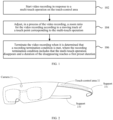
- FIG. 1 is a flowchart showing a method for controlling video recording according to an illustrative embodiment of the present disclosure.
- the method is applied to a head-wearable device which is provided with a camera and a touch-control area and can be represented in a form of glasses, helmets, hats and the like, and the specific form of the head-wearable device is not limited in the present disclosure.
- the above method may include following steps.
- Step 102 start video recording in response to a multi-touch operation on the touch-control area.
- the head-wearable device can start video recording in response to a user's multi-touch operation on the touch-control area.
- a point where the user touches the touch-control area is called a touch point
- the multi-touch operation indicates that an amount of touch points where the user touches the touch-control area is not less than two.
- the user generally touches the touch-control area with a finger, and one touch point is formed where each finger touches the touch-control area.
- the user can complete the multi-touch operation with no less than two fingers.
- the user can complete the multi-touch operation by means of a two-finger touch, a three-finger touch, etc.
- the amount of touch points in a multi-touch operation is not limited otherwise in the present disclosure.
- the head-wearable device can start video recording in response to the user's two-finger touch operation.
- the starting video recording described above is different from starting a functional interface for video recording without starting video recording.
- the starting video recording described above refers to entering the functional interface of video recording and starting collecting video images directly.
- the starting video recording may include: starting the video recording with a zoom ratio used at a moment when the previous video recording terminates. For example, when the user starts the touch operation through the multi-touch operation, and starts video recording again through the multi-touch operation after a video recording is finished, a zoom ratio used in current video recording can continue to use a zoom ratio used at a moment when the previous video recording is finished. That is, the current zoom ratio is retained when a video recording terminates, and is continued to be used for a next video recording.
- the zoom ratio is retained when the previous video recording terminates, so as to be continued to be used in the next video recording, thus avoiding a tedious operation of adjusting a zoom ratio again when the user records videos in segments, continuously.
- the starting video recording may include: starting the video recording with a preset zoom ratio.
- the zoom ratio of the camera can be adjusted to a preset value which is flexibly adjustable as required.
- the zoom ratio will be adjusted to an unusual ratio for the recording quality, and the zoom ratio of the camera can be restored to the preset value when the video recording is finished, since the user in most cases only needs to use a relatively moderate ratio for recording.
- the preset value can be a zoom ratio value commonly used by the user when recording videos, so as to meet recording requirements of the user in most cases.
- the above preset value can be set by the user according to his or her own recording habits, or statistics of zoom ratios used by the user in multiple video recordings can be made to select an average value of multiple zoom ratio values or select a most frequently occurring ratio value among the multiple zoom ratio values as the preset value. In this way, the user's requirements for the zoom ratio value used for video recording in normal cases can be met, and the user is prevented from adjusting the zoom ratio again when starting video recording.
- Step 104 adjust, in a process of the video recording, a zoom ratio for the video recording according to a moving track of a touch point corresponding to the multi-touch operation.
- the user can adjust the zoom ratio by moving the touch point during the video recording. For example, when the user's hand touches a touch-control area on the head-wearable device, the user's hand, in the process of the video recording, can slide in the touch-control area under the condition of continuously touching the touch-control area, and the head-wearable device adjusts the zoom ratio of the current video recording according to the sliding track of the user's hand in the touch-control area.
- the zoom ratio when the head-wearable device detects that all touch points move towards a first direction, the zoom ratio is increased; when the head-wearable device detects that all touch points move towards a second direction, the zoom ratio is reduced.
- a direction towards the camera is the first direction and a direction away from the camera is the second direction, since each finger's touch on the touch-control area forms one touch point, when all touch points move towards the camera, in other words, when the user slides in the first direction while keeping touching the touch-control area, a sliding track towards the first direction is formed in the touch-control area.
- the zoom ratio can be increased, and that is, zoom in of a recorded scene is enabled.
- the zoom ratio when the head-wearable device detects that a first change occurs to a relative distance between a part of touch points and other touch points in all touch points, the zoom ratio is increased; and when the head-wearable device detects that a second change occurs to the relative distance between a part of touch points and other touch points in all touch points, the zoom ratio is reduced.
- the zoom ratio is increased; and when the head-wearable device detects that a second change occurs to the relative distance between a part of touch points and other touch points in all touch points, the zoom ratio is reduced. For example, since each finger's touch on the touch-control area forms one touch point, it is assumed that the user touches the touch-control area with two fingers, when the two fingers of the user slide in a mode of being apart gradually in the touch-control area, two sliding tracks will be formed in the touch-control area, orientations of the two sliding tracks are opposite and the distance between the two touch points gradually increases.
- the zoom ratio for the current video recording is increased.
- two sliding tracks will also be formed in the touch-control area, but orientations of the two sliding tracks are face-to-face and the distance between the two touch points decreases.
- the zoom ratio for the current video recording is reduced.
- the variation factor of the zoom ratio is positively correlated with an amount of change in the relative distance. That is, the greater the change in distance between touch points is, the greater the variation factor of the zoom ratio is; and the smaller the change in distance between touch points is, the smaller the variation factor of the zoom ratio is.
- Step 106 terminate the video recording when it is determined that a recording termination condition is met, where the recording termination condition includes that the multi-touch operation disappears and a duration of the disappearing reaches a first preset duration.
- the touch-control area when the user touches the touch-control area with a finger, one touch point is formed where each finger touches the touch-control area.
- the touch point disappears; and when all touch points disappear, it indicates that the user's multi-touch operation on the touch-control area disappears.
- the video recording can be terminated and a generated video file can be saved. It is worth noting that when the multi-touch operation disappears, but the duration of the disappearing does not reach the first preset duration yet, the video recording can be paused or continued; and if the video recording is continued, the video recording ends when the first preset duration is reached.
- the first preset duration is flexibly adjustable according to actual conditions and values from engineering experience, which is not limited in the present disclosure.
- the method may further include: invalidating the recording termination condition when it is determined that an invalidation condition corresponding to the recording termination condition is met, where the invalidation condition includes: a duration of the multi-touch operation is no less than a second preset duration.
- the recording termination condition is invalid, the video recording is continued when the multi-touch operation disappears and the duration of the disappearing reaches the first preset duration.
- the first preset duration is 1 second and the second preset duration is 5 seconds
- the duration of the multi-touch operation performed by the user on the touch-control area reaches 5 seconds
- the user stops the multi-touch operation on the touch-control area when the duration of ending the multi-touch operation reaches 1 second, the video recording is continued instead of being stopped.
- the relationship between sizes of the first preset duration and the second preset duration is not limited in present disclosure, and the first preset duration can also be greater than the second preset duration without affecting the implementation of the solution.
- the user's multi-touch operation reaches the second preset duration, the user does not need to continue the multi-touch operation. At this point, the user can continue to record video without touching the touch-control area of the head-wearable device, which reduces the limitation of touch operation on the user's actions.
- video recording is paused when the multi-touch operation disappears, and video recording is continued when the multi-touch operation recovers within a third preset duration.
- the third preset duration is 0.5 seconds
- video recording may be continued instead of being terminated, and during the 0.5 seconds, video recording is paused when the multi-touch operation ends, and is continued when the multi-touch operation is recovered.
- an interval from disappearance to recovery of the multi-touch operation is less than 0.5 seconds, video recording is maintained both in the process of the disappearance and after the recovery of the multi-touch operation.
- the third preset duration can be any value less than or equal to the first preset duration, which is not limited in present disclosure.
- the method further includes: in the process of the video recording, when a part of touch points disappears and then recovers within a fourth preset duration, performing a photographing operation and maintaining the video recording.
- the fourth preset duration is 0.5 seconds
- the user uses a two-finger touch operation, the user lifts one finger in the process of video recording, to have one touch point disappear, and the two-finger touch operation is recovered within 0.5 seconds.
- a photo capture operation can be performed while maintaining the video recording, and an amount of photos captured (one photo or multiple photos can be captured) and a form of the photo capture (a photo can be captured in a dynamic form or in a static form) are not limited in present disclosure.
- the video recording is directly started by starting a video recording function of the head-wearable device through the multi-touch operation, so that the user can complete a series of processes such as starting the camera, selecting a video recording mode, starting the video recording, etc. by one touch operation, which simplifies the user's operation and improves the user's operation efficiency.
- a quick start of video recording through the above multi-touch operation can help the user to capture short-duration video images in time, preventing the user from missing an image content required to be taken, and improving user experience.
- the zoom ratio for the video recording is adjustable according to the moving track of the touch point corresponding to the multi-touch operation, which can help the user to adjust the distance perceived in an image during video recording in real time through a simple sliding operation and meets the user's need to record images at different distances from the camera; in addition, the video recording terminates when the multi-touch operation disappears, which eliminates an operation step that the user needs to further click a button for terminating the videoing function, and thus further simplify the user's operation, thereby improving the interaction efficiency between the user and the head-wearable device.
- the user is enabled to control a plurality of functions involved in the video recording process through continuous interactive operations which run through the whole video recording process, and the user may efficiently and quickly control the video recording process through the simple interactive operations.
- an expansion of a video recording function in different dimensions is realized by setting different preset durations, so that the user can not only capture photos during the video recording, but also continue the video recording without a touch operation after the touch operation lasts a certain amount of time.
- the various technical solutions provided by the present disclosure can better adapt to various possible actual situations when the user actually uses the head-wearable device, thereby improving the user experience.
- FIG. 2 the following embodiments are described in detail by taking the head-wearable device embodied as intelligent glasses as an example.
- the intelligent glasses shown in FIG. 2 can be worn on the head by a user, and at least include a camera 21 and a touch-control area 22.
- the touch-control area 22 can be located on an outer surface of a head-wearable device support 23, and the intelligent glasses can have one or more touch-control areas.
- the present disclosure does not limit the location and amount of touch-control areas.
- FIG. 2 shows a state where the user does not perform a touch operation, such operation state can be called state 1, and no touch point is formed at this time.
- FIG. 3 shows a state where the user touches the touch-control area on the intelligent glasses with two fingers, and such operation state can be called state 2. In state 2, the user touches the touch-control area with two fingers to form two touch points respectively.
- FIG. 4 shows a state where the user touches the touch-control area with a single finger, and such operation state can be called state 3. Compared with state 2, because the user touches the touch-control area with only a single finger, one touch point disappears, and that is, only one touch point exists in state 3.
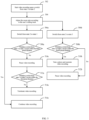
- FIG. 5 is a flowchart of a method for controlling video recording according to an illustrative embodiment of the present disclosure, and the above method may include the following steps.
- Step 502 start video recording when the intelligent glasses switch from state 1 to state 2.
- the user touches the touch-control area on a supportof the intelligent glasses with two fingers, the intelligent glasses switch from state 1 to state 2, and then the intelligent glasses directly start the video recording in response to the two-finger touch operation.
- Step 504 adjust the zoom ratio according to the user's sliding track.
- a direction towards the camera of the intelligent glasses is a first direction
- a direction away from the camera of the intelligent glasses is a second direction. If the user's two fingers slide in the first direction while keeping touching the touch-control area, the zoom ratio is increased, and that is, a scene that is recorded is zoomed in; if the user's two fingers slide in the second direction while keeping touching the touch-control area, the zoom ratio is reduced, and that is, a scene that is recorded is zoomed out, and thereby a scope of recording is expanded.
- FIG. 7 and FIG. 8 it is assumed that the user touches the touch-control area with two fingers, in the case that the two fingers of the user slide in the touch-control area, as shown in FIG. 7 , with two fingers gradually being apart, a distance between two touch points formed by the two fingers gradually increases, and the zoom ratio used during current video recording is increased at this time.
- FIG. 8 when the two fingers of the user slide with the two fingers gradually coming together, the distance between the two touch points formed by the two fingers gradually decreases, and the zoom ratio used during current video recording is reduced at this time.
- Step 506a to Step 508a when the intelligent glasses switch from state 2 to state 1, determine whether a switch from state 1 to state 2 occurs within the third preset duration.
- the third preset duration is 0.5 seconds
- step 516a is started to continue video recording at this time, and the video recording can be paused or continued when the state of the intelligent glasses is switched to state 1, that is, when the two fingers depart from the touch-control area, the video recording can be paused or continued.
- step 510a is started to pause the video recording and then is the step 512a: determine whether a switch from state 1 to state 2 occurs within the first preset duration, and when the first preset duration is reached, the step 514a is started to terminate the video recording.
- the intelligent glasses can terminate the video recording and save the generated video files.
- the first preset duration can be any value greater than or equal to 0.5 seconds.
- the first preset duration is also 0.5 seconds, when the user touches the touch-control area with two fingers and then departs therefrom and quickly recovers touching afterwards and a duration from the departure to the recovery of touching is greater than 0.5 seconds, the video recording can be directly terminated.
- the first preset duration is greater than 0.5 seconds, and for example, is 1 second
- the video recording is continued, and if the duration from the departure to the recovery of touching ranges between 0.5 seconds and 1 second, the video recording can be paused, and if the duration from the departure to the recovery of touching reaches 1 second, the video recording can be directly terminated.
- Step 506b to step 508b when the intelligent glasses switch from state 2 to state 3, determine whether a switch from state 3 to state 2 occurs within the fourth preset duration.
- step 510b is started to perform a photographing operation and maintain the video recording.
- the fourth preset duration is 0.5 seconds
- a switch from state 2 to state 3 that is, the user switch from a two-finger touch to a single-finger touch
- the two-finger touch is recovered from the single-finger touch within 0.5 seconds
- a photo of the current moment when the user recovers the two-finger touch may be taken (one photo may be captured or a plurality of photos may be captured continuously, and also the photo may be captured in a dynamic or static form).
- the video recording can be paused at this time.
- this specification also provides an apparatus embodiment.
- FIG. 9 is a structural schematic diagram of an electronic device for controlling video recording according to an illustrative embodiment of the present disclosure.
- the electronic device includes a processor 902, an internal bus 904, a network interface 906, a memory 908 and a nonvolatile memory 910, and of course, other hardware required by services may also be included.
- the processor 902 reads a corresponding computer program from the nonvolatile memory 910 into the memory 908 and then the computer program runs, forming an apparatus for controlling video recording on a logical level.
- the present disclosure does not exclude other implementations, such as a logic device or a combination of software and hardware, etc. That is to say, executive bodies of the following processing flow are not limited to respective logic units, but can also be hardware or logic devices.
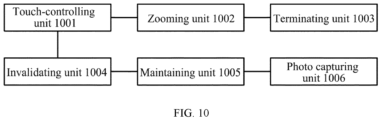
- FIG. 10 is a block diagram of an apparatus for controlling video recording according to an illustrative embodiment of the present disclosure.
- the apparatus is applied to a head-wearable device which is provided with a camera and a touch-control area, and the apparatus includes:
- adjusting, in the process of the video recording, the zoom ratio for the video recording according to the moving track of the touch point corresponding to the multi-touch operation includes:
- adjusting, in the process of the video recording, the zoom ratio for the video recording according to the moving track of the touch point corresponding to the multi-touch operation includes:
- starting the video recording includes: starting the video recording with a zoom ratio used at a moment when a previous video recording terminates; or, starting the video recording with a preset zoom ratio.
- the above apparatus may further include:
- the above apparatus may further include:
- the above apparatus further includes: a photo capturing unit 1006, configured to, in the process of the video recording, perform a photographing operation and maintain the video recording when a part of touch points disappears and then recovers within a fourth preset duration.
- a photo capturing unit 1006 configured to, in the process of the video recording, perform a photographing operation and maintain the video recording when a part of touch points disappears and then recovers within a fourth preset duration.
- the apparatus embodiment since it basically corresponds to the method embodiment, reference is made to a part of the description of the method embodiments for the relevant details.
- the apparatus embodiments described above are merely illustrative, the units described as separate parts may be or may not be physically separate, a component displayed as a unit may or may not be a physical unit, that is, may be located in one place, or may be distributed to multiple network units. Part or all of the modules can be selected as required to achieve the purpose of the solution of the present disclosure, which those of ordinary skill in the art can understand and implement without creative labor.
- a non-transitory computer-readable storage medium including instructions, such as a memory including instructions, where the instructions can be executed by the processor of the apparatus for controlling video recording, so as to implement the method according to any of the above embodiments, for example, the method may include: starting video recording in response to a multi-touch operation on the touch-control area; adjusting, in a process of the video recording, a zoom ratio for the video recording according to a moving track of a touch point corresponding to the multi-touch operation; and terminating the video recording when it is determined that a recording termination condition is met, where the recording termination condition includes that the multi-touch operation disappears and a duration of the disappearing reaches a first preset duration.
- the non-transitory computer-readable storage medium can be a read only memory (ROM), a random access memory (RAM), a CD-ROM, a magnetic tape, a floppy disk, an optical data storage device, etc., which is not limited in the present disclosure.
Landscapes
- Engineering & Computer Science (AREA)
- Theoretical Computer Science (AREA)
- General Engineering & Computer Science (AREA)
- Human Computer Interaction (AREA)
- Physics & Mathematics (AREA)
- General Physics & Mathematics (AREA)
- Multimedia (AREA)
- Signal Processing (AREA)
- Computer Hardware Design (AREA)
- User Interface Of Digital Computer (AREA)
- Studio Devices (AREA)
Claims (10)
- Verfahren zur Steuerung einer Videoaufzeichnung, wobei das Verfahren umfasst:Starten (102) einer Videoaufzeichnung mit einer Kamera durch eine Vorrichtung zum Steuern von Videoaufzeichnungen in Reaktion auf einen Mehrfachberührungsvorgang auf einem Berührungsbedienbereich; wobei die Vorrichtung zum Steuern von Videoaufzeichnungen zum Steuern eines am Kopf tragbaren Geräts ausgelegt ist und das am Kopf tragbare Gerät mit der Kamera und dem Berührungsbedienbereich versehen ist; wobei ein Berührungspunkt ausgebildet ist, an dem jeder Finger den Berührungsbedienbereich berührt, und ein Benutzer den Mehrfachberührungsvorgang mit nicht weniger als zwei Fingern durchführen kann;Anpassen (104) eines Zoomverhältnisses für die Videoaufzeichnung durch die Vorrichtung in einem Prozess der Videoaufzeichnung gemäß einer Bewegungsspur eines Berührungspunkts, der dem Mehrfachberührungsvorgang entspricht; undBeenden (106) der Videoaufzeichnung durch die Vorrichtung, wenn bestimmt wird, dass eine Aufzeichnungsbeendigungsbedingung erfüllt ist, wobei die Aufzeichnungsbeendigungsbedingung umfasst, dass der Mehrfachberührungsvorgang verschwindet und eine Dauer des Verschwindens eine erste voreingestellte Dauer erreicht;dadurch gekennzeichnet, dass das Verfahren ferner umfasst:
Durchführen eines Fotografiervorgangs durch die Vorrichtung und Aufrechterhalten der Videoaufzeichnung in dem Prozess der Videoaufzeichnung, wenn ein Teil der Berührungspunkte verschwindet und dann innerhalb einer vierten voreingestellten Dauer wiederhergestellt wird. - Verfahren nach Anspruch 1, wobei das Anpassen (104) eines Zoomverhältnisses für die Videoaufzeichnung durch die Vorrichtung in einem Prozess der Videoaufzeichnung gemäß einer Bewegungsspur eines Berührungspunkts, der dem Mehrfachberührungsvorgang entspricht, umfasst:Erhöhen des Zoomverhältnisses durch die Vorrichtung, wenn erkannt wird, dass sich alle Berührungspunkte in einer ersten Richtung bewegen; undVerringern des Zoomverhältnisses durch die Vorrichtung, wenn erkannt wird, dass sich alle Berührungspunkte in einer zweiten Richtung bewegen;wobei ein Variationsfaktor des Zoomverhältnisses positiv mit einer Distanz korreliert wird, die von allen Bewegungspunkten zurückgelegt wird.
- Verfahren nach Anspruch 1, wobei das Anpassen (104) eines Zoomverhältnisses für die Videoaufzeichnung durch die Vorrichtung in einem Prozess der Videoaufzeichnung gemäß einer Bewegungsspur eines Berührungspunkts, der dem Mehrfachberührungsvorgang entspricht, umfasst:Erhöhen des Zoomverhältnisses durch die Vorrichtung, wenn erkannt wird, dass eine erste Änderung einer relativen Distanz zwischen einem Teil der Berührungspunkte und anderen Berührungspunkten bei allen Berührungspunkten auftritt; undVerringern des Zoomverhältnisses durch die Vorrichtung, wenn erkannt wird, dass eine zweite Änderung der relativen Distanz zwischen dem Teil der Berührungspunkte und den anderen Berührungspunkten bei allen Berührungspunkten auftritt;wobei ein Variationsfaktor des Zoomverhältnisses positiv mit einem Änderungsbetrag der relativen Distanz korreliert wird.
- Verfahren nach Anspruch 1, wobei das Starten (102) der Videoaufzeichnung durch die Vorrichtung umfasst:Starten der Videoaufzeichnung durch die Vorrichtung mit einem Zoomverhältnis, das zu einem Zeitpunkt verwendet wird, zu dem eine vorherige Videoaufzeichnung endet; oderStarten der Videoaufzeichnung durch die Vorrichtung mit einem voreingestellten Zoomverhältnis.
- Verfahren nach Anspruch 1, ferner umfassend:Aufheben der Aufzeichnungsbeendigungsbedingung durch die Vorrichtung, wenn bestimmt wird, dass eine der Aufzeichnungsbeendigungsbedingung entsprechende Aufhebungsbedingung erfüllt ist, wobei die Aufhebungsbedingung umfasst: eine Dauer des Mehrfachberührungsvorgangs ist nicht kürzer als eine zweite voreingestellte Dauer; und,wenn die Aufzeichnungsbeendigungsbedingung ungültig ist, Fortfahren mit der Videoaufzeichnung durch die Vorrichtung, wenn der Mehrfachberührungsvorgang verschwindet und die Dauer des Verschwindens die erste voreingestellte Dauer erreicht.
- Verfahren nach Anspruch 1, ferner umfassend:Pausieren der Videoaufzeichnung durch die Vorrichtung im Prozess der Videoaufzeichnung, wenn der Mehrfachberührungsvorgang verschwindet, und Fortfahren durch die Vorrichtungmit der Videoaufzeichnung, wenn der Mehrfachberührungsvorgang innerhalb einer dritten voreingestellten Dauer wiederhergestellt wird, wobei die dritte voreingestellte Dauer nicht länger als die erste voreingestellte Dauer ist; oderAufrechterhalten der Videoaufzeichnung durch die Vorrichtung im Prozess der Videoaufzeichnung sowohl in einem Prozess des Verschwindens als auch nach der Wiederherstellung des Mehrfachberührungsvorgangs, wobei ein Intervall vom Verschwinden bis zur Wiederherstellung des Mehrfachberührungsvorgangs nicht länger als die dritte voreingestellte Dauer ist; oderFortfahren mit der Videoaufzeichnung durch die Vorrichtung im Prozess der Videoaufzeichnung nach dem Verschwinden des Mehrfachberührungsvorgangs und Pausieren der Videoaufzeichnung durch die Vorrichtung, wenn der Mehrfachberührungsvorgang nicht innerhalb der dritten voreingestellten Dauer wiederhergestellt wird.
- Vorrichtung zum Steuern von Videoaufzeichnungen, wobei die Vorrichtung so ausgelegt ist, dass sie ein am Kopf tragbares Gerät steuert, das mit einer Kamera und einem Berührungsbedienbereich versehen ist, und die Vorrichtung umfasst:eine Berührungsbedieneinheit (1001), die so ausgelegt ist, dass sie in Reaktion auf einen Mehrfachberührungsvorgang auf dem Berührungsbedienbereich eine Videoaufzeichnung mit der Kamera startet; wobei ein Berührungspunkt ausgebildet ist, an dem jeder Finger den Berührungsbedienbereich berührt, und ein Benutzer den Mehrfachberührungsvorgang mit nicht weniger als zwei Fingern durchführen kann;eine Zoomeinheit (1002), die so ausgelegt ist, dass sie ein Zoomverhältnis für die Videoaufzeichnung in einem Prozess der Videoaufzeichnung gemäß einer Bewegungsspur eines Berührungspunkts anpasst, der dem Mehrfachberührungsvorgang entspricht; undeine Beendigungseinheit (1003), die so ausgelegt ist, dass sie die Videoaufzeichnung beendet, wenn bestimmt wird, dass eine Aufzeichnungsbeendigungsbedingung erfüllt ist, wobei die Aufzeichnungsbeendigungsbedingung umfasst, dass der Mehrfachberührungsvorgang verschwindet und eine Dauer des Verschwindens eine erste voreingestellte Dauer erreicht;dadurch gekennzeichnet, dass die Vorrichtung ferner umfasst; eine Fotoaufnahmeeinheit (1006);wobei die Fotoaufnahmeeinheit (1006) so ausgelegt ist, dass sie einen Fotografiervorgang durchführt und die Videoaufzeichnung in dem Prozess der Videoaufzeichnung aufrechterhält, wenn ein Teil der Berührungspunkte verschwindet und dann innerhalb einer vierten voreingestellten Dauer wiederhergestellt wird.
- Vorrichtung nach Anspruch 7, wobei die Vorrichtung ferner eine Aufhebungseinheit (1004) umfasst:wobei die Aufhebungseinheit (1004) so ausgelegt ist, dass sie die Aufzeichnungsbeendigungsbedingung aufhebt, wenn bestimmt wird, dass eine der Aufzeichnungsbeendigungsbedingung entsprechende Aufhebungsbedingung erfüllt ist, wobei die Aufhebungsbedingung umfasst: eine Dauer des Mehrfachberührungsvorgangs ist nicht kürzer als eine zweite voreingestellte Dauer; und,wenn die Aufzeichnungsbeendigungsbedingung ungültig ist, mit der Videoaufzeichnung fortfährt, wenn der Mehrfachberührungsvorgang verschwindet und die Dauer des Verschwindens die erste voreingestellte Dauer erreicht.
- Vorrichtung nach Anspruch 7, wobei die Vorrichtung ferner eine Aufrechterhaltungseinheit (1005) umfasst:wobei die Aufrechterhaltungseinheit (1005) ausgelegt ist zum: Pausieren der Videoaufzeichnung im Prozess der Videoaufzeichnung, wenn der Mehrfachberührungsvorgang verschwindet, und Fortfahren mit der Videoaufzeichnung, wenn der Mehrfachberührungsvorgang innerhalb einer dritten voreingestellten Dauer wiederhergestellt wird, wobei die dritte voreingestellte Dauer nicht länger als die erste voreingestellte Dauer ist; oderAufrechterhalten der Videoaufzeichnung im Prozess der Videoaufzeichnung sowohl in einem Prozess des Verschwindens als auch nach der Wiederherstellung des Mehrfachberührungsvorgangs, wobei ein Intervall vom Verschwinden bis zur Wiederherstellung des Mehrfachberührungsvorgangs nicht länger als die dritte voreingestellte Dauer ist; oderFortfahren mit der Videoaufzeichnung im Prozess der Videoaufzeichnung nach dem Verschwinden des Mehrfachberührungsvorgangs und Pausieren der Videoaufzeichnung, wenn der Mehrfachberührungsvorgang nicht innerhalb der dritten voreingestellten Dauer wiederhergestellt wird.
- Computerlesbares Speichermedium mit darauf gespeicherten Computerprogrammanweisungen, wobei die Computerprogrammanweisungen bei Ausführung durch einen Prozessor die Vorrichtung nach Anspruch 7 zum Durchführen des Verfahrens nach einem der Ansprüche 1 bis 6 veranlassen.
Applications Claiming Priority (1)
| Application Number | Priority Date | Filing Date | Title |
|---|---|---|---|
| CN202110169516.9A CN112905088B (zh) | 2021-02-07 | 2021-02-07 | 视频拍摄的控制方法及装置 |
Publications (3)
| Publication Number | Publication Date |
|---|---|
| EP4040261A1 EP4040261A1 (de) | 2022-08-10 |
| EP4040261B1 true EP4040261B1 (de) | 2024-08-14 |
| EP4040261C0 EP4040261C0 (de) | 2024-08-14 |
Family
ID=76124420
Family Applications (1)
| Application Number | Title | Priority Date | Filing Date |
|---|---|---|---|
| EP21205764.0A Active EP4040261B1 (de) | 2021-02-07 | 2021-11-01 | Verfahren und gerät zur steuerung von videoaufnahmen |
Country Status (3)
| Country | Link |
|---|---|
| US (1) | US11539878B2 (de) |
| EP (1) | EP4040261B1 (de) |
| CN (1) | CN112905088B (de) |
Families Citing this family (1)
| Publication number | Priority date | Publication date | Assignee | Title |
|---|---|---|---|---|
| US12154419B2 (en) * | 2022-09-19 | 2024-11-26 | Jeremy Vardicos | Video recording device |
Family Cites Families (22)
| Publication number | Priority date | Publication date | Assignee | Title |
|---|---|---|---|---|
| CN102801942B (zh) * | 2012-07-23 | 2016-05-11 | 小米科技有限责任公司 | 一种录制视频及生成gif动态图的方法和装置 |
| US20140055633A1 (en) * | 2012-08-27 | 2014-02-27 | Richard E. MARLIN | Device and method for photo and video capture |
| JP5644905B2 (ja) * | 2013-07-17 | 2014-12-24 | ソニー株式会社 | 情報処理装置、画像拡大縮小方法及びそのプログラム |
| KR102127928B1 (ko) * | 2013-10-15 | 2020-06-29 | 엘지전자 주식회사 | 입체적 입력장치를 갖는 글래스형 단말기 및 그의 화면 제어방법 |
| US9261700B2 (en) * | 2013-11-20 | 2016-02-16 | Google Inc. | Systems and methods for performing multi-touch operations on a head-mountable device |
| CN104967770B (zh) * | 2014-05-14 | 2018-07-10 | 腾讯科技(北京)有限公司 | 视频拍摄方法及装置 |
| KR20160005416A (ko) | 2014-07-07 | 2016-01-15 | 엘지전자 주식회사 | 이동 단말기 |
| KR102227087B1 (ko) | 2014-07-08 | 2021-03-12 | 엘지전자 주식회사 | 글래스 타입 단말기 및 그것의 제어방법 |
| CN104486543B (zh) * | 2014-12-09 | 2020-11-27 | 北京时代沃林科技发展有限公司 | 智能终端触控方式控制云台摄像头的系统 |
| CN105791670A (zh) * | 2014-12-25 | 2016-07-20 | 阿里巴巴集团控股有限公司 | 图像采集方法及装置 |
| CN105847663B (zh) * | 2015-06-24 | 2019-03-05 | 维沃移动通信有限公司 | 一种拍摄设备显示图像的调整方法和调整装置 |
| CN106921826B (zh) * | 2015-12-24 | 2021-04-20 | 中兴通讯股份有限公司 | 拍照模式的处理方法及装置 |
| CN105704539A (zh) * | 2016-02-15 | 2016-06-22 | 努比亚技术有限公司 | 视频共享装置及方法 |
| CN105991930B (zh) * | 2016-07-19 | 2019-04-19 | Oppo广东移动通信有限公司 | 双摄像头的变焦处理方法、装置和移动终端 |
| CN106303258A (zh) * | 2016-09-19 | 2017-01-04 | 深圳市金立通信设备有限公司 | 一种基于双摄像头的拍摄方法和终端 |
| CN106506801A (zh) * | 2016-09-23 | 2017-03-15 | 维沃移动通信有限公司 | 一种调整摄像头变焦倍数的方法及移动终端 |
| CN106657774A (zh) * | 2016-11-25 | 2017-05-10 | 杭州联络互动信息科技股份有限公司 | 一种视频录制方法及装置 |
| CN108111750B (zh) * | 2017-12-12 | 2020-04-07 | 维沃移动通信有限公司 | 一种变焦调节方法、移动终端及计算机可读存储介质 |
| CN108810403A (zh) * | 2018-04-27 | 2018-11-13 | Oppo广东移动通信有限公司 | 焦距调节方法、装置、存储介质及电子设备 |
| CN109656636B (zh) * | 2018-11-30 | 2022-04-08 | 维沃移动通信有限公司 | 一种应用启动方法及装置 |
| CN110336967A (zh) * | 2019-07-01 | 2019-10-15 | 成都市喜爱科技有限公司 | 一种录像控制方法、装置、系统、游乐设备及存储介质 |
| CN111970456B (zh) * | 2020-09-14 | 2022-01-11 | Oppo广东移动通信有限公司 | 拍摄控制方法、装置、设备及存储介质 |
-
2021
- 2021-02-07 CN CN202110169516.9A patent/CN112905088B/zh active Active
- 2021-10-26 US US17/511,468 patent/US11539878B2/en active Active
- 2021-11-01 EP EP21205764.0A patent/EP4040261B1/de active Active
Also Published As
| Publication number | Publication date |
|---|---|
| CN112905088A (zh) | 2021-06-04 |
| EP4040261C0 (de) | 2024-08-14 |
| US20220256074A1 (en) | 2022-08-11 |
| US11539878B2 (en) | 2022-12-27 |
| EP4040261A1 (de) | 2022-08-10 |
| CN112905088B (zh) | 2022-11-04 |
Similar Documents
| Publication | Publication Date | Title |
|---|---|---|
| JP7612730B2 (ja) | メディアコンテンツをナビゲートするためのデバイス、方法及びグラフィカルユーザインターフェース | |
| US12206980B2 (en) | Devices, methods, and graphical user interfaces for capturing and recording media in multiple modes | |
| EP2728455B1 (de) | Mobiles Endgerät | |
| CN111061412B (zh) | 一种多媒体资源的播放控制方法及装置 | |
| CN112714253B (zh) | 视频录制方法、装置、电子设备和可读存储介质 | |
| JP2010122856A (ja) | 画像処理装置、画像表示方法および画像表示プログラム | |
| KR20110055244A (ko) | 디지털 촬영 장치 및 그 제어 방법 및 이를 실행하기 위한 프로그램을 저장한 기록매체 | |
| CN105307051A (zh) | 视频处理方法及装置 | |
| CN112905093B (zh) | 内容显示方法、装置、存储介质及电子设备 | |
| CN111061372B (zh) | 设备控制方法及相关设备 | |
| JP2021524171A (ja) | モバイル画像キャプチャデバイスを用いて巻戻し動作を実行するためのシステムおよび方法 | |
| EP4040261B1 (de) | Verfahren und gerät zur steuerung von videoaufnahmen | |
| EP2665064A2 (de) | Verfahren zum Ausrichten von Inhalten von Medienausrüstungen, und Vorrichtung dafür | |
| US20180203556A1 (en) | Display control system, display control method, and display device | |
| CN108156512B (zh) | 一种视频播放控制方法及装置 | |
| CN114500852B (zh) | 拍摄方法、拍摄装置、电子设备和可读存储介质 | |
| CN112181264A (zh) | 一种手势识别方法和装置 | |
| KR102192366B1 (ko) | 영상 컨텐츠 검색 사용자 인터페이스를 제공하는 이동통신 단말기 및 이를 이용한 영상 컨텐츠 관리 방법 | |
| CN115209004A (zh) | 图像文件查看方法、智能终端及其拍照方法、存储介质 | |
| JP3565445B2 (ja) | 映像表示装置 | |
| CN115981536A (zh) | 多媒体数据的显示方法及装置、电子设备、存储介质 | |
| CN113050842A (zh) | 一种界面显示方法、装置及移动终端 | |
| US11765333B1 (en) | Systems and methods for improved transitions in immersive media | |
| CN114675761A (zh) | 一种界面控制方法和相关设备 | |
| CN113504829A (zh) | 图片调节方法、系统、终端设备及计算机可读存储介质 |
Legal Events
| Date | Code | Title | Description |
|---|---|---|---|
| PUAI | Public reference made under article 153(3) epc to a published international application that has entered the european phase |
Free format text: ORIGINAL CODE: 0009012 |
|
| STAA | Information on the status of an ep patent application or granted ep patent |
Free format text: STATUS: THE APPLICATION HAS BEEN PUBLISHED |
|
| AK | Designated contracting states |
Kind code of ref document: A1 Designated state(s): AL AT BE BG CH CY CZ DE DK EE ES FI FR GB GR HR HU IE IS IT LI LT LU LV MC MK MT NL NO PL PT RO RS SE SI SK SM TR |
|
| STAA | Information on the status of an ep patent application or granted ep patent |
Free format text: STATUS: REQUEST FOR EXAMINATION WAS MADE |
|
| 17P | Request for examination filed |
Effective date: 20220817 |
|
| RBV | Designated contracting states (corrected) |
Designated state(s): AL AT BE BG CH CY CZ DE DK EE ES FI FR GB GR HR HU IE IS IT LI LT LU LV MC MK MT NL NO PL PT RO RS SE SI SK SM TR |
|
| GRAP | Despatch of communication of intention to grant a patent |
Free format text: ORIGINAL CODE: EPIDOSNIGR1 |
|
| STAA | Information on the status of an ep patent application or granted ep patent |
Free format text: STATUS: GRANT OF PATENT IS INTENDED |
|
| RIC1 | Information provided on ipc code assigned before grant |
Ipc: H04N 23/69 20230101ALI20240220BHEP Ipc: H04N 23/60 20230101ALI20240220BHEP Ipc: G06F 3/04883 20220101ALI20240220BHEP Ipc: G06F 3/0354 20130101ALI20240220BHEP Ipc: G06F 3/01 20060101ALI20240220BHEP Ipc: G06F 1/16 20060101AFI20240220BHEP |
|
| INTG | Intention to grant announced |
Effective date: 20240304 |
|
| GRAS | Grant fee paid |
Free format text: ORIGINAL CODE: EPIDOSNIGR3 |
|
| GRAA | (expected) grant |
Free format text: ORIGINAL CODE: 0009210 |
|
| STAA | Information on the status of an ep patent application or granted ep patent |
Free format text: STATUS: THE PATENT HAS BEEN GRANTED |
|
| AK | Designated contracting states |
Kind code of ref document: B1 Designated state(s): AL AT BE BG CH CY CZ DE DK EE ES FI FR GB GR HR HU IE IS IT LI LT LU LV MC MK MT NL NO PL PT RO RS SE SI SK SM TR |
|
| REG | Reference to a national code |
Ref country code: GB Ref legal event code: FG4D |
|
| REG | Reference to a national code |
Ref country code: CH Ref legal event code: EP |
|
| REG | Reference to a national code |
Ref country code: DE Ref legal event code: R096 Ref document number: 602021017130 Country of ref document: DE |
|
| REG | Reference to a national code |
Ref country code: IE Ref legal event code: FG4D |
|
| U01 | Request for unitary effect filed |
Effective date: 20240903 |
|
| U07 | Unitary effect registered |
Designated state(s): AT BE BG DE DK EE FI FR IT LT LU LV MT NL PT RO SE SI Effective date: 20240917 |
|
| U20 | Renewal fee for the european patent with unitary effect paid |
Year of fee payment: 4 Effective date: 20241125 |
|
| PG25 | Lapsed in a contracting state [announced via postgrant information from national office to epo] |
Ref country code: NO Free format text: LAPSE BECAUSE OF FAILURE TO SUBMIT A TRANSLATION OF THE DESCRIPTION OR TO PAY THE FEE WITHIN THE PRESCRIBED TIME-LIMIT Effective date: 20241114 |
|
| PG25 | Lapsed in a contracting state [announced via postgrant information from national office to epo] |
Ref country code: PL Free format text: LAPSE BECAUSE OF FAILURE TO SUBMIT A TRANSLATION OF THE DESCRIPTION OR TO PAY THE FEE WITHIN THE PRESCRIBED TIME-LIMIT Effective date: 20240814 Ref country code: GR Free format text: LAPSE BECAUSE OF FAILURE TO SUBMIT A TRANSLATION OF THE DESCRIPTION OR TO PAY THE FEE WITHIN THE PRESCRIBED TIME-LIMIT Effective date: 20241115 |
|
| PG25 | Lapsed in a contracting state [announced via postgrant information from national office to epo] |
Ref country code: IS Free format text: LAPSE BECAUSE OF FAILURE TO SUBMIT A TRANSLATION OF THE DESCRIPTION OR TO PAY THE FEE WITHIN THE PRESCRIBED TIME-LIMIT Effective date: 20241214 |
|
| PG25 | Lapsed in a contracting state [announced via postgrant information from national office to epo] |
Ref country code: HR Free format text: LAPSE BECAUSE OF FAILURE TO SUBMIT A TRANSLATION OF THE DESCRIPTION OR TO PAY THE FEE WITHIN THE PRESCRIBED TIME-LIMIT Effective date: 20240814 |
|
| PG25 | Lapsed in a contracting state [announced via postgrant information from national office to epo] |
Ref country code: RS Free format text: LAPSE BECAUSE OF FAILURE TO SUBMIT A TRANSLATION OF THE DESCRIPTION OR TO PAY THE FEE WITHIN THE PRESCRIBED TIME-LIMIT Effective date: 20241114 Ref country code: ES Free format text: LAPSE BECAUSE OF FAILURE TO SUBMIT A TRANSLATION OF THE DESCRIPTION OR TO PAY THE FEE WITHIN THE PRESCRIBED TIME-LIMIT Effective date: 20240814 |
|
| PG25 | Lapsed in a contracting state [announced via postgrant information from national office to epo] |
Ref country code: RS Free format text: LAPSE BECAUSE OF FAILURE TO SUBMIT A TRANSLATION OF THE DESCRIPTION OR TO PAY THE FEE WITHIN THE PRESCRIBED TIME-LIMIT Effective date: 20241114 Ref country code: PL Free format text: LAPSE BECAUSE OF FAILURE TO SUBMIT A TRANSLATION OF THE DESCRIPTION OR TO PAY THE FEE WITHIN THE PRESCRIBED TIME-LIMIT Effective date: 20240814 Ref country code: NO Free format text: LAPSE BECAUSE OF FAILURE TO SUBMIT A TRANSLATION OF THE DESCRIPTION OR TO PAY THE FEE WITHIN THE PRESCRIBED TIME-LIMIT Effective date: 20241114 Ref country code: IS Free format text: LAPSE BECAUSE OF FAILURE TO SUBMIT A TRANSLATION OF THE DESCRIPTION OR TO PAY THE FEE WITHIN THE PRESCRIBED TIME-LIMIT Effective date: 20241214 Ref country code: HR Free format text: LAPSE BECAUSE OF FAILURE TO SUBMIT A TRANSLATION OF THE DESCRIPTION OR TO PAY THE FEE WITHIN THE PRESCRIBED TIME-LIMIT Effective date: 20240814 Ref country code: GR Free format text: LAPSE BECAUSE OF FAILURE TO SUBMIT A TRANSLATION OF THE DESCRIPTION OR TO PAY THE FEE WITHIN THE PRESCRIBED TIME-LIMIT Effective date: 20241115 Ref country code: ES Free format text: LAPSE BECAUSE OF FAILURE TO SUBMIT A TRANSLATION OF THE DESCRIPTION OR TO PAY THE FEE WITHIN THE PRESCRIBED TIME-LIMIT Effective date: 20240814 |
|
| PG25 | Lapsed in a contracting state [announced via postgrant information from national office to epo] |
Ref country code: SM Free format text: LAPSE BECAUSE OF FAILURE TO SUBMIT A TRANSLATION OF THE DESCRIPTION OR TO PAY THE FEE WITHIN THE PRESCRIBED TIME-LIMIT Effective date: 20240814 |
|
| PG25 | Lapsed in a contracting state [announced via postgrant information from national office to epo] |
Ref country code: CZ Free format text: LAPSE BECAUSE OF FAILURE TO SUBMIT A TRANSLATION OF THE DESCRIPTION OR TO PAY THE FEE WITHIN THE PRESCRIBED TIME-LIMIT Effective date: 20240814 |
|
| PG25 | Lapsed in a contracting state [announced via postgrant information from national office to epo] |
Ref country code: SK Free format text: LAPSE BECAUSE OF FAILURE TO SUBMIT A TRANSLATION OF THE DESCRIPTION OR TO PAY THE FEE WITHIN THE PRESCRIBED TIME-LIMIT Effective date: 20240814 |
|
| PLBE | No opposition filed within time limit |
Free format text: ORIGINAL CODE: 0009261 |
|
| STAA | Information on the status of an ep patent application or granted ep patent |
Free format text: STATUS: NO OPPOSITION FILED WITHIN TIME LIMIT |
|
| REG | Reference to a national code |
Ref country code: CH Ref legal event code: PL |
|
| PG25 | Lapsed in a contracting state [announced via postgrant information from national office to epo] |
Ref country code: MC Free format text: LAPSE BECAUSE OF FAILURE TO SUBMIT A TRANSLATION OF THE DESCRIPTION OR TO PAY THE FEE WITHIN THE PRESCRIBED TIME-LIMIT Effective date: 20240814 |
|
| REG | Reference to a national code |
Ref country code: CH Ref legal event code: PL |
|
| 26N | No opposition filed |
Effective date: 20250515 |
|
| PG25 | Lapsed in a contracting state [announced via postgrant information from national office to epo] |
Ref country code: CH Free format text: LAPSE BECAUSE OF NON-PAYMENT OF DUE FEES Effective date: 20241130 |
|
| PG25 | Lapsed in a contracting state [announced via postgrant information from national office to epo] |
Ref country code: IE Free format text: LAPSE BECAUSE OF NON-PAYMENT OF DUE FEES Effective date: 20241101 |