EP4038472B1 - Mobile anwendungen auf einer mehrbild-rechenvorrichtung - Google Patents
Mobile anwendungen auf einer mehrbild-rechenvorrichtung Download PDFInfo
- Publication number
- EP4038472B1 EP4038472B1 EP20771741.4A EP20771741A EP4038472B1 EP 4038472 B1 EP4038472 B1 EP 4038472B1 EP 20771741 A EP20771741 A EP 20771741A EP 4038472 B1 EP4038472 B1 EP 4038472B1
- Authority
- EP
- European Patent Office
- Prior art keywords
- display
- application
- touch input
- computing device
- instructions
- Prior art date
- Legal status (The legal status is an assumption and is not a legal conclusion. Google has not performed a legal analysis and makes no representation as to the accuracy of the status listed.)
- Active
Links
Images










Classifications
-
- G—PHYSICS
- G06—COMPUTING OR CALCULATING; COUNTING
- G06F—ELECTRIC DIGITAL DATA PROCESSING
- G06F1/00—Details not covered by groups G06F3/00 - G06F13/00 and G06F21/00
- G06F1/16—Constructional details or arrangements
- G06F1/1613—Constructional details or arrangements for portable computers
- G06F1/1615—Constructional details or arrangements for portable computers with several enclosures having relative motions, each enclosure supporting at least one I/O or computing function
- G06F1/1616—Constructional details or arrangements for portable computers with several enclosures having relative motions, each enclosure supporting at least one I/O or computing function with folding flat displays, e.g. laptop computers or notebooks having a clamshell configuration, with body parts pivoting to an open position around an axis parallel to the plane they define in closed position
-
- G—PHYSICS
- G06—COMPUTING OR CALCULATING; COUNTING
- G06F—ELECTRIC DIGITAL DATA PROCESSING
- G06F1/00—Details not covered by groups G06F3/00 - G06F13/00 and G06F21/00
- G06F1/16—Constructional details or arrangements
- G06F1/1613—Constructional details or arrangements for portable computers
- G06F1/1633—Constructional details or arrangements of portable computers not specific to the type of enclosures covered by groups G06F1/1615 - G06F1/1626
- G06F1/1637—Details related to the display arrangement, including those related to the mounting of the display in the housing
- G06F1/1641—Details related to the display arrangement, including those related to the mounting of the display in the housing the display being formed by a plurality of foldable display components
-
- G—PHYSICS
- G06—COMPUTING OR CALCULATING; COUNTING
- G06F—ELECTRIC DIGITAL DATA PROCESSING
- G06F1/00—Details not covered by groups G06F3/00 - G06F13/00 and G06F21/00
- G06F1/16—Constructional details or arrangements
- G06F1/1613—Constructional details or arrangements for portable computers
- G06F1/1633—Constructional details or arrangements of portable computers not specific to the type of enclosures covered by groups G06F1/1615 - G06F1/1626
- G06F1/1675—Miscellaneous details related to the relative movement between the different enclosures or enclosure parts
- G06F1/1681—Details related solely to hinges
-
- G—PHYSICS
- G06—COMPUTING OR CALCULATING; COUNTING
- G06F—ELECTRIC DIGITAL DATA PROCESSING
- G06F3/00—Input arrangements for transferring data to be processed into a form capable of being handled by the computer; Output arrangements for transferring data from processing unit to output unit, e.g. interface arrangements
- G06F3/01—Input arrangements or combined input and output arrangements for interaction between user and computer
- G06F3/048—Interaction techniques based on graphical user interfaces [GUI]
- G06F3/0484—Interaction techniques based on graphical user interfaces [GUI] for the control of specific functions or operations, e.g. selecting or manipulating an object, an image or a displayed text element, setting a parameter value or selecting a range
- G06F3/04842—Selection of displayed objects or displayed text elements
-
- G—PHYSICS
- G06—COMPUTING OR CALCULATING; COUNTING
- G06F—ELECTRIC DIGITAL DATA PROCESSING
- G06F3/00—Input arrangements for transferring data to be processed into a form capable of being handled by the computer; Output arrangements for transferring data from processing unit to output unit, e.g. interface arrangements
- G06F3/01—Input arrangements or combined input and output arrangements for interaction between user and computer
- G06F3/048—Interaction techniques based on graphical user interfaces [GUI]
- G06F3/0484—Interaction techniques based on graphical user interfaces [GUI] for the control of specific functions or operations, e.g. selecting or manipulating an object, an image or a displayed text element, setting a parameter value or selecting a range
- G06F3/04845—Interaction techniques based on graphical user interfaces [GUI] for the control of specific functions or operations, e.g. selecting or manipulating an object, an image or a displayed text element, setting a parameter value or selecting a range for image manipulation, e.g. dragging, rotation, expansion or change of colour
-
- G—PHYSICS
- G06—COMPUTING OR CALCULATING; COUNTING
- G06F—ELECTRIC DIGITAL DATA PROCESSING
- G06F3/00—Input arrangements for transferring data to be processed into a form capable of being handled by the computer; Output arrangements for transferring data from processing unit to output unit, e.g. interface arrangements
- G06F3/01—Input arrangements or combined input and output arrangements for interaction between user and computer
- G06F3/048—Interaction techniques based on graphical user interfaces [GUI]
- G06F3/0484—Interaction techniques based on graphical user interfaces [GUI] for the control of specific functions or operations, e.g. selecting or manipulating an object, an image or a displayed text element, setting a parameter value or selecting a range
- G06F3/0486—Drag-and-drop
-
- G—PHYSICS
- G06—COMPUTING OR CALCULATING; COUNTING
- G06F—ELECTRIC DIGITAL DATA PROCESSING
- G06F3/00—Input arrangements for transferring data to be processed into a form capable of being handled by the computer; Output arrangements for transferring data from processing unit to output unit, e.g. interface arrangements
- G06F3/01—Input arrangements or combined input and output arrangements for interaction between user and computer
- G06F3/048—Interaction techniques based on graphical user interfaces [GUI]
- G06F3/0487—Interaction techniques based on graphical user interfaces [GUI] using specific features provided by the input device, e.g. functions controlled by the rotation of a mouse with dual sensing arrangements, or of the nature of the input device, e.g. tap gestures based on pressure sensed by a digitiser
- G06F3/0488—Interaction techniques based on graphical user interfaces [GUI] using specific features provided by the input device, e.g. functions controlled by the rotation of a mouse with dual sensing arrangements, or of the nature of the input device, e.g. tap gestures based on pressure sensed by a digitiser using a touch-screen or digitiser, e.g. input of commands through traced gestures
-
- G—PHYSICS
- G06—COMPUTING OR CALCULATING; COUNTING
- G06F—ELECTRIC DIGITAL DATA PROCESSING
- G06F3/00—Input arrangements for transferring data to be processed into a form capable of being handled by the computer; Output arrangements for transferring data from processing unit to output unit, e.g. interface arrangements
- G06F3/01—Input arrangements or combined input and output arrangements for interaction between user and computer
- G06F3/048—Interaction techniques based on graphical user interfaces [GUI]
- G06F3/0487—Interaction techniques based on graphical user interfaces [GUI] using specific features provided by the input device, e.g. functions controlled by the rotation of a mouse with dual sensing arrangements, or of the nature of the input device, e.g. tap gestures based on pressure sensed by a digitiser
- G06F3/0488—Interaction techniques based on graphical user interfaces [GUI] using specific features provided by the input device, e.g. functions controlled by the rotation of a mouse with dual sensing arrangements, or of the nature of the input device, e.g. tap gestures based on pressure sensed by a digitiser using a touch-screen or digitiser, e.g. input of commands through traced gestures
- G06F3/04883—Interaction techniques based on graphical user interfaces [GUI] using specific features provided by the input device, e.g. functions controlled by the rotation of a mouse with dual sensing arrangements, or of the nature of the input device, e.g. tap gestures based on pressure sensed by a digitiser using a touch-screen or digitiser, e.g. input of commands through traced gestures for inputting data by handwriting, e.g. gesture or text
-
- G—PHYSICS
- G06—COMPUTING OR CALCULATING; COUNTING
- G06F—ELECTRIC DIGITAL DATA PROCESSING
- G06F3/00—Input arrangements for transferring data to be processed into a form capable of being handled by the computer; Output arrangements for transferring data from processing unit to output unit, e.g. interface arrangements
- G06F3/01—Input arrangements or combined input and output arrangements for interaction between user and computer
- G06F3/048—Interaction techniques based on graphical user interfaces [GUI]
- G06F3/0487—Interaction techniques based on graphical user interfaces [GUI] using specific features provided by the input device, e.g. functions controlled by the rotation of a mouse with dual sensing arrangements, or of the nature of the input device, e.g. tap gestures based on pressure sensed by a digitiser
- G06F3/0488—Interaction techniques based on graphical user interfaces [GUI] using specific features provided by the input device, e.g. functions controlled by the rotation of a mouse with dual sensing arrangements, or of the nature of the input device, e.g. tap gestures based on pressure sensed by a digitiser using a touch-screen or digitiser, e.g. input of commands through traced gestures
- G06F3/04886—Interaction techniques based on graphical user interfaces [GUI] using specific features provided by the input device, e.g. functions controlled by the rotation of a mouse with dual sensing arrangements, or of the nature of the input device, e.g. tap gestures based on pressure sensed by a digitiser using a touch-screen or digitiser, e.g. input of commands through traced gestures by partitioning the display area of the touch-screen or the surface of the digitising tablet into independently controllable areas, e.g. virtual keyboards or menus
-
- G—PHYSICS
- G06—COMPUTING OR CALCULATING; COUNTING
- G06F—ELECTRIC DIGITAL DATA PROCESSING
- G06F3/00—Input arrangements for transferring data to be processed into a form capable of being handled by the computer; Output arrangements for transferring data from processing unit to output unit, e.g. interface arrangements
- G06F3/14—Digital output to display device ; Cooperation and interconnection of the display device with other functional units
- G06F3/1423—Digital output to display device ; Cooperation and interconnection of the display device with other functional units controlling a plurality of local displays, e.g. CRT and flat panel display
-
- G—PHYSICS
- G06—COMPUTING OR CALCULATING; COUNTING
- G06F—ELECTRIC DIGITAL DATA PROCESSING
- G06F9/00—Arrangements for program control, e.g. control units
- G06F9/06—Arrangements for program control, e.g. control units using stored programs, i.e. using an internal store of processing equipment to receive or retain programs
- G06F9/44—Arrangements for executing specific programs
- G06F9/451—Execution arrangements for user interfaces
-
- G—PHYSICS
- G06—COMPUTING OR CALCULATING; COUNTING
- G06F—ELECTRIC DIGITAL DATA PROCESSING
- G06F2203/00—Indexing scheme relating to G06F3/00 - G06F3/048
- G06F2203/048—Indexing scheme relating to G06F3/048
- G06F2203/04803—Split screen, i.e. subdividing the display area or the window area into separate subareas
-
- G—PHYSICS
- G09—EDUCATION; CRYPTOGRAPHY; DISPLAY; ADVERTISING; SEALS
- G09G—ARRANGEMENTS OR CIRCUITS FOR CONTROL OF INDICATING DEVICES USING STATIC MEANS TO PRESENT VARIABLE INFORMATION
- G09G2354/00—Aspects of interface with display user
-
- G—PHYSICS
- G09—EDUCATION; CRYPTOGRAPHY; DISPLAY; ADVERTISING; SEALS
- G09G—ARRANGEMENTS OR CIRCUITS FOR CONTROL OF INDICATING DEVICES USING STATIC MEANS TO PRESENT VARIABLE INFORMATION
- G09G2356/00—Detection of the display position w.r.t. other display screens
Definitions
- Some mobile electronic devices such as smart phones and tablets, have a monolithic handheld form in which a display occupies substantially an entire front side of the device.
- Other devices such as laptop computers, include a hinge that connects a display to other hardware, such as a keyboard and cursor controller (e.g. a track pad).
- US2012/084710A1 describes a dual-screen user device and methods for revealing a combination of desktops on single and multiple screens.
- Selected desktops and/or running applications are displayed on dual screen displays.
- Desktops and applications can be shifted between screens by user gestures, and/or moved off of the screens and therefore hidden.
- Hidden desktops and screens can be re-displayed by yet other gestures.
- the desktops and applications are arranged in a window stack that represents a logical order of the desktops and applications providing a user with an intuitive ability to manage multiple applications/desktops running simultaneously.
- One user gesture launches an applications management window that provides visual indications of all of the applications and desktops running at the time, applications/desktops displayed on the screens.
- Other gestures can rearrange the order of all of the applications and desktops in the window stack.
- WO2010/028406A1 describes a method that includes receiving a user input at a first display surface of an electronic device to move a graphical user interface element displayed at the first display surface.
- the electronic device includes a second display surface separated from the first display surface by a gap.
- the method also includes determining that at least a portion of the graphical user interface element is to be moved beyond an edge of the first display surface into the gap such that the at least a portion of the graphical user element will not be displayed at the first display surface.
- the method further includes displaying the at least a portion of the graphical user interface element at the second display surface based on a location and a direction of movement of the graphical user interface element at the first display surface.
- EP2674834A2 describes a portable device comprising a first touch-screen display and a second touch-screen display arranged on at least one foldable panel, and a method for controlling the portable device.
- a portable device displays pieces of information linked to each other through two touch-screen displays, and a user may interact with the portable device through a touch gesture sensed in at least one of the two touch-screen displays.
- a portable device portable device provides, through two touch-screen displays, dual homepages, mode-switching capability, a pocket mode homepage screen, a gallery map, a tack manager, a private broadcast, a clipboard, an electronic book, a video conference, a cooperative game, a calendar, a phone conversation, a camera, mode-switching capability by sensing the folding/un-folding of the panel, and/or the display of information over a hinge between panels.
- Examples are disclosed that relate to operating a user interface of a multi-screen computing device.
- One example provides a computing device, comprising a first portion comprising a first display and a first touch sensor, and a second portion comprising a second display and a second touch sensor, the second portion connected to the first portion via a hinge, the hinge defining a seam between the first display and the second display.
- the computing device is configured to receive a touch input at the first display moving an application that is currently displayed on the first display and not on the second display toward the second display, detect the touch input releasing the application within a predetermined area, span the application across the first display and the second display such that a portion of application content is hidden behind the seam, receive a touch input moving the spanned application, and move the spanned application in a direction of the touch input to reveal at least a portion of the application content hidden behind the seam.
- a computing device comprising a first portion comprising a first display and a first touch sensor, a second portion comprising a second display and a second touch sensor, the second portion connected to the first portion via a hinge, the hinge defining a seam between the first display and the second display, a logic device, and a storage device holding instructions executable by the logic machine.
- the instructions are executable to receive a touch input at the first display moving an application from the first display toward the second display, when the touch input releases the application within a first predefined area, to move the application to the second display, and when the touch input releases the application within a second predetermined area, to span the application by displaying the application across the first display and the second display.
- Another example provides a method enacted on a computing device, the computing device comprising a first portion comprising a first display and a first touch sensor, and a second portion comprising a second display and a second touch sensor, the second portion connected to the first portion via a hinge.
- the method comprises displaying a first application on the first display, displaying a second application on the second display, receiving a touch input at the first display moving the first application toward the second display, detecting the touch input releasing the application within a predetermined area, and stacking the first application over the second application on the second display based at least upon the touch input releasing the application within the predetermined area.
- FIG. 1 shows an example multi-screen computing device in the form of a dual-screen computing device 100.
- the computing device 100 includes a first portion 102 and a second portion 104 that respectively include a first display 106 and a second display 108.
- a hinge 110 arranged between the first and second portions 102 and 104 allows the relative pose between the portions and their displays to be adjusted.
- the computing device 100 may be configured to determine the relative pose between the first and second portions 102 and 104 (e.g. via motion sensor data from one or more motion sensors in each portion), and adjust a function of the computing device based on the relative pose.
- Each of the first display 106 and the second display 108 may be a touch-sensitive display having a touch sensor.
- the touch sensor(s) may be configured to sense multiple sources of touch input, such as a digit of a user and a stylus manipulated by the user, and may sense multiple concurrent touches.
- the computing device 100 may assume any suitable form, including but not limited to various mobile devices (e.g., foldable smart phone, tablet, or laptop).
- the first portion 102 includes a first three-dimensional pose sensor system 114 configured to provide output indicative of a three-dimensional pose of the first portion 102
- the second portion 104 includes a second three-dimensional pose sensor system 116 configured to provide output indicative of a three-dimensional pose of the second portion 104.
- the first and second pose systems 114 and 116 each includes an accelerometer and a gyroscope, and optionally a magnetometer. The output produced by the first and second pose systems 114 and 116 may be used to determine a three-dimensional pose of first and second portions 102 and 104, respectively.
- any other suitable sensor or sensors may be used to sense the relative orientations of the displays, such as an optical or mechanical encoder incorporated into the hinge.
- FIGS. 2-5 show various example display poses for the dual-screen computing device 100. More specifically, FIG. 2 shows a single portrait pose (in which either display 106 or 108 may face the user), FIG. 3 shows a double portrait pose, FIG. 4 shows a single landscape pose (in which either display 106 or 108 may face the user), and FIG. 5 shows a double landscape pose.
- a user interface of the computing device 100 may be configured to operate in a certain manner and/or respond to touch inputs differently.
- the second portion 104 may be folded via the hinge 110 behind the first portion 102, or vice versa.
- the second display 108 may be imperceptible.
- the computing device 100 may render graphical content that was previously displayed across both the first display 106 and the second display 108 fully onto the first display 106, may cease displaying images on the second display 108, and/or may also cease receiving touch inputs on the second display 108.
- Various examples of operating a user interface and responding to touch inputs based on the pose of the computing device are further described below.
- a touch input may span an application across both a first display and a second display of a dual-screen device.
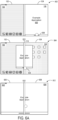
- FIGS. 6A and 6B show an example user interface displayed when spanning an application 600 across the first display 106 and the second display 108 of the first portion 102 and the second portion 104 of the dual-screen device 100.
- the user interface at 602 shows application 600 open on the second display 108 of the second portion 104, while the first display 106 on the first portion 102 is unoccupied by any applications.
- the user interface shows that a touch input 606 has dragged the application 600 from the second display 604 toward the first display 602.
- the touch input 606 may originate at a location along an application navigation bar 608 that is displayed at the bottom of the application 600.
- the application navigation bar 608 may be configured to receive user inputs related to moving, dismissing, or otherwise manipulating the application 600.
- the touch input 606 may release the application 600 when the application 600 is in a predetermined area, e.g. within a threshold distance from a seam 610 in between the two displays (as defined by the hinge 110 that connects the two device portions).
- Example predetermined areas for triggering certain user interface actions are discussed in more detail in regard to FIGS. 12-17 .
- the user interface at 612 shows the application 600 spanned across both displays in response to the touch input releasing the application 600.
- a mask may be applied to a rendering of the application in a location corresponding to the seam 610 when the application is spanned. Such masking may help the display of the spanned application (and also application windows moving across the seam) to appear more natural, as opposed to splitting the full image between the two displays. However, such masking also causes a small area of the displayed application to be unviewable. As such, a user may desire to reveal the content being blocked by the seam.
- FIG. 6B at 614 and 616 show example interactions in which a user moves the application 600 (e.g. by touching and dragging) to reveal content hidden by the seam 610.
- Any suitable touch inputs may trigger offsetting of the application to reveal content behind the seam 610.
- a touch input may swipe, touch and drag, or perform a multi-finger gesture to the left or right from the seam, from a seam corner, etc. in double portrait mode. The same touch inputs may apply except in up or down directions from the seam in double landscape mode.
- the user interface shows a touch input moving the application toward the left
- the user interface shows a touch input moving the application toward the right.
- the spanned application may thereby be moved in a direction of the touch input to reveal at least a portion of the application content hidden behind the seam.
- a user may then move the application back to the original spanned mode shown at 612, such as by tapping a revealed arrow user interface control 618 or 620 (shown at 614 and 616), or by dragging and releasing the application back toward the seam.
- such masking may not be applied, and instead the application may be divided into two portions that together make up the entire image.
- such a seam between multiple displays may not be present, or a seam may also be configured to display content (e.g. via a flexible display over the hinge).
- a touch input may move an application while scaling the application simultaneously.
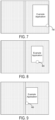
- FIGS. 7-9 illustrate an example of the scaling of a displayed application in response to a user touch input dragging the application.
- an origin of the scaling of the application may be set dynamically by horizontal touch position.
- FIG. 7 shows a touch input 700 that starts at a right bottom corner of the application
- FIG. 8 shows a touch input 800 that starts at a middle of the bottom of the application
- FIG. 9 shows a touch input 900 that starts at a left bottom corner of the application.
- the scaling decreases based upon a vertical movement distance from the bottom of the display, and an origin of the movement is based upon the initial touch location of the touch input.
- the dynamic positioning of the origin of scaling may help to create the effect that the application follows the user's finger or stylus.
- the automatic scaling that occurs with movement of an application may help to better indicate to the user that the application is currently being moved while keeping the content of the application visible. Further, once released, expansion of the application back to its original size may also help to better indicate to the user that the application is no longer being moved by user input.
- Automatic scaling when moving an application may further help provide a more seamless transition of the application to a recent applications list or task switcher for switching between applications, as examples. For example, a preview for a recent applications list may be triggered when a gesture velocity for moving application drops to within a threshold velocity close to zero.
- an application may be moved in response to a horizontal movement and scaled in response to a vertical movement in portrait poses, and moved in response to a vertical movement and scaled in response to a horizontal movement in landscape poses.
- the ratio of movement of the touch input to movement of the application on the user interface may change as a function of touch position.
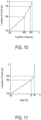
- FIG. 10 shows a plot of an example vertical movement of an application on a display as a function of touch position in a Y direction when the display device is in a portrait pose.
- the position of an application follows a user's touch in a 1:1 ratio from a Y position of pixel 720 to pixel 400.
- the change in Y position of the application compared to the change in touch location varies at a ratio of less than 1: 1 from pixels 400 to 200.
- the Y position of the application versus the touch position linearly varies at even a lesser ratio.
- any other suitable mapping of touch movement to application movement may be used.
- FIG. 11 shows a plot of an example application scaling as a function of touch position in a Y direction. From Y of touch at pixels 720 to 400, the application may scale linearly at a first rate from 100% to 30% scale; from Y of touch at pixels 400 to 300, the application may scale linearly, but at a lesser rate, from 30% to 20% scale; and from Y of touch less than 300, the scale of the application may remain at 20%, thus not decreasing further.
- movement of the application in a horizontal direction while in a portrait mode may follow the user's touch in a 1:1 ratio at all positions of X, and horizontal movement may not cause the application to scale, as an example. Movement of an application in a landscape mode also may display movement rate and/or scaling adjustments.
- FIGS. 12 and 13 show example hint images 1200 and 1300 that may be displayed while moving an application in a double portrait pose and a double landscape pose, respectively.
- the illustrated example hint images indicate that if a touch input currently dragging the application were to be released at the current location, then the application would snap to or move to the display on which hint image is displayed.
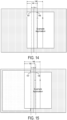
- FIGS. 14-17 show example hint images displayed based on touch inputs moving an application to within example threshold distances.
- a transition zone 14 occupies a portion of the first display, and a portion of the second display.
- FIG. 14 illustrates an example in which a touch input drags an application from the second display toward the first display.
- a first fraction 144 of the application as defined from a left edge of the application to example line A, has not passed a first boundary 145 of the transition zone 14, and no hint images are yet displayed, indicating that if the touch input were to release the application at that position, the application would be displayed again at the original position without any movement.
- FIG. 15 shows the application having been moved sufficiently far such that the first fraction 144 of the application has passed the first boundary 145 of the transition zone 14.
- a hint image is displayed on the first display, indicating that the application will move to the first display upon release.
- FIG. 16 shows that the application has been moved so that a second, larger fraction 146 of the application, as defined from a left edge of the application to example line B, passes the first boundary 145 of the transition zone 14, and in response a hint image is displayed spanning both displays, indicating that the application will span across both displays upon release.
- FIG. 16 shows that the application has been moved so that a second, larger fraction 146 of the application, as defined from a left edge of the application to example line B, passes the first boundary 145 of the transition zone 14, and in response a hint image is displayed spanning both displays, indicating that the application will span across both displays upon release.
- FIG. 17 shows that the application has been moved so that the second, larger fraction 146 of the application passes a second boundary 147 of the transition zone 14, and in response a hint image is displayed on the first display, indicating that the application will move to the first display upon release.
- a hint image is displayed on the first display, indicating that the application will move to the first display upon release.
- FIG. 18 shows an example hint image displayed in response to a touch input moving an application to a display currently occupied by another application.
- a touch input moves the application from the second display toward the first display, but the first display is already occupied by another application.
- the other application on the left may slightly shrink and become greyed out as a hint image indicating that the dragged application would stack on top of the other application upon release and potentially cause the other application to close in some examples.
- FIG. 19 shows an example hint image displayed in response to a touch input to swap applications.
- the application has been dragged such that the first portion 144 of the application has passed an example swapping threshold line labeled as line C.
- the application may be dragged such that a far edge 1902 of the application passes the first boundary 145 into the transition zone 14.
- a hint image is displayed showing the second application on the left at a smaller scale, and further showing the second application as a greyed out image on the second display, indicating that the application on the right will swap with the application on the left upon release.
- hint images may not be displayed, but the same actions upon release within the predetermined areas may be applied regardless of whether hint images are displayed. Further, other suitable hint images may be used in other examples.
- the first application when a first application is moved from a first display to a second display that is already occupied by a second application, the first application is stacked on top of the second application.
- the second application may remain behind the first application indefinitely in a suspended state, until the first application is either moved away or dismissed. In other such examples, the second application may be dismissed automatically.
- the second application may remain stacked behind the first application for a predetermined threshold amount of time, after which the second application may be dismissed and may then be accessible from a recent applications list. Within that threshold amount of time, a user may undo the stacking in order to reveal and resume the second application again.
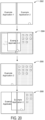
- FIG. 20 shows an example user interface while stacking an application and then unstacking the application within a threshold time.
- Application 1 is on the left display
- Application 2 is on the right display.
- a touch input moves Application 2 toward the left display onto Application 1
- Application 1 is shown smaller and transparent, as an example hint image indicating the stacking and possible application dismissal
- Application 2 has been stacked on top of Application 1.
- a touch input moves Application 2 back toward the right display, as shown at 2008, thereby revealing Application 1 before it is dismissed.
- the dismissed application may be resumed again from a recent applications list, for example. Any suitable threshold time may be used.
- the threshold time may be between five and twenty seconds, and may be ten seconds in a more specific example.
- an application that has become stacked underneath another application may instead (either immediately or after a predetermined threshold of time) be automatically transferred to a recent applications list for retrieval by the user.
- a user may trigger the launch of a new application from a currently open application, or a new instance of the same application.
- the new task may automatically be launched from the first application for display on the display opposite the first application, if that display is unoccupied.
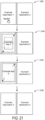
- FIG. 21 shows an example user interface depicting launching a new task from a link in an application while another application is open on another display.
- the left display is occupied by Application 1 which contains a link
- the right display is occupied by Application 2.
- the new Application 3 opens on the same display as Application 1, stacking over Application 1 and suspending Application 1, as shown at 2106.
- Application 1 may be displayed as if it is receding and/or shrinking as Application 3 launches and expands to cover the left display.
- Application 3 has been stacked on top of Application 1. In this instance, the stacking may not result in the automatic dismissal of Application 1.
- Application 1 may be restored, for example, by user retrieval from a recent applications list, as mentioned above, or by a user touch input dismissing or moving Application 3 to the adjacent display.
- FIGS. 22-26 show various examples of spanning, stacking, swapping, and dismissal of applications in response to movements of one application when one or more display(s) are already occupied by one or more other applications.
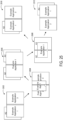
- FIG. 22 shows an example user interface depicting spanning of an application over another application and then contracting of the spanned application, thereby restoring the application beneath the spanned application.
- Application 1 is displayed on the first display
- Application 2 is displayed on the second display.
- a user touch input moves Application 1 toward the seam, and releases to span Application 1 across both displays, stacking Application 1 over Application 2 on the second display, as shown at 2206.
- a user touch input contracts Application 1 and moves Application 1 back to the first display.
- Application 2 is revealed and restored.
- FIG. 23 shows spanning and contracting an application when another application is open on another display, and also shows different outcomes as a result of contracting Application 1 to different screens.
- Application 1 is displayed on the first display
- Application 2 is displayed on the second display.
- Application 1 is shown spanned across both displays, e.g. after a touch input dragging and releasing Application 1 near the seam, thereby stacking at least a portion of Application 1 over Application 2 on the second display.
- the user may contract Application 1 back toward the first display, restoring Application 2 on the second display, as shown at 2306.
- the user may contract Application 1 toward the second display.
- Application 1 may be automatically swapped with Application 2, such that Application 2 is displayed on the first display, as shown at 2308.
- swapping may be triggered when contracting a spanned application by moving the spanned application to a "swap threshold area" within an outer edge of the display, e.g. as illustrated in FIG. 19 . If the contracted application is released outside of the swap threshold area, it may result in permanent stacking.
- FIG. 24 shows spanning and contracting of an application when two other applications are stacked on another display.
- Application 1 is displayed on the first display, and Application 2 is displayed on the second display while stacked over Application 3.
- a user touch input moves Application toward the seam, and upon release, Application 1 spans across both displays, stacking over both Application 2 and Application 3 on the second display, as shown at 2406.
- a user input contracts spanned Application 1, but depending on which side Application 1 is contracted to, the result is different.
- Application 1 is shown contracted to the first display, restoring the original arrangement.
- the spanned application is contracted at the second display where the stacked applications were originally located, the stacked applications swap locations with the spanned application.
- swapping may be triggered when contracting the spanned application to a "swap threshold area" within an outer edge of the display, and stacking may result when the spanned application is released outside of the swap threshold area.
- FIG. 25 shows spanning and contracting an application when a second application is stacked behind the application, and a third application is open on another display.
- Application 1 is stacked over Application 2 on the first display, and Application 3 is displayed on the second display.
- a user touch input moves Application 1 toward the seam.
- Application 1 is thereby spanned across both displays, stacking over both Application 2 on the first display and Application 3 on the second display, as shown at 2506.
- the application may stack above either the second application or the third application, depending to which side the application is contracted.
- Application 1 is contracted to the first display, restoring Application 3 on the second display.
- Application 1 is contracted to the second display, revealing Application 2 on the first display while Application 1 is stacked over Application 3 on the second display.
- FIG. 26 shows spanning and contracting an application when a second application is stacked behind the application, and two other applications are stacked on another display.
- Application 1 is stacked over Application 2 on the first display
- Application 3 is stacked over Application 4 on the second display.
- a user touch input moves Application 1 toward the seam.
- Application 1 is spanned, as shown at 2606
- Application 1 remains stacked over Application 2 on the left display, and further stacks over Application 3 and Application 4 on the right display.
- a user touch input then contracts Application 1, at 2608.
- Application 1 back to the left display at 2610, Application 1 stacks back over Application 2 on the left display, while Application 3 and Application 4 remain stacked on the right display.
- Application 1 stacks over Application 3, dismissing Application 4. This may occur, for example, if a setting dictates that only two applications may be stacked on a display at any time (other than when spanning). In other examples, more than two applications may be stacked at a time per display.
- FIG. 27 shows an example method 2700 of operating a dual screen computing device.
- Method 2700 comprises, at 2702, displaying a first application a first display, and at 2704, displaying a second application at a second display of the dual screen computing device.
- Method 2700 further includes, at 2706, receiving a touch input at the first display opening a third application while the first application is displayed on the first display, e.g. from a link within the first application.
- method 2700 comprises displaying the third application as being stacked over the first application.
- method 2700 includes receiving a touch input closing the third application, and in response, closing the third application and displaying the first application on the first display.
- the computing device may open new applications from currently running applications based on whether any application(s) are already open on either of the first display or the second display.
- FIGS. 28A-E shows another example method 2800 of operating a dual-screen computing device, and more particularly illustrate various methods of displaying an application based upon the application being moved to different predetermined areas of the displays.
- Method 2800 includes, at 2802, receiving a touch input at the first display dragging the first application from the first display toward the second display. In some examples, this may include receiving the touch input at an application navigation bar (e.g. displayed at a bottom, side, or other suitable location on the display, as illustrated in FIG. 6 ). While the first application is being dragged, a size of the first application may be scaled based at least in part on a direction of movement of the touch input, at 2804.
- an application navigation bar e.g. displayed at a bottom, side, or other suitable location on the display, as illustrated in FIG. 6 .
- a size of the first application may be scaled based at least in part on a direction of movement of the touch input, at 2804.
- method 2800 includes displaying a hint indicating where the application will move based at least in part on the touch input dragging the first application to within a predetermined area.
- hint images indicating that the first application will be spanned, moved, swapped, or stacked may be displayed indicating a result of the movement of the first application based on the touch input dragging the first application if the touch input is completed.
- method 2800 may continue to 2808 of FIG. 28A , or to FIGS. 28C , 28D, or 28E , which illustrate different outcomes depending on where the first application is released.
- method 2800 may include, at 2808, detecting a touch input releasing the first application within a first predetermined area. This may include, at 2810, detecting the touch input releasing the first application within a threshold distance of a seam of the computing device in a hinge region of the device. In other examples, such a seam may not be present.
- method 2800 includes spanning the application across the first display and the second display, such that a portion of application content is hidden behind the seam. Spanning may include, at 2824, applying a mask to a rendering of the first application in a location corresponding to a seam in between the first display and the second display. In other examples, an image of the first application may be divided such that the full image is split between the two displays.
- spanning may include, at 2816, stacking a portion of the spanned, first application over a second application on the second display, where a second application is open on the second display.
- method 2800 further includes, at 2818, receiving a touch input moving the spanned first application.
- Method 2800 also includes, at 2820, moving the spanned application in a direction of the touch input to reveal at least a portion of the application content hidden behind the seam.
- method 2800 includes, at 2822, receiving a touch input moving and contracting the spanned application to either one of the first display and the second display, and displaying the first application on one of the first display and the second display based on the touch input. For example, a drag-and-release touch input or a fling gesture may contract the first application toward the first display, and the first application may be moved to the first display in response.
- moving the first application may reveal the second application, as indicated at 2824.
- the touch input may contract the first application onto the second display, such that the first application remains stacked over the second application, as shown at 2826, thereby potentially leading to the closing of the second application in some examples, e.g. immediately or after a threshold amount of time.
- the touch input may contract the first application onto the second display, such that the first application swaps positions with the second application, instead of stacking on top of the second application, as indicated at 2828.
- FIG. 28C shows, at 2736, detecting the touch input releasing the first application within a second predefined area.
- the first application is moved to the second display, instead of being spanned across both displays.
- Such an action also may result from a fling gesture in which a touch input is moved from one of the first and second display toward the other of the first and second display with a velocity greater than a threshold velocity, and/or an acceleration greater than a threshold acceleration, also as indicated at 2830.
- Moving the first application to the second display may include, at 2834, stacking the first application over a second application on the second display.
- the computing device may close the second application after a threshold amount of time of the first application being stacked over the second application, as shown at 2836. This may allow a user to move the stacked first application back to the first display to reveal the second application on the second display before the second application is closed.
- method 2800 further includes, at 2838, receiving a touch input moving the first application back to the first display, and in response, displaying the first application on the first display. Where the first application was stacked over a second application and moved within a threshold amount of time, this also may include displaying the second application on the second display.
- FIG. 28D shows, at 2842, detecting the touch input releasing the first application within a third predefined area, and swapping the first application on the first display with the second application on the second display.
- FIG. 28E shows, at 2842, detecting the touch input releasing the first application within a fourth predefined area, and closing the first application in response.
- the touch input may drag-and-release the first application in any other suitable predetermined areas to trigger other corresponding actions, such as moving an application to a recent applications list, etc.
- FIGS. 29A-B shows an example user interface depicting interactions with an applications folder in a double portrait mode of the dual-screen device 100.
- the user interface shows a pinned applications bar 2904 on the first display 106 of the first portion 102, and a pinned applications bar 2906 on the second display 108 of the first portion 104.
- the user interface at 2902 also shows a touch input 2908 tapping an applications folder 2910 on the first display 106 display.
- the applications folder 2910 is opened on the first display 106.
- the open applications folder 2910 may be at least partially transparent, such that content behind it is still visible.
- the pinned applications that were on the pinned applications bar 2904 on the first display 106 are shifted over to the pinned applications bar 2906 on the second display 108.
- the shifting may be animated so that a user views the transition of the pinned applications to the other display.
- shifting of the pinned applications may occur in any instance where an application or system component (e.g. a folder) occupies either screen in a dual-display mode.
- an application or system component e.g. a folder
- a touch input 2916 performed on the second display 108 drags from left to right on the second display 108, which moves the items displayed behind the applications folder 2910 on the first display 106 to the second display 108.
- a user may close the applications folder 2910, e.g. by tapping an "X" icon shown in the folder.
- the applications folder 2910 is opened on the second display 108, such as after a touch input has moved the applications folder from the first display 106 to the second display 108, or after touch inputs have closed the applications folder 2910 on the first display 106, and reopened the applications folder 2910 on the second display 108.
- the pinned applications that were previously on the pinned applications bar 2906 of the second display 108 are shifted to the pinned applications bar 2904 on the first display 106.
- a touch input 2920 may be performed from right to left to shift content behind the applications folder 2910 on the second display 108 to the first display 106, as shown similarly at 2914.
- a touch input 2926 may move an application 2928 that is not currently in the applications folder 2910 into the folder 2910. It will be understood that pinned applications may also shift in response to the opening of an application on one display, and is not limited to the opening of an applications folder. Such behavior may allow the pinned applications to remain visible to a user.
- a user may also shift the pinned applications that were on pinned applications bar 2904 on the first display 106 over to the pinned applications bar 2906 on the second display 108 through a right swipe/fling gesture, either within the pinned applications bar 2904 or a threshold area of pinned applications bar 2906.
- the user may perform a left swipe/fling gesture either on pinned applications bar 2906 or pinned applications bar 2904 to shift the pinned applications that were previously on pinned applications bar 2096 on the second display 108 over to pinned applications bar 2094 on the first display 106. This gives the user the control to launch whichever pinned application on the preferred display.
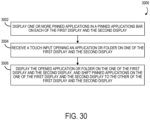
- FIG. 30 shows an example method 3000 of operating a dual screen computing device.
- Method 3000 includes, at 3002, displaying one or more applications in a pinned applications bar on each of the first display and the second display.
- Method 3000 further includes, at 3004, receiving a touch input opening an application or folder on one of the first display and the second display.
- method 3000 includes, at 3006, displaying the opened application or folder on the one of the first display and the second display, and shifting pinned applications on the one of the first display and second display to the other of the first display and the second display. For example, if a touch input opens an application on the first display, the pinned applications in the pinned applications bar on the first display may shift to the pinned applications bar of the second display.
- the pinned applications in the pinned applications bar on the second display may shift to the pinned applications bar of the first display. It will be understood that this may also apply when opening an applications folder, as described in regard to FIGS. 29A-B .
- any suitable multiple display systems including displays systems other than mobile phones, such as multi-monitor display systems for desktop computers, surface-mounted multi-displays, virtual and/or augmented reality display systems, head-up displays, projected display systems, etc.
- a suitable input device e.g. a mouse controlling a cursor.
- the methods and processes described herein may be tied to a computing system of one or more computing devices.
- such methods and processes may be implemented as a computer-application program or service, an application-programming interface (API), a library, and/or other computer-program product.
- API application-programming interface
- FIG. 31 schematically shows a non-limiting embodiment of a computing system 3100 that can enact one or more of the methods and processes described above.
- Computing system 3100 is shown in simplified form.
- Computing system 3100 may embody the computer device 100 described above and illustrated in FIG. 1 .
- Computing system 3100 may take the form of one or more personal computers, server computers, tablet computers, home-entertainment computers, network computing devices, gaming devices, mobile computing devices, mobile communication devices (e.g., smart phone), and/or other computing devices, and wearable computing devices such as smart wristwatches and head mounted augmented reality devices.
- Computing system 3100 includes a logic device 3102, and a non-volatile storage device 3104.
- Computing system 3100 may optionally include a display subsystem 3106, input subsystem 3108, communication subsystem 3110, and/or other components not shown in FIG. 31 .
- Logic device 3102 includes one or more physical devices configured to execute instructions.
- the logic device 3102 may be configured to execute instructions that are part of one or more applications, programs, routines, libraries, objects, components, data structures, or other logical constructs. Such instructions may be implemented to perform a task, implement a data type, transform the state of one or more components, achieve a technical effect, or otherwise arrive at a desired result.
- the logic device 3102 may include one or more physical processors (hardware) configured to execute software instructions. Additionally or alternatively, the logic device 3102 may include one or more hardware logic circuits or firmware devices configured to execute hardware-implemented logic or firmware instructions. Processors of the logic device 3102 may be single-core or multi-core, and the instructions executed thereon may be configured for sequential, parallel, and/or distributed processing. Individual components of the logic device 3102 optionally may be distributed among two or more separate devices, which may be remotely located and/or configured for coordinated processing. Aspects of the logic device 3102 may be virtualized and executed by remotely accessible, networked computing devices configured in a cloud-computing configuration. In such a case, these virtualized aspects are run on different physical logic processors of various different machines, it will be understood.
- Storage device 3104 may be a non-volatile storage device.
- Non-volatile storage device 3104 includes one or more physical devices configured to hold instructions executable by the logic device 3102 to implement the methods and processes described herein. When such methods and processes are implemented, the state of non-volatile storage device 3104 may be transformed-e.g., to hold different data.
- Non-volatile storage device 3104 may include physical devices that are removable and/or built-in.
- Non-volatile storage device 3104 may include optical memory (e.g., CD, DVD, HD-DVD, Blu-Ray Disc, etc.), semiconductor memory (e.g., ROM, EPROM, EEPROM, FLASH memory, etc.), and/or magnetic memory (e.g., hard-disk drive, floppy-disk drive, tape drive, MRAM, etc.), or other mass storage device technology.
- Non-volatile storage device 3104 may include nonvolatile, dynamic, static, read/write, read-only, sequential-access, location-addressable, file-addressable, and/or content-addressable devices. It will be appreciated that storage device 3104 is configured to hold instructions even when power is cut to the storage device 3104.
- storage device 3104 may include volatile memory, which may include physical devices that include random access memory. Volatile memory is typically utilized by logic device 3102 to temporarily store information during processing of software instructions. It will be appreciated that volatile memory typically does not continue to store instructions when power is cut to the volatile memory.
- logic device 3102 and/or storage device 3104 may be integrated together into one or more hardware-logic components.
- Such hardware-logic components may include field-programmable gate arrays (FPGAs), program- and application-specific integrated circuits (PASIC / ASICs), program- and application-specific standard products (PSSP / ASSPs), system-on-a-chip (SOC), and complex programmable logic devices (CPLDs), for example.
- FPGAs field-programmable gate arrays
- PASIC / ASICs program- and application-specific integrated circuits
- PSSP / ASSPs program- and application-specific standard products
- SOC system-on-a-chip
- CPLDs complex programmable logic devices
- display subsystem 3106 may be used to present a visual representation of data held by storage device 3104.
- the visual representation may take the form of a graphical user interface (GUI).
- GUI graphical user interface
- the state of display subsystem 3106 may likewise be transformed to visually represent changes in the underlying data.
- Display subsystem 3106 may include one or more display devices utilizing virtually any type of technology. Such display devices may be combined with logic device 3102, volatile memory and/or non-volatile storage device 3104 in a shared enclosure, or such display devices may be peripheral display devices.
- input subsystem 3108 may comprise or interface with one or more user-input devices such as a keyboard, mouse, touch screen, or game controller.
- the input subsystem may comprise or interface with selected natural user input (NUI) componentry.
- NUI natural user input
- Such componentry may be integrated or peripheral, and the transduction and/or processing of input actions may be handled on- or off-board.
- NUI componentry may include a microphone for speech and/or voice recognition; an infrared, color, stereoscopic, and/or depth camera for machine vision and/or gesture recognition; a head tracker, eye tracker, accelerometer, and/or gyroscope for motion detection and/or intent recognition; as well as electric-field sensing componentry for assessing brain activity; and/or any other suitable sensor.
- communication subsystem 3110 may be configured to communicatively couple various computing devices described herein with each other, and with other devices.
- Communication subsystem 3110 may include wired and/or wireless communication devices compatible with one or more different communication protocols.
- the communication subsystem may be configured for communication via a wireless telephone network, or a wired or wireless local- or wide-area network, such as a HDMI over Wi-Fi connection.
- the communication subsystem may allow computing system 3100 to send and/or receive messages to and/or from other devices via a network such as the Internet.
- a computing device comprising a first portion comprising a first display and a first touch sensor, and a second portion comprising a second display and a second touch sensor, the second portion connected to the first portion via a hinge, the hinge defining a seam between the first display and the second display
- the computing device further includes a logic device, and a storage device holding instructions executable by the logic device to receive a touch input at the first display moving an application that is currently displayed on the first display and not on the second display toward the second display, detect the touch input releasing the application within a predetermined area, span the application across the first display and the second display such that a portion of application content is hidden behind the seam, receive a touch input moving the spanned application, and move the spanned application in a direction of the touch input moving the spanned application to reveal at least a portion of the application content hidden behind the seam.
- the instructions may be additionally or alternatively executable to span the application across the first display and the second display by applying a mask to a rendering of the displayed application in a location corresponding to the seam.
- the instructions may be additionally or alternatively executable to receive a touch input moving the spanned application to one of the first display and the second display, and display the spanned application on one of the first display and the second display.
- the instructions may be additionally or alternatively executable to display one or more applications in a pinned applications bar on each of the first display and the second display, receive a touch input opening an applications folder on one of the first display and the second display, and in response, display the applications folder on the one of the first display and the second display, and shift applications on the one of the first display and the second display to the other of the first display and the second display.
- the predefined area may be a first predefined area
- the instructions may be additionally or alternatively executable to detect a touch input moving the application toward the second display and releasing the application within a second predefined area, and move the application to the second display.
- the application may be a first application, and the instructions may be additionally or alternatively executable to display a second application on the second display, upon detecting the touch input releasing the application within the second predefined area, stack the first application over the second application on the second display.
- the instructions may be additionally or alternatively executable to close the second application after a threshold amount of time of the first application being stacked over the second application.
- the application may be a first application, and the instructions may be additionally or alternatively executable to display a second application on the second display, detect a touch input releasing the application within a second predefined area, and swap the first application on the first display with the second application on the second display.
- the application may be a first application, and the instructions may be additionally or alternatively executable to display a second application on the second display, wherein spanning the first application across the first display and the second display comprises stacking a portion of the first application over the second application on the second display, receive a touch input contracting the first application, and display the first application on the first display, and display the second application on the second display.
- the predefined area may be a first predefined area, and the instructions may be additionally or alternatively executable to detect a touch input releasing the application within a second predefined area, and close the application.
- the instructions may be additionally or alternatively executable to detect a touch input comprising a fling gesture, and move the application to the second display.
- the instructions may be additionally or alternatively executable to scale a size of the application based at least in part on a direction of movement of the touch input.
- the instructions may be additionally or alternatively executable to, prior to detecting the touch input releasing the application, display a hint indicating that the application will span based at least in part on the touch input moving the application to within the predetermined area.
- a computing device comprising a first portion comprising a first display and a first touch sensor, a second portion comprising a second display and a second touch sensor, the second portion connected to the first portion via a hinge, the hinge defining a seam between the first display and the second display, a logic device, and a storage device holding instructions executable by the logic machine to receive a touch input at the first display moving an application from the first display toward the second display, when the touch input releases the application within a first predefined area, move the application to the second display, and when the touch input releases the application within a second predetermined area, span the application by displaying the application across the first display and the second display.
- the application may be a first application, and the instructions may be additionally or alternatively executable to, display a second application on the second display, and when the user input releases the first application in a third predefined area, swap the first application on the first display with the second application on the second display by displaying the first application on the second display and displaying the second application on the first display.
- the application may be a first application, and the instructions may be additionally or alternatively executable to, display a second application on the second display, when the first application is displayed on the first display, receive a touch input at the first display opening a third application from the first application, and display the third application as being stacked over the first application.
- the instructions may be additionally or alternatively executable to receive a touch input closing the third application, and displaying the first application on the first display.
- Another example provides a method enacted on a computing device, the computing device comprising a first portion comprising a first display and a first touch sensor, and a second portion comprising a second display and a second touch sensor, the second portion connected to the first portion via a hinge, the hinge defining a seam between the first display and the second display, the method comprising displaying a first application on the first display, displaying a second application on the second display, receiving a touch input at the first display moving the first application toward the second display, detecting the touch input releasing the application within a predetermined area, and stacking the first application over the second application on the second display based at least upon the touch input releasing the application within the predetermined area.
- the method may additionally or alternatively include receiving a touch input moving the first application to the first display, and in response, displaying the first application on the first display and displaying the second application on the second display.
- the method may additionally or alternatively include closing the second application after a threshold amount of time of the first application being stacked over the second application.
Landscapes
- Engineering & Computer Science (AREA)
- Theoretical Computer Science (AREA)
- General Engineering & Computer Science (AREA)
- Physics & Mathematics (AREA)
- Human Computer Interaction (AREA)
- General Physics & Mathematics (AREA)
- Computer Hardware Design (AREA)
- Software Systems (AREA)
- Mathematical Physics (AREA)
- User Interface Of Digital Computer (AREA)
- Display Devices Of Pinball Game Machines (AREA)
Claims (15)
- Datenverarbeitungsvorrichtung (100), umfassend:einen ersten Abschnitt (102), der eine erste Anzeige (106) und einen ersten Berührungssensor umfasst;einen zweiten Abschnitt (104), der eine zweite Anzeige (108) und einen zweiten Berührungssensor umfasst, wobei der zweite Abschnitt mittels eines Scharniers (110) mit dem ersten Abschnitt verbunden ist;eine Logikvorrichtung (3102); undeine Speichervorrichtung (3104), die Anweisungen speichert, die von der Logikvorrichtung ausgeführt werden können zum:Empfangen (2802) einer Berührungseingabe an der ersten Anzeige, um eine Anwendung, die gegenwärtig auf der ersten Anzeige und nicht auf der zweiten Anzeige angezeigt wird, in Richtung der zweiten Anzeige zu verschieben,basierend mindestens auf der Berührungseingabe, die die Anwendung innerhalb eines ersten vordefinierten Bereichs freigibt, Verschieben der Anwendung zur zweiten Anzeige, wobei, wenn die Anwendung von der ersten Anzeige zur zweiten Anzeige verschoben wird und die zweite Anzeige bereits von einer zweiten Anwendung belegt ist, die Anweisungen ferner ausführbar sind, um die Anwendung auf der zweiten Anwendung zu stapeln,basierend mindestens auf der Berührungseingabe, die die Anwendung innerhalb eines zweiten vordefinierten Bereichs freigibt, der sich vom ersten vordefinierten Bereich unterscheidet, Erweitern der Anwendung über die erste Anzeige und die zweite Anzeige, undbasierend mindestens darauf, dass die Berührungseingabe die Anwendung innerhalb eines dritten vordefinierten Bereichs freigibt und die zweite Anzeige gegenwärtig die zweite Anwendung anzeigt, Austauschen der Anwendung auf der ersten Anzeige gegen die zweite Anwendung auf der zweiten Anzeige.
- Datenverarbeitungsvorrichtung nach Anspruch 1, wobei:das Scharnier eine Nahtstelle zwischen der ersten Anzeige und der zweiten Anzeige definiert; unddie Anweisungen ausführbar sind, um die Anwendung über die erste Anzeige und die zweite Anzeige zu erweitern, indem eine Maske auf eine Darstellung der Anwendung an einer Stelle angewendet wird, die der Nahtstelle entspricht, sodass ein Abschnitt des Anwendungsinhalts hinter der Nahtstelle verborgen ist.
- Datenverarbeitungsvorrichtung nach Anspruch 1, wobei die Anweisungen ferner ausführbar sind, um eine Berührungseingabe zu empfangen, die die erweiterte Anwendung zu einer der ersten Anzeige und der zweiten Anzeige verschiebt, und die erweiterte Anwendung auf einer der ersten Anzeige und der zweiten Anzeige anzuzeigen.
- Datenverarbeitungsvorrichtung nach Anspruch 1, wobei die Anweisungen ausführbar sind, um eine oder mehrere angeheftete Anwendungen in einer Leiste angehefteter Anwendungen auf jeder der ersten Anzeige und der zweiten Anzeige anzuzeigen, eine Berührungseingabe zu empfangen, die eine Anwendung auf einer der ersten Anzeige und der zweiten Anzeige öffnet, und als Reaktion darauf die geöffnete Anwendung auf der einen der ersten Anzeige und der zweiten Anzeige anzuzeigen und angeheftete Anwendungen auf der einen der ersten Anzeige und der zweiten Anzeige zur anderen der ersten Anzeige und der zweiten Anzeige zu verschieben.
- Datenverarbeitungsvorrichtung nach Anspruch 1, wobei die Anweisungen ferner ausführbar sind, um die zweite Anwendung eine Schwellenzeitdauer nach dem Stapeln der Anwendung über der zweiten Anwendung zu schließen.
- Datenverarbeitungsvorrichtung nach Anspruch 1, wobei:die Anwendung eine erste Anwendung ist,das Erweitern der ersten Anwendung über die erste Anzeige und die zweite Anzeige das Stapeln eines Abschnitts der ersten Anwendung über der zweiten Anwendung auf der zweiten Anzeige umfasst, unddie Anweisungen ferner ausführbar sind zum:Empfangen einer Berührungseingabe, die die erste Anwendung kontrahiert, undAnzeigen der ersten Anwendung auf der ersten Anzeige und Anzeigen der zweiten Anwendung auf der zweiten Anzeige.
- Datenverarbeitungsvorrichtung nach Anspruch 1, wobei die Anweisungen ferner ausführbar sind, um eine Berührungseingabe zu erfassen, die die Anwendung innerhalb eines vierten vordefinierten Bereichs freigibt, und die Anwendung zu schließen.
- Datenverarbeitungsvorrichtung nach Anspruch 1, wobei die Anweisungen ferner ausführbar sind, um eine Berührungseingabe zu erfassen, die eine Schleudergeste umfasst, und die Anwendung zur zweiten Anzeige zu verschieben.
- Datenverarbeitungsvorrichtung nach Anspruch 1, wobei die Anweisungen ausführbar sind, um eine Größe der Anwendung mindestens teilweise basierend auf einer Bewegungsrichtung der Berührungseingabe zu skalieren.
- Datenverarbeitungsvorrichtung nach Anspruch 1, wobei die Anweisungen ausführbar sind, um vor dem Erfassen der Berührungseingabe, die die Anwendung freigibt, einen Hinweis anzuzeigen, der darauf hinweist, dass die Anwendung mindestens teilweise basierend auf der Berührungseingabe, die die Anwendung in den zweiten vordefinierten Bereich verschiebt, erweitert wird.
- Verfahren, das auf einer Datenverarbeitungsvorrichtung (100) ausgeführt wird, wobei die Datenverarbeitungsvorrichtung einen ersten Abschnitt (102), der eine erste Anzeige (106) und einen ersten Berührungssensor umfasst, und einen zweiten Abschnitt (104) umfasst, der eine zweite Anzeige (108) und einen zweiten Berührungssensor umfasst, wobei der zweite Abschnitt mittels eines Scharniers (110) mit dem ersten Abschnitt verbunden ist, wobei das Verfahren umfasst:Empfangen (2802) einer Berührungseingabe an der ersten Anzeige, um eine Anwendung, die gegenwärtig auf der ersten Anzeige und nicht auf der zweiten Anzeige angezeigt wird, in Richtung der zweiten Anzeige zu verschieben,basierend mindestens auf der Berührungseingabe, die die Anwendung innerhalb eines ersten vordefinierten Bereichs freigibt, Verschieben der Anwendung zur zweiten Anzeige, wobei, wenn die Anwendung von der ersten Anzeige zur zweiten Anzeige verschoben wird und die zweite Anzeige bereits von einer zweiten Anwendung belegt ist, das Verfahren ferner das Stapeln der Anwendung auf der zweiten Anwendung umfasst,basierend mindestens auf der Berührungseingabe, die die Anwendung innerhalb eines zweiten vordefinierten Bereichs freigibt, der sich vom ersten vordefinierten Bereich unterscheidet, Erweitern der Anwendung über die erste Anzeige und die zweite Anzeige, undbasierend mindestens darauf, dass die Berührungseingabe die Anwendung innerhalb eines dritten vordefinierten Bereichs freigibt und die zweite Anzeige gegenwärtig die zweite Anwendung anzeigt, Austauschen der Anwendung auf der ersten Anzeige gegen die zweite Anwendung auf der zweiten Anzeige.
- Verfahren nach Anspruch 11, wobei:das Scharnier eine Nahtstelle zwischen der ersten Anzeige und der zweiten Anzeige definiert; unddas Erweitern der Anwendung über die erste Anzeige und die zweite Anzeige das Anwenden einer Maske auf eine Darstellung der Anwendung an einer Stelle umfasst, die der Nahtstelle entspricht, sodass ein Abschnitt des Anwendungsinhalts hinter der Nahtstelle verborgen ist.
- Verfahren nach Anspruch 11, wobei das Verfahren umfasst:Empfangen einer Berührungseingabe, die die erweiterte Anwendung zu einer der ersten Anzeige oder der zweiten Anzeige verschiebt, undAnzeigen der erweiterten Anwendung auf einer der ersten Anzeige und der zweiten Anzeige.
- Verfahren nach Anspruch 11, ferner umfassend:Anzeigen einer oder mehrerer angehefteter Anwendungen in einer Leiste angehefteter Anwendungen auf jeder der ersten Anzeige und der zweiten Anzeige;Empfangen einer Berührungseingabe, die eine Anwendung auf einer der ersten Anzeige und der zweiten Anzeige öffnet, und als Reaktion darauf:Anzeigen der geöffneten Anwendung auf der einen der ersten Anzeige und der zweiten Anzeige, undVerschieben angehefteter Anwendungen auf der einen der ersten Anzeige und der zweiten Anzeige zur anderen der ersten Anzeige und der zweiten Anzeige.
- Verfahren nach Anspruch 11, ferner umfassend:
Schließen der zweiten Anwendung eine Schwellenzeitdauer nach dem Stapeln der Anwendung über der zweiten Anwendung.
Applications Claiming Priority (3)
| Application Number | Priority Date | Filing Date | Title |
|---|---|---|---|
| US201962909191P | 2019-10-01 | 2019-10-01 | |
| US16/717,988 US11416130B2 (en) | 2019-10-01 | 2019-12-17 | Moving applications on multi-screen computing device |
| PCT/US2020/048965 WO2021066988A1 (en) | 2019-10-01 | 2020-09-02 | Moving applications on multi-screen computing device |
Publications (2)
| Publication Number | Publication Date |
|---|---|
| EP4038472A1 EP4038472A1 (de) | 2022-08-10 |
| EP4038472B1 true EP4038472B1 (de) | 2024-10-30 |
Family
ID=75161828
Family Applications (1)
| Application Number | Title | Priority Date | Filing Date |
|---|---|---|---|
| EP20771741.4A Active EP4038472B1 (de) | 2019-10-01 | 2020-09-02 | Mobile anwendungen auf einer mehrbild-rechenvorrichtung |
Country Status (4)
| Country | Link |
|---|---|
| US (3) | US11416130B2 (de) |
| EP (1) | EP4038472B1 (de) |
| CN (1) | CN114585996B (de) |
| WO (1) | WO2021066988A1 (de) |
Families Citing this family (21)
| Publication number | Priority date | Publication date | Assignee | Title |
|---|---|---|---|---|
| EP2434368B1 (de) * | 2010-09-24 | 2018-08-01 | BlackBerry Limited | Verfahren zur Konservierung von Strom auf einer tragbaren elektronischen Vorrichtung, die dafür konfiguriert wurde |
| US11416130B2 (en) | 2019-10-01 | 2022-08-16 | Microsoft Technology Licensing, Llc | Moving applications on multi-screen computing device |
| US11201962B2 (en) | 2019-10-01 | 2021-12-14 | Microsoft Technology Licensing, Llc | Calling on a multi-display device |
| US11561587B2 (en) | 2019-10-01 | 2023-01-24 | Microsoft Technology Licensing, Llc | Camera and flashlight operation in hinged device |
| US20220197342A1 (en) * | 2020-11-08 | 2022-06-23 | Lepton Computing Llc | Map Navigation Interface Through a Foldable Mobile Device |
| US12090390B2 (en) * | 2020-11-30 | 2024-09-17 | Lepton Computing Llc | Gaming motion control interface using foldable device mechanics |
| JP7651904B2 (ja) * | 2021-03-26 | 2025-03-27 | 富士フイルムビジネスイノベーション株式会社 | 情報処理システム |
| US11817065B2 (en) * | 2021-05-19 | 2023-11-14 | Apple Inc. | Methods for color or luminance compensation based on view location in foldable displays |
| USD1003932S1 (en) * | 2021-07-23 | 2023-11-07 | Samsung Electronics Co., Ltd. | Display screen or portion thereof with transitional graphical user interface |
| USD1012947S1 (en) * | 2021-07-23 | 2024-01-30 | Samsung Electronics Co., Ltd. | Display screen or portion thereof with transitional graphical user interface |
| USD1000473S1 (en) * | 2021-07-23 | 2023-10-03 | Samsung Electronics Co., Ltd. | Display screen or portion thereof with transitional graphical user interface |
| USD1001155S1 (en) * | 2021-07-23 | 2023-10-10 | Samsung Electronics Co., Ltd. | Display screen or portion thereof with transitional graphical user interface |
| US11635817B1 (en) | 2021-10-07 | 2023-04-25 | Microsoft Technology Licensing, Llc | Stylus haptic component |
| CN116088734A (zh) * | 2021-11-05 | 2023-05-09 | 北京小米移动软件有限公司 | 窗口调整方法、装置、电子设备和计算机可读存储介质 |
| CN116450070A (zh) * | 2022-01-10 | 2023-07-18 | 荣耀终端有限公司 | 电子设备及其信息显示方法、介质 |
| US11907516B2 (en) * | 2022-04-16 | 2024-02-20 | Samsung Electronics Co., Ltd. | Electronic device, method, and non-transitory computer readable storage medium for identifying set of information according to change in size of display area of flexible display |
| US11947860B2 (en) * | 2022-05-20 | 2024-04-02 | Microsoft Technology Licensing, Llc | Mapping incompatible windowing topographies across operating systems |
| USD1057743S1 (en) * | 2022-08-03 | 2025-01-14 | Samsung Electronics Co., Ltd. | Display screen or portion thereof with transitional graphical user interface |
| CN115509479A (zh) * | 2022-09-26 | 2022-12-23 | 联想(北京)有限公司 | 一种显示控制方法及装置 |
| USD1117302S1 (en) * | 2023-07-21 | 2026-03-10 | Samsung Electronics Co., Ltd. | Display screen or portion thereof with transitional graphical user interface |
| US20260093428A1 (en) * | 2024-09-30 | 2026-04-02 | Lenovo (United States) Inc. | Application window transferring between displays |
Family Cites Families (50)
| Publication number | Priority date | Publication date | Assignee | Title |
|---|---|---|---|---|
| JP3516328B2 (ja) | 1997-08-22 | 2004-04-05 | 株式会社日立製作所 | 情報通信端末装置 |
| US6326946B1 (en) * | 1998-09-17 | 2001-12-04 | Xerox Corporation | Operator icons for information collages |
| JP2002091418A (ja) * | 2000-09-11 | 2002-03-27 | Casio Comput Co Ltd | ウィンドウ表示装置及び記録媒体 |
| US7536650B1 (en) * | 2003-02-25 | 2009-05-19 | Robertson George G | System and method that facilitates computer desktop use via scaling of displayed objects with shifts to the periphery |
| US9207717B2 (en) | 2010-10-01 | 2015-12-08 | Z124 | Dragging an application to a screen using the application manager |
| US9146585B2 (en) | 2010-10-01 | 2015-09-29 | Z124 | Dual-screen view in response to rotation |
| US8504936B2 (en) | 2010-10-01 | 2013-08-06 | Z124 | Changing stack when swapping |
| US20060107226A1 (en) * | 2004-11-16 | 2006-05-18 | Microsoft Corporation | Sidebar autohide to desktop |
| KR101217554B1 (ko) | 2006-05-09 | 2013-01-02 | 삼성전자주식회사 | 이음매가 없는 폴더형 디스플레이 장치 |
| US8245154B2 (en) * | 2006-11-03 | 2012-08-14 | International Business Machines Corporation | Most-recently-used task switching among parent and child windows |
| US8890802B2 (en) | 2008-06-10 | 2014-11-18 | Intel Corporation | Device with display position input |
| US8947320B2 (en) | 2008-09-08 | 2015-02-03 | Qualcomm Incorporated | Method for indicating location and direction of a graphical user interface element |
| US8289287B2 (en) * | 2008-12-30 | 2012-10-16 | Nokia Corporation | Method, apparatus and computer program product for providing a personalizable user interface |
| US8194001B2 (en) | 2009-03-27 | 2012-06-05 | Microsoft Corporation | Mobile computer device display postures |
| US20100321275A1 (en) | 2009-06-18 | 2010-12-23 | Microsoft Corporation | Multiple display computing device with position-based operating modes |
| US8548523B2 (en) | 2009-07-01 | 2013-10-01 | At&T Intellectual Property I, L.P. | Methods, apparatus, and computer program products for changing ring method based on type of connected device |
| US20110143769A1 (en) | 2009-12-16 | 2011-06-16 | Microsoft Corporation | Dual display mobile communication device |
| US9405444B2 (en) * | 2010-10-01 | 2016-08-02 | Z124 | User interface with independent drawer control |
| EP3734407A1 (de) | 2011-02-10 | 2020-11-04 | Samsung Electronics Co., Ltd. | Tragbare vorrichtung mit einer berührungsbildschirmanzeige und verfahren zur steuerung davon |
| US9351237B2 (en) | 2011-09-27 | 2016-05-24 | Z124 | Displaying of charging status on dual screen device |
| US20130127738A1 (en) * | 2011-11-23 | 2013-05-23 | Microsoft Corporation | Dynamic scaling of touch sensor |
| CN105103536B (zh) | 2013-03-06 | 2018-10-12 | 日本电气株式会社 | 成像设备和成像方法 |
| US9524030B2 (en) | 2013-04-26 | 2016-12-20 | Immersion Corporation | Haptic feedback for interactions with foldable-bendable displays |
| US20140351722A1 (en) * | 2013-05-23 | 2014-11-27 | Microsoft | User interface elements for multiple displays |
| KR20150026403A (ko) | 2013-09-03 | 2015-03-11 | 삼성전자주식회사 | 듀얼 모니터링 시스템 및 방법 |
| US20150100914A1 (en) * | 2013-10-04 | 2015-04-09 | Samsung Electronics Co., Ltd. | Gestures for multiple window operation |
| US9478124B2 (en) | 2013-10-21 | 2016-10-25 | I-Interactive Llc | Remote control with enhanced touch surface input |
| US10021247B2 (en) | 2013-11-14 | 2018-07-10 | Wells Fargo Bank, N.A. | Call center interface |
| KR102331956B1 (ko) | 2014-02-10 | 2021-11-29 | 삼성전자주식회사 | 사용자 단말 장치 및 이의 디스플레이 방법 |
| KR102377785B1 (ko) | 2014-02-10 | 2022-03-23 | 삼성전자주식회사 | 사용자 단말 장치 및 이의 디스플레이 방법 |
| CN104951329A (zh) * | 2014-03-31 | 2015-09-30 | 青岛海信移动通信技术股份有限公司 | 一种应用程序模板的配置、启动方法和移动终端 |
| US9648062B2 (en) * | 2014-06-12 | 2017-05-09 | Apple Inc. | Systems and methods for multitasking on an electronic device with a touch-sensitive display |
| US20150370322A1 (en) * | 2014-06-18 | 2015-12-24 | Advanced Micro Devices, Inc. | Method and apparatus for bezel mitigation with head tracking |
| CN104239094B (zh) * | 2014-08-29 | 2017-12-08 | 小米科技有限责任公司 | 后台应用程序的控制方法、装置及终端设备 |
| US10558344B2 (en) * | 2015-06-01 | 2020-02-11 | Apple Inc. | Linking multiple windows in a user interface display |
| US10291873B2 (en) | 2015-11-20 | 2019-05-14 | Hattar Tanin, LLC | Dual-screen electronic devices |
| KR102480462B1 (ko) * | 2016-02-05 | 2022-12-23 | 삼성전자주식회사 | 복수의 디스플레이들을 포함하는 전자 장치 및 그 동작 방법 |
| KR102558164B1 (ko) | 2016-08-30 | 2023-07-21 | 삼성전자 주식회사 | 콜 백 알림 서비스 방법 및 전자 장치 |
| US10346117B2 (en) * | 2016-11-09 | 2019-07-09 | Microsoft Technology Licensing, Llc | Device having a screen region on a hinge coupled between other screen regions |
| CN106681641A (zh) | 2016-12-23 | 2017-05-17 | 珠海市魅族科技有限公司 | 一种分屏显示方法及装置 |
| CN107040719A (zh) | 2017-03-21 | 2017-08-11 | 宇龙计算机通信科技(深圳)有限公司 | 基于双屏终端的拍摄控制方法及拍摄控制装置 |
| US10567630B2 (en) | 2017-05-12 | 2020-02-18 | Microsoft Technology Licensing, Llc | Image capture using a hinged device with multiple cameras |
| US10204592B1 (en) * | 2017-11-30 | 2019-02-12 | Dell Products L.P. | Configuring multiple displays of a computing device to have a similar perceived appearance |
| US11169577B2 (en) | 2018-04-04 | 2021-11-09 | Microsoft Technology Licensing, Llc | Sensing relative orientation of computing device portions |
| DK180316B1 (en) * | 2018-06-03 | 2020-11-06 | Apple Inc | Devices and methods for interacting with an application switching user interface |
| KR102638783B1 (ko) | 2018-10-17 | 2024-02-22 | 삼성전자주식회사 | 폴딩 각도에 따라 어플리케이션을 제어하기 위한 전자 장치 및 그에 관한 방법 |
| CN110381282B (zh) | 2019-07-30 | 2021-06-29 | 华为技术有限公司 | 一种应用于电子设备的视频通话的显示方法及相关装置 |
| US11561587B2 (en) | 2019-10-01 | 2023-01-24 | Microsoft Technology Licensing, Llc | Camera and flashlight operation in hinged device |
| US11201962B2 (en) | 2019-10-01 | 2021-12-14 | Microsoft Technology Licensing, Llc | Calling on a multi-display device |
| US11416130B2 (en) | 2019-10-01 | 2022-08-16 | Microsoft Technology Licensing, Llc | Moving applications on multi-screen computing device |
-
2019
- 2019-12-17 US US16/717,988 patent/US11416130B2/en active Active
-
2020
- 2020-09-02 EP EP20771741.4A patent/EP4038472B1/de active Active
- 2020-09-02 CN CN202080069791.7A patent/CN114585996B/zh active Active
- 2020-09-02 WO PCT/US2020/048965 patent/WO2021066988A1/en not_active Ceased
-
2022
- 2022-08-15 US US17/819,820 patent/US12056340B2/en active Active
-
2024
- 2024-07-11 US US18/769,891 patent/US20240370152A1/en active Pending
Also Published As
| Publication number | Publication date |
|---|---|
| CN114585996B (zh) | 2025-04-08 |
| US20220391078A1 (en) | 2022-12-08 |
| US12056340B2 (en) | 2024-08-06 |
| US11416130B2 (en) | 2022-08-16 |
| US20240370152A1 (en) | 2024-11-07 |
| CN114585996A (zh) | 2022-06-03 |
| EP4038472A1 (de) | 2022-08-10 |
| US20210096732A1 (en) | 2021-04-01 |
| WO2021066988A1 (en) | 2021-04-08 |
Similar Documents
| Publication | Publication Date | Title |
|---|---|---|
| US12056340B2 (en) | Moving applications on multi-screen computing device | |
| US12321563B2 (en) | Method of grouping user interfaces in an environment | |
| EP4365723B1 (de) | Adaptive grössenbestimmung und positionierung von anwendungsfenstern | |
| EP3175341B1 (de) | Dynamische verbindungsteiler für anwendungsfenster | |
| EP3175340B1 (de) | Unterstützte präsentation von anwendungsfenstern | |
| JP5449400B2 (ja) | 仮想ページめくり | |
| US9804761B2 (en) | Gesture-based touch screen magnification | |
| KR20170037651A (ko) | 애플리케이션 창의 구역 기반 크기조정 및 위치지정 | |
| US11797164B2 (en) | Interface for multiple simultaneous views | |
| US20210096715A1 (en) | Drag and drop operations on a touch screen display | |
| US11520469B2 (en) | Interface for multiple simultaneous interactive views | |
| JP2016081417A (ja) | 複数領域を結合して表示する方法、装置及びプログラム。 | |
| US12632157B2 (en) | Method of grouping user interfaces in an environment |
Legal Events
| Date | Code | Title | Description |
|---|---|---|---|
| STAA | Information on the status of an ep patent application or granted ep patent |
Free format text: STATUS: UNKNOWN |
|
| STAA | Information on the status of an ep patent application or granted ep patent |
Free format text: STATUS: THE INTERNATIONAL PUBLICATION HAS BEEN MADE |
|
| PUAI | Public reference made under article 153(3) epc to a published international application that has entered the european phase |
Free format text: ORIGINAL CODE: 0009012 |
|
| STAA | Information on the status of an ep patent application or granted ep patent |
Free format text: STATUS: REQUEST FOR EXAMINATION WAS MADE |
|
| 17P | Request for examination filed |
Effective date: 20220330 |
|
| AK | Designated contracting states |
Kind code of ref document: A1 Designated state(s): AL AT BE BG CH CY CZ DE DK EE ES FI FR GB GR HR HU IE IS IT LI LT LU LV MC MK MT NL NO PL PT RO RS SE SI SK SM TR |
|
| DAV | Request for validation of the european patent (deleted) | ||
| DAX | Request for extension of the european patent (deleted) | ||
| GRAP | Despatch of communication of intention to grant a patent |
Free format text: ORIGINAL CODE: EPIDOSNIGR1 |
|
| STAA | Information on the status of an ep patent application or granted ep patent |
Free format text: STATUS: GRANT OF PATENT IS INTENDED |
|
| INTG | Intention to grant announced |
Effective date: 20231211 |
|
| RIN1 | Information on inventor provided before grant (corrected) |
Inventor name: NOAH, TREVOR CLIFF Inventor name: PANAY, PANOS COSTA Inventor name: KIM, YOUNG SOO Inventor name: RHOADES, TJ Inventor name: TUOMI, OTSO JOONA CASIMIR Inventor name: RODRIGUEZ VIRGEN, SERGIO EDUARDO Inventor name: DAVIS, SPENCER LEE Inventor name: SCHENONE, SCOTT D. Inventor name: SONNINO, EDUARDO |
|
| P01 | Opt-out of the competence of the unified patent court (upc) registered |
Effective date: 20240125 |
|
| GRAJ | Information related to disapproval of communication of intention to grant by the applicant or resumption of examination proceedings by the epo deleted |
Free format text: ORIGINAL CODE: EPIDOSDIGR1 |
|
| STAA | Information on the status of an ep patent application or granted ep patent |
Free format text: STATUS: REQUEST FOR EXAMINATION WAS MADE |
|
| INTC | Intention to grant announced (deleted) | ||
| GRAP | Despatch of communication of intention to grant a patent |
Free format text: ORIGINAL CODE: EPIDOSNIGR1 |
|
| STAA | Information on the status of an ep patent application or granted ep patent |
Free format text: STATUS: GRANT OF PATENT IS INTENDED |
|
| INTG | Intention to grant announced |
Effective date: 20240523 |
|
| GRAS | Grant fee paid |
Free format text: ORIGINAL CODE: EPIDOSNIGR3 |
|
| GRAA | (expected) grant |
Free format text: ORIGINAL CODE: 0009210 |
|
| STAA | Information on the status of an ep patent application or granted ep patent |
Free format text: STATUS: THE PATENT HAS BEEN GRANTED |
|
| AK | Designated contracting states |
Kind code of ref document: B1 Designated state(s): AL AT BE BG CH CY CZ DE DK EE ES FI FR GB GR HR HU IE IS IT LI LT LU LV MC MK MT NL NO PL PT RO RS SE SI SK SM TR |
|
| REG | Reference to a national code |
Ref country code: GB Ref legal event code: FG4D |
|
| REG | Reference to a national code |
Ref country code: CH Ref legal event code: EP |
|
| REG | Reference to a national code |
Ref country code: DE Ref legal event code: R096 Ref document number: 602020040361 Country of ref document: DE |
|
| REG | Reference to a national code |
Ref country code: IE Ref legal event code: FG4D |
|
| REG | Reference to a national code |
Ref country code: LT Ref legal event code: MG9D |
|
| REG | Reference to a national code |
Ref country code: NL Ref legal event code: MP Effective date: 20241030 |
|
| PG25 | Lapsed in a contracting state [announced via postgrant information from national office to epo] |
Ref country code: PT Free format text: LAPSE BECAUSE OF FAILURE TO SUBMIT A TRANSLATION OF THE DESCRIPTION OR TO PAY THE FEE WITHIN THE PRESCRIBED TIME-LIMIT Effective date: 20250228 Ref country code: IS Free format text: LAPSE BECAUSE OF FAILURE TO SUBMIT A TRANSLATION OF THE DESCRIPTION OR TO PAY THE FEE WITHIN THE PRESCRIBED TIME-LIMIT Effective date: 20250228 Ref country code: HR Free format text: LAPSE BECAUSE OF FAILURE TO SUBMIT A TRANSLATION OF THE DESCRIPTION OR TO PAY THE FEE WITHIN THE PRESCRIBED TIME-LIMIT Effective date: 20241030 |
|
| PG25 | Lapsed in a contracting state [announced via postgrant information from national office to epo] |
Ref country code: FI Free format text: LAPSE BECAUSE OF FAILURE TO SUBMIT A TRANSLATION OF THE DESCRIPTION OR TO PAY THE FEE WITHIN THE PRESCRIBED TIME-LIMIT Effective date: 20241030 Ref country code: NL Free format text: LAPSE BECAUSE OF FAILURE TO SUBMIT A TRANSLATION OF THE DESCRIPTION OR TO PAY THE FEE WITHIN THE PRESCRIBED TIME-LIMIT Effective date: 20241030 |
|
| REG | Reference to a national code |
Ref country code: AT Ref legal event code: MK05 Ref document number: 1737523 Country of ref document: AT Kind code of ref document: T Effective date: 20241030 |
|
| PG25 | Lapsed in a contracting state [announced via postgrant information from national office to epo] |
Ref country code: BG Free format text: LAPSE BECAUSE OF FAILURE TO SUBMIT A TRANSLATION OF THE DESCRIPTION OR TO PAY THE FEE WITHIN THE PRESCRIBED TIME-LIMIT Effective date: 20241030 |
|
| PG25 | Lapsed in a contracting state [announced via postgrant information from national office to epo] |
Ref country code: ES Free format text: LAPSE BECAUSE OF FAILURE TO SUBMIT A TRANSLATION OF THE DESCRIPTION OR TO PAY THE FEE WITHIN THE PRESCRIBED TIME-LIMIT Effective date: 20241030 |
|
| PG25 | Lapsed in a contracting state [announced via postgrant information from national office to epo] |
Ref country code: NO Free format text: LAPSE BECAUSE OF FAILURE TO SUBMIT A TRANSLATION OF THE DESCRIPTION OR TO PAY THE FEE WITHIN THE PRESCRIBED TIME-LIMIT Effective date: 20250130 |
|
| PG25 | Lapsed in a contracting state [announced via postgrant information from national office to epo] |
Ref country code: LV Free format text: LAPSE BECAUSE OF FAILURE TO SUBMIT A TRANSLATION OF THE DESCRIPTION OR TO PAY THE FEE WITHIN THE PRESCRIBED TIME-LIMIT Effective date: 20241030 Ref country code: AT Free format text: LAPSE BECAUSE OF FAILURE TO SUBMIT A TRANSLATION OF THE DESCRIPTION OR TO PAY THE FEE WITHIN THE PRESCRIBED TIME-LIMIT Effective date: 20241030 Ref country code: GR Free format text: LAPSE BECAUSE OF FAILURE TO SUBMIT A TRANSLATION OF THE DESCRIPTION OR TO PAY THE FEE WITHIN THE PRESCRIBED TIME-LIMIT Effective date: 20250131 |
|
| PG25 | Lapsed in a contracting state [announced via postgrant information from national office to epo] |
Ref country code: PL Free format text: LAPSE BECAUSE OF FAILURE TO SUBMIT A TRANSLATION OF THE DESCRIPTION OR TO PAY THE FEE WITHIN THE PRESCRIBED TIME-LIMIT Effective date: 20241030 |
|
| PG25 | Lapsed in a contracting state [announced via postgrant information from national office to epo] |
Ref country code: RS Free format text: LAPSE BECAUSE OF FAILURE TO SUBMIT A TRANSLATION OF THE DESCRIPTION OR TO PAY THE FEE WITHIN THE PRESCRIBED TIME-LIMIT Effective date: 20250130 |
|
| PG25 | Lapsed in a contracting state [announced via postgrant information from national office to epo] |
Ref country code: SM Free format text: LAPSE BECAUSE OF FAILURE TO SUBMIT A TRANSLATION OF THE DESCRIPTION OR TO PAY THE FEE WITHIN THE PRESCRIBED TIME-LIMIT Effective date: 20241030 |
|
| PG25 | Lapsed in a contracting state [announced via postgrant information from national office to epo] |
Ref country code: DK Free format text: LAPSE BECAUSE OF FAILURE TO SUBMIT A TRANSLATION OF THE DESCRIPTION OR TO PAY THE FEE WITHIN THE PRESCRIBED TIME-LIMIT Effective date: 20241030 |
|
| PG25 | Lapsed in a contracting state [announced via postgrant information from national office to epo] |
Ref country code: EE Free format text: LAPSE BECAUSE OF FAILURE TO SUBMIT A TRANSLATION OF THE DESCRIPTION OR TO PAY THE FEE WITHIN THE PRESCRIBED TIME-LIMIT Effective date: 20241030 |
|
| PG25 | Lapsed in a contracting state [announced via postgrant information from national office to epo] |
Ref country code: RO Free format text: LAPSE BECAUSE OF FAILURE TO SUBMIT A TRANSLATION OF THE DESCRIPTION OR TO PAY THE FEE WITHIN THE PRESCRIBED TIME-LIMIT Effective date: 20241030 |
|
| PG25 | Lapsed in a contracting state [announced via postgrant information from national office to epo] |
Ref country code: SK Free format text: LAPSE BECAUSE OF FAILURE TO SUBMIT A TRANSLATION OF THE DESCRIPTION OR TO PAY THE FEE WITHIN THE PRESCRIBED TIME-LIMIT Effective date: 20241030 |
|
| PG25 | Lapsed in a contracting state [announced via postgrant information from national office to epo] |
Ref country code: CZ Free format text: LAPSE BECAUSE OF FAILURE TO SUBMIT A TRANSLATION OF THE DESCRIPTION OR TO PAY THE FEE WITHIN THE PRESCRIBED TIME-LIMIT Effective date: 20241030 |
|
| PG25 | Lapsed in a contracting state [announced via postgrant information from national office to epo] |
Ref country code: IT Free format text: LAPSE BECAUSE OF FAILURE TO SUBMIT A TRANSLATION OF THE DESCRIPTION OR TO PAY THE FEE WITHIN THE PRESCRIBED TIME-LIMIT Effective date: 20241030 |
|
| REG | Reference to a national code |
Ref country code: DE Ref legal event code: R097 Ref document number: 602020040361 Country of ref document: DE |
|
| PLBE | No opposition filed within time limit |
Free format text: ORIGINAL CODE: 0009261 |
|
| STAA | Information on the status of an ep patent application or granted ep patent |
Free format text: STATUS: NO OPPOSITION FILED WITHIN TIME LIMIT |
|
| PG25 | Lapsed in a contracting state [announced via postgrant information from national office to epo] |
Ref country code: SE Free format text: LAPSE BECAUSE OF FAILURE TO SUBMIT A TRANSLATION OF THE DESCRIPTION OR TO PAY THE FEE WITHIN THE PRESCRIBED TIME-LIMIT Effective date: 20241030 |
|
| 26N | No opposition filed |
Effective date: 20250731 |
|
| PGFP | Annual fee paid to national office [announced via postgrant information from national office to epo] |
Ref country code: DE Payment date: 20250820 Year of fee payment: 6 |
|
| PGFP | Annual fee paid to national office [announced via postgrant information from national office to epo] |
Ref country code: GB Payment date: 20250820 Year of fee payment: 6 |
|
| REG | Reference to a national code |
Ref country code: CH Ref legal event code: H13 Free format text: ST27 STATUS EVENT CODE: U-0-0-H10-H13 (AS PROVIDED BY THE NATIONAL OFFICE) Effective date: 20260504 |