EP3783475B1 - Verfahren und einrichtung zur verarbeitung von daten, vorrichtung und speichermedium - Google Patents
Verfahren und einrichtung zur verarbeitung von daten, vorrichtung und speichermedium Download PDFInfo
- Publication number
- EP3783475B1 EP3783475B1 EP19218236.8A EP19218236A EP3783475B1 EP 3783475 B1 EP3783475 B1 EP 3783475B1 EP 19218236 A EP19218236 A EP 19218236A EP 3783475 B1 EP3783475 B1 EP 3783475B1
- Authority
- EP
- European Patent Office
- Prior art keywords
- window
- input method
- paste
- data
- area
- Prior art date
- Legal status (The legal status is an assumption and is not a legal conclusion. Google has not performed a legal analysis and makes no representation as to the accuracy of the status listed.)
- Active
Links
Images



Classifications
-
- G—PHYSICS
- G06—COMPUTING OR CALCULATING; COUNTING
- G06F—ELECTRIC DIGITAL DATA PROCESSING
- G06F3/00—Input arrangements for transferring data to be processed into a form capable of being handled by the computer; Output arrangements for transferring data from processing unit to output unit, e.g. interface arrangements
- G06F3/01—Input arrangements or combined input and output arrangements for interaction between user and computer
- G06F3/048—Interaction techniques based on graphical user interfaces [GUI]
- G06F3/0484—Interaction techniques based on graphical user interfaces [GUI] for the control of specific functions or operations, e.g. selecting or manipulating an object, an image or a displayed text element, setting a parameter value or selecting a range
- G06F3/04842—Selection of displayed objects or displayed text elements
-
- G—PHYSICS
- G06—COMPUTING OR CALCULATING; COUNTING
- G06F—ELECTRIC DIGITAL DATA PROCESSING
- G06F3/00—Input arrangements for transferring data to be processed into a form capable of being handled by the computer; Output arrangements for transferring data from processing unit to output unit, e.g. interface arrangements
- G06F3/01—Input arrangements or combined input and output arrangements for interaction between user and computer
- G06F3/048—Interaction techniques based on graphical user interfaces [GUI]
- G06F3/0481—Interaction techniques based on graphical user interfaces [GUI] based on specific properties of the displayed interaction object or a metaphor-based environment, e.g. interaction with desktop elements like windows or icons, or assisted by a cursor's changing behaviour or appearance
-
- G—PHYSICS
- G06—COMPUTING OR CALCULATING; COUNTING
- G06F—ELECTRIC DIGITAL DATA PROCESSING
- G06F3/00—Input arrangements for transferring data to be processed into a form capable of being handled by the computer; Output arrangements for transferring data from processing unit to output unit, e.g. interface arrangements
- G06F3/01—Input arrangements or combined input and output arrangements for interaction between user and computer
- G06F3/048—Interaction techniques based on graphical user interfaces [GUI]
- G06F3/0484—Interaction techniques based on graphical user interfaces [GUI] for the control of specific functions or operations, e.g. selecting or manipulating an object, an image or a displayed text element, setting a parameter value or selecting a range
- G06F3/04847—Interaction techniques to control parameter settings, e.g. interaction with sliders or dials
-
- G—PHYSICS
- G06—COMPUTING OR CALCULATING; COUNTING
- G06F—ELECTRIC DIGITAL DATA PROCESSING
- G06F3/00—Input arrangements for transferring data to be processed into a form capable of being handled by the computer; Output arrangements for transferring data from processing unit to output unit, e.g. interface arrangements
- G06F3/01—Input arrangements or combined input and output arrangements for interaction between user and computer
- G06F3/048—Interaction techniques based on graphical user interfaces [GUI]
- G06F3/0487—Interaction techniques based on graphical user interfaces [GUI] using specific features provided by the input device, e.g. functions controlled by the rotation of a mouse with dual sensing arrangements, or of the nature of the input device, e.g. tap gestures based on pressure sensed by a digitiser
- G06F3/0488—Interaction techniques based on graphical user interfaces [GUI] using specific features provided by the input device, e.g. functions controlled by the rotation of a mouse with dual sensing arrangements, or of the nature of the input device, e.g. tap gestures based on pressure sensed by a digitiser using a touch-screen or digitiser, e.g. input of commands through traced gestures
-
- G—PHYSICS
- G06—COMPUTING OR CALCULATING; COUNTING
- G06F—ELECTRIC DIGITAL DATA PROCESSING
- G06F3/00—Input arrangements for transferring data to be processed into a form capable of being handled by the computer; Output arrangements for transferring data from processing unit to output unit, e.g. interface arrangements
- G06F3/01—Input arrangements or combined input and output arrangements for interaction between user and computer
- G06F3/048—Interaction techniques based on graphical user interfaces [GUI]
- G06F3/0487—Interaction techniques based on graphical user interfaces [GUI] using specific features provided by the input device, e.g. functions controlled by the rotation of a mouse with dual sensing arrangements, or of the nature of the input device, e.g. tap gestures based on pressure sensed by a digitiser
- G06F3/0488—Interaction techniques based on graphical user interfaces [GUI] using specific features provided by the input device, e.g. functions controlled by the rotation of a mouse with dual sensing arrangements, or of the nature of the input device, e.g. tap gestures based on pressure sensed by a digitiser using a touch-screen or digitiser, e.g. input of commands through traced gestures
- G06F3/04886—Interaction techniques based on graphical user interfaces [GUI] using specific features provided by the input device, e.g. functions controlled by the rotation of a mouse with dual sensing arrangements, or of the nature of the input device, e.g. tap gestures based on pressure sensed by a digitiser using a touch-screen or digitiser, e.g. input of commands through traced gestures by partitioning the display area of the touch-screen or the surface of the digitising tablet into independently controllable areas, e.g. virtual keyboards or menus
-
- G—PHYSICS
- G06—COMPUTING OR CALCULATING; COUNTING
- G06F—ELECTRIC DIGITAL DATA PROCESSING
- G06F9/00—Arrangements for program control, e.g. control units
- G06F9/06—Arrangements for program control, e.g. control units using stored programs, i.e. using an internal store of processing equipment to receive or retain programs
- G06F9/46—Multiprogramming arrangements
- G06F9/54—Interprogram communication
- G06F9/543—User-generated data transfer, e.g. clipboards, dynamic data exchange [DDE], object linking and embedding [OLE]
Definitions
- input methods have become indispensable tools in users' daily lives. They not only serve as the basic tools for users to communicate through terminal devices, but also increasingly developed into communication media for human-computer interaction.
- D1 discloses that a display control unit displays multiple pieces of data stored in memory on display unit when operation detection unit detects a first operation, and displays, from among the multiple pieces of data displayed on display unit, the data displayed at a position corresponding to the second operation, at a predetermined position on display unit when operation detection unit detects the second operation.
- CN107368242 A discloses a method for automatically adjusting the size and position of a soft keyboard. The aim is to prevent the soft keyboard from partially or completely overlaying an input box or window.
- the present disclosure relates generally to the fields of terminal technologies, and more specifically to a method and an apparatus of processing data, a device, and a storage medium.
- an electronic device as defined by claim 9.
- a computer readable storage medium storing a computer program, when executing the computer program, a processor is caused to perform the method of processing data described above.
- first, second, third and the like may be used in the present disclosure to describe various information, such information should not be limited to these terms. These terms are only used to distinguish one category of information from another. For example, without departing from the scope of the present disclosure, first information may be referred as second information; and similarly, second information may also be referred as first information.
- first information may be referred as second information; and similarly, second information may also be referred as first information.
- word “if” as used herein may be interpreted as “when” or “upon” or “in response to determining”.
- An input method is a tool that provides input to other modules in a system.
- the input method can be considered as a character generator that converts input data touch events or key pressing events into other various characters.
- the input method can be installed, which means that the system can have multiple input methods (for example, a Sogou input method, a Baidu input method), but only one is activated. Users can switch between different input methods.
- the input method can be run in the form of a service. The input method can only serve for one program at a time, and only the program running in the front end can receive the input data from the input method.
- the overall framework of the input method system may include: InputMethodManager in the program process, InputMethodManagerService in the system process, and InputMethodService in the input method process.
- the InputMethodManagerService also known as IMMS is responsible for managing all input methods of the system, including loading and switching the input method service (Input Method Service, IMS for short).
- IMS input Method Service
- the program can notify the InputMethodManagerService that the program has acquired the focus through the InputMethodManager and can request to bind the program to the current input method.
- the program can request the InputMethodManagerService through the InputMethodManager to display the input method.
- the InputMethodManagerService can send a data communication interface of the requested EditText to the current input method and request to display the input method.
- the input method can display its own input method window, and store the data structure of the target view.
- a soft keyboard area is often displayed at the bottom of a screen.
- the inventors of the present disclosures have recognized that with the development of the full screen technology and the terminal technology, a distance between the bezel of the screen and the bezel of the terminal device is getting ever smaller, and a distance from the soft keyboard area to the lower bezel of the terminal device is getting ever smaller.
- the screen of the terminal device becomes increasingly large, when a user holds the terminal device and inputs content using an input method, the user has to hold the bottom of the terminal device to operate, so that the user cannot have a comfortable input experience.
- Various embodiments of the present disclosure provide a solution capable of raising a soft keyboard area.
- the soft keyboard manipulation area can be adjusted to a height suitable for operation, so that when the user inputs content, the touch range of the finger and the grip feeling of the terminal device are made more comfortable and ergonomic, thereby providing a comfortable input experience.
- a floating window containing data to be pasted can also be displayed at a designated position of the target input method window, and when a paste instruction is triggered based on the operation of the floating window, a response is made to the paste instruction, thereby quickly pasting data.
- FIG. 2A is a flowchart of a method of processing data according to some embodiments of the present disclosure.
- the method includes the following steps 202-206.
- a target input method window is displayed.
- the target input method window includes a soft keyboard area and a height increasing area, and the height increasing area is located at the bottom of the soft keyboard area, and is used for raising the soft keyboard area.
- a floating window containing data to be pasted is displayed at a designated position of the target input method window, where the data to be pasted is data newly added to a clipboard;
- Triggering a paste instruction based on an operation of the floating window may include detecting that a paste instruction is triggered based on the floating window.
- the method of processing data provided in this example may be implemented by software, or may be implemented by combining software and hardware or by hardware.
- the hardware involved may be composed of multiple physical entities or may be composed of one physical entity.
- the method of processing data can be applied to a smart terminal having a paste requirement, and the smart terminal includes one of a smart phone, a tablet computer, a PDA (Personal Digital Assistant), an e-book reader, a multimedia player, and the like.
- the method of processing data can be implemented by a processor in the smart terminal.
- the input method application may be a software in which one or more input modes such as voice, handwriting, pinyin, strokes, and double spelling are integrated.
- the soft keyboard area referred to in this example may be a keyboard area provided by an input method application, and is a manipulation area for providing input information.
- the soft keyboard area may be a keyboard area occupying a bottom area of the screen in the related art, and for this reason, the soft keyboard area may be referred to as a normal keyboard area or a conventional keyboard area.
- the soft keyboard area may include a keyboard area where a plurality of input modes such as Pinyin 9 key, Pinyin 26 key, Wubi 9 key, Wubi 26 key, stroke keyboard, handwriting keyboard, voice keyboard, and the like are provided.
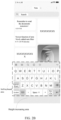
- FIG. 2B a soft keyboard area of a QWERTY keyboard is illustrated, and the user can implement an input operation based on buttons in the soft keyboard area.
- the height increasing area one of the purposes of setting the height increasing area is to increase the height of the soft keyboard area (may be referred to as the keyboard manipulation area of the input method) in the screen, so that when the user inputs content using the soft keyboard, the touch range of the finger and the grip feeling of the terminal device are made more comfortable and ergonomic.
- the height increasing area may be an extended area of the soft keyboard area or a separate area.
- the background of the height increasing area may be the same as or different from the background of the soft keyboard area.
- the transparency of the height increasing area can be a designated transparency. In some embodiments, the transparency of the height increasing area can be 100%, that is, the height increasing area is a transparent area so that the user can see the information in the next layer of window.
- the height increasing area may be a blank area. As shown in FIG. 2B , in the schematic diagram, the background of the height increasing area is the same as the background of the soft keyboard area, thereby achieving a uniform style with the original soft keyboard area.
- an input method application is newly designed.
- the target input method window includes a soft keyboard area and a height increasing area, and the height increasing area is at the bottom of the soft keyboard area. Therefore, an input method application with a raised soft keyboard area is designed to allow adjusting the manipulation area of the soft keyboard to a height suitable for operation, so that when the user inputs content, the touch range of the finger and the grip feeling of the terminal device are made more comfortable and ergonomic, thereby providing a comfortable input experience.
- one or more input method applications may be installed in the smart terminal, and the input method application to be started may be a system-level application or a third-party application, and it cannot be guaranteed that the input method that the user desires to start is the newly designed input method application.
- a system level scheme for increasing the height of the soft keyboard area of the input method is also provided. On the basis of the original input method window corresponding to the input method application, a height increasing area having a designated height is added at the bottom of the soft keyboard area to obtain a target input method window.
- a height increasing area having a designated height is added to the bottom of the soft keyboard area of the original input method window to form the target, and the layout of the original input method window corresponding to the input method application is changed, so as to use the adjusted layout information to display the target input method window.
- the layout information can be intercepted by the Hook mechanism to change the layout of the original input method window corresponding to the input method application.
- adding a height increasing area having a designated height to the bottom of the soft keyboard area of the original input method window to form the target, and changing the layout of the original input method window corresponding to the input method application includes:
- the application framework layer monitors that the window layout module is initializing the layout of the original input method window of the input method application, intercepting the layout information sent by the window layout module to the window display module through the Hook mechanism, and adjusting the layout information by adding a height increasing area having a designated height to the bottom of the soft keyboard area of the original input method window to form the target, and sending the adjusted layout information to the window display module, to display the target input method window in the changed layout.
- a target input method window including a height increasing area is displayed, so that when the user inputs content through the input method, the touch range of the finger and the grip feeling of the terminal device are made more comfortable and ergonomic, thereby providing a comfortable input experience. Also, various input method applications can be supported.
- the Hook mechanism in the application framework layer is used to change the layout of the current input method application from a system level perspective. Hook can be translated into hooks that can incorporate their own codes into the process of a hooked program and become part of the target process.
- the Hook mechanism can be used to intercept the layout information sent by the window layout module (such as the function module formed by the window layout function) to the window display module (such as the function module formed by the window display function), adjust the layout information by adding a height increasing area having a designated height to the bottom of the soft keyboard area of the original input method window to form the target, and send the adjusted layout information to the window display module, to display a target input method winding having a height increasing area.
- the window layout module such as the function module formed by the window layout function
- the window display module such as the function module formed by the window display function
- Examples of the present disclosure may be applied to various operating systems such as an Android system, an IOS system, and the like.
- the Android system may include an application layer and an application framework layer, and other layers will not be discussed in the present disclosure.
- the Framework in Android is a layer under the direct application and called the application framework layer.
- This layer is the API (Application Interface) framework used by the core application, provides various APIs for the application layer and provides various components and services to support Android development, including ActivityManager, WindowManager, and ViewSystem.
- the application corresponding to the input method needs to inherit the input method service InputMethodService, and the window layout function (such as initViews) in InputMethodService is used to initialize the input method layout when the input method is started.
- the window layout function such as initViews
- the Hook mechanism is used to add codes to the initViews method of the InputMethodService to modify the layout and thus a height increasing area is added.
- the codes added through the Hook mechanism can be executed in the process of the input method, thereby modifying the input method layout.
- the process of obtaining the height increasing area may include:
- the original input method layout includes a blank layout area (such as FullScreenArea) and a soft keyboard area (such as InputArea).
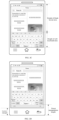
- FIG. 2C it is a schematic diagram illustrating a height of a blank layout area and a height of a soft keyboard area in the related art.
- the sum of the height of the blank layout area and the height of the soft keyboard area may be equal to the height of the screen, and the blank layout area does not affect the display and touch operations of the lower window by the user.
- the lower window is a window of an application (such as the note application in FIG. 2C ) that uses the input method application.
- the heights of the blank layout area and the soft keyboard area can be obtained and dynamically adjusted.
- the heights of the FullScreenArea and the InputArea can be reset according to the required height of the height increasing area, so that the height increasing area can be normally displayed.
- the designated height of the height increasing area may be preset, and the soft keyboard area of this height is suitable for manipulation by the user. Further, for different screen sizes, corresponding preset heights for comfort manipulation may be different.
- a mapping relationship between designated heights and screen sizes is determined in advance, and the designated height may be determined based on the screen size of the smart terminal. For example, a designated height for a terminal device having a relatively large screen size may be larger than a designated height for a terminal device having a relatively small screen size. In actual applications, the lower margins of different smart terminals may be different.
- the lower margins of the terminal device there are differences in the lower margins of the terminal device s between a full-screen terminal device and a non-full-screen terminal device.
- the lower margin of the terminal device is the distance between the lower edge of displaying area of the screen and the lower bezel of the body in the smart terminal.
- a correspondence between a type of the smart terminal and a designated height is pre-configured, and the designated height is determined based on the type of the smart terminal and the correspondence.
- the designated height may be determined based on the preset manipulation height and the lower margin of the terminal device.
- the preset manipulation height is a distance between the bottom of the preset soft keyboard area and the lower bezel of the device body, and the lower margin of the terminal device is a distance between the lower edge of displaying area of the screen and the lower bezel of the body in the smart terminal.
- FIG. 2D is a schematic diagram illustrating a preset manipulation height and a lower margin of a terminal device according to an example of the present disclosure. As shown in FIG. 2D , the schematic diagram illustrates the preset manipulation height and the lower margin of a terminal device.
- the preset manipulation height can be the same or different. In some embodiments, the preset manipulation height may be determined based on the body height/body size of the smart terminal. The lower margin of the terminal device can be determined according to the size of the body and the size of the screen.
- the height increasing area can be dynamically adjusted according to the lower margin of the terminal device.
- the height of the height increasing area on a terminal device with a smaller lower margin is relatively large; and the height of the height increasing area on a terminal device with a larger lower margin is relatively small. It is to ensure that the distance between the lower bezel of the terminal body and the input area of the input method is the same, to achieve a uniform style.
- different smart terminals may have different preset manipulation heights.
- codes can be added to the Hook mechanism to implement: calculating a height of the height increasing area to be displayed according to the lower margin of the terminal device, and after the height is calculated, determining the display space for the height increasing area by adjusting the height of the blank layout area (fullscreenArea) of the input method.
- the height increasing area includes a designated shortcut button set, and the designated shortcut button set includes one or more shortcut buttons, for example, shortcut buttons associated with the input.
- the designated shortcut button can be a shortcut control that provides designated functionality.
- the designated shortcut button may be a previously designated fixed shortcut button, or may be a shortcut button according to the frequency used by the user or set by the user.
- the designated shortcut button may include, but not limited to, a voice input button, a clipboard button, a common language button, an input method switching button, an input method setting button, and the like, in particular, a shortcut button for improving input efficiency.
- the number of designated shortcut buttons can be pre-configured.
- codes can be added to the Hook mechanism to implement: while adding the height increasing area, adding the designated shortcut button to the height increasing area, such as two buttons: an input method switching button and a clipboard button. After the input method switching button is clicked on, a window is popped out for the user to select the input method. After the clipboard button is clicked on, a window listing all or part of the contents of the user's clipboard is popped out for the user to select, paste, and input.
- the instruction to display the input method window can be obtained when the input area is triggered.
- the input area may be an area where data is to be input, and may include an input box, a text box, text to be edited, or the like.
- the target input method window can be displayed while the input area is in an input-able state. Whether the input area is in an input-able state can be triggered by a user operation. For example, the user triggers the input area to be input-able by clicking on the input area.
- the clicked position in the input area may be referred to as a target position or a focus position, and the clicked position may be a position where the cursor is located, and the user is prompted to locate the target position/focus position by displaying the cursor.
- the target position/focus position may be the position at which data is to be input.
- a floating window containing data to be pasted may be displayed at a designated position of the target input method window, and the data to be pasted is data newly added to the clipboard.
- the paste instruction is triggered based on the operation of the floating window, the paste instruction is responded to.
- a condition for displaying the floating window may be further defined.
- the condition for displaying the floating window further includes that a copy operation and/or a cut operation has been performed before the target input method window is displayed, which can be specifically configured as desired.
- the clipboard is used to temporarily store copied data and/or cut data, which can be called a data transfer station, a temporary storage area or a temporary storage database.
- the clipboard temporarily stores at least the lastly copied data and/or the lastly cut data, that is, the data newly added to the clipboard, and the data can be referred to as data to be pasted.
- the data to be pasted is displayed in a floating window to remind the user that the paste operation can be implemented based on the floating window.
- the floating window can display all or part of the data to be pasted, and can be configured as desired. For example, all or part of the data to be pasted is displayed by default. For example, all or part of the data to be pasted is displayed as set by the user. Whether all or part of the data to be pasted is displayed in the floating window can also be determined by the amount of data to be pasted and the size of the floating window.
- the floating window can be on the interface where the input area is located.
- FIG. 3A it is a schematic diagram of a pasting process in the related art.
- the examples of the present disclosure provide a solution that can reduce the number of pasting steps and allow repeated pasting.
- the present disclosure may be pre-configured with a repeated paste state, and further, may be configured with a single paste state.
- the current paste state is the repeated paste state
- the data to be pasted is pasted into the input area by triggering the floating window, which can reduce the number of pasting steps and improve the pasting efficiency.
- the data to be pasted can be repeatedly pasted by retaining the display of the floating window.
- the repeated paste state is a state in which the same data to be pasted is allowed to repeatedly paste.
- the same content can be pasted for multiple times, which can simplify the repeated pasting steps without repeatedly performing copy and paste by the user.
- a condition for closing the floating window may also be set, and the floating window is closed when the preset closing condition is satisfied.
- the preset closing condition may include triggering a close instruction based on an operation on the floating window when the current paste state is the repeated paste state.
- the preset closing condition may include: when the current paste state is the repeated paste state, a preset delay time period from the data to be pasted which is pasted to the input area is expired. It should be understood that the above-mentioned preset closing conditions are merely examples, and should not be construed as any limitations of the present disclosure. Other existing or future active triggering or delay triggering conditions for closing the floating window may be applied to the present disclosure and thus are included in the scope of protection of the present disclosure.
- the single paste state may be referred to as a close-after-paste state
- the repeated paste state may include a delayed-close-after-paste state and a retain-after-paste state.
- the same content is only allowed to be pasted once, and then the floating window is closed.
- the pre-configured paste state includes one or more of the following: a close-after-paste state, a delayed-close-after-paste state and a retain-after-paste state.
- the response paste instruction may include:
- the paste instruction can be triggered multiple times during the display of the floating window.
- the floating window may be closed through a close control on the floating window, or the floating window may be closed when the target input method window is closed.
- the floating window can include a close control, and a close instruction is triggered by clicking on the close control.
- the close control can be an "X" control, and the "X" control can be clicked to close the floating window.
- the floating windows can be the same or different in different paste states.
- the floating window in order to distinguish, in the close-after-paste state, the floating window is referred to as a first floating window (or single pasting floating window); in a delayed-close-after-paste state, the floating window is referred to as a second floating window; and in the retain-after-paste state, the floating window is referred to as a third floating window.
- the first floating window, the second floating window, and the third floating window may be the same or may be different.
- the different floating windows are used to remind the user that the current paste state is the close-after-paste state, the delayed-close-after-paste state or the retain-after-paste state.
- the first floating window and the third floating window may be set to be different.
- the first floating window does not include a close control
- the third floating window includes a close control.
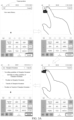
- FIG. 3B it is a schematic diagram showing a comparison of a first floating window and a third floating window according to some embodiments of the present disclosure. The user can distinguish whether the current paste state is the close-after-paste state or the retain-after-past state by determining whether there is a close control (such as the "X" control).
- Examples of the present disclosure also provide a paste-state setting service.
- the paste-state setting service can be implemented by a paste-state setting interface under a designated path.
- the corresponding paste-state setting interface can be found according to the designated path, and the current paste state is set based on the paste-state setting interface.
- the method further includes: performing switching operation between paste states when a designated sliding event is detected based on the interface where the target input method window is located. For example, when the paste state includes a single paste state and a repeated paste state, in a case that the designated sliding event is detected, if the current paste state is a single paste state, the single paste state is switched to the repeated paste state; and if the current paste state is the repeated paste state, the repeated paste state is switched to a single paste state.
- the current paste state can be switched to the next paste state in a preset order when the designated sliding event is detected.
- the sliding event can be an event that slides on a designated trajectory.
- the event that slides on a designated trajectory may be sliding to the left, sliding to the right, drawing a designated figure, and the like.
- switching between paste states is implemented, thereby realizing fast switching.
- the method further includes: switching to a designated paste state when a designated sliding event is detected based on the interface where the input area is located.
- the current paste state can be directly switched to the designated paste state, so as to achieve fast switching to the designated paste state.
- the designated paste state may be a single paste state or a repeated paste state, or may be a close-after-paste state, a delayed-close-paste state, or a retain-after-paste state, which may be set by the user.
- the data to be pasted is automatically pasted, and the user does not need to manually perform paste, thereby further improving the paste efficiency.
- the designated position may be a pre-configured position suitable for displaying the floating window.
- the designated position may be a position associated with a cursor position in the input area.
- the designated position may be a position adjacent to the cursor position in the input area so that the user can quickly paste the data by clicking on the floating window.
- FIG. 3C in the schematic diagram, after the user copies the data to be pasted in other positions (assumed to be "chi mei wang liang"), the user can enter the Baidu application homepage, and click the input box to make the input box in an input-able state.
- the floating window can be displayed at a position adjacent to the position where the cursor of the input box is located, and the floating window contains data to be pasted to remind the user that the data to be pasted can be pasted.
- the user can click on the floating window to paste the data to be pasted ("chi mei wang liang") into the input box.
- the designated position is a position associated with an input method keyboard.
- the position associated with an input method keyboard may be a position adjacent to the input method keyboard, or may be on an input method keyboard or the like.
- the input method application may be a software in which one or more input modes such as voice, handwriting, pinyin, strokes, and double spelling are integrated.
- the input method keyboard can be a soft keyboard provided by the input method application for the user to input data.
- the input method keyboard may include a keyboard of various input modes such as Pinyin 9 key, Pinyin 26 key, Wubi 9 key, Wubi 26 key, stroke keyboard, handwriting keyboard, voice keyboard, and the like.
- the floating window is displayed in the area directly adjacent to the input method keyboard, or in the case of displaying the input method keyboard, the clipboard shortcut control is displayed in the area associated with the input method keyboard, the designated position is the position adjacent to the clipboard shortcut control, and the floating window is displayed near the clipboard shortcut control.
- displaying the clipboard shortcut control in an area adjacent to the input method keyboard can realize the visualization of the clipboard.
- the floating window is displayed near the clipboard shortcut control. Since the floating window remains displayed after the paste instruction is triggered in the repeated paste state, displaying the floating window near the clipboard shortcut control can avoid interference to inputting other data by the user, compared with a case that the floating window is always displayed near the input area.
- the input method is one of the most commonly used tools for users when using smart terminals. Using input methods to type text content is the most common operation for users.
- the input method designed in above examples is aimed to reduce false touch in typing on the mobile phone, and is ergonomic, so that the grip feeling and the touch feeling in typing are more comfortable.
- the height increasing area is arranged under the input method keyboard to raise the soft keyboard area to a proper height.
- a clipboard shortcut control is arranged in the height increasing area.
- other controls can be arranged as desired, such as, one or more designated shortcut buttons selected from a voice input button, a common language button, an input method switching button, an input method setting button, and the like.
- the height increasing area includes a clipboard shortcut control
- the designated position is a position adjacent to the clipboard shortcut control.
- the data to be pasted can be displayed near the clipboard shortcut control in the height increasing area.
- it not only can raise the soft keyboard area to a proper height to make more comfortable grip feeling and touch feeling for the user in typing, but also can avoid interference to the user caused by not exiting from the floating window.
- codes can be added to the Hook mechanism to further implement: while adding the height increasing area, adding a clipboard shortcut control in the height increasing area.
- An instruction to display the input method window is acquired, a target input method window is displayed and a floating window containing data to be pasted is displayed at a designated position of the target input method window. Further, upon clicking on the clipboard, a window can be popped out to list all or part of the contents of the user's clipboard, for the user to select and paste the input. It can be understood that other shortcut controls related to the input can be added to the height increasing area.
- the target input method window When the target input method window is displayed, if the terminal device is currently in the paste state, for example, there is copied data and/or cut data currently, a floating window containing data to be pasted is displayed at a position adjacent to the clipboard shortcut control, and the user can trigger a paste instruction by operating on the floating window, thereby to paste the data to be pasted into the input area, which can reduce the number of paste operation steps, improve the paste efficiency, and at the same time, the data to be pasted is repeatedly pasted or single pasted by retaining or not retaining the display of the floating window in different past states.
- the clipboard not only temporarily stores the newly added data, but also temporarily stores the data added in history.
- the validity period of the data in the clipboard can be configured as desired. For example, the data in the clipboard is deleted after the temporary storage time reaches the designated time. For example, after restarting the operating system, all data of the clipboard cache is cleared off. For example, only a preset number of data is allowed to be temporarily stored in the clipboard. The user may have a need to paste previously copied data.
- the method further includes: when the clipboard shortcut control is triggered, displaying multiple pieces of data cached in the clipboard in chronological order of the data being added to the clipboard.
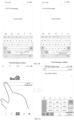
- FIG. 3D it is a schematic diagram of an interface after a clipboard shortcut control is triggered according to some embodiments of the present disclosure.
- the content displayed upon clicking on the clipboard shortcut control is illustrated, and the data copied in history can be sorted according to the copy time. The user can click on one piece of the data copied in history to quickly paste the copied content.
- the user can click on the clipboard shortcut control to display multiple piece of data cached in the clipboard at a position adjacent to the clipboard shortcut control, and data copied in history can be quickly pasted by selecting a piece of data for paste.
- the designated position can also be other positions.
- the floating window can be displayed in the middle or other position of the screen to remind the user to paste, and so on, which will not be elaborated one by one herein.
- the data may be data newly added to the clipboard, that is, data added to the clipboard most recently from the current time, and the data of the last copy operation and/or cut operation, which may be defined as copied data in a generalized concept.
- the data recently added to the clipboard is the data that the user desires to paste.
- the data to be pasted may be data of a type such as text data, links, pictures, and the like.
- the paste instruction when it is detected that the data to be pasted is plain text data or non-link data, the paste instruction is triggered by clicking on the floating window, so as to implement a case in which upon clicking on the floating window, a paste instruction may be triggered, and the data to be pasted is pasted to the input area.
- the plain data refers to that all of the data to be pasted is text.
- a link cannot be directly opened.
- a link cannot be opened in a note.
- the link has to be copied to a browser to access the link, and the operation steps are cumbersome.
- the method further includes: when the data to be pasted is link data, and an access instruction is triggered based on operation on the floating window, displaying the page indicated by the data of the link.
- the user can operate on the floating window to trigger an access instruction, thereby enabling quick access to the page indicated by the link, and avoiding the defect that in some applications, it is inefficient in accessing a webpage since the link cannot be directly opened.
- the access instruction in some embodiments, can be triggered by the user clicking on the floating window. This example achieves quick access to the page indicated by the link by directly clicking on the floating window.
- the floating window includes an access control, and an access instruction is triggered by the user clicking on the access control on the floating window.
- the paste instruction in some embodiments, the user can click positions on the floating window other than the access control to trigger the paste instruction.
- the floating window further includes a paste control
- the paste instruction is triggered by the user clicking on the paste control in the floating window.
- Non-plain link refers to that the data to be pasted includes a link and text.
- Plain link refers to that all of the data to be pasted is a link.
- FIG. 3E in the left figure, when the data to be pasted is a plain link, an icon of scissors is used to represent the clipboard shortcut control.
- an icon of paste is used to indicate the clipboard shortcut control.
- Different icons can be used to distinguish the operations that may be triggered by clicking on the floating window.
- the page corresponding to the link is directly accessed, for example, the page corresponding to the link is opened by a designated application.
- the floating window in the right figure is clicked, the data to be pasted is copied to the input area of the current interface.
- a repeated paste mode and a single paste mode are pre-configured.
- the repeated paste state may be a state in the repeated paste mode
- the single paste state may be a state in the single paste mode.
- the method can include the following steps.
- a target input method window is displayed.
- the target input method window includes a soft keyboard area and a height increasing area, and the height increasing area is located at the bottom of the soft keyboard area, and is configured to raise the soft keyboard area.
- the current paste mode is determined.
- the repeated paste mode may include a delayed-close-after-paste sub-mode and/or a retain-after-paste sub-mode, and the following is illustrated by the repeated paste mode being the retain-after-paste sub-mode as an example.
- a repeated-paste floating window containing data to be pasted is displayed at a position adjacent to a clipboard shortcut control.
- the data to be pasted is data newly added to the clipboard; and the clipboard shortcut control is displayed in the height increasing area.
- Triggering a paste instruction based on an operation on the repeated-paste floating window may include detecting a paste instruction being triggered based on the repeated-paste floating window.
- Triggering a close instruction based on an operation on the repeated-paste floating window may include detecting a close instruction being triggered based on the repeated-paste floating window.
- a single-paste floating window containing data to be pasted is displayed at a position adjacent to the clipboard shortcut control.
- Triggering a paste instruction based on an operation on the repeated-paste floating window may include detecting a paste instruction being triggered based on the single-paste floating window.
- the copied content in the single paste mode, the copied content is closed after clicking paste.
- the repeated paste mode the copied content is retained after clicking paste.
- the repeated-paste floating window and single-paste floating window can be displayed in the form of bubbles.
- the repeated-paste floating window or single-paste floating window is clicked to directly paste the content into the input area, such as input focus area.
- the repeated-paste floating window or single-paste floating window is clicked to directly open the web page corresponding to the link.
- the user After copying the content in one place, the user enters the page to which the content is to be pasted, and the input method keyboard is invoked. A bubble appears automatically above the clipboard function control in the blank area at the bottom of the input method keyboard. The content just being copied is in the bubble. The copied content will be pasted into the input focus area when being clicked on. If the user sets "click to paste and close the copied content" (single paste), the bubble disappears; and if the user sets "click to paste and then retain the content” (repeated paste), the bubble does not disappear. The user clicks on the close button on the bubble and the bubble disappears. If in the bubble is content of a link, after the bubble is clicked on, a browser will be directly opened to access the page pointed by the link
- a database can also be used to record the contents of the clipboard. By monitoring whether the contents of the clipboard are changed in the system, when new content is added into the clipboard, the content is written into the database, thereby realizing the ability of storing multiple pieces of copied records. When there is a need to view the copied data in history, the data can be viewed by clicking on the clipboard shortcut control.
- the copied content can be quickly pasted with only one step, the process is extremely short, and very convenient.
- the copied content can be repeatedly pasted, which is quick and easy.
- the copied link address can be quickly accessed with only one step, which is quick and convenient.
- the present disclosure also provides an example of an apparatus of processing data, a device to which the apparatus is applied, and a storage medium.
- the apparatus includes a window display module 52 and a data pasting module 54.
- the window display module 52 is configured to, in response to acquiring an instruction to display an input method window, display a target input method window, and display a floating window containing data to be pasted at a designated position of the target input method window; wherein the target input method window includes a soft keyboard area and a height increasing area, the height increasing area is located at the bottom of the soft keyboard area, and is configured to raise the soft keyboard area; the data to be pasted is data newly added to the clipboard; and
- the data pasting module 54 is configured to, when a paste instruction is triggered based on an operation on the floating window, respond to the paste instruction.
- the pre-configured paste state includes one or more of the following: a close-after-paste state, a delayed close-after-paste state, and a retain-after-paste state.
- Responding to the paste instruction includes one or more of the following situations:
- the paste instruction can be triggered for multiple times during the display of the floating window.
- the apparatus further includes a state switching module configured to, when a designated sliding event is detected based on an interface where the target input method window is located, perform a switching operation between the paste states or switch to a designated paste state.
- the apparatus further includes a page access module configured to, when the data to be pasted is link data, and an access instruction is triggered based on an operation on the floating window, display a page indicated by the link data.
- the access instruction is triggered by a user clicking the floating window.
- the access instruction is triggered by a user clicking an access control on the floating window, and the paste instruction is triggered by a user clicking on a paste control on the floating window.
- the height increasing area includes a clipboard shortcut control therein, and the designated position is a position adjacent to the clipboard shortcut control.
- the window display module 52 is further configured to when the clipboard shortcut is triggered, display multiple pieces of data cached in a clipboard in chronological order of the data being added to the clipboard.
- the target input method window is an input method window corresponding to an input method application, or the target input method window is based on and acquired by adding a height increasing area having a designated height to the bottom of the soft keyboard area of an original input method window to form a target, and changing a layout of the original input method window corresponding to the input method application.
- the apparatus further includes a layout changing module configured to when an application framework layer monitors that a window layout module is initializing the layout of the original input method window of the input method application, intercept layout information sent by the window layout module to a window display module through a Hook mechanism, and adjust the layout information by adding a height increasing area having the designated height to the bottom of the soft keyboard area of the original input method window to form the target, and send the adjusted layout information to the window display module, to display the target input method window in the changed layout.
- a layout changing module configured to when an application framework layer monitors that a window layout module is initializing the layout of the original input method window of the input method application, intercept layout information sent by the window layout module to a window display module through a Hook mechanism, and adjust the layout information by adding a height increasing area having the designated height to the bottom of the soft keyboard area of the original input method window to form the target, and send the adjusted layout information to the window display module, to display the target input method window in the changed layout.
- the apparatus is applied to a smart terminal, and the designated height is determined based on a preset manipulation height and a lower margin of the terminal device, wherein the preset manipulation height is a preset distance between the bottom of the soft keyboard area and a lower bezel of the body, and the lower margin of the terminal device is a distance between the lower edge of displaying area of the screen and the lower bezel of the body in the smart terminal device.
- the present disclosure also provides an electronic device.
- the device includes a processor; and a memory storing processor-executable instructions; wherein the processor is configured to perform the steps of the method of any of the above.
- the present disclosure also provides a computer readable storage medium storing a computer program that, when executing the computer program, a processor is caused to perform the steps of any of the methods described above.
- the present disclosure may take the form of a computer program product embodied on one or more storage media (including but not limited to disk storage, CD-ROM, optical storage, etc.) in which program codes are embodied.
- the computer-usable storage medium includes both transitory and non-transitory, removable and non-removable media, and information storage can be implemented by any method or technology.
- the information can be computer readable instructions, data structures, modules of programs, or other data.
- Examples of computer storage medium include, but not limited to, a phase change memory (PRAM), a static random access memory (SRAM), a dynamic random access memory (DRAM), other type of random access memory (RAM), a read only memory (ROM), an electrically erasable programmable read only memory (EEPROM), a flash memory or other memory technology, a compact disk read only memory (CD-ROM), a digital versatile disk (DVD) or other optical storage, a magnetic tape cartridge, a magnetic tape storage or other magnetic storage device or any other non-transportable media that can be used to store information that can be accessed by a computing device.
- PRAM phase change memory
- SRAM static random access memory
- DRAM dynamic random access memory
- RAM random access memory
- ROM read only memory
- EEPROM electrically erasable programmable read only memory
- flash memory or other memory technology
- CD-ROM compact disk read only memory
- DVD digital versatile disk
- magnetic tape cartridge a magnetic tape storage or other magnetic storage device or any other non-transportable media that can
- circuits, device components, modules, units, blocks, or portions may have modular configurations, or are composed of discrete components, but nonetheless can be referred to as "units,” “modules,” or “portions” in general.
- the "circuits,” “components,” “modules,” “blocks,” “portions,” or “units” referred to herein may or may not be in modular forms.
- the device example since it basically corresponds to the method example, reference may be made to the partial description of the method example.
- the device examples described above are merely illustrative, wherein the modules described as separate components may or may not be physically separate, and the components displayed as modules may or may not be physical modules, that is, may be located at one place, or can be distributed to multiple network modules. Some or all of the modules may be selected according to actual needs to achieve the objectives of the present disclosure. It can be understood and implemented by those of ordinary skill in the art without any creative effort.
- the apparatus 600 may include a terminal device such as a mobile phone, a computer, a digital broadcast terminal, a messaging device, a game console, a tablet device, a medical device, a fitness device, a personal digital assistant, and the like.
- a terminal device such as a mobile phone, a computer, a digital broadcast terminal, a messaging device, a game console, a tablet device, a medical device, a fitness device, a personal digital assistant, and the like.
- the apparatus 600 may include one or more of the following components: a processing component 602, a memory 604, a power supply component 606, a multimedia component 608, an audio component 610, an input/output (I/O) interface 612, a sensor component 614, and a communication component 616.
- the processing component 602 generally controls overall operations of the apparatus 600, such as operations associated with display, phone calls, data communications, camera operations, and recording operations.
- the processing component 602 may include one or more processors 609 to execute instructions to complete all or part of the steps of the above methods.
- the processing component 602 may include one or more modules which facilitate the interaction between the processing component 602 and other components.
- the processing component 602 may include a multimedia module to facilitate the interaction between the multimedia component 608 and the processing component 602.
- the memory 604 is to store various types of data to support the operation on the apparatus 600. Examples of such data include instructions for any application or method operated on the apparatus 600, contact data, telephone directory data, messages, pictures, video and so on.
- the memory 604 may be implemented by any type of volatile or non-volatile storage devices or a combination thereof, such as a Static Random Access Memory (SRAM), an Electrically Erasable Programmable Read-Only Memory (EEPROM), an Erasable Programmable Read-Only Memory (EPROM), a Programmable Read-Only Memory (PROM), a Read-Only Memory (ROM), a magnetic memory, a flash memory, a magnetic or compact disk.
- SRAM Static Random Access Memory
- EEPROM Electrically Erasable Programmable Read-Only Memory
- EPROM Erasable Programmable Read-Only Memory
- PROM Programmable Read-Only Memory
- ROM Read-Only Memory
- the power supply component 606 supplies power for different components of the apparatus 600.
- the power supply component 606 may include a power supply management system, one or more power supplies, and other association components for generating, managing and distributing power for the apparatus 600.
- the multimedia component 608 includes a screen providing an output interface between the apparatus 600 and a user.
- the screen may include a Liquid Crystal Display (LCD) and a Touch Panel (TP).
- LCD Liquid Crystal Display
- TP Touch Panel
- OLED organic light-emitting diode
- the screen may be implemented as a touch screen to receive input signals from the user.
- the TP may include one or more touch sensors to sense touches, swipes, and gestures on the TP.
- the touch sensors may not only sense a boundary of a touch or swipe, but also sense a duration and a pressure associated with the touch or swipe.
- the multimedia component 608 may include a front camera and/or a rear camera.
- the front camera and/or rear camera may receive external multimedia data when the apparatus 600 is in an operable mode, such as a photographing mode or a video mode.
- Each of the front camera and the rear camera may be a fixed optical lens system or have focal length and optical zooming capability.
- the audio component 610 is to output and/or input an audio signal.
- the audio component 610 includes a microphone (MIC).
- the microphone When the apparatus 600 is in an operable mode, such as a call mode, a record mode and a voice recognition mode, the microphone is to receive an external audio signal.
- the received audio signal may be further stored in the memory 604 or sent via the communication component 616.
- the audio component 610 further includes a speaker for outputting an audio signal.
- the I/O interface 612 provides an interface between the processing component 602 and a peripheral interface module.
- the above peripheral interface module may include a keyboard, a click wheel, buttons, or the like. These buttons may include but not limited to, a home button, a volume button, a start button and a lock button.
- the sensor component 614 includes one or more sensors to provide status assessments of various aspects for the apparatus 600.
- the sensor component 614 may detect the on/off status of the apparatus 600, and relative positioning of component, for example, the component is a display and a keypad of the apparatus 600.
- the sensor component 614 may also detect a change in position of the apparatus 600 or a component of the apparatus 600, a presence or absence of the contact between a user and the apparatus 600, an orientation or an acceleration/deceleration of the apparatus 600, and a change in temperature of the apparatus 600.
- the sensor component 614 may include a proximity sensor to detect the presence of a nearby object without any physical contact.
- the sensor component 614 may further include an optical sensor, such as a Complementary Metal-Oxide-Semiconductor (CMOS) or Charged Coupled Device (CCD) image sensor which is used in imaging applications.
- CMOS Complementary Metal-Oxide-Semiconductor
- CCD Charged Coupled Device
- the sensor component 614 may further include an acceleration sensor, a gyroscope sensor, a magnetic sensor, a pressure sensor, or a temperature sensor.
- the communication component 616 is to facilitate wired or wireless communication between the apparatus 600 and other devices.
- the apparatus 600 may access a wireless network based on a communication standard, such as Wi-Fi, 2G or 3G, 4G, 5G or a combination thereof.
- the communication component 616 receives a broadcast signal or broadcast related information from an external broadcast management system via a broadcast channel.
- the communication component 616 may further include a Near Field Communication (NFC) module for promoting short-range communication.
- the NFC module may be implemented based on a radio frequency identification (RFID) technology, an infrared data association (IrDA) technology, an ultra-wideband (UWB) technology, a Bluetooth ® (BT) technology and other technologies.
- RFID radio frequency identification
- IrDA infrared data association
- UWB ultra-wideband
- BT Bluetooth ®
- the apparatus 600 may be implemented by one or more Application Specific Integrated Circuits (ASICs), Digital Signal Processors (DSPs), Digital Signal Processing Devices (DSPDs), programmable Logic Devices (PLDs), Field Programmable Gate Arrays (FPGAs), controllers, microcontrollers, microprocessors, or other electronic components for performing the method as described above.
- ASICs Application Specific Integrated Circuits
- DSPs Digital Signal Processors
- DSPDs Digital Signal Processing Devices
- PLDs programmable Logic Devices
- FPGAs Field Programmable Gate Arrays
- controllers microcontrollers, microprocessors, or other electronic components for performing the method as described above.
- non-transitory computer readable storage medium including instructions, such as the memory 604 including instructions.
- the above instructions may be executed by the processor 620 of the apparatus 600 to complete the above method.
- the non-transitory computer readable storage medium may be a Read-Only Memory (ROM), a Random-Access Memory (RAM), a CD-ROM, a magnetic tape, a floppy disk, an optical data storage device, and so on.
- the apparatus 600 When instructions in the storage medium are executed by the processor, the apparatus 600 is caused to perform any of the methods of processing data described above.
- modules/units can each be implemented by hardware, or software, or a combination of hardware and software.
- modules/units may be combined as one module/unit, and each of the above described modules/units may be further divided into a plurality of sub-modules/sub-units.
- first and second are used for descriptive purposes only and are not to be construed as indicating or implying a relative importance or implicitly indicating the number of technical features indicated.
- elements referred to as “first” and “second” may include one or more of the features either explicitly or implicitly.
- a plurality indicates two or more unless specifically defined otherwise.
- the terms “installed,” “connected,” “coupled,” “fixed” and the like shall be understood broadly, and may be either a fixed connection or a detachable connection, or integrated, unless otherwise explicitly defined. These terms can refer to mechanical or electrical connections, or both. Such connections can be direct connections or indirect connections through an intermediate medium. These terms can also refer to the internal connections or the interactions between elements The specific meanings of the above terms in the present disclosure can be understood by those of ordinary skill in the art on a case-by-case basis.
- a first element being "on,” “over,” or “below” a second element may indicate direct contact between the first and second elements, without contact, or indirect through an intermediate medium, unless otherwise explicitly stated and defined.
- a first element being "above,” “over,” or “at an upper surface of” a second element may indicate that the first element is directly above the second element, or merely that the first element is at a level higher than the second element.
- the first element “below,” “underneath,” or “at a lower surface of” the second element may indicate that the first element is directly below the second element, or merely that the first element is at a level lower than the second feature.
- the first and second elements may or may not be in contact with each other.
- the terms “one embodiment,” “some embodiments,” “example,” “specific example,” or “some examples,” and the like may indicate a specific feature described in connection with the embodiment or example, a structure, a material or feature included in at least one embodiment or example.
- the schematic representation of the above terms is not necessarily directed to the same embodiment or example.
- control and/or interface software or app can be provided in a form of a non-transitory computer-readable storage medium having instructions stored thereon is further provided.
- the non-transitory computer-readable storage medium may be a Read-Only Memory (ROM), a Random-Access Memory (RAM), a Compact Disc Read-Only Memory (CD-ROM), a magnetic tape, a floppy disk, optical data storage equipment, a flash drive such as a USB drive or an SD card, and the like.
- Implementations of the subject matter and the operations described in this disclosure can be implemented in digital electronic circuitry, or in computer software, firmware, or hardware, including the structures disclosed herein and their structural equivalents, or in combinations of one or more of them. Implementations of the subject matter described in this disclosure can be implemented as one or more computer programs, i.e., one or more modules of computer program instructions, encoded on one or more computer storage medium for execution by, or to control the operation of, data processing apparatus.
- the program instructions can be encoded on an artificially-generated propagated signal, e.g., a machine-generated electrical, optical, or electromagnetic signal, that is generated to encode information for transmission to suitable receiver apparatus for execution by a data processing apparatus.
- an artificially-generated propagated signal e.g., a machine-generated electrical, optical, or electromagnetic signal
- a computer storage medium can be, or be included in, a computer-readable storage device, a computer-readable storage substrate, a random or serial access memory array or device, or a combination of one or more of them.
- a computer storage medium is not a propagated signal
- a computer storage medium can be a source or destination of computer program instructions encoded in an artificially-generated propagated signal.
- the computer storage medium can also be, or be included in, one or more separate components or media (e.g., multiple CDs, disks, drives, or other storage devices). Accordingly, the computer storage medium may be tangible.
- the operations described in this disclosure can be implemented as operations performed by a data processing apparatus on data stored on one or more computer-readable storage devices or received from other sources.
- the devices in this disclosure can include special purpose logic circuitry, e.g., an FPGA (field-programmable gate array), or an ASIC (application-specific integrated circuit).
- the device can also include, in addition to hardware, code that creates an execution environment for the computer program in question, e.g., code that constitutes processor firmware, a protocol stack, a database management system, an operating system, a cross-platform runtime environment, a virtual machine, or a combination of one or more of them.
- the devices and execution environment can realize various different computing model infrastructures, such as web services, distributed computing, and grid computing infrastructures.
- the devices can be controlled remotely through the Internet, on a smart phone, a tablet computer or other types of computers, with a web-based graphic user interface (GUI).
- GUI graphic user interface
- a computer program (also known as a program, software, software application, app, script, or code) can be written in any form of programming language, including compiled or interpreted languages, declarative or procedural languages, and it can be deployed in any form, including as a stand-alone program or as a module, component, subroutine, object, or other unit suitable for use in a computing environment.
- a computer program may, but need not, correspond to a file in a file system.
- a program can be stored in a portion of a file that holds other programs or data (e.g., one or more scripts stored in a mark-up language document), in a single file dedicated to the program in question, or in multiple coordinated files (e.g., files that store one or more modules, sub-programs, or portions of code).
- a computer program can be deployed to be executed on one computer or on multiple computers that are located at one site or distributed across multiple sites and interconnected by a communication network.
- the processes and logic flows described in this disclosure can be performed by one or more programmable processors executing one or more computer programs to perform actions by operating on input data and generating output.
- the processes and logic flows can also be performed by, and apparatus can also be implemented as, special purpose logic circuitry, e.g., an FPGA, or an ASIC.
- processors or processing circuits suitable for the execution of a computer program include, by way of example, both general and special purpose microprocessors, and any one or more processors of any kind of digital computer.
- a processor will receive instructions and data from a read-only memory, or a random-access memory, or both.
- Elements of a computer can include a processor configured to perform actions in accordance with instructions and one or more memory devices for storing instructions and data.
- a computer will also include, or be operatively coupled to receive data from or transfer data to, or both, one or more mass storage devices for storing data, e.g., magnetic, magneto-optical disks, or optical disks.
- mass storage devices for storing data
- a computer need not have such devices.
- a computer can be embedded in another device, e.g., a mobile telephone, a personal digital assistant (PDA), a mobile audio or video player, a game console, a Global Positioning System (GPS) receiver, or a portable storage device (e.g., a universal serial bus (USB) flash drive), to name just a few.
- PDA personal digital assistant
- GPS Global Positioning System
- USB universal serial bus
- Devices suitable for storing computer program instructions and data include all forms of non-volatile memory, media and memory devices, including by way of example semiconductor memory devices, e.g., EPROM, EEPROM, and flash memory devices; magnetic disks, e.g., internal hard disks or removable disks; magneto-optical disks; and CD-ROM and DVD-ROM disks.
- semiconductor memory devices e.g., EPROM, EEPROM, and flash memory devices
- magnetic disks e.g., internal hard disks or removable disks
- magneto-optical disks e.g., CD-ROM and DVD-ROM disks.
- the processor and the memory can be supplemented by, or incorporated in, special purpose logic circuitry.
- implementations of the subject matter described in this specification can be implemented with a computer and/or a display device, e.g., a VR/AR device, a head-mount display (HMD) device, a head-up display (HUD) device, smart eyewear (e.g., glasses), a CRT (cathode-ray tube), LCD (liquid-crystal display), OLED (organic light emitting diode) display, other flexible configuration, or any other monitor for displaying information to the user and a keyboard, a pointing device, e.g., a mouse, trackball, etc., or a touch screen, touch pad, etc., by which the user can provide input to the computer.
- a display device e.g., a VR/AR device, a head-mount display (HMD) device, a head-up display (HUD) device, smart eyewear (e.g., glasses), a CRT (cathode-ray tube), LCD (liquid-crystal display), OLED (organ
- feedback provided to the user can be any form of sensory feedback, e.g., visual feedback, auditory feedback, or tactile feedback; and input from the user can be received in any form, including acoustic, speech, or tactile input.
- a user can speak commands to the audio processing device, to perform various operations.
- Implementations of the subject matter described in this specification can be implemented in a computing system that includes a back-end component, e.g., as a data server, or that includes a middleware component, e.g., an application server, or that includes a front-end component, e.g., a client computer having a graphical user interface or a Web browser through which a user can interact with an implementation of the subject matter described in this specification, or any combination of one or more such back-end, middleware, or front-end components.
- the components of the system can be interconnected by any form or medium of digital data communication, e.g., a communication network.
- Examples of communication networks include a local area network (“LAN”) and a wide area network (“WAN”), an inter-network (e.g., the Internet), and peer-to-peer networks (e.g., ad hoc peer-to-peer networks).
- LAN local area network
- WAN wide area network
- inter-network e.g., the Internet
- peer-to-peer networks e.g., ad hoc peer-to-peer networks.
Landscapes
- Engineering & Computer Science (AREA)
- Theoretical Computer Science (AREA)
- General Engineering & Computer Science (AREA)
- Physics & Mathematics (AREA)
- General Physics & Mathematics (AREA)
- Human Computer Interaction (AREA)
- Software Systems (AREA)
- User Interface Of Digital Computer (AREA)
- Input From Keyboards Or The Like (AREA)
Claims (10)
- Verfahren zur Datenverarbeitung, wobei das Verfahren auf ein intelligentes Endgerät angewendet wird und Folgendes umfasst:als Reaktion auf das Erfassen einer Anweisung, ein Eingabemethodenfenster anzuzeigen, Bestimmen einer voreingestellten Manipulationshöhe und eines unteren Rands des intelligenten Endgeräts, wobei die voreingestellte Manipulationshöhe des intelligenten Endgeräts ein voreingestellter Abstand zwischen einem Boden eines weichen Tastaturbereichs und einer unteren Einfassung eines Gehäuses des intelligenten Endgeräts ist, und der untere Rand des intelligenten Endgeräts ein Abstand zwischen einer unteren Kante eines Anzeigebereichs eines Bildschirms des intelligenten Endgeräts und der unteren Einfassung des Gehäuses in dem intelligenten Endgerät ist;Bestimmen einer bestimmten Höhe eines höhenvergrößernden Bereichs auf der Grundlage der voreingestellten Manipulationshöhe und des unteren Rands des intelligenten Terminals;Hinzufügen, durch Ändern eines Layouts eines ursprünglichen Eingabemethodenfensters einer Eingabemethodenanwendung, des höhenvergrößernden Bereichs mit der bezeichneten Höhe zum Boden des weichen Tastaturbereichs des ursprünglichen Eingabemethodenfensters, um ein Zieleingabemethodenfenster zu erhalten, und Anzeigen des Zieleingabemethodenfensters basierend auf der bezeichneten Höhe, wobei das Zieleingabemethodenfenster den weichen Tastaturbereich und den höhenvergrößernden Bereich umfasst und der höhenvergrößernde Bereich an einem Boden des weichen Tastaturbereichs angeordnet ist und konfiguriert ist, um den weichen Tastaturbereich anzuheben;Anzeigen (204) eines schwebenden Fensters, das Daten enthält, die an einer bestimmten Position des Zieleingabeverfahrensfensters eingefügt werden sollen, wobei die einzufügenden Daten Daten sind, die neu zu einer Zwischenablage hinzugefügt wurden; undwenn ein Einfügebefehl auf der Grundlage einer Operation am schwebenden Fenster ausgelöst wird, Reagieren (206) auf den Einfügebefehl.
- Verfahren nach Anspruch 1, wobei ein vorkonfigurierter Einfügezustand einen oder mehrere der folgenden Zustände umfasst: einen Zustand "Schließen nach dem Einfügen", einen verzögerten Zustand "Schließen nach dem Einfügen" und einen Zustand "Beibehalten nach dem Einfügen";wobei das Reagieren auf den Einfügebefehl eines oder mehrere der folgenden Elemente umfasst:wenn ein aktueller Einfügezustand der Zustand "Schließen nach Einfügen" ist, Durchführung der Operation des Einfügens der einzufügenden Daten und Schließen des schwebenden Fensters;wenn sich der aktuelle Einfügezustand im Zustand des verzögerten Schließens nach dem Einfügen befindet, Durchführen des Vorgangs des Einfügens der einzufügenden Daten und Schließen des schwebenden Fensters nach Ablauf einer voreingestellten Zeitspanne der Verzögerung; oderwenn sich der aktuelle Einfügezustand im Zustand "Nach dem Einfügen beibehalten" befindet, Durchführen des Vorgangs des Einfügens der einzufügenden Daten und Beibehalten der Anzeige des schwebenden Fensters; undwobei der Einfügebefehl während der Anzeige des schwebenden Fensters mehrfach ausgelöst werden kann.
- Verfahren nach Anspruch 2, wobei das Verfahren ferner umfasst:
wenn ein bestimmtes Gleitereignis auf der Grundlage einer Schnittstelle, an der sich das Zieleingabeverfahren-Fenster befindet, erkannt wird, Durchführen eines Schaltvorgangs zwischen den Einfügezuständen oder Umschalten in einen bestimmten Einfügezustand. - Verfahren nach einem der Ansprüche 1 bis 3, das ferner umfasst:
wenn es sich bei den einzufügenden Daten um Verknüpfungsdaten handelt und ein Zugriffsbefehl auf der Grundlage einer Operation auf dem schwebenden Fenster ausgelöst wird, Anzeigen einer durch die Verknüpfungsdaten angegebenen Seite; wobei der Zugriffsbefehl durch Anklicken des schwebenden Fensters ausgelöst wird; oder der Zugriffsbefehl durch Anklicken einer Zugriffssteuerung auf dem schwebenden Fenster ausgelöst wird und der Einfügebefehl durch Anklicken einer Einfügesteuerung auf dem schwebenden Fenster ausgelöst wird. - Verfahren nach einem der Ansprüche 1 bis 4, wobei der höhenvergrößernde Bereich eine Zwischenablage-Verknüpfungssteuerung umfasst und die festgelegte Position eine Position neben der Zwischenablage-Verknüpfungssteuerung ist.
- Verfahren nach Anspruch 5, ferner umfassend:
wenn das Steuerelement für die Zwischenablageverknüpfung ausgelöst wird, werden mehrere in der Zwischenablage zwischengespeicherte Daten in chronologischer Reihenfolge der Daten angezeigt, die der Zwischenablage hinzugefügt wurden. - Verfahren nach einem der Ansprüche 1 bis 6, wobei das Ziel-Eingabeverfahren-Fenster ein Eingabeverfahren-Fenster ist, das einer Eingabeverfahren-Anwendung entspricht.
- Verfahren nach Anspruch 1, wobei durch Ändern des Layouts des ursprünglichen Eingabemethodenfensters der Eingabemethodenanwendung der höhenvergrößernde Bereich mit der bestimmten Höhe zum unteren Teil des weichen Tastaturbereichs des ursprünglichen Eingabemethodenfensters hinzugefügt wird, um das Zieleingabemethodenfenster zu erhalten, umfassend:
wenn eine Anwendungsrahmenschicht überwacht, dass das Layout des Fensters der ursprünglichen Eingabemethode initialisiert wird,Abfangen von Original-Layout-Informationen durch einen Hook-Mechanismus,Anpassen der ursprünglichen Layout-Information durch Hinzufügen des höhenvergrößernden Bereichs mit der bezeichneten Höhe zum unteren Teil des weichen Tastaturbereichs des ursprünglichen Eingabemethodenfensters, undAnzeigen des Ziel-Eingabemethodenfensters in den angepassten Layout-Informationen. - Elektronisches Gerät, umfassend:einen Prozessor (620); undeinen Speicher (604), in dem vom Prozessor ausführbare Anweisungen gespeichert sind;wobei der Prozessor bei der Ausführung der vom Prozessor ausführbaren Anweisungen so konfiguriert ist, dass er das Verfahren nach einem der Ansprüche 1 bis 8 durchführt.
- Nicht-transitorisches computerlesbares Speichermedium, das ein Computerprogramm speichert, wobei bei der Ausführung des Computerprogramms ein Prozessor veranlasst wird, das Verfahren nach einem der Ansprüche 1 bis 8 durchzuführen.
Applications Claiming Priority (1)
| Application Number | Priority Date | Filing Date | Title |
|---|---|---|---|
| CN201910769042.4A CN110515510B (zh) | 2019-08-20 | 2019-08-20 | 数据处理方法、装置、设备及存储介质 |
Publications (2)
| Publication Number | Publication Date |
|---|---|
| EP3783475A1 EP3783475A1 (de) | 2021-02-24 |
| EP3783475B1 true EP3783475B1 (de) | 2024-10-09 |
Family
ID=68626019
Family Applications (1)
| Application Number | Title | Priority Date | Filing Date |
|---|---|---|---|
| EP19218236.8A Active EP3783475B1 (de) | 2019-08-20 | 2019-12-19 | Verfahren und einrichtung zur verarbeitung von daten, vorrichtung und speichermedium |
Country Status (3)
| Country | Link |
|---|---|
| US (1) | US11126334B2 (de) |
| EP (1) | EP3783475B1 (de) |
| CN (1) | CN110515510B (de) |
Families Citing this family (15)
| Publication number | Priority date | Publication date | Assignee | Title |
|---|---|---|---|---|
| US10438437B1 (en) * | 2019-03-20 | 2019-10-08 | Capital One Services, Llc | Tap to copy data to clipboard via NFC |
| CN111176506A (zh) * | 2019-12-25 | 2020-05-19 | 华为技术有限公司 | 一种屏幕显示方法及电子设备 |
| CN111309418A (zh) * | 2020-01-21 | 2020-06-19 | 华为技术有限公司 | 一种控件显示方法及电子设备 |
| CN113268014B (zh) * | 2020-02-14 | 2024-07-09 | 阿里巴巴集团控股有限公司 | 一种载体、设施控制方法、设备、系统及存储介质 |
| CN111782427A (zh) * | 2020-07-16 | 2020-10-16 | Oppo广东移动通信有限公司 | 一种内容操作方法、装置及计算机可读存储介质 |
| CN111913592B (zh) * | 2020-07-30 | 2024-10-15 | 维沃移动通信有限公司 | 信息输入方法、装置、电子设备及可读存储介质 |
| US11960447B2 (en) * | 2020-12-31 | 2024-04-16 | Google Llc | Operating system-level management of multiple item copy and paste |
| CN114860147B (zh) | 2021-02-04 | 2023-09-08 | Oppo广东移动通信有限公司 | 输入方法、装置、电子设备以及存储介质 |
| CN113311972B (zh) * | 2021-06-10 | 2023-06-09 | 维沃移动通信(杭州)有限公司 | 输入方法及输入装置 |
| CN113655894B (zh) * | 2021-08-16 | 2024-07-16 | 北京百度网讯科技有限公司 | 一种文本输入方法、装置、电子设备及存储介质 |
| CN113656795B (zh) * | 2021-08-25 | 2024-04-05 | 奇安信科技集团股份有限公司 | 窗口操作行为审计方法及系统 |
| CN115495003A (zh) | 2021-09-18 | 2022-12-20 | 荣耀终端有限公司 | 键盘显示方法、折叠屏设备和计算机可读存储介质 |
| CN114373064B (zh) * | 2021-12-14 | 2024-07-16 | 聚好看科技股份有限公司 | 一种vrar内容编辑方法、装置、设备及介质 |
| CN117130525A (zh) * | 2022-05-20 | 2023-11-28 | 华为技术有限公司 | 复制数据的方法及电子设备 |
| CN120560770B (zh) * | 2025-07-31 | 2025-10-17 | 深圳市朗宇芯科技有限公司 | 一种人机交互界面的控件自动布局优化方法及相关装置 |
Citations (1)
| Publication number | Priority date | Publication date | Assignee | Title |
|---|---|---|---|---|
| CN107368242A (zh) * | 2017-09-20 | 2017-11-21 | 济南浚达信息技术有限公司 | 一种安卓系统软键盘自动调整位置的方法 |
Family Cites Families (15)
| Publication number | Priority date | Publication date | Assignee | Title |
|---|---|---|---|---|
| US20060066590A1 (en) * | 2004-09-29 | 2006-03-30 | Masanori Ozawa | Input device |
| US8191008B2 (en) * | 2005-10-03 | 2012-05-29 | Citrix Systems, Inc. | Simulating multi-monitor functionality in a single monitor environment |
| US8453066B2 (en) * | 2006-11-06 | 2013-05-28 | Microsoft Corporation | Clipboard augmentation with references |
| US9041660B2 (en) * | 2008-12-09 | 2015-05-26 | Microsoft Technology Licensing, Llc | Soft keyboard control |
| KR20130122257A (ko) * | 2012-04-30 | 2013-11-07 | 한국과학기술원 | 원격 현장감 제공을 위한 촉각정보 전송 키보드 및 이를 이용한 서비스 제공방법 |
| WO2014141548A1 (ja) * | 2013-03-15 | 2014-09-18 | Necカシオモバイルコミュニケーションズ株式会社 | 表示制御 |
| US10496275B2 (en) * | 2015-10-12 | 2019-12-03 | Microsoft Technology Licensing, Llc | Multi-window keyboard |
| EP3440536A1 (de) * | 2016-04-06 | 2019-02-13 | Microsoft Technology Licensing, LLC | Virtuelle tastatur mit mehreren fenstern |
| CN106055202B (zh) * | 2016-05-27 | 2019-08-20 | 维沃移动通信有限公司 | 一种复制粘贴方法及移动终端 |
| WO2018223558A1 (zh) | 2017-06-07 | 2018-12-13 | 华为技术有限公司 | 数据处理方法及电子设备 |
| US10417991B2 (en) * | 2017-08-18 | 2019-09-17 | Microsoft Technology Licensing, Llc | Multi-display device user interface modification |
| CN110119239B (zh) * | 2018-02-06 | 2024-05-28 | 北京搜狗科技发展有限公司 | 一种输入法应用显示方法及装置 |
| CN109375983B (zh) * | 2018-12-20 | 2022-01-07 | 广东金赋科技股份有限公司 | 终端内输入法窗口自动调整的方法 |
| CN109683794A (zh) * | 2018-12-24 | 2019-04-26 | 联想(北京)有限公司 | 信息处理方法及电子设备 |
| CN109710086A (zh) * | 2018-12-28 | 2019-05-03 | 北京微播视界科技有限公司 | 表情面板的显示方法、装置、电子设备及可读存储介质 |
-
2019
- 2019-08-20 CN CN201910769042.4A patent/CN110515510B/zh active Active
- 2019-11-30 US US16/699,608 patent/US11126334B2/en active Active
- 2019-12-19 EP EP19218236.8A patent/EP3783475B1/de active Active
Patent Citations (1)
| Publication number | Priority date | Publication date | Assignee | Title |
|---|---|---|---|---|
| CN107368242A (zh) * | 2017-09-20 | 2017-11-21 | 济南浚达信息技术有限公司 | 一种安卓系统软键盘自动调整位置的方法 |
Also Published As
| Publication number | Publication date |
|---|---|
| CN110515510B (zh) | 2021-03-02 |
| EP3783475A1 (de) | 2021-02-24 |
| US20210055854A1 (en) | 2021-02-25 |
| CN110515510A (zh) | 2019-11-29 |
| US11126334B2 (en) | 2021-09-21 |
Similar Documents
| Publication | Publication Date | Title |
|---|---|---|
| EP3783475B1 (de) | Verfahren und einrichtung zur verarbeitung von daten, vorrichtung und speichermedium | |
| JP7701480B2 (ja) | 複数のディスプレイデバイスと相互作用するためのシステム及び方法 | |
| JP6640265B2 (ja) | 複数のアプリケーションから受信した通知を表示するためのシステムおよび方法 | |
| US10152228B2 (en) | Enhanced display of interactive elements in a browser | |
| US10097494B2 (en) | Apparatus and method for providing information | |
| EP2701054B1 (de) | Verfahren und Vorrichtung zum Aufbau eines Home-Bildschirms in einem Endgerät mit einem Berührungsbildschirm | |
| US9081498B2 (en) | Method and apparatus for adjusting a user interface to reduce obscuration | |
| US8539375B1 (en) | Method and apparatus for providing a user interface on a device enabling selection of operations to be performed in relation to content | |
| US20200371685A1 (en) | Graphical User Interface Display Method And Electronic Device | |
| US12287957B2 (en) | User interfaces for managing application widgets | |
| US20130227413A1 (en) | Method and Apparatus for Providing a Contextual User Interface on a Device | |
| US20140267130A1 (en) | Hover gestures for touch-enabled devices | |
| KR102485448B1 (ko) | 제스처 입력을 처리하기 위한 전자 장치 및 방법 | |
| US20130227490A1 (en) | Method and Apparatus for Providing an Option to Enable Multiple Selections | |
| US20130227454A1 (en) | Method and Apparatus for Providing an Option to Undo a Delete Operation | |
| US10303328B2 (en) | Mobile terminal and method for controlling the same | |
| EP3709147B1 (de) | Verfahren und vorrichtung zur bestimmung der fingerabdruckerfassungsregion | |
| CN110417988A (zh) | 一种界面显示方法、装置及设备 | |
| EP3757739B1 (de) | Verfahren zur anzeige beim verlassen einer anwendung und endgerät | |
| JP6378451B2 (ja) | アプリケーションに関連付けられた新規メッセージを処理するための方法及び装置 | |
| WO2017032005A1 (zh) | 一种操作菜单显示方法及终端 | |
| EP2849045A2 (de) | Verfahren und Vorrichtung zur Anwendungsteuerung unter Benutzung von Tasteneingaben oder eine Kombination davon | |
| WO2023005828A1 (zh) | 消息显示方法、装置和电子设备 | |
| US11137838B2 (en) | Electronic device for storing user data, and method therefor | |
| CN106020694A (zh) | 电子设备、选区动态调整方法及装置 |
Legal Events
| Date | Code | Title | Description |
|---|---|---|---|
| PUAI | Public reference made under article 153(3) epc to a published international application that has entered the european phase |
Free format text: ORIGINAL CODE: 0009012 |
|
| STAA | Information on the status of an ep patent application or granted ep patent |
Free format text: STATUS: REQUEST FOR EXAMINATION WAS MADE |
|
| 17P | Request for examination filed |
Effective date: 20201221 |
|
| AK | Designated contracting states |
Kind code of ref document: A1 Designated state(s): AL AT BE BG CH CY CZ DE DK EE ES FI FR GB GR HR HU IE IS IT LI LT LU LV MC MK MT NL NO PL PT RO RS SE SI SK SM TR |
|
| AX | Request for extension of the european patent |
Extension state: BA ME |
|
| STAA | Information on the status of an ep patent application or granted ep patent |
Free format text: STATUS: EXAMINATION IS IN PROGRESS |
|
| 17Q | First examination report despatched |
Effective date: 20211213 |
|
| REG | Reference to a national code |
Ref country code: DE Ref legal event code: R079 Free format text: PREVIOUS MAIN CLASS: G06F0003048800 Ipc: G06F0003048860 Ref country code: DE Ref legal event code: R079 Ref document number: 602019059987 Country of ref document: DE Free format text: PREVIOUS MAIN CLASS: G06F0003048800 Ipc: G06F0003048860 |
|
| GRAP | Despatch of communication of intention to grant a patent |
Free format text: ORIGINAL CODE: EPIDOSNIGR1 |
|
| STAA | Information on the status of an ep patent application or granted ep patent |
Free format text: STATUS: GRANT OF PATENT IS INTENDED |
|
| RIC1 | Information provided on ipc code assigned before grant |
Ipc: G06F 3/0481 20130101ALI20240507BHEP Ipc: G06F 3/0488 20130101ALI20240507BHEP Ipc: G06F 3/04886 20220101AFI20240507BHEP |
|
| INTG | Intention to grant announced |
Effective date: 20240522 |
|
| GRAS | Grant fee paid |
Free format text: ORIGINAL CODE: EPIDOSNIGR3 |
|
| P01 | Opt-out of the competence of the unified patent court (upc) registered |
Free format text: CASE NUMBER: APP_43777/2024 Effective date: 20240726 |
|
| GRAA | (expected) grant |
Free format text: ORIGINAL CODE: 0009210 |
|
| STAA | Information on the status of an ep patent application or granted ep patent |
Free format text: STATUS: THE PATENT HAS BEEN GRANTED |
|
| AK | Designated contracting states |
Kind code of ref document: B1 Designated state(s): AL AT BE BG CH CY CZ DE DK EE ES FI FR GB GR HR HU IE IS IT LI LT LU LV MC MK MT NL NO PL PT RO RS SE SI SK SM TR |
|
| REG | Reference to a national code |
Ref country code: CH Ref legal event code: EP |
|
| REG | Reference to a national code |
Ref country code: DE Ref legal event code: R096 Ref document number: 602019059987 Country of ref document: DE |
|
| REG | Reference to a national code |
Ref country code: IE Ref legal event code: FG4D |
|
| PGFP | Annual fee paid to national office [announced via postgrant information from national office to epo] |
Ref country code: DE Payment date: 20241210 Year of fee payment: 6 |
|
| PGFP | Annual fee paid to national office [announced via postgrant information from national office to epo] |
Ref country code: GB Payment date: 20241227 Year of fee payment: 6 |
|
| REG | Reference to a national code |
Ref country code: LT Ref legal event code: MG9D |
|
| REG | Reference to a national code |
Ref country code: NL Ref legal event code: MP Effective date: 20241009 |
|
| REG | Reference to a national code |
Ref country code: AT Ref legal event code: MK05 Ref document number: 1731304 Country of ref document: AT Kind code of ref document: T Effective date: 20241009 |
|
| PG25 | Lapsed in a contracting state [announced via postgrant information from national office to epo] |
Ref country code: NL Free format text: LAPSE BECAUSE OF FAILURE TO SUBMIT A TRANSLATION OF THE DESCRIPTION OR TO PAY THE FEE WITHIN THE PRESCRIBED TIME-LIMIT Effective date: 20241009 |
|
| PG25 | Lapsed in a contracting state [announced via postgrant information from national office to epo] |
Ref country code: NL Free format text: LAPSE BECAUSE OF FAILURE TO SUBMIT A TRANSLATION OF THE DESCRIPTION OR TO PAY THE FEE WITHIN THE PRESCRIBED TIME-LIMIT Effective date: 20241009 |
|
| PG25 | Lapsed in a contracting state [announced via postgrant information from national office to epo] |
Ref country code: PT Free format text: LAPSE BECAUSE OF FAILURE TO SUBMIT A TRANSLATION OF THE DESCRIPTION OR TO PAY THE FEE WITHIN THE PRESCRIBED TIME-LIMIT Effective date: 20250210 Ref country code: HR Free format text: LAPSE BECAUSE OF FAILURE TO SUBMIT A TRANSLATION OF THE DESCRIPTION OR TO PAY THE FEE WITHIN THE PRESCRIBED TIME-LIMIT Effective date: 20241009 Ref country code: IS Free format text: LAPSE BECAUSE OF FAILURE TO SUBMIT A TRANSLATION OF THE DESCRIPTION OR TO PAY THE FEE WITHIN THE PRESCRIBED TIME-LIMIT Effective date: 20250209 |
|
| PG25 | Lapsed in a contracting state [announced via postgrant information from national office to epo] |
Ref country code: FI Free format text: LAPSE BECAUSE OF FAILURE TO SUBMIT A TRANSLATION OF THE DESCRIPTION OR TO PAY THE FEE WITHIN THE PRESCRIBED TIME-LIMIT Effective date: 20241009 |
|
| PG25 | Lapsed in a contracting state [announced via postgrant information from national office to epo] |
Ref country code: BG Free format text: LAPSE BECAUSE OF FAILURE TO SUBMIT A TRANSLATION OF THE DESCRIPTION OR TO PAY THE FEE WITHIN THE PRESCRIBED TIME-LIMIT Effective date: 20241009 |
|
| PG25 | Lapsed in a contracting state [announced via postgrant information from national office to epo] |
Ref country code: ES Free format text: LAPSE BECAUSE OF FAILURE TO SUBMIT A TRANSLATION OF THE DESCRIPTION OR TO PAY THE FEE WITHIN THE PRESCRIBED TIME-LIMIT Effective date: 20241009 |
|
| PG25 | Lapsed in a contracting state [announced via postgrant information from national office to epo] |
Ref country code: NO Free format text: LAPSE BECAUSE OF FAILURE TO SUBMIT A TRANSLATION OF THE DESCRIPTION OR TO PAY THE FEE WITHIN THE PRESCRIBED TIME-LIMIT Effective date: 20250109 |
|
| PG25 | Lapsed in a contracting state [announced via postgrant information from national office to epo] |
Ref country code: LV Free format text: LAPSE BECAUSE OF FAILURE TO SUBMIT A TRANSLATION OF THE DESCRIPTION OR TO PAY THE FEE WITHIN THE PRESCRIBED TIME-LIMIT Effective date: 20241009 Ref country code: GR Free format text: LAPSE BECAUSE OF FAILURE TO SUBMIT A TRANSLATION OF THE DESCRIPTION OR TO PAY THE FEE WITHIN THE PRESCRIBED TIME-LIMIT Effective date: 20250110 Ref country code: AT Free format text: LAPSE BECAUSE OF FAILURE TO SUBMIT A TRANSLATION OF THE DESCRIPTION OR TO PAY THE FEE WITHIN THE PRESCRIBED TIME-LIMIT Effective date: 20241009 |
|
| PG25 | Lapsed in a contracting state [announced via postgrant information from national office to epo] |
Ref country code: PL Free format text: LAPSE BECAUSE OF FAILURE TO SUBMIT A TRANSLATION OF THE DESCRIPTION OR TO PAY THE FEE WITHIN THE PRESCRIBED TIME-LIMIT Effective date: 20241009 |
|
| PG25 | Lapsed in a contracting state [announced via postgrant information from national office to epo] |
Ref country code: RS Free format text: LAPSE BECAUSE OF FAILURE TO SUBMIT A TRANSLATION OF THE DESCRIPTION OR TO PAY THE FEE WITHIN THE PRESCRIBED TIME-LIMIT Effective date: 20250109 |
|
| PG25 | Lapsed in a contracting state [announced via postgrant information from national office to epo] |
Ref country code: SM Free format text: LAPSE BECAUSE OF FAILURE TO SUBMIT A TRANSLATION OF THE DESCRIPTION OR TO PAY THE FEE WITHIN THE PRESCRIBED TIME-LIMIT Effective date: 20241009 |
|
| PG25 | Lapsed in a contracting state [announced via postgrant information from national office to epo] |
Ref country code: MC Free format text: LAPSE BECAUSE OF FAILURE TO SUBMIT A TRANSLATION OF THE DESCRIPTION OR TO PAY THE FEE WITHIN THE PRESCRIBED TIME-LIMIT Effective date: 20241009 |
|
| PG25 | Lapsed in a contracting state [announced via postgrant information from national office to epo] |
Ref country code: DK Free format text: LAPSE BECAUSE OF FAILURE TO SUBMIT A TRANSLATION OF THE DESCRIPTION OR TO PAY THE FEE WITHIN THE PRESCRIBED TIME-LIMIT Effective date: 20241009 |
|
| REG | Reference to a national code |
Ref country code: DE Ref legal event code: R097 Ref document number: 602019059987 Country of ref document: DE |
|
| PG25 | Lapsed in a contracting state [announced via postgrant information from national office to epo] |
Ref country code: EE Free format text: LAPSE BECAUSE OF FAILURE TO SUBMIT A TRANSLATION OF THE DESCRIPTION OR TO PAY THE FEE WITHIN THE PRESCRIBED TIME-LIMIT Effective date: 20241009 |
|
| PG25 | Lapsed in a contracting state [announced via postgrant information from national office to epo] |
Ref country code: RO Free format text: LAPSE BECAUSE OF FAILURE TO SUBMIT A TRANSLATION OF THE DESCRIPTION OR TO PAY THE FEE WITHIN THE PRESCRIBED TIME-LIMIT Effective date: 20241009 |
|
| PG25 | Lapsed in a contracting state [announced via postgrant information from national office to epo] |
Ref country code: SK Free format text: LAPSE BECAUSE OF FAILURE TO SUBMIT A TRANSLATION OF THE DESCRIPTION OR TO PAY THE FEE WITHIN THE PRESCRIBED TIME-LIMIT Effective date: 20241009 |
|
| PG25 | Lapsed in a contracting state [announced via postgrant information from national office to epo] |
Ref country code: CZ Free format text: LAPSE BECAUSE OF FAILURE TO SUBMIT A TRANSLATION OF THE DESCRIPTION OR TO PAY THE FEE WITHIN THE PRESCRIBED TIME-LIMIT Effective date: 20241009 |
|
| PG25 | Lapsed in a contracting state [announced via postgrant information from national office to epo] |
Ref country code: IT Free format text: LAPSE BECAUSE OF FAILURE TO SUBMIT A TRANSLATION OF THE DESCRIPTION OR TO PAY THE FEE WITHIN THE PRESCRIBED TIME-LIMIT Effective date: 20241009 |
|
| REG | Reference to a national code |
Ref country code: CH Ref legal event code: PL |
|
| PLBE | No opposition filed within time limit |
Free format text: ORIGINAL CODE: 0009261 |
|
| STAA | Information on the status of an ep patent application or granted ep patent |
Free format text: STATUS: NO OPPOSITION FILED WITHIN TIME LIMIT |
|
| PG25 | Lapsed in a contracting state [announced via postgrant information from national office to epo] |
Ref country code: LU Free format text: LAPSE BECAUSE OF NON-PAYMENT OF DUE FEES Effective date: 20241219 |
|
| PG25 | Lapsed in a contracting state [announced via postgrant information from national office to epo] |
Ref country code: SE Free format text: LAPSE BECAUSE OF FAILURE TO SUBMIT A TRANSLATION OF THE DESCRIPTION OR TO PAY THE FEE WITHIN THE PRESCRIBED TIME-LIMIT Effective date: 20241009 |
|
| 26N | No opposition filed |
Effective date: 20250710 |
|
| REG | Reference to a national code |
Ref country code: BE Ref legal event code: MM Effective date: 20241231 |
|
| PG25 | Lapsed in a contracting state [announced via postgrant information from national office to epo] |
Ref country code: BE Free format text: LAPSE BECAUSE OF NON-PAYMENT OF DUE FEES Effective date: 20241231 |
|
| PG25 | Lapsed in a contracting state [announced via postgrant information from national office to epo] |
Ref country code: FR Free format text: LAPSE BECAUSE OF NON-PAYMENT OF DUE FEES Effective date: 20241231 |
|
| PG25 | Lapsed in a contracting state [announced via postgrant information from national office to epo] |
Ref country code: CH Free format text: LAPSE BECAUSE OF NON-PAYMENT OF DUE FEES Effective date: 20241231 |
|
| PG25 | Lapsed in a contracting state [announced via postgrant information from national office to epo] |
Ref country code: IE Free format text: LAPSE BECAUSE OF NON-PAYMENT OF DUE FEES Effective date: 20241219 |