EP3776161B1 - Method and electronic device for configuring touch screen keyboard - Google Patents
Method and electronic device for configuring touch screen keyboard Download PDFInfo
- Publication number
- EP3776161B1 EP3776161B1 EP19842110.9A EP19842110A EP3776161B1 EP 3776161 B1 EP3776161 B1 EP 3776161B1 EP 19842110 A EP19842110 A EP 19842110A EP 3776161 B1 EP3776161 B1 EP 3776161B1
- Authority
- EP
- European Patent Office
- Prior art keywords
- application
- keyboard
- type
- touch screen
- screen keyboard
- Prior art date
- Legal status (The legal status is an assumption and is not a legal conclusion. Google has not performed a legal analysis and makes no representation as to the accuracy of the status listed.)
- Active
Links
Images






Classifications
-
- G—PHYSICS
- G06—COMPUTING OR CALCULATING; COUNTING
- G06F—ELECTRIC DIGITAL DATA PROCESSING
- G06F3/00—Input arrangements for transferring data to be processed into a form capable of being handled by the computer; Output arrangements for transferring data from processing unit to output unit, e.g. interface arrangements
- G06F3/01—Input arrangements or combined input and output arrangements for interaction between user and computer
- G06F3/048—Interaction techniques based on graphical user interfaces [GUI]
- G06F3/0487—Interaction techniques based on graphical user interfaces [GUI] using specific features provided by the input device, e.g. functions controlled by the rotation of a mouse with dual sensing arrangements, or of the nature of the input device, e.g. tap gestures based on pressure sensed by a digitiser
- G06F3/0488—Interaction techniques based on graphical user interfaces [GUI] using specific features provided by the input device, e.g. functions controlled by the rotation of a mouse with dual sensing arrangements, or of the nature of the input device, e.g. tap gestures based on pressure sensed by a digitiser using a touch-screen or digitiser, e.g. input of commands through traced gestures
- G06F3/04886—Interaction techniques based on graphical user interfaces [GUI] using specific features provided by the input device, e.g. functions controlled by the rotation of a mouse with dual sensing arrangements, or of the nature of the input device, e.g. tap gestures based on pressure sensed by a digitiser using a touch-screen or digitiser, e.g. input of commands through traced gestures by partitioning the display area of the touch-screen or the surface of the digitising tablet into independently controllable areas, e.g. virtual keyboards or menus
-
- G—PHYSICS
- G06—COMPUTING OR CALCULATING; COUNTING
- G06F—ELECTRIC DIGITAL DATA PROCESSING
- G06F3/00—Input arrangements for transferring data to be processed into a form capable of being handled by the computer; Output arrangements for transferring data from processing unit to output unit, e.g. interface arrangements
- G06F3/01—Input arrangements or combined input and output arrangements for interaction between user and computer
- G06F3/02—Input arrangements using manually operated switches, e.g. using keyboards or dials
- G06F3/023—Arrangements for converting discrete items of information into a coded form, e.g. arrangements for interpreting keyboard generated codes as alphanumeric codes, operand codes or instruction codes
- G06F3/0238—Programmable keyboards
Definitions
- the present disclosure relates to electronic devices. More particularly it is related to a method and electronic device for configuring a touch screen keyboard.
- the electronic devices such as for example, a mobile phone, a portable game console or the like provides a user interface that includes an on-screen keyboard which allows a user to enter input (i.e., a text) into the user interface by touching virtual keys displayed on a touch screen display.
- the on-screen keyboard is a system keyboard that is provided by the operating system of the electronic device.
- the operating system of the device handles the display behavior of the system keyboard.
- keyboard layouts are modified that increase user comfort, efficiency and accuracy.
- the virtual keyboards have been developed with separate left and right groupings of keys.
- some virtual keyboards have been developed that permit groups of keys to be moved, resized and rotated by a user to position the keys.
- user interaction with a virtual keyboard is tracked and the positions of keys based are adjusted upon the user's interaction with the keyboard.
- keyboards may require customizations of the keyboard. For example, a gaming application may require a specific theme keyboard or a regional application may require opening the keyboard in a particular language. Thus, a substantial need continues to exist for a manner of improving the efficiency, comfort and accuracy of touch screen keyboards.
- the patent publication EP2990925 describes a touchscreen apparatus that comprises a processor executing an operating system OS and an application (122), displaying at least one input field.
- the OS acquires a parameter indicative of the type of keyboard adapted to the input expected from the user.
- the OS retrieves a virtual keyboard corresponding to the parameter and displays the retrieved virtual keyboard.
- the patent publication US2009237359 describes a method and apparatus for displaying various types of touch screen keyboards at various positions according to an information input condition of a user. The method includes recognizing a point on a touch screen which a reference finger of at least one hand of a user touches, and displaying a touch screen keyboard including keys arranged according to the recognized point.
- circuits may, for example, be embodied in one or more semiconductor chips, or on substrate supports such as printed circuit boards and the like.
- circuits constituting a block may be implemented by dedicated hardware, or by a processor (e.g., one or more programmed microprocessors and associated circuitry), or by a combination of dedicated hardware to perform some functions of the block and a processor to perform other functions of the block.
- a processor e.g., one or more programmed microprocessors and associated circuitry
- Each block of the embodiments may be physically separated into two or more interacting and discrete blocks without departing from the scope of the disclosure.
- the blocks of the embodiments may be physically combined into more complex blocks without departing from the scope of the disclosure.
- keyboard and the touch screen keyboard will have the same meaning and are used interchangeably.
- the embodiments herein provide a method for configuring a touch screen keyboard in an electronic device.
- the method includes identifying a type of one or more applications running in the electronic device.
- the method includes receiving an input event on the one or more applications.
- the method includes dynamically configuring the touch screen keyboard based on the identified type of the one or more applications in response to the input event.
- the method includes causing to display the configured touch screen keyboard on the screen of the electronic device.
- the touch screen keyboard includes at least one of a QWERTY keyboard, a handwriting panel with a plurality of buttons and a voice input method editor (IME).
- IME voice input method editor
- dynamically configuring the touch screen keyboard based on the identified type of the one or more applications in response the input event includes determining one or more attributes of the touch screen keyboard in accordance with the identified type of the one or more applications. Further, the method includes modifying the touch screen keyboard with the determined one or more attributes.
- the one or more attributes include a layout type, position, number of rows, number of columns, width, height, theme, language preference, mode of the touch screen keyboard (such as normal mode, split keyboard and floating keyboard) and buttons.
- the method includes identifying a type of one or more applications running in the electronic device.
- the method includes generating one or more attributes of the touch screen keyboard based on the identified type of the one or more applications. Further, the method includes dynamically configuring the touch screen keyboard by applying the generated attributes.
- the proposed method can be used to provide a dynamic touch screen keyboard based on requirements of the application.
- the touch screen keyboard is modified dynamically in accordance with the requirements of the application.
- the attributes of the keyboard such as a layout type, position, number of rows, number of columns, width, height, theme, language preference, mode of the touch screen keyboard and buttons are dynamically modified in accordance with the application type and the request received from the application.
- the touch screen keyboard is modified by providing one or more buttons for interaction with the applications using the determined attributes.
- the proposed method can be used to enhance the user experience, where the user can use keyboard smartly based on the application context.
- the proposed method can be used to enhance the utility of transparent keyboard in a messaging application over a video feature.
- FIGS. 1A through 17 where similar reference characters denote corresponding features consistently throughout the figures, there are shown preferred embodiments.
- FIGS. 1A-1C are example illustrations in which is touch screen keyboard is dynamically configured based on an application(s) running in an electronic device 100, according to embodiments as disclosed herein.
- the electronic device 100 can be, for example, but not limited to a cellular phone, a smart phone, a Personal Digital Assistant (PDA), a tablet computer, a laptop computer, a smart watch, a smart glass or the like.
- PDA Personal Digital Assistant
- the touch screen keyboard can be displayed on the type of application running in the electronic device 100 as shown in the FIG. 1A .
- the touch screen keyboard is dynamically configured based on the type of application running in the electronic device 100 (i.e., the keyboard attributes such as but not limited to height and width are configured based on the type of the application).
- the touch screen board is dynamically configured in accordance with the requirements of the application.
- buttons of the touch screen keyboard are displayed by applying a theme of the application running in the electronic device, as shown in the FIG. 1B .
- the theme of the application is blue, then the various buttons of the touch screen keyboard are displayed in blue.
- the touch screen keyboard can be configured in accordance with the theme of the application.
- the touch screen keyboard can be configured based on a language of the application being accessed in the electronic device 100 as shown in the FIG. 1C .
- the language of the application is Hindi
- the touch screen keyboard can be displayed in Hindi language.
- FIGS. 1A-1C depicts only few embodiments of the present disclosure. It is to be understood that the other embodiments are not limited thereto. The various embodiments are depicted in conjunction with figures in the later parts of the description.
- the touch screen keyboard can be dynamically configurable based on the type of the application running in the electronic device.
- the touch screen keyboard touch screen keyboard includes a QWERTY keyboard, a handwriting panel with a plurality of buttons and a voice input method editor (IME).
- the handwriting panel is displayed in the electronic device 100 based on the type and content of the application running in the electronic device 100.
- FIG. 2A is a block diagram of the electronic device 100, according to an embodiment as disclosed herein.
- the electronic device 100 includes an event detection engine 110, a keyboard rendering engine 120, and a communicator 130, a memory 140, a processor 150, a display screen 160.
- the event detection engine 110 can be configured to detect occurrence of an input event on one or more applications running in the electronic device 100.
- the input event can be a touch event, a tap event or the like to provide some input to the electronic device 100.
- the keyboard rendering engine 120 can be configured to perform one or more actions for rendering the touch screen keyboard based on the type of application(s) running in the electronic device 100.
- the keyboard rendering engine 120 can be configured to identify the type of applications running in the electronic device 100 icons and dynamically configures the touch screen keyboard based on the identified type of the one or more applications in response to the input event.
- the keyboard rendering engine 120 can be configured to determine one or more attributes of the touch screen keyboard in accordance with the identified type of the one or more applications. Further, the keyboard rendering engine can be configured to modify the touch screen keyboard with the determined one or more attributes.
- the one or more attributes of the touch screen keyboard includes a layout type, position, number of rows, number of columns, width, height, theme, language preference, mode of the touch screen keyboard and buttons.
- the keyboard rendering engine 120 can be configured to modify the touch screen keyboard with the determined one or more attributes by providing one or more buttons to the touch screen keyboard for interaction with the one or more applications based on the determined one or more attributes.
- the various actions performed by the keyboard rendering engine 120 for dynamically configuring the touch screen keyboard are explained in conjunction with the figures.
- the communicator 130 is configured for communicating internally between internal hardware components and with external devices via one or more networks.
- the communicator 130 is configured for communicating with the keyboard rendering engine 120 for dynamically configuring the touch screen keyboard in the electronic device 100.
- the processor 140 is coupled with the keyboard rendering engine 120, the communicator 130, the memory 150 and the display screen.
- the processor 140 is configured to execute instructions stored in the memory 150 and to perform various actions for configuring the touch screen keyboard.
- the memory 150 stores a plurality of applications. Further, the memory 150 includes a plurality of attributes of the touch screen keyboard. The various attributes of the touch screen keyboard are extracted from the memory 150. The memory 150 also stores instructions to be executed by the processor 140. The memory 150 may include non-volatile storage elements.
- the various configurations of the touch screen keyboard based on the identified type of applications are displayed to the user on the display screen 160.
- FIG. 2A shows various hardware components of the electronic device 100, it is to be understood that other embodiments are not limited thereon.
- One or more components can be combined together to perform same or substantially similar function to perform context based actions in the electronic device 100.
- FIG. 2B illustrates various components of a keyboard rendering engine 120 in the electronic device 100, according to an embodiment as disclosed herein.
- the keyboard rendering engine 120 includes a keyboard service 120a, a keyboard request parser 120b, keyboard response composer 120c, attributes database 120d, a keyboard controller 120e and a keyboard view controller 120f.
- the keyboard service 120a can be configured to receive a Keyboard Transfer Protocol (KTP) specifications request from the application running in the electronic device 100.
- KTP specifications include keyboard's properties such as height, width, theme, language preference, and addition of new buttons or the like.
- the KTP is a set of rules for transferring required input method from the application to the keyboard.
- the KTP defines the set of rules to control configuration or customization of the keyboard.
- the set of rules may include extra keyboard buttons (i.e., for controlling application functionality), keyboard layout type, keyboard position, number of rows and columns, enabling/disabling special symbols, keyboard width/height, keyboard theme, keyboard language preference, keyboard mode such as a handwriting panel and a voice input method editor (IME), or the like.
- IME voice input method editor
- the application running in the background sends KTP request to the keyboard service 120a.
- the KTP request includes properties of the keyboard to be modified based on the requirements of the application.
- the keyboard service 120a runs continuously in the background to receive the KTP request from the application.
- the keyboard service 120a sends the KTP request of the application to the keyboard parser 120b.
- the keyboard request parser 120b parses the KTP request received from the keyboard service 120a.
- the KTP request is parsed to identify the attributes of the keyboard based on the application requirements.
- the keyboard request parser 120b parses the application request in XML format.
- the response composer 120c receives the parsed information from the keyboard parser 120b and the parsed information is then composed and the preferences related to the keyboard are modified in accordance with the request of the application.
- the response composer 120c communicates with attributes database 120d to modify the values of attributes of the keyboard in accordance with the request of the application and receives information of about various attributes from the attributes database 120d.
- the response composer 120c generates the required input method using the attribute database 120d.
- the response composer 120c checks the attributes database 120d while parsing the application request for interpretation and generating the required keyboard or the input method.
- the attribute data base 120d or the (KTP database) is stored in the electronic device 100.
- the KTP database 120d can be stored locally integrated with keyboard application
- attribute data base 120d can be stored on a cloud network.
- the keyboard rendering engine 120 provides the data in the attribute DB 120d.
- the keyboard rendering engine 120 defines the protocol rules and stores them in the attribute DB 120d database which is integrated with a keyboard application.
- the keyboard controller 120e can be configured to analyze the type of the application or content of the application running in the electronic device 100.
- the keyboard controller 120e can be configured to include the one or more buttons on keyboard based on the identified type of the one or more applications.
- the one or more buttons on the touch screen keyboard are provided based on an identified content of the one or more applications running in the electronic device 100.
- the one or more buttons can be "review”, “Lyrics”, “Wiki”, “Emoji”, and “Collage” which are relevant to the content of the one or more applications running in the electronic device 100.
- the one or more buttons on the touch screen keyboard are configurable to receive one or more inputs to perform one or more actions in the applications in accordance with the one or more inputs, wherein the one or more actions comprises sharing content associated with the applications with other applications.
- the keyboard view controller 120f detects the input event and the keyboard controller 120e processes the content of the application and extracts screenshots of the content.
- the collage can be shared with other user through a messaging application or the chat application.
- the user can perform various actions using the configurable buttons which are provided along with the keyboard based on the content of the application running in the electronic device 100.
- the keyboard view controller 120f can be configured to modify the view of the keyboard in accordance with the request of the application.
- the keyboard view controller 120f can be configured to redraw the keyboard based on the modified properties of the keyboard.
- the keyboard view controller 120f can be configured to render the modified keyboard on the display screen 160.
- the keyboard view controller 120f can be configured to detect or identify the type of keyboard such as a normal keyboard, a split keyboard, a floating keyboard or the like and a position of the keyboard as per the KTP request received from the application.
- FIG. 3 is a flow diagram 300 illustrating a method for configuring a touch screen keyboard in an electronic device, according to an embodiment as disclosed herein.
- the method includes Identify a type of one or more applications running in the electronic device 100.
- the method includes receiving an input event on the one or more applications.
- the method includes dynamically configuring the touch screen keyboard based on the identified type of the one or more applications in response to the input event.
- the method includes causing to display the configured touch screen keyboard on the screen of the electronic device 100.
- the various actions, acts, blocks, steps, or the like in the flow diagram 300 may be performed in the order presented, in a different order or simultaneously. Further, in some embodiments, some of the actions, acts, blocks, steps, or the like may be omitted, added, modified, skipped, or the like.
- FIG. 4 is a flow diagram 400 illustrating another method for configuring a touch screen keyboard in the electronic device 100, that is outside the scope of claim 1.
- the method includes identifying the type of one or more applications running in the electronic device 100.
- the method includes generating the one or more attributes of the touch screen keyboard based on the identified type of the one or more applications.
- the method includes dynamically configuring the touch screen keyboard by applying the generated one or more attributes.
- FIG. 5 is a flow diagram 500 illustrating a method for modifying the touch screen keyboard with determined attributes, according to an embodiment as disclosed herein.
- the method includes determining the one or more attributes of the touch screen keyboard in accordance with the identified type of the one or more applications.
- the one or more attributes of the touch screen keyboard includes a layout type, position, number of rows, number of columns, width, height, theme, language preference, mode of the touch screen keyboard and buttons.
- the method includes modifying the touch screen keyboard with the determined one or more attributes.
- modifying the touch screen keyboard with the determined one or more attributes includes providing one or more buttons to the touch screen keyboard for interaction with the one or more applications based on the one or more attributes. These buttons are provided based on the type of the applications.
- the one or more buttons on the touch screen keyboard are provided based on content of the one or more applications running in the electronic device.
- the one or more buttons on the touch screen keyboard are configurable to receive one or more inputs to perform actions in the applications in accordance with the one or more inputs.
- the various actions which can be performed using the buttons are described in conjunction with figures.
- modifying the touch screen keyboard includes splitting the touch screen keyboard to at least first and second keyboard portions. Further, a first portion of the touch screen keyboard and a second portion of the touch screen keyboard are displayed in the electronic device 100 based on the identified objects (for example, humans, buildings, trees, any real world objects or the like).
- identified objects for example, humans, buildings, trees, any real world objects or the like.
- modifying the touch screen keyboard includes receiving a request from the one or more applications including a position of the touch screen keyboard. Further, the touch screen keyboard is dynamically modified based on the position received in the request.
- the various actions, acts, blocks, steps, or the like in the flow diagram 500 may be performed in the order presented, in a different order or simultaneously. Further, in some embodiments, some of the actions, acts, blocks, steps, or the like may be omitted, added, modified, skipped, or the like.
- FIGS. 6A and 6B are example illustrations in which the touch screen keyboard is displayed along with controlling functions associated with the applications running in the electronic device 100, according to an embodiment as disclosed herein.
- the user is chatting on a chat application while watching a multimedia content in a video application.
- the touch screen keyboard is invoked.
- the video application requests for a customizable row with basic functionalities of the video application (i.e., play, stop, pause) through the touch screen keyboard.
- the user can interact with the video through the touch screen keyboard.
- the user can play, pause, and stop the video without hiding the touch screen keyboard and continues to chat in the chat application.
- the user is chatting on a chat application while viewing an image in a gallery application.
- the touch screen keyboard is invoked
- the video application requests for a customizable row with basic functionalities of the gallery applications (i.e., slide show mode, zoom-in, zoom-out or the like).
- the user can interact with the gallery applications using gallery control functions without hiding the touch screen keyboard and continues to chat in the chat application.
- FIG. 7 is an example illustration in which the touch screen keyboard is displayed in accordance with a theme of the application, according to an embodiment as disclosed herein.
- the touch screen keyboard is displayed in the electronic device 100 in accordance with the theme of the application.
- the application requests the keyboard rendering engine 120 to change the theme of the touch screen board along with various attributes such as height, width or the like. For example, the application may request for a blue theme with specific height and width.
- the keyboard rendering engine 120 dynamically configures the touch screen keyboard in accordance with the request of the application and renders the keyboard with the blue theme.
- FIG. 8 is an example illustration in which the touch screen keyboard is displayed in accordance with a language of the application, according to an embodiment as disclosed herein.
- the application can request or set the language preference of the touch screen keyboard.
- the touch screen keyboard is displayed in the electronic device 100 in accordance with the language of the application which is being accessed at the electronic device 100.
- a Hindi news application is being accessed at the electronic device. When the user intends to search for news in the search bar, automatically the Hindi news application invokes the touch screen keyboard in Hindi language.
- FIGS. 9A and 9B are example illustrations in which the touch screen keyboard is displayed as a split keyboard and a floating keyboard, according to an embodiment as disclosed herein.
- the user is chatting while watching news.
- the touch screen keyboard is invoked.
- the application requests the keyboard rendering engine 120 to split the touch screen keyboard.
- the keyboard rendering engine 120 renders the first portion of the touch screen keyboard on left and the second portion of the touch screen keyboard on right as shown in the FIG. 9A .
- the keyboard rendering engine 120 renders the touch screen keyboard based on the position as requested by the application which is running in the electronic device 100.
- the video application is running in the electronic device 100 and the user is searching for other playing contents.
- the video application requests the keyboard rendering engine 120 to render the touch screen keyboard at the centre.
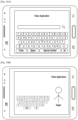
- the keyboard rendering engine 120 analyzes the content/objects in the video application and renders the floating keyboard at the centre as shown in the FIG. 9B .
- FIGS. 10A and 10B are example illustrations of positioning the touch screen keyboard based on content of the application, according to an embodiment as disclosed herein.
- the video application is running in the electronic device 100 and the user is searching for another video.
- the video application requests the keyboard rendering engine 120 to render the touch screen keyboard at the bottom position and the touch screen keyboard is rendered at the bottom position as shown in the FIG. 10A .
- the video application is running in the electronic device 100 and the user is searching for another content.
- the singer is singing at the right side.
- the video application requests the keyboard rendering engine 120 to render the touch screen keyboard on the left side and the touch screen keyboard is rendered on the left side as per the request from the video application.
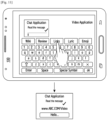
- FIG. 11 is an example illustration in which a video link is shared through a chat application using one or more buttons on the touch screen keyboard, according to an embodiment as disclosed herein.
- the user is chatting on a chat application while accessing the video application.
- the video application can request the keyboard rendering engine 120 to provide buttons along with the touch screen keyboard.
- the keyboard rendering engine 120 provides buttons on the touch screen keyboard based on the identified content of application running in the electronic device.
- the buttons on the touch screen keyboard are configurable to receive inputs from the user to perform actions in the applications in accordance with the user inputs.
- "Link" button the link of the video is shared through the chat application.
- the buttons on the touch screen keyboard provide various functionalities based on the content of the application.
- FIG. 12 is an example illustration in which a collage of images is shared through a chat application using one or more buttons on the touch screen keyboard, according to an embodiment as disclosed herein.
- the user is chatting on a chat application while accessing the video application.
- the video application can request the keyboard rendering engine 120 to provide buttons along with the touch screen keyboard.
- "collage" button images from the video are extracted to generate a collage.
- the user can share the collage through the chat application as shown in the FIG. 12 .
- FIGS. 13A and 13B are example illustrations in which a plurality of emoticons are provided on interaction with one or more buttons on the touch screen keyboard, according to an embodiment as disclosed herein.
- the user is chatting on a chat application while accessing the video application.
- the video application can request the keyboard rendering engine 120 to provide buttons along with the touch screen keyboard.
- the keyboard rendering engine 120 analyzes the content of the video application and generates the "Emojis" or "Emoticons” relevant to the video as shown in the FIG. 13B .
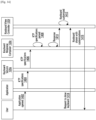
- FIG. 14 is a sequence diagram illustrating various steps involved in providing a configurable touch screen keyboard based on application running in the electronic device, according to an embodiment as disclosed herein.
- the user opens (1402) the application.
- the application sends (1404) Keyboard Transfer Protocol (KTP) specifications to the keyboard service 120a.
- KTP specifications include keyboard's properties such as height, width, theme, language preference, and addition of new buttons or the like.
- the keyboard service 120a sends (1406) the KTP specifications to the keyboard response composer 120c.
- the keyboard response composer 120c includes a parsing engine to parse (1408) the KTP specifications.
- the keyboard response composer 120c sends (1410) a response to the keyboard view controller 120f.
- the keyboard view controller 120f customizes (1412) the keyboard in accordance with the request from the application.
- the application sends (1414) a request to launch the keyboard, when the user searches for a content through a search field.
- the keyboard view controller 120f shows (1416) a customized keyboard to the application.
- FIG. 15 is a sequence diagram illustrating various steps involved in configuring the position of the touch screen keyboard, according to an embodiment as disclosed herein.
- the user opens (1502) the application.
- the application sends (1504) KTP specifications to the keyboard service 120a.
- KTP specifications include keyboard's properties such as height, width, theme, language preference, and addition of new buttons or the like.
- the Keyboard service 120a sends (1506) the KTP specifications to the keyboard response composer 120c.
- the keyboard response composer 120c includes a parsing engine to parse (1508) the KTP specifications.
- the keyboard response composer 120c composes (1510) a response and sends (1512) the response to the keyboard controller 120e.
- the keyboard controller 120e detects (1514) the keyboard type and position.
- the keyboard controller 120e sends (1516) information about keyboard type and position to the keyboard view controller 120f.
- the keyboard view controller 120f customizes (1518) the keyboard in accordance with the request from the application.
- the application sends (1520) a request to launch the keyboard, when the user searches for a content through a search field.
- the keyboard view controller 120f sends (1522) a customized keyboard to the application.
- FIG. 16 is a sequence diagram illustrating various steps involved in providing a plurality of emoticons on interaction with one or more buttons on the touch screen keyboard, according to an embodiment as disclosed herein.
- the user opens (1602) the application.
- the application sends (1604) KTP specifications to the keyboard service 120a.
- the keyboard service 120a sends (1606) customisations to the keyboard view controller 120f.
- the keyboard view controller 120f customizes (1608) the keyboard in accordance with the request from the application.
- the application sends (1610) a request to launch the keyboard, when the user searches for a content through a search field.
- the keyboard view controller 120f sends (1612) a customized keyboard (which includes various buttons such as “review”, “Lyrics”, “Wiki”, “ Emoji” along with the keyboard buttons.
- the Keyboard view controller 120f detects the input event and sends (1616) a request for content analysis to the keyboard controller 120e.
- the keyboard controller 120e analyzes (1618) the content of the application and generates emoticons based on the content of the application. Further, the keyboard controller 120e sends (1620) the emoticons to the keyboard view controller. Further, the emoticons are shown (1622) to the user.
- FIG. 17 is a sequence diagram illustrating various steps involved in sharing a collage of images through a chat application using one or more buttons on the touch screen keyboard, according to an embodiment as disclosed herein.
- the user opens (1702) the application.
- the application sends (1704) KTP specifications to the keyboard service 120a.
- the keyboard service 120a sends (1706) customisations to the keyboard view controller 120f.
- the keyboard view controller 120f customizes (1708) the keyboard in accordance with the request from the application.
- the application sends (1710) a request to launch the keyboard, when the user searches for a content through a search field.
- the keyboard view controller 120f sends (1712) a customized keyboard (which includes various buttons such as “Collage”, “review”, “Lyrics”, “Wiki”, “Emoji” along with the keyboard buttons.
- the Keyboard view controller 120f detects the input event and sends (1716) a request for collage to the keyboard controller 120e.
- the keyboard controller 120e processes (1718) the content of the application and extracts screenshots of the content. Further, the keyboard controller 120e sends (1720) the generated collage to the keyboard view controller 120f. Further, the collage is shared (1722) with other user through a messaging application or the chat application.
- the embodiments disclosed herein can be implemented through at least one software program running on at least one hardware device and performing network management functions to control the elements.
- the elements shown in FIGS. 1 through 17 include blocks which can be at least one of a hardware device, or a combination of hardware device and software module.
Landscapes
- Engineering & Computer Science (AREA)
- General Engineering & Computer Science (AREA)
- Theoretical Computer Science (AREA)
- Human Computer Interaction (AREA)
- Physics & Mathematics (AREA)
- General Physics & Mathematics (AREA)
- User Interface Of Digital Computer (AREA)
- Input From Keyboards Or The Like (AREA)
Description
- The present disclosure relates to electronic devices. More particularly it is related to a method and electronic device for configuring a touch screen keyboard.
- In general, electronic devices dominate all aspects of modern life. Over a period of time, the manner in which the electronic devices display information on a user interface has become intelligent, efficient, and less obtrusive.
- The electronic devices such as for example, a mobile phone, a portable game console or the like provides a user interface that includes an on-screen keyboard which allows a user to enter input (i.e., a text) into the user interface by touching virtual keys displayed on a touch screen display. Typically, the on-screen keyboard is a system keyboard that is provided by the operating system of the electronic device. In addition to providing the system keyboard, the operating system of the device handles the display behavior of the system keyboard.
- In some existing methods, keyboard layouts are modified that increase user comfort, efficiency and accuracy. Further, the virtual keyboards have been developed with separate left and right groupings of keys. Furthermore, some virtual keyboards have been developed that permit groups of keys to be moved, resized and rotated by a user to position the keys. In other existing systems, user interaction with a virtual keyboard is tracked and the positions of keys based are adjusted upon the user's interaction with the keyboard.
- Many applications may require customizations of the keyboard. For example, a gaming application may require a specific theme keyboard or a regional application may require opening the keyboard in a particular language. Thus, a substantial need continues to exist for a manner of improving the efficiency, comfort and accuracy of touch screen keyboards.
- The above information is presented as background information only to help the reader to understand the present invention. Applicants have made no determination and make no assertion as to whether any of the above might be applicable as Prior Art with regard to the present application.
- The patent publication
EP2990925 describes a touchscreen apparatus that comprises a processor executing an operating system OS and an application (122), displaying at least one input field. Upon user selection of an input field, the OS acquires a parameter indicative of the type of keyboard adapted to the input expected from the user. The OS retrieves a virtual keyboard corresponding to the parameter and displays the retrieved virtual keyboard. The patent publicationUS2009237359 describes a method and apparatus for displaying various types of touch screen keyboards at various positions according to an information input condition of a user. The method includes recognizing a point on a touch screen which a reference finger of at least one hand of a user touches, and displaying a touch screen keyboard including keys arranged according to the recognized point. - Accordingly the embodiments herein provide a method as set out in accompanying
claim 1. - Accordingly the embodiments herein provide an electronic device as set out in accompanying
claim 9. - These and other aspects of the embodiments herein will be better appreciated and understood when considered in conjunction with the following description and the accompanying drawings. The following descriptions, while indicating preferred embodiments and numerous specific details thereof, are given by way of illustration.
- This invention is illustrated in the accompanying drawings, throughout which like reference letters indicate corresponding parts in the various figures. The embodiments herein will be better understood from the following description with reference to the drawings, in which:
-
FIG. 1A is example illustration in which a touch screen keyboard is dynamically configured based on an application(s) running in an electronic device, according to embodiments as disclosed herein; -
FIG. 1B is another example illustration in which a touch screen keyboard is dynamically configured based on an application(s) running in an electronic device, according to embodiments as disclosed herein; -
FIG. 1C is another example illustration in which a touch screen keyboard is dynamically configured based on an application(s) running in an electronic device, according to embodiments as disclosed herein; -
FIG. 2A is a block diagram of an electronic device, according to an embodiment as disclosed herein; -
FIG. 2B illustrates various components of a keyboard rendering engine in the electronic device, according to an embodiment as disclosed herein; -
FIG. 3 is a flow diagram illustrating a method for configuring a touch screen keyboard in an electronic device, according to an embodiment as disclosed herein; -
FIG. 4 is a flow diagram illustrating another method for configuring a touch screen keyboard in an electronic device, that is outside the scope ofclaim 1; -
FIG. 5 is a flow diagram illustrating a method for modifying the touch screen keyboard with determined attributes, according to an embodiment as disclosed herein; -
FIG. 6A is example illustration in which the touch screen keyboard is displayed along with controlling functions associated with the applications running in the electronic device, according to an embodiment as disclosed herein; -
FIG. 6B is another example illustration in which the touch screen keyboard is displayed along with controlling functions associated with the applications running in the electronic device, according to an embodiment as disclosed herein; -
FIG. 7 is an example illustration in which the touch screen keyboard is displayed in accordance with a theme of the application, according to an embodiment as disclosed herein; -
FIG. 8 is an example illustration in which the touch screen keyboard is displayed in accordance with a language of the application, according to an embodiment as disclosed herein; -
FIG. 9A is example illustration in which the touch screen keyboard is displayed as a split keyboard and a floating keyboard, according to an embodiment as disclosed herein; -
FIG. 9B is another example illustration in which the touch screen keyboard is displayed as a split keyboard and a floating keyboard, according to an embodiment as disclosed herein; -
FIG. 10A is example illustration of positioning the touch screen keyboard based on content of the application, according to an embodiment as disclosed herein; -
FIG. 10B is example illustration of positioning the touch screen keyboard based on content of the application, according to an embodiment as disclosed herein; -
FIG. 11 is an example illustration in which a video link is shared through a chat application using one or more buttons on the touch screen keyboard, according to an embodiment as disclosed herein; -
FIG. 12 is an example illustration in which a collage of images is shared through a chat application using one or more buttons on the touch screen keyboard, according to an embodiment as disclosed herein; -
FIG. 13A is example illustration in which a plurality of emoticons are provided on interaction with one or more buttons on the touch screen keyboard, according to an embodiment as disclosed herein; -
FIG. 13B is another example illustration in which a plurality of emoticons are provided on interaction with one or more buttons on the touch screen keyboard, according to an embodiment as disclosed herein; -
FIG. 14 is a sequence diagram illustrating various steps involved in providing a configurable touch screen keyboard based on application running in the electronic device, according to an embodiment as disclosed herein; -
FIG. 15 is a sequence diagram illustrating various steps involved in configuring the position of the touch screen keyboard, according to an embodiment as disclosed herein; -
FIG. 16 is a sequence diagram illustrating various steps involved in providing a plurality of emoticons on interaction with one or more buttons on the touch screen keyboard, according to an embodiment as disclosed herein; and -
FIG. 17 is a sequence diagram illustrating various steps involved in sharing a collage of images through a chat application using one or more buttons on the touch screen keyboard, according to an embodiment as disclosed herein. - Various embodiments of the present disclosure will now be described in detail with reference to the accompanying drawings. In the following description, specific details such as detailed configuration and components are merely provided to assist the overall understanding of these embodiments of the present disclosure. Descriptions of well-known functions and constructions are omitted for clarity and conciseness.
- Also, the various embodiments described herein are not necessarily mutually exclusive, as some embodiments can be combined with one or more other embodiments to form new embodiments.
- Herein, the term "or" as used herein, refers to a non-exclusive or, unless otherwise indicated. The examples used herein are intended merely to facilitate an understanding of ways in which the embodiments herein can be practiced and to further enable those skilled in the art to practice the embodiments herein. Accordingly, the examples should not be construed as limiting the scope of the embodiments herein.
- As is traditional in the field, embodiments may be described and illustrated in terms of blocks which carry out a described function or functions. These blocks, which may be referred to herein as units, engines, manager, modules or the like, are physically implemented by analog and/or digital circuits such as logic gates, integrated circuits, microprocessors, microcontrollers, memory circuits, passive electronic components, active electronic components, optical components, hardwired circuits and the like, and may optionally be driven by firmware and/or software. The circuits may, for example, be embodied in one or more semiconductor chips, or on substrate supports such as printed circuit boards and the like. The circuits constituting a block may be implemented by dedicated hardware, or by a processor (e.g., one or more programmed microprocessors and associated circuitry), or by a combination of dedicated hardware to perform some functions of the block and a processor to perform other functions of the block. Each block of the embodiments may be physically separated into two or more interacting and discrete blocks without departing from the scope of the disclosure. Likewise, the blocks of the embodiments may be physically combined into more complex blocks without departing from the scope of the disclosure.
- Throughout the description, the terms keyboard and the touch screen keyboard will have the same meaning and are used interchangeably.
- Accordingly the embodiments herein provide a method for configuring a touch screen keyboard in an electronic device. The method includes identifying a type of one or more applications running in the electronic device. The method includes receiving an input event on the one or more applications. Further, the method includes dynamically configuring the touch screen keyboard based on the identified type of the one or more applications in response to the input event. Furthermore, the method includes causing to display the configured touch screen keyboard on the screen of the electronic device.
- In an embodiment, the touch screen keyboard includes at least one of a QWERTY keyboard, a handwriting panel with a plurality of buttons and a voice input method editor (IME).
- In an embodiment, dynamically configuring the touch screen keyboard based on the identified type of the one or more applications in response the input event includes determining one or more attributes of the touch screen keyboard in accordance with the identified type of the one or more applications. Further, the method includes modifying the touch screen keyboard with the determined one or more attributes. The one or more attributes include a layout type, position, number of rows, number of columns, width, height, theme, language preference, mode of the touch screen keyboard (such as normal mode, split keyboard and floating keyboard) and buttons.
- In various embodiments, the method includes identifying a type of one or more applications running in the electronic device. The method includes generating one or more attributes of the touch screen keyboard based on the identified type of the one or more applications. Further, the method includes dynamically configuring the touch screen keyboard by applying the generated attributes.
- Unlike the conventional methods and systems, the proposed method can be used to provide a dynamic touch screen keyboard based on requirements of the application. The touch screen keyboard is modified dynamically in accordance with the requirements of the application. The attributes of the keyboard such as a layout type, position, number of rows, number of columns, width, height, theme, language preference, mode of the touch screen keyboard and buttons are dynamically modified in accordance with the application type and the request received from the application.
- The touch screen keyboard is modified by providing one or more buttons for interaction with the applications using the determined attributes. Various example illustrations are provided for better understanding in conjunction with figures for better understanding of the present disclosure.
- The proposed method can be used to enhance the user experience, where the user can use keyboard smartly based on the application context. In some example embodiments, the proposed method can be used to enhance the utility of transparent keyboard in a messaging application over a video feature.
- Referring now to the drawings and more particularly to
FIGS. 1A through 17 , where similar reference characters denote corresponding features consistently throughout the figures, there are shown preferred embodiments. -
FIGS. 1A-1C are example illustrations in which is touch screen keyboard is dynamically configured based on an application(s) running in anelectronic device 100, according to embodiments as disclosed herein. - The
electronic device 100 can be, for example, but not limited to a cellular phone, a smart phone, a Personal Digital Assistant (PDA), a tablet computer, a laptop computer, a smart watch, a smart glass or the like. - In an embodiment, the touch screen keyboard can be displayed on the type of application running in the
electronic device 100 as shown in theFIG. 1A . The touch screen keyboard is dynamically configured based on the type of application running in the electronic device 100 (i.e., the keyboard attributes such as but not limited to height and width are configured based on the type of the application). Thus, the touch screen board is dynamically configured in accordance with the requirements of the application. - In another embodiment, various buttons of the touch screen keyboard are displayed by applying a theme of the application running in the electronic device, as shown in the
FIG. 1B . For example, the theme of the application is blue, then the various buttons of the touch screen keyboard are displayed in blue. Thus, the touch screen keyboard can be configured in accordance with the theme of the application. - In yet another embodiment, the touch screen keyboard can be configured based on a language of the application being accessed in the
electronic device 100 as shown in theFIG. 1C . For example, the language of the application is Hindi, then the touch screen keyboard can be displayed in Hindi language. - The
FIGS. 1A-1C depicts only few embodiments of the present disclosure. It is to be understood that the other embodiments are not limited thereto. The various embodiments are depicted in conjunction with figures in the later parts of the description. - Thus, with the proposed method, the touch screen keyboard can be dynamically configurable based on the type of the application running in the electronic device. Various example illustrations in which the touch screen keyboard is dynamically configured are described in conjunction with figures. Although not shown in the
FIGS. 1A-1C , the touch screen keyboard touch screen keyboard includes a QWERTY keyboard, a handwriting panel with a plurality of buttons and a voice input method editor (IME). The handwriting panel is displayed in theelectronic device 100 based on the type and content of the application running in theelectronic device 100. -
FIG. 2A is a block diagram of theelectronic device 100, according to an embodiment as disclosed herein. As depicted in theFIG. 2 , theelectronic device 100 includes anevent detection engine 110, akeyboard rendering engine 120, and acommunicator 130, amemory 140, aprocessor 150, adisplay screen 160. - The
event detection engine 110 can be configured to detect occurrence of an input event on one or more applications running in theelectronic device 100. The input event can be a touch event, a tap event or the like to provide some input to theelectronic device 100. - The
keyboard rendering engine 120 can be configured to perform one or more actions for rendering the touch screen keyboard based on the type of application(s) running in theelectronic device 100. Thekeyboard rendering engine 120 can be configured to identify the type of applications running in theelectronic device 100 icons and dynamically configures the touch screen keyboard based on the identified type of the one or more applications in response to the input event. - In an embodiment, the
keyboard rendering engine 120 can be configured to determine one or more attributes of the touch screen keyboard in accordance with the identified type of the one or more applications. Further, the keyboard rendering engine can be configured to modify the touch screen keyboard with the determined one or more attributes. - In an embodiment, the one or more attributes of the touch screen keyboard includes a layout type, position, number of rows, number of columns, width, height, theme, language preference, mode of the touch screen keyboard and buttons.
- In an embodiment, the
keyboard rendering engine 120 can be configured to modify the touch screen keyboard with the determined one or more attributes by providing one or more buttons to the touch screen keyboard for interaction with the one or more applications based on the determined one or more attributes. The various actions performed by thekeyboard rendering engine 120 for dynamically configuring the touch screen keyboard are explained in conjunction with the figures. - The
communicator 130 is configured for communicating internally between internal hardware components and with external devices via one or more networks. Thecommunicator 130 is configured for communicating with thekeyboard rendering engine 120 for dynamically configuring the touch screen keyboard in theelectronic device 100. - The
processor 140 is coupled with thekeyboard rendering engine 120, thecommunicator 130, thememory 150 and the display screen. Theprocessor 140 is configured to execute instructions stored in thememory 150 and to perform various actions for configuring the touch screen keyboard. - The
memory 150 stores a plurality of applications. Further, thememory 150 includes a plurality of attributes of the touch screen keyboard. The various attributes of the touch screen keyboard are extracted from thememory 150. Thememory 150 also stores instructions to be executed by theprocessor 140. Thememory 150 may include non-volatile storage elements. - The various configurations of the touch screen keyboard based on the identified type of applications are displayed to the user on the
display screen 160. - Although the
FIG. 2A shows various hardware components of theelectronic device 100, it is to be understood that other embodiments are not limited thereon.. One or more components can be combined together to perform same or substantially similar function to perform context based actions in theelectronic device 100. -
FIG. 2B illustrates various components of akeyboard rendering engine 120 in theelectronic device 100, according to an embodiment as disclosed herein. As depicted in theFIG. 2B , thekeyboard rendering engine 120 includes akeyboard service 120a, akeyboard request parser 120b,keyboard response composer 120c, attributesdatabase 120d, akeyboard controller 120e and akeyboard view controller 120f. - In an embodiment, the
keyboard service 120a can be configured to receive a Keyboard Transfer Protocol (KTP) specifications request from the application running in theelectronic device 100. The KTP specifications include keyboard's properties such as height, width, theme, language preference, and addition of new buttons or the like. The KTP is a set of rules for transferring required input method from the application to the keyboard. The KTP defines the set of rules to control configuration or customization of the keyboard. The set of rules may include extra keyboard buttons (i.e., for controlling application functionality), keyboard layout type, keyboard position, number of rows and columns, enabling/disabling special symbols, keyboard width/height, keyboard theme, keyboard language preference, keyboard mode such as a handwriting panel and a voice input method editor (IME), or the like. - In an embodiment, the application running in the background sends KTP request to the
keyboard service 120a. The KTP request includes properties of the keyboard to be modified based on the requirements of the application. - The
keyboard service 120a runs continuously in the background to receive the KTP request from the application. Thekeyboard service 120a sends the KTP request of the application to thekeyboard parser 120b. - In an embodiment, the
keyboard request parser 120b parses the KTP request received from thekeyboard service 120a. The KTP request is parsed to identify the attributes of the keyboard based on the application requirements. Thekeyboard request parser 120b parses the application request in XML format. - The
response composer 120c receives the parsed information from thekeyboard parser 120b and the parsed information is then composed and the preferences related to the keyboard are modified in accordance with the request of the application. Theresponse composer 120c communicates withattributes database 120d to modify the values of attributes of the keyboard in accordance with the request of the application and receives information of about various attributes from theattributes database 120d. Thus, theresponse composer 120c generates the required input method using theattribute database 120d. Hence, theresponse composer 120c checks theattributes database 120d while parsing the application request for interpretation and generating the required keyboard or the input method. - In some embodiments, the
attribute data base 120d or the (KTP database) is stored in theelectronic device 100. TheKTP database 120d can be stored locally integrated with keyboard application - In another embodiment,
attribute data base 120d can be stored on a cloud network. - In an embodiment, the
keyboard rendering engine 120 provides the data in theattribute DB 120d. Thekeyboard rendering engine 120 defines the protocol rules and stores them in theattribute DB 120d database which is integrated with a keyboard application. - In an embodiment, the
keyboard controller 120e can be configured to analyze the type of the application or content of the application running in theelectronic device 100. Thekeyboard controller 120e can be configured to include the one or more buttons on keyboard based on the identified type of the one or more applications. The one or more buttons on the touch screen keyboard are provided based on an identified content of the one or more applications running in theelectronic device 100. For example, the one or more buttons can be "review", "Lyrics", "Wiki", "Emoji", and "Collage" which are relevant to the content of the one or more applications running in theelectronic device 100. - In some embodiments, the one or more buttons on the touch screen keyboard are configurable to receive one or more inputs to perform one or more actions in the applications in accordance with the one or more inputs, wherein the one or more actions comprises sharing content associated with the applications with other applications.
- In an example, when the "Collage" button is clicked, the
keyboard view controller 120f detects the input event and thekeyboard controller 120e processes the content of the application and extracts screenshots of the content. Further, the collage can be shared with other user through a messaging application or the chat application. Thus, the user can perform various actions using the configurable buttons which are provided along with the keyboard based on the content of the application running in theelectronic device 100. - In an embodiment, the
keyboard view controller 120f can be configured to modify the view of the keyboard in accordance with the request of the application. Thekeyboard view controller 120f can be configured to redraw the keyboard based on the modified properties of the keyboard. Thekeyboard view controller 120f can be configured to render the modified keyboard on thedisplay screen 160. - In an embodiment, the
keyboard view controller 120f can be configured to detect or identify the type of keyboard such as a normal keyboard, a split keyboard, a floating keyboard or the like and a position of the keyboard as per the KTP request received from the application. -
FIG. 3 is a flow diagram 300 illustrating a method for configuring a touch screen keyboard in an electronic device, according to an embodiment as disclosed herein. Atstep 302, the method includes Identify a type of one or more applications running in theelectronic device 100. Atstep 304, the method includes receiving an input event on the one or more applications. Atstep 306, the method includes dynamically configuring the touch screen keyboard based on the identified type of the one or more applications in response to the input event. At step 308, the method includes causing to display the configured touch screen keyboard on the screen of theelectronic device 100. - The various actions, acts, blocks, steps, or the like in the flow diagram 300 may be performed in the order presented, in a different order or simultaneously. Further, in some embodiments, some of the actions, acts, blocks, steps, or the like may be omitted, added, modified, skipped, or the like.
-
FIG. 4 is a flow diagram 400 illustrating another method for configuring a touch screen keyboard in theelectronic device 100, that is outside the scope ofclaim 1. At step 402, the method includes identifying the type of one or more applications running in theelectronic device 100. Atstep 404, the method includes generating the one or more attributes of the touch screen keyboard based on the identified type of the one or more applications. Atstep 406, the method includes dynamically configuring the touch screen keyboard by applying the generated one or more attributes. - The various actions, acts, blocks, steps, or the like in the flow diagram 400 may be performed in the order presented.
-
FIG. 5 is a flow diagram 500 illustrating a method for modifying the touch screen keyboard with determined attributes, according to an embodiment as disclosed herein. Atstep 502, the method includes determining the one or more attributes of the touch screen keyboard in accordance with the identified type of the one or more applications. The one or more attributes of the touch screen keyboard includes a layout type, position, number of rows, number of columns, width, height, theme, language preference, mode of the touch screen keyboard and buttons. - At
step 504, the method includes modifying the touch screen keyboard with the determined one or more attributes. - In an embodiment, modifying the touch screen keyboard with the determined one or more attributes includes providing one or more buttons to the touch screen keyboard for interaction with the one or more applications based on the one or more attributes. These buttons are provided based on the type of the applications.
- In some embodiments, the one or more buttons on the touch screen keyboard are provided based on content of the one or more applications running in the electronic device.
- In various embodiments, the one or more buttons on the touch screen keyboard are configurable to receive one or more inputs to perform actions in the applications in accordance with the one or more inputs. The various actions which can be performed using the buttons are described in conjunction with figures.
- In an embodiment, modifying the touch screen keyboard includes splitting the touch screen keyboard to at least first and second keyboard portions. Further, a first portion of the touch screen keyboard and a second portion of the touch screen keyboard are displayed in the
electronic device 100 based on the identified objects (for example, humans, buildings, trees, any real world objects or the like). - In an embodiment, modifying the touch screen keyboard includes receiving a request from the one or more applications including a position of the touch screen keyboard. Further, the touch screen keyboard is dynamically modified based on the position received in the request.
- The various actions, acts, blocks, steps, or the like in the flow diagram 500 may be performed in the order presented, in a different order or simultaneously. Further, in some embodiments, some of the actions, acts, blocks, steps, or the like may be omitted, added, modified, skipped, or the like.
-
FIGS. 6A and 6B are example illustrations in which the touch screen keyboard is displayed along with controlling functions associated with the applications running in theelectronic device 100, according to an embodiment as disclosed herein. As depicted in theFIG. 6A , the user is chatting on a chat application while watching a multimedia content in a video application. When the user interacts with the chat application, the touch screen keyboard is invoked. Further, the video application requests for a customizable row with basic functionalities of the video application (i.e., play, stop, pause) through the touch screen keyboard. Thus, the user can interact with the video through the touch screen keyboard. The user can play, pause, and stop the video without hiding the touch screen keyboard and continues to chat in the chat application. - As depicted in the
FIG. 6B , the user is chatting on a chat application while viewing an image in a gallery application. When the user interacts with the chat application, the touch screen keyboard is invoked Further, the video application requests for a customizable row with basic functionalities of the gallery applications (i.e., slide show mode, zoom-in, zoom-out or the like). The user can interact with the gallery applications using gallery control functions without hiding the touch screen keyboard and continues to chat in the chat application. -
FIG. 7 is an example illustration in which the touch screen keyboard is displayed in accordance with a theme of the application, according to an embodiment as disclosed herein. As depicted in theFIG. 7 , the touch screen keyboard is displayed in theelectronic device 100 in accordance with the theme of the application. When the application is launched in theelectronic device 100, the application requests thekeyboard rendering engine 120 to change the theme of the touch screen board along with various attributes such as height, width or the like. For example, the application may request for a blue theme with specific height and width. Thus, thekeyboard rendering engine 120 dynamically configures the touch screen keyboard in accordance with the request of the application and renders the keyboard with the blue theme. -
FIG. 8 is an example illustration in which the touch screen keyboard is displayed in accordance with a language of the application, according to an embodiment as disclosed herein. In an embodiment, the application can request or set the language preference of the touch screen keyboard. As depicted in theFIG. 8 , the touch screen keyboard is displayed in theelectronic device 100 in accordance with the language of the application which is being accessed at theelectronic device 100. In theFIG. 8 , a Hindi news application is being accessed at the electronic device. When the user intends to search for news in the search bar, automatically the Hindi news application invokes the touch screen keyboard in Hindi language. -
FIGS. 9A and 9B are example illustrations in which the touch screen keyboard is displayed as a split keyboard and a floating keyboard, according to an embodiment as disclosed herein. As depicted in theFIG. 9A , the user is chatting while watching news. When the user interacts with the chat application through the text field, the touch screen keyboard is invoked. In this scenario, the application requests thekeyboard rendering engine 120 to split the touch screen keyboard. Thekeyboard rendering engine 120 renders the first portion of the touch screen keyboard on left and the second portion of the touch screen keyboard on right as shown in theFIG. 9A . Thus, thekeyboard rendering engine 120 renders the touch screen keyboard based on the position as requested by the application which is running in theelectronic device 100. - As depicted in the
FIG. 9B , the video application is running in theelectronic device 100 and the user is searching for other playing contents. The video application requests thekeyboard rendering engine 120 to render the touch screen keyboard at the centre. Thekeyboard rendering engine 120 analyzes the content/objects in the video application and renders the floating keyboard at the centre as shown in theFIG. 9B . -
FIGS. 10A and 10B are example illustrations of positioning the touch screen keyboard based on content of the application, according to an embodiment as disclosed herein. As depicted in theFIG. 10A , the video application is running in theelectronic device 100 and the user is searching for another video. In this scenario, the video application requests thekeyboard rendering engine 120 to render the touch screen keyboard at the bottom position and the touch screen keyboard is rendered at the bottom position as shown in theFIG. 10A . - As depicted in the
FIG. 10B , the video application is running in theelectronic device 100 and the user is searching for another content. In the video application, the singer is singing at the right side. In this scenario, the video application requests thekeyboard rendering engine 120 to render the touch screen keyboard on the left side and the touch screen keyboard is rendered on the left side as per the request from the video application. -
FIG. 11 is an example illustration in which a video link is shared through a chat application using one or more buttons on the touch screen keyboard, according to an embodiment as disclosed herein. As depicted in theFIG. 11 , the user is chatting on a chat application while accessing the video application. In this scenario, the video application can request thekeyboard rendering engine 120 to provide buttons along with the touch screen keyboard. Thus, thekeyboard rendering engine 120 provides buttons on the touch screen keyboard based on the identified content of application running in the electronic device. The buttons on the touch screen keyboard are configurable to receive inputs from the user to perform actions in the applications in accordance with the user inputs. In this scenario, when the user clicks on "Link" button, the link of the video is shared through the chat application. Thus, the buttons on the touch screen keyboard provide various functionalities based on the content of the application. -
FIG. 12 is an example illustration in which a collage of images is shared through a chat application using one or more buttons on the touch screen keyboard, according to an embodiment as disclosed herein. As depicted in theFIG. 12 , the user is chatting on a chat application while accessing the video application. In this scenario, the video application can request thekeyboard rendering engine 120 to provide buttons along with the touch screen keyboard. When the user clicks on "collage" button, images from the video are extracted to generate a collage. Further, the user can share the collage through the chat application as shown in theFIG. 12 . -
FIGS. 13A and 13B are example illustrations in which a plurality of emoticons are provided on interaction with one or more buttons on the touch screen keyboard, according to an embodiment as disclosed herein. As depicted in theFIG. 13A , the user is chatting on a chat application while accessing the video application. In this scenario, the video application can request thekeyboard rendering engine 120 to provide buttons along with the touch screen keyboard. When the user click on the "Emoji" button, thekeyboard rendering engine 120 analyzes the content of the video application and generates the "Emojis" or "Emoticons" relevant to the video as shown in theFIG. 13B . -
FIG. 14 is a sequence diagram illustrating various steps involved in providing a configurable touch screen keyboard based on application running in the electronic device, according to an embodiment as disclosed herein. Initially, the user opens (1402) the application. The application sends (1404) Keyboard Transfer Protocol (KTP) specifications to thekeyboard service 120a. The KTP specifications include keyboard's properties such as height, width, theme, language preference, and addition of new buttons or the like. - Further, the
keyboard service 120a sends (1406) the KTP specifications to thekeyboard response composer 120c. Thekeyboard response composer 120c includes a parsing engine to parse (1408) the KTP specifications. Thekeyboard response composer 120c sends (1410) a response to thekeyboard view controller 120f. Thekeyboard view controller 120f customizes (1412) the keyboard in accordance with the request from the application. - The application sends (1414) a request to launch the keyboard, when the user searches for a content through a search field. The
keyboard view controller 120f shows (1416) a customized keyboard to the application. -
FIG. 15 is a sequence diagram illustrating various steps involved in configuring the position of the touch screen keyboard, according to an embodiment as disclosed herein. Initially, the user opens (1502) the application. The application sends (1504) KTP specifications to thekeyboard service 120a. The KTP specifications include keyboard's properties such as height, width, theme, language preference, and addition of new buttons or the like. - Further, the
Keyboard service 120a sends (1506) the KTP specifications to thekeyboard response composer 120c. Thekeyboard response composer 120c includes a parsing engine to parse (1508) the KTP specifications. Thekeyboard response composer 120c composes (1510) a response and sends (1512) the response to thekeyboard controller 120e. Thekeyboard controller 120e detects (1514) the keyboard type and position. Thekeyboard controller 120e sends (1516) information about keyboard type and position to thekeyboard view controller 120f. Thekeyboard view controller 120f customizes (1518) the keyboard in accordance with the request from the application. - The application sends (1520) a request to launch the keyboard, when the user searches for a content through a search field. The
keyboard view controller 120f sends (1522) a customized keyboard to the application. -
FIG. 16 is a sequence diagram illustrating various steps involved in providing a plurality of emoticons on interaction with one or more buttons on the touch screen keyboard, according to an embodiment as disclosed herein. Initially, the user opens (1602) the application. The application sends (1604) KTP specifications to thekeyboard service 120a. Thekeyboard service 120a sends (1606) customisations to thekeyboard view controller 120f. Thekeyboard view controller 120f customizes (1608) the keyboard in accordance with the request from the application. - The application sends (1610) a request to launch the keyboard, when the user searches for a content through a search field. The
keyboard view controller 120f sends (1612) a customized keyboard (which includes various buttons such as "review", "Lyrics", "Wiki", " Emoji" along with the keyboard buttons. - When the "Emoji" button is clicked (1614), the
Keyboard view controller 120f detects the input event and sends (1616) a request for content analysis to thekeyboard controller 120e. Thekeyboard controller 120e analyzes (1618) the content of the application and generates emoticons based on the content of the application. Further, thekeyboard controller 120e sends (1620) the emoticons to the keyboard view controller. Further, the emoticons are shown (1622) to the user. -
FIG. 17 is a sequence diagram illustrating various steps involved in sharing a collage of images through a chat application using one or more buttons on the touch screen keyboard, according to an embodiment as disclosed herein. Initially, the user opens (1702) the application. The application sends (1704) KTP specifications to thekeyboard service 120a. Thekeyboard service 120a sends (1706) customisations to thekeyboard view controller 120f. Thekeyboard view controller 120f customizes (1708) the keyboard in accordance with the request from the application. - The application sends (1710) a request to launch the keyboard, when the user searches for a content through a search field. The
keyboard view controller 120f sends (1712) a customized keyboard (which includes various buttons such as "Collage", "review", "Lyrics", "Wiki", "Emoji" along with the keyboard buttons. - When the "Collage" button is clicked (1714), the
Keyboard view controller 120f detects the input event and sends (1716) a request for collage to thekeyboard controller 120e. Thekeyboard controller 120e processes (1718) the content of the application and extracts screenshots of the content. Further, thekeyboard controller 120e sends (1720) the generated collage to thekeyboard view controller 120f. Further, the collage is shared (1722) with other user through a messaging application or the chat application. - The embodiments disclosed herein can be implemented through at least one software program running on at least one hardware device and performing network management functions to control the elements. The elements shown in
FIGS. 1 through 17 include blocks which can be at least one of a hardware device, or a combination of hardware device and software module.
Claims (10)
- A method for configuring a touch screen keyboard in an electronic device, the method comprising:identifying a first type of application and a second type of application which the first type of application and the second type of application are running in the electronic device (302, 402);receiving an input event from at least one of the first type of application and the second type of application (304);generating the touch screen keyboard based on the first type of application and the second type of application in response to the input event (306); anddisplaying the touch screen keyboard on the screen of the electronic device (308)wherein the touch screen keyboard includes at least one button which is providing function associated with the first type of application and the second type of application for interacting with the first type of application and the second type of application.
- The method of claim 1, wherein the touch screen keyboard comprises at least one of a QWERTY keyboard, a handwriting panel with a plurality of buttons and a voice input method editor (IME).
- The method of claim 1, wherein generating the touch screen keyboard based the first type of application and the second type of application in response the input event comprises:determining at least one attribute of the touch screen keyboard in accordance with the first type of application and the second type of application; andmodifying the touch screen keyboard with the determined at least one attribute (504).
- The method of claim 3, wherein the at least one attribute of the touch screen keyboard comprises at least one of a layout type, position, number of rows, number of columns, width, height, theme, language preference, mode of the touch screen keyboard and buttons.
- The method of claim 1, wherein the at least one button on the touch screen keyboard
are provided based on an identified content of the first type of application and the second type of application running in the electronic device. - The method of claim 1, wherein the at least one button on the touch screen keyboard
are configurable to receive one or more inputs to perform at least one action in the first type of application and the second type of application in accordance with the one or more inputs, wherein the at least one action comprises sharing content associated with the first type of application with the second type of application. - The method of claim 3, wherein modifying the touch screen keyboard includes:splitting the touch screen keyboard to at least a first and a second keyboard portions;causing to display the first and the second keyboard portions based on identified objects in the first type of application and the second type of application.
- The method of claim 3, wherein modifying the touch screen keyboard with the determined at least one attribute comprises:receiving a request from the at least one of the first type of application and the second type of application including a position of the the touch screen keyboard;dynamically modifying the touch screen keyboard based on the position received in the request; anddynamically causing to display the touch screen key board.
- An electronic device (100) for configuring a touch screen keyboard, the electronic device comprising:a memory (140);a processor (150); anda keyboard rendering engine (120) coupled to the memory (140) and the processor (150), configured to:identify a first type of application and a second type of application running in the electronic device;receive an input event from at least one of the first type of application and the second type of application; andgenerate the touch screen keyboard based on the first type of application and the second type of application in response to the input eventwherein the touch screen keyboard includes at least one button which is providing function associated with the first type of application and the second type of application for interacting with the first type of application and the second type of application.
- The electronic device of claim 9, the electronic device configured to carry out the method of one of claims 2 to 8.
Applications Claiming Priority (2)
| Application Number | Priority Date | Filing Date | Title |
|---|---|---|---|
| IN201841028363 | 2018-07-27 | ||
| PCT/KR2019/007064 WO2020022645A1 (en) | 2018-07-27 | 2019-06-12 | Method and electronic device for configuring touch screen keyboard |
Publications (4)
| Publication Number | Publication Date |
|---|---|
| EP3776161A1 EP3776161A1 (en) | 2021-02-17 |
| EP3776161A4 EP3776161A4 (en) | 2021-06-02 |
| EP3776161B1 true EP3776161B1 (en) | 2024-01-24 |
| EP3776161C0 EP3776161C0 (en) | 2024-01-24 |
Family
ID=69181879
Family Applications (1)
| Application Number | Title | Priority Date | Filing Date |
|---|---|---|---|
| EP19842110.9A Active EP3776161B1 (en) | 2018-07-27 | 2019-06-12 | Method and electronic device for configuring touch screen keyboard |
Country Status (4)
| Country | Link |
|---|---|
| US (1) | US11354036B2 (en) |
| EP (1) | EP3776161B1 (en) |
| CN (1) | CN112334870B (en) |
| WO (1) | WO2020022645A1 (en) |
Families Citing this family (4)
| Publication number | Priority date | Publication date | Assignee | Title |
|---|---|---|---|---|
| CN111338506B (en) * | 2020-02-19 | 2022-01-07 | Oppo广东移动通信有限公司 | Touch response method and device, electronic equipment and storage medium |
| CN114860147B (en) * | 2021-02-04 | 2023-09-08 | Oppo广东移动通信有限公司 | Input method, input device, electronic equipment and storage medium |
| CN120215800A (en) * | 2023-12-26 | 2025-06-27 | 北京小米移动软件有限公司 | Virtual keyboard display method, device, terminal and readable storage medium |
| US20260147473A1 (en) * | 2024-11-27 | 2026-05-28 | Huawei Technologies Co., Ltd. | Methods and devices for virtual keyboard customization |
Family Cites Families (25)
| Publication number | Priority date | Publication date | Assignee | Title |
|---|---|---|---|---|
| KR101352994B1 (en) | 2007-12-10 | 2014-01-21 | 삼성전자 주식회사 | Apparatus and method for providing an adaptive on-screen keyboard |
| KR101456490B1 (en) | 2008-03-24 | 2014-11-03 | 삼성전자주식회사 | A touch screen keyboard display method and apparatus having such a function |
| EP2175355A1 (en) * | 2008-10-07 | 2010-04-14 | Research In Motion Limited | Portable electronic device and method of secondary character rendering and entry |
| KR101651128B1 (en) * | 2009-10-05 | 2016-08-25 | 엘지전자 주식회사 | Mobile terminal and method for controlling application execution thereof |
| US20120109836A1 (en) * | 2010-11-01 | 2012-05-03 | Google Inc. | Content sharing interface for sharing content in social networks |
| KR101704549B1 (en) * | 2011-06-10 | 2017-02-22 | 삼성전자주식회사 | Method and apparatus for providing interface for inpputing character |
| DE112011105933B4 (en) | 2011-12-08 | 2026-05-07 | Intel Corporation | Methods and devices for dynamically adapting a virtual keyboard |
| US9292203B2 (en) | 2012-05-10 | 2016-03-22 | Apple Inc. | Providing a vertical candidate bar with an on-screen keyboard |
| US20130326347A1 (en) * | 2012-05-31 | 2013-12-05 | Microsoft Corporation | Application language libraries for managing computing environment languages |
| US9547375B2 (en) | 2012-10-10 | 2017-01-17 | Microsoft Technology Licensing, Llc | Split virtual keyboard on a mobile computing device |
| US20140188606A1 (en) | 2013-01-03 | 2014-07-03 | Brian Moore | Systems and methods for advertising on virtual keyboards |
| CN104007917B (en) * | 2013-02-27 | 2018-07-06 | 联想(北京)有限公司 | The control method and electronic equipment of a kind of dummy keyboard |
| KR102088909B1 (en) * | 2013-03-15 | 2020-04-14 | 엘지전자 주식회사 | Mobile terminal and modified keypad using method thereof |
| CN104239332A (en) * | 2013-06-18 | 2014-12-24 | 腾讯科技(深圳)有限公司 | Webpage content processing method, webpage content processing device and browser client side |
| WO2015192085A2 (en) * | 2014-06-12 | 2015-12-17 | Apple Inc. | Systems and methods for multitasking on an electronic device with a touch-sensitive display |
| EP2990925A1 (en) * | 2014-08-25 | 2016-03-02 | Thomson Licensing | Apparatus and method for displaying a virtual keyboard |
| KR20160097415A (en) * | 2015-02-06 | 2016-08-18 | 이강우 | Application for operating multi-windows on android platform and the touch device equipped with the same |
| KR20160101633A (en) * | 2015-02-13 | 2016-08-25 | (주)위자드웍스 | Keyboard application and method for selecting keyboard using the same |
| US10810252B2 (en) | 2015-10-02 | 2020-10-20 | Adobe Inc. | Searching using specific attributes found in images |
| TWI676931B (en) * | 2015-10-05 | 2019-11-11 | 香港商極刻科技(香港)控股有限公司 | Method to provide a service while inputting contents in an application through a virtual keyboard |
| KR20170081842A (en) * | 2016-01-05 | 2017-07-13 | 박치원 | Virtual keyboard and method for providing virtual keyboard |
| US20170364260A1 (en) * | 2016-02-11 | 2017-12-21 | Hyperkey, Inc. | Enhanced keyboard including multiple application execution |
| KR102535793B1 (en) * | 2016-06-15 | 2023-05-23 | 삼성전자주식회사 | Touch processing method and electronic device supporting the same |
| CN106097787A (en) | 2016-08-18 | 2016-11-09 | 四川以太原力科技有限公司 | Limbs teaching method based on virtual reality and teaching system |
| CN106873802A (en) * | 2017-03-31 | 2017-06-20 | 无线生活(杭州)信息科技有限公司 | Keyboard operation method and device based on electric business behavior |
-
2019
- 2019-06-12 WO PCT/KR2019/007064 patent/WO2020022645A1/en not_active Ceased
- 2019-06-12 EP EP19842110.9A patent/EP3776161B1/en active Active
- 2019-06-12 US US17/263,755 patent/US11354036B2/en active Active
- 2019-06-12 CN CN201980042357.7A patent/CN112334870B/en not_active Expired - Fee Related
Also Published As
| Publication number | Publication date |
|---|---|
| WO2020022645A1 (en) | 2020-01-30 |
| US20210165568A1 (en) | 2021-06-03 |
| EP3776161A1 (en) | 2021-02-17 |
| CN112334870A (en) | 2021-02-05 |
| EP3776161A4 (en) | 2021-06-02 |
| US11354036B2 (en) | 2022-06-07 |
| EP3776161C0 (en) | 2024-01-24 |
| CN112334870B (en) | 2024-08-27 |
Similar Documents
| Publication | Publication Date | Title |
|---|---|---|
| KR102016276B1 (en) | Semantic zoom animations | |
| EP3479213B1 (en) | Image search query predictions by a keyboard | |
| US10140017B2 (en) | Graphical keyboard application with integrated search | |
| CN103049254B (en) | DLL for semantic zoom | |
| US9946773B2 (en) | Graphical keyboard with integrated search features | |
| US20120017161A1 (en) | System and method for user interface | |
| US20140089824A1 (en) | Systems And Methods For Dynamically Altering A User Interface Based On User Interface Actions | |
| US11354036B2 (en) | Method and electronic device for configuring touch screen keyboard | |
| KR20140074889A (en) | Semantic zoom | |
| US10901614B2 (en) | Method and terminal for determining operation object | |
| JP2014519108A (en) | Web browser with fast site access user interface | |
| US12579209B2 (en) | Devices, methods, and graphical user interfaces for interacting with a web-browser | |
| KR20160060110A (en) | Quick tasks for on-screen keyboards | |
| CN113311973A (en) | Recommendation method and device | |
| KR102691841B1 (en) | System and method for providing search service | |
| US20240184441A1 (en) | Systems and Methods for Providing Continuous-Path and Delete Key Gestures at a Touch-Sensitive Keyboard | |
| CN112882619B (en) | Application interface management method and device, electronic equipment and medium | |
| CN112698734A (en) | Candidate word display method and device and electronic equipment | |
| EP3065032A1 (en) | Word prediction input method and terminal | |
| CN115080170B (en) | Information processing method, information processing device and electronic equipment | |
| CN114356118A (en) | Character input method, device, electronic equipment and medium | |
| CN113726946A (en) | Application program control method and device | |
| CN114415872A (en) | Application program installation method and device, electronic equipment and medium | |
| CN119576461A (en) | Interface display method, device, electronic device and storage medium | |
| CN119336216A (en) | Split-screen display method, device, electronic device and storage medium |
Legal Events
| Date | Code | Title | Description |
|---|---|---|---|
| STAA | Information on the status of an ep patent application or granted ep patent |
Free format text: STATUS: THE INTERNATIONAL PUBLICATION HAS BEEN MADE |
|
| PUAI | Public reference made under article 153(3) epc to a published international application that has entered the european phase |
Free format text: ORIGINAL CODE: 0009012 |
|
| STAA | Information on the status of an ep patent application or granted ep patent |
Free format text: STATUS: REQUEST FOR EXAMINATION WAS MADE |
|
| 17P | Request for examination filed |
Effective date: 20201028 |
|
| AK | Designated contracting states |
Kind code of ref document: A1 Designated state(s): AL AT BE BG CH CY CZ DE DK EE ES FI FR GB GR HR HU IE IS IT LI LT LU LV MC MK MT NL NO PL PT RO RS SE SI SK SM TR |
|
| AX | Request for extension of the european patent |
Extension state: BA ME |
|
| A4 | Supplementary search report drawn up and despatched |
Effective date: 20210503 |
|
| RIC1 | Information provided on ipc code assigned before grant |
Ipc: G06F 3/0488 20130101AFI20210426BHEP Ipc: G06F 3/0484 20130101ALI20210426BHEP Ipc: G06F 3/023 20060101ALI20210426BHEP |
|
| DAV | Request for validation of the european patent (deleted) | ||
| DAX | Request for extension of the european patent (deleted) | ||
| REG | Reference to a national code |
Ref country code: DE Ref legal event code: R079 Free format text: PREVIOUS MAIN CLASS: G06F0003048800 Ipc: G06F0003048860 Ref document number: 602019045752 Country of ref document: DE |
|
| GRAP | Despatch of communication of intention to grant a patent |
Free format text: ORIGINAL CODE: EPIDOSNIGR1 |
|
| STAA | Information on the status of an ep patent application or granted ep patent |
Free format text: STATUS: GRANT OF PATENT IS INTENDED |
|
| RIC1 | Information provided on ipc code assigned before grant |
Ipc: G06F 3/023 20060101ALI20230724BHEP Ipc: G06F 3/0484 20130101ALI20230724BHEP Ipc: G06F 3/04886 20220101AFI20230724BHEP |
|
| INTG | Intention to grant announced |
Effective date: 20230818 |
|
| GRAS | Grant fee paid |
Free format text: ORIGINAL CODE: EPIDOSNIGR3 |
|
| GRAA | (expected) grant |
Free format text: ORIGINAL CODE: 0009210 |
|
| STAA | Information on the status of an ep patent application or granted ep patent |
Free format text: STATUS: THE PATENT HAS BEEN GRANTED |
|
| AK | Designated contracting states |
Kind code of ref document: B1 Designated state(s): AL AT BE BG CH CY CZ DE DK EE ES FI FR GB GR HR HU IE IS IT LI LT LU LV MC MK MT NL NO PL PT RO RS SE SI SK SM TR |
|
| REG | Reference to a national code |
Ref country code: GB Ref legal event code: FG4D |
|
| REG | Reference to a national code |
Ref country code: CH Ref legal event code: EP |
|
| REG | Reference to a national code |
Ref country code: IE Ref legal event code: FG4D |
|
| REG | Reference to a national code |
Ref country code: DE Ref legal event code: R096 Ref document number: 602019045752 Country of ref document: DE |
|
| U01 | Request for unitary effect filed |
Effective date: 20240124 |
|
| U07 | Unitary effect registered |
Designated state(s): AT BE BG DE DK EE FI FR IT LT LU LV MT NL PT SE SI Effective date: 20240129 |
|
| U20 | Renewal fee for the european patent with unitary effect paid |
Year of fee payment: 6 Effective date: 20240522 |
|
| PG25 | Lapsed in a contracting state [announced via postgrant information from national office to epo] |
Ref country code: IS Free format text: LAPSE BECAUSE OF FAILURE TO SUBMIT A TRANSLATION OF THE DESCRIPTION OR TO PAY THE FEE WITHIN THE PRESCRIBED TIME-LIMIT Effective date: 20240524 |
|
| PGFP | Annual fee paid to national office [announced via postgrant information from national office to epo] |
Ref country code: GB Payment date: 20240520 Year of fee payment: 6 |
|
| PG25 | Lapsed in a contracting state [announced via postgrant information from national office to epo] |
Ref country code: GR Free format text: LAPSE BECAUSE OF FAILURE TO SUBMIT A TRANSLATION OF THE DESCRIPTION OR TO PAY THE FEE WITHIN THE PRESCRIBED TIME-LIMIT Effective date: 20240425 |
|
| PG25 | Lapsed in a contracting state [announced via postgrant information from national office to epo] |
Ref country code: RS Free format text: LAPSE BECAUSE OF FAILURE TO SUBMIT A TRANSLATION OF THE DESCRIPTION OR TO PAY THE FEE WITHIN THE PRESCRIBED TIME-LIMIT Effective date: 20240424 Ref country code: HR Free format text: LAPSE BECAUSE OF FAILURE TO SUBMIT A TRANSLATION OF THE DESCRIPTION OR TO PAY THE FEE WITHIN THE PRESCRIBED TIME-LIMIT Effective date: 20240124 |
|
| PG25 | Lapsed in a contracting state [announced via postgrant information from national office to epo] |
Ref country code: ES Free format text: LAPSE BECAUSE OF FAILURE TO SUBMIT A TRANSLATION OF THE DESCRIPTION OR TO PAY THE FEE WITHIN THE PRESCRIBED TIME-LIMIT Effective date: 20240124 |
|
| PG25 | Lapsed in a contracting state [announced via postgrant information from national office to epo] |
Ref country code: RS Free format text: LAPSE BECAUSE OF FAILURE TO SUBMIT A TRANSLATION OF THE DESCRIPTION OR TO PAY THE FEE WITHIN THE PRESCRIBED TIME-LIMIT Effective date: 20240424 Ref country code: NO Free format text: LAPSE BECAUSE OF FAILURE TO SUBMIT A TRANSLATION OF THE DESCRIPTION OR TO PAY THE FEE WITHIN THE PRESCRIBED TIME-LIMIT Effective date: 20240424 Ref country code: IS Free format text: LAPSE BECAUSE OF FAILURE TO SUBMIT A TRANSLATION OF THE DESCRIPTION OR TO PAY THE FEE WITHIN THE PRESCRIBED TIME-LIMIT Effective date: 20240524 Ref country code: HR Free format text: LAPSE BECAUSE OF FAILURE TO SUBMIT A TRANSLATION OF THE DESCRIPTION OR TO PAY THE FEE WITHIN THE PRESCRIBED TIME-LIMIT Effective date: 20240124 Ref country code: GR Free format text: LAPSE BECAUSE OF FAILURE TO SUBMIT A TRANSLATION OF THE DESCRIPTION OR TO PAY THE FEE WITHIN THE PRESCRIBED TIME-LIMIT Effective date: 20240425 Ref country code: ES Free format text: LAPSE BECAUSE OF FAILURE TO SUBMIT A TRANSLATION OF THE DESCRIPTION OR TO PAY THE FEE WITHIN THE PRESCRIBED TIME-LIMIT Effective date: 20240124 |
|
| PG25 | Lapsed in a contracting state [announced via postgrant information from national office to epo] |
Ref country code: PL Free format text: LAPSE BECAUSE OF FAILURE TO SUBMIT A TRANSLATION OF THE DESCRIPTION OR TO PAY THE FEE WITHIN THE PRESCRIBED TIME-LIMIT Effective date: 20240124 |
|
| PG25 | Lapsed in a contracting state [announced via postgrant information from national office to epo] |
Ref country code: PL Free format text: LAPSE BECAUSE OF FAILURE TO SUBMIT A TRANSLATION OF THE DESCRIPTION OR TO PAY THE FEE WITHIN THE PRESCRIBED TIME-LIMIT Effective date: 20240124 |
|
| PG25 | Lapsed in a contracting state [announced via postgrant information from national office to epo] |
Ref country code: SM Free format text: LAPSE BECAUSE OF FAILURE TO SUBMIT A TRANSLATION OF THE DESCRIPTION OR TO PAY THE FEE WITHIN THE PRESCRIBED TIME-LIMIT Effective date: 20240124 |
|
| PG25 | Lapsed in a contracting state [announced via postgrant information from national office to epo] |
Ref country code: CZ Free format text: LAPSE BECAUSE OF FAILURE TO SUBMIT A TRANSLATION OF THE DESCRIPTION OR TO PAY THE FEE WITHIN THE PRESCRIBED TIME-LIMIT Effective date: 20240124 |
|
| REG | Reference to a national code |
Ref country code: DE Ref legal event code: R097 Ref document number: 602019045752 Country of ref document: DE |
|
| PG25 | Lapsed in a contracting state [announced via postgrant information from national office to epo] |
Ref country code: SK Free format text: LAPSE BECAUSE OF FAILURE TO SUBMIT A TRANSLATION OF THE DESCRIPTION OR TO PAY THE FEE WITHIN THE PRESCRIBED TIME-LIMIT Effective date: 20240124 |
|
| PG25 | Lapsed in a contracting state [announced via postgrant information from national office to epo] |
Ref country code: SM Free format text: LAPSE BECAUSE OF FAILURE TO SUBMIT A TRANSLATION OF THE DESCRIPTION OR TO PAY THE FEE WITHIN THE PRESCRIBED TIME-LIMIT Effective date: 20240124 Ref country code: SK Free format text: LAPSE BECAUSE OF FAILURE TO SUBMIT A TRANSLATION OF THE DESCRIPTION OR TO PAY THE FEE WITHIN THE PRESCRIBED TIME-LIMIT Effective date: 20240124 Ref country code: CZ Free format text: LAPSE BECAUSE OF FAILURE TO SUBMIT A TRANSLATION OF THE DESCRIPTION OR TO PAY THE FEE WITHIN THE PRESCRIBED TIME-LIMIT Effective date: 20240124 |
|
| PLBE | No opposition filed within time limit |
Free format text: ORIGINAL CODE: 0009261 |
|
| STAA | Information on the status of an ep patent application or granted ep patent |
Free format text: STATUS: NO OPPOSITION FILED WITHIN TIME LIMIT |
|
| 26N | No opposition filed |
Effective date: 20241025 |
|
| PG25 | Lapsed in a contracting state [announced via postgrant information from national office to epo] |
Ref country code: MC Free format text: LAPSE BECAUSE OF FAILURE TO SUBMIT A TRANSLATION OF THE DESCRIPTION OR TO PAY THE FEE WITHIN THE PRESCRIBED TIME-LIMIT Effective date: 20240124 |
|
| REG | Reference to a national code |
Ref country code: CH Ref legal event code: PL |
|
| PG25 | Lapsed in a contracting state [announced via postgrant information from national office to epo] |
Ref country code: IE Free format text: LAPSE BECAUSE OF NON-PAYMENT OF DUE FEES Effective date: 20240612 |
|
| PG25 | Lapsed in a contracting state [announced via postgrant information from national office to epo] |
Ref country code: CH Free format text: LAPSE BECAUSE OF NON-PAYMENT OF DUE FEES Effective date: 20240630 |
|
| U20 | Renewal fee for the european patent with unitary effect paid |
Year of fee payment: 7 Effective date: 20250624 |
|
| PG25 | Lapsed in a contracting state [announced via postgrant information from national office to epo] |
Ref country code: RO Free format text: LAPSE BECAUSE OF FAILURE TO SUBMIT A TRANSLATION OF THE DESCRIPTION OR TO PAY THE FEE WITHIN THE PRESCRIBED TIME-LIMIT Effective date: 20240124 |
|
| PG25 | Lapsed in a contracting state [announced via postgrant information from national office to epo] |
Ref country code: CY Free format text: LAPSE BECAUSE OF FAILURE TO SUBMIT A TRANSLATION OF THE DESCRIPTION OR TO PAY THE FEE WITHIN THE PRESCRIBED TIME-LIMIT; INVALID AB INITIO Effective date: 20190612 |
|
| GBPC | Gb: european patent ceased through non-payment of renewal fee |
Effective date: 20250612 |
|
| PG25 | Lapsed in a contracting state [announced via postgrant information from national office to epo] |
Ref country code: HU Free format text: LAPSE BECAUSE OF FAILURE TO SUBMIT A TRANSLATION OF THE DESCRIPTION OR TO PAY THE FEE WITHIN THE PRESCRIBED TIME-LIMIT; INVALID AB INITIO Effective date: 20190612 |
|
| PG25 | Lapsed in a contracting state [announced via postgrant information from national office to epo] |
Ref country code: GB Free format text: LAPSE BECAUSE OF NON-PAYMENT OF DUE FEES Effective date: 20250612 |
|
| PG25 | Lapsed in a contracting state [announced via postgrant information from national office to epo] |
Ref country code: TR Free format text: LAPSE BECAUSE OF FAILURE TO SUBMIT A TRANSLATION OF THE DESCRIPTION OR TO PAY THE FEE WITHIN THE PRESCRIBED TIME-LIMIT Effective date: 20240124 |
|
| U20 | Renewal fee for the european patent with unitary effect paid |
Year of fee payment: 8 Effective date: 20260624 |