EP3706016A1 - Textbearbeitungsverfahren und mobiles endgerät - Google Patents
Textbearbeitungsverfahren und mobiles endgerät Download PDFInfo
- Publication number
- EP3706016A1 EP3706016A1 EP18879312.9A EP18879312A EP3706016A1 EP 3706016 A1 EP3706016 A1 EP 3706016A1 EP 18879312 A EP18879312 A EP 18879312A EP 3706016 A1 EP3706016 A1 EP 3706016A1
- Authority
- EP
- European Patent Office
- Prior art keywords
- text
- touch operation
- preset
- text block
- mobile terminal
- Prior art date
- Legal status (The legal status is an assumption and is not a legal conclusion. Google has not performed a legal analysis and makes no representation as to the accuracy of the status listed.)
- Ceased
Links
Images










Classifications
-
- G—PHYSICS
- G06—COMPUTING OR CALCULATING; COUNTING
- G06F—ELECTRIC DIGITAL DATA PROCESSING
- G06F3/00—Input arrangements for transferring data to be processed into a form capable of being handled by the computer; Output arrangements for transferring data from processing unit to output unit, e.g. interface arrangements
- G06F3/01—Input arrangements or combined input and output arrangements for interaction between user and computer
- G06F3/048—Interaction techniques based on graphical user interfaces [GUI]
- G06F3/0487—Interaction techniques based on graphical user interfaces [GUI] using specific features provided by the input device, e.g. functions controlled by the rotation of a mouse with dual sensing arrangements, or of the nature of the input device, e.g. tap gestures based on pressure sensed by a digitiser
- G06F3/0488—Interaction techniques based on graphical user interfaces [GUI] using specific features provided by the input device, e.g. functions controlled by the rotation of a mouse with dual sensing arrangements, or of the nature of the input device, e.g. tap gestures based on pressure sensed by a digitiser using a touch-screen or digitiser, e.g. input of commands through traced gestures
- G06F3/04883—Interaction techniques based on graphical user interfaces [GUI] using specific features provided by the input device, e.g. functions controlled by the rotation of a mouse with dual sensing arrangements, or of the nature of the input device, e.g. tap gestures based on pressure sensed by a digitiser using a touch-screen or digitiser, e.g. input of commands through traced gestures for inputting data by handwriting, e.g. gesture or text
-
- G—PHYSICS
- G06—COMPUTING OR CALCULATING; COUNTING
- G06F—ELECTRIC DIGITAL DATA PROCESSING
- G06F40/00—Handling natural language data
- G06F40/40—Processing or translation of natural language
- G06F40/53—Processing of non-Latin text
-
- G—PHYSICS
- G06—COMPUTING OR CALCULATING; COUNTING
- G06F—ELECTRIC DIGITAL DATA PROCESSING
- G06F3/00—Input arrangements for transferring data to be processed into a form capable of being handled by the computer; Output arrangements for transferring data from processing unit to output unit, e.g. interface arrangements
- G06F3/01—Input arrangements or combined input and output arrangements for interaction between user and computer
- G06F3/048—Interaction techniques based on graphical user interfaces [GUI]
- G06F3/0481—Interaction techniques based on graphical user interfaces [GUI] based on specific properties of the displayed interaction object or a metaphor-based environment, e.g. interaction with desktop elements like windows or icons, or assisted by a cursor's changing behaviour or appearance
-
- G—PHYSICS
- G06—COMPUTING OR CALCULATING; COUNTING
- G06F—ELECTRIC DIGITAL DATA PROCESSING
- G06F3/00—Input arrangements for transferring data to be processed into a form capable of being handled by the computer; Output arrangements for transferring data from processing unit to output unit, e.g. interface arrangements
- G06F3/01—Input arrangements or combined input and output arrangements for interaction between user and computer
- G06F3/048—Interaction techniques based on graphical user interfaces [GUI]
- G06F3/0487—Interaction techniques based on graphical user interfaces [GUI] using specific features provided by the input device, e.g. functions controlled by the rotation of a mouse with dual sensing arrangements, or of the nature of the input device, e.g. tap gestures based on pressure sensed by a digitiser
- G06F3/0488—Interaction techniques based on graphical user interfaces [GUI] using specific features provided by the input device, e.g. functions controlled by the rotation of a mouse with dual sensing arrangements, or of the nature of the input device, e.g. tap gestures based on pressure sensed by a digitiser using a touch-screen or digitiser, e.g. input of commands through traced gestures
- G06F3/04886—Interaction techniques based on graphical user interfaces [GUI] using specific features provided by the input device, e.g. functions controlled by the rotation of a mouse with dual sensing arrangements, or of the nature of the input device, e.g. tap gestures based on pressure sensed by a digitiser using a touch-screen or digitiser, e.g. input of commands through traced gestures by partitioning the display area of the touch-screen or the surface of the digitising tablet into independently controllable areas, e.g. virtual keyboards or menus
-
- G—PHYSICS
- G06—COMPUTING OR CALCULATING; COUNTING
- G06F—ELECTRIC DIGITAL DATA PROCESSING
- G06F40/00—Handling natural language data
- G06F40/10—Text processing
- G06F40/166—Editing, e.g. inserting or deleting
Definitions
- the present disclosure relates to the field of communication technology, and in particular to a text editing method and a mobile terminal.
- mobile terminals As mobile terminals have more and more functions, mobile terminals are widely used in various scenarios in daily life. For example, users can use mobile terminals to chat in social software, to edit character information in office software, and so on.
- errors such as typos, superfluous characters, missing characters, unsmooth sentences and the like are found in the characters inputted in the mobile terminal, the characters can be deleted from the end of the text until the cursor moves to the location where the error occurred, the wrong character is modified, and the tail text is re-entered. In this way, the user needs to enter characters one by one after deleting the words, and there are many steps to re-enter the tail text. It can be seen that the related art has the problem of complicated operations of character deletion, insertion and modification in the character editing process.
- an embodiment of the present disclosure provides a text editing method which includes:
- an embodiment of the present disclosure further provides a mobile terminal which includes:
- an embodiment of the present disclosure further provides a mobile terminal which includes a processor, a storage, and a computer program stored on the storage and capable of running on the processor, the computer program performing the steps of the above text editing method when running on the processor.
- an embodiment of the present disclosure further provides a computer readable storage medium having computer program stored thereon, the computer program performing, when executed by a processor, the steps of the above text editing method.
- Fig. 1 it is a flow chart of a text editing method according to an embodiment of the present disclosure.
- the text editing method may be applied to a mobile terminal. As shown in Fig. 1 , the method includes the following steps:
- Step 101 detecting a touch operation of a user on at least one text block displayed in an operating region of a preset text recycling window.
- At least one text block to be recycled is stored in the text recycling window.
- At least one character is included in the text block.
- the character includes a number, text, a punctuation mark, etc.
- the text block to be recycled stored in the text recycling window is a text block deleted by the user through a cut operation and/or a delete operation.
- the text information included in the text block deleted by the user has a high reuse value for the user.
- the operating region may be displayed according to a touch operation received on the text recycling window displayed on the screen of a mobile terminal.
- FIG. 2 it is a first schematic diagram of the screen of a mobile terminal according to an embodiment of the present disclosure.
- a text recycling window 201 and a text editing region 202 are displayed on the screen of the mobile terminal 200 shown in Fig. 2 .
- the screen of the mobile terminal shown in Fig. 2 is in a state that the operating region is not displayed.
- the text recycling window 201 receives a preset touch operation, the operating region is displayed.
- the character in the text block to be recycled may be one or more character removed correspondingly through a delete operation, a cut operation, etc.
- the character(s) may be edited on the text editing region 202.
- the text recycling window 201 receives a preset touch operation, the operating region is displayed.
- Fig. 3 it is a second schematic diagram of the screen of a mobile terminal according to an embodiment of the present disclosure.
- Fig. 3 is a schematic diagram of the screen formed by displaying the operating region on the basis of Fig. 2 .
- the text recycling window 201, the text editing region 202 and an operating region 203 are displayed on the screen of the mobile terminal 200 shown in Fig. 3 .
- a text block 204 is further displayed on the operating region 203.
- the specific text content of the text block 204 is " ". Text editing may be performed in the text editing region 202.
- a first text block 401 is displayed on the operating region 203 shown in Fig. 3 , this is merely schematic, and at least two text blocks may also be displayed on the operating region 203.
- Fig. 4 it is a schematic diagram of the operating region according to an embodiment of the present disclosure.
- a first text block 401, a second text block 402 and a third text block 403 are displayed on the operating region 203.
- the first text block 401 includes a plurality of characters " "
- the second text block 402 includes multiple characters " "
- the third text block 403 includes multiple characters " ".
- the creation time of the first text block 401 is the latest, the creation time of the third text block 403 is the earliest, and the creation time of the second text block 402 is between the creation time of the first text block 401 and the creation time of the third text block 403. According to the order of the creation times of the first text block 401, the second text block 402 and the third text block 403, the first text block 401, the second text block 402 and the third text block 403 are sequentially displayed on the operating region 203.
- the number and arrangement order of the text blocks displayed in the operating region may be set by the user, or may be set by default, which is not limited here. It is also possible to preset a movement operation, and when the movement operation is received, adjust the position of the operating region according to the movement operation. For example, in Step 101, if the text block is the text block 204 shown in Fig. 3 , a touch operation on the text block 204 is detected. If the text block includes the first text block 401, the second text block 402 and the third text block 403 on the operating region 203 shown in Fig. 3 , a touch operation on at least one of the first text block 401, the second text block 402 and the third text block 403 is detected. In this embodiment, the touch operation includes a clicking operation and a sliding operation. The clicking operation includes a single-clicking operation, a double-clicking operation and a multi-clicking operation.
- Step 102 if a preset first touch operation is detected, pasting at least one character selected by the first touch operation to a current position of a cursor in a text editing region.
- the preset first touch operation may be a clicking operation and a sliding operation.
- the clicking operation includes a single-clicking operation, a double-clicking operation and a multi-clicking operation.
- the second touch operation includes a sliding operation in a first preset sliding direction and/or a sliding operation with a first preset sliding trajectory, and a clicking operation detected in a first preset character display region.
- the second touch operation may be a sliding operation with the sliding direction to the right, may be a sliding operation with a length of the sliding trajectory exceeding 1cm, or may be a single-clicking operation, double-clicking operation or multi-clicking operation received in the character display region in the text block in the operating region.
- the at least one character selected by the first touch operation may be at least one character selected from a same text block, or may be characters selected from multiple text blocks respectively.
- the first touch operation may select at least one character from one of the first text block 401, the second text block 402 and the third text block 403 in the operating region 203 shown in Fig. 4 .
- the first touch operation selects two characters " " from the first text block 401; the first touch operation may also select at least one character from at least two of the first text block 401, the second text block 402 and the third text block 403 respectively.
- the first touch operation select two characters " " " from the first text block 401, select the character " " from the second text block 402, and select two characters " " " from the third text block 403.
- the at least one character selected by the first touch operation is the two characters " " in the text block 204 shown in Fig. 3
- the selected three characters " " are pasted to the current position of the cursor, and the two characters " " are displayed in the text editing region 202.
- the first touch operation selects a character " " from the first text block 401, three characters " " from the second text block 402, and two characters " " from the third text block 403, the selected characters " " " are pasted to the current position of the cursor in the text editing region.
- characters selected from one text block or more than two text blocks can be conveniently pasted to the current position of the cursor, and the user does not need to enter characters one by one, which reduces the operation steps for the user to write characters and saves the user's time.
- the above mobile terminal may be any mobile terminal including dual cameras, such as a mobile phone, a tablet personal computer, a laptop computer, a personal digital assistant (PDA), a mobile internet device (MID), or a wearable device, etc.
- a mobile phone such as a mobile phone, a tablet personal computer, a laptop computer, a personal digital assistant (PDA), a mobile internet device (MID), or a wearable device, etc.
- PDA personal digital assistant
- MID mobile internet device
- wearable device etc.
- a touch operation of the user on at least one text block displayed in the operating region of the preset text recycling window is detected; if the preset first touch operation is detected, at least one character selected by the first touch operation is pasted to the current position of the cursor in the text editing region; wherein at least one text block to be recycled is stored in the text recycling window.
- corresponding characters can be quickly selected from one or more text block and pasted to the current position of the cursor.
- the user does not need to enter characters one by one, which can solve the problem of tedious operations of character deletion, insertion and modification in the character editing process, thereby enabling the user to complete the text editing quickly.
- Fig. 5 it is a flow chart of a text editing method according to an embodiment of the present disclosure.
- the text editing method may be applied to the mobile terminal. As shown in Fig. 5 , the method includes the following steps:
- Step 501 detecting a touch operation of the user on a first text content displayed in the text editing region.
- the touch operation may be a clicking operation or a sliding operation.
- the clicking operation includes a single-clicking operation, a double-clicking operation and a multi-clicking operation.
- Fig. 6 it is a third schematic diagram of a mobile terminal according to an embodiment of the present disclosure. As shown, the text recycling window 201 and the text editing region 202 are displayed on the screen of the mobile terminal 200. The text content displayed in the text editing region 202 is " ", and a touch operation may be detected on the text content " " displayed in the text editing region 202.
- Step 502 if a preset second touch operation is detected, determining at least one character selected by the second touch operation as a target text block to be recycled.
- the second touch operation includes a sliding operation in a second preset sliding direction and/or a sliding operation with a second preset sliding trajectory, and a clicking operation detected in a second preset character display region.
- the second touch operation may be a sliding operation with the sliding direction to the left, may be a sliding operation with a length of the sliding trajectory exceeding2 cm, or may be a single-clicking operation, double-clicking operation or multi-clicking operation received in the character display region in the text editing region.
- the text editing region is the text editing region 202 shown in Fig. 6
- the second touch operation is detected on multiple characters " " of the text content displayed in the text editing region 202
- the multiple characters " " is determined as the target text block to be recycled.
- Step 503 caching the target text block to the preset text recycling window.
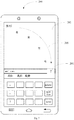
- FIG. 7 it is a fourth schematic diagram of the screen of a mobile terminal according to an embodiment of the present disclosure.
- the text recycling window 201, the text editing region 202, and a character sliding curve 205 are displayed on the screen of the mobile terminal 200.
- the target text block is " "
- the target text block " " may be slided into the text recycling window 201 in a character-by-character manner according to the sliding trajectory represented by the character sliding curve 205, and the target text block " " is cached to the text recycling window 201.
- Step 503 may include the following steps:
- a target text block is created based on the multiple characters " ", and the target text block including the multiple characters " " is cached to the preset text recycling window; on the other hand, if it is judged that a text block does not need to be created after the multiple characters " " are determined in Step 502 as the target text block to be recycled, the multiple characters " " are cached to the text block in the preset text recycling window which has a smallest time interval between a creation time thereof and a current time. In this way, the number of the text blocks in the preset text recycling window can be controlled reasonably, and the storage space in the text block can be utilized effectively.
- the judging whether a text block needs to be created includes:
- a text block is created; moreover, if the second touch operation is detected on the first text content displayed in the text editing region 202 shown in Fig. 6 , and the time interval between the second touch operation and the previous touch operation is larger than the first preset duration, then a text block is created, wherein the first preset duration may be set as 5 second or 8 second, etc.
- multiple text blocks may be created, and the number of the characters in each text block can be controlled reasonably to facilitate the display of the text blocks in the operating region, and the user can also quickly find the characters to be selected in the displayed text blocks.
- the method may include the step as follows: numbering the target text block according to the creation time of the target text block.
- the currently created target text block is numbered as the fourth text block, and information such as the number of characters and creation time of the target text block can also be recorded.
- Step 503 the method further includes:
- FIG. 8 it is a fifth schematic diagram of a screen of a mobile terminal according to an embodiment of the present disclosure.
- Fig. 8 is a schematic diagram of the screen obtained by adding characters in the text editing region 202 shown in Fig. 7 .
- a virtual keyboard 801 As shown in Fig. 8 , a virtual keyboard 801, a cursor 802 and a text editing region 202 are displayed on the screen of the mobile terminal 200.
- the text recycling window 201 is displayed in the first preset region of the virtual keyboard 801.
- the cursor 802 is used to prompt the user for the position of entering a character.
- three characters " " are added by entering them through the virtual keyboard 801, thereby obtaining the text content " " in the text editing region shown in Fig. 8 , wherein the three characters " " can be displayed by a preset highlighted display manner, such as by bolding or highlighting. In this way, it is convenient for the user to add characters into the text editing region and increase the speed of the user to add characters.
- Step 504 detecting a touch operation of a user on at least one text block displayed in an operating region of a preset text recycling window.
- Step 504 may include the following step:
- FIG. 9 it is a sixth schematic diagram of a screen of a mobile terminal according to an embodiment of the present disclosure.
- Fig. 9 is a schematic diagram of the screen obtained by pasting a text block in the text editing region 202 shown in Fig. 8 .
- a virtual keyboard 801 As shown in Fig. 9 , a virtual keyboard 801, a text editing region 202, an operating region 203, a text block 204 and a sliding trajectory 803 are displayed on the screen of the mobile terminal 200.
- the selected at least one character is " " in the text block 204, and then the characters " " are pasted to the text editing region 202 to obtain the second text content " " wherein the several characters " " may be displayed by a preset highlighted display manner such as bolding or highlighting.
- at least one word selected by the first touch operation may be pasted in the text editing region, and the user does not need to enter characters one by one, which reduces the steps for the user to enter characters and improves the speed to generate the text content.
- the method may further include the follow step: displaying the text recycling window.
- the displaying the text recycling window may include the following steps:
- the screen of the mobile terminal is changed correspondingly.
- the virtual keyboard 801 and the text editing region 202 are displayed on the screen of the mobile terminal.
- the text recycling window 201 is displayed in the first preset region of the virtual keyboard 801.
- the mobile terminal 200 starts the input method, and multiple characters " " are inputted in the text editing region.
- the text recycling window is displayed on the virtual keyboard, which can prompt the user to perform text editing using the text recycling window currently, and the user can perform subsequent operations on the text recycling window quickly.
- the step of displaying the text recycling window may include the following step: if a text recycling function starting instruction inputted by the user is received, displaying the text recycling window in a second preset region of the current display interface.
- any program interface may display the text recycling window.
- the text recycling window may be displayed on the chat interface of the instant messaging application according to the received text recycling function starting instruction input by the user, or may be displayed on the office application interface according to the received text recycling function starting instruction input by the user.
- a text recycling button may be displayed on the current display interface, and a touch instruction received by the text recycling button may be used as the text recycling function starting instruction input by the user.
- a touch instruction received by the text recycling button may be used as the text recycling function starting instruction input by the user.
- the method may further include the following step: if it is detected that an input method function is closed or a text recycling function closing instruction input by the user is received, eliminating display of the text recycling window.
- the display of the text recycling window may be eliminated, which saves the screen display space of the mobile terminal and facilitates displaying other content on the screen of the mobile terminal.
- the method may further include the following steps:
- the third touch operation includes a sliding operation in a third preset sliding direction and/or a sliding operation with a third preset sliding trajectory, and a clicking operation detected in the text recycling window.
- the third touch operation may be a sliding operation in the upward sliding direction, may be a sliding operation with a length of the sliding trajectory exceeding 1 cm, or may be a single-clicking operation, double-clicking operation or multi-clicking operation received on the text recycling window.
- the text block 204 is displayed in the operating region 203 in numerical sequence
- the first text block 401, the second text block 402 and the third text block 403 are displayed in the operating region 203 in numerical sequence.
- At least one text block may be displayed in the operating region in numerical sequence to facilitate the user to select a corresponding character from the text block and quickly complete the character pasting operation.
- the displaying at least one text block in the operating region in numerical sequence includes:
- the at least one text block satisfying the second preset condition includes at least one of:
- the second preset duration may be 1 minute, 2 minute, etc.
- the preset threshold may be 10 or 15, etc., which will not be limited here.
- the user may display at least one text block whose creation time is closer to the current time in the operating region as required, or the user may display at least one text block with a larger number of characters in the operating region as required.
- a variety of ways to display text blocks are provided to meet the different needs of users in the text editing process.
- the displaying at least one text block includes: displaying at least one text block in a formatted display manner.
- the formatted display manner displays only the content attribute corresponding to the characters in the text block, and does not display the format attribute. In this way, the display effect of the at least one text block in the operating region is better, which is convenient for a user to view.
- the displaying at least one text block in a formatted display manner includes:
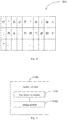
- FIG. 10 it is a schematic diagram of provided text blocks displayed in grid alignment.
- the text block 204 has 30 grids with 3 rows and 10 columns, and one character is displayed in each grid.
- each character in each text block corresponds to a grid, it is convenient for the user to accurately select a character from the text block, which reduces misoperations in the character selection process, and improves the accuracy of character selection.
- the method may further include the following step: if a preset first touch operation is detected, highlighting the grid corresponding to each character selected by the first touch operation with a third preset duration.
- the grid corresponding to the selected character is set to be highlighted for the third preset duration, which can prompt the user for the currently selected character, and guide the user to select the correct character.
- Step 505 if the preset first touch operation is detected, pasting at least one character selected by the first touch operation to the current position of the cursor in the text editing region.
- Step 102 The implementation process and beneficial effects of this step can be referred to the description of Step 102, and will not be repeated here.
- a touch operation of the user on a first text content displayed in the text editing region is detected; if a preset second touch operation is detected, at least one character selected by the second touch operation is determined as a target text block to be recycled; the target text block is cached to the preset text recycling window; a touch operation of a user on at least one text block displayed in an operating region of a preset text recycling window is detected; if the preset first touch operation is detected, at least one character selected by the first touch operation is pasted to the current position of the cursor in the text editing region; wherein at least one text block to be recycled is stored in the text recycling window.
- the text block can be recycled effectively.
- the user does not need to enter characters one by one, which can solve the problem of tedious operations of character deletion, insertion and modification in the character editing process, thereby enabling the user to complete the text editing quickly and improving the speed of text editing.
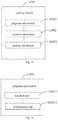
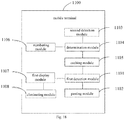
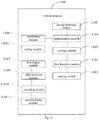
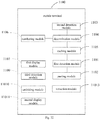
- the mobile terminal 1100 includes a first detection module 1101 and a pasting module 1102, and the first detection module 1101 is connected to the pasting module 1102; the first detection module 1101 is configured to detect a touch operation of a user on at least one text block displayed in an operating region of a preset text recycling window; and the pasting module 1102 is configured to, if a preset first touch operation is detected, paste at least one character selected by the first touch operation to the current position of the cursor in a text editing region; wherein at least one text block to be recycled is stored in the text recycling window.
- the mobile terminal 1100 further includes:
- the caching module 1105 includes:
- the judgment sub-module 11051 includes:
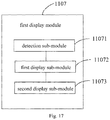
- the mobile terminal 1100 further includes: a first display module 1107 configured to display the text recycling window.
- the first display module includes:
- the mobile terminal 1100 further includes: an eliminating module 1108 configured to, if it is detected that an input method function is closed or a text recycling function disabling instruction input by the user is received, eliminate display of the text recycling window.
- the mobile terminal 1100 further includes:
- the second display module 11011 includes:
- the at least one text block satisfying the second preset condition includes at least one of:
- the second display module 11011 is further configured to display at least one text block in a formatted display manner.
- the second display module 11011 is further configured to display at least one text block in a grid alignment manner; wherein each character in each text block corresponds to a grid.
- the mobile terminal 1100 further includes: a setting module 11012 configured to, if the preset first touch operation is detected, highlight the grid corresponding to each character selected by the first touch operation for a third preset duration.
- the mobile terminal 1100 further includes: a retraction module 11013 configured to, if an operating region retraction instruction input by the user is received, retract the operating region of the text recycling window.
- a retraction module 11013 configured to, if an operating region retraction instruction input by the user is received, retract the operating region of the text recycling window.
- the mobile terminal 1100 further includes:
- the mobile terminal 1100 can implement the processes implemented by the mobile terminals in the method embodiments of Figs. 1 and 5 . To avoid repetition, details are not described herein again.
- the mobile terminal 1100 provided by the embodiment of the present disclosure can quickly select a corresponding character from the text block and paste it to the current position of the cursor, and the user does not need to enter characters one by one, which can solve the problem of tedious operations of character deletion, insertion and modification in the character editing process, thereby enabling the user to complete the text editing quickly.
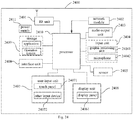
- Fig. 24 is a schematic diagram of a hardware structure of a mobile terminal implementing various embodiments of the present disclosure.
- the mobile terminal includes (but not limited thereto): a radio frequency unit 2401, a network module 2402, an audio output unit 2403, an input unit 2404, a sensor 2405, a display unit 2406, a user input unit 2407, an interface unit 2408, a storage 2409, a processor 2410, and power supply 2411 and other components.
- a radio frequency unit 2401 includes (but not limited thereto): a radio frequency unit 2401, a network module 2402, an audio output unit 2403, an input unit 2404, a sensor 2405, a display unit 2406, a user input unit 2407, an interface unit 2408, a storage 2409, a processor 2410, and power supply 2411 and other components.
- Those skilled in the art may understand that the structure of the mobile terminal shown in Fig. 24 does not constitute a limitation on the mobile terminal, and the mobile terminal may include more
- the processor 2410 is configured to detect a touch operation of a user on at least one text block displayed in an operating region of a preset text recycling window; if a preset first touch operation is detected, paste at least one character selected by the first touch operation to the current position of the cursor in a text editing region; wherein at least one text block to be recycled is stored in the text recycling window.
- the processor 2410 is further configured to detect a touch operation of the user on a first text content displayed in the text editing region; if a preset second touch operation is detected, determine at least one character selected by the second touch operation as a target text block to be recycled; and cache the target text block to the preset text recycling window.
- the processor 2410 caching the target text block to the preset text recycling window includes: judging whether a text block needs to be created; if a text block needs to be created, creating a target text block based on at least one character selected by the second touch operation, and caching the target text block to the preset text recycling window; if a text block does not need to be created, caching the target text block to a text block in the preset text recycling window which has a smallest time interval between a creation time thereof and a current time.
- the processor 2410 judging whether a text block needs to be created includes: detecting whether the second touch operation satisfies a first preset condition; and if it is detected that the second touch operation satisfies the first preset condition, determining that a text block needs to be created;
- the first preset condition includes at least one of following: a touch operation previous to the second touch operation is a preset operation; a time interval between the touch operation previous to the second touch operation and the second touch operation is larger than a first preset duration; wherein, the previous touch operation is a touch operation which has a smallest time interval between an operation time thereof and an operation time of the second touch operation;
- the preset operation includes at least one of: an operating region unfolding operation, a text recycling window starting operation, and a text adding operation.
- the processor 2410 is further configured to number the target text block according to a creation time of the target text block.
- the processor 2410 is further configured to display the text recycling window.
- the processor 2410 displaying the text recycling window includes: detecting whether an input method function is invoked; if it is detected that the input method function is invoked, displaying a virtual keyboard; and displaying the text recycling window in a first preset region of the virtual keyboard.
- the processor 2410 displaying the text recycling window includes: if a text recycling function starting instruction input by the user is received, displaying the text recycling window in a second preset region of the current display interface.
- the processor 2410 is further configured to, if it is detected that an input method function is closed or a text recycling function disabling instruction input by the user is received, eliminate display of the text recycling window.
- the processor 2410 is further configured to detect the touch operation of the user on the text recycling window; if a preset third touch operation is detected, unfold the operating region of the text recycling window; and display at least one text block in the operating region in numerical sequence.
- the processor 2410 displaying at least one text block in the operating region in numerical sequence includes: determining at least one text block satisfying a second preset condition; and displaying the at least one text block in the operating region in numerical sequence.
- the at least one text block satisfying the second preset condition includes at least one of: at least one text block having a time interval between a creation time thereof and a current time smaller than a second preset duration; and at least one text block having a word number larger than a preset threshold.
- the processor 2410 displaying at least one text block includes: displaying at least one text block in a formatted display manner.
- the processor 2410 displaying at least one text block in a formatted display manner includes: displaying at least one text block in a grid alignment manner; wherein each character in each text block corresponds to a grid.
- the processor 2410 is further configured to, if the preset first touch operation is detected, highlight the grid corresponding to each character selected by the first touch operation for a third preset duration.
- the processor 2410 is further configured to, if an operating region retraction instruction input by the user is received, retract the operating region of the text recycling window.
- the processor 2410 is further configured to acquire at least one character inputted by the user; adding the at least one character inputted by the user into the text editing region; and moving the cursor to the right of a last added character, the processor 2410 pasting at least one character selected by the first touch operation to the current position of the cursor in a text editing region includes: pasting at least one character selected by the first touch operation to the current position of the cursor in the text editing region to generate a second text content, wherein the at least one character inputted by the user in the text editing region is displayed in a preset highlighted display manner, and/or, the at least one character selected by the first touch operation in the text editing region is displayed in a preset highlighted display manner.
- the touch operation includes: a sliding operation and a clicking operation; wherein the clicking operation comprises a single-clicking operation, a double-clicking operation, and a multi-clicking operation.
- the mobile terminal 2400 can implement the processes implemented by the mobile terminals in the foregoing embodiments. To avoid repetition, details are not described herein again.
- the mobile terminal 2400 in the embodiment of the present disclosure can quickly select a corresponding character from the text block and paste it to the current position of the cursor, and the user does not need to enter characters one by one, which can solve the problem of tedious operations of character deletion, insertion and modification in the character editing process, thereby enabling the user to complete the text editing quickly.
- the radio frequency unit 2401 may be used to receive and sent information, or receive and send signals during a call. Specifically, after the downlink data from the base station is received, it is processed by the processor 2410; in addition, the uplink data is sent to the base station.
- the radio frequency unit 2401 includes but is not limited to an antenna, at least one amplifier, a transceiver, a coupler, a low noise amplifier, a duplexer, and the like.
- the radio frequency unit 2401 can also communicate with the network and other devices through a wireless communication system.
- the mobile terminal provides users with wireless broadband Internet access through the network module 2402, such as receiving and sending emails for users, browsing web pages, accessing streaming media, and the like.
- the audio output unit 2403 may convert audio data received by the radio frequency unit 2401 or the network module 2402 or stored in the storage 2409 into audio signals and output as sound. Moreover, the audio output unit 2403 may also provide audio output (e.g., call signal reception sound, message reception sound, etc.) related to a specific function performed by the mobile terminal 2400.
- the audio output unit 2403 includes a speaker, a buzzer, a telephone receiver, and the like.
- the input unit 2404 is used to receive audio or video signals.
- the input unit 2404 may include a graphics processing unit (GPU) 24041 and a microphone 24042, and the graphics processor 24041 may process image data of static pictures or videos obtained by an image capture device (such as a camera) in a video capture mode or an image capture mode.
- the processed image frames may be displayed on the display unit 2406.
- the image frames processed by the graphics processor 24041 may be stored in the storage 2409 (or other storage medium) or sent via the radio frequency unit 2401 or the network module 2402.
- the microphone 24042 can receive sound, and can process such sound into audio data.
- the processed audio data can be converted into a format that can be sent to the mobile communication base station via the radio frequency unit 2401 in the case of the telephone call mode, and sent.
- the mobile terminal 2400 also includes at least one sensor 2405, such as a light sensor, a motion sensor, and other sensors.
- the light sensor includes an ambient light sensor and a proximity sensor, where the ambient light sensor can adjust the brightness of the display panel 24061 according to the brightness of the ambient light, and the proximity sensor can turn off the display panel 24061 and/or backlight when the mobile terminal 2400 moves to the ear.
- an accelerometer sensor can detect the magnitude of acceleration in various directions (generally three axes), and can detect the magnitude and direction of gravity when at rest, and can be used for identifying of the posture of mobile terminal (such as horizontal and vertical screen switching, related games, magnetometer attitude calibration), vibration recognition related functions (such as pedometer, tap), etc; the sensor 2405 may also include a fingerprint sensor, a pressure sensor, an iris sensor, a molecular sensor, a gyroscope, a barometer, a hygrometer, a thermometer, an infrared sensor, etc., which will not be repeated here.
- the display unit 2406 is used to display information input by the user or information provided to the user.
- the display unit 2406 may include a display panel 24061, and the display panel 24061 may be configured in the form of liquid crystal display (LCD), organic light-emitting diode (OLED), or the like.
- LCD liquid crystal display
- OLED organic light-emitting diode
- the user input unit 2407 can be used to receive input numeric or character information, and generate key signal input related to user settings and function control of the mobile terminal.
- the user input unit 2407 includes a touch panel 24071 and other input device(s) 24072.
- the touch panel 24071 also known as a touch screen, can collect user's touch operations on or near it (for example, operations by the user using any suitable object or accessory such as a finger or a stylus on or near the touch panel 2407).
- the touch panel 24071 may include two parts of a touch detection device and a touch controller.
- the touch detection device detects the user's touch orientation and detects the signal brought by the touch operation, and transmits the signal to the touch controller; the touch controller receives touch information from the touch detection device, converts it into contact coordinates, and then send it to the processor 2410, and receive the command sent by the processor 2410 and execute it.
- the touch panel 24071 can be implemented in various types, such as resistive, capacitive, infrared, and surface acoustic wave types.
- the user input unit 2407 may also include other input device(s) 24072.
- other input devices 24072 may include, but are not limited to, a physical keyboard, function keys (such as volume control keys, switch keys, etc.), a trackball, a mouse, and a joystick, which will not be repeated here.
- the touch panel 24071 may be overlaid on the display panel 24061.
- the touch panel 24071 detects a touch operation on or near it, it transmit it to the processor 2410 to determine the type of touch event, and then the processor 2410 provides a corresponding visual output on the display panel 24061 according to the type of touch event.
- the touch panel 24071 and the display panel 24061 are implemented as two separate components to realize the input and output functions of the mobile terminal, in some embodiments, the touch panel 24071 and the display panel 24061 may be integrated together to implement the input and output functions of the mobile terminal, which is not specifically limited here.
- the interface unit 2408 is an interface for connecting an external device to the mobile terminal 2400.
- the external device may include a wired or wireless headset port, an external power (or battery charger) port, a wired or wireless data port, a memory card port, a port for connecting a device with an identification module, an audio input/output (I/O) port, a video I/O port, a headphone port, etc.
- the interface unit 2408 may be used to receive inputs from external devices (e.g., data information, power, etc.) and transmit the received inputs to one or more elements within the mobile terminal 2400 or may be used to transfer data between the mobile terminal 2400 and the external devices.
- the storage 2409 may be used to store software programs and various data.
- the storage 2409 may mainly include a program storage area and a data storage area, where the program storage area may store an operating system, application programs required for at least one function (such as a sound playback function, an image playback function, etc.); the data storage area may store data created by the use of mobile phone (such as audio data, phone books, etc.), etc.
- the storage 2409 may include a high-speed random access memory, and may also include a non-volatile memory, such as at least one magnetic disk storage device, a flash memory device, or other volatile solid-state storage devices.
- the processor 2410 is the control center of the mobile terminal, and uses various interfaces and lines to connect various parts of the entire mobile terminal. By running or performing software programs and/or modules stored in the storage 2409, and calling data stored in the storage 2409, it performs various functions and processing data of the mobile terminal, so as to monitor the entire mobile terminal.
- the processor 2410 may include one or more processing units; optionally, the processor 2410 may integrate an application processor and a modem processor, where the application processor mainly handles an operating system, a user interface, and application programs, etc., and the modem processor mainly handles wireless communication. It can be understood that, the foregoing modem processor may not be integrated into the processor 2410.
- the mobile terminal 2400 may further include a power supply 2411 (such as a battery) that supplies power to the components.
- a power supply 2411 may be logically connected to the processor 2410 through a power management system, thereby functions such as management of charging, discharging, and power consumption can be achieved through the power management system.
- the mobile terminal 2400 includes some function modules not shown, which will not be detailed here.
- an embodiment of the present disclosure further provides a mobile terminal including the processor 2410, the storage 2409, a computer program stored on the storage 2409 and capable of running on the processor 2410.
- a mobile terminal including the processor 2410, the storage 2409, a computer program stored on the storage 2409 and capable of running on the processor 2410.
- the various processes of the above text editing method embodiments is implemented, and the same technical effects can be achieved, which will not be repeated here to avoid repetition.
- the embodiments of the present disclosure also provide a computer readable storage medium that stores a computer program thereon.
- the computer program is executed by a processor, the processes of the above text editing method embodiments are implemented, and the same technical effects can be achieved, which will not be repeated here to avoid repetition.
- the computer readable storage medium may be, for example, a read-only memory (ROM), a random access memory (RAM), a magnetic disk, or an optical disk, etc.
Landscapes
- Engineering & Computer Science (AREA)
- Theoretical Computer Science (AREA)
- General Engineering & Computer Science (AREA)
- Physics & Mathematics (AREA)
- General Physics & Mathematics (AREA)
- Human Computer Interaction (AREA)
- Health & Medical Sciences (AREA)
- Artificial Intelligence (AREA)
- Audiology, Speech & Language Pathology (AREA)
- Computational Linguistics (AREA)
- General Health & Medical Sciences (AREA)
- User Interface Of Digital Computer (AREA)
Applications Claiming Priority (2)
| Application Number | Priority Date | Filing Date | Title |
|---|---|---|---|
| CN201711169660.2A CN107748741B (zh) | 2017-11-20 | 2017-11-20 | 一种文本编辑方法及移动终端 |
| PCT/CN2018/115389 WO2019096154A1 (zh) | 2017-11-20 | 2018-11-14 | 文本编辑方法及移动终端 |
Publications (2)
| Publication Number | Publication Date |
|---|---|
| EP3706016A1 true EP3706016A1 (de) | 2020-09-09 |
| EP3706016A4 EP3706016A4 (de) | 2020-11-25 |
Family
ID=61251403
Family Applications (1)
| Application Number | Title | Priority Date | Filing Date |
|---|---|---|---|
| EP18879312.9A Ceased EP3706016A4 (de) | 2017-11-20 | 2018-11-14 | Textbearbeitungsverfahren und mobiles endgerät |
Country Status (4)
| Country | Link |
|---|---|
| US (1) | US11307761B2 (de) |
| EP (1) | EP3706016A4 (de) |
| CN (1) | CN107748741B (de) |
| WO (1) | WO2019096154A1 (de) |
Families Citing this family (6)
| Publication number | Priority date | Publication date | Assignee | Title |
|---|---|---|---|---|
| CN107748741B (zh) | 2017-11-20 | 2021-04-23 | 维沃移动通信有限公司 | 一种文本编辑方法及移动终端 |
| CN110174979B (zh) * | 2019-05-22 | 2022-10-18 | 努比亚技术有限公司 | 消息的编辑方法、可穿戴设备及计算机可读存储介质 |
| CN111027288A (zh) * | 2019-11-04 | 2020-04-17 | 贝壳技术有限公司 | 文本编辑方法及文本编辑系统 |
| CN114860147B (zh) | 2021-02-04 | 2023-09-08 | Oppo广东移动通信有限公司 | 输入方法、装置、电子设备以及存储介质 |
| CN113742106B (zh) * | 2021-09-01 | 2024-09-10 | 统信软件技术有限公司 | 一种文本粘贴方法、装置、计算设备及可读存储介质 |
| CN115048030B (zh) * | 2022-08-12 | 2022-12-09 | 广东新空电子科技股份有限公司 | 一种文字合并方法、装置、电子设备和存储介质 |
Family Cites Families (40)
| Publication number | Priority date | Publication date | Assignee | Title |
|---|---|---|---|---|
| JP2993528B2 (ja) * | 1991-05-18 | 1999-12-20 | 富士通株式会社 | テキスト管理・復元方式 |
| US6240430B1 (en) | 1996-12-13 | 2001-05-29 | International Business Machines Corporation | Method of multiple text selection and manipulation |
| JP2004030268A (ja) | 2002-06-26 | 2004-01-29 | Toshiba Corp | 移動無線端末装置 |
| US7921082B2 (en) * | 2004-01-23 | 2011-04-05 | Lsi Corporation | File recovery under linux operating system |
| US20060095470A1 (en) * | 2004-11-04 | 2006-05-04 | Cochran Robert A | Managing a file in a network environment |
| US9785329B2 (en) * | 2005-05-23 | 2017-10-10 | Nokia Technologies Oy | Pocket computer and associated methods |
| US7559033B2 (en) * | 2005-07-21 | 2009-07-07 | International Business Machines Corporation | Method and system for improving selection capability for user interface |
| US7890485B2 (en) * | 2006-04-13 | 2011-02-15 | Tony Malandain | Knowledge management tool |
| US8453066B2 (en) * | 2006-11-06 | 2013-05-28 | Microsoft Corporation | Clipboard augmentation with references |
| CN101651895B (zh) | 2008-08-15 | 2012-06-27 | 华为技术有限公司 | 长期演进的时分双工通信方法、设备、系统及无线帧结构 |
| CN101924727A (zh) | 2009-06-16 | 2010-12-22 | 中兴通讯股份有限公司 | 无线通信系统中的帧结构指示信息配置方法 |
| CN102141886B (zh) * | 2010-01-29 | 2016-04-20 | 诺基亚技术有限公司 | 文本编辑方法和设备 |
| KR101601049B1 (ko) * | 2010-02-10 | 2016-03-08 | 삼성전자주식회사 | 듀얼 표시부를 가지는 휴대단말 및 그 표시부를 이용한 클립보드 기능 제공 방법 |
| JP5229750B2 (ja) * | 2010-10-29 | 2013-07-03 | キヤノンマーケティングジャパン株式会社 | 情報処理装置、情報処理方法、およびそのプログラム |
| KR20120132069A (ko) * | 2011-05-27 | 2012-12-05 | 삼성전자주식회사 | 다중 선택 및 다중 붙이기를 이용한 텍스트 편집을 위한 방법 및 장치 |
| JP5546022B2 (ja) * | 2011-06-09 | 2014-07-09 | 株式会社Nttドコモ | 表示装置、表示方法及びプログラム |
| KR20130004654A (ko) * | 2011-07-04 | 2013-01-14 | 삼성전자주식회사 | 휴대단말기의 텍스트 편집방법 및 장치 |
| US8914594B2 (en) * | 2011-12-22 | 2014-12-16 | Sandisk Technologies Inc. | Systems and methods of loading data from a non-volatile memory to a volatile memory |
| KR101869522B1 (ko) * | 2012-01-19 | 2018-06-22 | 삼성전자주식회사 | 휴대 단말기에서 클립보드를 제공하는 장치 및 방법 |
| CN103312462B (zh) | 2012-03-16 | 2016-11-16 | 上海贝尔股份有限公司 | 解决tdd上行资源配置信息和harq应答消息冲突的方法 |
| US9098520B2 (en) * | 2012-04-03 | 2015-08-04 | Baloota Applications Ltd. | Apparatus and methods for restoring data objects |
| CN103457911A (zh) * | 2012-05-29 | 2013-12-18 | 北京小米科技有限责任公司 | 一种信息共享方法及系统 |
| CN103136181B (zh) * | 2013-03-06 | 2017-04-12 | 惠州Tcl移动通信有限公司 | 电子阅读设备及其文本提取与保存的方法 |
| US9760964B2 (en) * | 2013-04-11 | 2017-09-12 | Facebook, Inc. | Application-tailored object re-use and recycling |
| US9710147B2 (en) * | 2013-05-29 | 2017-07-18 | Lg Electronics Inc. | Mobile terminal and controlling method thereof |
| KR102136602B1 (ko) * | 2013-07-10 | 2020-07-22 | 삼성전자 주식회사 | 휴대단말기의 컨텐츠 처리 장치 및 방법 |
| CN104346092A (zh) * | 2013-08-01 | 2015-02-11 | 腾讯科技(深圳)有限公司 | 一种在移动终端中呈现剪贴板内容的方法及装置 |
| WO2015026060A1 (ko) | 2013-08-20 | 2015-02-26 | 엘지전자 주식회사 | 복수의 셀에 동시 접속하는 방법 및 사용자 장치 |
| CN103761216B (zh) | 2013-12-24 | 2018-01-16 | 上海斐讯数据通信技术有限公司 | 编辑文本的方法及移动终端 |
| CN104156140A (zh) | 2014-08-15 | 2014-11-19 | 广东欧珀移动通信有限公司 | 一种利用重力传感器快速编辑文字的方法及装置 |
| CN104320539A (zh) | 2014-10-21 | 2015-01-28 | 厦门美图移动科技有限公司 | 一种在移动设备上通过模板快速输入的方法 |
| JP6380150B2 (ja) * | 2015-02-13 | 2018-08-29 | オムロン株式会社 | 文字入力システム用のプログラムおよび情報処理装置 |
| US9629066B2 (en) | 2015-02-24 | 2017-04-18 | Huawei Technologies Co., Ltd. | System and method for transmission time intervals |
| WO2016148530A1 (en) | 2015-03-17 | 2016-09-22 | Lg Electronics Inc. | Method and apparatus for performing data rate matching in licensed assisted access carrier in wireless communication system |
| CN104834433B (zh) * | 2015-04-24 | 2018-02-02 | 小米科技有限责任公司 | 文本编辑方法、装置及终端 |
| CN105892805A (zh) * | 2016-03-29 | 2016-08-24 | 北京小米移动软件有限公司 | 即时消息的处理方法及装置 |
| CN106648371A (zh) * | 2016-12-29 | 2017-05-10 | 北京小米移动软件有限公司 | 基于文本文件的文本移动方法及装置 |
| CN106919307B (zh) * | 2017-03-09 | 2018-12-04 | 维沃移动通信有限公司 | 一种文本复制方法及移动终端 |
| KR102356349B1 (ko) * | 2017-06-16 | 2022-02-08 | 후아웨이 테크놀러지 컴퍼니 리미티드 | 파일 처리 방법 및 이동 단말 |
| CN107748741B (zh) | 2017-11-20 | 2021-04-23 | 维沃移动通信有限公司 | 一种文本编辑方法及移动终端 |
-
2017
- 2017-11-20 CN CN201711169660.2A patent/CN107748741B/zh active Active
-
2018
- 2018-11-14 US US16/765,682 patent/US11307761B2/en active Active
- 2018-11-14 EP EP18879312.9A patent/EP3706016A4/de not_active Ceased
- 2018-11-14 WO PCT/CN2018/115389 patent/WO2019096154A1/zh not_active Ceased
Also Published As
| Publication number | Publication date |
|---|---|
| US11307761B2 (en) | 2022-04-19 |
| CN107748741A (zh) | 2018-03-02 |
| CN107748741B (zh) | 2021-04-23 |
| US20200301574A1 (en) | 2020-09-24 |
| EP3706016A4 (de) | 2020-11-25 |
| WO2019096154A1 (zh) | 2019-05-23 |
Similar Documents
| Publication | Publication Date | Title |
|---|---|---|
| US11829580B2 (en) | Multi-piece text copy method and mobile terminal | |
| US11307761B2 (en) | Text editing method and mobile terminal | |
| CN108762954B (zh) | 一种对象分享方法及移动终端 | |
| CN108737904B (zh) | 一种视频数据处理方法及移动终端 | |
| US11568899B2 (en) | Method, apparatus and smart mobile terminal for editing video | |
| EP3731077B1 (de) | Verfahren zum editieren von text und mobile vorrichtung | |
| EP3822778A1 (de) | Verfahren zur anzeige einer hintergrundanwendung und mobiles endgerät | |
| CN107943390B (zh) | 一种文字复制方法及移动终端 | |
| CN110618969B (zh) | 一种图标显示方法及电子设备 | |
| CN109213416B (zh) | 一种显示信息处理方法及移动终端 | |
| WO2020238938A1 (zh) | 信息输入方法及移动终端 | |
| US11895069B2 (en) | Message sending method and mobile terminal | |
| EP3832440A1 (de) | Texteingabeverfahren und endgerät | |
| US20220011914A1 (en) | Operation method and terminal device | |
| CN110932964A (zh) | 一种信息的处理方法及装置 | |
| CN107819936B (zh) | 一种短信分类方法、移动终端和存储介质 | |
| CN108632465A (zh) | 一种语音输入的方法及移动终端 | |
| KR102554899B1 (ko) | 음성 처리 방법 및 이동 단말기 | |
| CN110780796A (zh) | 一种截屏方法及电子设备 | |
| CN111090484B (zh) | 一种信息处理方法及电子设备 | |
| CN104063162B (zh) | 输入手写信息的方法及装置 | |
| CN111158544A (zh) | 一种内容添加方法及电子设备 | |
| CN111026714A (zh) | 一种重命名方法及电子设备 | |
| CN111143580A (zh) | 多媒体数据存储方法、装置、存储介质及电子设备 | |
| CN106598469A (zh) | 一种优化存储方式的方法和装置及移动终端 |
Legal Events
| Date | Code | Title | Description |
|---|---|---|---|
| STAA | Information on the status of an ep patent application or granted ep patent |
Free format text: STATUS: THE INTERNATIONAL PUBLICATION HAS BEEN MADE |
|
| PUAI | Public reference made under article 153(3) epc to a published international application that has entered the european phase |
Free format text: ORIGINAL CODE: 0009012 |
|
| STAA | Information on the status of an ep patent application or granted ep patent |
Free format text: STATUS: REQUEST FOR EXAMINATION WAS MADE |
|
| 17P | Request for examination filed |
Effective date: 20200602 |
|
| AK | Designated contracting states |
Kind code of ref document: A1 Designated state(s): AL AT BE BG CH CY CZ DE DK EE ES FI FR GB GR HR HU IE IS IT LI LT LU LV MC MK MT NL NO PL PT RO RS SE SI SK SM TR |
|
| AX | Request for extension of the european patent |
Extension state: BA ME |
|
| REG | Reference to a national code |
Ref country code: DE Ref legal event code: R079 Free format text: PREVIOUS MAIN CLASS: G06F0017240000 Ipc: G06F0040166000 |
|
| A4 | Supplementary search report drawn up and despatched |
Effective date: 20201022 |
|
| RIC1 | Information provided on ipc code assigned before grant |
Ipc: G06F 40/166 20200101AFI20201016BHEP Ipc: G06F 3/0488 20130101ALI20201016BHEP |
|
| DAV | Request for validation of the european patent (deleted) | ||
| DAX | Request for extension of the european patent (deleted) | ||
| STAA | Information on the status of an ep patent application or granted ep patent |
Free format text: STATUS: EXAMINATION IS IN PROGRESS |
|
| 17Q | First examination report despatched |
Effective date: 20230220 |
|
| REG | Reference to a national code |
Ref country code: DE Ref legal event code: R003 |
|
| STAA | Information on the status of an ep patent application or granted ep patent |
Free format text: STATUS: THE APPLICATION HAS BEEN REFUSED |
|
| 18R | Application refused |
Effective date: 20250902 |