EP3698244B1 - Elektronische vorrichtung und steuerungsverfahren dafür - Google Patents
Elektronische vorrichtung und steuerungsverfahren dafür Download PDFInfo
- Publication number
- EP3698244B1 EP3698244B1 EP19738516.4A EP19738516A EP3698244B1 EP 3698244 B1 EP3698244 B1 EP 3698244B1 EP 19738516 A EP19738516 A EP 19738516A EP 3698244 B1 EP3698244 B1 EP 3698244B1
- Authority
- EP
- European Patent Office
- Prior art keywords
- electronic apparatus
- another electronic
- dock
- stored
- guest
- Prior art date
- Legal status (The legal status is an assumption and is not a legal conclusion. Google has not performed a legal analysis and makes no representation as to the accuracy of the status listed.)
- Active
Links
Images




Classifications
-
- G—PHYSICS
- G06—COMPUTING OR CALCULATING; COUNTING
- G06F—ELECTRIC DIGITAL DATA PROCESSING
- G06F9/00—Arrangements for program control, e.g. control units
- G06F9/06—Arrangements for program control, e.g. control units using stored programs, i.e. using an internal store of processing equipment to receive or retain programs
- G06F9/44—Arrangements for executing specific programs
- G06F9/4401—Bootstrapping
- G06F9/4406—Loading of operating system
-
- G—PHYSICS
- G06—COMPUTING OR CALCULATING; COUNTING
- G06F—ELECTRIC DIGITAL DATA PROCESSING
- G06F1/00—Details not covered by groups G06F3/00 - G06F13/00 and G06F21/00
- G06F1/16—Constructional details or arrangements
- G06F1/1613—Constructional details or arrangements for portable computers
- G06F1/1632—External expansion units, e.g. docking stations
-
- G—PHYSICS
- G06—COMPUTING OR CALCULATING; COUNTING
- G06F—ELECTRIC DIGITAL DATA PROCESSING
- G06F1/00—Details not covered by groups G06F3/00 - G06F13/00 and G06F21/00
- G06F1/16—Constructional details or arrangements
- G06F1/1613—Constructional details or arrangements for portable computers
- G06F1/1633—Constructional details or arrangements of portable computers not specific to the type of enclosures covered by groups G06F1/1615 - G06F1/1626
- G06F1/1637—Details related to the display arrangement, including those related to the mounting of the display in the housing
- G06F1/1647—Details related to the display arrangement, including those related to the mounting of the display in the housing including at least an additional display
-
- G—PHYSICS
- G06—COMPUTING OR CALCULATING; COUNTING
- G06F—ELECTRIC DIGITAL DATA PROCESSING
- G06F1/00—Details not covered by groups G06F3/00 - G06F13/00 and G06F21/00
- G06F1/16—Constructional details or arrangements
- G06F1/1613—Constructional details or arrangements for portable computers
- G06F1/1633—Constructional details or arrangements of portable computers not specific to the type of enclosures covered by groups G06F1/1615 - G06F1/1626
- G06F1/1656—Details related to functional adaptations of the enclosure, e.g. to provide protection against EMI, shock, water, or to host detachable peripherals like a mouse or removable expansions units like PCMCIA cards, or to provide access to internal components for maintenance or to removable storage supports like CDs or DVDs, or to mechanically mount accessories
-
- G—PHYSICS
- G06—COMPUTING OR CALCULATING; COUNTING
- G06F—ELECTRIC DIGITAL DATA PROCESSING
- G06F3/00—Input arrangements for transferring data to be processed into a form capable of being handled by the computer; Output arrangements for transferring data from processing unit to output unit, e.g. interface arrangements
- G06F3/14—Digital output to display device ; Cooperation and interconnection of the display device with other functional units
- G06F3/1454—Digital output to display device ; Cooperation and interconnection of the display device with other functional units involving copying of the display data of a local workstation or window to a remote workstation or window so that an actual copy of the data is displayed simultaneously on two or more displays, e.g. teledisplay
-
- G—PHYSICS
- G06—COMPUTING OR CALCULATING; COUNTING
- G06F—ELECTRIC DIGITAL DATA PROCESSING
- G06F9/00—Arrangements for program control, e.g. control units
- G06F9/06—Arrangements for program control, e.g. control units using stored programs, i.e. using an internal store of processing equipment to receive or retain programs
- G06F9/44—Arrangements for executing specific programs
- G06F9/4401—Bootstrapping
- G06F9/4406—Loading of operating system
- G06F9/441—Multiboot arrangements, i.e. selecting an operating system to be loaded
-
- G—PHYSICS
- G06—COMPUTING OR CALCULATING; COUNTING
- G06F—ELECTRIC DIGITAL DATA PROCESSING
- G06F9/00—Arrangements for program control, e.g. control units
- G06F9/06—Arrangements for program control, e.g. control units using stored programs, i.e. using an internal store of processing equipment to receive or retain programs
- G06F9/44—Arrangements for executing specific programs
- G06F9/4401—Bootstrapping
- G06F9/4411—Configuring for operating with peripheral devices; Loading of device drivers
-
- G—PHYSICS
- G06—COMPUTING OR CALCULATING; COUNTING
- G06F—ELECTRIC DIGITAL DATA PROCESSING
- G06F9/00—Arrangements for program control, e.g. control units
- G06F9/06—Arrangements for program control, e.g. control units using stored programs, i.e. using an internal store of processing equipment to receive or retain programs
- G06F9/44—Arrangements for executing specific programs
- G06F9/455—Emulation; Interpretation; Software simulation, e.g. virtualisation or emulation of application or operating system execution engines
- G06F9/45533—Hypervisors; Virtual machine monitors
-
- H—ELECTRICITY
- H04—ELECTRIC COMMUNICATION TECHNIQUE
- H04M—TELEPHONIC COMMUNICATION
- H04M1/00—Substation equipment, e.g. for use by subscribers
- H04M1/72—Mobile telephones; Cordless telephones, i.e. devices for establishing wireless links to base stations without route selection
- H04M1/724—User interfaces specially adapted for cordless or mobile telephones
- H04M1/72403—User interfaces specially adapted for cordless or mobile telephones with means for local support of applications that increase the functionality
- H04M1/72409—User interfaces specially adapted for cordless or mobile telephones with means for local support of applications that increase the functionality by interfacing with external accessories
-
- H—ELECTRICITY
- H04—ELECTRIC COMMUNICATION TECHNIQUE
- H04M—TELEPHONIC COMMUNICATION
- H04M1/00—Substation equipment, e.g. for use by subscribers
- H04M1/72—Mobile telephones; Cordless telephones, i.e. devices for establishing wireless links to base stations without route selection
- H04M1/724—User interfaces specially adapted for cordless or mobile telephones
- H04M1/72403—User interfaces specially adapted for cordless or mobile telephones with means for local support of applications that increase the functionality
- H04M1/72409—User interfaces specially adapted for cordless or mobile telephones with means for local support of applications that increase the functionality by interfacing with external accessories
- H04M1/72412—User interfaces specially adapted for cordless or mobile telephones with means for local support of applications that increase the functionality by interfacing with external accessories using two-way short-range wireless interfaces
-
- H—ELECTRICITY
- H04—ELECTRIC COMMUNICATION TECHNIQUE
- H04M—TELEPHONIC COMMUNICATION
- H04M2250/00—Details of telephonic subscriber devices
- H04M2250/16—Details of telephonic subscriber devices including more than one display unit
Definitions
- the disclosure relates to an electronic apparatus capable of supporting a plurality of operating systems, and a control method thereof.
- the docking station outputs a screen of a portable terminal apparatus having a small display panel through a display apparatus having a large display panel, thereby providing a more convenient watching environment to a user. Further, in the docking station, an input device connected to the display apparatus, such as a keyboard, a mouse, or the like interworks with software provided in the portable terminal apparatus, thereby providing a working experience under a desktop computer environment to the user.
- an input device connected to the display apparatus such as a keyboard, a mouse, or the like interworks with software provided in the portable terminal apparatus, thereby providing a working experience under a desktop computer environment to the user.
- a multi-operating system (OS) technology enables an electronic apparatus supporting one multi-OS to have a host operating system and a guest operating system which may be selectively loaded, thereby providing a plurality of working environments.
- OS operating system
- Embodiments of the disclosure address the above disadvantages and other disadvantages not described above.
- the disclosure provides an electronic apparatus capable of operating and managing a multi-OS in a docking station, and a control method thereof.
- the user may be conveniently provided with a working environment of a preferred OS, thereby improving convenience of the user.
- ordinal numbers such as “first”, “second”, or the like may be used to distinguish components from each other.
- the ordinal number is used to distinguish the same or similar components from each other, and a term is not limited by the use of the ordinal number.
- ordinal numbers may be replaced with each other.
- a "module”, a “unit”, or a “-er/-or” may refer, for example, to a component performing at least one function or operation, and may be implemented by hardware or software or be implemented by any combination of hardware and software.
- a plurality of "modules”, a plurality of "units”, or a plurality of “-ers/-ors” may be integrated in at least one module and be implemented by at least one processor (not illustrated) except for a "module", a "unit”, or a "-er/-or” that must be implemented by specific hardware.
- connection between one portion and another portion includes not only direct connection but also indirect connection via a medium.
- “comprising” any components will be understood to imply the inclusion of other components but not the exclusion of any other components.
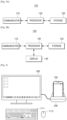
- FIGS. 1A and 1B are diagrams illustrating an example docking station according to an embodiment of the disclosure.
- a docking station arrangement 1000 of the disclosure may include an electronic apparatus 100, a dock 200, and a display apparatus 300.
- the electronic apparatus 100 may store a plurality of operating systems (hereinafter, referred to as OS) therein and is may be capable of selectively loading and operating the stored OS.
- the OS may refer, for example, to a platform providing an environment under which a user program may be efficiently executed in the electronic apparatus 100.
- An example purpose of the docking station arrangement 1000 is to provide a more convenient watching environment and/or working environment by outputting a screen of a portable terminal apparatus having a small display panel through a display apparatus having a large display panel. Therefore, in general, the electronic apparatus 100 may implemented by a portable terminal apparatus such as, for example, and without limitation, a smartphone which may be connected by being placed in the dock 200 as illustrated in FIG. 1A .
- a portable terminal apparatus such as, for example, and without limitation, a smartphone which may be connected by being placed in the dock 200 as illustrated in FIG. 1A .
- the electronic apparatus 100 may be implemented by various electronic apparatuses, including any kind of electronic apparatus such as, for example, and without limitation, a tablet computer, a personal digital assistant (PDA), a small personal computer (PC), a laptop computer, and the like, and the technical idea of the disclosure is not limited by the kind of electronic apparatus 100.
- any kind of electronic apparatus such as, for example, and without limitation, a tablet computer, a personal digital assistant (PDA), a small personal computer (PC), a laptop computer, and the like, and the technical idea of the disclosure is not limited by the kind of electronic apparatus 100.
- the dock 200 may be connected to the electronic apparatus 100 and the display apparatus 300 and perform data transmission between the electronic apparatus 100 and the display apparatus 300.
- the dock 200 generally serves to transfer a screen provided in the electronic apparatus 100 to the display apparatus 300.
- the dock 200 may have a structure in which the dock 200 may function as a holder for fixing the electronic apparatus 100.
- the electronic apparatus 100 may be placed in a state where it is docked with the dock 200 through an interface such as, for example, and without limitation, a physical input/output terminal or the like as illustrated in FIG. 1B .
- the electronic apparatus 100 and the dock 200 may also be connected to each other through wireless communication without the physical input/output terminal.
- the electronic apparatus 100 and the dock 200 may be connected to each other through various communication manners such as, for example, and without limitation, Bluetooth, Bluetooth low energy, Wi-Fi, Zigbee, or the like.
- the dock 200 may be various electronic apparatuses capable of being connected to the electronic apparatus 100 wirelessly or in a wired manner.
- the dock 200 may be implemented, for example, and without limitation, by a game pad, or the like in various example embodiments, which will be described in greater detail below.
- the display apparatus 300 may include a display panel capable of providing a screen and may be generally implemented, for example, and without limitation, by a television (TV), a monitor, or the like.
- the display apparatus 300 may, for example, display a screen provided in the electronic apparatus 100.
- the display apparatus 300 may include a display panel larger than a display panel of the electronic apparatus 100. This may provide the user with a more convenient watching environment and/or working environment by outputting a screen provided in the electronic apparatus 100 having the small display panel through the display apparatus having the large display panel.
- the display apparatus 300 may be connected to various input devices such as, for example, and without limitation, a keyboard 11-1, a mouse 11-2, and the like. Therefore, the user may watch contents stored in the electronic apparatus 100 through the display apparatus 300 and control the corresponding contents through the various input devices described above. Therefore, the user may be provided with convenience similar to a desktop environment.
- various input devices such as, for example, and without limitation, a keyboard 11-1, a mouse 11-2, and the like. Therefore, the user may watch contents stored in the electronic apparatus 100 through the display apparatus 300 and control the corresponding contents through the various input devices described above. Therefore, the user may be provided with convenience similar to a desktop environment.
- the display apparatus 300 may be connected to the dock 200 through various cable terminals such as, for example, and without limitation, a digital visual interface (DVI), a high definition multimedia interface (HDMI), a video graphics array (VGA), a display port (DP), and the like.
- DVI digital visual interface
- HDMI high definition multimedia interface
- VGA video graphics array
- DP display port
- FIGS. 2A and 2B are block diagrams illustrating example configurations of electronic apparatuses according to embodiments of the disclosure.
- the electronic apparatus 100 includes a communicator (e.g., including communication circuitry) 110, a storage 120, and a processor (e.g., including processing circuitry) 130.
- the communicator 110 may include various communication circuitry and may communicate with the dock 200 wirelessly or in a wired manner.
- the communicator 110 may include a physically implemented connector to communicate with the dock 200.
- Implementation of the connector is not limited, and the connector of the communicator 110 may be connectors with various type such as, for example, and without limitation, a micro-USB type connector, a mini-USB type connector, or the like.
- the connector may also simultaneously function as a connector for charging the electronic apparatus 100.
- the communicator 110 When the electronic apparatus 100 wirelessly communicates with the dock 200, the communicator 110, provides an interface for wireless connection with the dock 200, and may include various communication chips including various communication circuitry depending on a communication manner such as, for example, and without limitation, Bluetooth, Bluetooth low energy, Wi-Fi, Zigbee, or the like.
- the communicator 110 may also communicate with an external apparatus including a server, which will be described in greater detail below.
- the storage 120 may, for example, be a component storing a plurality of difference OSs.
- the storage 120 may store various OSs such as, for example, and without limitation, Windows, Linux, Unix, Android, macOS, and the like, therein.
- the processor 130 may selectively load the plurality of OSs stored in the storage 120 or simultaneously load the plurality of OSs.
- the OS operated earlier may be commonly referred to, for example, as a host OS, and the OS operated additionally may be referred to as a guest OS.
- VDI virtual desktop infrastructure
- a server maintains data of the user and an OS environment, and the user accesses the corresponding OS environment through a network to remotely use a virtual desktop provided in the corresponding OS environment.
- An example of a VDI will be described in greater detail below.
- the storage 120 may, for example, store identification information of the dock 200 connected to the electronic apparatus 100 and setting information of an OS to be operated according to the identification information of the dock 200, therein.
- the storage 120 may store, as the setting information, a matching table in which information on the kind of dock 200 and a certain OS to be operated based on the kind of dock 200, therein.
- Such a matching may, for example, be set in a manufacturing process and/or by the user.
- the setting information may be set based on a preference of the user or a characteristic of the dock 200.
- the setting information may be generated, for example, and without limitation, by being directly input by the user, or may be generated using history information of OSs operated by the user, or the like.
- the setting information may also be generated in a manner that an OS appropriate for the dock 200 is automatically set depending on the kind of dock 200 based on the identification information of the dock 200.
- the above-described storage 120 may, for example, include a hard disk drive (HDD), a solid state drive (SDD), a dynamic random-access memory (DRAM), a static random-access memory (SRAM), a ferroelectric random-access memory (FRAM), a flash memory, or may be various types of memories not mentioned above.
- HDD hard disk drive
- SDD solid state drive
- DRAM dynamic random-access memory
- SRAM static random-access memory
- FRAM ferroelectric random-access memory
- flash memory or may be various types of memories not mentioned above.
- the various example embodiments of the disclosure are not affected by the type of implemented storage 120.
- the processor 130 may include various processing circuitry for controlling a general operation of the electronic apparatus 100. For example, when the electronic apparatus 100 is connected to another electronic apparatus, the processor 130 may identify the another electronic apparatus, and operate an OS corresponding to the identified another electronic apparatus among the plurality of stored OSs.
- the another electronic apparatus may include the dock 200.
- the processor 130 may detect connection between the electronic apparatus 100 and the dock 200 through the communicator 110, and receive identification information of the dock 200 through the communicator 110 when the electronic apparatus 100 is connected to the dock 200.
- the processor 130 may compare the received identification information and the identification information stored in the storage 120 with each other to identify the dock 200, and operate an OS matched to the identified dock 200 from among the plurality of OSs stored in the storage 120 by using matching information stored in the storage 120.
- the processor 130 may, for example, operate the OS corresponding to the dock 200 using a virtual machine (hereinafter, referred to as VM) when an OS is already operated, or may selectively boot the OS corresponding to the dock 200 in case of a dual-booting environment. Further, the processor 130 may access an external server 400 to be provided with the cloud-based VDI depending on the kind of identified dock 200.
- VM virtual machine
- an operation of the disclosure will be described based on an embodiment in which an OS is additionally operated through the VM when an OS is already operated in the electronic apparatus 100 as a main embodiment, and the additional operated OS will be referred to as a guest OS.
- the processor 130 may transmit an image signal corresponding to an operation screen of the operated guest OS to the dock 200 through the communicator 110 so that the image signal corresponding to the operation screen of the OS may be output in the display apparatus 300 connected to the dock 200.
- the dock 200 may transmit the received image signal to the display apparatus 300, such that the operation screen of the guest OS is displayed in the display apparatus 300.
- An electronic apparatus 100' may further include a display 140 as illustrated in FIG. 2B .
- the processor 130 may also control the display 140 to output the image signal corresponding to the operation screen of the guest OS.
- the operation screen of the guest OS may be displayed only in the electronic apparatus 100' or when the dock 200 is connected to the display apparatus 300, the operation screen of the guest OS may be simultaneously displayed in the electronic apparatus 100' and the display apparatus 300.
- the processor 130 may perform a control so that the operation screen of the guest OS is displayed in the display 140 and the display apparatus 300 by mirroring, or may perform a control so that the operation screen of the guest OS is displayed only in the display apparatus 300.
- FIG. 3 is a diagram for describing a method of operating a guest OS according to an embodiment of the disclosure
- FIG. 4 is a diagram for describing a method of operating a guest OS according to an embodiment of of the disclosure
- FIG. 5 is a diagram for describing a method of operating a guest OS according to an embodiment of the disclosure.
- FIG. 3 is a diagram illustrating an example embodiment in which a guest OS set based on a user preference in advance is operated when the electronic apparatus 100 is connected to the dock 200.
- the electronic apparatus 100 may provide a user interface (UI) for setting a guest OS preferred by the user according to the identification information of the dock 200.
- the corresponding UI may be displayed through the display 140 included in the electronic apparatus 100, or the display apparatus 300 connected to the electronic apparatus 100 through the dock 200.
- the processor 130 may provide a UI for setting a guest OS matched to the connected dock 200, and the user may select any one guest OS through the corresponding UI.
- Information on the selection of the guest OS is stored in the storage 120 as a user preference, and when the electronic apparatus 100 is connected to the dock 200 again later, the guest OS selected by the user may be automatically operated based on the user preference stored in the storage 120.
- a screen of the automatically operated guest OS may be output through the display apparatus 300, and interwork with input devices 11-1 and 11-2 connected to the display apparatus 300.
- FIG. 3 illustrates a state where a screen of an OS (e.g., OS1) is automatically operated with the connection between the electronic apparatus 100 and the dock 200 is output in the display apparatus 300 in case that the user sets the OS1 as the guest OS matched to the dock 200.
- OS an OS
- FIGS. 4 and 5 illustrate example embodiments in which the user directly selects a guest OS to be operated with the connection between the electronic apparatus 100 and the dock 200 in case that the user preference is not stored in the electronic apparatus 100.
- the processor 130 may control the display 140 to output an image signal corresponding to a UI screen for selecting any one of a plurality of stored guest OSs.
- the processor 130 may control the display 140 to output an image signal corresponding to an operation screen of the guest OS.
- the processor 130 may control the display 140 to display a UI for selecting any one of a plurality of guest OSs (OS1 to OS3) stored in the storage 120.
- the UI may include a list of the plurality of guest OSs stored in the storage 120.
- the processor 130 When the user selects OS2 through the UI displayed in the display 140, the processor 130 operates the selected OS2.
- the processor 130 may transmit an image signal corresponding to an operation screen of the OS2 to the dock 200 through the communicator 110 so that the image signal corresponding to the operation screen of the OS2 may be output in the display apparatus 300 connected to the dock 200.
- the display apparatus 300 may display the operation screen of the OS2 as illustrated in FIG. 4 .
- the processor 130 may control the display apparatus 300 to output an image signal corresponding to a UI screen for selecting any one of a plurality of stored guest OSs.
- the processor 130 may operate the selected guest OS.
- the processor 130 may transmit an image signal corresponding to an operation screen of the selected guest OS to the dock 200 so that the image signal corresponding to the operation screen of the selected guest OS may be output in the display apparatus 300.
- the display apparatus 300 may display an operation screen of the OS3.
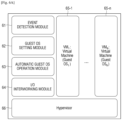
- FIGS. 6A , 6B and 6C are block diagrams illustrating example architectures in which a guest OS is operated according to various embodiments of the disclosure.
- each architecture may include an event detection module (e.g., including processing circuitry and/or program elements) 61 configured to detect an event of connection to the dock 200, a guest OS setting module (e.g., including processing circuitry and/or program elements) 62 configured to set a guest OS to be automatically operated at the time of connection to the dock 200, an automatic guest OS operation module (e.g., including processing circuitry and/or program elements) 63 configured to automatically operate the guest OS based on the event of connection to the dock 200, and an I/O interworking module (e.g., including processing circuitry and/or program elements) 64 configured to interwork between an I/O signal of the guest OS, and the display apparatus 300 and devices such as the keyboard 11-1, the mouse 11-2, or the like connected to the display apparatus 300 at the time of connection to the dock 200.
- an event detection module e.g., including processing circuitry and/or program elements
- a guest OS setting module e.g., including processing circuitry and/or program elements
- the guest OS corresponding to the dock 200 When the event of connection to the dock 200 set in advance is detected through the event detection module 61 and the guest OS setting module 62, the guest OS corresponding to the dock 200, which is set in advance, may be operated through the automatic guest OS operation module 63 and the I/O interworking module 64.
- the guest OS may be operated in various manners as illustrated, for example, and without limitation, in FIGS. 6A , 6B and 6C .
- the architecture illustrated in FIG. 6A may be referred to, for example, as a bare-metal virtualization architecture, and may include a plurality of virtual machine VM 1 to VM N software 65-1 to 65-n different from each other and a hypervisor 66.
- the hypervisor 66 which may, for example, be a logical platform for simultaneously executing the VM 1 to VM N software 65-1 to 65-n, may also be referred to as a virtual machine monitor (VMM).
- VMM virtual machine monitor
- the hypervisor 66 may be directly executed on hardware without relying on a host OS, and such a bare-metal virtualization architecture supports a real-time OS and enables improved I/O access through partitioning, which is advantageous.
- hypervisor type virtualization software may, for example, and without limitation, be ESX / EXSi server of VMware, XenServer of Citrix, VM server of Oracle, xVM Server of Sun Microsystems, Hyper-V of Microsoft, Virtual Iron of Virtual Iron, Parallels Server of Parallels, or the like.
- the architecture illustrated in FIG. 6B is a hosted virtualization architecture, and includes a plurality of virtual machine VM 1 to VM N software 65-1 to 65-n different from each other and a host OS 67.
- a VMM may be installed on the host OS 67 and a VM may be executed on the VMM.
- Such a hosted virtualization architecture may execute various kinds of VMs, which is advantageous.
- the hosted virtualization architecture may, for example, and without limitation, be VMware Workstation, VMware Server, and VMware Player of VMWare, Virtual Server and Virtual PC of Microsoft, VirtualBox of Sun Microsystems, Workstation of Parallels, or the like.
- the architecture illustrated in FIG. 6C is a desktop virtualization architecture and may include a virtual desktop infrastructure (VDI) client 68.
- the VDI client 68 may be provided with a cloud-based desktop environment desired by the user through a VM corresponding to the user of the electronic apparatus 100 among a plurality of different virtual machine VM 1 to VM N software stored in an external server 400.
- FIG. 7 is a flowchart illustrating an example process of operating a guest OS by connection between the electronic apparatus and the dock according to an embodiment of the disclosure.
- An event of connection to the dock 200 may be detected (S701).
- the electronic apparatus 100 receives identification information from the dock 200, and determines whether data of a preference for a guest OS to be operated at the time of connection to the dock 200 exists based on the received identification information (S702).
- the data of the preference for the guest OS to be operated at the time of connection to the dock 200 means data related to a user preference for a guest OS to be operated when the dock 200 is connected to the electronic apparatus 100.
- a screen of a host OS of the electronic apparatus 100 is output in the display apparatus 300 connected to the dock 200 (S707), and an input signal of the host OS interworks with an input device connected to the display apparatus 300 or an external input device (S708).
- a list of all of guest OSs that are installed in the electronic apparatus 100 and may be operated is output (S709).
- the user selects a guest OS desired to be operated from the list of the guest OSs displayed on a screen of the electronic apparatus 100 (S710), the selected guest OS is operated, and the operated guest OS is output through the display apparatus 300 connected to the dock 200 (S711). Further, an input signal of the guest OS interworks with the input device connected to the display apparatus 300 or the external input device (S712).
- FIG. 8 is a diagram illustrating an example docking station according to an embodiment of the disclosure
- FIG. 9 is a diagram illustrating an example docking station according to another embodiment of the disclosure.
- the docking station of the disclosure may also be applied to a vehicle.
- the vehicle generally includes a display apparatus 300 providing various information related to a driving of a vehicle, such as, for example, and without limitation, a navigation system, or the like.
- a display apparatus 300 providing various information related to a driving of a vehicle, such as, for example, and without limitation, a navigation system, or the like.
- the operations of the disclosure described with reference to FIGS. 3 , 4 and 5 may be applied as they are.
- the dock 200 connected to the electronic apparatus 100 of the disclosure may also be implemented, for example, and without limitation, by a game pad.
- the smartphone 100 may receive identification information from the game pad 200.
- the smartphone 100 may operate a guest OS corresponding to the connected game pad 200 from among a plurality of stored guest OSs based on the received identification information. It may, for example, be preferable that the operated guest OS is a guest OS in which a game interworking with the game pad 200 may be executed.
- An operation screen of the guest OS may be output through a display 140 of the smartphone 100.
- a graphics processing unit may be embedded in the game pad 200.
- the guest OS operated in the smartphone 100 may interwork with the GPU embedded in the game pad 200, instead of a GPU embedded in the smartphone 100, with the connection between the smartphone 100 and the game pad 200.
- the electronic apparatus 100 may also utilize resources of a GPU or the like embedded in the dock 200.
- FIG. 10 is a block diagram illustrating an example configuration of an electronic apparatus according to another embodiment of the disclosure.
- an electronic apparatus 100" may include a communicator (e.g., including communication circuitry) 110, a storage 120, a processor (e.g., including processing circuitry) 130, a display 140, an audio processor (e.g., including audio processing circuitry) 150, an audio output (e.g., including audio output circuitry) 160, a video processor (e.g., including video processing circuitry) 170, and a user interface 180.
- a communicator e.g., including communication circuitry
- a storage 120 e.g., a processor 130, a display 140
- an audio processor e.g., including audio processing circuitry
- an audio output e.g., including audio output circuitry
- a video processor e.g., including video processing circuitry
- the storage 120 may store various data such as, for example, and without limitation, a plurality of OS software modules for driving the electronic apparatus 100", various multimedia contents, and the like, therein.
- the storage 120 may store a base module processing a signal transferred from each hardware included in the electronic apparatus 100", a storage module managing a database (DB) or a registry, a graphic processing module generating a layout screen, a security module, and the like, therein.
- the storage 120 may store a module related to the architectures described with reference to FIGS. 6A , 6B and 6C .
- the processor 130 may include a read only memory (ROM) 131, a random access memory (RAM) 132, a central processing unit (CPU) 133, a graphic processor 134, and first to n-th interfaces 135-1 to 135-n.
- ROM read only memory
- RAM random access memory
- CPU central processing unit
- graphic processor 134 graphics processor
- first to n-th interfaces 135-1 to 135-n may be connected to one another through a bus 136.
- the CPU 133 may access the storage 120 to perform booting using an OS stored in the storage 120.
- the CPU 133 may perform various operations using various programs, contents, data, and the like, stored in the storage 120.
- An instruction set for booting a system, or the like, may, for example, be stored in the ROM 131.
- the CPU 133 may copy the OS stored in the storage 120 to the RAM 132 according to instructions stored in the ROM 131, and operates the OS to boot the system.
- the CPU 133 may copy various application programs stored in the storage 120 to the RAM 132, and executes the application programs copied to the RAM 132 to perform various operations.
- the graphic processor 134 renders a screen including various objects such as an icon, an image, a text, and the like, using a calculator (not illustrated) and a renderer (not illustrated).
- the calculator calculates attribute values such as coordinate values at which the respective objects will be displayed, forms, sizes, colors, and the like, of the respective objects depending on a layout of a screen.
- the renderer renders screens with various layouts including objects based on the attribute values calculated in the calculator.
- the first to n-th interfaces 135-1 to 135-n are connected to the various components described above.
- One of the interfaces may, for example, and without limitation, be a network interface connected to an external apparatus through a network.
- the operation of the processor 130 described above may be performed by executing a program stored in the storage 120.
- the display 140 may, for example, be a component providing a screen including an operation screen of an OS operated in the electronic apparatus 100" and an execution screen of contents.
- the contents may include contents having various formats, such as a text, an image, a video, a graphic user interface (GUI), or the like.
- GUI graphic user interface
- the display 140 may be implemented by various types of displays such as, for example, and without limitation, a liquid crystal display (LCD), an organic light emitting diode (OLED) display, an active-matrix organic light emitting diode (AM-OLED), a plasma display panel (PDP), and the like.
- the display 140 may include additional components depending on the type of implemented display 140.
- the display 140 may include an LCD display panel (not illustrated), a backlight unit (not illustrated) supplying light to the LCD display panel, and a panel driving substrate (not illustrated) driving the panel (not illustrated).
- the audio processor 150 may include various audio processing circuitry for performing processing for audio data.
- the audio output 160 may include various audio output circuitry for outputting the audio data processed in the audio processor 150.
- the video processor 170 may include various video processing circuitry for performing various kinds of image processing such as, for example, and without limitation, decoding, scaling, noise filtering, frame rate converting, resolution converting, and the like, for the contents.
- the user interface 180 may, for example, be a component detecting a user interaction for controlling a general operation of the electronic apparatus 100".
- the user interface 180 may include various interaction detection apparatuses such as, for example, and without limitation, an infrared (IR) signal receiver (not illustrated), a camera (not illustrated), and the like.
- IR infrared
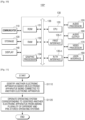
- FIGS. 11 and 12 are flowcharts illustrating example control methods of an electronic apparatus according to different example embodiments of the disclosure.
- FIG. 11 is a flowchart illustrating an example control method of an electronic apparatus according to an embodiment of the disclosure.
- the another electronic apparatus may be identified based on an electronic apparatus being connected to another electronic apparatus (S1110).
- the another electronic apparatus may be identified using pre-stored identification information of the another electronic apparatus.
- An OS corresponding to the identified another electronic apparatus may be operated, from among the plurality of different and pre-stored OSs (S1120).
- An OS corresponding to the identified another electronic apparatus may, for example, be operated using pre-stored setting information of the OS to be operated with the connection to the another electronic apparatus.
- the setting information may, for example, be set based on a preference of the user or a characteristic of the another electronic apparatus.
- An image signal corresponding to an operation screen of the operated OS may be transmitted to the another electronic apparatus so that the image signal corresponding to the operation screen is output in a display apparatus connected to the another electronic apparatus.
- the image signal corresponding to the operation screen of the operated OS may also be output through a display included in the electronic apparatus.
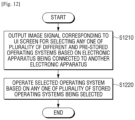
- FIG. 12 is a flowchart illustrating an example control method of an electronic apparatus in which the user may select an OS to be operated every time the electronic apparatus 100 is connected to the dock 200.
- An image signal corresponding to a UI screen for selecting any one of a plurality of OSs is output based on an electronic apparatus being connected to another electronic apparatus, from among the plurality of different and pre-stored OSs (S1210).
- the UI screen may be a screen providing a list of the plurality of stored OSs.
- the selected OS is operated based on any one of the plurality of stored OSs being selected (S1220).
- An image signal corresponding to an operation screen of the operated OS may be transmitted to the another electronic apparatus so that the image signal corresponding to the operation screen is output in a display apparatus connected to the another electronic apparatus.
- the image signal corresponding to the operation screen of the operated OS may also be output through a display included in the electronic apparatus.
- the user may be automatically provided with a working environment of a preferred OS, thereby improving convenience of the user.
- control methods according to various example embodiments described above may be implemented by a program and be stored in various recording media.
- a computer program for executing the various control methods by being processed by various processors may be used in a state where it is stored in a recording medium.
- a non-transitory computer-readable medium in which a program sequentially performs identifying another electronic apparatus based on an electronic apparatus being connected to the another electronic apparatus, and operating an OS corresponding to the identified another electronic apparatus from among a plurality of OSs is stored may be provided, the plurality of different and pre-stored OSs.
- the non-transitory computer-readable medium may be a medium that semi-permanently stores data therein and is readable by an apparatus.
- the various applications or programs described above may be stored and provided in the non-transitory computer readable medium such as, for example, and without limitation, a compact disk (CD), a digital versatile disk (DVD), a hard disk, a Blu-ray disk, a universal serial bus (USB), a memory card, a read only memory (ROM), or the like.
Landscapes
- Engineering & Computer Science (AREA)
- Theoretical Computer Science (AREA)
- Software Systems (AREA)
- General Engineering & Computer Science (AREA)
- General Physics & Mathematics (AREA)
- Physics & Mathematics (AREA)
- Computer Hardware Design (AREA)
- Human Computer Interaction (AREA)
- Computer Security & Cryptography (AREA)
- Signal Processing (AREA)
- Computer Networks & Wireless Communication (AREA)
- User Interface Of Digital Computer (AREA)
- Control Of Electric Motors In General (AREA)
Claims (6)
- Elektronische Vorrichtung (100), umfassend:eine Kommunikationseinrichtung (110), die eine Kommunikationsschaltung umfasst, die dazu konfiguriert ist, eine Verbindung zu einer anderen elektronischen Vorrichtung bereitzustellen;einen Speicher (120), der dazu konfiguriert ist, Folgendes zu speichern:eine Vielzahl von Betriebssystemen, wobei sich jedes der Vielzahl von Betriebssystemen voneinander unterscheidet; undIdentifikationsinformationen der anderen elektronischen Vorrichtung (100); undeinen Prozessor (130), der zu Folgendem konfiguriert ist: in dem Fall, dass das bevorzugte Betriebssystem, das der anderen elektronischen Vorrichtung entspricht, durch den Speicher (120) gespeichert wird, Identifizieren der anderen elektronischen Vorrichtung auf Grundlage davon, dass die elektronische Vorrichtung (100) mit der anderen elektronischen Vorrichtung verbunden ist, unter Verwendung der gespeicherten Identifikationsinformationen und Betreiben des bevorzugten Betriebssystems, das der anderen elektronischen Vorrichtung entspricht; unddadurch gekennzeichnet, dassin dem Fall, dass das bevorzugte Betriebssystem, das der anderen elektronischen Vorrichtung entspricht, nicht durch den Speicher (120) gespeichert wird, Steuern einer Anzeige (140), um ein Bildsignal auszugeben, das einem Benutzeroberflächenbildschirm, UI-Bildschirm, zum Auswählen eines beliebigen aus der Vielzahl von gespeicherten Betriebssystemen entspricht, auf Grundlage davon, dass die elektronische Vorrichtung (100) mit der anderen elektronischen Vorrichtung verbunden ist, Betreiben des ausgewählten Betriebssystems auf Grundlage davon, dass ein beliebiges aus der Vielzahl von gespeicherten Betriebssystemen ausgewählt wird, und Speichern von Informationen über das ausgewählte Betriebssystem in dem Speicher (120) als das bevorzugte Betriebssystem, das der anderen elektronischen Vorrichtung entspricht,wobei der UI-Bildschirm einen Bildschirm beinhaltet, der eine Liste der Vielzahl von gespeicherten Betriebssystemen bereitstellt.
- Elektronische Vorrichtung (100) nach Anspruch 1, wobei die Anzeige (140) in einer Anzeigevorrichtung (300) beinhaltet ist, die mit der anderen elektronischen Vorrichtung verbunden ist, und der Prozessor (130) dazu konfiguriert ist, ein Bildsignal, das einem Betriebsbildschirm des betriebenen Betriebssystems entspricht, durch die Kommunikationseinrichtung (110) an die andere elektronische Vorrichtung zu übertragen, sodass das Bildsignal, das dem Betriebsbildschirm entspricht, dazu in der Lage ist, in der Anzeigevorrichtung (300) ausgegeben zu werden, die mit der anderen elektronischen Vorrichtung verbunden ist.
- Elektronische Vorrichtung (100) nach Anspruch 1, wobei die Anzeige (140) in der elektronischen Vorrichtung (100) beinhaltet ist und der Prozessor (130) dazu konfiguriert ist, die Anzeige (140) zu steuern, um ein Bildsignal auszugeben, das einem Betriebsbildschirm des betriebenen Betriebssystems entspricht.
- Elektronische Vorrichtung (100) nach Anspruch 1, wobei die Kommunikationseinrichtung (110) eine Schnittstelle beinhaltet, die eine Schaltung umfasst, die dazu konfiguriert ist, eine Verbindung zu der anderen elektronischen Vorrichtung auf drahtgebundene Weise und/oder eine Ankopplung an die andere elektronische Vorrichtung bereitzustellen.
- Elektronische Vorrichtung (100) nach Anspruch 1, wobei die Kommunikationseinrichtung (110) eine Schnittstelle beinhaltet, die eine Schaltung umfasst, die dazu konfiguriert ist, eine drahtlose Verbindung zu der anderen elektronischen Vorrichtung bereitzustellen.
- Steuerungsverfahren einer elektronischen Vorrichtung (100), umfassend:Bereitstellen einer Verbindung zu einer anderen elektronischen Vorrichtung, durch eine Kommunikationseinrichtung (110), die eine Kommunikationsschaltung umfasst;Speichern von Folgendem durch einen Speicher (120):eine Vielzahl von Betriebssystemen, wobei sich jedes der Vielzahl von Betriebssystemen voneinander unterscheidet; undIdentifikationsinformationen der anderen elektronischen Vorrichtung (100);in dem Fall, dass das bevorzugte Betriebssystem, das der anderen elektronischen Vorrichtung entspricht, durch den Speicher (120) gespeichert wird, Identifizieren der anderen elektronischen Vorrichtung auf Grundlage davon, dass die elektronische Vorrichtung (100) mit der anderen elektronischen Vorrichtung verbunden ist, unter Verwendung der gespeicherten Identifikationsinformationen und Betreiben des bevorzugten Betriebssystems, das der anderen elektronischen Vorrichtung entspricht, durch einen Prozessor (130); unddadurch gekennzeichnet, dassin dem Fall, dass das bevorzugte Betriebssystem, das der anderen elektronischen Vorrichtung entspricht, nicht durch den Speicher (120) gespeichert wird, Ausgeben eines Bildsignals, das einem Benutzeroberflächenbildschirm, UI-Bildschirm, zum Auswählen eines beliebigen aus der Vielzahl von gespeicherten Betriebssystemen entspricht, auf Grundlage davon, dass die elektronische Vorrichtung (100) mit der anderen elektronischen Vorrichtung verbunden ist, Betreiben des ausgewählten Betriebssystems auf Grundlage davon, dass ein beliebiges aus der Vielzahl von gespeicherten Betriebssystemen ausgewählt wird, durch den Prozessor (130) und Speichern von Informationen über das ausgewählte Betriebssystem in dem Speicher (120) als das bevorzugte Betriebssystem, das der anderen elektronischen Vorrichtung entspricht,wobei das Ausgeben Bereitstellen einer Liste der Vielzahl von gespeicherten Betriebssystemen durch den UI-Bildschirm umfasst.
Applications Claiming Priority (2)
| Application Number | Priority Date | Filing Date | Title |
|---|---|---|---|
| KR1020180003491A KR102447434B1 (ko) | 2018-01-10 | 2018-01-10 | 전자 장치 및 그 제어 방법 |
| PCT/KR2019/000398 WO2019139378A1 (en) | 2018-01-10 | 2019-01-10 | Electronic apparatus and control method thereof |
Publications (4)
| Publication Number | Publication Date |
|---|---|
| EP3698244A1 EP3698244A1 (de) | 2020-08-26 |
| EP3698244A4 EP3698244A4 (de) | 2020-12-16 |
| EP3698244B1 true EP3698244B1 (de) | 2025-06-04 |
| EP3698244C0 EP3698244C0 (de) | 2025-06-04 |
Family
ID=67140183
Family Applications (1)
| Application Number | Title | Priority Date | Filing Date |
|---|---|---|---|
| EP19738516.4A Active EP3698244B1 (de) | 2018-01-10 | 2019-01-10 | Elektronische vorrichtung und steuerungsverfahren dafür |
Country Status (5)
| Country | Link |
|---|---|
| US (1) | US10948945B2 (de) |
| EP (1) | EP3698244B1 (de) |
| KR (1) | KR102447434B1 (de) |
| CN (1) | CN111480143B (de) |
| WO (1) | WO2019139378A1 (de) |
Families Citing this family (2)
| Publication number | Priority date | Publication date | Assignee | Title |
|---|---|---|---|---|
| CN115686699A (zh) * | 2021-07-30 | 2023-02-03 | 华为技术有限公司 | 一种控制方法及可穿戴设备 |
| KR20240127126A (ko) * | 2023-02-15 | 2024-08-22 | 삼성전자주식회사 | 전자 장치 및 그 제어 방법 |
Citations (1)
| Publication number | Priority date | Publication date | Assignee | Title |
|---|---|---|---|---|
| KR20110111828A (ko) * | 2010-04-05 | 2011-10-12 | 주식회사 케이엠알아이 | 다중 운영체제를 지원하는 휴대 단말과 도킹 스테이션, 및 그 구동 방법 |
Family Cites Families (37)
| Publication number | Priority date | Publication date | Assignee | Title |
|---|---|---|---|---|
| US6763458B1 (en) * | 1999-09-27 | 2004-07-13 | Captaris, Inc. | System and method for installing and servicing an operating system in a computer or information appliance |
| US20100005396A1 (en) * | 2000-02-18 | 2010-01-07 | Nason D David | Method and system for controlling a comlementary user interface on a display surface |
| US9098437B2 (en) * | 2010-10-01 | 2015-08-04 | Z124 | Cross-environment communication framework |
| JP2003196096A (ja) | 2001-12-07 | 2003-07-11 | Internatl Business Mach Corp <Ibm> | コンピュータシステム、その起動制御方法及びプログラム |
| US20030204708A1 (en) * | 2002-04-24 | 2003-10-30 | Colin Hulme | Portable computer having hierarchical operating systems |
| US9003426B2 (en) | 2011-12-09 | 2015-04-07 | Z124 | Physical key secure peripheral interconnection |
| US7389512B2 (en) * | 2003-05-09 | 2008-06-17 | Sun Microsystems, Inc. | Interprocess communication within operating system partitions |
| US7290067B2 (en) * | 2003-06-20 | 2007-10-30 | Canon Kabushiki Kaisha | Information processing apparatus control method for external device having both a wire interface and a wireless interface settings |
| US7506152B2 (en) * | 2003-08-11 | 2009-03-17 | Lg Electronics Inc. | Convertible computer with selective loading of an operating system based on a tablet or notebook mode |
| JP2006301771A (ja) | 2005-04-18 | 2006-11-02 | Toshiba Corp | 情報処理装置および動作制御方法 |
| US8195624B2 (en) * | 2005-06-30 | 2012-06-05 | Phoenix Technologies Ltd. | Shared file system management between independent operating systems |
| US20080155103A1 (en) * | 2006-12-21 | 2008-06-26 | Kimberly Tekavec Bailey | AF UNIX Socket Across Systems in the Same Computer on Computer Systems that Support Multiple Operating System Images |
| CN101339511B (zh) * | 2007-07-02 | 2011-06-15 | 国际商业机器公司 | 用于监控和自适应地预载入关键动态连接库的方法和系统 |
| US20090083829A1 (en) * | 2007-09-20 | 2009-03-26 | C & S Operations, Inc. | Computer system |
| US20100060572A1 (en) * | 2008-09-11 | 2010-03-11 | Ely Tsern | Display device for interfacing with a handheld computer device that dynamically generates a different user environment for the display device |
| US20100211769A1 (en) * | 2009-02-19 | 2010-08-19 | Subramonian Shankar | Concurrent Execution of a Smartphone Operating System and a Desktop Operating System |
| US8707061B2 (en) * | 2009-03-27 | 2014-04-22 | Qualcomm Incorporated | System and method of providing scalable computing between a portable computing device and a portable computing device docking station |
| TWI400652B (zh) * | 2009-06-11 | 2013-07-01 | Insyde Software Corp | Dual operating system parallel processing methods, recording media and computer program products |
| US8868899B2 (en) * | 2009-07-20 | 2014-10-21 | Motorola Mobility Llc | System and method for switching between environments in a multi-environment operating system |
| US9367331B2 (en) | 2009-07-20 | 2016-06-14 | Google Technology Holdings LLC | Multi-environment operating system |
| US9372711B2 (en) | 2009-07-20 | 2016-06-21 | Google Technology Holdings LLC | System and method for initiating a multi-environment operating system |
| US9348633B2 (en) * | 2009-07-20 | 2016-05-24 | Google Technology Holdings LLC | Multi-environment operating system |
| KR101785653B1 (ko) | 2010-06-21 | 2017-10-16 | 엘지전자 주식회사 | 스마트 사용자 식별 모듈을 이용한 다중 운영체제 시스템 및 그 제어 방법 |
| US8589952B2 (en) * | 2010-06-30 | 2013-11-19 | Palm, Inc. | Dual operating system operation and configuration |
| US9014911B2 (en) * | 2011-11-16 | 2015-04-21 | Flextronics Ap, Llc | Street side sensors |
| US8799631B2 (en) * | 2010-11-11 | 2014-08-05 | Lsi Corporation | Dynamically select operating system (OS) to boot based on hardware states |
| US9804857B2 (en) | 2010-12-17 | 2017-10-31 | Intel Corporation | Method and apparatus for multi-mode mobile computing devices and peripherals |
| US8682962B2 (en) * | 2010-12-24 | 2014-03-25 | Levono (Singapore) Pte. Ltd. | Systems and methods for communicating and switching between components in a hybrid computing environment |
| CN102567056A (zh) * | 2011-12-23 | 2012-07-11 | 华为终端有限公司 | 一种终端启动的方法及终端 |
| US9711160B2 (en) | 2012-05-29 | 2017-07-18 | Apple Inc. | Smart dock for activating a voice recognition mode of a portable electronic device |
| CN102970413B (zh) * | 2012-10-26 | 2014-11-12 | 广东欧珀移动通信有限公司 | 一种智能手机运行方法 |
| US9098303B2 (en) * | 2013-09-04 | 2015-08-04 | Red Hat, Inc. | Portable computing device providing operating system for host devices |
| EP3053025A4 (de) * | 2013-09-30 | 2017-05-17 | Hewlett-Packard Development Company, L.P. | Auswahl von betriebssystemen auf basis eines computermodus |
| US9436698B2 (en) | 2014-02-12 | 2016-09-06 | Lenovo (Singapore) Pte. Ltd. | Sharing a file system between multiple operating systems |
| KR20160023394A (ko) * | 2014-08-22 | 2016-03-03 | 삼성전자주식회사 | 디스플레이 장치 및 그 제어 방법 |
| KR101641489B1 (ko) * | 2014-09-24 | 2016-07-21 | 엘지전자 주식회사 | 이동단말기 및 차량 |
| KR20170001393A (ko) | 2015-06-26 | 2017-01-04 | 삼성전자주식회사 | 전자 장치의 상황에 따른 외부 장치의 이용 방법 및 그 전자 장치 |
-
2018
- 2018-01-10 KR KR1020180003491A patent/KR102447434B1/ko active Active
-
2019
- 2019-01-10 CN CN201980006542.0A patent/CN111480143B/zh active Active
- 2019-01-10 US US16/244,308 patent/US10948945B2/en active Active
- 2019-01-10 WO PCT/KR2019/000398 patent/WO2019139378A1/en not_active Ceased
- 2019-01-10 EP EP19738516.4A patent/EP3698244B1/de active Active
Patent Citations (1)
| Publication number | Priority date | Publication date | Assignee | Title |
|---|---|---|---|---|
| KR20110111828A (ko) * | 2010-04-05 | 2011-10-12 | 주식회사 케이엠알아이 | 다중 운영체제를 지원하는 휴대 단말과 도킹 스테이션, 및 그 구동 방법 |
Also Published As
| Publication number | Publication date |
|---|---|
| EP3698244A4 (de) | 2020-12-16 |
| WO2019139378A1 (en) | 2019-07-18 |
| US20190212776A1 (en) | 2019-07-11 |
| KR20190085402A (ko) | 2019-07-18 |
| KR102447434B1 (ko) | 2022-09-27 |
| US10948945B2 (en) | 2021-03-16 |
| CN111480143B (zh) | 2025-04-29 |
| EP3698244A1 (de) | 2020-08-26 |
| EP3698244C0 (de) | 2025-06-04 |
| CN111480143A (zh) | 2020-07-31 |
Similar Documents
| Publication | Publication Date | Title |
|---|---|---|
| CN107783818B (zh) | 深度学习任务处理方法、装置、设备及存储介质 | |
| US9164646B2 (en) | Method and apparatus for accommodating display migration among a plurality of physical displays | |
| US11347538B2 (en) | Method for controlling execution of heterogeneous operating systems and electronic device and storage medium therefor | |
| US11693707B2 (en) | Electronic device for executing multiple operating systems and method of controlling same | |
| EP3007160A1 (de) | Zeitgeber, anzeige mit organischer leuchtdiode (oled) damit und verfahren zur ansteuerung der oled-anzeige | |
| CN102567052A (zh) | 启用配置有图形处理器的服务器的远程管理的技术 | |
| US9507617B1 (en) | Inter-virtual machine communication using pseudo devices | |
| US20140108951A1 (en) | Method and Apparatus for Providing Adaptive Wallpaper Display for a Device Having Multiple Operating System Environments | |
| US20180074956A1 (en) | Method, apparatus, and electronic device for modifying memory data of a virtual machine | |
| US9766918B2 (en) | Virtual system device identification using GPU to host bridge mapping | |
| KR20160097050A (ko) | Os들의 화면을 통합하여 표시하는 방법 및 장치 | |
| US9471357B2 (en) | Monitoring virtual machine interface and local graphical user interface on a thin client and alternating therebetween | |
| US11836503B2 (en) | Electronic device for executing heterogeneous operating systems and method therefor | |
| US10948945B2 (en) | Electronic apparatus with multiple operating systems and control method thereof | |
| US10637827B2 (en) | Security network system and data processing method therefor | |
| EP4509978A1 (de) | Implementierungsverfahren und -vorrichtung für virtuellen bildschirm sowie vorrichtung und speichermedium | |
| US20160011754A1 (en) | Method and system for virtualized sensors in a multi-sensor environment | |
| US20220270538A1 (en) | Display mode setting determinations | |
| EP3974976B1 (de) | Bereitstellung der gastanwendungsanzeige von einem hostbetriebssystem | |
| US20140019997A1 (en) | Virtualization system and method thereof | |
| US20250355714A1 (en) | Electronic device and method for controlling same | |
| US9558529B2 (en) | Rendering video data in an information handling system using a management controller | |
| US20240111369A1 (en) | Information handling system and kvm display automated configuration | |
| US11048462B1 (en) | Associating a selector with plural applications for presenting the plural applications on respective plural monitors | |
| US20130328865A1 (en) | Apparatus and method for graphic offloading based on virtual machine monitor |
Legal Events
| Date | Code | Title | Description |
|---|---|---|---|
| STAA | Information on the status of an ep patent application or granted ep patent |
Free format text: STATUS: THE INTERNATIONAL PUBLICATION HAS BEEN MADE |
|
| PUAI | Public reference made under article 153(3) epc to a published international application that has entered the european phase |
Free format text: ORIGINAL CODE: 0009012 |
|
| STAA | Information on the status of an ep patent application or granted ep patent |
Free format text: STATUS: REQUEST FOR EXAMINATION WAS MADE |
|
| 17P | Request for examination filed |
Effective date: 20200519 |
|
| AK | Designated contracting states |
Kind code of ref document: A1 Designated state(s): AL AT BE BG CH CY CZ DE DK EE ES FI FR GB GR HR HU IE IS IT LI LT LU LV MC MK MT NL NO PL PT RO RS SE SI SK SM TR |
|
| AX | Request for extension of the european patent |
Extension state: BA ME |
|
| A4 | Supplementary search report drawn up and despatched |
Effective date: 20201116 |
|
| RIC1 | Information provided on ipc code assigned before grant |
Ipc: G06F 9/455 20180101ALI20201110BHEP Ipc: G06F 3/14 20060101ALI20201110BHEP Ipc: G06F 1/16 20060101ALI20201110BHEP Ipc: H04M 1/725 20060101AFI20201110BHEP Ipc: G06F 9/4401 20180101ALI20201110BHEP |
|
| DAV | Request for validation of the european patent (deleted) | ||
| DAX | Request for extension of the european patent (deleted) | ||
| STAA | Information on the status of an ep patent application or granted ep patent |
Free format text: STATUS: EXAMINATION IS IN PROGRESS |
|
| 17Q | First examination report despatched |
Effective date: 20220224 |
|
| REG | Reference to a national code |
Free format text: PREVIOUS MAIN CLASS: G06F0009440100 Ref country code: DE Ref legal event code: R079 Ref document number: 602019070750 Country of ref document: DE Ipc: H04M0001724090 |
|
| GRAP | Despatch of communication of intention to grant a patent |
Free format text: ORIGINAL CODE: EPIDOSNIGR1 |
|
| STAA | Information on the status of an ep patent application or granted ep patent |
Free format text: STATUS: GRANT OF PATENT IS INTENDED |
|
| RIC1 | Information provided on ipc code assigned before grant |
Ipc: G06F 9/455 20180101ALI20250310BHEP Ipc: G06F 9/4401 20180101ALI20250310BHEP Ipc: G06F 1/16 20060101ALI20250310BHEP Ipc: H04M 1/72409 20210101AFI20250310BHEP |
|
| INTG | Intention to grant announced |
Effective date: 20250320 |
|
| GRAS | Grant fee paid |
Free format text: ORIGINAL CODE: EPIDOSNIGR3 |
|
| GRAA | (expected) grant |
Free format text: ORIGINAL CODE: 0009210 |
|
| STAA | Information on the status of an ep patent application or granted ep patent |
Free format text: STATUS: THE PATENT HAS BEEN GRANTED |
|
| AK | Designated contracting states |
Kind code of ref document: B1 Designated state(s): AL AT BE BG CH CY CZ DE DK EE ES FI FR GB GR HR HU IE IS IT LI LT LU LV MC MK MT NL NO PL PT RO RS SE SI SK SM TR |
|
| REG | Reference to a national code |
Ref country code: GB Ref legal event code: FG4D |
|
| REG | Reference to a national code |
Ref country code: CH Ref legal event code: EP |
|
| REG | Reference to a national code |
Ref country code: IE Ref legal event code: FG4D |
|
| U01 | Request for unitary effect filed |
Effective date: 20250604 |
|
| U07 | Unitary effect registered |
Designated state(s): AT BE BG DE DK EE FI FR IT LT LU LV MT NL PT RO SE SI Effective date: 20250611 |
|
| PG25 | Lapsed in a contracting state [announced via postgrant information from national office to epo] |
Ref country code: ES Free format text: LAPSE BECAUSE OF FAILURE TO SUBMIT A TRANSLATION OF THE DESCRIPTION OR TO PAY THE FEE WITHIN THE PRESCRIBED TIME-LIMIT Effective date: 20250604 |
|
| PG25 | Lapsed in a contracting state [announced via postgrant information from national office to epo] |
Ref country code: NO Free format text: LAPSE BECAUSE OF FAILURE TO SUBMIT A TRANSLATION OF THE DESCRIPTION OR TO PAY THE FEE WITHIN THE PRESCRIBED TIME-LIMIT Effective date: 20250904 Ref country code: GR Free format text: LAPSE BECAUSE OF FAILURE TO SUBMIT A TRANSLATION OF THE DESCRIPTION OR TO PAY THE FEE WITHIN THE PRESCRIBED TIME-LIMIT Effective date: 20250905 |
|
| PG25 | Lapsed in a contracting state [announced via postgrant information from national office to epo] |
Ref country code: PL Free format text: LAPSE BECAUSE OF FAILURE TO SUBMIT A TRANSLATION OF THE DESCRIPTION OR TO PAY THE FEE WITHIN THE PRESCRIBED TIME-LIMIT Effective date: 20250604 |
|
| PG25 | Lapsed in a contracting state [announced via postgrant information from national office to epo] |
Ref country code: HR Free format text: LAPSE BECAUSE OF FAILURE TO SUBMIT A TRANSLATION OF THE DESCRIPTION OR TO PAY THE FEE WITHIN THE PRESCRIBED TIME-LIMIT Effective date: 20250604 |
|
| PG25 | Lapsed in a contracting state [announced via postgrant information from national office to epo] |
Ref country code: RS Free format text: LAPSE BECAUSE OF FAILURE TO SUBMIT A TRANSLATION OF THE DESCRIPTION OR TO PAY THE FEE WITHIN THE PRESCRIBED TIME-LIMIT Effective date: 20250904 |
|
| PG25 | Lapsed in a contracting state [announced via postgrant information from national office to epo] |
Ref country code: IS Free format text: LAPSE BECAUSE OF FAILURE TO SUBMIT A TRANSLATION OF THE DESCRIPTION OR TO PAY THE FEE WITHIN THE PRESCRIBED TIME-LIMIT Effective date: 20251004 |
|
| PGFP | Annual fee paid to national office [announced via postgrant information from national office to epo] |
Ref country code: GB Payment date: 20251222 Year of fee payment: 8 |
|
| PG25 | Lapsed in a contracting state [announced via postgrant information from national office to epo] |
Ref country code: SM Free format text: LAPSE BECAUSE OF FAILURE TO SUBMIT A TRANSLATION OF THE DESCRIPTION OR TO PAY THE FEE WITHIN THE PRESCRIBED TIME-LIMIT Effective date: 20250604 |
|
| PG25 | Lapsed in a contracting state [announced via postgrant information from national office to epo] |
Ref country code: CZ Free format text: LAPSE BECAUSE OF FAILURE TO SUBMIT A TRANSLATION OF THE DESCRIPTION OR TO PAY THE FEE WITHIN THE PRESCRIBED TIME-LIMIT Effective date: 20250604 |
|
| PG25 | Lapsed in a contracting state [announced via postgrant information from national office to epo] |
Ref country code: SK Free format text: LAPSE BECAUSE OF FAILURE TO SUBMIT A TRANSLATION OF THE DESCRIPTION OR TO PAY THE FEE WITHIN THE PRESCRIBED TIME-LIMIT Effective date: 20250604 |
|
| U20 | Renewal fee for the european patent with unitary effect paid |
Year of fee payment: 8 Effective date: 20260122 |
|
| PLBE | No opposition filed within time limit |
Free format text: ORIGINAL CODE: 0009261 |
|
| STAA | Information on the status of an ep patent application or granted ep patent |
Free format text: STATUS: NO OPPOSITION FILED WITHIN TIME LIMIT |
|
| REG | Reference to a national code |
Ref country code: CH Ref legal event code: L10 Free format text: ST27 STATUS EVENT CODE: U-0-0-L10-L00 (AS PROVIDED BY THE NATIONAL OFFICE) Effective date: 20260416 |
|
| 26N | No opposition filed |
Effective date: 20260305 |