EP3666708A1 - Elevator operation panel, elevator system and elevator panel display method - Google Patents
Elevator operation panel, elevator system and elevator panel display method Download PDFInfo
- Publication number
- EP3666708A1 EP3666708A1 EP19215039.9A EP19215039A EP3666708A1 EP 3666708 A1 EP3666708 A1 EP 3666708A1 EP 19215039 A EP19215039 A EP 19215039A EP 3666708 A1 EP3666708 A1 EP 3666708A1
- Authority
- EP
- European Patent Office
- Prior art keywords
- elevator
- display
- information
- floor information
- floor
- Prior art date
- Legal status (The legal status is an assumption and is not a legal conclusion. Google has not performed a legal analysis and makes no representation as to the accuracy of the status listed.)
- Granted
Links
Images

Classifications
-
- B—PERFORMING OPERATIONS; TRANSPORTING
- B66—HOISTING; LIFTING; HAULING
- B66B—ELEVATORS; ESCALATORS OR MOVING WALKWAYS
- B66B1/00—Control systems of elevators in general
- B66B1/34—Details, e.g. call counting devices, data transmission from car to control system, devices giving information to the control system
- B66B1/46—Adaptations of switches or switchgear
- B66B1/52—Floor selectors
-
- B—PERFORMING OPERATIONS; TRANSPORTING
- B66—HOISTING; LIFTING; HAULING
- B66B—ELEVATORS; ESCALATORS OR MOVING WALKWAYS
- B66B1/00—Control systems of elevators in general
- B66B1/24—Control systems with regulation, i.e. with retroactive action, for influencing travelling speed, acceleration, or deceleration
- B66B1/2408—Control systems with regulation, i.e. with retroactive action, for influencing travelling speed, acceleration, or deceleration where the allocation of a call to an elevator car is of importance, i.e. by means of a supervisory or group controller
-
- B—PERFORMING OPERATIONS; TRANSPORTING
- B66—HOISTING; LIFTING; HAULING
- B66B—ELEVATORS; ESCALATORS OR MOVING WALKWAYS
- B66B1/00—Control systems of elevators in general
- B66B1/34—Details, e.g. call counting devices, data transmission from car to control system, devices giving information to the control system
- B66B1/46—Adaptations of switches or switchgear
- B66B1/461—Adaptations of switches or switchgear characterised by their shape or profile
- B66B1/463—Touch sensitive input devices
-
- B—PERFORMING OPERATIONS; TRANSPORTING
- B66—HOISTING; LIFTING; HAULING
- B66B—ELEVATORS; ESCALATORS OR MOVING WALKWAYS
- B66B1/00—Control systems of elevators in general
- B66B1/34—Details, e.g. call counting devices, data transmission from car to control system, devices giving information to the control system
- B66B1/46—Adaptations of switches or switchgear
- B66B1/468—Call registering systems
-
- B—PERFORMING OPERATIONS; TRANSPORTING
- B66—HOISTING; LIFTING; HAULING
- B66B—ELEVATORS; ESCALATORS OR MOVING WALKWAYS
- B66B1/00—Control systems of elevators in general
- B66B1/34—Details, e.g. call counting devices, data transmission from car to control system, devices giving information to the control system
- B66B1/46—Adaptations of switches or switchgear
- B66B1/50—Adaptations of switches or switchgear with operating or control mechanisms mounted in the car or cage or in the lift well or hoistway
-
- B—PERFORMING OPERATIONS; TRANSPORTING
- B66—HOISTING; LIFTING; HAULING
- B66B—ELEVATORS; ESCALATORS OR MOVING WALKWAYS
- B66B3/00—Applications of devices for indicating or signalling operating conditions of elevators
-
- B—PERFORMING OPERATIONS; TRANSPORTING
- B66—HOISTING; LIFTING; HAULING
- B66B—ELEVATORS; ESCALATORS OR MOVING WALKWAYS
- B66B3/00—Applications of devices for indicating or signalling operating conditions of elevators
- B66B3/002—Indicators
-
- B—PERFORMING OPERATIONS; TRANSPORTING
- B66—HOISTING; LIFTING; HAULING
- B66B—ELEVATORS; ESCALATORS OR MOVING WALKWAYS
- B66B3/00—Applications of devices for indicating or signalling operating conditions of elevators
- B66B3/02—Position or depth indicators
-
- G—PHYSICS
- G06—COMPUTING OR CALCULATING; COUNTING
- G06F—ELECTRIC DIGITAL DATA PROCESSING
- G06F3/00—Input arrangements for transferring data to be processed into a form capable of being handled by the computer; Output arrangements for transferring data from processing unit to output unit, e.g. interface arrangements
- G06F3/01—Input arrangements or combined input and output arrangements for interaction between user and computer
- G06F3/048—Interaction techniques based on graphical user interfaces [GUI]
- G06F3/0484—Interaction techniques based on graphical user interfaces [GUI] for the control of specific functions or operations, e.g. selecting or manipulating an object, an image or a displayed text element, setting a parameter value or selecting a range
- G06F3/04847—Interaction techniques to control parameter settings, e.g. interaction with sliders or dials
-
- G—PHYSICS
- G06—COMPUTING OR CALCULATING; COUNTING
- G06F—ELECTRIC DIGITAL DATA PROCESSING
- G06F3/00—Input arrangements for transferring data to be processed into a form capable of being handled by the computer; Output arrangements for transferring data from processing unit to output unit, e.g. interface arrangements
- G06F3/01—Input arrangements or combined input and output arrangements for interaction between user and computer
- G06F3/048—Interaction techniques based on graphical user interfaces [GUI]
- G06F3/0487—Interaction techniques based on graphical user interfaces [GUI] using specific features provided by the input device, e.g. functions controlled by the rotation of a mouse with dual sensing arrangements, or of the nature of the input device, e.g. tap gestures based on pressure sensed by a digitiser
- G06F3/0488—Interaction techniques based on graphical user interfaces [GUI] using specific features provided by the input device, e.g. functions controlled by the rotation of a mouse with dual sensing arrangements, or of the nature of the input device, e.g. tap gestures based on pressure sensed by a digitiser using a touch-screen or digitiser, e.g. input of commands through traced gestures
- G06F3/04886—Interaction techniques based on graphical user interfaces [GUI] using specific features provided by the input device, e.g. functions controlled by the rotation of a mouse with dual sensing arrangements, or of the nature of the input device, e.g. tap gestures based on pressure sensed by a digitiser using a touch-screen or digitiser, e.g. input of commands through traced gestures by partitioning the display area of the touch-screen or the surface of the digitising tablet into independently controllable areas, e.g. virtual keyboards or menus
-
- B—PERFORMING OPERATIONS; TRANSPORTING
- B66—HOISTING; LIFTING; HAULING
- B66B—ELEVATORS; ESCALATORS OR MOVING WALKWAYS
- B66B2201/00—Aspects of control systems of elevators
- B66B2201/40—Details of the change of control mode
- B66B2201/46—Switches or switchgear
- B66B2201/4607—Call registering systems
- B66B2201/4623—Wherein the destination is registered after boarding
Definitions
- the present application relates to the field of elevators, and in particular to an elevator operation panel and a display method thereof.
- the present application provides an elevator operation panel, an elevator system, and an elevator panel display method, thereby effectively solving or at least alleviating one or more of the above problems and problems in other aspects existing in the prior art.
- an elevator operation panel comprising: a display area configured to display first floor information of a building based at least on an elevator movement trend, wherein the first floor information includes all floors that the elevator has not yet arrived at on the elevator movement trend; a touch control area configured to receive an input instruction; and a control unit configured to receive an input instruction from the touch control area, and adjust display information of the display area according to the input instruction, wherein the control unit is further configured to receive floor change information of the building, and adjust the display information of the display area according to the floor change information of the building.
- the display area is further configured to display second floor information that is not on the elevator movement trend, wherein the second floor information has a different display effect from the first floor information.
- the first floor information and/or the second floor information is displayed by one or more of a number, a text, a progress bar, a percentage, or a color.
- the first floor information is displayed by a number or a text having a first brightness
- the second floor information is displayed by a number or a text having a second brightness.
- the first brightness is greater than the second brightness.
- the first floor information is displayed by a number or a text having a first color
- the second floor information is displayed by a number or a text having a second color.
- the second floor information is displayed by an ellipsis, wherein when the touch control area receives a corresponding input instruction, the control unit controls the ellipsis to unfold to display the second floor information.
- the elevator operation panel comprises a liquid crystal display, and the display area and the touch control area are integrated in the liquid crystal display.
- an elevator system comprising: an elevator car configured to carry passengers; an elevator operation panel having a display area and a touch control area, wherein the display area is configured to display first floor information of a building based at least on an elevator movement trend, the first floor information including all floors that the elevator has not yet arrived at on the elevator movement trend, and wherein the touch control area is configured to receive an input instruction; and a control unit configured to receive an input instruction from the touch control area, and adjust display information of the display area according to the input instruction, wherein the control unit is further configured to receive floor change information of the building, and adjust the display information of the display area according to the floor change information of the building.
- the display area is further configured to display second floor information that is not on the elevator movement trend, wherein the second floor information has a different display effect from the first floor information.
- the first floor information and/or the second floor information is displayed by one or more of a number, a text, a progress bar, a percentage, or a color.
- the first floor information is displayed by a number or a text having a first brightness
- the second floor information is displayed by a number or a text having a second brightness.
- the first brightness is greater than the second brightness.
- the first floor information is displayed by a number or a text having a first color
- the second floor information is displayed by a number or a text having a second color.
- the second floor information is displayed by an ellipsis, wherein when the touch control area receives a corresponding input instruction, the control unit controls the ellipsis to unfold to display the second floor information.
- the elevator operation panel comprises a liquid crystal display, and the display area and the touch control area are integrated in the liquid crystal display.
- control unit is provided in the elevator operation panel.
- an elevator panel display method comprising: displaying, by a display area of the elevator panel, first floor information of the building based at least on an elevator movement trend, wherein the first floor information includes all floors that the elevator has not yet arrived at on the elevator movement trend; receiving, by a touch control area of the elevator panel, an input instruction; and receiving, by a control unit of the elevator or the elevator panel, an input instruction from the touch control area, and adjusting display information of the display area according to the input instruction, wherein the control unit is further configured to receive floor change information of the building, and adjust the display information of the display area according to the floor change information of the building.
- the display area is further configured to display second floor information that is not on the elevator movement trend, wherein the second floor information has a different display effect from the first floor information.
- the second floor information is displayed by an ellipsis, wherein when the touch control area receives a corresponding input instruction, the control unit controls the ellipsis to unfold to display the second floor information.
- the elevator system and the elevator panel display method of the present application by displaying the corresponding floor information based on the elevator movement trend, on the one hand, the amount of information displayed on the panel can be reduced, and part of the information screening and filtering time of the passenger can be saved, and on the other hand, information most likely to be required by the passenger can be displayed with the maximum probability on the panel in the first place, so as to prevent the passenger from performing other operations to obtain the required information, thereby effectively improving passenger experience.
- the elevator operation panel 100 at least includes a display area 110, a touch control area 120, and a control unit (not shown).
- the display area 110 is configured to display first floor information 111 of the building based at least on an elevator movement trend, wherein the first floor information 111 includes all floors that the elevator has not yet arrived at on the elevator movement trend.
- the touch control area 120 is configured to receive an input instruction.
- the control unit is configured to receive the input instruction from the touch control area 120, and adjust display information of the display area 110 according to the input instruction. Further, the control unit is configured to receive floor change information of the building, and adjust the display information of the display area 110 according to the floor change information of the building.
- the elevator operation panel 100 of the present application by displaying the corresponding floor information based on the elevator movement trend, on the one hand, the amount of information displayed on the panel can be reduced, and part of the information screening and filtering time of the passenger can be saved, so that the passenger can quickly select the desired floor, and on the other hand, information most likely to be required by the passenger can be displayed with the maximum probability on the panel in the first place, so as to prevent the passenger from performing other operations to obtain the required information, thereby effectively improving passenger experience.
- control unit mentioned in the foregoing embodiments may be directly disposed in or attached to the elevator operation panel 100, and it may also belong to the overall control unit of the corresponding elevator system. Accordingly, that the elevator operation panel 100 includes a control unit as described herein is intended to express the integrity in function, but not to emphasize that the operation panel 100 must include the corresponding hardware for the control unit.
- elevator movement trend refers to the movement direction of an elevator car in the elevator system after receiving one or more call instructions, which represents a time-continuous process. In this process, it is possible that the car moves up alone, moves down alone, or first moves up and then down, and so on. Therefore, the corresponding elevator floors on the elevator movement trend refer to part or all of the floors that the elevator car will sequentially pass or arrive at.
- the display area 110 may also be configured to display second floor information 112 that is not on the elevator movement trend, wherein the second floor information 112 has a different display effect from the first floor information 111.
- the display area 110 may also be configured to display second floor information 112 that is not on the elevator movement trend, wherein the second floor information 112 has a different display effect from the first floor information 111.
- the floor information appearing on the operation panel 100 may be displayed by one or more of a number, a text, a progress bar, a percentage, or a color.
- the first floor information 111 may be configured to be displayed by a number or a text having a first brightness
- the second floor information 112 is configured to be displayed by a number or a text having a second brightness, thereby facilitating distinction by the passenger.
- the first brightness may be configured to be greater than the second brightness, thereby enabling the first floor information 111 most likely to be required by the passenger to be more prominently displayed within the passenger's field of view.
- the first floor information 111 may be configured to be displayed by a number or a text having a first color
- the second floor information 112 is configured to be displayed by a number or a text having a second color, thereby facilitating distinction by the passenger.
- the second floor information 112 may be displayed by an ellipsis.
- the passenger confirms that the required information is not in the first floor information 111, he/she may enter a corresponding input instruction on the touch control area 120, for example, by tapping a designated position, etc., to activate the ellipsis.
- the control unit controls the ellipsis to unfold to display the second floor information 112.
- the first floor information 111 most likely to be required by the passenger can be prominently displayed in the field of view of the passenger, and the function of conveniently calling the second floor information 112 less likely to be required is also provided, thereby improving passenger experience.
- the elevator operation panel 100 may include a liquid crystal display.
- the display area 110 and the touch control area 120 may be integrated in the liquid crystal display, wherein the two may share the same area or may be partitioned from each other, which will be determined based on the actual situation. And there are relatively mature technical bases to implement these two solutions, so it will not be described in detail.
- the elevator system comprises: an elevator car configured to carry passengers; and an elevator operation panel 100 having a display area 110 and a touch control area 120.
- the display area 110 is configured to display first floor information 111 of the building based at least on an elevator movement trend.
- the first floor information includes all floors that the elevator has not yet arrived at on the elevator movement trend.
- the touch control area 120 is configured to receive an input instruction.
- the elevator system further includes a control unit configured to receive the input instruction from the touch control area 120, and adjust display information of the display area 110 according to the input instruction.
- the control unit is further configured to receive floor change information of the building, and adjust the display information of the display area 110 according to the floor change information of the building.
- the elevator system of the present application by displaying the corresponding floor information based on the elevator movement trend, on the one hand, the amount of information displayed on the panel can be reduced, and part of the information screening and filtering time of the passenger can be saved, so that the passenger can quickly select the desired floor, and on the other hand, information most likely to be required by the passenger can be displayed with the maximum probability on the panel in the first place, so as to prevent the passenger from performing other operations to obtain the required information, thereby effectively improving passenger experience.
- the elevator operation panel 100 applied in the embodiments of the elevator system is similar to the elevator operation panel 100 separately mentioned in the foregoing embodiments.
- a certain modification is made to the control unit.
- the control unit may be directly disposed in or attached to the elevator operation panel 100, and it may also belong to the overall control unit of the corresponding elevator system. Accordingly, that the elevator operation panel 100 includes a control unit as described herein is intended to express the integrity in function, but not to emphasize that the operation panel 100 must include the corresponding hardware for the control unit.
- the display area 110 may also be configured to display second floor information 112 that is not on the elevator movement trend, wherein the second floor information 112 has a different display effect from the first floor information 111.
- the display area 110 may also be configured to display second floor information 112 that is not on the elevator movement trend, wherein the second floor information 112 has a different display effect from the first floor information 111.
- the floor information appearing on the operation panel 100 may be displayed by one or more of a number, a text, a progress bar, a percentage, or a color.
- the first floor information 111 may be configured to be displayed by a number or a text having a first brightness
- the second floor information 112 is configured to be displayed by a number or a text having a second brightness, thereby facilitating distinction by the passenger.
- the first brightness may be configured to be greater than the second brightness, thereby enabling the first floor information 111 most likely to be required by the passenger to be more prominently displayed within the passenger's field of view.
- the first floor information 111 may be configured to be displayed by a number or a text having a first color
- the second floor information 112 is configured to be displayed by a number or a text having a second color, thereby facilitating distinction by the passenger.
- the second floor information 112 may be displayed by an ellipsis.
- the passenger confirms that the required information is not in the first floor information 111, he/she may enter a corresponding input instruction on the touch control area 120, for example, by tapping a designated position, etc., to activate the ellipsis.
- the control unit controls the ellipsis to unfold to display the second floor information 112.
- the first floor information 111 most likely to be required by the passenger can be prominently displayed in the field of view of the passenger, and the function of conveniently calling the second floor information 112 less likely to be required is also provided, thereby improving passenger experience.
- the elevator operation panel 100 may include a liquid crystal display.
- the display area 110 and the touch control area 120 may be integrated in the liquid crystal display, wherein the two may share the same area or may be partitioned from each other, which will be determined based on the actual situation. And there are relatively mature technical bases to implement these two solutions, so it will not be described in detail.
- an elevator panel display method comprises: displaying, by a display area 110 of the elevator panel, first floor information 111 of the building based at least on an elevator movement trend, wherein the first floor information 111 includes all floors that the elevator has not yet arrived at on the elevator movement trend.
- a touch control area 120 of the elevator panel is used to receive an input instruction.
- a control unit of the elevator or the elevator panel is configured to receive the input instruction from the touch control area 120, and adjust display information of the display area 110 according to the input instruction.
- the control unit is further configured to receive floor change information of the building, and adjust the display information of the display area 110 according to the floor change information of the building.
- the control unit can be used to receive an input instruction from the touch control area 120 and perform a corresponding operation, for example, to a corresponding floor or the like.
- the control unit can also be used to obtain the real-time floor change information of the elevator in the building and control the display area 110 to dynamically display the corresponding first floor information 111.
- the first floor information 111 displayed on the elevator operation panel 100 in the elevator car is the touch buttons of 1 st -7 th floors, which allows the passenger to choose any one therefrom to go to the corresponding floor.
- the first floor information 111 displayed on the elevator operation panel 100 is gradually changed to the touch buttons of 2 nd -7 th floors, 3 rd -7 th floors, and the like.
- Another example is that when a second passenger calls from 4 th floor of the building, when he/she enters the elevator car, considering that the call request is shown as going up, the chance of going to the 1 st -4 th floors is extremely low (not absolutely impossible, for example, the passenger presses the wrong call direction, etc.), so the first floor information 111 displayed on the elevator operation panel 100 in the elevator car has been changed to the touch buttons of 5 th -7 th floors, so that the passenger can quickly acquire the desired floor.
- the elevator panel display method of the present application by displaying the corresponding floor information based on the elevator movement trend, on the one hand, the amount of information displayed on the panel can be reduced, and part of the information screening and filtering time of the passenger can be saved, so that the passenger can quickly select the desired floor, and on the other hand, information most likely to be required by the passenger can be displayed with the maximum probability on the panel in the first place, so as to prevent the passenger from performing other operations to obtain the required information, thereby effectively improving passenger experience.
- the display area 110 may also be configured to display second floor information 112 that is not on the elevator movement trend, wherein the second floor information 112 has a different display effect from the first floor information 111.
- the display area 110 may also be configured to display second floor information 112 that is not on the elevator movement trend, wherein the second floor information 112 has a different display effect from the first floor information 111.
- the second floor information 112 may be displayed by an ellipsis.
- the passenger confirms that the required information is not in the first floor information 111, he/she may enter a corresponding input instruction on the touch control area 120, for example, by tapping a designated position, etc., to activate the ellipsis.
- the control unit controls the ellipsis to unfold to display the second floor information 112.
- the first floor information 111 most likely to be required by the passenger can be prominently displayed in the field of view of the passenger, and the function of conveniently calling the second floor information 112 less likely to be required is also provided, thereby improving passenger experience.
Landscapes
- Engineering & Computer Science (AREA)
- Automation & Control Theory (AREA)
- Computer Networks & Wireless Communication (AREA)
- General Engineering & Computer Science (AREA)
- Theoretical Computer Science (AREA)
- Human Computer Interaction (AREA)
- Physics & Mathematics (AREA)
- General Physics & Mathematics (AREA)
- Indicating And Signalling Devices For Elevators (AREA)
- Elevator Control (AREA)
Abstract
Description
- The present application relates to the field of elevators, and in particular to an elevator operation panel and a display method thereof.
- At present, with the development and maturity of elevator technology, passengers have higher demand for the intelligence and convenience in the use of elevators. For example, as touch control screens are introduced into elevator display and call applications, more information can be displayed and a more flexible button layout becomes possible, but there is still space to optimize the display mode. For example, for a conventional elevator display panel, the change in its display size is usually limited, but the number of floors of the building in which it is installed may vary from several floors to dozens of floors, or even more than one hundred floors. In the case of a particularly large number of floors, if the elevator display panel is required to display all floors, the display identifier for each floor will be limited to a very small space, so it is extremely inconvenient for a passenger to quickly locate the desired floor. If the passenger enters the desired floor, such operation will take extra operation time and increase the complexity of panel display and the corresponding control mode.
- In view of the above, the present application provides an elevator operation panel, an elevator system, and an elevator panel display method, thereby effectively solving or at least alleviating one or more of the above problems and problems in other aspects existing in the prior art.
- In order to achieve the object of the present application, according to a first aspect of the present application, an elevator operation panel is provided, comprising: a display area configured to display first floor information of a building based at least on an elevator movement trend, wherein the first floor information includes all floors that the elevator has not yet arrived at on the elevator movement trend; a touch control area configured to receive an input instruction; and a control unit configured to receive an input instruction from the touch control area, and adjust display information of the display area according to the input instruction, wherein the control unit is further configured to receive floor change information of the building, and adjust the display information of the display area according to the floor change information of the building.
- Optionally, the display area is further configured to display second floor information that is not on the elevator movement trend, wherein the second floor information has a different display effect from the first floor information.
- Optionally, the first floor information and/or the second floor information is displayed by one or more of a number, a text, a progress bar, a percentage, or a color.
- Optionally, the first floor information is displayed by a number or a text having a first brightness, and the second floor information is displayed by a number or a text having a second brightness.
- Optionally, the first brightness is greater than the second brightness.
- Optionally, the first floor information is displayed by a number or a text having a first color, and the second floor information is displayed by a number or a text having a second color.
- Optionally, the second floor information is displayed by an ellipsis, wherein when the touch control area receives a corresponding input instruction, the control unit controls the ellipsis to unfold to display the second floor information.
- Optionally, the elevator operation panel comprises a liquid crystal display, and the display area and the touch control area are integrated in the liquid crystal display.
- In order to achieve the object of the present application, according to a second aspect of the present application, an elevator system is further provided, comprising: an elevator car configured to carry passengers; an elevator operation panel having a display area and a touch control area, wherein the display area is configured to display first floor information of a building based at least on an elevator movement trend, the first floor information including all floors that the elevator has not yet arrived at on the elevator movement trend, and wherein the touch control area is configured to receive an input instruction; and a control unit configured to receive an input instruction from the touch control area, and adjust display information of the display area according to the input instruction, wherein the control unit is further configured to receive floor change information of the building, and adjust the display information of the display area according to the floor change information of the building.
- Optionally, the display area is further configured to display second floor information that is not on the elevator movement trend, wherein the second floor information has a different display effect from the first floor information.
- Optionally, the first floor information and/or the second floor information is displayed by one or more of a number, a text, a progress bar, a percentage, or a color.
- Optionally, the first floor information is displayed by a number or a text having a first brightness, and the second floor information is displayed by a number or a text having a second brightness.
- Optionally, the first brightness is greater than the second brightness.
- Optionally, the first floor information is displayed by a number or a text having a first color, and the second floor information is displayed by a number or a text having a second color.
- Optionally, the second floor information is displayed by an ellipsis, wherein when the touch control area receives a corresponding input instruction, the control unit controls the ellipsis to unfold to display the second floor information.
- Optionally, the elevator operation panel comprises a liquid crystal display, and the display area and the touch control area are integrated in the liquid crystal display.
- Optionally, the control unit is provided in the elevator operation panel.
- In order to achieve the object of the present application, according to a third aspect of the present application, an elevator panel display method is further provided, comprising: displaying, by a display area of the elevator panel, first floor information of the building based at least on an elevator movement trend, wherein the first floor information includes all floors that the elevator has not yet arrived at on the elevator movement trend; receiving, by a touch control area of the elevator panel, an input instruction; and receiving, by a control unit of the elevator or the elevator panel, an input instruction from the touch control area, and adjusting display information of the display area according to the input instruction, wherein the control unit is further configured to receive floor change information of the building, and adjust the display information of the display area according to the floor change information of the building.
- Optionally, the display area is further configured to display second floor information that is not on the elevator movement trend, wherein the second floor information has a different display effect from the first floor information.
- Optionally, the second floor information is displayed by an ellipsis, wherein when the touch control area receives a corresponding input instruction, the control unit controls the ellipsis to unfold to display the second floor information.
- According to the elevator operation panel, the elevator system and the elevator panel display method of the present application, by displaying the corresponding floor information based on the elevator movement trend, on the one hand, the amount of information displayed on the panel can be reduced, and part of the information screening and filtering time of the passenger can be saved, and on the other hand, information most likely to be required by the passenger can be displayed with the maximum probability on the panel in the first place, so as to prevent the passenger from performing other operations to obtain the required information, thereby effectively improving passenger experience.
- The technical solutions of the present application are further described in detail below with reference to the accompanying drawings and embodiments. However, it should be understood that the drawings are designed only for the purpose of explanation, and therefore are not served to limit the scope of the present application. In addition, unless being pointed out in particular, the drawings are only intended to conceptually illustrate the structural constructions described herein, and are not necessarily drawn to scale.
-
FIG. 1 is a schematic diagram of the display area of an elevator operation panel when an embodiment of the elevator system of the present application is on the 1st floor. -
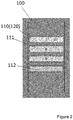
FIG. 2 is a schematic diagram of the display area of an elevator operation panel when an embodiment of the elevator system of the present application is on the 4th floor. - The present application will be described in more detail hereinafter with reference to the accompanying drawings in which exemplary embodiments of the present application are illustrated. However, the present invention may be implemented in many different forms and should not be construed as being limited to the embodiments set forth herein. On the contrary, these embodiments are provided so that the disclosure of the present application becomes thorough and complete, and the concept of the present application is completely conveyed to those skilled in the art.
- Although the features of the present application are disclosed in connection with several embodiments or one of the embodiments, if, however, such features may be desirable and/or advantageous for any given or identifiable function, such features may be combined with one or more other features of other implementations/embodiments.
- Several functional entities may be mentioned herein, which do not necessarily have to correspond to physically or logically independent entities. These functional entities may be implemented by means of software, or implemented in one or more hardware modules or integrated circuits, or implemented in different processing devices and/or microcontroller devices.
- In conjunction with
FIGS. 1 and2 , an embodiment of anelevator operation panel 100 is illustrated. Theelevator operation panel 100 at least includes adisplay area 110, atouch control area 120, and a control unit (not shown). Specifically, thedisplay area 110 is configured to displayfirst floor information 111 of the building based at least on an elevator movement trend, wherein thefirst floor information 111 includes all floors that the elevator has not yet arrived at on the elevator movement trend. Thetouch control area 120 is configured to receive an input instruction. The control unit is configured to receive the input instruction from thetouch control area 120, and adjust display information of thedisplay area 110 according to the input instruction. Further, the control unit is configured to receive floor change information of the building, and adjust the display information of thedisplay area 110 according to the floor change information of the building. Under such a configuration, according to theelevator operation panel 100 of the present application, by displaying the corresponding floor information based on the elevator movement trend, on the one hand, the amount of information displayed on the panel can be reduced, and part of the information screening and filtering time of the passenger can be saved, so that the passenger can quickly select the desired floor, and on the other hand, information most likely to be required by the passenger can be displayed with the maximum probability on the panel in the first place, so as to prevent the passenger from performing other operations to obtain the required information, thereby effectively improving passenger experience. - Wherein, the control unit mentioned in the foregoing embodiments may be directly disposed in or attached to the
elevator operation panel 100, and it may also belong to the overall control unit of the corresponding elevator system. Accordingly, that theelevator operation panel 100 includes a control unit as described herein is intended to express the integrity in function, but not to emphasize that theoperation panel 100 must include the corresponding hardware for the control unit. - In addition, it should be understood that, in this context, "elevator movement trend" refers to the movement direction of an elevator car in the elevator system after receiving one or more call instructions, which represents a time-continuous process. In this process, it is possible that the car moves up alone, moves down alone, or first moves up and then down, and so on. Therefore, the corresponding elevator floors on the elevator movement trend refer to part or all of the floors that the elevator car will sequentially pass or arrive at.
- On the basis of the above, further improvements may be made to the components or functional parts therein or additional components and functional parts may be added based on the foregoing embodiments, as will be exemplarily explained below.
- For example, the
display area 110 may also be configured to displaysecond floor information 112 that is not on the elevator movement trend, wherein thesecond floor information 112 has a different display effect from thefirst floor information 111. At this time, by providing different display effects, it is still possible to highlight thefirst floor information 111 most likely to be required by the passenger. At the same time, when the passenger has a call error or temporarily changes the request, an option to quickly change the call request will be offered to him/her. - As several alternative embodiments, the floor information appearing on the
operation panel 100 may be displayed by one or more of a number, a text, a progress bar, a percentage, or a color. - More specifically, when the
operation panel 100 contains two types of floor information at the same time, thefirst floor information 111 may be configured to be displayed by a number or a text having a first brightness, and thesecond floor information 112 is configured to be displayed by a number or a text having a second brightness, thereby facilitating distinction by the passenger. Alternatively, the first brightness may be configured to be greater than the second brightness, thereby enabling thefirst floor information 111 most likely to be required by the passenger to be more prominently displayed within the passenger's field of view. - As another alternative embodiment, when the
operation panel 100 contains two types of floor information at the same time, thefirst floor information 111 may be configured to be displayed by a number or a text having a first color, and thesecond floor information 112 is configured to be displayed by a number or a text having a second color, thereby facilitating distinction by the passenger. - As a further alternative embodiment, to further highlight the key point, the
second floor information 112 may be displayed by an ellipsis. When the passenger confirms that the required information is not in thefirst floor information 111, he/she may enter a corresponding input instruction on thetouch control area 120, for example, by tapping a designated position, etc., to activate the ellipsis. When thetouch control area 120 receives the corresponding input instruction, the control unit controls the ellipsis to unfold to display thesecond floor information 112. In this way, thefirst floor information 111 most likely to be required by the passenger can be prominently displayed in the field of view of the passenger, and the function of conveniently calling thesecond floor information 112 less likely to be required is also provided, thereby improving passenger experience. - In addition, as one of the hardware foundations in the foregoing embodiments, the
elevator operation panel 100 may include a liquid crystal display. In this case, thedisplay area 110 and thetouch control area 120 may be integrated in the liquid crystal display, wherein the two may share the same area or may be partitioned from each other, which will be determined based on the actual situation. And there are relatively mature technical bases to implement these two solutions, so it will not be described in detail. - Although not shown in the drawings, an embodiment of an elevator system is also provided herein. The elevator system comprises: an elevator car configured to carry passengers; and an
elevator operation panel 100 having adisplay area 110 and atouch control area 120. Wherein, thedisplay area 110 is configured to displayfirst floor information 111 of the building based at least on an elevator movement trend. The first floor information includes all floors that the elevator has not yet arrived at on the elevator movement trend. And thetouch control area 120 is configured to receive an input instruction. In addition, the elevator system further includes a control unit configured to receive the input instruction from thetouch control area 120, and adjust display information of thedisplay area 110 according to the input instruction. And the control unit is further configured to receive floor change information of the building, and adjust the display information of thedisplay area 110 according to the floor change information of the building. Under such a configuration, according to the elevator system of the present application, by displaying the corresponding floor information based on the elevator movement trend, on the one hand, the amount of information displayed on the panel can be reduced, and part of the information screening and filtering time of the passenger can be saved, so that the passenger can quickly select the desired floor, and on the other hand, information most likely to be required by the passenger can be displayed with the maximum probability on the panel in the first place, so as to prevent the passenger from performing other operations to obtain the required information, thereby effectively improving passenger experience. - The
elevator operation panel 100 applied in the embodiments of the elevator system is similar to theelevator operation panel 100 separately mentioned in the foregoing embodiments. In addition, a certain modification is made to the control unit. As mentioned aforesaid, the control unit may be directly disposed in or attached to theelevator operation panel 100, and it may also belong to the overall control unit of the corresponding elevator system. Accordingly, that theelevator operation panel 100 includes a control unit as described herein is intended to express the integrity in function, but not to emphasize that theoperation panel 100 must include the corresponding hardware for the control unit. - On the basis of the above, further improvements may be made to the components or functional parts therein or additional components and functional parts may be added based on the foregoing embodiments, as will be exemplarily explained below.
- For example, the
display area 110 may also be configured to displaysecond floor information 112 that is not on the elevator movement trend, wherein thesecond floor information 112 has a different display effect from thefirst floor information 111. At this time, by providing different display effects, it is still possible to highlight thefirst floor information 111 most likely to be required by the passenger. At the same time, when the passenger has a call error or temporarily changes the request, an option to quickly change the call request will be offered to him/her. - As several alternative embodiments, the floor information appearing on the
operation panel 100 may be displayed by one or more of a number, a text, a progress bar, a percentage, or a color. - More specifically, when the
operation panel 100 in the elevator system contains two types of floor information at the same time, thefirst floor information 111 may be configured to be displayed by a number or a text having a first brightness, and thesecond floor information 112 is configured to be displayed by a number or a text having a second brightness, thereby facilitating distinction by the passenger. Alternatively, the first brightness may be configured to be greater than the second brightness, thereby enabling thefirst floor information 111 most likely to be required by the passenger to be more prominently displayed within the passenger's field of view. - As another alternative embodiment, when the
operation panel 100 contains two types of floor information at the same time, thefirst floor information 111 may be configured to be displayed by a number or a text having a first color, and thesecond floor information 112 is configured to be displayed by a number or a text having a second color, thereby facilitating distinction by the passenger. - As a further alternative embodiment, to further highlight the key point, the
second floor information 112 may be displayed by an ellipsis. When the passenger confirms that the required information is not in thefirst floor information 111, he/she may enter a corresponding input instruction on thetouch control area 120, for example, by tapping a designated position, etc., to activate the ellipsis. When thetouch control area 120 receives the corresponding input instruction, the control unit controls the ellipsis to unfold to display thesecond floor information 112. In this way, thefirst floor information 111 most likely to be required by the passenger can be prominently displayed in the field of view of the passenger, and the function of conveniently calling thesecond floor information 112 less likely to be required is also provided, thereby improving passenger experience. - In addition, as one of the hardware foundations in the foregoing embodiments, the
elevator operation panel 100 may include a liquid crystal display. In this case, thedisplay area 110 and thetouch control area 120 may be integrated in the liquid crystal display, wherein the two may share the same area or may be partitioned from each other, which will be determined based on the actual situation. And there are relatively mature technical bases to implement these two solutions, so it will not be described in detail. - Likewise, although not shown in the drawings, an elevator panel display method is also provided herein. The display method comprises: displaying, by a
display area 110 of the elevator panel,first floor information 111 of the building based at least on an elevator movement trend, wherein thefirst floor information 111 includes all floors that the elevator has not yet arrived at on the elevator movement trend. In addition, atouch control area 120 of the elevator panel is used to receive an input instruction. Further, a control unit of the elevator or the elevator panel is configured to receive the input instruction from thetouch control area 120, and adjust display information of thedisplay area 110 according to the input instruction. And the control unit is further configured to receive floor change information of the building, and adjust the display information of thedisplay area 110 according to the floor change information of the building. Under such a configuration, on the one hand, the control unit can be used to receive an input instruction from thetouch control area 120 and perform a corresponding operation, for example, to a corresponding floor or the like. On the other hand, the control unit can also be used to obtain the real-time floor change information of the elevator in the building and control thedisplay area 110 to dynamically display the correspondingfirst floor information 111. For example, referring toFIGS. 1 and2 , for a building having a total of seven floors, when a passenger enters the elevator car from the lobby, thefirst floor information 111 displayed on theelevator operation panel 100 in the elevator car is the touch buttons of 1st-7th floors, which allows the passenger to choose any one therefrom to go to the corresponding floor. As the elevator ascends, thefirst floor information 111 displayed on theelevator operation panel 100 is gradually changed to the touch buttons of 2nd-7th floors, 3rd-7th floors, and the like. Another example is that when a second passenger calls from 4th floor of the building, when he/she enters the elevator car, considering that the call request is shown as going up, the chance of going to the 1st-4th floors is extremely low (not absolutely impossible, for example, the passenger presses the wrong call direction, etc.), so thefirst floor information 111 displayed on theelevator operation panel 100 in the elevator car has been changed to the touch buttons of 5th-7th floors, so that the passenger can quickly acquire the desired floor. This kind of improvement is especially outstanding when the number of floors in a building is large, because as the number of floors increases, the display space for the identifier of each floor will become smaller, which will bring troubles in selection to passengers. In summary, according to the elevator panel display method of the present application, by displaying the corresponding floor information based on the elevator movement trend, on the one hand, the amount of information displayed on the panel can be reduced, and part of the information screening and filtering time of the passenger can be saved, so that the passenger can quickly select the desired floor, and on the other hand, information most likely to be required by the passenger can be displayed with the maximum probability on the panel in the first place, so as to prevent the passenger from performing other operations to obtain the required information, thereby effectively improving passenger experience. - On the basis of the above, the
display area 110 may also be configured to displaysecond floor information 112 that is not on the elevator movement trend, wherein thesecond floor information 112 has a different display effect from thefirst floor information 111. At this time, by providing different display effects, it is still possible to highlight thefirst floor information 111 most likely to be required by the passenger. At the same time, when the passenger has a call error or temporarily changes the request, an option to quickly change the call request will be offered to him/her. - More specifically, when the
operation panel 100 contains two types of floor information at the same time, to further highlight the key point, thesecond floor information 112 may be displayed by an ellipsis. When the passenger confirms that the required information is not in thefirst floor information 111, he/she may enter a corresponding input instruction on thetouch control area 120, for example, by tapping a designated position, etc., to activate the ellipsis. When thetouch control area 120 receives the corresponding input instruction, the control unit controls the ellipsis to unfold to display thesecond floor information 112. In this way, thefirst floor information 111 most likely to be required by the passenger can be prominently displayed in the field of view of the passenger, and the function of conveniently calling thesecond floor information 112 less likely to be required is also provided, thereby improving passenger experience. - The present specification discloses the present application using embodiments, including optimal embodiment, and also enables those skilled in the art to carry out the present application, including manufacturing and using any apparatus or system, and performing any method contained therein. The protection scope of the patent of the present application is limited by the claims, and may include other embodiments conceivable to those skilled in the art. If these kinds of other embodiments have structural components having no difference from what is literally described in the claims, or if they include equivalent structural components having no substantial difference from what is literally described in the claims, then they are intended to be in the scope of the claims.
Claims (15)
- An elevator operation panel, comprising:a display area configured to display first floor information of the building based at least on an elevator movement trend, wherein the first floor information includes all floors that the elevator has not yet arrived at on the elevator movement trend;a touch control area configured to receive an input instruction; anda control unit configured to receive an input instruction from the touch control area, and adjust display information of the display area according to the input instruction, wherein the control unit is further configured to receive floor change information of the building, and adjust the display information of the display area according to the floor change information of the building.
- The elevator operation panel according to claim 1, wherein the first floor information is displayed by one or more of a number, a text, a progress bar, a percentage, or a color.
- The elevator operation panel according to claim 1 or 2, wherein the display area is further configured to display second floor information that is not on the elevator movement trend, and wherein the second floor information has a different display effect from the first floor information.
- The elevator operation panel according to claim 3, wherein the second floor information is displayed by one or more of a number, a text, a progress bar, a percentage, or a color.
- The elevator operation panel according to claim 4, wherein the first floor information is displayed by a number or a text having a first brightness, and the second floor information is displayed by a number or a text having a second brightness.
- The elevator operation panel according to claim 5, wherein the first brightness is greater than the second brightness.
- The elevator operation panel according to any of claims 4, 5 or 6, wherein the first floor information is displayed by a number or a text having a first color, and the second floor information is displayed by a number or a text having a second color.
- The elevator operation panel according to any of claims 3-7, wherein the second floor information is displayed by an ellipsis, and wherein when the touch control area receives a corresponding input instruction, the control unit controls the ellipsis to unfold to display the second floor information.
- The elevator operation panel according to any preceding claim, wherein the elevator operation panel comprises a liquid crystal display, and wherein the display area and the touch control area are integrated in the liquid crystal display.
- An elevator system, comprising:an elevator car configured to carry passengers;an elevator operation panel having a display area and a touch control area, wherein the display area is configured to display first floor information of the building based at least on an elevator movement trend, the first floor information including all floors that the elevator has not yet arrived at on the elevator movement trend, and wherein the touch control area is configured to receive an input instruction; anda control unit configured to receive an input instruction from the touch control area, and adjust display information of the display area according to the input instruction, wherein the control unit is further configured to receive floor change information of the building, and adjust the display information of the display area according to the floor change information of the building.
- The elevator system according to claim 10, wherein the display area is further configured to display second floor information that is not on the elevator movement trend, and wherein the second floor information has a different display effect from the first floor information; optionally wherein the first floor information and/or the second floor information is displayed by one or more of a number, a text, a progress bar, a percentage, or a color; further optionally wherein the first floor information is displayed by a number or a text having a first brightness, and the second floor information is displayed by a number or a text having a second brightness, and further optionally wherein the first brightness is greater than the second brightness; and/or optionally wherein the first floor information is displayed by a number or a text having a first color, and the second floor information is displayed by a number or a text having a second color; and/or optionally wherein the second floor information is displayed by an ellipsis, and wherein when the touch control area receives a corresponding input instruction, the control unit controls the ellipsis to unfold to display the second floor information; and/or optionally wherein the elevator operation panel comprises a liquid crystal display, and wherein the display area and the touch control area are integrated in the liquid crystal display.
- The elevator system according to any of claim 10 or 11, wherein the control unit is provided in the elevator operation panel.
- An elevator panel display method, comprising:displaying, by a display area of the elevator panel, first floor information of the building based at least on an elevator movement trend, wherein the first floor information includes all floors that the elevator has not yet arrived at on the elevator movement trend;receiving, by a touch control area of the elevator panel, an input instruction; andreceiving, by a control unit of the elevator or the elevator panel, an input instruction from the touch control area, and adjusting the display information of the display area according to the input instruction, wherein the control unit is further configured to receive floor change information of the building, and adjust the display information of the display area according to the floor change information of the building.
- The elevator panel display method according to claim 13, wherein the display area is further configured to display second floor information that is not on the elevator movement trend, and wherein the second floor information has a different display effect from the first floor information.
- The elevator panel display method according to claim 14, wherein the second floor information is displayed by an ellipsis, and wherein when the touch control area receives a corresponding input instruction, the control unit controls the ellipsis to unfold to display the second floor information.
Applications Claiming Priority (1)
| Application Number | Priority Date | Filing Date | Title |
|---|---|---|---|
| CN201811502801.2A CN111285212A (en) | 2018-12-10 | 2018-12-10 | Elevator operation panel, elevator system and elevator panel display method |
Publications (2)
| Publication Number | Publication Date |
|---|---|
| EP3666708A1 true EP3666708A1 (en) | 2020-06-17 |
| EP3666708B1 EP3666708B1 (en) | 2024-08-14 |
Family
ID=68848171
Family Applications (1)
| Application Number | Title | Priority Date | Filing Date |
|---|---|---|---|
| EP19215039.9A Active EP3666708B1 (en) | 2018-12-10 | 2019-12-10 | Elevator operation panel, elevator system and elevator panel display method |
Country Status (3)
| Country | Link |
|---|---|
| US (1) | US12509326B2 (en) |
| EP (1) | EP3666708B1 (en) |
| CN (1) | CN111285212A (en) |
Families Citing this family (2)
| Publication number | Priority date | Publication date | Assignee | Title |
|---|---|---|---|---|
| CN111285212A (en) * | 2018-12-10 | 2020-06-16 | 奥的斯电梯公司 | Elevator operation panel, elevator system and elevator panel display method |
| CN113590012B (en) * | 2021-07-05 | 2023-09-26 | 日立楼宇技术(广州)有限公司 | Quick elevator calling method, device, computer equipment and storage medium |
Citations (5)
| Publication number | Priority date | Publication date | Assignee | Title |
|---|---|---|---|---|
| JP2004099222A (en) * | 2002-09-06 | 2004-04-02 | Mitsubishi Electric Building Techno Service Co Ltd | Operating device in elevator car |
| WO2006001804A2 (en) * | 2004-06-11 | 2006-01-05 | Otis Elevator Company | Voice request elevator allocation and passenger display |
| WO2007108168A1 (en) * | 2006-03-20 | 2007-09-27 | Hitachi, Ltd. | Information display in elevator car |
| JP2014141315A (en) * | 2013-01-22 | 2014-08-07 | Mitsubishi Electric Corp | Elevator operation display equipment |
| JP5844423B2 (en) * | 2014-06-18 | 2016-01-13 | 東芝エレベータ株式会社 | Elevator car display control method and elevator car display control device |
Family Cites Families (36)
| Publication number | Priority date | Publication date | Assignee | Title |
|---|---|---|---|---|
| JPH01288584A (en) * | 1988-05-16 | 1989-11-20 | Mitsubishi Electric Corp | Touch pannel type call button device for elevator |
| US5194702A (en) | 1991-09-17 | 1993-03-16 | Swonger Jr Karl W | Vertically scrolled elevator position indicator |
| FI941226L (en) * | 1994-03-15 | 1995-09-16 | Kone Oy | Method for controlling a display and display apparatus |
| US5627980A (en) * | 1995-03-20 | 1997-05-06 | Xerox Corporation | Elision based presentation of ordered data |
| US5969306A (en) * | 1998-03-26 | 1999-10-19 | Otis Elevator Company | Elevator car call buttons indicating car floor position |
| CN1175998C (en) * | 2000-06-16 | 2004-11-17 | 三菱电机株式会社 | elevator operating panel |
| CN1382096A (en) | 2000-08-23 | 2002-11-27 | 三菱电机株式会社 | Operating board for elevator |
| FI112792B (en) | 2001-08-14 | 2004-01-15 | Kone Corp | For elevator passengers informative floor number display in floor and basket |
| JPWO2005077803A1 (en) * | 2004-02-13 | 2007-08-23 | 三菱電機株式会社 | Elevator call registration device |
| NZ539155A (en) | 2004-04-08 | 2005-11-25 | Inventio Ag | Call operating panel for elevator with configurable touch sensitive buttons |
| WO2005105643A1 (en) * | 2004-04-30 | 2005-11-10 | Mitsubishi Denki Kabushiki Kaisha | Destination floor indicator of elevator |
| JP2006001742A (en) * | 2004-06-18 | 2006-01-05 | Inventio Ag | Device and method for informing elevator equipment to passenger |
| ES2402415T5 (en) | 2004-06-29 | 2017-02-03 | Otis Elevator Company | Programmable Adaptive Touch Screen Lift Call Devices |
| WO2006025096A1 (en) * | 2004-08-30 | 2006-03-09 | Mitsubishi Denki Kabushiki Kaisha | Destination floor register for elevator |
| KR100606198B1 (en) | 2005-03-21 | 2006-08-02 | 새한엘리베이터 주식회사 | Touch screen elevator control |
| KR20070008597A (en) * | 2006-09-20 | 2007-01-17 | 오티스 엘리베이터 컴파니 | Conveyor passenger interface system |
| CN101130416A (en) * | 2007-06-28 | 2008-02-27 | 广州日立电梯有限公司 | Method for processing register information of target floor of lifter and apparatus for displaying register information of target floor of lifter |
| US8125461B2 (en) | 2008-01-11 | 2012-02-28 | Apple Inc. | Dynamic input graphic display |
| KR20110114280A (en) | 2010-04-13 | 2011-10-19 | 김중원 | Elevator Control Device Using Touch Screen |
| KR101227983B1 (en) * | 2011-02-17 | 2013-02-01 | 오티스 엘리베이터 컴파니 | Elevator with input output user equipment |
| FI124165B (en) | 2012-09-26 | 2014-04-15 | Kone Corp | Lift system |
| WO2014201624A1 (en) * | 2013-06-18 | 2014-12-24 | Nokia Corporation | Message handling |
| JP2015013695A (en) * | 2013-07-03 | 2015-01-22 | 株式会社日立製作所 | Elevator destination floor registration device |
| US9489400B1 (en) * | 2014-06-13 | 2016-11-08 | Amazon Technologies, Inc. | Interactive item filtering using images |
| DE102014115999A1 (en) | 2014-11-03 | 2016-05-04 | K.A. Schmersal Gmbh & Co. Kg | Operation of a lift by means of a touchscreen |
| EP3253701B1 (en) | 2015-02-04 | 2021-03-31 | KONE Corporation | Elevator operating panel comprising touch screen |
| CN104925599A (en) | 2015-07-06 | 2015-09-23 | 康力电梯股份有限公司 | Floor-sliding-selecting touch screen elevator operation box |
| CN104925600A (en) | 2015-07-06 | 2015-09-23 | 康力电梯股份有限公司 | Touch screen elevator operation box for rotary knob layer selection |
| CN107176511B (en) * | 2016-03-09 | 2021-03-16 | 奥的斯电梯公司 | Call control device, call control system and call control method thereof |
| US10124989B2 (en) * | 2016-10-28 | 2018-11-13 | Otis Elevator Complany | Elevator car arrival indication on a mobile device |
| JP6467109B2 (en) * | 2016-12-09 | 2019-02-06 | 株式会社日立製作所 | Elevator system |
| KR101821522B1 (en) * | 2017-02-08 | 2018-03-08 | 윤일식 | Apparatus and Method for controlling the Motion of an Elevator using a Monitor |
| US10497164B2 (en) * | 2017-03-31 | 2019-12-03 | Otis Elevator Company | Animation for representing elevator car movement |
| CN111285212A (en) * | 2018-12-10 | 2020-06-16 | 奥的斯电梯公司 | Elevator operation panel, elevator system and elevator panel display method |
| JP7656560B2 (en) * | 2022-03-01 | 2025-04-03 | 株式会社日立ビルシステム | Elevator system and elevator control method |
| JP7689094B2 (en) * | 2022-03-10 | 2025-06-05 | 株式会社日立ビルシステム | Elevator system and elevator control method |
-
2018
- 2018-12-10 CN CN201811502801.2A patent/CN111285212A/en active Pending
-
2019
- 2019-12-09 US US16/707,758 patent/US12509326B2/en active Active
- 2019-12-10 EP EP19215039.9A patent/EP3666708B1/en active Active
Patent Citations (5)
| Publication number | Priority date | Publication date | Assignee | Title |
|---|---|---|---|---|
| JP2004099222A (en) * | 2002-09-06 | 2004-04-02 | Mitsubishi Electric Building Techno Service Co Ltd | Operating device in elevator car |
| WO2006001804A2 (en) * | 2004-06-11 | 2006-01-05 | Otis Elevator Company | Voice request elevator allocation and passenger display |
| WO2007108168A1 (en) * | 2006-03-20 | 2007-09-27 | Hitachi, Ltd. | Information display in elevator car |
| JP2014141315A (en) * | 2013-01-22 | 2014-08-07 | Mitsubishi Electric Corp | Elevator operation display equipment |
| JP5844423B2 (en) * | 2014-06-18 | 2016-01-13 | 東芝エレベータ株式会社 | Elevator car display control method and elevator car display control device |
Also Published As
| Publication number | Publication date |
|---|---|
| EP3666708B1 (en) | 2024-08-14 |
| US12509326B2 (en) | 2025-12-30 |
| US20200180904A1 (en) | 2020-06-11 |
| CN111285212A (en) | 2020-06-16 |
Similar Documents
| Publication | Publication Date | Title |
|---|---|---|
| JP5107343B2 (en) | Elevator system | |
| US20120138390A1 (en) | Elevator system and method for controlling the same | |
| EP2786950A1 (en) | Elevator group management device | |
| EP3666708B1 (en) | Elevator operation panel, elevator system and elevator panel display method | |
| EP2691329A1 (en) | Method for modernizing an elevator installation | |
| CN103303753A (en) | Elevator group management system | |
| JP2011111253A (en) | Group supervisory operation control system and group supervisory operation control method of elevator | |
| KR20130088156A (en) | Elevator landing destination floor registering apparatus | |
| JPH02163274A (en) | Controller for elevator | |
| JP5749427B2 (en) | Elevator group management system | |
| KR20090087073A (en) | Destination floor display of elevator | |
| JPH0859108A (en) | Elevator call registration device | |
| JP2000272851A (en) | Elevator hall display device | |
| KR20130064323A (en) | Destination selecting system of elevator and the control method thereof | |
| JP6972259B1 (en) | Landing call registration method switching method and group management control device | |
| JP6218797B2 (en) | Elevator control device | |
| JP2758276B2 (en) | Elevator car call registration device | |
| JP7167122B2 (en) | Elevator system and hall call registration switching method | |
| KR101820660B1 (en) | Floor id storage system using by hall button of hall indicator panel and the control method thereof | |
| JP2009173398A (en) | Elevator group management system | |
| JP4494135B2 (en) | Elevator system | |
| JP2021038070A (en) | Elevator system | |
| WO2019111407A1 (en) | Device for registering destination floor of elevator, and method for registering destination floor of elevator | |
| JP2002321880A (en) | Elevator hall display device | |
| JP2015000771A (en) | Elevator control device |
Legal Events
| Date | Code | Title | Description |
|---|---|---|---|
| PUAI | Public reference made under article 153(3) epc to a published international application that has entered the european phase |
Free format text: ORIGINAL CODE: 0009012 |
|
| STAA | Information on the status of an ep patent application or granted ep patent |
Free format text: STATUS: THE APPLICATION HAS BEEN PUBLISHED |
|
| AK | Designated contracting states |
Kind code of ref document: A1 Designated state(s): AL AT BE BG CH CY CZ DE DK EE ES FI FR GB GR HR HU IE IS IT LI LT LU LV MC MK MT NL NO PL PT RO RS SE SI SK SM TR |
|
| AX | Request for extension of the european patent |
Extension state: BA ME |
|
| RIN1 | Information on inventor provided before grant (corrected) |
Inventor name: LI, KAI |
|
| STAA | Information on the status of an ep patent application or granted ep patent |
Free format text: STATUS: REQUEST FOR EXAMINATION WAS MADE |
|
| 17P | Request for examination filed |
Effective date: 20201217 |
|
| RBV | Designated contracting states (corrected) |
Designated state(s): AL AT BE BG CH CY CZ DE DK EE ES FI FR GB GR HR HU IE IS IT LI LT LU LV MC MK MT NL NO PL PT RO RS SE SI SK SM TR |
|
| RIC1 | Information provided on ipc code assigned before grant |
Ipc: B66B 1/46 20060101ALI20220504BHEP Ipc: B66B 3/00 20060101AFI20220504BHEP |
|
| STAA | Information on the status of an ep patent application or granted ep patent |
Free format text: STATUS: EXAMINATION IS IN PROGRESS |
|
| 17Q | First examination report despatched |
Effective date: 20220628 |
|
| GRAP | Despatch of communication of intention to grant a patent |
Free format text: ORIGINAL CODE: EPIDOSNIGR1 |
|
| STAA | Information on the status of an ep patent application or granted ep patent |
Free format text: STATUS: GRANT OF PATENT IS INTENDED |
|
| INTG | Intention to grant announced |
Effective date: 20240307 |
|
| GRAS | Grant fee paid |
Free format text: ORIGINAL CODE: EPIDOSNIGR3 |
|
| GRAA | (expected) grant |
Free format text: ORIGINAL CODE: 0009210 |
|
| STAA | Information on the status of an ep patent application or granted ep patent |
Free format text: STATUS: THE PATENT HAS BEEN GRANTED |
|
| AK | Designated contracting states |
Kind code of ref document: B1 Designated state(s): AL AT BE BG CH CY CZ DE DK EE ES FI FR GB GR HR HU IE IS IT LI LT LU LV MC MK MT NL NO PL PT RO RS SE SI SK SM TR |
|
| REG | Reference to a national code |
Ref country code: GB Ref legal event code: FG4D |
|
| RIN1 | Information on inventor provided before grant (corrected) |
Inventor name: LI, KAI |
|
| REG | Reference to a national code |
Ref country code: CH Ref legal event code: EP |
|
| REG | Reference to a national code |
Ref country code: DE Ref legal event code: R096 Ref document number: 602019056926 Country of ref document: DE |
|
| REG | Reference to a national code |
Ref country code: IE Ref legal event code: FG4D |
|
| REG | Reference to a national code |
Ref country code: LT Ref legal event code: MG9D |
|
| REG | Reference to a national code |
Ref country code: NL Ref legal event code: MP Effective date: 20240814 |
|
| PGFP | Annual fee paid to national office [announced via postgrant information from national office to epo] |
Ref country code: DE Payment date: 20241121 Year of fee payment: 6 |
|
| PG25 | Lapsed in a contracting state [announced via postgrant information from national office to epo] |
Ref country code: NO Free format text: LAPSE BECAUSE OF FAILURE TO SUBMIT A TRANSLATION OF THE DESCRIPTION OR TO PAY THE FEE WITHIN THE PRESCRIBED TIME-LIMIT Effective date: 20241114 |
|
| REG | Reference to a national code |
Ref country code: AT Ref legal event code: MK05 Ref document number: 1713154 Country of ref document: AT Kind code of ref document: T Effective date: 20240814 |
|
| PG25 | Lapsed in a contracting state [announced via postgrant information from national office to epo] |
Ref country code: NL Free format text: LAPSE BECAUSE OF FAILURE TO SUBMIT A TRANSLATION OF THE DESCRIPTION OR TO PAY THE FEE WITHIN THE PRESCRIBED TIME-LIMIT Effective date: 20240814 Ref country code: FI Free format text: LAPSE BECAUSE OF FAILURE TO SUBMIT A TRANSLATION OF THE DESCRIPTION OR TO PAY THE FEE WITHIN THE PRESCRIBED TIME-LIMIT Effective date: 20240814 Ref country code: PL Free format text: LAPSE BECAUSE OF FAILURE TO SUBMIT A TRANSLATION OF THE DESCRIPTION OR TO PAY THE FEE WITHIN THE PRESCRIBED TIME-LIMIT Effective date: 20240814 Ref country code: GR Free format text: LAPSE BECAUSE OF FAILURE TO SUBMIT A TRANSLATION OF THE DESCRIPTION OR TO PAY THE FEE WITHIN THE PRESCRIBED TIME-LIMIT Effective date: 20241115 Ref country code: PT Free format text: LAPSE BECAUSE OF FAILURE TO SUBMIT A TRANSLATION OF THE DESCRIPTION OR TO PAY THE FEE WITHIN THE PRESCRIBED TIME-LIMIT Effective date: 20241216 |
|
| PG25 | Lapsed in a contracting state [announced via postgrant information from national office to epo] |
Ref country code: BG Free format text: LAPSE BECAUSE OF FAILURE TO SUBMIT A TRANSLATION OF THE DESCRIPTION OR TO PAY THE FEE WITHIN THE PRESCRIBED TIME-LIMIT Effective date: 20240814 |
|
| PGFP | Annual fee paid to national office [announced via postgrant information from national office to epo] |
Ref country code: FR Payment date: 20241121 Year of fee payment: 6 |
|
| PG25 | Lapsed in a contracting state [announced via postgrant information from national office to epo] |
Ref country code: LV Free format text: LAPSE BECAUSE OF FAILURE TO SUBMIT A TRANSLATION OF THE DESCRIPTION OR TO PAY THE FEE WITHIN THE PRESCRIBED TIME-LIMIT Effective date: 20240814 |
|
| PG25 | Lapsed in a contracting state [announced via postgrant information from national office to epo] |
Ref country code: IS Free format text: LAPSE BECAUSE OF FAILURE TO SUBMIT A TRANSLATION OF THE DESCRIPTION OR TO PAY THE FEE WITHIN THE PRESCRIBED TIME-LIMIT Effective date: 20241214 Ref country code: AT Free format text: LAPSE BECAUSE OF FAILURE TO SUBMIT A TRANSLATION OF THE DESCRIPTION OR TO PAY THE FEE WITHIN THE PRESCRIBED TIME-LIMIT Effective date: 20240814 |
|
| PG25 | Lapsed in a contracting state [announced via postgrant information from national office to epo] |
Ref country code: HR Free format text: LAPSE BECAUSE OF FAILURE TO SUBMIT A TRANSLATION OF THE DESCRIPTION OR TO PAY THE FEE WITHIN THE PRESCRIBED TIME-LIMIT Effective date: 20240814 |
|
| PG25 | Lapsed in a contracting state [announced via postgrant information from national office to epo] |
Ref country code: RS Free format text: LAPSE BECAUSE OF FAILURE TO SUBMIT A TRANSLATION OF THE DESCRIPTION OR TO PAY THE FEE WITHIN THE PRESCRIBED TIME-LIMIT Effective date: 20241114 Ref country code: ES Free format text: LAPSE BECAUSE OF FAILURE TO SUBMIT A TRANSLATION OF THE DESCRIPTION OR TO PAY THE FEE WITHIN THE PRESCRIBED TIME-LIMIT Effective date: 20240814 |
|
| PG25 | Lapsed in a contracting state [announced via postgrant information from national office to epo] |
Ref country code: RS Free format text: LAPSE BECAUSE OF FAILURE TO SUBMIT A TRANSLATION OF THE DESCRIPTION OR TO PAY THE FEE WITHIN THE PRESCRIBED TIME-LIMIT Effective date: 20241114 Ref country code: PT Free format text: LAPSE BECAUSE OF FAILURE TO SUBMIT A TRANSLATION OF THE DESCRIPTION OR TO PAY THE FEE WITHIN THE PRESCRIBED TIME-LIMIT Effective date: 20241216 Ref country code: PL Free format text: LAPSE BECAUSE OF FAILURE TO SUBMIT A TRANSLATION OF THE DESCRIPTION OR TO PAY THE FEE WITHIN THE PRESCRIBED TIME-LIMIT Effective date: 20240814 Ref country code: NO Free format text: LAPSE BECAUSE OF FAILURE TO SUBMIT A TRANSLATION OF THE DESCRIPTION OR TO PAY THE FEE WITHIN THE PRESCRIBED TIME-LIMIT Effective date: 20241114 Ref country code: NL Free format text: LAPSE BECAUSE OF FAILURE TO SUBMIT A TRANSLATION OF THE DESCRIPTION OR TO PAY THE FEE WITHIN THE PRESCRIBED TIME-LIMIT Effective date: 20240814 Ref country code: LV Free format text: LAPSE BECAUSE OF FAILURE TO SUBMIT A TRANSLATION OF THE DESCRIPTION OR TO PAY THE FEE WITHIN THE PRESCRIBED TIME-LIMIT Effective date: 20240814 Ref country code: IS Free format text: LAPSE BECAUSE OF FAILURE TO SUBMIT A TRANSLATION OF THE DESCRIPTION OR TO PAY THE FEE WITHIN THE PRESCRIBED TIME-LIMIT Effective date: 20241214 Ref country code: HR Free format text: LAPSE BECAUSE OF FAILURE TO SUBMIT A TRANSLATION OF THE DESCRIPTION OR TO PAY THE FEE WITHIN THE PRESCRIBED TIME-LIMIT Effective date: 20240814 Ref country code: GR Free format text: LAPSE BECAUSE OF FAILURE TO SUBMIT A TRANSLATION OF THE DESCRIPTION OR TO PAY THE FEE WITHIN THE PRESCRIBED TIME-LIMIT Effective date: 20241115 Ref country code: FI Free format text: LAPSE BECAUSE OF FAILURE TO SUBMIT A TRANSLATION OF THE DESCRIPTION OR TO PAY THE FEE WITHIN THE PRESCRIBED TIME-LIMIT Effective date: 20240814 Ref country code: ES Free format text: LAPSE BECAUSE OF FAILURE TO SUBMIT A TRANSLATION OF THE DESCRIPTION OR TO PAY THE FEE WITHIN THE PRESCRIBED TIME-LIMIT Effective date: 20240814 Ref country code: BG Free format text: LAPSE BECAUSE OF FAILURE TO SUBMIT A TRANSLATION OF THE DESCRIPTION OR TO PAY THE FEE WITHIN THE PRESCRIBED TIME-LIMIT Effective date: 20240814 Ref country code: AT Free format text: LAPSE BECAUSE OF FAILURE TO SUBMIT A TRANSLATION OF THE DESCRIPTION OR TO PAY THE FEE WITHIN THE PRESCRIBED TIME-LIMIT Effective date: 20240814 |
|
| PG25 | Lapsed in a contracting state [announced via postgrant information from national office to epo] |
Ref country code: DK Free format text: LAPSE BECAUSE OF FAILURE TO SUBMIT A TRANSLATION OF THE DESCRIPTION OR TO PAY THE FEE WITHIN THE PRESCRIBED TIME-LIMIT Effective date: 20240814 Ref country code: RO Free format text: LAPSE BECAUSE OF FAILURE TO SUBMIT A TRANSLATION OF THE DESCRIPTION OR TO PAY THE FEE WITHIN THE PRESCRIBED TIME-LIMIT Effective date: 20240814 Ref country code: SM Free format text: LAPSE BECAUSE OF FAILURE TO SUBMIT A TRANSLATION OF THE DESCRIPTION OR TO PAY THE FEE WITHIN THE PRESCRIBED TIME-LIMIT Effective date: 20240814 |
|
| PG25 | Lapsed in a contracting state [announced via postgrant information from national office to epo] |
Ref country code: EE Free format text: LAPSE BECAUSE OF FAILURE TO SUBMIT A TRANSLATION OF THE DESCRIPTION OR TO PAY THE FEE WITHIN THE PRESCRIBED TIME-LIMIT Effective date: 20240814 |
|
| PG25 | Lapsed in a contracting state [announced via postgrant information from national office to epo] |
Ref country code: CZ Free format text: LAPSE BECAUSE OF FAILURE TO SUBMIT A TRANSLATION OF THE DESCRIPTION OR TO PAY THE FEE WITHIN THE PRESCRIBED TIME-LIMIT Effective date: 20240814 |
|
| PG25 | Lapsed in a contracting state [announced via postgrant information from national office to epo] |
Ref country code: SK Free format text: LAPSE BECAUSE OF FAILURE TO SUBMIT A TRANSLATION OF THE DESCRIPTION OR TO PAY THE FEE WITHIN THE PRESCRIBED TIME-LIMIT Effective date: 20240814 Ref country code: IT Free format text: LAPSE BECAUSE OF FAILURE TO SUBMIT A TRANSLATION OF THE DESCRIPTION OR TO PAY THE FEE WITHIN THE PRESCRIBED TIME-LIMIT Effective date: 20240814 |
|
| REG | Reference to a national code |
Ref country code: DE Ref legal event code: R097 Ref document number: 602019056926 Country of ref document: DE |
|
| PLBE | No opposition filed within time limit |
Free format text: ORIGINAL CODE: 0009261 |
|
| STAA | Information on the status of an ep patent application or granted ep patent |
Free format text: STATUS: NO OPPOSITION FILED WITHIN TIME LIMIT |
|
| PG25 | Lapsed in a contracting state [announced via postgrant information from national office to epo] |
Ref country code: MC Free format text: LAPSE BECAUSE OF FAILURE TO SUBMIT A TRANSLATION OF THE DESCRIPTION OR TO PAY THE FEE WITHIN THE PRESCRIBED TIME-LIMIT Effective date: 20240814 |
|
| 26N | No opposition filed |
Effective date: 20250515 |
|
| REG | Reference to a national code |
Ref country code: CH Ref legal event code: PL |
|
| PG25 | Lapsed in a contracting state [announced via postgrant information from national office to epo] |
Ref country code: LU Free format text: LAPSE BECAUSE OF NON-PAYMENT OF DUE FEES Effective date: 20241210 |
|
| GBPC | Gb: european patent ceased through non-payment of renewal fee |
Effective date: 20241210 |
|
| PG25 | Lapsed in a contracting state [announced via postgrant information from national office to epo] |
Ref country code: SE Free format text: LAPSE BECAUSE OF FAILURE TO SUBMIT A TRANSLATION OF THE DESCRIPTION OR TO PAY THE FEE WITHIN THE PRESCRIBED TIME-LIMIT Effective date: 20240814 |
|
| REG | Reference to a national code |
Ref country code: BE Ref legal event code: MM Effective date: 20241231 |
|
| PG25 | Lapsed in a contracting state [announced via postgrant information from national office to epo] |
Ref country code: GB Free format text: LAPSE BECAUSE OF NON-PAYMENT OF DUE FEES Effective date: 20241210 Ref country code: BE Free format text: LAPSE BECAUSE OF NON-PAYMENT OF DUE FEES Effective date: 20241231 |
|
| PG25 | Lapsed in a contracting state [announced via postgrant information from national office to epo] |
Ref country code: CH Free format text: LAPSE BECAUSE OF NON-PAYMENT OF DUE FEES Effective date: 20241231 |
|
| PG25 | Lapsed in a contracting state [announced via postgrant information from national office to epo] |
Ref country code: IE Free format text: LAPSE BECAUSE OF NON-PAYMENT OF DUE FEES Effective date: 20241210 |