EP3665557B1 - Verfahren zur empfehlung einer oder mehrerer aktionen und elektronische vorrichtung dafür - Google Patents
Verfahren zur empfehlung einer oder mehrerer aktionen und elektronische vorrichtung dafür Download PDFInfo
- Publication number
- EP3665557B1 EP3665557B1 EP18856087.4A EP18856087A EP3665557B1 EP 3665557 B1 EP3665557 B1 EP 3665557B1 EP 18856087 A EP18856087 A EP 18856087A EP 3665557 B1 EP3665557 B1 EP 3665557B1
- Authority
- EP
- European Patent Office
- Prior art keywords
- user
- actionable
- entity
- actionable items
- bulb
- Prior art date
- Legal status (The legal status is an assumption and is not a legal conclusion. Google has not performed a legal analysis and makes no representation as to the accuracy of the status listed.)
- Not-in-force
Links
Images











Classifications
-
- G—PHYSICS
- G06—COMPUTING OR CALCULATING; COUNTING
- G06V—IMAGE OR VIDEO RECOGNITION OR UNDERSTANDING
- G06V10/00—Arrangements for image or video recognition or understanding
- G06V10/94—Hardware or software architectures specially adapted for image or video understanding
- G06V10/945—User interactive design; Environments; Toolboxes
-
- G—PHYSICS
- G06—COMPUTING OR CALCULATING; COUNTING
- G06F—ELECTRIC DIGITAL DATA PROCESSING
- G06F18/00—Pattern recognition
- G06F18/40—Software arrangements specially adapted for pattern recognition, e.g. user interfaces or toolboxes therefor
-
- G—PHYSICS
- G06—COMPUTING OR CALCULATING; COUNTING
- G06F—ELECTRIC DIGITAL DATA PROCESSING
- G06F3/00—Input arrangements for transferring data to be processed into a form capable of being handled by the computer; Output arrangements for transferring data from processing unit to output unit, e.g. interface arrangements
- G06F3/01—Input arrangements or combined input and output arrangements for interaction between user and computer
- G06F3/017—Gesture based interaction, e.g. based on a set of recognized hand gestures
-
- G—PHYSICS
- G06—COMPUTING OR CALCULATING; COUNTING
- G06F—ELECTRIC DIGITAL DATA PROCESSING
- G06F3/00—Input arrangements for transferring data to be processed into a form capable of being handled by the computer; Output arrangements for transferring data from processing unit to output unit, e.g. interface arrangements
- G06F3/01—Input arrangements or combined input and output arrangements for interaction between user and computer
- G06F3/048—Interaction techniques based on graphical user interfaces [GUI]
- G06F3/0481—Interaction techniques based on graphical user interfaces [GUI] based on specific properties of the displayed interaction object or a metaphor-based environment, e.g. interaction with desktop elements like windows or icons, or assisted by a cursor's changing behaviour or appearance
- G06F3/04817—Interaction techniques based on graphical user interfaces [GUI] based on specific properties of the displayed interaction object or a metaphor-based environment, e.g. interaction with desktop elements like windows or icons, or assisted by a cursor's changing behaviour or appearance using icons
-
- G—PHYSICS
- G06—COMPUTING OR CALCULATING; COUNTING
- G06F—ELECTRIC DIGITAL DATA PROCESSING
- G06F3/00—Input arrangements for transferring data to be processed into a form capable of being handled by the computer; Output arrangements for transferring data from processing unit to output unit, e.g. interface arrangements
- G06F3/01—Input arrangements or combined input and output arrangements for interaction between user and computer
- G06F3/048—Interaction techniques based on graphical user interfaces [GUI]
- G06F3/0484—Interaction techniques based on graphical user interfaces [GUI] for the control of specific functions or operations, e.g. selecting or manipulating an object, an image or a displayed text element, setting a parameter value or selecting a range
- G06F3/04842—Selection of displayed objects or displayed text elements
-
- G—PHYSICS
- G06—COMPUTING OR CALCULATING; COUNTING
- G06F—ELECTRIC DIGITAL DATA PROCESSING
- G06F3/00—Input arrangements for transferring data to be processed into a form capable of being handled by the computer; Output arrangements for transferring data from processing unit to output unit, e.g. interface arrangements
- G06F3/01—Input arrangements or combined input and output arrangements for interaction between user and computer
- G06F3/048—Interaction techniques based on graphical user interfaces [GUI]
- G06F3/0484—Interaction techniques based on graphical user interfaces [GUI] for the control of specific functions or operations, e.g. selecting or manipulating an object, an image or a displayed text element, setting a parameter value or selecting a range
- G06F3/0486—Drag-and-drop
-
- G—PHYSICS
- G06—COMPUTING OR CALCULATING; COUNTING
- G06F—ELECTRIC DIGITAL DATA PROCESSING
- G06F3/00—Input arrangements for transferring data to be processed into a form capable of being handled by the computer; Output arrangements for transferring data from processing unit to output unit, e.g. interface arrangements
- G06F3/01—Input arrangements or combined input and output arrangements for interaction between user and computer
- G06F3/048—Interaction techniques based on graphical user interfaces [GUI]
- G06F3/0487—Interaction techniques based on graphical user interfaces [GUI] using specific features provided by the input device, e.g. functions controlled by the rotation of a mouse with dual sensing arrangements, or of the nature of the input device, e.g. tap gestures based on pressure sensed by a digitiser
- G06F3/0488—Interaction techniques based on graphical user interfaces [GUI] using specific features provided by the input device, e.g. functions controlled by the rotation of a mouse with dual sensing arrangements, or of the nature of the input device, e.g. tap gestures based on pressure sensed by a digitiser using a touch-screen or digitiser, e.g. input of commands through traced gestures
- G06F3/04883—Interaction techniques based on graphical user interfaces [GUI] using specific features provided by the input device, e.g. functions controlled by the rotation of a mouse with dual sensing arrangements, or of the nature of the input device, e.g. tap gestures based on pressure sensed by a digitiser using a touch-screen or digitiser, e.g. input of commands through traced gestures for inputting data by handwriting, e.g. gesture or text
-
- G—PHYSICS
- G06—COMPUTING OR CALCULATING; COUNTING
- G06V—IMAGE OR VIDEO RECOGNITION OR UNDERSTANDING
- G06V10/00—Arrangements for image or video recognition or understanding
- G06V10/10—Image acquisition
- G06V10/17—Image acquisition using hand-held instruments
-
- G—PHYSICS
- G06—COMPUTING OR CALCULATING; COUNTING
- G06V—IMAGE OR VIDEO RECOGNITION OR UNDERSTANDING
- G06V30/00—Character recognition; Recognising digital ink; Document-oriented image-based pattern recognition
- G06V30/40—Document-oriented image-based pattern recognition
- G06V30/41—Analysis of document content
- G06V30/413—Classification of content, e.g. text, photographs or tables
-
- G—PHYSICS
- G06—COMPUTING OR CALCULATING; COUNTING
- G06V—IMAGE OR VIDEO RECOGNITION OR UNDERSTANDING
- G06V30/00—Character recognition; Recognising digital ink; Document-oriented image-based pattern recognition
- G06V30/40—Document-oriented image-based pattern recognition
- G06V30/41—Analysis of document content
- G06V30/414—Extracting the geometrical structure, e.g. layout tree; Block segmentation, e.g. bounding boxes for graphics or text
-
- G—PHYSICS
- G06—COMPUTING OR CALCULATING; COUNTING
- G06V—IMAGE OR VIDEO RECOGNITION OR UNDERSTANDING
- G06V40/00—Recognition of biometric, human-related or animal-related patterns in image or video data
- G06V40/20—Movements or behaviour, e.g. gesture recognition
- G06V40/28—Recognition of hand or arm movements, e.g. recognition of deaf sign language
Definitions
- the disclosure relates to mobile communications. More particularly, the disclosure relates to a method for recommending one or more actions and an electronic device thereof.
- the virtual assistant is configured to understand the user needs and acts like a person in interacting with the mobile device. This provides the user an experience similar to interacting with another person rather a machine.
- the virtual assistant allows the user to interact with the mobile device using voice commands.
- the virtual assistant understands the voice commands of the user extract the essential information from the voice command and access the relevant one or more applications and provides the result/ feedback to the user accordingly.
- the virtual assistants are made intelligent enough to understand voice of the user to execute any function. Since, the interactions are performed using voice commands, the frequency of using such virtual assistants are not encouraged by the users in all situations.
- US9002725B1 discloses a method for targeting information based on message content
- US20130298162A discloses a method of providing recommended search term corresponding to an image
- US20140337800A1 relates to recognizing objects in images.
- an aspect of the disclosure is to provide a method for recommending one or more actions and an electronic device thereof, corresponding to independent claims 1 and 14 respectively.
- the disclosure describes a method of recommending one or more actions for a mobile device.
- the application recommendation method enables a user of the mobile device to perform one or more tasks intelligently using one or more application recommendations.
- the disclosure describes use of an indicia that when invoked by a user on one or more user selected regions, encompasses plurality of device content present in the one or more user selected regions.
- the indicia also identify one or more actionable items in the encompassed plurality of device contents and recommend one or more device application to perform one or more functions associated with the one or more actionable items.
- the indicia may be an assistance item and the assistance item may be item that recommends the user the information needed by identifying the information on the mobile device screen.
- the user may press on the assistance item and drag the assistance item over one or more regions on the mobile device screen.
- the assistance item may encompass plurality of device contents present in the one or more user selected regions.
- the one or more user selected regions are associated with any application present in the mobile device such as message, contacts, email, gallery and so on.
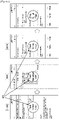
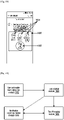
- FIG. 1 is a flow chart diagram illustrating series of operations involved in recommending one or more actions for a mobile device, according to an embodiment of the disclosure.
- an indicia is invoked by the user on one or more user selected regions on a mobile device screen.
- the user may invoke the indicia by providing a touch/tap gesture on the indicia. Initially, the indicia look semi-transparent on the mobile device screen. Upon receiving the touch/tap gesture, the indicia become fully visible on the mobile device screen.
- the indicia is represented as an image and it can be of any form, size, color etc. The user then provides a long press on the indicia and drags the indicia over one or more regions on the mobile device screen.
- the indicia encompass plurality of device contents present in the one or more user selected regions.
- one or more actionable items present within the plurality of device contents are identified and the identified one or more actionable items are visually indicated on the mobile screen at operation 106.
- the user can also edit the one or more actionable items according to his choice.
- an inter-relationship between the identified one or more actionable items are recognized.
- the recognition of the one or more actionable items results in execution of at least one function associated with the one or more actionable items. Therefore, at operation 110, at least one appropriate device application is suggested for executing at least one function which involves the inter-relationship among the actionable items. The same is illustrated in FIG. 1 .
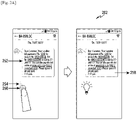
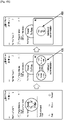
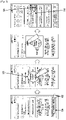
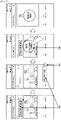
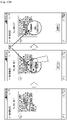
- FIGS. 2A to 2F are schematic diagrams illustrating series of operations involved in recommending an appropriate application for a message received by a user, according to various embodiments of the disclosure.
- a user has received his mobile bill as a message 252 via a messaging application.
- the received message displays information such as phone number, amount to be paid, due date, URL for making payment etc. on a mobile screen.
- the disclosure displays an indicia such as a 'bulb' 254 below the message on the messaging application.
- the bulb remains semi-transparent on the mobile screen and when a user provides a tap gesture 256 on the bulb, the bulb glows and properly appears on the mobile screen 258. This is performed at operation 202.
- the user long presses on the bulb 254 and drags the bulb 254 across the message 252 being displayed on the mobile screen 258.
- the bulb 254 intelligently identifies one or more actionable items 260 present in the message 252.
- Some of the actionable items 260 correspond to at least one of payment, social media, travel, shopping, multimedia, settings, amount and the like.
- the one or more actionable items present in the message comprises of 'payment', 'BSNL A/C no', 'amount', 'phone number' etc.
- These identified one or more actionable items 260 are visually indicated to the user.
- the visual indication also includes a change in color and intensity of the bulb 254 for the different actionable items 260 being identified. This performed at operation 204.
- the bulb 254 outlines the message in dotted lines and appears at right corner of the outlined message.
- the user then provides a double tap gesture 262 on the bulb 254.
- the bulb 254 recognizes inter-relationship between the identified one or more actionable items 260.
- the bulb 254 displays a user actionable entity 264 based on the inter-relationship recognized between the one or more actionable items 260.
- the user actionable entity 264 is displayed as a pop-up box along with one or more options to the user on the mobile device screen 258. This is performed at operation 206.
- the one or more options are i) ADD & USE 266, ii) ADD 268 and iii) EDIT 270.
- the option 'ADD' 268 allows a user to create a new entry of an actionable entity that can be viewed in a user interface element.
- the user interface element is a place where all the created user actionable items and its associated tasks are stored and displayed for future use.
- the ADD option 268 creates a new entry under payment item.
- the option 'ADD & USE' 266 allows a user to create an entity and store it for later usage.
- the option 'EDIT' 270 allows the user to edit one or more actionable items being created. However, it is to be noted that the options may vary based on the created actionable entity.
- the newly created payment entity will be displayed to the user as 'pay BSNL Rs 1245'.
- the newly created payment entity 272 displays one or more options associated with the payment entity 272. For the above example, the options 'Search coupons' 274 and 'Pay' 276 will be displayed to the user. The same is performed at operation 208.
- the payment entity 272 retrieves possible applications with coupons 278 for the mobile bill payment and lists the most preferred application 280 with an indication such as red dot on the coupon. The same is illustrated in FIG. 2E of operation 210. The user may then select the most preferred application and proceed to make the payment after the discount. The final payment entity 282 will then be displayed to the user as shown in FIG. 2F of operation 212. In case, if the user selects the option 'pay' 276, the payment entity 272 directs the user to BSNL bill payment webpage to make the payment.
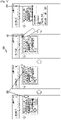
- FIGS. 3A and 3B are schematic diagrams illustrating a series of operations performed in a gallery application, according to various embodiments of the disclosure.
- Image B is the edit version of Image A (colored Red of Image A)
- Image A is set as album cover photo
- the bulb 302 retrieves that Image C is another image taken around same place of Image A and it is of less in dimension of the other two images. This is possible by extracting the GPS information associated with the three images. The same is shown in FIG. 3B . Further, the bulb also suggests one or more operations to be performed on the images as shown below.
- the bulb 302 is capable of retrieving common or differential information that is the bulb instantly creates the 'travel entity 1' 402 based on the details mentioned in the content of the mail and displays the created 'travel entity 1' 402 to the user present in one or more objects of an application.
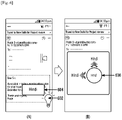
- FIGS. 4A and 4B are schematic diagrams illustrating series of steps involved in creating a travel entity, according to various embodiments of the disclosure.
- a user is viewing an email detailing travel plan for the user.
- the user then invokes a 'bulb' being displayed on the email application and drags over content of the email sent to user B.
- the bulb instantly creates the 'travel entity 1' 402 based on the details mentioned in the content of the mail and displays the created 'travel entity 1' 402 to the user.
- 'travel entity2' 402 is created based on a received SMS as shown in FIG. 4A .
- the user may store the created 'travel entity 1' and 'travel entity2' for later use.
- the p disclosure recommends the 'travel entity3' 408 based on the previously created travel entities 406 and suggest the same to the user as shown in FIG. 4B .
- FIG. 5 is a schematic diagram illustrating a series of operations performed in creating a shopping coupon entity, according to an embodiment of the disclosure.
- a user is using a mail application and viewing an email with gift information.
- the user may activate bulb 502 and drags the bulb 502 across the email content.
- the bulb 502 captures coupon validity information 504 present in the email content and creates a shopping coupon entity 506 as "Book my show, Rs 500".
- the shopping coupon entity 506 displays options such as 'Schedule' and 'Book'.
- the shopping coupon item analyzes validity of the coupon and sends a reminder to the user accordingly.
- the user may either dismiss the reminder or snooze the reminder to notify about the notification at later point of time.
- the reminder may be notified on a notification drawer 508 of a mobile device.
- the disclosure relates another notification 510 with the existing Shopping Coupon entity.
- the shopping coupon entity 506 also tracks dismissed events, messages etc. for future recommendations.
- FIG. 6 is a schematic diagram illustrating series of actions performed in use case of creating a language entity, according to an embodiment of the disclosure.
- Part (A) of FIG. 6 illustrates an embodiment of the disclosure in performing different tasks with same item, where the user's preferred language (Hindi) is different from the user device's default language (English).
- Hindi user's preferred language
- the information captured 604 is shown in Hindi.
- Different tasks in this embodiment include translation and travel plan based on the intelligent entity 606 created with user's preferred language Hindi. The same is illustrated in part (B) of FIG. 6 .
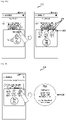
- FIGS. 7A , 7B , and 7C are schematic diagrams illustrating a process of creating a social entity, according to various embodiments of the disclosure.
- a first user receives an email along with an image attachment.
- the first user may activate an indicia such as a 'bulb' 704 and drags the bulb 704 over the email content.
- the bulb 704 then captures information of one or more user actionable items such as sender of the email 702 and a photo 702.
- the bulb 704 further identifies a second user tagged in the photo 702. It is to be noted that the bulb 704 may use different types of intelligence to identify the second user.
- the bulb 704 creates the social entity 706. When the user long presses on the social entity 706, a share option will be displayed and prompts the first user to share the photo 702 with the second user. The same is shown in FIG. 7A .
- the social entity 706 when the first user selects the share option, the social entity 706 automatically displays second user and prompts the first user to share the image with the second user.
- the social entity 706 lists multimedia sharing application such as WhatsApp for sharing the photo 702 with the second user.
- the multimedia sharing application is listed based on past Application usage history, user preferences and so on. The same is shown in FIG. 7B .
- the social entity 706 initiates a chat session with the second user for sharing the photo. Further, the social entity 706 creates a message content 710 that reads that the photo is sent by first user in Hindi language. A smiley 712 is also added to the created message based on the context of the message. The message may be created by applying appropriate other intelligences by making it, for example, an informal Hindi message. It is to be noted that though the mail content was in English, the WhatsApp chat message is created in Hindi language based on recent communications 714 with the second user. The same is illustrated in FIG. 7C .
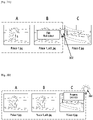
- FIG. 8 is a schematic diagram depicting another use case related to creation of a social networking service (SNS) entity, according to an embodiment of the disclosure.
- SNS social networking service
- the bulb 804 retrieves one or more information associated with the album and recommends one or more operations that can be performed by the user.
- the bulb 804 retrieves the following information.
- the bulb 804 creates a new SNS entity and displays the following operations to the user.
- the SNS entity On selecting 'plan travel', the SNS entity displays the following options to the user for planning the trip.
- the SNS entity searches phone number of the person from contacts and displays phone no. of the person to make a call.
- the call may either a voice or a video call and it is configured based on user preferences and activity history of the user.
- FIG. 9 is a diagram illustrating an example related to a gallery application, according to an embodiment of the disclosure.
- the bulb 904 retrieves one or more information associated with the album and recommends one or more operations that can be performed by the user. In the above scenario, the bulb 904 retrieves the following information.
- the bulb 904 creates a new gallery entity and displays the following operations to the user.
- the gallery entity launches appropriate application accordingly.
- FIG. 10 is a schematic diagram that exemplifies the multimedia related application, according to an embodiment of the disclosure.
- a user is watching a video on a mobile device. While watching the video, the user invokes a bulb 1002 that is present semi-transparent on a mobile screen and drags the bulb 1002 over the video.
- the omni-present bulb 1002 extracts information such as name of the player used, type of audio track chosen, and mode of the video (portrait/landscape) being watched.
- the bulb 1002 based on the above extracted information, creates a multimedia entity and suggests one or more tasks that can be performed by the user. For example, the multimedia entity recommends the user to set the player as default video playback.
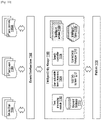
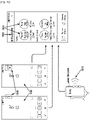
- FIG. 11 is a block diagram illustrating an architecture of a user device, according to an embodiment of the disclosure.
- the user device comprises of a software platform 1150, an Intelligent entity manager 1100, an external interface layer 1160, a plurality of device applications 1180, a plurality of third party applications 1190 and its associated services 1190A.
- the intelligent entity manager 1100 further comprises of a text processing module 1102, a user actionable items inventory 1104, a search controller 1106, plurality of intelligent entities 1108, a keyword database (DB) 1110, a graphical user interface (GUI)-sub system 1112, a connectivity manager 1114, and plurality of intelligent tasks 1116.
- DB keyword database
- GUI graphical user interface
- the text processing module 1102 is adapted for processing the text displayed on the user's screen by the application.
- the user actionable items inventory 1104 maintains a record of all the active items associated with one or more applications of the user device.
- the search controller 1106 is adapted for controlling searches performed relating to actionable items/entities stored in the user device.
- the keyword DB 1110 comprises of keywords that are used while identifying intelligent information.
- the GUI-sub system 1112 is responsible for showing various user interface elements.
- the connectivity manager 1114 manages the connections with different devices while executing the intelligent tasks.
- the intelligent tasks 1116 is adapted for managing one or more tasks to be performed by executing an appropriate device application.
- the intelligent entities 1108 is adapted for capturing one or more intelligent information associated with one or more user actionable items encompassed within a user selected region. The same is illustrated in FIG. 11 .
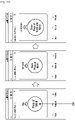
- FIGS. 12A and 12B are schematic diagrams illustrating a method of capturing information of plurality of device contents from one or more user selected regions on a mobile device screen, according to an embodiment of the disclosure.
- a user invokes a bulb 1206 that is present semi-transparent on a mobile device screen such as one shown in FIG. 2 .
- the user provides a touch gesture/tap on the bulb 1206, due to which, the bulb 1206 becomes fully visible on the screen.
- the user then long presses on the bulb 1206 and drags the bulb 1206 over plurality of device contents present in the mobile screen.
- the information capturing process terminates when the user stops providing the drag gesture 1204.
- the bulb 1206 captures one or more actionable items and visually indicates the captured one or more actionable items on the mobile screen as shown in part (A) of FIG. 12A .
- the bulb 1206 also captures information present in multiple part of a content in a long email, photo etc. The same is shown in part (B) of FIG. 12A where information is captured from multiple parts 1208 of a long email including information from a part 1210 of the email that is beyond current display window.
- the bulb may automatically select multiple regions in the long email and the user may select/ deselect one or more regions out of them. The bulb may then capture information from only the user selected regions.
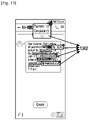
- the bulb automatically identifies information from the content displayed on the mobile screen. As shown in part (C) of FIG. 12B , the set of automatically detected actionable items 1202 are displayed next of the display elements 1212 used to capture the information. The user can then edit each item according to his choice.
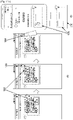
- FIG. 13 is a schematic diagram illustrating a method of detecting one or more user actionable items as shown in FIG. 2 , according to an embodiment of the disclosure.
- the bulb is configured with a predefined list of known categories defined using regular expressions or keywords.
- the one or more keywords or expressions comprises at least one of phone number, address, trade name, account number, image etc.
- the bulb searches for at least one of the above mentioned keywords and retrieves the keyword 'amount' from device content being displayed on a mobile screen. Based on the retrieved information, the bulb creates user actionable entity 'payment' 1302 as shown in FIG. 13 .
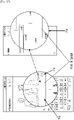
- FIGS. 14A and 14B are schematic diagrams illustrating a method of recognizing inter-relationship between one or more user actionable items, according to various embodiments of the disclosure.
- a bulb automatically captures one or more user actionable items 1402 from a currently displayed message on a mobile screen. For the above example, the bulb captures the following information
- the bulb then recognizes that detected items telephone number, amount, URL etc. are related to BSNL and detects BSNL as a central entity 1404. The same is illustrated in FIG. 14A .
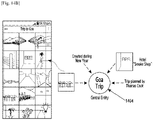
- the bulb analyzes inter-relationship among the one or more photos present in a gallery application as shown in FIG. 14B .
- the bulb when the bulb is dragged over the one or more photos present in the gallery application, the bulb automatically identifies common factor among them.
- the bulb further analyzes information on person who uploaded, place where the photos were taken, date, time, occasion etc., to find the common factor.
- the bulb identifies that the detected items - person who uploaded photos, name of the place, date mentioned in the album etc., are related to Goa trip, the bulb creates 'Goa trip' is the central entity 1404. The same is illustrated in FIG. 14B .
- FIGS. 15A and 15B are schematic diagrams illustrating a method of creating one or more user actionable entities based on detected user actionable items, according to various embodiments of the disclosure.
- one or more user actionable items such as BSNL, Rs 1245, www.bsnl.co.in etc. are retrieved.
- one or more user actionable entities 1502 are created.
- the created user actionable entities 1502 are displayed to the user along with its attributes.
- the bulb can also create more than one user actionable entities based on the retrieved information and allows a user to navigate across the created user actionable entities to choose right one.
- the one or more actionable entities created for a message of FIG. 2 is shown in parts (1), and (2) of FIG. 15A .
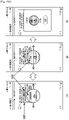
- the user is allowed to edit or manually change the information captured.
- the user is provided with an edit option to edit the created actionable entity 1502.
- the same is shown in part (3) of FIG. 15A .
- the user can also choose to change the actionable entity 1502 being created from the same captured information. For the example shown in FIG. 15A , the user is prompted to confirm the task 'payment' being created. The user may then change the 'payment' task to 'complaint' task. The same is illustrated in FIG. 15B .
- FIG. 16 is a schematic diagram illustrating different ways of launching a user interface element from a home screen of a user device, according to an embodiment of the disclosure.
- the user interface element is hereinafter referred as Intelliboard as per FIG. 16 .
- the Intelliboard 1602 is a place where all the created user actionable tasks are stored and displayed for future use.
- a user may launch the Intelliboard 1602 from the home screen 1606 of the user device by providing a touch/ tap gesture on a specific indication 1608 provided on top corner of the user device.
- user may launch the Intelliboard 1602 by double tapping on a bulb or any other image provided on the home screen 1606 of the user device.
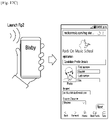
- the Intelliboard 1602 can be launched using Bixby, a virtual assistant enabled devices.
- the Bixby launches the Intelliboard 1602 based on specific voice command provided by the user such as, "Launch Intelliboard” 1610. After launching the Intelliboard, the various user actionable tasks 1604 stored inside the Intelliboard 1602 are shown on the home screen of the Intelliboard 1602. The same is illustrated in FIG. 16 .
- FIGS. 17A , 17B , 17C , and 17D are schematic diagrams illustrating different ways of operating on an intelligent entity stored in an Intelliboard using Bixby voice command, according to various embodiments of the disclosure.
- a user device is enabled with Bixby-virtual assistant system.
- the user uses Bixby voice commands to launch a saved task using one or more keywords.
- the Bixby may provide voice command as "Register Music class”.
- all the tasks that are saved in the Intelliboard 1700 are searched and the task with the keywords "register music class" is retrieved accordingly.
- FIG. 17A if the user keywords match multiple tasks, then all matching tasks 1702 are listed to the user. The user can then choose one from the list. Otherwise, the user may use additional keywords to launch the specific task. The same is illustrated in FIG. 17B .
- a task id is used to launch a task.
- each task is automatically assigned a unique identifier that will be addressable by Bixby to accomplish the task captured by the Intelliboard 1700.
- a task can be invoked by Bixby-virtual assistant system at any point in time. For example, a user uses Bixby voice command to launch the intended task by using the task id- Rg2. Accordingly, task id having rg2 is retrieved and displayed to the user. The same is illustrated in FIG. 17C .
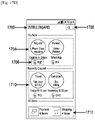
- the most user actionable tasks 1704 that is launched from the Intelliboard 1700 may appear automatically on a specific app screen.
- an app that might have executed an Intelliboard 1700 earlier may display related task(s) based on the context. For example, one or more tasks 1704 are displayed based on date, current pending tasks, currently opened apps, currently viewed images/ videos/chat messages and so on.
- the Intelliboard 1700 also comprises of tasks 1710 that are recently executed. Further, tasks 1712 that are created can be grouped into different categories and displayed on the Intelliboard 1700. The user can navigate across all categories and also perform various operations involving one or more task(s) from same or different categories.
- a task may be executed by specific Bixby command 1706 ("Execute Rg2"). Each task is automatically assigned a unique identifier that will be addressable by Bixby to accomplish the task captured by the task. Using these commands, the task may be invoked by Bixby system at any point in time. Further, user may perform various operations on tasks like search, view details, edit using a search tap 1708. The same is illustrated in FIG. 17D .
- FIG. 18 is a schematic diagram illustrating a method of recommending one or more applications to execute a task being created, according to an embodiment of the disclosure.
- an intelligent entity manager suggests one or more applications 1804 to perform the task.
- the intelligent entity manager provides an indication 1806 to select an appropriate application to invoke.
- the intelligent entity manager stores a static mapping of task against applications.
- a mapping of tasks against applications are shown in Table 1, below. Table 1 Task Application Pay PayTM, My Galaxy Travel Uber, KakaoTaxi Video VLC Player, KMPlayer
- the intelligent entity manager learns rules from past user actions to suggest preferred tasks/applications.
- FIG. 19 is a block diagram illustrating one or more modules of a user interface element involved in an application recommendation method, according to an embodiment of the disclosure.
- the one or more modules comprises of user actionable items detection module 1902, task creation module 1904, task managing module 1906, and an application recommendation module 1908.
- the user actionable items detection module 1902 is adapted for capturing one or more user actionable items in a user selected region.
- user actionable items detection module 1902 checks whether a bulb is invoked by a user on one or more user selected area. If the bulb is invoked, user actionable items detection module 1902 detects one or more actionable items present in the user selected area and sends the detected one or more actionable items to the task creation module.
- system automatically detects and displays one or more user actionable items for application data to the user. The user then selects one or more user actionable items and sends it to the task creation module 1904. In some embodiments, the detected one or more user actionable items are forwarded to the task creation module to create one or more tasks.
- the task creation module 1904 is adapted for creating one or more tasks based on information associated with one or more user actionable items. At first, the task creation module determines a central entity for the one or more user actionable items. Then, the task creation module 1904 applies one or more rules on the central entity and the associated one or more user actionable items to detect category and associated parameters. A rule created for executing a payment entity is shown below.
- the created one or more tasks are shared with task managing module 1906.
- the task managing module 1906 is adapted for managing one or more user actionable entities being created in an Intelliboard.
- the Intelliboard is launched using voice command received from Bixby or a touch gesture from a user.
- the Intelliboard displays the saved user actionable entities sorted by category, frequently used etc. From the displayed one or more user actionable entities, a particular user actionable entity is selected.
- the user actionable entity is selected by providing a touch gesture.
- one or more tasks associated with the user actionable entity is executed accordingly.
- the user device recommends one or more applications to execute the one or more tasks.
- the user device highlights the appropriate application with an indication to select the application.
- FIG. 20 is a schematic diagram illustrating a method of launching Intelliboard from Bixby sub menu, according to an embodiment of the disclosure.
- a user can launch an Intelliboard 2002 in Bixby enabled devices.
- the virtual assistant-Bixby comprises of Intelliboard sub menus. Therefore, the Intelliboard 2002 may become one of the sub menus of Bixby because of its frequent usage.
- the Intelliboard is provided with one or more categories to select a particular actionable entity for executing a particular task. As shown in FIG. 20 , on selecting any of the categories such as 'try now', 'recently created' etc., the relevant saved tasks 2004 will be displayed inside Intelliboard 2002. It is to be noted that the displayed tasks can be launched by providing voice command 2006 using Bixby.
- FIG. 21 is a schematic diagram illustrating a method of executing a task using Bixby sub menu, according to an embodiment of the disclosure.
- the user can launch a task to be executed from an application Sub Menu.
- the user may provide long press of an item of text.
- a menu 2102 with one or more options for the selected text such as copy, forward, delete, share, add as actionable entity etc., are displayed to the user.
- add as actionable entity 2104 an actionable entity 2104 is created based on the context of text selected by the user. The same is illustrated in FIG. 21 .
- FIG. 22 is a schematic diagram illustrating a series of operations performed in creating a sports entity using Bixby sub menu, according to an embodiment of the disclosure.
- a user is viewing sports news on a Bixby sub menu.
- the user may invoke a bulb 2204 and drags the bulb 2204 on a news article.
- the bulb 2204 detects keywords in a user selected region and visually indicates a user actionable item 2202 in the user selected region to the user.
- the bulb 2204 displays user actionable entity 2206 along with one or more options.
- the bulb 2204 detects keyword 'Ronaldo' and further identifies that he is a football player. Accordingly, the bulb 2204 fetches information about Ronaldo and displays one or more options relating to Ronaldo 2206.
- the bulb 2204 displays 'latest scores' and 'next matches' associated with Ronaldo 2206. If the user selects option 'latest scores', the bulb intelligently fetches information about the scores and displays the latest scores on a mobile screen. The same is illustrated in FIG. 22 .
- FIG. 23 is a schematic diagram illustrating a series of operations performed in creating a shopping entity using Bixby sub menu, according to an embodiment of the disclosure.
- a user is searching for digital cameras on a shopping site such as Amazon.
- the user may invoke a bulb 2302 and drags the bulb 2302 on one search result being displayed on a mobile screen.
- the bulb 2302 detects the displayed search result as 'Sony camera' 2304 and visually indicates the detected 'Sony camera' 2304 to the user.
- the bulb 2302 creates 'Sony camera' entity 2306.
- the bulb 2302 provides one or more options associated with the 'Sony camera'.
- the bulb 2302 displays 'payment options' and 'more info' option.
- the bulb 2302 displays credit/ debit card options for making the payment on a mobile screen.
Landscapes
- Engineering & Computer Science (AREA)
- Theoretical Computer Science (AREA)
- General Engineering & Computer Science (AREA)
- Physics & Mathematics (AREA)
- General Physics & Mathematics (AREA)
- Human Computer Interaction (AREA)
- Computer Vision & Pattern Recognition (AREA)
- Multimedia (AREA)
- Artificial Intelligence (AREA)
- Health & Medical Sciences (AREA)
- Software Systems (AREA)
- Social Psychology (AREA)
- Psychiatry (AREA)
- General Health & Medical Sciences (AREA)
- Bioinformatics & Computational Biology (AREA)
- Evolutionary Biology (AREA)
- Evolutionary Computation (AREA)
- Data Mining & Analysis (AREA)
- Computer Graphics (AREA)
- Geometry (AREA)
- Bioinformatics & Cheminformatics (AREA)
- Life Sciences & Earth Sciences (AREA)
- User Interface Of Digital Computer (AREA)
Claims (15)
- Verfahren zum Empfehlen einer oder mehrerer Aktionen für ein elektronisches Gerät, wobei das Verfahren Folgendes umfasst:Identifizieren (104) mehrerer aktionsfähigen Elemente, die in einem oder mehreren ausgewählten Bereichen auf einer Anzeige des elektronischen Geräts enthalten sind, wobei der eine oder die mehreren ausgewählten Bereiche mehrere Geräteinhalte umfassen und basierend auf der Eingabe eines Benutzers ausgewählt werden;Anzeigen (106) der mehreren aktionsfähigen Elemente, wobei der Benutzer die mehreren aktionsfähigen Elemente bearbeiten kann;Identifizieren (108) mindestens einer Funktion basierend auf einem Zusammenhang zwischen den mehreren aktionsfähigen Elementen; undAnzeigen (110) mindestens einer Anwendung, die der mindestens einen Funktion zugeordnet ist.
- Verfahren nach Anspruch 1, wobei die mehreren Inhalte mindestens eines von Texten, Zahlen, Symbolen, Bildern oder Piktogrammen umfasst, die auf der Anzeige des elektronischen Geräts angezeigt werden.
- Verfahren nach Anspruch 1, wobei die mehreren aktionsfähigen Elemente mindestens eines von einer Telefonnummer, einer Adresse, einer E-Mail, einer E-Mail-ID, einem Uniform-Resource-Locator (URL), einem Handelsnamen, einer Kontonummer oder einem Bild innerhalb der umfassten mehreren Geräteinhalten umfasst.
- Verfahren nach Anspruch 1,wobei der Benutzer einen oder mehrere ausgewählte Bereiche abwählen kann, undwobei die mehreren aktionsfähigen Elemente gemäß der Abwahl des einen oder der mehreren ausgewählten Bereiche aktualisiert werden.
- Verfahren nach Anspruch 1, wobei der Benutzer die mehreren aktionsfähigen Elemente, die aus dem einen oder den mehreren ausgewählten Bereichen identifiziert wurden, bearbeiten, aktualisieren oder löschen kann.
- Verfahren nach Anspruch 1, wobei die Benutzereingabe erfasst wird, indem eine Manipulation eines Zeichens identifiziert wird, und
wobei die Zeichen aktiviert werden, indem mindestens eines von einer Berührungsgeste, einer Ziehgeste, einer Doppeltippgeste, einem Sprachbefehl oder einer Langdruckgeste bereitgestellt wird. - Verfahren nach Anspruch 1, ferner umfassend:Bereitstellen einer oder mehrerer Empfehlungen, die der mindestens einen Anwendung zugeordnet sind, an den Benutzer zum Ausführen der Aufgabe,wobei die eine oder mehreren Empfehlungen basierend auf einer Benutzerpräferenz, einem vergangenen Aktivitätsverlauf und einer geplanten zukünftigen Aktivität des Benutzers bereitgestellt werden.
- Verfahren nach Anspruch 1, ferner umfassend:
Speichern der mindestens einen Geräteanwendung als eine oder mehrere benutzeraktionsfähige Entitäten in dem elektronischen Gerät. - Verfahren nach Anspruch 1, ferner umfassend Bereitstellen der mehreren benutzeraktionsfähigen Elementen, Anwendungsempfehlungen und benutzeraktionsfähigen Entitäten für einen Benutzer in einer anderen Sprache als einer ursprünglichen Entität, und die in einem sprachunabhängigen Format in dem elektronischen Gerät gespeichert sind.
- Verfahren nach Anspruch 8, ferner umfassend:Bereitstellen einer Benutzerschnittstelle zum Anzeigen der gespeicherten einen oder mehreren vom Benutzer benutzeraktionsfähigen Entitäten in dem elektronischen Gerät;Aktualisieren der gespeicherten einen oder mehreren benutzeraktionsfähigen Entitäten, die in der Benutzerschnittstelle angezeigt werden; undAktivieren mindestens einer der gespeicherten einen oder mehreren vom benutzeraktionsfähigen Entitäten durch Bereitstellen mindestens eines Sprachbefehls mit Schlüsselwörtern, einer ID einer gespeicherten Entität, einer Kategorie der gespeicherten Entität oder eines Auswahlmenüs.
- Verfahren nach Anspruch 1, ferner umfassend:Extrahieren gemeinsamer oder unterschiedlicher Parameter aus mindestens zwei oder mehr der aktionsfähigen Elemente, basierend auf einem oder mehreren von Metadaten, Inhalten und Eigenschaften, die den mindestens zwei oder mehr aktionsfähigen Elementen zugeordnet sind; undErzeugen einer neuen benutzeraktionsfähigen Entität basierend auf den extrahierten gemeinsamen oder differentiellen Parametern.
- Verfahren nach Anspruch 1, ferner umfassend:Vergleichen eines oder mehrerer Parameter, die mindestens zwei oder mehreren aktionsfähigen Entitäten zugeordnet sind; undErzeugen einer zusammengeführten benutzeraktionsfähigen Entität basierend auf dem Vergleich von mindestens zwei oder mehr aktionsfähigen Elementen.
- Verfahren nach Anspruch 12, ferner umfassend:Empfehlen, durch den Benutzer, von zwei oder mehr der aktionsfähigen Entitäten zum Zusammenführen,wobei Parameter in den zwei oder mehr aktionsfähigen Entitäten verglichen werden, um zu empfehlen, dass zwei oder mehr der aktionsfähigen Elemente zusammengeführt werden sollen.
- Elektronisches Gerät, umfassend:einen Speicher;eine Anzeige;eine Benutzerschnittstelle; undmindestens einen Prozessor, der betriebsfähig mit dem Speicher gekoppelt und dafür konfiguriert ist, die Benutzerschnittstelle zu steuern, um:mehrere aktionsfähige Elemente zu identifizieren (104), die in einem oder mehreren vom Benutzer ausgewählten Bereichen auf der Anzeige des elektronischen Geräts enthalten sind, wobei der eine oder die mehreren ausgewählten Bereiche mehrere Geräteinhalte umfassen und basierend auf einer Eingabe eines Benutzers ausgewählt werden,die mehreren aktionsfähigen Elemente anzuzeigen (106), wobei der Benutzer die mehreren aktionsfähigen Elemente bearbeiten kann, die in dem elektronischen Gerät angezeigt werden,mindestens eine Funktion basierend auf einem Zusammenhang zwischen den mehreren aktionsfähigen Elementen zu identifizieren (108), undmindestens eine mindestens einer Funktion zugeordnete Anwendung anzuzeigen (10).
- Elektronisches Gerät nach Anspruch 14, wobei das elektronische Gerät dazu konfiguriert ist, ein Verfahren nach einem der Ansprüche 2 bis 13 zu implementieren.
Applications Claiming Priority (2)
| Application Number | Priority Date | Filing Date | Title |
|---|---|---|---|
| IN201741032287 | 2017-09-12 | ||
| PCT/KR2018/010680 WO2019054745A1 (en) | 2017-09-12 | 2018-09-12 | METHOD FOR RECOMMENDING ONE OR MORE ACTIONS AND ASSOCIATED ELECTRONIC DEVICE |
Publications (3)
| Publication Number | Publication Date |
|---|---|
| EP3665557A1 EP3665557A1 (de) | 2020-06-17 |
| EP3665557A4 EP3665557A4 (de) | 2020-09-16 |
| EP3665557B1 true EP3665557B1 (de) | 2022-08-31 |
Family
ID=65631749
Family Applications (1)
| Application Number | Title | Priority Date | Filing Date |
|---|---|---|---|
| EP18856087.4A Not-in-force EP3665557B1 (de) | 2017-09-12 | 2018-09-12 | Verfahren zur empfehlung einer oder mehrerer aktionen und elektronische vorrichtung dafür |
Country Status (3)
| Country | Link |
|---|---|
| US (1) | US11030448B2 (de) |
| EP (1) | EP3665557B1 (de) |
| WO (1) | WO2019054745A1 (de) |
Families Citing this family (1)
| Publication number | Priority date | Publication date | Assignee | Title |
|---|---|---|---|---|
| US11410075B2 (en) * | 2018-01-15 | 2022-08-09 | Microsoft Technology Licensing, Llc | Contextually-aware recommendations for assisting users with task completion |
Family Cites Families (10)
| Publication number | Priority date | Publication date | Assignee | Title |
|---|---|---|---|---|
| US9002725B1 (en) * | 2005-04-20 | 2015-04-07 | Google Inc. | System and method for targeting information based on message content |
| US20100131836A1 (en) | 2008-11-24 | 2010-05-27 | Microsoft Corporation | User-authored notes on shared documents |
| KR102004262B1 (ko) * | 2012-05-07 | 2019-07-26 | 엘지전자 주식회사 | 미디어 시스템 및 이미지와 연관된 추천 검색어를 제공하는 방법 |
| US9916514B2 (en) * | 2012-06-11 | 2018-03-13 | Amazon Technologies, Inc. | Text recognition driven functionality |
| US8896556B2 (en) * | 2012-07-31 | 2014-11-25 | Verizon Patent And Licensing Inc. | Time-based touch interface |
| KR102045841B1 (ko) | 2012-10-09 | 2019-11-18 | 삼성전자주식회사 | 전자 장치에서 태스크 추천 아이콘을 생성하는 방법 및 장치 |
| KR102111769B1 (ko) | 2013-02-08 | 2020-06-08 | 삼성전자주식회사 | 추천 패널 제공 방법 및 이를 위한 디바이스, 추천 아이템 제공 방법 및 이를 위한 서버 |
| US9671941B1 (en) | 2013-05-09 | 2017-06-06 | Amazon Technologies, Inc. | Graphical behaviors for recognition interfaces |
| US9798944B2 (en) | 2014-02-20 | 2017-10-24 | International Business Machines Corporation | Dynamically enabling an interactive element within a non-interactive view of a screen sharing session |
| KR101746543B1 (ko) | 2015-11-23 | 2017-06-13 | 엘지전자 주식회사 | 이동 단말기 및 그 제어 방법 |
-
2018
- 2018-09-12 EP EP18856087.4A patent/EP3665557B1/de not_active Not-in-force
- 2018-09-12 US US16/129,193 patent/US11030448B2/en active Active
- 2018-09-12 WO PCT/KR2018/010680 patent/WO2019054745A1/en not_active Ceased
Also Published As
| Publication number | Publication date |
|---|---|
| WO2019054745A1 (en) | 2019-03-21 |
| EP3665557A1 (de) | 2020-06-17 |
| US11030448B2 (en) | 2021-06-08 |
| US20190080163A1 (en) | 2019-03-14 |
| EP3665557A4 (de) | 2020-09-16 |
Similar Documents
| Publication | Publication Date | Title |
|---|---|---|
| US12131370B2 (en) | System and method for receiving data at a merchant device from a user device over a wireless link | |
| US10656823B2 (en) | Method and electronic device for managing operation of applications | |
| US9361638B2 (en) | System and method for providing a single input field having multiple processing possibilities | |
| US9305108B2 (en) | Semantic selection and purpose facilitation | |
| US10114802B2 (en) | Method, device, and system for accessing third party platforms via a messaging application | |
| US20220245529A1 (en) | Distributing a user interface for accessing files | |
| US10749986B2 (en) | Platform for interaction via commands and entities | |
| US20180357728A1 (en) | Management of a media archive representing personal modular memories | |
| US20150212695A1 (en) | Suggested action feedback | |
| CN105045796A (zh) | 与模块化搜索对象框架相关联的基于意图的搜索结果 | |
| US20200014670A1 (en) | User device enabling access to payment information in response to user input | |
| CN121263767A (zh) | 信息传输方法及电子设备 | |
| US11030448B2 (en) | Method for recommending one or more actions and an electronic device thereof | |
| US20150212696A1 (en) | Selected content refinement mechanisms | |
| CN122838717A (zh) | 基于截图的服务推荐方法及相关设备 | |
| CN121326174A (zh) | 显示方法、装置及电子设备 |
Legal Events
| Date | Code | Title | Description |
|---|---|---|---|
| STAA | Information on the status of an ep patent application or granted ep patent |
Free format text: STATUS: THE INTERNATIONAL PUBLICATION HAS BEEN MADE |
|
| PUAI | Public reference made under article 153(3) epc to a published international application that has entered the european phase |
Free format text: ORIGINAL CODE: 0009012 |
|
| STAA | Information on the status of an ep patent application or granted ep patent |
Free format text: STATUS: REQUEST FOR EXAMINATION WAS MADE |
|
| 17P | Request for examination filed |
Effective date: 20200313 |
|
| AK | Designated contracting states |
Kind code of ref document: A1 Designated state(s): AL AT BE BG CH CY CZ DE DK EE ES FI FR GB GR HR HU IE IS IT LI LT LU LV MC MK MT NL NO PL PT RO RS SE SI SK SM TR |
|
| AX | Request for extension of the european patent |
Extension state: BA ME |
|
| A4 | Supplementary search report drawn up and despatched |
Effective date: 20200814 |
|
| RIC1 | Information provided on ipc code assigned before grant |
Ipc: G06K 9/62 20060101ALI20200810BHEP Ipc: G06F 3/0481 20130101ALI20200810BHEP Ipc: G06F 3/0484 20130101AFI20200810BHEP |
|
| DAV | Request for validation of the european patent (deleted) | ||
| DAX | Request for extension of the european patent (deleted) | ||
| REG | Reference to a national code |
Ref country code: DE Ref legal event code: R079 Ref document number: 602018040149 Country of ref document: DE Free format text: PREVIOUS MAIN CLASS: G06F0003048400 Ipc: G06F0003048170 |
|
| RIC1 | Information provided on ipc code assigned before grant |
Ipc: G06K 9/62 20060101ALI20220120BHEP Ipc: G06V 40/20 20220101ALI20220120BHEP Ipc: G06V 10/10 20220101ALI20220120BHEP Ipc: G06F 3/04883 20220101ALI20220120BHEP Ipc: G06F 3/0486 20130101ALI20220120BHEP Ipc: G06F 3/04842 20220101ALI20220120BHEP Ipc: G06F 3/04817 20220101AFI20220120BHEP |
|
| GRAP | Despatch of communication of intention to grant a patent |
Free format text: ORIGINAL CODE: EPIDOSNIGR1 |
|
| STAA | Information on the status of an ep patent application or granted ep patent |
Free format text: STATUS: GRANT OF PATENT IS INTENDED |
|
| INTG | Intention to grant announced |
Effective date: 20220330 |
|
| GRAS | Grant fee paid |
Free format text: ORIGINAL CODE: EPIDOSNIGR3 |
|
| GRAA | (expected) grant |
Free format text: ORIGINAL CODE: 0009210 |
|
| STAA | Information on the status of an ep patent application or granted ep patent |
Free format text: STATUS: THE PATENT HAS BEEN GRANTED |
|
| AK | Designated contracting states |
Kind code of ref document: B1 Designated state(s): AL AT BE BG CH CY CZ DE DK EE ES FI FR GB GR HR HU IE IS IT LI LT LU LV MC MK MT NL NO PL PT RO RS SE SI SK SM TR |
|
| REG | Reference to a national code |
Ref country code: CH Ref legal event code: EP Ref country code: GB Ref legal event code: FG4D |
|
| REG | Reference to a national code |
Ref country code: AT Ref legal event code: REF Ref document number: 1515777 Country of ref document: AT Kind code of ref document: T Effective date: 20220915 Ref country code: DE Ref legal event code: R096 Ref document number: 602018040149 Country of ref document: DE |
|
| REG | Reference to a national code |
Ref country code: IE Ref legal event code: FG4D |
|
| REG | Reference to a national code |
Ref country code: LT Ref legal event code: MG9D |
|
| REG | Reference to a national code |
Ref country code: NL Ref legal event code: MP Effective date: 20220831 |
|
| PG25 | Lapsed in a contracting state [announced via postgrant information from national office to epo] |
Ref country code: SE Free format text: LAPSE BECAUSE OF FAILURE TO SUBMIT A TRANSLATION OF THE DESCRIPTION OR TO PAY THE FEE WITHIN THE PRESCRIBED TIME-LIMIT Effective date: 20220831 Ref country code: RS Free format text: LAPSE BECAUSE OF FAILURE TO SUBMIT A TRANSLATION OF THE DESCRIPTION OR TO PAY THE FEE WITHIN THE PRESCRIBED TIME-LIMIT Effective date: 20220831 Ref country code: NO Free format text: LAPSE BECAUSE OF FAILURE TO SUBMIT A TRANSLATION OF THE DESCRIPTION OR TO PAY THE FEE WITHIN THE PRESCRIBED TIME-LIMIT Effective date: 20221130 Ref country code: LV Free format text: LAPSE BECAUSE OF FAILURE TO SUBMIT A TRANSLATION OF THE DESCRIPTION OR TO PAY THE FEE WITHIN THE PRESCRIBED TIME-LIMIT Effective date: 20220831 Ref country code: LT Free format text: LAPSE BECAUSE OF FAILURE TO SUBMIT A TRANSLATION OF THE DESCRIPTION OR TO PAY THE FEE WITHIN THE PRESCRIBED TIME-LIMIT Effective date: 20220831 Ref country code: FI Free format text: LAPSE BECAUSE OF FAILURE TO SUBMIT A TRANSLATION OF THE DESCRIPTION OR TO PAY THE FEE WITHIN THE PRESCRIBED TIME-LIMIT Effective date: 20220831 |
|
| REG | Reference to a national code |
Ref country code: AT Ref legal event code: MK05 Ref document number: 1515777 Country of ref document: AT Kind code of ref document: T Effective date: 20220831 |
|
| PG25 | Lapsed in a contracting state [announced via postgrant information from national office to epo] |
Ref country code: PL Free format text: LAPSE BECAUSE OF FAILURE TO SUBMIT A TRANSLATION OF THE DESCRIPTION OR TO PAY THE FEE WITHIN THE PRESCRIBED TIME-LIMIT Effective date: 20220831 Ref country code: IS Free format text: LAPSE BECAUSE OF FAILURE TO SUBMIT A TRANSLATION OF THE DESCRIPTION OR TO PAY THE FEE WITHIN THE PRESCRIBED TIME-LIMIT Effective date: 20221231 Ref country code: HR Free format text: LAPSE BECAUSE OF FAILURE TO SUBMIT A TRANSLATION OF THE DESCRIPTION OR TO PAY THE FEE WITHIN THE PRESCRIBED TIME-LIMIT Effective date: 20220831 Ref country code: GR Free format text: LAPSE BECAUSE OF FAILURE TO SUBMIT A TRANSLATION OF THE DESCRIPTION OR TO PAY THE FEE WITHIN THE PRESCRIBED TIME-LIMIT Effective date: 20221201 |
|
| PG25 | Lapsed in a contracting state [announced via postgrant information from national office to epo] |
Ref country code: SM Free format text: LAPSE BECAUSE OF FAILURE TO SUBMIT A TRANSLATION OF THE DESCRIPTION OR TO PAY THE FEE WITHIN THE PRESCRIBED TIME-LIMIT Effective date: 20220831 Ref country code: RO Free format text: LAPSE BECAUSE OF FAILURE TO SUBMIT A TRANSLATION OF THE DESCRIPTION OR TO PAY THE FEE WITHIN THE PRESCRIBED TIME-LIMIT Effective date: 20220831 Ref country code: PT Free format text: LAPSE BECAUSE OF FAILURE TO SUBMIT A TRANSLATION OF THE DESCRIPTION OR TO PAY THE FEE WITHIN THE PRESCRIBED TIME-LIMIT Effective date: 20230102 Ref country code: ES Free format text: LAPSE BECAUSE OF FAILURE TO SUBMIT A TRANSLATION OF THE DESCRIPTION OR TO PAY THE FEE WITHIN THE PRESCRIBED TIME-LIMIT Effective date: 20220831 Ref country code: DK Free format text: LAPSE BECAUSE OF FAILURE TO SUBMIT A TRANSLATION OF THE DESCRIPTION OR TO PAY THE FEE WITHIN THE PRESCRIBED TIME-LIMIT Effective date: 20220831 Ref country code: CZ Free format text: LAPSE BECAUSE OF FAILURE TO SUBMIT A TRANSLATION OF THE DESCRIPTION OR TO PAY THE FEE WITHIN THE PRESCRIBED TIME-LIMIT Effective date: 20220831 Ref country code: AT Free format text: LAPSE BECAUSE OF FAILURE TO SUBMIT A TRANSLATION OF THE DESCRIPTION OR TO PAY THE FEE WITHIN THE PRESCRIBED TIME-LIMIT Effective date: 20220831 |
|
| REG | Reference to a national code |
Ref country code: CH Ref legal event code: PL |
|
| REG | Reference to a national code |
Ref country code: BE Ref legal event code: MM Effective date: 20220930 |
|
| PG25 | Lapsed in a contracting state [announced via postgrant information from national office to epo] |
Ref country code: SK Free format text: LAPSE BECAUSE OF FAILURE TO SUBMIT A TRANSLATION OF THE DESCRIPTION OR TO PAY THE FEE WITHIN THE PRESCRIBED TIME-LIMIT Effective date: 20220831 Ref country code: MC Free format text: LAPSE BECAUSE OF FAILURE TO SUBMIT A TRANSLATION OF THE DESCRIPTION OR TO PAY THE FEE WITHIN THE PRESCRIBED TIME-LIMIT Effective date: 20220831 Ref country code: EE Free format text: LAPSE BECAUSE OF FAILURE TO SUBMIT A TRANSLATION OF THE DESCRIPTION OR TO PAY THE FEE WITHIN THE PRESCRIBED TIME-LIMIT Effective date: 20220831 |
|
| REG | Reference to a national code |
Ref country code: DE Ref legal event code: R097 Ref document number: 602018040149 Country of ref document: DE |
|
| PG25 | Lapsed in a contracting state [announced via postgrant information from national office to epo] |
Ref country code: NL Free format text: LAPSE BECAUSE OF FAILURE TO SUBMIT A TRANSLATION OF THE DESCRIPTION OR TO PAY THE FEE WITHIN THE PRESCRIBED TIME-LIMIT Effective date: 20220831 Ref country code: LU Free format text: LAPSE BECAUSE OF NON-PAYMENT OF DUE FEES Effective date: 20220912 Ref country code: AL Free format text: LAPSE BECAUSE OF FAILURE TO SUBMIT A TRANSLATION OF THE DESCRIPTION OR TO PAY THE FEE WITHIN THE PRESCRIBED TIME-LIMIT Effective date: 20220831 |
|
| PLBE | No opposition filed within time limit |
Free format text: ORIGINAL CODE: 0009261 |
|
| STAA | Information on the status of an ep patent application or granted ep patent |
Free format text: STATUS: NO OPPOSITION FILED WITHIN TIME LIMIT |
|
| PG25 | Lapsed in a contracting state [announced via postgrant information from national office to epo] |
Ref country code: LI Free format text: LAPSE BECAUSE OF NON-PAYMENT OF DUE FEES Effective date: 20220930 Ref country code: IE Free format text: LAPSE BECAUSE OF NON-PAYMENT OF DUE FEES Effective date: 20220912 Ref country code: FR Free format text: LAPSE BECAUSE OF NON-PAYMENT OF DUE FEES Effective date: 20221031 Ref country code: CH Free format text: LAPSE BECAUSE OF NON-PAYMENT OF DUE FEES Effective date: 20220930 |
|
| 26N | No opposition filed |
Effective date: 20230601 |
|
| PG25 | Lapsed in a contracting state [announced via postgrant information from national office to epo] |
Ref country code: SI Free format text: LAPSE BECAUSE OF FAILURE TO SUBMIT A TRANSLATION OF THE DESCRIPTION OR TO PAY THE FEE WITHIN THE PRESCRIBED TIME-LIMIT Effective date: 20220831 |
|
| PG25 | Lapsed in a contracting state [announced via postgrant information from national office to epo] |
Ref country code: BE Free format text: LAPSE BECAUSE OF NON-PAYMENT OF DUE FEES Effective date: 20220930 |
|
| PGFP | Annual fee paid to national office [announced via postgrant information from national office to epo] |
Ref country code: GB Payment date: 20230821 Year of fee payment: 6 |
|
| PG25 | Lapsed in a contracting state [announced via postgrant information from national office to epo] |
Ref country code: CY Free format text: LAPSE BECAUSE OF FAILURE TO SUBMIT A TRANSLATION OF THE DESCRIPTION OR TO PAY THE FEE WITHIN THE PRESCRIBED TIME-LIMIT Effective date: 20220831 |
|
| PG25 | Lapsed in a contracting state [announced via postgrant information from national office to epo] |
Ref country code: MK Free format text: LAPSE BECAUSE OF FAILURE TO SUBMIT A TRANSLATION OF THE DESCRIPTION OR TO PAY THE FEE WITHIN THE PRESCRIBED TIME-LIMIT Effective date: 20220831 Ref country code: IT Free format text: LAPSE BECAUSE OF FAILURE TO SUBMIT A TRANSLATION OF THE DESCRIPTION OR TO PAY THE FEE WITHIN THE PRESCRIBED TIME-LIMIT Effective date: 20220831 Ref country code: HU Free format text: LAPSE BECAUSE OF FAILURE TO SUBMIT A TRANSLATION OF THE DESCRIPTION OR TO PAY THE FEE WITHIN THE PRESCRIBED TIME-LIMIT; INVALID AB INITIO Effective date: 20180912 |
|
| PG25 | Lapsed in a contracting state [announced via postgrant information from national office to epo] |
Ref country code: BG Free format text: LAPSE BECAUSE OF FAILURE TO SUBMIT A TRANSLATION OF THE DESCRIPTION OR TO PAY THE FEE WITHIN THE PRESCRIBED TIME-LIMIT Effective date: 20220831 |
|
| PG25 | Lapsed in a contracting state [announced via postgrant information from national office to epo] |
Ref country code: MT Free format text: LAPSE BECAUSE OF FAILURE TO SUBMIT A TRANSLATION OF THE DESCRIPTION OR TO PAY THE FEE WITHIN THE PRESCRIBED TIME-LIMIT Effective date: 20220831 |
|
| PGFP | Annual fee paid to national office [announced via postgrant information from national office to epo] |
Ref country code: DE Payment date: 20240822 Year of fee payment: 7 |
|
| GBPC | Gb: european patent ceased through non-payment of renewal fee |
Effective date: 20240912 |
|
| PG25 | Lapsed in a contracting state [announced via postgrant information from national office to epo] |
Ref country code: GB Free format text: LAPSE BECAUSE OF NON-PAYMENT OF DUE FEES Effective date: 20240912 |
|
| PG25 | Lapsed in a contracting state [announced via postgrant information from national office to epo] |
Ref country code: TR Free format text: LAPSE BECAUSE OF FAILURE TO SUBMIT A TRANSLATION OF THE DESCRIPTION OR TO PAY THE FEE WITHIN THE PRESCRIBED TIME-LIMIT Effective date: 20220831 |
|
| REG | Reference to a national code |
Ref country code: DE Ref legal event code: R119 Ref document number: 602018040149 Country of ref document: DE |
|
| PG25 | Lapsed in a contracting state [announced via postgrant information from national office to epo] |
Ref country code: DE Free format text: LAPSE BECAUSE OF NON-PAYMENT OF DUE FEES Effective date: 20260401 |