EP3633472A1 - Hmi development assistance device, hmi development assistance method and hmi development assistance program - Google Patents
Hmi development assistance device, hmi development assistance method and hmi development assistance program Download PDFInfo
- Publication number
- EP3633472A1 EP3633472A1 EP18809548.3A EP18809548A EP3633472A1 EP 3633472 A1 EP3633472 A1 EP 3633472A1 EP 18809548 A EP18809548 A EP 18809548A EP 3633472 A1 EP3633472 A1 EP 3633472A1
- Authority
- EP
- European Patent Office
- Prior art keywords
- hmi
- project
- comparison
- editing
- edited
- Prior art date
- Legal status (The legal status is an assumption and is not a legal conclusion. Google has not performed a legal analysis and makes no representation as to the accuracy of the status listed.)
- Granted
Links
Images


Classifications
-
- G—PHYSICS
- G05—CONTROLLING; REGULATING
- G05B—CONTROL OR REGULATING SYSTEMS IN GENERAL; FUNCTIONAL ELEMENTS OF SUCH SYSTEMS; MONITORING OR TESTING ARRANGEMENTS FOR SUCH SYSTEMS OR ELEMENTS
- G05B19/00—Program-control systems
- G05B19/02—Program-control systems electric
- G05B19/04—Program control other than numerical control, i.e. in sequence controllers or logic controllers
- G05B19/042—Program control other than numerical control, i.e. in sequence controllers or logic controllers using digital processors
- G05B19/0426—Programming the control sequence
-
- G—PHYSICS
- G06—COMPUTING OR CALCULATING; COUNTING
- G06F—ELECTRIC DIGITAL DATA PROCESSING
- G06F3/00—Input arrangements for transferring data to be processed into a form capable of being handled by the computer; Output arrangements for transferring data from processing unit to output unit, e.g. interface arrangements
- G06F3/01—Input arrangements or combined input and output arrangements for interaction between user and computer
- G06F3/048—Interaction techniques based on graphical user interfaces [GUI]
- G06F3/0481—Interaction techniques based on graphical user interfaces [GUI] based on specific properties of the displayed interaction object or a metaphor-based environment, e.g. interaction with desktop elements like windows or icons, or assisted by a cursor's changing behaviour or appearance
-
- G—PHYSICS
- G05—CONTROLLING; REGULATING
- G05B—CONTROL OR REGULATING SYSTEMS IN GENERAL; FUNCTIONAL ELEMENTS OF SUCH SYSTEMS; MONITORING OR TESTING ARRANGEMENTS FOR SUCH SYSTEMS OR ELEMENTS
- G05B19/00—Program-control systems
- G05B19/02—Program-control systems electric
- G05B19/418—Total factory control, i.e. centrally controlling a plurality of machines, e.g. direct or distributed numerical control [DNC], flexible manufacturing systems [FMS], integrated manufacturing systems [IMS] or computer integrated manufacturing [CIM]
-
- G—PHYSICS
- G05—CONTROLLING; REGULATING
- G05B—CONTROL OR REGULATING SYSTEMS IN GENERAL; FUNCTIONAL ELEMENTS OF SUCH SYSTEMS; MONITORING OR TESTING ARRANGEMENTS FOR SUCH SYSTEMS OR ELEMENTS
- G05B19/00—Program-control systems
- G05B19/02—Program-control systems electric
- G05B19/418—Total factory control, i.e. centrally controlling a plurality of machines, e.g. direct or distributed numerical control [DNC], flexible manufacturing systems [FMS], integrated manufacturing systems [IMS] or computer integrated manufacturing [CIM]
- G05B19/4183—Total factory control, i.e. centrally controlling a plurality of machines, e.g. direct or distributed numerical control [DNC], flexible manufacturing systems [FMS], integrated manufacturing systems [IMS] or computer integrated manufacturing [CIM] characterised by data acquisition, e.g. workpiece identification
-
- G—PHYSICS
- G06—COMPUTING OR CALCULATING; COUNTING
- G06F—ELECTRIC DIGITAL DATA PROCESSING
- G06F3/00—Input arrangements for transferring data to be processed into a form capable of being handled by the computer; Output arrangements for transferring data from processing unit to output unit, e.g. interface arrangements
- G06F3/01—Input arrangements or combined input and output arrangements for interaction between user and computer
- G06F3/048—Interaction techniques based on graphical user interfaces [GUI]
- G06F3/0484—Interaction techniques based on graphical user interfaces [GUI] for the control of specific functions or operations, e.g. selecting or manipulating an object, an image or a displayed text element, setting a parameter value or selecting a range
-
- G—PHYSICS
- G06—COMPUTING OR CALCULATING; COUNTING
- G06F—ELECTRIC DIGITAL DATA PROCESSING
- G06F8/00—Arrangements for software engineering
- G06F8/30—Creation or generation of source code
- G06F8/34—Graphical or visual programming
-
- G—PHYSICS
- G06—COMPUTING OR CALCULATING; COUNTING
- G06F—ELECTRIC DIGITAL DATA PROCESSING
- G06F8/00—Arrangements for software engineering
- G06F8/30—Creation or generation of source code
- G06F8/38—Creation or generation of source code for implementing user interfaces
-
- G—PHYSICS
- G06—COMPUTING OR CALCULATING; COUNTING
- G06F—ELECTRIC DIGITAL DATA PROCESSING
- G06F8/00—Arrangements for software engineering
- G06F8/70—Software maintenance or management
- G06F8/71—Version control; Configuration management
-
- G—PHYSICS
- G05—CONTROLLING; REGULATING
- G05B—CONTROL OR REGULATING SYSTEMS IN GENERAL; FUNCTIONAL ELEMENTS OF SUCH SYSTEMS; MONITORING OR TESTING ARRANGEMENTS FOR SUCH SYSTEMS OR ELEMENTS
- G05B2219/00—Program-control systems
- G05B2219/20—Pc systems
- G05B2219/23—Pc programming
- G05B2219/23258—GUI graphical user interface, icon, function bloc editor, labview
Definitions
- the present invention relates to a HMI (human machine interface) development support technology for supporting HMI development of control equipment.
- HMI human machine interface
- industrial control equipment such as a PLC (programmable logic controller) or the like is equipped with an indicator capable of operation input, that is, a HMI.
- An operator can know states of the control equipment and a FA (factory automation) system including the control equipment by viewing a screen of the HMI.
- the operator can perform various settings such as a parameter setting and the like on each equipment of the FA system including the control equipment by performing an operation input on the screen of the HMI.
- a HMI development support device as shown in patent literature 1 is variously designed.
- Patent literature 1 Japanese Laid-Open No. 2009-157580
- a conventional HMI development support device basically, only one HMI project is displayed and edited, and comparison with other HMI projects is not easy.
- the HMI projects can only be displayed on the screen respectively even in a multi-window configuration, and detailed comparison in items of the HMI projects is not easy.
- an objective of the present invention is to provide a HMI development support technology with which it is possible to easily compare a plurality of HMI projects.
- the HMI development support device of the present invention includes a HMI editing unit and a display unit.
- the HMI editing unit performs editing of a HMI project which is configured by a plurality of objects.
- the HMI editing unit has a comparison processing unit which forms a comparison screen for highlighting differences between a reference HMI project and the HMI project being edited and displays the comparison screen on the display unit.
- the comparison processing unit forms the comparison screen for highlighting objects of the reference HMI project and objects of the HMI project being edited in which attribute values are different from each other and variables are common.
- the comparison processing unit forms, in the objects of the reference HMI project and the objects of the HMI project being edited in which attribute values are different, the comparison screen for highlighting the different attribute values.
- the comparison processing unit has a merge processing unit which reflects the attribute values of the objects of the reference HMI project on the attribute values of the objects of the HMI project being edited.
- the attribute values of the objects of the reference HMI project is easily reflected on the objects of the HMI project being edited.
- the merge processing unit reflects selected attribute values when a plurality of attribute values is different.
- merge can be selectively made for each attribute value.
- the HMI development support device includes a temporary storage unit which temporarily stores the HMI project being edited.
- the merge processing unit On receiving cancel of processing for reflecting the attribute values, the merge processing unit returns to the HMI project being edited that is read out from the temporary storage unit.
- the attribute values of the objects before the merge are securely restored even if the merge is cancelled.
- a plurality of HMI projects can be easily compared.
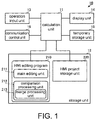
- FIG. 1 is a functional block diagram of the HMI development support device of the embodiment of the present invention.
- a HMI development support device 10 includes a calculation unit 11, a storage unit 12, an operation input unit 13, a display unit 14, a temporary storage unit 15, and a communication control unit 16. Specifically, the HMI development support device 10 is implemented by a personal computer and the like.
- the calculation unit 11 is a so-called CPU or the like and executes programs that are read out.
- a HMI editing program 210 is stored in the storage unit 12. The calculation unit 11 reads out and executes the HMI editing program 210, and thereby implements editing of a HMI project.
- the HMI editing program 210 has a main editing unit 211 and a comparison processing unit 212.
- the main editing unit 211 is a part executing main processing of the editing of the HMI project.
- the comparison processing unit 212 is a part executing comparison processing of the HMI project.
- the comparison processing refers to the processing for comparing the HMI project being edited and a reference HMI project.
- the comparison processing unit 212 has a merge processing unit 213.
- the merge processing unit 213 is a part executing merge processing of the HMI project.
- the merge processing refers to the processing for reflecting attribute values and the like of the reference HMI project on the HMI project being edited. Besides, specific contents of the comparison processing and the merge processing are described later.
- comparison processing unit 212 may be described as a program independent from the main editing unit 211 and be executed by a call from the main editing unit 211, or may be described as a part of the main editing unit 211.
- merge processing unit 213 may be described as a part of the comparison processing unit 212, or may be described as a program independent from the comparison processing unit 212 and be executed by a call from the comparison processing unit 212.
- a HMI project storage unit 220 is assigned to the storage unit 12.
- a HMI project edited in the past is stored with a history thereof in the HMI project storage unit 220.
- the operation input unit 13 is, for example, a mouse or a keyboard, and receives operation input to a HMI editing screen and outputs the operation input to the calculation unit 11.
- the display unit 14 is, for example, a liquid crystal display or the like, and displays a HMI editing screen that corresponds to the processing of the HMI editing program 210 executed by the calculation unit 11.
- the temporary storage unit 15 is a volatile memory or the like and temporarily stores the HMI project being edited. Besides, the temporary storage unit 15 may also temporarily store a reference object.
- the communication control unit 16 executes communication between the calculation unit 11 and an external device.
- the communication control unit 16 executes communication between the calculation unit 11 and an external control equipment or server.
- the above-described HMI project storage unit 220 can also be omitted when the latest version of the HMI project installed on the control equipment is set as a reference online.
- the above-described communication control unit 16 can also be omitted when the comparison processing is performed offline.
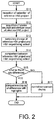
- FIG. 2 is a flowchart of the comparison processing in the HMI development support method of the present invention.
- the HMI development support device 10 receives selection of the reference HMI project (S11).
- FIG. 3 is a flowchart of selection processing of the reference HMI project.
- the HMI development support device 10 is in an online state (S101: YES) and receives comparison with the latest version of HMI project (S102: YES), the latest version of HMI project is acquired from the server (S103).
- the HMI development support device 10 sets the latest version of HMI project as the reference HMI project (S104).
- the HMI development support device 10 When the HMI development support device 10 is offline (S101: NO) or receives comparison of an offline inquiry even in the online state (S102: NO), search of a reference candidate HMI project is performed on the HMI project storage unit 220 (S112). At this time, the HMI development support device 10 refers to variables of the objects included in the HMI project being edited, and extracts the HMI projects having the same variable as reference candidates. The HMI development support device 10 displays a list of the reference candidates (S113). The HMI development support device 10 receives selection of the reference HMI project from the list of the reference candidates according to specification of the operation input unit 13 and the like (S114).
- the HMI development support device 10 acquires a screen structure and attribute values of the reference HMI project (S12).
- the HMI development support device 10 temporarily stores the screen structure and the attribute values of the reference HMI project and a screen structure and attribute values of the HMI project being edited (S13).
- the HMI development support device 10 compares the attribute values of the reference HMI project with the attribute values of the HMI project being edited (S14).
- the HMI development support device 10 displays a comparison screen on which the differences are highlighted (S16). Specifically, the HMI development support device 10 highlights the attribute values and the objects corresponding to the differences on the comparison screen.
- the HMI development support device 10 displays a normal comparison screen (S17). Specifically, the HMI development support device 10 display a comparison screen without highlights.
- FIG. 4 and FIG. 5 are diagrams showing one example of the comparison screen when there are differences. Difference aspects are different in FIG. 4 and FIG. 5 .
- a comparison screen 140 has an editing target display area 41 and a reference display area 42.
- the editing target display area 41 and reference display area 42 are displayed in parallel on the comparison screen 140.
- the editing target display area 41 has an editing target object arrangement 411 and an editing target attribute value list 412.
- the editing target object arrangement 411 and the editing target attribute value list 412 are displayed in parallel.
- the reference display area 42 has a reference object arrangement 421 and a reference attribute value list 422.
- the reference object arrangement 421 and the reference attribute value list 422 are displayed in parallel.
- the editing target attribute value list 412 and the reference attribute value list 422 are displayed adj acently.
- the editing target attribute value list 412 and the reference attribute value list 422 are displayed so that individual attribute values are adjacent. In this way, comparison between individual attribute values of the HMI project being edited and individual attribute values of the reference HMI project is easy.
- the editing target object arrangement 411 and the reference object arrangement 421 are displayed to clamp the editing target attribute value list 412 and the reference attribute value list 422. In this way, comparison between object arrangements of the HMI project being edited and object arrangements of the reference HMI project is easy.
- the differences between objects of the HMI project being edited and objects of the reference HMI project are highlighted on the comparison screen 140.
- tags are displayed on the differences.
- the type of the tags that is, the type of the differences is displayed on a tag reference area 44 of the comparison screen 140.
- “Dif' means that an object in which variables are the same exists in both the HMI project being edited and the reference HMI project but the attribute values are different.
- “Lso” means that the object does not exist in the HMI project being edited but exists in the reference HMI project.
- “Rso” means that the object does not exist in the reference HMI project but exists in the HMI project being edited.
- “Cpy” means that the attribute value or the object itself is copied by the merge processing described later from the reference HMI project to the HMI project being edited.
- a "Button 1" object is different in the HMI project being edited and the reference HMI project in background color and arrangement position.
- a tag of "Dif" is displayed on the "Button 1" object.
- a "Button 4" object does not exist in the HMI project being edited but exists in the reference HMI project.
- a tag of "Lso” is displayed on the "Button 4" object. In this way, the programmer can easily and more reliably recognize that the "Button 4" object exists in the reference HMI project but does not exist in the HMI project being edited.
- the differences are highlighted for each attribute value in the editing target attribute value list 412 and the reference attribute value list 422.
- BCU background color
- App Appearance
- POS arrangement position
- Lay Lay
- Prp property
- Eve vent action
- Anm animation
- Prp, Eve, and Anm are selected by an attribute value item switching tag 43 of the comparison screen 140, and thereby the display can be switched.
- the programmer can easily and more reliably recognize the differences between the HMI project being edited and the reference HMI project. Furthermore, the programmer can easily and more reliably recognize the differences for each attribute value.
- FIG. 5 shows a state in which the arrangement and attribute values of a "Button 3" object are further different with respect to the state of FIG. 4 .
- the same tag is displayed on the objects in which variables are the same. For example, a tag of "Dif 1" is displayed on the "Button 1" object, and a tag of "Dif 2" is displayed on the "Button 3" object.
- a tag of "Dif 1" is displayed on the "Button 1" object
- a tag of "Dif 2" is displayed on the "Button 3" object.
- FIG. 6 is a flowchart of the merge processing in the HMI development support method of the present invention.
- the HMI development support device 10 receives selection of a merge target of the HMI project being edited (S21).
- the merge target may be selected in object unit or in attribute value unit.
- the HMI development support device 10 receives merge processing of the selected object and the selected attribute values (S22).
- the HMI development support device 10 performs merge in object unit. That is, the HMI development support device 10 replaces all attribute values which are differences in the selected object with the attribute values of the objects having the same variables in the reference HMI project. In this way, even when a plurality of attribute values in the object is different, all the different attribute values can be equalized by one operation.
- the HMI development support device 10 performs merge with the selected attribute values only. That is, the HMI development support device 10 replaces only the selected attribute values that are differences with the attribute values of the objects having the same variables in the reference HMI project. In this way, when a plurality of attribute values in the object is different, it is possible to equalize only the necessary attribute values.
- the HMI development support device 10 updates a display of the comparison screen 140 corresponding to a merge result (S26). Accordingly, the programmer can immediately recognize the merge result.
- the HMI development support device 10 cancels the merge and redisplays the HMI project being edited before the merge processing which is stored in the temporary storage unit 15 (S28). Besides, if the cancel processing of merge is not performed (S27: NO), the HMI development support device 10 does not perform the cancel processing.
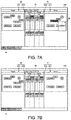
- FIG. 7A is a diagram showing a comparison screen during operation of the merge processing in object unit
- FIG. 7B is a diagram showing a comparison screen after the merge processing.
- the HMI development support device 10 displays a processing selection window 45 near the object.
- the HMI development support device 10 reads out the attribute values of the "Button 1" object of the reference HMI project.
- the HMI development support device 10 overwrites the attribute values of the "Button 1" object of the HMI project being edited with the attribute values of the "Button 1" object of the reference HMI project that are read out.
- the HMI development support device 10 updates the editing target display area 41 (the editing target object arrangement 411 and the editing target attribute value list 412) corresponding to the overwritten "Button 1" object of the HMI project being edited and the attribute values thereof. That is, in the editing target object arrangement 411, a tag of "Cpy" is displayed on the "Button 1" object. At this time, when the position of the object is moved, the HMI development support device 10 also moves the display position of the object as shown in FIG. 7B .
- the updated attribute values are subjected to a highlight display that shows the update.
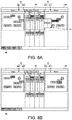
- FIG. 8A is a diagram showing a comparison screen during operation of the merge processing in attribute value unit
- FIG. 8B is a diagram showing a comparison screen after the merge processing.
- the HMI development support device 10 displays the processing selection window 45 near a column of the item "BCU".
- the HMI development support device 10 reads out the attribute values of the item "BCU” of the "Button 1" object of the reference HMI project.
- the HMI development support device 10 overwrites the attribute values of the item "BCU” of the "Button 1" object of the HMI project being edited with the attribute values of the item "BCU” of the "Button 1" object of the reference HMI project that are read out.
- the HMI development support device 10 updates the editing target display area 41 (the editing target object arrangement 411 and the editing target attribute value list 412) corresponding to the overwritten attribute values of the item "BCU" of the "Button 1" object of the HMI project being edited and the attribute values thereof. That is, the overwritten attribute values and the attribute values that are not overwritten exist in the editing target object arrangement 411, and thus the tags of "Cpy" and "Dif" are displayed on the "Button 1" object. At this time, when the position of an object is moved, the HMI development support device 10 also moves the display position of the object.
- the updated attribute values are subjected to a highlight display that shows the update.
- the programmer can easily perform merge for the HMI project being edited in object unit or in attribute value unit. Furthermore, the programmer can immediately recognize the merge result.
Landscapes
- Engineering & Computer Science (AREA)
- General Engineering & Computer Science (AREA)
- Theoretical Computer Science (AREA)
- Physics & Mathematics (AREA)
- General Physics & Mathematics (AREA)
- Software Systems (AREA)
- Human Computer Interaction (AREA)
- Automation & Control Theory (AREA)
- Quality & Reliability (AREA)
- Manufacturing & Machinery (AREA)
- Computer Security & Cryptography (AREA)
- User Interface Of Digital Computer (AREA)
- Programmable Controllers (AREA)
- Management, Administration, Business Operations System, And Electronic Commerce (AREA)
Abstract
Description
- The present invention relates to a HMI (human machine interface) development support technology for supporting HMI development of control equipment.
- Currently, industrial control equipment such as a PLC (programmable logic controller) or the like is equipped with an indicator capable of operation input, that is, a HMI. An operator can know states of the control equipment and a FA (factory automation) system including the control equipment by viewing a screen of the HMI. In addition, the operator can perform various settings such as a parameter setting and the like on each equipment of the FA system including the control equipment by performing an operation input on the screen of the HMI.
- Then, in order to create the screen and function of the HMI, for example, a HMI development support device as shown in
patent literature 1 is variously designed. - Patent literature 1: Japanese Laid-Open No.
2009-157580 - However, in a conventional HMI development support device, basically, only one HMI project is displayed and edited, and comparison with other HMI projects is not easy. In addition, in the conventional HMI development support device, the HMI projects can only be displayed on the screen respectively even in a multi-window configuration, and detailed comparison in items of the HMI projects is not easy.
- Accordingly, an objective of the present invention is to provide a HMI development support technology with which it is possible to easily compare a plurality of HMI projects.
- The HMI development support device of the present invention includes a HMI editing unit and a display unit. The HMI editing unit performs editing of a HMI project which is configured by a plurality of objects. The HMI editing unit has a comparison processing unit which forms a comparison screen for highlighting differences between a reference HMI project and the HMI project being edited and displays the comparison screen on the display unit.
- In the configuration, the differences between the reference HMI project and the HMI project being edited are easily recognized visually.
- In addition, in the HMI development support device, the comparison processing unit forms the comparison screen for highlighting objects of the reference HMI project and objects of the HMI project being edited in which attribute values are different from each other and variables are common.
- In the configuration, the differences are easily recognized visually for each displayed object.
- In addition, in the HMI development support device, the comparison processing unit forms, in the objects of the reference HMI project and the objects of the HMI project being edited in which attribute values are different, the comparison screen for highlighting the different attribute values.
- In the configuration, the differences are easily recognized visually for each attribute value.
- In addition, in the HMI development support device, the comparison processing unit has a merge processing unit which reflects the attribute values of the objects of the reference HMI project on the attribute values of the objects of the HMI project being edited.
- In the configuration, the attribute values of the objects of the reference HMI project is easily reflected on the objects of the HMI project being edited.
- In addition, in the HMI development support device, the merge processing unit reflects selected attribute values when a plurality of attribute values is different.
- In the configuration, merge can be selectively made for each attribute value.
- In addition, the HMI development support device includes a temporary storage unit which temporarily stores the HMI project being edited. On receiving cancel of processing for reflecting the attribute values, the merge processing unit returns to the HMI project being edited that is read out from the temporary storage unit.
- In the configuration, the attribute values of the objects before the merge are securely restored even if the merge is cancelled.
- According to the present invention, a plurality of HMI projects can be easily compared.
-
-
FIG. 1 is a functional block diagram of a HMI development support device of an embodiment of the present invention. -
FIG. 2 is a flowchart of comparison processing in a HMI development support method of the present invention. -
FIG. 3 is a flowchart of selection processing of a reference HMI project. -
FIG. 4 is a diagram showing one example of a comparison screen when there are differences. -
FIG. 5 is a diagram showing one example of the comparison screen when there are differences. -
FIG. 6 is a flowchart of merge processing in the HMI development support method of the present invention. -
FIG. 7A is a diagram showing a comparison screen during operation of the merge processing in object unit, andFIG. 7B is a diagram showing a comparison screen after the merge processing. -
FIG. 8A is a diagram showing a comparison screen during operation of the merge processing in attribute value unit, andFIG. 8B is a diagram showing a comparison screen after the merge processing. - A HMI development support technology of an embodiment of the present invention is described with reference to the drawings.
FIG. 1 is a functional block diagram of the HMI development support device of the embodiment of the present invention. - As shown in
FIG. 1 , a HMIdevelopment support device 10 includes acalculation unit 11, astorage unit 12, anoperation input unit 13, adisplay unit 14, atemporary storage unit 15, and acommunication control unit 16. Specifically, the HMIdevelopment support device 10 is implemented by a personal computer and the like. - The
calculation unit 11 is a so-called CPU or the like and executes programs that are read out. AHMI editing program 210 is stored in thestorage unit 12. Thecalculation unit 11 reads out and executes theHMI editing program 210, and thereby implements editing of a HMI project. - The HMI
editing program 210 has amain editing unit 211 and acomparison processing unit 212. Themain editing unit 211 is a part executing main processing of the editing of the HMI project. - The
comparison processing unit 212 is a part executing comparison processing of the HMI project. The comparison processing refers to the processing for comparing the HMI project being edited and a reference HMI project. Thecomparison processing unit 212 has amerge processing unit 213. - The
merge processing unit 213 is a part executing merge processing of the HMI project. The merge processing refers to the processing for reflecting attribute values and the like of the reference HMI project on the HMI project being edited. Besides, specific contents of the comparison processing and the merge processing are described later. - Besides, the
comparison processing unit 212 may be described as a program independent from themain editing unit 211 and be executed by a call from themain editing unit 211, or may be described as a part of themain editing unit 211. Similarly, themerge processing unit 213 may be described as a part of thecomparison processing unit 212, or may be described as a program independent from thecomparison processing unit 212 and be executed by a call from thecomparison processing unit 212. - A HMI
project storage unit 220 is assigned to thestorage unit 12. A HMI project edited in the past is stored with a history thereof in the HMIproject storage unit 220. - The
operation input unit 13 is, for example, a mouse or a keyboard, and receives operation input to a HMI editing screen and outputs the operation input to thecalculation unit 11. - The
display unit 14 is, for example, a liquid crystal display or the like, and displays a HMI editing screen that corresponds to the processing of theHMI editing program 210 executed by thecalculation unit 11. - The
temporary storage unit 15 is a volatile memory or the like and temporarily stores the HMI project being edited. Besides, thetemporary storage unit 15 may also temporarily store a reference object. - The
communication control unit 16 executes communication between thecalculation unit 11 and an external device. For example, thecommunication control unit 16 executes communication between thecalculation unit 11 and an external control equipment or server. - Besides, the above-described HMI
project storage unit 220 can also be omitted when the latest version of the HMI project installed on the control equipment is set as a reference online. - In addition, the above-described
communication control unit 16 can also be omitted when the comparison processing is performed offline. - The HMI
development support device 10 having this configuration executes the comparison processing and the merge processing of the HMI project as shown below.FIG. 2 is a flowchart of the comparison processing in the HMI development support method of the present invention. - The HMI
development support device 10 receives selection of the reference HMI project (S11).FIG. 3 is a flowchart of selection processing of the reference HMI project. When the HMIdevelopment support device 10 is in an online state (S101: YES) and receives comparison with the latest version of HMI project (S102: YES), the latest version of HMI project is acquired from the server (S103). The HMIdevelopment support device 10 sets the latest version of HMI project as the reference HMI project (S104). - When the HMI
development support device 10 is offline (S101: NO) or receives comparison of an offline inquiry even in the online state (S102: NO), search of a reference candidate HMI project is performed on the HMI project storage unit 220 (S112). At this time, the HMIdevelopment support device 10 refers to variables of the objects included in the HMI project being edited, and extracts the HMI projects having the same variable as reference candidates. The HMIdevelopment support device 10 displays a list of the reference candidates (S113). The HMIdevelopment support device 10 receives selection of the reference HMI project from the list of the reference candidates according to specification of theoperation input unit 13 and the like (S114). - The HMI
development support device 10 acquires a screen structure and attribute values of the reference HMI project (S12). The HMIdevelopment support device 10 temporarily stores the screen structure and the attribute values of the reference HMI project and a screen structure and attribute values of the HMI project being edited (S13). - The HMI
development support device 10 compares the attribute values of the reference HMI project with the attribute values of the HMI project being edited (S14). - If there are differences between the attribute values of the reference HMI project and the attribute values of the HMI project being edited (S15: YES), the HMI
development support device 10 displays a comparison screen on which the differences are highlighted (S16). Specifically, the HMIdevelopment support device 10 highlights the attribute values and the objects corresponding to the differences on the comparison screen. - On the other hand, if there are no differences (S15: NO), the HMI
development support device 10 displays a normal comparison screen (S17). Specifically, the HMIdevelopment support device 10 display a comparison screen without highlights. -
FIG. 4 andFIG. 5 are diagrams showing one example of the comparison screen when there are differences. Difference aspects are different inFIG. 4 andFIG. 5 . - As shown in
FIG. 4 , acomparison screen 140 has an editingtarget display area 41 and areference display area 42. The editingtarget display area 41 andreference display area 42 are displayed in parallel on thecomparison screen 140. The editingtarget display area 41 has an editingtarget object arrangement 411 and an editing targetattribute value list 412. The editingtarget object arrangement 411 and the editing targetattribute value list 412 are displayed in parallel. Thereference display area 42 has areference object arrangement 421 and a referenceattribute value list 422. Thereference object arrangement 421 and the referenceattribute value list 422 are displayed in parallel. - The editing target
attribute value list 412 and the referenceattribute value list 422 are displayed adj acently. The editing targetattribute value list 412 and the referenceattribute value list 422 are displayed so that individual attribute values are adjacent. In this way, comparison between individual attribute values of the HMI project being edited and individual attribute values of the reference HMI project is easy. - The editing
target object arrangement 411 and thereference object arrangement 421 are displayed to clamp the editing targetattribute value list 412 and the referenceattribute value list 422. In this way, comparison between object arrangements of the HMI project being edited and object arrangements of the reference HMI project is easy. - Furthermore, as shown in
FIG. 4 , the differences between objects of the HMI project being edited and objects of the reference HMI project are highlighted on thecomparison screen 140. Specifically, as shown inFIG. 4 , in the editingtarget object arrangement 411 and thereference object arrangement 421, tags are displayed on the differences. - The type of the tags, that is, the type of the differences is displayed on a
tag reference area 44 of thecomparison screen 140. Specifically, "Dif' means that an object in which variables are the same exists in both the HMI project being edited and the reference HMI project but the attribute values are different. "Lso" means that the object does not exist in the HMI project being edited but exists in the reference HMI project. "Rso" means that the object does not exist in the reference HMI project but exists in the HMI project being edited. "Cpy" means that the attribute value or the object itself is copied by the merge processing described later from the reference HMI project to the HMI project being edited. - For example, in the example of
FIG. 4 , a "Button 1" object is different in the HMI project being edited and the reference HMI project in background color and arrangement position. In this case, in each of the editingtarget object arrangement 411 and thereference object arrangement 421, a tag of "Dif" is displayed on the "Button 1" object. In this way, a programmer can easily and more reliably recognize that the attribute value of the "Button 1" object is different in the HMI project being edited and the reference HMI project. - In addition, in the example of
FIG. 4 , a "Button 4" object does not exist in the HMI project being edited but exists in the reference HMI project. In this case, in thereference object arrangement 421, a tag of "Lso" is displayed on the "Button 4" object. In this way, the programmer can easily and more reliably recognize that the "Button 4" object exists in the reference HMI project but does not exist in the HMI project being edited. - Furthermore, on the
comparison screen 140, the differences are highlighted for each attribute value in the editing targetattribute value list 412 and the referenceattribute value list 422. For example, in the example ofFIG. 4 , as the attribute values of the "Button 1" object, BCU (background color) of App (Appearance) of Prp (property) and POS (arrangement position) of Lay (Layout) of Prp (property) are highlighted. In this way, the programmer can easily and more reliably recognize which attribute value of the "Button 1" object is different in the HMI project being edited and the reference HMI project. - Besides, not only Prp (property), but Eve (event action) and Anm (animation) can also be set as the attribute values of object, and they are highlighted as long as there are differences, and the tags are displayed on the objects of the editing
target display area 41 and thereference display area 42. The Prp, Eve, and Anm are selected by an attribute valueitem switching tag 43 of thecomparison screen 140, and thereby the display can be switched. - Accordingly, by having the configuration and processing of the HMI
development support device 10, the programmer can easily and more reliably recognize the differences between the HMI project being edited and the reference HMI project. Furthermore, the programmer can easily and more reliably recognize the differences for each attribute value. -
FIG. 5 shows a state in which the arrangement and attribute values of a "Button 3" object are further different with respect to the state ofFIG. 4 . In this case, as shown inFIG. 5 , the same tag is displayed on the objects in which variables are the same. For example, a tag of "Dif 1" is displayed on the "Button 1" object, and a tag of "Dif 2" is displayed on the "Button 3" object. In this way, even when there is a plurality of objects having differences in the HMI project being edited and the reference HMI project, a corresponding relationship of each object can be easily recognized. - Next, the merge processing is described.
FIG. 6 is a flowchart of the merge processing in the HMI development support method of the present invention. - The HMI
development support device 10 receives selection of a merge target of the HMI project being edited (S21). The merge target may be selected in object unit or in attribute value unit. The HMIdevelopment support device 10 receives merge processing of the selected object and the selected attribute values (S22). - If an object of the editing
target object arrangement 411 is selected (S23: YES), the HMIdevelopment support device 10 performs merge in object unit. That is, the HMIdevelopment support device 10 replaces all attribute values which are differences in the selected object with the attribute values of the objects having the same variables in the reference HMI project. In this way, even when a plurality of attribute values in the object is different, all the different attribute values can be equalized by one operation. - On the other hand, if the attribute values of the editing target
attribute value list 412 are selected (S23: NO), the HMIdevelopment support device 10 performs merge with the selected attribute values only. That is, the HMIdevelopment support device 10 replaces only the selected attribute values that are differences with the attribute values of the objects having the same variables in the reference HMI project. In this way, when a plurality of attribute values in the object is different, it is possible to equalize only the necessary attribute values. - The HMI
development support device 10 updates a display of thecomparison screen 140 corresponding to a merge result (S26). Accordingly, the programmer can immediately recognize the merge result. - If a cancel operation of merge is received (S27: YES), the HMI
development support device 10 cancels the merge and redisplays the HMI project being edited before the merge processing which is stored in the temporary storage unit 15 (S28). Besides, if the cancel processing of merge is not performed (S27: NO), the HMIdevelopment support device 10 does not perform the cancel processing. -
FIG. 7A is a diagram showing a comparison screen during operation of the merge processing in object unit, andFIG. 7B is a diagram showing a comparison screen after the merge processing. - First, as shown in
FIG. 7A , in the editingtarget object arrangement 411 of thecomparison screen 140, when the "Button 1" object is selected and a prescribed operation is performed, the HMIdevelopment support device 10 displays aprocessing selection window 45 near the object. - When "Merge" is selected, the HMI
development support device 10 reads out the attribute values of the "Button 1" object of the reference HMI project. - The HMI
development support device 10 overwrites the attribute values of the "Button 1" object of the HMI project being edited with the attribute values of the "Button 1" object of the reference HMI project that are read out. - As shown in
FIG. 7B , the HMIdevelopment support device 10 updates the editing target display area 41 (the editingtarget object arrangement 411 and the editing target attribute value list 412) corresponding to the overwritten "Button 1" object of the HMI project being edited and the attribute values thereof. That is, in the editingtarget object arrangement 411, a tag of "Cpy" is displayed on the "Button 1" object. At this time, when the position of the object is moved, the HMIdevelopment support device 10 also moves the display position of the object as shown inFIG. 7B . - In addition, in the editing target
attribute value list 412, as shown inFIG. 7B , the updated attribute values are subjected to a highlight display that shows the update. -
FIG. 8A is a diagram showing a comparison screen during operation of the merge processing in attribute value unit, andFIG. 8B is a diagram showing a comparison screen after the merge processing. - First, as shown in
FIG. 8A , in the editing targetattribute value list 412 of thecomparison screen 140, when an item "BCU" is selected and a prescribed operation is performed, the HMIdevelopment support device 10 displays theprocessing selection window 45 near a column of the item "BCU". - When "Merge" is selected, the HMI
development support device 10 reads out the attribute values of the item "BCU" of the "Button 1" object of the reference HMI project. - The HMI
development support device 10 overwrites the attribute values of the item "BCU" of the "Button 1" object of the HMI project being edited with the attribute values of the item "BCU" of the "Button 1" object of the reference HMI project that are read out. - As shown in
FIG. 8B , the HMIdevelopment support device 10 updates the editing target display area 41 (the editingtarget object arrangement 411 and the editing target attribute value list 412) corresponding to the overwritten attribute values of the item "BCU" of the "Button 1" object of the HMI project being edited and the attribute values thereof. That is, the overwritten attribute values and the attribute values that are not overwritten exist in the editingtarget object arrangement 411, and thus the tags of "Cpy" and "Dif" are displayed on the "Button 1" object. At this time, when the position of an object is moved, the HMIdevelopment support device 10 also moves the display position of the object. - In addition, in the editing target
attribute value list 412, as shown inFIG. 8B , the updated attribute values are subjected to a highlight display that shows the update. - Accordingly, by having the configuration and processing of the HMI
development support device 10, the programmer can easily perform merge for the HMI project being edited in object unit or in attribute value unit. Furthermore, the programmer can immediately recognize the merge result. -
- 10
- HMI development support device
- 11
- calculation unit
- 12
- storage unit
- 13
- operation input unit
- 14
- display unit
- 15
- temporary storage unit
- 16
- communication control unit
- 41
- editing target display area
- 42
- reference display area
- 43
- attribute value item switching tab
- 44
- tab reference area
- 45
- processing selection window
- 140
- comparison screen
- 210
- HMI editing program
- 211
- main editing unit
- 212
- comparison processing unit
- 213
- merge processing unit
- 220
- HMI project storage unit
- 411
- editing target object arrangement
- 412
- editing target attribute value list
- 421
- reference object arrangement
- 422
- reference attribute value list
Claims (8)
- A HMI development support device, comprising:a HMI editing unit, which performs editing of a HMI project that is configured by a plurality of objects; anda display unit, which displays an editing screen of the HMI project;wherein the HMI editing unit comprisesa comparison processing unit, which forms a comparison screen for highlighting differences between a reference HMI project and the HMI project being edited, and displays the comparison screen on the display unit.
- The HMI development support device according to claim 1,
wherein the comparison processing unit forms
the comparison screen for highlighting objects of the reference HMI project and objects of the HMI project being edited in which attribute values are different from each other and variables are common. - The HMI development support device according to claim 2,
wherein the comparison processing unit forms,
in the objects of the reference HMI project and the objects of the HMI project being edited in which attribute values are different, the comparison screen for highlighting the different attribute values. - The HMI development support device according to claim 2 or 3,
wherein the comparison processing unit comprises
a merge processing unit, which reflects the attribute values of the objects of the reference HMI project on the attribute values of the objects of the HMI project being edited. - The HMI development support device according to claim 4,
wherein the merge processing unit reflects selected attribute values when a plurality of attribute values is different. - The HMI development support device according to claim 4 or 5, comprising
a temporary storage unit, which temporarily stores the HMI project being edited;
wherein on receiving cancel of processing for reflecting the attribute values,
the merge processing unit returns to the HMI project being edited that is read out from the temporary storage unit. - A HMI development support method, comprising:a HMI editing process for performing editing of a HMI project which is configured by a plurality of objects, anda display process for displaying an editing screen of the HMI project;wherein the HMI editing process comprisesa comparison processing process for forming a comparison screen between a reference HMI project and a HMI project being edited and displaying the comparison screen on a display unit;wherein the comparison processing process highlightsdifferences between the reference HMI project and the HMI project being edited on the comparison screen.
- A HMI development support program, which causes a computer to execute:HMI editing processing for performing editing of a HMI project which is configured by a plurality of objects, anddisplay processing for displaying an editing screen of the HMI project;wherein the HMI editing processing comprisescomparison processing for forming a comparison screen between a reference HMI project and a HMI project being edited and displaying the comparison screen on a display unit;in the comparison processing,the computer is caused to execute processing for highlighting differences between the reference HMI project and the HMI project being edited on the comparison screen.
Applications Claiming Priority (2)
| Application Number | Priority Date | Filing Date | Title |
|---|---|---|---|
| JP2017106175A JP6870479B2 (en) | 2017-05-30 | 2017-05-30 | HMI development support device, HMI development support method, and HMI development support program |
| PCT/JP2018/007412 WO2018220922A1 (en) | 2017-05-30 | 2018-02-28 | Hmi development assistance device, hmi development assistance method and hmi development assistance program |
Publications (3)
| Publication Number | Publication Date |
|---|---|
| EP3633472A1 true EP3633472A1 (en) | 2020-04-08 |
| EP3633472A4 EP3633472A4 (en) | 2021-02-24 |
| EP3633472B1 EP3633472B1 (en) | 2024-08-21 |
Family
ID=64455983
Family Applications (1)
| Application Number | Title | Priority Date | Filing Date |
|---|---|---|---|
| EP18809548.3A Active EP3633472B1 (en) | 2017-05-30 | 2018-02-28 | Hmi development assistance device, hmi development assistance method and hmi development assistance program |
Country Status (5)
| Country | Link |
|---|---|
| US (1) | US11287940B2 (en) |
| EP (1) | EP3633472B1 (en) |
| JP (1) | JP6870479B2 (en) |
| CN (1) | CN110506243B (en) |
| WO (1) | WO2018220922A1 (en) |
Cited By (8)
| Publication number | Priority date | Publication date | Assignee | Title |
|---|---|---|---|---|
| WO2022226241A1 (en) * | 2021-04-21 | 2022-10-27 | Figma, Inc. | Branching and merging in a design interface |
| US11681423B2 (en) | 2019-11-13 | 2023-06-20 | Figma, Inc. | System and method for implementing design system to provide preview of constraint conflicts |
| US11733973B2 (en) | 2020-09-16 | 2023-08-22 | Figma, Inc. | Interactive graphic design system to enable creation and use of variant component sets for interactive objects |
| US11966572B2 (en) | 2021-11-16 | 2024-04-23 | Figma, Inc. | Commenting feature for graphic design systems |
| US12067208B2 (en) | 2021-04-20 | 2024-08-20 | Figma, Inc. | Cursor text representation of user in a collaborative platform |
| US12333278B2 (en) | 2020-02-06 | 2025-06-17 | Figma, Inc. | Interface object manipulation based on aggregated property values |
| US12429995B2 (en) | 2022-03-16 | 2025-09-30 | Figma, Inc. | Collaborative widget state synchronization |
| US12524213B2 (en) | 2021-10-19 | 2026-01-13 | Figma, Inc. | Code block element for integrated graphic design system |
Families Citing this family (5)
| Publication number | Priority date | Publication date | Assignee | Title |
|---|---|---|---|---|
| JP7024885B2 (en) | 2018-10-25 | 2022-02-24 | 株式会社Ihi | Joining method |
| KR102430372B1 (en) * | 2020-01-20 | 2022-08-08 | 엘에스일렉트릭(주) | Human machine interface device and method for driving the same |
| CN116802568B (en) * | 2021-02-10 | 2024-09-13 | 三菱电机株式会社 | Storage unit, screen data creation device and screen data creation method |
| JP7627148B2 (en) * | 2021-03-16 | 2025-02-05 | シュナイダーエレクトリックホールディングス株式会社 | Simulation Equipment |
| WO2025013149A1 (en) * | 2023-07-10 | 2025-01-16 | 日本電気株式会社 | Data management device, data management method, and recording medium |
Family Cites Families (27)
| Publication number | Priority date | Publication date | Assignee | Title |
|---|---|---|---|---|
| JPH0434662A (en) * | 1990-05-31 | 1992-02-05 | Fujitsu Ltd | Device for supporting development of picture display program |
| JP2951751B2 (en) * | 1991-06-20 | 1999-09-20 | 株式会社日立製作所 | Programmable controller, program editing and displaying method, and program editing and displaying device |
| US5974254A (en) * | 1997-06-06 | 1999-10-26 | National Instruments Corporation | Method for detecting differences between graphical programs |
| US6226652B1 (en) | 1997-09-05 | 2001-05-01 | International Business Machines Corp. | Method and system for automatically detecting collision and selecting updated versions of a set of files |
| US7071934B1 (en) * | 1998-03-20 | 2006-07-04 | International Business Machines Corp. | Method and apparatus for visually-oriented navigation of compared object versions |
| JP3862913B2 (en) * | 2000-02-15 | 2006-12-27 | シャープ株式会社 | Computer-readable storage medium storing file processing apparatus and program for operating computer as file processing apparatus |
| US7742432B2 (en) * | 2006-01-05 | 2010-06-22 | International Busniness Machines Corporation | Topology comparison |
| US20080104016A1 (en) * | 2006-10-30 | 2008-05-01 | Susan Handayani Putri Atmaja | Method and system for comparing data |
| US20080303819A1 (en) * | 2007-06-08 | 2008-12-11 | Pierre-Olivier Latour | Method and apparatus for comparing program graphs |
| JP2009157580A (en) | 2007-12-26 | 2009-07-16 | Hitachi Ltd | HMI development support device, HMI development support method, and HMI development support program |
| US8683371B2 (en) | 2010-06-08 | 2014-03-25 | Mitsubishi Electric Corporation | Screen creating system of programmable display and screen creating program thereof |
| JP2012064156A (en) | 2010-09-17 | 2012-03-29 | Canon It Solutions Inc | Information processing apparatus, and processing method and program thereof |
| EP2455855A1 (en) * | 2010-11-22 | 2012-05-23 | Siemens AG | Graphical comparison display of software |
| WO2012176365A1 (en) | 2011-06-20 | 2012-12-27 | パナソニック株式会社 | Gui program creation support device, gui program creation support method, program and integrated circuit |
| US9286597B2 (en) * | 2012-03-30 | 2016-03-15 | Microsoft Technology Licensing, Llc | Tracking co-authoring conflicts using document comments |
| US9710502B2 (en) * | 2012-04-03 | 2017-07-18 | Expedox Llc | Document management |
| US8924193B2 (en) | 2013-03-14 | 2014-12-30 | The Mathworks, Inc. | Generating variants from file differences |
| CN104142881B (en) * | 2013-05-07 | 2019-04-12 | 腾讯科技(深圳)有限公司 | The adaptation defect inspection method and detection device of application programming interface |
| US9557989B2 (en) | 2013-09-25 | 2017-01-31 | Dassault Systemes Americas Corp. | Comparison and merging of IC design data |
| US9075780B2 (en) * | 2013-10-01 | 2015-07-07 | Workiva Inc. | System and method for comparing objects in document revisions and displaying comparison objects |
| US9747010B2 (en) * | 2014-01-16 | 2017-08-29 | Xerox Corporation | Electronic content visual comparison apparatus and method |
| JP2016014951A (en) * | 2014-07-01 | 2016-01-28 | 三菱電機株式会社 | Information processing apparatus, information processing method, and program |
| JP6122814B2 (en) * | 2014-07-17 | 2017-04-26 | 富士フイルム株式会社 | Information processing apparatus, program, and digital plate inspection method |
| JP6348021B2 (en) * | 2014-09-01 | 2018-06-27 | 株式会社ミツトヨ | Measuring instrument parameter setting method and measuring instrument parameter setting program |
| WO2016139805A1 (en) * | 2015-03-05 | 2016-09-09 | 三菱電機株式会社 | Programmable logic controller engineering tool and programmable logic controller engineering tool program |
| CN107430475B (en) * | 2015-04-03 | 2020-08-25 | 三菱电机株式会社 | Object adjustment tool and object adjustment method |
| JP2016218977A (en) | 2015-05-26 | 2016-12-22 | 富士通株式会社 | Comparison program, information processing apparatus, and comparison method |
-
2017
- 2017-05-30 JP JP2017106175A patent/JP6870479B2/en active Active
-
2018
- 2018-02-28 WO PCT/JP2018/007412 patent/WO2018220922A1/en not_active Ceased
- 2018-02-28 CN CN201880024807.5A patent/CN110506243B/en active Active
- 2018-02-28 EP EP18809548.3A patent/EP3633472B1/en active Active
- 2018-02-28 US US16/603,239 patent/US11287940B2/en active Active
Cited By (11)
| Publication number | Priority date | Publication date | Assignee | Title |
|---|---|---|---|---|
| US11681423B2 (en) | 2019-11-13 | 2023-06-20 | Figma, Inc. | System and method for implementing design system to provide preview of constraint conflicts |
| US12026361B2 (en) | 2019-11-13 | 2024-07-02 | Figma, Inc. | System and method for implementing design system to provide preview of constraint conflicts |
| US12333278B2 (en) | 2020-02-06 | 2025-06-17 | Figma, Inc. | Interface object manipulation based on aggregated property values |
| US11733973B2 (en) | 2020-09-16 | 2023-08-22 | Figma, Inc. | Interactive graphic design system to enable creation and use of variant component sets for interactive objects |
| US12373172B2 (en) | 2020-09-16 | 2025-07-29 | Figma, Inc. | Interactive graphic design system to enable creation and use of variant component sets for interactive objects |
| US12067208B2 (en) | 2021-04-20 | 2024-08-20 | Figma, Inc. | Cursor text representation of user in a collaborative platform |
| WO2022226241A1 (en) * | 2021-04-21 | 2022-10-27 | Figma, Inc. | Branching and merging in a design interface |
| US12524213B2 (en) | 2021-10-19 | 2026-01-13 | Figma, Inc. | Code block element for integrated graphic design system |
| US11966572B2 (en) | 2021-11-16 | 2024-04-23 | Figma, Inc. | Commenting feature for graphic design systems |
| US12210735B1 (en) | 2021-11-16 | 2025-01-28 | Figma, Inc. | Commenting feature for graphic design systems |
| US12429995B2 (en) | 2022-03-16 | 2025-09-30 | Figma, Inc. | Collaborative widget state synchronization |
Also Published As
| Publication number | Publication date |
|---|---|
| JP2018200660A (en) | 2018-12-20 |
| EP3633472B1 (en) | 2024-08-21 |
| CN110506243B (en) | 2022-07-19 |
| CN110506243A (en) | 2019-11-26 |
| US20210081078A1 (en) | 2021-03-18 |
| JP6870479B2 (en) | 2021-05-12 |
| EP3633472A4 (en) | 2021-02-24 |
| WO2018220922A1 (en) | 2018-12-06 |
| US11287940B2 (en) | 2022-03-29 |
Similar Documents
| Publication | Publication Date | Title |
|---|---|---|
| EP3633472B1 (en) | Hmi development assistance device, hmi development assistance method and hmi development assistance program | |
| US10268347B2 (en) | Display area wide control area | |
| KR20160136250A (en) | Method for launching a second application using a first application icon in an electronic device | |
| US20150317591A1 (en) | Mobile computing application for industrial automation manufacturing data | |
| US9146556B2 (en) | Plant monitoring control system | |
| JP2019028518A (en) | Numerical controller, and, control method of numerical controller | |
| US20210208835A1 (en) | Display control device and display control method | |
| US9058187B2 (en) | Displaying current task lists on graphical user interfaces of processing machine control | |
| EP3709172B1 (en) | Apparatus, system, method and program supporting control-program-development | |
| JP2019012492A (en) | Information processing apparatus and information processing system | |
| JP2010287034A (en) | Address display system of modbus protocol communication between external equipment and plc | |
| EP3674887A1 (en) | User interface development assistance device, user interface development assistance method, and user interface development assistance program | |
| JP5847965B2 (en) | Programmable controller system, programmable display, support device, program | |
| JP2017049870A (en) | Machine control system indicating machine operation information on indicator according to operator | |
| EP3640794A1 (en) | Program development support device, program development support method, and program development support program | |
| TWI569118B (en) | Screen generating software | |
| US20160179303A1 (en) | Device for managing and configuring field devices in an automation installation | |
| CN108375967B (en) | Control device | |
| EP3276474B1 (en) | View port array of graphic user interface components | |
| US20170262069A1 (en) | Character input device, character input method, and character input program | |
| JP2017072927A (en) | Schedule correction support device and method | |
| JP6247542B2 (en) | Monitoring point definition changing method and engineering device | |
| JP2011150505A (en) | Device, method and program for displaying multi-window | |
| JP2011248623A (en) | Monitoring control system | |
| JP6845439B2 (en) | Information processing device, display control method and program |
Legal Events
| Date | Code | Title | Description |
|---|---|---|---|
| STAA | Information on the status of an ep patent application or granted ep patent |
Free format text: STATUS: THE INTERNATIONAL PUBLICATION HAS BEEN MADE |
|
| PUAI | Public reference made under article 153(3) epc to a published international application that has entered the european phase |
Free format text: ORIGINAL CODE: 0009012 |
|
| STAA | Information on the status of an ep patent application or granted ep patent |
Free format text: STATUS: REQUEST FOR EXAMINATION WAS MADE |
|
| 17P | Request for examination filed |
Effective date: 20191015 |
|
| AK | Designated contracting states |
Kind code of ref document: A1 Designated state(s): AL AT BE BG CH CY CZ DE DK EE ES FI FR GB GR HR HU IE IS IT LI LT LU LV MC MK MT NL NO PL PT RO RS SE SI SK SM TR |
|
| AX | Request for extension of the european patent |
Extension state: BA ME |
|
| DAV | Request for validation of the european patent (deleted) | ||
| DAX | Request for extension of the european patent (deleted) | ||
| A4 | Supplementary search report drawn up and despatched |
Effective date: 20210126 |
|
| RIC1 | Information provided on ipc code assigned before grant |
Ipc: G06F 8/34 20180101ALI20210120BHEP Ipc: G05B 19/042 20060101AFI20210120BHEP |
|
| STAA | Information on the status of an ep patent application or granted ep patent |
Free format text: STATUS: EXAMINATION IS IN PROGRESS |
|
| 17Q | First examination report despatched |
Effective date: 20220413 |
|
| REG | Reference to a national code |
Ref country code: DE Ref legal event code: R079 Free format text: PREVIOUS MAIN CLASS: G05B0019050000 Ipc: G05B0019042000 Ref document number: 602018073407 Country of ref document: DE |
|
| GRAP | Despatch of communication of intention to grant a patent |
Free format text: ORIGINAL CODE: EPIDOSNIGR1 |
|
| STAA | Information on the status of an ep patent application or granted ep patent |
Free format text: STATUS: GRANT OF PATENT IS INTENDED |
|
| RIC1 | Information provided on ipc code assigned before grant |
Ipc: G06F 8/71 20180101ALI20240306BHEP Ipc: G06F 8/38 20180101ALI20240306BHEP Ipc: G06F 8/34 20180101ALI20240306BHEP Ipc: G05B 19/042 20060101AFI20240306BHEP |
|
| INTG | Intention to grant announced |
Effective date: 20240322 |
|
| GRAS | Grant fee paid |
Free format text: ORIGINAL CODE: EPIDOSNIGR3 |
|
| GRAA | (expected) grant |
Free format text: ORIGINAL CODE: 0009210 |
|
| STAA | Information on the status of an ep patent application or granted ep patent |
Free format text: STATUS: THE PATENT HAS BEEN GRANTED |
|
| AK | Designated contracting states |
Kind code of ref document: B1 Designated state(s): AL AT BE BG CH CY CZ DE DK EE ES FI FR GB GR HR HU IE IS IT LI LT LU LV MC MK MT NL NO PL PT RO RS SE SI SK SM TR |
|
| REG | Reference to a national code |
Ref country code: GB Ref legal event code: FG4D |
|
| REG | Reference to a national code |
Ref country code: CH Ref legal event code: EP |
|
| REG | Reference to a national code |
Ref country code: DE Ref legal event code: R096 Ref document number: 602018073407 Country of ref document: DE |
|
| REG | Reference to a national code |
Ref country code: IE Ref legal event code: FG4D |
|
| REG | Reference to a national code |
Ref country code: LT Ref legal event code: MG9D |
|
| REG | Reference to a national code |
Ref country code: NL Ref legal event code: MP Effective date: 20240821 |
|
| PG25 | Lapsed in a contracting state [announced via postgrant information from national office to epo] |
Ref country code: NO Free format text: LAPSE BECAUSE OF FAILURE TO SUBMIT A TRANSLATION OF THE DESCRIPTION OR TO PAY THE FEE WITHIN THE PRESCRIBED TIME-LIMIT Effective date: 20241121 |
|
| REG | Reference to a national code |
Ref country code: AT Ref legal event code: MK05 Ref document number: 1716094 Country of ref document: AT Kind code of ref document: T Effective date: 20240821 |
|
| PG25 | Lapsed in a contracting state [announced via postgrant information from national office to epo] |
Ref country code: NL Free format text: LAPSE BECAUSE OF FAILURE TO SUBMIT A TRANSLATION OF THE DESCRIPTION OR TO PAY THE FEE WITHIN THE PRESCRIBED TIME-LIMIT Effective date: 20240821 Ref country code: PL Free format text: LAPSE BECAUSE OF FAILURE TO SUBMIT A TRANSLATION OF THE DESCRIPTION OR TO PAY THE FEE WITHIN THE PRESCRIBED TIME-LIMIT Effective date: 20240821 Ref country code: PT Free format text: LAPSE BECAUSE OF FAILURE TO SUBMIT A TRANSLATION OF THE DESCRIPTION OR TO PAY THE FEE WITHIN THE PRESCRIBED TIME-LIMIT Effective date: 20241223 Ref country code: GR Free format text: LAPSE BECAUSE OF FAILURE TO SUBMIT A TRANSLATION OF THE DESCRIPTION OR TO PAY THE FEE WITHIN THE PRESCRIBED TIME-LIMIT Effective date: 20241122 Ref country code: FI Free format text: LAPSE BECAUSE OF FAILURE TO SUBMIT A TRANSLATION OF THE DESCRIPTION OR TO PAY THE FEE WITHIN THE PRESCRIBED TIME-LIMIT Effective date: 20240821 |
|
| PG25 | Lapsed in a contracting state [announced via postgrant information from national office to epo] |
Ref country code: BG Free format text: LAPSE BECAUSE OF FAILURE TO SUBMIT A TRANSLATION OF THE DESCRIPTION OR TO PAY THE FEE WITHIN THE PRESCRIBED TIME-LIMIT Effective date: 20240821 |
|
| PG25 | Lapsed in a contracting state [announced via postgrant information from national office to epo] |
Ref country code: LV Free format text: LAPSE BECAUSE OF FAILURE TO SUBMIT A TRANSLATION OF THE DESCRIPTION OR TO PAY THE FEE WITHIN THE PRESCRIBED TIME-LIMIT Effective date: 20240821 |
|
| PG25 | Lapsed in a contracting state [announced via postgrant information from national office to epo] |
Ref country code: IS Free format text: LAPSE BECAUSE OF FAILURE TO SUBMIT A TRANSLATION OF THE DESCRIPTION OR TO PAY THE FEE WITHIN THE PRESCRIBED TIME-LIMIT Effective date: 20241221 Ref country code: AT Free format text: LAPSE BECAUSE OF FAILURE TO SUBMIT A TRANSLATION OF THE DESCRIPTION OR TO PAY THE FEE WITHIN THE PRESCRIBED TIME-LIMIT Effective date: 20240821 |
|
| PG25 | Lapsed in a contracting state [announced via postgrant information from national office to epo] |
Ref country code: HR Free format text: LAPSE BECAUSE OF FAILURE TO SUBMIT A TRANSLATION OF THE DESCRIPTION OR TO PAY THE FEE WITHIN THE PRESCRIBED TIME-LIMIT Effective date: 20240821 |
|
| PG25 | Lapsed in a contracting state [announced via postgrant information from national office to epo] |
Ref country code: RS Free format text: LAPSE BECAUSE OF FAILURE TO SUBMIT A TRANSLATION OF THE DESCRIPTION OR TO PAY THE FEE WITHIN THE PRESCRIBED TIME-LIMIT Effective date: 20241121 Ref country code: ES Free format text: LAPSE BECAUSE OF FAILURE TO SUBMIT A TRANSLATION OF THE DESCRIPTION OR TO PAY THE FEE WITHIN THE PRESCRIBED TIME-LIMIT Effective date: 20240821 |
|
| PG25 | Lapsed in a contracting state [announced via postgrant information from national office to epo] |
Ref country code: RS Free format text: LAPSE BECAUSE OF FAILURE TO SUBMIT A TRANSLATION OF THE DESCRIPTION OR TO PAY THE FEE WITHIN THE PRESCRIBED TIME-LIMIT Effective date: 20241121 Ref country code: PT Free format text: LAPSE BECAUSE OF FAILURE TO SUBMIT A TRANSLATION OF THE DESCRIPTION OR TO PAY THE FEE WITHIN THE PRESCRIBED TIME-LIMIT Effective date: 20241223 Ref country code: PL Free format text: LAPSE BECAUSE OF FAILURE TO SUBMIT A TRANSLATION OF THE DESCRIPTION OR TO PAY THE FEE WITHIN THE PRESCRIBED TIME-LIMIT Effective date: 20240821 Ref country code: NO Free format text: LAPSE BECAUSE OF FAILURE TO SUBMIT A TRANSLATION OF THE DESCRIPTION OR TO PAY THE FEE WITHIN THE PRESCRIBED TIME-LIMIT Effective date: 20241121 Ref country code: NL Free format text: LAPSE BECAUSE OF FAILURE TO SUBMIT A TRANSLATION OF THE DESCRIPTION OR TO PAY THE FEE WITHIN THE PRESCRIBED TIME-LIMIT Effective date: 20240821 Ref country code: LV Free format text: LAPSE BECAUSE OF FAILURE TO SUBMIT A TRANSLATION OF THE DESCRIPTION OR TO PAY THE FEE WITHIN THE PRESCRIBED TIME-LIMIT Effective date: 20240821 Ref country code: IS Free format text: LAPSE BECAUSE OF FAILURE TO SUBMIT A TRANSLATION OF THE DESCRIPTION OR TO PAY THE FEE WITHIN THE PRESCRIBED TIME-LIMIT Effective date: 20241221 Ref country code: HR Free format text: LAPSE BECAUSE OF FAILURE TO SUBMIT A TRANSLATION OF THE DESCRIPTION OR TO PAY THE FEE WITHIN THE PRESCRIBED TIME-LIMIT Effective date: 20240821 Ref country code: GR Free format text: LAPSE BECAUSE OF FAILURE TO SUBMIT A TRANSLATION OF THE DESCRIPTION OR TO PAY THE FEE WITHIN THE PRESCRIBED TIME-LIMIT Effective date: 20241122 Ref country code: FI Free format text: LAPSE BECAUSE OF FAILURE TO SUBMIT A TRANSLATION OF THE DESCRIPTION OR TO PAY THE FEE WITHIN THE PRESCRIBED TIME-LIMIT Effective date: 20240821 Ref country code: ES Free format text: LAPSE BECAUSE OF FAILURE TO SUBMIT A TRANSLATION OF THE DESCRIPTION OR TO PAY THE FEE WITHIN THE PRESCRIBED TIME-LIMIT Effective date: 20240821 Ref country code: BG Free format text: LAPSE BECAUSE OF FAILURE TO SUBMIT A TRANSLATION OF THE DESCRIPTION OR TO PAY THE FEE WITHIN THE PRESCRIBED TIME-LIMIT Effective date: 20240821 Ref country code: AT Free format text: LAPSE BECAUSE OF FAILURE TO SUBMIT A TRANSLATION OF THE DESCRIPTION OR TO PAY THE FEE WITHIN THE PRESCRIBED TIME-LIMIT Effective date: 20240821 |
|
| PG25 | Lapsed in a contracting state [announced via postgrant information from national office to epo] |
Ref country code: SM Free format text: LAPSE BECAUSE OF FAILURE TO SUBMIT A TRANSLATION OF THE DESCRIPTION OR TO PAY THE FEE WITHIN THE PRESCRIBED TIME-LIMIT Effective date: 20240821 Ref country code: RO Free format text: LAPSE BECAUSE OF FAILURE TO SUBMIT A TRANSLATION OF THE DESCRIPTION OR TO PAY THE FEE WITHIN THE PRESCRIBED TIME-LIMIT Effective date: 20240821 Ref country code: DK Free format text: LAPSE BECAUSE OF FAILURE TO SUBMIT A TRANSLATION OF THE DESCRIPTION OR TO PAY THE FEE WITHIN THE PRESCRIBED TIME-LIMIT Effective date: 20240821 |
|
| PG25 | Lapsed in a contracting state [announced via postgrant information from national office to epo] |
Ref country code: EE Free format text: LAPSE BECAUSE OF FAILURE TO SUBMIT A TRANSLATION OF THE DESCRIPTION OR TO PAY THE FEE WITHIN THE PRESCRIBED TIME-LIMIT Effective date: 20240821 |
|
| PG25 | Lapsed in a contracting state [announced via postgrant information from national office to epo] |
Ref country code: CZ Free format text: LAPSE BECAUSE OF FAILURE TO SUBMIT A TRANSLATION OF THE DESCRIPTION OR TO PAY THE FEE WITHIN THE PRESCRIBED TIME-LIMIT Effective date: 20240821 |
|
| PG25 | Lapsed in a contracting state [announced via postgrant information from national office to epo] |
Ref country code: SK Free format text: LAPSE BECAUSE OF FAILURE TO SUBMIT A TRANSLATION OF THE DESCRIPTION OR TO PAY THE FEE WITHIN THE PRESCRIBED TIME-LIMIT Effective date: 20240821 Ref country code: IT Free format text: LAPSE BECAUSE OF FAILURE TO SUBMIT A TRANSLATION OF THE DESCRIPTION OR TO PAY THE FEE WITHIN THE PRESCRIBED TIME-LIMIT Effective date: 20240821 |
|
| REG | Reference to a national code |
Ref country code: DE Ref legal event code: R097 Ref document number: 602018073407 Country of ref document: DE |
|
| PLBE | No opposition filed within time limit |
Free format text: ORIGINAL CODE: 0009261 |
|
| STAA | Information on the status of an ep patent application or granted ep patent |
Free format text: STATUS: NO OPPOSITION FILED WITHIN TIME LIMIT |
|
| 26N | No opposition filed |
Effective date: 20250522 |
|
| PG25 | Lapsed in a contracting state [announced via postgrant information from national office to epo] |
Ref country code: SE Free format text: LAPSE BECAUSE OF FAILURE TO SUBMIT A TRANSLATION OF THE DESCRIPTION OR TO PAY THE FEE WITHIN THE PRESCRIBED TIME-LIMIT Effective date: 20240821 |
|
| PG25 | Lapsed in a contracting state [announced via postgrant information from national office to epo] |
Ref country code: MC Free format text: LAPSE BECAUSE OF FAILURE TO SUBMIT A TRANSLATION OF THE DESCRIPTION OR TO PAY THE FEE WITHIN THE PRESCRIBED TIME-LIMIT Effective date: 20240821 |
|
| REG | Reference to a national code |
Ref country code: CH Ref legal event code: PL |
|
| PG25 | Lapsed in a contracting state [announced via postgrant information from national office to epo] |
Ref country code: LU Free format text: LAPSE BECAUSE OF NON-PAYMENT OF DUE FEES Effective date: 20250228 |
|
| PG25 | Lapsed in a contracting state [announced via postgrant information from national office to epo] |
Ref country code: CH Free format text: LAPSE BECAUSE OF NON-PAYMENT OF DUE FEES Effective date: 20250228 |
|
| GBPC | Gb: european patent ceased through non-payment of renewal fee |
Effective date: 20250228 |
|
| REG | Reference to a national code |
Ref country code: BE Ref legal event code: MM Effective date: 20250228 |
|
| PG25 | Lapsed in a contracting state [announced via postgrant information from national office to epo] |
Ref country code: GB Free format text: LAPSE BECAUSE OF NON-PAYMENT OF DUE FEES Effective date: 20250228 |
|
| PG25 | Lapsed in a contracting state [announced via postgrant information from national office to epo] |
Ref country code: FR Free format text: LAPSE BECAUSE OF NON-PAYMENT OF DUE FEES Effective date: 20250228 |
|
| PG25 | Lapsed in a contracting state [announced via postgrant information from national office to epo] |
Ref country code: BE Free format text: LAPSE BECAUSE OF NON-PAYMENT OF DUE FEES Effective date: 20250228 |
|
| PG25 | Lapsed in a contracting state [announced via postgrant information from national office to epo] |
Ref country code: IE Free format text: LAPSE BECAUSE OF NON-PAYMENT OF DUE FEES Effective date: 20250228 |
|
| PGFP | Annual fee paid to national office [announced via postgrant information from national office to epo] |
Ref country code: DE Payment date: 20260217 Year of fee payment: 9 |