EP3608772B1 - Verfahren zur ausführung einer funktion auf der basis von sprache und elektronische vorrichtung damit - Google Patents
Verfahren zur ausführung einer funktion auf der basis von sprache und elektronische vorrichtung damit Download PDFInfo
- Publication number
- EP3608772B1 EP3608772B1 EP19190780.7A EP19190780A EP3608772B1 EP 3608772 B1 EP3608772 B1 EP 3608772B1 EP 19190780 A EP19190780 A EP 19190780A EP 3608772 B1 EP3608772 B1 EP 3608772B1
- Authority
- EP
- European Patent Office
- Prior art keywords
- command
- function
- executing
- display
- processor
- Prior art date
- Legal status (The legal status is an assumption and is not a legal conclusion. Google has not performed a legal analysis and makes no representation as to the accuracy of the status listed.)
- Active
Links
Images








Classifications
-
- G—PHYSICS
- G10—MUSICAL INSTRUMENTS; ACOUSTICS
- G10L—SPEECH ANALYSIS TECHNIQUES OR SPEECH SYNTHESIS; SPEECH RECOGNITION; SPEECH OR VOICE PROCESSING TECHNIQUES; SPEECH OR AUDIO CODING OR DECODING
- G10L15/00—Speech recognition
- G10L15/22—Procedures used during a speech recognition process, e.g. man-machine dialogue
-
- H—ELECTRICITY
- H04—ELECTRIC COMMUNICATION TECHNIQUE
- H04M—TELEPHONIC COMMUNICATION
- H04M1/00—Substation equipment, e.g. for use by subscribers
- H04M1/72—Mobile telephones; Cordless telephones, i.e. devices for establishing wireless links to base stations without route selection
- H04M1/724—User interfaces specially adapted for cordless or mobile telephones
- H04M1/72403—User interfaces specially adapted for cordless or mobile telephones with means for local support of applications that increase the functionality
-
- G—PHYSICS
- G06—COMPUTING OR CALCULATING; COUNTING
- G06F—ELECTRIC DIGITAL DATA PROCESSING
- G06F3/00—Input arrangements for transferring data to be processed into a form capable of being handled by the computer; Output arrangements for transferring data from processing unit to output unit, e.g. interface arrangements
- G06F3/16—Sound input; Sound output
- G06F3/167—Audio in a user interface, e.g. using voice commands for navigating, audio feedback
-
- G—PHYSICS
- G06—COMPUTING OR CALCULATING; COUNTING
- G06F—ELECTRIC DIGITAL DATA PROCESSING
- G06F3/00—Input arrangements for transferring data to be processed into a form capable of being handled by the computer; Output arrangements for transferring data from processing unit to output unit, e.g. interface arrangements
- G06F3/01—Input arrangements or combined input and output arrangements for interaction between user and computer
- G06F3/048—Interaction techniques based on graphical user interfaces [GUI]
- G06F3/0484—Interaction techniques based on graphical user interfaces [GUI] for the control of specific functions or operations, e.g. selecting or manipulating an object, an image or a displayed text element, setting a parameter value or selecting a range
-
- G—PHYSICS
- G10—MUSICAL INSTRUMENTS; ACOUSTICS
- G10L—SPEECH ANALYSIS TECHNIQUES OR SPEECH SYNTHESIS; SPEECH RECOGNITION; SPEECH OR VOICE PROCESSING TECHNIQUES; SPEECH OR AUDIO CODING OR DECODING
- G10L15/00—Speech recognition
-
- G—PHYSICS
- G10—MUSICAL INSTRUMENTS; ACOUSTICS
- G10L—SPEECH ANALYSIS TECHNIQUES OR SPEECH SYNTHESIS; SPEECH RECOGNITION; SPEECH OR VOICE PROCESSING TECHNIQUES; SPEECH OR AUDIO CODING OR DECODING
- G10L15/00—Speech recognition
- G10L15/22—Procedures used during a speech recognition process, e.g. man-machine dialogue
- G10L2015/223—Execution procedure of a spoken command
-
- H—ELECTRICITY
- H04—ELECTRIC COMMUNICATION TECHNIQUE
- H04M—TELEPHONIC COMMUNICATION
- H04M2201/00—Electronic components, circuits, software, systems or apparatus used in telephone systems
- H04M2201/40—Electronic components, circuits, software, systems or apparatus used in telephone systems using speech recognition
Definitions
- the disclosure relates to a method for executing a function based on a voice and an electronic device supporting the same.
- the voice recognition function enables an electronic device to easily execute various functions by recognizing a voice of a user without operating an extra button or touching a touch module.
- US 2014/082501A1 relates to a context aware service provision method for recognising the user context and executing an action corresponding to the user context according to a rule defined by the user and feeding back the execution result to the user interactively.
- the user context can be recognised based on a speech input from the user.
- an electronic device provided with a voice recognition function may perform a function of executing at least one function regarding at least one command set for the designated instruction in sequence.
- the electronic device may not control the action for executing the at least one function regarding the at least one command set for the designated instruction while executing the at least one function regarding the at least one command set for the designated instruction in sequence.
- Various embodiments of the disclosure relate to a method for executing a function based on a voice, which can perform a voice recognition function more exactly by controlling an action for executing a function regarding a command set for a designated instruction by using at least one object, while executing at least one function regarding at least one command set for the designated instruction, and an electronic device supporting the same.
- various functions described below can be implemented or supported by one or more computer programs, each of which is formed from computer readable program code and embodied in a computer readable medium.
- application and “program” refer to one or more computer programs, software components, sets of instructions, procedures, functions, objects, classes, instances, related data, or a portion thereof adapted for implementation in a suitable computer readable program code.
- computer readable program code includes any type of computer code, including source code, object code, and executable code.
- FIGS. 1 through 21 discussed below, and the various embodiments used to describe the principles of the present disclosure in this patent document are by way of illustration only and should not be construed in any way to limit the scope of the disclosure. Those skilled in the art will understand that the principles of the present disclosure may be implemented in any suitably arranged system or device.
- the invention is defined by the appended independent claims. Preferred embodiments are set out in the dependent claims. Embodiments that do not fall within the scope of the claims do not describe part of the invention.
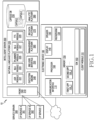
- FIG. 1 is a block diagram illustrating an integrated intelligence system according to various non-claimed embodiments.
- the integrated intelligence system 10 may include an electronic device 100, an intelligent server 200, a service server 300.
- the electronic device 100 may be a terminal device (or an electronic device) which is connectable to the Internet, and may be, for example, a mobile phone, a smartphone, a personal digital assistant (PDA), a laptop computer, a television (TV), a home appliance, a wearable device, a head-mounted device (HMD), or a smart speaker.
- a terminal device or an electronic device which is connectable to the Internet
- PDA personal digital assistant
- TV television
- HMD head-mounted device
- smart speaker a smart speaker
- the electronic device 100 includes a microphone 120, a display 140, and a processor 160 and may include a communication interface 110, a speaker 130, and/or a memory 150.
- the elements listed above may be operatively or electrically connected with one another.
- the processor 160 may perform a designated function by executing a program stored in the memory 150.
- the processor 160 may perform the following actions for processing a voice input by executing at least one of the client module 151 or the SDK 153.
- the processor 160 may control the actions of the plurality of apps 155 through the SDK 153.
- the following actions described as actions of the client module 151 or the SDK 153 may be actions by execution of the processor 160.
- the client module 151 may receive a voice input.
- the client module 151 may receive a voice signal corresponding to user utterance detected through the microphone 120.
- the client module 151 may transmit the received voice input to the intelligent server 200.
- the client module 151 may transmit state information of the electronic device 100 to the intelligent server 200 along with the received voice input.
- the state information may be, for example, execution state information of an app.
- the client module 151 may receive a result corresponding to the received voice input. For example, when the result corresponding to the received voice input can be calculated at the intelligent server 200, the client module 151 may receive the result corresponding to the received voice input. The client module 151 may display the received result on the display 140.
- the client module 151 may receive a plan corresponding to the received voice input.
- the client module 151 may display results of executing the plurality of actions of the app according to the plan on the display 140.
- the client module 151 may display the results of executing the plurality of actions on the display in sequence.
- the electronic device 100 may display only a part of the results of executing the plurality of actions (for example, a result of the final action) on the display.
- the client module 151 may receive, from the intelligent server 200, a request for obtaining information necessary for calculating the result corresponding to the voice input. According to an embodiment, the client module 151 may transmit the necessary information to the intelligent server 200 in response to the request.
- the client module 151 may transmit information of the results of executing the plurality of actions according to the plan to the intelligent server 200.
- the intelligent server 200 may identify that the received voice input is correctly processed by using the result information.
- the client module 151 may include a voice recognition module. According to an embodiment, the client module 151 may recognize a voice input performing a restricted function through the voice recognition module. For example, the client module 151 may perform an intelligent app for processing a voice input for executing a systematic action through a designated input (for example, Wake up!).
- the intelligent server 200 may receive information related to a user voice input from the electronic device 100 via a communication network. According to an embodiment, the intelligent server 200 may change data related to the received voice input to text data. According to an embodiment, the intelligent server 200 may generate a plan for executing a task corresponding to the user voice input, based on the text data.
- the intelligent server 200 may transmit a result according to the generated plan to the electronic device 100, or may transmit the generated plan to the electronic device 100.
- the electronic device 100 may display the result according to the plan on the display.
- the electronic device 100 may display a result of executing an action according to the plan on the display.
- the intelligent server 200 may include a front end 210, a natural language platform 220, a capsule database (DB) 230, an execution engine 240, an end user interface 250, a management platform 260, a big data platform 270, or an analytic platform 280.
- DB capsule database
- the front end 210 may receive a voice input received from the electronic device 100.
- the front end 210 may transmit a response corresponding to the voice input.
- the natural language platform 220 may include an automatic speech recognition (ASR) module 221, a natural language understanding (NLU) module 223, a planner module 225, a natural language generator (NLG) module 227, or a text to speech (TTS) module 229.
- ASR automatic speech recognition
- NLU natural language understanding
- NLG natural language generator
- TTS text to speech
- the ASR module 221 may convert the voice input received from the electronic device 100 into text data.
- the NLU module 223 may understand a user's intent by using the text data of the voice input.
- the NLU module 223 may understand the user's intent by performing syntactic analysis or semantic analysis.
- the NLU module 223 may understand a meaning of a word extracted from the voice input by using linguistic characteristics (for example, grammatical elements) of a morpheme or a phrase, and may determine the user's intent by matching the understood word meaning with an intent.
- the planner module 225 may generate a plan by using the intent determined at the NLU module 223 and a parameter. According to an embodiment, the planner module 225 may determine a plurality of domains necessary for performing a task based on the determined intent. The planner module 225 may determine a plurality of actions included in each of the plurality of domains determined based on the intent. According to an embodiment, the planner module 225 may determine parameters necessary for executing the determined plurality of actions, or result values outputted by execution of the plurality of actions. The parameter and the result value may be defined as a concept of a designated form (or class). Accordingly, the plan may include the plurality of actions determined by the user's intent, and a plurality of concepts.
- the planner module 225 may determine relationships between the plurality of actions and the plurality of concepts in a step-wise manner (or hierarchically). For example, the planner module 225 may determine the order of executing the plurality of actions which are determined based on the user's intent, based on the plurality of concepts. In other words, the planner module 225 may determine the order of executing the plurality of actions, based on the parameters necessary for executing the plurality of actions, and results outputted by execution of the plurality of actions. Accordingly, the planner module 225 may generate a plan including association information (for example, ontology) between the plurality of actions and the plurality of concepts. The planner module 225 may generate the plan by using information stored in the capsule DB 230 in which a set of relationships between the concepts and the actions is stored.
- association information for example, ontology
- the NLG module 227 may change designated information into a text form.
- the information changed to the text form may be a form of natural language utterance.
- the TTS module 229 according to an embodiment may change information in a text form to information in a voice form.
- the capsule DB 230 may store information regarding the relationships between the plurality of concepts and the plurality of actions corresponding the plurality of domains.
- a capsule may include a plurality of action objects (or action information) and a plurality of concept objects (or concept information) which are included in the plan.
- the capsule DB 230 may store a plurality of capsules in the form of a concept action network (CAN).
- the plurality of capsules may be stored in a function registry included in the capsule DB 230.
- the capsule DB 230 may include a dialog registry in which information of a dialog (or interaction) with the user is stored.
- the capsule DB 230 may update stored objects through a developer tool.
- the developer tool may include, for example, a function editor for updating the action objects or the concept objects.
- the developer tool may include a vocabulary editor for updating a vocabulary.
- the developer tool may include a strategy editor for generating and registering a strategy for determining a plan.
- the developer tool may include a dialog editor for generating a dialog with the user.
- the developer tool may include a follow-up editor for activating a follow-up goal and editing follow-up utterance providing a hint.
- the follow-up goal may be determined based on a currently set goal, user's preference, or an environmental condition.
- the capsule DB 230 may be implemented within the electronic device 100.
- the execution engine 240 may calculate a result by using the generated plan.
- the end user interface 250 may transmit the calculated result to the electronic device 100. Accordingly, the electronic device 100 may receive the result and provide the received result to the user.
- the management platform 260 may manage information used in the intelligent server 200.
- the big data platform 270 according to an embodiment may collect data of the user.
- the analytic platform 280 according to an embodiment may manage a quality of service (QoS) of the intelligent server 200. For example, the analytic platform 280 may manage the elements and a processing rate (or efficiency) of the intelligent server 200.
- QoS quality of service
- the service server 300 may provide a designated service (for example, a food ordering or hotel booking service) to the electronic device 100.
- the service server 300 may be a server that is managed by a third party.
- the service server 300 can include a variety of services, including CP service A 301, CP service B 302, and CP service C.
- the service server 300 may provide information for generating the plan corresponding to the received voice input to the intelligent server 200.
- the provided information may be stored in the capsule DB 230.
- the service server 300 may provide result information according to the plan to the intelligent server 200.
- the electronic device 100 may provide various intelligent services to the user in response to a user input.
- the user input may include, for example, an input through a physical button, a touch input, or a voice input.
- the electronic device 100 may provide a voice recognition service through an intelligent app (or a voice recognition app) stored therein.
- the electronic device 100 may recognize user utterance or a voice input received through the microphone, and may provide a service corresponding to the recognized voice input to the user.
- the electronic device 100 may perform a designated action independently or along with the intelligent server and/or service server, based on the received voice input. For example, the electronic device 100 may execute an app corresponding to the received voice input, and may perform the designated action through the executed app.
- the electronic device 100 when the electronic device 100 provides the service along with the intelligent server 200 and/or the service server, the electronic device may detect user utterance by using the microphone 120, and may generate a signal (or voice data) corresponding to the detected user utterance. The electronic device may transmit the voice data to the intelligent server 200 by using the communication interface 110.
- the intelligent server 200 may generate a plan for performing a task corresponding to the voice input, or a result of executing an action according the plan, in response to the voice input received from the electronic device 100.
- the plan may include, for example, a plurality of actions for performing the task corresponding to the voice input of the user, and a plurality of concepts related to the plurality of actions.
- the concept may be a definition of a parameter inputted to execute the plurality of actions, or a definition of a result value outputted by execution of the plurality of actions.
- the plan may include association information between the plurality of actions and the plurality of concepts.
- the electronic device 100 may receive the response by using the communication interface 110.
- the electronic device 100 may output a voice signal generated in the electronic device 100 to the outside by using the speaker 130, or may output an image generated in the electronic device 100 to the outside by using the display 140.
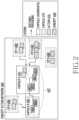
- FIG. 2 is a view illustrating relationship information between concepts and actions stored in a database according to various non-claimed embodiments.
- a capsule DB (for example, the capsule DB 230) of the intelligent server 200 may store capsules in the form of a concept action network (CAN) 400.
- the capsule DB may store an action for processing a task corresponding to a voice input of a user, and a parameter necessary for the action in the form of the CAN.
- the capsule DB may store a plurality of capsules (capsule A 401, capsule B 404) corresponding to a plurality of domains (for example, applications), respectively.
- one capsule for example, capsule A 401 may correspond to one domain (for example, a location (geo), an application).
- one capsule may correspond to at least one service provider (for example, CP 1 402, CP 2 403, CP 3 406, or CP 4 405) for performing a function regarding the domain related to the capsule.
- one capsule may include at least one action 410 and at least one concept 420 for performing a designated function.
- the natural language platform 220 may generate a plan for performing a task corresponding to a received voice input by using a capsule stored in the capsule DB.
- the planner module 225 of the natural language platform may generate a plan by using a capsule stored in the capsule DB.
- a plan 407 may be generated by using actions 4011, 4013 and concepts 4012, 4014 of the capsule A 410, and an action 4041 and a concept 4042 of the capsule B 404.
- the electronic device 100 may execute an intelligent app to process a user input through the intelligent server 200.
- the electronic device 100 may receive a voice input saying "Let me know my schedule of this week!
- the electronic device 100 may display a user interface (UI) 313 (for example, an input window) of the intelligent app displaying text data of the received voice input on the display.
- UI user interface
- the electronic device 100 may display a result corresponding to the received voice input in a screen 320 on the display.
- the electronic device 100 may receive a plan corresponding to the received user input and may display "schedule of this week" on the display according to the plan.
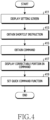
- FIG. 4 is a flowchart illustrating a method for setting a quick command function according to a non-claimed embodiment.
- the processor 160 may display a screen for setting a quick command through the display 140.
- the quick command function may be a function that, when a voice inputted from a user corresponds to a designated instruction (or command or text), executes at least one function regarding at least one command set for the designated instruction (or at least one function executed according to at least one command).
- the processor 160 may set “morning” as a designated instruction by setting the quick command function.
- the electronic device 100 may not perform a function regarding (or corresponding to) "morning" as a command (or a normal voice command function regarding "morning" as a command), and may execute at least one function regarding at least one command set to correspond to (or mapped onto) "morning.”
- a designated instruction to execute at least one function regarding at least one command by using the quick command function will be referred to as a "shortcut instruction.”
- the processor 160 may display the screen for setting the quick command function through the display 140 in response to a user input for setting the quick command function.
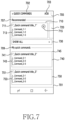
- the processor 160 may display a default screen for setting the quick command function like a screen 701 of FIG. 7 through the display 140, in response to the user input for setting the quick command function.
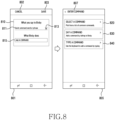
- the processor 160 may obtain a shortcut instruction based on a text inputted by using a keyboard (or a virtual keyboard). For example, when the processor 160 receives a user input regarding a field 811 on a screen 801 of FIG. 8 , the processor 160 may display a keyboard for inputting a text through the display 140. When a text is inputted through the keyboard, the processor 160 may obtain the inputted text as a shortcut instruction.
- the processor 160 may obtain the shortcut instruction based on a voice inputted from the user. For example, when the processor 160 receives a user input on an object 813 on the screen 801, the processor 160 may display a screen for receiving an input of a voice from the user through the display 140. The processor 160 may convert the voice inputted from the user into a text by using the voice recognition module, and may obtain the converted text as a shortcut instruction.
- the processor 160 in an embodiment may obtain (or input) at least one command to be set for the shortcut instruction.
- the processor 160 may obtain at least one command to be performed when a voice inputted from a user while the voice recognition function is executed corresponds to the shortcut instruction (hereinafter, referred to as "at least one command related to the shortcut instruction"), according to various methods (or by selecting at least one method of various methods).
- the processor 160 may display at least one command related to the selected application or service through the display 140.
- the processor 160 may select at least one command related to the selected application or service, and may obtain the selected at least one command as at least one command related to the shortcut instruction.
- the processor 160 may obtain at least one command related to the shortcut instruction, based on a voice inputted from the user. For example, in response to a user input of selecting a method of using a voice input from the various methods for obtaining at least one command related to the shortcut instruction being received, the processor 160 may display a screen as shown on a screen 903 of FIG. 9 through the display 140. The processor 160 may convert the voice inputted by the user into a text by using the voice recognition module, and may obtain the converted text as at least one command related to the shortcut instruction.
- the processor 160 may obtain at least one command related to the shortcut instruction, based on a text inputted by the user by using the keyboard. For example, in response to a user input of selecting a method of using a text input by using the keyboard from the various methods for obtaining at least one command related to the shortcut instruction being received, the processor 160 may display a screen as shown on a screen 905 of FIG. 9 through the display 140. When a text is inputted by using the keyboard, the processor 160 may obtain the inputted text as at least one command related to the shortcut instruction.
- the processor 160 may obtain at least one command related to the shortcut instruction by selecting a command regarding a function (or a voice command function that has been performed previously (or recently). For example, in response to a user input of selecting a method of using a command regarding a function that has been previously performed from the various methods for obtaining at least one command related to the shortcut instruction being received, the processor 160 may display a list including commands regarding functions that have been previously performed through the display 140. In response to a user input of selecting a command regarding a function that has been previously performed, the processor 160 may obtain the selected command regarding the previously performed function as at least one command related to the shortcut instruction.
- the processor 160 in an embodiment may display a portion that can be corrected (or edited) in the at least one command related to the shortcut instruction according to a designated method.
- the processor 160 may display the at least one command related to the shortcut instruction through the display 140.
- the processor 160 may display a portion that can be corrected by the user in the at least one command related to the shortcut instruction to be distinguished from the other portion through the display 140 (or may highlight the portion). For example, as shown on a screen 1001 of FIG. 10 , the processor 160 may display a portion 1045 (or "San Francisco") that can be corrected by the user in a command 1041 (or "Tell me the weather in San Francisco") related to the shortcut instruction bolder than a portion that cannot be corrected (or "Tell me the weather”) (or display the text in bold type).
- the method of displaying the portion that can be corrected by the user in the at least one command related to the shortcut instruction to be distinguished from the other portion is not limited to the above-described example.
- the processor 160 may display the color or shade of the portion that can be corrected by the user in the at least one command related to the shortcut instruction to be different from the other portion that cannot be corrected, through the display 140.
- the processor 160 may correct the portion that can be corrected in the at least one command related to the shortcut instruction, based on a user input. For example, based on a user input of selecting the portion that can be corrected by the user in the at least one command related to the shortcut instruction, the processor 160 may display, through the display 140, a screen 1100 including a correctable portion 1121 that can be corrected by the user in the command "Tell me the weather in San Francisco" 1120, and a keyboard 1110, as shown in FIG. 11 . The processor 160 may correct the correctable portion 1121 based on a user input using the keyboard 1110.
- the processor 160 in an embodiment may set the quick command function based on a user input for setting the quick command function.
- the processor 160 may store information regarding the set quick command function in the memory 150. In an embodiment, when the quick command function is set, the processor 160 may transmit the information regarding the set quick command function to a server (for example, the intelligent server 200, etc.).
- a server for example, the intelligent server 200, etc.
- the processor 160 may display, through the display 140, a screen including an object for performing an action of identifying an error which may occur when a quick command function (hereinafter, referred to as an "error"), while setting the quick command function.
- error a quick command function
- the processor 160 may display, through the display 140, an object for performing an action of identifying an error, along with the shortcut instruction and the at least one command related to the shortcut instruction obtained.
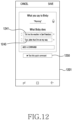
- the processor 160 display an object 1250 for performing an action of identifying an error, along with the commands "Tell me the weather in San Francisco” 1241 and "Text John that I'm on my way” 1243 , through the display 140 as shown in FIG. 12 .
- the error may include a case in which at least one function regarding the at least one command related to the shortcut instruction cannot be executed when the quick command function is executed.
- the error may be a case in which the message "I'm on my way” cannot be transmitted to "John” like a case in which the at least one command related to the shortcut instruction is "Text John that I'm on my way” and a contact corresponding to "John” (or the other party) is not registered at a phone book.
- the error may be a case in which a function regarding a command like "Turn on an air conditioner on July 6, 2018" cannot be executed like a case in which the at least one command related to the shortcut instruction is "Turn on an air conditioner on July 6, 2018” and the current date is August 2, 2018.
- the error may include a case in which a meaning of a text constituting the at least one command related to the shortcut instruction cannot be recognized (understood) like a case in which a text constituting the at least one command related to the shortcut instruction is a special character or a symbol.
- the error is not limited to the above-described embodiments, and may include all cases in which at least one function regarding the at least one command related to the shortcut instruction cannot be normally performed when the quick command function is executed.
- the processor 160 may execute (or test or simulate) the at least one command related to the shortcut instruction to identify the error.
- the processor 160 may execute a plurality of functions regarding the plurality of commands in sequence based on an order (or a rank) set for the plurality of commands. In an embodiment, the processor 160 may execute at least a part of the plurality of functions regarding the plurality of commands or at least a part of each of the plurality of functions in association with the intelligent server 200.
- the processor 160 may perform all or a part of actions for executing the function regarding the command related to the shortcut instruction according to the command (or the function regarding the command), an application or service for performing the command. For example, when the command is "Today weather," the processor 160 may perform all of the actions for providing information regarding the today weather.
- the processor 160 may display a portion that is a cause of the error in the command where the error occurs to be distinguished from the other portion.
- the processor 160 may display the color of a portion 1451 which is a cause of the error in the command where the error occurs to be different from the other portion through the display 140 as shown in FIG. 14 .
- the method of displaying the portion which is the cause of the error to be distinguished from the other portion is not limited to the method of displaying the color differently.
- the processor 160 in an embodiment may correct the command where the error occurs, based on a user input. For example, based on a user input of selecting the portion which is the cause of the error (or an area including the portion which is the cause of the error) by the user in the command where the error occurs, the processor 160 may display a screen 1501 including the command where the error occurs, "Text John that I'm on my way" 1520, and a keyboard 1510 through the display 140 as shown on the screen 1501 of FIG. 15 . The processor 160 may correct the portion 1521 which is the cause of the error based on a user input using the keyboard 1510.
- the processor 160 in an embodiment may set the quick command function based on a user input for setting the quick command function.
- the processor 160 may store information regarding the set quick command function in the memory 150. In an embodiment, when the quick command function is set, the processor 160 may transmit the information regarding the set quick command function to a server (for example, the intelligent server 200, etc.).
- a server for example, the intelligent server 200, etc.
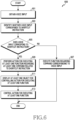
- FIG. 6 is a flowchart illustrating a method 600 for controlling an action for executing at least one function regarding at least one command related to a shortcut instruction while executing a quick command function according to various non-claimed embodiments.
- the processor 160 in an embodiment may obtain a voice input through the microphone 120.
- the processor 160 may activate the microphone 120.
- the processor 160 may obtain a voice input from the user through the activated microphone 120.
- the processor 160 may convert the voice input obtained from the user into a text by using the voice recognition module.
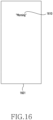
- the processor 160 may display the converted text through the display 140. For example, as shown in FIG. 16 , the processor 160 may display the text converted from the voice input, "Morning" 160, on a screen 1601 through the display 140.
- the processor 160 in an embodiment may identify whether the voice input (or the text converted from the voice input) corresponds to a shortcut instruction. For example, the processor 160 may identify whether the obtained voice input is identical to a shortcut instruction stored in the memory 150 by setting the quick command function.
- the processor 160 may execute a function regarding a command corresponding to the voice input in operation 607. For example, the processor 160 may execute the function regarding (or corresponding to) "morning" as a command (or a normal voice command function regarding "morning" as a command).
- the processor 160 in an embodiment may perform an action for executing at least one function regarding at least one command related to the shortcut instruction (hereinafter, referred to as "at least one function executing action").
- the processor 160 may transmit information regarding at least one command related to the shortcut instruction to the intelligent server 200 through the communication interface 110. In an embodiment, the processor 160 may transmit information necessary for executing at least one function regarding at least one command related to the shortcut instruction to the intelligent server 200 through the communication unit 110. In an embodiment, the processor 160 may perform at least a part of the at least one function executing action.
- the processor 160 may execute a plurality of functions regarding the plurality of commands in sequence based on an order (or rank) set for the plurality of commands. In an embodiment, the processor 160 may execute at least a part of the plurality of functions regarding the plurality of commands, or at least a part of a function of each of the plurality of functions in association with the intelligent server 200.
- the processor 160 in an embodiment may display at least one object for controlling the at least one function executing action through the display 140.
- the processor 160 may display at least one object for controlling the at least one function executing action through the display 140 while executing the at least one function executing action.
- the at least one object includes two objects, comprising a first object for temporarily stopping (or pausing and resuming) the at least one function executing action (hereinafter, referred to as a "first object").
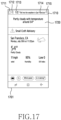
- the at least one object may include a first object 1711 of FIG. 17 .
- the processor 160 may determine a position of the at least one object by considering a position of information indicating a result of executing the at least one function regarding the at least one command related to the shortcut instruction. For example, the processor 160 may determine to display the at least one object in a region where the information indicating the result of executing the at least one function regarding the at least one command related to the shortcut instruction is not displayed (or a region which does not overlap the information indicating the result of executing the at least one function).
- the display position of the at least one object is not limited to the above-described example.
- the processor 160 may control the action for executing the at least one function in response to a user input on the at least one object.
- the processor 160 may transmit, to the intelligent server 200 through the communication interface 110, information for letting the intelligent server 200 stop the action for executing the function regarding the second command.
- the processor 160 may not perform a part of the action for executing the function regarding the second command to be executed in the electronic device.
- the processor 160 may display, through the display 140, an object for displaying a screen for correcting (or editing) at least one command related to the shortcut instruction or for correcting an error.
- the processor 160 may display, through the display 140, an object 2016 for displaying a screen (for example, a screen 2101 of FIG. 21 ) for correcting (or editing) the at least one command related to the shortcut instruction or for correcting an error ( or an object for correcting the at least one command) as shown in FIG. 20 .
- the processor 160 may resume the at least one function executing action. For example, in the state in which the at least one function executing action is temporarily stopped in response to a user input on a first object 1911 as shown in FIG. 19 , when an input on the first object 2011 is received from the user as shown in FIG. 20 , the processor 160 may resume the at least one function executing action which was being executed at the time of temporarily stopping.
- the processor 160 when an input on the second object is received from the user, the processor 160 skips the action for executing the function regarding the command which is being currently performed, and may perform an action for executing a function of a next command (or a command of a next order) of the command which is being currently performed. For example, when a plurality of commands are related to the shortcut instruction and an input on the second object is received from the user while the action for executing the function regarding the first command among the plurality of commands is being performed, the processor 160 may perform the action for executing the function regarding the second command (or may start performing the action for executing the function regarding the second command) without performing the action for executing the function regarding the first command.
- the processor 160 may display, through the display 140, an object for displaying a screen for correcting (or editing) the at least one command related to the shortcut instruction or correcting an error.
- the processor 160 may stop the action for executing the function regarding the command which is being currently performed, and may wait before performing the action for executing the function of the next command (or command of the next order) of the command which is being currently performed.
- the processor 160 may perform the action for executing the function of the next command (or command of the next order) of the command which is being performed.
- the first object and the second object are illustrated as the at least one object, but are not limited thereto.
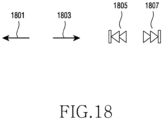
- the at least one object may include various objects as shown in FIG. 18 .
- objects 1801, 1803 of FIG. 18 may be objects for moving to pages on which results of the plurality of functions regarding the plurality of commands are displayed, respectively, when all of the plurality of functions regarding the plurality of commands related to the shortcut instruction are executed. For example, in a state in which all of the plurality of functions regarding the plurality of commands related to the shortcut instruction are executed and then a page indicating a result of executing a function regarding the last command is displayed through the display 140, when a user input on the object 1801 is received, the processor 160 may move to a page displaying a result of executing a function regarding a previous command of the last command.
- the processor 160 may move to the page displaying the result of executing the function of the next command of the result of executing the function of the currently displayed command, for example, to the page displaying the result of executing the function of the last command.
- objects 1805, 1807 of FIG. 18 may be objects for executing the action of executing the function of the first command or the function of the last command, while the plurality of functions regarding the plurality of commands related to the shortcut instruction are being executed.
- the processor 160 may perform an action for executing a function regarding the first command.
- the processor 160 may perform an action for performing a function of the fifth command.
- the at least one object is not limited to the first object, the second object, or the objects 1801-1807 of FIG. 18 .
- FIG. 7 is a view illustrating a method for setting a quick command function according to various embodiments
- FIG. 8 is a view illustrating the method for setting the quick command function according to various embodiments
- FIG. 9 is a view illustrating the method for setting the quick command function according to various embodiments
- FIG. 10 is a view illustrating the method for setting the quick command function according to various embodiments
- FIG. 11 is a view illustrating the method for setting the quick command function according to various embodiments.
- a screen 701 of FIG. 7 may be a screen (or default screen) for setting the quick command function.
- information 702 may indicate that the screen 701 is a screen for setting the quick command function.
- the processor 160 may display a main screen of a voice recognition application or may display a previously displayed screen through the display 140.
- an object 703 may be an object for displaying a screen through which the user newly inputs a shortcut instruction and at least one command related to the shortcut instruction.
- the processor 160 may display a screen 801 of FIG. 8 through the display 140.
- an object 705 may be an object for executing a function of displaying a screen including a tutorial regarding a method for using the quick command function, and for executing a function of displaying a screen for deleting a set shortcut instruction or at least one of at least one command related to the short instruction.
- a short instruction provided (or recommended 707) by the voice recognition application (or the intelligent server 200) and at least one command related to the shortcut instruction may be displayed in regions 710, 720.
- a shortcut instruction 711 provided by the voice recognition application and a plurality of commands 713 related to the shortcut instruction 711 may be displayed in the region 710.
- a shortcut instruction and at least one command related to the shortcut instruction, which are included in the region 720 may be displayed.
- the processor 160 may set the quick command function based on the shortcut instruction 711 and the plurality of commands 713 included in the region 710.
- the region 710 may move to a region 740.
- the shortcut instruction 711 and the plurality of commands 713 included in the region 710 may be displayed in replacement of a shortcut instruction 741 and commands 743 included in the region 740.
- a region 730 may be a region for executing a function of displaying a list of a shortcut instruction provided by the voice recognition application and at least one command related to the shortcut instruction. For example, when a user input on the region 730 is received, the processor 160 may display, through the display 140, the shortcut instruction provided by the voice recognition application and the at least one command that are provided by the voice recognition application but are not displayed on the screen 701, along with the shortcut instruction 711 and the plurality of commands 713 included in the region 710.
- information 709 may be information indicating that the quick command function is set for the shortcut instructions 741, 751 and the commands 743, 753 included in the regions 740, 750 positioned below the display position of the information 709.
- the processor 160 may display, through the display 140. a screen for correcting (or editing) the shortcut instruction or at least one command related to the shortcut instruction included in the region 740 (or region 750).
- the screen 801 of FIG. 8 may be a screen through which a shortcut instruction and at least one command related to the shortcut instruction are newly inputted.
- the processor 160 in response to a user input on the object 703 of FIG. 7 being received, the processor 160 may display the screen 801 of FIG. 1 through the display 140.
- the processor 160 may cancel the action of newly inputting a shortcut instruction and at least one command related to the shortcut instruction.
- the processor 160 when the processor 160 receives a user input on the field 811, the processor 160 may display a keyboard for inputting a text through the display 140. When a text is inputted by using the keyboard, the processor 160 may input the inputted text into the field 811 (or may display the text through the display 140).
- the processor 160 when the processor 160 receives a user input on the object 813, the processor 160 may display a screen indicating that a voice input can be received from the user through the display 140.
- the processor 160 may convert the voice inputted from the user into a text by using the voice recognition module, and may input the converted text into the field 811.
- the processor 160 may display a screen 805 to select at least one of various methods for obtaining at least one command related to the shortcut instruction through the display 140.
- a region 820 may be a region for inputting at least one command related to the shortcut instruction, based on an application or a service provided (or recommended) by the voice recognition application.
- the processor 160 may display a screen as shown on a screen 901 of FIG. 9 through the display 140.
- the processor 160 may display a list including an application or service provided by the voice recognition application in the region 930 through the display 140.
- the processor 160 may display at least one command related to the selected application or service through the display 140 although it is not illustrated in FIG. 9 .
- a region 830 may be a region for inputting at least one command related to the shortcut instruction based on a voice inputted from the user.
- the processor 160 in response to a user input on the region 830 being received, the processor 160 may display a screen as shown on the screen 903 of FIG. 9 through the display 140.
- the processor 160 may convert a voice inputted from the user into a text by using the voice recognition module, and may obtain (or input to the field 815) the converted text as at least one command related to the shortcut instruction.
- a region 840 may be a region for inputting at least one command related to the shortcut instruction based on a text inputted by the user using the keyboard.
- the processor 160 may display a screen as shown on the screen 905 of FIG. 9 through the display 140.
- the processor 160 may obtain (or input to the field 815) the inputted text as at least one command related to the shortcut instruction.
- the processor 160 in an embodiment may obtain at least one command related to the shortcut instruction by selecting a command regarding a function (or a voice command function) which is previously (or recently) performed. For example, in response to a user input of selecting a method of using a command regarding a previously performed function from various methods for obtaining at least one command related to the shortcut instruction being received, the processor 160 may display a list including a command regarding a previously performed function through the display 140. In response to a user input of selecting the command regarding the previously performed function, the processor 160 may obtain (or input to the field 815) the selected command regarding the previously performed function as at least one command related to the shortcut instruction.
- the processor 160 may display the screen 1001 shown in FIG. 10 through the display 140.
- the shortcut instruction for example, "Morning”
- the command for example, “Tell me the weather in San Francisco” 1041
- the command for example, "Text John that I'm on my way” 1043
- the processor 160 may display portions, "John” 1047 and “I'm on my way” 1049, that can be corrected by the user in the command, "Text John that I'm on my way” 1043, bolder the other portions that cannot be corrected, "Text” and “that,” (or display the text in bold type) through the display 140.
- the method of displaying the portion that can be corrected by the user in the at least one command related to the shortcut instruction to be distinguished from the other portion is not limited to the above-described example.
- the processor 160 may display the color or shade of the portion that can be corrected by the user in the at least one command related to the shortcut instruction to be different from the other portion that cannot be corrected through the display 140.
- the screen 1001 of FIG. 10 may further include objects 1031, 1033 to change an order of execution of a function regarding the command 1041 and a function regarding the command 1043. For example, based on a tap input or a drag input on the object 1031, the order of executing the function regarding the command 1041 and the function regarding the command 1043 may be changed.
- the processor 160 may execute the command 1041 included in the region 1030 located above the region 1040 before the command 1043.
- the screen 1001 of FIG. 10 may further include an object 1035 to delete the command 1041, and an object 1037 to delete the command 1043.
- FIG. 12 is a view illustrating a method for correcting an error which may occur when a quick command function is executed, while setting the quick command function according to various embodiments
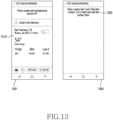
- FIG. 13 is a view illustrating the method for correcting the error which may occur when the quick command function is executed, while setting the quick command function according to various embodiments
- FIG. 14 is a view illustrating the method for correcting the error which may occur when the quick command function is executed, while setting the quick command function according to various embodiments
- FIG. 15 is a view illustrating the method for correcting the error which may occur when the quick command function is executed, while setting the quick command function according to various embodiments.
- the processor 160 may display a screen 1201 including an object 1250 for performing an action for identifying an error through the display 140 as shown in FIG. 12 .
- the processor 160 may display an object for performing the action of identifying an error, along with the shortcut instruction and the at least one command related to the shortcut instruction, through the display 140.
- the processor 160 may display the object 1250 for performing the action of identifying an error, along with the commands, "Tell me the weather in San Francisco" 1241 and "Text John that I'm on my way” 1243, through the display 140, as shown in FIG. 12 .
- the screen 1201 of FIG. 12 may be the same as the screen 1001 of FIG. 10 except for that the screen 1201 further includes the object 1250.
- the processor 160 may execute (or test or simulate) the at least one command related to the shortcut instruction to identify the error.
- the processor 160 may execute a plurality of functions regarding the plurality of commands in sequence based on an order (or rank) set for the plurality of commands.
- a screen 1301 of FIG. 13 may be a screen executing (or an execution result screen) a function regarding the command "Tell me the weather in San Francisco” 1241.
- the screen 1301 may include information 1310 regarding the weather of San Francisco as the function regarding the command "Tell me the weather in San Francisco” 1241.
- the screen 1301 may be a screen displayed when the function regarding the command "Tell me the weather in San Francisco” 1241 is executed without an error.
- a screen 1303 of FIG. 13 may be a screen executing (or an execution result screen) a function regarding the command "Text John that I'm on my way” 1243.
- the screen 1303 may be a screen displayed when an error occurs while the function regarding the command "Text John that I'm on my way” 1243 is being executed.
- the screen 1303 of FIG. 13 may be a screen that is displayed when the message "I'm on my way" cannot be sent to "John” like the case in which a contact corresponding to "John” (the other party) in the command "Text John that I'm on my way” 1243 is not registered at the phone book.
- the processor 160 may display a portion, "John” 1451, in a region 1410 that is a cause of the error in the command in which the error occurs, "Text John that I'm on my way” 1443, among the command "Tell me the weather in San Francisco” 1441 and the command "Text John that I'm on my way” 1443, to be distinguished from the other portion 1449, along with information 1480 indicating that the error occurred while executing the quick command function, as shown in FIG. 14 .
- the processor 160 may display the color of the portion that is the cause of the error in the command in which the error occurs to be different from the other portion through the display 140.
- the method of displaying the portion which is the cause of the error to be distinguished from the other portion is not limited to the method of displaying the color differently.
- the processor 160 may correct the command in which the error occurs (or the portion which is the cause of the error) based on a user input. For example, in response to a user input of selecting the portion that is the cause of the error (or region including the portion which is the cause of the error) in the command in which the error occurs by the user, the processor 160 may display, through the display 140, the screen 1501 including the command in which the error occurs, "Text John that I'm on my way" 1520, and the keyboard 1510, as shown on the screen 1501 of FIG. 15 . In an embodiment, the portion which is the cause of the error, "John" 1521, may be displayed to be distinguished from the other portion of the command.
- the shade of the display region of the portion which is the cause of the error, "John” 1521 may be different from the shade of the display region of the other portion in the command.
- the processor 160 may correct the portion which is the cause of the error, "John" 1521, based on a user input using the keyboard 1510.
- the processor 160 may display a command including the corrected portion "Jon” 1551, "Text Jon that I'm on my way” 1543, through the display 140, as shown on a screen 1502 of FIG. 15 .
- the processor 160 may set the quick command function based on a user input on an object 1571 for setting the quick command function.
- the processor 160 may store information regarding the set quick command function in the memory 150.
- FIG. 16 is a view illustrating a method for controlling an action for executing at least one function regarding at least one command related to a shortcut instruction while executing a quick command function according to various embodiments
- FIG. 17 is a view illustrating the method for controlling the action for executing the at least one function regarding the at least one command related to the shortcut instruction while executing the quick command function according to various embodiments
- FIG. 18 is a view illustrating the method for controlling the action for executing the at least one function regarding the at least one command related to the shortcut instruction while executing the quick command function according to various embodiments
- FIG. 19 is a view illustrating the method for controlling the action for executing the at least one function regarding the at least one command related to the shortcut instruction while executing the quick command function according to various embodiments
- FIG. 19 is a view illustrating the method for controlling the action for executing the at least one function regarding the at least one command related to the shortcut instruction while executing the quick command function according to various embodiments
- FIG. 19 is a view illustrating the method for controlling
- FIG. 20 is a view illustrating the method for controlling the action for executing the at least one function regarding the at least one command related to the shortcut instruction while executing the quick command function according to various embodiments
- FIG. 21 is a view illustrating the method for controlling the action for executing the at least one function regarding the at least one command related to the shortcut instruction while executing the quick command function according to various embodiments.
- a voice input is obtained from a user through the microphone 120.
- the processor 160 may convert the voice input obtained from the user into a text by using the voice recognition module.
- the processor 160 may display the converted text through the display 140.
- the processor 160 may display the text converted from the voice input, "Morning" 1610, on a screen 1601 through the display 140.
- "Morning" 1610 corresponds to a shortcut instruction, and a plurality of commands related to the shortcut instruction are "Tell me the weather in San Francisco" and "Text John that I'm on my way.”
- the processor 160 may perform at least one function executing action.
- the processor 160 may execute a function regarding a first command, followed by a function regarding a second command in sequence based on an order (or rank) set for the plurality of commands. For example, as shown in FIG. 17 , the processor 160 may display, through the display 140, a screen 1701 (or an execution result screen) displaying execution of the function regarding the command "Tell me the weather in San Francisco" 1714 as shown in FIG. 17 .
- the screen 1701 may include information 1720 regarding the weather of San Francisco as the function regarding the command "Tell me the weather in San Francisco" 1714.
- the processor 160 displays a first object 1711 and a second object 1712 for controlling the at least one function executing action in a region 1710.
- the region 1710 may further include information 1713 indicating that the function regarding the command "Tell me the weather in San Francisco” 1714 is the first command of the two commands, the command "Tell me the weather in San Francisco” 1714, and an object 1715 for terminating the quick command function.
- the region 1710 may further include at least one of the various objects as shown in FIG. 18 .
- the objects 1801, 1803 of FIG. 18 may be objects for moving to pages on which results of the plurality of functions regarding the plurality of commands are displayed, respectively, when all of the plurality of functions regarding the plurality of commands related to the shortcut instruction are executed.
- the objects 1805, 1807 of FIG. 18 may be objects for executing an action for executing a function of the first command or a function of the last command, while the plurality of functions regarding the plurality of commands related to the shortcut instruction are being executed.
- the objects included in the region 1710 are not limited to the first object 1711, the second object 1712, or the objects 1801-1807 of FIG. 18 .
- the processor 160 controls the action for executing the at least one function in response to a user input on at least one object. For example, as shown in FIG. 19 , in response to an input on the first object 1911 being received from the user while the function regarding the command "Text John that I'm on my way” 1914 is being performed, the processor 160 temporarily stops the at least one function executing action. In an embodiment, even after execution of the function regarding the command "Text John that I'm on my way" 1914 is completed (for example, even after information 1920 indicating that the error occurs is displayed on the screen 1901), the processor 160 may temporarily stop the at least one function executing action in response to an input on the first object 1911 being received from the user.
- the processor 160 may display, through the display 140, an object for displaying a screen for correcting (editing) the at least one command related to the shortcut instruction or correcting the error.
- the processor 160 may display, through the display 140, an object 2016 for displaying a screen (for example, a screen 2101 of FIG. 21 ) for correcting (or editing) the at least one command related to the shortcut instruction or correcting the error as shown in FIG. 20 .
- the processor 160 when an input on a second object 1912 is received from the user, the processor 160 skips the action for executing the function regarding the currently performed command, and performs an action for executing a function of the next command (or command of the next order) of the currently performed command. For example, when a plurality of commands are related to the shortcut instruction, and an input on the second object 1912 is received from the user while the action for executing the function regarding the first command among the plurality of commands is being performed, the processor 160 does not perform the action for executing the function regarding the first command, and performs an action for executing the function of the second command (or may start performing the action for executing the function regarding the second command).
- the processor 160 may display a screen 2101 for correcting (or editing) the at least one command related to the shortcut instruction or correcting the error through the display 140 as shown in FIG. 21 .
- the screen 2101 of FIG. 21 is the same as the screen 1401 of FIG. 14 and thus a detailed description thereof is omitted.
- the processor 160 skips the action for executing the function regarding the currently performed command.
- a voice recognition function By controlling an action for performing a function regarding a command set for a designated instruction by using at least one object while executing the at least one function regarding the at least one command set for the designated instruction, a voice recognition function can be more exactly executed.
- the structure of data used in the above-described embodiments of the disclosure may be recorded on a computer readable recording medium through various means.
- the computer readable recording medium may include a storage medium such as a magnetic storage medium (for example, a read only memory (ROM), a floppy disk, a hard disk, or the like) and an optical reading medium (for example, a CD-ROM, a DVD, or the like).
- a computer-readable recording medium on which programs executable by a computer are recorded may record a program for executing the operations of obtaining a voice input through a microphone; identifying whether the voice input corresponds to an instruction that is set to execute at least one function regarding at least one command; in response to it being identified that the voice input corresponds to the set instruction, performing an action for executing the at least one function; through a display, displaying at least one object for controlling the action for executing the at least one function; and, in response to a user input on the at least one object, controlling the action for executing the at least one function.
Landscapes
- Engineering & Computer Science (AREA)
- Human Computer Interaction (AREA)
- Theoretical Computer Science (AREA)
- Physics & Mathematics (AREA)
- Audiology, Speech & Language Pathology (AREA)
- Health & Medical Sciences (AREA)
- Multimedia (AREA)
- General Engineering & Computer Science (AREA)
- General Physics & Mathematics (AREA)
- Computational Linguistics (AREA)
- Acoustics & Sound (AREA)
- General Health & Medical Sciences (AREA)
- Computer Networks & Wireless Communication (AREA)
- Signal Processing (AREA)
- User Interface Of Digital Computer (AREA)
Claims (11)
- Elektronische Vorrichtung (100), umfassend:ein Mikrofon (120);eine Anzeige (140); undeinen Prozessor (160), der zu Folgendem konfiguriert ist:Erlangen einer Spracheingabe über das Mikrofon;Identifizieren, ob die Spracheingabe einer Anweisung entspricht, die eingestellt ist, um einen Befehl auszuführen, der sich auf einen ersten Befehl bezieht, gefolgt von einer Funktion, die sich auf einen zweiten Befehl in Folge bezieht;als Reaktion auf ein Identifizieren, dass die Spracheingabe der eingestellten Anweisung entspricht, Durchführen einer Aktion zum Ausführen der Funktion in Bezug auf den ersten Befehl;über das Display, Anzeigen von zwei Objekten,umfassend ein erstes Objekt (1711; 1911; 2011) und ein zweites Objekt (1712; 1912; 2012) zum Steuern der Aktion zum Ausführen der Funktion in Bezug auf den ersten Befehl, während die Aktion zum Ausführen der Funktion in Bezug auf den ersten Befehl durchgeführt wird;als Reaktion auf ein Empfangen einer Benutzereingabe an dem ersten Objekt, vorübergehendes Anhalten der Aktion zum Ausführen der Funktion in Bezug auf den ersten Befehl; undals Reaktion auf ein Empfangen einer Benutzereingabe an dem zweiten Objekt während eines Durchführens der Aktion zum Ausführen der Funktion in Bezug auf den ersten Befehl, Überspringen der Aktion zum Ausführen der Funktion in Bezug auf den ersten Befehl und Durchführen einer Aktion zum Ausführen der Funktion in Bezug auf den zweiten Befehl.
- Elektronische Vorrichtung nach Anspruch 1, wobei:
der Prozessor konfiguriert ist, um als Reaktion auf ein Empfangen einer Benutzereingabe an dem ersten Objekt, Anzeigen eines dritten Objekts (2016) über die Anzeige, und als Reaktion auf ein Empfangen einer Benutzereingabe an dem dritten Objekt, Anzeigen eines Bildschirms zum Korrigieren des ersten Befehls über die Anzeige (2101). - Elektronische Vorrichtung (100) nach Anspruch 1, wobei der Prozessor (160) konfiguriert ist, um die eingestellte Anweisung und die Befehle durch Verwenden von mindestens einem von dem Mikrofon (120) oder einer Tastatur zu erlangen, um die eingestellte Anweisung und die Befehle einzustellen.
- Elektronische Vorrichtung (100) nach Anspruch 3, wobei der Prozessor (160) konfiguriert ist, um ferner die Befehle zu erlangen, indem er zwei aus (i) einem Befehl, der sich auf eine Anwendung oder einen Dienst bezieht, der von einer Spracherkennungsanwendung bereitgestellt wird, oder (ii) einem zuvor ausgeführten Befehl auswählt.
- Elektronische Vorrichtung (100) nach Anspruch 4, wobei der Prozessor (160) zu Folgendem konfiguriert ist:Hervorheben eines korrigierbaren Abschnitts (1045, 1047, 1049) in dem ersten Befehl durch die Anzeige; undbasierend auf einem Empfangen der Benutzereingabe, Korrigieren des korrigierbaren Abschnitts.
- Elektronische Vorrichtung (100) nach Anspruch 3, wobei der Prozessor (160) zu Folgendem konfiguriert ist:beim (i) Einstellen der eingestellten Anweisungen und der Befehleoder (ii) Ausführen einer Aktion zum Ausführen einer Funktion, Empfangen einer Benutzereingabe an einem vierten Objekt (1250); undals Reaktion auf ein Empfangen der Benutzereingabe an dem vierten Objekt, Identifizieren, ob die Aktion zum Ausführen der Funktion ausführbar ist.
- Elektronische Vorrichtung (100) nach Anspruch 6, wobei der Prozessor (160) konfiguriert ist, um basierend auf einem Identifizieren, dass die Aktion zum Ausführen der Funktion nicht ausführbar ist, Hervorheben eines Abschnitts, der bewirkt, dass die Aktion zum Ausführen der Funktion in dem jeweiligen Befehl nicht ausgeführt wird.
- Elektronische Vorrichtung (100) nach Anspruch 1, wobei der Prozessor (160) konfiguriert ist, um über die Anzeige die Objekte nicht überlappende Informationen anzuzeigen, die ein Resultat der Ausführung der Funktion angeben.
- Verfahren (600), umfassend:Erlangen (601) einer Spracheingabe über ein Mikrofon;Identifizieren (603), ob die Spracheingabe einer Anweisung entspricht, die eingestellt ist, um eine Funktion in Bezug auf einen ersten Befehl, gefolgt von einer Funktion in Bezug auf einen zweiten Befehl, in Folge auszuführen;als Reaktion auf ein Identifizieren (605), dass die Spracheingabe der eingestellten Anweisung entspricht,Durchführen (609) einer Aktion zum Ausführen der Funktion in Bezug auf den ersten Befehl;über eine Anzeige, Anzeigen (611) von zwei Objekten, umfassend ein erstes Objekt und ein zweites Objekt, um die Aktion zum Ausführen der Funktion in Bezug auf den ersten Befehl zu steuern, während die Aktion zum Ausführen der Funktion in Bezug auf den ersten Befehl durchgeführt wird;als Reaktion auf eine Benutzereingabe an dem ersten Objekt, vorübergehendes Anhalten der Aktion zum Ausführen der Funktion in Bezug auf den ersten Befehl; undals Reaktion auf ein Empfangen einer Benutzereingabe an dem zweiten Objekt während eines Durchführens der Aktion zum Ausführen der Funktion in Bezug auf den ersten Befehl, Überspringen der Aktion zum Ausführen der Funktion in Bezug auf den ersten Befehl und Durchführen einer Aktion zum Ausführen der Funktion in Bezug auf den zweiten Befehl.
- Verfahren nach Anspruch 9, wobei:
ein Steuern der Aktion zum Ausführen der Funktion als Reaktion auf eine Benutzereingabe an dem ersten Objekt ein Anzeigen eines dritten Objekts über die Anzeige, und als Reaktion auf ein Empfangen einer Benutzereingabe an dem dritten Objekt ein Anzeigen eines Bildschirms zum Korrigieren des ersten Befehls über die Anzeige umfasst. - Verfahren nach Anspruch 9, ferner umfassend ein Erlangen der eingestellten Anweisung und der Befehle durch Verwenden des Mikrofons oder einer Tastatur, um die eingestellte Anweisung und die Befehle einzustellen.
Applications Claiming Priority (1)
| Application Number | Priority Date | Filing Date | Title |
|---|---|---|---|
| KR1020180092665A KR102527107B1 (ko) | 2018-08-08 | 2018-08-08 | 음성에 기반하여 기능을 실행하기 위한 방법 및 이를 지원하는 사용자 전자 장치 |
Publications (3)
| Publication Number | Publication Date |
|---|---|
| EP3608772A1 EP3608772A1 (de) | 2020-02-12 |
| EP3608772C0 EP3608772C0 (de) | 2023-08-02 |
| EP3608772B1 true EP3608772B1 (de) | 2023-08-02 |
Family
ID=67587512
Family Applications (1)
| Application Number | Title | Priority Date | Filing Date |
|---|---|---|---|
| EP19190780.7A Active EP3608772B1 (de) | 2018-08-08 | 2019-08-08 | Verfahren zur ausführung einer funktion auf der basis von sprache und elektronische vorrichtung damit |
Country Status (5)
| Country | Link |
|---|---|
| US (1) | US11615788B2 (de) |
| EP (1) | EP3608772B1 (de) |
| KR (1) | KR102527107B1 (de) |
| CN (1) | CN112534799A (de) |
| WO (1) | WO2020032655A1 (de) |
Families Citing this family (6)
| Publication number | Priority date | Publication date | Assignee | Title |
|---|---|---|---|---|
| US9204939B2 (en) * | 2011-08-21 | 2015-12-08 | M.S.T. Medical Surgery Technologies Ltd. | Device and method for assisting laparoscopic surgery—rule based approach |
| JP7710157B2 (ja) * | 2020-02-27 | 2025-07-18 | パナソニックIpマネジメント株式会社 | 情報処理方法、プログラム、及び、情報処理装置 |
| KR102888304B1 (ko) * | 2020-03-03 | 2025-11-20 | 삼성전자주식회사 | 사용자 입력을 처리하는 전자 장치 및 방법 |
| US12002458B1 (en) * | 2020-09-04 | 2024-06-04 | Amazon Technologies, Inc. | Autonomously motile device with command processing |
| KR102848286B1 (ko) | 2020-12-23 | 2025-08-20 | 삼성전자주식회사 | 전자 장치 및 그의 연속성을 가지는 사용자 입력에 대한 실행 정보를 공유하는 방법 |
| CN113282472B (zh) * | 2021-05-25 | 2024-01-02 | 北京达佳互联信息技术有限公司 | 性能测试方法及装置 |
Family Cites Families (18)
| Publication number | Priority date | Publication date | Assignee | Title |
|---|---|---|---|---|
| KR101537693B1 (ko) * | 2008-11-24 | 2015-07-20 | 엘지전자 주식회사 | 단말기 및 그 제어 방법 |
| KR20140009687A (ko) * | 2012-07-12 | 2014-01-23 | 삼성전자주식회사 | 매크로 기능을 이용하는 복합 입력 처리 방법 및 장치 |
| KR102070196B1 (ko) * | 2012-09-20 | 2020-01-30 | 삼성전자 주식회사 | 사용자 디바이스에서 상황 인식 서비스 제공 방법 및 장치 |
| US10042603B2 (en) | 2012-09-20 | 2018-08-07 | Samsung Electronics Co., Ltd. | Context aware service provision method and apparatus of user device |
| KR101330671B1 (ko) | 2012-09-28 | 2013-11-15 | 삼성전자주식회사 | 전자장치, 서버 및 그 제어방법 |
| KR102060064B1 (ko) | 2013-02-01 | 2019-12-27 | 엘지전자 주식회사 | 단말기 제어방법 |
| CN103369492B (zh) | 2013-07-15 | 2017-06-09 | 张�林 | 一种基于智能手机提供远程服务的方法和系统 |
| US10416625B2 (en) | 2013-11-15 | 2019-09-17 | Apple Inc. | Aggregating user routines in an automated environment |
| TWI577234B (zh) | 2014-09-29 | 2017-04-01 | Hu Yu Jie Chang | An adjustable lighting fixture |
| KR102236228B1 (ko) * | 2014-10-15 | 2021-04-06 | 현대모비스 주식회사 | 차량용 avn 시스템의 음성 제어방법 및 그 장치 |
| US9576575B2 (en) * | 2014-10-27 | 2017-02-21 | Toyota Motor Engineering & Manufacturing North America, Inc. | Providing voice recognition shortcuts based on user verbal input |
| US10192549B2 (en) * | 2014-11-28 | 2019-01-29 | Microsoft Technology Licensing, Llc | Extending digital personal assistant action providers |
| KR20170014353A (ko) | 2015-07-29 | 2017-02-08 | 삼성전자주식회사 | 음성 기반의 화면 내비게이션 장치 및 방법 |
| CN105679315A (zh) | 2016-03-22 | 2016-06-15 | 谢奇 | 一种语音控制且可语音编程的控制方法和系统 |
| CN106098061B (zh) | 2016-06-01 | 2020-07-03 | Tcl科技集团股份有限公司 | 一种基于安卓系统的语音交互方法和装置 |
| US10297254B2 (en) | 2016-10-03 | 2019-05-21 | Google Llc | Task initiation using long-tail voice commands by weighting strength of association of the tasks and their respective commands based on user feedback |
| KR102667413B1 (ko) | 2016-10-27 | 2024-05-21 | 삼성전자주식회사 | 음성 명령에 기초하여 애플리케이션을 실행하는 방법 및 장치 |
| US11237696B2 (en) | 2016-12-19 | 2022-02-01 | Google Llc | Smart assist for repeated actions |
-
2018
- 2018-08-08 KR KR1020180092665A patent/KR102527107B1/ko active Active
-
2019
- 2019-08-08 EP EP19190780.7A patent/EP3608772B1/de active Active
- 2019-08-08 CN CN201980052141.9A patent/CN112534799A/zh active Pending
- 2019-08-08 US US16/536,257 patent/US11615788B2/en active Active
- 2019-08-08 WO PCT/KR2019/010025 patent/WO2020032655A1/en not_active Ceased
Also Published As
| Publication number | Publication date |
|---|---|
| EP3608772C0 (de) | 2023-08-02 |
| US11615788B2 (en) | 2023-03-28 |
| KR102527107B1 (ko) | 2023-05-02 |
| KR20200017272A (ko) | 2020-02-18 |
| WO2020032655A1 (en) | 2020-02-13 |
| EP3608772A1 (de) | 2020-02-12 |
| US20200051563A1 (en) | 2020-02-13 |
| CN112534799A (zh) | 2021-03-19 |
Similar Documents
| Publication | Publication Date | Title |
|---|---|---|
| EP3608772B1 (de) | Verfahren zur ausführung einer funktion auf der basis von sprache und elektronische vorrichtung damit | |
| EP3891596B1 (de) | Beschleunigung der interaktion mit einem digitalen assistenten durch vorhersage von benutzerreaktionen | |
| US11194448B2 (en) | Apparatus for vision and language-assisted smartphone task automation and method thereof | |
| EP3507709B1 (de) | Automatisierung des verfassens der aufgabe/des dialogs mit natürlicher sprache durch nutzung von bestehender inhalte | |
| CN102750271B (zh) | 谈话式对话学习和纠正 | |
| US10860289B2 (en) | Flexible voice-based information retrieval system for virtual assistant | |
| KR102878803B1 (ko) | 시맨틱 지능형 태스크 학습 및 적응형 실행 방법 및 시스템 | |
| KR20240090703A (ko) | 사용자, 자동화된 어시스턴트 및 컴퓨팅 서비스 간의 다중 모드 상호 작용 | |
| Vu et al. | GPTVoiceTasker: LLM-powered virtual assistant for smartphone | |
| US20240403545A1 (en) | User interface generative artificial intelligence for digital task submission | |
| US20250094455A1 (en) | Contextual query rewriting | |
| CN109144458B (zh) | 用于执行与语音输入相对应的操作的电子设备 | |
| US20210327424A1 (en) | Electronic device and method for executing task corresponding to shortcut command | |
| US20250094480A1 (en) | Document processing and retrieval for knowledge-based question answering | |
| US20220108079A1 (en) | Application-Specific Generated Chatbot | |
| KR20240091051A (ko) | 문서들로부터의 임베딩된 데이터의 추출을 위한 딥 러닝 기술들 | |
| CN117809641A (zh) | 一种终端设备及基于查询文本改写的语音交互方法 | |
| KR102464120B1 (ko) | 사용자 발화를 처리하는 전자 장치 | |
| US20200051555A1 (en) | Electronic apparatus for processing user utterance and controlling method thereof | |
| KR102741650B1 (ko) | 음성 인식 서비스 운용 방법 및 이를 지원하는 전자 장치 | |
| KR102685417B1 (ko) | 사용자 입력을 처리하는 전자 장치 및 방법 | |
| KR102843159B1 (ko) | 음성 인식 기능을 이용한 동작을 수행하는 전자 장치 및 이를 이용한 동작과 관련된 알림을 제공하는 방법 | |
| CN110447026B (zh) | 用于在新的域中提供自动化助理的开发人员平台 | |
| KR102865668B1 (ko) | 사용자 발화를 처리하는 전자 장치와 그 동작 방법 | |
| KR102620705B1 (ko) | 전자 장치 및 그의 동작 방법 |
Legal Events
| Date | Code | Title | Description |
|---|---|---|---|
| PUAI | Public reference made under article 153(3) epc to a published international application that has entered the european phase |
Free format text: ORIGINAL CODE: 0009012 |
|
| STAA | Information on the status of an ep patent application or granted ep patent |
Free format text: STATUS: REQUEST FOR EXAMINATION WAS MADE |
|
| 17P | Request for examination filed |
Effective date: 20190808 |
|
| AK | Designated contracting states |
Kind code of ref document: A1 Designated state(s): AL AT BE BG CH CY CZ DE DK EE ES FI FR GB GR HR HU IE IS IT LI LT LU LV MC MK MT NL NO PL PT RO RS SE SI SK SM TR |
|
| AX | Request for extension of the european patent |
Extension state: BA ME |
|
| STAA | Information on the status of an ep patent application or granted ep patent |
Free format text: STATUS: EXAMINATION IS IN PROGRESS |
|
| 17Q | First examination report despatched |
Effective date: 20210204 |
|
| GRAP | Despatch of communication of intention to grant a patent |
Free format text: ORIGINAL CODE: EPIDOSNIGR1 |
|
| STAA | Information on the status of an ep patent application or granted ep patent |
Free format text: STATUS: GRANT OF PATENT IS INTENDED |
|
| INTG | Intention to grant announced |
Effective date: 20230220 |
|
| GRAS | Grant fee paid |
Free format text: ORIGINAL CODE: EPIDOSNIGR3 |
|
| GRAA | (expected) grant |
Free format text: ORIGINAL CODE: 0009210 |
|
| STAA | Information on the status of an ep patent application or granted ep patent |
Free format text: STATUS: THE PATENT HAS BEEN GRANTED |
|
| AK | Designated contracting states |
Kind code of ref document: B1 Designated state(s): AL AT BE BG CH CY CZ DE DK EE ES FI FR GB GR HR HU IE IS IT LI LT LU LV MC MK MT NL NO PL PT RO RS SE SI SK SM TR |
|
| REG | Reference to a national code |
Ref country code: GB Ref legal event code: FG4D |
|
| REG | Reference to a national code |
Ref country code: CH Ref legal event code: EP |
|
| REG | Reference to a national code |
Ref country code: DE Ref legal event code: R096 Ref document number: 602019033905 Country of ref document: DE |
|
| REG | Reference to a national code |
Ref country code: IE Ref legal event code: FG4D |
|
| U01 | Request for unitary effect filed |
Effective date: 20230807 |
|
| U07 | Unitary effect registered |
Designated state(s): AT BE BG DE DK EE FI FR IT LT LU LV MT NL PT SE SI Effective date: 20230811 |
|
| U20 | Renewal fee for the european patent with unitary effect paid |
Year of fee payment: 5 Effective date: 20230831 |
|
| PG25 | Lapsed in a contracting state [announced via postgrant information from national office to epo] |
Ref country code: GR Free format text: LAPSE BECAUSE OF FAILURE TO SUBMIT A TRANSLATION OF THE DESCRIPTION OR TO PAY THE FEE WITHIN THE PRESCRIBED TIME-LIMIT Effective date: 20231103 |
|
| PG25 | Lapsed in a contracting state [announced via postgrant information from national office to epo] |
Ref country code: IS Free format text: LAPSE BECAUSE OF FAILURE TO SUBMIT A TRANSLATION OF THE DESCRIPTION OR TO PAY THE FEE WITHIN THE PRESCRIBED TIME-LIMIT Effective date: 20231202 |
|
| PG25 | Lapsed in a contracting state [announced via postgrant information from national office to epo] |
Ref country code: RS Free format text: LAPSE BECAUSE OF FAILURE TO SUBMIT A TRANSLATION OF THE DESCRIPTION OR TO PAY THE FEE WITHIN THE PRESCRIBED TIME-LIMIT Effective date: 20230802 Ref country code: NO Free format text: LAPSE BECAUSE OF FAILURE TO SUBMIT A TRANSLATION OF THE DESCRIPTION OR TO PAY THE FEE WITHIN THE PRESCRIBED TIME-LIMIT Effective date: 20231102 Ref country code: IS Free format text: LAPSE BECAUSE OF FAILURE TO SUBMIT A TRANSLATION OF THE DESCRIPTION OR TO PAY THE FEE WITHIN THE PRESCRIBED TIME-LIMIT Effective date: 20231202 Ref country code: HR Free format text: LAPSE BECAUSE OF FAILURE TO SUBMIT A TRANSLATION OF THE DESCRIPTION OR TO PAY THE FEE WITHIN THE PRESCRIBED TIME-LIMIT Effective date: 20230802 Ref country code: GR Free format text: LAPSE BECAUSE OF FAILURE TO SUBMIT A TRANSLATION OF THE DESCRIPTION OR TO PAY THE FEE WITHIN THE PRESCRIBED TIME-LIMIT Effective date: 20231103 |
|
| PG25 | Lapsed in a contracting state [announced via postgrant information from national office to epo] |
Ref country code: PL Free format text: LAPSE BECAUSE OF FAILURE TO SUBMIT A TRANSLATION OF THE DESCRIPTION OR TO PAY THE FEE WITHIN THE PRESCRIBED TIME-LIMIT Effective date: 20230802 |
|
| REG | Reference to a national code |
Ref country code: CH Ref legal event code: PL |
|
| PG25 | Lapsed in a contracting state [announced via postgrant information from national office to epo] |
Ref country code: ES Free format text: LAPSE BECAUSE OF FAILURE TO SUBMIT A TRANSLATION OF THE DESCRIPTION OR TO PAY THE FEE WITHIN THE PRESCRIBED TIME-LIMIT Effective date: 20230802 |
|
| PG25 | Lapsed in a contracting state [announced via postgrant information from national office to epo] |
Ref country code: SM Free format text: LAPSE BECAUSE OF FAILURE TO SUBMIT A TRANSLATION OF THE DESCRIPTION OR TO PAY THE FEE WITHIN THE PRESCRIBED TIME-LIMIT Effective date: 20230802 Ref country code: RO Free format text: LAPSE BECAUSE OF FAILURE TO SUBMIT A TRANSLATION OF THE DESCRIPTION OR TO PAY THE FEE WITHIN THE PRESCRIBED TIME-LIMIT Effective date: 20230802 Ref country code: ES Free format text: LAPSE BECAUSE OF FAILURE TO SUBMIT A TRANSLATION OF THE DESCRIPTION OR TO PAY THE FEE WITHIN THE PRESCRIBED TIME-LIMIT Effective date: 20230802 Ref country code: CZ Free format text: LAPSE BECAUSE OF FAILURE TO SUBMIT A TRANSLATION OF THE DESCRIPTION OR TO PAY THE FEE WITHIN THE PRESCRIBED TIME-LIMIT Effective date: 20230802 Ref country code: SK Free format text: LAPSE BECAUSE OF FAILURE TO SUBMIT A TRANSLATION OF THE DESCRIPTION OR TO PAY THE FEE WITHIN THE PRESCRIBED TIME-LIMIT Effective date: 20230802 Ref country code: CH Free format text: LAPSE BECAUSE OF NON-PAYMENT OF DUE FEES Effective date: 20230831 |
|
| REG | Reference to a national code |
Ref country code: DE Ref legal event code: R097 Ref document number: 602019033905 Country of ref document: DE |
|
| REG | Reference to a national code |
Ref country code: IE Ref legal event code: MM4A |
|
| PG25 | Lapsed in a contracting state [announced via postgrant information from national office to epo] |
Ref country code: MC Free format text: LAPSE BECAUSE OF FAILURE TO SUBMIT A TRANSLATION OF THE DESCRIPTION OR TO PAY THE FEE WITHIN THE PRESCRIBED TIME-LIMIT Effective date: 20230802 |
|
| PLBE | No opposition filed within time limit |
Free format text: ORIGINAL CODE: 0009261 |
|
| STAA | Information on the status of an ep patent application or granted ep patent |
Free format text: STATUS: NO OPPOSITION FILED WITHIN TIME LIMIT |
|
| PG25 | Lapsed in a contracting state [announced via postgrant information from national office to epo] |
Ref country code: IE Free format text: LAPSE BECAUSE OF NON-PAYMENT OF DUE FEES Effective date: 20230808 |
|
| 26N | No opposition filed |
Effective date: 20240503 |
|
| PG25 | Lapsed in a contracting state [announced via postgrant information from national office to epo] |
Ref country code: IE Free format text: LAPSE BECAUSE OF NON-PAYMENT OF DUE FEES Effective date: 20230808 |
|
| U20 | Renewal fee for the european patent with unitary effect paid |
Year of fee payment: 6 Effective date: 20240724 |
|
| PG25 | Lapsed in a contracting state [announced via postgrant information from national office to epo] |
Ref country code: CY Free format text: LAPSE BECAUSE OF FAILURE TO SUBMIT A TRANSLATION OF THE DESCRIPTION OR TO PAY THE FEE WITHIN THE PRESCRIBED TIME-LIMIT; INVALID AB INITIO Effective date: 20190808 |
|
| PG25 | Lapsed in a contracting state [announced via postgrant information from national office to epo] |
Ref country code: HU Free format text: LAPSE BECAUSE OF FAILURE TO SUBMIT A TRANSLATION OF THE DESCRIPTION OR TO PAY THE FEE WITHIN THE PRESCRIBED TIME-LIMIT; INVALID AB INITIO Effective date: 20190808 |
|
| U20 | Renewal fee for the european patent with unitary effect paid |
Year of fee payment: 7 Effective date: 20250822 |
|
| PGFP | Annual fee paid to national office [announced via postgrant information from national office to epo] |
Ref country code: GB Payment date: 20250722 Year of fee payment: 7 |
|
| PG25 | Lapsed in a contracting state [announced via postgrant information from national office to epo] |
Ref country code: TR Free format text: LAPSE BECAUSE OF FAILURE TO SUBMIT A TRANSLATION OF THE DESCRIPTION OR TO PAY THE FEE WITHIN THE PRESCRIBED TIME-LIMIT Effective date: 20230802 |