EP3579080A1 - Verfahren zur anzeige einer bildvorschauschnittstelle und mobiles endgerät - Google Patents
Verfahren zur anzeige einer bildvorschauschnittstelle und mobiles endgerät Download PDFInfo
- Publication number
- EP3579080A1 EP3579080A1 EP17899075.0A EP17899075A EP3579080A1 EP 3579080 A1 EP3579080 A1 EP 3579080A1 EP 17899075 A EP17899075 A EP 17899075A EP 3579080 A1 EP3579080 A1 EP 3579080A1
- Authority
- EP
- European Patent Office
- Prior art keywords
- preview interface
- mobile terminal
- image preview
- user
- screen
- Prior art date
- Legal status (The legal status is an assumption and is not a legal conclusion. Google has not performed a legal analysis and makes no representation as to the accuracy of the status listed.)
- Withdrawn
Links
Images




Classifications
-
- G—PHYSICS
- G06—COMPUTING OR CALCULATING; COUNTING
- G06F—ELECTRIC DIGITAL DATA PROCESSING
- G06F3/00—Input arrangements for transferring data to be processed into a form capable of being handled by the computer; Output arrangements for transferring data from processing unit to output unit, e.g. interface arrangements
- G06F3/01—Input arrangements or combined input and output arrangements for interaction between user and computer
- G06F3/048—Interaction techniques based on graphical user interfaces [GUI]
- G06F3/0487—Interaction techniques based on graphical user interfaces [GUI] using specific features provided by the input device, e.g. functions controlled by the rotation of a mouse with dual sensing arrangements, or of the nature of the input device, e.g. tap gestures based on pressure sensed by a digitiser
- G06F3/0488—Interaction techniques based on graphical user interfaces [GUI] using specific features provided by the input device, e.g. functions controlled by the rotation of a mouse with dual sensing arrangements, or of the nature of the input device, e.g. tap gestures based on pressure sensed by a digitiser using a touch-screen or digitiser, e.g. input of commands through traced gestures
- G06F3/04883—Interaction techniques based on graphical user interfaces [GUI] using specific features provided by the input device, e.g. functions controlled by the rotation of a mouse with dual sensing arrangements, or of the nature of the input device, e.g. tap gestures based on pressure sensed by a digitiser using a touch-screen or digitiser, e.g. input of commands through traced gestures for inputting data by handwriting, e.g. gesture or text
-
- G—PHYSICS
- G06—COMPUTING OR CALCULATING; COUNTING
- G06F—ELECTRIC DIGITAL DATA PROCESSING
- G06F3/00—Input arrangements for transferring data to be processed into a form capable of being handled by the computer; Output arrangements for transferring data from processing unit to output unit, e.g. interface arrangements
- G06F3/01—Input arrangements or combined input and output arrangements for interaction between user and computer
- G06F3/011—Arrangements for interaction with the human body, e.g. for user immersion in virtual reality
-
- H—ELECTRICITY
- H04—ELECTRIC COMMUNICATION TECHNIQUE
- H04N—PICTORIAL COMMUNICATION, e.g. TELEVISION
- H04N23/00—Cameras or camera modules comprising electronic image sensors; Control thereof
- H04N23/60—Control of cameras or camera modules
- H04N23/63—Control of cameras or camera modules by using electronic viewfinders
-
- H—ELECTRICITY
- H04—ELECTRIC COMMUNICATION TECHNIQUE
- H04M—TELEPHONIC COMMUNICATION
- H04M1/00—Substation equipment, e.g. for use by subscribers
- H04M1/72—Mobile telephones; Cordless telephones, i.e. devices for establishing wireless links to base stations without route selection
- H04M1/724—User interfaces specially adapted for cordless or mobile telephones
- H04M1/72448—User interfaces specially adapted for cordless or mobile telephones with means for adapting the functionality of the device according to specific conditions
-
- H—ELECTRICITY
- H04—ELECTRIC COMMUNICATION TECHNIQUE
- H04N—PICTORIAL COMMUNICATION, e.g. TELEVISION
- H04N5/00—Details of television systems
- H04N5/222—Studio circuitry; Studio devices; Studio equipment
- H04N5/262—Studio circuits, e.g. for mixing, switching-over, change of character of image, other special effects ; Cameras specially adapted for the electronic generation of special effects
- H04N5/2628—Alteration of picture size, shape, position or orientation, e.g. zooming, rotation, rolling, perspective, translation
-
- G—PHYSICS
- G06—COMPUTING OR CALCULATING; COUNTING
- G06F—ELECTRIC DIGITAL DATA PROCESSING
- G06F2203/00—Indexing scheme relating to G06F3/00 - G06F3/048
- G06F2203/048—Indexing scheme relating to G06F3/048
- G06F2203/04806—Zoom, i.e. interaction techniques or interactors for controlling the zooming operation
Definitions
- the present disclosure relates to the field of display processing technology, in particular to a method for displaying an image preview interface and a mobile terminal.
- mobile terminals such as cellphones and tablet computers
- screens of mobile terminals become larger and larger, a user can take photos with a mobile terminal, and in order to improve overall visual effects, some users may choose to take photos when the screens of mobile terminals are in a landscape state.
- some holding gestures of the users may easily block the screen, which causes the users unable to see an entire preview interface during shooting, thereby affecting photographing effects.
- a method for displaying an image preview interface and a mobile terminal are provided according to embodiments of the present disclosure, to solve a problem that photographing effects are affected due to the fact that holding gestures of users easily block screens in related art.
- a method for displaying an image preview interface is provided according to an embodiment of the present disclosure, applied to a mobile terminal, and the method includes:
- a mobile terminal is further provided according to an embodiment of the present disclosure, which includes:
- an image preview interface of the mobile terminal is zoomed out in a case that the screen of the mobile terminal is in the landscape state, where the image preview interface includes a preview image captured by a camera of the mobile terminal, and the zoomed-out image preview interface is displayed.
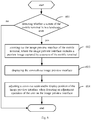
- Fig. 1 is a flowchart of a method for displaying an image preview interface according to a first embodiment of the present disclosure.
- the method for displaying an image preview interface is applied to a mobile terminal, which, as shown in Fig. 1 , includes steps 101 to 103.
- Step 101 includes detecting whether a screen of the mobile terminal is in a landscape state.
- step 102 proceeds in a case that mobile terminal is in the landscape mode; otherwise, the flow ends in a case that the mobile terminal is not in the landscape mode.
- the landscape state in the embodiments of the present disclosure refers to a longer edge of a screen being in a horizontally-displayed state and whether the screen is in a horizontally-displayed state can be detected by a gravity sensor in the mobile terminal in the method. If the screen is in a horizontally-displayed state, it is determined that the image preview interface is in the landscape state; to the contrary, if the screen is not in a horizontally-displayed state, it is determined that the image preview interface is not in the landscape state. How to detect whether the screen is in a horizontally-displayed state by the gravity sensor falls within the scope of related technology, which is not described herein.
- the image preview interface is in the landscape state by the method, it indicates that a user is holding the mobile terminal horizontally, during which a portion of the screen may be blocked due to limitation of dimensions and therefore a portion of the interface may be blocked, as shown in Fig. 2 .
- Step 102 includes zooming out the image preview interface of the mobile terminal, where the image preview interface includes a preview image captured by a camera of the mobile terminal.
- the image preview interface captured by the camera is scaled down in the method. That is, when the user is shooting by holding the mobile terminal in a landscape state, the image preview interface captured by the camera is zoomed out in the method.
- the camera of the mobile terminal may be a front camera or a rear camera, which is not limited in the embodiments of the present disclosure.
- the image preview interface may be zoomed out directly or after receiving a trigger operation of the user on the image preview interface in the method, or the image preview interface may be zoomed out based on how the screen of the mobile terminal is held by the user.
- the zooming out image preview interface may include zooming out the image preview interface to a predetermined scale, or determining a display scale based on the trigger operation of the user or how the screen of the mobile terminal is held by the user and zooming out the image preview interface to the determined display scale.
- Step 103 includes displaying the zoomed-out image preview interface.
- the zoomed-out image preview interface may be displayed in the method after step 102 for viewing of the user. As shown in Fig. 3 , the entire image preview interface can be viewed by the user, improving photographing effects.
- the mobile terminal above may be any mobile terminal with shooting functionality, such as a cellphone, a tablet personal computer (Tablet Personal Computer), a laptop computer (Laptop Computer), a personal digital assistant (personal digital assistant, abbreviated as PDA), a mobile internet device (Mobile Internet Device, MID) or a wearable device (Wearable Device).
- a cellphone a tablet personal computer (Tablet Personal Computer), a laptop computer (Laptop Computer), a personal digital assistant (personal digital assistant, abbreviated as PDA), a mobile internet device (Mobile Internet Device, MID) or a wearable device (Wearable Device).
- PDA personal digital assistant
- MID mobile internet device
- MID wearable device
- zooming out the image preview interface in a case that the screen of the mobile terminal is in a landscape state includes: zooming out the image preview interface in a case that the screen of the mobile terminal is in a landscape state and a zoom-out operation of the user on the image preview interface is detected.
- the image preview interface is zoomed out upon detecting a zoom-out operation of the user on the image preview interface.
- the zoom-out operation may be a click operation or a slide operation on anywhere or a predetermined position of the image preview interface, or a press operation on a physical button of the mobile terminal.
- the zoom-out operation may be consecutive click operation (such as double click or triple click) on anywhere or the predetermined position of the image preview interface, and the image preview interface is zoomed out by a predetermined scale in response to each consecutive click operation in the method.
- the zoom-out operation may also be a slide operation of a user finger on the image preview interface, for example, two fingers sliding in the same or opposite directions to zoom out the image preview interface, where the zoom-out scale may be a predetermined scale or determined based on a slide distance of the fingers.
- a virtual operating button may be provided within the image preview interface in the method, and the user can zoom out the image preview interface with the virtual operating button, as shown in Fig. 4 and Fig. 5 . It should be noted that the above zoom-out operations are intended merely for purpose of description rather than limiting, and any other operations which can trigger adjustment of the display scale of the image preview interface shall also fall within the scope of the present disclosure.
- the display scale of the image preview interface is reduced in response to the zoom-out operation.
- the image preview interface may be adjusted to a predetermined scale in response to the zoom-out operation, or a display scale may be determined based on the zoom-out operation and then the image preview interface is adjusted to the display scale determined based on the zoom-out operation in the method, which is not limited in the present disclosure.
- the image preview interface may be zoomed out by a predetermined scale on each double click or triple click operation in the method.
- the image preview interface is zoomed out by 20% in response to each double click or triple click operation.
- the zoom-out operation is a slide operation
- the image preview interface may be zoomed out by a predetermined scale after each slide operation, or a zoom-out scale is determined based on the slide operation and then the image preview interface is adjusted to the zoom-out scale as determined in the method.
- the image preview interface may be directly zoomed out to the predetermined scale, for example, 80%.
- the display scale of the image preview interface may also be reduced by a predetermined scale in response to each press operation of the user on the physical button of the mobile terminal in the method, for example, the display scale of the image preview interface may be reduced by a predetermined scale (for example, 20%) each time the user presses a volume-down button or a volume-up button.
- zooming out the image preview interface includes zooming out the image preview interface based on a predetermined scale; and displaying the zoomed-out image preview interface includes displaying the zoomed-out image preview interface in a predetermined position.
- zooming out the image preview interface includes zooming out the image preview interface based on a predetermined scale
- displaying the zoomed-out image preview interface includes displaying the zoomed-out image preview interface in a predetermined position (for example, left bottom corner or left top corner of the screen) in the method. That is, in the embodiment, in a case that it is detected the screen of the mobile terminal is in a landscape state, the image preview interface captured by the camera is zoomed out to the predetermined scale and the zoomed-out image preview interface is displayed in the predetermined position in the method.
- the predetermined scale and the predetermined position may be respectively a fixed scale and a fixed position set by the user in advance, or a zoom-out scale and a display position of the image preview interface in last execution of the method.
- a display position of the image preview interface with the adjusted display scale is adjusted as well, for example, the image preview interface with the adjusted display scale is directly displayed in the predetermined position, or is displayed a position where is not blocked by the user after detecting a position where the user holds the screen, which is not limited in the embodiment.
- the display scale of the image preview interface is adjusted to the predetermined scale in response to the zoom-out operation, and the image preview interface with the scale thereof adjusted is directly displayed in the predetermined position (for example, left bottom corner of the screen shown in Fig. 3 or Fig. 5 ) in the method.
- a display scale and a display position of the image preview interface in each shooting of the mobile terminal in a landscape mode are recorded in the method
- the predetermined scale and the predetermined position may be a display scale and a display position of the image preview interface in last shooting of the mobile terminal in the landscape mode recorded in the method.
- the image preview interface can be directly adjusted to the display scale and the display position in last shooting of the mobile terminal in the landscape mode in the method.
- the camera is a front camera of the mobile terminal.
- the preview interface may be easily blocked, affecting photographing effects.
- the operation of the user can be received, and the display scale and the display position of the image preview interface can be adjusted, improving selfie photographing effects of the user.
- the image preview interface is zoomed out in a case that the screen of the mobile terminal is in a landscape state, where the image preview interface includes a preview image captured by the camera of the mobile terminal, and the zoomed-out image preview interface is displayed.
- the image preview interface can be zoomed out when the user shoots in a landscape state by the method for displaying an image preview interface according to the present disclosure, thereby effectively avoiding blocking the preview interface when the user holds the mobile terminal to shoot images, and improving photographing effects.
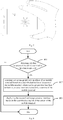
- Fig. 6 is a flowchart of a method for displaying an image preview interface according to a second embodiment of the present disclosure.
- the second embodiment differs from the first embodiment in that an adjustment operation of the user on the image preview interface can be detected and a zoom-out scale and/or display position of the image preview interface can be adjusted in response to the adjustment operation of the user on the image preview interface in the method.
- the method for displaying an image preview interface includes steps 601 to 604.
- Step 601 includes detecting whether a screen of the mobile terminal is in a landscape state.
- step 602 proceeds in a case that mobile terminal is in the landscape mode; otherwise, the flow ends in a case that the mobile terminal is not in the landscape mode.
- Step 602 includes zooming out the image preview interface of the mobile terminal, where the image preview interface includes a preview image captured by a camera of the mobile terminal.
- Step 603 includes displaying the zoomed-out image preview interface.
- Steps 601 to 603 are the same as steps 101 to 103 in the first embodiment of the present disclosure, which are therefore not described herein redundantly.
- Step 604 includes adjusting a zoom-out scale and/or display position of the image preview interface when detecting an adjustment operation of the user on the image preview interface.
- the zoom-out scale and/or display position of the image preview interface is adjusted in response to the adjustment operation on detecting the adjustment operation of the user on the image preview interface in the method.
- the adjustment operation may just be a zoom-out adjustment operation or a position adjustment operation, or may include both the zoom-out adjustment operation and the position adjustment operation. That is, on detecting the adjustment operation of the user on the image preview interface, it may be only the zoom-out scale or the display position of the image preview interface that is adjusted, or the zoom-out scale and the display position of the image preview interface may be both adjusted at the same time.
- the zoom-out adjustment operation on the image preview interface may be the zoom-out operation on the image preview interface according to the first embodiment of the present disclosure, which is not described herein redundantly.
- the position adjustment operation on the image preview interface may be a click or slide operation on anywhere or a predetermined position of the image preview interface, or a press operation on a physical button of the mobile terminal. It should be noted that the foregoing is merely an example of the position adjustment operation rather than a limitation, and any other operation capable of triggering the display position adjustment of the image preview interface shall fall within the scope of the present disclosure.
- the display position of the image preview interface is adjusted in response to the position adjustment operation in the method.
- the image preview interface may be adjusted to a predetermined position in response to the position adjustment operation in the method, or a display position may be determined based on the position adjustment operation and then the image preview interface is adjusted to the display position determined based on the position adjustment operation, which is not limited in the present disclosure.
- the image preview interface may be displayed in a predetermined position in response to the click operation in the method, for example, when the user clicks anywhere or a virtual button in the image preview interface, the image preview interface may be displayed in a predetermined position of the screen (for example, left bottom corner shown in Fig. 3 or Fig. 5 ) in the method.
- the position adjustment operation is a slide operation on the image preview interface
- the image preview interface may be controlled to move in the screen in response to the slide operation in the method.
- the display position of the image preview interface may be moved in response to each press operation of the user on a physical button of the mobile terminal in the method, for example, the display position of the image preview interface may be moved in a first predetermined direction (for example, left, down or left-down) by a predetermined distance each time the user presses a volume-down button in the method, and moved in a second predetermined direction (for example, right, up or right-up) by a predetermined distance each time the user presses a volume-up button in the method, where the first and second predetermined directions may be any two direction different from each other.
- a first predetermined direction for example, left, down or left-down
- a second predetermined direction for example, right, up or right-up
- the user can adjust the display position of the image preview interface based on his or her holding gesture, so that the user can adjust the image preview interface to a display position convenient for viewing of the user, as shown in Fig. 7 , which facilitates the user to adjust shooting position based on the preview interface when taking photos.
- the image preview interface of the mobile terminal is zoomed out in a case that the mobile terminal is in a landscape state, where the image preview interface includes a preview interface captured by the camera of the mobile terminal, and the zoomed-out image preview interface is displayed, and the zoom-out scale and/or display position of the image preview interface is adjusted on detecting an adjustment operation of the user on the image preview interface.
- the image preview interface can be adjusted in response to an operation of the user when taking photos in a landscape state by the method for displaying an image preview interface according to the present disclosure, thereby effectively avoiding blocking the image preview interface when the user holds the mobile terminal, and improving photographing effects.
- Fig. 8 is a flowchart of a method for displaying an image preview interface according to a third embodiment of the present disclosure.
- the third embodiment differs from the first embodiment in that the method can sense a holding position when the user holds the mobile terminal and automatically adjust a zoom-out scale and/or display position of the image preview interface based on the holding position.
- the method for displaying an image preview interface includes steps 801 to 803.
- Step 801 includes detecting whether a screen of the mobile terminal is in a landscape state.
- step 802 is performed in a case that the screen of the mobile terminal is in a landscape state; otherwise, the flow ends in a case that the screen of the mobile terminal is not in a landscape state.
- Step 802 includes zooming out the image preview interface of the mobile terminal based on a user-blocked region of a screen of the mobile terminal, where the image preview interface includes a preview interface captured by a camera of the mobile terminal.
- multiple sensors are provided at a side edge of the screen and/or on the screen of the mobile terminal and configured to sense the user-blocked region of the screen of the mobile terminal, where the user-blocked region is a region of the screen blocked by the user.
- the sensor may be a temperature sensor, and the user-blocked region of the screen of the mobile terminal can be determined based on temperature data obtained by multiple temperature sensors in the method.
- the sensor may also be a pressure sensor, and the user-blocked region of the screen of the mobile terminal can be determined based on pressure data obtained by multiple pressure sensors in the method.
- the image preview interface of the mobile terminal is zoomed out based on the user-blocked region of the screen of the mobile terminal in the method.
- a display scale may be determined based on the user-blocked region of the screen of the mobile terminal, and the image preview interface may be zoomed out to the display scale as determined in the method. Determining the display scale based on the user-blocked region of the screen of the mobile terminal may be determining the display scale only based on an area of the user-blocked region of the screen of the mobile terminal, or based on a ratio of the area of the screen of the mobile terminal by the user to an area of the screen, which is not limited in the embodiments of the present disclosure.
- Step 803 includes displaying the zoomed-out image preview interface based on the user-blocked region of the screen of the mobile terminal.
- the zoomed-out image preview interface may be displayed based on the user-blocked region of the screen of the mobile terminal in the method.
- a target region may be determined based on the user-blocked region of the screen of the mobile terminal, and the zoomed-out image preview interface is displayed in the target region in the method.
- a region of the screen which is not blocked by the user may be determined as the target region based on the user-blocked region of the screen of the mobile terminal, and the zoomed-out image preview interface is then displayed in the target region.
- the image preview interface may be zoomed out or displayed based on how the user holds the mobile terminal (that is, how the screen is blocked when the user holds the mobile terminal), overcoming the problem that photographing effects are affected due to the fact that the preview interface may be blocked when the user holds the mobile terminal in a landscape state to shoot images.
- zooming out the image preview interface based on the user-blocked region of the screen of the mobile terminal includes:
- zooming out the image preview interface based on the user-blocked region of the screen of the mobile terminal in the method specifically includes calculating a display scale based on an area of the user-blocked region of the screen of the mobile terminal and a total area of the screen and zooming out the image preview interface based on the display scale. Specifically, a ratio of the area of the user-blocked region of the screen of the mobile terminal to the total area of the screen is calculated and determined to be the display scale and the image preview interface is zoomed out to the display scale as calculated in the method.
- the image preview interface is zoomed out based on the ratio of the area of the user-blocked region of the screen of the mobile terminal to that of the screen in the method, which can ensure that the zoom-out image preview interface can be fully displayed in a unblocked region of the screen, thereby effectively preventing the image preview interface from being blocked.
- displaying the zoomed-out image preview interface based on the user-blocked region of the screen of the mobile terminal includes: displaying the zoomed-out image preview interface in a region of the screen of the mobile terminal other than the user-blocked region.
- displaying the zoomed-out image preview interface based on the user-blocked region of the screen of the mobile terminal specifically includes displaying the zoomed-out image preview interface in a region of the screen of the mobile terminal other than the user-blocked region. That is, in this embodiment, any other region of the screen which is not blocked by the user may be determined as a target region based on the user-blocked region of the screen, and the zoomed-out image preview interface is displayed in the target region in the method. For example, as shown in Fig. 3 , the zoomed-out image preview interface is displayed in a left bottom corner region of the screen in the method. In this way, the user can conveniently view the entire image preview interface when holding the cellphone, facilitating the user to adjust a position based on the preview interface and improving photographing effects.
- the image preview interface is zoomed out based on the user-blocked region of the screen of the mobile terminal, where the image preview interface includes a preview interface captured by the camera of the mobile terminal, and the zoomed-out image preview interface is displayed based on the user-blocked region of the screen of the mobile terminal.
- the display position of the image preview interface can be automatically adjusted based on a holding gesture of the user when the user shoots images in a landscape mode with the method according to the embodiment, which can effectively prevent the image preview interface from being blocked when the user holds the mobile terminal and improve photographing effects.
- Fig. 9 is a structural diagram of a mobile terminal according to a fourth embodiment of the present disclosure.
- the mobile terminal 900 includes:
- the zoom-out module 902 is configured to zoom out the image preview interface in a case that the mobile terminal is in the landscape state and a zoom-out operation of a user on the image preview interface is detected.
- the zoom-out module 902 is configured to zoom out the image preview interface based on a predetermined scale in a case that the mobile terminal is in the landscape state
- the display module 903 is configured to display the zoomed-out image preview interface in a predetermined position.
- the mobile terminal further includes an adjustment module 904 configured to adjust a zoom-out scale and/or display position of the image preview interface when detecting an adjustment operation of the user on the image preview interface.
- an adjustment module 904 configured to adjust a zoom-out scale and/or display position of the image preview interface when detecting an adjustment operation of the user on the image preview interface.
- the zoom-out module 902 is configured to zoom out the image preview interface based on a user-blocked region of the screen of the mobile terminal, in a case that the mobile terminal is in a landscape state; and the display module 903 is configured to display the zoomed-out image preview interface based on the user-blocked region of the screen of the mobile terminal.
- the zoom-out module 902 includes:
- the display module 903 is configured to display the zoomed-out image preview interface in a region of the screen of the mobile terminal other than the user-blocked region.
- the mobile terminal 900 can implement the steps performed by the mobile terminal according to the method embodiments as shown in Fig. 1 to Fig. 8 , which is not described redundantly herein for purpose of conciseness.
- Fig. 12 is a schematic structural diagram of a mobile terminal 1200 according to a fifth embodiment of the present disclosure.
- the mobile terminal 1200 includes at least one processor 1201, a memory 1202, at least one user interface 1203 and a network interface 1204.
- the components of the mobile terminal 1200 are coupled by a bus system 1205.
- the bus system 1005 is configured to implement connections and communications between the components.
- the bus system 1205 further includes a power supply bus, a control bus and a state signal bus.
- the various buses are denoted by bus system 1205 in Fig. 12 .
- the user interfaces 1203 may include a display, a keyboard, or a click device, such as a mouse, a trackball, a touchpad or a touch screen.
- the memory 1202 in the embodiments of the present disclosure may be a volatile memory or a non-volatile memory, or may include both volatile and non-volatile memories.
- the non-volatile memory may be a read-only memory (Read-Only Memory, ROM), a programmable read-only memory (Programmable ROM, PROM), an erasable programmable read-only memory (Erasable PROM, EPROM), or an electrically erasable programmable read-only memory (Electrically EPROM, EEPROM) or a flash memory.
- the volatile memory may be a random access memory (Random Access Memory, RAM) that acts as a high-speed external cache.
- RAM static random access memory
- DRAM dynamic random access memory
- DRAM synchronous dynamic random access memory
- SDRAM double data rate synchronous dynamic random access memory
- Double Data Rate SDRAM DDRSDRAM
- ESDRAM enhanced synchronous dynamic random access memory
- Synchlink connection dynamic random access memory Synchlink DRAM, SDRAM
- Direct Rambus RAM Direct Rambus RAM
- the memory 1202 stores elements, executable modules or data structures, or a subset thereof, or an extended set thereof: an operating system 12021 and an application 12022.
- the operating system 12021 includes various system programs, such as a framework layer, a core library layer, a driver layer, and the like, for implementing various basic services and processing hardware-based tasks.
- the application 12022 includes various applications, such as a media player (Media Player), a browser (Browser), and the like, for implementing various application services.
- a program implementing the methods according to the embodiments of the present disclosure may be included in the application 12022.
- the processor 1201 by invoking a program or instructions stored in the memory 1202, which may be a program or instructions stored in the application 12022, the processor 1201 is configured to:
- the methods according to the foregoing embodiments of the present disclosure can be applied to the processor 1201, or implemented by the processor 1201.
- the processor 1201 may be an integrated circuit chip with signal processing capabilities.
- each step of the foregoing methods may be completed by an integrated logic circuit in form of hardware or instructions in form of software in the processor 1201.
- the processor 1201 above may be a general-purpose processor, a digital signal processor (Digital Signal Processor, DSP), an application specific integrated circuit (Application Specific Integrated Circuit, ASIC), a field programmable gate array (Field Programmable Gate Array, FPGA) or any other programmable logic device, a discrete gate, a transistor logic device or a discrete hardware component, which can implement or carry out the methods, steps, and logical block diagrams according to the embodiments of the present disclosure.
- the general-purpose processor may be a microprocessor, or the processor may be any conventional processor.
- the steps of the methods according to the embodiments of the present disclosure may be directly implemented by a hardware decoding processor, or may be performed by a combination of hardware and software modules in the decoding processor.
- the software module may be located in a conventional storage medium such as a random access memory, a flash memory, a read-only memory, a programmable read-only memory, an electrically erasable programmable memory, or a registers.
- the storage medium is located in the memory 1202, and the processor 1201 reads the information in the memory 1202 and completes the steps of the above methods in combination with its hardware.
- the embodiments described herein can be implemented in the form of hardware, software, firmware, middleware, microcode, or a combination thereof.
- the processing unit can be implemented in one or more application specific integrated circuits (Application Specific Integrated Circuits, ASIC), digital signal processors (Digital Signal Processing, DSP), digital signal processing devices (DSP Device, DSPD), programmable logic devices (Programmable Logic Device, PLD), field-programmable gate arrays (Field-Programmable Gate Array, FPGA), general purpose processors, controllers, microcontrollers, microprocessors, other electronics units for performing the functions according to the present disclosure or combinations of the above.
- ASIC Application Specific Integrated Circuits
- DSP Digital Signal Processing
- DSP Device digital signal processing devices
- PLD programmable logic devices
- FPGA field-programmable gate array
- general purpose processors controllers, microcontrollers, microprocessors, other electronics units for performing the functions according to the present disclosure or combinations of the above.
- the technical solutions according to the present disclosure can be implemented by modules (e.g., processes, functions, and so on) for performing the functions according to the present disclosure.
- the software code can be stored in the memory and executed by the processor, and the memory can be implemented in the processor or outside the processor.
- zooming out, by the processor 1201, the image preview interface in a case that the screen of the mobile terminal is in the landscape state includes: zooming out the image preview interface in a case that the screen of the mobile terminal is in the landscape state and a zoom-out operation of a user on the image preview interface is detected.
- zooming out, by the processor 1201, the image preview interface includes zooming out the image preview interface based on a predetermined scale; and displaying, by the processor 1201, the image preview interface includes displaying the zoomed-out image preview interface in a predetermined position.
- the processor 1201 is further configured to: adjust a zoom-out scale and/or display position of the image preview interface on detecting an adjustment operation of the user on the image preview interface.
- zooming out, by the processor 1201, the image preview interface includes zooming out the image preview interface based on a user-blocked region of the screen of the mobile terminal; and displaying, by the processor 1201, the image preview interface includes displaying the zoomed-out image preview interface based on the user-blocked region of the screen of the mobile terminal.
- zooming out, by the processor 1201, the image preview interface based on the user-blocked region of the screen of the mobile terminal includes:
- displaying, by the processor 1201, the zoomed-out image preview interface based on the user-blocked region of the screen of the mobile terminal includes: displaying the zoomed-out image preview interface in a region of the screen of the mobile terminal other than the user-blocked region.
- the mobile terminal 1200 can implement the processes performed by the mobile terminal 1200 according to the foregoing embodiments, which is not described redundantly herein for purpose of conciseness.
- the image preview interface is zoomed out in a case that the mobile terminal is in a landscape state, where the image preview interface includes a preview interface captured by the camera of the mobile terminal, and the zoomed-out image preview interface is displayed.
- the image preview interface can be zoomed out when the user shoots images in the landscape state with the method for displaying an image preview interface according to the present disclosure, thereby overcoming the problem that photographing effects are affected due to the fact that the preview interface may be blocked when the user holds the mobile terminal.
- the disclosed apparatus and method may be implemented in other manners.
- the apparatus embodiments described above are merely illustrative.
- the division of the units is only a logical function division, and in practical implementation, there may be another manner of division.
- multiple units or components may be combined or integrated into another system, or some features can be ignored or not implemented.
- the mutual coupling or direct coupling or communication connection shown or discussed may be implemented with some interfaces, and indirect coupling or communication connection between apparatuses or units may be electrical, mechanical or in other forms.
- the units described as separate components may or may be not physically separated, and the components shown as units may or may be not physical units, that is, they may be located in one place or distributed to multiple network units. Some or all of the units may be selected according to practical needs to achieve the objective of the technical solutions of the embodiments.
- the product may be stored in a computer readable storage medium.
- the computer software product is stored in a storage medium, which includes instructions that cause a computer device (which may be a personal computer, a server or a network device) to perform all or part of the steps of the methods according to the embodiments of the present disclosure.
- the foregoing storage medium may include any storage medium that can store program codes, such as a USB flash drive, a mobile hard disk, a ROM, a RAM, a magnetic disk, or an optical disk.
Landscapes
- Engineering & Computer Science (AREA)
- General Engineering & Computer Science (AREA)
- Theoretical Computer Science (AREA)
- Human Computer Interaction (AREA)
- Signal Processing (AREA)
- Physics & Mathematics (AREA)
- General Physics & Mathematics (AREA)
- Multimedia (AREA)
- Computer Networks & Wireless Communication (AREA)
- User Interface Of Digital Computer (AREA)
- Controls And Circuits For Display Device (AREA)
Applications Claiming Priority (2)
| Application Number | Priority Date | Filing Date | Title |
|---|---|---|---|
| CN201710112439.7A CN106909224B (zh) | 2017-02-28 | 2017-02-28 | 一种显示图像预览界面的方法及移动终端 |
| PCT/CN2017/119080 WO2018157659A1 (zh) | 2017-02-28 | 2017-12-27 | 显示图像预览界面的方法及移动终端 |
Publications (2)
| Publication Number | Publication Date |
|---|---|
| EP3579080A1 true EP3579080A1 (de) | 2019-12-11 |
| EP3579080A4 EP3579080A4 (de) | 2020-02-05 |
Family
ID=59208645
Family Applications (1)
| Application Number | Title | Priority Date | Filing Date |
|---|---|---|---|
| EP17899075.0A Withdrawn EP3579080A4 (de) | 2017-02-28 | 2017-12-27 | Verfahren zur anzeige einer bildvorschauschnittstelle und mobiles endgerät |
Country Status (4)
| Country | Link |
|---|---|
| US (1) | US20200014851A1 (de) |
| EP (1) | EP3579080A4 (de) |
| CN (1) | CN106909224B (de) |
| WO (1) | WO2018157659A1 (de) |
Families Citing this family (11)
| Publication number | Priority date | Publication date | Assignee | Title |
|---|---|---|---|---|
| CN106909224B (zh) * | 2017-02-28 | 2018-10-19 | 维沃移动通信有限公司 | 一种显示图像预览界面的方法及移动终端 |
| CN111149349B (zh) * | 2017-09-28 | 2021-08-03 | 富士胶片株式会社 | 摄影装置和其控制方法及存储介质 |
| CN108111889B (zh) * | 2017-12-14 | 2020-09-08 | Oppo广东移动通信有限公司 | 电子设备及相关产品 |
| CN107864299B (zh) * | 2017-12-25 | 2020-08-21 | Oppo广东移动通信有限公司 | 图片显示方法及相关产品 |
| CN108111649A (zh) * | 2017-12-25 | 2018-06-01 | 广东欧珀移动通信有限公司 | 电子装置、拍照方法及相关产品 |
| CN108073343B (zh) * | 2018-01-26 | 2019-12-17 | 维沃移动通信有限公司 | 一种显示界面调整方法及移动终端 |
| CN110083395B (zh) * | 2019-04-15 | 2023-07-18 | 上海墨案智能科技有限公司 | 一种触控方法、电子设备、可拆卸部件和存储介质 |
| CN110297566B (zh) * | 2019-06-28 | 2023-04-07 | Oppo广东移动通信有限公司 | 电子设备及界面调整方法 |
| CN113821183B (zh) * | 2021-06-01 | 2025-06-03 | 腾讯科技(深圳)有限公司 | 窗口显示方法、装置、电子设备及存储介质 |
| DE102021114586A1 (de) * | 2021-06-07 | 2022-12-08 | B. Braun New Ventures GmbH | Endoskopischer Navigationszeiger |
| CN113949815B (zh) * | 2021-11-17 | 2024-10-25 | 维沃移动通信有限公司 | 一种拍摄预览方法、装置及电子设备 |
Family Cites Families (19)
| Publication number | Priority date | Publication date | Assignee | Title |
|---|---|---|---|---|
| US7085590B2 (en) * | 2003-12-31 | 2006-08-01 | Sony Ericsson Mobile Communications Ab | Mobile terminal with ergonomic imaging functions |
| JP4510713B2 (ja) * | 2005-07-21 | 2010-07-28 | 富士フイルム株式会社 | デジタルカメラ |
| JP2011176794A (ja) * | 2010-01-26 | 2011-09-08 | Canon Inc | 撮像装置及び撮像方法 |
| US8593418B2 (en) * | 2010-08-08 | 2013-11-26 | Qualcomm Incorporated | Method and system for adjusting display content |
| CN102065183A (zh) * | 2010-12-31 | 2011-05-18 | 惠州Tcl移动通信有限公司 | 一种手机及其摄像处理方法 |
| US20140078178A1 (en) * | 2012-09-14 | 2014-03-20 | Eric Qing Li | Adaptive Display Of A Visual Object On A Portable Device |
| KR101545883B1 (ko) * | 2012-10-30 | 2015-08-20 | 삼성전자주식회사 | 단말의 카메라 제어 방법 및 그 단말 |
| KR102034583B1 (ko) * | 2013-02-28 | 2019-10-21 | 엘지전자 주식회사 | 디지털 디바이스 및 그 제어 방법 |
| CN104243791B (zh) * | 2013-06-19 | 2018-03-23 | 联想(北京)有限公司 | 一种信息处理方法及电子设备 |
| KR102182401B1 (ko) * | 2014-06-11 | 2020-11-24 | 엘지전자 주식회사 | 이동단말기 및 그 제어방법 |
| KR20160019187A (ko) * | 2014-08-11 | 2016-02-19 | 엘지전자 주식회사 | 이동 단말기 및 그 제어 방법 |
| KR20160020896A (ko) * | 2014-08-14 | 2016-02-24 | 삼성전자주식회사 | 디지털 영상 처리 방법, 상기 방법을 기록한 컴퓨터 판독 가능 저장매체 및 디지털 영상 처리 장치. |
| US9712751B2 (en) * | 2015-01-22 | 2017-07-18 | Apple Inc. | Camera field of view effects based on device orientation and scene content |
| CN105573485B (zh) * | 2015-05-28 | 2018-12-25 | 宇龙计算机通信科技(深圳)有限公司 | 一种显示内容调节方法及终端 |
| CN104850660A (zh) * | 2015-06-04 | 2015-08-19 | 广东欧珀移动通信有限公司 | 一种图片显示方法、装置及移动终端 |
| CN105204733B (zh) * | 2015-09-02 | 2019-05-21 | 小米科技有限责任公司 | 视频聊天窗口的显示方法及装置 |
| CN105278910B (zh) * | 2015-11-24 | 2019-07-30 | 努比亚技术有限公司 | 一种显示方法及装置 |
| CN105867764A (zh) * | 2016-03-25 | 2016-08-17 | 乐视控股(北京)有限公司 | 一种多媒体调节方法、装置及移动设备 |
| CN106909224B (zh) * | 2017-02-28 | 2018-10-19 | 维沃移动通信有限公司 | 一种显示图像预览界面的方法及移动终端 |
-
2017
- 2017-02-28 CN CN201710112439.7A patent/CN106909224B/zh active Active
- 2017-12-27 EP EP17899075.0A patent/EP3579080A4/de not_active Withdrawn
- 2017-12-27 US US16/489,239 patent/US20200014851A1/en not_active Abandoned
- 2017-12-27 WO PCT/CN2017/119080 patent/WO2018157659A1/zh not_active Ceased
Also Published As
| Publication number | Publication date |
|---|---|
| EP3579080A4 (de) | 2020-02-05 |
| CN106909224A (zh) | 2017-06-30 |
| WO2018157659A1 (zh) | 2018-09-07 |
| CN106909224B (zh) | 2018-10-19 |
| US20200014851A1 (en) | 2020-01-09 |
Similar Documents
| Publication | Publication Date | Title |
|---|---|---|
| EP3579080A1 (de) | Verfahren zur anzeige einer bildvorschauschnittstelle und mobiles endgerät | |
| US8723988B2 (en) | Using a touch sensitive display to control magnification and capture of digital images by an electronic device | |
| CN104461288B (zh) | 使用不同视场角摄像头拍照的方法和终端 | |
| CN107155064B (zh) | 一种拍摄方法及移动终端 | |
| WO2018192390A1 (zh) | 一种移动终端的拍摄方法及移动终端 | |
| CN106648035A (zh) | 一种图像分辨率的调整方法及移动终端 | |
| CN107172346B (zh) | 一种虚化方法及移动终端 | |
| US11693544B2 (en) | Mobile terminal display picture control method, apparatus, and device and storage medium | |
| CN107395997A (zh) | 一种拍摄方法及移动终端 | |
| CN106534685A (zh) | 一种全景图像生成方法及移动终端 | |
| CN106170058A (zh) | 一种曝光方法及移动终端 | |
| CN103973959A (zh) | 电子装置及电子装置拍摄操作方法 | |
| CN107147837A (zh) | 一种拍摄参数的设置方法和移动终端 | |
| CN107181913A (zh) | 一种拍照方法及移动终端 | |
| WO2019062431A1 (zh) | 拍摄方法及移动终端 | |
| CN107580179A (zh) | 一种摄像头启动方法及移动终端 | |
| CN106101544A (zh) | 一种图像处理方法及移动终端 | |
| CN106210512A (zh) | 一种摄像头切换方法及移动终端 | |
| CN106791375B (zh) | 一种拍摄对焦方法及移动终端 | |
| CN106331484A (zh) | 一种对焦方法及移动终端 | |
| CN107222737A (zh) | 一种深度图像数据的处理方法及移动终端 | |
| WO2017059734A1 (zh) | 一种图片缩放方法及电子设备 | |
| CN106095280A (zh) | 一种拍照方法及移动终端 | |
| CN106454086A (zh) | 一种图像处理方法和移动终端 | |
| CN106888354A (zh) | 一种单手拍照方法及移动终端 |
Legal Events
| Date | Code | Title | Description |
|---|---|---|---|
| STAA | Information on the status of an ep patent application or granted ep patent |
Free format text: STATUS: THE INTERNATIONAL PUBLICATION HAS BEEN MADE |
|
| PUAI | Public reference made under article 153(3) epc to a published international application that has entered the european phase |
Free format text: ORIGINAL CODE: 0009012 |
|
| STAA | Information on the status of an ep patent application or granted ep patent |
Free format text: STATUS: REQUEST FOR EXAMINATION WAS MADE |
|
| 17P | Request for examination filed |
Effective date: 20190904 |
|
| AK | Designated contracting states |
Kind code of ref document: A1 Designated state(s): AL AT BE BG CH CY CZ DE DK EE ES FI FR GB GR HR HU IE IS IT LI LT LU LV MC MK MT NL NO PL PT RO RS SE SI SK SM TR |
|
| AX | Request for extension of the european patent |
Extension state: BA ME |
|
| A4 | Supplementary search report drawn up and despatched |
Effective date: 20200109 |
|
| RIC1 | Information provided on ipc code assigned before grant |
Ipc: G06F 3/0488 20130101ALI20200102BHEP Ipc: G06F 3/01 20060101AFI20200102BHEP |
|
| DAV | Request for validation of the european patent (deleted) | ||
| DAX | Request for extension of the european patent (deleted) | ||
| STAA | Information on the status of an ep patent application or granted ep patent |
Free format text: STATUS: EXAMINATION IS IN PROGRESS |
|
| 17Q | First examination report despatched |
Effective date: 20211012 |
|
| STAA | Information on the status of an ep patent application or granted ep patent |
Free format text: STATUS: THE APPLICATION IS DEEMED TO BE WITHDRAWN |
|
| 18D | Application deemed to be withdrawn |
Effective date: 20230711 |