EP3480752A1 - Inspektionsarbeitsablauf unter verwendung von objekterkennung und anderer verfahren - Google Patents
Inspektionsarbeitsablauf unter verwendung von objekterkennung und anderer verfahren Download PDFInfo
- Publication number
- EP3480752A1 EP3480752A1 EP18204629.2A EP18204629A EP3480752A1 EP 3480752 A1 EP3480752 A1 EP 3480752A1 EP 18204629 A EP18204629 A EP 18204629A EP 3480752 A1 EP3480752 A1 EP 3480752A1
- Authority
- EP
- European Patent Office
- Prior art keywords
- equipment
- inspection
- user
- data
- piece
- Prior art date
- Legal status (The legal status is an assumption and is not a legal conclusion. Google has not performed a legal analysis and makes no representation as to the accuracy of the status listed.)
- Ceased
Links
Images


Classifications
-
- G—PHYSICS
- G06—COMPUTING OR CALCULATING; COUNTING
- G06Q—INFORMATION AND COMMUNICATION TECHNOLOGY [ICT] SPECIALLY ADAPTED FOR ADMINISTRATIVE, COMMERCIAL, FINANCIAL, MANAGERIAL OR SUPERVISORY PURPOSES; SYSTEMS OR METHODS SPECIALLY ADAPTED FOR ADMINISTRATIVE, COMMERCIAL, FINANCIAL, MANAGERIAL OR SUPERVISORY PURPOSES, NOT OTHERWISE PROVIDED FOR
- G06Q10/00—Administration; Management
- G06Q10/20—Administration of product repair or maintenance
-
- H—ELECTRICITY
- H04—ELECTRIC COMMUNICATION TECHNIQUE
- H04N—PICTORIAL COMMUNICATION, e.g. TELEVISION
- H04N23/00—Cameras or camera modules comprising electronic image sensors; Control thereof
- H04N23/60—Control of cameras or camera modules
- H04N23/64—Computer-aided capture of images, e.g. transfer from script file into camera, check of taken image quality, advice or proposal for image composition or decision on when to take image
-
- G—PHYSICS
- G06—COMPUTING OR CALCULATING; COUNTING
- G06V—IMAGE OR VIDEO RECOGNITION OR UNDERSTANDING
- G06V20/00—Scenes; Scene-specific elements
- G06V20/20—Scenes; Scene-specific elements in augmented reality scenes
-
- H—ELECTRICITY
- H04—ELECTRIC COMMUNICATION TECHNIQUE
- H04N—PICTORIAL COMMUNICATION, e.g. TELEVISION
- H04N7/00—Television systems
- H04N7/18—Closed-circuit television [CCTV] systems, i.e. systems in which the video signal is not broadcast
- H04N7/183—Closed-circuit television [CCTV] systems, i.e. systems in which the video signal is not broadcast for receiving images from a single remote source
-
- G—PHYSICS
- G06—COMPUTING OR CALCULATING; COUNTING
- G06F—ELECTRIC DIGITAL DATA PROCESSING
- G06F3/00—Input arrangements for transferring data to be processed into a form capable of being handled by the computer; Output arrangements for transferring data from processing unit to output unit, e.g. interface arrangements
- G06F3/01—Input arrangements or combined input and output arrangements for interaction between user and computer
- G06F3/048—Interaction techniques based on graphical user interfaces [GUI]
- G06F3/0481—Interaction techniques based on graphical user interfaces [GUI] based on specific properties of the displayed interaction object or a metaphor-based environment, e.g. interaction with desktop elements like windows or icons, or assisted by a cursor's changing behaviour or appearance
- G06F3/0482—Interaction with lists of selectable items, e.g. menus
Definitions
- aspects of this disclosure are directed toward systems and methods for collecting data during a workflow routine.
- Various methods can include receiving information regarding an environment and outputting information regarding pieces of equipment in the environment, such as the pieces of equipment within the environment available for inspection, directions to a location of a selected piece of equipment, one or more parameters associated with a selected piece of equipment, a workflow routine for acquiring inspection data, and/or a reference image representing a selected piece of equipment.
- Methods can include acquiring inspection data representative of at least one parameter associated with the identified piece of equipment.
- Inspection data can include image data, such as acoustic image data, infrared image data, and/or visible light image data, for example.
- Exemplary systems can include an inspection tool, a user interface, memory, and a processor.
- the processor can be configured to provide instructions to a user to perform a workflow routine using the inspection tool to collect inspection data via the inspection tool, acquire the inspection data, and save the acquired inspection data to memory.
- Providing instructions can include displaying a list of equipment that is part of the workflow routine and available for inspection. Additionally or alternatively, providing instructions can include displaying a list of steps to perform during the workflow routine.
- Such measuring devices can include one or more imaging tools capable of generating image data representative of a target scene and/or one or more test and measurement tool capable of generating measurement data representative of one or more parameters of an object under test.
- Exemplary imaging tools can include electromagnetic imaging tools, and can be configured to generate image data representative of electromagnetic radiation from a target scene, such as infrared image data, visible light image data, ultraviolet image data, millimeter wave image data, and the like. Combinations of one or more electromagnetic spectrums may also be used, for example, as described in U.S. Patent No. 7,538,326 , entitled "VISIBLE LIGHT AND IR COMBINED IMAGE CAMERA WITH A LASER POINTER,” which is assigned to the assignee of the instant application, and is hereby incorporated by reference in its entirety.
- an imaging tool can include an acoustic imaging tool including one or more acoustic sensor elements used to generate an acoustic image of a target scene.
- acoustic imaging tool including one or more acoustic sensor elements used to generate an acoustic image of a target scene.
- Exemplary acoustic imaging tools, and combinations of acoustic imaging tool and electromagnetic imaging tools, are described in U.S. Patent Application No. 15/802,153, filed November 2, 2017 , and entitled "FOCUS AND/OR PARALLAX ADJUSTMENT IN ACOUSTIC IMAGING USING DISTANCE INFORMATION," which is assigned to the assignee of the instant application and is hereby incorporated by reference in its entirety.
- Electromagnetic imaging tools and/or acoustic imaging tools may be combined or otherwise in communication with one another and/or with other test and measurement tools, for example, as described in U.S. Patent Application No. 14/855,884, filed September 16, 2015 , and entitled "TEST AND MEASUREMENT SYSTEM WITH REMOVABLE IMAGING TOOL,” which is assigned to the assignee of the instant application and is hereby incorporated by reference in its entirety.
- imaging and/or test and measurement functionally may be incorporated into a user's external device (e.g., smartphone, tablet, etc.), such as described in U.S. Patent Application No.
- Inspection and/or maintenance data may be analyzed individually or collectively and used for predictive maintenance or fault prediction.
- maintenance and/or inspection processes can be complex and/or lengthy, making consistent inspections difficult to perform consistently while gathering a complete set of proper data. Additionally or alternatively, such processes may be performed by an inexperienced worker and/or a worker that is unfamiliar with one or more inspection processes and/or a particular environment in which the maintenance and/or inspection process is being performed.
- Aiding techniques and data processing techniques can be used to guide and assist an individual in performing a maintenance and/or inspection process, for example, by assisting a system user in a data collection workflow process. Such aiding can result in faster, easier, and more reliable/consistent data collection.
- these aiding techniques can support or provide an inspection and/or maintenance workflow procedure.
- such techniques provide guidance to the user during the workflow and may involve manual inputs from the user and/or automatic means of acquiring and analyzing measurements.
- useful information for performing various tasks in a maintenance and/or inspection procedure may be provided to the user on an ongoing basis throughout the process, and can be provided on-demand or automatically by a processing/analysis system.
- Such information may include the locations of equipment that is to be inspected, how the measurements should be taken, and whether or not measurements that are obtained are taken appropriately.
- This information may be provided to the user in the form of text messages, as graphical/text indicators superimposed on live imagery, as sound cues, as light indicators, or by other means.
- determining which indicators should be presented to a user can be performed in a variety of ways, including, for example, location detection, processing live imagery to determine the identify of an object under test, or other live data (e.g., proximity detection relative to an object) collected from other sensor devices.
- CMMS computerized maintenance management system
- database entries can include a variety of maintenance and/or inspection information, including past results, instructions for performing such processes, possible errors that can be observed during maintenance/inspection, and the like.
- the aiding and processing techniques and results described herein therefore provide useful data which improves the effectiveness of such a maintenance management system.
- Such additional data along with the increased reliability of measurements due to aiding, result in better maintenance of equipment and more reliable fault predictions.
- Inspection and/or maintenance tools and/or activities may be part of an overall CMMS system.
- one or more tools e.g., a test and measurement tool, imaging tool, etc.
- a separate device such as a computer workstation, an external device such as a smartphone or a tablet, or the like.
- data acquired by a tool carried by a user e.g., an imaging tool, a test and measurement tool, or the like
- an external device such as described in U.S.
- Patent Application No. 14/855,989 filed September 17, 2015 , and entitled "DISPLAY OF IMAGES FROM AN IMAGING TOOL EMBEDDED OR ATTACHED TO A TEST AND MEASUREMENT TOOL," which is assigned to the assignee of the instant application and is hereby incorporated by reference in its entirety.
- such a software platform may involve a licensing and delivery model in which software is licensed on a subscription basis and is centrally hosted and may be referred to as a Software as a Service, or SAAS.
- SAAS Software as a Service
- Such a system may be made accessible to users using a client via a web browser or other means.
- Measurement data including imagery, over time, for example, for a particular piece of equipment, as well as analysis results of such data and/or signals sent directly from the equipment itself, may be provided to and made available from the SAAS.
- data can include results from a variety of sensor devices including images from an IR, VL, acoustic, or other imaging system.
- Data can additionally or alternatively include metrics/analysis/trends obtained by analysis from such measurements and imagery.
- data from the SAAS such as imagery, measurement data, and other data for a piece of multiple pieces of equipment may be automatically associated to that equipment and may be provided to a user of the SAAS, for example, to assist with future maintenance and/or inspection processes.
- Such imagery, measurement data, and other data may be provided to a user in an on-demand fashion, or automatically via an alarm/notification system.
- data may be downloaded from the SAAS and stored in memory on board one or more tools carried by a user, and/or on a user's personal device, such as a smartphone or tablet.
- a user may access such data real time from a remote location, such as a hosted server providing access to a user, e.g., via a tool and/or a personal device.
- a user may receive data (e.g., using a tool and/or personal device) that can provide information representative of previous and/or expected measurement information, steps for performing one or more maintenance and/or inspection processes, or other equipment information.
- trend analysis and/or generating a CMMS or SAAS for use with guided inspections can include building a statistical database of typical equipment operation, for example, as described in U.S. Patent Application No. 15/190,792, filed June 23, 2016 , and entitled "THERMAL ANOMALY DETECTION,” which is assigned to the assignee of the instant application and is hereby incorporated by reference in its entirety.
- a user may be provided (e.g., via on-board memory, network access, etc.) a workflow routine instructing the user how to perform one or more maintenance and/or inspection processes.
- a workflow routine may be documented in the form of a procedure, which may be brief or quite detailed.
- a detailed procedure may include, for example, a list of equipment to be inspected and/or maintained, the measuring devices (sensors) to use for each piece of equipment to be inspected, and/or the methods and/or settings in which the measuring devices are to be used at each inspection step.
- One or more measuring devices used during workflows may include an interface that allows for access/viewing of a workflow procedure, stored as an electronic document or instruction set, which the user may review at will during the inspection.
- the electronic document or instruction set may reside on one of, and may be shared between, the multiple sensing devices used during the workflow.
- the electronic document may reside on a separate device (pc, smartphone, or tablet) that the user carries during the inspection process, or it may reside remotely and be communicated to the measuring equipment or other device that the user carries, (from a data cloud or a central hub that is used for data collection and processing).
- An exemplary workflow procedure may include the physical route of the inspections/maintenance, the equipment to be inspected/maintained, the measurement devices (e.g., imaging tools, test and measurement tools, etc.) to be used in inspecting each piece of equipment at each step, measurement device settings, connection diagrams for electrical and other contact inspections, required viewing angles and perspectives for image inspections, and/or previously acquired reference images that indicate the appropriate image appearance for imagery at each step of an image-based inspection.
- Such imagery inspections may involve IR, VL, mm wave, acoustic, or other imaging devices.
- the measuring devices imagers and other sensors
- a separate device pc, smartphone, or tablet
- the user may have access to the electronic workflow procedure. Additionally or alternatively, the user may be able to manually record their progress and/or measurement results during the inspections and measurements during the workflow, for example, saving data to a SAAS and/or CMMS. In some examples, the progress through the workflow and/or the measurements themselves may be recorded automatically.
- the physical real-time location of a user and/or of the measuring device(s) may be automatically tracked during the workflow or may be manually entered by the user.
- Automatic methods may include GPS, inertial tracking methods, triangulation by use of external devices, by proximity or RFID sensors placed at various locations, or by other means.
- the physical location of equipment to inspect may also be known to the processing system.
- the real-time location data of the operator and sensors may be used to infer which pieces of equipment can be inspected (e.g., are near the user, such as within a predetermined proximity of the user) at a given time. These determinations can be made either inside a measuring device (e.g., imaging tools, test and measurement tools, etc.), in a separate device that the user is carrying, (ex. pc, smartphone, or tablet), or at a separate processing hub which is in communication with one or more such devices.
- a measuring device e.g., imaging tools, test and measurement tools, etc.
- guidance can be provided to a user as to the proper actions/measurements to take for a given one or more pieces of equipment that are accessible for inspection a given point. For example, based on known locations of a user and equipment available for inspection, should the user wish to take a measurement or collect an image at a known location, a set of candidate equipment for inspection at that location may be indicated to the user. Thus, the user may select an item from a candidate list of known items. Such a selection may trigger execution of further guidance for performing maintenance and/or inspection of the selected equipment, and/or may pre-load a variety of available data representative of the equipment, eliminating the need for manual entry of some such details, such as the full description of the equipment. As the user verifies the specific identity of the equipment of interest, the instructions for taking required measurements may be indicated, and any subsequent measurements may be automatically associated to the specific equipment for future reference (e.g., in a CMMS and/or SAAS).
- a specific piece of equipment near the user can be identified automatically and in real time.
- identification can be achieved as a result of the known physical location of the inspection device(s) and equipment, or by an identification signal (active or passive) transmitted from the equipment to the inspection device, or by an external triangulation system.
- identification of the equipment might be achieved by object recognition image processing techniques where the equipment is identified within the imagery in real time.
- object recognition image processing techniques can include, for example, correlation methods and blob analysis.
- identification of a specific piece of equipment might be achieved by combing live data obtained from a number of different sensors such as acoustic, mm-wave, visual imaging, and IR imaging.
- a user may or may not be prompted to manually select the equipment, for example, from a candidate list, or otherwise confirm the identity of the automatically identified equipment. For instance, in some examples, identification of the equipment to be inspected may be indicated to the user, and useful reference information regarding the specific equipment can be provided automatically to the user. Association of the specific equipment identity to subsequently obtained imager data or other sensor data measurements may also be automatic.
- the viewing perspective (orientation, position, and measuring distance) of an imaging device may be automatically determined or manually entered by the user. Automatic determination might be achieved using sensors within the imager (e.g., orientation sensing via accelerometers or the like, position sensing such as GPS or the like, etc.), or by externally placed sensors, or might be determined from the imagery itself using image processing techniques such as object recognition.
- a procedure step e.g., in a workflow routine
- one or more procedure steps is associated with and therefore implies a particular viewing location and perspective for a specific piece of equipment.
- the system may direct a user to a location for capturing image data from such a predetermined location.
- a location for capturing image data may be associated with an image previously captured and associated with the procedure step.
- directing a user to the location can include a rephotography process in order to reproduce the capture point of the previously captured image. Exemplary such processes are described in U.S. Patent Application No. 13/331,633, filed December 20, 2011 , and entitled, "THERMAL IMAGING CAMERA FOR INFRARED REPHOTOGRAPHY," U.S. Patent Application No.
- Location/perspective specific reference imagery and other data may be stored prior to performing the workflow, for each piece of equipment that is of interest for imaging or data collection.
- This data may be stored in the measuring device, a separate device that the user carries, or in a central processing hub. This data may be provided to the user automatically or on demand throughout the workflow for reference.
- this reference imagery may be used by the user as a guide that indicates how the appropriate view should appear for the imager as measurements are acquired.
- the reference imagery can be displayed along with live scene imagery, and other data may be processed by the system in order to provide useful guidance and cues to the user.
- the known real-time imaging perspective and current physical location data may be used to determine what objects or equipment are to be expected in the current imagery at a given time.
- analysis of current location information may be used (e.g., via a processor) to determine that the tool is near a location from which previous image data (or other data) was captured.
- Such a location or equipment located at such a location can be presented to the user as a possible inspection candidate.
- a notification or description of such potential equipment can be presented to the user.
- These indications might include a display of the previously acquired reference image of the equipment.
- Object recognition image processing techniques such as correlation or blob analysis methods may be used to search for, indicate, and track objects in the imagery which are candidates for known pieces of equipment needing inspection. Such candidates may be presented to the user with an option to confirm the identity of a piece of equipment.
- a user may or may not be prompted to select or confirm the identity of the equipment.
- any related messaging to the user or association of the equipment identity to the image and/or other sensor data may then be performed automatically.
- object recognition and other image processing techniques can be used to determine automatically and in real time when pieces of equipment that are required for inspection are present in the image scene. These techniques may also be used to determine when the objects are present but are not being viewed appropriately for imaging measurements. Image processing and/or other techniques can determine errors in the imaging process, and can provide guidance to the user (e.g., to refocus, change position, change viewing perspective, etc.). In addition, a system may automatically determine whether the correct settings for obtaining imagery of the equipment are being applied or not to the imager. If not then the system may automatically provide appropriate guidance for changing these settings to the user.
- the system may automatically apply the appropriate control settings to the imager as a known piece of equipment is inspected or imaged. If the imager settings and imagery itself is determined to be appropriate for a required measurement for a piece of equipment, a message may be provided to indicate this status to the user so that the user knows that it is appropriate to obtain a manual image measurement.
- image data may be captured automatically for a desired piece of equipment in the event that the system determines that the imager settings and live image content are appropriate for the inspection of that equipment (e.g., if an image is sufficiently reproduced, or if relevant portions of the equipment are recognized to be within the imaged scene).
- the system may take one or more corrective actions. For example, in some embodiments, a system may signal a user to alert the user of an error. In some examples, if an image is being incorrectly viewed, the system may provide signals a positioning device capable of physically moving an imaging tool to the appropriate viewing position and/or angle for the measurement. The measurements may then be acquired automatically by the system, or prompt the user to acquire one or more desired measurements.
- FIGS. 1-8 Various examples of system operation are described below with reference to FIGS. 1-8 .
- FIG. 1 shows an environment 10 including a plurality of pieces of Equipment A, B, C, D, and E suitable for inspection and/or maintenance.
- a path 20 extends through the environment 10 and moves past Equipment A, B, C, D, and E.
- a system e.g., a measurement device, a user's mobile device, a workstation, a remote server, etc.
- Such a map may be viewed by a user for determining an appropriate route for performing a given workflow.
- a textual or other description may be used to guide a workflow.
- FIG. 2 shows an exemplary workflow routine for performing inspection and/or maintenance within environment 10.
- a workflow can include steps such as analyzing various equipment, such as Equipment A-E.
- a graphical interface showing a workflow such as that shown in FIG. 2 can be displayed to a user as an overview of a workflow prior to performing the workflow and/or a checklist of steps to be viewed during the workflow.
- a user may select a step from the graphical workflow representation to view additional information about the step, such as various analysis and/or other steps to perform.
- the exemplary workflow shown in FIG. 2 further includes sample images associated with each step. Such images may be stored in memory (e.g., as part of a CMMS and/or SAAS), and may be used as a visual aid for identifying equipment for inspection and/or as a template or guide for reproducing like images during inspection.
- a user may be presented with the workflow for environment 10 shown in FIG. 2 without access to a map such as that shown in FIG. 1 .
- the provided workflow informs the user which equipment within the space should be analyzed (e.g., inspected).
- a user may enter the environment 10 to being the inspection process without explicit knowledge of the location of each of the prescribed pieces of equipment to analyze, but may be provided with images (e.g., as shown) indicating which equipment should be analyzed.
- images e.g., as shown
- a user may be alerted as to which equipment may be currently available for inspection, for example, due to being within a certain proximity of such equipment.
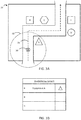
- FIG. 3A shows a user 30 along inspection path 20 within environment 10.
- a user may be guided explicitly down path 20 for performing a workflow routine, such as via GPS or other real-time location monitoring technology.
- path 20 may be the only practical path through environment 10.
- a user may travel through environment 10 via an arbitrary path (e.g., path 20).
- equipment within a predetermined proximity 40 of the user becomes available and/or recommended for inspection.
- wireless communication between one or more measurement devices carried by the user e.g., a test and measurement tool, an imaging tool, etc.
- a tool carried by the user may determine a distance from one or more pieces of equipment, and identify the equipment within a predetermined proximity (e.g., 40), such as a programmed proximity within which a user should be able to identify the equipment for analysis.
- a predetermined proximity may be adjustable, for example, via a user interface or a remote server.
- FIG. 3B shows an exemplary interface illustrating to a user that Equipment A is available for inspection.
- a tool e.g., a test and measurement tool, an imaging tool
- an external device e.g., a smartphone, tablet, etc.
- Equipment A is listed as the equipment available for inspection, since Equipment A is within the proximity 40 of user 30.
- user 30 may select Equipment A on the interface, and receive subsequent instruction for performing maintenance and/or inspection of Equipment A.
- a user may receive additional data representative of Equipment A, such as a representative image, typical operating parameters, and the like.
- a tool e.g., an imaging tool, a test and measurement tool, a remote device interfacing with tool, etc.
- a tool determines that only one piece of equipment (e.g., Equipment A) is within range
- that equipment may be automatically selected for inspection. For example, a reference image, an inspection process, typical operating parameters, and/or other information related to the equipment may be automatically presented.
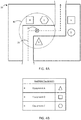
- FIG. 4A shows user 30 at a different location along inspection path 20 within environment 10.
- the user 30 is within a predetermined proximity 40 of Equipment A, B, and C.
- a user 30 may be presented with a list of equipment within a predetermined proximity 40 of the user 30.
- FIG. 4B shows an exemplary presentation of a list of equipment within the predetermined proximity 40 of the user 30 in FIG. 4A .
- the list of available equipment includes representative images of the available equipment.
- Equipment A, B, and C are considered available for inspection given the location of the user 30.
- the user may select a piece of equipment from the list of available equipment in order to receive additional information regarding the equipment and/or inspection processes related thereto.
- a system can determine when prescribed maintenance for a given piece of equipment has been performed (e.g., due to automatic data acquisition, receiving manual data entry, receiving an input from the user indicating inspection is complete, etc.), and can update the interface to indicate which equipment has been analyzed according to the workflow routine and which equipment has yet to be analyzed. For instance, if a user 30 inspects Equipment A when available at the location shown in FIG. 3A , when the user arrives at the location in FIG. 4A , Equipment A may be excluded from the list of available equipment for inspection or may otherwise be presented differently from equipment for which inspection data has not yet been acquired.
- equipment for which inspection data has been captured will be displayed in a different color, or may be grayed out and/or not selectable by a user.
- a user may select the equipment for which data has already been captured in order to review the captured data, or to capture new or additional data.
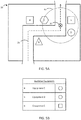
- FIG. 5A shows user 30 at yet another different location along inspection path 20 within environment 10.
- the user 30 is within a predetermined proximity 40 of Equipment C, D, and E.
- a user 30 may be presented with a list of equipment within a predetermined proximity 40 of the user 30.
- FIG. 5B shows an exemplary presentation of a list of equipment within the predetermined proximity 40 of the user 30 in FIG. 5A .
- the list of available equipment includes representative images of the available equipment.
- Equipment C, D, and E are considered available for inspection given the location of the user 30.
- the user may select a piece of equipment from the list of available equipment in order to receive additional information regarding the equipment and/or inspection processes related thereto.
- equipment for which inspection data has already been acquired may be presented differently from equipment for which data has yet to be acquired. For example, if a user performed an inspection of Equipment C while at the location shown in FIG. 4A , Equipment C may be excluded from or otherwise presented differently than Equipment D and E in the list of available equipment shown in FIG. 5B .
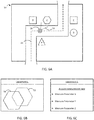
- FIG. 6A shows the user 30 at a location along path 20 in environment 10 similar to the location shown in FIG. 4A .
- Equipment C is in a field of view 50 of a tool (e.g., an imaging tool) carried by the user 30.
- an inspection system e.g., an imaging tool
- FIG. 6B shows an exemplary interface assisting a user in capturing an appropriate image of Equipment C.
- a template image 52 e.g., associated with the prescribed workflow routine
- a live image 54 can be presented alongside the template image (e.g., with one or both images being partially transparent) to assist a user in positioning an imaging tool to capture an image similar to the one associated with the workflow routine.
- other instructions/guidance can be provided for recapturing a new image corresponding to the reference image, such as described in U.S. Patent Application Nos. 13/331,633 , 13/331,644 , and 13/336,607 , each of which is incorporated by reference.
- FIG. 6C shows an exemplary interface instructing a user to acquire measurement data representative of parameters associated with Equipment C (Parameter X, Parameter Y, Parameter Z).
- Equipment C Parameter X, Parameter Y, Parameter Z
- Such parameters can include a variety of different parameters, for example, that can be analyzed/acquired using a test and measurement tool that may be carried by a user.
- a user may select from the list of parameters in order to view instructions on how to measure such a parameter.
- the user may be presented with detailed instructions for acquiring measurement data representative of that parameter and/or an interface on a measurement tool suitable for performing a measurement data acquisition.
- a user may be presented with an image capture interface (e.g., as shown in FIG. 6B ), a measurement data acquisition interface (e.g., as shown in FIG. 6C ), or both.
- an "acquire image data" or similar step may be presented in a list of steps to perform during a workflow routine.
- a system may present workflow routine steps to a user individually and sequentially in order to guide the user through the workflow process.
- a user may be presented with a list of steps, from which a user may select a step in the process to perform. Upon such a selection, the system may assist the user in performing the selected step.
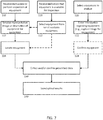
- FIG. 7 is a process flow diagram illustrating a variety of possible processes for collecting data during a workflow routine (130) and saving and/or uploading the results (140).
- a user can receive instruction to perform an inspection process of a given piece of equipment (100), and can receive a representative image or description of the equipment to assist in the inspection (102). Upon receiving such assistance information, the user may location the equipment (104) for inspection.
- the user may receive an indication that equipment is available for inspection (110), and select equipment for inspection, for example, from a list of available equipment (112).
- the user may receive a representative image or description of the selected equipment (102), or may locate the equipment (104) based on, for example, information from the provided list of available equipment.
- the user may select equipment within an environment for analysis (120) and enter information representative of the equipment into an inspection system (e.g., via an interface in an imaging tool, a test and measurement tool, an external device, etc.).
- an inspection system e.g., via an interface in an imaging tool, a test and measurement tool, an external device, etc.
- the user can capture an image of the selected equipment, input a type or location of such equipment, or the like.
- An inspection system may be programmed with instructions to identify the equipment for inspection based on the information input by the user, for example, via image recognition or the like.
- the system may present information regarding the equipment the system believes is to be inspected, which can be confirmed by the user (124).
- the user may collect data according to a workflow routine or otherwise confirm data captured automatically is satisfactory for performing the routine (130).
- the results e.g., inspection results
- FIG. 8 is a process flow diagram illustrating a variety of possible processes for guiding a user through a workflow routine (225), collecting data during the workflow routine (e.g., an inspection process) (230) and saving and/or uploading the results (240).
- the processes in FIG. 8 may be performed by a maintenance/inspection system, for example, via one or more tools carried by a user providing guidance/instruction to the user.
- a system may provide instruction to a user to perform inspection of a piece of equipment (200), and may provide a representative image or description of the equipment (202) to assist the user in finding the equipment.
- the system may provide an indication to a user that equipment is available for inspection (210), for example, by way of a list of one or more available pieces of equipment.
- the system may receive a selection of equipment, for example, from such a list (212).
- the system may provide a representative image or description of the equipment (202) to assist the user in finding the equipment.
- the system may receive information regarding equipment for inspection from the user (220). Such information may include an acquired image or other identification information that the system may use to lookup the equipment, for example, via a lookup table, image recognition, or the like in order to determine the equipment that is to be inspected based on the received information (222). In some examples, the system may confirm that the determined equipment (e.g., from step 222) is correct (224), for example, by indicating to the user the equipment the system identified based on the received information.
- information regarding equipment for inspection from the user may include an acquired image or other identification information that the system may use to lookup the equipment, for example, via a lookup table, image recognition, or the like in order to determine the equipment that is to be inspected based on the received information (222). In some examples, the system may confirm that the determined equipment (e.g., from step 222) is correct (224), for example, by indicating to the user the equipment the system identified based on the received information.
- the system may provide guidance for performing a workflow routine with respect to the equipment, such as an inspection process (225).
- the system may collect (e.g., automatically) and/or receive (e.g., via a user interface) data from the workflow routine, such as image data, measurement data, or the like (230) and save the results internally and/or upload the results to a separate location, such as a remote server (240).
- processors distributed among one or more system components, such as tools carried by the user (e.g., imaging tools, test and measurement tools, external devices, etc.), remote servers, and the like.
- processors may be implemented as one or more processors, such as one or more microprocessors, digital signal processors (DSPs), application specific integrated circuits (ASICs), field programmable gate arrays (FPGAs), programmable logic circuitry, or the like, either alone or in any suitable combination.
- DSPs digital signal processors
- ASICs application specific integrated circuits
- FPGAs field programmable gate arrays
- Examples provide a system comprising: an inspection tool configured to acquire inspection data; a user interface; memory; and a processor in communication with the inspection tool, the user interface, and the memory, the processor being configured to: provide instructions via the user interface to perform a workflow routine using the inspection tool, the workflow routine including at least collecting inspection data associated with a piece of equipment; acquire the inspection data associated with the equipment; and save the acquired inspection data to the memory.
- the user interface, the memory, and the processor are included in the inspection tool.
- the workflow routine comprises a list including a plurality of pieces of equipment for which to collect inspection data and one or more steps for collecting inspection data from each of the plurality of pieces of equipment.
- the workflow routine includes a list of one or more devices necessary for completing the routine, the one or more devices including the inspection tool and the method and/or settings for operating at least one of the one or more devices.
- workflow routine is presented as an electronic document, and wherein the user interface comprises a computer, smartphone, or tablet.
- the inspection tool comprises an imaging tool
- the workflow routine comprises instructions for acquiring image data, including at least a viewing perspective or a reference image.
- the processor is configured to: receive image data from the imaging tool; and recognize an object within the received image data; and wherein the workflow routine comprises instructions for collecting inspection data associated with the recognized object.
- Some examples further comprise a position sensor in communication with the processor, and wherein the processor is configured to provide instructions via the user interface to perform a workflow routine based on received position information from the position sensor.
- the position information comprises proximity information representative of proximity between the user and a piece of equipment.
- providing instructions via the user interface to perform a workflow routine comprises displaying, on the user interface, a list of equipment that is part of the workflow routine and available for inspection; and the processor is configured to: receive a selection of a piece of equipment via the user interface; and provide instructions, via the user interface, for collecting inspection data associated with the selected piece of equipment.
- providing instructions via the user interface to perform a workflow routine comprises displaying, on the user interface, a list of steps to perform during the workflow routine, and wherein steps that have been completed are shown in a distinguishing way from steps that have not been completed.
- the processor is configured to determine automatically when one or more steps in the workflow routine are completed.
- the processor is located remotely from the inspection tool and the user interface, and wherein the processor communicates with the inspection tool and the user interface via a network.
- Examples provide method of collecting data during a workflow routine, comprising: receiving information regarding an environment; providing information regarding pieces of equipment in the environment; identifying a piece of equipment for inspection; acquiring inspection data representative of at least one parameter associated with the identified piece of equipment; storing the inspection data.
- Some examples further comprise determining one or more pieces of equipment available for inspection; and providing information regarding pieces of equipment in the environment comprises notifying a user of at least one piece of equipment currently available for inspection; and identifying a piece of equipment for inspection comprises receiving a selection from a user designating the identified piece of equipment.
- Some examples further comprise the step of determining a first piece of equipment is within a predetermined proximity, and notifying the user that the first piece of equipment is available for inspection upon determining that the first piece of equipment is within the predetermined proximity.
- determining one or more pieces of equipment available for inspection comprises recognizing one or more pieces of equipment within a field of view of an imaging tool.
- determining one or more pieces available for inspection comprises determining one or more pieces of equipment for which inspection data has not yet been acquired.
- notifying a user of at least one piece of equipment currently available for inspection comprises presenting a user with a list including equipment currently available for inspection.
- the list including equipment currently available for inspection presents equipment for which inspection data has already been received in a visually distinguishing manner than equipment for which inspection data has not yet been received.
- equipment for which inspection data has already been received are presented in the list in a different color than equipment for which inspection data has not yet been received.
- receiving the selection of a piece of equipment comprises receiving a selection from the list including equipment currently available for inspection.
- Some examples further comprise outputting information related to the identified piece of equipment, the outputting information comprising: outputting directions to a location of the selected piece of equipment; outputting one or more parameters associated with the selected piece of equipment; outputting a workflow routine for acquiring the inspection data; and/or presenting a reference image representative of the selected equipment.
- the inspection data comprises acoustic image data, infrared image data, and/or visible light image data.
- receiving information regarding the environment comprises determining one or more pieces of equipment in the environment.
- determining one or more pieces of equipment in the environment comprises determining location information representative of a current location; receiving an input indicative of the environment; and/or receiving proximity information representative of a proximity to one or more pieces of equipment.
Landscapes
- Engineering & Computer Science (AREA)
- Business, Economics & Management (AREA)
- Human Resources & Organizations (AREA)
- Multimedia (AREA)
- Physics & Mathematics (AREA)
- Theoretical Computer Science (AREA)
- General Physics & Mathematics (AREA)
- Signal Processing (AREA)
- Operations Research (AREA)
- Quality & Reliability (AREA)
- Strategic Management (AREA)
- Tourism & Hospitality (AREA)
- Economics (AREA)
- General Business, Economics & Management (AREA)
- Marketing (AREA)
- Entrepreneurship & Innovation (AREA)
- Testing And Monitoring For Control Systems (AREA)
- Investigating Materials By The Use Of Optical Means Adapted For Particular Applications (AREA)
- Management, Administration, Business Operations System, And Electronic Commerce (AREA)
Applications Claiming Priority (1)
| Application Number | Priority Date | Filing Date | Title |
|---|---|---|---|
| US201762582137P | 2017-11-06 | 2017-11-06 |
Publications (1)
| Publication Number | Publication Date |
|---|---|
| EP3480752A1 true EP3480752A1 (de) | 2019-05-08 |
Family
ID=64267531
Family Applications (1)
| Application Number | Title | Priority Date | Filing Date |
|---|---|---|---|
| EP18204629.2A Ceased EP3480752A1 (de) | 2017-11-06 | 2018-11-06 | Inspektionsarbeitsablauf unter verwendung von objekterkennung und anderer verfahren |
Country Status (3)
| Country | Link |
|---|---|
| US (2) | US20190141236A1 (de) |
| EP (1) | EP3480752A1 (de) |
| CN (1) | CN109754148A (de) |
Cited By (1)
| Publication number | Priority date | Publication date | Assignee | Title |
|---|---|---|---|---|
| CN114004819A (zh) * | 2021-11-04 | 2022-02-01 | 中国联合网络通信集团有限公司 | 验布处理方法、装置、设备、系统及介质 |
Families Citing this family (8)
| Publication number | Priority date | Publication date | Assignee | Title |
|---|---|---|---|---|
| US11450113B1 (en) * | 2009-06-04 | 2022-09-20 | Masoud Vaziri | Method and apparatus for a wearable computer |
| US10732123B2 (en) * | 2017-05-31 | 2020-08-04 | Flir Systems Ab | Inspection routing systems and methods |
| WO2021202616A1 (en) | 2020-03-31 | 2021-10-07 | Flir Systems Ab | Thermal imaging asset inspection systems and methods |
| US20220057269A1 (en) * | 2020-08-21 | 2022-02-24 | Analog Devices, Inc. | Multi-sensor using a thermal camera |
| US11930264B2 (en) * | 2021-05-18 | 2024-03-12 | Magna Electronics Inc. | Vehicular driver monitoring system with camera view optimization |
| WO2022254642A1 (ja) * | 2021-06-03 | 2022-12-08 | 三菱電機株式会社 | 温度計測装置、及び温度計測方法 |
| WO2024073746A1 (en) * | 2022-09-30 | 2024-04-04 | Flir Systems Ab | Camera alignment using reference image for asset inspection systems and methods |
| EP4521734A1 (de) * | 2023-08-08 | 2025-03-12 | Motherson Innovations Company Ltd. | Kameraüberwachungssystem für ein fahrzeug, verfahren zur steuerung des kameraüberwachungssystems und fahrzeug |
Citations (3)
| Publication number | Priority date | Publication date | Assignee | Title |
|---|---|---|---|---|
| US7538326B2 (en) | 2004-12-03 | 2009-05-26 | Fluke Corporation | Visible light and IR combined image camera with a laser pointer |
| US20170301154A1 (en) * | 2016-04-19 | 2017-10-19 | Rozint Enterprises, Inc. | Systems and methods for use of diagnostic scan tool in automotive collision repair |
| US20170308869A1 (en) * | 2016-04-21 | 2017-10-26 | Continental Tide Defense Systems, Inc. | Workflow, assessment, verification, and evaluation (wave) system and method |
Family Cites Families (56)
| Publication number | Priority date | Publication date | Assignee | Title |
|---|---|---|---|---|
| US5637871A (en) | 1993-06-07 | 1997-06-10 | Computational Systems, Inc. | Portable digital infrared thermography system |
| US5386117B1 (en) | 1993-06-07 | 1997-06-10 | Computational Systems Inc | Infrared thermography system including mobile unit |
| US5724242A (en) | 1995-03-21 | 1998-03-03 | Caterpillar Inc. | Method for producing production control software for a natural gas engine controller |
| US5860066A (en) | 1996-06-27 | 1999-01-12 | Payment Systems For Credit Unions Inc. | Imaging and workflow system |
| US5949418A (en) | 1997-05-06 | 1999-09-07 | Microsoft Corporation | Operating system for handheld computing device having graphical window minimization/enlargement functionality |
| US6255650B1 (en) | 1998-12-11 | 2001-07-03 | Flir Systems, Inc. | Extreme temperature radiometry and imaging apparatus |
| US6542824B1 (en) | 1999-01-29 | 2003-04-01 | International Business Machines Corporation | Method and system for determining position information utilizing a portable electronic device lacking global positioning system (GPS) reception capability |
| US6845913B2 (en) | 1999-02-11 | 2005-01-25 | Flir Systems, Inc. | Method and apparatus for barcode selection of themographic survey images |
| US7640007B2 (en) * | 1999-02-12 | 2009-12-29 | Fisher-Rosemount Systems, Inc. | Wireless handheld communicator in a process control environment |
| SE0201529D0 (sv) | 2002-05-21 | 2002-05-21 | Flir Systems Ab | Method and apparatus for IR camera inspections |
| US10546253B2 (en) * | 2013-01-22 | 2020-01-28 | General Electric Company | Realtime inspection management |
| US6974373B2 (en) | 2002-08-02 | 2005-12-13 | Geissler Technologies, Llc | Apparatus and methods for the volumetric and dimensional measurement of livestock |
| US20040143602A1 (en) | 2002-10-18 | 2004-07-22 | Antonio Ruiz | Apparatus, system and method for automated and adaptive digital image/video surveillance for events and configurations using a rich multimedia relational database |
| US6937164B2 (en) | 2003-02-17 | 2005-08-30 | The Boeing Company | Methods and apparatus for transportation vehicle security monitoring |
| US20070174152A1 (en) | 2003-12-08 | 2007-07-26 | Bjornberg David B | Handheld system for information acquisition, verification, recording, processing, display and communication |
| US7454050B2 (en) | 2004-06-18 | 2008-11-18 | Csi Technology, Inc. | Method of automating a thermographic inspection process |
| US7535002B2 (en) | 2004-12-03 | 2009-05-19 | Fluke Corporation | Camera with visible light and infrared image blending |
| US20060244837A1 (en) | 2005-04-28 | 2006-11-02 | Lucas Ekeroth | Thermal imaging device |
| US7332716B2 (en) | 2005-06-06 | 2008-02-19 | Flir Systems Ab | IR camera |
| US7528372B2 (en) | 2005-10-19 | 2009-05-05 | Csi Technology, Inc. | Apparatus and method for infrared imaging with performance algorithm |
| US7475275B2 (en) | 2005-10-27 | 2009-01-06 | International Business Machines Corporation | Method for fault handling in a co-operative workflow environment |
| US7732768B1 (en) | 2006-03-02 | 2010-06-08 | Thermoteknix Systems Ltd. | Image alignment and trend analysis features for an infrared imaging system |
| US20080183049A1 (en) | 2007-01-31 | 2008-07-31 | Microsoft Corporation | Remote management of captured image sequence |
| KR101456319B1 (ko) | 2007-07-09 | 2014-11-03 | 플리르 시스템스 에이비 | 적외선 이미지 프로세싱 방법, 적외선 이미지 캡쳐 시스템 및 컴퓨터 판독가능 매체 |
| TW200915853A (en) | 2007-09-28 | 2009-04-01 | Altek Corp | Method and system for stabilizing vibration of camera |
| US20090106684A1 (en) * | 2007-10-22 | 2009-04-23 | Al Chakra | System and Method to Facilitate Progress Forking |
| US7970911B2 (en) * | 2008-01-04 | 2011-06-28 | Mitel Networks Corporation | Method, apparatus and system for modulating an application based on proximity |
| DE102008004785B4 (de) | 2008-01-17 | 2012-06-21 | Dräger Safety AG & Co. KGaA | System zum Schutz und/oder zur Führung von Personen in Gefahrensituationen |
| US8749635B2 (en) | 2009-06-03 | 2014-06-10 | Flir Systems, Inc. | Infrared camera systems and methods for dual sensor applications |
| US8645854B2 (en) * | 2010-01-19 | 2014-02-04 | Verizon Patent And Licensing Inc. | Provisioning workflow management methods and systems |
| US8976931B2 (en) | 2010-04-13 | 2015-03-10 | Carestream Health, Inc. | Mobile radiography imaging apparatus using prior related images before current image exposure and methods for same |
| US9615147B2 (en) | 2010-05-17 | 2017-04-04 | Flir Systems, Inc. | Multisensory meter system |
| US20120039537A1 (en) | 2010-08-10 | 2012-02-16 | Keys Gregory C | Method, apparatus, and system for workflow participation of an imaging device |
| WO2012101272A1 (en) | 2011-01-28 | 2012-08-02 | Flir Systems Ab | A method for managing ir image data |
| WO2012101275A1 (en) | 2011-01-28 | 2012-08-02 | Flir Systems Ab | Dynamic annotation in user information system of ir camera |
| WO2012115881A1 (en) | 2011-02-22 | 2012-08-30 | Flir Systems, Inc. | Infrared sensor systems and methods |
| CN103493472B (zh) | 2011-02-25 | 2017-07-04 | 菲力尔系统公司 | 模块化的红外摄像机系统及方法 |
| US9176990B2 (en) | 2011-03-04 | 2015-11-03 | Fluke Corporation | Visual image annotation, tagging of infrared images, and infrared image linking |
| KR101066068B1 (ko) | 2011-03-22 | 2011-09-20 | (주)유디피 | 듀얼 카메라를 이용한 영상 감시 장치 및 방법 |
| US9058520B2 (en) * | 2011-09-22 | 2015-06-16 | Siemens Corporation | Systems and methods for hands free inspection |
| US20130090946A1 (en) | 2011-10-05 | 2013-04-11 | Thomas Kwok-Fah Foo | Systems and methods for imaging workflow |
| US20130155248A1 (en) | 2011-12-20 | 2013-06-20 | Fluke Corporation | Thermal imaging camera for infrared rephotography |
| US20130155249A1 (en) | 2011-12-20 | 2013-06-20 | Fluke Corporation | Thermal imaging camera for infrared rephotography |
| US20130162835A1 (en) | 2011-12-23 | 2013-06-27 | Fluke Corporation | Thermal imaging camera for infrared rephotography |
| US20130176202A1 (en) * | 2012-01-11 | 2013-07-11 | Qualcomm Incorporated | Menu selection using tangible interaction with mobile devices |
| WO2014032168A1 (en) * | 2012-08-29 | 2014-03-06 | Maintenance Assistant Inc. | Computer system and method for maintenance management including collaboration across clients |
| JP6586076B2 (ja) | 2013-03-15 | 2019-10-02 | フルークコーポレイションFluke Corporation | 分離した無線モバイル装置を用いて赤外線画像に可視的な視聴覚の注釈付け |
| US10649413B2 (en) * | 2013-03-15 | 2020-05-12 | Fisher-Rosemount Systems, Inc. | Method for initiating or resuming a mobile control session in a process plant |
| US8887993B2 (en) * | 2013-04-23 | 2014-11-18 | The Boeing Company | Barcode access to electronic resources for complex system parts |
| US20160080666A1 (en) | 2014-09-17 | 2016-03-17 | Fluke Corporation | Test and measurement system with removable imaging tool |
| US9568368B2 (en) | 2014-09-17 | 2017-02-14 | Fluke Corporation | Mobile device used with isolated test and measurement input block |
| US20160076937A1 (en) | 2014-09-17 | 2016-03-17 | Fluke Corporation | Display of images from an imaging tool embedded or attached to a test and measurement tool |
| US10129490B2 (en) | 2015-04-05 | 2018-11-13 | Hema Imaging Llc | Systems and approaches for thermal image corrections |
| US10375325B2 (en) | 2016-06-23 | 2019-08-06 | Fluke Corporation | Thermal anomaly detection |
| WO2019005951A1 (en) * | 2017-06-29 | 2019-01-03 | Walmart Apollo, Llc | SYSTEMS AND METHODS FOR REALIZING AND MONITORING ASSET INSPECTIONS |
| US11099075B2 (en) | 2017-11-02 | 2021-08-24 | Fluke Corporation | Focus and/or parallax adjustment in acoustic imaging using distance information |
-
2018
- 2018-11-05 US US16/180,873 patent/US20190141236A1/en not_active Abandoned
- 2018-11-06 CN CN201811312209.6A patent/CN109754148A/zh active Pending
- 2018-11-06 EP EP18204629.2A patent/EP3480752A1/de not_active Ceased
-
2021
- 2021-06-15 US US17/348,755 patent/US12088910B2/en active Active
Patent Citations (3)
| Publication number | Priority date | Publication date | Assignee | Title |
|---|---|---|---|---|
| US7538326B2 (en) | 2004-12-03 | 2009-05-26 | Fluke Corporation | Visible light and IR combined image camera with a laser pointer |
| US20170301154A1 (en) * | 2016-04-19 | 2017-10-19 | Rozint Enterprises, Inc. | Systems and methods for use of diagnostic scan tool in automotive collision repair |
| US20170308869A1 (en) * | 2016-04-21 | 2017-10-26 | Continental Tide Defense Systems, Inc. | Workflow, assessment, verification, and evaluation (wave) system and method |
Cited By (1)
| Publication number | Priority date | Publication date | Assignee | Title |
|---|---|---|---|---|
| CN114004819A (zh) * | 2021-11-04 | 2022-02-01 | 中国联合网络通信集团有限公司 | 验布处理方法、装置、设备、系统及介质 |
Also Published As
| Publication number | Publication date |
|---|---|
| US12088910B2 (en) | 2024-09-10 |
| CN109754148A (zh) | 2019-05-14 |
| US20190141236A1 (en) | 2019-05-09 |
| US20210344833A1 (en) | 2021-11-04 |
Similar Documents
| Publication | Publication Date | Title |
|---|---|---|
| US12088910B2 (en) | Inspection workflow using object recognition and other techniques | |
| CN110212451B (zh) | 一种电力ar智能巡检装置 | |
| US12008915B2 (en) | Weld training systems to synchronize weld data for presentation | |
| CN111604888B (zh) | 巡检机器人控制方法、巡检系统、存储介质及电子设备 | |
| US10878633B2 (en) | Augmented reality-based measuring system | |
| US10878607B2 (en) | Collection and validation of data from visual displays | |
| US10809148B2 (en) | Combined gas leakage detection and quantification | |
| US11127211B2 (en) | Plant management system, plant management method, plant management apparatus, and plant management program | |
| US8902302B2 (en) | Method and apparatus for surveying with a feature location | |
| CN107249983B (zh) | 用于远程检查飞机发动机的状态的方法和装置 | |
| JP6918044B2 (ja) | ロボット制御装置及びロボット制御方法 | |
| US20240153069A1 (en) | Method and arrangement for testing the quality of an object | |
| JP2022054521A (ja) | 巡視点検作業評価システム、巡視点検作業評価装置、操作端末、位置検出端末、及び巡視点検作業評価方法 | |
| CN108460051A (zh) | 车位地图生成方法、装置及系统 | |
| CN114508646B (zh) | 利用管道机器人检修管道的智能检测方法及系统 | |
| KR102227031B1 (ko) | 화상데이터 내의 척도마커의 추적을 통한 구조물 표면의 균열 감시 방법 | |
| JP2019174115A (ja) | ガス検出情報表示システム及びガス検出情報表示プログラム | |
| US12335655B2 (en) | Thermal imaging asset inspection systems and methods | |
| KR101497396B1 (ko) | 타겟 위치 측정시스템 및 이를 이용한 타겟 위치 측정방법 | |
| KR101912611B1 (ko) | 위치 기반 정보 서비스를 이용한 휴대용 측정 및 분석 장치 | |
| JP7432078B2 (ja) | 仮想情報がオーバーレイされたポータブルディスプレイデバイス | |
| KR102039902B1 (ko) | 원격 기자재 정도 검사 시스템 및 방법 | |
| JP6990482B1 (ja) | 検査システム、方法及びプログラム | |
| US20250071251A1 (en) | System and method for locating and visualizing camera images in relation to a large-scale manufacturing product | |
| US20240328789A1 (en) | Method for recording inspection data |
Legal Events
| Date | Code | Title | Description |
|---|---|---|---|
| PUAI | Public reference made under article 153(3) epc to a published international application that has entered the european phase |
Free format text: ORIGINAL CODE: 0009012 |
|
| STAA | Information on the status of an ep patent application or granted ep patent |
Free format text: STATUS: THE APPLICATION HAS BEEN PUBLISHED |
|
| AK | Designated contracting states |
Kind code of ref document: A1 Designated state(s): AL AT BE BG CH CY CZ DE DK EE ES FI FR GB GR HR HU IE IS IT LI LT LU LV MC MK MT NL NO PL PT RO RS SE SI SK SM TR |
|
| AX | Request for extension of the european patent |
Extension state: BA ME |
|
| STAA | Information on the status of an ep patent application or granted ep patent |
Free format text: STATUS: REQUEST FOR EXAMINATION WAS MADE |
|
| 17P | Request for examination filed |
Effective date: 20191108 |
|
| RBV | Designated contracting states (corrected) |
Designated state(s): AL AT BE BG CH CY CZ DE DK EE ES FI FR GB GR HR HU IE IS IT LI LT LU LV MC MK MT NL NO PL PT RO RS SE SI SK SM TR |
|
| STAA | Information on the status of an ep patent application or granted ep patent |
Free format text: STATUS: EXAMINATION IS IN PROGRESS |
|
| 17Q | First examination report despatched |
Effective date: 20200605 |
|
| STAA | Information on the status of an ep patent application or granted ep patent |
Free format text: STATUS: THE APPLICATION HAS BEEN REFUSED |
|
| 18R | Application refused |
Effective date: 20220321 |