EP3279781B1 - Procédé et dispositif d'affichage d'entrée de texte sur un dispositif terminal, et dispositif terminal - Google Patents
Procédé et dispositif d'affichage d'entrée de texte sur un dispositif terminal, et dispositif terminal Download PDFInfo
- Publication number
- EP3279781B1 EP3279781B1 EP15889454.3A EP15889454A EP3279781B1 EP 3279781 B1 EP3279781 B1 EP 3279781B1 EP 15889454 A EP15889454 A EP 15889454A EP 3279781 B1 EP3279781 B1 EP 3279781B1
- Authority
- EP
- European Patent Office
- Prior art keywords
- candidate
- area
- word
- terminal device
- areas
- Prior art date
- Legal status (The legal status is an assumption and is not a legal conclusion. Google has not performed a legal analysis and makes no representation as to the accuracy of the status listed.)
- Active
Links
Images


Classifications
-
- G—PHYSICS
- G06—COMPUTING OR CALCULATING; COUNTING
- G06F—ELECTRIC DIGITAL DATA PROCESSING
- G06F3/00—Input arrangements for transferring data to be processed into a form capable of being handled by the computer; Output arrangements for transferring data from processing unit to output unit, e.g. interface arrangements
- G06F3/01—Input arrangements or combined input and output arrangements for interaction between user and computer
- G06F3/02—Input arrangements using manually operated switches, e.g. using keyboards or dials
- G06F3/023—Arrangements for converting discrete items of information into a coded form, e.g. arrangements for interpreting keyboard generated codes as alphanumeric codes, operand codes or instruction codes
- G06F3/0233—Character input methods
- G06F3/0236—Character input methods using selection techniques to select from displayed items
-
- G—PHYSICS
- G06—COMPUTING OR CALCULATING; COUNTING
- G06F—ELECTRIC DIGITAL DATA PROCESSING
- G06F3/00—Input arrangements for transferring data to be processed into a form capable of being handled by the computer; Output arrangements for transferring data from processing unit to output unit, e.g. interface arrangements
- G06F3/01—Input arrangements or combined input and output arrangements for interaction between user and computer
- G06F3/02—Input arrangements using manually operated switches, e.g. using keyboards or dials
- G06F3/023—Arrangements for converting discrete items of information into a coded form, e.g. arrangements for interpreting keyboard generated codes as alphanumeric codes, operand codes or instruction codes
- G06F3/0233—Character input methods
- G06F3/0237—Character input methods using prediction or retrieval techniques
-
- G—PHYSICS
- G06—COMPUTING OR CALCULATING; COUNTING
- G06F—ELECTRIC DIGITAL DATA PROCESSING
- G06F3/00—Input arrangements for transferring data to be processed into a form capable of being handled by the computer; Output arrangements for transferring data from processing unit to output unit, e.g. interface arrangements
- G06F3/01—Input arrangements or combined input and output arrangements for interaction between user and computer
- G06F3/048—Interaction techniques based on graphical user interfaces [GUI]
- G06F3/0484—Interaction techniques based on graphical user interfaces [GUI] for the control of specific functions or operations, e.g. selecting or manipulating an object, an image or a displayed text element, setting a parameter value or selecting a range
- G06F3/04842—Selection of displayed objects or displayed text elements
-
- G—PHYSICS
- G06—COMPUTING OR CALCULATING; COUNTING
- G06F—ELECTRIC DIGITAL DATA PROCESSING
- G06F3/00—Input arrangements for transferring data to be processed into a form capable of being handled by the computer; Output arrangements for transferring data from processing unit to output unit, e.g. interface arrangements
- G06F3/01—Input arrangements or combined input and output arrangements for interaction between user and computer
- G06F3/048—Interaction techniques based on graphical user interfaces [GUI]
- G06F3/0487—Interaction techniques based on graphical user interfaces [GUI] using specific features provided by the input device, e.g. functions controlled by the rotation of a mouse with dual sensing arrangements, or of the nature of the input device, e.g. tap gestures based on pressure sensed by a digitiser
- G06F3/0488—Interaction techniques based on graphical user interfaces [GUI] using specific features provided by the input device, e.g. functions controlled by the rotation of a mouse with dual sensing arrangements, or of the nature of the input device, e.g. tap gestures based on pressure sensed by a digitiser using a touch-screen or digitiser, e.g. input of commands through traced gestures
- G06F3/04883—Interaction techniques based on graphical user interfaces [GUI] using specific features provided by the input device, e.g. functions controlled by the rotation of a mouse with dual sensing arrangements, or of the nature of the input device, e.g. tap gestures based on pressure sensed by a digitiser using a touch-screen or digitiser, e.g. input of commands through traced gestures for inputting data by handwriting, e.g. gesture or text
-
- G—PHYSICS
- G06—COMPUTING OR CALCULATING; COUNTING
- G06F—ELECTRIC DIGITAL DATA PROCESSING
- G06F3/00—Input arrangements for transferring data to be processed into a form capable of being handled by the computer; Output arrangements for transferring data from processing unit to output unit, e.g. interface arrangements
- G06F3/01—Input arrangements or combined input and output arrangements for interaction between user and computer
- G06F3/048—Interaction techniques based on graphical user interfaces [GUI]
- G06F3/0487—Interaction techniques based on graphical user interfaces [GUI] using specific features provided by the input device, e.g. functions controlled by the rotation of a mouse with dual sensing arrangements, or of the nature of the input device, e.g. tap gestures based on pressure sensed by a digitiser
- G06F3/0488—Interaction techniques based on graphical user interfaces [GUI] using specific features provided by the input device, e.g. functions controlled by the rotation of a mouse with dual sensing arrangements, or of the nature of the input device, e.g. tap gestures based on pressure sensed by a digitiser using a touch-screen or digitiser, e.g. input of commands through traced gestures
- G06F3/04886—Interaction techniques based on graphical user interfaces [GUI] using specific features provided by the input device, e.g. functions controlled by the rotation of a mouse with dual sensing arrangements, or of the nature of the input device, e.g. tap gestures based on pressure sensed by a digitiser using a touch-screen or digitiser, e.g. input of commands through traced gestures by partitioning the display area of the touch-screen or the surface of the digitising tablet into independently controllable areas, e.g. virtual keyboards or menus
-
- G—PHYSICS
- G06—COMPUTING OR CALCULATING; COUNTING
- G06F—ELECTRIC DIGITAL DATA PROCESSING
- G06F3/00—Input arrangements for transferring data to be processed into a form capable of being handled by the computer; Output arrangements for transferring data from processing unit to output unit, e.g. interface arrangements
- G06F3/01—Input arrangements or combined input and output arrangements for interaction between user and computer
- G06F3/048—Interaction techniques based on graphical user interfaces [GUI]
- G06F3/0487—Interaction techniques based on graphical user interfaces [GUI] using specific features provided by the input device, e.g. functions controlled by the rotation of a mouse with dual sensing arrangements, or of the nature of the input device, e.g. tap gestures based on pressure sensed by a digitiser
- G06F3/0489—Interaction techniques based on graphical user interfaces [GUI] using specific features provided by the input device, e.g. functions controlled by the rotation of a mouse with dual sensing arrangements, or of the nature of the input device, e.g. tap gestures based on pressure sensed by a digitiser using dedicated keyboard keys or combinations thereof
- G06F3/04895—Guidance during keyboard input operation, e.g. prompting
-
- G—PHYSICS
- G06—COMPUTING OR CALCULATING; COUNTING
- G06F—ELECTRIC DIGITAL DATA PROCESSING
- G06F40/00—Handling natural language data
- G06F40/20—Natural language analysis
- G06F40/274—Converting codes to words; Guess-ahead of partial word inputs
Definitions
- the present disclosure relates to the field of text display technologies of a terminal device, and in particular, to a method and an apparatus for displaying textual input of a terminal device, and a terminal device.
- a large screen and an ultra-large screen are a development trend of intelligent terminal devices, so that not only richer content is shown, but a user operation becomes more convenient,
- a smart phone, a tablet computer, and another intelligent terminal device have a large screen and a ultra-large screen.
- a user usually performs an operation with one hand, and generally performs the operation with a thumb of a hand that holds the smart phone, or holds the smart phone with one hand and performs the operation with a finger of the other hand.
- the large-screen intelligent terminal device may display multiple options in multiple candidate areas for the user to select.
- the multiple options are generally displayed in the multiple candidate areas by using a preferred-word high-frequency sorting method, that is, options with different selection frequencies are displayed in an order from left to right and from top to bottom of the candidate areas.
- An option with a highest selection frequency is displayed in an upper leftmost candidate area, and an option with a lowest selection frequency is displayed in a lower rightmost candidate area.
- a preferred-word high-frequency sorting method that is, options with different selection frequencies are displayed in an order from left to right and from top to bottom of the candidate areas.
- An option with a highest selection frequency is displayed in an upper leftmost candidate area
- an option with a lowest selection frequency is displayed in a lower rightmost candidate area.
- the thumb may not perform an operation on a candidate area on a screen edge, for example, when the right hand performs an operation and selects a word by using the input method, it may be inconvenient for a right thumb to select a word option in a leftmost candidate area on the screen.
- an operation may be performed on the large-screen intelligent terminal device in a one-hand mode, that is, a display area on the large screen is reduced in a specified proportion and is left aligned or right aligned.
- CN102662603 relates to input method display method and system for mobile phone with touch screen.
- Implementations of the present disclosure provide techniques for displaying textual input of a terminal device, so as to resolve prior-art problems that in a one-hand mode, a display area is reduced, operation difficulty is increased, a display manner is undiversified and inflexible, and user experience is reduced.
- a selection frequency at which each candidate area is selected in specified duration is counted, a delay value from a moment at which entering is completed in a keyboard area to a moment at which each candidate area is selected each time in the specified duration is calculated, an average delay value of each candidate area in the specified duration is calculated according to the calculated delay value, and after the specified duration, a correspondence between each candidate area and a candidate-word display priority is adjusted according to the obtained selection frequency and the obtained average delay value of each candidate area.
- a candidate word displayed in the candidate area can be dynamically adjusted, so that an entering speed is optimized, a display area does not need to be reduced, a display manner is flexible, and user experience is improved.
- Implementations of the present disclosure provide a method and an apparatus for displaying textual input of a terminal device, and a terminal device, so as to resolve prior-art problems that when a large-screen intelligent terminal device is operated with one hand, because a one-hand mode is used, a display area is reduced, operation difficulty is increased, a display manner is undiversified and inflexible, and user experience is reduced.
- the method and the apparatus are based on a same inventive concept, due to a similar problem-resolving principle of the method and the apparatus, mutual reference may be made to implementation of the apparatus and implementation of the method, and no repeated description is provided.
- a selection frequency at which each candidate area is selected in specified duration is counted, a delay value from a moment at which entering is completed in a keyboard area to a moment at which each candidate area is selected each time in the specified duration is calculated, an average delay value of each candidate area in the specified duration is calculated according to the calculated delay value, and after the specified duration, a correspondence between each candidate area and a candidate-word display priority is adjusted according to the obtained selection frequency and the obtained average delay value of each candidate area.
- a candidate word displayed in the candidate area can be dynamically adjusted, so that an entering speed is optimized, a display area does not need to be reduced, a display manner is flexible, and user experience is improved.
- Implementations of the present disclosure provide a method and an apparatus for displaying textual input of a terminal device that are applicable to a handheld intelligent terminal device such as a smart phone or a tablet computer on which entering is performed by using a keyboard area and a candidate word is selected from multiple candidate areas.
- a handheld intelligent terminal device such as a smart phone or a tablet computer on which entering is performed by using a keyboard area and a candidate word is selected from multiple candidate areas.
- a method for displaying textual input of a terminal device is provided in an implementation of the present disclosure.
- a screen of the terminal device includes a keyboard area and at least two candidate areas. Each candidate area in the at least two candidate areas is corresponding to a different candidate-word display priority, and each candidate area is used to display a candidate word that is of a corresponding candidate-word display priority and that is in a candidate-word subset of a character entered in the keyboard area.
- a procedure of the method includes the following steps.
- Step 101 The terminal device counts a selection frequency at which each candidate area in the at least two candidate areas is selected in specified duration.
- the terminal device After a user enters a character in the keyboard area on the screen, the terminal device determines, according to the entered character, a to-be-displayed candidate-word subset corresponding to the entered character. Each candidate word in the candidate-word subset is corresponding to a different candidate-word display priority. The candidate word that is corresponding to the candidate-word display priority and that is in the candidate-word subset can be displayed only when each candidate area on the screen of the terminal device is corresponding to a different candidate-word display priority.
- the specified duration may be set by the user according to an actual scenario, or may be set by the terminal device before factory delivery.
- a start moment of the specified duration may be a moment at which an application including a textual input function is enabled, a moment at which last adjustment is completed, a moment at which the terminal device is powered on, or a moment at which a candidate-word display priority to be displayed in each candidate area of the terminal device is initialized.
- the specified duration or the start moment of the specified duration is not limited in this implementation of the present disclosure.
- the method further includes:
- a storage module in the terminal device may store the correspondence between an operation mode and a display configuration manner. In this way, when the terminal device supports multiple operation modes, the terminal device may store multiple display configuration manners, so that a speed for adjusting to an optimal display configuration manner is improved.
- a preferred-word high-frequency sorting method is usually used for displaying a candidate word in a candidate area, that is, after a character is entered in a keyboard area, in a to-be-displayed candidate-word subset, a candidate word with a highest selection frequency has a highest candidate-word display priority, a candidate word with a second highest selection frequency has a second highest candidate-word display priority, ...
- the candidate word of the highest candidate-word display priority is usually displayed in an upper leftmost candidate area, and a candidate word of a lowest candidate-word display priority is usually displayed in a lower rightmost candidate area.
- the candidate area displays the candidate word of the candidate-word display priority according to a correspondence, included in a display configuration manner, between the candidate area and the candidate-word display priority.
- the terminal device determines the current operation mode in the following two manners:
- the operation mode includes a left-hand operation mode or a right-hand operation mode.
- the user determines the current operation mode by using a substantive key of the terminal device or according to setting selected by the user in the terminal device, that is, the user selects the left-hand operation mode or the right-hand operation mode by using the key of the terminal device, or selects the left-hand operation mode or the right-hand operation mode in a setting option of the terminal device.
- the terminal device may determine the current operation mode according to a sliding operation performed on the terminal device by the user, for example, when the terminal device is held in the right hand, usually, a right thumb performs the sliding operation, and when the right thumb performs the sliding operation, the right thumb usually slides from left to right. Therefore, the terminal device may determine the current operation mode according to a direction of the sliding operation.
- the current operation mode may be determined according to the operation frequencies of the user on the left part and the right part of the terminal device. For example, when the right hand is used for operation, an operation frequency on the right part is usually greater than an operation frequency on the left part.
- the current operation mode may be determined according to a combination of the sliding operation and the operation frequency.
- Step 102 The terminal device calculates a delay value from a moment at which entering is completed in the keyboard area to a moment at which each candidate area in the at least two candidate areas is selected each time in the specified duration.
- the user enters the character in the keyboard area, and after all characters are entered, selects a required candidate word from candidate words displayed in the candidate area, that is, the candidate area that displays the candidate word is selected. Because of different positions of the candidate area, delay values of the candidate area are different when the candidate area is selected.
- step 101 and step 102 are not performed in sequence.
- Step 101 may be performed first, and then step 102 and a subsequent step 103 are performed; or step 102 and a subsequent step 103 are performed first, and then step 101 is performed; or step 101, step 102, and a subsequent step 103 are performed at the same time. This is not limited in this implementation of the present disclosure.
- Step 103 The terminal device counts an average delay value of each candidate area in the at least two candidate areas in the specified duration according to the delay value.
- an average value of delay values of the candidate area that are obtained when the candidate area is selected is determined as the average delay value of the candidate area in the specified duration.
- the average delay value obtained when each candidate area is selected may show an operation habit of the user in the candidate area.
- Step 104 After the specified duration, adjust, according to the obtained selection frequency and the obtained average delay value of each candidate area in the at least two candidate areas, the correspondence between each candidate area in the at least two candidate areas and a candidate-word display priority.
- the method before the adjusting the correspondence between each candidate area in the at least two candidate areas and a candidate-word display priority, the method further includes:
- the specified frequency threshold is set according to an actual scenario by the user or the terminal device, and may be 20, 30, 50, or the like. This is not limited in this implementation of the present disclosure.
- the adjusting, according to the obtained selection frequency and the obtained average delay value of each candidate area in the at least two candidate areas, a correspondence between each candidate area in the at least two candidate areas and a candidate-word display priority includes:
- each candidate area is corresponding to unique candidate-area information, such as an identifier of the candidate area, an address of the candidate area, or coordinates of the candidate area on the screen. Therefore, after the candidate areas are sorted, a generated candidate-area sequence is a candidate-area information sequence.
- a display priority corresponding to each candidate area is adjusted, to form a new display configuration manner.
- a candidate-word display priority corresponding to a candidate area with a high selection frequency is configured for a candidate area with a small average delay value, that is, a candidate word with a high selection probability is displayed in a candidate area that meets the operation habit of the user. Therefore, operation efficiency of the user is improved, an entering speed is optimized, a display manner is more flexible, and user experience is improved.
- the method further includes:
- the adjusted display configuration manner may be directly used as an initial display configuration manner for next adjustment to initialize each candidate area.
- the display configuration manner may be increasingly closer to a use habit of the user, an entering speed is optimized to a maximum extent, and user experience is improved.
- Step 105 Display, in each candidate area in the at least two candidate areas according to the adjusted correspondence between each candidate area in the at least two candidate areas and a candidate-word display priority, the candidate word that is of the corresponding candidate-word display priority and that is in the candidate-word subset.
- each candidate word in the candidate-word subset is corresponding to a different candidate-word display priority.
- Each candidate area displays the candidate word that is of the corresponding candidate-word display priority and that is in the candidate-word subset of the character entered in the keyboard area. Therefore, the candidate word that is of the candidate-word display priority and that is in the candidate-word subset is displayed according to an adjusted candidate-word display priority corresponding to each candidate area.
- a selection frequency at which each candidate area on a screen is selected in specified duration is counted, a delay value from a moment at which entering is completed in a keyboard area to a moment at which each candidate area is selected each time in the specified duration is calculated, an average delay value of each candidate area in the specified duration is determined based on the delay value, and after the specified duration, a correspondence between each candidate area and a candidate-word display priority is adjusted according to the obtained selection frequency and the obtained average delay value of each candidate area.
- a candidate-word display priority corresponding to each candidate area is adjusted, according to an operation habit of a user, an area with a short operation time is made corresponding to a candidate word with a relatively high selection probability, that is, a to-be-selected candidate word is dynamically adjusted to an area that is most convenient for user to move a finger. Therefore, operation habits of all users may be considered to a maximum extent, so that a candidate word displayed in the candidate area is increasingly closer to a use habit of the user, an entering speed is optimized, a display area does not need to be reduced, a display manner is more flexible, and user experience is improved.
- a method for displaying textual input of a terminal device is provided in an implementation of the present disclosure, and the terminal device is a handheld intelligent terminal device such as a smart phone or a tablet computer on which entering is performed by using a keyboard area and a candidate word is selected from multiple candidate areas.
- a specific procedure of the method includes the following steps.
- Step 201 The terminal device determines a current operation mode.
- the operation mode is a left-hand operation mode or a right-hand operation mode.
- the terminal device determines the current operation mode in the following manners:
- a user determines the current operation mode by using a substantive key of the terminal device or according to setting selected by the user in the terminal device, that is, the user selects the left-hand operation mode or the right-hand operation mode by using the key of the terminal device, or selects the left-hand operation mode or the right-hand operation mode in a setting option of the terminal device.
- the terminal device may determine the current operation mode according to a sliding operation performed on the terminal device by the user, for example, when the terminal device is held in the right hand, usually, a right thumb performs the sliding operation, and when the right thumb performs the sliding operation, the right thumb usually slides from left to right. Therefore, the terminal device may determine the current operation mode according to a direction of the sliding operation.
- the current operation mode may be determined according to the operation frequencies of the user on the left part and the right part of the terminal device. For example, when the right hand is used for operation, an operation frequency on the right part is usually greater than an operation frequency on the left part.
- the current operation mode may be determined according to a combination of the sliding operation and the operation frequency.
- the current operation mode is the right-hand operation mode.
- Step 202 The terminal device determines, according to a preset correspondence between an operation mode and a display configuration manner, a display configuration manner corresponding to the current operation mode, where the display configuration manner includes a correspondence between each candidate area in the at least two candidate areas and a candidate-word display priority.
- each candidate area of the terminal device is initialized according to a pre-stored display configuration manner corresponding to the determined operation mode, that is, a corresponding display priority is set for each candidate area. For example, when an operation is performed by the right hand, different display priorities are set for the candidate areas from left to right and from top to bottom in descending order, that is, a highest display priority is set for an upper left candidate area, and a lowest display priority is set for a lower right candidate area.
- An option corresponding to the highest display priority is a candidate word with a highest occurrence frequency.
- a candidate word corresponding to a highest display priority is a Chinese character A
- a candidate word corresponding to a second highest display priority is a Chinese character B
- the highest display priority is set for an upper left candidate area or a leftmost (in a row of candidate areas) candidate area
- the Chinese character A is displayed in the upper left candidate area or the leftmost candidate area.
- a corresponding candidate-word display priority is set for each candidate area according to the right-hand operation mode and a pre-stored display configuration manner corresponding to the right-hand operation mode.
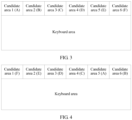
- corresponding candidate-word display priorities are separately set for candidate areas 1 to 6.
- the candidate-word display priorities are A, B, C, D, E, and F in descending order.
- a candidate-word display priority that is set for the candidate area 1 is A
- a candidate-word display priority that is set for the candidate area 2 is B
- ... a candidate-word display priority that is set for the candidate area 6 is F.
- Step 203 The terminal device counts a selection frequency at which each candidate area is selected in specified duration; calculates a delay value from a moment at which entering is completed in the keyboard area to a moment at which each candidate area is selected each time in the specified duration; and calculates an average delay value of each candidate area in the specified duration according to the delay value.
- the specified duration is set according to an actual scenario, and may be one hour, 30 minutes, or the like. This is not limited in this implementation of the present disclosure.
- an average delay value of any candidate area is calculated, and this includes: using, as the average delay value of the candidate area, a calculated average value of delay values from the moment at which entering is completed in the keyboard area to moments at which the candidate area is selected in the specified duration.
- the specified duration is two hours
- a start moment of the specified duration is a moment at which the terminal device is powered on. It is assumed that after two hours after the terminal device is powered on, selection frequencies at which the candidate areas 1 to 6 in FIG 3 are selected in the specified duration are respectively 30, 15, 9, 7, 4, 2, and 1. Average delay values of the candidate areas 1 to 6 in the specified duration are respectively 0.5 second, 0.3 second, 0.1 second, 0.05 second, 0.01 second, and 0.03 second.
- Step 204 After the specified duration, adjust a correspondence between each candidate area and a candidate-word display priority according to the obtained selection frequency and the obtained average delay value of each candidate area.
- the method further includes:
- the specified frequency threshold is set according to an actual scenario by the user or the terminal device, and may be 20, 30, 50, or the like. This is not limited in this implementation of the present disclosure. In an example of this implementation, the specified frequency-domain threshold is 25. Because a selection frequency, obtained by means of counting in step 203, of the candidate area 1 is 30, the correspondence between each candidate area and a candidate-word display priority may be adjusted.
- the adjusting a correspondence between each candidate area and a candidate-word display priority includes:
- Step 205 Use an adjusted correspondence between each candidate area and a candidate-word display priority as a new display configuration manner, and update a display configuration manner in the preset correspondence between an operation mode and a display configuration manner.
- the adjusted display configuration manner may be directly used as an initial display configuration manner for next adjustment to initialize each candidate area.
- the display configuration manner may be increasingly closer to a use habit of the user, an entering speed is optimized to a maximum extent, and user experience is improved.
- Step 206 Display, in each candidate area in the at least two candidate areas according to the adjusted correspondence between each candidate area in the at least two candidate areas and a candidate-word display priority, the candidate word that is of the corresponding candidate-word display priority and that is in the candidate-word subset.
- a correspondence between each candidate area and a candidate-word display priority is adjusted.
- an area with a short operation time is made corresponding to a candidate word with a relatively high selection probability, that is, a to-be-selected candidate word is dynamically adjusted to an area that is most convenient for user to move a finger. Therefore, operation habits of all users may be considered to a maximum extent, so that a candidate word displayed in the candidate area is increasingly closer to a use habit of the user, an entering speed is optimized, a display area does not need to be reduced, a display manner is more flexible, and user experience is improved.
- an apparatus for displaying textual input of a terminal device is further provided in an implementation of the present disclosure, and the apparatus is applicable to a handheld terminal device on which entering is performed by using a keyboard area and a candidate word is selected from multiple candidate areas.
- a screen of the terminal device includes a keyboard area and at least two candidate areas. Each candidate area in the at least two candidate areas is corresponding to a different candidate-word display priority, and each candidate area is used to display a candidate word that is of a corresponding candidate-word display priority and that is in a candidate-word subset of a character entered in the keyboard area.
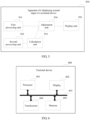
- the apparatus 500 includes a first processing unit 501, a second processing unit 502, a calculation unit 503, an adjustment unit 504, and a display unit 505.
- the first processing unit 501 is configured to count a selection frequency at which each candidate area in the at least two candidate areas is selected in specified duration.
- the second processing unit 502 is configured to calculate a delay value from a moment at which entering is completed in the keyboard area to a moment at which each candidate area in the at least two candidate areas is selected each time in the specified duration.
- the calculation unit 503 is configured to calculate an average delay value of each candidate area in the at least two candidate areas in the specified duration according to the delay value.
- the adjustment unit 504 is configured to: after the specified duration, adjust, according to the obtained selection frequency and the obtained average delay value of each candidate area in the at least two candidate areas, a correspondence between each candidate area in the at least two candidate areas and a candidate-word display priority.
- the display unit 505 is configured to display, in each candidate area in the at least two candidate areas according to the adjusted correspondence between each candidate area in the at least two candidate areas and a candidate-word display priority, the candidate word that is of the corresponding candidate-word display priority and that is in the candidate-word subset.
- the adjustment unit 504 is further configured to: before adjusting the correspondence between each candidate area in the at least two candidate areas and a candidate-word display priority, determine that an obtained selection frequency of at least one candidate area is greater than or equal to a specified frequency threshold, or receive an adjustment instruction.
- the adjustment unit 504 is specifically configured to:
- the apparatus 500 further includes:
- the configuration unit is further configured to: display, in each candidate area in the at least two candidate areas according to the correspondence, a candidate word that is of a candidate-word display priority corresponding to each candidate area and that is in the candidate-word subset.
- the configuration unit 506 is specifically configured to:
- the operation mode includes a left-hand operation mode or a right-hand operation mode.
- the adjustment unit 504 is further configured to:
- a terminal device is further provided in an implementation of the present disclosure.
- a terminal device 600 includes a processor 601, a display 602, and a touchscreen 604.
- the processor 601, the display 602, and the touchscreen 604 are connected to each other by using a bus 603.
- the display 602 is used to output a character, a picture, and/or a video.
- the display 602 may include a display panel such as a display panel configured in a form of an LCD (Liquid Crystal Display, liquid crystal display), an OLED (Organic Light-Emitting Diode, organic light-emitting diode), a field emission display (field emission display, FED for short), or the like.
- the display 602 may include a reflective display such as an electrophoretic (electrophoretic) display or a display that uses a technology of interferometric modulation of light (Interferometric Modulation of Light).
- the display 602 may include a single display or multiple displays of different sizes.
- the touchscreen 604 may be configured to detect input of a user. Touching or pressing a corresponding area of the touchscreen 604 may trigger a response of corresponding content of the display 602, for example, when a text is entered, a corresponding text may be selected by taping a touchscreen area corresponding to content displayed in the display.
- the bus 603 may be a peripheral component interconnect (peripheral component interconnect, PCI for short) bus, an extended industry standard architecture (extended industry standard architecture, EISA for short) bus, or the like. The bus may be classified into an address bus, a data bus, a control bus, and the like.
- the processor 601 is a control center of the terminal device and is connected to each part of the entire terminal device by using various interfaces and lines.
- the processor 601 implements various functions of the terminal device and/or processes data by running or executing a software program and/or a module that are/is stored in a storage unit and by invoking data stored in the storage unit.
- the processor 601 may include an integrated circuit (Integrated Circuit, IC for short), for example, may include a single packaged IC, or may be formed by connecting multiple packaged ICs that have a same function or different functions.
- the processor 601 may include only a central processing unit (Central Processing Unit, CPU for short), or may be a combination of a GPU, a digital signal processor (Digital Signal Processor, DSP for short), and a control chip (for example, a baseband chip) in a communication unit.
- the CPU may be a single computing core, or may include multiple computing cores.
- the screen of the terminal device may include the touchscreen and the display, or may be one of the touchscreen or the display.
- the processor 601 is configured to:
- the display 602 is configured to display, in each candidate area in the at least two candidate areas on the display according to the correspondence that is between each candidate area in the at least two candidate areas and a candidate-word display priority and that is adjusted by the processor 601, a candidate word that is of a corresponding candidate-word display priority and that is in a candidate-word subset.
- the processor 601 is further configured to: before adjusting the correspondence between each candidate area in the at least two candidate areas and a candidate-word display priority, determine that an obtained selection frequency of at least one candidate area is greater than or equal to a specified frequency threshold, or receive an adjustment instruction.
- the processor 601 is configured to:
- the processor 601 is further configured to:
- the display 602 displays, in each candidate area in the at least two candidate areas on the screen according to the correspondence, a candidate word that is of a candidate-word display priority corresponding to each candidate area and that is in the candidate-word subset.
- the processor 601 when determining the current operation mode of the terminal device, is configured to:
- the operation mode includes a left-hand operation mode or a right-hand operation mode.
- the processor 601 is further configured to:
- the terminal device 600 further includes the memory 605 that is configured to store a program and the like.
- the program may include program code, and the program code includes a computer operation instruction.
- the memory 605 may include a random access memory (random access memory, RAM), or may further include a nonvolatile memory (non-volatile memory), for example, at least one hard disk.
- the processor 601 executes an application program stored in the memory 605 to implement the foregoing method for displaying textual input of a terminal device.
- implementations of the present disclosure provide a method and an apparatus for displaying textual input of a terminal device, and a terminal device.
- a selection frequency at which each candidate area is selected in specified duration is counted, a delay value from a moment at which entering is completed in a keyboard area to a moment at which each candidate area is selected each time in the specified duration is calculated, an average delay value of each candidate area in the specified duration is calculated according to the calculated delay value, and after the specified duration, a correspondence between each candidate area and a candidate-word display priority is adjusted according to the obtained selection frequency and the obtained average delay value of each candidate area.
- a candidate word displayed in the candidate area can be dynamically adjusted, so that an entering speed is optimized, a display area does not need to be reduced, a display manner is flexible, and user experience is improved.
- the implementations of the present disclosure may be provided as a method, a system, or a computer program product. Therefore, the present disclosure may use a form of hardware only implementations, software only implementations, or implementations with a combination of software and hardware. Moreover, the present disclosure may use a form of a computer program product that is implemented on one or more computer-usable storage media (including but not limited to a disk memory, a CD-ROM, an optical memory, and the like) that include computer-usable program code.
- computer-usable storage media including but not limited to a disk memory, a CD-ROM, an optical memory, and the like
- These computer program instructions may be provided for a general-purpose computer, a dedicated computer, an embedded processor, or a processor of any other programmable data processing device to generate a machine, so that the instructions executed by a computer or a processor of any other programmable data processing device generate an apparatus for implementing a specific function in one or more processes in the flowcharts and/or in one or more blocks in the block diagrams.
- These computer program instructions may be stored in a computer readable memory that can instruct the computer or any other programmable data processing device to work in a specific manner, so that the instructions stored in the computer readable memory generate an artifact that includes an instruction apparatus.
- the instruction apparatus implements a specific function in one or more processes in the flowcharts and/or in one or more blocks in the block diagrams.
- These computer program instructions may be loaded onto a computer or another programmable data processing device, so that a series of operations and steps are performed on the computer or the another programmable device, thereby generating computer-implemented processing. Therefore, the instructions executed on the computer or the another programmable device provide steps for implementing a specific function in one or more processes in the flowcharts and/or in one or more blocks in the block diagrams.
Landscapes
- Engineering & Computer Science (AREA)
- Theoretical Computer Science (AREA)
- General Engineering & Computer Science (AREA)
- Physics & Mathematics (AREA)
- General Physics & Mathematics (AREA)
- Human Computer Interaction (AREA)
- Health & Medical Sciences (AREA)
- Artificial Intelligence (AREA)
- Audiology, Speech & Language Pathology (AREA)
- Computational Linguistics (AREA)
- General Health & Medical Sciences (AREA)
- User Interface Of Digital Computer (AREA)
- Telephone Function (AREA)
- Input From Keyboards Or The Like (AREA)
Claims (15)
- Procédé d'affichage d'entrée textuelle d'un dispositif terminal, dans lequel un écran du dispositif terminal comprend une zone de clavier et deux zones candidates ou plus, chaque zone candidate dans les deux zones candidates ou plus correspond à une priorité d'affichage de mot candidat différente, chaque zone candidate est utilisée pour afficher un mot candidat qui est d'une priorité d'affichage de mot candidat correspondante et qui se trouve dans un sous-ensemble de mot candidat d'un caractère entré dans la zone de clavier, et le procédé comprend :la détermination (201) d'un mode de fonctionnement actuel ;la détermination (202), en fonction d'une correspondance prédéfinie entre un mode de fonctionnement et une manière de configuration d'affichage, d'une manière de configuration d'affichage correspondant au mode de fonctionnement actuel, où la manière de configuration d'affichage comprend une correspondance entre chaque zone candidate dans les deux zones candidates ou plus et une priorité d'affichage de mot candidat ;après la détermination d'une manière de configuration d'affichage correspondant au mode de fonctionnement actuel, le procédé comprend en outre :le comptage (101), par le dispositif terminal, d'une fréquence de sélection à laquelle chaque zone candidate dans les deux zones candidates ou plus est sélectionnée dans une durée spécifiée ;le calcul (102), par le dispositif terminal, d'une valeur de retard à partir d'un moment auquel l'entrée d'un ou plusieurs caractères est exécutée dans la zone de clavier à un moment auquel chaque zone candidate dans les deux zones candidates ou plus est sélectionnée à chaque fois dans la durée spécifiée ;le calcul (103), par le dispositif terminal, d'une valeur de retard moyenne de chaque zone candidate dans les deux zones candidates ou plus dans la durée spécifiée en fonction de la valeur de retard ;après la durée spécifiée, le réglage (104), en fonction de la fréquence de sélection obtenue et de la valeur de retard moyenne obtenue de chaque zone candidate dans les deux zones candidates ou plus, de la correspondance entre chaque zone candidate dans les deux zones candidates ou plus et d'une priorité d'affichage de mot candidat ; etl'affichage (105), dans chaque zone candidate dans les deux zones candidates ou plus, en fonction de la correspondance réglée entre chaque zone candidate dans les deux zones candidates ou plus et d'une priorité d'affichage de mot candidat, du mot candidat qui est de la priorité d'affichage de mot candidat correspondante et qui se trouve dans le sous-ensemble de mot candidat ;dans lequel le mode de fonctionnement comprend un mode de fonctionnement de gauche ou un mode de fonctionnement de droite.
- Procédé selon la revendication 1, avant le réglage d'une correspondance entre chaque zone candidate dans les deux zones candidates ou plus et d'une priorité d'affichage de mot candidat, comprenant en outre :la détermination d'une fréquence de sélection obtenue d'au moins une zone candidate est supérieure ou égale à un seuil de fréquence spécifié ; oula réception d'une instruction de réglage.
- Procédé selon la revendication 1 ou 2, dans lequel le réglage, en fonction de la fréquence de sélection obtenue et de la valeur de retard moyenne obtenue de chaque zone candidate dans les deux zones candidates ou plus, d'une correspondance entre chaque zone candidate dans les deux zones candidates ou plus et d'une priorité d'affichage de mot candidat comprend :le tri des deux zones candidates ou plus en ordre descendant des fréquences de sélection obtenues des deux zones candidates ou plus ;l'obtention, en fonction des deux zones candidates ou plus triées, d'un ordre de priorités d'affichage de mot candidat correspondant aux deux zones candidates ou plus, et l'utilisation de l'ordre en tant que séquence de priorité d'affichage de mot candidat ;le tri des deux zones candidates ou plus en ordre ascendant des valeurs de retard moyennes obtenues des deux zones candidates ou plus, pour obtenir une séquence de zones candidates ; etle réglage d'une Nième priorité d'affichage dans la séquence de priorité d'affichage de mot candidat pour une Nième zone candidate dans la séquence de zones candidates, dans lequel N est un nombre entier positif inférieur ou égal à une quantité de zones candidates.
- Procédé selon l'une quelconque des revendications 1 à 3, après la détermination d'une manière de configuration d'affichage correspondant au mode de fonctionnement actuel, le procédé comprenant en outre :
l'affichage, dans chaque zone candidate dans les deux zones candidates ou plus, en fonction de la correspondance, d'un mot candidat qui est d'une priorité d'affichage de mot candidat correspondant à chaque zone candidate et qui se trouve dans le sous-ensemble de mot candidat. - Procédé selon la revendication 1, dans lequel la détermination, par le dispositif terminal, d'un mode de fonctionnement actuel comprend :la détermination, par le dispositif terminal, du mode de fonctionnement actuel en fonction du réglage actuel ; oula détermination, par le dispositif terminal, du mode de fonctionnement actuel en fonction d'une opération de glissement déclenchée et/ou de fréquences de fonctionnement au niveau desquelles une partie gauche et une partie droite du dispositif terminal sont déclenchées.
- Procédé selon l'une quelconque des revendications 1 à 5, après le réglage d'une correspondance entre chaque zone candidate dans les deux zones candidates ou plus, et d'une priorité d'affichage de mot candidat, comprenant en outre :l'utilisation de la correspondance réglée entre chaque zone candidate dans les deux zones candidates ou plus, et d'une priorité d'affichage de mot candidat en tant que nouvelle manière de configuration d'affichage ; etla mise à jour d'une manière de configuration d'affichage dans la correspondance prédéfinie entre un mode de fonctionnement et une manière de configuration d'affichage à la nouvelle manière de configuration d'affichage.
- Appareil d'affichage d'entrée textuelle d'un dispositif terminal, dans lequel un écran du dispositif terminal comprend une zone de clavier et deux zones candidates ou plus, chaque zone candidate dans les deux zones candidates ou plus correspond à une priorité d'affichage de mot candidat différente, chaque zone candidate est utilisée pour afficher un mot candidat qui est d'une priorité d'affichage de mot candidat correspondante et qui se trouve dans un sous-ensemble de mot candidat d'un caractère entré dans la zone de clavier, et l'appareil comprend :une unité de configuration, configurée pour : déterminer un mode de fonctionnement actuel du dispositif terminal ; etdéterminer, en fonction d'une correspondance prédéfinie entre un mode de fonctionnement et une manière de configuration d'affichage, une manière de configuration d'affichage correspondant au mode de fonctionnement actuel, dans lequel la manière de configuration d'affichage comprend la correspondance entre chaque zone candidate dans les deux zones candidates ou plus et une priorité d'affichage de mot candidat ;dans lequel l'appareil comprend en outre :une première unité de traitement (501), configurée pour compter une fréquence de sélection à laquelle chaque zone candidate dans les deux zones candidates ou plus est sélectionnée dans une durée spécifiée ;une deuxième unité de traitement (502), configurée pour calculer une valeur de retard à partir d'un moment auquel l'entrée d'un ou plusieurs caractères est exécutée dans la zone de clavier à un moment auquel chaque zone candidate dans les deux zones candidates ou plus est sélectionnée à chaque fois dans la durée spécifiée ;une unité de calcul (503), configurée pour calculer une valeur de retard moyenne de chaque zone candidate dans les deux zones candidates ou plus dans la durée spécifiée en fonction de la valeur de retard ;une unité de réglage (504), configurée pour : après la durée spécifiée, régler, en fonction de la fréquence de sélection obtenue et de la valeur de retard moyenne obtenue de chaque zone candidate dans les deux zones candidates ou plus, la correspondance entre chaque zone candidate dans les deux zones candidates ou plus et une priorité d'affichage de mot candidat ; etune unité d'affichage (505), configurée pour afficher, dans chaque zone candidate dans les deux zones candidates ou plus, en fonction de la correspondance réglée entre chaque zone candidate dans les deux zones candidates ou plus et d'une priorité d'affichage de mot candidat, le mot candidat qui est de la priorité d'affichage de mot candidat correspondante et qui se trouve dans le sous-ensemble de mot candidat ;dans lequel le mode de fonctionnement comprend un mode de fonctionnement de gauche ou un mode de fonctionnement de droite.
- Appareil selon la revendication 7, dans lequel l'unité de réglage est configurée en outre pour :
avant de régler la correspondance entre chaque zone candidate dans les deux zones candidates ou plus et une priorité d'affichage de mot candidat, déterminer qu'une fréquence de sélection obtenue d'au moins une zone candidate est supérieure ou égale à un seuil de fréquence spécifié, ou recevoir une instruction de réglage. - Appareil selon la revendication 7 ou 8, dans lequel l'unité de réglage est configurée pour :trier les deux zones candidates ou plus, en ordre descendant des fréquences de sélection obtenues des deux zones candidates ou plus ;obtenir, en fonction des deux zones candidates triées ou plus, un ordre de priorités d'affichage de mot candidat correspondant aux deux zones candidates ou plus, et utiliser l'ordre en tant que séquence de priorité d'affichage de mot candidat ;trier les deux zones candidates ou plus en ordre ascendant des valeurs de retard moyennes obtenues des deux zones candidates ou plus, pour obtenir une séquence de zones candidates ; etrégler une Nième priorité d'affichage dans la séquence de priorité d'affichage de mot candidat pour une Nième zone candidate dans la séquence de zones candidates, dans lequel N est un nombre entier positif inférieur ou égal à une quantité de zones candidates.
- Appareil selon l'une quelconque des revendications 7 à 9, dans lequel l'unité de configuration est configurée en outre pour :
afficher, dans chaque zone candidate dans les deux zones candidates ou plus, en fonction de la correspondance, un mot candidat qui est d'une priorité d'affichage de mot candidat correspondant à chaque zone candidate et qui se trouve dans le sous-ensemble de mot candidat. - Appareil selon la revendication 10, dans lequel lors de la détermination du mode de fonctionnement actuel du dispositif terminal, l'unité de configuration est configurée pour :déterminer le mode de fonctionnement actuel en fonction du réglage actuel du dispositif terminal ; oudéterminer le mode de fonctionnement actuel en fonction d'une opération de glissement déclenchée du dispositif terminal et/ou de fréquences de fonctionnement au niveau desquelles une partie gauche et une partie droite du dispositif terminal sont déclenchées.
- Appareil selon l'une quelconque des revendications 7 à 10, dans lequel l'unité de réglage est configurée en outre pour :après le réglage de la correspondance entre chaque zone candidate dans les deux zones candidates ou plus et une priorité d'affichage de mot candidat, utiliser la correspondance réglée entre chaque zone candidate dans les deux zones candidates ou plus et une priorité d'affichage de mot candidat en tant que nouvelle manière de configuration d'affichage ; etmettre à jour une manière de configuration d'affichage dans la correspondance prédéfinie entre un mode de fonctionnement et une manière de configuration d'affichage à la nouvelle manière de configuration d'affichage.
- Dispositif terminal comprenant un appareil d'affichage d'entrée textuelle du dispositif terminal selon l'une quelconque des revendications 7 à 12.
- Produit de programme informatique, comprenant un ensemble d'instructions qui, lorsqu'il est exécuté par un dispositif terminal, amène le dispositif terminal à mettre en oeuvre le procédé selon l'une quelconque des revendications 1 à 6.
- Support de stockage lisible par ordinateur, le support de stockage lisible par ordinateur stockant un ensemble d'instructions qui, lorsqu'il est exécuté par un dispositif terminal, amène le dispositif terminal à mettre en oeuvre le procédé selon l'une quelconque des revendications 1 à 6.
Applications Claiming Priority (1)
| Application Number | Priority Date | Filing Date | Title |
|---|---|---|---|
| PCT/CN2015/076959 WO2016168963A1 (fr) | 2015-04-20 | 2015-04-20 | Procédé et dispositif d'affichage d'entrée de texte sur un dispositif terminal, et dispositif terminal |
Publications (3)
| Publication Number | Publication Date |
|---|---|
| EP3279781A1 EP3279781A1 (fr) | 2018-02-07 |
| EP3279781A4 EP3279781A4 (fr) | 2018-05-02 |
| EP3279781B1 true EP3279781B1 (fr) | 2024-08-21 |
Family
ID=57142750
Family Applications (1)
| Application Number | Title | Priority Date | Filing Date |
|---|---|---|---|
| EP15889454.3A Active EP3279781B1 (fr) | 2015-04-20 | 2015-04-20 | Procédé et dispositif d'affichage d'entrée de texte sur un dispositif terminal, et dispositif terminal |
Country Status (7)
| Country | Link |
|---|---|
| US (1) | US10846476B2 (fr) |
| EP (1) | EP3279781B1 (fr) |
| JP (1) | JP6496044B2 (fr) |
| CN (1) | CN107408007B (fr) |
| AU (1) | AU2015392244B2 (fr) |
| BR (1) | BR112017022688B1 (fr) |
| WO (1) | WO2016168963A1 (fr) |
Families Citing this family (3)
| Publication number | Priority date | Publication date | Assignee | Title |
|---|---|---|---|---|
| CN114527919B (zh) * | 2020-11-19 | 2024-05-28 | 北京搜狗科技发展有限公司 | 一种信息展示方法、装置和电子设备 |
| CN116597360A (zh) * | 2023-05-29 | 2023-08-15 | 北京字跳网络技术有限公司 | 一种视频处理方法、系统、设备及介质、程序产品 |
| JP2026005896A (ja) * | 2024-06-28 | 2026-01-16 | 株式会社豊田中央研究所 | 情報処理システム、情報処理方法及びプログラム |
Citations (1)
| Publication number | Priority date | Publication date | Assignee | Title |
|---|---|---|---|---|
| US20150007069A1 (en) * | 2013-06-26 | 2015-01-01 | Hon Hai Precision Industry Co., Ltd. | Electronic device capable of reconfiguring displayed icons and method thereof |
Family Cites Families (17)
| Publication number | Priority date | Publication date | Assignee | Title |
|---|---|---|---|---|
| CN1050915C (zh) * | 1995-06-07 | 2000-03-29 | 林兵 | 一种计算机汉字输入引导提示方法 |
| JP3351213B2 (ja) * | 1996-01-09 | 2002-11-25 | 三菱電機株式会社 | 学習メニュー制御方式 |
| JP5105513B2 (ja) * | 2007-07-20 | 2012-12-26 | インターナショナル・ビジネス・マシーンズ・コーポレーション | 処理対象として適切なテキストを選択する技術 |
| CN100592249C (zh) | 2007-09-21 | 2010-02-24 | 上海汉翔信息技术有限公司 | 快速输入相关词的方法 |
| CN101424977A (zh) * | 2008-11-28 | 2009-05-06 | 深圳华为通信技术有限公司 | 采用键盘进行内容输入的输入方法及终端设备 |
| JP2011118729A (ja) * | 2009-12-04 | 2011-06-16 | Panasonic Corp | 電子機器および選択画面の表示方法 |
| JP5062279B2 (ja) | 2010-03-29 | 2012-10-31 | パナソニック株式会社 | 情報機器および携帯情報機器 |
| JP2012003545A (ja) | 2010-06-17 | 2012-01-05 | Nec Corp | 情報処理端末およびその操作制御方法 |
| JP5996262B2 (ja) | 2012-05-11 | 2016-09-21 | シャープ株式会社 | 文字入力装置、電子機器、制御方法、制御プログラムおよび記録媒体 |
| CN102662603A (zh) * | 2012-05-18 | 2012-09-12 | 广州市渡明信息技术有限公司 | 用于具有触摸屏幕的手机的输入法显示方法及系统 |
| US8464180B1 (en) * | 2012-06-15 | 2013-06-11 | Google Inc. | Organizing graphical representations on computing devices |
| US8850350B2 (en) * | 2012-10-16 | 2014-09-30 | Google Inc. | Partial gesture text entry |
| JP2014191355A (ja) * | 2013-03-26 | 2014-10-06 | Oki Data Corp | 文字入力装置及び文字入力方法 |
| CN103226393B (zh) * | 2013-04-12 | 2016-05-18 | 百度在线网络技术(北京)有限公司 | 一种输入方法和设备 |
| JP6271914B2 (ja) | 2013-08-28 | 2018-01-31 | キヤノン株式会社 | 情報処理装置及びその制御方法、コンピュータプログラム、記録媒体 |
| CN104035667B (zh) * | 2014-04-30 | 2018-02-02 | 百度在线网络技术(北京)有限公司 | 一种用于展现候选信息的方法和装置 |
| CN104391644B (zh) * | 2014-11-11 | 2018-03-20 | 北京元心科技有限公司 | 一种输入方法及装置 |
-
2015
- 2015-04-20 US US15/567,911 patent/US10846476B2/en active Active
- 2015-04-20 EP EP15889454.3A patent/EP3279781B1/fr active Active
- 2015-04-20 AU AU2015392244A patent/AU2015392244B2/en active Active
- 2015-04-20 WO PCT/CN2015/076959 patent/WO2016168963A1/fr not_active Ceased
- 2015-04-20 BR BR112017022688-0A patent/BR112017022688B1/pt active IP Right Grant
- 2015-04-20 CN CN201580078385.6A patent/CN107408007B/zh active Active
- 2015-04-20 JP JP2017554836A patent/JP6496044B2/ja not_active Expired - Fee Related
Patent Citations (1)
| Publication number | Priority date | Publication date | Assignee | Title |
|---|---|---|---|---|
| US20150007069A1 (en) * | 2013-06-26 | 2015-01-01 | Hon Hai Precision Industry Co., Ltd. | Electronic device capable of reconfiguring displayed icons and method thereof |
Also Published As
| Publication number | Publication date |
|---|---|
| JP2018514038A (ja) | 2018-05-31 |
| WO2016168963A1 (fr) | 2016-10-27 |
| AU2015392244A1 (en) | 2017-11-16 |
| CN107408007B (zh) | 2019-07-23 |
| US20180137096A1 (en) | 2018-05-17 |
| US10846476B2 (en) | 2020-11-24 |
| BR112017022688A2 (pt) | 2018-07-10 |
| CN107408007A (zh) | 2017-11-28 |
| BR112017022688B1 (pt) | 2023-04-04 |
| EP3279781A1 (fr) | 2018-02-07 |
| AU2015392244B2 (en) | 2019-04-18 |
| JP6496044B2 (ja) | 2019-04-03 |
| EP3279781A4 (fr) | 2018-05-02 |
Similar Documents
| Publication | Publication Date | Title |
|---|---|---|
| US10649644B2 (en) | Controlling multitasking application displays using gestures | |
| EP3200061A1 (fr) | Procédé et appareil de gestion d'icônes ainsi que terminal | |
| CN106201166A (zh) | 一种分屏显示方法及终端 | |
| CN105045411A (zh) | 一种对象控制方法及终端 | |
| US20150058761A1 (en) | Information processing method and electronic device | |
| WO2022048513A1 (fr) | Procédé et appareil d'affichage de recherche et dispositif électronique | |
| US20160026357A1 (en) | Touch-type terminal and method thereof for locating prompt box | |
| US20130346905A1 (en) | Targeted key press zones on an interactive display | |
| CN104765560A (zh) | 一种显示控制方法 | |
| CN103076980B (zh) | 搜索项显示方法和装置 | |
| US20170091431A1 (en) | Secure identification information entry on a small touchscreen display | |
| US20230230084A1 (en) | Interface display method and apparatus, and electronic device | |
| WO2019024495A1 (fr) | Terminal et procédé de poussée de thème d'application, et support de stockage lisible par ordinateur | |
| EP3279781B1 (fr) | Procédé et dispositif d'affichage d'entrée de texte sur un dispositif terminal, et dispositif terminal | |
| KR20180088859A (ko) | 시나리오에 따라 그래픽 처리 해상도를 변경하기 위한 방법 및 휴대용 전자 디바이스 | |
| US20200097098A1 (en) | Virtual keyboard implementation method, storage device, and mobile terminal | |
| US8625901B2 (en) | Method for dynamically adjusting a waiting time of handwriting inputs, electronic equipment and computer-readable medium thereof | |
| WO2022253181A1 (fr) | Procédé et appareil d'agencement d'icônes et dispositif électronique | |
| CN104765561A (zh) | 一种终端 | |
| US10235043B2 (en) | Keyboard for use with a computing device | |
| CN113268620A (zh) | 图片显示方法及装置 | |
| CN105573746A (zh) | 一种控件属性处理方法及装置 | |
| US10635224B2 (en) | Information input method and apparatus for touch screen | |
| CN103809869A (zh) | 一种信息处理方法及电子设备 | |
| CN104461334A (zh) | 一种字符输入方法及装置 |
Legal Events
| Date | Code | Title | Description |
|---|---|---|---|
| STAA | Information on the status of an ep patent application or granted ep patent |
Free format text: STATUS: THE INTERNATIONAL PUBLICATION HAS BEEN MADE |
|
| PUAI | Public reference made under article 153(3) epc to a published international application that has entered the european phase |
Free format text: ORIGINAL CODE: 0009012 |
|
| STAA | Information on the status of an ep patent application or granted ep patent |
Free format text: STATUS: REQUEST FOR EXAMINATION WAS MADE |
|
| 17P | Request for examination filed |
Effective date: 20171101 |
|
| AK | Designated contracting states |
Kind code of ref document: A1 Designated state(s): AL AT BE BG CH CY CZ DE DK EE ES FI FR GB GR HR HU IE IS IT LI LT LU LV MC MK MT NL NO PL PT RO RS SE SI SK SM TR |
|
| AX | Request for extension of the european patent |
Extension state: BA ME |
|
| A4 | Supplementary search report drawn up and despatched |
Effective date: 20180405 |
|
| RIC1 | Information provided on ipc code assigned before grant |
Ipc: G06F 3/0482 20130101AFI20180329BHEP Ipc: G06F 17/27 20060101ALI20180329BHEP Ipc: G06F 3/023 20060101ALI20180329BHEP Ipc: G06F 3/0489 20130101ALI20180329BHEP Ipc: G06F 3/0488 20130101ALI20180329BHEP |
|
| DAV | Request for validation of the european patent (deleted) | ||
| DAX | Request for extension of the european patent (deleted) | ||
| STAA | Information on the status of an ep patent application or granted ep patent |
Free format text: STATUS: EXAMINATION IS IN PROGRESS |
|
| 17Q | First examination report despatched |
Effective date: 20200316 |
|
| REG | Reference to a national code |
Ref country code: DE Ref legal event code: R079 Free format text: PREVIOUS MAIN CLASS: G06F0003048200 Ipc: G06F0003023000 Ref country code: DE Ref legal event code: R079 Ref document number: 602015089637 Country of ref document: DE Free format text: PREVIOUS MAIN CLASS: G06F0003048200 Ipc: G06F0003023000 |
|
| GRAP | Despatch of communication of intention to grant a patent |
Free format text: ORIGINAL CODE: EPIDOSNIGR1 |
|
| STAA | Information on the status of an ep patent application or granted ep patent |
Free format text: STATUS: GRANT OF PATENT IS INTENDED |
|
| RIC1 | Information provided on ipc code assigned before grant |
Ipc: G06F 3/0488 20130101ALI20240315BHEP Ipc: G06F 3/0489 20130101ALI20240315BHEP Ipc: G06F 3/0482 20130101ALI20240315BHEP Ipc: G06F 3/023 20060101AFI20240315BHEP |
|
| INTG | Intention to grant announced |
Effective date: 20240411 |
|
| P01 | Opt-out of the competence of the unified patent court (upc) registered |
Effective date: 20240514 |
|
| GRAS | Grant fee paid |
Free format text: ORIGINAL CODE: EPIDOSNIGR3 |
|
| GRAA | (expected) grant |
Free format text: ORIGINAL CODE: 0009210 |
|
| STAA | Information on the status of an ep patent application or granted ep patent |
Free format text: STATUS: THE PATENT HAS BEEN GRANTED |
|
| AK | Designated contracting states |
Kind code of ref document: B1 Designated state(s): AL AT BE BG CH CY CZ DE DK EE ES FI FR GB GR HR HU IE IS IT LI LT LU LV MC MK MT NL NO PL PT RO RS SE SI SK SM TR |
|
| REG | Reference to a national code |
Ref country code: GB Ref legal event code: FG4D |
|
| REG | Reference to a national code |
Ref country code: CH Ref legal event code: EP |
|
| REG | Reference to a national code |
Ref country code: DE Ref legal event code: R096 Ref document number: 602015089637 Country of ref document: DE |
|
| REG | Reference to a national code |
Ref country code: IE Ref legal event code: FG4D |
|
| REG | Reference to a national code |
Ref country code: LT Ref legal event code: MG9D |
|
| REG | Reference to a national code |
Ref country code: NL Ref legal event code: MP Effective date: 20240821 |
|
| PG25 | Lapsed in a contracting state [announced via postgrant information from national office to epo] |
Ref country code: NO Free format text: LAPSE BECAUSE OF FAILURE TO SUBMIT A TRANSLATION OF THE DESCRIPTION OR TO PAY THE FEE WITHIN THE PRESCRIBED TIME-LIMIT Effective date: 20241121 |
|
| REG | Reference to a national code |
Ref country code: AT Ref legal event code: MK05 Ref document number: 1716136 Country of ref document: AT Kind code of ref document: T Effective date: 20240821 |
|
| PG25 | Lapsed in a contracting state [announced via postgrant information from national office to epo] |
Ref country code: FI Free format text: LAPSE BECAUSE OF FAILURE TO SUBMIT A TRANSLATION OF THE DESCRIPTION OR TO PAY THE FEE WITHIN THE PRESCRIBED TIME-LIMIT Effective date: 20240821 Ref country code: PT Free format text: LAPSE BECAUSE OF FAILURE TO SUBMIT A TRANSLATION OF THE DESCRIPTION OR TO PAY THE FEE WITHIN THE PRESCRIBED TIME-LIMIT Effective date: 20241223 Ref country code: GR Free format text: LAPSE BECAUSE OF FAILURE TO SUBMIT A TRANSLATION OF THE DESCRIPTION OR TO PAY THE FEE WITHIN THE PRESCRIBED TIME-LIMIT Effective date: 20241122 Ref country code: NL Free format text: LAPSE BECAUSE OF FAILURE TO SUBMIT A TRANSLATION OF THE DESCRIPTION OR TO PAY THE FEE WITHIN THE PRESCRIBED TIME-LIMIT Effective date: 20240821 Ref country code: PL Free format text: LAPSE BECAUSE OF FAILURE TO SUBMIT A TRANSLATION OF THE DESCRIPTION OR TO PAY THE FEE WITHIN THE PRESCRIBED TIME-LIMIT Effective date: 20240821 |
|
| PG25 | Lapsed in a contracting state [announced via postgrant information from national office to epo] |
Ref country code: BG Free format text: LAPSE BECAUSE OF FAILURE TO SUBMIT A TRANSLATION OF THE DESCRIPTION OR TO PAY THE FEE WITHIN THE PRESCRIBED TIME-LIMIT Effective date: 20240821 |
|
| PG25 | Lapsed in a contracting state [announced via postgrant information from national office to epo] |
Ref country code: LV Free format text: LAPSE BECAUSE OF FAILURE TO SUBMIT A TRANSLATION OF THE DESCRIPTION OR TO PAY THE FEE WITHIN THE PRESCRIBED TIME-LIMIT Effective date: 20240821 |
|
| PG25 | Lapsed in a contracting state [announced via postgrant information from national office to epo] |
Ref country code: AT Free format text: LAPSE BECAUSE OF FAILURE TO SUBMIT A TRANSLATION OF THE DESCRIPTION OR TO PAY THE FEE WITHIN THE PRESCRIBED TIME-LIMIT Effective date: 20240821 Ref country code: IS Free format text: LAPSE BECAUSE OF FAILURE TO SUBMIT A TRANSLATION OF THE DESCRIPTION OR TO PAY THE FEE WITHIN THE PRESCRIBED TIME-LIMIT Effective date: 20241221 |
|
| PG25 | Lapsed in a contracting state [announced via postgrant information from national office to epo] |
Ref country code: HR Free format text: LAPSE BECAUSE OF FAILURE TO SUBMIT A TRANSLATION OF THE DESCRIPTION OR TO PAY THE FEE WITHIN THE PRESCRIBED TIME-LIMIT Effective date: 20240821 |
|
| PG25 | Lapsed in a contracting state [announced via postgrant information from national office to epo] |
Ref country code: RS Free format text: LAPSE BECAUSE OF FAILURE TO SUBMIT A TRANSLATION OF THE DESCRIPTION OR TO PAY THE FEE WITHIN THE PRESCRIBED TIME-LIMIT Effective date: 20241121 Ref country code: ES Free format text: LAPSE BECAUSE OF FAILURE TO SUBMIT A TRANSLATION OF THE DESCRIPTION OR TO PAY THE FEE WITHIN THE PRESCRIBED TIME-LIMIT Effective date: 20240821 |
|
| PG25 | Lapsed in a contracting state [announced via postgrant information from national office to epo] |
Ref country code: RS Free format text: LAPSE BECAUSE OF FAILURE TO SUBMIT A TRANSLATION OF THE DESCRIPTION OR TO PAY THE FEE WITHIN THE PRESCRIBED TIME-LIMIT Effective date: 20241121 Ref country code: PT Free format text: LAPSE BECAUSE OF FAILURE TO SUBMIT A TRANSLATION OF THE DESCRIPTION OR TO PAY THE FEE WITHIN THE PRESCRIBED TIME-LIMIT Effective date: 20241223 Ref country code: PL Free format text: LAPSE BECAUSE OF FAILURE TO SUBMIT A TRANSLATION OF THE DESCRIPTION OR TO PAY THE FEE WITHIN THE PRESCRIBED TIME-LIMIT Effective date: 20240821 Ref country code: NO Free format text: LAPSE BECAUSE OF FAILURE TO SUBMIT A TRANSLATION OF THE DESCRIPTION OR TO PAY THE FEE WITHIN THE PRESCRIBED TIME-LIMIT Effective date: 20241121 Ref country code: NL Free format text: LAPSE BECAUSE OF FAILURE TO SUBMIT A TRANSLATION OF THE DESCRIPTION OR TO PAY THE FEE WITHIN THE PRESCRIBED TIME-LIMIT Effective date: 20240821 Ref country code: LV Free format text: LAPSE BECAUSE OF FAILURE TO SUBMIT A TRANSLATION OF THE DESCRIPTION OR TO PAY THE FEE WITHIN THE PRESCRIBED TIME-LIMIT Effective date: 20240821 Ref country code: IS Free format text: LAPSE BECAUSE OF FAILURE TO SUBMIT A TRANSLATION OF THE DESCRIPTION OR TO PAY THE FEE WITHIN THE PRESCRIBED TIME-LIMIT Effective date: 20241221 Ref country code: HR Free format text: LAPSE BECAUSE OF FAILURE TO SUBMIT A TRANSLATION OF THE DESCRIPTION OR TO PAY THE FEE WITHIN THE PRESCRIBED TIME-LIMIT Effective date: 20240821 Ref country code: GR Free format text: LAPSE BECAUSE OF FAILURE TO SUBMIT A TRANSLATION OF THE DESCRIPTION OR TO PAY THE FEE WITHIN THE PRESCRIBED TIME-LIMIT Effective date: 20241122 Ref country code: FI Free format text: LAPSE BECAUSE OF FAILURE TO SUBMIT A TRANSLATION OF THE DESCRIPTION OR TO PAY THE FEE WITHIN THE PRESCRIBED TIME-LIMIT Effective date: 20240821 Ref country code: ES Free format text: LAPSE BECAUSE OF FAILURE TO SUBMIT A TRANSLATION OF THE DESCRIPTION OR TO PAY THE FEE WITHIN THE PRESCRIBED TIME-LIMIT Effective date: 20240821 Ref country code: BG Free format text: LAPSE BECAUSE OF FAILURE TO SUBMIT A TRANSLATION OF THE DESCRIPTION OR TO PAY THE FEE WITHIN THE PRESCRIBED TIME-LIMIT Effective date: 20240821 Ref country code: AT Free format text: LAPSE BECAUSE OF FAILURE TO SUBMIT A TRANSLATION OF THE DESCRIPTION OR TO PAY THE FEE WITHIN THE PRESCRIBED TIME-LIMIT Effective date: 20240821 |
|
| PG25 | Lapsed in a contracting state [announced via postgrant information from national office to epo] |
Ref country code: RO Free format text: LAPSE BECAUSE OF FAILURE TO SUBMIT A TRANSLATION OF THE DESCRIPTION OR TO PAY THE FEE WITHIN THE PRESCRIBED TIME-LIMIT Effective date: 20240821 Ref country code: SM Free format text: LAPSE BECAUSE OF FAILURE TO SUBMIT A TRANSLATION OF THE DESCRIPTION OR TO PAY THE FEE WITHIN THE PRESCRIBED TIME-LIMIT Effective date: 20240821 Ref country code: DK Free format text: LAPSE BECAUSE OF FAILURE TO SUBMIT A TRANSLATION OF THE DESCRIPTION OR TO PAY THE FEE WITHIN THE PRESCRIBED TIME-LIMIT Effective date: 20240821 |
|
| PG25 | Lapsed in a contracting state [announced via postgrant information from national office to epo] |
Ref country code: EE Free format text: LAPSE BECAUSE OF FAILURE TO SUBMIT A TRANSLATION OF THE DESCRIPTION OR TO PAY THE FEE WITHIN THE PRESCRIBED TIME-LIMIT Effective date: 20240821 |
|
| PG25 | Lapsed in a contracting state [announced via postgrant information from national office to epo] |
Ref country code: CZ Free format text: LAPSE BECAUSE OF FAILURE TO SUBMIT A TRANSLATION OF THE DESCRIPTION OR TO PAY THE FEE WITHIN THE PRESCRIBED TIME-LIMIT Effective date: 20240821 |
|
| PG25 | Lapsed in a contracting state [announced via postgrant information from national office to epo] |
Ref country code: SK Free format text: LAPSE BECAUSE OF FAILURE TO SUBMIT A TRANSLATION OF THE DESCRIPTION OR TO PAY THE FEE WITHIN THE PRESCRIBED TIME-LIMIT Effective date: 20240821 Ref country code: IT Free format text: LAPSE BECAUSE OF FAILURE TO SUBMIT A TRANSLATION OF THE DESCRIPTION OR TO PAY THE FEE WITHIN THE PRESCRIBED TIME-LIMIT Effective date: 20240821 |
|
| PGFP | Annual fee paid to national office [announced via postgrant information from national office to epo] |
Ref country code: GB Payment date: 20250306 Year of fee payment: 11 |
|
| REG | Reference to a national code |
Ref country code: DE Ref legal event code: R097 Ref document number: 602015089637 Country of ref document: DE |
|
| PLBE | No opposition filed within time limit |
Free format text: ORIGINAL CODE: 0009261 |
|
| STAA | Information on the status of an ep patent application or granted ep patent |
Free format text: STATUS: NO OPPOSITION FILED WITHIN TIME LIMIT |
|
| PGFP | Annual fee paid to national office [announced via postgrant information from national office to epo] |
Ref country code: DE Payment date: 20250305 Year of fee payment: 11 |
|
| 26N | No opposition filed |
Effective date: 20250522 |
|
| PG25 | Lapsed in a contracting state [announced via postgrant information from national office to epo] |
Ref country code: SE Free format text: LAPSE BECAUSE OF FAILURE TO SUBMIT A TRANSLATION OF THE DESCRIPTION OR TO PAY THE FEE WITHIN THE PRESCRIBED TIME-LIMIT Effective date: 20240821 |
|
| REG | Reference to a national code |
Ref country code: CH Ref legal event code: H13 Free format text: ST27 STATUS EVENT CODE: U-0-0-H10-H13 (AS PROVIDED BY THE NATIONAL OFFICE) Effective date: 20251125 |
|
| PG25 | Lapsed in a contracting state [announced via postgrant information from national office to epo] |
Ref country code: LU Free format text: LAPSE BECAUSE OF NON-PAYMENT OF DUE FEES Effective date: 20250420 |
|
| PG25 | Lapsed in a contracting state [announced via postgrant information from national office to epo] |
Ref country code: MC Free format text: LAPSE BECAUSE OF FAILURE TO SUBMIT A TRANSLATION OF THE DESCRIPTION OR TO PAY THE FEE WITHIN THE PRESCRIBED TIME-LIMIT Effective date: 20240821 |
|
| REG | Reference to a national code |
Ref country code: BE Ref legal event code: MM Effective date: 20250430 |
|
| PG25 | Lapsed in a contracting state [announced via postgrant information from national office to epo] |
Ref country code: FR Free format text: LAPSE BECAUSE OF NON-PAYMENT OF DUE FEES Effective date: 20250430 |
|
| PG25 | Lapsed in a contracting state [announced via postgrant information from national office to epo] |
Ref country code: BE Free format text: LAPSE BECAUSE OF NON-PAYMENT OF DUE FEES Effective date: 20250430 |
|
| PG25 | Lapsed in a contracting state [announced via postgrant information from national office to epo] |
Ref country code: CH Free format text: LAPSE BECAUSE OF NON-PAYMENT OF DUE FEES Effective date: 20250430 |