EP3260966A1 - Bedienvorrichtung eines kraftfahrzeugs - Google Patents
Bedienvorrichtung eines kraftfahrzeugs Download PDFInfo
- Publication number
- EP3260966A1 EP3260966A1 EP17174904.7A EP17174904A EP3260966A1 EP 3260966 A1 EP3260966 A1 EP 3260966A1 EP 17174904 A EP17174904 A EP 17174904A EP 3260966 A1 EP3260966 A1 EP 3260966A1
- Authority
- EP
- European Patent Office
- Prior art keywords
- information
- screen
- closed position
- movement
- operating device
- Prior art date
- Legal status (The legal status is an assumption and is not a legal conclusion. Google has not performed a legal analysis and makes no representation as to the accuracy of the status listed.)
- Granted
Links
Images




Classifications
-
- G—PHYSICS
- G06—COMPUTING OR CALCULATING; COUNTING
- G06F—ELECTRIC DIGITAL DATA PROCESSING
- G06F3/00—Input arrangements for transferring data to be processed into a form capable of being handled by the computer; Output arrangements for transferring data from processing unit to output unit, e.g. interface arrangements
- G06F3/01—Input arrangements or combined input and output arrangements for interaction between user and computer
- G06F3/048—Interaction techniques based on graphical user interfaces [GUI]
- G06F3/0481—Interaction techniques based on graphical user interfaces [GUI] based on specific properties of the displayed interaction object or a metaphor-based environment, e.g. interaction with desktop elements like windows or icons, or assisted by a cursor's changing behaviour or appearance
-
- B—PERFORMING OPERATIONS; TRANSPORTING
- B60—VEHICLES IN GENERAL
- B60K—ARRANGEMENT OR MOUNTING OF PROPULSION UNITS OR OF TRANSMISSIONS IN VEHICLES; ARRANGEMENT OR MOUNTING OF PLURAL DIVERSE PRIME-MOVERS IN VEHICLES; AUXILIARY DRIVES FOR VEHICLES; INSTRUMENTATION OR DASHBOARDS FOR VEHICLES; ARRANGEMENTS IN CONNECTION WITH COOLING, AIR INTAKE, GAS EXHAUST OR FUEL SUPPLY OF PROPULSION UNITS IN VEHICLES
- B60K35/00—Instruments specially adapted for vehicles; Arrangement of instruments in or on vehicles
- B60K35/10—Input arrangements, i.e. from user to vehicle, associated with vehicle functions or specially adapted therefor
-
- B—PERFORMING OPERATIONS; TRANSPORTING
- B60—VEHICLES IN GENERAL
- B60K—ARRANGEMENT OR MOUNTING OF PROPULSION UNITS OR OF TRANSMISSIONS IN VEHICLES; ARRANGEMENT OR MOUNTING OF PLURAL DIVERSE PRIME-MOVERS IN VEHICLES; AUXILIARY DRIVES FOR VEHICLES; INSTRUMENTATION OR DASHBOARDS FOR VEHICLES; ARRANGEMENTS IN CONNECTION WITH COOLING, AIR INTAKE, GAS EXHAUST OR FUEL SUPPLY OF PROPULSION UNITS IN VEHICLES
- B60K35/00—Instruments specially adapted for vehicles; Arrangement of instruments in or on vehicles
- B60K35/20—Output arrangements, i.e. from vehicle to user, associated with vehicle functions or specially adapted therefor
- B60K35/21—Output arrangements, i.e. from vehicle to user, associated with vehicle functions or specially adapted therefor using visual output, e.g. blinking lights or matrix displays
- B60K35/22—Display screens
-
- B—PERFORMING OPERATIONS; TRANSPORTING
- B60—VEHICLES IN GENERAL
- B60K—ARRANGEMENT OR MOUNTING OF PROPULSION UNITS OR OF TRANSMISSIONS IN VEHICLES; ARRANGEMENT OR MOUNTING OF PLURAL DIVERSE PRIME-MOVERS IN VEHICLES; AUXILIARY DRIVES FOR VEHICLES; INSTRUMENTATION OR DASHBOARDS FOR VEHICLES; ARRANGEMENTS IN CONNECTION WITH COOLING, AIR INTAKE, GAS EXHAUST OR FUEL SUPPLY OF PROPULSION UNITS IN VEHICLES
- B60K35/00—Instruments specially adapted for vehicles; Arrangement of instruments in or on vehicles
- B60K35/50—Instruments characterised by their means of attachment to or integration in the vehicle
- B60K35/53—Movable instruments, e.g. slidable
-
- B—PERFORMING OPERATIONS; TRANSPORTING
- B60—VEHICLES IN GENERAL
- B60K—ARRANGEMENT OR MOUNTING OF PROPULSION UNITS OR OF TRANSMISSIONS IN VEHICLES; ARRANGEMENT OR MOUNTING OF PLURAL DIVERSE PRIME-MOVERS IN VEHICLES; AUXILIARY DRIVES FOR VEHICLES; INSTRUMENTATION OR DASHBOARDS FOR VEHICLES; ARRANGEMENTS IN CONNECTION WITH COOLING, AIR INTAKE, GAS EXHAUST OR FUEL SUPPLY OF PROPULSION UNITS IN VEHICLES
- B60K35/00—Instruments specially adapted for vehicles; Arrangement of instruments in or on vehicles
- B60K35/60—Instruments characterised by their location or relative disposition in or on vehicles
-
- B—PERFORMING OPERATIONS; TRANSPORTING
- B60—VEHICLES IN GENERAL
- B60K—ARRANGEMENT OR MOUNTING OF PROPULSION UNITS OR OF TRANSMISSIONS IN VEHICLES; ARRANGEMENT OR MOUNTING OF PLURAL DIVERSE PRIME-MOVERS IN VEHICLES; AUXILIARY DRIVES FOR VEHICLES; INSTRUMENTATION OR DASHBOARDS FOR VEHICLES; ARRANGEMENTS IN CONNECTION WITH COOLING, AIR INTAKE, GAS EXHAUST OR FUEL SUPPLY OF PROPULSION UNITS IN VEHICLES
- B60K35/00—Instruments specially adapted for vehicles; Arrangement of instruments in or on vehicles
- B60K35/80—Arrangements for controlling instruments
- B60K35/81—Arrangements for controlling instruments for controlling displays
-
- B—PERFORMING OPERATIONS; TRANSPORTING
- B60—VEHICLES IN GENERAL
- B60K—ARRANGEMENT OR MOUNTING OF PROPULSION UNITS OR OF TRANSMISSIONS IN VEHICLES; ARRANGEMENT OR MOUNTING OF PLURAL DIVERSE PRIME-MOVERS IN VEHICLES; AUXILIARY DRIVES FOR VEHICLES; INSTRUMENTATION OR DASHBOARDS FOR VEHICLES; ARRANGEMENTS IN CONNECTION WITH COOLING, AIR INTAKE, GAS EXHAUST OR FUEL SUPPLY OF PROPULSION UNITS IN VEHICLES
- B60K35/00—Instruments specially adapted for vehicles; Arrangement of instruments in or on vehicles
- B60K35/90—Calibration of instruments, e.g. setting initial or reference parameters; Testing of instruments, e.g. detecting malfunction
-
- B—PERFORMING OPERATIONS; TRANSPORTING
- B60—VEHICLES IN GENERAL
- B60K—ARRANGEMENT OR MOUNTING OF PROPULSION UNITS OR OF TRANSMISSIONS IN VEHICLES; ARRANGEMENT OR MOUNTING OF PLURAL DIVERSE PRIME-MOVERS IN VEHICLES; AUXILIARY DRIVES FOR VEHICLES; INSTRUMENTATION OR DASHBOARDS FOR VEHICLES; ARRANGEMENTS IN CONNECTION WITH COOLING, AIR INTAKE, GAS EXHAUST OR FUEL SUPPLY OF PROPULSION UNITS IN VEHICLES
- B60K2360/00—Indexing scheme associated with groups B60K35/00 or B60K37/00 relating to details of instruments or dashboards
- B60K2360/11—Instrument graphical user interfaces or menu aspects
-
- B—PERFORMING OPERATIONS; TRANSPORTING
- B60—VEHICLES IN GENERAL
- B60K—ARRANGEMENT OR MOUNTING OF PROPULSION UNITS OR OF TRANSMISSIONS IN VEHICLES; ARRANGEMENT OR MOUNTING OF PLURAL DIVERSE PRIME-MOVERS IN VEHICLES; AUXILIARY DRIVES FOR VEHICLES; INSTRUMENTATION OR DASHBOARDS FOR VEHICLES; ARRANGEMENTS IN CONNECTION WITH COOLING, AIR INTAKE, GAS EXHAUST OR FUEL SUPPLY OF PROPULSION UNITS IN VEHICLES
- B60K2360/00—Indexing scheme associated with groups B60K35/00 or B60K37/00 relating to details of instruments or dashboards
- B60K2360/11—Instrument graphical user interfaces or menu aspects
- B60K2360/113—Scrolling through menu items
-
- B—PERFORMING OPERATIONS; TRANSPORTING
- B60—VEHICLES IN GENERAL
- B60K—ARRANGEMENT OR MOUNTING OF PROPULSION UNITS OR OF TRANSMISSIONS IN VEHICLES; ARRANGEMENT OR MOUNTING OF PLURAL DIVERSE PRIME-MOVERS IN VEHICLES; AUXILIARY DRIVES FOR VEHICLES; INSTRUMENTATION OR DASHBOARDS FOR VEHICLES; ARRANGEMENTS IN CONNECTION WITH COOLING, AIR INTAKE, GAS EXHAUST OR FUEL SUPPLY OF PROPULSION UNITS IN VEHICLES
- B60K2360/00—Indexing scheme associated with groups B60K35/00 or B60K37/00 relating to details of instruments or dashboards
- B60K2360/11—Instrument graphical user interfaces or menu aspects
- B60K2360/115—Selection of menu items
-
- B—PERFORMING OPERATIONS; TRANSPORTING
- B60—VEHICLES IN GENERAL
- B60K—ARRANGEMENT OR MOUNTING OF PROPULSION UNITS OR OF TRANSMISSIONS IN VEHICLES; ARRANGEMENT OR MOUNTING OF PLURAL DIVERSE PRIME-MOVERS IN VEHICLES; AUXILIARY DRIVES FOR VEHICLES; INSTRUMENTATION OR DASHBOARDS FOR VEHICLES; ARRANGEMENTS IN CONNECTION WITH COOLING, AIR INTAKE, GAS EXHAUST OR FUEL SUPPLY OF PROPULSION UNITS IN VEHICLES
- B60K2360/00—Indexing scheme associated with groups B60K35/00 or B60K37/00 relating to details of instruments or dashboards
- B60K2360/126—Rotatable input devices for instruments
-
- B—PERFORMING OPERATIONS; TRANSPORTING
- B60—VEHICLES IN GENERAL
- B60K—ARRANGEMENT OR MOUNTING OF PROPULSION UNITS OR OF TRANSMISSIONS IN VEHICLES; ARRANGEMENT OR MOUNTING OF PLURAL DIVERSE PRIME-MOVERS IN VEHICLES; AUXILIARY DRIVES FOR VEHICLES; INSTRUMENTATION OR DASHBOARDS FOR VEHICLES; ARRANGEMENTS IN CONNECTION WITH COOLING, AIR INTAKE, GAS EXHAUST OR FUEL SUPPLY OF PROPULSION UNITS IN VEHICLES
- B60K2360/00—Indexing scheme associated with groups B60K35/00 or B60K37/00 relating to details of instruments or dashboards
- B60K2360/143—Touch sensitive instrument input devices
- B60K2360/1438—Touch screens
- B60K2360/1442—Emulation of input devices
-
- B—PERFORMING OPERATIONS; TRANSPORTING
- B60—VEHICLES IN GENERAL
- B60K—ARRANGEMENT OR MOUNTING OF PROPULSION UNITS OR OF TRANSMISSIONS IN VEHICLES; ARRANGEMENT OR MOUNTING OF PLURAL DIVERSE PRIME-MOVERS IN VEHICLES; AUXILIARY DRIVES FOR VEHICLES; INSTRUMENTATION OR DASHBOARDS FOR VEHICLES; ARRANGEMENTS IN CONNECTION WITH COOLING, AIR INTAKE, GAS EXHAUST OR FUEL SUPPLY OF PROPULSION UNITS IN VEHICLES
- B60K35/00—Instruments specially adapted for vehicles; Arrangement of instruments in or on vehicles
- B60K35/20—Output arrangements, i.e. from vehicle to user, associated with vehicle functions or specially adapted therefor
- B60K35/21—Output arrangements, i.e. from vehicle to user, associated with vehicle functions or specially adapted therefor using visual output, e.g. blinking lights or matrix displays
- B60K35/23—Head-up displays [HUD]
Definitions
- the present invention relates to a technique for operation in a motor vehicle.
- an operating device and a motor vehicle equipped with the operating device are described.
- an object of the present invention to provide a vehicle operation in which a clear operation is possible without loss of information.
- An alternative or additional task is to allow the operation of the vehicle without the need for training specific to the operator.
- a device for operating a motor vehicle can be used in the driver's area of the motor vehicle.
- the operating device comprises a screen adapted to display first information and second information dependent on the first information in an information area; an input unit configured to determine a plurality of directions of movement; and a controller connected to the screen and the input unit and configured to display the first information and a part of the information area without the second information on the screen in a closed position of the information area and at least the information area with the second information on the information area in an open position of the information area Display screen, wherein a transition from the closed position to the open position is effected by entering a direction of movement of the directions of movement, and a transition from the open position to the closed position by entering the same direction of movement is effected.
- the motor vehicle may be a passenger car or a commercial vehicle, in particular a bus or a truck.
- infotainment systems in vehicles can hold a large amount of information which has to be presented to the driver in a clear form, in particular without distracting him from driving.
- Embodiments may assist the driver with a structured screen display in both the closed position and the open position, by displaying either the first information or the second information.
- essential or frequently requested vehicle data or route information are displayed to the user as first information.
- Information that is not essential to the current state or current use of the motor vehicle or that is rarely queried may be hidden as the second information for reducing complexity.
- the plurality of directions of movement may each be directed towards an edge or a corner of the screen.
- the information surface can be represented in the closed position at least by a bar on the screen.
- the entered direction of movement may correspond to a border or corner position of the bar in the closed position.
- the bar may have a distance to the edge of the screen in the closed position.
- the screen edge may be a border region on which the first information, the second information and / or the information surface can no longer be displayed.
- the controller may be configured to swing the beam and / or the (for example partially displayed) information surface by a position of the closed position with temporary reduction of the distance to the edge of the screen during the transition from the closed position to the open position.
- the swinging motion may include a reversal of motion.
- the swinging motion may include half a period of oscillation.
- the controller may be configured to move the bar and / or the information surface after the swinging movement against the input direction of movement to the center of the screen during the transition from the closed position to the open position.
- the control can be designed to move the beam and / or the information surface in the direction of the input direction of movement during the transition from the open position into the closed position. Furthermore, the control can be designed to swing the beam and / or the (for example, partially displayed) information surface after passing through the position of the closed position swinging when moving from the open position to the closed position, for example, after a delay phase against the entered direction of movement to reach the position to move to the closed position.
- the beam may oscillate past its position in the closed position, temporarily reducing the distance to the edge of the screen, and, after reversing its direction of movement, assume its position for the closed position.
- the beam may be arranged (in the closed position, in the open position and / or during the transitions) on an edge of the information surface or be realized by the latter.
- the operating unit may comprise at least one mechanically movable operating element.
- the operating unit may comprise a control element which is manually movable in each of the plurality of directions of movement. Alternatively or additionally, finger movements on touch-sensitive surfaces or in the room can be detected.
- the information surface may not be displayed in the closed position or incomplete on the screen.
- the information area in the open position can be displayed completely within the screen.
- the controller may further be configured to change in the open position the second information displayed in the information area in response to further inputs to the input unit.
- the further inputs may be different from the inputs of the direction of movement.
- a motor vehicle in particular a utility vehicle
- the device can be arranged in the driver area of the motor vehicle, for example on the dashboard of the motor vehicle, and / or in a driver's cab of the utility vehicle.
- FIG. 1 schematically shows a first embodiment of a device generally designated by reference numeral 100 for operating a motor vehicle.
- the device 100 comprises at least one screen 102 and at least one input unit 104.
- the device 100 can be used in passenger cars or commercial vehicles.
- the screen 102 is a secondary display and the input unit 104 includes a rotary and push-motion actuator in spatial association with the secondary display.
- the secondary display and / or the rotary push-button can be arranged on the center console.
- the screen 102 is realized by a freely programmable combination instrument.
- the input unit 104 may include control keys (for example, arrow keys) on a multifunction steering wheel.
- the input unit 104 may be configured to detect gesture controls in the room.
- the input unit 104 comprises a microwave transmitter, for example for electromagnetic radiation having a frequency between 2 GHz to 300 GHz (for example 60 GHz) and a receiver for receiving an echo signal of the microwaves reflecting from the surface of individual fingers or a palm.
- a touch-sensitive surface can be arranged on the screen 102 as an input unit 104 or as an additional input possibility.
- the screen 102 and input unit 104 are in signal communication with a controller 106.
- the controller 106 may be configured to generate and output graphic signals to the screen 102 and to receive input signals from the input unit 104, the generated graphics signals depending on the input signals.
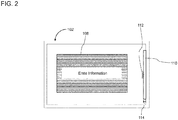
- FIG. 2 schematically shows a screen display according to a first implementation.
- the display shown in FIG. 1 comprises a first information 108, for example within a bounded area of the screen 102, and a closed position of an information surface 110.
- the first information 108 may correspond to a currently displayed content of an infotainment system of the motor vehicle, a routing of the motor vehicle or an external destination or job planning.
- the information surface 110 is only partially displayed in the closed position.
- the information area is arranged on one edge of the screen 102 predominantly (for example over 90% of the area) outside the screen 102.
- the information surface 110 is enclosed in a frame and in the closed position, only one side length of the frame is fully displayed.
- the information area can also be designed as an information window with controls in at least one corner of the window.
- No information within the information area 110 is displayed in the closed position on the screen 102.
- a bar 112 is visible, which represents or supplements the information surface.
- the beam 112 is disposed at a distance 114 from the nearest edge or corner of the screen 102.
- the distance 114 is also referred to as the distance 114 of the closed position.
- the bar 112 may be solely by the displayed side length, a broadening of a portion of the side length, or, as in FIG FIG. 2 shown to be realized by the display of a handle bar on the side.
- FIG. 3 schematically shows the screen display at a transition from in FIG. 2 shown closed position in an open position of the information surface. The transition is effected by an input to the input unit 104.
- the input unit 104 includes, for example, a physical operating element 116 that is movable in a plurality of directions 118. The transition is triggered by a first input 120 of a movement direction 122, which corresponds to the lateral position of the information surface 110 and / or its bar 112 with respect to the screen 102. Im in FIG. 3 As shown, in the closed position, the beam 112 is located at the right edge of the screen 102, and the input direction of movement 122 is right. For example the operating element 116 is pulled in the direction of the information surface 110 and released.
- the input 120 may include sliding a finger in the direction of movement 122, such as a touch-sensitive screen 102 at the location of the beam 112. If the input unit 104 detects a spatial gesture, the input 120 may include a finger gesture. or hand movement in the direction of movement 122.
- a timeline 124 of the transition with portions of the corresponding screens is left to right in FIG FIG. 3 shown schematically.
- the transition from the closed position to the open position of the information surface 110 may include a linear movement 126 and a swinging movement 128.
- the bar 112 (and the possibly displayed part of the information surface 110) follows the input 120 by a translational movement in the direction of the input direction of movement.
- the movement of the beam (and possibly partially displayed information surface 110) in the region of the distance 114 is referred to herein generally as swinging motion 128.
- the acceleration during the swing motion 128, for example, as long as the distance is less than the distance 114, may be constant (for a parabolic motion over time), may be proportional to the distance to the edge (for a harmonic over time), or may be disproportionate grow (for example, according to an edge-diverging functional dependency to prevent the bar 112 from temporarily leaving the edge of the screen 102 or dynamically indicating a stop at the edge of the screen).
- the oscillating movement 128 is preferably followed by a linear movement at constant speed of the information surface 110 until the information surface 110 is completely displayed within the screen 102 in an open position.
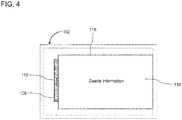
- FIG. 4 12 shows a schematic screen display of the open position of the information surface 110.
- the information surface 110 contains a second information 130.
- the second information 130 can be displayed during the entire movement of the information surface 110 within the information surface 110, for example stationary relative to the information surface 110.
- the second information 130 may relate to and supplement the first information 108.
- the information area 110 releases more in-depth second information 130, in that the information window 110 slides over the screen 102 until the complete information area 110 has been released.
- the information surface 110 can cover currently displayed displays of the first information 108.
- the first information 108 may be partially or completely covered by the information surface 110 in the open position.
- the device 100 includes an infotainment system in the cab of a commercial vehicle.
- the device 100 allows the driver, within the navigation window as the first information 108, to easily retrieve the information area 110 as another information window. Also in other levels of operation control of the controller 106, this information area 110 or a context-dependent information area 110 is used to provide the driver with additional information in a straightforward manner.
- the controller 106 may be configured to perform an interaction with the user within the information area 110.
- the information surface 110 includes in-depth information (for example environmental information) and / or setting options (for example destinations).
- the controller 106 may distinguish the user interaction within the information area 110 from the operation of the transitions of the information area 110, such as by disjoint input signals. For example, rotary and push inputs on the operating element 116 are assigned exclusively to the user interaction within the information surface 110, and inputs 120 and 121 of a movement direction 118 are assigned exclusively to the operation of the transition of the information surface 110.
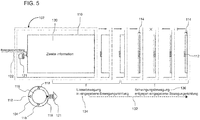
- FIG. 5 schematically shows a transition from the open position of the information surface 110 in the closed position.
- the transition in the open position is triggered by a second input 121 of the same direction of movement 122, which also causes the transition starting from the closed position.
- the second input 121 may be the same operating element 116 or use another input option.
- the first input 120 can use the operating element 116 and the second input can use a gesture detected by the input unit 104, which respectively correspond to the same direction of movement. In the case of the second input 121 on the touch-sensitive screen 102, this starts at the bar 112.
- FIG. 5 shows a time axis 132 of the transition from the open position to the closed position of the information surface 110.
- a first phase 134 is a linear movement of the information window 110 in the input direction of movement 122.
- a second phase 136 includes a swinging movement by the distance of the beam 112 (and / or the direction of movement opposite edge of the information surface 110) to the edge of the screen.
- the oscillating movement includes, for example, the phase 136, while the distance is smaller than the distance 114 of the closed position.
- the movement of beam 112 is delayed, reversing (to the time denoted by "x"), and bouncing against the input direction of travel 122 from the edge of screen 102 until reaching the closed position distance 114.
- the reversal of motion at the edge of the screen at the transition to the closed position preferably follows the same distance-dependent acceleration as in the case of the transition from the closed position to the open position.
- the dynamics of the information surface 110 can correspond to a reproducible and consistent working environment.
- transition resulting closed position gives the hidden in the open position first information 108 completely free, for example, as in FIG. 2 shown.
- the display of the first information 108 may, for example if time-dependent data is included, update during the transition to the closed position.
- the controller 106 may be configured to perform an operating method according to the FIGS. 2 to 5 to perform space-saving information display in screens of vehicles.
- the operating method allows the user to retrieve second information 130 within an existing view of the first information 108 on the screen 102.
- the technique enables a digital operation with a realistic or realistic movement of the opening and closing operation by means of screen 102 and input unit 104.
- the operation can be performed by a direction of movement 118 corresponding control element 116, by touch screen or by detecting spatial gestures be controlled.
- directing the inputs 120 and 121 of the user eg, the driver
- the beam 112 in response to the input performs a resilient movement 128 and 136, for example, the numerically simulated movement when opening or closing corresponds to a sensor drawer, a realistic operation is achieved.
- FIG. 6 schematically shows a screen display of the closed position in a second implementation of the device 100.
- the partially displayed information surface 110 and / or the bar 112 may be disposed on each side of the screen 102, also outside of a page center.
- the information surface 110 can maintain its position perpendicular to the entered direction of movement 122 during the transition to the closed position and / or during the transition to the open position.
- the information surface 110 and / or the bar 112 may be arranged in a corner of the screen 102.
- the entered direction of movement 122 may specify the corresponding corner, for example by the operating element 116 being moved by temporally overlapping actuation of the directions "down" and "left" into a corresponding corner.
- a plurality of different information areas 110 can be implemented, each of which can include its own second information 130.
- the information areas 110 can be moved independently of each other.
- the information areas are determined uniquely via the entered movement direction 122 on the basis of their peripheral position in the first input 120 and / or the second input 121.
- FIG. 7 schematically shows the transition from the closed position to the open position in a third implementation of the device 100.
- the bar 112 may be disposed within the screen 102 (for example, on an edge of a main window of the first information 108).
- the associated information surface 110 opens within the screen 102 by reversing the direction of the beam 112 due to the oscillatory motion 128.
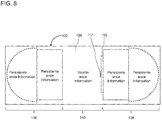
- FIG. 8 schematically shows the closed position in a fourth implementation of the device 100.
- the screen 102 is realized by a freely programmable combination instrument (FPK).
- the screen 102 includes persistent areas 138 that are excluded from the changes caused by the transitions and a variable area 140, in which the information surface 110 assumes its open position by covering the first information 108.
- FPK freely programmable combination instrument
- the movement of the operating element can be followed by an intuitively learned movement, for example the opening of a drawer with pressure sensor technology.
- the transitions between the open and closed positions can correspond to familiar procedures of an opening mechanism, for example for handle-free drawers or cabinet doors, which are opened and closed by a slight pressure against the front.
- the opening and closing technology of the information surfaces provides a space-saving representation of the vehicle information in the limited display area of the screen.
Landscapes
- Engineering & Computer Science (AREA)
- Chemical & Material Sciences (AREA)
- Combustion & Propulsion (AREA)
- Transportation (AREA)
- Mechanical Engineering (AREA)
- General Engineering & Computer Science (AREA)
- Theoretical Computer Science (AREA)
- Human Computer Interaction (AREA)
- Physics & Mathematics (AREA)
- General Physics & Mathematics (AREA)
- User Interface Of Digital Computer (AREA)
Abstract
Description
- Die vorliegende Erfindung betrifft eine Technik zur Bedienung in einem Kraftfahrzeug. Insbesondere sind eine Bedienvorrichtung und ein mit der Bedienvorrichtung ausgestattetes Kraftfahrzeug beschrieben.
- Zur Bedienung der wachsenden Funktionalität und Konnektivität eines Kraftfahrzeugs sind im Stand der Technik Benutzerschnittstellen mit komplexen Menüstrukturen bekannt, die beispielsweise an einem Fahrerarbeitsplatz angeordnet sind. Hierzu zählen auch sogenannte Infotainment-Systeme. Jedoch weisen herkömmliche Benutzerschnittstellen unübersichtliche Menüstrukturen bei wachsendem Inhalt auf.
- Der Benutzer muss sich mit der komplexen Darstellungsformen und einer oft nicht intuitiven Bedienungsführung vertraut machen. Auch ist der Weg durch die Menüstruktur oft schwer nachvollziehbar und dadurch nicht zuverlässig reproduzierbar. Dabei ist es gerade bei Nutzfahrzeugen wichtig, dass bei einem Fahrerwechsel das Fahrzeug ohne zeitaufwendige Einarbeitung übernommen werden kann, auch um eine Fehlbedienung zu vermeiden.
- Zudem müssen Bildschirmanzeigen in Kraftfahrzeugen, insbesondere während der Fahrt, klar und übersichtlich sein. Ein herkömmlicher Einsatz von Animationen in der Bedienungsführung, welche die Komplexität zu kaschieren versuchen, beschleunigen nicht den Bedienungsablauf und reduziert nicht die Komplexität der Bildschirmanzeige.
- Somit ist es eine Aufgabe der vorliegenden Erfindung, eine Fahrzeugbedienung bereitzustellen, bei der ohne Informationsverlust eine übersichtliche Bedienung ermöglicht ist. Eine alternative oder zusätzliche Aufgabe ist die Bedienung des Fahrzeugs zu ermöglichen, ohne dass eine für die Bedienung spezifische Einarbeitung erforderlich ist.
- Diese Aufgabe oder Aufgaben werden durch eine Bedienvorrichtung und ein mit der Bedienvorrichtung ausgestattetes Kraftfahrzeug mit den Merkmalen der unabhängigen Ansprüche gelöst. Vorteilhafte Ausführungen und Anwendungen sind Gegenstand der abhängigen Ansprüche und werden im Folgenden unter teilweiser Bezugnahme auf die Figuren näher erläutert.
- Gemäß einem Aspekt ist eine Vorrichtung zur Bedienung eines Kraftfahrzeugs bereitgestellt. Die Bedienvorrichtung ist im Fahrerbereich des Kraftfahrzeugs einsetzbar. Die Bedienvorrichtung umfasst einen Bildschirm, der dazu ausgebildet ist, eine erste Information und in einer Informationsfläche eine von der ersten Information abhängige zweite Information anzuzeigen; eine Eingabeeinheit, die dazu ausgebildet ist, eine Vielzahl an Bewegungsrichtungen zu bestimmen; und eine mit dem Bildschirm und der Eingabeeinheit verbundene Steuerung, die dazu ausgebildet ist, in einer Schließstellung der Informationsfläche die erste Information und einen Teil der Informationsfläche ohne die zweite Information am Bildschirm anzuzeigen und in einer Offenstellung der Informationsfläche zumindest die Informationsfläche mit der zweiten Information am Bildschirm anzuzeigen, wobei ein Übergang von der Schließstellung in die Offenstellung durch Eingabe einer Bewegungsrichtung der Bewegungsrichtungen bewirkt wird, und ein Übergang von der Offenstellung in die Schließstellung durch Eingabe derselben Bewegungsrichtung bewirkt wird.
- Indem die Eingaben derselben Bewegungsrichtung die Offenstellung und die Schließstellung jeweils bewirken, können Ausführungsbeispiele durch eine schwingende (beispielsweise eine am Bildschirmrand abprallende) Bewegung der Informationsfläche dem Benutzer einen intuitiven Zugriff auf die zweite Information ermöglichen. Dadurch ist die zusätzliche zweite Information jederzeit griffbereit und entfernbar, ohne dass die Bildschirmanzeige, insbesondere während der Fahrt, unübersichtlich ist. Die Optionalität der zweiten Information kann genutzt wird, diese auszublenden, und gleichzeitig durch eine eindeutige Eingabe jederzeit verfügbar zu halten. Durch die direkte Relation zwischen der Eingabebewegung eines Bedienelements und der Bildschirmanzeige ist kein zeitintensiver Lernaufwand für die Nutzung der Bedienvorrichtung erforderlich.
- Das Kraftfahrzeug kann ein Personenkraftwagen oder ein Nutzfahrzeug, insbesondere ein Bus oder ein Lastkraftwagen, sein. Beispielsweise können Infotainment-Systeme in Fahrzeugen eine Vielzahl an Informationen vorhalten, die dem Fahrer in einer übersichtlichen Form präsentiert werden muss, insbesondere ohne ihn dabei von der Fahrt abzulenken. Ausführungsbeispiele können den Fahrer unterstützen durch eine strukturierte Bildschirmanzeige sowohl in der Schließstellung als auch in der Offenstellung, indem jeweils entweder die erste Information oder die zweite Information angezeigt wird.
- Beispielsweise werden dem Benutzer in der Schließstellung wesentliche oder häufig abgefragte Fahrzeugdaten oder Streckeninformationen als erste Information angezeigt. Informationen, die für den aktuellen Zustand oder die aktuelle Nutzung des Kraftfahrzeugs nicht wesentlich sind oder selten abgefragt werden, können als die zweite Information zur Reduktion der Komplexität ausgeblendet sein.
- Auf der Informationsfläche können in der Offenstellung z. B. Texte, Bilder und/oder Grafiken angezeigt werden. Insbesondere können Verweise oder Auswahlpunkte zu weitergehenden Ebenen einer hierarchischen Bedienungsführung angezeigt werden.
- Die Vielzahl an Bewegungsrichtungen kann jeweils in Richtung eines Rands oder einer Ecke des Bildschirms gerichtet sein.
- Die Informationsfläche kann in der Schließstellung zumindest durch einen Balken am Bildschirm repräsentiert sein. Die eingegebene Bewegungsrichtung kann einer Rand- oder Eck-Position des Balkens in der Schließstellung entsprechen.
- Der Balken kann in der Schließstellung einen Abstand zum Bildschirmrand aufweisen. Hierbei kann der Bildschirmrand ein Grenzbereich sein, auf welchem die erste Information, die zweite Information und/oder die Informationsfläche nicht mehr anzeigbar ist.
- Die Steuerung kann dazu ausgebildet sein, beim Übergang von der Schließstellung in die Offenstellung den Balken und/oder die (beispielsweise partiell angezeigte) Informationsfläche um eine Position der Schließstellung unter temporärer Verkleinerung des Abstands zum Bildschirmrand schwingend zu bewegen. Die Schwingbewegung kann eine Bewegungsumkehr umfassen. Die Schwingbewegung kann eine halbe Schwingungsperiode umfassen. Ferner kann die Steuerung dazu ausgebildet sein, beim Übergang von der Schließstellung in die Offenstellung den Balken und/oder die Informationsfläche nach der Schwingbewegung entgegen der eingegebenen Bewegungsrichtung zur Mitte des Bildschirms zu bewegen.
- Die Steuerung kann dazu ausgebildet sein, beim Übergang von der Offenstellung in die Schließstellung den Balken und/oder die Informationsfläche in Richtung der eingegeben Bewegungsrichtung zu bewegen. Ferner kann die Steuerung dazu ausgebildet sein, beim Übergang von der Offenstellung in die Schließstellung den Balken und/oder die (beispielsweise partiell angezeigte) Informationsfläche nach Durchlaufen der Position der Schließstellung schwingend zu bewegen, beispielsweise nach einer Verzögerungsphase entgegen der eingegebenen Bewegungsrichtung zum Erreichen der Position der Schließstellung zu bewegen. Der Balken kann über seine Position in der Schließstellung hinaus schwingen, unter temporärer Verkleinerung des Abstands zum Bildschirmrand, und nach Umkehr seiner Bewegungsrichtung seine Position für die Schließstellung einnehmen.
- Der Balken kann (in der Schließstellung, in der Offenstellung und/oder währen den Übergängen) an einer Kante der Informationsfläche angeordnet sein oder durch diese realisiert sein.
- Die Bedieneinheit kann mindestens ein mechanisch bewegliches Bedienelement umfassen. Die Bedieneinheit kann ein Bedienelement umfassen, das in jede der Vielzahl an Bewegungsrichtungen manuell beweglich ist. Alternativ oder ergänzend können Fingerbewegungen auf berührungsempfindlichen Flächen oder im Raum erfasst werden.
- Die Informationsfläche kann in der Schließstellung nicht oder unvollständig am Bildschirm angezeigt sein. Alternativ oder ergänzend kann die Informationsfläche in der Offenstellung vollständig innerhalb des Bildschirms angezeigt sein.
- Die Steuerung kann ferner dazu ausgebildet sein, in der Offenstellung die in der Informationsfläche angezeigte zweite Information in Reaktion auf weitere Eingaben an der Eingabeeinheit zu verändern. Die weiteren Eingaben können von den Eingaben der Bewegungsrichtung verschieden sein.
- Gemäß einem weiteren Aspekt ist ein Kraftfahrzeug, insbesondere ein Nutzfahrzeug, bereitgestellt. Die Vorrichtung kann im Fahrerbereich des Kraftfahrzeugs, beispielsweise am Armaturenbrett des Kraftfahrzeugs, und/oder in einem Fahrerhaus des Nutzfahrzeugs angeordnet sein.
- Weitere Merkmale und Vorteile der Erfindung werden im Folgenden unter Bezugnahme auf die beigefügten Zeichnungen beschrieben. Es zeigen:
- Figur 1
- schematisch einen Fahrerbereich mit einem Ausführungsbeispiel einer Vorrichtung zur Bedienung eines Kraftfahrzeugs;
- Figur 2
- eine schematische Bildschirmanzeige in einer Schließstellung einer Informationsfläche in einer ersten Implementierung der Vorrichtung der
Figur 1 ; - Figur 3
- eine schematische Bildschirmanzeige eines Übergangs von der Schließstellung der
Figur 2 in eine Offenstellung der Informationsfläche; - Figur 4
- eine schematische Bildschirmanzeige der Offenstellung der Informationsfläche;
- Figur 5
- eine schematische Bildschirmanzeige eines Übergangs von der Offenstellung der
Figur 4 in die Schließstellung derFigur 2 ; - Figur 6
- eine schematische Bildschirmanzeige der Schließstellung der Informationsfläche in einer zweiten Implementierung der Vorrichtung der
Figur 1 ; - Figur 7
- eine schematische Bildschirmanzeige des Übergangs von der Schließstellung in die Offenstellung der Informationsfläche in einer dritten Implementierung der Vorrichtung der
Figur 1 ; und - Figur 8
- eine schematische Bildschirmanzeige der Schließstellung der Informationsfläche in einer vierten Implementierung der Vorrichtung der
Figur 1 . -
Figur 1 zeigt schematisch ein erstes Ausführungsbeispiel einer allgemein mit Bezugszeichen 100 bezeichneten Vorrichtung zur Bedienung eines Kraftfahrzeugs. Die Vorrichtung 100 umfasst mindestens einen Bildschirm 102 und mindestens eine Eingabeeinheit 104. Die Vorrichtung 100 kann in PKWs oder Nutzfahrzeugen eingesetzt sein. - Beispielsweise ist der Bildschirm 102 ein Sekundärdisplay und die Eingabeeinheit 104 umfasst einen Steller für eine Dreh- und Drückbewegung in räumlicher Zuordnung zum Sekundärdisplay. Das Sekundärdisplay und/oder der Dreh-Drück-Steller können an der Mittelkonsole angeordnet sein.
- Alternativ oder ergänzend ist der Bildschirm 102 durch ein freiprogrammierbares Kombinationsinstrument realisiert. Insbesondere in letzterem Fall kann die Eingabeeinheit 104 Steuertasten (beispielsweise Pfeiltasten) an einem Multifunktionslenkrad umfassen.
- Eine weitere oder zusätzliche Umsetzung des Bildschirms 102 umfasst ein sogenanntes Head-Up-Display (HUD). Insbesondere in letzterem Fall kann die Eingabeeinheit 104 dazu ausgebildet sein, Gestensteuerungen im Raum zu erfassen. Beispielsweise umfasst die Eingabeeinheit 104 einen Mikrowellensender, beispielsweise für elektromagnetische Strahlung mit einer Frequenz zwischen 2 GHz bis 300 GHz (beispielsweise 60 GHz) und einen Empfänger zum Empfangen eines Echosignals der Mikrowellen, die von der Oberfläche einzelner Finger oder einer Handfläche reflektieren.
- Ferner kann in jedem Beispiel am Bildschirm 102 eine berührungsempfindliche Oberfläche als Eingabeeinheit 104 oder als zusätzliche Eingabemöglichkeit angeordnet sein.
- Der Bildschirm 102 und die Eingabeeinheit 104 stehen mit einer Steuerung 106 in Signalverbindung. Die Steuerung 106 kann dazu ausgebildet sein, Grafiksignale zu erzeugen und an den Bildschirm 102 auszugeben sowie Eingabesignale von der Eingabeeinheit 104 zu erhalten, wobei die erzeugten Grafiksignale von den Eingabesignalen abhängen.
-
Figur 2 zeigt schematisch eine Bildschirmanzeige gemäß einer ersten Implementierung. Die inFigur 2 gezeigte Bildschirmanzeige umfasst eine erste Information 108, beispielsweise innerhalb eines berandeten Bereichs des Bildschirms 102, und eine Schließstellung einer Informationsfläche 110. - Die erste Information 108 kann einem aktuell angezeigten Inhalt eines Infotainment-System des Kraftfahrzeugs, einer Streckenführung des Kraftfahrzeugs oder einer externen Ziel- oder Auftragsplanung entsprechen.
- Die Informationsfläche 110 ist in der Schließstellung nur teilweise angezeigt. Die Informationsfläche ist an einem Rand des Bildschirms 102 überwiegend (beispielsweise zu über 90% der Fläche) außerhalb des Bildschirms 102 angeordnet. Beispielsweise ist die Informationsfläche 110 in einen Rahmen eingefasst und in der Schließstellung ist nur eine Seitenlänge des Rahmens vollständig angezeigt. Die Informationsfläche kann auch als Informationsfenster mit Steuerelementen in mindestens einer Ecke des Fensters ausgebildet sein.
- Keine Information innerhalb der Informationsfläche 110 wird in der Schließstellung am Bildschirm 102 angezeigt.
- Zumindest in der Schließstellung ist ein Balken 112 sichtbar, der die Informationsfläche repräsentiert oder ergänzt. Der Balken 112 ist in einem Abstand 114 gegenüber dem nächstliegenden Rand oder Eck des Bildschirms 102 angeordnet. Der Abstand 114 wird auch als Abstand 114 der Schließstellung bezeichnet. Der Balken 112 kann allein durch die angezeigte Seitenlänge, eine Verbreiterung eines Abschnitts der Seitenlänge oder, wie in
Figur 2 gezeigt, durch die Anzeige einer Griffleiste auf der Seitenlänge realisiert sein. -
Figur 3 zeigt schematisch die Bildschirmanzeige bei einem Übergang von der inFigur 2 gezeigten Schließstellung in eine Offenstellung der Informationsfläche. Der Übergang wird durch eine Eingabe an der Eingabeeinheit 104 bewirkt. - Die Eingabeeinheit 104 umfasst beispielsweise ein physisches Bedienelement 116, das in eine Vielzahl an Richtungen 118 beweglich ist. Der Übergang wird ausgelöst durch eine erste Eingabe 120 einer Bewegungsrichtung 122, die der seitlichen Lage der Informationsfläche 110 und/oder dessen Balken 112 bezüglich des Bildschirms 102 entspricht. Im in
Figur 3 gezeigten Beispiel ist der Balken 112 in der Schließstellung am rechten Rand des Bildschirms 102 angeordnet, und die eingegebene Bewegungsrichtung 122 ist rechts. Beispielsweise wird das Bedienelement 116 in Richtung der Informationsfläche 110 gezogen und losgelassen. - Bei einer Eingabeeinheit 104 mit einer berührungsempfindlichen Fläche kann die Eingabe 120 ein Gleiten eines Fingers in die Bewegungsrichtung 122 umfassen, beispielsweise bei einem berührungsempfindlichen Bildschirm 102 an der Stelle des Balkens 112. Erfasst die Eingabeeinheit 104 eine räumliche Geste, kann die Eingabe 120 eine Finger- oder Handbewegung in die Bewegungsrichtung 122 umfassen.
- Eine Zeitachse 124 des Übergangs mit Ausschnitten der entsprechenden Bildschirmanzeigen ist von links nach rechts in
Figur 3 schematisch gezeigt. Der Übergang von der Schließstellung in die Offenstellung der Informationsfläche 110 kann eine Linearbewegung 126 und eine Schwingbewegung 128 umfassen. In der Linearbewegung 126 folgt der Balken 112 (und der ggf. angezeigte Teil der Informationsfläche 110) der Eingabe 120 durch eine Translationsbewegung in Richtung der eingegebenen Bewegungsrichtung. - Wird ein Abstand des Balkens 112 zu dem (der Bewegungsrichtung 122 entsprechenden) Rand des Bildschirms 102 kleiner als der Abstand 114, wird die Bewegung durch eine Beschleunigung entgegen der Bewegungsrichtung 122 verzögert, umgekehrt (an der mit "x" gekennzeichneten Bildschirmanzeige) und entgegen der eingegebenen Bewegungsrichtung 122 fortgesetzt weg vom Rand des Bildschirms 102.
- Die Bewegung des Balkens (und der ggf. teilweise angezeigten Informationsfläche 110) im Bereich des Abstands 114 wird hierin allgemein als Schwingbewegung 128 bezeichnet. Die Beschleunigung während der Schwingbewegung 128, beispielsweise solange der Abstand kleiner als der Abstand 114 ist, kann konstant sein (für eine im zeitlichen Verlauf parabelförmige Bewegung), kann proportional zum Abstand zum Rand sein (für eine im zeitlichen Verlauf harmonische Bewegung) oder kann überproportional anwachsen (beispielsweise gemäß einer zum Rand hin divergierenden funktionalen Abhängigkeit, um zu verhindern, dass der Balken 112 den Rand des Bildschirm 102 temporär verlässt oder um einen Anschlag am Rand des Bildschirms dynamisch anzuzeigen).
- An die Schwingbewegung 128 schließt sich vorzugsweise eine Linearbewegung bei gleichbleibender Geschwindigkeit der Informationsfläche 110 an, bis die Informationsfläche 110 in einer Offenstellung vollständig innerhalb des Bildschirms 102 angezeigt wird.
-
Figur 4 zeigt eine schematische Bildschirmanzeige der Offenstellung der Informationsfläche 110. Die Informationsfläche 110 enthält eine zweite Information 130. Die zweite Information 130 kann während der gesamten Bewegung der Informationsfläche 110 innerhalb der Informationsfläche 110, beispielsweise ortsfest relativ zur Informationsfläche 110, angezeigt werden. Die zweite Information 130 kann sich auf die erste Information 108 beziehen und diese ergänzen. - Die Informationsfläche 110 gibt tiefergehende zweite Informationen 130 frei, indem sich das Informationsfenster 110 solange über den Bildschirm 102 schiebt, bis die komplette Informationsfläche 110 freigegeben ist. Dabei kann die Informationsfläche 110 aktuell dargestellte Anzeigen der ersten Information 108 überdecken. Die erste Information 108 kann teilweise oder vollständig durch die Informationsfläche 110 in der Offenstellung überdeckt werden.
- Beispielsweise umfasst die Vorrichtung 100 ein Infotainment-System im Fahrerhaus eines Nutzfahrzeugs. Die Vorrichtung 100 ermöglicht dem Fahrer, innerhalb des Navigationsfensters als die erste Information 108, auf unkomplizierte Weise die Informationsfläche 110 als ein weiteres Informationsfenster abzurufen. Auch in anderen Ebenen der Bedienungsführung der Steuerung 106 wird diese Informationsfläche 110 oder eine kontextabhängige Informationsfläche 110 dazu eingesetzt, um dem Fahrer auf unkomplizierte Weise Zusatzinformationen anzubieten.
- Alternativ oder ergänzend kann die Steuerung 106 dazu ausgebildet sein, eine Interaktion mit dem Benutzer innerhalb der Informationsfläche 110 auszuführen. Beispielsweise umfasst die Informationsfläche 110 tiefergehende Informationen (beispielsweise Umgebungsinformationen) und/oder Einstellungsmöglichkeiten (beispielsweise Zielorte). Die Steuerung 106 kann die Benutzerinteraktion im Rahmen der Informationsfläche 110 von der Bedienung der Übergänge der Informationsfläche 110 unterscheiden, beispielsweise durch disjunkte Eingabesignale. Beispielsweise sind Dreh- und Drück-Eingaben am Bedienelement 116 ausschließlich der Benutzerinteraktion innerhalb der Informationsfläche 110 zugeordnet, und Eingaben 120 und 121 einer Bewegungsrichtung 118 sind ausschließlich der Bedienung des Übergangs der Informationsfläche 110 zugeordnet.
-
Figur 5 zeigt schematisch einen Übergang von der Offenstellung der Informationsfläche 110 in die Schließstellung. Der Übergang in der Offenstellung wird ausgelöst durch eine zweite Eingabe 121 derselben Bewegungsrichtung 122, die auch den von der Schließstellung ausgehenden Übergang bewirkt. Die zweite Eingabe 121 kann dasselbe Bedienelement 116 oder eine andere Eingabemöglichkeit benutzen. Beispielsweise kann die erste Eingabe 120 das Bedienelement 116 und die zweite Eingabe eine von der Eingabeeinheit 104 erfasste Geste nutzen, die jeweils derselben Bewegungsrichtung entsprechen. Im Fall der zweiten Eingabe 121 am berührungsempfindlichen Bildschirm 102 setzt diese am Balken 112 an. -
Figur 5 zeigt eine Zeitachse 132 des Übergangs von der Offenstellung in die Schließstellung der Informationsfläche 110. In einer ersten Phase 134 erfolgt eine Linearbewegung des Informationsfensters 110 in die eingegebene Bewegungsrichtung 122. Eine zweite Phase 136 umfasst eine Schwingbewegung um den Abstand des Balkens 112 (und/oder der der Bewegungsrichtung entgegengesetzten Kante der Informationsfläche 110) zum Rand des Bildschirms. Die Schwingbewegung umfasst beispielsweise die Phase 136, während der Abstand kleiner als der Abstand 114 der Schließstellung ist. - Während der Schwingbewegung 136 wird die Bewegung des Balkens 112 verzögert, kehrt sich um (zu der mit "x" bezeichneten Zeit) und prallt entgegen der eingegebenen Bewegungsrichtung 122 vom Rand des Bildschirms 102 ab, bis zum Erreichen des Abstands 114 der Schließstellung. Die Bewegungsumkehr am Bildschirmrand beim Übergang in die Schließstellung folgt vorzugsweise derselben vom Abstand abhängigen Beschleunigung wie im Fall des Übergangs von der Schließstellung in die Offenstellung. Dadurch kann die Dynamik der Informationsfläche 110 einer reproduzierbaren und konsistenten Arbeitsumgebung entsprechen.
- Die aus dem in
Figur 5 gezeigten Übergang resultierende Schließstellung gibt die in der Offenstellung verdeckte erste Information 108 vollständig frei, beispielsweise wie inFigur 2 gezeigt. Die Anzeige der ersten Information 108 kann sich, beispielsweise falls zeitabhängige Daten umfasst sind, beim Übergang in die Schließstellung aktualisieren. - Die Steuerung 106 kann dazu ausgebildet sein, ein Bedienverfahren gemäß den
Figuren 2 bis 5 zur platzsparenden Informationsdarstellung in Bildschirmen von Fahrzeugen auszuführen. Das Bedienverfahren ermöglicht es dem Benutzer, zweite Informationen 130 innerhalb einer bestehenden Ansicht der ersten Information 108 auf dem Bildschirm 102 abzurufen. - Die Technik ermöglicht einen digitalen Bedienvorgang mit einer realitätsentsprechenden oder realitätsnahen Bewegung des Öffnungs- und Schließvorgangs mittels Bildschirm 102 und Eingabeeinheit 104. Der Bedienvorgang kann durch ein den Bewegungsrichtungen 118 entsprechendes Bedienelement 116, per Touchscreen oder durch Erfassung räumlicher Gesten gesteuert sein. Indem die Eingaben 120 und 121 des Benutzers (beispielsweise des Fahrers) in die Richtung des Balkens 112 gerichtet ist und der Balken 112 in Reaktion auf die Eingabe eine federnde Bewegung 128 bzw. 136 ausführt, die beispielsweise der numerisch simulierten Bewegung beim Öffnen bzw. Schließen einer Sensorschublade entspricht, ist ein realitätsentsprechender Bedienvorgang erreicht.
-
Figur 6 zeigt schematisch eine Bildschirmanzeige der Schließstellung in einer zweiten Implementierung der Vorrichtung 100. Die partiell angezeigte Informationsfläche 110 und/oder der Balken 112 können an jeder Seite des Bildschirms 102 angeordnet sein, auch außerhalb einer Seitenmitte. Beispielsweise kann die Informationsfläche 110 ihre Position senkrecht zur eingegebenen Bewegungsrichtung 122 beim Übergang in die Schließstellung und/oder beim Übergang in die Offenstellung beibehalten. - Alternativ oder ergänzend können in der Schließstellung die Informationsfläche 110 und/oder der Balken 112 in einer Ecke des Bildschirms 102 angeordnet sein. Dazu kann die eingegebene Bewegungsrichtung 122 die entsprechende Ecke vorgeben, beispielsweise indem das Bedienelement 116 durch zeitlich überlappende Betätigung der Richtungen "unten" und "links" in eine entsprechende Ecke bewegt wird.
- In allen Implementierungen sind mehrere verschieden Informationsflächen 110 realisierbar, die jeweils eigene zweite Informationen 130 umfassen können. Die Informationsflächen 110 können unabhängig voneinander bewegt werden. Beispielsweise werden die Informationsflächen anhand ihrer Randlage bei der ersten Eingabe 120 und/oder der zweiten Eingabe 121 eindeutig über die eingegebene Bewegungsrichtung 122 bestimmt.
-
Figur 7 zeigt schematisch den Übergang von der Schließstellung in die Offenstellung in einer dritten Implementierung der Vorrichtung 100. In der Schließstellung kann der Balken 112 innerhalb des Bildschirms 102 (beispielsweise an einem Rand eines Hauptfensters der ersten Information 108) angeordnet sein. Die zugehörige Informationsfläche 110 öffnet sich innerhalb des Bildschirms 102 durch Richtungsumkehr des Balkens 112 aufgrund der Schwingbewegung 128. -
Figur 8 zeigt schematisch die Schließstellung in einer vierten Implementierung der Vorrichtung 100. Der Bildschirm 102 ist durch ein freiprogrammierbares Kombinationsinstrument (FPK) realisiert. Der Bildschirm 102 umfasst persistente Bereiche 138, die von den durch die Übergänge verursachten Veränderungen ausgenommen sind, und einen veränderbaren Bereich 140, in dem die Informationsfläche 110 durch Überdeckung der ersten Information 108 seine Offenstellung einnimmt. - Wie anhand vorstehender Ausführungsbeispiele verdeutlicht, kann die Bewegung des Bedienelements einer intuitiv zu erlernenden Bewegung folgen, beispielsweise dem Öffnen einer Schublade mit Drucksensortechnik. Die Übergänge zwischen Offen- und Schließstellung können so vertrauten Abläufen eines Öffnungsmechanismus entsprechen, beispielsweise für grifflosen Schubladen oder Schranktüren, die durch einen leichten Druck gegen die Front geöffnet und geschlossen werden.
- Dadurch dass der Benutzer den Übergang auslöst durch eine Bedienungsbewegung in Richtung der gewünschten zweiten Information, und nicht weg von der Informationsfläche (wie bei einer ziehenden Bewegungen), ist ein direkter Zugriff ohne Lernaufwand ermöglicht.
- Durch die Öffnungs- und Schließtechnik der Informationsflächen erfolgt eine platzsparende Darstellung der Fahrzeuginformationen in der begrenzten Anzeigefläche des Bildschirms.
- Obwohl die Erfindung in Bezug auf exemplarische Ausführungsbeispiele beschrieben worden ist, ist es für einen Fachmann ersichtlich, dass verschiedene Änderungen vorgenommen werden können und Äquivalente als Ersatz verwendet werden können. Ferner können viele Modifikationen vorgenommen werden, um eine bestimmte Situation oder ein bestimmtes Material an die Lehre der Erfindung anzupassen. Folglich ist die Erfindung nicht auf die offenbarten Ausführungsbeispiele beschränkt, sondern umfasst alle Ausführungsbeispiele, die in den Bereich der beigefügten Patentansprüche fallen.
-
- 100
- Vorrichtung zur Bedienung eines Kraftfahrzeugs
- 102
- Bildschirm
- 104
- Eingabeeinheit
- 106
- Steuerung
- 108
- Erste Information
- 110
- Informationsfläche
- 112
- Balken
- 114
- Abstand des Balkens
- 116
- Bedienelement der Eingabeeinheit
- 118
- Vielzahl an Richtungen
- 120
- Erste Eingabe an der Eingabeeinheit
- 121
- Zweite Eingabe an der Eingabeeinheit
- 122
- Eingegebene Bewegungsrichtung
- 124
- Erste Zeitachse
- 126
- Linearbewegung auf erste Eingabe
- 128
- Schwingbewegung auf erste Eingabe
- 130
- Zweite Information
- 132
- Zweite Zeitachse
- 134
- Linearbewegung auf zweite Eingabe
- 136
- Schwingbewegung auf zweite Eingabe
- 138
- Persistenter Bereich des Bildschirms
- 140
- Veränderlicher Bereich des Bildschirms
Claims (15)
- Bedienvorrichtung (100) im Fahrerbereich eines Kraftfahrzeugs, umfassend:einen Bildschirm (102), der dazu ausgebildet ist, eine erste Information (108) und in einer Informationsfläche (110) eine von der ersten Information (108) abhängige zweite Information (130) anzuzeigen;eine Eingabeeinheit (104), die dazu ausgebildet ist, eine Vielzahl an Bewegungsrichtungen (118) zu bestimmen; undeine mit dem Bildschirm (102) und der Eingabeeinheit (104) verbundene Steuerung (106), die dazu ausgebildet ist, in einer Schließstellung der Informationsfläche (110) die erste Information (108) und einen Teil der Informationsfläche (110) ohne die zweite Information (130) am Bildschirm (102) anzuzeigen und in einer Offenstellung der Informationsfläche (110) zumindest die Informationsfläche (110) mit der zweiten Information (130) am Bildschirm (102) anzuzeigen, wobei ein Übergang von der Schließstellung in die Offenstellung durch Eingabe (120) einer Bewegungsrichtung (122) der Bewegungsrichtungen (118) bewirkt wird, und ein Übergang von der Offenstellung in die Schließstellung durch Eingabe (121) derselben Bewegungsrichtung (122) bewirkt wird.
- Bedienvorrichtung nach Anspruch 1, wobei die Vielzahl an Bewegungsrichtungen (118) jeweils in Richtung eines Rands oder einer Ecke des Bildschirms (102) gerichtet sind.
- Bedienvorrichtung nach Anspruch 1 oder 2, wobei die Informationsfläche (110) in der Schließstellung zumindest durch einen Balken (112) am Bildschirm (102) repräsentiert ist.
- Bedienvorrichtung nach Anspruch 3, wobei die eingegebene Bewegungsrichtung (122) einer Rand- oder Eck-Position des Balkens (112) in der Schließstellung entspricht.
- Bedienvorrichtung nach Anspruch 3 oder 4, wobei der Balken (112) in der Schließstellung einen Abstand (114) zum Bildschirmrand aufweist.
- Bedienvorrichtung nach Anspruch 5, wobei die Steuerung (106) dazu ausgebildet ist, beim Übergang von der Schließstellung in die Offenstellung zumindest den Balken (112) um seine Position der Schließstellung unter temporärer Verkleinerung des Abstands zum Bildschirmrand schwingend zu bewegen.
- Bedienvorrichtung nach Anspruch 6, wobei die Steuerung (106) dazu ausgebildet ist, beim Übergang von der Schließstellung in die Offenstellung den Balken (112) und/oder die Informationsfläche (110) nach der Schwingbewegung (128) entgegen der eingegebenen Bewegungsrichtung (122) zur Mitte des Bildschirms (102) zu bewegen.
- Bedienvorrichtung nach einem der Ansprüche 3 bis 7, wobei die Steuerung dazu ausgebildet ist, beim Übergang von der Offenstellung in die Schließstellung den Balken (112) und/oder die Informationsfläche (110) in Richtung der eingegeben Bewegungsrichtung (122) zu bewegen.
- Bedienvorrichtung nach Anspruch 8, wobei die Steuerung (106) dazu ausgebildet ist, beim Übergang von der Offenstellung in die Schließstellung den Balken (112) nach Durchlaufen seiner Position der Schließstellung schwingend zu bewegen entgegen der eingegebenen Bewegungsrichtung zum Erreichen der Position der Schließstellung.
- Bedienvorrichtung nach einem der Ansprüche 3 bis 9, wobei der Balken (112) zumindest in der Schließstellung und/oder in der Offenstellung an einer Kante der Informationsfläche (110) angeordnet ist oder dieser entspricht.
- Bedienvorrichtung nach einem der Ansprüche 1 bis 10, wobei die Bedieneinheit (104) ein Bedienelement (116) umfasst, das in jede der Vielzahl an Bewegungsrichtungen (118) manuell beweglich ist.
- Bedienvorrichtung nach einem der Ansprüche 1 bis 11, wobei die Informationsfläche (110) in der Schließstellung nicht oder unvollständig am Bildschirm (102) angezeigt ist.
- Bedienvorrichtung nach einem der Ansprüche 1 bis 12, wobei die Informationsfläche (110) in der Offenstellung vollständig innerhalb des Bildschirms (102) angezeigt ist.
- Bedienvorrichtung nach einem der Ansprüche 1 bis 13, wobei die Steuerung (106) ferner dazu ausgebildet ist, in der Offenstellung die in der Informationsfläche (110) angezeigte zweite Information (130) in Reaktion auf weitere Eingaben an der Eingabeeinheit (104) zu verändern, wobei die weiteren Eingaben von den Eingaben (120, 121) der Bewegungsrichtung (122) verschieden sind.
- Kraftfahrzeug, insbesondere Nutzfahrzeug, dessen Fahrerbereich eine Vorrichtung (100) nach einem der Ansprüche 1 bis 14 umfasst.
Applications Claiming Priority (1)
| Application Number | Priority Date | Filing Date | Title |
|---|---|---|---|
| DE102016007699.2A DE102016007699A1 (de) | 2016-06-23 | 2016-06-23 | Bedienvorrichtung eines Kraftfahrzeugs |
Publications (2)
| Publication Number | Publication Date |
|---|---|
| EP3260966A1 true EP3260966A1 (de) | 2017-12-27 |
| EP3260966B1 EP3260966B1 (de) | 2021-03-31 |
Family
ID=59077814
Family Applications (1)
| Application Number | Title | Priority Date | Filing Date |
|---|---|---|---|
| EP17174904.7A Active EP3260966B1 (de) | 2016-06-23 | 2017-06-08 | Bedienvorrichtung eines kraftfahrzeugs |
Country Status (2)
| Country | Link |
|---|---|
| EP (1) | EP3260966B1 (de) |
| DE (1) | DE102016007699A1 (de) |
Cited By (1)
| Publication number | Priority date | Publication date | Assignee | Title |
|---|---|---|---|---|
| EP4541631A4 (de) * | 2022-06-20 | 2025-11-12 | Lg Electronics Inc | Fahrzeuganzeigevorrichtung, fahrzeug damit und betriebsverfahren dafür |
Citations (4)
| Publication number | Priority date | Publication date | Assignee | Title |
|---|---|---|---|---|
| US20120054667A1 (en) * | 2010-08-31 | 2012-03-01 | Blackboard Inc. | Separate and simultaneous control of windows in windowing systems |
| EP2787427A1 (de) * | 2013-04-05 | 2014-10-08 | Seat, S.A. | Verfahren zur Darstellung und/oder Handhabung von Informationen in einem Auto |
| EP2808775A2 (de) * | 2013-05-27 | 2014-12-03 | Volkswagen Aktiengesellschaft | Controller für ein Informationswiedergabesystem für ein Fahrzeug |
| DE102014225161A1 (de) * | 2013-12-18 | 2015-06-18 | Hyundai Motor Company | Multi-Bediensystem und -Verfahren unter Verwendung eines Touchpads eines Bediensystems von einem Fahrzeug |
Family Cites Families (4)
| Publication number | Priority date | Publication date | Assignee | Title |
|---|---|---|---|---|
| US5305435A (en) * | 1990-07-17 | 1994-04-19 | Hewlett-Packard Company | Computer windows management system and method for simulating off-screen document storage and retrieval |
| WO2008134657A2 (en) * | 2007-04-27 | 2008-11-06 | Johnson Controls Technology Company | Information management system and method |
| US8527900B2 (en) * | 2010-07-21 | 2013-09-03 | Volkswagen Ag | Motor vehicle |
| DE102012107552A1 (de) * | 2012-08-17 | 2014-05-15 | Claas Selbstfahrende Erntemaschinen Gmbh | Anzeigevorrichtung für Landmaschinen |
-
2016
- 2016-06-23 DE DE102016007699.2A patent/DE102016007699A1/de not_active Withdrawn
-
2017
- 2017-06-08 EP EP17174904.7A patent/EP3260966B1/de active Active
Patent Citations (4)
| Publication number | Priority date | Publication date | Assignee | Title |
|---|---|---|---|---|
| US20120054667A1 (en) * | 2010-08-31 | 2012-03-01 | Blackboard Inc. | Separate and simultaneous control of windows in windowing systems |
| EP2787427A1 (de) * | 2013-04-05 | 2014-10-08 | Seat, S.A. | Verfahren zur Darstellung und/oder Handhabung von Informationen in einem Auto |
| EP2808775A2 (de) * | 2013-05-27 | 2014-12-03 | Volkswagen Aktiengesellschaft | Controller für ein Informationswiedergabesystem für ein Fahrzeug |
| DE102014225161A1 (de) * | 2013-12-18 | 2015-06-18 | Hyundai Motor Company | Multi-Bediensystem und -Verfahren unter Verwendung eines Touchpads eines Bediensystems von einem Fahrzeug |
Cited By (1)
| Publication number | Priority date | Publication date | Assignee | Title |
|---|---|---|---|---|
| EP4541631A4 (de) * | 2022-06-20 | 2025-11-12 | Lg Electronics Inc | Fahrzeuganzeigevorrichtung, fahrzeug damit und betriebsverfahren dafür |
Also Published As
| Publication number | Publication date |
|---|---|
| DE102016007699A1 (de) | 2017-12-28 |
| EP3260966B1 (de) | 2021-03-31 |
Similar Documents
| Publication | Publication Date | Title |
|---|---|---|
| EP2179346B1 (de) | Anzeige- und bedienvorrichtung für ein kraftfahrzeug mit einer multi-view-anzeigevorrichtung | |
| DE102006028046B4 (de) | Kombinierte Anzeige- und Bedienvorrichtung für ein Kraftfahrzeug | |
| EP3036126B1 (de) | Bedienverfahren für eine bedien- und anzeigevorrichtung in einem fahrzeug und bedien- und anzeigevorrichtung in einem fahrzeug | |
| EP3085559B1 (de) | Verfahren und bedienungsvorrichtung zum bedienen einer klimaanlage eines fahrzeugs | |
| DE10147940A1 (de) | Vorrichtung mit einem Bedienpanel und zumindesst einer Kamera zur Detektion eines sich im Bereich über oder auf dem Bedienpanel befindenden Objektes und Verfahren zum Betreiben einer solchen Vorrichtung | |
| EP3040849B1 (de) | Fortbewegungsmittel, Anwenderschnittstelle und Verfahren zur übergreifenden Anzeige eines Anzeigeinhaltes auf zwei Anzeigeeinrichtungen | |
| DE102014012550A1 (de) | Kraftfahrzeug-Bedienungsvorrichtung | |
| EP3279018A1 (de) | Verfahren und bedienvorrichtung zum bedienen einer klimatisierungsvorrichtung eines fahrzeugs | |
| DE102012012729A1 (de) | Bedieneinrichtung für ein Fahrzeug und Verfahren zum Bedienen von Einrichtungen eines Fahrzeugs | |
| EP2196359B1 (de) | Bedienverfahren und Bedieneinrichtung | |
| EP2425321B1 (de) | Verfahren und vorrichtung zum anzeigen von in listen geordneter information | |
| WO2008098658A1 (de) | Informationseinrichtung und verfahren zum bereitstellen von inofrmationen in einem kraftfahrzeug mit verbesserter bedienbarkeit | |
| DE102015122602A1 (de) | Fahrzeug mit einer Bilderfassungseinheit und einem Bediensystem zum Bedienen von Einrichtungen des Fahrzeugs sowie Verfahren zum Betreiben des Bediensystems | |
| EP3270278A1 (de) | Verfahren zum betreiben eines bediensystems und bediensystem | |
| EP2246214B1 (de) | Verfahren und Vorrichtung zum Anzeigen von in Listen geordneter Information | |
| DE102013000069B4 (de) | Kraftfahrzeug-Bedienschnittstelle mit einem Bedienelement zum Erfassen einer Bedienhandlung | |
| EP2137022B1 (de) | Informationssystem und verfahren zum bereitstellen von informationen in einem kraftfahrzeug mit verbesserter bedienbarkeit | |
| EP2808775B1 (de) | Controller für ein Informationswiedergabesystem für ein Fahrzeug | |
| EP2030828B1 (de) | Multimodales Bediensystem und Verfahren zum Bedienen von Komponenten und Funktionen in einem Kraftfahrzeug | |
| EP3260966B1 (de) | Bedienvorrichtung eines kraftfahrzeugs | |
| DE102009039114A1 (de) | Bedienvorrichtung für ein Fahrzeug | |
| EP3394570B1 (de) | Anzeigesystem und verfahren zum betreiben eines anzeigesystems in einem fahrzeug mit zumindest einer ersten und einer zweiten anzeigefläche | |
| WO2024146834A1 (de) | Nutzfahrzeug mit einem favoriten-bedienfeld | |
| EP3188922B1 (de) | Bedienvorrichtung und verfahren zum bedienen von funktionen eines fahrzeugs, insbesondere eines kraftwagens | |
| DE69019718T2 (de) | Steuerungsvorrichtung von Funktionen an Bord eines Kraftfahrzeugs. |
Legal Events
| Date | Code | Title | Description |
|---|---|---|---|
| PUAI | Public reference made under article 153(3) epc to a published international application that has entered the european phase |
Free format text: ORIGINAL CODE: 0009012 |
|
| STAA | Information on the status of an ep patent application or granted ep patent |
Free format text: STATUS: THE APPLICATION HAS BEEN PUBLISHED |
|
| AK | Designated contracting states |
Kind code of ref document: A1 Designated state(s): AL AT BE BG CH CY CZ DE DK EE ES FI FR GB GR HR HU IE IS IT LI LT LU LV MC MK MT NL NO PL PT RO RS SE SI SK SM TR |
|
| AX | Request for extension of the european patent |
Extension state: BA ME |
|
| STAA | Information on the status of an ep patent application or granted ep patent |
Free format text: STATUS: REQUEST FOR EXAMINATION WAS MADE |
|
| 17P | Request for examination filed |
Effective date: 20180626 |
|
| RBV | Designated contracting states (corrected) |
Designated state(s): AL AT BE BG CH CY CZ DE DK EE ES FI FR GB GR HR HU IE IS IT LI LT LU LV MC MK MT NL NO PL PT RO RS SE SI SK SM TR |
|
| STAA | Information on the status of an ep patent application or granted ep patent |
Free format text: STATUS: EXAMINATION IS IN PROGRESS |
|
| 17Q | First examination report despatched |
Effective date: 20190117 |
|
| RAP1 | Party data changed (applicant data changed or rights of an application transferred) |
Owner name: MAN TRUCK & BUS SE |
|
| GRAP | Despatch of communication of intention to grant a patent |
Free format text: ORIGINAL CODE: EPIDOSNIGR1 |
|
| STAA | Information on the status of an ep patent application or granted ep patent |
Free format text: STATUS: GRANT OF PATENT IS INTENDED |
|
| RIC1 | Information provided on ipc code assigned before grant |
Ipc: B60K 37/06 20060101ALI20201113BHEP Ipc: G06F 3/048 20130101AFI20201113BHEP Ipc: B60K 35/00 20060101ALI20201113BHEP Ipc: G06F 3/0481 20130101ALI20201113BHEP |
|
| INTG | Intention to grant announced |
Effective date: 20201210 |
|
| GRAS | Grant fee paid |
Free format text: ORIGINAL CODE: EPIDOSNIGR3 |
|
| GRAA | (expected) grant |
Free format text: ORIGINAL CODE: 0009210 |
|
| STAA | Information on the status of an ep patent application or granted ep patent |
Free format text: STATUS: THE PATENT HAS BEEN GRANTED |
|
| AK | Designated contracting states |
Kind code of ref document: B1 Designated state(s): AL AT BE BG CH CY CZ DE DK EE ES FI FR GB GR HR HU IE IS IT LI LT LU LV MC MK MT NL NO PL PT RO RS SE SI SK SM TR |
|
| REG | Reference to a national code |
Ref country code: GB Ref legal event code: FG4D Free format text: NOT ENGLISH Ref country code: CH Ref legal event code: EP |
|
| REG | Reference to a national code |
Ref country code: DE Ref legal event code: R096 Ref document number: 502017009861 Country of ref document: DE Ref country code: AT Ref legal event code: REF Ref document number: 1377672 Country of ref document: AT Kind code of ref document: T Effective date: 20210415 |
|
| REG | Reference to a national code |
Ref country code: IE Ref legal event code: FG4D Free format text: LANGUAGE OF EP DOCUMENT: GERMAN |
|
| REG | Reference to a national code |
Ref country code: NL Ref legal event code: FP |
|
| REG | Reference to a national code |
Ref country code: SE Ref legal event code: TRGR |
|
| REG | Reference to a national code |
Ref country code: LT Ref legal event code: MG9D |
|
| PG25 | Lapsed in a contracting state [announced via postgrant information from national office to epo] |
Ref country code: BG Free format text: LAPSE BECAUSE OF FAILURE TO SUBMIT A TRANSLATION OF THE DESCRIPTION OR TO PAY THE FEE WITHIN THE PRESCRIBED TIME-LIMIT Effective date: 20210630 Ref country code: NO Free format text: LAPSE BECAUSE OF FAILURE TO SUBMIT A TRANSLATION OF THE DESCRIPTION OR TO PAY THE FEE WITHIN THE PRESCRIBED TIME-LIMIT Effective date: 20210630 Ref country code: HR Free format text: LAPSE BECAUSE OF FAILURE TO SUBMIT A TRANSLATION OF THE DESCRIPTION OR TO PAY THE FEE WITHIN THE PRESCRIBED TIME-LIMIT Effective date: 20210331 Ref country code: FI Free format text: LAPSE BECAUSE OF FAILURE TO SUBMIT A TRANSLATION OF THE DESCRIPTION OR TO PAY THE FEE WITHIN THE PRESCRIBED TIME-LIMIT Effective date: 20210331 |
|
| PG25 | Lapsed in a contracting state [announced via postgrant information from national office to epo] |
Ref country code: LV Free format text: LAPSE BECAUSE OF FAILURE TO SUBMIT A TRANSLATION OF THE DESCRIPTION OR TO PAY THE FEE WITHIN THE PRESCRIBED TIME-LIMIT Effective date: 20210331 Ref country code: RS Free format text: LAPSE BECAUSE OF FAILURE TO SUBMIT A TRANSLATION OF THE DESCRIPTION OR TO PAY THE FEE WITHIN THE PRESCRIBED TIME-LIMIT Effective date: 20210331 |
|
| PG25 | Lapsed in a contracting state [announced via postgrant information from national office to epo] |
Ref country code: EE Free format text: LAPSE BECAUSE OF FAILURE TO SUBMIT A TRANSLATION OF THE DESCRIPTION OR TO PAY THE FEE WITHIN THE PRESCRIBED TIME-LIMIT Effective date: 20210331 Ref country code: CZ Free format text: LAPSE BECAUSE OF FAILURE TO SUBMIT A TRANSLATION OF THE DESCRIPTION OR TO PAY THE FEE WITHIN THE PRESCRIBED TIME-LIMIT Effective date: 20210331 Ref country code: LT Free format text: LAPSE BECAUSE OF FAILURE TO SUBMIT A TRANSLATION OF THE DESCRIPTION OR TO PAY THE FEE WITHIN THE PRESCRIBED TIME-LIMIT Effective date: 20210331 Ref country code: SM Free format text: LAPSE BECAUSE OF FAILURE TO SUBMIT A TRANSLATION OF THE DESCRIPTION OR TO PAY THE FEE WITHIN THE PRESCRIBED TIME-LIMIT Effective date: 20210331 |
|
| PG25 | Lapsed in a contracting state [announced via postgrant information from national office to epo] |
Ref country code: PT Free format text: LAPSE BECAUSE OF FAILURE TO SUBMIT A TRANSLATION OF THE DESCRIPTION OR TO PAY THE FEE WITHIN THE PRESCRIBED TIME-LIMIT Effective date: 20210802 Ref country code: PL Free format text: LAPSE BECAUSE OF FAILURE TO SUBMIT A TRANSLATION OF THE DESCRIPTION OR TO PAY THE FEE WITHIN THE PRESCRIBED TIME-LIMIT Effective date: 20210331 Ref country code: RO Free format text: LAPSE BECAUSE OF FAILURE TO SUBMIT A TRANSLATION OF THE DESCRIPTION OR TO PAY THE FEE WITHIN THE PRESCRIBED TIME-LIMIT Effective date: 20210331 Ref country code: SK Free format text: LAPSE BECAUSE OF FAILURE TO SUBMIT A TRANSLATION OF THE DESCRIPTION OR TO PAY THE FEE WITHIN THE PRESCRIBED TIME-LIMIT Effective date: 20210331 Ref country code: IS Free format text: LAPSE BECAUSE OF FAILURE TO SUBMIT A TRANSLATION OF THE DESCRIPTION OR TO PAY THE FEE WITHIN THE PRESCRIBED TIME-LIMIT Effective date: 20210731 |
|
| REG | Reference to a national code |
Ref country code: DE Ref legal event code: R097 Ref document number: 502017009861 Country of ref document: DE |
|
| PG25 | Lapsed in a contracting state [announced via postgrant information from national office to epo] |
Ref country code: DK Free format text: LAPSE BECAUSE OF FAILURE TO SUBMIT A TRANSLATION OF THE DESCRIPTION OR TO PAY THE FEE WITHIN THE PRESCRIBED TIME-LIMIT Effective date: 20210331 Ref country code: AL Free format text: LAPSE BECAUSE OF FAILURE TO SUBMIT A TRANSLATION OF THE DESCRIPTION OR TO PAY THE FEE WITHIN THE PRESCRIBED TIME-LIMIT Effective date: 20210331 Ref country code: MC Free format text: LAPSE BECAUSE OF FAILURE TO SUBMIT A TRANSLATION OF THE DESCRIPTION OR TO PAY THE FEE WITHIN THE PRESCRIBED TIME-LIMIT Effective date: 20210331 Ref country code: ES Free format text: LAPSE BECAUSE OF FAILURE TO SUBMIT A TRANSLATION OF THE DESCRIPTION OR TO PAY THE FEE WITHIN THE PRESCRIBED TIME-LIMIT Effective date: 20210331 |
|
| REG | Reference to a national code |
Ref country code: CH Ref legal event code: PL |
|
| PLBE | No opposition filed within time limit |
Free format text: ORIGINAL CODE: 0009261 |
|
| STAA | Information on the status of an ep patent application or granted ep patent |
Free format text: STATUS: NO OPPOSITION FILED WITHIN TIME LIMIT |
|
| GBPC | Gb: european patent ceased through non-payment of renewal fee |
Effective date: 20210630 |
|
| 26N | No opposition filed |
Effective date: 20220104 |
|
| REG | Reference to a national code |
Ref country code: BE Ref legal event code: MM Effective date: 20210630 |
|
| PG25 | Lapsed in a contracting state [announced via postgrant information from national office to epo] |
Ref country code: LU Free format text: LAPSE BECAUSE OF NON-PAYMENT OF DUE FEES Effective date: 20210608 |
|
| PG25 | Lapsed in a contracting state [announced via postgrant information from national office to epo] |
Ref country code: LI Free format text: LAPSE BECAUSE OF NON-PAYMENT OF DUE FEES Effective date: 20210630 Ref country code: IE Free format text: LAPSE BECAUSE OF NON-PAYMENT OF DUE FEES Effective date: 20210608 Ref country code: GB Free format text: LAPSE BECAUSE OF NON-PAYMENT OF DUE FEES Effective date: 20210630 Ref country code: CH Free format text: LAPSE BECAUSE OF NON-PAYMENT OF DUE FEES Effective date: 20210630 |
|
| PG25 | Lapsed in a contracting state [announced via postgrant information from national office to epo] |
Ref country code: IS Free format text: LAPSE BECAUSE OF FAILURE TO SUBMIT A TRANSLATION OF THE DESCRIPTION OR TO PAY THE FEE WITHIN THE PRESCRIBED TIME-LIMIT Effective date: 20210731 |
|
| PG25 | Lapsed in a contracting state [announced via postgrant information from national office to epo] |
Ref country code: BE Free format text: LAPSE BECAUSE OF NON-PAYMENT OF DUE FEES Effective date: 20210630 |
|
| PG25 | Lapsed in a contracting state [announced via postgrant information from national office to epo] |
Ref country code: HU Free format text: LAPSE BECAUSE OF FAILURE TO SUBMIT A TRANSLATION OF THE DESCRIPTION OR TO PAY THE FEE WITHIN THE PRESCRIBED TIME-LIMIT; INVALID AB INITIO Effective date: 20170608 |
|
| PG25 | Lapsed in a contracting state [announced via postgrant information from national office to epo] |
Ref country code: CY Free format text: LAPSE BECAUSE OF FAILURE TO SUBMIT A TRANSLATION OF THE DESCRIPTION OR TO PAY THE FEE WITHIN THE PRESCRIBED TIME-LIMIT Effective date: 20210331 |
|
| PG25 | Lapsed in a contracting state [announced via postgrant information from national office to epo] |
Ref country code: GR Free format text: LAPSE BECAUSE OF FAILURE TO SUBMIT A TRANSLATION OF THE DESCRIPTION OR TO PAY THE FEE WITHIN THE PRESCRIBED TIME-LIMIT Effective date: 20210331 |
|
| REG | Reference to a national code |
Ref country code: AT Ref legal event code: MM01 Ref document number: 1377672 Country of ref document: AT Kind code of ref document: T Effective date: 20220608 |
|
| PG25 | Lapsed in a contracting state [announced via postgrant information from national office to epo] |
Ref country code: AT Free format text: LAPSE BECAUSE OF NON-PAYMENT OF DUE FEES Effective date: 20220608 |
|
| PG25 | Lapsed in a contracting state [announced via postgrant information from national office to epo] |
Ref country code: MK Free format text: LAPSE BECAUSE OF FAILURE TO SUBMIT A TRANSLATION OF THE DESCRIPTION OR TO PAY THE FEE WITHIN THE PRESCRIBED TIME-LIMIT Effective date: 20210331 |
|
| PG25 | Lapsed in a contracting state [announced via postgrant information from national office to epo] |
Ref country code: MT Free format text: LAPSE BECAUSE OF FAILURE TO SUBMIT A TRANSLATION OF THE DESCRIPTION OR TO PAY THE FEE WITHIN THE PRESCRIBED TIME-LIMIT Effective date: 20210331 |
|
| PGFP | Annual fee paid to national office [announced via postgrant information from national office to epo] |
Ref country code: DE Payment date: 20250626 Year of fee payment: 9 |
|
| PGFP | Annual fee paid to national office [announced via postgrant information from national office to epo] |
Ref country code: NL Payment date: 20250624 Year of fee payment: 9 |
|
| PGFP | Annual fee paid to national office [announced via postgrant information from national office to epo] |
Ref country code: FR Payment date: 20250624 Year of fee payment: 9 |
|
| PGFP | Annual fee paid to national office [announced via postgrant information from national office to epo] |
Ref country code: SE Payment date: 20250619 Year of fee payment: 9 |
|
| PGFP | Annual fee paid to national office [announced via postgrant information from national office to epo] |
Ref country code: IT Payment date: 20250623 Year of fee payment: 9 |
|
| PG25 | Lapsed in a contracting state [announced via postgrant information from national office to epo] |
Ref country code: TR Free format text: LAPSE BECAUSE OF FAILURE TO SUBMIT A TRANSLATION OF THE DESCRIPTION OR TO PAY THE FEE WITHIN THE PRESCRIBED TIME-LIMIT Effective date: 20210331 |