EP3189679B1 - Unterstützung eines betriebssystems für standortkarten - Google Patents
Unterstützung eines betriebssystems für standortkarten Download PDFInfo
- Publication number
- EP3189679B1 EP3189679B1 EP15787730.9A EP15787730A EP3189679B1 EP 3189679 B1 EP3189679 B1 EP 3189679B1 EP 15787730 A EP15787730 A EP 15787730A EP 3189679 B1 EP3189679 B1 EP 3189679B1
- Authority
- EP
- European Patent Office
- Prior art keywords
- location
- location card
- application
- action
- card
- Prior art date
- Legal status (The legal status is an assumption and is not a legal conclusion. Google has not performed a legal analysis and makes no representation as to the accuracy of the status listed.)
- Active
Links
Images



Classifications
-
- H—ELECTRICITY
- H04—ELECTRIC COMMUNICATION TECHNIQUE
- H04W—WIRELESS COMMUNICATION NETWORKS
- H04W4/00—Services specially adapted for wireless communication networks; Facilities therefor
- H04W4/20—Services signaling; Auxiliary data signalling, i.e. transmitting data via a non-traffic channel
-
- G—PHYSICS
- G01—MEASURING; TESTING
- G01C—MEASURING DISTANCES, LEVELS OR BEARINGS; SURVEYING; NAVIGATION; GYROSCOPIC INSTRUMENTS; PHOTOGRAMMETRY OR VIDEOGRAMMETRY
- G01C21/00—Navigation; Navigational instruments not provided for in groups G01C1/00 - G01C19/00
- G01C21/26—Navigation; Navigational instruments not provided for in groups G01C1/00 - G01C19/00 specially adapted for navigation in a road network
-
- G—PHYSICS
- G06—COMPUTING OR CALCULATING; COUNTING
- G06F—ELECTRIC DIGITAL DATA PROCESSING
- G06F3/00—Input arrangements for transferring data to be processed into a form capable of being handled by the computer; Output arrangements for transferring data from processing unit to output unit, e.g. interface arrangements
- G06F3/01—Input arrangements or combined input and output arrangements for interaction between user and computer
- G06F3/048—Interaction techniques based on graphical user interfaces [GUI]
- G06F3/0481—Interaction techniques based on graphical user interfaces [GUI] based on specific properties of the displayed interaction object or a metaphor-based environment, e.g. interaction with desktop elements like windows or icons, or assisted by a cursor's changing behaviour or appearance
-
- G—PHYSICS
- G06—COMPUTING OR CALCULATING; COUNTING
- G06F—ELECTRIC DIGITAL DATA PROCESSING
- G06F3/00—Input arrangements for transferring data to be processed into a form capable of being handled by the computer; Output arrangements for transferring data from processing unit to output unit, e.g. interface arrangements
- G06F3/01—Input arrangements or combined input and output arrangements for interaction between user and computer
- G06F3/048—Interaction techniques based on graphical user interfaces [GUI]
- G06F3/0484—Interaction techniques based on graphical user interfaces [GUI] for the control of specific functions or operations, e.g. selecting or manipulating an object, an image or a displayed text element, setting a parameter value or selecting a range
-
- G—PHYSICS
- G06—COMPUTING OR CALCULATING; COUNTING
- G06F—ELECTRIC DIGITAL DATA PROCESSING
- G06F3/00—Input arrangements for transferring data to be processed into a form capable of being handled by the computer; Output arrangements for transferring data from processing unit to output unit, e.g. interface arrangements
- G06F3/16—Sound input; Sound output
- G06F3/167—Audio in a user interface, e.g. using voice commands for navigating, audio feedback
-
- G—PHYSICS
- G06—COMPUTING OR CALCULATING; COUNTING
- G06F—ELECTRIC DIGITAL DATA PROCESSING
- G06F40/00—Handling natural language data
- G06F40/10—Text processing
- G06F40/103—Formatting, i.e. changing of presentation of documents
- G06F40/106—Display of layout of documents; Previewing
-
- G—PHYSICS
- G06—COMPUTING OR CALCULATING; COUNTING
- G06F—ELECTRIC DIGITAL DATA PROCESSING
- G06F40/00—Handling natural language data
- G06F40/10—Text processing
- G06F40/12—Use of codes for handling textual entities
- G06F40/134—Hyperlinking
-
- G—PHYSICS
- G06—COMPUTING OR CALCULATING; COUNTING
- G06F—ELECTRIC DIGITAL DATA PROCESSING
- G06F40/00—Handling natural language data
- G06F40/10—Text processing
- G06F40/12—Use of codes for handling textual entities
- G06F40/14—Tree-structured documents
-
- G—PHYSICS
- G06—COMPUTING OR CALCULATING; COUNTING
- G06F—ELECTRIC DIGITAL DATA PROCESSING
- G06F40/00—Handling natural language data
- G06F40/10—Text processing
- G06F40/166—Editing, e.g. inserting or deleting
- G06F40/174—Form filling; Merging
-
- G—PHYSICS
- G06—COMPUTING OR CALCULATING; COUNTING
- G06F—ELECTRIC DIGITAL DATA PROCESSING
- G06F40/00—Handling natural language data
- G06F40/10—Text processing
- G06F40/166—Editing, e.g. inserting or deleting
- G06F40/186—Templates
Definitions
- mapping applications are commonly used in smartphones and other mobile computing devices. Typically, a mapping application requests map information from a mapping service, then presents a graphical representation of the map information. Within a mapping application, a user can view various types of maps (e.g. , street view, aerial view), search for an address, search for a specific location, search for a type of location, retrieve directions to reach a location, view traffic conditions, or perform another navigation-related action.
- maps e.g. , street view, aerial view
- search for an address e.g. , search for a specific location
- search for a type of location retrieve directions to reach a location, view traffic conditions, or perform another navigation-related action.
- mapping application are useful for performing navigation-related actions, in many cases, they cannot perform more complicated tasks that incorporate other, non-navigation actions. For example, a user might (1) use a Web browser to find a location, (2) open a mapping application to get map information and directions to the location, (3) open another application to read a review about the location, (4) open a telephone application to call a business at the location, and then (5) open a messaging application to share information about the location with a friend. When switching between applications, the user often has to copy relevant information (e.g ., address, name of business, telephone number) from one application to another in order to use that information in the other application.
- relevant information e.g ., address, name of business, telephone number
- the user finds an application suitable for an action, starts the application, copies information, and performs the action, then continues with the next application for the next action, and so on, until the series of actions is completed.
- the user switches between different contexts, which can be confusing and result in loss of information.
- An application such as a Web browser or software-based personal assistant can "host" a map.
- the map is presented in the application's screen area.
- the application requests map information from a mapping service, then graphically presents the map information in part of its screen area.
- actions that relate to a location in the map e.g ., getting directions, calling a telephone number, sharing the location
- switching to other applications adds steps for the user (to launch the other applications, copy information between applications, and perform the actions).
- an application such as a Web browser or software-based personal assistant can expose location-related actions to the user, but the actions are presented in an application-specific way. Location-related actions are not presented in a consistent way from application to application. Thus, the user experience is not consistent between applications, which can be confusing to a user.
- US2012042036 A1 proposes a method for selecting one or more mobile device applications using context data describing the current environment of a mobile device and application metadata describing environment conditions where applications are more likely to be relevant, in order to improve the experience of discovering, downloading, and installing mobile device applications.
- an application calls an operating system ("OS") to generate a location card, which can include a map of a location as well as additional information about the location and one or more action indicators.
- OS operating system
- a location card can include a map of a location as well as additional information about the location and one or more action indicators.
- an action indicator a user can launch an application to perform an action related to the location immediately and directly from the location card, without manually finding an application, launching the application, copying relevant information between applications, and initiating the action.
- an application that requests a location card can specify different actions to be represented with action indicators in the location card.
- location cards supported by the OS provide a consistent way to expose location information and location-related actions to users from application to application.
- the OS in response to one or more calls through an interface of an OS, the OS generates a location card for a location.
- the location card can include (a) a map for the location; (b) details about the location; and/or (c) one or more action indicators.
- Each of the action indicator(s) is linked to an application capable of performing a corresponding action.
- the OS when it generates the location card, the OS creates a structure in memory of a computing system.
- the structure defines visual elements and attributes for a map, visual elements and attributes for additional details, and visual elements and attributes for action indicator(s).
- the call(s) to the OS provide information about the location card.
- the call(s) provide: (1) one or more parameters that specify a type of the map; (2) one or more parameters that specify the details about the location; (3) one or more parameters that specify, for each of the action indicator(s), the linked application and the corresponding action; (4) one or more parameters that specify one or more of font size, font color, font type, border width, border color, border type, height, width, position and background color for the location card; and/or (5) one or more parameters that specify a template for the location card.
- the OS can select a template for the location card, and then populate at least some fields of the template using one or more parameters provided in the call(s). Other fields of the template can have default values.
- the OS can adjust the location card depending on various factors. For example, the OS evaluates size and/or orientation of a screen of a display device of the computing system, and then adjusts the location card based at least in part on results of the evaluating. Or, as another example, the OS determines which of the map, the additional details and the action indicator(s) to include in the location card based on priority information, and then adjusts the location card based at least in part on results of the evaluating.
- the OS After generating the location card, the OS outputs the location card for display. For example, the OS renders the location card to a surface, compositing the various elements of the location card onto the surface, which is used to update a screen of a display device.
- the location card can be rendered in various ways. For example, the location card can replace (on the surface to be displayed) the content of an application that requested the location card. In this case, when the user closes the location card, the OS removes the location card from display (updating the surface to be displayed) and outputs the previous content of the application for display. Or, the location card can be rendered for display as a flyout object on top of other content previously rendered for display (on the surface to be displayed).
- the OS when the user provides user input outside the flyout object, the OS removes the flyout object from display (updating the surface to be displayed) and outputs the other content for display.
- a location card can be displayed individually. Or, the location card can be part of a stack of multiple location cards that are output for display.
- the OS may receive user input to actuate an action indicator. For example, in response to actuation of a given action indicator, the OS launches the application linked to the given action indicator, and provides information to the launched application in order for the launched application to perform the corresponding action for the given action indicator.
- the OS can also output a view of the launched application (e.g ., if the application is not running as a background task) for display. Later, after the action has been performed and the launched application has been closed, the OS can remove the view, if any, of the launched application (updating the surface to be displayed) and output the location card for display again.
- an application receives a notification that indicates interest in a location.
- the notification is user input such as mouse input or touchscreen input over a representation of the location on a screen of a display device of the computing system.
- the notification received by the application is an event triggered within the application, based on an association recognized by the application between the location and a user profile or user preferences.
- the application makes, through an interface of an OS, one or more calls that specify a location card for the location.
- the location card can include (a) a map for the location; (b) details about the location; and/or (c) one or more action indicators.
- Each of the action indicator(s) is linked to an application capable of performing a corresponding action.
- the action indicator(s) can all represent primary actions, to be presented directly in the location card. Or, in addition to any action indicators for primary actions, the action indicator(s) can include at least one action indicator for a secondary action, which is not to be presented directly in the location card but is accessible using the location card.
- the call(s) provide information about the location card.
- the call(s) provide: (1) one or more parameters that specify a type of the map; (2) one or more parameters that specify the details about the location; (3) one or more parameters that specify, for each of the action indicator(s), the linked application and the corresponding action; (4) one or more parameters that specify one or more of font size, font color, font type, border width, border color, border type, height, width, position and background color for the location card; and/or (5) one or more parameters that specify a template for the location card.
- the application can adjust the call(s) that specify the location card depending on various factors. For example, the application evaluates size and/or orientation of a screen of a display device of the computing system, and then adjusts one or more of the call(s) that specify the location card based at least in part on results of the evaluating. Or, as another example, the application evaluates one or more settings and/or one or more conditions of the computing system, and then, based on results of the evaluating, determines a type of the map. Or, as another example, the application determines a custom view of the location, where the custom view is used as the map for the location.
- the application requests a search for an address of the location, receives results of the search, and filters the results of the search to determine the details about the location to include in the location card.
- the application identifies relevant information about the location, determines the corresponding action for the relevant information, and determines the application capable of performing the corresponding action.
- the innovations can be implemented as part of a method, as part of a computing system adapted to perform the method or as part of tangible computer-readable media storing computer-executable instructions for causing a computing system to perform the method.
- the various innovations can be used in combination or separately.
- an application calls an operating system ("OS") to generate a location card.
- the location card can show a map of a location as well as additional information about the location and one or more action indicators.
- an action indicator With an action indicator, a user can launch an application to perform a location-related action immediately and directly from the location card, without manually finding an application, launching the application, copying relevant information between applications, and initiating the action.
- an application can specify different actions to be represented with action indicators in a location card.
- location cards supported by the OS provide a consistent way to expose location information and location-related actions to users.
- an application can be any type of software apart from the OS module(s) that generate location cards.
- the application is software that executes in user mode (or user space), as opposed to kernel mode (or kernel space) used by many OS modules, and the application has a foreground user interface ("UI") component, as opposed to executing only as a background task.
- UI foreground user interface
- Operations described herein as being performing by an OS can be performed by any module or combination of modules of the OS, which in general is any software that manages computer hardware and software resources of a computing system and provides common services for software executing in the computing system.
- identical reference numbers in different figures indicate an identical component or module.
- a given component or module may accept a different type of information as input and/or produce a different type of information as output.
- Figure 1 illustrates a generalized example of an example computing system (100) in which several of the described innovations may be implemented.
- the computing system (100) is not intended to suggest any limitation as to scope of use or functionality, as the innovations may be implemented in diverse computing systems, including special-purpose computing systems adapted for presentation of location-related information and actions.
- the computing system (100) includes one or more processing units (110, 115) and memory (120, 125).
- the processing units (110, 115) execute computer-executable instructions.
- a processing unit can be a central processing unit ("CPU"), processor in an application-specific integrated circuit ("ASIC") or any other type of processor.
- CPU central processing unit
- ASIC application-specific integrated circuit
- Figure 1 shows a central processing unit (110) as well as a graphics processing unit or co-processing unit (115).
- the tangible memory (120, 125) may be volatile memory (e.g ., registers, cache, RAM), non-volatile memory (e.g ., ROM, EEPROM, flash memory, etc.), or some combination of the two, accessible by the processing unit(s).
- the memory (120, 125) stores software (180) implementing one or more innovations for OS support for location cards, in the form of computer-executable instructions suitable for execution by the processing unit(s).
- a computing system may have additional features.
- the computing system (100) includes storage (140), one or more input devices (150), one or more output devices (160), and one or more communication connections (170).
- An interconnection mechanism such as a bus, controller, or network interconnects the components of the computing system (100).
- OS software provides an operating environment for other software executing in the computing system (100), and coordinates activities of the components of the computing system (100).
- the tangible storage (140) may be removable or non-removable, and includes magnetic disks, magnetic tapes or cassettes, CD-ROMs, DVDs, or any other medium which can be used to store information and which can be accessed within the computing system (100).
- the storage (140) stores instructions for the software (180) implementing one or more innovations for OS support for location cards.
- the input device(s) (150) may be a touch input device such as a keyboard, mouse, pen, or trackball, a voice input device, a scanning device, touchscreen, or another device that provides input to the computing system (100).
- the output device(s) (160) may be a display, printer, speaker, CD-writer, or another device that provides output from the computing system (100).
- the communication connection(s) (170) enable communication over a communication medium to another computing entity.
- the communication medium conveys information such as computer-executable instructions or other data in a modulated data signal.
- a modulated data signal is a signal that has one or more of its characteristics set or changed in such a manner as to encode information in the signal.
- communication media can use an electrical, optical, RF, or other carrier.
- Computer-readable media are any available tangible media that can be accessed within a computing environment.
- Computer-readable media include memory (120, 125), storage (140), and combinations of any of the above.
- modules include routines, programs, libraries, objects, classes, components, data structures, etc. that perform particular tasks or implement particular abstract data types.
- the functionality of the modules may be combined or split between modules as desired in various embodiments.
- Computer-executable instructions for modules may be executed within a local or distributed computing system.
- a computing system or device can be local or distributed, and can include any combination of special-purpose hardware and/or hardware with software implementing the functionality described herein.
- the disclosed methods can be implemented using specialized computing hardware configured to perform any of the disclosed methods.
- the disclosed methods can be implemented by an integrated circuit (e.g ., an ASIC (such as an ASIC digital signal processor (“DSP”), a graphics processing unit (“GPU”), or a programmable logic device (“PLD”), such as a field programmable gate array (“FPGA”)) specially designed or configured to implement any of the disclosed methods.
- an ASIC such as an ASIC digital signal processor (“DSP"), a graphics processing unit (“GPU”), or a programmable logic device (“PLD”), such as a field programmable gate array (“FPGA”)
- FPGA field programmable gate array
- FIG. 2 illustrates a generalized example of a cloud computing environment (200) in which several of the described innovations may be implemented.
- various types of services e.g. , computing services
- the cloud (210) can comprise a collection of computing devices, which may be located centrally or distributed, that provide cloud-based mapping services, search services or messaging services to various types of users and devices connected via a network such as the Internet.
- the computing devices of the cloud computing environment (200) can be used in different ways to accomplish computing tasks.
- some tasks e.g ., processing user input, presenting a UI, performing certain actions with applications
- can be performed on local computing devices e.g ., connected devices 230, 240, 250
- other tasks e.g ., searching for locations, retrieving map information, determining routes, searching for additional details about locations, sharing information about locations
- the cloud (210) provides services for connected devices (230, 240, 250) with a variety of screen capabilities.
- a first connected device (230) represents a device with a computer screen (e.g., a mid-size screen).
- the first connected device (230) could be a personal computer such as desktop computer, laptop computer, notebook computer, netbook computer, or the like.
- a second connected device (240) represents a device with a mobile device screen ( e.g., a small size screen).
- the second connected device (240) could be a mobile phone, smartphone, personal digital assistant, tablet computer, and the like.
- a third connected device (250) represents a device associated with a large screen.
- the third connected device (250) could be a television screen (e.g., a smart television) or another device connected to a television ( e.g. , a set-top box or gaming console) or the like.
- Devices without screen capabilities also can be used in the example cloud computing environment (200).
- the cloud (210) can provide services for one or more computers (e.g ., server computers) without displays.
- the way a location card is generated can depend on the screen capabilities of a computing system that presents the location card.
- Services can be provided by the cloud (210) through service providers (220) or through other providers of online services (not depicted). Cloud services can be customized to the screen size, display capability, and/or touchscreen capability of a particular connected device ( e.g ., connected devices 230, 240, and/or 250).
- the cloud (210) can provide services to search for locations, services to retrieve map information, services to determine routes, services to search for additional details about locations, services to share information about locations and/or other services described herein, to the various connected devices (230, 240, and/or 250) using, at least in part, the service providers (220).
- the service providers (220) can provide a centralized solution for various cloud-based services.
- the service providers (220) can manage service subscriptions for users and/or devices (e.g., for the connected devices (230, 240, 250) and/or their respective users). For example, a connected device (230, 240 or 250) requests a search for a location, requests map information for the location, requests a search for additional details about the location, requests that a route to the location be determined and/or requests that information about the location be shared with one or more other devices.
- a connected device 230, 240 or 250
- requests a search for a location requests map information for the location, requests a search for additional details about the location, requests that a route to the location be determined and/or requests that information about the location be shared with one or more other devices.
- One or more computing systems in the cloud (210) handle the request(s) (e.g ., searching for a location, determining map information for the location, searching for additional details about the location, determining a route to the location and/or sharing information about the location with one or more other devices), and then return results to the connected device (230, 240 or 250) that made the request(s).
- Different computing systems in the cloud (210) can handle different requests.
- an operating system in response to one or more calls from an application, an operating system ("OS") generates a location card.
- the location card includes a map of a location, additional information about the location and/or one or more action indicators.
- a user can simply review the content of the location card, which presents location-related details in an effective way.
- a user can launch an application to perform a location-related action immediately and directly from the location card.
- the launched application can be a mapping application that is launched to determine directions to a location, a telephone application that is launched to place a call to a business at the location, a messaging application that is launched to share information about the location with another user, or some other type of application.
- an application can specify different actions to be represented with action indicators in a location card, different location information relevant to users and/or different types of map views to include in the location card.
- the location card functionality provides a developer the flexibility to determine which map views, actions, and information to present in a location card.
- the developer of an application can easily link to functionality of other applications when presenting location information. This can permit the user to complete tasks with the other applications, and then automatically return to the application that requested the location card, thereby enriching the user experience for that application.
- location cards supported by the OS provide a consistent user experience for display of location information and location-related actions to users.
- An OS can support location card functionality for first-party applications (provided by the maker of the OS) and third-party applications. In this way, the OS can consistently present location-related actions and location information from application to application.
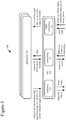
- Figure 3 shows an example software architecture (300) for an application (310) that requests that an OS (350) generate a location card.
- a computing system e.g ., smartphone, tablet computer or other computing device
- the architecture (300) includes an OS (350) and one or more applications (310) that use services of the OS (350).
- the OS (350) includes components for rendering (e.g ., rendering visual output to a display, generating voice output for a speaker), components for networking, and components for input processing. Other components of the OS (350) are not shown.
- the OS (350) manages user input functions, output functions, storage access functions, network communication functions, and other functions for the computing device.
- the OS (350) provides access to such functions to the application (310).
- a user generates user input that affects generation, output and use of location cards.
- the user input can be tactile input such as touchscreen input, mouse input, button presses or key presses, or it can be voice input.
- the OS (350) includes functionality for recognizing taps, finger gestures, or other input to a touchscreen, recognizing commands from voice input, button input or key press input, and creating messages that can be used by the application (310).
- the application (310) listens for user input event messages from the OS (350).
- the UI event messages can indicate a panning gesture, flicking gesture, dragging gesture, or other gesture on a touchscreen of the device, a tap on the touchscreen, mouse input, key press input, or another UI event ( e.g., from voice input, directional buttons, trackball input).
- the application (310) can react to the user input (or another type of notification) by making one or more calls to the OS (350), requesting that the OS (350) generate a location card for a location.
- the application (310) requests that the OS (350) generate a location card for the location.
- the UI event message can be a mouse click, cursor hover, touchscreen tap or other input over a textual or graphical representation of a location on a screen of a display device of the computing system.
- the UI event message can be a key press, voice command or other input that otherwise indicates interest in a location.
- the application (310) can specify a map view, informational details and/or one or more action indicators for a location card.
- the OS (350) exposes an interface such as an application programming interface ("API") across which the application (310) makes the call(s).
- API application programming interface
- the details of the interface depend on implementation.
- an API can include a namespace with various object types or classes in it for different location cards.
- a given object type or class includes a method (“constructor") that can be called to construct an instance of a location card object and one or more methods that can be called to specify properties of the instance.
- an API can include a single class for a location card, with a constructor method and methods to specify properties of a location card.
- the application (310) can provide one or more parameters that specify a type of map for the location card. For example, for a map of a location, an application (310) can specify whether a mapping service should provide a street view, aerial view, 3D view or other type of map view. The application (310) can also specify layers to be composited over the map with traffic details, weather details, or other details. As another option, the application (310) can specify a custom view ( e.g ., venue) to use for the map of a location, or request a specialized map such as a subway map for the location. In general, the application (310) can change the type of map view depending on the usage scenario or user settings. The application (310) can also change the map view depending on context.
- a mapping service should provide a street view, aerial view, 3D view or other type of map view.
- the application (310) can also specify layers to be composited over the map with traffic details, weather details, or other details.
- the application (310) can specify a custom view (e.g ., venue)
- the application (310) can specify a street view for the map if the current location (of the computing device) is far from the location in the location card or the user is moving quickly, but provide a venue view if the current location is close to the location in the location card or the user is moving slowly.
- the application (310) can specify a map view that omits the area around the current location if it is close to the home of a user, office of the user or other location expected to be familiar to the user, but otherwise provide a map view that includes the current location.
- a map data store can cache recently used map data. As needed, the map data store gets additional or updated map data for a location card from local file storage or from network resources.
- the OS (350) mediates access to the storage and network resources. For example, the map data store requests map data for a location card through a storage or networking module of the OS (350), which processes the request, as necessary requests map data from a mapping service and receives a reply, and provides the requested map data to the map data store.
- the map data can be photographic image data or graphical data (for boundaries, roads, etc.) at various levels of detail, ranging from high-level depiction of states and cities, to medium-level depiction of neighborhoods and highways, to low-level depiction of streets and buildings.
- the map data can include graphical indicators such as icons or text labels for place names of states, cities, neighborhoods, streets, buildings, landmarks or other features in the map.
- the organization of the map data depends on implementation. For example, in some implementations, different types of map data are combined into a single layer of map data at a given level of detail. In other implementations, different types of map data are organized in different overlays that are composited during rendering.
- the application (310) can also provide one or more parameters that specify the details about the location. As shown in Figure 3 , to determine the details for the parameter(s) of the call(s), the application (310) can request details about a location from a search service.
- the networking module (354) of the OS (350) conveys the request to a server, receives the reply (including, e.g ., distance information, information about landmarks or points of interest ("POIs"), reviews, ratings, other commentary, a phone number, email address or other contact information, menus, pricing information, photos, advertising promotions or other information), and conveys the results to the application (310).
- POIs point of interest
- the application (310) can use a reverse business lookup service to find details about a location.
- the application (310) can filter the search results to determine which details to present in a location card, potentially using priority information to favor some types of information over other types of information.
- the application (310) can also provide one or more parameters that specify, for each of the action indicator(s), the linked application and the corresponding action.
- the application (310) indicates the application that the OS (350) should launch to perform the corresponding action, and also indicates information that should be provided to the launched application in order to perform the action.
- the action indicator can represent a primary action, which is expected to be commonly selected from the location card, or a secondary action. For a primary action, the action indicator is directly presented in the location card. In contrast, for a secondary action, the action indicator is presented in a menu or screen accessed through the location card.
- the developer when a developer designs the application (310), the developer can specify actions/commands to be represented in a location card when the application (310) requests generation of the location card.
- An "action factory" can provide options to the developer for different action/commands to include in a location card. For example, from a menu of options, the developer selects a particular action/command associated with a protocol or API call to launch a given application. Or, for a custom action indicator, the developer can specify an action, application, and protocol or API call to launch the application.
- the application launched to handle an action for an action indicator can be determined by the OS (350) at run time.
- the application (310) can provide one or more parameters that specify, for an action indicator, a type of application and the corresponding action.
- the application (310) indicates the type of application that the OS (350) should launch to perform the corresponding action, and also indicates information that should be provided to the launched application in order to perform the action.
- the OS (350) selects a default application for the specified type of application.
- the OS (350) presents to the user a menu of suitable applications, and the user selects the application to launch to handle the corresponding action.
- the OS (350) can store the selection by the user for use in generating location cards, going forward.
- the application (310) can also provide one or more parameters that specify font size, font color, font type, border width, border color, border type, height, width, position, background color and/or another attribute for the location card.
- the application (310) can manage the graphical details of the location card depending on application settings, user settings, current lighting levels or other factors. In this way, the application (310) can directly control the appearance of the location card.
- the application (310) can specify a style for a location card, where the style indicates a combination of property settings.
- the application (310) can provide one or more parameters that specify a template for the location card.
- the template is an extensible application markup language ("XAML") template that specifies the overall "look and feel" of a location card (e.g ., layout, properties of appearance, animations or other behaviors of UI elements).
- XAML allows a developer to define and link UI elements for a location card using declarative statements.
- the template is provided in another language.
- the OS (350) can populate properties, values, fields, etc. of a template using default values and/or depending on the parameters of the call(s) that specify the location card.
- the OS (350) can use different templates for different usage scenarios (see below), different form factors (e.g. , screen sizes) of computing systems, or different screen orientations.
- a location card can be implemented as a hierarchical composition, or tree, of UI elements.
- a top-level location card includes UI elements for a map portion, details portion and action indicators portion.
- the map portion can include sub-elements for map layers, zooming controls, scrolling controls and other features.
- the details portion can include sub-elements for various textual information and/or graphical information.
- the action indicators portion can include sub-elements such as buttons with labels for various action indicators.
- the OS (350) In response to the call(s), the OS (350) generates a location card.
- the OS (350) can create a structure in memory of the computing system ( e.g ., based on a template and parameters of the call(s)).
- the structure defines visual elements and attributes for the map portion of the location card, visual elements and attributes for the additional details of the location card, and/or visual elements and attributes for the action indicator(s) of the location card.
- a module of the OS (350) creates or modifies a file in XAML or another language for the location card, then converts the file for the location card to an object instance or other run-time representation of the location card, which can be rendered for display.
- the OS (350) After the location card is generated, the OS (350) outputs the location card for display.
- a rendering module (352) of the OS (350) produces an image (or surface) based on the object instance or other run-time representation of the location card. The surface is used to update the screen of a display device.
- the rendering module (352) can traverse the hierarchy, compositing UI elements of the hierarchy from back to front onto the surface to be displayed.
- the hierarchy of UI elements is retained in memory, such that changes to individual UI element can be reflected in the hierarchy and cause updates to the surface during subsequent rendering operations.
- the rendering module (352) can also provide output to the OS (350) for voice output over a speaker or headphones. The exact operations performed as part of the rendering depend on implementation.
- the location card can be rendered as a pop-up menu over other content, as a flyout object over other content, as a control that replaces other content or as some other graphical feature.
- the location card is hosted, or presented, within the context of the application (310) that requested the location card, and the focus returns to that application when the location card closes.
- the OS (350) can automatically update the map with a simple translation animation. Or, the OS (350) can automatically re-position an icon that indicates the current location of the computing system as the current location is updated.
- the OS (350) can also react to a change in the type of view (e.g., to switch from a street view to an aerial view, or vice versa) or a change in details to be rendered ( e.g., to show or hide traffic details).
- POIs on a map can change depending on which information in the location card is selected with user input.
- the OS (350) launches the application linked to the action indicator and provides information to the launched application, so that the launched application can perform the action for the action indicator.
- the OS (350) calls an API method or follows some other protocol for launching the application, passing information to the launched application.
- the launched application has a UI component such as a frame that is output for display. In some cases, however, the launched application can be a background task having no UI component.
- the launched application can be a mapping application (to get directions to a location), a telephone application (to place a telephone call), a messaging application (to share information about a location), document viewer (to view a document about a location), file editor (to edit information about a location) or some other type of application.
- a mapping application to get directions to a location
- a telephone application to place a telephone call
- a messaging application to share information about a location
- document viewer to view a document about a location
- file editor to edit information about a location
- the OS (350) removes any view for the launched application from the display (updating the surface to be displayed) and updates the display.
- the OS (350) removes the location card from the display (updating the surface to be displayed) and updates the display. For example, content of the application (310) is output for display, and the OS (350) returns focus to the application (310).
- the OS (350) includes more or fewer modules.
- a given module can be split into multiple modules, or different modules can be combined into a single module.
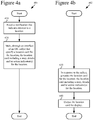
- Figure 4a illustrates a generalized technique (401) for requesting a location card.
- the technique (401) for requesting a location card can be performed by an application.
- the application receives (410) a notification that indicates interest in a location.
- the notification that indicates interest in the location is user input such as mouse input or touchscreen input over a representation of the location on a screen of a display device of the computing system. This can be a mouse click, cursor hover, touchscreen tap or other input over a textual or graphical representation of the location.
- the user input can be key press input, voice input or other input that otherwise indicates interest in the location.
- the notification received by the application is an event triggered within the application, based on an association recognized by the application between the location and a user profile / user preferences.
- the application makes (420), through an interface of an OS, one or more calls that specify a location card for the location.
- the location card includes (a) a map for the location, (b) details about the location, and/or (c) one or more action indicators.
- Each of the action indicator(s) is linked to an application capable of performing a corresponding action.
- the call(s) can include parameters as described in section III.A.
- the application can adjust the parameters in the call(s) that specify the location card based on various criteria. For example, when setting the parameters of the call(s), the application can:
- Figure 4b illustrates a generalized technique (402) for generating a location card.
- the technique (402) for generating a location card can be performed by one or more module(s) of an OS.
- the OS in response to the call(s) through the interface of the OS, the OS generates (430) a location card for a location.
- the location card includes (a) a map for the location, (b) details about the location, and/or (c) one or more action indicators.
- Each of the action indicator(s) is linked to an application capable of performing a corresponding action.
- the call(s) can include parameters as described in section III.A.
- the OS can adjust the location card depending on various factors. For example, the OS evaluates size and/or orientation of a screen of a display device of the computing system, and then adjusts the location card based at least in part on results of the evaluating. Or, as another example, the OS determines which of the map, the details and the action indicator(s) to include in the location card based on priority information, and then adjusts the location card based at least in part on results of the evaluating. Or, the OS adjusts the location card in some other way.
- the OS then outputs (440) the location card for display.
- the location card can be rendered in various ways.
- the location card can replace the content of the application that requested the location card.
- the OS removes the location card from display (updating the surface to be displayed) and outputs the previous content of the application for display.
- the location card can be rendered for display as a flyout object on top of other, previously rendered content (for the application that requested the location card).
- the OS removes the flyout object from display (updating the surface to be displayed) and outputs the other content for display.
- the location card can be rendered as a pop-up menu or some other graphical feature.
- a location card can be displayed individually.
- the location card can be part of a stack of multiple location cards that are output for display.
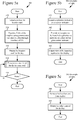
- Figures 5a-5c illustrate an example technique (501) for generating a location card.
- the technique (501) can be performed by one or more modules of an OS.
- the OS selects (510) a template for the location card and populates (520) at least some fields of the template using parameters provided in the call(s) to generate the location card. For example, as described in section III.A, the OS selects between multiple available templates, and then populates values of properties, attributes, fields, etc. of the template based on the parameters in the call(s) and default parameters.
- the OS outputs (530) the location card for display and processes (540) user input for the location card.
- the OS outputs the location card for display as described in section III.A.
- the way that the OS processes (540) the user input depends on the user input.
- Figure 5b shows a technique (502) for processing user input for actuation of an action indicator in the location card.
- the OS launches (541) the application linked to the given action indicator, provides (542) information to the launched application in order for the launched application to perform the corresponding action for the given action indicator, and outputs (543) a view, if any, of the launched application for display.
- the launched application can further process user input according to its normal processing.
- the OS can remove the view of the launched application, if any, from display (updating the surface to be displayed), and output the location card for display. In this way, after completion of the action for an action indicator, the focus can return to the location card.
- Figure 5c shows a technique (503) for processing user input for the close of the location card. For example, if the location card is rendered as a flyout object, the location card is closed when any user input outside the location card is received. Or, if the location card is rendered as a pop-up control, the location card is closed in response to actuation of a "close” or "X" button. In any case, when the location card is closed, the OS removes (544) the location card from display (updating the surface to be displayed) and outputs (545) for display other content that was under the location card.
- the OS removes (544) the location card from display (updating the surface to be displayed) and outputs (545) for display other content that was under the location card.
- the OS can process other user input for the location card in other ways. For example, the OS can respond to user interest in details about a POI around a location by highlighting the POI in the map portion of the location card.
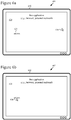
- Figures 6a-6d illustrate the creation and use of a location card in a computing system with a medium-size screen, such as a personal computer.
- the display device (610) includes a screen depicting content (620) of a first application.
- the first application is a Web browser or software-based personal assistant.
- the content (620) includes an address (621). Other details of the content (620) are omitted to simplify the example.
- a cursor (630) of the UI of the computing system hovers over the content (620) at a position far from the address (621).
- the cursor (630) has been moved to hover over the address (621).
- a location card (640) that overlays the content (620) of the first application.
- the location card (640) can be automatically requested by a software-based personal assistant, based on an association recognized between a location and a user profile / user preferences.
- the location card (640) is rendered as a flyout object.
- the location card (640) includes a details portion (642), action indicators portion (644) with multiple action indicators (for action 1, action 2, and action 3) and a map portion (646).
- the cursor (630) has been moved to hover over the action indicator for action 1.
- the second application is a telephone application, mapping application or messaging application.
- the second application closes (not shown), its content (650) is removed from the screen, potentially returning to the view (603) of Figure 6c .
- the location card (640) closes and is removed from the screen.
- Figures 7a-7c illustrate the creation and use of a location card in a computing device with a small screen, such as a smartphone, tablet computer or other mobile computing device.
- the computing device (710) includes a screen depicting content (720) of a first application (e.g. , Web browser or software-based personal assistant).
- the content (720) includes an address (721), but other details are omitted to simplify the example.
- the computing device (710) accepts touchscreen input.
- touchscreen input has been received over the address (721). This triggers, as shown in the view (702) of Figure 7b , the generation and output for display of a location card (740) that overlays the content (720) of the first application.
- the location card (740) can be automatically requested by a software-based personal assistant, based on an association recognized between a location and a user profile / user preferences.
- the location card (740) is rendered as a control that replaces the content of the first application.
- the location card (740) includes a details portion (742), and action indicators portion (744) with multiple action indicators (for action 1, action 2, and action 3) and a map portion (746).
- Figures 8a-8c illustrate the creation and use of a location card over a Web browser.
- the display device (810) includes a screen depicting content (820) of a Web browser.
- the content (820) includes multiple addresses.
- a cursor (830) of the UI of the computing system hovers over the content (820) far from any of the addresses.
- the cursor (830) has been moved to hover over one of the addresses. This triggers, as shown in the view (802) of Figure 8b , the generation and output for display of a location card (840) that overlays the content (820) of the Web browser.
- the location card (840) is rendered as a flyout object.
- the location card (840) includes a details portion with the name, address, telephone number, business hours, rating information, and pricing information for a business.
- the action indicators portion of the location card (840) includes action indicators for Directions, Call and Share actions, and the map portion of the location card (840) includes map details for the business.
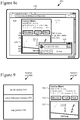
- the cursor (830) has been moved to hover over the action indicator for the Call action. This triggers the launch of a telephone application, whose content (850) overlays the location card (840) and the content (820) of the Web browser.
- the telephone application later closes (not shown), its content (850) is removed from the screen, potentially returning to the view (802) of Figure 8b .
- the location card (840) closes and is removed from the screen.
- Figure 9 illustrates a generalized location card (900) and accompanying example location card (901).
- the generalized location card (900) includes a details portion (910), action indicators portion (920) and map portion (930).
- the details portion (910) provides information which a user can review at a glance. This information includes, for example, any of name, address, telephone number, review information, rating information, pricing information, distance, travel time, etc. for a location. Alternatively, the details portion (910) includes other textual and/or graphical information.
- the action indicators portion (920) shows one or more action indicators to help a user complete a task by directly linking to an application that can be used to complete that task.
- Example actions include getting directions to a location, saving the location to a directory or favorites list, sharing information about the location with another user, editing information about the location, calling a telephone number associated with the location, and determining POIs near the location.
- the action indicators portion (920) includes action indicators for other and/or additional actions.
- the action indicators can be for primary actions, which are directly represented in the action indicators portion (920), or secondary actions, which are not directly represented in the action indicators portion (920) but can be accessed through the location card (900).
- the map portion (930) displays a map view, which can be a road map, venue map, aerial map, street map, traffic map, or some other kind of map.
- the map portion (930) can show indicators for one or more POIs, or show no POIs.
- the example location card (901) of Figure 9 includes a details portion (911), action indicators portion (912) and map portion (913), whose contents are described above with reference to Figure 8b .
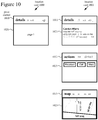
- Figure 10 shows an alternative configuration for a generalized location card (1000) and accompanying example location card (1001).
- the generalized location card (1000) includes a pivot control (1010) usable to switch between different pages (1020) for details about a location, action indicators for the location and a map view of the location.
- the location card (1000) can switch pages in response to a flick gesture or pan gesture on a touchscreen, in response to mouse wheel input from a mouse, or in response to other user input.
- the different pages (1020) can include content as described with reference to the different portions of the location card (900) Figure 9 .
- the initial state (1011) of the pivot control is to show the "details" page (1021).
- the state (1012) of the pivot control is to show the "actions” page (1022).
- the state (1013) of the pivot control is to show the "map" page (1023).
- the contents of the pages (1021, 1022, 1023) are as described with reference to Figure 8b .
- a location card can be rendered in another configuration, e.g ., carousel control.
- An application or the OS can change the configuration of a location card (e.g., switching templates) or change which information is shown in a location card depending on the form factor of a computing device, the screen orientation of the computing device, a usage scenario, user settings, application settings and/or another factor. For example, on a device with a smaller screen, the application specifies (or the OS determines) that a smaller location card should be generated, showing a condensed version of details, map information and/or action indicators likely to be important to the user. To save space, details and/or action indicators can overlay the map portion of a location card. Also, depending on available space, action indicators can be presented for more or fewer primary actions versus secondary actions. As screen size increases, more details, more map information and/or more action indicators can be shown in the location card.
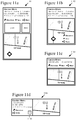
- Figures 11a-11d illustrate example location cards (1101, 1102, 1103, 1104) that have been changed to suit different form factors of devices.
- the location card (1101) shown in Figure 11a includes name, address, distance, telephone number, business hours, rating information, and pricing information for a business, as well as photos for the business.
- the location card (1101) includes action indicators for Directions, Save and Share actions, and the map view shows the location for the location card and current location of the user's computing device.
- the location card (1102) of Figure 11b shows the same map information and details as the location card (1101) of Figure 11a , but omits the photos.
- the action indicators overlay the map information to save space.
- the location card (1103) includes a condensed version of details and smaller map view, no longer showing the current location.
- the location card (1104) includes a condensed version of details and the smaller map view, and the Save action has been relegated to the status of a secondary action.
- the location card (1104) still includes action indicators for the Directions and Share actions, but the Save action is accessible through a menu that pops up upon actuation of the chevron button (1110).
- the application or OS can choose different types of details, different actions and/or different types of map information depending on priority information.
- the priority information can prioritize map information over actions, and prioritize actions over additional details.
- the priority information can prioritize some types of details (e.g ., name, telephone number) over other types of details ( e.g. , address, reviews).
- the priority information can prioritize some types of actions over other types of actions.
- the priority information can change depending on usage scenario.
- the priority information can include a set of primary actions and a set of secondary actions.
- the primary actions are used for tasks expected to be most common, which developers seek to expose to users at the top level of the location card.
- the secondary actions are used for tasks expected to be less common, which need not be at the forefront of the location card.
- the location card can omit action indicators.
- a location card can be output for a single location, as shown in Figures 9 , 10 and 11a-11d . Alternatively, location cards can be stacked in a list.
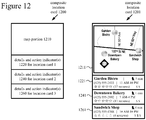
- Figure 12 shows a generalized composite location card (1200) and an example composite location card (1201).
- a composite location card can be used, for example, to show search results that include multiple locations.
- the generalized composite location card (1200) includes a map portion (1210), details and action indicator(s) (1220) for location card 1, details and action indicator(s) (1240) for location card 2, details and action indicator(s) (1260) for location card 3, and so on.
- the details portion and action indicator(s) portion for a given location card are condensed into a single portion of the composite location card (1200).
- the map information, details and action indicator(s) that are included in the composite location card (1200) can be specified by an application.
- the example composite location card (1201) includes a map portion (1211) in which several locations are indicated on a street map and labeled.
- the map portion (1211) also shows the current location (indicated by the diamond with a circle in it).
- a location card (1221, 1241, 1261) shows condensed details and a single action indicator.
- the condensed details (name, telephone number, business hours, rating information, pricing information and time to destination) fit in a relatively small area.
- the single action indicator - to get directions to a location - is depicted as a small walking figure.
- An application can specify different location cards for different usage scenarios.
- an OS can adjust location cards for different usage scenarios.
- the application or OS can adjust map information, details and/or actions of a location card to tailor the location card to the anticipated needs of a user. This provides flexibility to an application developer to specify actions and information specific to the goals of an application, while still providing a consistent user experience for how location cards are rendered by the OS and used. Location cards can be used in various scenarios.
- a user can ask a software-based personal assistant for information about a location such as a business, restaurant, generic place, venue or transit station, and the resulting information can be presented with a location card.
- the details shown in the location card can depend on the type of location - e.g ., name, address and telephone number for a generic business; name, review information and menu for a restaurant; distance and travel time for a transit stop; and so on.
- the actions represented as primary actions in a location card can depend on the type of location - e.g., getting directions, placing a telephone call or sharing a location for a generic business; getting directions, reading review information, or placing a telephone call for a restaurant; getting an alternate route for a transit stop; and so on.
- a software-based personal assistant can use a location card to present information about an itinerary or schedule.
- the software-based personal assistant can automatically request that the OS generate a location card, so as to recommend a place to the user or notify the user about a place.
- a user When browsing a Web page with a Web browser, a user can indicate interest in an address for a location.
- the Web browser can request the OS to present information about the location in a location card.
- the details shown and actions represented in a location card can depend on the type of location.
- the application when processing a specific address with a mapping application or messaging application, the application can request the OS to present information about the location in a location card.
- a calendar application can use a location card to present information about the location of an event on a calendar.
- a contacts application can use a location card to present location information for a contact.
- the details shown and actions represented in a location card can depend on the type of location.
- the details shown and actions represented in a location card can also depend on the type of application - e.g ., sharing a location for a messaging application; getting directions, an alternate route or traffic details for a mapping application; re-scheduling or re-locating an event for a calendar application; sending a text message or placing a telephone call for a contacts application; and so on.
- the details shown and actions represented can also depend on context in other ways. For example, if a mapping application shows traffic data, the mapping application can specify that a location card include an action indicator to determine an alternate route to a location as a primary action, but otherwise present an action indicator for that action as a secondary action.
- an application can store information about locations (e.g ., a location where a car is parked, a series of locations for errands), and request that a location card be generated to present information about the location(s).
- the location card can include action indicators to edit a location (change address or change position within a venue), get directions to a location, or share a location.
- Such actions are expected to be frequently used when retrieving or storing a location (e.g ., editing to fix a problem with inaccurate placement of a location for a parking space, getting directions to a parking space, sharing the location of a parking space).
- locations cards are generated and rendered by an OS, but not persisted to storage.
- a location card can be stored in persistent form.
- An application or OS can store and retrieve information for the location card for later use of the location card.
- a single application requests and uses a location card, which the OS generates.
- a different application requests and uses its own location card, generated by the OS.
- a location card can be shared by multiple applications.
- an application retrieves information about a location, provides at least some of the retrieved information to the OS to generate a location card, then discards the information.
- the application can retain the retrieved information in a data model for the location.
- the application can store information about a location and provide it to the OS to generate location cards for different situations, without retrieving the information multiple times.
- a mapping application can buffer information about a location in a data model, then provide an appropriate subset of the buffered information to the OS to generate a location card for a given situation such as presenting search results (showing more details), navigation, driving (showing less details), and so on. The application can select different subsets of the buffered information for location cards in different situations.
Landscapes
- Engineering & Computer Science (AREA)
- Theoretical Computer Science (AREA)
- General Engineering & Computer Science (AREA)
- General Physics & Mathematics (AREA)
- Physics & Mathematics (AREA)
- Audiology, Speech & Language Pathology (AREA)
- Health & Medical Sciences (AREA)
- General Health & Medical Sciences (AREA)
- Computational Linguistics (AREA)
- Artificial Intelligence (AREA)
- Radar, Positioning & Navigation (AREA)
- Remote Sensing (AREA)
- Human Computer Interaction (AREA)
- Computer Networks & Wireless Communication (AREA)
- Signal Processing (AREA)
- Automation & Control Theory (AREA)
- Multimedia (AREA)
- User Interface Of Digital Computer (AREA)
Claims (14)
- Verfahren in einem Rechensystem, umfassend:in einem Betriebssystem, in Antwort auf einen oder mehrere Anrufe durch eine Anwendungsprogrammierungsschnittstelle (Application Programming Interface, "API"), Erzeugen (430) einer Standortkarte für einen Standort und Ausgeben (440, 530) der Standortkarte zur Anzeige,dadurch gekennzeichnet, dassdie Standortkarte enthält
(a) eine Landkarte für den Standort, (b) Einzelheiten über den Standort und (c) einen oder mehrere Aktionsindikatoren, wobei jeder des einen oder der mehreren Aktionsindikatoren mit einer Anwendung verbunden ist, die imstande ist, eine entsprechende Aktion durchzuführen, wobei das Betriebssystem Standortkartenfunktionalität für Erstparteienanwendungen und für Drittparteienanwendungen unterstützt, die Anrufe durch die API vornehmen. - Verfahren nach Anspruch 1, wobei das Erzeugen (430) der Standortkarte ein Erstellen einer Struktur im Speicher des Rechensystems enthält, wobei die Struktur visuelle Elemente und Attribute für die Landkarte, visuelle Elemente und Attribute für die Einzelheiten und visuelle Elemente und Attribute für den einen oder die mehreren Aktionsindikatoren definiert.
- Verfahren nach Anspruch 1, wobei das Erzeugen (430) der Standortkarte enthält:Auswählen (510) einer Vorlage für die Standortkarte; undBestücken (520) mindestens einiger Felder der Vorlage unter Verwendung eines oder mehrerer Parameter, die in dem einen oder den mehreren Anrufen bereitgestellt sind.
- Verfahren nach Anspruch 1, wobei das Erzeugen (430) enthält:Auswerten von Größe und/oder Orientierung eines Bildschirms einer Anzeigevorrichtung des Rechensystems; undAnpassen der Standortkarte basierend mindestens teilweise auf Ergebnissen der Auswertung.
- Verfahren nach Anspruch 1, wobei das Erzeugen (430) enthält:Bestimmen basierend auf Prioritätsinformationen, welches von der Landkarte, den Einzelheiten und des einen oder der mehreren Aktionsindikatoren in der Standortkarte aufzunehmen ist; undAnpassen der Standortkarte basierend mindestens teilweise auf Ergebnissen der Bestimmung.
- Verfahren nach Anspruch 1, weiter umfassend, in Antwort auf eine Aktivierung eines bestimmten Aktionsindikators unter dem einen oder den mehreren Aktionsindikatoren:Starten (541) der Anwendung, die mit dem gegebenen Aktionsindikator verbunden ist;Bereitstellen (542) von Informationen für die gestartete Anwendung, um die entsprechende Aktion für den gegebenen Aktionsindikator durchzuführen; undAusgeben (543) einer Ansicht, falls vorhanden, der gestarteten Anwendung zur Anzeige.
- Verfahren in einem Rechensystem, umfassend:Empfangen (410) einer Meldung, die Interesse an einem Standort angibt; undVornehmen (420) durch eine Anwendungsprogrammierungsschnittstelle ("API") eines Betriebssystems, eines oder mehrerer Anrufe, die eine Standortkarte für den Standort spezifizieren,dadurch gekennzeichnet, dassdie Standortkarte (a) eine Landkarte für den Standort, (b) Einzelheiten über den Standort und (c) einen oder mehrere Aktionsindikatoren enthält, wobei jeder des einen oder der mehreren Aktionsindikatoren mit einer Anwendung verbunden ist, die imstande ist, eine entsprechende Aktion durchzuführen, wobei das Betriebssystem Standortkartenfunktionalität für Erstparteienanwendungen und für Drittparteienanwendungen unterstützt, die Anrufe durch die API vornehmen.
- Verfahren nach Anspruch 7, weiter umfassend:Auswerten von Größe und/oder Orientierung eines Bildschirms einer Anzeigevorrichtung des Rechensystems; undAnpassen mindestens einiger des einen oder der mehreren Anrufe, die die Standortkarte spezifizieren, basierend mindestens teilweise auf Ergebnissen der Auswertung.
- Verfahren nach Anspruch 7, weiter umfassend, vor dem Vornehmen (420) des einen oder der mehreren Anrufe, die die Standortkarte spezifizieren:(a) Auswerten einer oder mehrerer Einstellungen und/oder einer oder mehrerer Bedingungen des Rechensystems und, basierend auf Ergebnissen der Auswertung, Bestimmen einer Art der Landkarte;(b) Bestimmen einer benutzerdefinierten Ansicht des Standorts, wobei die benutzerdefinierte Ansicht als die Landkarte für den Standort verwendet wird;(c) Anfordern einer Suche nach einer Adresse des Standorts, Empfangen von Ergebnissen der Suche und Filtern der Ergebnisse der Suche, um die Einzelheiten über den Standort zu bestimmen, die in der Standortkarte enthalten sein sollen; und/oder(d) für jeden des einen oder der mehreren Aktionsindikatoren Identifizieren relevanter Informationen über den Standort, Bestimmen der entsprechenden Aktion für die relevanten Informationen und Bestimmen der Anwendung, die imstande ist, die entsprechende Aktion durchzuführen.
- Verfahren nach Anspruch 7, wobei der eine oder die mehreren Aktionsindikatoren mindestens einen Aktionsindikator für eine primäre Aktion enthalten, die direkt in der Standortkarte zu präsentieren ist, und mindestens einen Aktionsindikator für eine sekundäre Aktion, die nicht direkt in der Standortkarte zu präsentieren ist.
- Verfahren nach Anspruch 7, wobei die Meldung, die Interesse an dem Standort angibt, eine Mauseingabe oder eine Berührungsbildschirmeingabe über eine Darstellung des Standorts auf einem Bildschirm einer Anzeigevorrichtung des Rechensystems ist.
- Verfahren nach einem der Ansprüche 1-11, wobei der eine oder die mehreren Anrufe mindestens einige bereitstellen von:einem oder mehreren Parametern, die eine Art der Landkarte spezifizieren;einem oder mehreren Parametern, die die Einzelheiten über den Standort spezifizieren;einem oder mehreren Parametern, die, für jeden des einen oder der mehreren Aktionsindikatoren, die verbundene Anwendung und die entsprechende Aktion spezifizieren;einem oder mehreren Parametern, die eines oder mehrere von Schriftgröße, Schriftfarbe, Schriftart, Umrandungsbreite, Umrandungsfarbe, Umrandungsart, Höhe, Breite, Position und Hintergrundfarbe für die Standortkarte spezifizieren; undeinem oder mehreren Parametern, die eine Vorlage für die Standortkarte spezifizieren.
- Verfahren nach Anspruch 1-11, wobei die Standortkarte Teil eines Stapels mehrerer Standortkarten ist, die zur Anzeige ausgegeben werden.
- Ein oder mehrere computerlesbare Medien, die computerausführbare Anweisungen speichern, um ein Rechensystem, das dadurch programmiert ist, zu veranlassen, ein Verfahren durchzuführen, umfassend:
in Antwort auf einen oder mehrere Anrufe durch eine Anwendungsprogrammierungsschnittstelle, API, eines Betriebssystems Erzeugen (430) einer Standortkarte für einen Standort, wobei das Erzeugen (430) der Standortkarte enthält:Auswählen (510) einer Vorlage für die Standortkarte; undBestücken (520) mindestens einiger Felder der Vorlage unter Verwendung eines oder mehrerer Parameter, die in dem einen oder den mehreren Anrufen bereitgestellt sind; undAusgeben (440, 530) der Standortkarte zur Anzeige,dadurch gekennzeichnet, dass die Standortkarte (a) eine Landkarte für den Standort, (b) Einzelheiten über den Standort und (c) einen oder mehrere Aktionsindikatoren enthält,wobei jeder des einen oder der mehreren Aktionsindikatoren mit einer Anwendung verbunden ist, die imstande ist, eine entsprechende Aktion durchzuführen, wobei das Betriebssystem Standortkartenfunktionalität für Erstparteienanwendungen und für Drittparteienanwendungen unterstützt, die Anrufe durch die API vornehmen.
Applications Claiming Priority (2)
| Application Number | Priority Date | Filing Date | Title |
|---|---|---|---|
| US14/475,383 US9460058B2 (en) | 2014-09-02 | 2014-09-02 | Operating system support for location cards |
| PCT/US2015/048023 WO2016036787A1 (en) | 2014-09-02 | 2015-09-02 | Operating system support for location cards |
Publications (2)
| Publication Number | Publication Date |
|---|---|
| EP3189679A1 EP3189679A1 (de) | 2017-07-12 |
| EP3189679B1 true EP3189679B1 (de) | 2019-10-23 |
Family
ID=54364659
Family Applications (1)
| Application Number | Title | Priority Date | Filing Date |
|---|---|---|---|
| EP15787730.9A Active EP3189679B1 (de) | 2014-09-02 | 2015-09-02 | Unterstützung eines betriebssystems für standortkarten |
Country Status (4)
| Country | Link |
|---|---|
| US (3) | US9460058B2 (de) |
| EP (1) | EP3189679B1 (de) |
| CN (2) | CN106797547B (de) |
| WO (1) | WO2016036787A1 (de) |
Families Citing this family (16)
| Publication number | Priority date | Publication date | Assignee | Title |
|---|---|---|---|---|
| US9460058B2 (en) * | 2014-09-02 | 2016-10-04 | Microsoft Technology Licensing, Llc | Operating system support for location cards |
| US9448988B2 (en) | 2014-10-09 | 2016-09-20 | Wrap Media Llc | Authoring tool for the authoring of wrap packages of cards |
| US20160103820A1 (en) | 2014-10-09 | 2016-04-14 | Wrap Media, LLC | Authoring tool for the authoring of wrap packages of cards |
| US11132711B2 (en) * | 2014-12-23 | 2021-09-28 | Facebook, Inc. | Inline expansion of maps in content items |
| JP6297482B2 (ja) * | 2014-12-26 | 2018-03-20 | 日立オートモティブシステムズ株式会社 | 情報処理装置 |
| US10310700B2 (en) * | 2015-01-21 | 2019-06-04 | Samsung Electronics Co., Ltd. | Apparatus and method for managing of content using electronic device |
| KR20160112898A (ko) * | 2015-03-20 | 2016-09-28 | 한국과학기술원 | 증강현실 기반 동적 서비스 제공 방법 및 장치 |
| US9600803B2 (en) | 2015-03-26 | 2017-03-21 | Wrap Media, LLC | Mobile-first authoring tool for the authoring of wrap packages |
| US9582917B2 (en) * | 2015-03-26 | 2017-02-28 | Wrap Media, LLC | Authoring tool for the mixing of cards of wrap packages |
| US20160321712A1 (en) * | 2015-05-01 | 2016-11-03 | Wadju Inc. | Crowd Sourced Networked Target Feedback |
| US20160344677A1 (en) | 2015-05-22 | 2016-11-24 | Microsoft Technology Licensing, Llc | Unified messaging platform for providing interactive semantic objects |
| US10360287B2 (en) | 2015-05-22 | 2019-07-23 | Microsoft Technology Licensing, Llc | Unified messaging platform and interface for providing user callouts |
| US9772926B2 (en) * | 2015-08-20 | 2017-09-26 | International Business Machines Corporation | System and method for determining relevance of application software maintenance |
| US20170358113A1 (en) * | 2016-06-12 | 2017-12-14 | Apple Inc. | Dynamically Adjusting Style of Display Area for Presenting Information Associated with a Displayed Map |
| US10579740B2 (en) * | 2016-12-28 | 2020-03-03 | Motorola Solutions, Inc. | System and method for content presentation selection |
| US20190286282A1 (en) * | 2018-03-14 | 2019-09-19 | Honda Motor Co., Ltd. | Methods and systems for adjusting a layout of applications displayed on a screen |
Family Cites Families (21)
| Publication number | Priority date | Publication date | Assignee | Title |
|---|---|---|---|---|
| US6321158B1 (en) | 1994-06-24 | 2001-11-20 | Delorme Publishing Company | Integrated routing/mapping information |
| JP4300767B2 (ja) | 2002-08-05 | 2009-07-22 | ソニー株式会社 | ガイドシステム、コンテンツサーバ、携帯装置、情報処理方法、情報処理プログラム、及び記憶媒体 |
| US8103445B2 (en) | 2005-04-21 | 2012-01-24 | Microsoft Corporation | Dynamic map rendering as a function of a user parameter |
| US7805246B2 (en) * | 2007-10-25 | 2010-09-28 | Microsoft Corporation | View-independent tagging of geospatial entities in images |
| US20090327078A1 (en) | 2008-06-24 | 2009-12-31 | Google Inc. | Method and system for displaying information based on user actions |
| US8671365B2 (en) | 2008-11-26 | 2014-03-11 | Nokia Corporation | Method, apparatus and computer program product for providing a cursor for indicating context data in a mapping application |
| CN101859310A (zh) * | 2009-04-09 | 2010-10-13 | 刘东方 | 电子地图名片 |
| JP5494346B2 (ja) | 2009-11-26 | 2014-05-14 | 株式会社Jvcケンウッド | 情報表示装置、情報表示装置の制御方法、およびプログラム |
| US20110197200A1 (en) * | 2010-02-11 | 2011-08-11 | Garmin Ltd. | Decoding location information in content for use by a native mapping application |
| US8543333B2 (en) * | 2010-03-03 | 2013-09-24 | Htc Corporation | Method, system, apparatus and computer-readable medium for browsing spot information |
| US8909629B2 (en) * | 2010-03-22 | 2014-12-09 | Google Inc. | Personalized location tags |
| US9936333B2 (en) | 2010-08-10 | 2018-04-03 | Microsoft Technology Licensing, Llc | Location and contextual-based mobile application promotion and delivery |
| US8818981B2 (en) | 2010-10-15 | 2014-08-26 | Microsoft Corporation | Providing information to users based on context |
| US9746995B2 (en) * | 2011-07-14 | 2017-08-29 | Microsoft Technology Licensing, Llc | Launcher for context based menus |
| US20130139113A1 (en) * | 2011-11-30 | 2013-05-30 | Microsoft Corporation | Quick action for performing frequent tasks on a mobile device |
| CN104115147B (zh) | 2012-02-16 | 2018-06-29 | 微软技术许可有限责任公司 | 位置感知应用搜索 |
| US20140365944A1 (en) * | 2013-06-09 | 2014-12-11 | Apple Inc. | Location-Based Application Recommendations |
| US8972187B1 (en) * | 2013-06-28 | 2015-03-03 | Google Inc. | Varying the degree of precision in navigation data analysis |
| US20150099481A1 (en) * | 2013-10-03 | 2015-04-09 | White Cheetah, Inc. | Method and system for providing alert notifications |
| US9442911B2 (en) * | 2014-01-09 | 2016-09-13 | Ricoh Company, Ltd. | Adding annotations to a map |
| US9460058B2 (en) * | 2014-09-02 | 2016-10-04 | Microsoft Technology Licensing, Llc | Operating system support for location cards |
-
2014
- 2014-09-02 US US14/475,383 patent/US9460058B2/en active Active
-
2015
- 2015-09-02 WO PCT/US2015/048023 patent/WO2016036787A1/en not_active Ceased
- 2015-09-02 EP EP15787730.9A patent/EP3189679B1/de active Active
- 2015-09-02 CN CN201580047146.4A patent/CN106797547B/zh active Active
- 2015-09-02 CN CN202010440133.6A patent/CN111639476B/zh active Active
-
2016
- 2016-07-06 US US15/203,647 patent/US9904434B2/en active Active
-
2018
- 2018-01-12 US US15/869,801 patent/US10514819B2/en active Active
Non-Patent Citations (1)
| Title |
|---|
| None * |
Also Published As
| Publication number | Publication date |
|---|---|
| US20180136790A1 (en) | 2018-05-17 |
| US9460058B2 (en) | 2016-10-04 |
| US9904434B2 (en) | 2018-02-27 |
| US20160313870A1 (en) | 2016-10-27 |
| CN111639476A (zh) | 2020-09-08 |
| CN106797547A (zh) | 2017-05-31 |
| WO2016036787A1 (en) | 2016-03-10 |
| CN106797547B (zh) | 2020-07-03 |
| US20160062955A1 (en) | 2016-03-03 |
| US10514819B2 (en) | 2019-12-24 |
| CN111639476B (zh) | 2023-11-07 |
| EP3189679A1 (de) | 2017-07-12 |
Similar Documents
| Publication | Publication Date | Title |
|---|---|---|
| US10514819B2 (en) | Operating system support for location cards | |
| US11971273B2 (en) | Devices and methods for comparing and selecting alternative navigation routes | |
| US20220137758A1 (en) | Updating display of workspaces in a user interface for managing workspaces in response to user input | |
| US10740117B2 (en) | Grouping windows into clusters in one or more workspaces in a user interface | |
| US9658732B2 (en) | Changing a virtual workspace based on user interaction with an application window in a user interface | |
| US9292196B2 (en) | Modifying the presentation of clustered application windows in a user interface | |
| TWI522889B (zh) | 管理使用者介面中之工作空間 | |
| US12253379B2 (en) | Mapping preferred locations using multiple arrows | |
| US10877624B2 (en) | Method for displaying and electronic device thereof | |
| CN110457034A (zh) | 生成用于第三方应用程序的导航用户界面 | |
| JP2005316955A (ja) | ポータブル装置用の高度なナビゲーション技術 | |
| KR20130064458A (ko) | 복수 개의 영역으로 구분된 화면을 디스플레이하는 디스플레이 장치 및 그 방법 | |
| JP2014535087A (ja) | マルチコラム・ノートブック・インタラクション | |
| JP5889325B2 (ja) | アプリケーションのファイルシステムアクセス | |
| US11243678B2 (en) | Method of panning image | |
| US20180293455A1 (en) | Methods and systems for managing images | |
| US10007399B2 (en) | Information block user interface | |
| Au et al. | Bing Maps for Windows Universal Applications | |
| AU2019202690A1 (en) | Managing workspaces in a user interface |
Legal Events
| Date | Code | Title | Description |
|---|---|---|---|
| STAA | Information on the status of an ep patent application or granted ep patent |
Free format text: STATUS: THE INTERNATIONAL PUBLICATION HAS BEEN MADE |
|
| PUAI | Public reference made under article 153(3) epc to a published international application that has entered the european phase |
Free format text: ORIGINAL CODE: 0009012 |
|
| STAA | Information on the status of an ep patent application or granted ep patent |
Free format text: STATUS: REQUEST FOR EXAMINATION WAS MADE |
|
| 17P | Request for examination filed |
Effective date: 20170206 |
|
| AK | Designated contracting states |
Kind code of ref document: A1 Designated state(s): AL AT BE BG CH CY CZ DE DK EE ES FI FR GB GR HR HU IE IS IT LI LT LU LV MC MK MT NL NO PL PT RO RS SE SI SK SM TR |
|
| AX | Request for extension of the european patent |
Extension state: BA ME |
|
| DAV | Request for validation of the european patent (deleted) | ||
| DAX | Request for extension of the european patent (deleted) | ||
| GRAP | Despatch of communication of intention to grant a patent |
Free format text: ORIGINAL CODE: EPIDOSNIGR1 |
|
| STAA | Information on the status of an ep patent application or granted ep patent |
Free format text: STATUS: GRANT OF PATENT IS INTENDED |
|
| INTG | Intention to grant announced |
Effective date: 20190514 |
|
| GRAS | Grant fee paid |
Free format text: ORIGINAL CODE: EPIDOSNIGR3 |
|
| GRAA | (expected) grant |
Free format text: ORIGINAL CODE: 0009210 |
|
| STAA | Information on the status of an ep patent application or granted ep patent |
Free format text: STATUS: THE PATENT HAS BEEN GRANTED |
|
| AK | Designated contracting states |
Kind code of ref document: B1 Designated state(s): AL AT BE BG CH CY CZ DE DK EE ES FI FR GB GR HR HU IE IS IT LI LT LU LV MC MK MT NL NO PL PT RO RS SE SI SK SM TR |
|
| REG | Reference to a national code |
Ref country code: GB Ref legal event code: FG4D |
|
| REG | Reference to a national code |
Ref country code: CH Ref legal event code: EP |
|
| REG | Reference to a national code |
Ref country code: IE Ref legal event code: FG4D |
|
| REG | Reference to a national code |
Ref country code: DE Ref legal event code: R096 Ref document number: 602015040374 Country of ref document: DE |
|
| REG | Reference to a national code |
Ref country code: AT Ref legal event code: REF Ref document number: 1195055 Country of ref document: AT Kind code of ref document: T Effective date: 20191115 |
|
| REG | Reference to a national code |
Ref country code: NL Ref legal event code: FP |
|
| REG | Reference to a national code |
Ref country code: LT Ref legal event code: MG4D |
|
| PG25 | Lapsed in a contracting state [announced via postgrant information from national office to epo] |
Ref country code: SE Free format text: LAPSE BECAUSE OF FAILURE TO SUBMIT A TRANSLATION OF THE DESCRIPTION OR TO PAY THE FEE WITHIN THE PRESCRIBED TIME-LIMIT Effective date: 20191023 Ref country code: LV Free format text: LAPSE BECAUSE OF FAILURE TO SUBMIT A TRANSLATION OF THE DESCRIPTION OR TO PAY THE FEE WITHIN THE PRESCRIBED TIME-LIMIT Effective date: 20191023 Ref country code: GR Free format text: LAPSE BECAUSE OF FAILURE TO SUBMIT A TRANSLATION OF THE DESCRIPTION OR TO PAY THE FEE WITHIN THE PRESCRIBED TIME-LIMIT Effective date: 20200124 Ref country code: LT Free format text: LAPSE BECAUSE OF FAILURE TO SUBMIT A TRANSLATION OF THE DESCRIPTION OR TO PAY THE FEE WITHIN THE PRESCRIBED TIME-LIMIT Effective date: 20191023 Ref country code: NO Free format text: LAPSE BECAUSE OF FAILURE TO SUBMIT A TRANSLATION OF THE DESCRIPTION OR TO PAY THE FEE WITHIN THE PRESCRIBED TIME-LIMIT Effective date: 20200123 Ref country code: PL Free format text: LAPSE BECAUSE OF FAILURE TO SUBMIT A TRANSLATION OF THE DESCRIPTION OR TO PAY THE FEE WITHIN THE PRESCRIBED TIME-LIMIT Effective date: 20191023 Ref country code: PT Free format text: LAPSE BECAUSE OF FAILURE TO SUBMIT A TRANSLATION OF THE DESCRIPTION OR TO PAY THE FEE WITHIN THE PRESCRIBED TIME-LIMIT Effective date: 20200224 Ref country code: BG Free format text: LAPSE BECAUSE OF FAILURE TO SUBMIT A TRANSLATION OF THE DESCRIPTION OR TO PAY THE FEE WITHIN THE PRESCRIBED TIME-LIMIT Effective date: 20200123 Ref country code: FI Free format text: LAPSE BECAUSE OF FAILURE TO SUBMIT A TRANSLATION OF THE DESCRIPTION OR TO PAY THE FEE WITHIN THE PRESCRIBED TIME-LIMIT Effective date: 20191023 |
|
| PG25 | Lapsed in a contracting state [announced via postgrant information from national office to epo] |
Ref country code: HR Free format text: LAPSE BECAUSE OF FAILURE TO SUBMIT A TRANSLATION OF THE DESCRIPTION OR TO PAY THE FEE WITHIN THE PRESCRIBED TIME-LIMIT Effective date: 20191023 Ref country code: IS Free format text: LAPSE BECAUSE OF FAILURE TO SUBMIT A TRANSLATION OF THE DESCRIPTION OR TO PAY THE FEE WITHIN THE PRESCRIBED TIME-LIMIT Effective date: 20200224 Ref country code: RS Free format text: LAPSE BECAUSE OF FAILURE TO SUBMIT A TRANSLATION OF THE DESCRIPTION OR TO PAY THE FEE WITHIN THE PRESCRIBED TIME-LIMIT Effective date: 20191023 |
|
| PG25 | Lapsed in a contracting state [announced via postgrant information from national office to epo] |
Ref country code: AL Free format text: LAPSE BECAUSE OF FAILURE TO SUBMIT A TRANSLATION OF THE DESCRIPTION OR TO PAY THE FEE WITHIN THE PRESCRIBED TIME-LIMIT Effective date: 20191023 |
|
| REG | Reference to a national code |
Ref country code: DE Ref legal event code: R097 Ref document number: 602015040374 Country of ref document: DE |
|
| PG2D | Information on lapse in contracting state deleted |
Ref country code: IS |
|
| PG25 | Lapsed in a contracting state [announced via postgrant information from national office to epo] |
Ref country code: DK Free format text: LAPSE BECAUSE OF FAILURE TO SUBMIT A TRANSLATION OF THE DESCRIPTION OR TO PAY THE FEE WITHIN THE PRESCRIBED TIME-LIMIT Effective date: 20191023 Ref country code: EE Free format text: LAPSE BECAUSE OF FAILURE TO SUBMIT A TRANSLATION OF THE DESCRIPTION OR TO PAY THE FEE WITHIN THE PRESCRIBED TIME-LIMIT Effective date: 20191023 Ref country code: ES Free format text: LAPSE BECAUSE OF FAILURE TO SUBMIT A TRANSLATION OF THE DESCRIPTION OR TO PAY THE FEE WITHIN THE PRESCRIBED TIME-LIMIT Effective date: 20191023 Ref country code: CZ Free format text: LAPSE BECAUSE OF FAILURE TO SUBMIT A TRANSLATION OF THE DESCRIPTION OR TO PAY THE FEE WITHIN THE PRESCRIBED TIME-LIMIT Effective date: 20191023 Ref country code: RO Free format text: LAPSE BECAUSE OF FAILURE TO SUBMIT A TRANSLATION OF THE DESCRIPTION OR TO PAY THE FEE WITHIN THE PRESCRIBED TIME-LIMIT Effective date: 20191023 Ref country code: IS Free format text: LAPSE BECAUSE OF FAILURE TO SUBMIT A TRANSLATION OF THE DESCRIPTION OR TO PAY THE FEE WITHIN THE PRESCRIBED TIME-LIMIT Effective date: 20200223 |
|
| REG | Reference to a national code |
Ref country code: AT Ref legal event code: MK05 Ref document number: 1195055 Country of ref document: AT Kind code of ref document: T Effective date: 20191023 |
|
| PLBE | No opposition filed within time limit |
Free format text: ORIGINAL CODE: 0009261 |
|
| STAA | Information on the status of an ep patent application or granted ep patent |
Free format text: STATUS: NO OPPOSITION FILED WITHIN TIME LIMIT |
|
| PG25 | Lapsed in a contracting state [announced via postgrant information from national office to epo] |
Ref country code: IT Free format text: LAPSE BECAUSE OF FAILURE TO SUBMIT A TRANSLATION OF THE DESCRIPTION OR TO PAY THE FEE WITHIN THE PRESCRIBED TIME-LIMIT Effective date: 20191023 Ref country code: SK Free format text: LAPSE BECAUSE OF FAILURE TO SUBMIT A TRANSLATION OF THE DESCRIPTION OR TO PAY THE FEE WITHIN THE PRESCRIBED TIME-LIMIT Effective date: 20191023 Ref country code: SM Free format text: LAPSE BECAUSE OF FAILURE TO SUBMIT A TRANSLATION OF THE DESCRIPTION OR TO PAY THE FEE WITHIN THE PRESCRIBED TIME-LIMIT Effective date: 20191023 |
|
| 26N | No opposition filed |
Effective date: 20200724 |
|
| PG25 | Lapsed in a contracting state [announced via postgrant information from national office to epo] |
Ref country code: AT Free format text: LAPSE BECAUSE OF FAILURE TO SUBMIT A TRANSLATION OF THE DESCRIPTION OR TO PAY THE FEE WITHIN THE PRESCRIBED TIME-LIMIT Effective date: 20191023 Ref country code: SI Free format text: LAPSE BECAUSE OF FAILURE TO SUBMIT A TRANSLATION OF THE DESCRIPTION OR TO PAY THE FEE WITHIN THE PRESCRIBED TIME-LIMIT Effective date: 20191023 |
|
| PG25 | Lapsed in a contracting state [announced via postgrant information from national office to epo] |
Ref country code: MC Free format text: LAPSE BECAUSE OF FAILURE TO SUBMIT A TRANSLATION OF THE DESCRIPTION OR TO PAY THE FEE WITHIN THE PRESCRIBED TIME-LIMIT Effective date: 20191023 |
|
| REG | Reference to a national code |
Ref country code: CH Ref legal event code: PL |
|
| REG | Reference to a national code |
Ref country code: BE Ref legal event code: MM Effective date: 20200930 |
|
| PG25 | Lapsed in a contracting state [announced via postgrant information from national office to epo] |
Ref country code: LU Free format text: LAPSE BECAUSE OF NON-PAYMENT OF DUE FEES Effective date: 20200902 |
|
| PG25 | Lapsed in a contracting state [announced via postgrant information from national office to epo] |
Ref country code: BE Free format text: LAPSE BECAUSE OF NON-PAYMENT OF DUE FEES Effective date: 20200930 Ref country code: CH Free format text: LAPSE BECAUSE OF NON-PAYMENT OF DUE FEES Effective date: 20200930 Ref country code: LI Free format text: LAPSE BECAUSE OF NON-PAYMENT OF DUE FEES Effective date: 20200930 Ref country code: IE Free format text: LAPSE BECAUSE OF NON-PAYMENT OF DUE FEES Effective date: 20200902 |
|
| PG25 | Lapsed in a contracting state [announced via postgrant information from national office to epo] |
Ref country code: TR Free format text: LAPSE BECAUSE OF FAILURE TO SUBMIT A TRANSLATION OF THE DESCRIPTION OR TO PAY THE FEE WITHIN THE PRESCRIBED TIME-LIMIT Effective date: 20191023 Ref country code: MT Free format text: LAPSE BECAUSE OF FAILURE TO SUBMIT A TRANSLATION OF THE DESCRIPTION OR TO PAY THE FEE WITHIN THE PRESCRIBED TIME-LIMIT Effective date: 20191023 Ref country code: CY Free format text: LAPSE BECAUSE OF FAILURE TO SUBMIT A TRANSLATION OF THE DESCRIPTION OR TO PAY THE FEE WITHIN THE PRESCRIBED TIME-LIMIT Effective date: 20191023 |
|
| PG25 | Lapsed in a contracting state [announced via postgrant information from national office to epo] |
Ref country code: MK Free format text: LAPSE BECAUSE OF FAILURE TO SUBMIT A TRANSLATION OF THE DESCRIPTION OR TO PAY THE FEE WITHIN THE PRESCRIBED TIME-LIMIT Effective date: 20191023 |
|
| P01 | Opt-out of the competence of the unified patent court (upc) registered |
Effective date: 20230512 |
|
| PGFP | Annual fee paid to national office [announced via postgrant information from national office to epo] |
Ref country code: NL Payment date: 20250820 Year of fee payment: 11 |
|
| PGFP | Annual fee paid to national office [announced via postgrant information from national office to epo] |
Ref country code: DE Payment date: 20250820 Year of fee payment: 11 |
|
| PGFP | Annual fee paid to national office [announced via postgrant information from national office to epo] |
Ref country code: GB Payment date: 20250822 Year of fee payment: 11 |
|
| PGFP | Annual fee paid to national office [announced via postgrant information from national office to epo] |
Ref country code: FR Payment date: 20250820 Year of fee payment: 11 |