EP3176687A1 - Adaptive virtual keyboard for handheld device - Google Patents
Adaptive virtual keyboard for handheld device Download PDFInfo
- Publication number
- EP3176687A1 EP3176687A1 EP17152708.8A EP17152708A EP3176687A1 EP 3176687 A1 EP3176687 A1 EP 3176687A1 EP 17152708 A EP17152708 A EP 17152708A EP 3176687 A1 EP3176687 A1 EP 3176687A1
- Authority
- EP
- European Patent Office
- Prior art keywords
- user
- key
- keys
- thumb
- touchscreen
- Prior art date
- Legal status (The legal status is an assumption and is not a legal conclusion. Google has not performed a legal analysis and makes no representation as to the accuracy of the status listed.)
- Granted
Links
Images

Classifications
-
- G—PHYSICS
- G06—COMPUTING OR CALCULATING; COUNTING
- G06F—ELECTRIC DIGITAL DATA PROCESSING
- G06F21/00—Security arrangements for protecting computers, components thereof, programs or data against unauthorised activity
- G06F21/30—Authentication, i.e. establishing the identity or authorisation of security principals
- G06F21/31—User authentication
- G06F21/32—User authentication using biometric data, e.g. fingerprints, iris scans or voiceprints
-
- G—PHYSICS
- G02—OPTICS
- G02B—OPTICAL ELEMENTS, SYSTEMS OR APPARATUS
- G02B13/00—Optical objectives specially designed for the purposes specified below
- G02B13/001—Miniaturised objectives for electronic devices, e.g. portable telephones, webcams, PDAs, small digital cameras
- G02B13/0055—Miniaturised objectives for electronic devices, e.g. portable telephones, webcams, PDAs, small digital cameras employing a special optical element
- G02B13/0065—Miniaturised objectives for electronic devices, e.g. portable telephones, webcams, PDAs, small digital cameras employing a special optical element having a beam-folding prism or mirror
-
- G—PHYSICS
- G02—OPTICS
- G02B—OPTICAL ELEMENTS, SYSTEMS OR APPARATUS
- G02B13/00—Optical objectives specially designed for the purposes specified below
- G02B13/001—Miniaturised objectives for electronic devices, e.g. portable telephones, webcams, PDAs, small digital cameras
- G02B13/009—Miniaturised objectives for electronic devices, e.g. portable telephones, webcams, PDAs, small digital cameras having zoom function
-
- G—PHYSICS
- G02—OPTICS
- G02B—OPTICAL ELEMENTS, SYSTEMS OR APPARATUS
- G02B7/00—Mountings, adjusting means, or light-tight connections, for optical elements
- G02B7/02—Mountings, adjusting means, or light-tight connections, for optical elements for lenses
-
- G—PHYSICS
- G03—PHOTOGRAPHY; CINEMATOGRAPHY; ANALOGOUS TECHNIQUES USING WAVES OTHER THAN OPTICAL WAVES; ELECTROGRAPHY; HOLOGRAPHY
- G03B—APPARATUS OR ARRANGEMENTS FOR TAKING PHOTOGRAPHS OR FOR PROJECTING OR VIEWING THEM; APPARATUS OR ARRANGEMENTS EMPLOYING ANALOGOUS TECHNIQUES USING WAVES OTHER THAN OPTICAL WAVES; ACCESSORIES THEREFOR
- G03B17/00—Details of cameras or camera bodies; Accessories therefor
- G03B17/02—Bodies
- G03B17/12—Bodies with means for supporting objectives, supplementary lenses, filters, masks, or turrets
-
- G—PHYSICS
- G03—PHOTOGRAPHY; CINEMATOGRAPHY; ANALOGOUS TECHNIQUES USING WAVES OTHER THAN OPTICAL WAVES; ELECTROGRAPHY; HOLOGRAPHY
- G03B—APPARATUS OR ARRANGEMENTS FOR TAKING PHOTOGRAPHS OR FOR PROJECTING OR VIEWING THEM; APPARATUS OR ARRANGEMENTS EMPLOYING ANALOGOUS TECHNIQUES USING WAVES OTHER THAN OPTICAL WAVES; ACCESSORIES THEREFOR
- G03B3/00—Focusing arrangements of general interest for cameras, projectors or printers
-
- G—PHYSICS
- G06—COMPUTING OR CALCULATING; COUNTING
- G06F—ELECTRIC DIGITAL DATA PROCESSING
- G06F21/00—Security arrangements for protecting computers, components thereof, programs or data against unauthorised activity
- G06F21/30—Authentication, i.e. establishing the identity or authorisation of security principals
- G06F21/31—User authentication
- G06F21/40—User authentication by quorum, i.e. whereby two or more security principals are required
-
- G—PHYSICS
- G06—COMPUTING OR CALCULATING; COUNTING
- G06F—ELECTRIC DIGITAL DATA PROCESSING
- G06F3/00—Input arrangements for transferring data to be processed into a form capable of being handled by the computer; Output arrangements for transferring data from processing unit to output unit, e.g. interface arrangements
- G06F3/01—Input arrangements or combined input and output arrangements for interaction between user and computer
- G06F3/02—Input arrangements using manually operated switches, e.g. using keyboards or dials
-
- G—PHYSICS
- G06—COMPUTING OR CALCULATING; COUNTING
- G06F—ELECTRIC DIGITAL DATA PROCESSING
- G06F3/00—Input arrangements for transferring data to be processed into a form capable of being handled by the computer; Output arrangements for transferring data from processing unit to output unit, e.g. interface arrangements
- G06F3/01—Input arrangements or combined input and output arrangements for interaction between user and computer
- G06F3/02—Input arrangements using manually operated switches, e.g. using keyboards or dials
- G06F3/023—Arrangements for converting discrete items of information into a coded form, e.g. arrangements for interpreting keyboard generated codes as alphanumeric codes, operand codes or instruction codes
- G06F3/0233—Character input methods
- G06F3/0236—Character input methods using selection techniques to select from displayed items
-
- G—PHYSICS
- G06—COMPUTING OR CALCULATING; COUNTING
- G06F—ELECTRIC DIGITAL DATA PROCESSING
- G06F3/00—Input arrangements for transferring data to be processed into a form capable of being handled by the computer; Output arrangements for transferring data from processing unit to output unit, e.g. interface arrangements
- G06F3/01—Input arrangements or combined input and output arrangements for interaction between user and computer
- G06F3/02—Input arrangements using manually operated switches, e.g. using keyboards or dials
- G06F3/023—Arrangements for converting discrete items of information into a coded form, e.g. arrangements for interpreting keyboard generated codes as alphanumeric codes, operand codes or instruction codes
- G06F3/0233—Character input methods
- G06F3/0237—Character input methods using prediction or retrieval techniques
-
- G—PHYSICS
- G06—COMPUTING OR CALCULATING; COUNTING
- G06F—ELECTRIC DIGITAL DATA PROCESSING
- G06F3/00—Input arrangements for transferring data to be processed into a form capable of being handled by the computer; Output arrangements for transferring data from processing unit to output unit, e.g. interface arrangements
- G06F3/01—Input arrangements or combined input and output arrangements for interaction between user and computer
- G06F3/03—Arrangements for converting the position or the displacement of a member into a coded form
- G06F3/041—Digitisers, e.g. for touch screens or touch pads, characterised by the transducing means
-
- G—PHYSICS
- G06—COMPUTING OR CALCULATING; COUNTING
- G06F—ELECTRIC DIGITAL DATA PROCESSING
- G06F3/00—Input arrangements for transferring data to be processed into a form capable of being handled by the computer; Output arrangements for transferring data from processing unit to output unit, e.g. interface arrangements
- G06F3/01—Input arrangements or combined input and output arrangements for interaction between user and computer
- G06F3/03—Arrangements for converting the position or the displacement of a member into a coded form
- G06F3/041—Digitisers, e.g. for touch screens or touch pads, characterised by the transducing means
- G06F3/0412—Digitisers structurally integrated in a display
-
- G—PHYSICS
- G06—COMPUTING OR CALCULATING; COUNTING
- G06F—ELECTRIC DIGITAL DATA PROCESSING
- G06F3/00—Input arrangements for transferring data to be processed into a form capable of being handled by the computer; Output arrangements for transferring data from processing unit to output unit, e.g. interface arrangements
- G06F3/01—Input arrangements or combined input and output arrangements for interaction between user and computer
- G06F3/03—Arrangements for converting the position or the displacement of a member into a coded form
- G06F3/041—Digitisers, e.g. for touch screens or touch pads, characterised by the transducing means
- G06F3/0414—Digitisers, e.g. for touch screens or touch pads, characterised by the transducing means using force sensing means to determine a position
-
- G—PHYSICS
- G06—COMPUTING OR CALCULATING; COUNTING
- G06F—ELECTRIC DIGITAL DATA PROCESSING
- G06F3/00—Input arrangements for transferring data to be processed into a form capable of being handled by the computer; Output arrangements for transferring data from processing unit to output unit, e.g. interface arrangements
- G06F3/01—Input arrangements or combined input and output arrangements for interaction between user and computer
- G06F3/03—Arrangements for converting the position or the displacement of a member into a coded form
- G06F3/041—Digitisers, e.g. for touch screens or touch pads, characterised by the transducing means
- G06F3/0416—Control or interface arrangements specially adapted for digitisers
-
- G—PHYSICS
- G06—COMPUTING OR CALCULATING; COUNTING
- G06F—ELECTRIC DIGITAL DATA PROCESSING
- G06F3/00—Input arrangements for transferring data to be processed into a form capable of being handled by the computer; Output arrangements for transferring data from processing unit to output unit, e.g. interface arrangements
- G06F3/01—Input arrangements or combined input and output arrangements for interaction between user and computer
- G06F3/03—Arrangements for converting the position or the displacement of a member into a coded form
- G06F3/041—Digitisers, e.g. for touch screens or touch pads, characterised by the transducing means
- G06F3/0416—Control or interface arrangements specially adapted for digitisers
- G06F3/0418—Control or interface arrangements specially adapted for digitisers for error correction or compensation, e.g. based on parallax, calibration or alignment
-
- G—PHYSICS
- G06—COMPUTING OR CALCULATING; COUNTING
- G06F—ELECTRIC DIGITAL DATA PROCESSING
- G06F3/00—Input arrangements for transferring data to be processed into a form capable of being handled by the computer; Output arrangements for transferring data from processing unit to output unit, e.g. interface arrangements
- G06F3/01—Input arrangements or combined input and output arrangements for interaction between user and computer
- G06F3/03—Arrangements for converting the position or the displacement of a member into a coded form
- G06F3/041—Digitisers, e.g. for touch screens or touch pads, characterised by the transducing means
- G06F3/0416—Control or interface arrangements specially adapted for digitisers
- G06F3/0418—Control or interface arrangements specially adapted for digitisers for error correction or compensation, e.g. based on parallax, calibration or alignment
- G06F3/04186—Touch location disambiguation
-
- G—PHYSICS
- G06—COMPUTING OR CALCULATING; COUNTING
- G06F—ELECTRIC DIGITAL DATA PROCESSING
- G06F3/00—Input arrangements for transferring data to be processed into a form capable of being handled by the computer; Output arrangements for transferring data from processing unit to output unit, e.g. interface arrangements
- G06F3/01—Input arrangements or combined input and output arrangements for interaction between user and computer
- G06F3/048—Interaction techniques based on graphical user interfaces [GUI]
- G06F3/0484—Interaction techniques based on graphical user interfaces [GUI] for the control of specific functions or operations, e.g. selecting or manipulating an object, an image or a displayed text element, setting a parameter value or selecting a range
- G06F3/04842—Selection of displayed objects or displayed text elements
-
- G—PHYSICS
- G06—COMPUTING OR CALCULATING; COUNTING
- G06F—ELECTRIC DIGITAL DATA PROCESSING
- G06F3/00—Input arrangements for transferring data to be processed into a form capable of being handled by the computer; Output arrangements for transferring data from processing unit to output unit, e.g. interface arrangements
- G06F3/01—Input arrangements or combined input and output arrangements for interaction between user and computer
- G06F3/048—Interaction techniques based on graphical user interfaces [GUI]
- G06F3/0487—Interaction techniques based on graphical user interfaces [GUI] using specific features provided by the input device, e.g. functions controlled by the rotation of a mouse with dual sensing arrangements, or of the nature of the input device, e.g. tap gestures based on pressure sensed by a digitiser
- G06F3/0488—Interaction techniques based on graphical user interfaces [GUI] using specific features provided by the input device, e.g. functions controlled by the rotation of a mouse with dual sensing arrangements, or of the nature of the input device, e.g. tap gestures based on pressure sensed by a digitiser using a touch-screen or digitiser, e.g. input of commands through traced gestures
-
- G—PHYSICS
- G06—COMPUTING OR CALCULATING; COUNTING
- G06F—ELECTRIC DIGITAL DATA PROCESSING
- G06F3/00—Input arrangements for transferring data to be processed into a form capable of being handled by the computer; Output arrangements for transferring data from processing unit to output unit, e.g. interface arrangements
- G06F3/01—Input arrangements or combined input and output arrangements for interaction between user and computer
- G06F3/048—Interaction techniques based on graphical user interfaces [GUI]
- G06F3/0487—Interaction techniques based on graphical user interfaces [GUI] using specific features provided by the input device, e.g. functions controlled by the rotation of a mouse with dual sensing arrangements, or of the nature of the input device, e.g. tap gestures based on pressure sensed by a digitiser
- G06F3/0488—Interaction techniques based on graphical user interfaces [GUI] using specific features provided by the input device, e.g. functions controlled by the rotation of a mouse with dual sensing arrangements, or of the nature of the input device, e.g. tap gestures based on pressure sensed by a digitiser using a touch-screen or digitiser, e.g. input of commands through traced gestures
- G06F3/04883—Interaction techniques based on graphical user interfaces [GUI] using specific features provided by the input device, e.g. functions controlled by the rotation of a mouse with dual sensing arrangements, or of the nature of the input device, e.g. tap gestures based on pressure sensed by a digitiser using a touch-screen or digitiser, e.g. input of commands through traced gestures for inputting data by handwriting, e.g. gesture or text
-
- G—PHYSICS
- G06—COMPUTING OR CALCULATING; COUNTING
- G06F—ELECTRIC DIGITAL DATA PROCESSING
- G06F3/00—Input arrangements for transferring data to be processed into a form capable of being handled by the computer; Output arrangements for transferring data from processing unit to output unit, e.g. interface arrangements
- G06F3/01—Input arrangements or combined input and output arrangements for interaction between user and computer
- G06F3/048—Interaction techniques based on graphical user interfaces [GUI]
- G06F3/0487—Interaction techniques based on graphical user interfaces [GUI] using specific features provided by the input device, e.g. functions controlled by the rotation of a mouse with dual sensing arrangements, or of the nature of the input device, e.g. tap gestures based on pressure sensed by a digitiser
- G06F3/0488—Interaction techniques based on graphical user interfaces [GUI] using specific features provided by the input device, e.g. functions controlled by the rotation of a mouse with dual sensing arrangements, or of the nature of the input device, e.g. tap gestures based on pressure sensed by a digitiser using a touch-screen or digitiser, e.g. input of commands through traced gestures
- G06F3/04886—Interaction techniques based on graphical user interfaces [GUI] using specific features provided by the input device, e.g. functions controlled by the rotation of a mouse with dual sensing arrangements, or of the nature of the input device, e.g. tap gestures based on pressure sensed by a digitiser using a touch-screen or digitiser, e.g. input of commands through traced gestures by partitioning the display area of the touch-screen or the surface of the digitising tablet into independently controllable areas, e.g. virtual keyboards or menus
-
- G—PHYSICS
- G06—COMPUTING OR CALCULATING; COUNTING
- G06F—ELECTRIC DIGITAL DATA PROCESSING
- G06F9/00—Arrangements for program control, e.g. control units
- G06F9/06—Arrangements for program control, e.g. control units using stored programs, i.e. using an internal store of processing equipment to receive or retain programs
- G06F9/44—Arrangements for executing specific programs
- G06F9/451—Execution arrangements for user interfaces
-
- G—PHYSICS
- G06—COMPUTING OR CALCULATING; COUNTING
- G06K—GRAPHICAL DATA READING; PRESENTATION OF DATA; RECORD CARRIERS; HANDLING RECORD CARRIERS
- G06K7/00—Methods or arrangements for sensing record carriers, e.g. for reading patterns
- G06K7/10—Methods or arrangements for sensing record carriers, e.g. for reading patterns by electromagnetic radiation, e.g. optical sensing; by corpuscular radiation
- G06K7/10544—Methods or arrangements for sensing record carriers, e.g. for reading patterns by electromagnetic radiation, e.g. optical sensing; by corpuscular radiation by scanning of the records by radiation in the optical part of the electromagnetic spectrum
- G06K7/10792—Special measures in relation to the object to be scanned
- G06K7/10801—Multidistance reading
- G06K7/10811—Focalisation
-
- G—PHYSICS
- G06—COMPUTING OR CALCULATING; COUNTING
- G06K—GRAPHICAL DATA READING; PRESENTATION OF DATA; RECORD CARRIERS; HANDLING RECORD CARRIERS
- G06K7/00—Methods or arrangements for sensing record carriers, e.g. for reading patterns
- G06K7/10—Methods or arrangements for sensing record carriers, e.g. for reading patterns by electromagnetic radiation, e.g. optical sensing; by corpuscular radiation
- G06K7/14—Methods or arrangements for sensing record carriers, e.g. for reading patterns by electromagnetic radiation, e.g. optical sensing; by corpuscular radiation using light without selection of wavelength, e.g. sensing reflected white light
- G06K7/1404—Methods for optical code recognition
- G06K7/1408—Methods for optical code recognition the method being specifically adapted for the type of code
-
- G—PHYSICS
- G06—COMPUTING OR CALCULATING; COUNTING
- G06Q—INFORMATION AND COMMUNICATION TECHNOLOGY [ICT] SPECIALLY ADAPTED FOR ADMINISTRATIVE, COMMERCIAL, FINANCIAL, MANAGERIAL OR SUPERVISORY PURPOSES; SYSTEMS OR METHODS SPECIALLY ADAPTED FOR ADMINISTRATIVE, COMMERCIAL, FINANCIAL, MANAGERIAL OR SUPERVISORY PURPOSES, NOT OTHERWISE PROVIDED FOR
- G06Q20/00—Payment architectures, schemes or protocols
- G06Q20/30—Payment architectures, schemes or protocols characterised by the use of specific devices or networks
- G06Q20/32—Payment architectures, schemes or protocols characterised by the use of specific devices or networks using wireless devices
- G06Q20/327—Short range or proximity payments by means of M-devices
- G06Q20/3276—Short range or proximity payments by means of M-devices using a pictured code, e.g. barcode or QR-code, being read by the M-device
-
- G—PHYSICS
- G06—COMPUTING OR CALCULATING; COUNTING
- G06Q—INFORMATION AND COMMUNICATION TECHNOLOGY [ICT] SPECIALLY ADAPTED FOR ADMINISTRATIVE, COMMERCIAL, FINANCIAL, MANAGERIAL OR SUPERVISORY PURPOSES; SYSTEMS OR METHODS SPECIALLY ADAPTED FOR ADMINISTRATIVE, COMMERCIAL, FINANCIAL, MANAGERIAL OR SUPERVISORY PURPOSES, NOT OTHERWISE PROVIDED FOR
- G06Q20/00—Payment architectures, schemes or protocols
- G06Q20/38—Payment protocols; Details thereof
- G06Q20/40—Authorisation, e.g. identification of payer or payee, verification of customer or shop credentials; Review and approval of payers, e.g. check credit lines or negative lists
- G06Q20/401—Transaction verification
- G06Q20/4012—Verifying personal identification numbers [PIN]
-
- G—PHYSICS
- G06—COMPUTING OR CALCULATING; COUNTING
- G06Q—INFORMATION AND COMMUNICATION TECHNOLOGY [ICT] SPECIALLY ADAPTED FOR ADMINISTRATIVE, COMMERCIAL, FINANCIAL, MANAGERIAL OR SUPERVISORY PURPOSES; SYSTEMS OR METHODS SPECIALLY ADAPTED FOR ADMINISTRATIVE, COMMERCIAL, FINANCIAL, MANAGERIAL OR SUPERVISORY PURPOSES, NOT OTHERWISE PROVIDED FOR
- G06Q20/00—Payment architectures, schemes or protocols
- G06Q20/38—Payment protocols; Details thereof
- G06Q20/40—Authorisation, e.g. identification of payer or payee, verification of customer or shop credentials; Review and approval of payers, e.g. check credit lines or negative lists
- G06Q20/401—Transaction verification
- G06Q20/4014—Identity check for transactions
- G06Q20/40145—Biometric identity checks
-
- G—PHYSICS
- G06—COMPUTING OR CALCULATING; COUNTING
- G06Q—INFORMATION AND COMMUNICATION TECHNOLOGY [ICT] SPECIALLY ADAPTED FOR ADMINISTRATIVE, COMMERCIAL, FINANCIAL, MANAGERIAL OR SUPERVISORY PURPOSES; SYSTEMS OR METHODS SPECIALLY ADAPTED FOR ADMINISTRATIVE, COMMERCIAL, FINANCIAL, MANAGERIAL OR SUPERVISORY PURPOSES, NOT OTHERWISE PROVIDED FOR
- G06Q30/00—Commerce
- G06Q30/02—Marketing; Price estimation or determination; Fundraising
-
- G—PHYSICS
- G06—COMPUTING OR CALCULATING; COUNTING
- G06V—IMAGE OR VIDEO RECOGNITION OR UNDERSTANDING
- G06V40/00—Recognition of biometric, human-related or animal-related patterns in image or video data
- G06V40/10—Human or animal bodies, e.g. vehicle occupants or pedestrians; Body parts, e.g. hands
- G06V40/16—Human faces, e.g. facial parts, sketches or expressions
-
- G—PHYSICS
- G06—COMPUTING OR CALCULATING; COUNTING
- G06V—IMAGE OR VIDEO RECOGNITION OR UNDERSTANDING
- G06V40/00—Recognition of biometric, human-related or animal-related patterns in image or video data
- G06V40/10—Human or animal bodies, e.g. vehicle occupants or pedestrians; Body parts, e.g. hands
- G06V40/16—Human faces, e.g. facial parts, sketches or expressions
- G06V40/161—Detection; Localisation; Normalisation
- G06V40/165—Detection; Localisation; Normalisation using facial parts and geometric relationships
-
- G—PHYSICS
- G06—COMPUTING OR CALCULATING; COUNTING
- G06V—IMAGE OR VIDEO RECOGNITION OR UNDERSTANDING
- G06V40/00—Recognition of biometric, human-related or animal-related patterns in image or video data
- G06V40/10—Human or animal bodies, e.g. vehicle occupants or pedestrians; Body parts, e.g. hands
- G06V40/18—Eye characteristics, e.g. of the iris
- G06V40/19—Sensors therefor
-
- G—PHYSICS
- G06—COMPUTING OR CALCULATING; COUNTING
- G06V—IMAGE OR VIDEO RECOGNITION OR UNDERSTANDING
- G06V40/00—Recognition of biometric, human-related or animal-related patterns in image or video data
- G06V40/20—Movements or behaviour, e.g. gesture recognition
-
- G—PHYSICS
- G06—COMPUTING OR CALCULATING; COUNTING
- G06V—IMAGE OR VIDEO RECOGNITION OR UNDERSTANDING
- G06V40/00—Recognition of biometric, human-related or animal-related patterns in image or video data
- G06V40/40—Spoof detection, e.g. liveness detection
- G06V40/45—Detection of the body part being alive
-
- H—ELECTRICITY
- H04—ELECTRIC COMMUNICATION TECHNIQUE
- H04L—TRANSMISSION OF DIGITAL INFORMATION, e.g. TELEGRAPHIC COMMUNICATION
- H04L63/00—Network architectures or network communication protocols for network security
- H04L63/08—Network architectures or network communication protocols for network security for authentication of entities
- H04L63/083—Network architectures or network communication protocols for network security for authentication of entities using passwords
-
- H—ELECTRICITY
- H04—ELECTRIC COMMUNICATION TECHNIQUE
- H04N—PICTORIAL COMMUNICATION, e.g. TELEVISION
- H04N13/00—Stereoscopic video systems; Multi-view video systems; Details thereof
- H04N13/20—Image signal generators
- H04N13/204—Image signal generators using stereoscopic image cameras
- H04N13/239—Image signal generators using stereoscopic image cameras using two two-dimensional [2D] image sensors having a relative position equal to or related to the interocular distance
-
- H—ELECTRICITY
- H04—ELECTRIC COMMUNICATION TECHNIQUE
- H04N—PICTORIAL COMMUNICATION, e.g. TELEVISION
- H04N13/00—Stereoscopic video systems; Multi-view video systems; Details thereof
- H04N13/20—Image signal generators
- H04N13/204—Image signal generators using stereoscopic image cameras
- H04N13/243—Image signal generators using stereoscopic image cameras using three or more two-dimensional [2D] image sensors
-
- H—ELECTRICITY
- H04—ELECTRIC COMMUNICATION TECHNIQUE
- H04N—PICTORIAL COMMUNICATION, e.g. TELEVISION
- H04N23/00—Cameras or camera modules comprising electronic image sensors; Control thereof
- H04N23/45—Cameras or camera modules comprising electronic image sensors; Control thereof for generating image signals from two or more image sensors being of different type or operating in different modes, e.g. with a CMOS sensor for moving images in combination with a charge-coupled device [CCD] for still images
-
- H—ELECTRICITY
- H04—ELECTRIC COMMUNICATION TECHNIQUE
- H04N—PICTORIAL COMMUNICATION, e.g. TELEVISION
- H04N23/00—Cameras or camera modules comprising electronic image sensors; Control thereof
- H04N23/60—Control of cameras or camera modules
- H04N23/63—Control of cameras or camera modules by using electronic viewfinders
-
- H—ELECTRICITY
- H04—ELECTRIC COMMUNICATION TECHNIQUE
- H04N—PICTORIAL COMMUNICATION, e.g. TELEVISION
- H04N23/00—Cameras or camera modules comprising electronic image sensors; Control thereof
- H04N23/60—Control of cameras or camera modules
- H04N23/67—Focus control based on electronic image sensor signals
-
- H—ELECTRICITY
- H04—ELECTRIC COMMUNICATION TECHNIQUE
- H04N—PICTORIAL COMMUNICATION, e.g. TELEVISION
- H04N23/00—Cameras or camera modules comprising electronic image sensors; Control thereof
- H04N23/60—Control of cameras or camera modules
- H04N23/69—Control of means for changing angle of the field of view, e.g. optical zoom objectives or electronic zooming
-
- H—ELECTRICITY
- H04—ELECTRIC COMMUNICATION TECHNIQUE
- H04N—PICTORIAL COMMUNICATION, e.g. TELEVISION
- H04N7/00—Television systems
- H04N7/18—Closed-circuit television [CCTV] systems, i.e. systems in which the video signal is not broadcast
- H04N7/183—Closed-circuit television [CCTV] systems, i.e. systems in which the video signal is not broadcast for receiving images from a single remote source
-
- G—PHYSICS
- G06—COMPUTING OR CALCULATING; COUNTING
- G06F—ELECTRIC DIGITAL DATA PROCESSING
- G06F2203/00—Indexing scheme relating to G06F3/00 - G06F3/048
- G06F2203/048—Indexing scheme relating to G06F3/048
- G06F2203/04808—Several contacts: gestures triggering a specific function, e.g. scrolling, zooming, right-click, when the user establishes several contacts with the surface simultaneously; e.g. using several fingers or a combination of fingers and pen
-
- G—PHYSICS
- G06—COMPUTING OR CALCULATING; COUNTING
- G06K—GRAPHICAL DATA READING; PRESENTATION OF DATA; RECORD CARRIERS; HANDLING RECORD CARRIERS
- G06K2207/00—Other aspects
- G06K2207/1011—Aiming
-
- H—ELECTRICITY
- H04—ELECTRIC COMMUNICATION TECHNIQUE
- H04M—TELEPHONIC COMMUNICATION
- H04M1/00—Substation equipment, e.g. for use by subscribers
- H04M1/72—Mobile telephones; Cordless telephones, i.e. devices for establishing wireless links to base stations without route selection
- H04M1/724—User interfaces specially adapted for cordless or mobile telephones
- H04M1/72448—User interfaces specially adapted for cordless or mobile telephones with means for adapting the functionality of the device according to specific conditions
-
- H—ELECTRICITY
- H04—ELECTRIC COMMUNICATION TECHNIQUE
- H04M—TELEPHONIC COMMUNICATION
- H04M2250/00—Details of telephonic subscriber devices
- H04M2250/52—Details of telephonic subscriber devices including functional features of a camera
Definitions
- references to “one embodiment”, “an embodiment”, “example embodiment”, “various embodiments”, etc., indicate that the embodiment(s) of the invention so described may include particular features, structures, or characteristics, but not every embodiment necessarily includes the particular features, structures, or characteristics. Further, some embodiments may have some, all, or none of the features described for other embodiments.
- Coupled is used to indicate that two or more elements are in direct physical or electrical contact with each other.
- Connected is used to indicate that two or more elements are in direct physical or electrical contact with each other.
- Connected is used to indicate that two or more elements are in direct physical or electrical contact with each other.
- Connected is used to indicate that two or more elements are in direct physical or electrical contact with each other.
- Connected is used to indicate that two or more elements are in direct physical or electrical contact with each other.
- Coupled is used to indicate that two or more elements co-operate or interact with each other, but they may or may not be in direct physical or electrical contact.
- Various embodiments of the invention may be implemented in one or any combination of hardware, firmware, and software.
- the invention may also be implemented as instructions contained in or on a computer-readable medium, which may be read and executed by one or more processors to enable performance of the operations described herein.
- a computer-readable medium may include any mechanism for storing information in a form readable by one or more computers.
- a computer-readable medium may include a tangible storage medium, such as but not limited to read only memory (ROM); random access memory (RAM); magnetic disk storage media; optical storage media; a flash memory device, etc.
- Various embodiments of the invention relate to a configuration of virtual keys on the touch-screen of a virtual keyboard.
- the keys may be arranged in arcs that are conveniently reached by the user's thumb(s) when the device is held in the user's hand(s).
- the placement of the keys may be customized to fit the individual user's thumb and/or personal preferences.
- adaptive sensing may be used to compensate for the contact surface of the user's thumb being off-center from a key and/or being larger than the key.
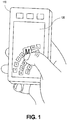
- Fig. 1 shows a multi-function handheld user device, according to an embodiment of the invention.
- the illustrated device 110 is shown with a touchscreen 120 for displaying information to the user and receiving tactile inputs from the user when the user touches the screen at one or more particular locations.
- Three hard buttons are also shown above the display. Other physical buttons, sensors, features, etc. may also be included but are not shown to avoid excessive clutter in the drawing.
- 'hard' buttons are so called because they are physical buttons, permanently located in specific areas.
- the device may also contain 'soft' buttons, each consisting of an image on the touch-sensitive display screen, denoted herein as a touchscreen.
- the device may sense that touch and perform whatever function is associated with that soft button.
- the term 'key' is used in this document to denote a soft button that represents an individual key on a virtual keyboard shown on the touchscreen.
- the illustrated device 110 is depicted as having a particular shape, proportion, and appearance, with buttons located in particular locations, this is for example only and the embodiments of the invention may not be limited to this particular physical configuration. For example, in some embodiments various features may be located elsewhere on the same side or on different sides of the device. In some embodiments the overall shape of the device 110 may be different than shown.
- Device 110 may also include functionality for wireless communication, for various visual, audio, and physical inputs, and for various visual, audio, and physical outputs that are not specifically described herein. In some embodiments, the device may use this functionality in different ways depending on which mode it is in.
- Fig. 1 also shows a virtual keyboard on the touchscreen display.
- each key on the keyboard is implemented as a soft button on the touchscreen.
- the device 110 senses that touch, determines where on the screen the touch occurred, determines which key is associated with that location, and interprets this touch as a keystroke of the selected key.
- a hysteresis effect may be used in which the user must remove his finger from the key for a minimum amount of time and touch the key again before a second touch of that key will be registered.
- the keys on the keyboard are arranged in three rows that each follow an arc shape. These rows are positioned for ease of reach by the user's thumb. Because of the configuration of the human thumb, the arcs may not be perfectly circular, but rather each arc might have a variable rate of curvature. For this reason, the terms 'circular' and 'concentric' are not used to describe them here, although in some instances the arcs might be circular and/or concentric.
- each arc has a pivot point (the pivot point of the user's thumb) that is in approximately the same place, and each arc has a similar shape, with each arc being approximately the same distance from the next adjacent arc throughout the length of those arcs, when measured radially from the pivot point.
- Ease of reach by the user's thumb, rather than a rigid geographical shape, may be the guiding principle when determining the curvature and location of each arc.
- Fig. 1 shows three rows of keys, but other embodiments may have one, two, four, or more rows.
- the keys are shown the same size in all rows, but in some embodiments, some keys may be larger or smaller than others.
- the inner row may have smaller keys than the outer row. Not only does this allow more keys to be placed on the inner row, which has less room for keys, but it also recognizes that the user is likely to touch keys on the inner row with the end of his thumb, which presents a smaller touch area than is felt by keys on the outer row, which are touched with the thumb in an extended position.
- the illustrated example also shows that the three rows are spaced the same distance from each other, but other embodiments may differ. Again, the mechanics and flexibility of the human thumb may determine this spacing.
- Each key is shown with a somewhat rectangular shape, but the soft keys may be displayed with any convenient shape.
- different keys may have different shapes to provide addition information to the user (for example, a square shape for upper case, and a round shape for lower case). Different colors may also be used to denote additional information about that key.
- Each key is shown labeled with the character it represents. These labels are all shown oriented with respect to the bottom of the device (for easy reading by the user) but other embodiments may orient the label with respect to the radial center of the arcs, or some other definable reference point.
- the displayed character will be shown as upper- or lower-case to indicate whether the upper- or lower-case version of the character is represented by that key..
- the symbol represented by the key will be shown in an enlarged version to provide positive feedback to the user, and the position of this enlarged key may be shifted so that it won't be obscured by the user's thumb.
- the user touches the 'M' key (which is hidden from view by the user's thumb), and an enlarged version of the 'M' key is shown just beyond the user's thumb, temporarily overlaying whatever other keys are located there.
- Different color, style, shape, etc. may also be used to distinguish this touch indicator from the remainder of the keys.
- Fig. 1 shows particular characters assigned to particular key positions, but this is for example only. Other embodiments may assign characters to key positions in any desirable arrangement, such as QWERTY, Dvorak, etc. In some embodiments, the key assignments may be programmable.
- Fig. 1 Because the configuration shown in Fig. 1 is designed for one-handed operation, and the keyboard is therefore limited to the space reachable by a single thumb, there may not be enough space to simultaneously represent all the characters that he user wants to type. To compensate for this, all or a portion of the key positions may be reassigned to represent other characters, and new labels representing the new characters may be produced on the touchscreen for those keys. This change may be initiated in any convenient manner, such as but not limited to: 1) touching one of the keyboard keys assigned to this function, 2) touching a particular soft key outside the keyboard area, 3) pressing a hard button, 4) dragging the thumb along a substantial part of an arc, 5) etc.
- the full available keyboard may be thought of as an approximate wheel with four quadrants, with each quadrant having a separate set of characters, and with only one quadrant visible on the touch screen at a time (or two quadrants visible for the two-handed operation described later).
- the user may then call up whichever quadrant he wants displayed.
- one quadrant might contain keys with letters
- another quadrant contain keys with numbers and punctuation marks
- another quadrant contain keys representing pictures, icons, letterheads, etc., that the user likes to insert into documents
- the fourth quadrant contain commonly used phrases, sentences, paragraphs, etc.
- more or fewer than four quadrants may also be used, since this is a virtual concept and is not constrained to an actual physical circle.
- the keyboard configuration shown in Fig. 1 is designed for right-handed operation by making the rows of keys concentric about the lower right-hand corner. By making the rows of keys concentric about the lower left hand corner, the device may be suitable for left-handed operation.
- the illustrated keyboard is also shown configured for vertical operation, i.e., the long side of the display is vertical. Some embodiments may operate with a horizontal operation, i.e., the long side of the display is horizontal.
- the right/left handed configuration and/or the vertical/horizontal operation is selectable by the user. In some embodiments, these configurations may be automatically selected by the device (e.g., sensing gravity to select the vertical/horizontal operation, and sensing which part of the display is touched by the user's thumb to select right- or left-handed operation).
- Fig. 2 shows a virtual keyboard configured for two-handed operation, according to an embodiment of the invention.
- the primary difference between this two-handed operation and the one-handed operation of Fig. 1 is that there are two portions to the virtual keyboard, one configured for operation with the right thumb and the other configured for operation with the left thumb. More keys, and therefore more characters, can be simultaneously displayed with this configuration, as compared with the one-handed configuration of Fig. 1 .
- the two keyboard portions may have the same or a different number of rows, the same or a different number of keys in each row, different spacing, etc.
- the assignment of characters to the individual keys may be switched between the left and right areas for the convenience of users that have a left- or right-handed preference. All the same features, techniques, choices, etc.
- the user may manually select either one- or two-handed operation.
- the device may automatically select one- or two-handed operation, based on some automatically sensed criteria, such as device orientation or sensing touches on both sides of the touchscreen.
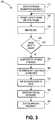
- Fig. 3 shows a flow diagram of a method of calibrating the size of the keyboard to the individual user, according to an embodiment of the invention.
- the calibration process may be initiated by the user, or started automatically based on some pre-determined criteria, such as but not limited to: a) powerup of the device, b) creation of a new user account, c) changing the font size of the characters on the virtual keyboard, d) etc.
- the user may then be prompted at 320 to draw an arc with his thumb on the touchscreen surface, with his hand in its normal data-entry position.
- This arc may be referred to as a 'calibration arc' because its purpose is to calibrate the location of a keyboard row so the keys on that row will be at a convenient position for the user's thumb. In some embodiments, this arc will be visible on the touchscreen after being drawn by the user, but other embodiments may not display the calibration arc.
- the location of this arc on the display screen may be recorded at 330. This location may be used to determine where the corresponding row of keys will be placed on the screen.
- the user may be prompted to enter more than one arc. For example, to calibrate the device for two-handed keyboard operation, the user may be prompted to draw separate arcs, one with each thumb. If more than one row is to be calibrated, the user may be prompted to draw a middle arc, an outer arc, and/or an inner arc. In some embodiments, the user may be prompted to retrace the same arc more than once, so the device can determine an average position for that arc. Any or all of these options may be accommodated with the operations at 320-330-340.
- the arc for only one row of keys is input by the user's thumb, and the other arcs for the other rows for that thumb are automatically located with respect to that arc.
- the locations of the other arcs are determined at 350.
- the user may have been prompted to draw an arc with the thumb in a mid-position, neither fully extended nor fully retracted, and the other rows placed in larger and smaller arcs with respect to that one.
- the user may draw an arc with the thumb fully extended to mark the location of the outer row of keys, with the other arcs created inside that one.
- the user may draw an arc with the thumb fully retracted to mark the location of the inner row of keys, with the other arcs created outside that one.
- the device may assign the position of each key along each arc, with each arc representing a row of keys.
- a predetermined spacing between adjacent keys on the same row may be assumed.
- the spacing may vary. For example, if the calibration process was able to determine the width of the user's thumbprint in various locations, this information may be used to decide the space between keys. A wide thumb print may lead to a wider spacing between keys, to reduce the chance of touching multiple keys in a manner that could lead to error.
- the various characters may be assigned to the various key positions on the different rows.
- this arrangement may be predetermined. In other embodiments, this arrangement may be customized, based on various criteria. For example, the most frequently used characters may be placed on the middle row, to reduce thumb travel. The next most frequently used characters may be placed on the outer row, since extending the thumb is generally considered easier than retracting the thumb.
- Commonly occurring sequences of characters e.g., digraphs
- commonly occurring sequences can be alternated between the two thumbs to facilitate alternating thumb action.
- the device may generate the completed keyboard on the display based on these character position assignments, and exit the calibration sequence at 390.
- various embodiments of the invention may provide a virtual keyboard that is well suited to the natural motion of the user's thumb(s) and is customized to characteristics and preferences of the user. The invention may thereby improve the ease, speed, and accuracy with which the user can enter text on the device.
- the 'contact patch' is the area in which the user contacts the touchscreen when attempting to touch a key or other icon. If a stylus is used, the contact patch may be very small and well-defined in shape. If the user's fingertip is the instrument of contact, the contact patch may be somewhat larger, and the size may vary depending on the pressure which the user applies with that finger. The size and shape of the contact patch may both vary depending on the angle with which the finger contacts the touchscreen. If the thumb is used as the instrument of contact, the same considerations apply, but the size is likely to be even larger than with the fingertip, due to the thumb's generally greater cross section, and the shape and size may vary considerably depending on the contact angle of the thumb, which may generally be shallower than the contact angle of a finger.
- the sensing device may have to interpret the sensor information and determine a point at which the touch was intended. Within this document, this point is called the 'active point', which may or may not be the centroid (the geographical center) of the contact patch.
- the 'active point' which may or may not be the centroid (the geographical center) of the contact patch.
- the device may assume that a particular row of keys will experience an elliptical contact patch with the ellipse oriented in a particular direction, while a different row of keys may experience an elliptical contact patch with the ellipse oriented in a different direction, or even a circular contact patch.
- These assumptions may be taken into consideration when calculating the active point. Assumptions made about a contact patch for a middle row may be interpolated between assumptions made about contact patches for the inner and outer rows. These are only examples; the actual assumptions may vary from this based on actual experience with the user and/or previous studies based on the general population.
- the user may perceive the active point to be near the end of the thumb tip, and the device may move the active point away from the centroid to accommodate this perception.
- the device may sense which mode of operation is being currently used, and adjust the active point calculations accordingly. For example, the device may assume a two-handed operation is being used if a two-handed keyboard is displayed on the touchscreen. Or the device may infer the same by sensing contact in both parts of the screen. In another embodiment, the device may assume one-handed operation if the device is being held in a vertical orientation (the short dimension is horizontal), and two-handed operation if the device is being held in a horizontal orientation (the long dimension is horizontal), based on accelerometers or other sensors. However, the user may be able to manually override these assumptions if desired.
- the type of instrument being used to contact the screen may be inferred by the device based on the size and shape of the contact patch. If the contact patch is relatively large, the device may assume the thumb is being used and adjust the active point accordingly. If the contact patch is smaller, the device may assume that a finger is being used, and adjust the active point based on that assumption. If the contact patch is very small, the device may assume a stylus is being used, and not make any adjustments.
- these adjustments may be pre-defined, either based on a standard set of parameters, or based on the results of one or more calibration sessions. In other embodiments, the adjustments may be continually or frequently modified, based on the recent history of operation. In some embodiments, both initial calibration and ongoing adjustments may be incorporated.
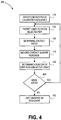
- Fig. 4 shows a flow diagram of a method for a contact patch calibration sequence, according to an embodiment of the invention.
- the method of flow diagram 400 may be used to pre-calibrate the device to a particular user's characteristics. Operations 430 - 460 may also be used for ongoing adjustments during normal operation of the virtual keyboard.
- the device may prompt the user to press a selected key.
- the keyboard e.g., the keyboard generated by the keyboard calibration sequence of Fig. 3
- the key may be shown in isolation in the same location it will occupy in that keyboard.
- the device determines relevant information on the contact patch at 430. Based on readings from the individual contact sensors in the touchscreen, the device may determine the size and shape of the contact patch, and in some embodiments may record the contact readings for the different areas of the contact patch at 440. At 450 the device may determine the centroid for the contact patch, i.e., the geometric center of the contact patch. In some procedures, the centroid may be considered the initial active point for the contact patch, but may then be relocated based on other factors, such as those previously described. In some embodiments, the touchscreen may provide the device with only a calculated centroid position for the contact patch, rather than providing multiple contact sensor readings and having the device calculate the centroid.
- the device may then return to 420 to calibrate the contact patch for another key on the keyboard. In some embodiments this process may be repeated for every key on the keyboard. In other embodiments, only some keys or touchscreen locations may be used in this calibration procedure, and calibration data for the rest may be interpolated from the results of those keys. In some embodiments, the same key may be calibrated more than once, to obtain an average of the readings for that key. After all the selected keys or areas of the touchscreen have been calibrated, either directly or through interpolation, the calibration sequence may be exited at 470.
- the device may use various techniques to determine which key the user intended to touch. Some techniques are contextual in nature, and may not be performed immediately. For example, the device may compare the multiple contacted characters to the rest of the word to determine which character forms a real word, based on a spelling dictionary. If more than one of the possible characters forms a real word, the context of the sentence may be examined to select which word was most likely intended, and therefore which character was intended.
- the key receiving the highest pressure from the thumb may be assumed to be the intended key.
- the different pressure measurements for the different contacted keys may be multiplied by a probability factor, based on predictive text analysis, to determine which key was most likely intended.
- the 'hot spot' i.e., the spot that the device considers the center of a key
- the 'hot spot' may be shifted if the user consistently misses the hot spot in the same direction. For example, if the user consistently types below the hot spot of the 's' key, the device may move the hot spot of the 's' key downward. Determining that the user consistently misses in the same direction may be determined in various ways. For example, localized pressure sensing at various points in the contact patch may be used to determine that the highest pressure point in the contact patch consistently misses the center of the key in the same direction. In another example, it may be determined that the centroid or active point consistently misses the key or its hotspot in the same direction.
- words with that particular character may be frequently misspelled by substituting the same adjacent character. This may be verified, for example, when the user either manually corrects such misspellings, and/or when the user accepts automatic spelling corrections.
- the displayed position of the key may remain unchanged, even though the hotspot for that key is relocated. In other embodiments, the displayed position of the key may be moved so that the new hotspot is centered within the displayed key.
- the device may attempt to differentiate between simply typing the wrong character (e.g., none of the contacted characters spell a word, or maybe dyslexic letter inversion frequently occurs), and errors due to missing the hotspot, and adjust the hotspot only in response to the latter.
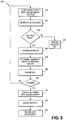
- Fig. 5 shows a flow diagram for a method of adaptively interpreting keystrokes, according to an embodiment of the invention.
- the device may receive input from the touchscreen indicating a key has been touched, and determine the centroid of the contact patch.
- this input may comprise readings from multiple contact sensors that define the contact patch, which may then be converted to the location of the centroid.
- the input from the touchscreen may simply represent the location of the centroid, as determined by the touchscreen logic.
- the active point may be determined at 520 based on the location of the centroid and on previously determined differences between the centroid and active point for that part of the touchscreen. If the intended key is obvious based on the location of the active point, at 535 the device may assume that key was intended. However, if the active point is sufficiently close to multiple keys to cause uncertainty as to which key was intended, as determined at 530, the device may examine the hotspots of those multiple keys at 540. At 550, the device may determine the probability that each of these keys represents the correct key, based on various criteria. A significant criteria may be the previous history with this same grouping of keys.
- the device may select which key was most likely intended by the user, and enter that character into the typing sequence. At this point it may not be feasible to look at spelling and context considerations for that particular keystroke because the rest of the word or sentence has not been completed. The device may then return to 530 to process more keystrokes. At each pass through 565, the device may determine if it is finished with spelling/context considerations for that particular keystroke. If it is, it may possibly change the previously chosen key at 570 based on those factors.
- the lessons learned from this process may be incorporated for future processing. For example, at 580 the location of the hotspot for that key may be adjusted. This information may be recorded for future use at 590.
Landscapes
- Engineering & Computer Science (AREA)
- Theoretical Computer Science (AREA)
- Physics & Mathematics (AREA)
- General Physics & Mathematics (AREA)
- General Engineering & Computer Science (AREA)
- Human Computer Interaction (AREA)
- Multimedia (AREA)
- Business, Economics & Management (AREA)
- Signal Processing (AREA)
- Computer Security & Cryptography (AREA)
- Health & Medical Sciences (AREA)
- Accounting & Taxation (AREA)
- Software Systems (AREA)
- General Health & Medical Sciences (AREA)
- Strategic Management (AREA)
- Finance (AREA)
- Electromagnetism (AREA)
- Optics & Photonics (AREA)
- Development Economics (AREA)
- General Business, Economics & Management (AREA)
- Computer Vision & Pattern Recognition (AREA)
- Computer Hardware Design (AREA)
- Oral & Maxillofacial Surgery (AREA)
- Toxicology (AREA)
- Artificial Intelligence (AREA)
- Game Theory and Decision Science (AREA)
- Economics (AREA)
- Entrepreneurship & Innovation (AREA)
- Marketing (AREA)
- Ophthalmology & Optometry (AREA)
- Psychiatry (AREA)
- Geometry (AREA)
- Social Psychology (AREA)
- Computer Networks & Wireless Communication (AREA)
- Computing Systems (AREA)
- Input From Keyboards Or The Like (AREA)
- User Interface Of Digital Computer (AREA)
- Position Input By Displaying (AREA)
- Telephone Function (AREA)
Abstract
Description
- As multi-purpose wireless devices become too small for standard mechanical/electronic keyboards, virtual keyboards are increasing being used as a primary input device by displaying an arrangement of keys on a touchscreen. The user enters a keystroke by simply touching the screen with a fingertip at the location where the desired key is displayed. Because of the small size and hand-held nature of these devices, many users typically use only their thumbs to enter the data. However, most of these virtual keyboards arrange the keys in either a rectangular matrix of keys, or in the standard QWERTY format. The linear nature of the rows in such arrangements makes them ill suited for used by the thumbs. Specifically, to move his thumb along the length of a row of keys or along the height of a column of keys, a user must articulate the several joints of his thumb in a relatively unnatural manner. Indeed, becoming accustomed to such arrangements can require extensive proprioceptive development from the user. While the designs of some physical keyboards on multi-purpose wireless devices do provide improved ergonomics (compared to a rectangular matrix of keys), the degree of to which the ergonomics can be tailored to a particular individual remains limited. Further, such designs do not account for the fact different users have different sizes of hands, fingers and thumbs, so a keyboard that is properly sized for one user may be more difficult for another user.
- Some embodiments of the invention may be understood by referring to the following description and accompanying drawings that are used to illustrate embodiments of the invention. In the drawings:
-
Fig. 1 shows a multi-function handheld user device, according to an embodiment of the invention. -
Fig. 2 shows a virtual keyboard configured for two-handed operation, according to an embodiment of the invention. -
Fig. 3 shows a flow diagram of a method of calibrating the size of the keyboard to the individual user, according to an embodiment of the invention. -
Fig. 4 shows a flow diagram of a method for an initial contact patch calibration sequence, according to an embodiment of the invention. -
Fig. 5 shows a flow diagram of a method of adaptively interpreting keystrokes, according to an embodiment of the invention. - In the following description, numerous specific details are set forth. However, it is understood that embodiments of the invention may be practiced without these specific details. In other instances, well-known circuits, structures and techniques have not been shown in detail in order not to obscure an understanding of this description.
- References to "one embodiment", "an embodiment", "example embodiment", "various embodiments", etc., indicate that the embodiment(s) of the invention so described may include particular features, structures, or characteristics, but not every embodiment necessarily includes the particular features, structures, or characteristics. Further, some embodiments may have some, all, or none of the features described for other embodiments.
- In the following description and claims, the terms "coupled" and "connected," along with their derivatives, may be used. It should be understood that these terms are not intended as synonyms for each other. Rather, in particular embodiments, "connected" is used to indicate that two or more elements are in direct physical or electrical contact with each other. "Coupled" is used to indicate that two or more elements co-operate or interact with each other, but they may or may not be in direct physical or electrical contact.
- As used in the claims, unless otherwise specified the use of the ordinal adjectives "first", "second", "third", etc., to describe a common element, merely indicate that different instances of like elements are being referred to, and are not intended to imply that the elements so described must be in a given sequence, either temporally, spatially, in ranking, or in any other manner.
- Various embodiments of the invention may be implemented in one or any combination of hardware, firmware, and software. The invention may also be implemented as instructions contained in or on a computer-readable medium, which may be read and executed by one or more processors to enable performance of the operations described herein. A computer-readable medium may include any mechanism for storing information in a form readable by one or more computers. For example, a computer-readable medium may include a tangible storage medium, such as but not limited to read only memory (ROM); random access memory (RAM); magnetic disk storage media; optical storage media; a flash memory device, etc.
- Various embodiments of the invention relate to a configuration of virtual keys on the touch-screen of a virtual keyboard. Rather than being arranged in straight horizontal rows, the keys may be arranged in arcs that are conveniently reached by the user's thumb(s) when the device is held in the user's hand(s). In some embodiments, the placement of the keys may be customized to fit the individual user's thumb and/or personal preferences. In some embodiments, adaptive sensing may be used to compensate for the contact surface of the user's thumb being off-center from a key and/or being larger than the key.
-
Fig. 1 shows a multi-function handheld user device, according to an embodiment of the invention. The illustrateddevice 110 is shown with atouchscreen 120 for displaying information to the user and receiving tactile inputs from the user when the user touches the screen at one or more particular locations. Three hard buttons are also shown above the display. Other physical buttons, sensors, features, etc. may also be included but are not shown to avoid excessive clutter in the drawing. Within the context of this document, 'hard' buttons are so called because they are physical buttons, permanently located in specific areas. But the device may also contain 'soft' buttons, each consisting of an image on the touch-sensitive display screen, denoted herein as a touchscreen. When the user touches a soft button, the device may sense that touch and perform whatever function is associated with that soft button. The term 'key' is used in this document to denote a soft button that represents an individual key on a virtual keyboard shown on the touchscreen. - Although the illustrated
device 110 is depicted as having a particular shape, proportion, and appearance, with buttons located in particular locations, this is for example only and the embodiments of the invention may not be limited to this particular physical configuration. For example, in some embodiments various features may be located elsewhere on the same side or on different sides of the device. In some embodiments the overall shape of thedevice 110 may be different than shown. -
Device 110 may also include functionality for wireless communication, for various visual, audio, and physical inputs, and for various visual, audio, and physical outputs that are not specifically described herein. In some embodiments, the device may use this functionality in different ways depending on which mode it is in. -
Fig. 1 also shows a virtual keyboard on the touchscreen display. In a virtual keyboard, each key on the keyboard is implemented as a soft button on the touchscreen. When the user touches a particular key with his/her thumb (or finger, or stylus, or other object), thedevice 110 senses that touch, determines where on the screen the touch occurred, determines which key is associated with that location, and interprets this touch as a keystroke of the selected key. In some embodiments, a hysteresis effect may be used in which the user must remove his finger from the key for a minimum amount of time and touch the key again before a second touch of that key will be registered. - In this example, the keys on the keyboard are arranged in three rows that each follow an arc shape. These rows are positioned for ease of reach by the user's thumb. Because of the configuration of the human thumb, the arcs may not be perfectly circular, but rather each arc might have a variable rate of curvature. For this reason, the terms 'circular' and 'concentric' are not used to describe them here, although in some instances the arcs might be circular and/or concentric. These arcs are described herein as 'tiered' arcs because each arc has a pivot point (the pivot point of the user's thumb) that is in approximately the same place, and each arc has a similar shape, with each arc being approximately the same distance from the next adjacent arc throughout the length of those arcs, when measured radially from the pivot point. Ease of reach by the user's thumb, rather than a rigid geographical shape, may be the guiding principle when determining the curvature and location of each arc.
- The example of
Fig. 1 shows three rows of keys, but other embodiments may have one, two, four, or more rows. The keys are shown the same size in all rows, but in some embodiments, some keys may be larger or smaller than others. For example, the inner row may have smaller keys than the outer row. Not only does this allow more keys to be placed on the inner row, which has less room for keys, but it also recognizes that the user is likely to touch keys on the inner row with the end of his thumb, which presents a smaller touch area than is felt by keys on the outer row, which are touched with the thumb in an extended position. The illustrated example also shows that the three rows are spaced the same distance from each other, but other embodiments may differ. Again, the mechanics and flexibility of the human thumb may determine this spacing. - Each key is shown with a somewhat rectangular shape, but the soft keys may be displayed with any convenient shape. In some embodiments, different keys may have different shapes to provide addition information to the user (for example, a square shape for upper case, and a round shape for lower case). Different colors may also be used to denote additional information about that key. Each key is shown labeled with the character it represents. These labels are all shown oriented with respect to the bottom of the device (for easy reading by the user) but other embodiments may orient the label with respect to the radial center of the arcs, or some other definable reference point. In some embodiments, the displayed character will be shown as upper- or lower-case to indicate whether the upper- or lower-case version of the character is represented by that key..
- In some embodiments, whenever a key touch is registered by the device, the symbol represented by the key will be shown in an enlarged version to provide positive feedback to the user, and the position of this enlarged key may be shifted so that it won't be obscured by the user's thumb. In the example of
Fig. 1 , the user touches the 'M' key (which is hidden from view by the user's thumb), and an enlarged version of the 'M' key is shown just beyond the user's thumb, temporarily overlaying whatever other keys are located there. Different color, style, shape, etc. may also be used to distinguish this touch indicator from the remainder of the keys. - The example of
Fig. 1 shows particular characters assigned to particular key positions, but this is for example only. Other embodiments may assign characters to key positions in any desirable arrangement, such as QWERTY, Dvorak, etc. In some embodiments, the key assignments may be programmable. - Because the configuration shown in
Fig. 1 is designed for one-handed operation, and the keyboard is therefore limited to the space reachable by a single thumb, there may not be enough space to simultaneously represent all the characters that he user wants to type. To compensate for this, all or a portion of the key positions may be reassigned to represent other characters, and new labels representing the new characters may be produced on the touchscreen for those keys. This change may be initiated in any convenient manner, such as but not limited to: 1) touching one of the keyboard keys assigned to this function, 2) touching a particular soft key outside the keyboard area, 3) pressing a hard button, 4) dragging the thumb along a substantial part of an arc, 5) etc. - In some embodiments, the full available keyboard may be thought of as an approximate wheel with four quadrants, with each quadrant having a separate set of characters, and with only one quadrant visible on the touch screen at a time (or two quadrants visible for the two-handed operation described later). The user may then call up whichever quadrant he wants displayed. For example, one quadrant might contain keys with letters, another quadrant contain keys with numbers and punctuation marks, another quadrant contain keys representing pictures, icons, letterheads, etc., that the user likes to insert into documents, and the fourth quadrant contain commonly used phrases, sentences, paragraphs, etc. Of course, more or fewer than four quadrants may also be used, since this is a virtual concept and is not constrained to an actual physical circle.
- The keyboard configuration shown in
Fig. 1 is designed for right-handed operation by making the rows of keys concentric about the lower right-hand corner. By making the rows of keys concentric about the lower left hand corner, the device may be suitable for left-handed operation. The illustrated keyboard is also shown configured for vertical operation, i.e., the long side of the display is vertical. Some embodiments may operate with a horizontal operation, i.e., the long side of the display is horizontal. In some embodiments, the right/left handed configuration and/or the vertical/horizontal operation is selectable by the user. In some embodiments, these configurations may be automatically selected by the device (e.g., sensing gravity to select the vertical/horizontal operation, and sensing which part of the display is touched by the user's thumb to select right- or left-handed operation). -
Fig. 2 shows a virtual keyboard configured for two-handed operation, according to an embodiment of the invention. The primary difference between this two-handed operation and the one-handed operation ofFig. 1 is that there are two portions to the virtual keyboard, one configured for operation with the right thumb and the other configured for operation with the left thumb. More keys, and therefore more characters, can be simultaneously displayed with this configuration, as compared with the one-handed configuration ofFig. 1 . The two keyboard portions may have the same or a different number of rows, the same or a different number of keys in each row, different spacing, etc. In some embodiments, the assignment of characters to the individual keys may be switched between the left and right areas for the convenience of users that have a left- or right-handed preference. All the same features, techniques, choices, etc. that are available for one-handed operation may also be applied to this two handed operation, and in some embodiments may be applied separately for each portion of the keyboard. In some embodiments the user may manually select either one- or two-handed operation. In some embodiments, the device may automatically select one- or two-handed operation, based on some automatically sensed criteria, such as device orientation or sensing touches on both sides of the touchscreen. -
Fig. 3 shows a flow diagram of a method of calibrating the size of the keyboard to the individual user, according to an embodiment of the invention. In flow diagram 300, at 310 the calibration process may be initiated by the user, or started automatically based on some pre-determined criteria, such as but not limited to: a) powerup of the device, b) creation of a new user account, c) changing the font size of the characters on the virtual keyboard, d) etc. The user may then be prompted at 320 to draw an arc with his thumb on the touchscreen surface, with his hand in its normal data-entry position. This arc may be referred to as a 'calibration arc' because its purpose is to calibrate the location of a keyboard row so the keys on that row will be at a convenient position for the user's thumb. In some embodiments, this arc will be visible on the touchscreen after being drawn by the user, but other embodiments may not display the calibration arc. - In either case, the location of this arc on the display screen may be recorded at 330. This location may be used to determine where the corresponding row of keys will be placed on the screen. In some embodiments, the user may be prompted to enter more than one arc. For example, to calibrate the device for two-handed keyboard operation, the user may be prompted to draw separate arcs, one with each thumb. If more than one row is to be calibrated, the user may be prompted to draw a middle arc, an outer arc, and/or an inner arc. In some embodiments, the user may be prompted to retrace the same arc more than once, so the device can determine an average position for that arc. Any or all of these options may be accommodated with the operations at 320-330-340.
- In some embodiments, the arc for only one row of keys is input by the user's thumb, and the other arcs for the other rows for that thumb are automatically located with respect to that arc. In such a case, the locations of the other arcs are determined at 350. In one embodiment, the user may have been prompted to draw an arc with the thumb in a mid-position, neither fully extended nor fully retracted, and the other rows placed in larger and smaller arcs with respect to that one. In another embodiment the user may draw an arc with the thumb fully extended to mark the location of the outer row of keys, with the other arcs created inside that one. Conversely, the user may draw an arc with the thumb fully retracted to mark the location of the inner row of keys, with the other arcs created outside that one.
- Once the arc locations have been determined, at 360 the device may assign the position of each key along each arc, with each arc representing a row of keys. In some embodiments, a predetermined spacing between adjacent keys on the same row may be assumed. In other embodiments, the spacing may vary. For example, if the calibration process was able to determine the width of the user's thumbprint in various locations, this information may be used to decide the space between keys. A wide thumb print may lead to a wider spacing between keys, to reduce the chance of touching multiple keys in a manner that could lead to error.
- At 370, the various characters (letters, numerals, punctuation marks, etc.) may be assigned to the various key positions on the different rows. In some embodiments, this arrangement may be predetermined. In other embodiments, this arrangement may be customized, based on various criteria. For example, the most frequently used characters may be placed on the middle row, to reduce thumb travel. The next most frequently used characters may be placed on the outer row, since extending the thumb is generally considered easier than retracting the thumb. Commonly occurring sequences of characters (e.g., digraphs) can be ordered sequentially along an arc to facilitate a more natural 'inward sweep' motion of the thumb. For two-handed operation, commonly occurring sequences can be alternated between the two thumbs to facilitate alternating thumb action. Other considerations may also be used to assign characters to key positions. In some embodiments, the user may be able to assign characters to specific key positions. At 380, the device may generate the completed keyboard on the display based on these character position assignments, and exit the calibration sequence at 390. By virtue of these and other features, various embodiments of the invention may provide a virtual keyboard that is well suited to the natural motion of the user's thumb(s) and is customized to characteristics and preferences of the user. The invention may thereby improve the ease, speed, and accuracy with which the user can enter text on the device.
- Due to the close spacing of the keys, and the relatively large contact area of the user's thumb, it is likely that the user will frequently contact more than one key simultaneously. Various approaches may be taken to reduce the negative effects of this by interpreting which key the user intended to touch. Some approaches involve interpreting the area contacted by the user's thumb, while others are based on context and repetitive errors. Both approaches are described below.
- The 'contact patch' is the area in which the user contacts the touchscreen when attempting to touch a key or other icon. If a stylus is used, the contact patch may be very small and well-defined in shape. If the user's fingertip is the instrument of contact, the contact patch may be somewhat larger, and the size may vary depending on the pressure which the user applies with that finger. The size and shape of the contact patch may both vary depending on the angle with which the finger contacts the touchscreen. If the thumb is used as the instrument of contact, the same considerations apply, but the size is likely to be even larger than with the fingertip, due to the thumb's generally greater cross section, and the shape and size may vary considerably depending on the contact angle of the thumb, which may generally be shallower than the contact angle of a finger.
- Since the contact patch may be even larger than the key on the touchscreen that is being touched, the sensing device may have to interpret the sensor information and determine a point at which the touch was intended. Within this document, this point is called the 'active point', which may or may not be the centroid (the geographical center) of the contact patch. These calculations may be complicated by the fact that the size and shape of the contact patch varies with: 1) which row the key is on (which affect the angle of the thumb), and 2) whether the user is entering data with a one-handed or two-handed keyboard operation (the position of the hand, and therefore the angle of the thumb, may generally be different in a two-handed operation than it is in a one-handed operation). Further, the actual contact patch and/or the actual centroid of that contact patch may be different than the contact patch and centroid as perceived by the user.
- In some embodiments the device may assume that a particular row of keys will experience an elliptical contact patch with the ellipse oriented in a particular direction, while a different row of keys may experience an elliptical contact patch with the ellipse oriented in a different direction, or even a circular contact patch. These assumptions may be taken into consideration when calculating the active point. Assumptions made about a contact patch for a middle row may be interpolated between assumptions made about contact patches for the inner and outer rows. These are only examples; the actual assumptions may vary from this based on actual experience with the user and/or previous studies based on the general population.
- As an example of user perception, for some rows the user may perceive the active point to be near the end of the thumb tip, and the device may move the active point away from the centroid to accommodate this perception.
- Since the angle of the thumb, and therefore the shape of the contact patch, is generally different during two-handed operation than during one-handed operation, the device may sense which mode of operation is being currently used, and adjust the active point calculations accordingly. For example, the device may assume a two-handed operation is being used if a two-handed keyboard is displayed on the touchscreen. Or the device may infer the same by sensing contact in both parts of the screen. In another embodiment, the device may assume one-handed operation if the device is being held in a vertical orientation (the short dimension is horizontal), and two-handed operation if the device is being held in a horizontal orientation (the long dimension is horizontal), based on accelerometers or other sensors. However, the user may be able to manually override these assumptions if desired.
- In some embodiments, the type of instrument being used to contact the screen may be inferred by the device based on the size and shape of the contact patch. If the contact patch is relatively large, the device may assume the thumb is being used and adjust the active point accordingly. If the contact patch is smaller, the device may assume that a finger is being used, and adjust the active point based on that assumption. If the contact patch is very small, the device may assume a stylus is being used, and not make any adjustments.
- Regardless of the type of adjustments being made, in some embodiments these adjustments may be pre-defined, either based on a standard set of parameters, or based on the results of one or more calibration sessions. In other embodiments, the adjustments may be continually or frequently modified, based on the recent history of operation. In some embodiments, both initial calibration and ongoing adjustments may be incorporated.
-
Fig. 4 shows a flow diagram of a method for a contact patch calibration sequence, according to an embodiment of the invention. The method of flow diagram 400 may be used to pre-calibrate the device to a particular user's characteristics. Operations 430 - 460 may also be used for ongoing adjustments during normal operation of the virtual keyboard. After entering the contact patch calibration sequence at 410, at 420 the device may prompt the user to press a selected key. In some embodiments, the keyboard (e.g., the keyboard generated by the keyboard calibration sequence ofFig. 3 ) may be fully displayed, but in other embodiments the key may be shown in isolation in the same location it will occupy in that keyboard. - When the user touches the selected key, the device determines relevant information on the contact patch at 430. Based on readings from the individual contact sensors in the touchscreen, the device may determine the size and shape of the contact patch, and in some embodiments may record the contact readings for the different areas of the contact patch at 440. At 450 the device may determine the centroid for the contact patch, i.e., the geometric center of the contact patch. In some procedures, the centroid may be considered the initial active point for the contact patch, but may then be relocated based on other factors, such as those previously described. In some embodiments, the touchscreen may provide the device with only a calculated centroid position for the contact patch, rather than providing multiple contact sensor readings and having the device calculate the centroid.
- At 460, the device may then return to 420 to calibrate the contact patch for another key on the keyboard. In some embodiments this process may be repeated for every key on the keyboard. In other embodiments, only some keys or touchscreen locations may be used in this calibration procedure, and calibration data for the rest may be interpolated from the results of those keys. In some embodiments, the same key may be calibrated more than once, to obtain an average of the readings for that key. After all the selected keys or areas of the touchscreen have been calibrated, either directly or through interpolation, the calibration sequence may be exited at 470.
- When more than one key is simultaneously touched by the user, the device may use various techniques to determine which key the user intended to touch. Some techniques are contextual in nature, and may not be performed immediately. For example, the device may compare the multiple contacted characters to the rest of the word to determine which character forms a real word, based on a spelling dictionary. If more than one of the possible characters forms a real word, the context of the sentence may be examined to select which word was most likely intended, and therefore which character was intended.
- In some cases, there may be a previous history of striking this same combination of adjacent keys, when a particular one of those keys was usually intended, and this history may be taken into account.
- If the touchscreen provides local pressure measurements, the key receiving the highest pressure from the thumb may be assumed to be the intended key. Alternately, the different pressure measurements for the different contacted keys may be multiplied by a probability factor, based on predictive text analysis, to determine which key was most likely intended.
- The 'hot spot', i.e., the spot that the device considers the center of a key, may be shifted if the user consistently misses the hot spot in the same direction. For example, if the user consistently types below the hot spot of the 's' key, the device may move the hot spot of the 's' key downward. Determining that the user consistently misses in the same direction may be determined in various ways. For example, localized pressure sensing at various points in the contact patch may be used to determine that the highest pressure point in the contact patch consistently misses the center of the key in the same direction. In another example, it may be determined that the centroid or active point consistently misses the key or its hotspot in the same direction.
- In another example, words with that particular character may be frequently misspelled by substituting the same adjacent character. This may be verified, for example, when the user either manually corrects such misspellings, and/or when the user accepts automatic spelling corrections. In some embodiments, the displayed position of the key may remain unchanged, even though the hotspot for that key is relocated. In other embodiments, the displayed position of the key may be moved so that the new hotspot is centered within the displayed key. In some embodiments, the device may attempt to differentiate between simply typing the wrong character (e.g., none of the contacted characters spell a word, or maybe dyslexic letter inversion frequently occurs), and errors due to missing the hotspot, and adjust the hotspot only in response to the latter.
-
Fig. 5 shows a flow diagram for a method of adaptively interpreting keystrokes, according to an embodiment of the invention. In flow diagram 500, at 510 the device may receive input from the touchscreen indicating a key has been touched, and determine the centroid of the contact patch. In some embodiments this input may comprise readings from multiple contact sensors that define the contact patch, which may then be converted to the location of the centroid. In other embodiments, the input from the touchscreen may simply represent the location of the centroid, as determined by the touchscreen logic. - In either case, the active point may be determined at 520 based on the location of the centroid and on previously determined differences between the centroid and active point for that part of the touchscreen. If the intended key is obvious based on the location of the active point, at 535 the device may assume that key was intended. However, if the active point is sufficiently close to multiple keys to cause uncertainty as to which key was intended, as determined at 530, the device may examine the hotspots of those multiple keys at 540. At 550, the device may determine the probability that each of these keys represents the correct key, based on various criteria. A significant criteria may be the previous history with this same grouping of keys.
- Based on these and other considerations, at 560 the device may select which key was most likely intended by the user, and enter that character into the typing sequence. At this point it may not be feasible to look at spelling and context considerations for that particular keystroke because the rest of the word or sentence has not been completed. The device may then return to 530 to process more keystrokes. At each pass through 565, the device may determine if it is finished with spelling/context considerations for that particular keystroke. If it is, it may possibly change the previously chosen key at 570 based on those factors.
- Once the chosen character and associated key have been finalized, the lessons learned from this process may be incorporated for future processing. For example, at 580 the location of the hotspot for that key may be adjusted. This information may be recorded for future use at 590.
- The foregoing description is intended to be illustrative and not limiting. Variations will occur to those of skill in the art. Those variations are intended to be included in the various embodiments of the invention, which are limited only by the scope of the following claims.
- The following section of the description consists of numbered paragraphs simply providing statements of the invention already described herein. The numbered paragraphs in this section are not claims. The claims are set forth below in the later section headed "claims".
- 1. An apparatus, comprising: a handheld electronic device having a touchscreen with a virtual keyboard, wherein the virtual keyboard has first and second arc-shaped tiered rows of keys.
- 2. The apparatus of
clause 1, wherein the virtual keyboard has two portions, the first portion having at least the first and second rows of keys arranged for operation by one of a user's thumbs, and the second portion having at least a third arc-shaped row of keys arranged for operation by the user's other thumb, when the user is gripping the device with both right and left hands. - 3. The apparatus of
clause 1, wherein at least one item selected from the following list is programmable by user action: a) a distance between the first and second rows; b) a distance between adjacent keys in a row; and c) which character is assigned to each key. - 4. The apparatus of
clause 1, wherein a display of a key on the touchscreen is to be shifted to a position visible to a user when the key is activated by a touch. - 5. The apparatus of
clause 1, wherein the device is to perform a keyboard calibration procedure comprising: a) prompting a user to draw a calibration arc on the touchscreen with the user's thumb; and b) generating the first row of keys for the virtual keyboard along the calibration arc drawn by the user's thumb. - 6. The apparatus of clause 5, wherein the calibration procedure further comprises generating the second row of keys in relation to the first row of keys.
- 7. A method, comprising: entering a calibration mode; detecting a first calibration arc drawn on a touchscreen; and generating a first row of soft keys for a virtual keyboard along the first calibration arc.
- 8. The method of
clause 7, further comprising prompting a user, prior to said detecting, to draw the first calibration arc on the touchscreen. - 9. The method of
clause 7, further comprising generating a second row of soft keys having a tiered relation with the first row of soft keys. - 10. The method of
clause 7, further comprising: detecting a second calibration arc drawn on the touchscreen; and generating a second row of soft keys for the virtual keyboard along the second calibration arc. - 11. The method of clause 10, wherein the first and second calibration arcs are tiered with respect to each other.
- 12. The method of clause 10, wherein: the first and second calibration arcs are drawn by the user using different thumbs; and the first and second calibration arcs are not tiered with respect to each other.
- 13. An article comprising a computer-readable storage medium that contains instructions, which when executed by one or more processors result in performing operations comprising: entering a calibration mode; detecting a first calibration arc drawn on a touchscreen; and generating a first row of soft keys for a virtual keyboard along the first calibration arc.
- 14. The article of clause 13, wherein the operations further comprises prompting a user, prior to said detecting, to draw the first calibration arc on the touchscreen.
- 15. The article of clause 13, wherein the operations further comprise generating a second row of soft keys having a tiered relation with the first row of soft keys.
- 16. The article of clause 13, wherein the operations further comprise: detecting a second calibration arc drawn on the touchscreen; and generating a second row of soft keys for the virtual keyboard along the second calibration arc.
- 17. The article of clause 16, wherein the first and second calibration arcs are tiered with respect to each other.
- 18. The article of clause 16, wherein: the first and second calibration arcs are drawn by the user using different thumbs; and the first and second calibration arcs are not tiered with respect to each other.
- 19. An apparatus, comprising: a handheld device including a touchscreen for displaying a virtual keyboard, wherein the device is to: detect a touch on the touchscreen by a user; determine a location for a centroid of a contact patch for the touch; and determine a location of an active point with respect to the centroid.
- 20. The apparatus of clause 19, wherein said determining the location of the centroid comprises: receiving readings from multiple sensor points on the touchscreen located within the contact patch; and calculating the centroid from the multiple sensor points.
- 21. The apparatus of clause 19, wherein said determining the location of the active point is based at least in part on one or more factors selected from a list consisting of: the centroid of the contact patch; a size of the contact patch; a shape of the contact patch; a difference in pressure sensed at the multiple points; a location on the keyboard of the contact patch; a positional relationship between the centroid and a keyboard key that is at least partly overlapped by the contact patch; and a previous history of the positional relationship between the contact patch and the keyboard key.
- 22. The apparatus of clause 19, wherein said detecting a touch is to be performed during a calibration procedure for the keyboard.
- 23. A method, comprising: sensing a touch on a touchscreen of a handheld electronic device; determining a centroid for a contact patch of the touch; and determining an active point for the contact patch, wherein the active point is a different location than the centroid.
- 24. The method of clause 23, wherein said determining the active point is based at least in part on one or more factors selected from a list consisting of: the centroid of the contact patch; a size of the contact patch; a shape of the contact patch; a difference in pressure sensed at multiple points within the contact patch; a location on the keyboard of the contact patch; a positional relationship between the contact patch and a keyboard key that is at least partly overlapped by the contact patch; and a previous history of the positional relationship between the contact patch and the keyboard key.
- 25. The method of clause 23, wherein said sensing is performed during an initial calibration procedure for the keyboard.
- 26. The method clause 23, wherein said adjusting is performed during operational usage of the keyboard.
- 27. An article comprising a computer-readable storage medium that contains instructions, which when executed by one or more processors result in performing operations comprising: sensing a contact patch on a touchscreen of a handheld electronic device; determining a centroid for a contact patch for the touch; and determining an active point for the contact patch.
- 28. The article of clause 27, wherein the operation of determining the active point is based at least in part on one or more factors selected from a list consisting of: a centroid of the contact patch; a size of the contact patch; a shape of the contact patch; a difference in pressure sensed at the multiple points; a location on the keyboard of the contact patch; a positional relationship between the contact patch and a keyboard key that is at least partly overlapped by the contact patch; a previous history of the positional relationship between the contact patch and the keyboard key.
- 29. The article of clause 27, wherein the operation of adjusting is performed during an initial calibration procedure for the keyboard.
- 30. The article of clause 27, wherein the operation of adjusting is performed during operational usage of the keyboard.
- 31. An apparatus, comprising: a handheld electronic device including a touchscreen for displaying a virtual keyboard, wherein the device is to: detect a contact patch when the touchscreen is touched by a user; determine an active point for the contact patch; determine a hot spot for each of multiple keys located near the active point; select a particular key from among the multiple keys as a key intended by the user; and include a particular character represented by the particular key as a character in an ongoing stream of text input by the user.
- 32. The apparatus of clause 31, wherein said selection is based on at least one criteria selected from a list consisting of: location of each of the hotspots with respect to the active point; and a probability based at least in part on a past history of the active point and at least some of the multiple keys.
- 33. The apparatus of clause 31, wherein the device is to relocate the hot spot for the particular key for subsequent operations, based at least in part on determinations leading to the selection of the particular key.
- 34. The apparatus of clause 31, wherein the device is further to: detect additional contact patches; select additional keys based on the additional contact patches; include a corresponding character from each of the selected keys into the ongoing stream of text until at least a word has been formed; determine the word is an invalid word; and change the particular character to another character represented by another of the multiple keys to form a valid word.
- 35. The apparatus of clause 34, wherein the device is further to move a hot spot for the particular key based at least in part on determinations leading to the changing of the particular character.
- 36. A method, comprising: determining an active point of a contact patch when a touchscreen of a handheld electronic device is touched by a user; determining the active point is near a hot spot for each of multiple keys on a virtual keyboard on the touchscreen; selecting a particular key from among the multiple keys as a key intended by the user; and including a particular character represented by the particular key as a character in an ongoing stream of text input by the user.
- 37. The method of clause 36, wherein said selecting is based on at least one criteria selected from a list consisting of: location of each of the hotspots with respect to the contact patch; and a probability based at least in part on a past history of the multiple keys and corresponding contact patches.
- 38. The method of clause 36, further comprising moving a hot spot for the particular key based at least in part on determinations leading to said selecting the particular key.
- 39. The method of clause 36, further comprising: determining additional active points for additional contact patches generated by additional touches; selecting additional keys based on the additional touches; including a corresponding character from each of the selected additional keys into the ongoing stream of text until at least a word has been formed; determining the word is an invalid word; and changing the particular character to another character represented by another of the multiple keys to form a valid word.
- 40. The method of clause 39, further comprising moving a hot spot for the particular key based at least in part on determinations leading to said changing of the particular character.
- 41. An article comprising a computer-readable storage medium that contains instructions, which when executed by one or more processors result in performing operations comprising: determining an active point of a contact patch when a touchscreen of a handheld electronic device is touched by a user; determining the active point is near a hot spot for each of multiple keys on a virtual keyboard on the touchscreen; selecting a particular key from among the multiple keys as a key intended by the user; and including a particular character represented by the particular key as a character in an ongoing stream of text input by the user.
- 42. The article of clause 41, wherein said selecting is based on at least one criteria selected from a list consisting of: a location of each of the hotspots with respect to the contact patch; and a probability based at least in part on a past history of the multiple keys and corresponding contact patches.
- 43. The article of clause 41, wherein the operations further comprise moving a hot spot for the particular key based at least in part on determinations leading to said selecting the particular key.
- 44. The article of clause 41 , wherein the operations further comprise: determining additional active points for additional contact patches generated by additional touches; selecting additional keys based on the additional touches; including a corresponding character from each of the selected additional keys into the ongoing stream of text until at least a word has been formed; determining the word is an invalid word; and changing the particular character to another character represented by another of the multiple keys to form a valid word.
- 45. The article of clause 44, wherein the operations further comprise moving a hot spot for the particular key based at least in part on determinations leading to said changing of the particular character.
Claims (15)
- A apparatus comprising:a handheld electronic device having a touchscreen for displaying a virtual keyboard having three arc-shaped tiered rows of keys, including keys associated with respective characters, wherein the device is configured to:enable a user to enter text content via the virtual keyboard with one hand while holding the handheld electronic device in the same hand; andperform predictive text analysis to determine characters intended to be entered by the user as the user enters the text content via the virtual keyboard.
- The apparatus of claim 1, wherein to perform predictive text analysis the device is configured to:in response to a user selection of a key that is part of a word in a sentence being entered by the user via the virtual keyboard,compare characters for each of one or more adjacent keys proximate to a sensed input coordinate to a remaining portion of the word to determine whether using the character forms a real word; andif more than one of the characters that are compared forms a real word, examine a context of a sentence that would be formed using that word to select which word and character was most likely intended.
- The apparatus of claim 2, wherein the apparatus is configured to determine a key intended to be selected by the user based, in part, on a history of previous determinations of intended key selections.
- The apparatus of any of the preceding claims, wherein the apparatus is configured to:in response to a user selection of a key that is part of a word in a sentence being entered by the user via the virtual keyboard,sense an area of the touchscreen a user's finger or thumb is in contact with corresponding to the key selection,detect that the user intended to select one of multiple adjacent keys proximate to the area of the touchscreen that is sensed; anddetermine a key intended to be selected by the user based on at least one of the area of the touchscreen that the user's finger or thumb is sensed to be in contact with and an active point detected via the touchscreen or determined as a function of the area; andpredictive text analysis that considers at least one of a context of the word and a context of the sentence.
- The apparatus of any of the preceding claims, wherein the apparatus is configured to adapt active points relative to areas of the touchscreen that the user's finger or thumb are sensed to be in contact with based on observation of intended keys over time.
- The apparatus of any of the preceding claims, wherein the three arc-shaped tiered rows of keys are arranged to be selectively activated via a user's thumb, and wherein the apparatus is configured to determine what key is selected is based on detecting areas of the touchscreen the user's thumb is sensed to be in contact with corresponding to the key selection.
- The apparatus of any of the preceding claims, wherein the three arc-shaped tiered rows of keys are arranged to be selectively activated via a user's thumb when the user is holding the apparatus using one hand including the user's thumb.
- The apparatus of claim 1, wherein the apparatus is configured to enable a user to adjust a layout of the keyboard.
- A method for implementing a virtual keyboard on a handheld electronic device having a touchscreen for displaying the virtual keyboard, the method comprising:displaying three arc-shaped tiered rows of keys on the touchscreen display;in response to a user selection of a key that is part of a word in a sentence being entered by the user via the virtual keyboard,sensing an area of the touchscreen a user's finger or thumb is in contact with corresponding to the key selection,detecting that the user intended to select one of multiple adjacent keys proximate to the area of the touchscreen that is sensed; anddetermining a key intended to be selected by the user based on at least one of the area of the touchscreen that the user's finger or thumb is sensed to be in contact with and an active point detected via the touchscreen or determined as a function of the area;performing predictive text analysis including,
comparing characters for each of the multiple adjacent keys to a remaining portion of the word to determine whether using the character in forms a real word; and
if more than one of the characters that are compared forms a real word, examining a context of a sentence that would be formed using that word to select which word and character was most likely intended. - The method of claim 9, wherein determining a key intended to be selected by the user further includes considering a history of previous determinations of intended key selections.
- The method of claim 9 or 10, further comprising adapting active points relative to contact patches based on observation of intended keys over time.
- The method of any of claims 9-11, wherein the three arc-shaped tiered rows of keys are arranged to be selectively activated via a user's thumb, further comprising implementing logic to determine what key is selected by detecting areas of the touchscreen the user's thumb is sensed to be in contact with corresponding to the key selection.
- The method of any of claims 9-12, further comprising enabling a user to adjust a layout of the keyboard.
- The method of any of claims 9-13, further comprising:detecting whether a user is selecting keys using a finger or using a thumb; andadjusting a location of an active point relative to a detected area of the touchscreen display that the user's finger or thumb is sensed to be in contact with based on whether use of a finger or thumb for selecting keys is detected.
- A computer program product comprising computer program code that, when executed on a processor, implements the method of any of claims 9-14.
Applications Claiming Priority (3)
| Application Number | Priority Date | Filing Date | Title |
|---|---|---|---|
| US18752009P | 2009-06-16 | 2009-06-16 | |
| EP09846310.2A EP2443532B1 (en) | 2009-06-16 | 2009-12-31 | Adaptive virtual keyboard for handheld device |
| PCT/US2009/069931 WO2010147611A1 (en) | 2009-06-16 | 2009-12-31 | Adaptive virtual keyboard for handheld device |
Related Parent Applications (2)
| Application Number | Title | Priority Date | Filing Date |
|---|---|---|---|
| EP09846310.2A Division EP2443532B1 (en) | 2009-06-16 | 2009-12-31 | Adaptive virtual keyboard for handheld device |
| EP09846310.2A Division-Into EP2443532B1 (en) | 2009-06-16 | 2009-12-31 | Adaptive virtual keyboard for handheld device |
Publications (2)
| Publication Number | Publication Date |
|---|---|
| EP3176687A1 true EP3176687A1 (en) | 2017-06-07 |
| EP3176687B1 EP3176687B1 (en) | 2026-04-01 |
Family
ID=58412670
Family Applications (2)
| Application Number | Title | Priority Date | Filing Date |
|---|---|---|---|
| EP17152708.8A Active EP3176687B1 (en) | 2009-06-16 | 2009-12-31 | Adaptive virtual keyboard for handheld device |
| EP09846310.2A Active EP2443532B1 (en) | 2009-06-16 | 2009-12-31 | Adaptive virtual keyboard for handheld device |
Family Applications After (1)
| Application Number | Title | Priority Date | Filing Date |
|---|---|---|---|
| EP09846310.2A Active EP2443532B1 (en) | 2009-06-16 | 2009-12-31 | Adaptive virtual keyboard for handheld device |
Country Status (7)
| Country | Link |
|---|---|
| US (1) | US9013423B2 (en) |
| EP (2) | EP3176687B1 (en) |
| JP (1) | JP5532499B2 (en) |
| KR (3) | KR101364837B1 (en) |
| BR (1) | BRPI0924002B1 (en) |
| SG (1) | SG175398A1 (en) |
| WO (1) | WO2010147611A1 (en) |
Cited By (1)
| Publication number | Priority date | Publication date | Assignee | Title |
|---|---|---|---|---|
| EP4318201A4 (en) * | 2021-09-30 | 2024-10-16 | Beijing Sogou Technology Development Co., Ltd. | METHOD AND DEVICE FOR SETTING A VIRTUAL KEYBOARD, STORAGE MEDIUM AND COMPUTER PROGRAM PRODUCT |
Families Citing this family (111)
| Publication number | Priority date | Publication date | Assignee | Title |
|---|---|---|---|---|
| US8018440B2 (en) | 2005-12-30 | 2011-09-13 | Microsoft Corporation | Unintentional touch rejection |
| JP2009169456A (en) * | 2008-01-10 | 2009-07-30 | Nec Corp | Electronic equipment, information input method and information input control program used for same electronic equipment, and portable terminal device |
| JP4632102B2 (en) * | 2008-07-17 | 2011-02-16 | ソニー株式会社 | Information processing apparatus, information processing method, and information processing program |
| WO2010110550A1 (en) * | 2009-03-23 | 2010-09-30 | Core Logic Inc. | Apparatus and method for providing virtual keyboard |
| KR20120006066A (en) | 2009-06-16 | 2012-01-17 | 인텔 코오퍼레이션 | Camera applications in a handheld device |
| TWI438413B (en) | 2009-10-09 | 2014-05-21 | Egalax Empia Technology Inc | Method and device for signal detection |
| US8570289B2 (en) * | 2009-10-09 | 2013-10-29 | Egalax—Empia Technology Inc. | Method and device for position detection |
| US8261213B2 (en) | 2010-01-28 | 2012-09-04 | Microsoft Corporation | Brush, carbon-copy, and fill gestures |
| US9411504B2 (en) | 2010-01-28 | 2016-08-09 | Microsoft Technology Licensing, Llc | Copy and staple gestures |
| US9519356B2 (en) | 2010-02-04 | 2016-12-13 | Microsoft Technology Licensing, Llc | Link gestures |
| US9310994B2 (en) * | 2010-02-19 | 2016-04-12 | Microsoft Technology Licensing, Llc | Use of bezel as an input mechanism |
| US9367205B2 (en) * | 2010-02-19 | 2016-06-14 | Microsoft Technolgoy Licensing, Llc | Radial menus with bezel gestures |
| US9965165B2 (en) | 2010-02-19 | 2018-05-08 | Microsoft Technology Licensing, Llc | Multi-finger gestures |
| US9454304B2 (en) | 2010-02-25 | 2016-09-27 | Microsoft Technology Licensing, Llc | Multi-screen dual tap gesture |
| US9342241B2 (en) * | 2010-03-03 | 2016-05-17 | Twitch Technologies Llc | Matrix keyboarding system |
| US8384566B2 (en) * | 2010-05-19 | 2013-02-26 | Mckesson Financial Holdings | Pressure-sensitive keyboard and associated method of operation |
| US8648809B2 (en) * | 2010-06-16 | 2014-02-11 | International Business Machines Corporation | Reconfiguration of virtual keyboard |
| JP2012003545A (en) * | 2010-06-17 | 2012-01-05 | Nec Corp | Information processing terminal and operation control method therefor |
| US20120047454A1 (en) * | 2010-08-18 | 2012-02-23 | Erik Anthony Harte | Dynamic Soft Input |
| JPWO2012070682A1 (en) * | 2010-11-24 | 2014-05-19 | 日本電気株式会社 | Input device and control method of input device |
| KR101821160B1 (en) * | 2010-12-10 | 2018-03-08 | 삼성전자 주식회사 | Method and apparatus for providing user keypad in a portable terminal |
| TWI432996B (en) * | 2010-12-10 | 2014-04-01 | Compal Electronics Inc | A method for adjusting the display appearance of a keyboard interface being displayed on a touch display unit |
| US20120166995A1 (en) * | 2010-12-24 | 2012-06-28 | Telefonaktiebolaget L M Ericsson (Publ) | Smart virtual keyboard for touchscreen devices |
| US10365819B2 (en) * | 2011-01-24 | 2019-07-30 | Apple Inc. | Device, method, and graphical user interface for displaying a character input user interface |
| JP5361913B2 (en) * | 2011-01-25 | 2013-12-04 | 株式会社ソニー・コンピュータエンタテインメント | Input device, input method, and computer program |
| EP2673689A4 (en) * | 2011-02-11 | 2017-01-18 | Ideatron Pty Ltd | Keypad |
| JP5813991B2 (en) * | 2011-05-02 | 2015-11-17 | 埼玉日本電気株式会社 | Portable terminal, input control method and program |
| CN102203715B (en) | 2011-05-23 | 2013-03-20 | 华为终端有限公司 | An input method, an input device and a terminal device |
| US8719719B2 (en) * | 2011-06-17 | 2014-05-06 | Google Inc. | Graphical icon presentation |
| WO2012176371A1 (en) * | 2011-06-24 | 2012-12-27 | 株式会社村田製作所 | Portable device |
| US20130002565A1 (en) * | 2011-06-28 | 2013-01-03 | Microsoft Corporation | Detecting portable device orientation and user posture via touch sensors |
| US9448724B2 (en) * | 2011-07-11 | 2016-09-20 | International Business Machines Corporation | Dynamically customizable touch screen keyboard for adapting to user physiology |
| CN102299996A (en) * | 2011-08-19 | 2011-12-28 | 华为终端有限公司 | Handheld device operating mode distinguishing method and handheld device |
| US20130057475A1 (en) * | 2011-09-01 | 2013-03-07 | Microsoft Corporation | Split keyboard for thumb typing |
| US8730174B2 (en) | 2011-10-13 | 2014-05-20 | Blackberry Limited | Device and method for receiving input |
| US20130105239A1 (en) * | 2011-10-30 | 2013-05-02 | Hei Tao Fung | Telerobot for Facilitating Interaction between Users |
| KR101972924B1 (en) * | 2011-11-11 | 2019-08-23 | 삼성전자주식회사 | Method and apparatus for designating enire area using partial area touch in a portable equipment |
| KR101340703B1 (en) | 2011-11-25 | 2013-12-12 | 삼성전자주식회사 | Device and method for arranging keypad in wireless terminal |
| CN103543853A (en) * | 2011-11-30 | 2014-01-29 | 英特尔公司 | Self-adaptive virtual keyboard for handheld device |
| US9851884B2 (en) * | 2011-12-01 | 2017-12-26 | Panasonic Intellectual Property Management Co., Ltd. | Information processing device |
| CN102591577A (en) * | 2011-12-28 | 2012-07-18 | 华为技术有限公司 | Method for displaying arc-shaped menu index and relevant device |
| US9519419B2 (en) | 2012-01-17 | 2016-12-13 | Microsoft Technology Licensing, Llc | Skinnable touch device grip patterns |
| US8863042B2 (en) * | 2012-01-24 | 2014-10-14 | Charles J. Kulas | Handheld device with touch controls that reconfigure in response to the way a user operates the device |
| JP6271444B2 (en) * | 2012-02-24 | 2018-01-31 | トーマス ジェイ モスカリッロMOSCARILLO, Thomas, J. | Gesture recognition apparatus and method |
| US10216286B2 (en) * | 2012-03-06 | 2019-02-26 | Todd E. Chornenky | On-screen diagonal keyboard |
| TWI536250B (en) * | 2012-03-09 | 2016-06-01 | 群邁通訊股份有限公司 | System and method for displaying input interface |
| KR101999182B1 (en) | 2012-04-08 | 2019-07-11 | 삼성전자주식회사 | User terminal device and control method thereof |
| CN102681670A (en) * | 2012-04-09 | 2012-09-19 | 中兴通讯股份有限公司 | Mobile terminal and setting method for virtual keyboard of same |
| USD730370S1 (en) | 2012-04-10 | 2015-05-26 | Google Inc. | Display screen of a communication terminal with a graphical user interface |
| US20130265235A1 (en) * | 2012-04-10 | 2013-10-10 | Google Inc. | Floating navigational controls in a tablet computer |
| JP5997921B2 (en) * | 2012-04-13 | 2016-09-28 | 株式会社MetaMoJi | Character input method and character input device |
| KR101979666B1 (en) * | 2012-05-15 | 2019-05-17 | 삼성전자 주식회사 | Operation Method For plural Touch Panel And Portable Device supporting the same |
| US9600167B2 (en) * | 2012-09-28 | 2017-03-21 | Facebook, Inc. | Systems and methods for a user-adaptive keyboard |
| US9304683B2 (en) * | 2012-10-10 | 2016-04-05 | Microsoft Technology Licensing, Llc | Arced or slanted soft input panels |
| US9547375B2 (en) | 2012-10-10 | 2017-01-17 | Microsoft Technology Licensing, Llc | Split virtual keyboard on a mobile computing device |
| US8843845B2 (en) | 2012-10-16 | 2014-09-23 | Google Inc. | Multi-gesture text input prediction |
| US9582122B2 (en) | 2012-11-12 | 2017-02-28 | Microsoft Technology Licensing, Llc | Touch-sensitive bezel techniques |
| EP2926236A1 (en) | 2012-11-27 | 2015-10-07 | Thomson Licensing | Adaptive virtual keyboard |
| US10048861B2 (en) * | 2012-11-27 | 2018-08-14 | Thomson Licensing | Adaptive virtual keyboard |
| US8832589B2 (en) | 2013-01-15 | 2014-09-09 | Google Inc. | Touch keyboard using language and spatial models |
| US9535603B2 (en) | 2013-03-14 | 2017-01-03 | Carl F. Andersen | Columnar fitted virtual keyboard |
| CN104345944B (en) * | 2013-08-05 | 2019-01-18 | 中兴通讯股份有限公司 | Device, method and the mobile terminal of adaptive adjustment touch input panel layout |
| US20150057063A1 (en) * | 2013-08-22 | 2015-02-26 | Partygaming Ia Limited | Mobile gaming system and method for touch screen game operation |
| DE102013015635B4 (en) * | 2013-09-20 | 2016-12-15 | Audi Ag | Operating device for a system in the interior of a motor vehicle |
| US20150089360A1 (en) * | 2013-09-25 | 2015-03-26 | At&T Mobility Ii Llc | Intelligent Adaptation of User Interfaces |
| US20150089359A1 (en) * | 2013-09-25 | 2015-03-26 | At&T Mobility Ii Llc | Intelligent Adaptation of Home Screens |
| US20150089386A1 (en) * | 2013-09-25 | 2015-03-26 | At&T Mobility Ii Llc | Intelligent Adaptation of Home Screens According to Handedness |
| US9933858B2 (en) | 2013-09-29 | 2018-04-03 | Shenzhen Hsmc Technology Co., Ltd. | Keyboard operated with two thumbs and key layout method thereof |
| US10156984B2 (en) | 2013-09-29 | 2018-12-18 | Shenzhen Hsmc Technology Co., Ltd. | Method for implementing control of keys of virtual keyboard on wide touch screen with two thumbs |
| CN103576879B (en) * | 2013-09-29 | 2016-03-30 | 罗蒙明 | A kind of method realizing both hands thumb manipulation widescreen dummy keyboard button |
| EP3063608B1 (en) | 2013-10-30 | 2020-02-12 | Apple Inc. | Displaying relevant user interface objects |
| CN104750374B (en) * | 2013-12-27 | 2019-11-22 | 深圳富泰宏精密工业有限公司 | Dialing board management method and system |
| US9207794B2 (en) * | 2013-12-30 | 2015-12-08 | Google Inc. | Disambiguation of user intent on a touchscreen keyboard |
| WO2015108310A1 (en) * | 2014-01-20 | 2015-07-23 | Samsung Electronics Co., Ltd. | User interface for touch devices |
| USD704673S1 (en) | 2014-01-25 | 2014-05-13 | Dinesh Agarwal | Curved split-screen cellphone |
| EP3100153B1 (en) * | 2014-01-27 | 2022-01-05 | Hewlett-Packard Development Company, L.P. | Printer interface selection and control |
| WO2015125179A1 (en) | 2014-02-19 | 2015-08-27 | パナソニック インテレクチュアル プロパティ コーポレーション オブ アメリカ | Transmitter, transmission method and receiving method |
| CN103885632B (en) * | 2014-02-22 | 2018-07-06 | 小米科技有限责任公司 | Input method and device |
| US9477337B2 (en) | 2014-03-14 | 2016-10-25 | Microsoft Technology Licensing, Llc | Conductive trace routing for display and bezel sensors |
| US9158426B1 (en) * | 2014-03-19 | 2015-10-13 | Google Inc. | Touch keyboard calibration |
| US9324067B2 (en) | 2014-05-29 | 2016-04-26 | Apple Inc. | User interface for payments |
| US20220171530A1 (en) * | 2014-06-11 | 2022-06-02 | Lenovo (Singapore) Pte. Ltd. | Displaying a user input modality |
| US20150363008A1 (en) * | 2014-06-11 | 2015-12-17 | Lenovo (Singapore) Pte. Ltd. | Displaying a user input modality |
| US10152227B2 (en) | 2014-08-26 | 2018-12-11 | International Business Machines Corporation | Free form user-designed single-handed touchscreen keyboard |
| WO2016036552A1 (en) | 2014-09-02 | 2016-03-10 | Apple Inc. | User interactions for a mapping application |
| CN105528169A (en) * | 2014-10-23 | 2016-04-27 | 中兴通讯股份有限公司 | A touch screen apparatus and a method for operating the same |
| US9626089B2 (en) * | 2015-01-16 | 2017-04-18 | Toyota Motor Engineering & Manufacturing | Determination and indication of included system features |
| US20160291747A1 (en) * | 2015-03-31 | 2016-10-06 | Prysm,Inc | Asset positioning on large touch-screen displays |
| US9678664B2 (en) | 2015-04-10 | 2017-06-13 | Google Inc. | Neural network for keyboard input decoding |
| KR101728045B1 (en) | 2015-05-26 | 2017-04-18 | 삼성전자주식회사 | Medical image display apparatus and method for providing user interface thereof |
| US20160358133A1 (en) | 2015-06-05 | 2016-12-08 | Apple Inc. | User interface for loyalty accounts and private label accounts for a wearable device |
| US9940637B2 (en) | 2015-06-05 | 2018-04-10 | Apple Inc. | User interface for loyalty accounts and private label accounts |
| CN106293191B (en) * | 2015-06-19 | 2019-09-10 | 北京智谷睿拓技术服务有限公司 | Information processing method and equipment |
| CN106325723B (en) | 2015-06-19 | 2019-09-20 | 北京智谷睿拓技术服务有限公司 | Information processing method and equipment |
| KR20170002051A (en) | 2015-06-29 | 2017-01-06 | 삼성전자주식회사 | A method and an electronic device for one-hane user interface |
| US10628036B2 (en) | 2016-01-18 | 2020-04-21 | Microsoft Technology Licensing, Llc | Keyboard customization |
| US10860199B2 (en) | 2016-09-23 | 2020-12-08 | Apple Inc. | Dynamically adjusting touch hysteresis based on contextual data |
| US10671181B2 (en) * | 2017-04-03 | 2020-06-02 | Microsoft Technology Licensing, Llc | Text entry interface |
| US10013081B1 (en) | 2017-04-04 | 2018-07-03 | Google Llc | Electronic circuit and method to account for strain gauge variation |
| CN106919292A (en) * | 2017-04-13 | 2017-07-04 | 芯海科技(深圳)股份有限公司 | A kind of method and device of the man-machine interaction of mobile phone side virtual key |
| US10635255B2 (en) | 2017-04-18 | 2020-04-28 | Google Llc | Electronic device response to force-sensitive interface |
| US10514797B2 (en) * | 2017-04-18 | 2019-12-24 | Google Llc | Force-sensitive user input interface for an electronic device |
| JP2017134868A (en) * | 2017-04-27 | 2017-08-03 | キヤノン株式会社 | Information terminal, display control method, and program |
| KR102044824B1 (en) * | 2017-06-20 | 2019-11-15 | 주식회사 하이딥 | Apparatus capable of sensing touch and touch pressure and control method thereof |
| US10671279B2 (en) * | 2017-07-11 | 2020-06-02 | Thumba Inc. | Interactive virtual keyboard configured to use gestures and having condensed characters on a plurality of keys arranged approximately radially about at least one center point |
| US20190026120A1 (en) * | 2017-07-21 | 2019-01-24 | International Business Machines Corporation | Customizing mobile device operation based on touch points |
| KR101881383B1 (en) * | 2017-10-11 | 2018-07-24 | 안지홍 | Touch-screen system with easy operation of one hand and providing method thereof |
| CN110347315A (en) * | 2018-04-08 | 2019-10-18 | 中兴通讯股份有限公司 | A kind of data processing method, terminal and storage medium |
| CN110473311B (en) | 2018-05-09 | 2021-07-23 | 杭州海康威视数字技术股份有限公司 | Preventing illegal attack methods, devices and electronic equipment |
| KR102119482B1 (en) * | 2018-09-21 | 2020-06-05 | 충남대학교산학협력단 | Screen Arrangement Method and Character Input Method for One-hand Keyboard of Smartphone |
| CN111309183B (en) * | 2020-02-26 | 2022-04-15 | 京东方科技集团股份有限公司 | Touch display system and control method thereof |
Citations (3)
| Publication number | Priority date | Publication date | Assignee | Title |
|---|---|---|---|---|
| US20040183833A1 (en) * | 2003-03-19 | 2004-09-23 | Chua Yong Tong | Keyboard error reduction method and apparatus |
| US20060085757A1 (en) * | 2004-07-30 | 2006-04-20 | Apple Computer, Inc. | Activating virtual keys of a touch-screen virtual keyboard |
| WO2008030880A1 (en) * | 2006-09-06 | 2008-03-13 | Apple Inc. | Methods for determining a cursor position from a finger contact with a touch screen display |
Family Cites Families (24)
| Publication number | Priority date | Publication date | Assignee | Title |
|---|---|---|---|---|
| JPH04102911A (en) * | 1990-08-22 | 1992-04-03 | Toshiba Corp | Hand-held terminal |
| JPH0785216B2 (en) * | 1992-02-07 | 1995-09-13 | インターナショナル・ビジネス・マシーンズ・コーポレイション | Menu display device and method |
| ATE188302T1 (en) * | 1993-04-01 | 2000-01-15 | Ibm | DYNAMIC ADJUSTMENT FOR TOUCH DISPLAY BUTTONS |
| US5953541A (en) * | 1997-01-24 | 1999-09-14 | Tegic Communications, Inc. | Disambiguating system for disambiguating ambiguous input sequences by displaying objects associated with the generated input sequences in the order of decreasing frequency of use |
| JPH10232735A (en) | 1997-02-18 | 1998-09-02 | Sharp Corp | Input device for information equipment |
| US7679534B2 (en) * | 1998-12-04 | 2010-03-16 | Tegic Communications, Inc. | Contextual prediction of user words and user actions |
| GB0201074D0 (en) | 2002-01-18 | 2002-03-06 | 3G Lab Ltd | Graphic user interface for data processing device |
| JP4518955B2 (en) * | 2002-11-29 | 2010-08-04 | コーニンクレッカ フィリップス エレクトロニクス エヌ ヴィ | User interface using moved representation of contact area |
| JP2004341813A (en) | 2003-05-15 | 2004-12-02 | Casio Comput Co Ltd | Input device display control method and input device |
| JP2005078156A (en) | 2003-08-28 | 2005-03-24 | Seiko Epson Corp | Control screen display apparatus and method, and program thereof |
| KR20060026830A (en) * | 2004-09-21 | 2006-03-24 | 송정헌 | Portable keypad system |
| JP2006268313A (en) * | 2005-03-23 | 2006-10-05 | Fuji Xerox Co Ltd | Display controller and arrangement method for display content thereof |
| US7694231B2 (en) * | 2006-01-05 | 2010-04-06 | Apple Inc. | Keyboards for portable electronic devices |
| JP4628295B2 (en) * | 2006-03-30 | 2011-02-09 | 京セラ株式会社 | Operation key group layout method and portable terminal device in portable terminal device |
| JP4699955B2 (en) * | 2006-07-21 | 2011-06-15 | シャープ株式会社 | Information processing device |
| KR20080008750A (en) | 2006-07-21 | 2008-01-24 | 주식회사 용마엔지니어링 | Isolation Supporting Device with Mechanical Damper and Isolation Construction Method Using It |
| KR100852401B1 (en) | 2007-02-27 | 2008-08-14 | 삼성전자주식회사 | Character input method of a mobile terminal having a touch screen |
| KR101086433B1 (en) * | 2007-03-27 | 2011-11-23 | 삼성전자주식회사 | Method and apparatus for displaying touch screen keyboard on device |
| KR100837283B1 (en) * | 2007-09-10 | 2008-06-11 | (주)익스트라스탠다드 | Handheld terminal with touch screen |
| JP2009110286A (en) * | 2007-10-30 | 2009-05-21 | Toshiba Corp | Information processing apparatus, launcher activation control program, and launcher activation control method |
| KR101352994B1 (en) * | 2007-12-10 | 2014-01-21 | 삼성전자 주식회사 | Apparatus and method for providing an adaptive on-screen keyboard |
| JP2009163278A (en) | 2007-12-21 | 2009-07-23 | Toshiba Corp | Portable equipment |
| EP2101250B1 (en) * | 2008-03-14 | 2014-06-11 | BlackBerry Limited | Character selection on a device using offset contact-zone |
| US20120162078A1 (en) * | 2010-12-28 | 2012-06-28 | Bran Ferren | Adaptive virtual keyboard for handheld device |
-
2009
- 2009-12-31 WO PCT/US2009/069931 patent/WO2010147611A1/en not_active Ceased
- 2009-12-31 EP EP17152708.8A patent/EP3176687B1/en active Active
- 2009-12-31 KR KR1020117028293A patent/KR101364837B1/en active Active
- 2009-12-31 SG SG2011079555A patent/SG175398A1/en unknown
- 2009-12-31 US US13/376,620 patent/US9013423B2/en active Active
- 2009-12-31 KR KR1020117028292A patent/KR101364881B1/en active Active
- 2009-12-31 JP JP2012513031A patent/JP5532499B2/en active Active
- 2009-12-31 EP EP09846310.2A patent/EP2443532B1/en active Active
- 2009-12-31 BR BRPI0924002-0A patent/BRPI0924002B1/en active IP Right Grant
- 2009-12-31 KR KR1020117026404A patent/KR101364814B1/en active Active
Patent Citations (4)
| Publication number | Priority date | Publication date | Assignee | Title |
|---|---|---|---|---|
| US20040183833A1 (en) * | 2003-03-19 | 2004-09-23 | Chua Yong Tong | Keyboard error reduction method and apparatus |
| US20060085757A1 (en) * | 2004-07-30 | 2006-04-20 | Apple Computer, Inc. | Activating virtual keys of a touch-screen virtual keyboard |
| US20070247442A1 (en) * | 2004-07-30 | 2007-10-25 | Andre Bartley K | Activating virtual keys of a touch-screen virtual keyboard |
| WO2008030880A1 (en) * | 2006-09-06 | 2008-03-13 | Apple Inc. | Methods for determining a cursor position from a finger contact with a touch screen display |
Cited By (2)
| Publication number | Priority date | Publication date | Assignee | Title |
|---|---|---|---|---|
| EP4318201A4 (en) * | 2021-09-30 | 2024-10-16 | Beijing Sogou Technology Development Co., Ltd. | METHOD AND DEVICE FOR SETTING A VIRTUAL KEYBOARD, STORAGE MEDIUM AND COMPUTER PROGRAM PRODUCT |
| US12204748B2 (en) | 2021-09-30 | 2025-01-21 | Beijing Sogou Technology Development Co., Ltd. | Virtual keyboard setting method and apparatus, and storage medium |
Also Published As
| Publication number | Publication date |
|---|---|
| BRPI0924002A2 (en) | 2012-12-11 |
| KR20120013410A (en) | 2012-02-14 |
| US20120075194A1 (en) | 2012-03-29 |
| EP2443532A1 (en) | 2012-04-25 |
| EP3176687B1 (en) | 2026-04-01 |
| US9013423B2 (en) | 2015-04-21 |
| EP2443532A4 (en) | 2012-11-07 |
| BRPI0924002B1 (en) | 2021-03-02 |
| WO2010147611A1 (en) | 2010-12-23 |
| KR101364837B1 (en) | 2014-02-19 |
| KR20120016087A (en) | 2012-02-22 |
| KR20120013409A (en) | 2012-02-14 |
| JP2012527709A (en) | 2012-11-08 |
| EP2443532B1 (en) | 2018-01-24 |
| SG175398A1 (en) | 2011-12-29 |
| KR101364881B1 (en) | 2014-02-19 |
| JP5532499B2 (en) | 2014-06-25 |
| KR101364814B1 (en) | 2014-02-19 |
Similar Documents
| Publication | Publication Date | Title |
|---|---|---|
| US10133482B2 (en) | Adaptive virtual keyboard for handheld device | |
| US9013423B2 (en) | Adaptive virtual keyboard for handheld device | |
| CN103543853A (en) | Self-adaptive virtual keyboard for handheld device | |
| EP4057116A1 (en) | Method for biometrically optimizing a virtual keyboard |
Legal Events
| Date | Code | Title | Description |
|---|---|---|---|
| 17P | Request for examination filed |
Effective date: 20170123 |
|
| AC | Divisional application: reference to earlier application |
Ref document number: 2443532 Country of ref document: EP Kind code of ref document: P |
|
| AK | Designated contracting states |
Kind code of ref document: A1 Designated state(s): AT BE BG CH CY CZ DE DK EE ES FI FR GB GR HR HU IE IS IT LI LT LU LV MC MK MT NL NO PL PT RO SE SI SK SM TR |
|
| PUAI | Public reference made under article 153(3) epc to a published international application that has entered the european phase |
Free format text: ORIGINAL CODE: 0009012 |
|
| STAA | Information on the status of an ep patent application or granted ep patent |
Free format text: STATUS: REQUEST FOR EXAMINATION WAS MADE |
|
| STAA | Information on the status of an ep patent application or granted ep patent |
Free format text: STATUS: EXAMINATION IS IN PROGRESS |
|
| 17Q | First examination report despatched |
Effective date: 20190305 |
|
| GRAP | Despatch of communication of intention to grant a patent |
Free format text: ORIGINAL CODE: EPIDOSNIGR1 |
|
| STAA | Information on the status of an ep patent application or granted ep patent |
Free format text: STATUS: GRANT OF PATENT IS INTENDED |
|
| INTG | Intention to grant announced |
Effective date: 20251105 |
|
| GRAS | Grant fee paid |
Free format text: ORIGINAL CODE: EPIDOSNIGR3 |
|
| GRAA | (expected) grant |
Free format text: ORIGINAL CODE: 0009210 |
|
| STAA | Information on the status of an ep patent application or granted ep patent |
Free format text: STATUS: THE PATENT HAS BEEN GRANTED |
|
| AC | Divisional application: reference to earlier application |
Ref document number: 2443532 Country of ref document: EP Kind code of ref document: P |
|
| AK | Designated contracting states |
Kind code of ref document: B1 Designated state(s): AT BE BG CH CY CZ DE DK EE ES FI FR GB GR HR HU IE IS IT LI LT LU LV MC MK MT NL NO PL PT RO SE SI SK SM TR |
|
| REG | Reference to a national code |
Ref country code: CH Ref legal event code: F10 Free format text: ST27 STATUS EVENT CODE: U-0-0-F10-F00 (AS PROVIDED BY THE NATIONAL OFFICE) Effective date: 20260401 Ref country code: GB Ref legal event code: FG4D |
|
| P01 | Opt-out of the competence of the unified patent court (upc) registered |
Free format text: CASE NUMBER: UPC_APP_0009051_3176687/2026 Effective date: 20260309 |
|
| REG | Reference to a national code |
Ref country code: DE Ref legal event code: R096 Ref document number: 602009065669 Country of ref document: DE |
|
| REG | Reference to a national code |
Ref country code: IE Ref legal event code: FG4D |