EP3086537A1 - Application icon display control method and terminal - Google Patents
Application icon display control method and terminal Download PDFInfo
- Publication number
- EP3086537A1 EP3086537A1 EP13899970.1A EP13899970A EP3086537A1 EP 3086537 A1 EP3086537 A1 EP 3086537A1 EP 13899970 A EP13899970 A EP 13899970A EP 3086537 A1 EP3086537 A1 EP 3086537A1
- Authority
- EP
- European Patent Office
- Prior art keywords
- application
- frequently used
- icons
- icon
- application icons
- Prior art date
- Legal status (The legal status is an assumption and is not a legal conclusion. Google has not performed a legal analysis and makes no representation as to the accuracy of the status listed.)
- Withdrawn
Links
Images


Classifications
-
- G—PHYSICS
- G06—COMPUTING OR CALCULATING; COUNTING
- G06F—ELECTRIC DIGITAL DATA PROCESSING
- G06F3/00—Input arrangements for transferring data to be processed into a form capable of being handled by the computer; Output arrangements for transferring data from processing unit to output unit, e.g. interface arrangements
- G06F3/01—Input arrangements or combined input and output arrangements for interaction between user and computer
- G06F3/048—Interaction techniques based on graphical user interfaces [GUI]
- G06F3/0481—Interaction techniques based on graphical user interfaces [GUI] based on specific properties of the displayed interaction object or a metaphor-based environment, e.g. interaction with desktop elements like windows or icons, or assisted by a cursor's changing behaviour or appearance
- G06F3/0482—Interaction with lists of selectable items, e.g. menus
-
- G—PHYSICS
- G06—COMPUTING OR CALCULATING; COUNTING
- G06F—ELECTRIC DIGITAL DATA PROCESSING
- G06F3/00—Input arrangements for transferring data to be processed into a form capable of being handled by the computer; Output arrangements for transferring data from processing unit to output unit, e.g. interface arrangements
- G06F3/01—Input arrangements or combined input and output arrangements for interaction between user and computer
- G06F3/048—Interaction techniques based on graphical user interfaces [GUI]
- G06F3/0481—Interaction techniques based on graphical user interfaces [GUI] based on specific properties of the displayed interaction object or a metaphor-based environment, e.g. interaction with desktop elements like windows or icons, or assisted by a cursor's changing behaviour or appearance
- G06F3/04817—Interaction techniques based on graphical user interfaces [GUI] based on specific properties of the displayed interaction object or a metaphor-based environment, e.g. interaction with desktop elements like windows or icons, or assisted by a cursor's changing behaviour or appearance using icons
-
- G—PHYSICS
- G06—COMPUTING OR CALCULATING; COUNTING
- G06F—ELECTRIC DIGITAL DATA PROCESSING
- G06F3/00—Input arrangements for transferring data to be processed into a form capable of being handled by the computer; Output arrangements for transferring data from processing unit to output unit, e.g. interface arrangements
- G06F3/01—Input arrangements or combined input and output arrangements for interaction between user and computer
- G06F3/048—Interaction techniques based on graphical user interfaces [GUI]
- G06F3/0484—Interaction techniques based on graphical user interfaces [GUI] for the control of specific functions or operations, e.g. selecting or manipulating an object, an image or a displayed text element, setting a parameter value or selecting a range
- G06F3/04842—Selection of displayed objects or displayed text elements
-
- G—PHYSICS
- G06—COMPUTING OR CALCULATING; COUNTING
- G06F—ELECTRIC DIGITAL DATA PROCESSING
- G06F3/00—Input arrangements for transferring data to be processed into a form capable of being handled by the computer; Output arrangements for transferring data from processing unit to output unit, e.g. interface arrangements
- G06F3/01—Input arrangements or combined input and output arrangements for interaction between user and computer
- G06F3/048—Interaction techniques based on graphical user interfaces [GUI]
- G06F3/0487—Interaction techniques based on graphical user interfaces [GUI] using specific features provided by the input device, e.g. functions controlled by the rotation of a mouse with dual sensing arrangements, or of the nature of the input device, e.g. tap gestures based on pressure sensed by a digitiser
- G06F3/0488—Interaction techniques based on graphical user interfaces [GUI] using specific features provided by the input device, e.g. functions controlled by the rotation of a mouse with dual sensing arrangements, or of the nature of the input device, e.g. tap gestures based on pressure sensed by a digitiser using a touch-screen or digitiser, e.g. input of commands through traced gestures
- G06F3/04883—Interaction techniques based on graphical user interfaces [GUI] using specific features provided by the input device, e.g. functions controlled by the rotation of a mouse with dual sensing arrangements, or of the nature of the input device, e.g. tap gestures based on pressure sensed by a digitiser using a touch-screen or digitiser, e.g. input of commands through traced gestures for inputting data by handwriting, e.g. gesture or text
-
- H—ELECTRICITY
- H04—ELECTRIC COMMUNICATION TECHNIQUE
- H04M—TELEPHONIC COMMUNICATION
- H04M1/00—Substation equipment, e.g. for use by subscribers
- H04M1/72—Mobile telephones; Cordless telephones, i.e. devices for establishing wireless links to base stations without route selection
- H04M1/724—User interfaces specially adapted for cordless or mobile telephones
-
- H—ELECTRICITY
- H04—ELECTRIC COMMUNICATION TECHNIQUE
- H04M—TELEPHONIC COMMUNICATION
- H04M1/00—Substation equipment, e.g. for use by subscribers
- H04M1/72—Mobile telephones; Cordless telephones, i.e. devices for establishing wireless links to base stations without route selection
- H04M1/724—User interfaces specially adapted for cordless or mobile telephones
- H04M1/72469—User interfaces specially adapted for cordless or mobile telephones for operating the device by selecting functions from two or more displayed items, e.g. menus or icons
-
- H—ELECTRICITY
- H04—ELECTRIC COMMUNICATION TECHNIQUE
- H04M—TELEPHONIC COMMUNICATION
- H04M1/00—Substation equipment, e.g. for use by subscribers
- H04M1/72—Mobile telephones; Cordless telephones, i.e. devices for establishing wireless links to base stations without route selection
- H04M1/724—User interfaces specially adapted for cordless or mobile telephones
- H04M1/72469—User interfaces specially adapted for cordless or mobile telephones for operating the device by selecting functions from two or more displayed items, e.g. menus or icons
- H04M1/72472—User interfaces specially adapted for cordless or mobile telephones for operating the device by selecting functions from two or more displayed items, e.g. menus or icons wherein the items are sorted according to specific criteria, e.g. frequency of use
-
- H—ELECTRICITY
- H04—ELECTRIC COMMUNICATION TECHNIQUE
- H04M—TELEPHONIC COMMUNICATION
- H04M2250/00—Details of telephonic subscriber devices
- H04M2250/22—Details of telephonic subscriber devices including a touch pad, a touch sensor or a touch detector
Definitions
- the present invention relates to communication technology field, and particularly to an application icon display control method and a terminal.
- operating an icon or a page can be realized by exerting a long press or other operation on an icon displayed on the desktop of a terminal.
- the system automatically recognizes that a certain adjacent icon is clicked and the application corresponding to the icon is started.
- menu pages correspondingly increase.
- a frequently used icon bar is displayed below menu pages, and a number of frequently used icons are displayed in the frequently used icon bar.
- the frequently used icon bar stay unchanged. Thus, an invisible screen switch boundary exists between the menu pages and the frequently used icon bar.
- the screen of the terminal gradually increases, thus the region in which the frequently used icon bar is located also become great, and gap regions among the frequently used icons also become great.
- Present operation method cannot fully utilize the gaps among the icons, and response for operations exerted on the gaps is simple.
- the present invention provides a new application icon display control technology, which can fully utilize gap regions of the frequently used icon bar.
- one aspect of the present invention provides an application icon display control method which includes distributing a number of preset application icons in gap regions of a region in which a frequently used icon bar of a terminal is located, wherein the gap regions are the remaining regions obtained by removing regions occupied by frequently used icons from the region in which the frequently used icon bar is located.
- the gap regions of the frequently used icon bar also increase.
- the gap regions can be fully utilized.
- the user can operate the application icons distributed in the gap regions.
- the number of application icons on menu pages is accordingly reduced.
- the frequently used icon bar is always located in a single hand operation range of the user, the step of flipping pages by moving fingers significantly to search application icons is thus eliminated, which can facilitate the user to find corresponding application icons.
- designated gap regions among the frequently used icons are divided according to use frequency of application icons to be assigned to corresponding application icons.
- the application icon having the highest use frequency is adjacent to a screen edge of the terminal.
- the selection of the gap regions is determined according to use frequency of the application icons.
- the application icon having a higher use frequency is distributed in a gap region which is greater and more adjacent to the touch range of the user's finger, for example, the left or right side of the terminal, such that the application icon can be easily operated.
- the shape of the gap regions in the frequently used icon bar is irregular, thus the shape of the application icons is also irregular so as to match the shape of the gap regions.
- the gap regions of the frequently used bar is filled similar to puzzle.
- some of the gap regions among the frequently used icons is reserved for a preset number of application icons which are not dynamically distributed on the current menu page and are also not located in the frequently used icon bar.
- some of the gap regions of the frequently used icon bar is reserved for application icons which are not dynamically distributed on the current menu page, such that it is convenient for the user to operate application icons on other menu pages, and there is no need to page back and forth to find needed application icons.
- Other of the gap regions are still used for application icons set by the user.
- the plurality of application icons are displayed, or the application corresponding to the gap region on which the triggering operation is exerted is started.
- Setting application icons to be in the gap regions of the frequently used icon bar is not only for fully utilizing the gap regions, but also for protecting privacy information.
- Some applications are related to user's privacy, e.g., short messages. Generally, when a new short message is received, the user does not wish that others can get the content of the short message easily. However, in related art, displaying prompt on the short message icon directly or on other position directly is not beneficial for protecting user's privacy.
- the application icons in the gap regions are hidden, and only when the user wants to use the application icons, the application icons can be displayed. Therefore, the user can set some private application icons to be in the gap regions, which facilitates the user to use the private application icons, and further protects user's privacy.
- any of the application icons receives a message notification, for reminding the user, the display status of the frequently used icon adjacent to the application icon the application corresponding to which has received the message notification is changed or the background color the region of the application icon is changed.
- changing the display status of the frequently icons includes changing the distance between the adjacent frequently used icon and the other frequently used icons.
- Another aspect of the present invention further provides a terminal which includes a display control unit configured to distribute a number of preset application icons in gap regions of a region in which a frequently used icon bar of a terminal is located, wherein the gap regions are the remaining regions obtained by removing regions occupied by frequently used icons from the region in which the frequently used icon bar is located.
- the gap regions of the frequently used icon bar also increase.
- the gap regions can be fully utilized.
- the user can operate the application icons distributed in the gap regions.
- the number of application icons on menu pages is accordingly reduced.
- the frequently used icon bar is always located in a single hand operation range of the user, the step of flipping pages by moving fingers significantly to search application icons is thus eliminated, which can facilitate the user to find corresponding application icons.
- the display control unit includes a region distributing unit configured to divide designated gap regions among the frequently used icons according to use frequency of application icons to be assigned to corresponding application icons.
- the application icon having the highest use frequency is adjacent to a screen edge of the terminal.
- the selection of the gap regions is determined according to use frequency of the application icons.
- the application icon having a higher use frequency is distributed in a gap region which is greater and more adjacent to the touch range of the user's finger, for example, the left or right side of the terminal, such that the application icon can be easily operated.
- the shape of the gap regions in the frequently used icon bar is irregular, thus the shape of the application icons is also irregular so as to match the shape of the gap regions.
- the gap regions of the frequently used bar is filled similar to puzzle.
- the region distributing unit is further configured to reserve some of the gap regions among the frequently used icons for a preset number of application icons which are not dynamically distributed on the current menu page and are not located in the frequently used icon bar.
- some of the gap regions of the frequently used icon bar is reserved for application icons which are not dynamically distributed on the current menu page, such that it is convenient for the user to operate application icons on other menu pages, and there is no need to page back and forth to find needed application icons.
- Other of the gap regions are still used for application icons set by the user.
- the display control unit is further configured to display the plurality of application icons or start the application corresponding to the gap region on which the triggering operation is exerted upon receiving a triggering operation from the user.
- Setting application icons to be in the gap regions of the frequently used icon bar is not only for fully utilizing the gap regions, but also for protecting privacy information.
- Some applications are related to user's privacy, e.g., short messages. Generally, when a new short message is received, the user does not wish that others can get the content of the short message easily. However, in related art, displaying prompt on the short message icon directly or on other position directly is not beneficial for protecting user's privacy.
- the application icons in the gap regions are hidden, and only when the user wants to use the application icons, the application icons can be displayed. Therefore, the user can set some private application icons to be in the gap regions, which facilitates the user to use the private application icons, and further protects user's privacy.
- the display control unit includes a display status adjusting unit configured to change the display status of the frequently used icon adjacent to the application icon the application corresponding to which has received the message notification or change the background color of the region of the application icon when any of the application icons receives a message notification so as to remind the user.
- changing the display status of the frequently icons includes changing the distance between the adjacent frequently used icon and the other frequently used icons.
- the present invention fully utilizes the gap regions of the frequently used icon bar, and a number of application icons preset by the user are distributed in the gap regions, which facilitates user's operation on the application icons, and accordingly reduces the number of the application icons on the menu pages, and can also protects the application data relating to user's privacy.
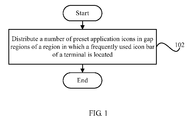
- FIG. 1 is a flow chart of an application icon display control method in accordance with an exemplary embodiment of the present invention.
- an application icon display control method in accordance with an exemplary embodiment of the present invention includes step 102, distributing a number of preset application icons in gap regions of a region in which a frequently used icon bar of a terminal is located, wherein the gap regions are the remaining regions obtained by removing regions occupied by frequently used icons from the region in which the frequently used icon bar is located.
- the gap regions of the frequently used icon bar also increase.
- the gap regions can be fully utilized.
- the user can operate the application icons distributed in the gap regions.
- the number of application icons on menu pages is accordingly reduced.
- the frequently used icon bar is always located in a single hand operation range of the user, the step of flipping pages by moving fingers significantly to search application icons is thus eliminated, which can facilitate the user to find corresponding application icons.
- designated gap regions among the frequently used icons are divided according to use frequency of application icons to be assigned to corresponding application icons.
- the application icon having the highest use frequency is adjacent to a screen edge of the terminal.
- the selection of the gap regions is determined according to use frequency of the application icons.
- the application icon having a higher use frequency is distributed in a gap region which is greater and more adjacent to the touch range of the user's finger, for example, the left or right side of the terminal, such that the application icon can be easily operated.
- the shape of the gap regions in the frequently used icon bar is irregular, thus the shape of the application icons is also irregular so as to match the shape of the gap regions.
- the gap regions of the frequently used bar is filled similar to puzzle.
- some of the gap regions among the frequently used icons is reserved for a preset number of application icons which are not dynamically distributed on the current menu page and are also not located in the frequently used icon bar.
- some of the gap regions of the frequently used icon bar is reserved for application icons which are not dynamically distributed on the current menu page, such that it is convenient for the user to operate application icons on other menu pages, and there is no need to page back and forth to find needed application icons.
- Other of the gap regions are still used for application icons set by the user.
- the plurality of application icons are displayed, or the application corresponding to the gap region on which the triggering operation is exerted is started.
- Setting application icons to be in the gap regions of the frequently used icon bar is not only for fully utilizing the gap regions, but also for protecting privacy information.
- Some applications are related to user's privacy, e.g., short messages. Generally, when a new short message is received, the user does not wish that others can get the content of the short message easily. However, in related art, displaying prompt on the short message icon directly or on other position directly is not beneficial for protecting user's privacy.
- the application icons in the gap regions are hidden, and only when the user wants to use the application icons, the application icons can be displayed. Therefore, the user can set some private application icons to be in the gap regions, which facilitates the user to use the private application icons, and further protects user's privacy.
- the user has known the application icon corresponding to each gap region.
- the application corresponding to the gap region is directly started, and the main interface of the application is displayed, thus there is no need to display the application icon, which increase operation efficiency.
- any of the application icons receives a message notification
- the display status of the frequently used icon adjacent to the application icon the application corresponding to which has received the message notification is changed or the background color the region of the application icon is changed so as to remind the user.
- changing the display status of the frequently icons includes changing the distance between the adjacent frequently used icon and the other frequently used icons.
- Menu pages 204 are the pages which can be flipped by the user and each menu page 204 includes a number of application icons.
- the frequently used icon bar 202 is the bar which includes frequently used application icons 206 and stays unchanged when the menu pages 204 are flipped.
- the gap regions of the frequently used icon bar 202 are the remaining regions obtained by removing the regions occupied by the frequently used icons from the region of the frequently used icon bar 202.
- the present invention utilizes the gap regions of the frequently used bar.
- the user can select some application icons and the selected application icons are set to be distributed in the gap regions.
- the icon of the application 1, the icon of the application 2, and the icon of the application 3 are selected to be distributed in the gap regions.
- FIG.2 it can be known that the size and shape of the gap regions corresponding to different application icons are different.
- which gap region should be assigned to which of the three application icons can be determined according to the use of the three applications. For example, the use frequency of the application 1 and the application 3 are relatively higher, thus the icon of the application 1 and the icon of the application 2 are set to be distributed in the regions adjacent to the operation range of the user's finger, for example, two sides of the screen.
- the sizes of the gap regions respectively corresponding to the the icon of the application 1 and the icon of the application 2 are relatively greater, which facilitates user's operation.
- the application icons distributed in the gap regions are invisible.
- the applications relating to user's privacy such as short message, Wechat, QQ, are set to be in the gap regions of the frequently used icon bar 202.
- the user can perform certain operations to display the applications.
- the certain operations can include sliding up, sliding down, long press, drawing an arc, and so on.
- the terminal usually includes a number of menu pages.
- the current menu page is the third menu page
- the user wants to use some application the icon corresponding to which is on the first menu page
- the user needs to page forward to the first menu page, and then the user operates the application icon to start the application, which is a tedious operation.
- the application icons of the first menu page and the second menu page which are frequently used and are also not in the frequently used icon bar can be set to be in the blank region 208.
- the user can directly start the application by performing operations in the frequently used icon bar, and the user does not need to page back and forth to find the application icon, which results in that when the user flips pages, the application icons in the blank region are continuously updated, and the user cannot see the continuous update of the application icons in the blank regions, thus page display is not affected.
- the application icons are not visible, thus it is desirable to provide a method which can prompt the user to look up message notifications of the applications and can also protect user's privacy.
- the embodiment adopts a new prompt manner. As shown in FIG. 4 , it is assumed that the application 1 has received a new message notification, the user can be reminded by changing the position of the adjacent frequently used icon. As shown in FIG. 4 , the frequently used icon is moved to a new position 210.
- the user can be reminded by changing the color of the background of the region of the application icon the application corresponding to which has received a message notification, thus the user is reminded that the application the icon corresponding to which is in the region has received a message notification.
- the message content is not directly displayed for the user, accordingly user's privacy is protected.
- FIG. 5 is a block diagram of a terminal in accordance with an exemplary embodiment of the present invention.
- a terminal 500 in accordance with an exemplary embodiment of the present invention includes a display control unit 502 configured to distribute a number of preset application icons in gap regions of a region in which a frequently used icon bar of a terminal is located, wherein the gap regions are the remaining regions obtained by removing regions occupied by frequently used icons from the region in which the frequently used icon bar is located.
- the gap regions of the frequently used icon bar also increase.
- the gap regions can be fully utilized.
- the user can operate the application icons distributed in the gap regions.
- the number of application icons on menu pages is accordingly reduced.
- the frequently used icon bar is always located in a single hand operation range of the user, the step of flipping pages by moving fingers significantly to search application icons is thus eliminated, which can facilitate the user to find corresponding application icons.
- the display control unit 502 includes a region distributing unit 5022 configured to divide designated gap regions among the frequently used icons according to use frequency of application icons to be assigned to corresponding application icons.
- the application icon having the highest use frequency is adjacent to a screen edge of the terminal.
- the selection of the gap regions is determined according to use frequency of the application icons.
- the application icon having a higher use frequency is distributed in a gap region which is greater and more adjacent to the touch range of the user's finger, for example, the left or right side of the terminal, such that the application icon can be easily operated.
- the shape of the gap regions in the frequently used icon bar is irregular, thus the shape of the application icons is also irregular so as to match the shape of the gap regions.
- the gap regions of the frequently used bar is filled similar to puzzle.
- the region distributing unit 5022 is further configured to reserve some of the gap regions among the frequently used icons for a preset number of application icons which are not dynamically distributed on the current menu page and are also not located in the frequently used icon bar.
- some of the gap regions of the frequently used icon bar is reserved for application icons which are not dynamically distributed on the current menu page, such that it is convenient for the user to operate application icons on other menu pages, and there is no need to page back and forth to find needed application icons.
- Other of the gap regions are still used for application icons set by the user.
- the display control unit 502 is further configured to display the plurality of application icons or start an application corresponding to the gap region on which the triggering operation is exerted upon receiving a triggering operation from the user.
- Setting application icons to be in the gap regions of the frequently used icon bar is not only for fully utilizing the gap regions, but also for protecting privacy information.
- Some applications are related to user's privacy, e.g., short messages. Generally, when a new short message is received, the user does not wish that others can get the content of the short message easily. However, in related art, displaying prompt on the short message icon directly or on other position directly is not beneficial for protecting user's privacy.
- the application icons in the gap regions are hidden, and only when the user wants to use the application icons, the application icons can be displayed. Therefore, the user can set some private application icons to be in the gap regions, which facilitates the user to use the private application icons, and further protects user's privacy.
- the display control unit 502 includes a display status adjusting unit 5024 configured to change the display status of the frequently used icon adjacent to the application icon the application corresponding to which has received the message notification or the background color the region of the application icon when any of the application icons receives a message notification.
- changing the display status of the frequently icons includes changing the distance between the adjacent frequently used icon and the other frequently used icons.
- the present invention fully utilizes the gap regions of the frequently used icon bar, and a number of application icons preset by the user are distributed in the gap regions, which facilitates user's operation on the application icons, and accordingly reduces the number of the application icons on the menu pages, and can also protects the application data relating to user's privacy.
Landscapes
- Engineering & Computer Science (AREA)
- General Engineering & Computer Science (AREA)
- Theoretical Computer Science (AREA)
- Human Computer Interaction (AREA)
- Physics & Mathematics (AREA)
- General Physics & Mathematics (AREA)
- Computer Networks & Wireless Communication (AREA)
- Signal Processing (AREA)
- User Interface Of Digital Computer (AREA)
Abstract
Description
- The present invention relates to communication technology field, and particularly to an application icon display control method and a terminal.
- Presently, operating an icon or a page can be realized by exerting a long press or other operation on an icon displayed on the desktop of a terminal. When exerting a click or other operation on a region in which no icon is located, the system automatically recognizes that a certain adjacent icon is clicked and the application corresponding to the icon is started.
- With the increase of applications, menu pages correspondingly increase. A frequently used icon bar is displayed below menu pages, and a number of frequently used icons are displayed in the frequently used icon bar. When flipping the menu pages, the frequently used icon bar stay unchanged. Thus, an invisible screen switch boundary exists between the menu pages and the frequently used icon bar.
- The screen of the terminal gradually increases, thus the region in which the frequently used icon bar is located also become great, and gap regions among the frequently used icons also become great. Present operation method cannot fully utilize the gaps among the icons, and response for operations exerted on the gaps is simple.
- Based on at least one of the above-mentioned problems, the present invention provides a new application icon display control technology, which can fully utilize gap regions of the frequently used icon bar.
- In view of this, one aspect of the present invention provides an application icon display control method which includes distributing a number of preset application icons in gap regions of a region in which a frequently used icon bar of a terminal is located, wherein the gap regions are the remaining regions obtained by removing regions occupied by frequently used icons from the region in which the frequently used icon bar is located.
- In this embodiment, with the increase of the screen size of the terminal, the gap regions of the frequently used icon bar also increase. By means of distributing a number of application icons preset by a user in the gap regions, the gap regions can be fully utilized. The user can operate the application icons distributed in the gap regions. By means of setting more application icons in the frequently used bar, the number of application icons on menu pages is accordingly reduced. As the frequently used icon bar is always located in a single hand operation range of the user, the step of flipping pages by moving fingers significantly to search application icons is thus eliminated, which can facilitate the user to find corresponding application icons.
- In the above-mentioned technical solution, preferably, designated gap regions among the frequently used icons are divided according to use frequency of application icons to be assigned to corresponding application icons. Wherein, the application icon having the highest use frequency is adjacent to a screen edge of the terminal.
- To facilitate single hand operation of the user, the selection of the gap regions is determined according to use frequency of the application icons. For example, the application icon having a higher use frequency is distributed in a gap region which is greater and more adjacent to the touch range of the user's finger, for example, the left or right side of the terminal, such that the application icon can be easily operated.
- Additionally, the shape of the gap regions in the frequently used icon bar is irregular, thus the shape of the application icons is also irregular so as to match the shape of the gap regions. The gap regions of the frequently used bar is filled similar to puzzle.
- In any of the above-mentioned technical solutions, preferably, some of the gap regions among the frequently used icons is reserved for a preset number of application icons which are not dynamically distributed on the current menu page and are also not located in the frequently used icon bar.
- For further facilitating the user to search applications icons, some of the gap regions of the frequently used icon bar is reserved for application icons which are not dynamically distributed on the current menu page, such that it is convenient for the user to operate application icons on other menu pages, and there is no need to page back and forth to find needed application icons. Other of the gap regions are still used for application icons set by the user.
- In any of the technical solutions, preferably, upon receiving a triggering operation from the user, the plurality of application icons are displayed, or the application corresponding to the gap region on which the triggering operation is exerted is started.
- Setting application icons to be in the gap regions of the frequently used icon bar is not only for fully utilizing the gap regions, but also for protecting privacy information. Some applications are related to user's privacy, e.g., short messages. Generally, when a new short message is received, the user does not wish that others can get the content of the short message easily. However, in related art, displaying prompt on the short message icon directly or on other position directly is not beneficial for protecting user's privacy. In this embodiment, normally, the application icons in the gap regions are hidden, and only when the user wants to use the application icons, the application icons can be displayed. Therefore, the user can set some private application icons to be in the gap regions, which facilitates the user to use the private application icons, and further protects user's privacy.
- In any of the above-mentioned technical solution, preferably, when any of the application icons receives a message notification, for reminding the user, the display status of the frequently used icon adjacent to the application icon the application corresponding to which has received the message notification is changed or the background color the region of the application icon is changed.
- For the reason of that normally the application icons in the gap regions are hidden, when the application receives a new message notification, the user needs to know that there is a new message notification without direct prompt. Therefore, in the technical solution, by way of changing the status of the adjacent frequently used icon, the user is reminded that the application corresponding to the hidden application icon has received a new message notification.
- In any of the above-mentioned technical solution, preferably, changing the display status of the frequently icons includes changing the distance between the adjacent frequently used icon and the other frequently used icons.
- Another aspect of the present invention further provides a terminal which includes a display control unit configured to distribute a number of preset application icons in gap regions of a region in which a frequently used icon bar of a terminal is located, wherein the gap regions are the remaining regions obtained by removing regions occupied by frequently used icons from the region in which the frequently used icon bar is located.
- In this embodiment, with the increase of the screen size of the terminal, the gap regions of the frequently used icon bar also increase. By means of distributing a number of application icons preset by a user in the gap regions, the gap regions can be fully utilized. The user can operate the application icons distributed in the gap regions. By means of setting more application icons in the frequently used bar, the number of application icons on menu pages is accordingly reduced. As the frequently used icon bar is always located in a single hand operation range of the user, the step of flipping pages by moving fingers significantly to search application icons is thus eliminated, which can facilitate the user to find corresponding application icons.
- In the above-mentioned technical solution, preferably, the display control unit includes a region distributing unit configured to divide designated gap regions among the frequently used icons according to use frequency of application icons to be assigned to corresponding application icons. Wherein, the application icon having the highest use frequency is adjacent to a screen edge of the terminal.
- To facilitate single hand operation of the user, the selection of the gap regions is determined according to use frequency of the application icons. For example, the application icon having a higher use frequency is distributed in a gap region which is greater and more adjacent to the touch range of the user's finger, for example, the left or right side of the terminal, such that the application icon can be easily operated.
- Additionally, the shape of the gap regions in the frequently used icon bar is irregular, thus the shape of the application icons is also irregular so as to match the shape of the gap regions. The gap regions of the frequently used bar is filled similar to puzzle.
- In any of the above-mentioned technical solutions, preferably, the region distributing unit is further configured to reserve some of the gap regions among the frequently used icons for a preset number of application icons which are not dynamically distributed on the current menu page and are not located in the frequently used icon bar.
- For further facilitating the user to search applications icons, some of the gap regions of the frequently used icon bar is reserved for application icons which are not dynamically distributed on the current menu page, such that it is convenient for the user to operate application icons on other menu pages, and there is no need to page back and forth to find needed application icons. Other of the gap regions are still used for application icons set by the user.
- In any of the technical solutions, preferably, the display control unit is further configured to display the plurality of application icons or start the application corresponding to the gap region on which the triggering operation is exerted upon receiving a triggering operation from the user.
- Setting application icons to be in the gap regions of the frequently used icon bar is not only for fully utilizing the gap regions, but also for protecting privacy information. Some applications are related to user's privacy, e.g., short messages. Generally, when a new short message is received, the user does not wish that others can get the content of the short message easily. However, in related art, displaying prompt on the short message icon directly or on other position directly is not beneficial for protecting user's privacy. In this embodiment, normally, the application icons in the gap regions are hidden, and only when the user wants to use the application icons, the application icons can be displayed. Therefore, the user can set some private application icons to be in the gap regions, which facilitates the user to use the private application icons, and further protects user's privacy.
- In any of the above-mentioned technical solution, preferably, the display control unit includes a display status adjusting unit configured to change the display status of the frequently used icon adjacent to the application icon the application corresponding to which has received the message notification or change the background color of the region of the application icon when any of the application icons receives a message notification so as to remind the user.
- For the reason of that normally the application icons in the gap regions are hidden, when one application receives a new message notification, the user needs to know that there is a new message notification without direct prompt. Therefore, in the technical solution, by way of changing the status of the adjacent frequently used icon, the user is reminded that the application corresponding to the hidden application icon has received a new message notification.
- In any of the above-mentioned technical solution, preferably, changing the display status of the frequently icons includes changing the distance between the adjacent frequently used icon and the other frequently used icons.
- The above specifically illustrates the technical solution of the present invention in combination with the accompanying drawings. The present invention fully utilizes the gap regions of the frequently used icon bar, and a number of application icons preset by the user are distributed in the gap regions, which facilitates user's operation on the application icons, and accordingly reduces the number of the application icons on the menu pages, and can also protects the application data relating to user's privacy.
-
-
FIG. 1 is a flow chart of an application icon display control method in accordance with an exemplary embodiment of the present invention. -
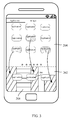
FIG. 2 is a schematic view showing that application icons are distributed in gap regions of a frequently used icon bar in accordance with an exemplary embodiment of the present invention. -
FIG. 3 is a schematic view showing that application icons are distributed in gap regions of a frequently used icon bar in accordance with another exemplary embodiment of the present invention. -
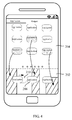
FIG. 4 is a prompt schematic view showing that a message notification has received in accordance with an exemplary embodiment of the present invention. -
FIG. 5 is a block diagram of a terminal in accordance with an exemplary embodiment of the present invention. - To understand the above-mentioned purposes, features and advantages of the present disclosure more clearly, the present disclosure will be further described in detail below in combination with the accompanying drawings and the specific implementations. It should be noted that, the embodiments of the present application and the features in the embodiments may be combined with one another without conflicts.
- Many specific details will be described below for sufficiently understanding the present disclosure. However, the present disclosure may also be implemented by adopting other manners different from those described herein. Accordingly, the protection scope of the present invention is not limited by the specific embodiments disclosed below.
-
FIG. 1 is a flow chart of an application icon display control method in accordance with an exemplary embodiment of the present invention. - As shown in
FIG. 1 , an application icon display control method in accordance with an exemplary embodiment of the present invention includesstep 102, distributing a number of preset application icons in gap regions of a region in which a frequently used icon bar of a terminal is located, wherein the gap regions are the remaining regions obtained by removing regions occupied by frequently used icons from the region in which the frequently used icon bar is located. - In this embodiment, with the increase of the screen size of the terminal, the gap regions of the frequently used icon bar also increase. By means of distributing a number of application icons preset by a user in the gap regions, the gap regions can be fully utilized. The user can operate the application icons distributed in the gap regions. By means of setting more application icons in the frequently used bar, the number of application icons on menu pages is accordingly reduced. As the frequently used icon bar is always located in a single hand operation range of the user, the step of flipping pages by moving fingers significantly to search application icons is thus eliminated, which can facilitate the user to find corresponding application icons.
- In the above-mentioned technical solution, preferably, designated gap regions among the frequently used icons are divided according to use frequency of application icons to be assigned to corresponding application icons. Wherein, the application icon having the highest use frequency is adjacent to a screen edge of the terminal.
- To facilitate single hand operation of the user, the selection of the gap regions is determined according to use frequency of the application icons. For example, the application icon having a higher use frequency is distributed in a gap region which is greater and more adjacent to the touch range of the user's finger, for example, the left or right side of the terminal, such that the application icon can be easily operated.
- Additionally, the shape of the gap regions in the frequently used icon bar is irregular, thus the shape of the application icons is also irregular so as to match the shape of the gap regions. The gap regions of the frequently used bar is filled similar to puzzle.
- In any of the above-mentioned technical solutions, preferably, some of the gap regions among the frequently used icons is reserved for a preset number of application icons which are not dynamically distributed on the current menu page and are also not located in the frequently used icon bar.
- For further facilitating the user to search applications icons, some of the gap regions of the frequently used icon bar is reserved for application icons which are not dynamically distributed on the current menu page, such that it is convenient for the user to operate application icons on other menu pages, and there is no need to page back and forth to find needed application icons. Other of the gap regions are still used for application icons set by the user.
- In any of the technical solutions, preferably, upon receiving a triggering operation from the user, the plurality of application icons are displayed, or the application corresponding to the gap region on which the triggering operation is exerted is started.
- Setting application icons to be in the gap regions of the frequently used icon bar is not only for fully utilizing the gap regions, but also for protecting privacy information. Some applications are related to user's privacy, e.g., short messages. Generally, when a new short message is received, the user does not wish that others can get the content of the short message easily. However, in related art, displaying prompt on the short message icon directly or on other position directly is not beneficial for protecting user's privacy. In this embodiment, normally, the application icons in the gap regions are hidden, and only when the user wants to use the application icons, the application icons can be displayed. Therefore, the user can set some private application icons to be in the gap regions, which facilitates the user to use the private application icons, and further protects user's privacy.
- In another embodiment, it is assumed that the user has known the application icon corresponding to each gap region. When some gap region is triggered by the user, the application corresponding to the gap region is directly started, and the main interface of the application is displayed, thus there is no need to display the application icon, which increase operation efficiency.
- In any of the above-mentioned technical solution, preferably, when any of the application icons receives a message notification, the display status of the frequently used icon adjacent to the application icon the application corresponding to which has received the message notification is changed or the background color the region of the application icon is changed so as to remind the user.
- For the reason of that normally the application icons in the gap regions are hidden, when one application receives a new message notification, the user needs to know that there is a new message notification without direct prompt. Therefore, in the technical solution, by way of changing the status of the adjacent frequently used icon, the user is reminded that the application corresponding to the hidden application icon has received a new message notification.
- In any of the above-mentioned technical solution, preferably, changing the display status of the frequently icons includes changing the distance between the adjacent frequently used icon and the other frequently used icons.
- The following will further illustrate the application icon display control method of the present invention in combination with
FIGs. 2-4 . - Some terms are firstly illustrated.
-
Menu pages 204 are the pages which can be flipped by the user and eachmenu page 204 includes a number of application icons. - The frequently used
icon bar 202 is the bar which includes frequently usedapplication icons 206 and stays unchanged when the menu pages 204 are flipped. - The gap regions of the frequently used
icon bar 202 are the remaining regions obtained by removing the regions occupied by the frequently used icons from the region of the frequently usedicon bar 202. - The present invention utilizes the gap regions of the frequently used bar. The user can select some application icons and the selected application icons are set to be distributed in the gap regions. As shown in
FIG. 2 , the icon of theapplication 1, the icon of theapplication 2, and the icon of theapplication 3 are selected to be distributed in the gap regions. FromFIG.2 , it can be known that the size and shape of the gap regions corresponding to different application icons are different. In this embodiment, which gap region should be assigned to which of the three application icons can be determined according to the use of the three applications. For example, the use frequency of theapplication 1 and theapplication 3 are relatively higher, thus the icon of theapplication 1 and the icon of theapplication 2 are set to be distributed in the regions adjacent to the operation range of the user's finger, for example, two sides of the screen. Furthermore, the sizes of the gap regions respectively corresponding to the the icon of theapplication 1 and the icon of theapplication 2 are relatively greater, which facilitates user's operation. - Normally, the application icons distributed in the gap regions are invisible. Thus, the applications relating to user's privacy, such as short message, Wechat, QQ, are set to be in the gap regions of the frequently used
icon bar 202. When the user wants to operate the applications, the user can perform certain operations to display the applications. The certain operations can include sliding up, sliding down, long press, drawing an arc, and so on. - After distributing the preset application icons, some gap regions of the frequently used icon bar are not filled, and other application icons can be dynamically displayed in the blank regions.
- As shown in
FIG. 3 , other application icons can be distributed in theblank region 208. The terminal usually includes a number of menu pages. When the current menu page is the third menu page, if the user wants to use some application the icon corresponding to which is on the first menu page, the user needs to page forward to the first menu page, and then the user operates the application icon to start the application, which is a tedious operation. To avoid the tedious operation, when the current menu page is the third page, the application icons of the first menu page and the second menu page which are frequently used and are also not in the frequently used icon bar can be set to be in theblank region 208. By doing so, the user can directly start the application by performing operations in the frequently used icon bar, and the user does not need to page back and forth to find the application icon, which results in that when the user flips pages, the application icons in the blank region are continuously updated, and the user cannot see the continuous update of the application icons in the blank regions, thus page display is not affected. - If related application icons are distributed in the frequently used icon bar, these application icons may not be displayed on the menu pages, which can reduce the number of the application icons in the menu pages, and the application icons can be displayed as concentrately as possible.
- Normally, the application icons are not visible, thus it is desirable to provide a method which can prompt the user to look up message notifications of the applications and can also protect user's privacy. The embodiment adopts a new prompt manner. As shown in
FIG. 4 , it is assumed that theapplication 1 has received a new message notification, the user can be reminded by changing the position of the adjacent frequently used icon. As shown inFIG. 4 , the frequently used icon is moved to anew position 210. - Besides the prompt manner, the user can be reminded by changing the color of the background of the region of the application icon the application corresponding to which has received a message notification, thus the user is reminded that the application the icon corresponding to which is in the region has received a message notification. Thus, the message content is not directly displayed for the user, accordingly user's privacy is protected.
- Therefore, it is improper to directly display prompt on associated application icons, such as message prompt for private contacts, update of social messages, and so on. It is not convenient for the user to start a private mode to look up the prompt. Thus the content related to private contacts can be set to be distributed in the space around the frequently used icon bar, and communication with private contacts can be quickly established.
-
FIG. 5 is a block diagram of a terminal in accordance with an exemplary embodiment of the present invention. - As shown in
FIG. 5 , a terminal 500 in accordance with an exemplary embodiment of the present invention includes a display control unit 502 configured to distribute a number of preset application icons in gap regions of a region in which a frequently used icon bar of a terminal is located, wherein the gap regions are the remaining regions obtained by removing regions occupied by frequently used icons from the region in which the frequently used icon bar is located. - In this embodiment, with the increase of the screen size of the terminal, the gap regions of the frequently used icon bar also increase. By means of distributing a number of application icons preset by a user in the gap regions, the gap regions can be fully utilized. The user can operate the application icons distributed in the gap regions. By means of setting more application icons in the frequently used bar, the number of application icons on menu pages is accordingly reduced. As the frequently used icon bar is always located in a single hand operation range of the user, the step of flipping pages by moving fingers significantly to search application icons is thus eliminated, which can facilitate the user to find corresponding application icons.
- In the above-mentioned technical solution, preferably, the display control unit 502 includes a
region distributing unit 5022 configured to divide designated gap regions among the frequently used icons according to use frequency of application icons to be assigned to corresponding application icons. Wherein, the application icon having the highest use frequency is adjacent to a screen edge of the terminal. - To facilitate single hand operation of the user, the selection of the gap regions is determined according to use frequency of the application icons. For example, the application icon having a higher use frequency is distributed in a gap region which is greater and more adjacent to the touch range of the user's finger, for example, the left or right side of the terminal, such that the application icon can be easily operated.
- Additionally, the shape of the gap regions in the frequently used icon bar is irregular, thus the shape of the application icons is also irregular so as to match the shape of the gap regions. The gap regions of the frequently used bar is filled similar to puzzle.
- In any of the above-mentioned technical solutions, preferably, the
region distributing unit 5022 is further configured to reserve some of the gap regions among the frequently used icons for a preset number of application icons which are not dynamically distributed on the current menu page and are also not located in the frequently used icon bar. - For further facilitating the user to search applications icons, some of the gap regions of the frequently used icon bar is reserved for application icons which are not dynamically distributed on the current menu page, such that it is convenient for the user to operate application icons on other menu pages, and there is no need to page back and forth to find needed application icons. Other of the gap regions are still used for application icons set by the user.
- In any of the technical solutions, preferably, the display control unit 502 is further configured to display the plurality of application icons or start an application corresponding to the gap region on which the triggering operation is exerted upon receiving a triggering operation from the user.
- Setting application icons to be in the gap regions of the frequently used icon bar is not only for fully utilizing the gap regions, but also for protecting privacy information. Some applications are related to user's privacy, e.g., short messages. Generally, when a new short message is received, the user does not wish that others can get the content of the short message easily. However, in related art, displaying prompt on the short message icon directly or on other position directly is not beneficial for protecting user's privacy. In this embodiment, normally, the application icons in the gap regions are hidden, and only when the user wants to use the application icons, the application icons can be displayed. Therefore, the user can set some private application icons to be in the gap regions, which facilitates the user to use the private application icons, and further protects user's privacy.
- In any of the above-mentioned technical solution, preferably, the display control unit 502 includes a display status adjusting unit 5024 configured to change the display status of the frequently used icon adjacent to the application icon the application corresponding to which has received the message notification or the background color the region of the application icon when any of the application icons receives a message notification.
- For the reason of that normally the application icons in the gap regions are hidden, when one application receives a new message notification, the user needs to know that there is a new message notification without direct prompt. Therefore, in the technical solution, by way of changing the status of the adjacent frequently used icon, the user is reminded that the application corresponding to the hidden application icon receives a new message notification.
- In any of the above-mentioned technical solution, preferably, changing the display status of the frequently icons includes changing the distance between the adjacent frequently used icon and the other frequently used icons.
- The above specifically illustrates the technical solution of the present invention in combination with the accompanying drawings. The present invention fully utilizes the gap regions of the frequently used icon bar, and a number of application icons preset by the user are distributed in the gap regions, which facilitates user's operation on the application icons, and accordingly reduces the number of the application icons on the menu pages, and can also protects the application data relating to user's privacy.
- The foregoing descriptions are merely preferred embodiments of the present disclosure, rather than limiting the present disclosure. Various modifications and alterations may be made to the present disclosure for those skilled in the art. Any modification, equivalent substitution, improvement or the like made within the spirit and principle of the present disclosure shall fall into the protection scope of the present disclosure.
Claims (12)
- An application icon display control method, comprising:distributing a plurality of preset application icons in gap regions of a region in which a frequently used icon bar of a terminal is located, wherein the gap regions are the remaining regions obtained by removing regions occupied by frequently used application icons from the region in which the frequently used icon bar is located.
- The application icon display control method of claim 1, wherein designated gap regions among the frequently used icons are divided according to use frequency of application icons to be assigned to corresponding application icons, the application icon having the highest use frequency is adjacent to a screen edge of the terminal.
- The application icon display control method of claim 2, wherein some of the gap regions among the frequently used icons are reserved for a preset number of application icons which are not dynamically distributed on the current menu page and are further not located in the frequently used icon bar.
- The application icon display control method of any of claims 1-3, wherein when a triggering operation from a user is received, the plurality of application icons are displayed, or the application corresponding to the gap region on which the triggering operation is exerted on is started.
- The application icon display control method of claim 4, wherein when any of the application icons receives a message notification, the display status of the frequently used icon adjacent to the application icon the application corresponding to which has received the message notification is changed or the background color of the region of the application icon is changed so as to remind the user.
- The application icon display control method of claim 5, wherein changing the display status of the adjacent frequently used icon comprises changing the distance between the adjacent frequently used icon and other frequently used icons.
- The terminal comprising:a display control unit configured to distribute a number of preset application icons in gap regions of a region in which a frequently used icon bar of a terminal is located, wherein the gap regions are the remaining regions obtained by removing regions occupied by frequently used icons from the region in which the frequently used icon bar is located.
- The terminal of claim 7, wherein the display control unit comprises a region distributing unit configured to divide designated gap regions among the frequently used icons according to use frequency of application icons to be assigned to corresponding application icons, the application icon having the highest use frequency is adjacent to a screen edge of the terminal.
- The terminal of claim 8, wherein the region distributing unit is further configured to reserve some of the gap regions among the frequently used icons for a preset number of application icons which are not dynamically distributed on the current menu page and are not located in the frequently used icon bar.
- The terminal of any of claims 7-9, wherein the display control unit is further configured to display the plurality of application icons or start an application corresponding to the gap region on which the triggering operation is exerted upon receiving a triggering operation from the user.
- The terminal of claim 10, wherein the display control unit comprises a display status adjusting unit configured to change the display status of the frequently used icon adjacent to the application icon the application corresponding to which has received the message notification or change the background color of the region of the application icon when any of the application icons receives a message notification.
- The terminal of claim 11, wherein changing the display status of the frequently icons comprises changing the distance between the adjacent frequently used icon and the other frequently used icons.
Applications Claiming Priority (1)
| Application Number | Priority Date | Filing Date | Title |
|---|---|---|---|
| PCT/CN2013/089839 WO2015089767A1 (en) | 2013-12-18 | 2013-12-18 | Application icon display control method and terminal |
Publications (2)
| Publication Number | Publication Date |
|---|---|
| EP3086537A1 true EP3086537A1 (en) | 2016-10-26 |
| EP3086537A4 EP3086537A4 (en) | 2017-08-09 |
Family
ID=53401954
Family Applications (1)
| Application Number | Title | Priority Date | Filing Date |
|---|---|---|---|
| EP13899970.1A Withdrawn EP3086537A4 (en) | 2013-12-18 | 2013-12-18 | Application icon display control method and terminal |
Country Status (4)
| Country | Link |
|---|---|
| US (1) | US10248289B2 (en) |
| EP (1) | EP3086537A4 (en) |
| CN (1) | CN104904190B (en) |
| WO (1) | WO2015089767A1 (en) |
Cited By (1)
| Publication number | Priority date | Publication date | Assignee | Title |
|---|---|---|---|---|
| EP3410298A1 (en) * | 2017-05-31 | 2018-12-05 | Guangdong Oppo Mobile Telecommunications Corp., Ltd. | Method for searching application and related products |
Families Citing this family (19)
| Publication number | Priority date | Publication date | Assignee | Title |
|---|---|---|---|---|
| CN108073433A (en) * | 2016-11-10 | 2018-05-25 | 中国移动通信有限公司研究院 | The application icon management method and device of a kind of terminal |
| CN106371708A (en) * | 2016-11-22 | 2017-02-01 | 宇龙计算机通信科技(深圳)有限公司 | App icon intelligent sorting method, system and terminal device thereof |
| US11093129B2 (en) * | 2017-01-26 | 2021-08-17 | International Business Machines Corporation | Methods for repositioning icons on touch displays based on characteristics of touch gestures and related program products |
| US11115518B2 (en) * | 2017-08-18 | 2021-09-07 | Huawei Technologies Co., Ltd. | Display method and terminal |
| CN111279302A (en) * | 2017-08-29 | 2020-06-12 | 深圳传音通讯有限公司 | Icon display method and icon display device for intelligent terminal |
| CN107908527B (en) * | 2017-11-16 | 2020-03-24 | 维沃移动通信有限公司 | Application icon display method and device |
| US11714533B2 (en) * | 2017-11-20 | 2023-08-01 | Huawei Technologies Co., Ltd. | Method and apparatus for dynamically displaying icon based on background image |
| CN107967101A (en) * | 2017-12-18 | 2018-04-27 | 苏州燕云网络技术有限公司 | App icons are cancelled to the method and device sorted out |
| CN108089787A (en) * | 2017-12-18 | 2018-05-29 | 苏州燕云网络技术有限公司 | The method and device that quickly App icons are removed from file |
| FR3077902B1 (en) * | 2018-02-09 | 2020-02-21 | Psa Automobiles Sa | VEHICLE ENTERTAINMENT INFO SYSTEM |
| USD899435S1 (en) | 2018-03-16 | 2020-10-20 | Magic Leap, Inc. | Display panel or portion thereof with graphical user interface |
| CN109062638B (en) * | 2018-06-15 | 2021-09-17 | 平安科技(深圳)有限公司 | System component display method, computer readable storage medium and terminal device |
| CN110045890B (en) * | 2019-03-11 | 2021-01-08 | 维沃移动通信有限公司 | Application identifier display method and terminal equipment |
| US12248340B2 (en) | 2019-08-16 | 2025-03-11 | Sony Group Corporation | Information processing apparatus, information processing method, and information processing program |
| CN111355845B (en) * | 2020-02-27 | 2022-02-25 | 京东方科技集团股份有限公司 | Icon display processing method, storage medium and terminal device |
| CN111371952A (en) * | 2020-03-05 | 2020-07-03 | 西安极蜂天下信息科技有限公司 | Application icon management method and device |
| US11360635B2 (en) * | 2020-10-20 | 2022-06-14 | Rovi Guides, Inc. | Customizing user interface controls around a cursor |
| CN113419653B (en) * | 2021-08-25 | 2022-01-18 | 成都统信软件技术有限公司 | Desktop icon processing method, computing device and readable storage medium |
| CN114422461B (en) * | 2022-01-04 | 2024-07-02 | 维沃移动通信有限公司 | Message quoting method and device |
Family Cites Families (22)
| Publication number | Priority date | Publication date | Assignee | Title |
|---|---|---|---|---|
| US8037421B2 (en) * | 2005-10-11 | 2011-10-11 | Research In Motion Limited | System and method for organizing application indicators on an electronic device |
| US7509588B2 (en) * | 2005-12-30 | 2009-03-24 | Apple Inc. | Portable electronic device with interface reconfiguration mode |
| KR101388152B1 (en) * | 2007-07-26 | 2014-04-22 | 엘지전자 주식회사 | Portable terminal and method for displaying menu icon therefor |
| KR101564318B1 (en) * | 2008-10-14 | 2015-11-02 | 삼성전자주식회사 | Display device and its user interface display method |
| US20100223569A1 (en) * | 2009-02-27 | 2010-09-02 | Research In Motion Limited | Method for providing a notification on a portable electronic device |
| KR20110014040A (en) * | 2009-08-04 | 2011-02-10 | 엘지전자 주식회사 | Mobile terminal and its icon collision control method |
| CA2775007A1 (en) * | 2009-09-23 | 2011-03-31 | Dingnan Han | Method and interface for man-machine interaction |
| US9052926B2 (en) * | 2010-04-07 | 2015-06-09 | Apple Inc. | Device, method, and graphical user interface for managing concurrently open software applications |
| CN101833418B (en) * | 2010-04-28 | 2014-12-31 | 华为终端有限公司 | Method and device for adding icon in interface and mobile terminal |
| US8661369B2 (en) * | 2010-06-17 | 2014-02-25 | Lg Electronics Inc. | Mobile terminal and method of controlling the same |
| EP3734407A1 (en) * | 2011-02-10 | 2020-11-04 | Samsung Electronics Co., Ltd. | Portable device comprising a touch-screen display, and method for controlling same |
| JP2013105202A (en) * | 2011-11-10 | 2013-05-30 | Kyocera Corp | Device, method, and program |
| KR101873744B1 (en) * | 2011-11-29 | 2018-07-03 | 엘지전자 주식회사 | Mobile terminal and method for controlling the same |
| KR101879333B1 (en) * | 2011-12-06 | 2018-07-17 | 엘지전자 주식회사 | Mobilr terminal and fan-shaped icon arrangement method |
| CN103186321A (en) * | 2011-12-27 | 2013-07-03 | 上海博泰悦臻电子设备制造有限公司 | Method and device for controlling menu on screen |
| CN102662601A (en) * | 2012-05-02 | 2012-09-12 | 李凯 | Graph menu display method |
| CN102693087A (en) * | 2012-05-10 | 2012-09-26 | 深圳桑菲消费通信有限公司 | Method for adding program to standby interface of mobile phone |
| US9430120B2 (en) * | 2012-06-08 | 2016-08-30 | Apple Inc. | Identification of recently downloaded content |
| JP2014026588A (en) * | 2012-07-30 | 2014-02-06 | Fujitsu Ltd | Information processing device, method, and program |
| KR20140042609A (en) * | 2012-09-28 | 2014-04-07 | 삼성전자주식회사 | Electronic apparatus, method for executing of application and computer-readable recording medium |
| KR20140070040A (en) * | 2012-11-30 | 2014-06-10 | 삼성전자주식회사 | Apparatus and method for managing a plurality of objects displayed on touch screen |
| CN103399692A (en) * | 2013-06-27 | 2013-11-20 | 东莞宇龙通信科技有限公司 | Method for one-hand operation of mobile terminal and mobile terminal thereof |
-
2013
- 2013-12-18 CN CN201380068896.0A patent/CN104904190B/en active Active
- 2013-12-18 EP EP13899970.1A patent/EP3086537A4/en not_active Withdrawn
- 2013-12-18 WO PCT/CN2013/089839 patent/WO2015089767A1/en not_active Ceased
-
2016
- 2016-06-02 US US15/171,108 patent/US10248289B2/en active Active
Cited By (1)
| Publication number | Priority date | Publication date | Assignee | Title |
|---|---|---|---|---|
| EP3410298A1 (en) * | 2017-05-31 | 2018-12-05 | Guangdong Oppo Mobile Telecommunications Corp., Ltd. | Method for searching application and related products |
Also Published As
| Publication number | Publication date |
|---|---|
| CN104904190B (en) | 2018-11-06 |
| WO2015089767A1 (en) | 2015-06-25 |
| EP3086537A4 (en) | 2017-08-09 |
| CN104904190A (en) | 2015-09-09 |
| US20160274748A1 (en) | 2016-09-22 |
| US10248289B2 (en) | 2019-04-02 |
Similar Documents
| Publication | Publication Date | Title |
|---|---|---|
| US10248289B2 (en) | Application icon display control method and terminal | |
| AU2013348880B2 (en) | Split-screen display method and apparatus, and electronic device thereof | |
| CN106201171B (en) | Split-screen display method and electronic equipment | |
| CN103150095B (en) | Terminal and terminal control method | |
| EP3306454B1 (en) | A user interface for a touch sensitive display on an electronic device | |
| CN105094592B (en) | Content display device, content display method and program | |
| EP2693345A1 (en) | Mobile terminal | |
| US8988379B2 (en) | Display method, electronic device, and non-transitory storage medium | |
| EP2851773A1 (en) | Widget setting method and terminal device | |
| US9959009B1 (en) | Method for displaying information, and terminal equipment | |
| US9547634B2 (en) | Terminal and method for editing text using the same | |
| EP2902897A1 (en) | Word processing method and apparatus for touchscreen intelligent device | |
| JP2016528639A (en) | Object switching method, apparatus and touch screen terminal | |
| CN107924270A (en) | Notification control method, user terminal apparatus and record have the recording medium of notification control program | |
| CN104679392A (en) | Page display method and device based on status bar | |
| US12271579B2 (en) | Content input method and apparatus for instant messaging software, and device and medium | |
| US20120238328A1 (en) | Method for displaying message list on the terminal and terminal | |
| CN107133002B (en) | Information processing method and electronic equipment | |
| CN103383621B (en) | View switching method and device | |
| US11847294B2 (en) | Method for generating desktop of mobile terminal, device and electronic device | |
| US20150074595A1 (en) | Electronic Book Apparatus, Page Feeding Method, and Page Feeding Program of Electronic Book | |
| US10324617B2 (en) | Operation control method and terminal | |
| WO2024046076A1 (en) | Toolbar display method and apparatus, terminal, and computer readable storage medium | |
| US11461129B2 (en) | Data processing method, terminal and storage medium | |
| JP2021167955A (en) | Document display device |
Legal Events
| Date | Code | Title | Description |
|---|---|---|---|
| PUAI | Public reference made under article 153(3) epc to a published international application that has entered the european phase |
Free format text: ORIGINAL CODE: 0009012 |
|
| 17P | Request for examination filed |
Effective date: 20160415 |
|
| AK | Designated contracting states |
Kind code of ref document: A1 Designated state(s): AL AT BE BG CH CY CZ DE DK EE ES FI FR GB GR HR HU IE IS IT LI LT LU LV MC MK MT NL NO PL PT RO RS SE SI SK SM TR |
|
| AX | Request for extension of the european patent |
Extension state: BA ME |
|
| DAX | Request for extension of the european patent (deleted) | ||
| A4 | Supplementary search report drawn up and despatched |
Effective date: 20170706 |
|
| RIC1 | Information provided on ipc code assigned before grant |
Ipc: G06F 3/0482 20130101ALI20170630BHEP Ipc: G06F 3/0484 20130101ALI20170630BHEP Ipc: G06F 3/0488 20130101ALI20170630BHEP Ipc: G06F 3/0481 20130101ALI20170630BHEP Ipc: H04M 1/725 20060101AFI20170630BHEP |
|
| STAA | Information on the status of an ep patent application or granted ep patent |
Free format text: STATUS: THE APPLICATION IS DEEMED TO BE WITHDRAWN |
|
| 18D | Application deemed to be withdrawn |
Effective date: 20180206 |