EP3021214A2 - Image forming apparatus and image forming apparatus control program - Google Patents
Image forming apparatus and image forming apparatus control program Download PDFInfo
- Publication number
- EP3021214A2 EP3021214A2 EP15194503.7A EP15194503A EP3021214A2 EP 3021214 A2 EP3021214 A2 EP 3021214A2 EP 15194503 A EP15194503 A EP 15194503A EP 3021214 A2 EP3021214 A2 EP 3021214A2
- Authority
- EP
- European Patent Office
- Prior art keywords
- section
- image data
- pieces
- display
- setting
- Prior art date
- Legal status (The legal status is an assumption and is not a legal conclusion. Google has not performed a legal analysis and makes no representation as to the accuracy of the status listed.)
- Granted
Links
Images



Classifications
-
- H—ELECTRICITY
- H04—ELECTRIC COMMUNICATION TECHNIQUE
- H04N—PICTORIAL COMMUNICATION, e.g. TELEVISION
- H04N1/00—Scanning, transmission or reproduction of documents or the like, e.g. facsimile transmission; Details thereof
- H04N1/00127—Connection or combination of a still picture apparatus with another apparatus, e.g. for storage, processing or transmission of still picture signals or of information associated with a still picture
- H04N1/00129—Connection or combination of a still picture apparatus with another apparatus, e.g. for storage, processing or transmission of still picture signals or of information associated with a still picture with a display device, e.g. CRT or LCD monitor
-
- G—PHYSICS
- G09—EDUCATION; CRYPTOGRAPHY; DISPLAY; ADVERTISING; SEALS
- G09F—DISPLAYING; ADVERTISING; SIGNS; LABELS OR NAME-PLATES; SEALS
- G09F9/00—Indicating arrangements for variable information in which the information is built-up on a support by selection or combination of individual elements
-
- G—PHYSICS
- G06—COMPUTING OR CALCULATING; COUNTING
- G06F—ELECTRIC DIGITAL DATA PROCESSING
- G06F3/00—Input arrangements for transferring data to be processed into a form capable of being handled by the computer; Output arrangements for transferring data from processing unit to output unit, e.g. interface arrangements
- G06F3/14—Digital output to display device ; Cooperation and interconnection of the display device with other functional units
- G06F3/1423—Digital output to display device ; Cooperation and interconnection of the display device with other functional units controlling a plurality of local displays, e.g. CRT and flat panel display
-
- H—ELECTRICITY
- H04—ELECTRIC COMMUNICATION TECHNIQUE
- H04N—PICTORIAL COMMUNICATION, e.g. TELEVISION
- H04N1/00—Scanning, transmission or reproduction of documents or the like, e.g. facsimile transmission; Details thereof
- H04N1/0035—User-machine interface; Control console
- H04N1/00405—Output means
- H04N1/00408—Display of information to the user, e.g. menus
- H04N1/0044—Display of information to the user, e.g. menus for image preview or review, e.g. to help the user position a sheet
-
- H—ELECTRICITY
- H04—ELECTRIC COMMUNICATION TECHNIQUE
- H04N—PICTORIAL COMMUNICATION, e.g. TELEVISION
- H04N1/00—Scanning, transmission or reproduction of documents or the like, e.g. facsimile transmission; Details thereof
- H04N1/21—Intermediate information storage
- H04N1/2104—Intermediate information storage for one or a few pictures
-
- G—PHYSICS
- G09—EDUCATION; CRYPTOGRAPHY; DISPLAY; ADVERTISING; SEALS
- G09G—ARRANGEMENTS OR CIRCUITS FOR CONTROL OF INDICATING DEVICES USING STATIC MEANS TO PRESENT VARIABLE INFORMATION
- G09G2320/00—Control of display operating conditions
- G09G2320/06—Adjustment of display parameters
- G09G2320/0613—The adjustment depending on the type of the information to be displayed
-
- H—ELECTRICITY
- H04—ELECTRIC COMMUNICATION TECHNIQUE
- H04N—PICTORIAL COMMUNICATION, e.g. TELEVISION
- H04N2201/00—Indexing scheme relating to scanning, transmission or reproduction of documents or the like, and to details thereof
- H04N2201/0077—Types of the still picture apparatus
- H04N2201/0089—Image display device
-
- H—ELECTRICITY
- H04—ELECTRIC COMMUNICATION TECHNIQUE
- H04N—PICTORIAL COMMUNICATION, e.g. TELEVISION
- H04N2201/00—Indexing scheme relating to scanning, transmission or reproduction of documents or the like, and to details thereof
- H04N2201/0077—Types of the still picture apparatus
- H04N2201/0094—Multifunctional device, i.e. a device capable of all of reading, reproducing, copying, facsimile transception, file transception
Definitions
- the present invention relates to image forming apparatuses and image forming apparatus control programs and particularly relates to a technique for delivering image data to external digital signage devices.
- digital signage devices are becoming widespread as means for giving notice to many people of information in public facilities and so on.
- a dedicated management server provided externally of a digital signage device
- an operator can change the contents of an informing image to be displayed on the digital signage device.
- the digital signage device can avoid the trouble of having to remake the contents of information, which makes it easy to offer up-to-data information.
- An image forming apparatus includes an image reading section, a storage section, a communication section, an acceptance section, and an operation control section.
- the image reading section is operable to read an original document and generate image data from the read original document.
- the storage section is operable to store the image data generated by the image reading section.
- the communication section is operable to communicate data with one or more external digital signage devices.
- the acceptance section is configured to accept a delivery instruction to deliver the image data with the one or more digital signage devices designated as destinations.
- the operation control section is configured to control the operation of reading the original document and generating the image data performed by the image reading section, the operation of storing the image data performed by the storage section, and the operation of communicating data performed by the communication section.
- the storage section has a plurality of storage regions at least one or more of which are signage-specific storage regions associated one-to-one with the one or more digital signage devices.
- Each of the signage-specific storage regions stores: a plurality of pieces of the image data generated by the image reading section having read a number of original documents; and setting data indicating a display setting of how the relevant digital signage device displays the plurality of pieces of image data.
- the operation control section is configured to, when the acceptance section accepts the delivery instruction, allow the communication section to send the plurality of pieces of image data and the setting data both stored in the signage-specific storage region associated with the relevant digital signage device designated in the delivery instruction to the digital signage device designated in the delivery instruction.
- An image forming apparatus control program allows a computer to function as the above-described operation control section and the above-described acceptance section.
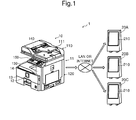
- FIG. 1 is a view showing a schematic configuration of a digital signage system according to one embodiment of the present invention.
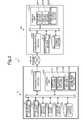
- FIG. 2 is a block diagram showing an internal configuration of the digital signage system according to the one embodiment of the present invention.
- the digital signage system 1 includes an image forming apparatus 10 and a plurality of digital signage devices 20A, 20B and 20C connected via a LAN (local area network) or the like to the image forming apparatus 10.
- the image forming apparatus 10 is configured to send to the digital signage devices 20A, 20B and 20C image data generated by an image reading section 110 having read an original document, together with programming information (setting data) indicating a setting of how the digital signage devices 20A, 20B and 20C display the image data.
- digital signage devices 20A, 20B and 20C have the same configuration and, therefore, unless otherwise distinguished, they and each of them are indicated at 20 from which "A", “B", and “C" are omitted.
- the image forming apparatus 10 is a multifunction peripheral having multiple functions including, for example, a copy function, a print function, a scan function, and a facsimile function.
- the image forming apparatus 10 is roughly composed of an apparatus body 11, the image reading section 110 disposed above the apparatus body 11, and a connecting portion 12 provided between the image reading section 110 and the apparatus body 11.
- the apparatus body 11 is made up to include an image forming section 120, a sheet feed section 13, and so on.
- the image forming section 120 forms a toner image on a recording paper sheet fed from the sheet feed section 13 based on image data generated by the image reading section 110 having read an original document placed on a document feeding tray 111 or other image data. Thereafter, the toner image formed on the recording paper sheet is heat fixed by an unshown fixing section. The recording paper sheet having an image fixed thereon by the completion of the fixing is discharged to a sheet output tray 14.
- a display section 130 and an operating section 150 are disposed at the front of a housing forming a shell of the image forming apparatus 10.
- the display section 130 is formed to include a liquid crystal display (LCD) or an organic light-emitting diode (OLED) display.
- LCD liquid crystal display
- OLED organic light-emitting diode
- a touch panel 140 is disposed in front of the display section 130.
- the touch panel 140 is a touch panel of, for example, a so-called resistive film system or a capacitance system and is configured to detect a user's touch of the touch panel 140 together with the point of touch. When detecting the user's touch, the touch panel 140 outputs a detection signal indicating a coordinate point of the point of touch.
- the operating section 150 is hard keys including, for example, a menu key for calling up a menu, arrow keys for moving the focus of a GUI composing the menu, a determination key for performing a determination operation for the GUI composing the menu, and so on.
- a storage section 160 is a large storage device, such as an HDD (hard disk drive), and is configured to store, for example, image data generated by the image reading section 110.
- HDD hard disk drive
- a communication section 170 is a network interface composed of a communication module, such as a LAN board.
- the image forming apparatus 10 further includes a control unit 100.
- the control unit 100 is composed of a CPU (central processing unit), a RAM (random access memory), a ROM (read only memory), and so on.
- the control unit 100 functions as a control section 101, an operation control section 102, an acceptance section 103, and a storage region generating section 104.
- each of the control section 101, the operation control section 102, the acceptance section 103, and the storage region generating section 104 of the control unit 100 may not be implemented by the operation of the control unit 100 in accordance with the image forming apparatus control program but may be constituted by a hardware circuit.
- the control section 101 governs the overall control of the image forming apparatus 10.
- the operation control section 102 governs the operation control of the image forming apparatus 10.
- the operation control section 102 is connected to the image reading section 110, the image forming section 120, the display section 130, the storage section 160, the communication section 170, and so on and performs the operation control of the above components connected thereto. The details of processing of the operation control section 102 will be described hereinafter.
- the acceptance section 103 has the function of accepting, based on a detection signal output from the touch panel 140, a user's gesture on the touch panel 140. Furthermore, the acceptance section 103 also has the function of accepting a user's operation using the operating section 150, such as a hardware key.
- the storage region generating section 104 has the function of, when the acceptance section 103 accepts a generation instruction to generate a storage region (signage-specific storage region) associated with a digital signage device 20, generating in the storage section 160 a signage-specific storage region associated one-to-one with the digital signage device 20.
- a new digital signage device 20 is introduced, an operator can enter the above generation instruction using the operating section 150 or so on to generate in the storage section 160 a signage-specific storage region associated one-to-one with the new digital signage device 20.
- the new digital signage device 20 is registered in the image forming apparatus 10, which makes it possible for the image forming apparatus 10 to generate and register image data and so on for the new digital signage device 20 and change the contents of an informing image to be displayed on the new digital signage device 20.
- the storage section 160 has a plurality of storage regions and at least one of them is associated one-to-one with a digital signage device 20.
- the user box 161A is associated with the digital signage device 20A
- the user box 161B is associated with the digital signage device 20B
- the user box 161C is associated with the digital signage device 20C.
- the user box 161D is not associated with any digital signage device 20.
- the digital signage device 20 includes a control unit 200, a display section 210, a storage section 220, a communication section 230, and so on.
- the display section 210 is formed of a liquid crystal display, an organic light-emitting diode display or the like.
- the storage section 220 is a large storage device, such as an HDD.
- the communication section 230 is a network interface composed of a communication module, such as a LAN board.
- the control unit 200 is composed of a CPU, a RAM, a ROM, and so on.
- the control unit 200 functions as a control section 201, a display control section 202, and a communication control section 203.
- each of the control section 201, the display control section 202, and the communication control section 203 of the control unit 200 may not be implemented by the operation of the control unit 200 in accordance with the control program but may be constituted by a hardware circuit.
- the control section 201 governs the overall operation control of the digital signage device 20.
- the communication control section 203 has the function of controlling the communication operation of the communication section 230. Specifically, the communication control section 203 allows the communication section 230 to receive image data and programming information sent from the image forming apparatus 10.
- the display control section 202 has the function of controlling the display operation of the display section 210. Specifically, the display control section 202 analyzes programming information received by the communication section 230 and, based on the analysis result, allows the display section 210 to display image data received by the communication section 230.
- the programming information sent from the digital signage device 20 contains, for example, a display setting of how the digital signage device 20 displays a plurality of pieces of image data.
- the display control section 202 allows the display section 210 to provide a slide show display of the plurality of pieces of image data sent from the digital signage device 20.
- the display control section 202 allows the display section 210 to display all or part of a list of the plurality of pieces of image data sent from the digital signage device 20.
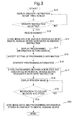
- FIG. 3 is a flowchart showing a flow of processing for delivering image data in the image forming apparatus 10 according to the one embodiment of the present invention.
- FIG. 4 is a diagram schematically showing a processing flow in the digital signage system 1 according to the one embodiment of the present invention.
- the operation control section 102 allows the display section 130 to display a predetermined delivery instruction acceptance screen (step S10).
- the acceptance section 103 determines, on the delivery instruction acceptance screen, whether or not to have accepted a delivery instruction (step S11).
- FIG. 5 is a view showing an example of a delivery instruction acceptance screen displayed on the display section 130.
- a list of digital signage devices 20 connected to the image forming apparatus 10 is displayed, together with their locations of installation, on the delivery instruction acceptance screen D1.
- a plurality of buttons from d1 to d3 are arranged on the delivery instruction acceptance screen D1.
- An operator pushes any buttons from d1 to d3 using the touch panel 140 or the operating section 150 to enter a delivery instruction to deliver image data.
- the acceptance section 103 accepts a delivery instruction designating as destinations the respective digital signage devices 20 corresponding to the one or more buttons pushed by the operator.
- the operation control section 102 allows the image reading section 110 to read (scan) an original document placed on the document feeding tray 111 (step S12). Then, the operation control section 102 allows the storage section 160 to store the image data generated by the image reading section 110 having read the original document in the one or more respective signage-specific storage regions (user boxes) associated with the one or more digital signage devices 20 designated in the delivery instruction accepted by the acceptance section 103 (step S 13). In the case where a plurality of original documents are placed on the document feeding tray 111, the image reading section 110 sequentially scans the plurality of original documents to generate respective pieces of image data for the original documents.
- the operation control section 102 allows the display section 130 to display a predetermined programming information acceptance screen (setting screen) (step S14).
- the acceptance section 103 accepts a setting of programming information based on a user's operation entered on the predetermined programming information acceptance screen (setting screen) (step S15).
- FIG. 6A is a view showing an example of a programming information acceptance screen displayed on the display section 130.
- the programming information acceptance screen D2 is displayed in the case where a plurality of original documents have been read in the processing at step S12 and a plurality of pieces of image data are accordingly stored in the signage-specific storage region associated with the relevant digital signage device 20.
- the programming information acceptance screen D2 is a setting screen for accepting the selection of a format for displaying a plurality of pieces of image data stored in the signage-specific storage region associated with the relevant digital signage device 20 and includes a plurality of buttons d4 and d5 arranged thereon.
- the operation control section 102 determines the slide show display format setting as a display setting for image data.
- the display control section 202 of the digital signage device 20 allows the display section 210 to display a plurality of images from p1 to p6 superposed one on another as shown in FIG. 6B . Then, the display control section 202 allows the display section 210 to sequentially display the plurality of images from p1 to p6 by switching from one image to another at predetermined time intervals (slide show display).
- the operation control section 102 determines the list display format setting as a display setting for image data.
- the display control section 202 of the digital signage device 20 allows the display section 210 to display the plurality of images from p1 to p6 in a line or matrix as shown in FIG. 6C (list display).
- Settings selectable as the programming information include, in addition to the above display setting, a setting of the display layout of image data, a setting of the display period of image data, and a setting of the display order of pieces of image data.
- FIG. 7A is a view showing another example of a programming information acceptance screen displayed on the display section 130.
- a plurality of buttons from d6 to d8 are arranged on the programming information acceptance screen D6.
- the acceptance section 103 accepts a setting of the display layout of image data as a setting of programming information.
- the setting of the display layout of image data herein refers to a setting indicating where image data is to be displayed on the display section 210 of the relevant digital signage device 20.
- FIG. 7B is a view showing an example of a display layout acceptance screen displayed on the display section 130.
- a display layout pattern acceptance screen d9 and an image data setting screen d10 are shown on the display layout acceptance screen D7.
- Three display layouts are presented as display layout patterns for a display region of the display section 210 on the display layout pattern acceptance screen d9.
- the three display layouts include: a display layout where the display region is not divided (left); a display layout where the display region is divided into two subregions (middle); and a display layout where the display region is divided into four subregions (right).
- the acceptance section 103 accepts, based on a user's operation entered using the touch panel 140 or the operating section 150, one of the three display layouts presented on the display layout pattern acceptance screen d9 as the display layout pattern for the display region of the display section 210. Furthermore, one or more pieces of image data capable of being displayed on the entire display region or each display subregion of the display section 210 are indicated on the image data setting screen d10.
- the acceptance section 103 accepts, based on a user's operation entered using the touch panel 140 or the operating section 150, the designation of a piece of image data to be displayed on the entire display region or each display subregion of the display section 210 from among all of one or more pieces of image data stored in the associated signage-specific storage region of the storage section 160.
- the acceptance section 103 accepts a setting of the display order of pieces of image data as a setting of programming information.
- the setting of the display order of pieces of image data herein refers to a setting indicating in which order pieces of image data are to be displayed on the display section 210 of the relevant digital signage device 20.
- FIG. 8A is a view showing an example of a display order acceptance screen displayed on the display section 130.
- an image data acceptance screen d11 and a display interval acceptance screen d12 are shown on the display order acceptance screen D8.
- Pieces of image data capable of being displayed at each position of the display order are indicated on the image data acceptance screen d11.
- the acceptance section 103 accepts, based on a user's operation entered using the touch panel 140 or the operating section 150, the designation of a piece of image data to be displayed at each position of the display order from among the pieces of image data stored in the associated signage-specific storage region of the storage section 160.
- the acceptance section 103 accepts the designation of a time interval based on a user's operation entered using the touch panel 140 or the operating section 150.
- the acceptance section 103 accepts a setting of the display period of image data as a setting of programming information.
- the setting of the display period of image data herein refers to a setting indicating how long the image data is to be displayed on the relevant digital signage device 20.
- FIG. 8B is a view showing an example of a display period acceptance screen displayed on the display section 130.
- a start time indication field d13 indicating the start time of display of image data and a finish time indication field d14 indicating the finish time of display of image data are shown on the display period acceptance screen D9.
- the acceptance section 103 accepts the designations of a start time of display of image data and a finish time of display of image data, each based on a user's operation entered using the touch panel 140 or the operating section 150.
- the operation control section 102 when the acceptance section 103 accepts the display setting or so on for the plurality of pieces of image data as a setting of programming information, the operation control section 102 generates programming information based on the accepted setting (step S16).
- the operation control section 102 allows the storage section 160 to store the programming information generated in the processing at step S16 in the respective signage-specific storage regions associated with the one or more digital signage devices 20 designated in the delivery instruction accepted by the acceptance section 103 (step S17).
- the one or more signage-specific storage regions of the storage section 160 store image data to be displayed by the one or more respective digital signage devices 20 and programming information indicating a setting of how the one or more digital signage devices 20 display the image data.
- the operation control section 102 allows the display section 130 to display, based on the image data and programming information stored in each signage-specific storage region of the storage section 160, a preview image indicating a display screen to be displayed on the relevant digital signage device 20 (step S18).
- the operation control section 102 allows the communication section 170 to deliver the image data by sending the image data and programming information stored in the signage-specific storage region to the relevant digital signage device 20 (step S20).
- a general digital signage system requires a dedicated management server separately from digital signage devices.
- the generation and registration of image data and so on on the dedicated management server are often complicated. Particularly in the case where there are a plurality of pieces of image data to be displayed, a complicated operation is required when an operator sets, on the dedicated management server, how the plurality of pieces of mage data are displayed on the digital signage device.
- Future digital signage devices can be considered to be introduced not only into large facilities, such as station yards, but also into relatively small facilities, such as schools. However, it is difficult to install a dedicated management server in small facilities.
- the method for operating the digital signage device should be simple.
- the image forming apparatus 10 includes signage-specific storage regions associated one-to-one with digital signage devices 20 and each signage-specific storage region stores: a plurality of pieces of image data generated by the image reading section 110 having read a number of original documents; and setting data indicating a display setting of how the relevant digital signage device 20 displays the plurality of pieces of image data.
- the operator can register a plurality of pieces of image data to be displayed on each digital signage device 20 with a simple operation, as before, of designating a destination for storage of the image data and scanning a number of original documents.
- the operator can set how the plurality of pieces of mage data are displayed on the digital signage device.
- a set of image data and programming information is stored in each of signage-specific storage regions associated one-to-one with the digital signage devices 20. Therefore, the operator can easily confirm or change the contents of image data and programming information later.
- FIG. 9 is a flowchart showing a flow of processing for outputting image data in the image forming apparatus 10 according to the one embodiment of the present invention.
- the operation control section 102 allows the display section 130 to display a predetermined output instruction acceptance screen (step S40).
- the acceptance section 103 accepts an output instruction on the output instruction acceptance screen (step S41, S43 or S45).
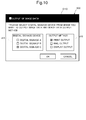
- FIG. 10 is a view showing an example of an output instruction acceptance screen displayed on the display section 130.
- an output source acceptance screen d15 for accepting the designation of a digital signage device serving as a source of data output and an output method acceptance screen d16 for accepting the designation of a method for outputting data are shown on the output instruction acceptance screen D10.
- the output source acceptance screen d15 shows a list of digital signage devices 20 connected to the image forming apparatus 10.
- the acceptance section 103 accepts the designation of one digital signage device 20 as a source of data output from among the list of digital signage devices 20.
- the output method acceptance screen d16 shows three output methods including print output, mail output, and display output.
- the acceptance section 103 accepts the designation of one output method from among the three output methods.
- the operation control section 102 allows the image forming section 120 to form an image on a recording paper sheet based on image data stored in the signage-specific storage region associated with the digital signage device 20 designated in the output instruction (step S42).
- the operation control section 102 may allow the image forming section 120 to form programming information stored in the same signage-specific storage region, together with the image data, on the recording paper sheet.
- the operation control section 102 allows the communication section 170 to send an e-mail to which image data stored in the signage-specific storage region associated with the digital signage device 20 designated in the output instruction is attached (step S44).
- the storage section 160 previously stores the address of the e-mail.
- the communication section 170 sends the e-mail to the address stored in the storage section 160.
- the operation control section 102 may allow the communication section 170 to attach programming information stored in the same signage-specific storage region, together with the image data, to the e-mail.
- the operation control section 102 may allow the communication section 170 to send the e-mail.
- the operation control section 102 allows the display section 130 to display image data stored in the signage-specific storage region associated with the digital signage device 20 designated in the output instruction (step S46).
- the operation control section 102 may allow the display section 130 to display programming information stored in the same signage-specific storage region, together with the image data.
- the image forming apparatus 10 stores image data and programming information in each of the signage-specific storage regions associated one-to-one with digital signage devices 20 and can output them using the image forming function, the communication function, the display function, or so on with which the image forming apparatus 10 is equipped. Therefore, in the image forming apparatus 10 according to the one embodiment of the present invention, information presented on each digital signage device 20 can be output with a simple operation in various output methods.
- the present invention is not limited to the configuration of the above embodiment and can be modified in various ways.
- the operation control section 102 allows the relevant signage-specific storage region to store setting data indicating the entered display setting.
- the operation control section 102 is configured to analyze the contents of a plurality of pieces of image data stored in the relevant signage-specific storage region and determines a display setting based on results of the analyzation. Furthermore, the operation control section 102 allows the storage section 160 to store setting data indicating the determined display setting in the signage-specific storage region.
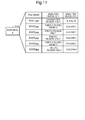
- FIG. 11 is a diagram showing an example of results of image data analysis performed by the operation control section 102 of the image forming apparatus 10 according to Modification 1.
- the pieces of image data stored in the signage-specific storage region are analyzed by the operation control section 102.
- the analysis results of the operation control section 102 are stored, together with the pieces of image data, in the signage-specific storage region.
- the operation control section 102 determines to which type of region each pixel contained in each of the pieces of image data stored in the signage-specific storage region belongs, for example, to which of a character region, a ground region, and a photographic region each pixel belongs.
- the character region is a region showing characters and symbols
- the ground region is a region showing the ground (a blank portion) of an original document
- the photographic region is a region showing a photograph portion of the original document.
- the operation control section 102 makes the above determination based on various pieces of information, including the proportion of white pixels to total pixels, the number of continuous white pixels, and the density difference between adjacent pixels.
- the signage-specific storage region of the storage section 160 stores the respective types of region of the pieces of image data as ANALYSIS RESULTS 1.
- the operation control section 102 determines whether each of the pieces of image data stored in the signage-specific storage region is a colored piece of image data containing a color image or a black-and-white piece of image data containing no color image.
- the signage-specific storage region of the storage section 160 stores the respective types of color of the pieces of image data, indicating a colored piece of image data or a black-and-white piece of image data, as ANALYSIS RESULTS 2.
- the operation control section 102 determines the display setting for the plurality of pieces of image data stored in the signage-specific storage region. Specifically, when the proportion of pieces of image data made from a photographic region only and pieces of image data partly made from a photographic region in the plurality of pieces of image data stored in the signage-specific storage region is equal to or greater than a predetermined proportion, the operation control section 102 determines the list display format setting as a display setting. Alternatively, when the proportion of pieces of image data made from a character region only in the plurality of pieces of image data is equal to or greater than a predetermined proportion, the operation control section 102 determines the slide show display format setting as a display setting.
- the plurality of pieces of image data can be displayed at a time, but the display size of each piece of image data is small, which reduces the distinguishability among the pieces of image data.
- pieces of image data containing a photographic region are suitable for a list display because they can be more easily distinguished from each other by a user than those containing no photographic region and made from a character region only.
- the slide show display can ensure a large display size of each piece of image data and is therefore suitable to display pieces of image data made from a character region only.
- the image forming apparatus 10 according to Modification 1 can display a plurality of images on the digital signage device 20 with a display setting suitable for a plurality of pieces of image data stored in the relevant signage-specific storage region, even if the operator does not enter any display setting.
- the operation control section 102 determines the display setting based on whether the plurality of pieces of image data stored in the relevant signage-specific storage region are colored pieces of image data or black-and-white pieces of image data. Specifically, when the proportion of colored pieces of image data in the plurality of pieces of image data stored in the signage-specific storage region is equal to or greater than a predetermined proportion, the operation control section 102 determines the list display format setting as a display setting. Alternatively, when the proportion of black-and-white pieces of image data in the plurality of pieces of image data is equal to or greater than a predetermined proportion, the operation control section 102 determines the slide show display format setting as a display setting. The reason for this is that colored pieces of image data can be more easily distinguished from each other by a user than black-and-white pieces of image data and are therefore suitable for a list display.
- FIG. 12 is a flowchart showing a flow of processing for delivering image data in the image forming apparatus 10 according to Modification 1.
- the same pieces of processing as those shown in FIG. 3 are designated by the same references and further explanation thereof will be omitted.
- the operation control section 102 analyzes the plurality of pieces of image data stored in the relevant signage-specific storage region (step S30). Then, the operation control section 102 determines the display setting for the plurality of pieces of image data based on the analysis results and generates programming information containing the display setting (step S31).
- the operation control section 102 allows the storage section 160 to store the programming information generated in the processing at step S31 in the respective signage-specific storage regions associated with the one or more digital signage devices 20 designated in the delivery instruction accepted by the acceptance section 103 (step S17).
- the operation control section 102 may determine, based on a user's operation accepted by the acceptance section 103, one or more pieces of image data to be displayed on the relevant digital signage device 20 from among the plurality of pieces of image data stored in the associated signage-specific storage region and generate programming information containing as a display setting a display image setting indicating the determined one or more pieces of image data to be displayed.
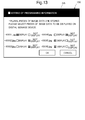
- FIG. 13 is a view showing an example of a programming information acceptance screen displayed on the display section 130 in Modification 2.
- the programming information acceptance screen D5 shows a list of a plurality of pieces of image data stored in a signage-specific storage region.
- three pieces of image data "xxxl.jpg”, “xxx5.jpg”, and "xxx6.jpg” of six pieces of image data are selected as pieces of image data to be displayed.
- the operation control section 102 generates programming information containing a display image setting indicating that the three pieces of image data are to be displayed and allows the relevant signage-specific storage region to store the generated programming information.
- the image forming apparatus 10 can select, from among the plurality of pieces of image data, one or more pieces of image data to be displayed on the relevant digital signage device 20 with a simple operation.
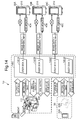
- FIG. 14 is a diagram schematically showing a processing flow in a digital signage system according to Modification 3. Further explanation of the same elements as those shown in FIG. 4 will be omitted.
- An image forming apparatus 10 according to Modification 3 includes a connection terminal capable of connecting a USB memory 40 which is a portable storage medium. Furthermore, the image forming apparatus 10 according to Modification 3 is configured to deliver image data and programming information stored in each signage-specific storage region of the storage section 160 not only by sending them via a LAN to the relevant digital signage device 20 but alternatively by outputting them to the USB memory 40 which is a portable storage medium.
- the operation control section 102 allows the USB memory 40 to store the image data and the programming information. Specifically, when the acceptance section 103 accepts the instruction to execute delivery, the operation control section 102 determines whether or not data communication with each digital signage device 20 designated in the instruction to execute delivery is possible.
- the operation control section 102 allows the image forming apparatus 10 to output to the USB memory 40 the image data and the programming information stored in the signage-specific storage region associated with the digital signage device 20 designated in the instruction to execute delivery. Then, the operator connects the USB memory 40 to a USB terminal of the digital signage device 20.
- the control section 201 of the digital signage device 20 allows the storage section 220 to record the image data and the programming information stored in the USB memory 40. In this manner, the operator can generate and register image data and programming information on the image forming apparatus 10, even for digital signage devices 20 not connected via a LAN to the image forming apparatus 10.
- the communication section 170 is operable to communicate data with external information processing apparatuses 30, such as a mobile terminal 30A and a PC (personal computer) 30B.
- external information processing apparatuses 30 such as a mobile terminal 30A and a PC (personal computer) 30B.
- image data to be displayed on the one or more digital signage devices 20 and a delivery instruction to deliver the image data are generated.
- the communication section 170 receives, under the control of the operation control section 102, the image data and the delivery instruction generated by the information processing apparatus 30.
- the operation control section 102 generates programming information based on the delivery instruction received by the communication section 170.
- the operation control section 102 allows the storage section 160 to store the generated programming information, together with the image data, in the one or more respective signage-specific storage regions associated with the one or more digital signage devices 20 designated in the delivery instruction.
- the image data generated in the information processing apparatus 30 provided externally of the image forming apparatus 10 can be delivered to the one or more digital signage devices 20.
- the image forming apparatus control program described in the above embodiment and modifications may be one stored on a computer-readable non-transitory recording medium, such as a hard disk, a CD-ROM, a DVD-ROM or a semiconductor memory.
- a computer-readable non-transitory recording medium such as a hard disk, a CD-ROM, a DVD-ROM or a semiconductor memory.
- FIGS. 1 to 14 The configurations and pieces of processing described with reference to FIGS. 1 to 14 are merely illustrative of the present invention and are not intended to limit the present invention to these configurations and pieces of processing.
Landscapes
- Engineering & Computer Science (AREA)
- Multimedia (AREA)
- Signal Processing (AREA)
- Theoretical Computer Science (AREA)
- Human Computer Interaction (AREA)
- Physics & Mathematics (AREA)
- General Physics & Mathematics (AREA)
- General Engineering & Computer Science (AREA)
- Facsimiles In General (AREA)
- Controls And Circuits For Display Device (AREA)
- Accessory Devices And Overall Control Thereof (AREA)
- Control Or Security For Electrophotography (AREA)
Abstract
Description
- The present invention relates to image forming apparatuses and image forming apparatus control programs and particularly relates to a technique for delivering image data to external digital signage devices.
- In recent years digital signage devices are becoming widespread as means for giving notice to many people of information in public facilities and so on. By generating and registering image data or the like for information on a dedicated management server provided externally of a digital signage device, an operator can change the contents of an informing image to be displayed on the digital signage device. Thus, as compared to conventional informing means, such as a notice and a notice board (bulletin board), the digital signage device can avoid the trouble of having to remake the contents of information, which makes it easy to offer up-to-data information.
- A technique improved over the aforementioned technique is proposed as one aspect of the present invention.
- An image forming apparatus according to an aspect of the present invention includes an image reading section, a storage section, a communication section, an acceptance section, and an operation control section. The image reading section is operable to read an original document and generate image data from the read original document. The storage section is operable to store the image data generated by the image reading section. The communication section is operable to communicate data with one or more external digital signage devices. The acceptance section is configured to accept a delivery instruction to deliver the image data with the one or more digital signage devices designated as destinations. The operation control section is configured to control the operation of reading the original document and generating the image data performed by the image reading section, the operation of storing the image data performed by the storage section, and the operation of communicating data performed by the communication section.
- Furthermore, the storage section has a plurality of storage regions at least one or more of which are signage-specific storage regions associated one-to-one with the one or more digital signage devices.
- Each of the signage-specific storage regions stores: a plurality of pieces of the image data generated by the image reading section having read a number of original documents; and setting data indicating a display setting of how the relevant digital signage device displays the plurality of pieces of image data.
- The operation control section is configured to, when the acceptance section accepts the delivery instruction, allow the communication section to send the plurality of pieces of image data and the setting data both stored in the signage-specific storage region associated with the relevant digital signage device designated in the delivery instruction to the digital signage device designated in the delivery instruction.
- An image forming apparatus control program according to another aspect of the present invention allows a computer to function as the above-described operation control section and the above-described acceptance section.
-
-
FIG. 1 is a view showing a schematic configuration of a digital signage system according to one embodiment of the present invention. -
FIG. 2 is a block diagram showing an internal configuration of the digital signage system according to the one embodiment of the present invention. -
FIG. 3 is a flowchart showing a flow of processing for delivering image data in an image forming apparatus according to the one embodiment of the present invention. -
FIG. 4 is a diagram schematically showing a processing flow in the digital signage system according to the one embodiment of the present invention. -
FIG. 5 is a view showing an example of a delivery instruction acceptance screen displayed on a display section of the image forming apparatus according to the one embodiment of the present invention. -
FIG. 6A is a view showing an example of a programming information acceptance screen displayed on the display section of the image forming apparatus according to the one embodiment of the present invention. -
FIG. 6B is a view showing example of a screen displayed on a digital signage device. -
FIG. 6C is a view showing example of a screen displayed on a digital signage device. -
FIG. 7A is a view showing another example of a programming information acceptance screen displayed on the display section of the image forming apparatus according to the one embodiment of the present invention. -
FIG. 7B is a view showing an example of a display layout acceptance screen displayed on the display section. -
FIG. 8A is a view showing an example of a display order acceptance screen displayed on the display section of the image forming apparatus according to the one embodiment of the present invention. -
FIG. 8B is a view showing an example of a display period acceptance screen displayed on the display section. -
FIG. 9 is a flowchart showing a flow of processing for outputting image data in the image forming apparatus according to the one embodiment of the present invention. -
FIG. 10 is a view showing an example of an output instruction acceptance screen displayed on the display section of the image forming apparatus according to the one embodiment of the present invention. -
FIG. 11 is a diagram showing an example of results of image data analysis performed by an operation control section of an image forming apparatus according toModification 1. -
FIG. 12 is a flowchart showing a flow of processing for delivering image data in the image forming apparatus according toModification 1. -
FIG. 13 is a view showing an example of a programming information acceptance screen displayed on a display section of an image forming apparatus according toModification 2. -
FIG. 14 is a diagram schematically showing a processing flow in a digital signage system according toModification 3. - Hereinafter, a description will be given of an image forming apparatus and an image forming apparatus control program, both according to one embodiment of the present invention, with reference to the drawings.
-
FIG. 1 is a view showing a schematic configuration of a digital signage system according to one embodiment of the present invention.FIG. 2 is a block diagram showing an internal configuration of the digital signage system according to the one embodiment of the present invention. - The
digital signage system 1 includes animage forming apparatus 10 and a plurality ofdigital signage devices image forming apparatus 10. Theimage forming apparatus 10 is configured to send to thedigital signage devices image reading section 110 having read an original document, together with programming information (setting data) indicating a setting of how thedigital signage devices - Note that the
digital signage devices - The
image forming apparatus 10 is a multifunction peripheral having multiple functions including, for example, a copy function, a print function, a scan function, and a facsimile function. Theimage forming apparatus 10 is roughly composed of anapparatus body 11, theimage reading section 110 disposed above theapparatus body 11, and a connectingportion 12 provided between theimage reading section 110 and theapparatus body 11. - The
apparatus body 11 is made up to include animage forming section 120, asheet feed section 13, and so on. - In an image forming operation of the
image forming apparatus 10, theimage forming section 120 forms a toner image on a recording paper sheet fed from thesheet feed section 13 based on image data generated by theimage reading section 110 having read an original document placed on adocument feeding tray 111 or other image data. Thereafter, the toner image formed on the recording paper sheet is heat fixed by an unshown fixing section. The recording paper sheet having an image fixed thereon by the completion of the fixing is discharged to asheet output tray 14. - A
display section 130 and anoperating section 150 are disposed at the front of a housing forming a shell of theimage forming apparatus 10. Thedisplay section 130 is formed to include a liquid crystal display (LCD) or an organic light-emitting diode (OLED) display. - A
touch panel 140 is disposed in front of thedisplay section 130. Thetouch panel 140 is a touch panel of, for example, a so-called resistive film system or a capacitance system and is configured to detect a user's touch of thetouch panel 140 together with the point of touch. When detecting the user's touch, thetouch panel 140 outputs a detection signal indicating a coordinate point of the point of touch. - The
operating section 150 is hard keys including, for example, a menu key for calling up a menu, arrow keys for moving the focus of a GUI composing the menu, a determination key for performing a determination operation for the GUI composing the menu, and so on. - A
storage section 160 is a large storage device, such as an HDD (hard disk drive), and is configured to store, for example, image data generated by theimage reading section 110. - A
communication section 170 is a network interface composed of a communication module, such as a LAN board. - The
image forming apparatus 10 further includes acontrol unit 100. Thecontrol unit 100 is composed of a CPU (central processing unit), a RAM (random access memory), a ROM (read only memory), and so on. When an image forming apparatus control program stored in the above ROM or thestorage section 160 is executed by the above CPU, thecontrol unit 100 functions as acontrol section 101, anoperation control section 102, anacceptance section 103, and a storageregion generating section 104. Alternatively, each of thecontrol section 101, theoperation control section 102, theacceptance section 103, and the storageregion generating section 104 of thecontrol unit 100 may not be implemented by the operation of thecontrol unit 100 in accordance with the image forming apparatus control program but may be constituted by a hardware circuit. - The
control section 101 governs the overall control of theimage forming apparatus 10. - The
operation control section 102 governs the operation control of theimage forming apparatus 10. Theoperation control section 102 is connected to theimage reading section 110, theimage forming section 120, thedisplay section 130, thestorage section 160, thecommunication section 170, and so on and performs the operation control of the above components connected thereto. The details of processing of theoperation control section 102 will be described hereinafter. - The
acceptance section 103 has the function of accepting, based on a detection signal output from thetouch panel 140, a user's gesture on thetouch panel 140. Furthermore, theacceptance section 103 also has the function of accepting a user's operation using theoperating section 150, such as a hardware key. - The storage
region generating section 104 has the function of, when theacceptance section 103 accepts a generation instruction to generate a storage region (signage-specific storage region) associated with adigital signage device 20, generating in the storage section 160 a signage-specific storage region associated one-to-one with thedigital signage device 20. When a newdigital signage device 20 is introduced, an operator can enter the above generation instruction using theoperating section 150 or so on to generate in the storage section 160 a signage-specific storage region associated one-to-one with the newdigital signage device 20. Thus, the newdigital signage device 20 is registered in theimage forming apparatus 10, which makes it possible for theimage forming apparatus 10 to generate and register image data and so on for the newdigital signage device 20 and change the contents of an informing image to be displayed on the newdigital signage device 20. - The
storage section 160 has a plurality of storage regions and at least one of them is associated one-to-one with adigital signage device 20. In an example shown inFIG. 4 , there are threeuser boxes 161A to 161C as signage-specific storage regions and oneuser box 161D as a non-signage-specific storage region in thestorage section 160. Theuser box 161A is associated with thedigital signage device 20A, theuser box 161B is associated with thedigital signage device 20B, and theuser box 161C is associated with thedigital signage device 20C. In contrast, theuser box 161D is not associated with anydigital signage device 20. - Next, a description will be given of the structure and configuration of each
digital signage device 20. Thedigital signage device 20 includes acontrol unit 200, adisplay section 210, astorage section 220, acommunication section 230, and so on. Thedisplay section 210 is formed of a liquid crystal display, an organic light-emitting diode display or the like. Thestorage section 220 is a large storage device, such as an HDD. Thecommunication section 230 is a network interface composed of a communication module, such as a LAN board. - The
control unit 200 is composed of a CPU, a RAM, a ROM, and so on. When a control program stored in the above ROM or thestorage section 220 is executed by the above CPU, thecontrol unit 200 functions as acontrol section 201, adisplay control section 202, and acommunication control section 203. Alternatively, each of thecontrol section 201, thedisplay control section 202, and thecommunication control section 203 of thecontrol unit 200 may not be implemented by the operation of thecontrol unit 200 in accordance with the control program but may be constituted by a hardware circuit. - The
control section 201 governs the overall operation control of thedigital signage device 20. - The
communication control section 203 has the function of controlling the communication operation of thecommunication section 230. Specifically, thecommunication control section 203 allows thecommunication section 230 to receive image data and programming information sent from theimage forming apparatus 10. - The
display control section 202 has the function of controlling the display operation of thedisplay section 210. Specifically, thedisplay control section 202 analyzes programming information received by thecommunication section 230 and, based on the analysis result, allows thedisplay section 210 to display image data received by thecommunication section 230. - As will hereinafter be described in detail, the programming information sent from the
digital signage device 20 contains, for example, a display setting of how thedigital signage device 20 displays a plurality of pieces of image data. For example, when the selected display setting is a slide show display format setting in which a plurality of pieces of image data are sequentially displayed by switching from one piece to another, thedisplay control section 202 allows thedisplay section 210 to provide a slide show display of the plurality of pieces of image data sent from thedigital signage device 20. For another example, when the selected display setting is a list display format setting in which two or more of a plurality of pieces of image data are displayed at a time, thedisplay control section 202 allows thedisplay section 210 to display all or part of a list of the plurality of pieces of image data sent from thedigital signage device 20. - The above is the description of the configuration of the
digital signage system 1. Subsequently, a description will be given of processing for delivering image data in thedigital signage system 1 with reference toFIGS. 3 and4 . -
FIG. 3 is a flowchart showing a flow of processing for delivering image data in theimage forming apparatus 10 according to the one embodiment of the present invention.FIG. 4 is a diagram schematically showing a processing flow in thedigital signage system 1 according to the one embodiment of the present invention. - The
operation control section 102 allows thedisplay section 130 to display a predetermined delivery instruction acceptance screen (step S10). Theacceptance section 103 determines, on the delivery instruction acceptance screen, whether or not to have accepted a delivery instruction (step S11). -
FIG. 5 is a view showing an example of a delivery instruction acceptance screen displayed on thedisplay section 130. In an example shown inFIG. 5 , a list ofdigital signage devices 20 connected to theimage forming apparatus 10 is displayed, together with their locations of installation, on the delivery instruction acceptance screen D1. Furthermore, a plurality of buttons from d1 to d3 are arranged on the delivery instruction acceptance screen D1. An operator pushes any buttons from d1 to d3 using thetouch panel 140 or theoperating section 150 to enter a delivery instruction to deliver image data. Theacceptance section 103 accepts a delivery instruction designating as destinations the respectivedigital signage devices 20 corresponding to the one or more buttons pushed by the operator. - When the
acceptance section 103 accepts the delivery instruction (YES in step S11), theoperation control section 102 allows theimage reading section 110 to read (scan) an original document placed on the document feeding tray 111 (step S12). Then, theoperation control section 102 allows thestorage section 160 to store the image data generated by theimage reading section 110 having read the original document in the one or more respective signage-specific storage regions (user boxes) associated with the one or moredigital signage devices 20 designated in the delivery instruction accepted by the acceptance section 103 (step S 13). In the case where a plurality of original documents are placed on thedocument feeding tray 111, theimage reading section 110 sequentially scans the plurality of original documents to generate respective pieces of image data for the original documents. - After the
storage section 160 stores the image data, theoperation control section 102 allows thedisplay section 130 to display a predetermined programming information acceptance screen (setting screen) (step S14). Theacceptance section 103 accepts a setting of programming information based on a user's operation entered on the predetermined programming information acceptance screen (setting screen) (step S15). -
FIG. 6A is a view showing an example of a programming information acceptance screen displayed on thedisplay section 130. The programming information acceptance screen D2 is displayed in the case where a plurality of original documents have been read in the processing at step S12 and a plurality of pieces of image data are accordingly stored in the signage-specific storage region associated with the relevantdigital signage device 20. The programming information acceptance screen D2 is a setting screen for accepting the selection of a format for displaying a plurality of pieces of image data stored in the signage-specific storage region associated with the relevantdigital signage device 20 and includes a plurality of buttons d4 and d5 arranged thereon. - When the button d5 is pushed by the operator, the
operation control section 102 determines the slide show display format setting as a display setting for image data. When thedigital signage device 20 receives programming information in which the slide show display format setting is selected as a display setting for image data, thedisplay control section 202 of thedigital signage device 20 allows thedisplay section 210 to display a plurality of images from p1 to p6 superposed one on another as shown inFIG. 6B . Then, thedisplay control section 202 allows thedisplay section 210 to sequentially display the plurality of images from p1 to p6 by switching from one image to another at predetermined time intervals (slide show display). - On the other hand, when the button d4 is pushed by the operator, the
operation control section 102 determines the list display format setting as a display setting for image data. When thedigital signage device 20 receives programming information in which the list display format setting is selected as a display setting for image data, thedisplay control section 202 of thedigital signage device 20 allows thedisplay section 210 to display the plurality of images from p1 to p6 in a line or matrix as shown inFIG. 6C (list display). - Settings selectable as the programming information include, in addition to the above display setting, a setting of the display layout of image data, a setting of the display period of image data, and a setting of the display order of pieces of image data.
-
FIG. 7A is a view showing another example of a programming information acceptance screen displayed on thedisplay section 130. In an example shown inFIG. 7A , a plurality of buttons from d6 to d8 are arranged on the programming information acceptance screen D6. - When the button d6 is pushed by the operator, the
acceptance section 103 accepts a setting of the display layout of image data as a setting of programming information. The setting of the display layout of image data herein refers to a setting indicating where image data is to be displayed on thedisplay section 210 of the relevantdigital signage device 20. -
FIG. 7B is a view showing an example of a display layout acceptance screen displayed on thedisplay section 130. In an example shown inFIG. 7B , a display layout pattern acceptance screen d9 and an image data setting screen d10 are shown on the display layout acceptance screen D7. Three display layouts are presented as display layout patterns for a display region of thedisplay section 210 on the display layout pattern acceptance screen d9. The three display layouts include: a display layout where the display region is not divided (left); a display layout where the display region is divided into two subregions (middle); and a display layout where the display region is divided into four subregions (right). Theacceptance section 103 accepts, based on a user's operation entered using thetouch panel 140 or theoperating section 150, one of the three display layouts presented on the display layout pattern acceptance screen d9 as the display layout pattern for the display region of thedisplay section 210. Furthermore, one or more pieces of image data capable of being displayed on the entire display region or each display subregion of thedisplay section 210 are indicated on the image data setting screen d10. Theacceptance section 103 accepts, based on a user's operation entered using thetouch panel 140 or theoperating section 150, the designation of a piece of image data to be displayed on the entire display region or each display subregion of thedisplay section 210 from among all of one or more pieces of image data stored in the associated signage-specific storage region of thestorage section 160. - Referring back to
FIG. 7A , when the button d8 is pushed by the operator, theacceptance section 103 accepts a setting of the display order of pieces of image data as a setting of programming information. The setting of the display order of pieces of image data herein refers to a setting indicating in which order pieces of image data are to be displayed on thedisplay section 210 of the relevantdigital signage device 20. -
FIG. 8A is a view showing an example of a display order acceptance screen displayed on thedisplay section 130. In an example shown inFIG. 8A , an image data acceptance screen d11 and a display interval acceptance screen d12 are shown on the display order acceptance screen D8. Pieces of image data capable of being displayed at each position of the display order are indicated on the image data acceptance screen d11. Theacceptance section 103 accepts, based on a user's operation entered using thetouch panel 140 or theoperating section 150, the designation of a piece of image data to be displayed at each position of the display order from among the pieces of image data stored in the associated signage-specific storage region of thestorage section 160. Furthermore, various options of the time interval at which the display of image data on the relevantdigital signage device 20 can be switched are presented on the display interval acceptance screen d12. Theacceptance section 103 accepts the designation of a time interval based on a user's operation entered using thetouch panel 140 or theoperating section 150. - Referring back to
FIG. 7A , when the button d7 is pushed by the operator, theacceptance section 103 accepts a setting of the display period of image data as a setting of programming information. The setting of the display period of image data herein refers to a setting indicating how long the image data is to be displayed on the relevantdigital signage device 20. -
FIG. 8B is a view showing an example of a display period acceptance screen displayed on thedisplay section 130. In an example shown inFIG. 8B , a start time indication field d13 indicating the start time of display of image data and a finish time indication field d14 indicating the finish time of display of image data are shown on the display period acceptance screen D9. Theacceptance section 103 accepts the designations of a start time of display of image data and a finish time of display of image data, each based on a user's operation entered using thetouch panel 140 or theoperating section 150. - In the above manners, when the
acceptance section 103 accepts the display setting or so on for the plurality of pieces of image data as a setting of programming information, theoperation control section 102 generates programming information based on the accepted setting (step S16). - Then, the
operation control section 102 allows thestorage section 160 to store the programming information generated in the processing at step S16 in the respective signage-specific storage regions associated with the one or moredigital signage devices 20 designated in the delivery instruction accepted by the acceptance section 103 (step S17). Thus, the one or more signage-specific storage regions of thestorage section 160 store image data to be displayed by the one or more respectivedigital signage devices 20 and programming information indicating a setting of how the one or moredigital signage devices 20 display the image data. - The
operation control section 102 allows thedisplay section 130 to display, based on the image data and programming information stored in each signage-specific storage region of thestorage section 160, a preview image indicating a display screen to be displayed on the relevant digital signage device 20 (step S18). - Thereafter, when the
acceptance section 103 accepts an instruction to execute delivery (YES in S19), theoperation control section 102 allows thecommunication section 170 to deliver the image data by sending the image data and programming information stored in the signage-specific storage region to the relevant digital signage device 20 (step S20). - A general digital signage system requires a dedicated management server separately from digital signage devices. The generation and registration of image data and so on on the dedicated management server are often complicated. Particularly in the case where there are a plurality of pieces of image data to be displayed, a complicated operation is required when an operator sets, on the dedicated management server, how the plurality of pieces of mage data are displayed on the digital signage device. Future digital signage devices can be considered to be introduced not only into large facilities, such as station yards, but also into relatively small facilities, such as schools. However, it is difficult to install a dedicated management server in small facilities. In addition, in small facilities, because it is difficult to put a dedicated staff for managing a digital signage device, a teacher or so on, which is a non-dedicated staff, will generate and register image data and so on. Therefore, it is preferred that the method for operating the digital signage device should be simple.
- To cope with the above problems, the
image forming apparatus 10 according to the one embodiment of the present invention includes signage-specific storage regions associated one-to-one withdigital signage devices 20 and each signage-specific storage region stores: a plurality of pieces of image data generated by theimage reading section 110 having read a number of original documents; and setting data indicating a display setting of how the relevantdigital signage device 20 displays the plurality of pieces of image data. Thus, the operator can register a plurality of pieces of image data to be displayed on eachdigital signage device 20 with a simple operation, as before, of designating a destination for storage of the image data and scanning a number of original documents. Furthermore, even when there are a plurality of pieces of image data to be displayed, the operator can set how the plurality of pieces of mage data are displayed on the digital signage device. In addition, in theimage forming apparatus 10 according to the one embodiment of the present invention, a set of image data and programming information is stored in each of signage-specific storage regions associated one-to-one with thedigital signage devices 20. Therefore, the operator can easily confirm or change the contents of image data and programming information later. - Next, a description will be given of processing for outputting image data in the
digital signage system 1 with reference toFIGS. 9 and4 . -
FIG. 9 is a flowchart showing a flow of processing for outputting image data in theimage forming apparatus 10 according to the one embodiment of the present invention. - The
operation control section 102 allows thedisplay section 130 to display a predetermined output instruction acceptance screen (step S40). Theacceptance section 103 accepts an output instruction on the output instruction acceptance screen (step S41, S43 or S45). -
FIG. 10 is a view showing an example of an output instruction acceptance screen displayed on thedisplay section 130. In an example shown inFIG. 10 , an output source acceptance screen d15 for accepting the designation of a digital signage device serving as a source of data output and an output method acceptance screen d16 for accepting the designation of a method for outputting data are shown on the output instruction acceptance screen D10. The output source acceptance screen d15 shows a list ofdigital signage devices 20 connected to theimage forming apparatus 10. Theacceptance section 103 accepts the designation of onedigital signage device 20 as a source of data output from among the list ofdigital signage devices 20. Furthermore, the output method acceptance screen d16 shows three output methods including print output, mail output, and display output. Theacceptance section 103 accepts the designation of one output method from among the three output methods. - When the
acceptance section 103 accepts an output instruction to form an image (YES in step S41), theoperation control section 102 allows theimage forming section 120 to form an image on a recording paper sheet based on image data stored in the signage-specific storage region associated with thedigital signage device 20 designated in the output instruction (step S42). Theoperation control section 102 may allow theimage forming section 120 to form programming information stored in the same signage-specific storage region, together with the image data, on the recording paper sheet. - When the
acceptance section 103 accepts an output instruction to send an e-mail (YES in step S43), theoperation control section 102 allows thecommunication section 170 to send an e-mail to which image data stored in the signage-specific storage region associated with thedigital signage device 20 designated in the output instruction is attached (step S44). Thestorage section 160 previously stores the address of the e-mail. Thecommunication section 170 sends the e-mail to the address stored in thestorage section 160. Theoperation control section 102 may allow thecommunication section 170 to attach programming information stored in the same signage-specific storage region, together with the image data, to the e-mail. Alternatively, when a user enters an e-mail address using thetouch panel 140 or theoperating section 150 and theacceptance section 103 accepts the e-mail address as a destination, theoperation control section 102 may allow thecommunication section 170 to send the e-mail. - When the
acceptance section 103 accepts an output instruction to display data (YES in step S45), theoperation control section 102 allows thedisplay section 130 to display image data stored in the signage-specific storage region associated with thedigital signage device 20 designated in the output instruction (step S46). Theoperation control section 102 may allow thedisplay section 130 to display programming information stored in the same signage-specific storage region, together with the image data. - As thus far described, the
image forming apparatus 10 according to the one embodiment of the present invention stores image data and programming information in each of the signage-specific storage regions associated one-to-one withdigital signage devices 20 and can output them using the image forming function, the communication function, the display function, or so on with which theimage forming apparatus 10 is equipped. Therefore, in theimage forming apparatus 10 according to the one embodiment of the present invention, information presented on eachdigital signage device 20 can be output with a simple operation in various output methods. - The present invention is not limited to the configuration of the above embodiment and can be modified in various ways.
- The description in the above embodiment has been given of the case where when the
acceptance section 103 accepts a display setting entered on the setting screen, theoperation control section 102 allows the relevant signage-specific storage region to store setting data indicating the entered display setting. Unlike this, in animage forming apparatus 10 according toModification 1, theoperation control section 102 is configured to analyze the contents of a plurality of pieces of image data stored in the relevant signage-specific storage region and determines a display setting based on results of the analyzation. Furthermore, theoperation control section 102 allows thestorage section 160 to store setting data indicating the determined display setting in the signage-specific storage region. -
FIG. 11 is a diagram showing an example of results of image data analysis performed by theoperation control section 102 of theimage forming apparatus 10 according toModification 1. The pieces of image data stored in the signage-specific storage region are analyzed by theoperation control section 102. The analysis results of theoperation control section 102 are stored, together with the pieces of image data, in the signage-specific storage region. - The
operation control section 102 determines to which type of region each pixel contained in each of the pieces of image data stored in the signage-specific storage region belongs, for example, to which of a character region, a ground region, and a photographic region each pixel belongs. The character region is a region showing characters and symbols, the ground region is a region showing the ground (a blank portion) of an original document, and the photographic region is a region showing a photograph portion of the original document. Theoperation control section 102 makes the above determination based on various pieces of information, including the proportion of white pixels to total pixels, the number of continuous white pixels, and the density difference between adjacent pixels. In an example shown inFIG. 11 , the signage-specific storage region of thestorage section 160 stores the respective types of region of the pieces of image data asANALYSIS RESULTS 1. - Furthermore, the
operation control section 102 determines whether each of the pieces of image data stored in the signage-specific storage region is a colored piece of image data containing a color image or a black-and-white piece of image data containing no color image. In the example shown inFIG. 11 , the signage-specific storage region of thestorage section 160 stores the respective types of color of the pieces of image data, indicating a colored piece of image data or a black-and-white piece of image data, asANALYSIS RESULTS 2. - Based on the above determination results, the
operation control section 102 determines the display setting for the plurality of pieces of image data stored in the signage-specific storage region. Specifically, when the proportion of pieces of image data made from a photographic region only and pieces of image data partly made from a photographic region in the plurality of pieces of image data stored in the signage-specific storage region is equal to or greater than a predetermined proportion, theoperation control section 102 determines the list display format setting as a display setting. Alternatively, when the proportion of pieces of image data made from a character region only in the plurality of pieces of image data is equal to or greater than a predetermined proportion, theoperation control section 102 determines the slide show display format setting as a display setting. - When the list display format setting is selected as a display setting, the plurality of pieces of image data can be displayed at a time, but the display size of each piece of image data is small, which reduces the distinguishability among the pieces of image data. In this relation, pieces of image data containing a photographic region are suitable for a list display because they can be more easily distinguished from each other by a user than those containing no photographic region and made from a character region only. On the other hand, the slide show display can ensure a large display size of each piece of image data and is therefore suitable to display pieces of image data made from a character region only. The
image forming apparatus 10 according toModification 1 can display a plurality of images on thedigital signage device 20 with a display setting suitable for a plurality of pieces of image data stored in the relevant signage-specific storage region, even if the operator does not enter any display setting. - Furthermore, the
operation control section 102 determines the display setting based on whether the plurality of pieces of image data stored in the relevant signage-specific storage region are colored pieces of image data or black-and-white pieces of image data. Specifically, when the proportion of colored pieces of image data in the plurality of pieces of image data stored in the signage-specific storage region is equal to or greater than a predetermined proportion, theoperation control section 102 determines the list display format setting as a display setting. Alternatively, when the proportion of black-and-white pieces of image data in the plurality of pieces of image data is equal to or greater than a predetermined proportion, theoperation control section 102 determines the slide show display format setting as a display setting. The reason for this is that colored pieces of image data can be more easily distinguished from each other by a user than black-and-white pieces of image data and are therefore suitable for a list display. -
FIG. 12 is a flowchart showing a flow of processing for delivering image data in theimage forming apparatus 10 according toModification 1. The same pieces of processing as those shown inFIG. 3 are designated by the same references and further explanation thereof will be omitted. - After the processing at step S13, the
operation control section 102 analyzes the plurality of pieces of image data stored in the relevant signage-specific storage region (step S30). Then, theoperation control section 102 determines the display setting for the plurality of pieces of image data based on the analysis results and generates programming information containing the display setting (step S31). - Then, the
operation control section 102 allows thestorage section 160 to store the programming information generated in the processing at step S31 in the respective signage-specific storage regions associated with the one or moredigital signage devices 20 designated in the delivery instruction accepted by the acceptance section 103 (step S17). - The
operation control section 102 may determine, based on a user's operation accepted by theacceptance section 103, one or more pieces of image data to be displayed on the relevantdigital signage device 20 from among the plurality of pieces of image data stored in the associated signage-specific storage region and generate programming information containing as a display setting a display image setting indicating the determined one or more pieces of image data to be displayed. -
FIG. 13 is a view showing an example of a programming information acceptance screen displayed on thedisplay section 130 inModification 2. The programming information acceptance screen D5 shows a list of a plurality of pieces of image data stored in a signage-specific storage region. In an example shown inFIG. 13 , three pieces of image data "xxxl.jpg", "xxx5.jpg", and "xxx6.jpg" of six pieces of image data are selected as pieces of image data to be displayed. Theoperation control section 102 generates programming information containing a display image setting indicating that the three pieces of image data are to be displayed and allows the relevant signage-specific storage region to store the generated programming information. - Thus, in the presence of a plurality of pieces of image data, the
image forming apparatus 10 according toModification 2 can select, from among the plurality of pieces of image data, one or more pieces of image data to be displayed on the relevantdigital signage device 20 with a simple operation. -
FIG. 14 is a diagram schematically showing a processing flow in a digital signage system according toModification 3. Further explanation of the same elements as those shown inFIG. 4 will be omitted. - An
image forming apparatus 10 according toModification 3 includes a connection terminal capable of connecting a USB memory 40 which is a portable storage medium. Furthermore, theimage forming apparatus 10 according toModification 3 is configured to deliver image data and programming information stored in each signage-specific storage region of thestorage section 160 not only by sending them via a LAN to the relevantdigital signage device 20 but alternatively by outputting them to the USB memory 40 which is a portable storage medium. - When a
digital signage device 20 designated in an instruction to execute delivery is not connected to a LAN or the like, theimage forming apparatus 10 cannot deliver image data and programming information to thedigital signage device 20. In this case, theoperation control section 102 allows the USB memory 40 to store the image data and the programming information. Specifically, when theacceptance section 103 accepts the instruction to execute delivery, theoperation control section 102 determines whether or not data communication with eachdigital signage device 20 designated in the instruction to execute delivery is possible. If theimage forming apparatus 10 is unable to communicate data with thedigital signage device 20 designated in the instruction to execute delivery, theoperation control section 102 allows theimage forming apparatus 10 to output to the USB memory 40 the image data and the programming information stored in the signage-specific storage region associated with thedigital signage device 20 designated in the instruction to execute delivery. Then, the operator connects the USB memory 40 to a USB terminal of thedigital signage device 20. When detecting that the USB memory 40 has been connected to the USB terminal, thecontrol section 201 of thedigital signage device 20 allows thestorage section 220 to record the image data and the programming information stored in the USB memory 40. In this manner, the operator can generate and register image data and programming information on theimage forming apparatus 10, even fordigital signage devices 20 not connected via a LAN to theimage forming apparatus 10. - Furthermore, in the
image forming apparatus 10 according to a modification, thecommunication section 170 is operable to communicate data with externalinformation processing apparatuses 30, such as amobile terminal 30A and a PC (personal computer) 30B. In eachinformation processing apparatus 30, image data to be displayed on the one or moredigital signage devices 20 and a delivery instruction to deliver the image data are generated. Thecommunication section 170 receives, under the control of theoperation control section 102, the image data and the delivery instruction generated by theinformation processing apparatus 30. Theoperation control section 102 generates programming information based on the delivery instruction received by thecommunication section 170. Then, theoperation control section 102 allows thestorage section 160 to store the generated programming information, together with the image data, in the one or more respective signage-specific storage regions associated with the one or moredigital signage devices 20 designated in the delivery instruction. Thus, the image data generated in theinformation processing apparatus 30 provided externally of theimage forming apparatus 10 can be delivered to the one or moredigital signage devices 20. - The image forming apparatus control program described in the above embodiment and modifications may be one stored on a computer-readable non-transitory recording medium, such as a hard disk, a CD-ROM, a DVD-ROM or a semiconductor memory.
- The configurations and pieces of processing described with reference to
FIGS. 1 to 14 are merely illustrative of the present invention and are not intended to limit the present invention to these configurations and pieces of processing.
Claims (11)
- An image forming apparatus (10) comprising:an image reading section (110) operable to read an original document and generate image data from the read original document;a storage section (160) operable to store the image data generated by the image reading section (110);a communication section (170) operable to communicate data with one or more external digital signage devices (20);an acceptance section (103) configured to accept a delivery instruction to deliver the image data with the one or more digital signage devices (20) designated as destinations; andan operation control section (102) configured to control the operation of reading the original document and generating the image data performed by the image reading section (110), the operation of storing the image data performed by the storage section (160), and the operation of communicating data performed by the communication section (170),wherein the storage section (160) has a plurality of storage regions at least one or more of which are signage-specific storage regions associated one-to-one with the one or more digital signage devices (20),each of the signage-specific storage regions stores: a plurality of pieces of the image data generated by the image reading section (110) having read a number of original documents; and setting data indicating a display setting of how the relevant digital signage device (20) displays the plurality of pieces of image data, andthe operation control section (102) is configured to, when the acceptance section (103) accepts the delivery instruction, allow the communication section (170) to send the plurality of pieces of image data and the setting data both stored in the signage-specific storage region associated with the relevant digital signage device (20) designated in the delivery instruction to the digital signage device (20) designated in the delivery instruction.
- The image forming apparatus (10) according to claim 1, wherein the operation control section (102) is further configured to analyze contents of the plurality of pieces of image data stored in the relevant signage-specific storage region, determine the display setting based on results of the analyzation, and allow the storage region (160) to store setting data indicating the determined display setting in the signage-specific storage region.
- The image forming apparatus (10) according to claim 1, further comprising a display section (130), wherein the operation control section (102) is further configured to allow the display section (130) to display a setting screen for accepting the display setting and then, when the acceptance section (103) accepts the display setting entered on the setting screen, allow the storage section (160) to store the setting data indicating the display setting in the signage-specific storage region.
- The image forming apparatus (10) according to claim 2, wherein
settings selectable as the display setting include a list display format setting in which two or more of the plurality of pieces of image data are displayed at a time and a slide show display format setting in which the plurality of pieces of image data are sequentially displayed by switching from one piece to another, and
the operation control section (102) is further configured to determine as the display setting either one of the list display format setting and the slide show display format setting. - The image forming apparatus (10) according to claim 4, wherein the operation control section (102) is further configured to: (i) determine whether or not each of the plurality of pieces of image data stored in the relevant signage-specific storage region contains a character region or a photographic region; (ii) determine the list display format setting as the display setting for the plurality of pieces of image data when a proportion of pieces of image data containing the photographic region in the plurality of pieces of image data is equal to or greater than a predetermined proportion; and (iii) determine the slide show display format setting as the display setting for the plurality of pieces of image data when a proportion of pieces of image data made from the character region only in the plurality of pieces of image data is equal to or greater than a predetermined proportion.
- The image forming apparatus (10) according to claim 4, wherein the operation control section (102) is further configured to: (i) determine whether each of the plurality of pieces of image data stored in the relevant signage-specific storage region is a colored piece of image data containing a color image or a black-and-white piece of image data containing no color image; (ii) determine the list display format setting as the display setting for the plurality of pieces of image data when a proportion of colored pieces of image data in the plurality of pieces of image data is equal to or greater than a predetermined proportion; and (iii) determine the slide show display format setting as the display setting for the plurality of pieces of image data when a proportion of black-and-white pieces of image data in the plurality of pieces of image data is equal to or greater than a predetermined proportion.
- The image forming apparatus (10) according to any one of claims 2 to 6, wherein the settings selectable as the display setting further include a display image setting designating one or more of the plurality of pieces of image data as those to be displayed on the relevant digital signage device (20), and
the operation control section (102) is further configured to determine from among the plurality of pieces of image data one or more pieces of image data to be displayed on the relevant digital signage device (20) and determine as the display setting the display image setting indicating the determined one or more pieces of image data to be displayed. - The image forming apparatus (10) according to any one of claims 1 to 7, wherein
the acceptance section (103) is further configured to accept an output instruction to output the image data stored in the one or more storage regions associated one-to-one with the one or more digital signage devices (20), and
the operation control section (102) is further configured to, when the acceptance section (103) accepts the output instruction, perform at least one of processing for allowing an image forming section (120) provided in the image forming apparatus to form an image on a recording paper sheet based on the image data indicated in the output instruction and processing for allowing the communication section (170) to send an e-mail to which the image data indicated in the output instruction is attached. - The image forming apparatus (10) according to any one of claims 1 to 8, wherein
the acceptance section (103) is further configured to accept a generation instruction to generate a signage-specific storage region associated with one of the one or more digital signage devices (20), and
the image forming apparatus (10) further comprises a storage region generating section (104) configured to, when the acceptance section (103) accepts the generation instruction, generate the signage-specific storage region associated with the digital signage device (20) in the storage section (160). - The image forming apparatus (10) according to any one of claims 1 to 9, wherein the operation control section (102) is further configured to allow the display section (130) to display a preview image indicating the image data to be displayed on the one or more digital signage devices (20) based on the display setting.
- An image forming apparatus control program allowing a computer to function as:an operation control section (102) configured to control an image reading operation of an image reading section (110), a communication operation of a communication section (170) capable of communicating data with one or more external digital signage devices (20), and a storage operation of a storage section (160) having a plurality of storage regions at least one or more of which are signage-specific storage regions associated one-to-one with the one or more digital signage devices (20); andan acceptance section (103) configured to accept a delivery instruction to deliver image data with the one or more digital signage devices (20) designated as destinations,wherein the image forming apparatus control program further allows the computer to function so that: the operation control section (102) allows each of the signage-specific storage regions to store a plurality of pieces of the image data generated by the image reading section (110) having read a number of original documents and setting data indicating a display setting of how the relevant digital signage device (20) displays the plurality of pieces of image data; and when the acceptance section (103) accepts the delivery instruction, the operation control section (102) allows the communication section (170) to send the plurality of pieces of image data and the setting data both stored in the signage-specific storage region associated with the relevant digital signage device (20) designated in the delivery instruction to the digital signage device (20) designated in the delivery instruction.
Applications Claiming Priority (1)
| Application Number | Priority Date | Filing Date | Title |
|---|---|---|---|
| JP2014232833A JP6043779B2 (en) | 2014-11-17 | 2014-11-17 | Image forming apparatus and image forming apparatus control program |
Publications (3)
| Publication Number | Publication Date |
|---|---|
| EP3021214A2 true EP3021214A2 (en) | 2016-05-18 |
| EP3021214A3 EP3021214A3 (en) | 2016-08-10 |
| EP3021214B1 EP3021214B1 (en) | 2017-07-05 |
Family
ID=54608306
Family Applications (1)
| Application Number | Title | Priority Date | Filing Date |
|---|---|---|---|
| EP15194503.7A Not-in-force EP3021214B1 (en) | 2014-11-17 | 2015-11-13 | Image forming apparatus and image forming apparatus control program |
Country Status (4)
| Country | Link |
|---|---|
| US (1) | US9888133B2 (en) |
| EP (1) | EP3021214B1 (en) |
| JP (1) | JP6043779B2 (en) |
| CN (1) | CN105608997B (en) |
Families Citing this family (11)
| Publication number | Priority date | Publication date | Assignee | Title |
|---|---|---|---|---|
| JP6604268B2 (en) * | 2016-05-30 | 2019-11-13 | 株式会社バッファロー | Information processing apparatus, content data display method and program in information processing apparatus |
| US10600295B2 (en) * | 2017-05-05 | 2020-03-24 | Tg-17, Inc. | System and method for threat monitoring, detection, and response |
| JP7030471B2 (en) * | 2017-10-05 | 2022-03-07 | キヤノン株式会社 | Image forming device, print setting method |
| US11216954B2 (en) * | 2018-04-18 | 2022-01-04 | Tg-17, Inc. | Systems and methods for real-time adjustment of neural networks for autonomous tracking and localization of moving subject |
| JP2019211595A (en) | 2018-06-04 | 2019-12-12 | 富士ゼロックス株式会社 | Display control unit, program and display system |
| JP7059814B2 (en) * | 2018-06-04 | 2022-04-26 | 富士フイルムビジネスイノベーション株式会社 | Display control device and program |
| JP7271887B2 (en) * | 2018-09-21 | 2023-05-12 | 富士フイルムビジネスイノベーション株式会社 | Display control device and display control program |
| JP7349871B2 (en) * | 2019-10-03 | 2023-09-25 | シャープ株式会社 | Display system and display method |
| JP2021175141A (en) * | 2020-04-28 | 2021-11-01 | シャープ株式会社 | Display system, display device, terminal device, and data management method |
| JP7292590B2 (en) * | 2020-10-09 | 2023-06-19 | 株式会社丸善グループ | Election billboards, election information display systems |
| CN117255725B (en) * | 2021-06-09 | 2026-02-24 | 松下知识产权经营株式会社 | Operation device, welding machine, image display method, and welding system |
Family Cites Families (10)
| Publication number | Priority date | Publication date | Assignee | Title |
|---|---|---|---|---|
| US7171626B2 (en) * | 2001-10-29 | 2007-01-30 | Microsoft Corporation | System and method for presenting the contents of a content collection based on content type |
| US20040012576A1 (en) * | 2002-07-16 | 2004-01-22 | Robert Cazier | Digital image display method and system |
| JP4557012B2 (en) * | 2008-01-31 | 2010-10-06 | ブラザー工業株式会社 | Communication device |
| JP2011010275A (en) * | 2009-05-26 | 2011-01-13 | Sanyo Electric Co Ltd | Image reproducing apparatus and imaging apparatus |
| GB2473238A (en) * | 2009-09-04 | 2011-03-09 | Matrix Media Systems Ltd | Multi-screen display panel with independently run screens |
| JP2011248393A (en) * | 2010-05-21 | 2011-12-08 | Toshiba Tec Corp | Store system |
| JP6044069B2 (en) | 2011-12-14 | 2016-12-14 | 株式会社リコー | Information processing apparatus and program |
| JP2013186573A (en) * | 2012-03-06 | 2013-09-19 | Sharp Corp | Information processing device |
| US20140136935A1 (en) * | 2012-11-13 | 2014-05-15 | Cas Designs Group, Lp Dba Kaleidoscope | Digital media management system and methods of use |
| JP5797679B2 (en) * | 2013-02-28 | 2015-10-21 | 京セラドキュメントソリューションズ株式会社 | Image forming apparatus and image forming method |
-
2014
- 2014-11-17 JP JP2014232833A patent/JP6043779B2/en not_active Expired - Fee Related
-
2015
- 2015-11-13 US US14/941,289 patent/US9888133B2/en not_active Expired - Fee Related
- 2015-11-13 EP EP15194503.7A patent/EP3021214B1/en not_active Not-in-force
- 2015-11-13 CN CN201510780753.3A patent/CN105608997B/en not_active Expired - Fee Related
Non-Patent Citations (1)
| Title |
|---|
| None |
Also Published As
| Publication number | Publication date |
|---|---|
| EP3021214B1 (en) | 2017-07-05 |
| US9888133B2 (en) | 2018-02-06 |
| CN105608997B (en) | 2018-07-17 |
| CN105608997A (en) | 2016-05-25 |
| JP2016096510A (en) | 2016-05-26 |
| JP6043779B2 (en) | 2016-12-14 |
| EP3021214A3 (en) | 2016-08-10 |
| US20160142564A1 (en) | 2016-05-19 |
Similar Documents
| Publication | Publication Date | Title |
|---|---|---|
| EP3021214B1 (en) | Image forming apparatus and image forming apparatus control program | |
| US7890879B2 (en) | Display controller, image processing apparatus, and display control method | |
| US10666829B2 (en) | Image scanning device and image processing apparatus including card scanning function, and image scanning method thereof | |
| US10270934B2 (en) | Image processing apparatus and image forming apparatus | |
| CN102202149B (en) | Image display device and display control method | |
| JP2015167001A (en) | Information processing program, information processing device, information processing system, information processing method, image processor and image processing system | |
| US8144988B2 (en) | Document-image-data providing system, document-image-data providing device, information processing device, document-image-data providing method, information processing method, document-image-data providing program, and information processing program | |
| US9077834B2 (en) | Non-transitory computer readable medium and job managing apparatus | |
| US11140276B2 (en) | Image processing apparatus, non-transitory storage medium, and image processing method | |
| EP3021308B1 (en) | Image forming apparatus and image forming apparatus control program | |
| US9609151B2 (en) | Image forming apparatus that delivers image data displayed on digital signage devices and computer-readable non-transitory medium with image forming control program recorded thereon | |
| US20210287187A1 (en) | Image processing apparatus and non-transitory computer readable medium storing program | |
| CN107770399A (en) | Image processing apparatus and control method | |
| US11681485B2 (en) | Count destination management apparatus and non-transitory computer readable medium | |
| JP6344209B2 (en) | Image forming apparatus | |
| CN113271388A (en) | Image forming apparatus, storage medium, and image forming system | |
| US20190114127A1 (en) | Image forming apparatus, method performed in the image forming apparatus, and storage medium | |
| US20250014375A1 (en) | Information processing apparatus, control method for information processing apparatus, and storage medium | |
| US20200334879A1 (en) | Information processing apparatus and non-transitory computer readable medium storing program | |
| CN106412376B (en) | Image forming apparatus | |
| JP2019020842A (en) | Document reader | |
| JP2022168645A (en) | Information processing device and program | |
| CN108628122A (en) | Image formation system and image forming method |
Legal Events
| Date | Code | Title | Description |
|---|---|---|---|
| PUAI | Public reference made under article 153(3) epc to a published international application that has entered the european phase |
Free format text: ORIGINAL CODE: 0009012 |
|
| AK | Designated contracting states |
Kind code of ref document: A2 Designated state(s): AL AT BE BG CH CY CZ DE DK EE ES FI FR GB GR HR HU IE IS IT LI LT LU LV MC MK MT NL NO PL PT RO RS SE SI SK SM TR |
|
| AX | Request for extension of the european patent |
Extension state: BA ME |
|
| PUAL | Search report despatched |
Free format text: ORIGINAL CODE: 0009013 |
|
| AK | Designated contracting states |
Kind code of ref document: A3 Designated state(s): AL AT BE BG CH CY CZ DE DK EE ES FI FR GB GR HR HU IE IS IT LI LT LU LV MC MK MT NL NO PL PT RO RS SE SI SK SM TR |
|
| AX | Request for extension of the european patent |
Extension state: BA ME |
|
| RIC1 | Information provided on ipc code assigned before grant |
Ipc: G06F 3/14 20060101AFI20160704BHEP |
|
| REG | Reference to a national code |
Ref country code: DE Ref legal event code: R079 Ref document number: 602015003436 Country of ref document: DE Free format text: PREVIOUS MAIN CLASS: G06F0003140000 Ipc: H04N0001000000 |
|
| 17P | Request for examination filed |
Effective date: 20170130 |
|
| RBV | Designated contracting states (corrected) |
Designated state(s): AL AT BE BG CH CY CZ DE DK EE ES FI FR GB GR HR HU IE IS IT LI LT LU LV MC MK MT NL NO PL PT RO RS SE SI SK SM TR |
|
| GRAP | Despatch of communication of intention to grant a patent |
Free format text: ORIGINAL CODE: EPIDOSNIGR1 |
|
| RIC1 | Information provided on ipc code assigned before grant |
Ipc: G06F 3/14 20060101ALI20170307BHEP Ipc: H04N 1/21 20060101ALI20170307BHEP Ipc: H04N 1/00 20060101AFI20170307BHEP |
|
| INTG | Intention to grant announced |
Effective date: 20170331 |
|
| GRAS | Grant fee paid |
Free format text: ORIGINAL CODE: EPIDOSNIGR3 |
|
| GRAA | (expected) grant |
Free format text: ORIGINAL CODE: 0009210 |
|
| AK | Designated contracting states |
Kind code of ref document: B1 Designated state(s): AL AT BE BG CH CY CZ DE DK EE ES FI FR GB GR HR HU IE IS IT LI LT LU LV MC MK MT NL NO PL PT RO RS SE SI SK SM TR |
|
| REG | Reference to a national code |
Ref country code: GB Ref legal event code: FG4D |
|
| REG | Reference to a national code |
Ref country code: CH Ref legal event code: EP |
|
| REG | Reference to a national code |
Ref country code: AT Ref legal event code: REF Ref document number: 907342 Country of ref document: AT Kind code of ref document: T Effective date: 20170715 |
|
| REG | Reference to a national code |
Ref country code: IE Ref legal event code: FG4D |
|
| REG | Reference to a national code |
Ref country code: DE Ref legal event code: R096 Ref document number: 602015003436 Country of ref document: DE |
|
| REG | Reference to a national code |
Ref country code: FR Ref legal event code: PLFP Year of fee payment: 3 |
|
| REG | Reference to a national code |
Ref country code: NL Ref legal event code: MP Effective date: 20170705 |
|
| REG | Reference to a national code |
Ref country code: AT Ref legal event code: MK05 Ref document number: 907342 Country of ref document: AT Kind code of ref document: T Effective date: 20170705 |
|
| REG | Reference to a national code |
Ref country code: LT Ref legal event code: MG4D |
|
| PG25 | Lapsed in a contracting state [announced via postgrant information from national office to epo] |
Ref country code: SE Free format text: LAPSE BECAUSE OF FAILURE TO SUBMIT A TRANSLATION OF THE DESCRIPTION OR TO PAY THE FEE WITHIN THE PRESCRIBED TIME-LIMIT Effective date: 20170705 Ref country code: AT Free format text: LAPSE BECAUSE OF FAILURE TO SUBMIT A TRANSLATION OF THE DESCRIPTION OR TO PAY THE FEE WITHIN THE PRESCRIBED TIME-LIMIT Effective date: 20170705 Ref country code: HR Free format text: LAPSE BECAUSE OF FAILURE TO SUBMIT A TRANSLATION OF THE DESCRIPTION OR TO PAY THE FEE WITHIN THE PRESCRIBED TIME-LIMIT Effective date: 20170705 Ref country code: LT Free format text: LAPSE BECAUSE OF FAILURE TO SUBMIT A TRANSLATION OF THE DESCRIPTION OR TO PAY THE FEE WITHIN THE PRESCRIBED TIME-LIMIT Effective date: 20170705 Ref country code: FI Free format text: LAPSE BECAUSE OF FAILURE TO SUBMIT A TRANSLATION OF THE DESCRIPTION OR TO PAY THE FEE WITHIN THE PRESCRIBED TIME-LIMIT Effective date: 20170705 Ref country code: NO Free format text: LAPSE BECAUSE OF FAILURE TO SUBMIT A TRANSLATION OF THE DESCRIPTION OR TO PAY THE FEE WITHIN THE PRESCRIBED TIME-LIMIT Effective date: 20171005 Ref country code: NL Free format text: LAPSE BECAUSE OF FAILURE TO SUBMIT A TRANSLATION OF THE DESCRIPTION OR TO PAY THE FEE WITHIN THE PRESCRIBED TIME-LIMIT Effective date: 20170705 |
|
| PG25 | Lapsed in a contracting state [announced via postgrant information from national office to epo] |
Ref country code: GR Free format text: LAPSE BECAUSE OF FAILURE TO SUBMIT A TRANSLATION OF THE DESCRIPTION OR TO PAY THE FEE WITHIN THE PRESCRIBED TIME-LIMIT Effective date: 20171006 Ref country code: ES Free format text: LAPSE BECAUSE OF FAILURE TO SUBMIT A TRANSLATION OF THE DESCRIPTION OR TO PAY THE FEE WITHIN THE PRESCRIBED TIME-LIMIT Effective date: 20170705 Ref country code: IS Free format text: LAPSE BECAUSE OF FAILURE TO SUBMIT A TRANSLATION OF THE DESCRIPTION OR TO PAY THE FEE WITHIN THE PRESCRIBED TIME-LIMIT Effective date: 20171105 Ref country code: BG Free format text: LAPSE BECAUSE OF FAILURE TO SUBMIT A TRANSLATION OF THE DESCRIPTION OR TO PAY THE FEE WITHIN THE PRESCRIBED TIME-LIMIT Effective date: 20171005 Ref country code: RS Free format text: LAPSE BECAUSE OF FAILURE TO SUBMIT A TRANSLATION OF THE DESCRIPTION OR TO PAY THE FEE WITHIN THE PRESCRIBED TIME-LIMIT Effective date: 20170705 Ref country code: LV Free format text: LAPSE BECAUSE OF FAILURE TO SUBMIT A TRANSLATION OF THE DESCRIPTION OR TO PAY THE FEE WITHIN THE PRESCRIBED TIME-LIMIT Effective date: 20170705 Ref country code: PL Free format text: LAPSE BECAUSE OF FAILURE TO SUBMIT A TRANSLATION OF THE DESCRIPTION OR TO PAY THE FEE WITHIN THE PRESCRIBED TIME-LIMIT Effective date: 20170705 |
|
| REG | Reference to a national code |
Ref country code: DE Ref legal event code: R097 Ref document number: 602015003436 Country of ref document: DE |
|
| PG25 | Lapsed in a contracting state [announced via postgrant information from national office to epo] |
Ref country code: DK Free format text: LAPSE BECAUSE OF FAILURE TO SUBMIT A TRANSLATION OF THE DESCRIPTION OR TO PAY THE FEE WITHIN THE PRESCRIBED TIME-LIMIT Effective date: 20170705 Ref country code: RO Free format text: LAPSE BECAUSE OF FAILURE TO SUBMIT A TRANSLATION OF THE DESCRIPTION OR TO PAY THE FEE WITHIN THE PRESCRIBED TIME-LIMIT Effective date: 20170705 Ref country code: CZ Free format text: LAPSE BECAUSE OF FAILURE TO SUBMIT A TRANSLATION OF THE DESCRIPTION OR TO PAY THE FEE WITHIN THE PRESCRIBED TIME-LIMIT Effective date: 20170705 |
|
| PLBE | No opposition filed within time limit |
Free format text: ORIGINAL CODE: 0009261 |
|
| STAA | Information on the status of an ep patent application or granted ep patent |
Free format text: STATUS: NO OPPOSITION FILED WITHIN TIME LIMIT |
|
| PG25 | Lapsed in a contracting state [announced via postgrant information from national office to epo] |
Ref country code: IT Free format text: LAPSE BECAUSE OF FAILURE TO SUBMIT A TRANSLATION OF THE DESCRIPTION OR TO PAY THE FEE WITHIN THE PRESCRIBED TIME-LIMIT Effective date: 20170705 Ref country code: EE Free format text: LAPSE BECAUSE OF FAILURE TO SUBMIT A TRANSLATION OF THE DESCRIPTION OR TO PAY THE FEE WITHIN THE PRESCRIBED TIME-LIMIT Effective date: 20170705 Ref country code: SK Free format text: LAPSE BECAUSE OF FAILURE TO SUBMIT A TRANSLATION OF THE DESCRIPTION OR TO PAY THE FEE WITHIN THE PRESCRIBED TIME-LIMIT Effective date: 20170705 Ref country code: SM Free format text: LAPSE BECAUSE OF FAILURE TO SUBMIT A TRANSLATION OF THE DESCRIPTION OR TO PAY THE FEE WITHIN THE PRESCRIBED TIME-LIMIT Effective date: 20170705 |
|
| 26N | No opposition filed |
Effective date: 20180406 |
|
| PG25 | Lapsed in a contracting state [announced via postgrant information from national office to epo] |
Ref country code: MC Free format text: LAPSE BECAUSE OF FAILURE TO SUBMIT A TRANSLATION OF THE DESCRIPTION OR TO PAY THE FEE WITHIN THE PRESCRIBED TIME-LIMIT Effective date: 20170705 |
|
| PG25 | Lapsed in a contracting state [announced via postgrant information from national office to epo] |
Ref country code: LU Free format text: LAPSE BECAUSE OF NON-PAYMENT OF DUE FEES Effective date: 20171113 Ref country code: SI Free format text: LAPSE BECAUSE OF FAILURE TO SUBMIT A TRANSLATION OF THE DESCRIPTION OR TO PAY THE FEE WITHIN THE PRESCRIBED TIME-LIMIT Effective date: 20170705 |
|
| REG | Reference to a national code |
Ref country code: BE Ref legal event code: MM Effective date: 20171130 |
|
| REG | Reference to a national code |
Ref country code: IE Ref legal event code: MM4A |
|
| PG25 | Lapsed in a contracting state [announced via postgrant information from national office to epo] |
Ref country code: MT Free format text: LAPSE BECAUSE OF NON-PAYMENT OF DUE FEES Effective date: 20171113 |
|
| REG | Reference to a national code |
Ref country code: FR Ref legal event code: PLFP Year of fee payment: 4 |
|
| PG25 | Lapsed in a contracting state [announced via postgrant information from national office to epo] |
Ref country code: IE Free format text: LAPSE BECAUSE OF NON-PAYMENT OF DUE FEES Effective date: 20171113 |
|
| PG25 | Lapsed in a contracting state [announced via postgrant information from national office to epo] |
Ref country code: BE Free format text: LAPSE BECAUSE OF NON-PAYMENT OF DUE FEES Effective date: 20171130 |
|
| PG25 | Lapsed in a contracting state [announced via postgrant information from national office to epo] |
Ref country code: HU Free format text: LAPSE BECAUSE OF FAILURE TO SUBMIT A TRANSLATION OF THE DESCRIPTION OR TO PAY THE FEE WITHIN THE PRESCRIBED TIME-LIMIT; INVALID AB INITIO Effective date: 20151113 |
|
| REG | Reference to a national code |
Ref country code: CH Ref legal event code: PL |
|
| PG25 | Lapsed in a contracting state [announced via postgrant information from national office to epo] |
Ref country code: LI Free format text: LAPSE BECAUSE OF NON-PAYMENT OF DUE FEES Effective date: 20181130 Ref country code: CH Free format text: LAPSE BECAUSE OF NON-PAYMENT OF DUE FEES Effective date: 20181130 |
|
| PG25 | Lapsed in a contracting state [announced via postgrant information from national office to epo] |
Ref country code: CY Free format text: LAPSE BECAUSE OF FAILURE TO SUBMIT A TRANSLATION OF THE DESCRIPTION OR TO PAY THE FEE WITHIN THE PRESCRIBED TIME-LIMIT Effective date: 20170705 |
|
| PG25 | Lapsed in a contracting state [announced via postgrant information from national office to epo] |
Ref country code: MK Free format text: LAPSE BECAUSE OF FAILURE TO SUBMIT A TRANSLATION OF THE DESCRIPTION OR TO PAY THE FEE WITHIN THE PRESCRIBED TIME-LIMIT Effective date: 20170705 |
|
| PG25 | Lapsed in a contracting state [announced via postgrant information from national office to epo] |
Ref country code: TR Free format text: LAPSE BECAUSE OF FAILURE TO SUBMIT A TRANSLATION OF THE DESCRIPTION OR TO PAY THE FEE WITHIN THE PRESCRIBED TIME-LIMIT Effective date: 20170705 |
|
| PG25 | Lapsed in a contracting state [announced via postgrant information from national office to epo] |
Ref country code: PT Free format text: LAPSE BECAUSE OF FAILURE TO SUBMIT A TRANSLATION OF THE DESCRIPTION OR TO PAY THE FEE WITHIN THE PRESCRIBED TIME-LIMIT Effective date: 20170705 |
|
| PG25 | Lapsed in a contracting state [announced via postgrant information from national office to epo] |
Ref country code: AL Free format text: LAPSE BECAUSE OF FAILURE TO SUBMIT A TRANSLATION OF THE DESCRIPTION OR TO PAY THE FEE WITHIN THE PRESCRIBED TIME-LIMIT Effective date: 20170705 |
|
| PGFP | Annual fee paid to national office [announced via postgrant information from national office to epo] |
Ref country code: GB Payment date: 20201104 Year of fee payment: 6 Ref country code: DE Payment date: 20201103 Year of fee payment: 6 Ref country code: FR Payment date: 20201013 Year of fee payment: 6 |
|
| REG | Reference to a national code |
Ref country code: DE Ref legal event code: R119 Ref document number: 602015003436 Country of ref document: DE |
|
| GBPC | Gb: european patent ceased through non-payment of renewal fee |
Effective date: 20211113 |
|
| PG25 | Lapsed in a contracting state [announced via postgrant information from national office to epo] |
Ref country code: GB Free format text: LAPSE BECAUSE OF NON-PAYMENT OF DUE FEES Effective date: 20211113 Ref country code: DE Free format text: LAPSE BECAUSE OF NON-PAYMENT OF DUE FEES Effective date: 20220601 |
|
| PG25 | Lapsed in a contracting state [announced via postgrant information from national office to epo] |
Ref country code: FR Free format text: LAPSE BECAUSE OF NON-PAYMENT OF DUE FEES Effective date: 20211130 |