EP2973010B1 - Audiosysteme sowie entsprechende vorrichtungen und verfahren - Google Patents
Audiosysteme sowie entsprechende vorrichtungen und verfahren Download PDFInfo
- Publication number
- EP2973010B1 EP2973010B1 EP14711665.1A EP14711665A EP2973010B1 EP 2973010 B1 EP2973010 B1 EP 2973010B1 EP 14711665 A EP14711665 A EP 14711665A EP 2973010 B1 EP2973010 B1 EP 2973010B1
- Authority
- EP
- European Patent Office
- Prior art keywords
- audio playback
- audio
- preset
- playback device
- playback devices
- Prior art date
- Legal status (The legal status is an assumption and is not a legal conclusion. Google has not performed a legal analysis and makes no representation as to the accuracy of the status listed.)
- Active
Links
Images










Classifications
-
- G—PHYSICS
- G06—COMPUTING OR CALCULATING; COUNTING
- G06F—ELECTRIC DIGITAL DATA PROCESSING
- G06F3/00—Input arrangements for transferring data to be processed into a form capable of being handled by the computer; Output arrangements for transferring data from processing unit to output unit, e.g. interface arrangements
- G06F3/16—Sound input; Sound output
- G06F3/165—Management of the audio stream, e.g. setting of volume, audio stream path
-
- G—PHYSICS
- G06—COMPUTING OR CALCULATING; COUNTING
- G06F—ELECTRIC DIGITAL DATA PROCESSING
- G06F16/00—Information retrieval; Database structures therefor; File system structures therefor
- G06F16/20—Information retrieval; Database structures therefor; File system structures therefor of structured data, e.g. relational data
- G06F16/27—Replication, distribution or synchronisation of data between databases or within a distributed database system; Distributed database system architectures therefor
-
- G—PHYSICS
- G06—COMPUTING OR CALCULATING; COUNTING
- G06F—ELECTRIC DIGITAL DATA PROCESSING
- G06F16/00—Information retrieval; Database structures therefor; File system structures therefor
- G06F16/20—Information retrieval; Database structures therefor; File system structures therefor of structured data, e.g. relational data
- G06F16/27—Replication, distribution or synchronisation of data between databases or within a distributed database system; Distributed database system architectures therefor
- G06F16/273—Asynchronous replication or reconciliation
-
- G—PHYSICS
- G06—COMPUTING OR CALCULATING; COUNTING
- G06F—ELECTRIC DIGITAL DATA PROCESSING
- G06F16/00—Information retrieval; Database structures therefor; File system structures therefor
- G06F16/60—Information retrieval; Database structures therefor; File system structures therefor of audio data
-
- G—PHYSICS
- G06—COMPUTING OR CALCULATING; COUNTING
- G06F—ELECTRIC DIGITAL DATA PROCESSING
- G06F16/00—Information retrieval; Database structures therefor; File system structures therefor
- G06F16/60—Information retrieval; Database structures therefor; File system structures therefor of audio data
- G06F16/63—Querying
-
- G—PHYSICS
- G06—COMPUTING OR CALCULATING; COUNTING
- G06F—ELECTRIC DIGITAL DATA PROCESSING
- G06F16/00—Information retrieval; Database structures therefor; File system structures therefor
- G06F16/60—Information retrieval; Database structures therefor; File system structures therefor of audio data
- G06F16/68—Retrieval characterised by using metadata, e.g. metadata not derived from the content or metadata generated manually
-
- G—PHYSICS
- G06—COMPUTING OR CALCULATING; COUNTING
- G06F—ELECTRIC DIGITAL DATA PROCESSING
- G06F17/00—Digital computing or data processing equipment or methods, specially adapted for specific functions
-
- G—PHYSICS
- G06—COMPUTING OR CALCULATING; COUNTING
- G06F—ELECTRIC DIGITAL DATA PROCESSING
- G06F21/00—Security arrangements for protecting computers, components thereof, programs or data against unauthorised activity
- G06F21/10—Protecting distributed programs or content, e.g. vending or licensing of copyrighted material ; Digital rights management [DRM]
-
- H—ELECTRICITY
- H04—ELECTRIC COMMUNICATION TECHNIQUE
- H04N—PICTORIAL COMMUNICATION, e.g. TELEVISION
- H04N21/00—Selective content distribution, e.g. interactive television or video on demand [VOD]
- H04N21/20—Servers specifically adapted for the distribution of content, e.g. VOD servers; Operations thereof
- H04N21/23—Processing of content or additional data; Elementary server operations; Server middleware
- H04N21/242—Synchronisation processes, e.g. processing of PCR [Programme Clock References]
-
- H—ELECTRICITY
- H04—ELECTRIC COMMUNICATION TECHNIQUE
- H04N—PICTORIAL COMMUNICATION, e.g. TELEVISION
- H04N21/00—Selective content distribution, e.g. interactive television or video on demand [VOD]
- H04N21/40—Client devices specifically adapted for the reception of or interaction with content, e.g. set-top-box [STB]; Operations thereof
- H04N21/43—Processing of content or additional data, e.g. demultiplexing additional data from a digital video stream; Elementary client operations, e.g. monitoring of home network or synchronising decoder's clock; Client middleware
- H04N21/443—OS processes, e.g. booting an STB, implementing a Java virtual machine in an STB or power management in an STB
- H04N21/4432—Powering on the client, e.g. bootstrap loading using setup parameters being stored locally or received from the server
-
- H—ELECTRICITY
- H04—ELECTRIC COMMUNICATION TECHNIQUE
- H04N—PICTORIAL COMMUNICATION, e.g. TELEVISION
- H04N21/00—Selective content distribution, e.g. interactive television or video on demand [VOD]
- H04N21/40—Client devices specifically adapted for the reception of or interaction with content, e.g. set-top-box [STB]; Operations thereof
- H04N21/47—End-user applications
- H04N21/485—End-user interface for client configuration
- H04N21/4858—End-user interface for client configuration for modifying screen layout parameters, e.g. fonts, size of the windows
-
- H—ELECTRICITY
- H04—ELECTRIC COMMUNICATION TECHNIQUE
- H04H—BROADCAST COMMUNICATION
- H04H20/00—Arrangements for broadcast or for distribution combined with broadcast
- H04H20/18—Arrangements for synchronising broadcast or distribution via plural systems
Definitions
- This disclosure relates to audio systems and related devices and methods, and, particularly, to managing (e.g., synchronizing) presets among devices in an audio system.
- the present invention relates to a method for managing presets in an audio system and an audio system as recited in the independent claims of the appended claim set.
- Advantageous embodiments are recited in dependent claims.
- This disclosure is based, at least in part, on the realization that it can be beneficial to synchronize presets among various devices within an audio system. It may be further beneficial to curate a list of recently access entities for providing audio content which can be shared among various devices within an audio system. Such features can help to facilitate quick and easy access to a user's preferred audio content.
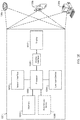
- an audio system 100 for the delivery of digital audio provides for easy, quick access to a variety of digital audio sources through the use of preset assignments.
- digital audio e.g., digital music
- the audio playback devices 110 are electronic devices which are capable of rendering audio content. These devices can access stored audio content (e.g., remotely stored audio content) and stream it for playback. In some cases, the audio playback devices 110 may also be capable of playing locally stored content. These devices render audio with the help of audio codecs and digital signal processors (DSPs) available within.
- DSPs digital signal processors
- the audio playback devices 110 can communicate with each other.
- each audio playback device 100 can communicate with the other audio playback devices 110 within the audio system 100 for synchronization.
- This can be a synchronization of device settings, such as synchronization of preset assignments, or, for synchronization of playback (e.g., such that all or a subset of the audio playback devices 110 play the same content simultaneously and synchronously).
- the digital audio sources 120 are devices and/or services that provide access to one or more associated entities for supplying content (e.g., audio streams) to the audio playback devices 110, and which can be located remotely from the audio playback devices 110.
- An "entity,” as used herein, refers to a grouping or collection of content for playback. Exemplary entities include Internet radio stations and user defined playlists.
- Content is data (e.g., an audio track) for playback.
- Associated entity refers to an entity that is associated with a particular audio source. For example, if the digital audio source 120 is an Internet music service such as Pandora@, an example associated entity would be a radio station provided by Pandora@.
- audio streams are considered to be data. They are processed as digital information that is converted to analog before presentation.
- Data streaming is the method by which data is moved from an audio source 120 to an audio playback device 110.
- the audio system 100 is capable of managing this audio (data) streaming in both fashions; descriptions of these processes are as follows.
- the digital audio sources 120 each maintain a repository of audio content which can be chosen by the user to play.
- the digital audio sources 120 can be based on the Digital Living Network Alliance® (DLNA) or other Web based protocols similar to the Hypertext Transfer Protocol (HTTP).
- DLNA Digital Living Network Alliance
- HTTP Hypertext Transfer Protocol
- Some of the devices and services in this category include Internet based music services 120a such as Pandora®, Spotify®, and vTuner®; network-attached storage (NAS) devices 120b, and a media server daemon 120c (e.g., provided as a component of a computer-based controller).
- the digital audio sources 120 include user defined playlists of digital music files available from network audio sources such as network-attached storage (NAS) devices 120b, and a DLNA server 120c which may be accessible to the audio playback devices 110 over a local area network such as a wireless (Wi-Fi) or wired (Ethernet) home network 150, as well as Internet radio sites 120a such as Pandora®, vTuner®, Spotify®, etc., which are accessible to the audio playback devices 110 over a wide area network 160 such as the Internet.
- network audio sources such as network-attached storage (NAS) devices 120b
- a DLNA server 120c which may be accessible to the audio playback devices 110 over a local area network such as a wireless (Wi-Fi) or wired (Ethernet) home network 150, as well as Internet radio sites 120a such as Pandora®, vTuner®, Spotify®, etc.
- the controllers 130 are responsible for controlling the audio playback devices 110 and for browsing the audio sources 120 in the audio system 100. Some of the devices in this category include desktop computers, laptop computers, and mobile devices such as smart phones and tablets. These devices control the audio playback devices 110 via a wireless communication interface (e.g., IEEE 802.11 b/g, Bluetooth LE, infrared, etc.).
- the controllers 130 serve as an online management tool for a user's network enabled audio playback devices 110.
- the controllers 130 provide interfaces which enable to the user to perform one or more of the following: setup a connection to a Wi-Fi network; create an audio system account for the user, sign into a user's audio system account and retrieve information; add or remove an audio playback device 110 on a user's audio system account; edit an audio playback device's name, and update software; access the audio sources (via the audio playback devices 110); assign an entity (e.g., a playlist or radio station) associated with one of the audio sources 120 to a preset indicator; browse and select recents, where "recents" refers to recently accessed entities; use transport controls (play/pause, next/skip, previous), view "Now Playing” (i.e., content currently playing on an audio playback device 110) and album art; and adjust volume levels.
- entity e.g., a playlist or radio station
- the controllers 130 may include network controllers 130a, 130b and auxiliary controllers 130c.
- the network controllers 130a, 130b are controllers that communicate with the audio playback devices 110 over a wireless (Wi-Fi) network connection.
- the network controllers can include primary network controllers 130a and secondary network controllers 130b.
- the primary network controllers 130a can be utilized for: connecting an audio playback device 110 to a Wi-Fi network (via a USB connection between the audio playback device 110 and the primary network controller 130a); creating a system account for the user; setting up music services; browsing of content for playback; setting preset assignments on the audio playback devices 110; transport control (e.g., play/pause, fast forward/rewind, etc.) for the audio playback devices 110; and selecting audio playback devices 110 for content playback (e.g., single room playback or synchronized multi-room playback).
- Devices in the primary network controller category can include desktop and laptop computers.
- the secondary network controllers 130b may offer some, but not all, of the functions of the primary network controllers 130a. For example, the secondary network controllers 130b may not provide for all of the account setup and account management functions that are offered by the primary network controllers 130a.
- the secondary network controllers 130b may be used for: music services setup; browsing of content; setting preset assignments on the audio playback devices; transport control of the audio playback devices; and selecting audio playback devices 110 for content playback: single room or synchronized multi-room playback.
- Devices in the secondary network controller category can include mobile devices such as smart phones and tablets.
- the auxiliary controllers 130c communicate wirelessly (e.g., via Bluetooth low energy (BTLE) or IR) with an associated (e.g., paired) one of the audio playback devices (item 110, FIG. 1 ).
- the auxiliary controllers 130c may offer limited functionality.
- the auxiliary controllers 130c may be used for: browsing of content; setting of preset assignments on the associated one of the audio playback devices 110; and transport control (play/pause, etc.) of the associated audio playback device.
- the server 140 is a cloud-based server which contains (e.g., within an account database) information related to a user's audio system account. This includes user account information such as the list of the audio playback devices 110 within the system 100, device diagnostic information, preset assignments, etc.
- the server 140 will be connected to by the audio playback devices 140 and by the controllers 130 (e.g., by primary network controllers) for the purpose of preset management, as well as management of audio sources 120 and management of the user's audio system account.
- the controllers 130 e.g., network controllers 130a, 130b
- the audio playback devices 110 may be arranged in different rooms (e.g., kitchen, dining room, basement, etc.) within the home.
- the devices within the LAN 150 connect to a user supplied access point 170 (e.g., a router) and subsequently to a wide area network (WAN) 160 (e.g., the Internet) for communication with the other digital audio sources 120 (Internet based music services 120a) and the server 140.
- a user supplied access point 170 e.g., a router
- WAN 160 wide area network
- the Internet Internet e.g., the Internet
- the audio system 100 can provide for the management of presets (a/k/a preset assignments) and recents.
- Presets are a set of (e.g., six) user-defined shortcuts to content, intended to provide quick access to entities associated with the digital music sources 120 from (1 of 6) preset indicators present on each of the audio playback devices 110.
- the preset indicators can be hardware buttons.
- the preset indicators may be virtual buttons defined by regions on a touch sensitive display.
- the individual preset indicators can be denoted with numerical identifiers.
- the presets can be global or local at the user's option.
- the user can select the global or local option, e.g., during set up of the user's system account. If the user's account is set to provide for global presets, the preset assignments will be synchronized on all the audio playback devices 110 across the audio system 100 such that preset assignments on any one of the audio playback devices correspond to respective preset assignments on each of the other audio playback devices (e.g., such that preset indicator "1" on a first one of the audio playback devices is assigned to the same entity as preset indicator "1" on all of the other audio playback devices 110 in the audio system 100), and, such that, if one of the preset assignments is changed on one of the audio playback devices 110, each of the other audio playback devices 110 is automatically updated such that a corresponding change is made to a corresponding preset assignment on each of the other audio playback devices.
- the synchronization of the preset assignments is managed through a combination of communications between the audio playback devices 110 with the server 140, and communications among the audio playback devices 110 themselves.
- a copy of the global preset assignments is stored locally on each audio playback device 110 associated with the user's account, and a copy of the global preset assignments is also maintained on the server 140.
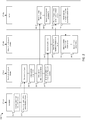
- FIG. 2 is a swim lane diagram 200 showing steps of managing/synchronizing "global" presets.
- "Swim lane” diagrams may be used to show the relationship between the various "actors” in the processes and to define the steps involved in the processes.
- FIG. 2 (and all other swim lane Figures) may equally represent a high-level block diagram of components of the invention implementing the steps thereof.
- the steps of FIG. 2 (and all the other FIGS. employing swim lane diagrams) may be implemented on computer program code in combination with the appropriate hardware.
- This computer program code may be stored on storage media such as a diskette, hard disk, CD-ROM, DVD-ROM or tape, as well as a memory storage device or collection of memory storage devices such as read-only memory (ROM) or random access memory (RAM). Additionally, the computer program code can be transferred to a workstation over the Internet or some other type of network.
- the first audio playback device updates one or more preset assignments based on the user input. Updating can include updating data corresponding to the preset assignments stored locally (e.g., within memory) on the audio playback device.
- the first audio playback device sends information regarding the update to the one or more preset assignments to the remote server for updating a set preset assignments stored on the server.
- the update information may include an updated set of preset assignments.
- the audio playback devices may communicate with the server via a hypertext transfer protocol.
- the first audio playback device may, for example, upload the update information to the server via an HTTP POST command.
- the server receives the update information from the first audio playback device (226), and updates a set of preset assignments stored on the server (228). Updating the set of preset assignments can include replacing previously stored data (e.g., a previously stored set of presets) with the updated information (e.g., an updated set of preset assignments).
- the first audio playback device sends a communication to each of the other audio playback devices (e.g., a separate notification to each of the other audio playback devices) in the audio system notifying the other playback devices that there has been a change to one or more preset assignments.
- a communication to each of the other audio playback devices (e.g., a separate notification to each of the other audio playback devices) in the audio system notifying the other playback devices that there has been a change to one or more preset assignments.
- the server receives the requests from the other audio playback devices.
- the server responds by providing update information (which may consist of an updated set of preset assignments) to the each of the other audio playback devices (238).
- the other playback devices receive the update information from the server.
- the other playback devices update their respective preset assignments (i.e., by updating preset data) (242). Updating can include removing (deleting) old data and replacing with new, updated data. For example, updating can include replacing a previously stored set of preset assignments and replacing with an updated set of preset assignments. Following these steps all of the audio playback devices will have the same preset assignments, and the server will have a copy of the preset assignments.
- the preset assignments will be device-specific such that the preset assignments on any one of the audio playback devices 110 will not necessarily correspond to the preset assignments on any of the other audio playback devices 110.
- a copy of the respective local preset assignments is stored locally on each audio playback device 110 associated with the user's account, and a copy of the local preset assignments for each audio playback device 110 is also maintained on the server 140.
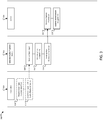
- FIG. 3 is a swim lane diagram 300 illustrating steps for managing local presets. Three swim lanes are shown including a lane for one of the controllers 310, a lane for a first one of the audio playback devices 312, and a lane for the server 316.
- a selected audio playback device i.e., a selected one of the audio playback devices 110, FIG. 1
- the user provides input directly to the audio playback devices, such as by pressing one of the preset indicators.
- the user may provide input via a user interface on one of the controllers (318), and the controller communicates the user input to the selected audio playback device (319).
- the selected audio playback device updates one or more preset assignments based on the user input. Updating can include updating data corresponding to the preset assignments stored locally (e.g., within memory) on the selected audio playback device.
- the selected audio playback device sends information regarding the update to the one or more preset assignments to the remote server for updating a set of preset assignments stored on the server.
- the update information may include an updated set of preset assignments.
- the audio playback devices may communicate with the server via a hypertext transfer protocol.
- the first audio playback device may, for example, upload the update information to the server via an HTTP POST command.
- the server receives the update information from the selected audio playback device (326), and updates a set of preset assignments stored on the server (328). Updating the set of preset assignments can include replacing previously stored data (e.g., a previously stored set of presets) with the updated information (e.g., an updated set of preset assignments). When the presets are set to local, the server will maintain (store and update) a separate set of presets for each audio playback device in the audio system.
- the maintenance of a copy of the respective preset assignments for each of the audio playback devices on the server can be beneficial, for example, where the user elects to change from a local setting to a global setting after the individual devices have already been programed with respective preset assignments.
- the server will prompt the user (e.g., via one of the controllers) to select one of the audio playback devices to serve as a master device.
- the server can then set the preset assignments for the selected master audio playback device as a set of global preset assignments and can provide the global preset assignments to the other audio playback devices in the audio system so as to synchronize the presets across the audio system.
- the "recents list” (a/k/a "recents”) is a list of entities that is populated from content that the user has chosen to play.
- Recent entities can include Internet radio stations (e.g., for Pandora® and vTuner®), and a "group of tracks” selected for Spotify® and stored music.
- the "group of tracks” is a "parent” of a currently playing track, based on whatever the user either browsed to or searched for (e.g., Album, Playlist, Genre > All, Artist > All, etc.).
- the controllers 130, and, in some cases, the audio playback devices 110 can provide access to the recents by displaying the recents list to the user and allowing the user to browse the recents list and select entities therefrom.
- the recents can be limited to a predetermined number of entities (e.g., 50-100 entities). Alternatively or additionally, the recents may be limited by date. For example, the recents may be limited to entities accessed by the user within the last day, month, year, etc., with older entries being purged from the list.
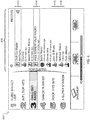
- FIG. 4 is an exemplary user interface 400 which may be provided by one of the controllers 130 ( FIG. 1 ), and which displays the recents list 410.
- the recents entries can be presented in reverse chronological order. "Now playing" (currently playing) tracks, if any, can be presented at the top of the list when the recents are displayed to the user (412), and may include an indication of where (i.e., on which of the audio playback devices) they are playing.
- the controllers 130 can be utilized to control the music selection on the audio playback devices 110 on a device-by-device (i.e., audio playback device by audio playback device) basis. Selecting a "Now Playing" entity from the recents list joins the corresponding music stream if it is not already joined.
- the first audio playback device updates a recents list stored locally (e.g., within memory) on that audio playback device to include the recently selected entity.
- the first audio playback device sends information regarding the update to the recents list to the remote server for updating a recents list stored on the server.
- the update information may include an updated recents list.
- the audio playback devices may communicate with the server via a hypertext transfer protocol.
- the first audio playback device may, for example, upload the update information to the server via an HTTP POST command.
- the server receives the update information from the first audio playback device (526), and updates a recents list stored on the server (528). Updating the recents list can include replacing previously stored data (e.g., a previously stored recents list) with the updated information (e.g., an updated recents list).
- the first audio playback device sends a communication to each of the other audio playback devices (e.g., a separate notification to each of the other audio playback devices) in the audio system notifying the other playback devices that there has been a change to the recents list.
- a communication to each of the other audio playback devices (e.g., a separate notification to each of the other audio playback devices) in the audio system notifying the other playback devices that there has been a change to the recents list.
- the server receives the requests from the other audio playback devices.
- the server responds by providing update information (which may consist of an updated recents list) to each of the other audio playback devices (538).
- the other playback devices receive the update information from the server.
- the other playback devices update their respective copies of the recents list (i.e., by updating recent data) (542). Updating can include removing (deleting) old data and replacing with new, updated data. For example, updating can include replacing a previously stored recents list and replacing with an updated recents list. Following these steps all of the audio playback devices will have the same recents list, and the server will have a copy of the recents list.
- the controller When a user browses recents using one of the controllers, the controller will retrieve the recents list stored locally on a selected one of the audio playback devices for display to the user. Thus, when recents are set to global, the user will be presented with the same list of entities regardless of which one of the audio playback devices the user selects to control though the controller.
- FIG. 6 is a swim lane diagram 600 showing steps for managing local recents. Three swim lanes are shown including a lane for one of the controllers 610, a lane for a selected one of the audio playback devices 612, and a lane for the server 616.
- a selected audio playback device i.e., a selected one of the audio playback devices 110, FIG. 1
- the user may provide input via one of the controllers (518), and the controller can communicate the user input to the first audio playback device (519).
- the selected audio playback device updates a recents list stored locally (e.g., within memory) on that audio playback device to include the recently selected entity.
- the selected audio playback device sends information regarding the update to the recents list to the remote server for updating a recents list stored on the server.
- the update information may include an updated recents list.
- the audio playback devices may communicate with the server via a hypertext transfer protocol.
- the first audio playback device may, for example, upload the update information to the server via an HTTP POST command.
- the server receives the update information from the selected audio playback device (526), and updates a recents list stored on the server (528). Updating the recents list can include replacing previously stored data (e.g., a previously stored recents list) with the updated information (e.g., an updated recents list).
- a previously stored recents list e.g., a previously stored recents list
- the updated information e.g., an updated recents list
- the maintenance of a copy of the respective recents lists for each of the audio playback devices on the server can be beneficial, for example, where the user elects to change from a local setting to a global setting after the individual devices have already curated their respective recents lists.
- the server can prompt the user (e.g., via one of the controllers) to select one of the audio playback devices to serve as a master device.
- the server can then set the recents list for the selected master audio playback device as a global recents list and can provide the global recents list to the other audio playback devices in the audio system so as to synchronize the recents list across the audio system.
- an audio playback device 110 includes an enclosure 710 and on the enclosure 710 there resides a graphical interface 712 (e.g., an OLED display) which can provide the user with information regarding currently playing ("Now Playing") music and information regarding the presets.
- a screen 714 conceals one or more electro-acoustic transducers 715 ( FIG. 7C ).
- the audio playback device 110 also includes a user input interface 716.
- the user input interface 716 includes a plurality of preset indicators 718, which are hardware buttons in the illustrated example.
- the preset indicators 718 (numbered 1-6) provide the user with easy, one press access to entities assigned to those buttons. That is, a single press of a selected one of the preset indicators 718 will initiate streaming and rendering of content from the assigned entity.
- the assigned entities can be associated with different ones of the digital audio sources (items 120a, 120b, 120c, FIG. 1 ) such that a single audio playback device 110 can provide for single press access to various different digital audio sources.
- the assigned entities include at least (i) user-defined playlists of digital music and (ii) Internet radio stations.
- the digital audio sources include a plurality of Internet radio sites, and the assigned entities include individual radio stations provided by those Internet radio sites.
- each preset indicator 718 operates in the same manner, at least from the user's perspective, regardless of which entities are assigned and which of the digital audio sources provide the assigned entities. That is, each preset indicator 718 can provide for single press access to its assigned entity whether that entity is a user-defined playlist of digital music provided by an NAS device or an Internet radio station provided by an Internet music service.
- the audio playback device 110 also includes a network interface 720, a processor 722, audio hardware 724, power supplies 726 for powering the various audio playback device components, and memory 728.
- a network interface 720 a processor 722, audio hardware 724, power supplies 726 for powering the various audio playback device components
- memory 728 Each of the processor 722, the graphical interface 712, the network interface 720, the processor 722, the audio hardware 724, the power supplies 726, and the memory 728 are interconnected using various buses, and several of the components may be mounted on a common motherboard or in other manners as appropriate.
- the network interface 720 provides for communication between the audio playback device 110 and the controller (e.g., items 130a-c, FIG. 1 ), the server (item 140, FIG. 1 ), the audio sources (items 120, FIG. 1 ) and other audio playback devices 110 via one or more communications protocols.
- the network interface 720 may provide either or both of a wireless interface 730 and a wired interface 732.
- the wireless interface 730 allows the audio playback device 110 to communicate wirelessly with other devices in accordance with a communication protocol such as such as IEEE 802.11 b/g.
- the wired interface 732 provides network interface functions via a wired (e.g., Ethernet) connection.
- the network interface 720 may also include a network media processor 734 for supporting Apple AirPlay® (a proprietary protocol stack/suite developed by Apple Inc., with headquarters in Cupertino, California, that allows wireless streaming of audio, video, and photos, together with related metadata between devices). For example, if a user connects an AirPlay® enabled device, such as an iPhone or iPad device, to the LAN 150, the user can then stream music to the network connected audio playback devices 110 via Apple AirPlay®.
- a suitable network media processor is the DM870 processor available from SMSC of Hauppauge, New York.
- the network media processor 734 provides network access (i.e., the Wi-Fi network and/or Ethernet connection can be provided through the network media processor 734) and AirPlay® audio.
- AirPlay® audio signals are passed to the processor 722, using the I 2 S protocol (an electrical serial bus interface standard used for connecting digital audio devices), for downstream processing and playback.
- the audio playback device 110 can support audio-streaming via AirPlay® and/or DLNA's UPnP protocols, and all integrated within one device.
- All other digital audio coming from network packets comes straight from the network media processor 734 through a USB bridge 736 to the processor 722 and runs into the decoders, DSP, and eventually is played back (rendered) via the electro-acoustic transducer(s) 715.
- the network interface 710 can also include a Bluetooth low energy (BTLE) system-on-chip (SoC) 738 for Bluetooth low energy applications (e.g., for wireless communication with a Bluetooth enabled controller (item 130c, FIG. 1 )).
- BTLE SoC Bluetooth low energy system-on-chip
- a suitable BTLE SoC is the CC2540 available from Texas Instruments, with headquarters in Dallas, Texas.
- Streamed data pass from the network interface 720 to the processor 722.
- the processor 722 can execute instructions within the audio playback device (e.g., for performing, among other things, digital signal processing, decoding, and equalization functions), including instructions stored in the memory 728.
- the processor 722 may be implemented as a chipset of chips that include separate and multiple analog and digital processors.
- the processor 722 may provide, for example, for coordination of other components of the audio playback device 110, such as control of user interfaces, applications run by the audio playback device 110.
- a suitable processor is the DA921 available from Texas Instruments.
- the processor 722 provides a processed digital audio signal to the audio hardware 724 which includes one or more digital-to-analog (D/A) converters for converting the digital audio signal to an analog audio signal.
- the audio hardware 724 also includes one or more amplifiers which provide amplified analog audio signals to the electroacoustic transducer(s) 715 for playback.
- the audio hardware 724 may include circuitry for processing analog input signals to provide digital audio signals for sharing with other devices in the acoustic system 100.
- the memory 728 stores information within the audio playback device 110.
- the memory 728 may store account information, such as the preset and recent information discussed above.
- the memory 728 may also provide storage for "tokens" for facilitating single press access to the digital audio sources 120 (e.g., the Internet radio services of FIG. 1 ).
- a token as used herein, is a unique identifier that may be provided by the digital audio source 120 and which allows the digital audio source 120 to recognize the audio playback device 110 as being associated with a user's account with the digital audio source 120 and without requiring the user to enter credentials (e.g., user name, password, etc.) each time the audio playback device 110 attempts to access the digital audio source 120.
- the memory 728 may include, for example, flash memory and/or non-volatile random access memory (NVRAM).
- instructions e.g., software
- the instructions when executed by one or more processing devices (e.g., the processor 722), perform one or more processes, such as those described above (e.g., with respect to FIGS. 2 , 3 , 5 , and 6 ).
- the instructions can also be stored by one or more storage devices, such as one or more computer- or machine-readable mediums (for example, the memory 728, or memory on the processor).
- the instructions may include instructions for performing decoding (i.e., the software modules include the audio codecs for decoding the digital audio streams), as well as digital signal processing and equalization.
- the instructions may also include instructions for enabling certain "browsing" functionality. That is, at least in some cases, the controllers (items 130a-c, FIG. 1 ) serve as graphical remote controls for the audio playback devices 110 and do not communicate with the digital audio sources 120 ( FIG. 1 ) directly, but, instead, communicate with the digital audio sources 120 via the audio playback devices 110.
- FIG. 8 is a swim lane diagram 800 showing steps for browsing entities (e.g., stations) associated with one of the digital audio sources (items 120a-c, FIG. 1 ). Three swim lanes are shown in FIG. 8 including a lane for a selected one of the controllers 810, a lane for a selected one of the audio playback devices 812, and a lane for a selected one of the digital audio sources 813.
- steps for browsing entities e.g., stations
- FIG. 810 Three swim lanes are shown in FIG. 8 including a lane for a selected one of the controllers 810, a lane for a selected one of the audio playback devices 812, and a lane for a selected one of the digital audio sources 813.
- the controller receives input from a user requesting a list of stations (entities) from a selected one of the digital audio sources (i.e., a digital audio source, within the audio system, that is selected by the user via a user interface provided by the controller).
- the controller sends the request to a selected one of the audio playback devices (i.e., an audio playback device, within the audio system, that is selected by the user via a user interface provided by the controller).
- the selected one of the audio playback devices receives the request from the controller.
- the audio playback device connects to the selected digital audio source via the router and Internet connection and requests a list of entities (e.g., stations) associated with that source (826).
- the selected one of the digital audio sources receives the request from the audio playback device.
- the audio source sends a list of available entities to the audio playback device (830).
- the audio playback device receives the list of available entities (832) and the audio playback device sends the list of available entities along to the controller (834).
- the controller receives the list of available entities from the audio playback device (836) and displays the list to the user (838).
- FIG. 9 illustrates another implementation of an audio playback device 110' in which the audio playback device hardware is divided between the enclosure 710 and a separate device ("dongle 900").
- the dongle 900 can be connected to the enclosure 710 via a wired connection 902.
- the network interface 720, the processor 722, the audio hardware 724, and the power supplies 726 are located within a housing 904 of the dongle 900.
- the graphical interface 712 and the user input interface 716 are located on the enclosure 710.
- the enclosure 710 encloses the electro-acoustic transducer(s) 715 and may also include additional electronics 906 (e.g., processors, amplifiers, D/A converters, A/D converters, power supplies, etc.) for processing, converting and amplifying audio content from local audio sources (e.g., audio content stored in memory within the enclosure 710, a CD connected to the audio playback device, a portable music device such as an IPod connected to the audio playback device 110', etc.).
- additional electronics 906 e.g., processors, amplifiers, D/A converters, A/D converters, power supplies, etc.
- an exemplary controller 130 includes a processor 1000, a memory 1010, a display 1012, a user input interface 1014, and a network interface 1016, among other components.
- the controller 130 may also be provided with a mass storage device 1018, such as a hard drive, a micro-drive, or other device, to provide additional storage.
- a mass storage device 1018 such as a hard drive, a micro-drive, or other device, to provide additional storage.
- Each of the processor 1000, the memory 1010, the display 1012, and the network interface 1016 are interconnected using various buses, and several of the components may be mounted on a common motherboard or in other manners as appropriate.
- the processor 1000 can execute instructions (e.g., software) within the controller 130, including instructions stored in the memory 1010 or in a secondary storage device (e.g., mass storage device 1018).
- the processor 1000 may be implemented as a chipset of chips that include separate and multiple analog and digital processors.
- the processor 1000 may provide, for example, for coordination of other components of the controller 130, such as control of user interfaces, applications run by the controller 130, and network communication by the controller 130.
- the processor 1000 may communication with a user through the display 1012 and the user input interface 1014.
- the processor 1000 may communicate with the user through a display interface 1020 coupled to the display 1012.
- the display 1012 may include an LCD monitor, or a touch sensitive display (e.g., in the case of a mobile device).
- the display interface 1020 may comprise appropriate circuitry for driving the display 1012 to preset graphical and other information to the user.
- the user input interface 1014 may include one or more user input devices such as a keyboard, a pointer device such as a mouse, and/or a touch sensitive display. In some cases, the same device (e.g., a touch sensitive display) may be utilized to provide the functions of the display 1012 and the user input interface 1014.
- a touch sensitive display e.g., a touch sensitive display
- the network interface 1016 facilitates wireless communication (e.g., Wi-Fi, Bluetooth, IR, etc.) with one or more of the audio playback devices (item 110, FIG. 1 ) via a corresponding network interface (item 720, FIG. 7C ) on the audio playback device 110.
- wireless communication e.g., Wi-Fi, Bluetooth, IR, etc.
- the memory 1010 stores information within the controller 130.
- the memory 1010 is a volatile memory unit or units.
- the memory 1010 is a non-volatile memory unit or units.
- the memory 1010 may also be another form of computer-readable medium, such as magnetic or optical disk.
- the mass storage device 1018 is capable of providing mass storage for the controller 130.
- the mass storage device 1018 may be or contain a computer readable medium, such as a floppy disk device, a hard disk device, an optical disk device, or a tape device, a flash memory or other similar solid state memory device, or an array of devices.
- Instructions can be stored in an information carrier.
- the instructions when executed by one or more processing devices (e.g., the processor 1000), perform one or more processes, such as those described above (e.g., with reference to FIGS. 2 , 3 , 5 , 6 and 8 ).
- the instructions can also be stored by one or more storage devices such as computer- or machine-readable mediums (for example, the memory 1010, the storage device 1018, or memory in the processor 1000).
- the controller software can include a user application 1100, a DLNA server daemon 1110, and a USB driver 1112.
- the user application 1100 is run by the user and can be started from a daemon in response to a Region Icon command.
- the user application 1100 includes computer-executable instructions (e.g., software modules) for system account creation and management (i.e., creating and managing a user's system account) (1114); audio playback device registration and configuration (1116); network management (1118); preset/recent management (1120); transport control (e.g., play/pause, rewind/forward, etc.) for the audio playback devices (1122); initiating firmware updates for the audio playback devices (1124); music services setup (1126); and context sensitive help (1128).
- system account creation and management i.e., creating and managing a user's system account
- audio playback device registration and configuration (1116
- network management e.g., preset/recent management
- transport control e.g., play/pause, rewind/forward, etc.
- firmware updates for the audio playback devices
- music services setup e.g., music services setup
- context sensitive help e.g., context sensitive help
- the DLNA server daemon 1110 serves music from the user's computer (e.g., iTunes, Windows Media Player, or files in a folder) to audio playback devices 110.
- the DLNA server 1110 is installed as a system service and always runs when the computer (controller 130) is booted.
- the DLNA server daemon 1110 shows as a tray icon when running in the background and can continue to serve music even when the user application 1100 is shut down.
- the DLNA server daemon 1110 can provide the user with the options for enabling and disabling the serving of the selected music library.
- the USB driver 1112 defines how the audio playback device 110 communicates with the controller 130 over a local USB connection.
- the USB driver 1112 is installed as a device driver.
- the USB driver 1112 is just an .INF file (i.e., a plain text information file) that points to a standard USB driver.
- the USB driver 1112 can be loaded by the controllers 130 operating system when the audio playback device 110 is connected via USB.
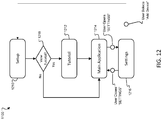
- FIG. 12 is a state interaction diagram that shows an overview of various user interface states of the user application 1100.
- the user application consists of four primary user interface (UI) states: a setup state 1210; a tutorial state 1212; a main application state 1214; and a settings state 1216.
- UI user interface
- a first run of the user application 1100 initiates the setup state 1210.
- the setup state 1210 performs network (e.g., Wi-Fi/Ethernet) setup, system account creation, and music services setup via the corresponding software modules ( FIG. 11 ).
- network e.g., Wi-Fi/Ethernet
- the Wi-Fi setup is automatically triggered when an audio playback device 110 ( FIG. 1 ) is connected to a controller 130 ( FIG. 1 ) via USB.
- the setup state 1210 When the setup state 1210 is completed, the user is shown a pop-up 1218 that gives him/her the option to view a tutorial, or to skip it and go directly to the main application state 1214. If the user elects to view the tutorial, the tutorial state 1212 runs and provides a step-by-step overview of how to use the main application Ul state.
- the secondary network controllers 130b FIG. 1
- the secondary network controllers 130b may not offer all of the functionality of the primary network controllers 103a ( FIG. 1 ). More specifically, the secondary network controllers 130b may not provide the setup functions offered by the primary network controllers 130a, and, consequently, the secondary network controllers 130b may start at step 1218.
- the main application state 1214 runs.
- the main application state 1214 is the primary application view that the user interfaces with.
- the user can access the settings state 1216 via the main application state 1214 (e.g., settings can be a menu item that is selectable from the main application state 1214.
- the settings state 1216 is an interface for adjusting system settings.
- the settings state 1216 can be used to: (i) adjust account settings (e.g., change an account password, delete an audio system account, etc.); (ii) adjust device settings (e.g., update software, change a device name, etc.); (iii) adjust presets and recents settings (e.g., change between local and global settings); (iv) adjust music services settings (e.g., add a music service, change location for local Internet radio, edit a Pandora® account, connect another Pandora® account); and adjust stored music settings (e.g., add or remove a music library).
- account settings e.g., change an account password, delete an audio system account, etc.
- device settings e.g., update software, change a device name, etc.
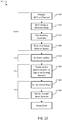
- FIG. 13 illustrates a high-level workflow for the setup state.
- the setup state 1210 consists of four main steps: Adding devices (e.g., audio playback devices and auxiliary controllers) to a user's system network (1310); audio playback device software update (1312); system account creation (1314); and music setup (1316).
- devices e.g., audio playback devices and auxiliary controllers
- the setup state 1210 is generally initiated when an audio playback device 110 is connected to the controller 130 via a USB connection. This starts the step of adding devices to an audio system network LAN 150 ( FIG. 1 ), which will begin by prompting the user to select how the USB connected audio playback device 110 will connect to the LAN (item 150, FIG. 1 ) (e.g., via Wi-Fi connection or via Ethernet connection) (1320). Once the user selects the network connection type, the user will be prompted to setup the network connection (1322). This can include entering network credentials (e.g., entering a network name or selecting from a list of available networks and entering a password if the network is password protected).
- network credentials e.g., entering a network name or selecting from a list of available networks and entering a password if the network is password protected.
- the user interface on the controller 130 can prompt the user to disconnect the audio playback device 110 from the controller 130 (i.e., disconnect the USB connection) and connect the audio playback device 110 to power where the user intends to use it, and then return to complete setup.
- the user interface can prompt the user to pair an auxiliary controller (BTLE controller) and can walk the user through the pairing process (1324). Then, the user can be prompted to setup additional devices (1326). Additional devices can be added by connecting via USB and going through the aforementioned steps for each subsequently added device.
- BTLE controller auxiliary controller
- additional devices can be added by connecting via USB and going through the aforementioned steps for each subsequently added device.
- device software is updated.
- the controller sends a command to the network connected audio playback devices to check for software updates (the software updates may be made available through the server and/or via a separate Internet service).
- the controller will prompt the user to update the audio playback devices if any updates are available and sends a command to the audio playback devices for update.
- the controller can indicate the software update progress via the user interface and can display a popup window in case of any errors.
- the controller will guide the user through creating an audio system account or will prompt the user to sign in to an existing account (1330).
- the system account will be created on the server via direct interaction between the controller and the server.
- the controller guides the user through music setup (1316) which includes setting up the user's stored music sources including PC stored music, NAS devices, etc. (1332) as well as setting up Internet based audio sources (e.g., Pandora®, vTuner®, etc.) (1334).
- music setup (1316) which includes setting up the user's stored music sources including PC stored music, NAS devices, etc. (1332) as well as setting up Internet based audio sources (e.g., Pandora®, vTuner®, etc.) (1334).
- the user when setting up the digital audio sources, the user may be prompted to enter account credentials. For example, when adding a user's Pandora® account to the user's system account, the Pandora® Internet service may request account credentials from the user. In return, Pandora® will return a unique identifier ("token") that can be stored on the server and in memory on each of the audio playback devices and which will allow the audio playback devices subsequent access to the remote audio source without requiring login each time.
- token unique identifier
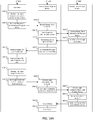
- FIG. 14A is a swim lane diagram showing steps for music setup for a digital audio source such as an Internet music service. Three swim lanes are shown in FIG. 14A including a lane for one of the controllers 1410, a lane for a selected one of the audio playback devices 1412, and a lane for a selected one of the digital audio sources (e.g., an Internet music service such as Pandora®) 1414.
- a digital audio source such as an Internet music service.
- the controller receives user input requesting access to an Internet music service, and, at step 1422, sends the request to a selected one of the audio playback devices.
- the selected audio playback device receives the request from the controller (1424) and sends the request to the Internet music source (1426).
- Internet music source receives request (1428) and responds with a request for login credentials (1430).
- the selected audio playback device receives the request for credentials (1432) and sends the request to the controller (1434).
- the controller receives the request for login credentials, and, at step 1438, the controller displays the request for login credentials to the user.
- the controller receives login credentials from the user, and, at step 1442, the controller sends the login credentials to the selected audio playback device.
- the selected audio playback device receives the login credentials (1444) and sends the credentials to the Internet music service (1446).
- the Internet music service receives the login credentials, and, at step 1450, authenticates the user's account. If the user's account is authenticated, the Internet music service will grant access and return a token to the selected audio playback device (1452). As discussed above, the token allows the Internet music service to identify and associate the device with a user's Internet music service account, thus obviating the need for login credentials after music services setup.
- the selected audio playback device receives the token (1454), and stores the token within memory in the selected audio playback device (1456).
- the token can then be distributed to other devices within the audio system to allow those other devices to similarly access the Internet music service.
- FIG. 14B is a swim lane diagram showing steps for for distribution of tokens for accessing account based digital audio sources such as certain Internet music services.
- Three swim lanes are shown in FIG. 14B including a lane for a first one of the audio playback devices 1460, a lane for the other audio playback devices in the audio system 1462, and a lane for the remote server 1464.
- the first one of the audio playback devices corresponds to the selected one of the audio playback devices that was utilized by the selected one of the controllers to setup the Internet music service as described above with respect to FIG. 14A .
- the first audio playback device sends a copy of the token received from the Internet music service to the server.
- the server receives the token from the first audio playback device (1468), and stores a copy of the token locally (e.g., within memory) on the server (1470).
- the first audio playback device sends a communication to each of the other audio playback devices (e.g., a separate notification to each of the other audio playback devices) in the audio system notifying the other playback devices that there have been changes to the user's account (i.e., a new digital audio source has been added to the audio system).
- a communication to each of the other audio playback devices (e.g., a separate notification to each of the other audio playback devices) in the audio system notifying the other playback devices that there have been changes to the user's account (i.e., a new digital audio source has been added to the audio system).
- the other audio playback devices receive the notification from the first audio playback device.
- each of the audio playback devices sends a communication to the server requesting information corresponding to the changes to the user's account (1476).
- the server receives the requests from the other audio playback devices.
- the server responds by providing the new account information (which may consist of a copy of the token for the recently added Internet music service) to each of the other audio playback devices (1480).
- the other playback devices receive the new account information (e.g., a copy of the token) from the server.
- the other playback devices update their locally stored copies of the user's account information (i.e., by adding the token to stored data) (1483).
- the distribution of "tokens” can help to facilitate single press access to the sources (e.g., via the preset indicators on the audio playback devices) to provide for source agnostic operation (i.e., the audio playback devices behave the same regardless of the source). This can help to allow the preset indicators on the audio playback devices to provide access to their respectively assigned entities irrespective of the associated digital audio source.
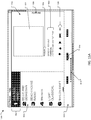
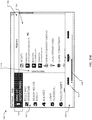
- the user interface 1500 for the main application state includes: an audio playback device region 1510, a preset region 1512, and a source region 1514.
- the audio playback device region 1510 lists audio playback devices 1516 on the LAN (150, FIG. 1 ) that are available for control. User can select the audio playback device 1516 from the list of available devices. The device that is currently selected is centered in the region. This is the device for which now playing information, presets, and recents are shown.
- the audio playback device region 1510 includes a volume slider 1518 which can be used to control the volume of the selected device.
- the preset region provides a list of preset indicators 1520 (in the form of virtual buttons) which correspond to the preset indicators (item 718, FIG. 7B ) on the selected audio playback device.
- the list can include a description of the corresponding entity assigned to the preset indicator along with a numerical identifier for the preset indicator.
- Users can select a preset (e.g., by double-clicking) play content associated with the selected preset with the selected audio playback device. Or, as discussed below, the user can use the interface to assign entities to the presets.
- the source region 1514 displays one of two modes of the main application.
- the two modes of the main application include a "Now Playing" mode ( FIG. 15A ) and an “Explore” mode ( FIG. 15B ).
- the source region 1514 displays album art 1522 for content being played by the selected audio playback device.
- the source region 1514 includes an identification of the audio source 1524 for the playing content, as well as source specific now playing information 1526 such as Artist Name/Album Name/Track name.
- the source region 1514 also includes source specific buttons 1528, which may include transport functions such as play, pause, skip forward, etc. Also displays an "Explore” button 1530 which allows the user to navigate to the Explore mode.
- the Explore mode allows the user to browse available content and features.
- the source region 1514 displays one of a plurality of lists that the user can navigate through to select content to play, to select an entity to assign to a preset, to access Help content, and/or to manage settings.
- a top-level Explore list ( FIG. 15B ) will include links 1532 to: digital audio sources (e.g., global and/or local Internet radio provided by vTuner®, stored music, Pandora®, etc.), recents list, help content, and the settings UI state. Audio sources with multiple accounts (e.g., multiple Pandora® accounts all associated with the user's system account) may be listed by date, with the first one set up listed first.
- digital audio sources e.g., global and/or local Internet radio provided by vTuner®, stored music, Pandora®, etc.
- Audio sources with multiple accounts e.g., multiple Pandora® accounts all associated with the user's system account
- Selection of an audio source opens a sub-list of entities ( FIG. 15C , showing sub-list of entities) associated with the selected source (the "Global Internet Radio" source (e.g., provided by vTuner®)) in the source region 1514.
- the sub-list of entities is generated via communication between the controller, the selected audio playback device, and the selected audio source as discussed above.
- a "Now Playing" button 1534 allows the user to navigate to the Now Playing mode.
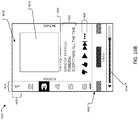
- FIGS. 16A through 16C illustrate another implementation of a graphical user interface 1600 for the main application that may be utilized for mobile devices.
- the main application can be in one of three modes: Presets mode ( FIG. 16A ), Now Playing mode ( FIG. 16B ), or Explore mode ( FIG. 16C ).
- the user can navigate between Presets, Now Playing, and Explore modes by swiping/navigating left/right amongst these modes.
- the user interface 1600 for the main application includes: an audio playback device region 1612, a presets region 1614, and a source region 1616.
- the audio playback device region 1612 lists audio playback devices on the LAN (item 150, FIG. 1 ) that are available for control. User can select the audio playback device from the list of available devices.
- the Audio playback device region 1612 includes a volume slider 1616 which can be used to control the volume of the selected device.
- the presets region 1614 includes a list of preset indicators 1620 (in the form of virtual buttons) which correspond to the preset indicators on the selected audio playback device.
- the preset indicators (item 718, FIG. 7B ) are identified by corresponding numerical identifiers for each preset indicator. Users can select a preset (e.g., by double-clicking) play content associated with the selected preset with the selected audio playback device.
- the source region 1616 displays the Presets mode, the Now Playing mode, or the Explore mode of the main application.
- the source region 1616 displays additional information for the device presets.
- the additional information can include a description of the corresponding entity assigned to the preset along with a numerical identifier for the preset button.
- the source region 1616 displays album art 1618 for content being played by the selected audio playback device.
- the source region 1616 also includes an identification of the audio source 1620 for the playing content, as well as source specific now playing information 1622 such as Artist Name/Album Name/Track name.
- the source region 1616 also includes source specific buttons 1624, which may include transport functions such as play, pause, skip forward, etc.
- the Explore mode ( FIG. 16C ) allows the user to browse available content and features.
- the source window displays one of a plurality of menus that the user can navigate through to select content to play, to select an entity to assign to a preset, to access Help content, and/or to manage settings.
- a top-level Explore list will include links to: available audio sources, recents, help content, and the settings UI state. Audio sources with multiple accounts (e.g., multiple Pandora® accounts all associated with the user's system account) may be listed by date, with the first one set up listed first.
- Audio sources with multiple accounts e.g., multiple Pandora® accounts all associated with the user's system account
- Selection of an audio source opens a sub-list of entities associated with the selected source in the source window.
- the sub-list of entities is generated via communication between the controller, the selected audio playback device, and the selected audio source as discussed above.
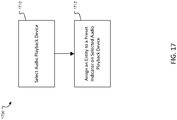
- FIG. 17 illustrates a process 1700 for setting preset from a controller.
- the process 1700 includes selecting an audio playback device from the audio playback device region of the user interface (1710).
- the selected audio playback device will be the device that the controller utilizes to communicate with the digital audio sources.
- the process 1700 also includes assigning an entity to a preset indicator on the selected audio playback device (1712).
- preset assignments can be set from either the "Now Playing” mode or the "Explore” mode of the main application. Assigning from the Now Playing mode will assign entity associated with currently playing content to the selected preset.
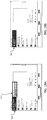
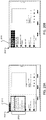
- FIGS. 18A and 18B show a sequence of screen displays illustrating the setting of a preset assignment from the Now Playing mode on a desktop or laptop computer.
- the user selects (e.g., by clicking with pointing device (mouse) or tapping in the case of a touch sensitive screen) and holds one of the preset indicators 1800 to cause the preset indicator to be highlighted ( FIG. 18A ).
- the preset indicator 1800 will be assigned to the "Now Playing" entity. This may be indicated by a change in the text associated with the preset indicator 1800 (e.g., the text may be updated to reflect the newly associated entity's name, as shown in FIG. 18B ).
- the new or updated preset assignment will take effect on the selected audio playback device 1810 (i.e., the device selected in the audio playback region) which is being controlled by the controller.
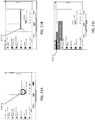
- the user can right-click on one the preset indicators 1900 and select "Set Preset" from a right-click menu 1910 to assign the entity associated with the currently playing content to be assigned to the selected preset indicator 1900.
- the main application state may include a menu bar 2000 with a "Set Preset” button 2010.
- the user can set a preset assignment by clicking on the "Set Preset” button 2010 to display a Preset menu 2012.
- the user can choose a preset from the preset menu 2012 to assign the entity (e.g., Internet radio station) associated with the "Now Playing" content to.
- Preset changes may be indicated by text changes to the station name associated with the preset indicator ( FIG. 18B ).
- FIGS. 21A through 21C illustrate yet another method of setting a preset from the "Now Playing" mode.
- the user can click/tap 2100 and hold within the source region ( FIG. 19A ).
- the entity to be assigned to a preset appears in a pop-up 2110 in the clicked/tapped area ( FIG. 19B ).
- the entity is dragged and dropped on the destination preset indicator 2112 ( FIG. 19C ).
- FIGS. 22A and 22B illustrate a method of assigning a preset in the Browse mode.
- the user selects an entity 2200 from a list of entities 2210 and drags the selected entity to the preset indicator 2212 ( FIG. 20A ).
- the preset assignment is updated to reflect the change. This can be reflected by a text update on the preset indicator 2212 ( FIG. 20B ).
- the preset assignment can be set or changed on the audio playback device itself by pressing and holding one of the preset indicators on the device's enclosure. This will assign an entity associated with currently plating content to the selected preset indicator.
- the preset assignments can be synchronized across the audio system as described above with respect to FIG. 2 .
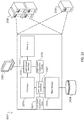
- FIG. 23 illustrates an exemplary computing device 2300 that can be utilized to implement the server (item 140, FIG. 1 ).
- the computing device 2300 is intended to represent various forms of digital computers, such as servers, blade servers, mainframes, and other appropriate computers.
- the components shown here, their connections and relationships, and their functions, are meant to be examples only, and are not meant to be limiting.
- the computing device 2300 includes a processor 2310, a memory 2312, a storage device 2314, a high-speed interface 2316 connecting to the memory 2312 and multiple high-speed expansion ports 2318, and a low-speed interface 2320 connecting to a low-speed expansion port 2322 and the storage device 2314.
- Each of the processor 2310, the memory 2312, the storage device 2314, the high-speed interface 2316, the high-speed expansion ports 2318, and the low-speed interface 2320 are interconnected using various busses, and may be mounted on a common motherboard or in other manners as appropriate.
- the processor 2310 can process instructions (e.g., a software program) for execution within the computing device 2300, including instructions stored in the memory 2312 or on the storage device 2314 to display graphical information for a GUI on an external input/output device, such as a display 2324 coupled to the high-speed interface 2316.
- instructions e.g., a software program
- multiple processors and/or multiple buses may be used, as appropriate, along with multiple memories and types of memory.
- multiple computing devices may be connected, with each device providing portions of the necessary operations (e.g., as a server bank, a group of blade servers, or a multiprocessor system).
- the memory 2312 stores information within the computing device 2300.
- the memory 2312 is a volatile memory unit or units.
- the memory 2312 is a non-volatile memory unit or units.
- the memory 2312 may also be another form of computer-readable medium, such as a magnetic or optical disk.
- the storage device 2314 is capable of providing mass storage for the computing device 2300.
- the storage device 2314 may be or contain a computer-readable medium, such as a floppy disk device, a hard disk device, an optical disk device, or a tape device, a flash memory or other similar solid state memory device, or an array of devices, including devices in a storage area network or other configurations.
- Instructions can be stored in an information carrier.
- the instructions when executed by one or more processing devices (for example, processor 2310), perform one or more processes, such as those described above (e.g., with reference to FIGS. 2 , 3 , 5 , 6 , 14B ).
- the instructions can also be stored by one or more storage devices such as computer-readable mediums (for example, the memory 2312, the storage device 2314, or memory on the processor 2310).
- the storage device 2314 may provide storage for a database 2324.
- the database can be used to store audio system account information.
- the high-speed interface 2316 manages bandwidth-intensive operations for the computing device 2300, while the low-speed interface 2320 manages lower bandwidth-intensive operations. Such allocation of functions is an example only.
- the high-speed interface 2316 is coupled to the memory 2312, the display 2322 (e.g., through a graphics processor or accelerator), and to the high-speed expansion ports 2318, which may accept various expansion cards (not shown).
- the low-speed interface 2320 is coupled to the storage device 2314 and the low-speed expansion port 2322.
- the low-speed expansion port 2322 which may include various communication ports (e.g., USB, Bluetooth, Ethernet, wireless Ethernet) may be coupled to one or more input/output devices, such as a keyboard, a pointing device, a scanner, or a networking device such as a switch or router, e.g., through a network adapter.
- input/output devices such as a keyboard, a pointing device, a scanner, or a networking device such as a switch or router, e.g., through a network adapter.
- Implementations of the systems and methods described above comprise computer components and computer-implemented steps that will be apparent to those skilled in the art.
- the computer-implemented steps may be stored as computer-executable instructions on a computer-readable medium such as, for example, floppy disks, hard disks, optical disks, Flash ROMS, nonvolatile ROM, and RAM.
- the computer-executable instructions may be executed on a variety of processors such as, for example, microprocessors, digital signal processors, gate arrays, etc.
- the instructions may be implemented in a high-level procedural and/or object-oriented programming language, and/or in assembly/machine language.
Landscapes
- Engineering & Computer Science (AREA)
- Theoretical Computer Science (AREA)
- Multimedia (AREA)
- Physics & Mathematics (AREA)
- General Engineering & Computer Science (AREA)
- General Physics & Mathematics (AREA)
- Databases & Information Systems (AREA)
- Software Systems (AREA)
- Data Mining & Analysis (AREA)
- Signal Processing (AREA)
- Human Computer Interaction (AREA)
- Mathematical Physics (AREA)
- Health & Medical Sciences (AREA)
- Audiology, Speech & Language Pathology (AREA)
- General Health & Medical Sciences (AREA)
- Computing Systems (AREA)
- Technology Law (AREA)
- Computer Hardware Design (AREA)
- Computer Security & Cryptography (AREA)
- Library & Information Science (AREA)
- Reverberation, Karaoke And Other Acoustics (AREA)
- Selective Calling Equipment (AREA)
- Information Transfer Between Computers (AREA)
- Indexing, Searching, Synchronizing, And The Amount Of Synchronization Travel Of Record Carriers (AREA)
Claims (9)
- Verfahren zum Verwalten von Voreinstellungen in einem Audiosystem (100), umfassend eine Vielzahl von Audio-Abspielgeräten (110) und einen Fernserver (140; 216), wobei das Verfahren umfasst:Auswählen (1710) eines ersten Audio-Abspielgerätes aus der Vielzahl von Audio-Abspielgeräten;Zuweisen (1712) voreingestellter Zuweisungen zu jeweiligen voreingestellten Indikatoren (718) einer Vielzahl von voreingestellten agnostischen Quellindikatoren in der Form von Hardware- oder virtuellen Schaltflächen auf dem ersten Audio-Abspielgerät (212), wobei jede der voreingestellten Zuweisungen eine Zuweisung einer jeweiligen Einheit ist, die eine Gruppierung oder Sammlung von Inhalt zum Abspielen ist, die mit einer von einer Vielfalt an digitalen Audioquellen (120a, 120b, 120c) verknüpft ist, die mindestens einige der internetbasierten Musikdienste, wie Internet-Radiowebsites (120a), netzwerkgebundene Speichergeräte (NAS) (120b) und ein Medienserverdämon (120c) beinhalten, wobei die voreingestellten Indikatoren angeordnet sind, um für einen Zugriff durch einfachen Druck auf ihre jeweils zugewiesenen Einheiten, auf dieselbe Art und Weise, ungeachtet der verknüpften digitalen Audioquelle zu sorgen;Synchronisieren voreingestellter Zuweisungen in der Vielzahl von Audio-Abspielgeräten (110), sodass die voreingestellten Zuweisungen in einem beliebigen der Audio-Abspielgeräte jeweiligen voreingestellten Zuweisungen in dem ersten Audio-Abspielgerät entsprechen, und, sodass, wenn eine der voreingestellten Zuweisungen in dem ersten Audio-Abspielgerät gerändert wird, jedes der anderen Audio-Abspielgeräte (214) automatisch aktualisiert wird, sodass eine entsprechende Änderung an einer entsprechenden voreingestellten Zuweisung in jedem der anderen Audio-Abspielgeräte vorgenommen wird,wobei der Schritt des Synchronisierens voreingestellter Zuweisungen in der Vielzahl von Abspielgeräten (110) die folgenden Schritte umfasst, die in dem Fernserver ausgeführt werden:Empfangen (226) von Informationen von dem ersten Audio-Abspielgerät (212) des Audiosystems im Hinblick auf eine Änderung an einer oder mehr einer Vielzahl von voreingestellten Zuweisungen;Aktualisieren (228) gespeicherter voreingestellter Daten basierend auf den von dem ersten Audio-Abspielgerät empfangenen Informationen; undBereitstellen (238) von Aktualisierungsinformationen für ein oder mehrere andere Audio-Abspielgeräte (214) des Audiosystems, sodass das eine oder mehrere andere Audio-Abspielgeräte ihre jeweilgen voreingestellten Zuweisungen aktualisieren (242), um jenen des ersten Audio-Abspielgerätes zu entsprechen,
dadurch gekennzeichnet, dass
das Verfahren weiter die Schritte des einen oder mehrerer anderer Audio-Abspielgeräte (214) des Audiosystems umfasst:Empfangen einer Benachrichtigung (232) von dem ersten Audio-Abspielgerät (212) im Hinblick auf die Änderung einer oder mehrerer einer Vielzahl von voreingestellten Zuweisungen;als Reaktion auf das Empfangen der Benachrichtigung Kontaktieren (234) des Fernservers (216) für das Audiosystem, um Aktualisierungsinformationen abzufragen, undAktualisieren (242) einer oder mehrerer voreingestellter Zuweisungen basierend auf von dem Fernserver empfangener (240) Aktualisierungsinformationen, sodass voreingestellte Zuweisungen an dem einen oder mehreren anderen Audio-Abspielgeräten jeweiligen voreingestellten Zuweisungen an dem ersten Audio-Abspielgerät entsprechen. - Verfahren nach Anspruch 1, weiter umfassend:Empfangen (1468) einer Kopie eines Tokens von dem ersten Audio-Abspielgerät (1460), wobei der Token eine eindeutige Kennung ist, welche eine entsprechende von den digitalen Audioquellen (120a, 120b, 120c) wiedererkennt und einem Nutzeraccount zuweist, wodurch ein Zugang zu dem Nutzeraccount bereitgestellt wird;Speichern (1470) der Kopie des Tokens innerhalb des Fernservers (1464); und Bereitstellen (1480) von Kopien des Tokens für das eine oder mehrere Audio-Abspielgeräte (1462) des Audiosystems, sodass die entsprechende der digitalen Audioquellen das eine oder mehrere Audio-Abspielgeräte als solche wiedererkennen kann, die mit dem Nutzeraccount verknüpft sind.
- Verfahren nach Anspruch 1, weiter umfassend das Empfangen (220) einer Nutzereingabe in Hinblick auf die Zuweisung einer Einheit, die mit einer der digitalen Audioquellen verknüpft ist, zu einem der voreingestellten Indikatoren in einem ersten der Audio-Abspielgeräte (212).
- Verfahren nach Anspruch 3, wobei die Nutzereingabe einer Betätigung einer Hardware-Schaltfläche (718) an einem ersten der Audio-Abspielgeräte entspricht.
- Verfahren nach Anspruch 3, wobei die Nutzereingabe über einen Controller (210) empfangen wird, der über eine Netzwerkverbindung mit dem ersten der Audio-Abspielgeräte verbunden ist.
- Verfahren nach Anspruch 1, wobei die zuweisbaren Einheiten mindestens (i) nutzerdefinierte Playlists von digitaler Musik und (ii) Internet-Radiosendern beinhalten.
- Audiosystem (100), umfassend eine Vielzahl von Audio-Abspielgeräten (110) und einen Fernserver (140; 216), wobei das Audiosystem umfasst:Mittel zum Auswählen (1710) eines ersten Audio-Abspielgerätes aus der Vielzahl von Abspielgeräten;Mittel zum Zuweisen (1712) voreingestellter Zuweisungen zu jeweiligen voreingestellten Indikatoren (718) einer Vielzahl von voreingestellten agnostischen Quellindikatoren in der Form von Hardware- oder virtuellen Schaltflächen auf dem ersten Audio-Abspielgerät (212), wobei jede der voreingestellten Zuweisungen eine Zuweisung einer jeweiligen Einheit ist, die eine Gruppierung oder Sammlung von Inhalt zum Abspielen ist, die mit einer von einer Vielfalt an digitalen Audioquellen (120a, 120b, 120c) verknüpft ist, die mindestens einige der internetbasierten Musikdienste, wie Internet-Radiowebsites (120a), netzwerkgebundene Speichergeräte (NAS) (120b) und ein Medienserverdämon (120c) beinhalten, wobei die voreingestellten Indikatoren angeordnet sind, um für einen Zugriff durch einfachen Druck auf ihre jeweils zugewiesenen Einheiten, auf dieselbe Art und Weise, ungeachtet der verknüpften digitalen Audioquelle zu sorgen;Mittel zum Synchronisieren voreingestellter Zuweisungen in der Vielzahl von Audio-Abspielgeräten (110), sodass die voreingestellten Zuweisungen in einem beliebigen der Audio-Abspielgeräte jeweiligen voreingestellten Zuweisungen in dem ersten Audio-Abspielgerät entsprechen, und, sodass, wenn eine der voreingestellten Zuweisungen in dem ersten Audio-Abspielgerät gerändert wird, jedes der anderen Audio-Abspielgeräte (214) automatisch aktualisiert wird, sodass eine entsprechende Änderung an einer entsprechenden voreingestellten Zuweisung an jedem der anderen Audio-Abspielgeräte vorgenommen wird,wobei die Mittel zum Synchronisieren voreingestellter Zuweisungen in der Vielzahl von Audio-Abspielgeräten (110) die folgenden Mittel des Fernservers umfasst:Mittel zum Empfangen (226) von Informationen von dem ersten Audio-Abspielgerät (212) des Audiosystems im Hinblick auf eine Änderung an einer oder mehreren einer Vielzahl von voreingestellten Zuweisungen;Mittel zum Aktualisieren (228) gespeicherter voreingestellter Daten basierend auf den von dem ersten Audio-Abspielgerät empfangenen Informationen; undMittel zum Bereitstellen (238) von Aktualisierungsinformationen für ein oder mehrere andere Audio-Abspielgeräte (214) des Audiosystems, sodass das eine oder mehrere andere Audio-Abspielgeräte ihre jeweilgen voreingestellten Zuweisungen aktualisieren (242), um jenen des ersten Audio-Abspielgerätes zu entsprechen,
dadurch gekennzeichnet, dass
das Audiosystem weiter die folgenden Mittel des einen oder mehrerer anderer Audio-Abspielgeräte (214) des Audiosystems umfasst:Mittel zum Empfangen einer Benachrichtigung (232) von dem ersten Audio-Abspielgerät (212) im Hinblick auf eine Änderung einer oder mehrerer einer Vielzahl von voreingestellten Zuweisungen;als Reaktion auf das Empfangen der Benachrichtigung Mittel zum Kontaktieren (234) des Fernservers (216) für das Audiosystem, um Aktualisierungsinformationen abzufragen, undMittel zum Aktualisieren (242) einer oder mehrerer voreingestellter Zuweisungen basierend auf von dem Fernserver empfangener (240) Aktualisierungsinformationen,sodass voreingestellte Zuweisungen in dem einen oder mehreren anderen Audio-Abspielgeräten jeweiligen voreingestellten Zuweisungen an dem ersten Audio-Abspielgerät entsprechen. - Audiosystem (100) nach Anspruch 7, wobei das erste Audio-Abspielgerät (110) konfiguriert ist, um betrieblich mit einer Vielfalt an digitalen Audioquellen (120a, 120b, 120c) verbunden zu werden, die mindestens einige der internetbasierten Musikdienste, wie Internet-Radiowebsites (120a), netzwerkgebundene Speichergeräte (NAS) (120b) und einen Medienserverdämon (120c) beinhalten, wobei das erste Audio-Abspielgerät umfasst:einen Digital-Analog-Wandler, der konfiguriert ist, um eine digitale Darstellung von Inhalt aus den digitalen Audioquellen zu empfangen, und in eine analoge Form umzuwandeln;einen elektroakustischen Umformer;eine Reihe von vom Nutzer wählbaren voreingestellten agnostischen Indikatoren (718) in der Form von Hardware- oder virtuellen Schaltflächen, wobei jeder Indikator aus der Reihe von voreingestellten Indikatoren konfiguriert ist, um darauf zugewiesen eine Einheit aufzuweisen, die eine Gruppierung oder Sammlung von Inhalt zum Abspielen ist, die mit einer von einer Vielfalt an digitalen Audioquellen verknüpft ist, wobei die voreingestellten Indikatoren angeordnet sind, um für einen Zugriff durch einfachen Druck auf ihre jeweils zugewiesenen Einheiten, auf dieselbe Art und Weise, ungeachtet der verknüpften digitalen Audioquelle zu sorgen;einen Prozessor; undin einem von einem Computer lesbaren Medium gespeicherte Anweisungen, die, wenn sie ausgeführt werden, den Prozessor veranlassen:eine oder mehrere voreingestellte Zuweisungen basierend auf einer Nutzereingabe zu aktualisieren (222), wobei jede der voreingestellten Zuweisungen eine Zuweisung einer Einheit, die mit einer der digitalen Audioquellen verknüpft ist, zu einem entsprechenden der voreingestellten Indikatoren ist;Informationen in Hinblick auf die Aktualisierung der einen oder mehrerer voreingestellten Zuweisungen an den Fernserver (216) des Audiosystems zu senden (224);ein oder mehrere andere Audio-Abspielgeräte innerhalb des Audiosystems, welches das erste Audio-Abspielgerät wahrnimmt, hinsichtlich der Aktualisierung der einen oder mehrerer voreingestellter Zuweisungen zu benachrichtigen (230);eine Benachrichtigung von einem anderen Audio-Abspielgerät innerhalb des Audiosystems in Hinblick auf Änderungen an den voreingestellten Zuweisungen in dem anderen Audio-Abspielgerät zu empfangen (232);als Reaktion auf das Empfangen der Benachrichtigung in Hinblick auf Änderungen an den voreingestellten Zuweisungen in dem anderen Audio-Abspielgerät den Fernserver (216) für das Audiosystem zu kontaktieren, um Aktualisierungsinformationen abzufragen (234); undeine oder mehrere voreingestellte Zuweisungen in dem ersten Audio-Abspielgerät basierend auf den von dem Fernserver empfangenen (240) Aktualisierungsinformationen zu aktualisieren (242), sodass voreingestellte Zuweisungen in dem einen oder mehreren anderen Audio-Abspielgeräten jeweiligen voreingestellten Zuweisungen an dem ersten Audio-Abspielgerät entsprechen.
- Audiosystem (100) nach Anspruch 8, wobei das erste Audio-Abspielgerät weiter ein Gehäuse umfasst, wobei sich der Digital-Analog-Wandler und der elektroakustische Umformer innerhalb des Gehäuses befinden, und sich die Reihe von vom Nutzer wählbaren vorhandenen Indikatoren (718) in dem Gehäuse befinden.
Applications Claiming Priority (3)
| Application Number | Priority Date | Filing Date | Title |
|---|---|---|---|
| US13/833,394 US9330169B2 (en) | 2013-03-15 | 2013-03-15 | Audio systems and related devices and methods |
| US13/857,475 US9177052B2 (en) | 2013-03-15 | 2013-04-05 | Audio systems and related devices and methods |
| PCT/US2014/019346 WO2014149533A2 (en) | 2013-03-15 | 2014-02-28 | Audio systems and related devices and methods |
Publications (2)
| Publication Number | Publication Date |
|---|---|
| EP2973010A2 EP2973010A2 (de) | 2016-01-20 |
| EP2973010B1 true EP2973010B1 (de) | 2021-05-05 |
Family
ID=51531394
Family Applications (1)
| Application Number | Title | Priority Date | Filing Date |
|---|---|---|---|
| EP14711665.1A Active EP2973010B1 (de) | 2013-03-15 | 2014-02-28 | Audiosysteme sowie entsprechende vorrichtungen und verfahren |
Country Status (7)
| Country | Link |
|---|---|
| US (3) | US9330169B2 (de) |
| EP (1) | EP2973010B1 (de) |
| JP (2) | JP6279704B2 (de) |
| CN (1) | CN105164678B (de) |
| CA (1) | CA2899801C (de) |
| TW (1) | TWI502488B (de) |
| WO (1) | WO2014149533A2 (de) |
Families Citing this family (160)
| Publication number | Priority date | Publication date | Assignee | Title |
|---|---|---|---|---|
| US8020023B2 (en) | 2003-07-28 | 2011-09-13 | Sonos, Inc. | Systems and methods for synchronizing operations among a plurality of independently clocked digital data processing devices without a voltage controlled crystal oscillator |
| US8234395B2 (en) | 2003-07-28 | 2012-07-31 | Sonos, Inc. | System and method for synchronizing operations among a plurality of independently clocked digital data processing devices |
| US11106425B2 (en) | 2003-07-28 | 2021-08-31 | Sonos, Inc. | Synchronizing operations among a plurality of independently clocked digital data processing devices |
| US8086752B2 (en) | 2006-11-22 | 2011-12-27 | Sonos, Inc. | Systems and methods for synchronizing operations among a plurality of independently clocked digital data processing devices that independently source digital data |
| US10613817B2 (en) | 2003-07-28 | 2020-04-07 | Sonos, Inc. | Method and apparatus for displaying a list of tracks scheduled for playback by a synchrony group |
| US11650784B2 (en) | 2003-07-28 | 2023-05-16 | Sonos, Inc. | Adjusting volume levels |
| US8290603B1 (en) | 2004-06-05 | 2012-10-16 | Sonos, Inc. | User interfaces for controlling and manipulating groupings in a multi-zone media system |
| US11106424B2 (en) | 2003-07-28 | 2021-08-31 | Sonos, Inc. | Synchronizing operations among a plurality of independently clocked digital data processing devices |
| US11294618B2 (en) | 2003-07-28 | 2022-04-05 | Sonos, Inc. | Media player system |
| US9977561B2 (en) | 2004-04-01 | 2018-05-22 | Sonos, Inc. | Systems, methods, apparatus, and articles of manufacture to provide guest access |
| US9374607B2 (en) | 2012-06-26 | 2016-06-21 | Sonos, Inc. | Media playback system with guest access |
| US8326951B1 (en) | 2004-06-05 | 2012-12-04 | Sonos, Inc. | Establishing a secure wireless network with minimum human intervention |
| US8868698B2 (en) | 2004-06-05 | 2014-10-21 | Sonos, Inc. | Establishing a secure wireless network with minimum human intervention |
| US9318108B2 (en) | 2010-01-18 | 2016-04-19 | Apple Inc. | Intelligent automated assistant |
| US9202509B2 (en) | 2006-09-12 | 2015-12-01 | Sonos, Inc. | Controlling and grouping in a multi-zone media system |
| US12167216B2 (en) | 2006-09-12 | 2024-12-10 | Sonos, Inc. | Playback device pairing |
| US8483853B1 (en) | 2006-09-12 | 2013-07-09 | Sonos, Inc. | Controlling and manipulating groupings in a multi-zone media system |
| US8788080B1 (en) | 2006-09-12 | 2014-07-22 | Sonos, Inc. | Multi-channel pairing in a media system |
| US8977255B2 (en) | 2007-04-03 | 2015-03-10 | Apple Inc. | Method and system for operating a multi-function portable electronic device using voice-activation |
| US8676904B2 (en) | 2008-10-02 | 2014-03-18 | Apple Inc. | Electronic devices with voice command and contextual data processing capabilities |
| US10061742B2 (en) | 2009-01-30 | 2018-08-28 | Sonos, Inc. | Advertising in a digital media playback system |
| US11429343B2 (en) | 2011-01-25 | 2022-08-30 | Sonos, Inc. | Stereo playback configuration and control |
| US11265652B2 (en) | 2011-01-25 | 2022-03-01 | Sonos, Inc. | Playback device pairing |
| US10057736B2 (en) | 2011-06-03 | 2018-08-21 | Apple Inc. | Active transport based notifications |
| US9665339B2 (en) | 2011-12-28 | 2017-05-30 | Sonos, Inc. | Methods and systems to select an audio track |
| US9654821B2 (en) | 2011-12-30 | 2017-05-16 | Sonos, Inc. | Systems and methods for networked music playback |
| US9344292B2 (en) | 2011-12-30 | 2016-05-17 | Sonos, Inc. | Systems and methods for player setup room names |
| US9729115B2 (en) | 2012-04-27 | 2017-08-08 | Sonos, Inc. | Intelligently increasing the sound level of player |
| US10417037B2 (en) | 2012-05-15 | 2019-09-17 | Apple Inc. | Systems and methods for integrating third party services with a digital assistant |
| US8908879B2 (en) | 2012-05-23 | 2014-12-09 | Sonos, Inc. | Audio content auditioning |
| US9674587B2 (en) | 2012-06-26 | 2017-06-06 | Sonos, Inc. | Systems and methods for networked music playback including remote add to queue |
| US9225307B2 (en) | 2012-06-28 | 2015-12-29 | Sonos, Inc. | Modification of audio responsive to proximity detection |
| US9008330B2 (en) | 2012-09-28 | 2015-04-14 | Sonos, Inc. | Crossover frequency adjustments for audio speakers |
| DE112014000709B4 (de) | 2013-02-07 | 2021-12-30 | Apple Inc. | Verfahren und vorrichtung zum betrieb eines sprachtriggers für einen digitalen assistenten |
| USD759069S1 (en) | 2013-03-15 | 2016-06-14 | Bose Corporation | Audio system display with graphical user interface |
| US9607083B2 (en) | 2013-03-15 | 2017-03-28 | Bose Corporation | Audio systems and related devices and methods |
| USD740787S1 (en) * | 2013-03-15 | 2015-10-13 | Bose Corporation | Audio system |
| US9330169B2 (en) | 2013-03-15 | 2016-05-03 | Bose Corporation | Audio systems and related devices and methods |
| US9361371B2 (en) | 2013-04-16 | 2016-06-07 | Sonos, Inc. | Playlist update in a media playback system |
| US9501533B2 (en) | 2013-04-16 | 2016-11-22 | Sonos, Inc. | Private queue for a media playback system |
| US9247363B2 (en) | 2013-04-16 | 2016-01-26 | Sonos, Inc. | Playback queue transfer in a media playback system |
| US9953179B2 (en) | 2013-05-29 | 2018-04-24 | Sonos, Inc. | Private queue indicator |
| US9703521B2 (en) | 2013-05-29 | 2017-07-11 | Sonos, Inc. | Moving a playback queue to a new zone |
| US9495076B2 (en) | 2013-05-29 | 2016-11-15 | Sonos, Inc. | Playlist modification |
| US10715973B2 (en) | 2013-05-29 | 2020-07-14 | Sonos, Inc. | Playback queue control transition |
| US9798510B2 (en) | 2013-05-29 | 2017-10-24 | Sonos, Inc. | Connected state indicator |
| US9684484B2 (en) | 2013-05-29 | 2017-06-20 | Sonos, Inc. | Playback zone silent connect |
| US9735978B2 (en) | 2013-05-29 | 2017-08-15 | Sonos, Inc. | Playback queue control via a playlist on a mobile device |
| US9298415B2 (en) | 2013-07-09 | 2016-03-29 | Sonos, Inc. | Systems and methods to provide play/pause content |
| US10244021B2 (en) * | 2013-12-06 | 2019-03-26 | Harman International Industries, Inc. | Media content and user experience delivery system |
| US20150195649A1 (en) * | 2013-12-08 | 2015-07-09 | Flyover Innovations, Llc | Method for proximity based audio device selection |
| US9300417B2 (en) * | 2014-01-06 | 2016-03-29 | GM Global Technology Operations LLC | Methods and apparatus for providing user-selectable preset options and associated data for a vehicle onboard computer system |
| US9226087B2 (en) | 2014-02-06 | 2015-12-29 | Sonos, Inc. | Audio output balancing during synchronized playback |
| US9226073B2 (en) | 2014-02-06 | 2015-12-29 | Sonos, Inc. | Audio output balancing during synchronized playback |
| US20150242597A1 (en) * | 2014-02-24 | 2015-08-27 | Google Inc. | Transferring authorization from an authenticated device to an unauthenticated device |
| US9478247B2 (en) | 2014-04-28 | 2016-10-25 | Sonos, Inc. | Management of media content playback |
| US9524338B2 (en) | 2014-04-28 | 2016-12-20 | Sonos, Inc. | Playback of media content according to media preferences |
| US9715875B2 (en) | 2014-05-30 | 2017-07-25 | Apple Inc. | Reducing the need for manual start/end-pointing and trigger phrases |
| US10170123B2 (en) | 2014-05-30 | 2019-01-01 | Apple Inc. | Intelligent assistant for home automation |
| US9672213B2 (en) | 2014-06-10 | 2017-06-06 | Sonos, Inc. | Providing media items from playback history |
| US9338493B2 (en) | 2014-06-30 | 2016-05-10 | Apple Inc. | Intelligent automated assistant for TV user interactions |
| US10498833B2 (en) | 2014-07-14 | 2019-12-03 | Sonos, Inc. | Managing application access of a media playback system |
| USD883956S1 (en) | 2014-08-13 | 2020-05-12 | Sonos, Inc. | Playback device |
| USD789991S1 (en) | 2014-08-13 | 2017-06-20 | Sonos, Inc. | Playback device |
| US10778739B2 (en) * | 2014-09-19 | 2020-09-15 | Sonos, Inc. | Limited-access media |
| CN104408051B (zh) * | 2014-10-28 | 2019-04-09 | 广州酷狗计算机科技有限公司 | 歌曲推荐方法及装置 |
| US9876780B2 (en) | 2014-11-21 | 2018-01-23 | Sonos, Inc. | Sharing access to a media service |
| US20160156992A1 (en) | 2014-12-01 | 2016-06-02 | Sonos, Inc. | Providing Information Associated with a Media Item |
| US9886953B2 (en) | 2015-03-08 | 2018-02-06 | Apple Inc. | Virtual assistant activation |
| TWI599217B (zh) * | 2015-03-24 | 2017-09-11 | Remote control voice co-play system and its cooperative play method | |
| US9891880B2 (en) | 2015-03-31 | 2018-02-13 | Sonos, Inc. | Information display regarding playback queue subscriptions |
| US20170085972A1 (en) | 2015-09-17 | 2017-03-23 | Sonos, Inc. | Media Player and Media Player Design |
| USD920278S1 (en) | 2017-03-13 | 2021-05-25 | Sonos, Inc. | Media playback device with lights |
| USD768602S1 (en) * | 2015-04-25 | 2016-10-11 | Sonos, Inc. | Playback device |
| USD906278S1 (en) | 2015-04-25 | 2020-12-29 | Sonos, Inc. | Media player device |
| USD886765S1 (en) | 2017-03-13 | 2020-06-09 | Sonos, Inc. | Media playback device |
| US10460227B2 (en) | 2015-05-15 | 2019-10-29 | Apple Inc. | Virtual assistant in a communication session |
| US10248376B2 (en) | 2015-06-11 | 2019-04-02 | Sonos, Inc. | Multiple groupings in a playback system |
| US9743138B2 (en) * | 2015-07-31 | 2017-08-22 | Mutr Llc | Method for sound recognition task trigger |
| US10747498B2 (en) | 2015-09-08 | 2020-08-18 | Apple Inc. | Zero latency digital assistant |
| US10671428B2 (en) | 2015-09-08 | 2020-06-02 | Apple Inc. | Distributed personal assistant |
| US9911433B2 (en) | 2015-09-08 | 2018-03-06 | Bose Corporation | Wireless audio synchronization |
| US9549429B1 (en) | 2015-09-08 | 2017-01-17 | Bose Corporation | Wireless network interconnection |
| US10331312B2 (en) | 2015-09-08 | 2019-06-25 | Apple Inc. | Intelligent automated assistant in a media environment |
| USD1043613S1 (en) | 2015-09-17 | 2024-09-24 | Sonos, Inc. | Media player |
| US11587559B2 (en) | 2015-09-30 | 2023-02-21 | Apple Inc. | Intelligent device identification |
| US10454604B2 (en) | 2015-10-02 | 2019-10-22 | Bose Corporation | Encoded audio synchronization |
| US9830126B2 (en) | 2015-10-21 | 2017-11-28 | Bose Corporation | Controlling audio playback based on activity |
| US10691473B2 (en) | 2015-11-06 | 2020-06-23 | Apple Inc. | Intelligent automated assistant in a messaging environment |
| US10303422B1 (en) | 2016-01-05 | 2019-05-28 | Sonos, Inc. | Multiple-device setup |
| US10586535B2 (en) | 2016-06-10 | 2020-03-10 | Apple Inc. | Intelligent digital assistant in a multi-tasking environment |
| DK201670540A1 (en) | 2016-06-11 | 2018-01-08 | Apple Inc | Application integration with a digital assistant |
| CN110058834B (zh) * | 2016-06-11 | 2022-06-17 | 苹果公司 | 智能设备仲裁和控制 |
| DK179415B1 (en) | 2016-06-11 | 2018-06-14 | Apple Inc | Intelligent device arbitration and control |
| US12197817B2 (en) | 2016-06-11 | 2025-01-14 | Apple Inc. | Intelligent device arbitration and control |
| WO2018051477A1 (ja) | 2016-09-16 | 2018-03-22 | ヤマハ株式会社 | 情報処理装置、スマートフォン、再生装置、プログラムおよび情報処理方法 |
| US9904508B1 (en) | 2016-09-27 | 2018-02-27 | Bose Corporation | Method for changing type of streamed content for an audio system |
| US20180089728A1 (en) * | 2016-09-27 | 2018-03-29 | Bose Corporation | System and method for streaming media player pre-configuration |
| USD851057S1 (en) | 2016-09-30 | 2019-06-11 | Sonos, Inc. | Speaker grill with graduated hole sizing over a transition area for a media device |
| USD827671S1 (en) | 2016-09-30 | 2018-09-04 | Sonos, Inc. | Media playback device |
| US10412473B2 (en) | 2016-09-30 | 2019-09-10 | Sonos, Inc. | Speaker grill with graduated hole sizing over a transition area for a media device |
| US10712997B2 (en) | 2016-10-17 | 2020-07-14 | Sonos, Inc. | Room association based on name |
| GB201620838D0 (en) * | 2016-12-07 | 2017-01-18 | Weav Music Ltd | Audio playback |
| US20180176274A1 (en) | 2016-12-19 | 2018-06-21 | Bose Corporation | Preset assignments for streaming music players |
| US20180173489A1 (en) | 2016-12-19 | 2018-06-21 | Bose Corporation | Intelligent presets |
| US11204787B2 (en) | 2017-01-09 | 2021-12-21 | Apple Inc. | Application integration with a digital assistant |
| US10089064B2 (en) | 2017-01-24 | 2018-10-02 | Bose Corporation | Audio systems and related devices and methods |
| CN110383236A (zh) * | 2017-02-15 | 2019-10-25 | 亚马逊技术股份有限公司 | 对主装置进行选择以实现同步音频 |
| WO2018163378A1 (ja) | 2017-03-09 | 2018-09-13 | ヤマハ株式会社 | 操作装置、コマンド処理装置、及びコンテンツ再生システム |
| CN110521145B (zh) * | 2017-04-10 | 2021-08-24 | 谷歌有限责任公司 | 对于任何发声设备的移动服务请求 |
| DK180048B1 (en) | 2017-05-11 | 2020-02-04 | Apple Inc. | MAINTAINING THE DATA PROTECTION OF PERSONAL INFORMATION |
| DK201770428A1 (en) | 2017-05-12 | 2019-02-18 | Apple Inc. | LOW-LATENCY INTELLIGENT AUTOMATED ASSISTANT |
| DK179496B1 (en) | 2017-05-12 | 2019-01-15 | Apple Inc. | USER-SPECIFIC Acoustic Models |
| DK201770411A1 (en) | 2017-05-15 | 2018-12-20 | Apple Inc. | Multi-modal interfaces |
| US10303715B2 (en) | 2017-05-16 | 2019-05-28 | Apple Inc. | Intelligent automated assistant for media exploration |
| WO2019027914A1 (en) | 2017-07-31 | 2019-02-07 | Bose Corporation | CONVERSATIONAL AUDIO ASSISTANT |
| US10595114B2 (en) | 2017-07-31 | 2020-03-17 | Bose Corporation | Adaptive headphone system |
| CN107729441B (zh) * | 2017-09-30 | 2022-04-08 | 北京酷我科技有限公司 | 一种音频文件的处理方法及系统 |
| JP6962158B2 (ja) * | 2017-12-01 | 2021-11-05 | ヤマハ株式会社 | 機器制御システム、機器制御方法、及びプログラム |
| US10869154B2 (en) | 2018-02-06 | 2020-12-15 | Bose Corporation | Location-based personal audio |
| US10194259B1 (en) | 2018-02-28 | 2019-01-29 | Bose Corporation | Directional audio selection |
| WO2019173573A1 (en) | 2018-03-08 | 2019-09-12 | Bose Corporation | User-interfaces for audio-augmented-reality |
| WO2019173566A1 (en) | 2018-03-08 | 2019-09-12 | Bose Corporation | Augmented reality software development kit |
| WO2019173577A1 (en) | 2018-03-08 | 2019-09-12 | Bose Corporation | Audio content engine for audio augmented reality |
| US11343613B2 (en) | 2018-03-08 | 2022-05-24 | Bose Corporation | Prioritizing delivery of location-based personal audio |
| US10356232B1 (en) | 2018-03-22 | 2019-07-16 | Bose Corporation | Dual-transceiver wireless calling |
| US10818288B2 (en) | 2018-03-26 | 2020-10-27 | Apple Inc. | Natural assistant interaction |
| EP3565265A1 (de) * | 2018-04-30 | 2019-11-06 | Spotify AB | Persönliches medien-streaming-gerät ökosystem |
| US11128686B2 (en) | 2018-05-07 | 2021-09-21 | Spotify Ab | Cloud-based preset for media content playback |
| US10992977B2 (en) | 2018-05-07 | 2021-04-27 | Spotify Ab | Automatic preset setup for media content playback |
| US10928918B2 (en) | 2018-05-07 | 2021-02-23 | Apple Inc. | Raise to speak |
| DK201870355A1 (en) | 2018-06-01 | 2019-12-16 | Apple Inc. | VIRTUAL ASSISTANT OPERATION IN MULTI-DEVICE ENVIRONMENTS |
| DK180639B1 (en) | 2018-06-01 | 2021-11-04 | Apple Inc | DISABILITY OF ATTENTION-ATTENTIVE VIRTUAL ASSISTANT |
| US11016720B2 (en) * | 2018-06-15 | 2021-05-25 | Bose Corporation | Audio system |
| US10747493B2 (en) * | 2018-07-09 | 2020-08-18 | Sonos, Inc. | Distributed provisioning of properties of operational settings of a media playback system |
| CN109117052A (zh) * | 2018-09-21 | 2019-01-01 | 深圳市二八智能家居有限公司 | 多区域音乐播放的控制方法及装置 |
| US11462215B2 (en) | 2018-09-28 | 2022-10-04 | Apple Inc. | Multi-modal inputs for voice commands |
| US11089402B2 (en) | 2018-10-19 | 2021-08-10 | Bose Corporation | Conversation assistance audio device control |
| US10795638B2 (en) | 2018-10-19 | 2020-10-06 | Bose Corporation | Conversation assistance audio device personalization |
| US10929099B2 (en) | 2018-11-02 | 2021-02-23 | Bose Corporation | Spatialized virtual personal assistant |
| US10462551B1 (en) | 2018-12-06 | 2019-10-29 | Bose Corporation | Wearable audio device with head on/off state detection |
| US10970040B2 (en) | 2019-03-01 | 2021-04-06 | Bose Corporation | Systems and methods for augmented reality content harvesting and information extraction |
| US11348573B2 (en) | 2019-03-18 | 2022-05-31 | Apple Inc. | Multimodality in digital assistant systems |
| US11184666B2 (en) | 2019-04-01 | 2021-11-23 | Sonos, Inc. | Access control techniques for media playback systems |
| US11307752B2 (en) | 2019-05-06 | 2022-04-19 | Apple Inc. | User configurable task triggers |
| DK201970509A1 (en) | 2019-05-06 | 2021-01-15 | Apple Inc | Spoken notifications |
| US11227599B2 (en) | 2019-06-01 | 2022-01-18 | Apple Inc. | Methods and user interfaces for voice-based control of electronic devices |
| US11438710B2 (en) | 2019-06-10 | 2022-09-06 | Bose Corporation | Contextual guidance for hearing aid |
| US11636855B2 (en) | 2019-11-11 | 2023-04-25 | Sonos, Inc. | Media content based on operational data |
| US12301635B2 (en) | 2020-05-11 | 2025-05-13 | Apple Inc. | Digital assistant hardware abstraction |
| US11061543B1 (en) | 2020-05-11 | 2021-07-13 | Apple Inc. | Providing relevant data items based on context |
| USD1046902S1 (en) | 2020-07-06 | 2024-10-15 | Andreas Hettich Gmbh & Co. Kg | Display panel or portion thereof with a transitional graphical user interface |
| USD1046901S1 (en) | 2020-07-06 | 2024-10-15 | Andreas Hettich Gmbh & Co. Kg | Display panel or portion thereof with transitional graphical user interface |
| USD1048082S1 (en) * | 2020-07-06 | 2024-10-22 | Andreas Hettich Gmbh & Co. Kg | Display panel or portion thereof with a transitional graphical user interface |
| US11490204B2 (en) | 2020-07-20 | 2022-11-01 | Apple Inc. | Multi-device audio adjustment coordination |
| US11438683B2 (en) | 2020-07-21 | 2022-09-06 | Apple Inc. | User identification using headphones |
| US12549945B2 (en) | 2020-09-25 | 2026-02-10 | Sonos, Inc. | Intelligent setup for playback devices |
| CN112383787B (zh) | 2020-11-03 | 2022-05-27 | 北京字节跳动网络技术有限公司 | 一种直播间创建方法、装置、电子设备及存储介质 |
| USD1099081S1 (en) | 2022-02-25 | 2025-10-21 | Sonos, Inc. | Media player device |
| USD1101721S1 (en) | 2022-02-25 | 2025-11-11 | Sonos, Inc. | Media player device |
Family Cites Families (109)
| Publication number | Priority date | Publication date | Assignee | Title |
|---|---|---|---|---|
| US3143182A (en) | 1961-07-17 | 1964-08-04 | E J Mosher | Sound reproducers |
| USD275403S (en) | 1981-08-19 | 1984-09-04 | Janome Sewing Machine Co. Ltd. | Imprinter |
| USD275402S (en) | 1981-10-09 | 1984-09-04 | O'brien Gerard T | Music book page turner |
| US5087980A (en) | 1988-01-22 | 1992-02-11 | Soundmaster International, Inc. | Synchronization of recordings |
| US5182552A (en) | 1989-08-24 | 1993-01-26 | Bose Corporation | Multiple zone audio system |
| US5530859A (en) | 1993-05-10 | 1996-06-25 | Taligent, Inc. | System for synchronizing a midi presentation with presentations generated by other multimedia streams by means of clock objects |
| AU5990194A (en) | 1993-05-10 | 1994-12-12 | Taligent, Inc. | Audio synchronization system |
| WO1996001540A2 (en) | 1994-07-05 | 1996-01-18 | Philips Electronics N.V. | Signal processing system |
| USD369356S (en) | 1995-02-09 | 1996-04-30 | Audiosource, Inc. | Video shielded loudspeaker |
| US5864868A (en) | 1996-02-13 | 1999-01-26 | Contois; David C. | Computer control system and user interface for media playing devices |
| US5951690A (en) | 1996-12-09 | 1999-09-14 | Stmicroelectronics, Inc. | Synchronizing an audio-visual stream synchronized to a clock with a video display that is synchronized to a different clock |
| US6469633B1 (en) | 1997-01-06 | 2002-10-22 | Openglobe Inc. | Remote control of electronic devices |
| US6134379A (en) | 1997-03-20 | 2000-10-17 | Avid Technology, Inc. | Method and apparatus for synchronizing devices in an audio/video system |
| NO307728B1 (no) | 1997-06-03 | 2000-05-15 | Abb Research Ltd | Fremgangsmåte for å skaffe tidssynkronisering i et nettverk |
| US5987106A (en) | 1997-06-24 | 1999-11-16 | Ati Technologies, Inc. | Automatic volume control system and method for use in a multimedia computer system |
| WO1999027681A2 (en) | 1997-11-25 | 1999-06-03 | Motorola Inc. | Audio content player methods, systems, and articles of manufacture |
| CA2821607C (en) * | 1998-07-17 | 2018-08-28 | United Video Properties, Inc. | Interactive television program guide with remote access |
| AR019932A1 (es) | 1998-07-17 | 2002-03-27 | United Video Properties Inc | Una disposicion de guias de programacion televisiva interactivas que tiene multiples dispositivos dentro de una residencia de un grupo familiar y un método que la emplea |
| US6285405B1 (en) | 1998-10-14 | 2001-09-04 | Vtel Corporation | System and method for synchronizing data signals |
| ATE263474T1 (de) | 1998-12-03 | 2004-04-15 | Cirrus Logic Inc | Drahtloses digitales lautsprechersystem |
| US7468934B1 (en) | 1999-07-12 | 2008-12-23 | Ez4Media, Inc. | Clock with link to the internet |
| US6791907B2 (en) * | 1999-04-22 | 2004-09-14 | Roxio, Inc. | Automobile audio system for collection, management and playback of audio data |
| WO2001008366A1 (en) | 1999-07-23 | 2001-02-01 | Centillium Communications, Inc. | Apparatus and method for media access control |
| US7023833B1 (en) | 1999-09-10 | 2006-04-04 | Pulse-Link, Inc. | Baseband wireless network for isochronous communication |
| US7020704B1 (en) * | 1999-10-05 | 2006-03-28 | Lipscomb Kenneth O | System and method for distributing media assets to user devices via a portal synchronized by said user devices |
| USD449590S1 (en) | 2000-01-25 | 2001-10-23 | Bang & Olufsen A/S | Wireless receiver unit |
| EP1179240B1 (de) * | 2000-03-09 | 2014-01-08 | Panasonic Corporation | System zur wiedergabeverwaltung von audiodaten |
| US6631410B1 (en) | 2000-03-16 | 2003-10-07 | Sharp Laboratories Of America, Inc. | Multimedia wired/wireless content synchronization system and method |
| US7187947B1 (en) | 2000-03-28 | 2007-03-06 | Affinity Labs, Llc | System and method for communicating selected information to an electronic device |
| US6874037B1 (en) | 2000-06-19 | 2005-03-29 | Sony Corporation | Method and apparatus for synchronizing device information |
| GB2364203B (en) | 2000-06-27 | 2004-03-17 | Nokia Mobile Phones Ltd | Synchronisation |
| FI20001570L (fi) | 2000-06-30 | 2001-12-31 | Nokia Corp | Synkronoitu palveluntarjonta tietoliikenneverkossa |
| US7277765B1 (en) * | 2000-10-12 | 2007-10-02 | Bose Corporation | Interactive sound reproducing |
| US7665115B2 (en) | 2001-02-02 | 2010-02-16 | Microsoft Corporation | Integration of media playback components with an independent timing specification |
| US7035246B2 (en) | 2001-03-13 | 2006-04-25 | Pulse-Link, Inc. | Maintaining a global time reference among a group of networked devices |
| USD462065S1 (en) | 2001-06-15 | 2002-08-27 | Bose Corporation | Loudspeaker |
| USD471204S1 (en) | 2001-06-22 | 2003-03-04 | Citicorp Development Center, Inc. | Banking interface for a display screen |
| FR2829655B1 (fr) | 2001-09-10 | 2003-12-26 | Digigram | Systeme de transmission de donnees audio, entre un module maitre et des modules esclaves, par l'intermediaire d'un reseau de communication numerique |
| US7391791B2 (en) | 2001-12-17 | 2008-06-24 | Implicit Networks, Inc. | Method and system for synchronization of content rendering |
| AU2003202256A1 (en) | 2002-01-08 | 2003-07-24 | Unwired Technology, Llc | Multiple channel wireless communication system |
| US7159174B2 (en) * | 2002-01-16 | 2007-01-02 | Microsoft Corporation | Data preparation for media browsing |
| US7151945B2 (en) | 2002-03-29 | 2006-12-19 | Cisco Systems Wireless Networking (Australia) Pty Limited | Method and apparatus for clock synchronization in a wireless network |
| DE60308809T2 (de) * | 2002-04-19 | 2007-08-23 | Yamaha Corp., Hamamatsu | Gerät zur Kommunikationsverwaltung |
| US7657224B2 (en) | 2002-05-06 | 2010-02-02 | Syncronation, Inc. | Localized audio networks and associated digital accessories |
| US7643894B2 (en) | 2002-05-09 | 2010-01-05 | Netstreams Llc | Audio network distribution system |
| USD482344S1 (en) | 2002-05-31 | 2003-11-18 | Bose Corporation | Loudspeaker design |
| JP3702261B2 (ja) | 2002-09-30 | 2005-10-05 | 株式会社東芝 | タイムスタンプ補正回路および補正方法 |
| CH704101B1 (de) | 2002-11-06 | 2012-05-31 | Barix Ag | Verfahren und Vorrichtung zur synchronisierten Wiedergabe von Datenströmen. |
| US8234395B2 (en) | 2003-07-28 | 2012-07-31 | Sonos, Inc. | System and method for synchronizing operations among a plurality of independently clocked digital data processing devices |
| US7571014B1 (en) | 2004-04-01 | 2009-08-04 | Sonos, Inc. | Method and apparatus for controlling multimedia players in a multi-zone system |
| US8290603B1 (en) | 2004-06-05 | 2012-10-16 | Sonos, Inc. | User interfaces for controlling and manipulating groupings in a multi-zone media system |
| EP1655953A4 (de) | 2003-08-14 | 2008-05-07 | Matsushita Electric Industrial Co Ltd | Benutzeroberflächensystem, programm und aufzeichnungsmedium |
| USD512988S1 (en) | 2003-11-18 | 2005-12-20 | Bose Corporation | Loudspeaker |
| JP2005203040A (ja) | 2004-01-16 | 2005-07-28 | Fujitsu Ten Ltd | 音響装置 |
| USD514545S1 (en) | 2004-02-19 | 2006-02-07 | Teac Corporation | Digital audio disc player with radio tuner |
| US7483538B2 (en) | 2004-03-02 | 2009-01-27 | Ksc Industries, Inc. | Wireless and wired speaker hub for a home theater system |
| USD514090S1 (en) | 2004-06-29 | 2006-01-31 | Bose Corporation | Sound system for portable music player |
| US7587366B2 (en) | 2004-10-14 | 2009-09-08 | International Business Machines Corporation | Secure information vault, exchange and processing system and method |
| US7924711B2 (en) * | 2004-10-20 | 2011-04-12 | Qualcomm Incorporated | Method and apparatus to adaptively manage end-to-end voice over internet protocol (VolP) media latency |
| USD532773S1 (en) | 2005-03-01 | 2006-11-28 | Altec Lansing Technologies, Inc. | Compact portable media reproduction device |
| USD566717S1 (en) | 2005-03-08 | 2008-04-15 | Microsoft Corporation | Image for a portion of a display screen |
| USD559852S1 (en) | 2005-03-08 | 2008-01-15 | Microsoft Corporation | Image for a portion of a display screen |
| USD566125S1 (en) | 2005-05-11 | 2008-04-08 | Microsoft Corporation | Image for a portion of a display screen |
| US8347341B2 (en) | 2006-03-16 | 2013-01-01 | Time Warner Cable Inc. | Methods and apparatus for centralized content and data delivery |
| USD574849S1 (en) | 2006-07-19 | 2008-08-12 | Shenzhen Sky Dragon Audio-Video Technology Co., Ltd. | Digital audio player |
| US7805682B1 (en) | 2006-08-03 | 2010-09-28 | Sonos, Inc. | Method and apparatus for editing a playlist |
| US8363607B2 (en) * | 2006-09-11 | 2013-01-29 | Qualcomm Incorporated | VOIP group resource management |
| US8788080B1 (en) | 2006-09-12 | 2014-07-22 | Sonos, Inc. | Multi-channel pairing in a media system |
| US20080091717A1 (en) * | 2006-09-27 | 2008-04-17 | Zachary Adam Garbow | Generation of Collaborative Playlist Based Upon Musical Preference Data from Multiple Digital Media Players |
| US20080089547A1 (en) | 2006-10-13 | 2008-04-17 | Klipsch, Llc | Digital audio speaker system for digital audio players with motorized drawer mechanism |
| USD563388S1 (en) | 2006-12-22 | 2008-03-04 | Bose Corporation | Portable music system |
| US20130007208A1 (en) | 2007-01-08 | 2013-01-03 | Mspot, Inc. | Method and Apparatus for Transferring Digital Content between Mobile Devices Using a Computing Cloud |
| USD565582S1 (en) | 2007-01-17 | 2008-04-01 | Microsoft Corporation | User interface for a portion of a display screen |
| WO2008109889A1 (en) * | 2007-03-08 | 2008-09-12 | Slacker, Inc. | System and method for personalizing playback content through interaction with a playback device |
| TW200841626A (en) * | 2007-04-13 | 2008-10-16 | Accton Technology Corp | An internet radio broadcasting system with radio stations management |
| USD576148S1 (en) | 2007-12-20 | 2008-09-02 | Bose Corporation | Music system |
| USD593573S1 (en) | 2008-01-04 | 2009-06-02 | Samsung Electronics Co., Ltd. | Video image display for portable phone |
| WO2009086599A1 (en) | 2008-01-07 | 2009-07-16 | Avega Systems Pty Ltd | A user interface for managing the operation of networked media playback devices |
| US8095065B2 (en) | 2008-01-08 | 2012-01-10 | Visteon Global Technologies, Inc. | Remote customizable vehicle entertainment system with multi-source presets |
| US8274935B2 (en) | 2008-02-11 | 2012-09-25 | Amdocs Software Systems Limited | Mobile communication device notifier |
| US8019900B1 (en) | 2008-03-25 | 2011-09-13 | SugarSync, Inc. | Opportunistic peer-to-peer synchronization in a synchronization system |
| USD597551S1 (en) | 2008-04-28 | 2009-08-04 | Microsoft Corporation | User interface for a display screen |
| EP2279504A4 (de) | 2008-05-08 | 2013-12-18 | Robert P Stratton | Fernsteuerungssystem und -verfahren |
| US9235644B2 (en) | 2008-07-14 | 2016-01-12 | Qualcomm Incorporated | Operator, device and platform independent aggregation, cross-platform translation, enablement and distribution of user activity catalogs |
| TW201003579A (en) * | 2008-07-15 | 2010-01-16 | Appro Technology Inc | Network management method for video data of monitoring system and system device thereof |
| US20100023578A1 (en) | 2008-07-28 | 2010-01-28 | Brant Kelly M | Systems, methods, and media for sharing and processing digital media content in a scaleable distributed computing environment |
| KR20100021903A (ko) | 2008-08-18 | 2010-02-26 | 삼성전자주식회사 | 메뉴 네비게이션 방법, 메뉴 네비게이션 기능을 갖는 장치 및 유저 인터페이스와 저장 매체 |
| USD603368S1 (en) | 2008-08-27 | 2009-11-03 | Bose Corporation | Audio system |
| US8165546B2 (en) * | 2009-05-05 | 2012-04-24 | Apple Inc. | Communicating radio presets between a portable media player and an accessory |
| USD637605S1 (en) | 2009-06-24 | 2011-05-10 | Htc Corporation | Display screen with a graphic user interface |
| JP2011113483A (ja) | 2009-11-30 | 2011-06-09 | Fujitsu Ten Ltd | 情報処理装置、オーディオ装置及び情報処理方法 |
| USD633474S1 (en) | 2009-12-25 | 2011-03-01 | Pioneer Corporation | Speaker with amplifier and digital audio disc player |
| USD626942S1 (en) | 2010-05-11 | 2010-11-09 | Bose Corporation | Remote control |
| US20120036024A1 (en) | 2010-08-06 | 2012-02-09 | Google Inc. | Mixed auctions |
| US8688252B2 (en) | 2010-09-28 | 2014-04-01 | Yamaha Corporation | Remote control system and communication system |
| US8923997B2 (en) | 2010-10-13 | 2014-12-30 | Sonos, Inc | Method and apparatus for adjusting a speaker system |
| US20120191816A1 (en) | 2010-10-13 | 2012-07-26 | Sonos Inc. | Method and apparatus for collecting diagnostic information |
| US8688431B2 (en) | 2011-04-05 | 2014-04-01 | Bose Corporation | Computer system audio device switching |
| JP5642012B2 (ja) * | 2011-04-13 | 2014-12-17 | アルパイン株式会社 | Av装置及びコンピュータプログラム |
| USD695757S1 (en) | 2011-06-09 | 2013-12-17 | Johnson Controls Technology Company | Display screen with a graphic user interface |
| US9449016B2 (en) | 2011-09-09 | 2016-09-20 | Microsoft Technology Licensing, Llc | Data synchronization policies |
| USD692905S1 (en) | 2011-11-04 | 2013-11-05 | Allstate Insurance Company | Display screen with graphical user interface |
| USD717315S1 (en) | 2012-06-04 | 2014-11-11 | Microsoft Corporation | Display screen with graphical user interface |
| USD729828S1 (en) | 2012-08-29 | 2015-05-19 | Samsung Electronics Co., Ltd | Digital camera with a graphical user interface |
| USD728598S1 (en) | 2012-08-29 | 2015-05-05 | Samsung Electronics Co., Ltd. | Digital camera with a graphical user interface |
| USD712425S1 (en) | 2012-12-28 | 2014-09-02 | Nissan Motor Co., Ltd. | Display screen with graphical user interface |
| USD720334S1 (en) | 2013-01-04 | 2014-12-30 | Amtran Technology Co., Ltd. | Knob for speaker |
| US9607083B2 (en) | 2013-03-15 | 2017-03-28 | Bose Corporation | Audio systems and related devices and methods |
| US9330169B2 (en) | 2013-03-15 | 2016-05-03 | Bose Corporation | Audio systems and related devices and methods |
-
2013
- 2013-03-15 US US13/833,394 patent/US9330169B2/en active Active
- 2013-04-05 US US13/857,475 patent/US9177052B2/en active Active
-
2014
- 2014-02-14 TW TW103104985A patent/TWI502488B/zh active
- 2014-02-28 EP EP14711665.1A patent/EP2973010B1/de active Active
- 2014-02-28 JP JP2016500499A patent/JP6279704B2/ja active Active
- 2014-02-28 CA CA2899801A patent/CA2899801C/en active Active
- 2014-02-28 CN CN201480016224.XA patent/CN105164678B/zh active Active
- 2014-02-28 WO PCT/US2014/019346 patent/WO2014149533A2/en not_active Ceased
-
2016
- 2016-03-28 US US15/082,597 patent/US10241744B2/en active Active
-
2017
- 2017-03-06 JP JP2017041684A patent/JP6321244B2/ja active Active
Also Published As
| Publication number | Publication date |
|---|---|
| JP6321244B2 (ja) | 2018-05-09 |
| JP2017134410A (ja) | 2017-08-03 |
| CN105164678A (zh) | 2015-12-16 |
| US20140277644A1 (en) | 2014-09-18 |
| EP2973010A2 (de) | 2016-01-20 |
| CA2899801A1 (en) | 2014-09-25 |
| US20160210114A1 (en) | 2016-07-21 |
| WO2014149533A3 (en) | 2014-11-06 |
| WO2014149533A2 (en) | 2014-09-25 |
| CA2899801C (en) | 2018-05-22 |
| JP2016520850A (ja) | 2016-07-14 |
| TW201443773A (zh) | 2014-11-16 |
| JP6279704B2 (ja) | 2018-02-14 |
| US9330169B2 (en) | 2016-05-03 |
| CN105164678B (zh) | 2020-03-10 |
| TWI502488B (zh) | 2015-10-01 |
| US20140277639A1 (en) | 2014-09-18 |
| US9177052B2 (en) | 2015-11-03 |
| US10241744B2 (en) | 2019-03-26 |
Similar Documents
| Publication | Publication Date | Title |
|---|---|---|
| EP2973010B1 (de) | Audiosysteme sowie entsprechende vorrichtungen und verfahren | |
| US9607083B2 (en) | Audio systems and related devices and methods | |
| CN105765914B (zh) | 音频系统及相关设备和方法 | |
| US10469624B2 (en) | User interface control in a networked audio system | |
| CN105850094B (zh) | 用于同步音频回放的方法和设备 | |
| US20130268593A1 (en) | Determining music in social events via automatic crowdsourcing | |
| US8825668B2 (en) | Method and apparatus for updating song playlists based on received user ratings | |
| US10419497B2 (en) | Establishing communication between digital media servers and audio playback devices in audio systems | |
| US20150100142A1 (en) | Audio Systems and Related Devices and Methods |
Legal Events
| Date | Code | Title | Description |
|---|---|---|---|
| PUAI | Public reference made under article 153(3) epc to a published international application that has entered the european phase |
Free format text: ORIGINAL CODE: 0009012 |
|
| 17P | Request for examination filed |
Effective date: 20150724 |
|
| AK | Designated contracting states |
Kind code of ref document: A2 Designated state(s): AL AT BE BG CH CY CZ DE DK EE ES FI FR GB GR HR HU IE IS IT LI LT LU LV MC MK MT NL NO PL PT RO RS SE SI SK SM TR |
|
| AX | Request for extension of the european patent |
Extension state: BA ME |
|
| DAX | Request for extension of the european patent (deleted) | ||
| STAA | Information on the status of an ep patent application or granted ep patent |
Free format text: STATUS: EXAMINATION IS IN PROGRESS |
|
| 17Q | First examination report despatched |
Effective date: 20180904 |
|
| REG | Reference to a national code |
Ref country code: DE Ref legal event code: R079 Ref document number: 602014077150 Country of ref document: DE Free format text: PREVIOUS MAIN CLASS: G06F0017300000 Ipc: H04N0021242000 |
|
| GRAP | Despatch of communication of intention to grant a patent |
Free format text: ORIGINAL CODE: EPIDOSNIGR1 |
|
| STAA | Information on the status of an ep patent application or granted ep patent |
Free format text: STATUS: GRANT OF PATENT IS INTENDED |
|
| RIC1 | Information provided on ipc code assigned before grant |
Ipc: H04N 21/443 20110101ALI20210115BHEP Ipc: H04N 21/242 20110101AFI20210115BHEP Ipc: H04N 21/485 20110101ALI20210115BHEP Ipc: G06F 3/16 20060101ALI20210115BHEP |
|
| INTG | Intention to grant announced |
Effective date: 20210216 |
|
| GRAS | Grant fee paid |
Free format text: ORIGINAL CODE: EPIDOSNIGR3 |
|
| GRAA | (expected) grant |
Free format text: ORIGINAL CODE: 0009210 |
|
| STAA | Information on the status of an ep patent application or granted ep patent |
Free format text: STATUS: THE PATENT HAS BEEN GRANTED |
|
| AK | Designated contracting states |
Kind code of ref document: B1 Designated state(s): AL AT BE BG CH CY CZ DE DK EE ES FI FR GB GR HR HU IE IS IT LI LT LU LV MC MK MT NL NO PL PT RO RS SE SI SK SM TR |
|
| REG | Reference to a national code |
Ref country code: GB Ref legal event code: FG4D |
|
| REG | Reference to a national code |
Ref country code: CH Ref legal event code: EP |
|
| REG | Reference to a national code |
Ref country code: AT Ref legal event code: REF Ref document number: 1391337 Country of ref document: AT Kind code of ref document: T Effective date: 20210515 |
|
| REG | Reference to a national code |
Ref country code: IE Ref legal event code: FG4D |
|
| REG | Reference to a national code |
Ref country code: DE Ref legal event code: R096 Ref document number: 602014077150 Country of ref document: DE |
|
| REG | Reference to a national code |
Ref country code: LT Ref legal event code: MG9D |
|
| REG | Reference to a national code |
Ref country code: AT Ref legal event code: MK05 Ref document number: 1391337 Country of ref document: AT Kind code of ref document: T Effective date: 20210505 |
|
| PG25 | Lapsed in a contracting state [announced via postgrant information from national office to epo] |
Ref country code: HR Free format text: LAPSE BECAUSE OF FAILURE TO SUBMIT A TRANSLATION OF THE DESCRIPTION OR TO PAY THE FEE WITHIN THE PRESCRIBED TIME-LIMIT Effective date: 20210505 Ref country code: LT Free format text: LAPSE BECAUSE OF FAILURE TO SUBMIT A TRANSLATION OF THE DESCRIPTION OR TO PAY THE FEE WITHIN THE PRESCRIBED TIME-LIMIT Effective date: 20210505 Ref country code: FI Free format text: LAPSE BECAUSE OF FAILURE TO SUBMIT A TRANSLATION OF THE DESCRIPTION OR TO PAY THE FEE WITHIN THE PRESCRIBED TIME-LIMIT Effective date: 20210505 Ref country code: BG Free format text: LAPSE BECAUSE OF FAILURE TO SUBMIT A TRANSLATION OF THE DESCRIPTION OR TO PAY THE FEE WITHIN THE PRESCRIBED TIME-LIMIT Effective date: 20210805 Ref country code: AT Free format text: LAPSE BECAUSE OF FAILURE TO SUBMIT A TRANSLATION OF THE DESCRIPTION OR TO PAY THE FEE WITHIN THE PRESCRIBED TIME-LIMIT Effective date: 20210505 |
|
| PG25 | Lapsed in a contracting state [announced via postgrant information from national office to epo] |
Ref country code: IS Free format text: LAPSE BECAUSE OF FAILURE TO SUBMIT A TRANSLATION OF THE DESCRIPTION OR TO PAY THE FEE WITHIN THE PRESCRIBED TIME-LIMIT Effective date: 20210905 Ref country code: LV Free format text: LAPSE BECAUSE OF FAILURE TO SUBMIT A TRANSLATION OF THE DESCRIPTION OR TO PAY THE FEE WITHIN THE PRESCRIBED TIME-LIMIT Effective date: 20210505 Ref country code: GR Free format text: LAPSE BECAUSE OF FAILURE TO SUBMIT A TRANSLATION OF THE DESCRIPTION OR TO PAY THE FEE WITHIN THE PRESCRIBED TIME-LIMIT Effective date: 20210806 Ref country code: RS Free format text: LAPSE BECAUSE OF FAILURE TO SUBMIT A TRANSLATION OF THE DESCRIPTION OR TO PAY THE FEE WITHIN THE PRESCRIBED TIME-LIMIT Effective date: 20210505 Ref country code: SE Free format text: LAPSE BECAUSE OF FAILURE TO SUBMIT A TRANSLATION OF THE DESCRIPTION OR TO PAY THE FEE WITHIN THE PRESCRIBED TIME-LIMIT Effective date: 20210505 Ref country code: ES Free format text: LAPSE BECAUSE OF FAILURE TO SUBMIT A TRANSLATION OF THE DESCRIPTION OR TO PAY THE FEE WITHIN THE PRESCRIBED TIME-LIMIT Effective date: 20210505 Ref country code: PT Free format text: LAPSE BECAUSE OF FAILURE TO SUBMIT A TRANSLATION OF THE DESCRIPTION OR TO PAY THE FEE WITHIN THE PRESCRIBED TIME-LIMIT Effective date: 20210906 Ref country code: NO Free format text: LAPSE BECAUSE OF FAILURE TO SUBMIT A TRANSLATION OF THE DESCRIPTION OR TO PAY THE FEE WITHIN THE PRESCRIBED TIME-LIMIT Effective date: 20210805 Ref country code: PL Free format text: LAPSE BECAUSE OF FAILURE TO SUBMIT A TRANSLATION OF THE DESCRIPTION OR TO PAY THE FEE WITHIN THE PRESCRIBED TIME-LIMIT Effective date: 20210505 |
|
| REG | Reference to a national code |
Ref country code: NL Ref legal event code: MP Effective date: 20210505 |
|
| PG25 | Lapsed in a contracting state [announced via postgrant information from national office to epo] |
Ref country code: NL Free format text: LAPSE BECAUSE OF FAILURE TO SUBMIT A TRANSLATION OF THE DESCRIPTION OR TO PAY THE FEE WITHIN THE PRESCRIBED TIME-LIMIT Effective date: 20210505 |
|
| PG25 | Lapsed in a contracting state [announced via postgrant information from national office to epo] |
Ref country code: RO Free format text: LAPSE BECAUSE OF FAILURE TO SUBMIT A TRANSLATION OF THE DESCRIPTION OR TO PAY THE FEE WITHIN THE PRESCRIBED TIME-LIMIT Effective date: 20210505 Ref country code: DK Free format text: LAPSE BECAUSE OF FAILURE TO SUBMIT A TRANSLATION OF THE DESCRIPTION OR TO PAY THE FEE WITHIN THE PRESCRIBED TIME-LIMIT Effective date: 20210505 Ref country code: EE Free format text: LAPSE BECAUSE OF FAILURE TO SUBMIT A TRANSLATION OF THE DESCRIPTION OR TO PAY THE FEE WITHIN THE PRESCRIBED TIME-LIMIT Effective date: 20210505 Ref country code: CZ Free format text: LAPSE BECAUSE OF FAILURE TO SUBMIT A TRANSLATION OF THE DESCRIPTION OR TO PAY THE FEE WITHIN THE PRESCRIBED TIME-LIMIT Effective date: 20210505 Ref country code: SM Free format text: LAPSE BECAUSE OF FAILURE TO SUBMIT A TRANSLATION OF THE DESCRIPTION OR TO PAY THE FEE WITHIN THE PRESCRIBED TIME-LIMIT Effective date: 20210505 Ref country code: SK Free format text: LAPSE BECAUSE OF FAILURE TO SUBMIT A TRANSLATION OF THE DESCRIPTION OR TO PAY THE FEE WITHIN THE PRESCRIBED TIME-LIMIT Effective date: 20210505 |
|
| REG | Reference to a national code |
Ref country code: DE Ref legal event code: R097 Ref document number: 602014077150 Country of ref document: DE |
|
| PLBE | No opposition filed within time limit |
Free format text: ORIGINAL CODE: 0009261 |
|
| STAA | Information on the status of an ep patent application or granted ep patent |
Free format text: STATUS: NO OPPOSITION FILED WITHIN TIME LIMIT |
|
| 26N | No opposition filed |
Effective date: 20220208 |
|
| PG25 | Lapsed in a contracting state [announced via postgrant information from national office to epo] |
Ref country code: IS Free format text: LAPSE BECAUSE OF FAILURE TO SUBMIT A TRANSLATION OF THE DESCRIPTION OR TO PAY THE FEE WITHIN THE PRESCRIBED TIME-LIMIT Effective date: 20210905 Ref country code: AL Free format text: LAPSE BECAUSE OF FAILURE TO SUBMIT A TRANSLATION OF THE DESCRIPTION OR TO PAY THE FEE WITHIN THE PRESCRIBED TIME-LIMIT Effective date: 20210505 |
|
| PG25 | Lapsed in a contracting state [announced via postgrant information from national office to epo] |
Ref country code: IT Free format text: LAPSE BECAUSE OF FAILURE TO SUBMIT A TRANSLATION OF THE DESCRIPTION OR TO PAY THE FEE WITHIN THE PRESCRIBED TIME-LIMIT Effective date: 20210505 |
|
| PG25 | Lapsed in a contracting state [announced via postgrant information from national office to epo] |
Ref country code: MC Free format text: LAPSE BECAUSE OF FAILURE TO SUBMIT A TRANSLATION OF THE DESCRIPTION OR TO PAY THE FEE WITHIN THE PRESCRIBED TIME-LIMIT Effective date: 20210505 |
|
| REG | Reference to a national code |
Ref country code: CH Ref legal event code: PL |
|
| REG | Reference to a national code |
Ref country code: BE Ref legal event code: MM Effective date: 20220228 |
|
| PG25 | Lapsed in a contracting state [announced via postgrant information from national office to epo] |
Ref country code: LU Free format text: LAPSE BECAUSE OF NON-PAYMENT OF DUE FEES Effective date: 20220228 |
|
| PG25 | Lapsed in a contracting state [announced via postgrant information from national office to epo] |
Ref country code: LI Free format text: LAPSE BECAUSE OF NON-PAYMENT OF DUE FEES Effective date: 20220228 Ref country code: IE Free format text: LAPSE BECAUSE OF NON-PAYMENT OF DUE FEES Effective date: 20220228 Ref country code: CH Free format text: LAPSE BECAUSE OF NON-PAYMENT OF DUE FEES Effective date: 20220228 |
|
| PG25 | Lapsed in a contracting state [announced via postgrant information from national office to epo] |
Ref country code: BE Free format text: LAPSE BECAUSE OF NON-PAYMENT OF DUE FEES Effective date: 20220228 |
|
| PG25 | Lapsed in a contracting state [announced via postgrant information from national office to epo] |
Ref country code: HU Free format text: LAPSE BECAUSE OF FAILURE TO SUBMIT A TRANSLATION OF THE DESCRIPTION OR TO PAY THE FEE WITHIN THE PRESCRIBED TIME-LIMIT; INVALID AB INITIO Effective date: 20140228 |
|
| PG25 | Lapsed in a contracting state [announced via postgrant information from national office to epo] |
Ref country code: MK Free format text: LAPSE BECAUSE OF FAILURE TO SUBMIT A TRANSLATION OF THE DESCRIPTION OR TO PAY THE FEE WITHIN THE PRESCRIBED TIME-LIMIT Effective date: 20210505 Ref country code: CY Free format text: LAPSE BECAUSE OF FAILURE TO SUBMIT A TRANSLATION OF THE DESCRIPTION OR TO PAY THE FEE WITHIN THE PRESCRIBED TIME-LIMIT Effective date: 20210505 |
|
| PG25 | Lapsed in a contracting state [announced via postgrant information from national office to epo] |
Ref country code: MT Free format text: LAPSE BECAUSE OF FAILURE TO SUBMIT A TRANSLATION OF THE DESCRIPTION OR TO PAY THE FEE WITHIN THE PRESCRIBED TIME-LIMIT Effective date: 20210505 |
|
| PG25 | Lapsed in a contracting state [announced via postgrant information from national office to epo] |
Ref country code: TR Free format text: LAPSE BECAUSE OF FAILURE TO SUBMIT A TRANSLATION OF THE DESCRIPTION OR TO PAY THE FEE WITHIN THE PRESCRIBED TIME-LIMIT Effective date: 20210505 |
|
| PGFP | Annual fee paid to national office [announced via postgrant information from national office to epo] |
Ref country code: GB Payment date: 20260121 Year of fee payment: 13 |
|
| PGFP | Annual fee paid to national office [announced via postgrant information from national office to epo] |
Ref country code: DE Payment date: 20260121 Year of fee payment: 13 |
|
| PGFP | Annual fee paid to national office [announced via postgrant information from national office to epo] |
Ref country code: FR Payment date: 20260121 Year of fee payment: 13 |