EP2933998A1 - Pick-up device and pick-up method - Google Patents
Pick-up device and pick-up method Download PDFInfo
- Publication number
- EP2933998A1 EP2933998A1 EP13869429.4A EP13869429A EP2933998A1 EP 2933998 A1 EP2933998 A1 EP 2933998A1 EP 13869429 A EP13869429 A EP 13869429A EP 2933998 A1 EP2933998 A1 EP 2933998A1
- Authority
- EP
- European Patent Office
- Prior art keywords
- metering
- focusing
- pattern
- command
- selecting
- Prior art date
- Legal status (The legal status is an assumption and is not a legal conclusion. Google has not performed a legal analysis and makes no representation as to the accuracy of the status listed.)
- Ceased
Links
Images


Classifications
-
- H—ELECTRICITY
- H04—ELECTRIC COMMUNICATION TECHNIQUE
- H04N—PICTORIAL COMMUNICATION, e.g. TELEVISION
- H04N23/00—Cameras or camera modules comprising electronic image sensors; Control thereof
- H04N23/60—Control of cameras or camera modules
- H04N23/62—Control of parameters via user interfaces
-
- G—PHYSICS
- G06—COMPUTING OR CALCULATING; COUNTING
- G06F—ELECTRIC DIGITAL DATA PROCESSING
- G06F3/00—Input arrangements for transferring data to be processed into a form capable of being handled by the computer; Output arrangements for transferring data from processing unit to output unit, e.g. interface arrangements
- G06F3/01—Input arrangements or combined input and output arrangements for interaction between user and computer
- G06F3/048—Interaction techniques based on graphical user interfaces [GUI]
- G06F3/0481—Interaction techniques based on graphical user interfaces [GUI] based on specific properties of the displayed interaction object or a metaphor-based environment, e.g. interaction with desktop elements like windows or icons, or assisted by a cursor's changing behaviour or appearance
- G06F3/04812—Interaction techniques based on cursor appearance or behaviour, e.g. being affected by the presence of displayed objects
-
- G—PHYSICS
- G06—COMPUTING OR CALCULATING; COUNTING
- G06F—ELECTRIC DIGITAL DATA PROCESSING
- G06F3/00—Input arrangements for transferring data to be processed into a form capable of being handled by the computer; Output arrangements for transferring data from processing unit to output unit, e.g. interface arrangements
- G06F3/01—Input arrangements or combined input and output arrangements for interaction between user and computer
- G06F3/048—Interaction techniques based on graphical user interfaces [GUI]
- G06F3/0484—Interaction techniques based on graphical user interfaces [GUI] for the control of specific functions or operations, e.g. selecting or manipulating an object, an image or a displayed text element, setting a parameter value or selecting a range
- G06F3/04842—Selection of displayed objects or displayed text elements
-
- G—PHYSICS
- G06—COMPUTING OR CALCULATING; COUNTING
- G06F—ELECTRIC DIGITAL DATA PROCESSING
- G06F3/00—Input arrangements for transferring data to be processed into a form capable of being handled by the computer; Output arrangements for transferring data from processing unit to output unit, e.g. interface arrangements
- G06F3/01—Input arrangements or combined input and output arrangements for interaction between user and computer
- G06F3/048—Interaction techniques based on graphical user interfaces [GUI]
- G06F3/0484—Interaction techniques based on graphical user interfaces [GUI] for the control of specific functions or operations, e.g. selecting or manipulating an object, an image or a displayed text element, setting a parameter value or selecting a range
- G06F3/04845—Interaction techniques based on graphical user interfaces [GUI] for the control of specific functions or operations, e.g. selecting or manipulating an object, an image or a displayed text element, setting a parameter value or selecting a range for image manipulation, e.g. dragging, rotation, expansion or change of colour
-
- G—PHYSICS
- G06—COMPUTING OR CALCULATING; COUNTING
- G06F—ELECTRIC DIGITAL DATA PROCESSING
- G06F3/00—Input arrangements for transferring data to be processed into a form capable of being handled by the computer; Output arrangements for transferring data from processing unit to output unit, e.g. interface arrangements
- G06F3/01—Input arrangements or combined input and output arrangements for interaction between user and computer
- G06F3/048—Interaction techniques based on graphical user interfaces [GUI]
- G06F3/0487—Interaction techniques based on graphical user interfaces [GUI] using specific features provided by the input device, e.g. functions controlled by the rotation of a mouse with dual sensing arrangements, or of the nature of the input device, e.g. tap gestures based on pressure sensed by a digitiser
- G06F3/0488—Interaction techniques based on graphical user interfaces [GUI] using specific features provided by the input device, e.g. functions controlled by the rotation of a mouse with dual sensing arrangements, or of the nature of the input device, e.g. tap gestures based on pressure sensed by a digitiser using a touch-screen or digitiser, e.g. input of commands through traced gestures
- G06F3/04886—Interaction techniques based on graphical user interfaces [GUI] using specific features provided by the input device, e.g. functions controlled by the rotation of a mouse with dual sensing arrangements, or of the nature of the input device, e.g. tap gestures based on pressure sensed by a digitiser using a touch-screen or digitiser, e.g. input of commands through traced gestures by partitioning the display area of the touch-screen or the surface of the digitising tablet into independently controllable areas, e.g. virtual keyboards or menus
-
- H—ELECTRICITY
- H04—ELECTRIC COMMUNICATION TECHNIQUE
- H04N—PICTORIAL COMMUNICATION, e.g. TELEVISION
- H04N23/00—Cameras or camera modules comprising electronic image sensors; Control thereof
- H04N23/60—Control of cameras or camera modules
- H04N23/63—Control of cameras or camera modules by using electronic viewfinders
- H04N23/631—Graphical user interfaces [GUI] specially adapted for controlling image capture or setting capture parameters
-
- H—ELECTRICITY
- H04—ELECTRIC COMMUNICATION TECHNIQUE
- H04N—PICTORIAL COMMUNICATION, e.g. TELEVISION
- H04N23/00—Cameras or camera modules comprising electronic image sensors; Control thereof
- H04N23/70—Circuitry for compensating brightness variation in the scene
- H04N23/71—Circuitry for evaluating the brightness variation
-
- G—PHYSICS
- G06—COMPUTING OR CALCULATING; COUNTING
- G06F—ELECTRIC DIGITAL DATA PROCESSING
- G06F2203/00—Indexing scheme relating to G06F3/00 - G06F3/048
- G06F2203/048—Indexing scheme relating to G06F3/048
- G06F2203/04803—Split screen, i.e. subdividing the display area or the window area into separate subareas
-
- G—PHYSICS
- G06—COMPUTING OR CALCULATING; COUNTING
- G06F—ELECTRIC DIGITAL DATA PROCESSING
- G06F2203/00—Indexing scheme relating to G06F3/00 - G06F3/048
- G06F2203/048—Indexing scheme relating to G06F3/048
- G06F2203/04804—Transparency, e.g. transparent or translucent windows
-
- G—PHYSICS
- G06—COMPUTING OR CALCULATING; COUNTING
- G06F—ELECTRIC DIGITAL DATA PROCESSING
- G06F2203/00—Indexing scheme relating to G06F3/00 - G06F3/048
- G06F2203/048—Indexing scheme relating to G06F3/048
- G06F2203/04808—Several contacts: gestures triggering a specific function, e.g. scrolling, zooming, right-click, when the user establishes several contacts with the surface simultaneously; e.g. using several fingers or a combination of fingers and pen
Definitions
- the present disclosure relates to photographic technology and, particularly, to a photographic apparatus and a photographing method.
- a focal distance of the touch point and light information are simultaneously measured. That is, when the user touches the screen to perform the manual focus operation, the metering value of the viewfinder interface is simultaneously changed.
- the technical problem to be solved by the present disclosure is to provide a photographic apparatus and a photographing method to resolve the problems of the existing technology, e.g., unable to have independent focusing point and metering point, and inconvenient for a user to find a view and capture an image based on amount of the backlit in different environments. That is, to provide a view finding solution to separate the focusing point and the metering point and to separately set the focusing value and the metering value, and also to provide a corresponding photographic apparatus and photographing method.
- the technical solution implemented for solving the above technical problems includes the followings.
- a photographic apparatus includes a display module configured to display an image; a receiving module configured to receive a command indicating an operation on the image displayed on the display module; and a processing module configured to select a metering position and/or a focusing position according to the command received by the receiving module.
- a photographing method includes displaying an image; receiving a command indicating an operation on the displayed image; and selecting a metering position and/or a focusing position according to the received command.
- the user when a user uses the photographic apparatus to preview a composed image, the user can select the focus area and the metering area as needed to compose images according to different scenes, thereby improving the user experience.
- the photographic apparatus includes a display module 11, a receiving module 12, and a processing module 13.
- the display module 11 is configured to display an image which can be an image captured by a camera, an image received by the camera, or an image stored in the photographic apparatus.
- the display module 11 is further configured to display a metering pattern and/ or a focusing pattern.
- the camera is connected with the display module 11, and the camera may be disposed on the outer side of the photographic apparatus.
- the camera can be a front camera, a rear camera, or an independent camera, and may be connected with the display module 11 through a data bus.
- the display module 11 can be a liquid crystal display (LCD) or an organic light emitting display (OLED).
- the receiving module 12 is configured to receive a command indicating an operation on the image displayed on the display module 12.
- the command may be a gesture-operation command, an audio-control or sound command, or a touch-input command.
- the command may include: a command for dragging or clicking the displayed metering pattern to select the metering position; and/or a command for dragging or clicking the focusing pattern to select the focusing position.
- the receiving module 12 can be a mouse, a keyboard, a microphone, a touch pad, a projecting device, or any combination thereof.
- the processing module 13 is configured to select the metering position and/or the focusing position according to the command received by the receiving module 12.
- the processing module 13 includes a calculating unit.
- the calculating unit can be configured to use a brightness value of pixel(s) covered by the metering pattern of at least one selected metering position as an input value, and to perform calculation according to a preset function to generate an output value.
- the photographic apparatus captures images based on the output value.
- the touch-input command is to use fingers on the screen of the display module 11 displaying the image to perform touch-control.
- the user can select the metering position by, for example, dragging the metering pattern 100 using a finger, observe the change of the amount of exposure, and select the metering point as needed.
- the user can also select the focusing position by, for example, dragging the focusing pattern 200 to an area requiring focusing using a finger to perform a focus operation.
- the color of the metering pattern is different from that of the focusing pattern, or the shape of the metering pattern is different from that of the focusing pattern.
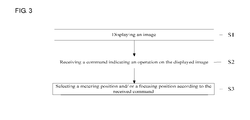
- the photographing method includes following steps.
- Step S1 displaying an image.
- the image can be an image captured by a camera, an image received by the camera, or an image stored in the photographic apparatus.
- the image may also include a metering pattern and/or a focusing pattern.
- Step S2 receiving a command indicating an operation on the displayed image.
- the command includes: a command for selecting a metering position and/or a command for selecting a focusing position.
- Step S3 selecting a metering position and/or the focusing position according to the received command.
- the metering position is selected according to the received command for selecting the metering position; and the focusing position is selected according to the received command for selecting the focusing position.
- the step of selecting the metering position and/or the focusing position further includes: dragging or clicking the displayed metering pattern to select the metering position; and/or dragging or clicking the displayed focusing pattern to select the focusing position.
- the color of the metering pattern is different from that of the focusing pattern; or the shape of the metering pattern is different from that of the focusing pattern.
- a brightness value of pixel(s) covered by the metering pattern of at least one selected metering position is set as an input value, and calculation is performed through a preset function to obtain an output value.
- An image can be captured according to the output value.
- the photographic apparatus adjusts focus parameters according to different focusing positions to capture the image, thereby optimizing the sharpness of the captured image.
- a mobile phone having an Android platform is used for illustrative purposes.
- the mobile phone uses dispatchTouchEvent of the Andriod system to dispatch and process the touch event.
- the mobile phone compares the coordinates of the touch-control area with the positions of the focusing frame and the metering frame to determine whether the dragging or clicking event is an operation for focusing or for metering.
- the method of calculateTapArea calculating a coordinate area, i.e., calculating a rectangular area using the touch point as the center point
- the method of calculateTapArea is used to perform coordinate conversion to convert the screen coordinates of the UI into driver coordinates which can be used by the bottom layer of the system.
- the Qualcomm interface setMeteringArea (setting a metering area, an interface configured to transmit the metering area to the bottom layer) is used to set the metering area, and the parameter data is transmitted to the HAL layer through JNI and is eventually received by the bottom layer.
- the method for separating the focus point and the metering point to perform view-finding can include three modules as follows.
- the parameters are transmitted to the JNI (Java Native Interface, a Java local call for performing the call from the upper layer Java language to the bottom layer C language) through setMeteringArea and setFocusArea (set focus area, an interface configured to transmit the focus area to the bottom layer) of the framework layer.
- the parameters are further transmitted to the HAL layer through android_hardware_Camera (a function in the JNI layer configured to process the call from Java language to C language in the camera module), finally completed by native_set_parms.
- the above embodiment is illustrated based on the Android platform.
- the embodiments of the present disclosure are not limited to the Android platform, and can be implemented on other platforms or operation systems including Apple's iOS or Microsoft's Windows.
- the user when a user uses the photographic apparatus to preview a composed image, the user can select the focus area and the metering area as needed to compose images according to different scenes, thereby improving the user experience.
Landscapes
- Engineering & Computer Science (AREA)
- General Engineering & Computer Science (AREA)
- Theoretical Computer Science (AREA)
- Human Computer Interaction (AREA)
- Multimedia (AREA)
- Signal Processing (AREA)
- General Physics & Mathematics (AREA)
- Physics & Mathematics (AREA)
- Studio Devices (AREA)
- User Interface Of Digital Computer (AREA)
- Indication In Cameras, And Counting Of Exposures (AREA)
- Focusing (AREA)
- Exposure Control For Cameras (AREA)
Abstract
Description
- The present disclosure relates to photographic technology and, particularly, to a photographic apparatus and a photographing method.
- For existing hand-held devices, such as mobile phones and digital cameras, when a user performs a manual focus operation on a preview viewfinder interface, a focal distance of the touch point and light information are simultaneously measured. That is, when the user touches the screen to perform the manual focus operation, the metering value of the viewfinder interface is simultaneously changed.
- In most cases, such way of performing focus operations and metering operations cannot meet users' requirements. For example, when the user captures an image outdoors in a backlit situation, the light from background is relatively strong. Because the focus point and the metering point are at a single point, the image captured is relatively dark.
- Therefore, the technical problem to be solved by the present disclosure is to provide a photographic apparatus and a photographing method to resolve the problems of the existing technology, e.g., unable to have independent focusing point and metering point, and inconvenient for a user to find a view and capture an image based on amount of the backlit in different environments. That is, to provide a view finding solution to separate the focusing point and the metering point and to separately set the focusing value and the metering value, and also to provide a corresponding photographic apparatus and photographing method.
- The technical solution implemented for solving the above technical problems includes the followings.
- A photographic apparatus includes a display module configured to display an image; a receiving module configured to receive a command indicating an operation on the image displayed on the display module; and a processing module configured to select a metering position and/or a focusing position according to the command received by the receiving module.
- A photographing method includes displaying an image; receiving a command indicating an operation on the displayed image; and selecting a metering position and/or a focusing position according to the received command.
- According to the embodiments of the present disclosure, when a user uses the photographic apparatus to preview a composed image, the user can select the focus area and the metering area as needed to compose images according to different scenes, thereby improving the user experience.
-
-
FIG. 1 is a block diagram of a photographic apparatus in accordance with a first embodiment of the present disclosure; -
FIG. 2 is a schematic view of a screen of a display module in accordance with embodiments of the present disclosure; -
FIG. 3 is a flow chart of a photographing method in accordance with embodiments of the present disclosure; and -
FIG. 4 is a flow chart of the photographing method based on an Android mobile phone in accordance with embodiments of the present disclosure. - Details of the present invention are further illustrated together with the accompanying drawings and the disclosed embodiments. It should be understood that the embodiments described herein are only used to explain the present disclosure rather than to limit the present disclosure.
- Referring to
FIG. 1 , which is a block diagram of a photographic apparatus in accordance with the first embodiment of the present disclosure, the photographic apparatus includes adisplay module 11, areceiving module 12, and aprocessing module 13. - The
display module 11 is configured to display an image which can be an image captured by a camera, an image received by the camera, or an image stored in the photographic apparatus. Thedisplay module 11 is further configured to display a metering pattern and/ or a focusing pattern. The camera is connected with thedisplay module 11, and the camera may be disposed on the outer side of the photographic apparatus. The camera can be a front camera, a rear camera, or an independent camera, and may be connected with thedisplay module 11 through a data bus. Thedisplay module 11 can be a liquid crystal display (LCD) or an organic light emitting display (OLED). - The receiving
module 12 is configured to receive a command indicating an operation on the image displayed on thedisplay module 12. The command may be a gesture-operation command, an audio-control or sound command, or a touch-input command. The command may include: a command for dragging or clicking the displayed metering pattern to select the metering position; and/or a command for dragging or clicking the focusing pattern to select the focusing position. The receivingmodule 12 can be a mouse, a keyboard, a microphone, a touch pad, a projecting device, or any combination thereof. - The
processing module 13 is configured to select the metering position and/or the focusing position according to the command received by thereceiving module 12. Preferably, theprocessing module 13 includes a calculating unit. The calculating unit can be configured to use a brightness value of pixel(s) covered by the metering pattern of at least one selected metering position as an input value, and to perform calculation according to a preset function to generate an output value. The photographic apparatus captures images based on the output value. - As an example, as shown in
FIG. 2 , the touch-input command is to use fingers on the screen of thedisplay module 11 displaying the image to perform touch-control. The user can select the metering position by, for example, dragging themetering pattern 100 using a finger, observe the change of the amount of exposure, and select the metering point as needed. The user can also select the focusing position by, for example, dragging the focusingpattern 200 to an area requiring focusing using a finger to perform a focus operation. - Preferably, there are at least two metering positions; and/or there are at least two focusing positions.
- Preferably, the color of the metering pattern is different from that of the focusing pattern, or the shape of the metering pattern is different from that of the focusing pattern.
- Referring to
FIG. 3 , which is a flow chart of a photographing method in accordance with the present disclosure, the photographing method includes following steps. - Step S1, displaying an image.
- The image can be an image captured by a camera, an image received by the camera, or an image stored in the photographic apparatus. The image may also include a metering pattern and/or a focusing pattern.
- Step S2, receiving a command indicating an operation on the displayed image.
- The command includes: a command for selecting a metering position and/or a command for selecting a focusing position.
- Step S3, selecting a metering position and/or the focusing position according to the received command.
- Specifically, the metering position is selected according to the received command for selecting the metering position; and the focusing position is selected according to the received command for selecting the focusing position.
- The step of selecting the metering position and/or the focusing position further includes: dragging or clicking the displayed metering pattern to select the metering position; and/or dragging or clicking the displayed focusing pattern to select the focusing position.
- In certain embodiments, there are at least two metering positions and/or at least two focusing positions.
- In certain embodiments, the color of the metering pattern is different from that of the focusing pattern; or the shape of the metering pattern is different from that of the focusing pattern. Thus, it is easy to distinguish the metering pattern from the focusing pattern, facilitating the user to operate the photographic apparatus.
- Preferably, a brightness value of pixel(s) covered by the metering pattern of at least one selected metering position is set as an input value, and calculation is performed through a preset function to obtain an output value. An image can be captured according to the output value.
- Preferably, when there are at least two focusing positions, and images corresponding to these focusing positions are distributed at far and near distances from the photographic apparatus, the photographic apparatus adjusts focus parameters according to different focusing positions to capture the image, thereby optimizing the sharpness of the captured image.
- Referring
FIG. 4 , a mobile phone having an Android platform is used for illustrative purposes. - The mobile phone uses dispatchTouchEvent of the Andriod system to dispatch and process the touch event. The mobile phone compares the coordinates of the touch-control area with the positions of the focusing frame and the metering frame to determine whether the dragging or clicking event is an operation for focusing or for metering. After the determination, the method of calculateTapArea (calculating a coordinate area, i.e., calculating a rectangular area using the touch point as the center point) is used to perform coordinate conversion to convert the screen coordinates of the UI into driver coordinates which can be used by the bottom layer of the system. The Qualcomm interface setMeteringArea (setting a metering area, an interface configured to transmit the metering area to the bottom layer) is used to set the metering area, and the parameter data is transmitted to the HAL layer through JNI and is eventually received by the bottom layer. According to the present disclosure, the method for separating the focus point and the metering point to perform view-finding can include three modules as follows.
- (1) Obtaining the touch event on the focus area and the metering area and determine the area. First, WindowManagerService (the window manager service, the service for managing the view in the window in the Android framework) dispatches the touch event to the current top activity. The function dispatchPointer (dispatch pointer, the method for sending messages in the WindowManagerService) in the WindowManagerService sends the message to the corresponding IWindow server side through an IWindow client side proxy, that is, an IWindow.Stub sub-class. Second, after receiving the message, the implemented method dispatchPointer of the IWindow.Stub sub-class is called. Third, after the message is transmitted to the View on the top layer, the method dispatchTouchEvent of the View is called, thereby finishing the obtaining of the touch event. By comparing the currently obtained coordinates of the touch on screen with the previous coordinates of the focus area and the metering area, it can be determined whether the area currently being dragged or clicked is a valid focus area, a valid metering area, or an invalid area.
- (2) Calculating the coordinates of the valid area and converting UI coordinates to driver coordinates.
After the focus area and the metering area are calculated through the calculateTapArea according to the current touch point, mapRect in Matrix and prepareMatrix (prepare coordinate conversion, a type of tool at Android App layer configured to convert upper layer coordinates to bottom layer driver coordinates) in Util tool convert the upper layer coordinates to the bottom layer driver coordinates. - (3) Transmitting the parameters and call a bottom layer interface.
- After determining and calculating the corresponding areas, the parameters are transmitted to the JNI (Java Native Interface, a Java local call for performing the call from the upper layer Java language to the bottom layer C language) through setMeteringArea and setFocusArea (set focus area, an interface configured to transmit the focus area to the bottom layer) of the framework layer. The parameters are further transmitted to the HAL layer through android_hardware_Camera (a function in the JNI layer configured to process the call from Java language to C language in the camera module), finally completed by native_set_parms.
- The above embodiment is illustrated based on the Android platform. However, the embodiments of the present disclosure are not limited to the Android platform, and can be implemented on other platforms or operation systems including Apple's iOS or Microsoft's Windows.
- According to the embodiments of the present disclosure, when a user uses the photographic apparatus to preview a composed image, the user can select the focus area and the metering area as needed to compose images according to different scenes, thereby improving the user experience.
- Certain preferred embodiments are described above together with accompanying drawings, without limiting the protection scope of the present invention. Those skilled in the art can, without departing the scope and principles of the present disclosure, obtain various modified embodiments, such as applying features of one embodiment to another embodiment to derive yet another embodiment. Any modifications, improvements, or equivalents to the disclosed embodiments should be within the scope of the present invention.
Claims (10)
- A photographic apparatus, comprising:a display module configured to display an image;a receiving module configured to receive a command indicating an operation on the image displayed on the display module; anda processing module configured to select a metering position and/or a focusing position according to the command received by the receiving module.
- The photographic apparatus of claim 1, wherein the display module is further configured to display a metering pattern and/or a focusing pattern.
- The photographic apparatus of claim 2, wherein the command includes:a command for dragging or clicking the displayed metering pattern to select the metering position; and/or,a command for dragging or clicking the displayed focusing pattern to select the focusing position.
- The photographic apparatus of claim 2, wherein:the processing module comprises a calculating unit;the calculating unit is configured to set a brightness value of pixels covered by the metering pattern of at least one selected metering position as an input value, and to perform calculation through a preset function to obtain an output value; andthe photographic apparatus captures the image based on the output value.
- A photographing method, comprising:displaying an image;receiving a command indicating an operation on the displayed image; andselecting a metering position and/or a focusing position according to the received command.
- The photographing method of claim 5, wherein:the command includes a command for selecting the metering position and/or a command for selecting the focusing operation; andthe step of selecting a metering position and/or a focusing position according to the received command further comprises:selecting the metering position according to the received command for selecting the metering position; andselecting the focusing position according to the received command for selecting the focusing position.
- The photographing method of claim 5, wherein the number of the metering position is at least two, and/or the number of the focusing position is at least two.
- The photographing method of claim 5, wherein the step of selecting a metering position and/ or a focusing position comprises:dragging or clicking a displayed metering pattern to select the metering position; and/ ordragging or clicking a displayed focusing pattern to select the focusing position.
- The photographing method of claim 8, wherein a color of the metering pattern is different from that of the focusing pattern; or a shape of the metering pattern is different from that of the focusing pattern.
- The photographing method of claim 8, further comprising:setting a brightness value of pixels covered by the metering pattern of at least one selected metering position as an input value,performing calculation through a preset function to obtain an output value; andcapturing the image based on the output value.
Applications Claiming Priority (4)
| Application Number | Priority Date | Filing Date | Title |
|---|---|---|---|
| CN201210587006 | 2012-12-28 | ||
| CN201310066502.XA CN103139481B (en) | 2012-12-28 | 2013-02-28 | Camera device and camera method |
| CN201310557312 | 2013-11-08 | ||
| PCT/CN2013/090176 WO2014101722A1 (en) | 2012-12-28 | 2013-12-22 | Pick-up device and pick-up method |
Publications (2)
| Publication Number | Publication Date |
|---|---|
| EP2933998A1 true EP2933998A1 (en) | 2015-10-21 |
| EP2933998A4 EP2933998A4 (en) | 2016-08-24 |
Family
ID=51019876
Family Applications (1)
| Application Number | Title | Priority Date | Filing Date |
|---|---|---|---|
| EP13869429.4A Ceased EP2933998A4 (en) | 2012-12-28 | 2013-12-22 | DEVICE AND METHOD FOR READING |
Country Status (6)
| Country | Link |
|---|---|
| US (2) | US20150281561A1 (en) |
| EP (1) | EP2933998A4 (en) |
| JP (1) | JP2016510522A (en) |
| KR (1) | KR101691764B1 (en) |
| IN (1) | IN2015DN04078A (en) |
| WO (1) | WO2014101722A1 (en) |
Cited By (1)
| Publication number | Priority date | Publication date | Assignee | Title |
|---|---|---|---|---|
| WO2016142757A1 (en) * | 2015-03-06 | 2016-09-15 | Sony Corporation | Method for independently determining exposure and focus settings of a digital camera |
Families Citing this family (6)
| Publication number | Priority date | Publication date | Assignee | Title |
|---|---|---|---|---|
| JP2016510522A (en) * | 2012-12-28 | 2016-04-07 | ヌビア テクノロジー カンパニー リミテッド | Imaging apparatus and imaging method |
| CN104079928A (en) * | 2014-07-07 | 2014-10-01 | 广东欧珀移动通信有限公司 | Camera consistency calibration method, device and mobile device |
| CN106101680B (en) * | 2015-05-06 | 2018-12-25 | 小米科技有限责任公司 | Acquisition parameters setting method and device |
| CN106713886B (en) * | 2016-12-20 | 2018-11-02 | 深圳Tcl数字技术有限公司 | White balance adjustment device and white balance adjustment method |
| CN108737717A (en) * | 2018-03-21 | 2018-11-02 | 北京猎户星空科技有限公司 | Image pickup method, device, smart machine and storage medium |
| CN110177218B (en) * | 2019-06-28 | 2021-06-04 | 广州鲁邦通物联网科技有限公司 | Photographing image processing method of android device |
Family Cites Families (16)
| Publication number | Priority date | Publication date | Assignee | Title |
|---|---|---|---|---|
| JP4040139B2 (en) * | 1997-05-12 | 2008-01-30 | キヤノン株式会社 | camera |
| JP3829144B2 (en) * | 2004-11-25 | 2006-10-04 | シャープ株式会社 | Mobile device with focusing area adjustment camera |
| JP4929630B2 (en) * | 2005-07-06 | 2012-05-09 | ソニー株式会社 | Imaging apparatus, control method, and program |
| KR100805293B1 (en) | 2006-11-16 | 2008-02-20 | 삼성전자주식회사 | Mobile device and its shooting method |
| JP2008166926A (en) | 2006-12-27 | 2008-07-17 | Nikon Corp | Backlight determination device and subject imaging method |
| US20080266438A1 (en) * | 2007-04-30 | 2008-10-30 | Henrik Eliasson | Digital camera and method of operation |
| JP4879127B2 (en) | 2007-09-21 | 2012-02-22 | 富士フイルム株式会社 | Digital camera and digital camera focus area selection method |
| JP2009273033A (en) * | 2008-05-09 | 2009-11-19 | Olympus Imaging Corp | Camera system, control method of controller, and program of the controller |
| US8237807B2 (en) * | 2008-07-24 | 2012-08-07 | Apple Inc. | Image capturing device with touch screen for adjusting camera settings |
| US7844174B2 (en) | 2008-07-31 | 2010-11-30 | Fuji Xerox Co., Ltd. | System and method for manual selection of multiple evaluation points for camera control |
| KR101505681B1 (en) * | 2008-09-05 | 2015-03-30 | 엘지전자 주식회사 | A mobile terminal having a touch screen and image capturing method using the same |
| CN101582985B (en) * | 2008-12-09 | 2011-07-27 | 王玉龙 | Digital scene-touching technique camera |
| US8233789B2 (en) * | 2010-04-07 | 2012-07-31 | Apple Inc. | Dynamic exposure metering based on face detection |
| JP2012095236A (en) * | 2010-10-28 | 2012-05-17 | Sanyo Electric Co Ltd | Imaging device |
| US20120242852A1 (en) * | 2011-03-21 | 2012-09-27 | Apple Inc. | Gesture-Based Configuration of Image Processing Techniques |
| JP2016510522A (en) * | 2012-12-28 | 2016-04-07 | ヌビア テクノロジー カンパニー リミテッド | Imaging apparatus and imaging method |
-
2013
- 2013-12-22 JP JP2015549968A patent/JP2016510522A/en active Pending
- 2013-12-22 EP EP13869429.4A patent/EP2933998A4/en not_active Ceased
- 2013-12-22 WO PCT/CN2013/090176 patent/WO2014101722A1/en not_active Ceased
- 2013-12-22 KR KR1020157018323A patent/KR101691764B1/en not_active Expired - Fee Related
- 2013-12-22 US US14/432,776 patent/US20150281561A1/en not_active Abandoned
- 2013-12-22 IN IN4078DEN2015 patent/IN2015DN04078A/en unknown
-
2015
- 2015-06-29 US US14/754,672 patent/US20150304567A1/en not_active Abandoned
Cited By (1)
| Publication number | Priority date | Publication date | Assignee | Title |
|---|---|---|---|---|
| WO2016142757A1 (en) * | 2015-03-06 | 2016-09-15 | Sony Corporation | Method for independently determining exposure and focus settings of a digital camera |
Also Published As
| Publication number | Publication date |
|---|---|
| IN2015DN04078A (en) | 2015-10-09 |
| KR20150095787A (en) | 2015-08-21 |
| JP2016510522A (en) | 2016-04-07 |
| US20150281561A1 (en) | 2015-10-01 |
| WO2014101722A1 (en) | 2014-07-03 |
| KR101691764B1 (en) | 2016-12-30 |
| EP2933998A4 (en) | 2016-08-24 |
| US20150304567A1 (en) | 2015-10-22 |
Similar Documents
| Publication | Publication Date | Title |
|---|---|---|
| US20150304567A1 (en) | Photographic apparatus and photographing method | |
| CN103139481B (en) | Camera device and camera method | |
| US10785440B2 (en) | Method for transmitting image and electronic device thereof | |
| US9338359B2 (en) | Method of capturing an image in a device and the device thereof | |
| EP2778989A2 (en) | Application information processing method and apparatus of mobile terminal | |
| WO2017063324A1 (en) | Window displaying method and mobile terminal | |
| US20140043255A1 (en) | Electronic device and image zooming method thereof | |
| US9509733B2 (en) | Program, communication apparatus and control method | |
| CN110209331A (en) | Information cuing method and terminal | |
| JP2011054162A (en) | Interactive information control system and program | |
| CN106648402A (en) | Information sending method and device and information processing method and device | |
| CN105320270A (en) | Method for performing face tracking function and electronic device thereof | |
| CN104917972A (en) | Method for remotely controlling picture taking, device and system | |
| CN113840165A (en) | Screen recording method, device, equipment and medium | |
| CN104102334B (en) | Remote device control method and remote control system | |
| CN104410787B (en) | A kind of photographic device and image capture method | |
| CN112672051A (en) | Shooting method and device and electronic equipment | |
| CN115248655B (en) | Method and apparatus for displaying information | |
| CN110933305B (en) | Electronic equipment and focusing method | |
| KR102150008B1 (en) | Method for transmitting for image and an electronic device thereof | |
| CN113037996A (en) | Image processing method and device and electronic equipment | |
| CN111263115A (en) | Method and apparatus for presenting images | |
| CN103823607B (en) | A kind of method, the mobile terminal of the big screen equipment of control | |
| CN113780019B (en) | Identification code selection method, device and electronic device | |
| CN103713835A (en) | Method and electronic equipment for processing data |
Legal Events
| Date | Code | Title | Description |
|---|---|---|---|
| PUAI | Public reference made under article 153(3) epc to a published international application that has entered the european phase |
Free format text: ORIGINAL CODE: 0009012 |
|
| 17P | Request for examination filed |
Effective date: 20150710 |
|
| AK | Designated contracting states |
Kind code of ref document: A1 Designated state(s): AL AT BE BG CH CY CZ DE DK EE ES FI FR GB GR HR HU IE IS IT LI LT LU LV MC MK MT NL NO PL PT RO RS SE SI SK SM TR |
|
| AX | Request for extension of the european patent |
Extension state: BA ME |
|
| DAX | Request for extension of the european patent (deleted) | ||
| A4 | Supplementary search report drawn up and despatched |
Effective date: 20160721 |
|
| RIC1 | Information provided on ipc code assigned before grant |
Ipc: H04N 5/235 20060101ALI20160715BHEP Ipc: H04N 5/232 20060101AFI20160715BHEP |
|
| STAA | Information on the status of an ep patent application or granted ep patent |
Free format text: STATUS: EXAMINATION IS IN PROGRESS |
|
| 17Q | First examination report despatched |
Effective date: 20170407 |
|
| REG | Reference to a national code |
Ref country code: DE Ref legal event code: R003 |
|
| STAA | Information on the status of an ep patent application or granted ep patent |
Free format text: STATUS: THE APPLICATION HAS BEEN REFUSED |
|
| 18R | Application refused |
Effective date: 20180410 |