EP2796957A1 - Novel single custom control to set various waveform parameters for generating waveforms in AWG - Google Patents
Novel single custom control to set various waveform parameters for generating waveforms in AWG Download PDFInfo
- Publication number
- EP2796957A1 EP2796957A1 EP20140165979 EP14165979A EP2796957A1 EP 2796957 A1 EP2796957 A1 EP 2796957A1 EP 20140165979 EP20140165979 EP 20140165979 EP 14165979 A EP14165979 A EP 14165979A EP 2796957 A1 EP2796957 A1 EP 2796957A1
- Authority
- EP
- European Patent Office
- Prior art keywords
- button
- control
- user
- buttons
- text box
- Prior art date
- Legal status (The legal status is an assumption and is not a legal conclusion. Google has not performed a legal analysis and makes no representation as to the accuracy of the status listed.)
- Withdrawn
Links
Images


Classifications
-
- G—PHYSICS
- G06—COMPUTING OR CALCULATING; COUNTING
- G06F—ELECTRIC DIGITAL DATA PROCESSING
- G06F3/00—Input arrangements for transferring data to be processed into a form capable of being handled by the computer; Output arrangements for transferring data from processing unit to output unit, e.g. interface arrangements
- G06F3/01—Input arrangements or combined input and output arrangements for interaction between user and computer
- G06F3/048—Interaction techniques based on graphical user interfaces [GUI]
- G06F3/0484—Interaction techniques based on graphical user interfaces [GUI] for the control of specific functions or operations, e.g. selecting or manipulating an object, an image or a displayed text element, setting a parameter value or selecting a range
- G06F3/0485—Scrolling or panning
-
- G—PHYSICS
- G06—COMPUTING OR CALCULATING; COUNTING
- G06F—ELECTRIC DIGITAL DATA PROCESSING
- G06F3/00—Input arrangements for transferring data to be processed into a form capable of being handled by the computer; Output arrangements for transferring data from processing unit to output unit, e.g. interface arrangements
- G06F3/01—Input arrangements or combined input and output arrangements for interaction between user and computer
- G06F3/048—Interaction techniques based on graphical user interfaces [GUI]
- G06F3/0487—Interaction techniques based on graphical user interfaces [GUI] using specific features provided by the input device, e.g. functions controlled by the rotation of a mouse with dual sensing arrangements, or of the nature of the input device, e.g. tap gestures based on pressure sensed by a digitiser
- G06F3/0488—Interaction techniques based on graphical user interfaces [GUI] using specific features provided by the input device, e.g. functions controlled by the rotation of a mouse with dual sensing arrangements, or of the nature of the input device, e.g. tap gestures based on pressure sensed by a digitiser using a touch-screen or digitiser, e.g. input of commands through traced gestures
- G06F3/04883—Interaction techniques based on graphical user interfaces [GUI] using specific features provided by the input device, e.g. functions controlled by the rotation of a mouse with dual sensing arrangements, or of the nature of the input device, e.g. tap gestures based on pressure sensed by a digitiser using a touch-screen or digitiser, e.g. input of commands through traced gestures for inputting data by handwriting, e.g. gesture or text
-
- G—PHYSICS
- G06—COMPUTING OR CALCULATING; COUNTING
- G06F—ELECTRIC DIGITAL DATA PROCESSING
- G06F1/00—Details not covered by groups G06F3/00 - G06F13/00 and G06F21/00
- G06F1/02—Digital function generators
- G06F1/022—Waveform generators, i.e. devices for generating periodical functions of time, e.g. direct digital synthesizers
Definitions
- This disclosure pertains to waveform generation, and more particularly to a control for waveform generation that presents all controls in a single screen.
- Tektronix's Arbitrary Waveform Generators offer a good example.
- Current user interfaces to access and use the Arbitrary Waveform Generator employ multiple screens and dialog boxes to give the user access to every feature of the Generator. But by using many different screens and/or dialog boxes, it can be difficult for the user to find and change a specific parameter.
- aspects of the invention include a control for a device, such as an Arbitrary Waveform Generator.
- the control includes various buttons, a drop-down list, and a text box.
- the drop-down list is populated with parameters appropriate to that button, and the text box can be used to enter or adjust values for that parameter. In this manner, the control can be used in a single screen.
- FIG. 1 shows a computer system to use a control (i.e., user interface) for an Arbitrary Waveform Generator (AWG) with a single screen, according to an embodiment of the invention.
- computer system 105 is shown as including computer 110, monitor 115, keyboard 120, and mouse 125.
- a person skilled in the art will recognize that other components can be included with computer system 105: for example, other input/output devices, such as a printer.
- FIG. 1 computer system 105 can include conventional internal components not shown in FIG. 1 : for example, central processing unit, memory, storage, etc.
- FIG. 1 shows a computer system to use a control (i.e., user interface) for an Arbitrary Waveform Generator (AWG) with a single screen, according to an embodiment of the invention.
- FIG. 1 computer system 105 is shown as including computer 110, monitor 115, keyboard 120, and mouse 125.
- FIG. 1 computer system 105 can include conventional internal components not shown in FIG. 1 : for example, central processing unit, memory, storage
- FIG. 1 shows computer system 105 as a conventional desktop computer, a person skilled in the art will recognize that computer system 105 can be any type of machine or computing device capable of providing the services attributed herein to computer system 105, including, for example, a laptop computer, a personal digital assistant (PDA), or a cellular telephone.
- PDA personal digital assistant
- Computer 110 includes control 130 and Arbitrary Waveform Generator 135.
- Control 130 provides the user with a way to configure and use Arbitrary Waveform Generator 135.
- Control 130 is discussed further with reference to FIG. 4 , below.
- FIG. 1 shows control 130 as part of computer 110 that is separate from Arbitrary Waveform Generator 135.
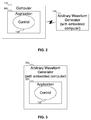
- FIG. 2 shows such an embodiment of the invention in a high level block diagram, called offline mode.
- Computer 110 includes application 205, which includes control 130.
- a user can use control 130 within application 205 to generate the instructions for Arbitrary Waveform Generator 135. These instructions can then be sent to Arbitrary Waveform Generator 135 to generate a waveform.
- Arbitrary Waveform Generator 135 can be directly connected to computer 110, or it can be connected to computer 110 via a network (not shown in FIG. 1 ). In fact, Arbitrary Waveform Generator 135 can be remotely located relative to computer 110. Any network interface between computer 110 and Arbitrary Waveform Generator 135 can be used.
- FIG. 3 shows an embodiment of the invention called online mode.
- control 130 and application 205 are part of Arbitrary Waveform Generator 135.
- Arbitrary Waveform Generator 135 can act as a special purpose computer, complete with hardware and/or software to support the use of control 130.
- the instructions generated by the use of control 130 in application 205 do not need to be sent via a network interface to Arbitrary Waveform Generator 135, as control 130 and application 205 are part of Arbitrary Waveform Generator.
- control 130 Regardless of whether the system is operating in online mode ( FIG. 3 ) or offline mode ( FIG. 2 ), the use of control 130, as discussed below, is the same.
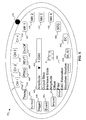
- FIG. 4 shows the control of FIG. 1 .
- control 130 includes various buttons, drop-down list 403, and text box 406. As the various buttons are selected by the user, drop-down list 403 and text box 406 are modified to let the user set or change the values for parameters associated with the buttons.
- Various parameters can have limits (minimums, maximums, or both). If limits exist for a particular parameter, the values input into text 406 can be compared against the limits to ensure the values are acceptable. If the values are not outside the limits appropriate for the parameter, the text box can be updated to the appropriate limit. For example, if the user enters a value that is below the minimum value for the parameter, the text box can be updated to reflect the minimum value automatically. Or if the user enters a value that is greater than the maximum value for the parameter, the text box can be updated to reflect the maximum value automatically. The user can also be informed that a value is not acceptable in other ways: for example, by changing the color of the text box and/or displaying a message to the user that the value is not acceptable.
- Control 130 includes four channel buttons 409, 412, 415, 418.
- the parameters for each channel button 409, 412, 415, 418 include Output State, Interleave State, Amplitude, Offset, Filter, DAC Resolution (in bits), and Waveform Rotation. The user can then select one of these parameters and enter the appropriate value for the selected parameter.
- FIG. 5 shows the control of FIG. 4 with the drop-down list showing parameters for a channel button.
- channel button 409 is selected.
- Drop-down list 403 is shown with list 505, from which the user can select a parameter, after which the user can enter a value for the selected parameter in text box 406.
- drop-down list 403 and text box 406 are similar for all other buttons (although the actual parameters can vary), the parameters for particular buttons are described, but not shown in other drawings.
- control 130 includes four channel marker buttons 421, 424, 427, 430.
- the parameters for each channel marker button 421, 424, 427, 430 include Marker High, Marker Low, Marker Delay, Marker Amplitude, and Marker Offset. The user can then select one of these parameters and enter the appropriate value for the selected parameter.
- Control 130 includes timing button 433.
- the parameters for timing button 433 include Sampling Rate, Repetition Rate, Clock Source, External Divider Rate, Reference Source, External Multiplier Rate, and External Reference. The user can then select one of these parameters and enter the appropriate value for the selected parameter.
- Control 130 includes trigger button 436.
- the parameters for trigger button 436 include Source, Interval, Level, Polarity, and Impedance. The user can then select one of these parameters and enter the appropriate value for the selected parameter.
- Control 130 includes run mode button 439.
- the parameters for run mode button 439 include Continuous, Triggered, Gated, and Sequence. The user can then select one of these parameters and enter the appropriate value for the selected parameter.
- Control 130 includes DC button 442.
- the parameters for DC button 442 include DC1, DC2, DC3, DC4, and DC Output. The user can then select one of these parameters and enter the appropriate value for the selected parameter.
- Control 130 includes resampling button 445.
- the parameters for resampling button 445 include Length and Ratio. The user can then select one of these parameters and enter the appropriate value for the selected parameter.
- Control 130 includes calibration button 448.
- the parameters for calibration button 448 include Analog Channel 1, Analog Channel 2, Analog Channel 3, Analog Channel 4, Marker Channel 1, Marker Channel 2, Marker Channel 3, and Marker Channel 4. The user can then select one of these parameters, and text box 406 displays the pass/fail status of the selected channel's calibration.
- Control 130 includes diagnostics button 451.
- the parameters for diagnostics button 451 include Front Panel, AWG, Clock, Output 1, Output 2, and Output 3. The user can then select one of these parameters, and text box 406 displays the pass/fail status of the selected channel's diagnostics.
- Control 130 includes waveform list button 454.
- the parameters for waveform list button 454 include Channel 1, Channel 2, Channel 3, and Channel 4. The user can then select one of these channels, after which text box 406 can display a list of all predefined and user-defined waveforms in the AWG instrument. The user can select one of these waveforms to be assigned to the selected channel.
- Control 130 includes import button 457.
- the parameters for import button 457 include AWG (*.awg, *.pat, *.seq *.wfm), Scope (*.wfm), RSA, and Others. The user can then select one of these parameters.
- Text box 406 can include a browse button to enable the user to browse for files of the selected file type, and select one for import. The selected file can then be shown in text box 406.
- .TXT file format (which the user can select using the Others parameter), the user can be prompted, as part of the browse box, for the format of the file (for example, Analog, Digital 8 bits and Digital 10 bits) and for a Normalize option.
- format of the file for example, Analog, Digital 8 bits and Digital 10 bits
- Normalize option for a Normalize option.
- AWG, Scope, and RSA file formats the waveform can be imported directly, without needing to specify the format of the file or Normalize options.
- Control 130 includes waveform sequence control button 460.
- the parameters for waveform sequence control button 460 include Wait Trigger, Repeat Count, Event Jump To, Go To Index, and Waveform. The user can then select one of these parameters and enter the appropriate value for the selected parameter.
- text box 406 displays the element index and trigger state. Text box 406 then enables the user to enter the trigger state and the Element index in the sequence.
- text box 406 displays the element index and repeat count. Text box 406 then enables the user to enter the Repeat value and the Element index in the sequence.
- text box 406 displays the element index and jump index number. Text box 406 then enables the user to enter the jump index and the Element index in the sequence.
- text box 406 displays the element index and Go To index number. Text box 406 then enables the user to enter the Go To index and the Element index in the sequence.
- Control 130 includes event 463 button 442.
- the parameters for DC button 442 include Level, Polarity, Jump Timing, and Event Impedance. The user can then select one of these parameters and enter the appropriate value for the selected parameter.
- Control 130 includes force trigger button 466.
- Trigger parameters control the signal outputs of the AWG instrument.
- a trigger controls the waveform output when the Run Mode is Triggered, Gated or Sequence.
- the user can generate a trigger signal through Force Trigger button 466.
- the AWG then uses the trigger signal that is generated internally or an external trigger that is applied to the front-panel Trigger Input connector.
- Control 130 includes force event button 469.
- Force event button 469 When a Forced Event occurs, the AWG generates an internal event signal. This signal is used to generate the event when the sequence is waiting for an event jump.
- Control 130 includes all outputs on/off button 472. In the AWG instrument, if one or more outputs are on, all outputs are turned off when All Outputs On/Off button 472 is pressed. If all outputs are off, all outputs are turned on when All Outputs On/Off button 472 is pressed.
- Control 130 includes dot 475.
- Dot 475 is a moveable button that can be used like a knob, to scroll through parameters in drop-down list 466, and/or to change scroll through values in text box 406. Dot 475 can be moved along the outer edge of control 130 to change the identified value.
- Control 130 includes play button 478.
- Play button 478 when pressed, activates the AWG to generate a waveform.
- Control 130 includes waveform graphic icon 481.
- Waveform graphic icon 481 indicates when the AWG is generating a waveform.
- Waveform graphic icon 481 can also be animated: the motion of animated waveform graphic icon 481 can then be distinguished from a static waveform graphic icon, which would indicate that the AWG is not currently generating a waveform.
- control 130 can be used to instruct the Arbitrary Waveform Generator to produce a waveform by setting the various parameters
- control 130 can also be used to generate an application.
- the application generated by control 130 can be thought of as special purpose software.
- the application can then be used to generate a specific waveform: each time the application is used, the application can drive the Arbitrary Waveform Generator to produce the specific waveform and play it out of the Arbitrary Waveform Generator.
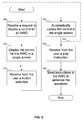
- FIG. 6 shows a flowchart of a procedure to use the control of FIG. 1 in a single screen, according to an embodiment of the invention.
- the system receives a request to display a control for an AWG.
- the system displays the AWG control to the user.
- the system receives a button selection from the user.
- the system automatically updates the control to reflect the appropriate parameters and/or values in the drop-down list and text box, so that the user can set or change parameters appropriate for the selected button.
- the system receives an instruction from the user to generate the waveform.
- the system sends instructions to the AWG to generate the waveform.
- the system is not limited to receiving only one button selection from the user, with only one corresponding update of the control.
- the system can, in fact, receive multiple button selections from the user, with appropriate updates of the control for each button selection.
- blocks 615 and 620 can be repeated as often as appropriate.
- the machine includes a system bus to which is attached processors, memory, e.g., random access memory (RAM), read-only memory (ROM), or other state preserving medium, storage devices, a video interface, and input/output interface ports.
- the machine may be controlled, at least in part, by input from conventional input devices, such as keyboards, mice, etc., as well as by directives received from another machine, interaction with a virtual reality (VR) environment, biometric feedback, or other input signal.
- VR virtual reality
- the term "machine” is intended to broadly encompass a single machine, or a system of communicatively coupled machines or devices operating together. Exemplary machines include computing devices such as personal computers, workstations, servers, portable computers, handheld devices, telephones, tablets, etc., as well as transportation devices, such as private or public transportation, e.g., automobiles, trains, cabs, etc.
- the machine may include embedded controllers, such as programmable or non-programmable logic devices or arrays, Application Specific Integrated Circuits, embedded computers, smart cards, and the like.
- the machine may utilize one or more connections to one or more remote machines, such as through a network interface, modem, or other communicative coupling.
- Machines may be interconnected by way of a physical and/or logical network, such as an intranet, the Internet, local area networks, wide area networks, etc.
- network communication may utilize various wired and/or wireless short range or long range carriers and protocols, including radio frequency (RF), satellite, microwave, Institute of Electrical and Electronics Engineers (IEEE) 810.11, Bluetooth, optical, infrared, cable, laser, etc.
- RF radio frequency
- IEEE Institute of Electrical and Electronics Engineers
- Associated data may be stored in, for example, the volatile and/or non-volatile memory, e.g., RAM, ROM, etc., or in other storage devices and their associated storage media, including hard-drives, floppy-disks, optical storage, tapes, flash memory, memory sticks, digital video disks, biological storage, etc.
- Associated data may be delivered over transmission environments, including the physical and/or logical network, in the form of packets, serial data, parallel data, propagated signals, etc., and may be used in a compressed or encrypted format.
- Associated data may be used in a distributed environment, and stored locally and/or remotely for machine access.
- Embodiments of the invention can extend to the following statements, without limitation:
- An embodiment of the invention includes a system, comprising: a computer, a processor in the computer, a memory in the computer, an Arbitrary Waveform Generator, and a control in the memory of the computer generated using the processor, the control including a plurality of buttons, a drop-down list, and a text box, presented to a user on a single screen, wherein upon a selection of one of the plurality of buttons by the user, the drop-down list and the text box are automatically updated in the single screen to reflect values appropriate for the selected button, and wherein the control is operative to interface with the Arbitrary Waveform Generator to generate waveforms responsive to information input to the control.
- An embodiment of the invention includes a system, comprising: a computer, a processor in the computer, a memory in the computer, an Arbitrary Waveform Generator, and a control in the memory of the computer generated using the processor, the control including a plurality of buttons including four channel buttons, four channel marker buttons, a timing button, a trigger button, a run button, a DC button, a resampling button, a calibration button, a diagnostics button, a waveform sequence button, a force trigger button, a force event button, an on/off button, an event button, and a play button, a drop-down list, and a text box, presented to a user on a single screen, wherein upon a selection of one of the plurality of buttons by the user, the drop-down list and the text box are automatically updated in the single screen to reflect values appropriate for the selected button, and wherein the control is operative to interface with the Arbitrary Waveform Generator to generate waveforms responsive to information input to the control.
- An embodiment of the invention includes a system, comprising: a computer, a processor in the computer, a memory in the computer, an Arbitrary Waveform Generator, and a control in the memory of the computer generated using the processor, the control including a plurality of buttons including four channel buttons, four channel marker buttons, a timing button, a trigger button, a run button, a DC button, a resampling button, a calibration button, a diagnostics button, a waveform sequence button, a force trigger button, a force event button, an on/off button, an event button, a play button, a waveform list button, and an import button, a drop-down list, and a text box, presented to a user on a single screen, wherein upon a selection of one of the plurality of buttons by the user, the drop-down list and the text box are automatically updated in the single screen to reflect values appropriate for the selected button, and wherein the control is operative to interface with the Arbitrary Waveform Generator to generate waveforms responsive to information input to the control
- An embodiment of the invention includes a system, comprising: a computer, a processor in the computer, a memory in the computer, an Arbitrary Waveform Generator, and a control in the memory of the computer generated using the processor, the control including a plurality of buttons including four channel buttons, four channel marker buttons, a timing button, a trigger button, a run button, a DC button, a resampling button, a calibration button, a diagnostics button, a waveform sequence button, a force trigger button, a force event button, an on/off button, an event button, and a play button, a drop-down list, and a text box, and a moveable button that can be used to select an item from the drop-down list if the drop-down list has focus or to change a value in the text box if the text box has focus, presented to a user on a single screen, wherein upon a selection of one of the plurality of buttons by the user, the drop-down list and the text box are automatically updated in the single screen to reflect
- An embodiment of the invention includes a system, comprising: a computer, a processor in the computer, a memory in the computer, an Arbitrary Waveform Generator, and a control in the memory of the computer generated using the processor, the control including a plurality of buttons including four channel buttons, four channel marker buttons, a timing button, a trigger button, a run button, a DC button, a resampling button, a calibration button, a diagnostics button, a waveform sequence button, a force trigger button, a force event button, an on/off button, an event button, and a play button, a drop-down list, and a text box, and a dot that can be used to select an item from the drop-down list if the drop-down list has focus or to change a value in the text box if the text box has focus, the dot moveable around the outer edge of the control, presented to a user on a single screen, wherein upon a selection of one of the plurality of buttons by the user, the drop-down list and
- An embodiment of the invention includes a system, comprising: a computer, a processor in the computer, a memory in the computer, an Arbitrary Waveform Generator, and a control in the memory of the computer generated using the processor, the control including a plurality of buttons including four channel buttons, four channel marker buttons, a timing button, a trigger button, a run button, a DC button, a resampling button, a calibration button, a diagnostics button, a waveform sequence button, a force trigger button, a force event button, an on/off button, an event button, and a play button, a drop-down list, and a text box, and an animated waveform graphic icon when the Arbitrary Waveform Generator is generating a waveform, presented to a user on a single screen, wherein upon a selection of one of the plurality of buttons by the user, the drop-down list and the text box are automatically updated in the single screen to reflect values appropriate for the selected button, and wherein the control is operative to interface with the Arbitrary Waveform Generator to
- An embodiment of the invention includes a system, comprising: a computer, a processor in the computer, a memory in the computer, an Arbitrary Waveform Generator, and a control in the memory of the computer generated using the processor, the control including a plurality of buttons, a drop-down list, and a text box, presented to a user on a single screen, wherein upon a selection of one of the plurality of buttons by the user, the drop-down list and the text box are automatically updated in the single screen to reflect values appropriate for the selected button, and wherein the control is operative to interface with the Arbitrary Waveform Generator to generate waveforms responsive to information input to the control, and wherein the Arbitrary Waveform Generator includes the computer and the control.
- An embodiment of the invention includes a system, comprising: a computer, a processor in the computer, a memory in the computer, an Arbitrary Waveform Generator, and a control in the memory of the computer generated using the processor, the control including a plurality of buttons, a drop-down list, and a text box, presented to a user on a single screen, wherein upon a selection of one of the plurality of buttons by the user, the drop-down list and the text box are automatically updated in the single screen to reflect values appropriate for the selected button, and wherein the control is operative to interface with the Arbitrary Waveform Generator to generate waveforms responsive to information input to the control, and wherein the Arbitrary Waveform Generator is connected to the computer including the control.
- An embodiment of the invention includes a method, comprising: receiving from a user a request to display a control for an Arbitrary Waveform Generator, displaying the control to the user, the control including a plurality of buttons, a drop-down list, and a text box, the control presented using a single screen, receiving from the user a selection of a button on the control, and responsive to the selection of the button, automatically updating the drop-down list and the text box in the single screen appropriate to the selected button, wherein the control is operative to interface with the Arbitrary Waveform Generator to generate waveforms responsive to information input to the control.
- An embodiment of the invention includes a method, comprising: receiving from a user a request to display a control for an Arbitrary Waveform Generator at the Arbitrary Waveform Generator, displaying the control to the user, the control including a plurality of buttons, a drop-down list, and a text box, the control presented using a single screen, receiving from the user a selection of a button on the control, and responsive to the selection of the button, automatically updating the drop-down list and the text box in the single screen appropriate to the selected button, wherein the control is operative to interface with the Arbitrary Waveform Generator to generate waveforms responsive to information input to the control.
- An embodiment of the invention includes a method, comprising: receiving from a user a request to display a control for an Arbitrary Waveform Generator at a machine connected to the Arbitrary Waveform Generator, displaying the control to the user, the control including a plurality of buttons, a drop-down list, and a text box, the control presented using a single screen, receiving from the user a selection of a button on the control, and responsive to the selection of the button, automatically updating the drop-down list and the text box in the single screen appropriate to the selected button, wherein the control is operative to interface with the Arbitrary Waveform Generator to generate waveforms responsive to information input to the control.
- An embodiment of the invention includes a method, comprising: receiving from a user a request to display a control for an Arbitrary Waveform Generator, displaying the control to the user, the control including a plurality of buttons including four channel buttons, four channel marker buttons, a timing button, a trigger button, a run button, a DC button, a resampling button, a calibration button, a diagnostics button, a waveform sequence button, a force trigger button, a force event button, an on/off button, an event button, and a play button, a drop-down list, and a text box, the control presented using a single screen, receiving from the user a selection of a button on the control, and responsive to the selection of the button, automatically updating the drop-down list and the text box in the single screen appropriate to the selected button, wherein the control is operative to interface with the Arbitrary Waveform Generator to generate waveforms responsive to information input to the control.
- An embodiment of the invention includes a method, comprising: receiving from a user a request to display a control for an Arbitrary Waveform Generator, displaying the control to the user, the control including a plurality of buttons including four channel buttons, four channel marker buttons, a timing button, a trigger button, a run button, a DC button, a resampling button, a calibration button, a diagnostics button, a waveform sequence button, a force trigger button, a force event button, an on/off button, an event button, a play button, a waveform list button, and an import button, a drop-down list, and a text box, the control presented using a single screen, receiving from the user a selection of a button on the control, and responsive to the selection of the button, automatically updating the drop-down list and the text box in the single screen appropriate to the selected button, wherein the control is operative to interface with the Arbitrary Waveform Generator to generate waveforms responsive to information input to the control.
- An embodiment of the invention includes a method, comprising: receiving from a user a request to display a control for an Arbitrary Waveform Generator, displaying the control to the user, the control including a plurality of buttons including four channel buttons, four channel marker buttons, a timing button, a trigger button, a run button, a DC button, a resampling button, a calibration button, a diagnostics button, a waveform sequence button, a force trigger button, a force event button, an on/off button, an event button, and a play button, a drop-down list, a text box, and a moveable button that can be used to select an item from the drop-down list if the drop-down list has focus or to change a value in the text box if the text box has focus, the control presented using a single screen, receiving from the user a selection of a button on the control, and responsive to the selection of the button, automatically updating the drop-down list and the text box in the single screen appropriate to the selected button, wherein the control is
- An embodiment of the invention includes a method, comprising: receiving from a user a request to display a control for an Arbitrary Waveform Generator, displaying the control to the user, the control including a plurality of buttons including four channel buttons, four channel marker buttons, a timing button, a trigger button, a run button, a DC button, a resampling button, a calibration button, a diagnostics button, a waveform sequence button, a force trigger button, a force event button, an on/off button, an event button, and a play button, a drop-down list, a text box, and a dot on an outer edge of the control, the dot moveable around the outer edge of the control, that can be used to select an item from the drop-down list if the drop-down list has focus or to change a value in the text box if the text box has focus, the control presented using a single screen, receiving from the user a selection of a button on the control, and responsive to the selection of the button, automatically updating the drop-down
- An embodiment of the invention includes a method, comprising: receiving from a user a request to display a control for an Arbitrary Waveform Generator, displaying the control to the user, the control including a plurality of buttons including four channel buttons, four channel marker buttons, a timing button, a trigger button, a run button, a DC button, a resampling button, a calibration button, a diagnostics button, a waveform sequence button, a force trigger button, a force event button, an on/off button, an event button, and a play button, a drop-down list, a text box, and an animated waveform graphic icon when the Arbitrary Waveform Generator is generating a waveform, the control presented using a single screen, receiving from the user a selection of a button on the control, and responsive to the selection of the button, automatically updating the drop-down list and the text box in the single screen appropriate to the selected button, wherein the control is operative to interface with the Arbitrary Waveform Generator to generate waveforms responsive to information input to the control.
- An embodiment of the invention includes a method, comprising: receiving from a user a request to display a control for an Arbitrary Waveform Generator, displaying the control to the user, the control including a plurality of buttons, a drop-down list, and a text box, the control presented using a single screen, receiving from the user a selection of a button on the control, responsive to the selection of the button, automatically updating the drop-down list and the text box in the single screen appropriate to the selected button, receiving from the user a selection of a play button, and sending instructions to the Arbitrary Waveform Generator to generate a waveform according to settings provided by the user, wherein the control is operative to interface with the Arbitrary Waveform Generator to generate waveforms responsive to information input to the control.
Landscapes
- Engineering & Computer Science (AREA)
- General Engineering & Computer Science (AREA)
- Theoretical Computer Science (AREA)
- Human Computer Interaction (AREA)
- Physics & Mathematics (AREA)
- General Physics & Mathematics (AREA)
- User Interface Of Digital Computer (AREA)
- Electrophonic Musical Instruments (AREA)
Applications Claiming Priority (1)
| Application Number | Priority Date | Filing Date | Title |
|---|---|---|---|
| IN1543MU2013 IN2013MU01543A (enExample) | 2013-04-26 | 2013-04-26 |
Publications (1)
| Publication Number | Publication Date |
|---|---|
| EP2796957A1 true EP2796957A1 (en) | 2014-10-29 |
Family
ID=50624448
Family Applications (1)
| Application Number | Title | Priority Date | Filing Date |
|---|---|---|---|
| EP20140165979 Withdrawn EP2796957A1 (en) | 2013-04-26 | 2014-04-25 | Novel single custom control to set various waveform parameters for generating waveforms in AWG |
Country Status (6)
| Country | Link |
|---|---|
| US (1) | US9335915B2 (enExample) |
| EP (1) | EP2796957A1 (enExample) |
| JP (1) | JP2014216030A (enExample) |
| KR (1) | KR20140128263A (enExample) |
| CN (1) | CN104123132A (enExample) |
| IN (1) | IN2013MU01543A (enExample) |
Families Citing this family (3)
| Publication number | Priority date | Publication date | Assignee | Title |
|---|---|---|---|---|
| CN107193322A (zh) * | 2016-03-15 | 2017-09-22 | 苏州普源精电科技有限公司 | 一种波形数据加载方法及装置 |
| CN112349188A (zh) * | 2020-12-18 | 2021-02-09 | 陈雨青 | 一种关于声音和声波的教学器具 |
| WO2023056697A1 (zh) * | 2021-10-09 | 2023-04-13 | 普源精电科技股份有限公司 | 波形序列处理方法、处理装置、电子设备及存储介质 |
Citations (2)
| Publication number | Priority date | Publication date | Assignee | Title |
|---|---|---|---|---|
| EP1205837A2 (en) * | 2000-10-11 | 2002-05-15 | Agilent Technologies, Inc. | Control for a graphical user interface supporting coupled variables and method of operation thereof |
| WO2007149357A2 (en) * | 2006-06-16 | 2007-12-27 | Cirque Corporation | A method of scrolling that is activated by touchdown in a predefined location on a touchpad that recognizes gestures for controlling scrolling functions |
Family Cites Families (12)
| Publication number | Priority date | Publication date | Assignee | Title |
|---|---|---|---|---|
| US6229536B1 (en) * | 1998-03-05 | 2001-05-08 | Agilent Technologies, Inc. | System and method for displaying simultaneously a main waveform display and a magnified waveform display in a signal measurement system |
| US7062716B2 (en) * | 1999-08-19 | 2006-06-13 | National Instruments Corporation | System and method for enhancing the readability of a graphical program |
| US8479109B2 (en) * | 1999-08-19 | 2013-07-02 | National Instruments Corporation | Programmatically generating a graphical program in response to user input |
| US7069517B2 (en) * | 1999-08-19 | 2006-06-27 | National Instruments Corporation | System and method for programmatically creating graphical program code in a graphical program |
| US6707474B1 (en) * | 1999-10-29 | 2004-03-16 | Agilent Technologies, Inc. | System and method for manipulating relationships among signals and buses of a signal measurement system on a graphical user interface |
| WO2002041103A2 (en) * | 2000-11-17 | 2002-05-23 | Lecroy Corporation | Streaming architecture for waveform processing |
| US7689917B2 (en) * | 2000-12-20 | 2010-03-30 | National Instruments Corporation | Automatically generating a sub-graphical program in response to user input configuring a graphical program node |
| US7058899B2 (en) * | 2001-06-20 | 2006-06-06 | National Instruments Corporation | System and method for creating a graphical program based on a pre-defined program process |
| US20020196282A1 (en) * | 2001-06-20 | 2002-12-26 | Washington Jeffrey D. | Collector node for a graphical program |
| US7159187B2 (en) * | 2001-11-06 | 2007-01-02 | Tektronix, Inc. | In-context creation and editing of masks and waveforms |
| US7200529B2 (en) * | 2003-08-15 | 2007-04-03 | National Instruments Corporation | Automatic configuration of function blocks in a signal analysis system |
| US8639323B2 (en) * | 2010-11-01 | 2014-01-28 | Medtronic, Inc. | System and apparatus to monitor biopacemaker maturation |
-
2013
- 2013-04-26 IN IN1543MU2013 patent/IN2013MU01543A/en unknown
-
2014
- 2014-04-16 US US14/254,522 patent/US9335915B2/en not_active Expired - Fee Related
- 2014-04-25 KR KR20140049962A patent/KR20140128263A/ko not_active Withdrawn
- 2014-04-25 EP EP20140165979 patent/EP2796957A1/en not_active Withdrawn
- 2014-04-25 CN CN201410252987.6A patent/CN104123132A/zh active Pending
- 2014-04-28 JP JP2014092797A patent/JP2014216030A/ja active Pending
Patent Citations (2)
| Publication number | Priority date | Publication date | Assignee | Title |
|---|---|---|---|---|
| EP1205837A2 (en) * | 2000-10-11 | 2002-05-15 | Agilent Technologies, Inc. | Control for a graphical user interface supporting coupled variables and method of operation thereof |
| WO2007149357A2 (en) * | 2006-06-16 | 2007-12-27 | Cirque Corporation | A method of scrolling that is activated by touchdown in a predefined location on a touchpad that recognizes gestures for controlling scrolling functions |
Non-Patent Citations (1)
| Title |
|---|
| AGILENT TECHNOLOGIES: "Agilent Arbitrary Waveform Generator 81180A User's Guide", 1 December 2011 (2011-12-01), XP055125841, Retrieved from the Internet <URL:http://cp.literature.agilent.com/litweb/pdf/81180-91020.pdf> [retrieved on 20140630] * |
Also Published As
| Publication number | Publication date |
|---|---|
| JP2014216030A (ja) | 2014-11-17 |
| US9335915B2 (en) | 2016-05-10 |
| CN104123132A (zh) | 2014-10-29 |
| US20140325421A1 (en) | 2014-10-30 |
| IN2013MU01543A (enExample) | 2015-04-17 |
| KR20140128263A (ko) | 2014-11-05 |
Similar Documents
| Publication | Publication Date | Title |
|---|---|---|
| EP2501151A1 (en) | Information processing device, information processing method, program, apparatus to be controlled, and information processing system | |
| EP2901256B1 (en) | Method and display device with tactile feedback | |
| CN101387917B (zh) | 多计算机切换器与多计算机系统 | |
| US9904458B2 (en) | Method for information processing and electronic apparatus thereof | |
| EP2431854A2 (en) | Image display apparatus, image display system, and image display method | |
| EP3196783A1 (en) | Open collaboration board with multiple integrated services | |
| CN110609639A (zh) | 控制致动器驱动信号以改善瞬态响应特性的系统和方法 | |
| CN103778361A (zh) | 一种电子设备及其功能设置的方法 | |
| JP2006155327A (ja) | コンピュータの遠隔操作システム | |
| US9335915B2 (en) | Single custom control to set various waveform parameters for generating waveforms in AWG | |
| JP2026507624A (ja) | 仮想オブジェクトに基づくインタラクションのための方法、装置、機器、記憶媒体及び製品 | |
| CN109426476B (zh) | 信号源调度系统及信号源系统的信号调度方法 | |
| EP2072955B1 (en) | Display definitions interface for avionics communications systems | |
| CN104794412A (zh) | 信息输入方法及装置与移动终端 | |
| CN105677135A (zh) | 一种投影仪播放控制方法及装置 | |
| CN109947528A (zh) | 信息处理方法和装置 | |
| CN115113773B (zh) | 信息的处理方法、装置、计算机可读存储介质和电子装置 | |
| US10979582B2 (en) | Extension of remote frame buffer (RFB) protocol | |
| CN115865852A (zh) | 即时通信会话信息的处理方法、装置及电子设备 | |
| KR20220143601A (ko) | 소싱 및 측정 타이밍을 구성하기 위한 사용자 인터페이스 및 방법 | |
| US11385767B2 (en) | Method of presenting user interface, apparatus for presenting user interface, and computer-program product | |
| JP2020181594A (ja) | プログラム、情報処理装置、及びシステム | |
| US20090172548A1 (en) | Tactile two-way feedback to remote presentation controller device to indicate slide animation status | |
| CN117271030A (zh) | 原型界面的设计方法、装置、存储介质及终端设备 | |
| JP2016093364A (ja) | 通信対戦ゲームシステム |
Legal Events
| Date | Code | Title | Description |
|---|---|---|---|
| PUAI | Public reference made under article 153(3) epc to a published international application that has entered the european phase |
Free format text: ORIGINAL CODE: 0009012 |
|
| 17P | Request for examination filed |
Effective date: 20140425 |
|
| AK | Designated contracting states |
Kind code of ref document: A1 Designated state(s): AL AT BE BG CH CY CZ DE DK EE ES FI FR GB GR HR HU IE IS IT LI LT LU LV MC MK MT NL NO PL PT RO RS SE SI SK SM TR |
|
| AX | Request for extension of the european patent |
Extension state: BA ME |
|
| R17P | Request for examination filed (corrected) |
Effective date: 20150428 |
|
| RBV | Designated contracting states (corrected) |
Designated state(s): AL AT BE BG CH CY CZ DE DK EE ES FI FR GB GR HR HU IE IS IT LI LT LU LV MC MK MT NL NO PL PT RO RS SE SI SK SM TR |
|
| 17Q | First examination report despatched |
Effective date: 20160311 |
|
| STAA | Information on the status of an ep patent application or granted ep patent |
Free format text: STATUS: THE APPLICATION IS DEEMED TO BE WITHDRAWN |
|
| 18D | Application deemed to be withdrawn |
Effective date: 20180220 |