EP2787465B1 - Verfahren zum Senden von verborgenen Nachricthen und elektronische Vorrichtung dafür - Google Patents
Verfahren zum Senden von verborgenen Nachricthen und elektronische Vorrichtung dafür Download PDFInfo
- Publication number
- EP2787465B1 EP2787465B1 EP14161258.0A EP14161258A EP2787465B1 EP 2787465 B1 EP2787465 B1 EP 2787465B1 EP 14161258 A EP14161258 A EP 14161258A EP 2787465 B1 EP2787465 B1 EP 2787465B1
- Authority
- EP
- European Patent Office
- Prior art keywords
- message
- hiding
- electronic device
- display
- layer
- Prior art date
- Legal status (The legal status is an assumption and is not a legal conclusion. Google has not performed a legal analysis and makes no representation as to the accuracy of the status listed.)
- Active
Links
Images












Classifications
-
- H—ELECTRICITY
- H04—ELECTRIC COMMUNICATION TECHNIQUE
- H04W—WIRELESS COMMUNICATION NETWORKS
- H04W4/00—Services specially adapted for wireless communication networks; Facilities therefor
- H04W4/12—Messaging; Mailboxes; Announcements
-
- G—PHYSICS
- G06—COMPUTING OR CALCULATING; COUNTING
- G06F—ELECTRIC DIGITAL DATA PROCESSING
- G06F21/00—Security arrangements for protecting computers, components thereof, programs or data against unauthorised activity
- G06F21/70—Protecting specific internal or peripheral components, in which the protection of a component leads to protection of the entire computer
- G06F21/82—Protecting input, output or interconnection devices
- G06F21/84—Protecting input, output or interconnection devices output devices, e.g. displays or monitors
-
- H—ELECTRICITY
- H04—ELECTRIC COMMUNICATION TECHNIQUE
- H04B—TRANSMISSION
- H04B1/00—Details of transmission systems, not covered by a single one of groups H04B3/00 - H04B13/00; Details of transmission systems not characterised by the medium used for transmission
- H04B1/38—Transceivers, i.e. devices in which transmitter and receiver form a structural unit and in which at least one part is used for functions of transmitting and receiving
- H04B1/40—Circuits
-
- H—ELECTRICITY
- H04—ELECTRIC COMMUNICATION TECHNIQUE
- H04L—TRANSMISSION OF DIGITAL INFORMATION, e.g. TELEGRAPHIC COMMUNICATION
- H04L51/00—User-to-user messaging in packet-switching networks, transmitted according to store-and-forward or real-time protocols, e.g. e-mail
-
- H—ELECTRICITY
- H04—ELECTRIC COMMUNICATION TECHNIQUE
- H04L—TRANSMISSION OF DIGITAL INFORMATION, e.g. TELEGRAPHIC COMMUNICATION
- H04L51/00—User-to-user messaging in packet-switching networks, transmitted according to store-and-forward or real-time protocols, e.g. e-mail
- H04L51/07—User-to-user messaging in packet-switching networks, transmitted according to store-and-forward or real-time protocols, e.g. e-mail characterised by the inclusion of specific contents
- H04L51/18—Commands or executable codes
-
- H—ELECTRICITY
- H04—ELECTRIC COMMUNICATION TECHNIQUE
- H04M—TELEPHONIC COMMUNICATION
- H04M1/00—Substation equipment, e.g. for use by subscribers
- H04M1/72—Mobile telephones; Cordless telephones, i.e. devices for establishing wireless links to base stations without route selection
- H04M1/724—User interfaces specially adapted for cordless or mobile telephones
- H04M1/72403—User interfaces specially adapted for cordless or mobile telephones with means for local support of applications that increase the functionality
- H04M1/7243—User interfaces specially adapted for cordless or mobile telephones with means for local support of applications that increase the functionality with interactive means for internal management of messages
- H04M1/72436—User interfaces specially adapted for cordless or mobile telephones with means for local support of applications that increase the functionality with interactive means for internal management of messages for text messaging, e.g. short messaging services [SMS] or e-mails
-
- G—PHYSICS
- G06—COMPUTING OR CALCULATING; COUNTING
- G06F—ELECTRIC DIGITAL DATA PROCESSING
- G06F2221/00—Indexing scheme relating to security arrangements for protecting computers, components thereof, programs or data against unauthorised activity
- G06F2221/03—Indexing scheme relating to G06F21/50, monitoring users, programs or devices to maintain the integrity of platforms
- G06F2221/032—Protect output to user by software means
-
- H—ELECTRICITY
- H04—ELECTRIC COMMUNICATION TECHNIQUE
- H04M—TELEPHONIC COMMUNICATION
- H04M1/00—Substation equipment, e.g. for use by subscribers
- H04M1/66—Substation equipment, e.g. for use by subscribers with means for preventing unauthorised or fraudulent calling
- H04M1/667—Preventing unauthorised calls from a telephone set
- H04M1/67—Preventing unauthorised calls from a telephone set by electronic means
- H04M1/673—Preventing unauthorised calls from a telephone set by electronic means the user being required to key in a code
-
- H—ELECTRICITY
- H04—ELECTRIC COMMUNICATION TECHNIQUE
- H04M—TELEPHONIC COMMUNICATION
- H04M2250/00—Details of telephonic subscriber devices
- H04M2250/22—Details of telephonic subscriber devices including a touch pad, a touch sensor or a touch detector
Definitions
- the present disclosure relates to a method for transmitting a message and an electronic device thereof.
- multimedia devices which provide a variety of multimedia services.
- electronic devices are now able to provide various multimedia services such as a message service, a broadcasting service, a wireless Internet service, a camera service, a music playback service, etc.
- SMS Short Message Service
- LMS Long Message Service
- MMS Multimedia Message Service
- US2012/0028659 discloses a method of operating a wireless communication device. The method includes the steps of wirelessly receiving a message, storing the message, and displaying the message, displaying a message redaction indicator and responsively receiving a message redaction instruction, redacting a portion of the message responsive to the message redaction instruction and storing the redacted portion of the message, displaying the message without the redacted portion.
- JP5021856B1 discloses a content display apparatus comprises a display unit which displays a content which has a plurality of characters an order of which is regulated, a position directions unit which directs a position on the display unit, and a control unit which controls a display on the display unit, according to the position directed by the position directions unit and the order of the characters.
- a first operation mode when the position directions unit directs a first position on the display unit, the control unit makes the characters corresponding to the directed first position impossible to be viewed on the display unit.
- the control unit makes such characters possible to be viewed that were made impossible to be viewed and that are located before the directed second position under the order.
- an aim of the present disclosure is to provide a method and apparatus for transmitting a message in an electronic device.
- Another aim of the present disclosure is to provide a method and apparatus for generating a message in which at least part of a text is hidden in an electronic device, and transmitting
- Another aim of the present disclosure is to provide a method and apparatus for generating a message in which at least part of a text is hidden using a touch pen in an electronic device, and transmitting the message.
- Another aim of the present disclosure is to provide a method and apparatus for checking a message in which at least part of a text is hidden in an electronic device.
- Another aim of the present disclosure is to provide a method and apparatus for checking a message in which at least part of a text is hidden using a touch pen in an electronic device.
- Another aim of the present disclosure is to provide a method and apparatus for checking a message in which at least part of a text is hidden through user authentication in an electronic device.
- Another aim of the present disclosure is to provide a method and apparatus for limiting a number of times a message in which at least part of a text is hidden is checked in an electronic device.
- a method for checking a message in an electronic device includes checking whether a message to be displayed on a display includes one or more hiding areas, and, when the message includes the one or more hiding areas, displaying on the display a message text except for a message text that is included in the one or more hiding areas.
- an electronic device according to claim 12 is provided.
- an electronic device may be a device that can transmit a message, such as a portable electronic device, a portable terminal, a mobile terminal, a mobile pad, a media player, a Personal Digital Assistant (PDA), a desktop computer, a laptop computer, a smart phone, a net-book computer, a television, a Mobile Internet Device (MID), an Ultra Mobile PC (UMPC), a tablet PC, a navigation device, a smart TV, a watch, a digital camera, an MP3 player, etc.
- the electronic device may be any electronic device that combines functions of two or more devices of the above-mentioned devices.
- a message in the following description may include one or more messages of the messages transmitted through a Short Message Service (SMS), a Long Message Service (LMS), a Multimedia Message Service (MMS), and a messenger service.
- SMS Short Message Service
- LMS Long Message Service
- MMS Multimedia Message Service
- messenger service a messenger service.
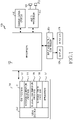
- FIG. 1 is a block diagram of an electronic device according to an embodiment of the present disclosure.
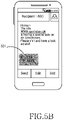
- FIGS. 5A , 5B , 5C , and 5D are views illustrating screen configurations for generating a hidden message in an electronic device according to the first embodiment of the present disclosure.
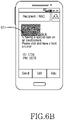
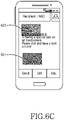
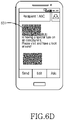
- FIGS. 6A , 6B , 6C , and 6D are views illustrating screen configurations for generating a hidden message in an electronic device according to a second embodiment of the present disclosure.
- FIGS. 8A , 8B , and 8C are views illustrating screen configurations for generating a hidden message in an electronic device according to a third embodiment of the present disclosure.
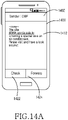
- FIGS. 14A , 14B , 14C , 14D , 14E , and 14F are views illustrating screen configurations for checking a hidden message in an electronic device according to an embodiment of the present disclosure.
- the electronic device 100 may include a memory 110, a processor 120, a communication system 130, an audio processor 140, an input and output controller 150, a display 160, and an inputter 170.
- the memory 110 recited herein may exist in plural number.
- the memory 110 may include a program storage 111 to store a program for controlling an operation of the electronic device 100, and a data storage 112 to store data which is generated while a program is being performed.
- the memory 110 may be a volatile memory (for example, a Random Access Memory (RAM)) or a non-volatile memory (for example, a flash memory), or a combination thereof.
- RAM Random Access Memory
- non-volatile memory for example, a flash memory
- the data storage 112 may store hiding frame setting information.
- the hiding frame setting information may include one or more pieces of shape information of a hiding frame to be added to a message and size information of the hiding frame.
- the shape of the hiding frame may include a polygon, a circle, an oval, a text balloon, a heart, etc.
- the hiding frame may indicate information that visualizes an area where at least part of a text is hidden in the message in the form of the hiding frame and displays the hiding frame.
- the program storage 111 may include a Graphic User Interface (GUI) program 113, a message generation program 114, a message transmission program 115, a message check program 116, and one or more applications 117.
- GUI Graphic User Interface
- a program included in the program storage 111 is a set of instructions and may be represented as an instruction set.
- the GUI program 113 includes one or more software elements for providing a user interface using graphics through the display 160.
- the GUI program 113 may control to display information on an application driven by the processor 120 on the display 160.
- the GUI program 113 may control to display a message generated through the message generation program 114 on the display 160 as shown in FIG. 5A .
- the GUI program 113 may control to display a touch input window for inputting a message using a touch pen on the display 160.
- the GUI program 113 may control the display 160 to display a hiding frame on one or more hiding areas determined by the message generation program 114.
- the GUI program 113 may control to display one or more hiding frames on the message displayed on the display 160 as shown in FIGS. 5A to 5D and FIGS. 6A to 6D .
- the GUI program 113 may control to display one or more hiding frames on a message display area for displaying a message as shown in FIGS. 8A to 8C .
- the GUI program 113 may control to display a hiding frame of a shape and size according to the hiding frame setting information stored in the data storage 112 on the display 160 or to display a hiding frame of a shape and size according to touch information for setting the hiding area on the display 160.
- the GUI program 113 may control to display the message checked by the message check program 116 on the display 160.
- the GUI program 113 may control to display the message on the display 160 without displaying a text of the hiding area in the received message as shown in FIG. 14A .
- the GUI program 113 may control to display a hiding frame 1431 on the display 160 as shown in FIG. 14B .
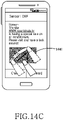
- the GUI program 113 may control to display the message text hidden by the hiding frame on the display 160 as shown in FIGS. 14C and 14F .
- the message generation program 114 includes one or more software elements for generating the message.
- the message generation program 114 may create the message according to touch information of a keypad or input information by a touch pen, which is provided from the inputter 170.
- the message generation program 114 may determine one or more hiding areas for hiding at least part of a text in the message. In this case, the message generation program 114 may determine the one or more hiding areas at one or more points of time of before, during, and after the message is created. For example, when a touch on the message display area by a touch pen or user's finger is sensed, the message generation program 114 may recognize that a setting event for hiding occurs. Accordingly, the message generation program 114 may set the one or more areas of the message display area where the touch is sensed, as the hiding area. For another example, the message generation program 114 may set one or more hiding areas by considering touch information on the message display area, after the setting event for hiding occurs.
- the message generation program 114 may determine whether the setting event for hiding occurs by considering one of selection of a hiding setting icon, selection of a hiding setting menu, and sensing of a gesture mapped onto the setting event for hiding.
- the hiding area recited herein indicates an area for displaying the hiding frame for hiding at least part of the text of the message.
- the message generation program 114 may set the hiding check option on the hiding area. For example, the message generation program 114 may set an option to check hiding information simply by a scratch operation of a touch pen on the hiding frame. For another example, the message generation program 114 may set an authentication key for the hiding frame. For another example, the message generation program 114 may limit the number of times the hiding frame can be checked. For another example, the message generation program 114 may set as the hiding check option two or more methods of the scratch operation using the touch pen, the authentication key setting method, and the method of setting the number of times the hiding frame can be checked.
- the scratch operation of the touch pen may indicate a series of operations of scratching the hiding frame with the touch pen.
- the message generation program 114 may set the same hiding check option for the plurality of pieces of hiding information or may set a different hiding check option for each piece of hiding information.
- the message transmission program 115 includes one or more software elements for transmitting the message generated by the message generation program 114 to a counterpart electronic device.
- the message transmission program 115 may control to transmit the hidden message generated by the message generation program 114 to the counterpart electronic device through the communication system 130.
- the message transmission program 115 may control to discriminate between the message generated by the message generation program 114 and the hiding area information on the message, and to transmit the message to the counterpart electronic device.
- the hiding area information may include one or more pieces of information of location, size, and shape information of the hiding frame included in the message.
- the message check program 116 includes one or more software elements for checking a message received from the counterpart electronic device.
- the message check program 116 may check the text of the message received through the communication system 130.
- the message check program 116 may control not to display the part of the text that is hidden in the message. Thereafter, when the hiding area checking event occurs, the message check program 116 may control to display the hiding frame in which the part of the text of the message is hidden.
- the message check program 116 may control to remove display of the hiding frame.
- the application 117 includes a software element for at least one application installed in the electronic device 100.
- the processor 120 controls the electronic device 100 to provide various multimedia services using at least one software program.
- the processor 120 executes at least one program stored in the memory 110 and provides a service corresponding to the corresponding program.
- the communication system 130 may perform a communication function of transmitting and receiving the message to and from the counterpart electronic device.
- the communication system 130 may be divided into a plurality of communication sub-modules which support different communication networks.
- the communication network includes a Global System for Mobile communications (GSM) network, an Enhanced Data rates for GSM Evolution (EDGE) network, a Code Division Multiple Access (CDMA) network, a Wideband-CDMA (W-CDMA) network, a Long Term Evolution (LTE) network, an Orthogonal Frequency-Division Multiplexing Access (OFDMA) network, a wireless Local Area Network (LAN), a Bluetooth network, Near Field Communication (NFC), etc.
- GSM Global System for Mobile communications
- EDGE Enhanced Data rates for GSM Evolution
- CDMA Code Division Multiple Access
- W-CDMA Wideband-CDMA
- LTE Long Term Evolution
- OFDMA Orthogonal Frequency-Division Multiplexing Access
- LAN Local Area Network
- Bluetooth Near Field Communication
- the audio processor 140 provides an audio interface between the user and the electronic device 100 through a speaker 141 and a microphone 142.
- the input and output controller 150 provides an interface between an input and output device, like the display 160, and the inputter 170 and the processor 120.
- the display 160 displays state information of the electronic device 100, a text input by the user, a moving image or still image, etc.
- the display 160 may display the message generated through the message generation program 114 as shown in FIG. 5A .
- the display 160 may display the hiding frame on one or more hiding areas determined by the message generation program 114.
- the display 160 may display one or more hiding frames on the area where the message is displayed as shown in FIGS. 5B to 5D and FIGS. 6A to 6D .
- the display 160 may display the hiding frame by superimposing another separate layer where the hiding frame is displayed on an upper end of a layer where the message is displayed. Accordingly, the display 160 can hide a message text of a location where the hiding frame is displayed.
- the display 160 may display one or more hiding frames on the message display area as shown in FIGS. 8A to 8C .
- the display 160 may display the hiding frame by superimposing another separate layer where the hiding frame is displayed on an upper end of a layer for displaying the message. Accordingly, the display 160 can hide the text of the message of a location where the hiding frame is displayed.
- the display 160 may display the message checked by the message check program 116.
- the display 160 may display the received message without displaying the hiding area as shown in FIG. 14A .
- the display 160 may display a hiding frame 1431 on the hiding area of the message as shown in FIG. 14B .
- the display 160 may display the message text hidden by the hiding frame as shown in FIGS. 14C and 14F .
- the inputter 170 provides input data generated by user's selection to the processor 120 through the input and output controller 150.
- the inputter 170 includes a keypad including at least one hardware button, a touch pad for sensing a touch, etc.
- the inputter 170 provides touch information sensed through the touch pad to the processor 120 through the input and output controller 150.
- FIG. 2 illustrates a configuration of a processor according to an embodiment of the present disclosure.
- the processor 120 includes a message generator 200, a message transmitter 210, a message checker 220, and a display controller 230.
- the message generator 200 may generate a message by executing the message generation program 114 stored in the program storage 111.
- the message generator 200 may create the message according to touch information of a keypad or input information by a touch pen, which is provided from the inputter 170.
- the message generator 200 may determine one or more hiding areas for hiding at least part of a text in the message. In this case, the message generator 200 may determine the one or more hiding areas at one or more points of time of before, during, and after the message is generated. For example, when a touch on the message display area by the touch pen or user's finger is sensed, the message generator 200 may recognize that a setting event for hiding occurs. Accordingly, the message generator 200 may set the one or more areas of the message display area where the touch is sensed, as the hiding area. For another example, the message generator 200 may set the one or more hiding areas by considering touch information on the message display area after the setting event for hiding occurs.
- the message generator 200 may check whether the setting event for hiding occurs by considering one of selection of a hiding setting icon, selection of a hiding setting menu, sensing of a gesture mapped onto the setting event for hiding, etc.
- the hiding area indicates an area for displaying the hiding frame for hiding at least part of the text of the message.
- the message generator 200 may set a hiding check option on the hiding area.
- the message generator 200 may set an option to check hiding information simply by a scratch operation of the touch pen on the hiding frame.
- the message generator 200 may set an authentication key for the hiding frame.
- the message generator 200 may limit the number of times the hiding frame can be checked.
- the message generator 200 may set as the hiding check option two or more methods of the scratch operation using the touch pen, the authentication key setting method, and the method of setting the number of times the hiding frame can be checked.
- the scratch operation of the touch pen may indicate a series of operations of scratching the hiding frame with the touch pen.
- the message generator 200 may set the same hiding check option for the plurality of pieces of hiding information or may set a different hiding check option for each piece of hiding information.
- the message transmitter 210 may control to transmit the message generated by the message generator 200 to the counterpart electronic device by executing the message transmission program 115 stored in the program storage 111.
- the message transmitter 210 may control to transmit the hidden message generated by the message generator 200 to the counterpart electronic device through the communication system 130.
- the message transmitter 210 may control to discriminate between the message generated by the message generator 200 and hiding area information on the message and to transmit the message to the counterpart electronic device.
- the hiding area information may include one or more of a location of the hiding area included in the message, and size and shape information of the hiding frame.
- the message checker 220 may check the message received from the counterpart electronic device by executing the message check program 116 stored in the program storage 111. For example, the message checker 220 may check the text of the message received through the communication 130. When the message includes the hiding area information on the message, the message checker 220 may control not to display the part of the text hidden in the message. Thereafter, when a hiding area checking event occurs, the message checker 220 may control to display the hiding frame in which the part of the text of the message is hidden. In addition, when an input corresponding to the hiding check option of the hiding frame is received from the inputter 170, the message checker 220 may control to remove display of the hiding frame.
- the display controller 230 may provide a user interface using graphics through the display 160 by executing the GUI program 113 stored in the program storage 111. That is, the display controller 230 may control to display information on an application driven by the processor 120 on the display 160.
- the display controller 230 may control to display the message generated by the message generator 200 on the display 160 as shown in FIG. 5A .
- the display controller 230 may control the display 160 to display the hiding frame on the one or more hiding areas determined by the message generator 200.
- the display controller 230 may control to display the one or more hiding frames on the message displayed on the display 160 as shown in FIGS. 5B to 5D and FIGS. 6A to 6D .
- the display controller 230 may control to display the one or more hiding frames on a message display area for displaying the message as shown in FIGS. 8A to 8C .
- the display controller 230 may control to display a hiding frame of a shape and size according to hiding frame setting information stored in the data storage 112 on the display 160 or to display a hiding frame of a shape and size according to touch information for setting the hiding area on the display 160.
- the display controller 230 may control to display the message checked by the message checker 220 on the display 160.
- the display controller 230 may control to display the received message on the display 160 without displaying the text of the hiding area in the message as shown in FIG. 14A .
- the display controller 230 may control to display the hiding frame 1431 on the display 160 as shown in FIG. 14B .
- the display controller 230 may control to display the message texts hidden by the hiding frame on the display 160 as shown in FIGS. 14C and 14F .
- the processor 120 may be configured to include elements for generating and checking the hidden message as separate modules as shown in FIG. 2 .
- the processor 120 may be configured to generate and check a hidden message in a single module.
- the electronic device 100 may include a separate control module for generating and checking a hidden message.
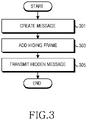
- FIG. 3 is a flowchart for transmitting a hidden message in an electronic device according to an embodiment of the present disclosure.
- the electronic device generates a message in operation 301.
- the electronic device may create the message according to touch information of a keypad or input information by a touch pen, which is provided from the inputter 170.
- the electronic device may display the created message on the display 150 as shown in FIG. 5A .
- the electronic device In operation 303, the electronic device generates a hidden message by adding a hiding frame to at least part of a text of the message.
- the electronic device may add one or more hiding frames to a message display area at one or more points of time of before, during, and after the message is created. For example, when a touch on the message display area by a touch pen or user's finger is sensed, the electronic device may recognize that a setting event for hiding occurs. Accordingly, the electronic device may set one or more areas of the message display area where the touch is sensed as a hiding area and may add the hiding frame. For another example, after the setting event for hiding occurs, the electronic device may set the one or more hiding areas by considering touch information on the message display area and may add the hiding frame.
- the electronic device may check whether the setting event for hiding occurs by considering one of selection of a hiding setting icon, selection of a hiding setting menu, sensing of a gesture mapped onto the setting event for hiding, etc.
- the hiding area indicates an area for displaying the hiding frame for hiding at least part of the text of the message.
- the electronic device transmits the hidden message to a counterpart electronic device.
- the electronic device may transmit the hidden message including the one or more hiding frames to the counterpart electronic device.
- the electronic device may transmit the message and the hiding area information on the message to the counterpart electronic device.
- the hiding area information may include one or more pieces of information of location, size, and shape information of the hiding frame included in the message.
- the electronic device may generate the hidden message by adding the one or more hiding frames to the message display area while or after the message is created.
- the electronic device may generate the hidden message by adding one or more hiding frames to the message display area in advance before the message is created. For example, the electronic device may display one or more hiding frames on the message display area in operation 303. Thereafter, the electronic device may generate the hidden message by displaying the message according to touch information of the keypad or input information by the touch pen, which is provided from the inputter 170, on the message display area where the hiding frame is displayed in operation 301. After generating the hidden message, the electronic device may transmit the hidden message to the counterpart electronic device in operation 305.
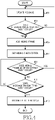
- FIG. 4 is a flowchart for generating a hidden message in an electronic device according to a first embodiment of the present disclosure.
- the electronic device creates a message in operation 401.
- the electronic device may display a message creation screen 500 on the display 160 as shown in FIG. 5A . Thereafter, the electronic device may display the message which is created according to touch information of a keypad or input information by a touch pen, which is provided from the inputter 170, on a message display area 510.
- the message creation screen 500 may further include one or more pieces of additional information for the message service from among information 502 on a counterpart electronic device to which the message is to be transmitted, an icon 504 of an address book used for adding counterpart electronic device information, and control menus 522, 524, and 526 for creating, editing, and transmitting the message.
- the electronic device checks whether a hidden message creating event occurs. For example, the electronic device may check whether a touch on the message display area 510 shown in FIG. 5A is sensed. For another example, the electronic device may check whether selection of a hiding setting icon is sensed. For another example, the electronic device may check whether the hiding setting menu 524 shown in FIG. 5A is selected. For another example, the electronic device may check whether a gesture matching the hidden message creating event is sensed.
- the electronic device finishes the present algorithm by returning to operation 401.
- the electronic device may transmit the message generated in operation 401 to the counterpart electronic device.
- the electronic device proceeds to operation 405 to add one or more hiding frames to the message display area.
- the electronic device may add a hiding frame of a shape and size according to hiding frame setting information stored in the data storage 112 or may add a hiding frame of a shape and size according to touch information for setting a hiding area. For example, when it is determined that the hidden message creating event occurs by considering touch movement information of a rectangular shape on the message display area 510, the electronic device may add a hiding frame 531 of a rectangular shape to the area where the touch is sensed according to the touch information as shown in FIG. 5B .
- the electronic device may add the hiding frame 531 of the rectangular shape to the area where the touch is sensed according to the touch information as shown in FIG. 5B .
- the electronic device may add the hiding frame 531 of the rectangular shape to the touch point according to the shape and size according to the hiding frame setting information stored in the data storage 112.
- the electronic device may change the location and size of the hiding frame 531 according to input information provided form the inputter 170. For example, when touch movement (601 ⁇ 603) on the hiding frame 531 is sensed as shown in FIG. 6A , the electronic device may change the location of the hiding frame 531 to a location 611 according to touch movement information as shown in FIG. 6B . For another example, the electronic device may adjust the size of the hiding frame 531 according to touch movement information on a border of the hiding frame 531.
- the electronic device After adding the hiding frame, the electronic device proceeds to operation 407 to set a hiding check option to check at least part of a text of the message hidden by the hiding frame.
- the electronic device may set an option to check hiding information simply by a scratch operation of a touch pen on the hiding frame.
- the electronic device may set an authentication key for the hiding information.
- the electronic device may limit the number of times the hiding information can be checked.
- the electronic device may set as the hiding check option two or more methods of the scratch operation using the touch pen, the authentication key setting method, and the method of setting the number of times the hiding information can be checked.
- the scratch operation by the touch pen may indicate a series of operations of scratching the hiding frame with the touch pen.
- the electronic device checks whether a hiding frame addition setting event occurs. For example, the electronic device may check whether a touch on the message display area 510 is sensed. For another example, the electronic device may check whether selection of the hiding setting icon is sensed. For another example, the electronic device may check whether the hiding area addition menu 526 shown in FIG. 5A is selected. For another example, the electronic device may check whether a gesture matching the hidden message creating event is sensed.
- the electronic device resumes operation 405 to add one or more hiding frames to the message display area.
- the electronic device may add a hiding frame of a shape and size according to hiding frame setting information stored in the data storage 112, or may add a hiding frame of a shape and size according to touch information for setting a hiding area. For example, when it is determined that the hiding frame addition setting event occurs by considering touch movement information of a rectangular shape on the message display area, the electronic device may add a hiding frame 623 of a rectangular shape to the area where the touch is sensed according to touch information as shown in FIG. 6C .
- the electronic device may add the hiding frame 623 of the rectangular shape to the area where the touch is sensed according to touch information as shown in FIG. 6C .
- the electronic device may add the hiding frame 623 of the rectangular shape to the touch point according to the shape and size according to the hiding frame setting information stored in the data storage 112.
- the electronic device proceeds to operation 411 to check whether a message transmitting event occurs. For example, the electronic device may check whether selection of the transmission menu 522 shown in FIG. 5A is sensed.
- the electronic device resumes operation 409 to check whether the hiding frame addition setting event occurs. For another example, when the message transmitting event does not occur, the electronic device may modify the message or add a message.
- the electronic device proceeds to operation 413 to transmit the hidden message to the counterpart electronic device.
- the electronic device may transmit the hidden message including the one or more hiding frames to the counterpart electronic device.
- the electronic device may transmit the message and hiding area information on the message to the counterpart electronic device.
- the electronic device may display hiding check option information 551 on the display again as shown in FIG. 5D and may check whether to transmit the message.
- the hiding area information may include one or more pieces of information of location, size, and shape information of the hiding frame included in the message.
- the electronic device may set the hiding check option on the hiding frame every time that the hiding frame is added. Accordingly, the electronic device may set a different hiding check option on each of the hiding frames included in the message.
- the electronic device may add one or more hiding frames to the message and then may set a hiding check option to be commonly applied to the one or more hiding frames added to the message. For example, when the message transmitting event occurs, the electronic device may display an input window for setting the hiding check option and may set the hiding check option to be commonly applied to the one or more hiding frames added to the message.
- the electronic device may apply a pre-set hiding check option to the one or more hiding frames added to the message.
- the electronic device may omit the process for setting the hiding check option in operation 407 while generating the hidden message.
- the electronic device may generate the hidden message by adding the one or more hiding frames to the message display area.
- the electronic device may indicate whether the hiding frame setting operation is completed or whether the message creating operation is completed by adjusting transparency of the one or more hiding frames displayed on the message display area. For example, when the electronic device adds the hiding frame 531 to the message display area in operation 405 of FIG. 4 as shown in FIG. 5B , the electronic device may adjust the transparency of the hiding frame 531 to allow the user to check the part of the text hidden by the hiding frame 531, until the hiding check option on the hiding frame 531 is set. When the hiding check option on the hiding frame 531 is set in operation 407 of FIG.
- the electronic device may adjust the transparency of the hiding frame 541 to have the part of the text of the message hidden by the hiding frame 541 as shown in FIG. 5C .
- the electronic device may adjust transparency of the hiding frame 623 to allow the user to check the part of the text hidden by the hiding frame 623, until the hiding check option on the hiding frame 623 is set.
- the electronic device may adjust transparency of a first hiding frame 621 on which a hiding check option is set to have the text of the message hidden by the first hiding frame 621.
- the electronic device may adjust the transparency of the hiding frame 631 to have the part of the text of the message hidden by the hiding frame 631 as shown in FIG. 6D .
- FIG. 7 is a flowchart for generating a hidden message in an electronic device according to a second embodiment of the present disclosure.
- the electronic device checks whether to create a hidden message in operation 701. For example, the electronic device may check whether a hidden message creation program is executed according to input information provided from the inputter 170. For another example, the electronic device may check whether a hidden message creating event occurs. In this case, the electronic device may check whether the hidden message creating event occurs by considering one of selection of a hidden message creating icon, selection of a hidden message creating menu, sensing of a gesture mapped onto the hidden message creating event, and the like. For another example, when creating a message, the electronic device may display a message creation screen 800 on the display 160. When touch movement on a message display area 810 of the message creation screen 800 is sensed, the electronic device may recognize that the hidden message creating event occurs.
- the message creation screen 800 may further include one or more pieces of additional information for the message service from among information 802 on a counterpart electronic device to which the message is to be transmitted, an icon 804 of an address book used for adding counterpart electronic device information, and control menus 814, 816, and 818 for creating, editing, and transmitting the message.
- the electronic device adds one or more hiding frames to the message display area in operation 703.
- the electronic device may add a hiding frame of a shape and size according to hiding frame setting information stored in the data storage 112 or may add a hiding frame of a shape and size according to touch information for setting a hiding area. For example, when it is determined that the hidden message creating event occurs by considering touch movement information of a rectangular shape on the message display area 810, the electronic device may add a hiding frame 812 of a rectangular shape to the area where the touch is sensed according to touch information as shown in FIG. 8A .
- the electronic device may add the hiding frame 812 of the rectangular shape to the area where the touch is sensed according to the touch information as shown in FIG. 8A .
- the electronic device may add the hiding frame 812 of the rectangular shape to the touch point according to the shape and size according to the hiding frame setting information stored in the data storage 112 as shown in FIG. 8A .
- the electronic device may change the location and size of the hiding frame 812 according to input information provided from the inputter 170. For example, when touch movement (821 ⁇ 823) on the hiding frame 812 is sensed as shown in FIG. 8B , the electronic device may change the location of the hiding frame 812 to a location 831 according to the touch movement information as shown in FIG. 8C . For another example, the electronic device may adjust the size of the hiding frame 812 according to touch movement information on a border of the hiding frame 812.
- the electronic device sets a hiding check option to check at least part of a text of the message hidden by the hiding frame.
- the electronic device may set an option to check hiding information simply by a scratch operation of a touch pen on the hiding frame.
- the electronic device may set an authentication key for the hiding information.
- the electronic device may limit the number of times the hiding information can be checked.
- the electronic device may set as the hiding check option two or more methods of the scratch operation using the touch pen, the authentication key setting method, and the method of setting the number of times the hiding information can be checked.
- the scratch operation by the touch pen may indicate a series of operations of scratching the hiding frame with the touch pen.
- the electronic device creates a message.
- the electronic device may create the message according to touch information of a keypad or input information by a touch pen, which is provided from the inputter 170.
- the electronic device may display the created message on the message display area 810 to which the hiding frame has been added as shown in FIG. 8A .
- the electronic device checks whether a message transmitting event occurs. For example, the electronic device may check whether selection of the transmission menu 814 shown in FIG. 8A is sensed.
- the electronic device proceeds to operation 713 to check whether a hiding frame addition setting event occurs. For example, the electronic device may check whether a touch on the message display area 810 is sensed. For another example, the electronic device may check whether selection of a hiding setting icon is sensed. For another example, the electronic device may check whether the hiding area addition menu 818 shown in FIG. 8A is selected. For another example, the electronic device may check whether a gesture matching the hidden message creating event is sensed.
- the electronic device resumes operation 703 to add one or more hiding frames to the message display area.
- the electronic device may add a hiding frame of a shape and size according to hiding frame setting information stored in the data storage 112 or may add a hiding frame of a shape and size according to touch information for setting a hiding area. For example, when it is determined that the hiding frame addition setting event occurs by considering touch movement information of a rectangular shape on the message display area, the electronic device may add the hiding frame 623 of the rectangular shape to the area where the touch is sensed according to touch information as shown in FIG. 6C .
- the electronic device may add the hiding frame 623 of the rectangular shape to the area where the touch is sensed according to touch information as shown in FIG. 6C .
- the electronic device may add the hiding frame 623 of the rectangular shape to the touch point according to the shape and size according to the hiding frame setting information stored in the data storage 112 as shown in FIG. 6C .
- the electronic device resumes operation 707 to correct and add the message.
- the electronic device transmits the hidden message to the counterpart electronic device in operation 711.
- the electronic device may transmit the hidden message including the one or more hiding frames to the counterpart electronic device.
- the electronic device may transmit the message and the hiding area information on the message to the counterpart electronic device.
- the electronic device may display the hiding check option information 551 on the display 160 again as shown in FIG. 5D and may check whether to transmit the message again.
- the hiding area information may include one or more pieces of information of location, size, and shape information of the hiding frame included in the message.
- the electronic device may generate the hidden message by adding the one or more hiding frames to the message display area.
- the electronic device may indicate whether the hiding frame setting operation is completed or whether the message creating operation is completed by adjusting transparency of the one or more hiding frames displayed on the message display area. For example, when creating the message, the electronic device may adjust the transparency of the hiding frame to display the message text of the area where the hiding frame is displayed and thus allow the user to check the text of the message created in the hiding frame area, until the message transmitting event occurs.
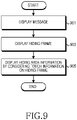
- FIG. 9 is a flowchart for checking hiding information in a hidden message in an electronic device according to an embodiment of the present disclosure.
- the electronic device displays a hidden message on the display 160 in operation 901.
- the electronic device may display a text of the hidden message on a message display area 1412 of a message check screen 1400 as shown in FIG. 14A .
- the electronic device may not display a message text of a hiding area that is hidden in the hidden message by a hiding frame on the display 160 as shown in FIG. 14A .
- the electronic device may display a hiding icon (not shown)_on a predetermined area of the message check screen 1400.
- the message check screen 1400 may further include one or more pieces of additional information for a message service from among information 1402 on a counterpart electronic device which has transmitted the message and control menus 1422 and 1424 for checking and forwarding the message.
- the electronic device displays one or more hiding frames in the hidden message. For example, when a hiding area checking event occurs, the electronic device checks the location, shape, and size of the hiding frame included in the hidden message based on hiding area information of the hidden message. Thereafter, the electronic device may display one or more hiding frames 1431 on the message display area 1412 by considering the location, shape, and size of the hiding frame included in the hidden message as shown in FIG. 14B . In this case, the electronic device may check whether the hiding area checking event occurs by considering one of selection of the hiding icon 1414, selection of a hiding area display menu, and sensing of a gesture mapped onto the hiding area checking event.
- the electronic device receives input information corresponding to a hiding check option of the hiding frame from the inputter 170 and displays the message text hidden by the hiding frame. For example, when a scratch 1441 on the hiding frame 1431 by a touch pen or user's finger is sensed as shown in FIG. 14C , the electronic device may display a part of the message text hidden by the hiding frame on the display 160 by removing the hiding frame of the scratched area as shown in FIG. 14C . When the size of the hiding frame becomes smaller than a reference size due to the scratch on the hiding frame, the electronic device may display the entire message text hidden by the hiding frame on the display 160 as shown in FIG. 14F .
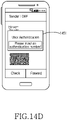
- the electronic device may display an authentication key input window 1451 on the display 160 as shown in FIG. 14D .
- the electronic device may remove the hiding frame or may remove the hiding frame by the scratch operation on the hiding frame.
- the electronic device may display an authentication failure message on the display 160.
- the electronic device may check whether it is possible to remove the hiding frame by considering the number of times the hiding frame has been checked.
- the electronic device may display a message 1461 indicating that the hiding area cannot be checked on the display 160 as shown in FIG. 14E .
- the electronic device may remove the hiding frame by the scratch operation on the hiding frame.
- the electronic device may receive input information corresponding to the hiding check option of the hiding frame from the inputter 170 and may display the message text hidden by the hiding frame.
- the electronic device may remove a corresponding hiding frame by considering input information on each of the hiding frames.
- FIG. 10 is a flowchart for checking a hidden message in an electronic device according to the first embodiment of the present disclosure.
- the electronic device displays a hidden message on the display 160 in operation 1001.
- the electronic device may display a text of the hidden message on the message display area 1412 of the message check screen 1400 as shown in FIG. 14A .
- the electronic device may display the text of the hidden message on the message display area 1412 of the message check screen 1400 as shown in FIG. 14A .
- the electronic device may not display a message text of a hiding area that is hidden in the hidden message by a hiding frame on the display 160 as shown in FIG. 14A .
- the electronic device may display the hiding icon 1414 on a predetermined area of the message check screen 1400.
- the electronic device checks whether a hiding area checking event occurs. For example, the electronic device may check whether the hiding icon 1414 shown in FIG. 14A is selected. For another example, the electronic device may check whether a hiding area display menu is selected. For another example, the electronic device may check whether a gesture mapped onto the hiding area checking event is sensed.
- the electronic device resumes operation 1001 to continue displaying the message.
- the electronic device displays one or more hiding frames in the hidden message in operation 1005.
- the electronic device may check the location, shape, and size of the hiding frame included in the hidden message based on hiding area information of the hidden message. Thereafter, the electronic device may display the one or more hiding frames 1431 on the message display area 1412 by considering the location, shape, and size of the hiding frame included in the hidden message as shown in FIG. 14B .
- the electronic device checks whether a scratch on the one or more hiding frames included in the hidden message is sensed. For example, the electronic device may check whether the scratch 1441 on the hiding frame 1431 by the touch pen or user's finger is sensed as shown in FIG. 14C .
- the electronic device displays a part of the text of the message hidden by the hiding frame on the display 160 by removing the area where the scratch is sensed from the hiding frame in operation 1009.
- the electronic device may display a part of the message text hidden by the hiding frame on the display 160 by removing display of the hiding frame of the area where the scratch is sensed from the hiding frame as shown in FIG. 14C .
- the electronic device checks whether an unscratched area exists in the hiding frame or whether an unscratched hiding frame exists.
- the electronic device resumes operation 1007 to check whether the scratch on the one or more hiding frames included in the hidden message is sensed.
- the electronic device may store the hidden message with only a part of the hiding frame being removed.
- the electronic device finishes the present algorithm. That is, the electronic device may display the entire text of the hidden message on the display 160 as shown in FIG. 14F .
- FIG. 11 is a flowchart for checking a hidden message in an electronic device according to the second embodiment of the present disclosure.
- the electronic device displays a hidden message on the display 160 in operation 1101.
- the electronic device may display a text of the hidden message on the message display area 1412 of the message check screen 1400 as shown in FIG. 14A .
- the electronic device may display the text of the hidden message on the message display area 1412 of the message check screen 1400 as shown in FIG. 14A .
- the electronic device may not display a message text of a hiding area that is hidden in the hidden message by a hiding frame on the display 160 as shown in FIG. 14A .
- the electronic device may display the hiding icon 1414 on a predetermined area of the message check screen 1400.
- the electronic device checks whether a hiding area checking event occurs. For example, the electronic device may check whether the hiding icon 1414 shown in FIG. 14A is selected. For another example, the electronic device may check whether a hiding area display menu is selected. For another example, the electronic device may check whether a gesture mapped onto the hiding area checking event is sensed.
- the electronic device resumes operation 1101 to continue displaying the message.
- the electronic device displays one or more hiding frames in the hidden message in operation 1105.
- the electronic device may check the location, shape, and size of the hiding frame included in the hidden message based on hiding area information of the hidden message. Thereafter, the electronic device may display the one or more hiding frames 1431 in the message display area 1412 by considering the location, shape, and size of the hiding frame included in the hidden message as shown in FIG. 14B .
- the electronic device checks whether a scratch on the one or more hiding frames included in the hidden message is sensed. For example, the electronic device may check whether the scratch 1441 on the hiding frame 1431 by the touch pen or user's finger is sensed as shown in FIG. 14C .
- the electronic device displays a part of the text of the message hidden by the hiding frame on the display 160 by removing the area where the scratch is sensed from the hiding frame in operation 1109.
- the electronic device may display a part of the message text hidden by the hiding frame on the display 160 by removing display of the hiding frame of the area where the scratch is sensed from the hiding frame as shown in FIG. 14C .
- the electronic device checks whether a size of an unscratched area in the hiding frame is smaller than a reference size. For example, the electronic device may check whether the size of the area that is not scratched in the hiding frame 1431 by the scratch 1441 on the hiding frame 1431 shown in FIG. 14C is smaller than the reference size.
- the electronic device When the size of the unscratched area in the hiding frame is larger than or equal to the reference size, the electronic device resumes operation 1107 to check whether the scratch on the one or more hiding frames included in the hidden message is sensed. In addition, when a storing event occurs, the electronic device may store the hidden message with only a part of the hiding frame being removed.
- the electronic device proceeds removes the corresponding hiding frame and displays the entire text of the hidden message on the display 160 in operation 1113.
- the electronic device recognizes that the scratch occurs on the entire area of the hiding frame 1431. Accordingly, the electronic device may display the entire text of the hidden message on the display 160 by removing the hiding frame 1431 from the hidden message as shown in FIG. 14F .
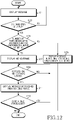
- FIG. 12 is a flowchart for checking a hidden message in an electronic device according to the third embodiment of the present disclosure.
- the electronic device displays a hidden message on the display 160 in operation 1201.
- the electronic device may display a text of the hidden message on the message display area 1412 of the message check screen 1400 as shown in FIG. 14A .
- the electronic device may display the text of the hidden message on the message display area 1412 of the message check screen 1400 as shown in FIG. 14A .
- the electronic device may not display a message text of a hiding area that is hidden in the hidden message by a hiding frame on the display 160 as shown in FIG. 14A .
- the electronic device may display the hiding icon 1414 on a predetermined area of the message check screen 1400.
- the electronic device checks whether a hiding area checking event occurs. For example, the electronic device may check whether the hiding icon 1414 shown in FIG. 14A is selected. For another example, the electronic device may check whether a hiding area display menu is selected. For another example, the electronic device may check whether a gesture mapped onto the hiding area checking event is sensed.
- the electronic device resumes operation 1201 to continue displaying the message.
- the electronic device checks whether the number of times the hiding area of the hidden message has been checked is less than a reference number of times in operation 1205.
- the electronic device may check whether there is one or more hiding frames that have been checked a number of times less than the reference number of times.
- the reference number of times is a hiding check option on the one or more hiding frames included in the hidden message and may be set by the counterpart electronic device.
- the electronic device may recognize that it is not possible to check the hiding area of the hidden message. Accordingly, the electronic device displays a message indicating that the hiding area cannot be checked on the display 160 in operation 1215. For example, the electronic device may display the message indicating that the hiding information on the hidden message cannot be checked on the display 160 as shown in FIG. 14E .
- the electronic device displays the one or more hiding frames in the hidden message in operation 1207.
- the electronic device may check the location, shape, and size of the hiding frame included in the hidden message based on hiding area information of the hidden message. Thereafter, the electronic device may display the one or more hiding frames 1431 in the message display area 1412 by considering the location, shape, and size of the hiding frame included in the hidden message as shown in FIG. 14B .
- the electronic device checks whether a scratch on the one or more hiding frames included in the hidden message is sensed. For example, the electronic device may check whether the scratch 1441 on the hiding frame 1431 by the touch pen or user's finger is sensed as shown in FIG. 14C .
- the electronic device displays a part of the text of the message hidden by the hiding frame on the display 160 by removing the area where the scratch is sensed from the hiding frame in operation 1211.
- the electronic device may display a part of the message text hidden by the hiding frame by removing display of the hiding frame of the area where the scratch is sensed from the hiding frame as shown in FIG. 14C .
- the electronic device proceeds to operation 1213 to check whether an unscratched area exists in the hiding frame or whether an unscratched hiding frame exists.
- the electronic device checks whether the scratch on the one or more hiding frames included in the hidden message is sensed in operation 1209. In addition, when a storing event occurs, the electronic device may store the hidden message with only a part of the hiding frame being removed.
- the electronic device finishes the present algorithm. That is, the electronic device may display the entire text of the hidden message on the display 160 as shown in FIG. 14F .
- FIG. 13 is a flowchart for checking a hidden message in an electronic device according to a fourth embodiment of the present disclosure.
- the electronic device displays a hidden message on the display 160 in operation 1301.
- the electronic device may display a text of the hidden message on the message display area 1412 of the message check screen 1400 as shown in FIG. 14A .
- the electronic device may display the text of the hidden message on the message display area 1412 of the message check screen 1400 as shown in FIG. 14A .
- the electronic device may not display a message text of a hiding area that is hidden in the hidden message by a hiding frame on the display 160 as shown in FIG. 14A .
- the electronic device may display the hiding icon 1414 on a predetermined area of the message check screen 1400.
- the electronic device checks whether a hiding area checking event occurs. For example, the electronic device may check whether the hiding icon 1414 shown in FIG. 14A is selected. For another example, the electronic device may check whether a hiding area display menu is selected. For another example, the electronic device may check whether a gesture mapped onto the hiding area checking event is sensed.
- the electronic device resumes operation 1301 to continue displaying the message.
- the electronic device displays a user authentication window on the display 160 in operation 1305.
- the electronic device may display a user authentication window 1451 for receiving input of an authentication key from the user on the display 160 as shown in FIG. 14D .
- the electronic device checks whether the user can be authenticated based on authentication information received through the user authentication window. For example, the electronic device may check an authentication key which is set for the hiding frame in the hiding area information of the hidden message. Thereafter, the electronic device may check whether the user can be authenticated by comparing the authentication key received from the inputter 170 and the authentication key set for the hiding frame. For another example, when the hiding area information of the hidden message does not include the authentication key set for the hiding frame, the electronic device requests the authentication key from the counterpart electronic device which has transmitted the hidden message. Thereafter, the electronic device may check whether the user can be authenticated by comparing the authentication key provided from the inputter 170 and the authentication key provided from the counterpart electronic device.
- the electronic device When the user cannot be authenticated, the electronic device recognizes that it is not possible to check the hiding area of the hidden message. Accordingly, the electronic device displays a message indicating that the hiding area cannot be checked on the display 160 in operation 1317.
- the electronic device displays one or more hiding frames in the hidden message in operation 1309.
- the electronic device may check the location, shape, and size of the hiding frame included in the hidden message based on the hiding area information of the hidden message. Thereafter, the electronic device may display the one or more hiding frames 1431 on the message display area 1412 by considering the location, shape, and size of the hiding frame included in the hidden message as shown in FIG. 14B .
- the electronic device checks whether a scratch on the one or more hiding frames included in the hidden message is sensed in operation 1311. For example, the electronic device may check whether the scratch 1441 on the hiding frame 1431 by the touch pen or user's finger is sensed as shown in FIG. 14C .
- the electronic device displays a part of the text of the message hidden by the hiding frame on the display 160 by removing the area where the scratch is sensed from the hiding frame in operation 1313.
- the electronic device may display a part of the message text hidden by the hiding frame on the display 160 by removing display of the hiding frame of the area where the scratch is sensed from the hiding frame as shown in FIG. 14C .
- the electronic device checks whether an unscratched area exists in the hiding frame or whether an unscratched hiding frame exists.
- the electronic device resumes checks whether the scratch on the one or more hiding frames included in the hidden message is sensed in operation 1309. In addition, when a storing event occurs, the electronic device may store the hidden message with only a part of the hiding frame being removed.
- the electronic device finishes the present algorithm. That is, the electronic device may display the entire text of the hidden message on the display 160 as shown in FIG. 14F .
- the electronic device transmits the message in which at least part of the text is hidden to the counterpart electronic device, so that the important message cannot be easily exposed to the outside and counterpart's attention can be focused on the hidden text.
- the electronic device may set an option to check the message in which at least part of the text is hidden through user authentication or limit the number of times the message in which at least part of the text is hidden can be checked, so that security for the important information included in the message can be enhanced.
- Non-transient computer readable storage medium stores one or more programs (software modules), the one or more programs comprising instructions, which when executed by one or more processors in an electronic device, cause the electronic device to perform a method of the present disclosure.
- Any such software may be stored in the form of volatile or non-volatile storage such as, for example, a storage device like a ROM, whether erasable or rewritable, or in the form of memory such as, for example, RAM, memory chips, device or integrated circuits or on an optically or magnetically readable medium such as, for example, a CD, DVD, magnetic disk or magnetic tape or the like.
- volatile or non-volatile storage such as, for example, a storage device like a ROM, whether erasable or rewritable, or in the form of memory such as, for example, RAM, memory chips, device or integrated circuits or on an optically or magnetically readable medium such as, for example, a CD, DVD, magnetic disk or magnetic tape or the like.
Landscapes
- Engineering & Computer Science (AREA)
- Computer Networks & Wireless Communication (AREA)
- Signal Processing (AREA)
- Computer Hardware Design (AREA)
- Theoretical Computer Science (AREA)
- Software Systems (AREA)
- Computer Security & Cryptography (AREA)
- Physics & Mathematics (AREA)
- General Engineering & Computer Science (AREA)
- General Physics & Mathematics (AREA)
- Human Computer Interaction (AREA)
- General Business, Economics & Management (AREA)
- Business, Economics & Management (AREA)
- User Interface Of Digital Computer (AREA)
- Communication Control (AREA)
- Telephone Function (AREA)
- Burglar Alarm Systems (AREA)
Claims (12)
- Verfahren zur Verwendung in einer elektronischen Vorrichtung, wobei das Verfahren Folgendes umfasst:Empfangen (301) einer Benutzereingabe zum Eingeben von Textdaten unter Verwendung eines Tastenfelds, während eine Nachrichtenanwendung ausgeführt wird;Anzeigen (301), auf einem Eingabenachrichten-Anzeigebereich eines Anzeigebildschirms der Nachrichtenanwendung durch eine Anzeige (160) der elektronischen Vorrichtung, einer ersten Schicht, die einen Nachrichteninhalt umfasst, der die Textdaten enthält;Anzeigen (303), auf dem Eingabenachrichten-Anzeigebereich der Anzeige (160), einer zweiten Schicht zum Verbergen mindestens eines Teils der Textdaten vor dem Übertragen einer Nachricht, die Informationen über die erste Schicht und Informationen, die mit der zweiten Schicht verbunden sind, enthält;Erzeugen (303) der Nachricht, die Informationen über die erste Schicht und Informationen, die mit der zweiten Schicht verbunden sind, enthält; undÜbertragen (305) der erzeugten Nachricht, die Informationen über die erste Schicht und Informationen, die mit der zweiten Schicht verbunden sind, enthält, an eine elektronische Gegenstückvorrichtung unter Verwendung eines Kommunikationssystems (130),wobei die zweite Schicht so angezeigt wird, dass sie eine angepasste Transparenz aufweist, um den mindestens einen Teil der Textdaten auf der ersten Schicht zu verbergen; undwobei die erzeugte Nachricht, die Informationen über die erste Schicht und Informationen, die mit der zweiten Schicht verbunden sind, enthält, konfiguriert ist zum:Ermöglichen des Anzeigens (1005) der Nachricht auf der elektronischen Gegenstückvorrichtung, wobei der mindestens eine Teil der Textdaten durch die zweite Schicht verborgen wird, sodass der mindestens eine Teil der Textdaten unlesbar ist, undErmöglichen des Offenlegens (1009) des mindestens einen Teils der Textdaten der ersten Schicht, wenn eine Berührungsgeste auf der zweiten Schicht an der elektronischen Gegenstückvorrichtung erfasst wird.
- Verfahren nach Anspruch 1,wobei die Berührungsgeste eine Bewegung einer erfassten Berührung enthält, undwobei die erzeugte Nachricht, die Informationen über die erste Schicht und Informationen, die mit der zweiten Schicht verbunden sind, enthält, dazu konfiguriert ist, eine schrittweise Offenlegung des mindestens einen Teils der Textdaten als Reaktion auf die Bewegung der erfassten Berührung zu ermöglichen.
- Verfahren nach Anspruch 1,wobei die Berührungsgeste eine Bewegung einer erfassten Berührung enthält, undwobei die erzeugte Nachricht, die Informationen über die erste Schicht und Informationen, die mit der zweiten Schicht verbunden sind, enthält, konfiguriert ist, um eine Steigerung einer Größe eines offengelegten Abschnitts des mindestens einen Teils der Textdaten als Reaktion auf die Bewegung der erfassten Berührung zu ermöglichen.
- Verfahren nach Anspruch 1, wobei die Berührungsgeste eine erfasste Berührung über einem Teilbereich der zweiten Schicht enthält.
- Verfahren nach Anspruch 1,wobei die Berührungsgeste eine Bewegung einer erfassten Berührung enthält, undwobei, wenn die Bewegung der erfassten Berührung größer als ein Schwellenwert ist, der mindestens eine Teil der Textdaten offenbart wird.
- Verfahren nach Anspruch 1, wobei das Anzeigen der zweiten Schicht ferner Anzeigen der zweiten Schicht in halbtransparenter Form über der ersten Schicht umfasst.
- Verfahren nach Anspruch 1, wobei das Anzeigen der zweiten Schicht ferner Anzeigen der zweiten Schicht umfasst, um die Anzeige des mindestens einen Teils der Textdaten teilweise zu verdecken.
- Verfahren nach Anspruch 1, wobei die erzeugte Nachricht, die Informationen über die erste Schicht und Informationen, die mit der zweiten Schicht verbunden sind, enthält, ferner dazu konfiguriert ist, es der Gegenstückvorrichtung zu ermöglichen, die zweite Schicht erneut anzuzeigen, um den mindestens einen Teil der Textdaten an der elektronischen Gegenstückvorrichtung zu verbergen, nachdem mindestens ein Teil der Textdaten durch die Berührungsgeste offengelegt wurde.
- Verfahren nach Anspruch 1, wobei das Anzeigen der zweiten Schicht ferner Empfangen einer Benutzereingabe auf einem Verbergungseinstellungssymbol zum Einstellen der zweiten Schicht umfasst.
- Verfahren nach Anspruch 1, ferner umfassend Anzeigen von Informationen, die mit der elektronischen Gegenstückvorrichtung verbunden sind.
- Verfahren nach Anspruch 1, ferner umfassend Anpassen der Transparenz der zweiten Schicht, um zuzulassen, dass der mindestens ein Teil der Textdaten betrachtet wird.
- Elektronische Vorrichtung (100), umfassend eine Anzeige (160), ein Kommunikationssystem (130) und mindestens einen Prozessor (120),
wobei der mindestens eine Prozessor (120) angeordnet ist, um das Verfahren nach einem der Ansprüche 1 bis 11 zu implementieren.
Priority Applications (2)
| Application Number | Priority Date | Filing Date | Title |
|---|---|---|---|
| EP26154287.2A EP4712437A2 (de) | 2013-04-02 | 2014-03-24 | Verfahren zum senden von verborgenen nachricthen und elektronische vorrichtung dafür |
| EP23150934.0A EP4181006B1 (de) | 2013-04-02 | 2014-03-24 | Verfahren zum senden von verborgenen nachricthen und elektronische vorrichtung dafür |
Applications Claiming Priority (1)
| Application Number | Priority Date | Filing Date | Title |
|---|---|---|---|
| KR1020130036002A KR102094013B1 (ko) | 2013-04-02 | 2013-04-02 | 전자 장치에서 메시지를 전송하기 위한 장치 및 방법 |
Related Child Applications (2)
| Application Number | Title | Priority Date | Filing Date |
|---|---|---|---|
| EP23150934.0A Division EP4181006B1 (de) | 2013-04-02 | 2014-03-24 | Verfahren zum senden von verborgenen nachricthen und elektronische vorrichtung dafür |
| EP26154287.2A Division EP4712437A2 (de) | 2013-04-02 | 2014-03-24 | Verfahren zum senden von verborgenen nachricthen und elektronische vorrichtung dafür |
Publications (2)
| Publication Number | Publication Date |
|---|---|
| EP2787465A1 EP2787465A1 (de) | 2014-10-08 |
| EP2787465B1 true EP2787465B1 (de) | 2023-01-11 |
Family
ID=50630570
Family Applications (3)
| Application Number | Title | Priority Date | Filing Date |
|---|---|---|---|
| EP26154287.2A Pending EP4712437A2 (de) | 2013-04-02 | 2014-03-24 | Verfahren zum senden von verborgenen nachricthen und elektronische vorrichtung dafür |
| EP23150934.0A Active EP4181006B1 (de) | 2013-04-02 | 2014-03-24 | Verfahren zum senden von verborgenen nachricthen und elektronische vorrichtung dafür |
| EP14161258.0A Active EP2787465B1 (de) | 2013-04-02 | 2014-03-24 | Verfahren zum Senden von verborgenen Nachricthen und elektronische Vorrichtung dafür |
Family Applications Before (2)
| Application Number | Title | Priority Date | Filing Date |
|---|---|---|---|
| EP26154287.2A Pending EP4712437A2 (de) | 2013-04-02 | 2014-03-24 | Verfahren zum senden von verborgenen nachricthen und elektronische vorrichtung dafür |
| EP23150934.0A Active EP4181006B1 (de) | 2013-04-02 | 2014-03-24 | Verfahren zum senden von verborgenen nachricthen und elektronische vorrichtung dafür |
Country Status (8)
| Country | Link |
|---|---|
| US (5) | US20140298197A1 (de) |
| EP (3) | EP4712437A2 (de) |
| KR (1) | KR102094013B1 (de) |
| CN (2) | CN110597440A (de) |
| ES (2) | ES3063054T3 (de) |
| FI (1) | FI2787465T3 (de) |
| HU (1) | HUE061468T2 (de) |
| PL (2) | PL2787465T3 (de) |
Families Citing this family (16)
| Publication number | Priority date | Publication date | Assignee | Title |
|---|---|---|---|---|
| KR102317847B1 (ko) * | 2015-04-28 | 2021-10-27 | 삼성전자주식회사 | 메시지 처리 방법 및 이를 지원하는 전자 장치 |
| DK179292B1 (en) * | 2015-06-07 | 2018-04-09 | Apple Inc | Devices, methods and graphical user interfaces for providing and interacting with notifications |
| KR102359271B1 (ko) * | 2015-06-30 | 2022-02-07 | 삼성전자주식회사 | 복수의 배터리 제어 방법 및 이를 구현하는 전자 장치 |
| US20170214651A1 (en) | 2016-01-05 | 2017-07-27 | William McMichael | Systems and methods of transmitting and displaying private message data via a text input application |
| CN105930489A (zh) * | 2016-04-29 | 2016-09-07 | 广东小天才科技有限公司 | 一种应用于电子终端的试题搜索方法和装置 |
| CN106293085A (zh) * | 2016-08-08 | 2017-01-04 | 广东小天才科技有限公司 | 应用于电子终端的试题搜索方法和装置 |
| CN106326415A (zh) * | 2016-08-24 | 2017-01-11 | 广东小天才科技有限公司 | 一种拍照搜题的方法及装置 |
| CN106527884A (zh) * | 2016-09-29 | 2017-03-22 | 维沃移动通信有限公司 | 一种目标对象的处理方法及移动终端 |
| CN107743086B (zh) * | 2016-10-18 | 2020-03-17 | 腾讯科技(深圳)有限公司 | 一种消息处理方法及系统、消息发送及接收装置 |
| KR101913616B1 (ko) | 2016-12-27 | 2018-10-31 | 주식회사 카카오 | 비밀 메시지를 위한 인스턴트 메시지 서비스 방법 및 상기 방법을 수행하는 사용자 단말 |
| KR102482606B1 (ko) * | 2018-02-22 | 2022-12-30 | 삼성전자주식회사 | 히든 메시지 출력을 위한 인터랙션이 설정된 메시지를 송수신하는 전자 장치 및 그 전자 장치의 제어 방법 |
| DK201870364A1 (en) | 2018-05-07 | 2019-12-03 | Apple Inc. | Multi-participant live communication user interface |
| US12449961B2 (en) | 2021-05-18 | 2025-10-21 | Apple Inc. | Adaptive video conference user interfaces |
| US11869126B2 (en) | 2021-12-13 | 2024-01-09 | Rovi Guides, Inc. | Systems and methods for obscuring restricted text and/or images in a video conferencing session |
| US12563299B2 (en) | 2022-04-04 | 2026-02-24 | Apple Inc. | User interfaces for camera sharing |
| US12578837B2 (en) | 2022-09-23 | 2026-03-17 | Apple Inc. | User interfaces for managing sharing of content in three-dimensional environments |
Citations (1)
| Publication number | Priority date | Publication date | Assignee | Title |
|---|---|---|---|---|
| JP5021856B1 (ja) * | 2011-10-04 | 2012-09-12 | パナソニック株式会社 | コンテンツ表示装置、コンテンツ表示方法、プログラム、および記録媒体 |
Family Cites Families (35)
| Publication number | Priority date | Publication date | Assignee | Title |
|---|---|---|---|---|
| US7325077B1 (en) * | 1997-08-21 | 2008-01-29 | Beryl Technical Assays Llc | Miniclient for internet appliance |
| US6542923B2 (en) * | 1997-08-21 | 2003-04-01 | Planet Web, Inc. | Active electronic mail |
| KR20010096391A (ko) | 2000-04-19 | 2001-11-07 | 김자륭 | 복권형 배너를 이용한 인터넷 광고 방법 |
| KR20000050085A (ko) | 2000-05-15 | 2000-08-05 | 노성호 | 전자우편의 행운권 카드를 이용한 인터넷 광고방법 |
| KR20030073182A (ko) | 2002-03-08 | 2003-09-19 | (주)씨큐텍 | 복권기능을 갖는 선불식 카드 및 이를 이용한 전자상거래결재시스템과 그 방법 |
| US7437765B2 (en) * | 2002-06-04 | 2008-10-14 | Sap Aktiengesellschaft | Sensitive display system |
| US7185285B2 (en) * | 2003-02-19 | 2007-02-27 | Microsoft Corporation | User interface and content enhancements for real-time communication |
| US7597619B2 (en) | 2004-07-21 | 2009-10-06 | Igt | Gaming method and system with a hidden image game piece |
| US8456654B2 (en) * | 2004-10-14 | 2013-06-04 | Onstream Systems Limited | Process for electronic document redaction |
| KR100677426B1 (ko) * | 2005-01-14 | 2007-02-02 | 엘지전자 주식회사 | 이동 통신 단말기의 문자 메시지 표시 방법 |
| KR100605456B1 (ko) | 2005-05-24 | 2006-07-28 | 주식회사 케이티프리텔 | 이동통신 단말기의 기울기 변화에 따라 메시지가디스플레이되는 멀티 메일 서비스 제공 시스템 및 방법 |
| US7876335B1 (en) * | 2006-06-02 | 2011-01-25 | Adobe Systems Incorporated | Methods and apparatus for redacting content in a document |
| US7864163B2 (en) * | 2006-09-06 | 2011-01-04 | Apple Inc. | Portable electronic device, method, and graphical user interface for displaying structured electronic documents |
| CN101000674A (zh) * | 2006-12-30 | 2007-07-18 | 上海序参量科技发展有限公司 | 网络中设置刮奖的方法 |
| KR100892966B1 (ko) * | 2007-01-20 | 2009-04-10 | 엘지전자 주식회사 | 터치 스크린을 구비한 전자 기기 및 이를 이용한 정보 표시방법 |
| US8407805B2 (en) * | 2009-03-04 | 2013-03-26 | Titus Inc. | Method and system for classifying and redacting segments of electronic documents |
| KR20110024632A (ko) * | 2009-09-02 | 2011-03-09 | (주)디지탈토닉 | 메시지 서비스 시스템 및 방법 |
| CN101763270B (zh) | 2010-01-28 | 2011-06-15 | 华为终端有限公司 | 组件显示处理方法和用户设备 |
| US8904554B2 (en) * | 2010-03-30 | 2014-12-02 | Private Access, Inc. | System and method for selectively redacting information in electronic documents |
| US8233887B2 (en) * | 2010-07-28 | 2012-07-31 | Sprint Communications Company L.P. | Covert message redaction and recovery in a wireless communication device |
| US20120054001A1 (en) | 2010-08-25 | 2012-03-01 | Poynt Corporation | Geo-fenced Virtual Scratchcard |
| CN102025815B (zh) * | 2010-11-03 | 2013-06-12 | 东莞宇龙通信科技有限公司 | 一种移动终端的屏幕显示方法、系统及移动终端 |
| US8698771B2 (en) * | 2011-03-13 | 2014-04-15 | Lg Electronics Inc. | Transparent display apparatus and method for operating the same |
| EP2500814B1 (de) * | 2011-03-13 | 2019-05-08 | LG Electronics Inc. | Transparente Anzeigevorrichtung und Verfahren zu deren Betrieb |
| US8782392B1 (en) * | 2011-04-11 | 2014-07-15 | Google Inc. | Privacy-protective data transfer and storage |
| DE112012005270T5 (de) * | 2011-12-14 | 2014-10-30 | International Business Machines Corporation | Nachrichtenaustauschsystem, Informationsverarbeitungseinheit und Nachrichtenaustauschverfahren und -Programm |
| US9257098B2 (en) * | 2011-12-23 | 2016-02-09 | Nokia Technologies Oy | Apparatus and methods for displaying second content in response to user inputs |
| US20130194301A1 (en) * | 2012-01-30 | 2013-08-01 | Burn Note, Inc. | System and method for securely transmiting sensitive information |
| KR101332811B1 (ko) * | 2012-02-24 | 2013-11-27 | 주식회사 팬택 | 메시지 숨김 기능을 갖는 단말과 그 메시지 숨김 및 복원 방법 |
| US9634977B2 (en) * | 2012-10-01 | 2017-04-25 | Salesforce.Com, Inc. | Systems and methods of redactive messaging |
| US20140201527A1 (en) * | 2013-01-17 | 2014-07-17 | Zohar KRIVOROT | Systems and methods for secure and private delivery of content |
| US20140268244A1 (en) * | 2013-03-15 | 2014-09-18 | Hewlett-Packard Development Company, L.P. | Redacting and processing a document |
| US9721107B2 (en) * | 2013-06-08 | 2017-08-01 | Apple Inc. | Using biometric verification to grant access to redacted content |
| US20140380231A1 (en) * | 2013-06-25 | 2014-12-25 | Appsense, Limited | Systems and methods for protecting a user interface component from accidental operation |
| US9203791B1 (en) * | 2014-12-24 | 2015-12-01 | Morven Management Limited | Secret chat mode for hidden dialogue |
-
2013
- 2013-04-02 KR KR1020130036002A patent/KR102094013B1/ko active Active
-
2014
- 2014-03-19 US US14/219,401 patent/US20140298197A1/en not_active Abandoned
- 2014-03-24 PL PL14161258.0T patent/PL2787465T3/pl unknown
- 2014-03-24 HU HUE14161258A patent/HUE061468T2/hu unknown
- 2014-03-24 PL PL23150934.0T patent/PL4181006T3/pl unknown
- 2014-03-24 EP EP26154287.2A patent/EP4712437A2/de active Pending
- 2014-03-24 EP EP23150934.0A patent/EP4181006B1/de active Active
- 2014-03-24 ES ES23150934T patent/ES3063054T3/es active Active
- 2014-03-24 EP EP14161258.0A patent/EP2787465B1/de active Active
- 2014-03-24 ES ES14161258T patent/ES2939279T3/es active Active
- 2014-03-24 FI FIEP14161258.0T patent/FI2787465T3/fi active
- 2014-04-02 CN CN201910861686.6A patent/CN110597440A/zh active Pending
- 2014-04-02 CN CN201410131853.9A patent/CN104102425A/zh active Pending
-
2020
- 2020-08-24 US US17/000,719 patent/US11316805B2/en active Active
-
2022
- 2022-04-22 US US17/727,176 patent/US11973723B2/en active Active
-
2024
- 2024-02-28 US US18/590,258 patent/US12380254B2/en active Active
-
2025
- 2025-06-27 US US19/252,631 patent/US20250328694A1/en active Pending
Patent Citations (2)
| Publication number | Priority date | Publication date | Assignee | Title |
|---|---|---|---|---|
| JP5021856B1 (ja) * | 2011-10-04 | 2012-09-12 | パナソニック株式会社 | コンテンツ表示装置、コンテンツ表示方法、プログラム、および記録媒体 |
| US20130082985A1 (en) * | 2011-10-04 | 2013-04-04 | Shuhei Sasakura | Content display apparatus, and content display method |
Also Published As
| Publication number | Publication date |
|---|---|
| EP4181006C0 (de) | 2026-01-28 |
| EP4181006A1 (de) | 2023-05-17 |
| US11316805B2 (en) | 2022-04-26 |
| PL2787465T3 (pl) | 2023-05-08 |
| US11973723B2 (en) | 2024-04-30 |
| CN104102425A (zh) | 2014-10-15 |
| KR20140120196A (ko) | 2014-10-13 |
| PL4181006T3 (pl) | 2026-04-13 |
| FI2787465T3 (fi) | 2023-03-30 |
| EP4181006B1 (de) | 2026-01-28 |
| HUE061468T2 (hu) | 2023-07-28 |
| CN110597440A (zh) | 2019-12-20 |
| KR102094013B1 (ko) | 2020-03-26 |
| US20220247698A1 (en) | 2022-08-04 |
| US20200389418A1 (en) | 2020-12-10 |
| EP4712437A2 (de) | 2026-03-18 |
| US20240205173A1 (en) | 2024-06-20 |
| US20250328694A1 (en) | 2025-10-23 |
| US12380254B2 (en) | 2025-08-05 |
| EP2787465A1 (de) | 2014-10-08 |
| ES2939279T3 (es) | 2023-04-20 |
| ES3063054T3 (en) | 2026-04-15 |
| US20140298197A1 (en) | 2014-10-02 |
Similar Documents
| Publication | Publication Date | Title |
|---|---|---|
| US12380254B2 (en) | Method for transmitting message and electronic device thereof | |
| US11347372B2 (en) | User terminal device and displaying method thereof | |
| US10976773B2 (en) | User terminal device and displaying method thereof | |
| US11256381B2 (en) | Method for providing message function and electronic device thereof | |
| KR102561200B1 (ko) | 사용자 단말 장치 및 이의 디스플레이 방법 | |
| US9519397B2 (en) | Data display method and apparatus | |
| KR102397602B1 (ko) | 그래픽 사용자 인터페이스를 제공하는 방법 및 전자 장치 | |
| KR102039172B1 (ko) | 사용자 단말 장치 및 이의 디스플레이 방법 | |
| US20140132634A1 (en) | Method And Apparatus For Recognizing Target Object At Machine Side in Human-Machine Interaction | |
| US20150095437A1 (en) | Method for providing notification information selectively and electronic device thereof | |
| CN106462331A (zh) | 命令表面钻入控制 |
Legal Events
| Date | Code | Title | Description |
|---|---|---|---|
| PUAI | Public reference made under article 153(3) epc to a published international application that has entered the european phase |
Free format text: ORIGINAL CODE: 0009012 |
|
| 17P | Request for examination filed |
Effective date: 20140324 |
|
| AK | Designated contracting states |
Kind code of ref document: A1 Designated state(s): AL AT BE BG CH CY CZ DE DK EE ES FI FR GB GR HR HU IE IS IT LI LT LU LV MC MK MT NL NO PL PT RO RS SE SI SK SM TR |
|
| AX | Request for extension of the european patent |
Extension state: BA ME |
|
| STAA | Information on the status of an ep patent application or granted ep patent |
Free format text: STATUS: EXAMINATION IS IN PROGRESS |
|
| 17Q | First examination report despatched |
Effective date: 20170331 |
|
| GRAP | Despatch of communication of intention to grant a patent |
Free format text: ORIGINAL CODE: EPIDOSNIGR1 |
|
| STAA | Information on the status of an ep patent application or granted ep patent |
Free format text: STATUS: GRANT OF PATENT IS INTENDED |
|
| RIC1 | Information provided on ipc code assigned before grant |
Ipc: H04M 1/72436 20210101ALI20220706BHEP Ipc: H04M 1/673 20060101ALI20220706BHEP Ipc: H04M 1/725 20060101ALI20220706BHEP Ipc: G06F 21/84 20130101AFI20220706BHEP |
|
| INTG | Intention to grant announced |
Effective date: 20220805 |
|
| GRAS | Grant fee paid |
Free format text: ORIGINAL CODE: EPIDOSNIGR3 |
|
| GRAA | (expected) grant |
Free format text: ORIGINAL CODE: 0009210 |
|
| STAA | Information on the status of an ep patent application or granted ep patent |
Free format text: STATUS: THE PATENT HAS BEEN GRANTED |
|
| AK | Designated contracting states |
Kind code of ref document: B1 Designated state(s): AL AT BE BG CH CY CZ DE DK EE ES FI FR GB GR HR HU IE IS IT LI LT LU LV MC MK MT NL NO PL PT RO RS SE SI SK SM TR |
|
| REG | Reference to a national code |
Ref country code: GB Ref legal event code: FG4D |
|
| REG | Reference to a national code |
Ref country code: CH Ref legal event code: EP |
|
| REG | Reference to a national code |
Ref country code: DE Ref legal event code: R096 Ref document number: 602014086055 Country of ref document: DE |
|
| REG | Reference to a national code |
Ref country code: IE Ref legal event code: FG4D |
|
| REG | Reference to a national code |
Ref country code: AT Ref legal event code: REF Ref document number: 1543859 Country of ref document: AT Kind code of ref document: T Effective date: 20230215 |
|
| REG | Reference to a national code |
Ref country code: RO Ref legal event code: EPE |
|
| REG | Reference to a national code |
Ref country code: NL Ref legal event code: FP |
|
| REG | Reference to a national code |
Ref country code: SE Ref legal event code: TRGR |
|
| REG | Reference to a national code |
Ref country code: ES Ref legal event code: FG2A Ref document number: 2939279 Country of ref document: ES Kind code of ref document: T3 Effective date: 20230420 |
|
| REG | Reference to a national code |
Ref country code: LT Ref legal event code: MG9D |
|
| REG | Reference to a national code |
Ref country code: AT Ref legal event code: MK05 Ref document number: 1543859 Country of ref document: AT Kind code of ref document: T Effective date: 20230111 |
|
| REG | Reference to a national code |
Ref country code: HU Ref legal event code: AG4A Ref document number: E061468 Country of ref document: HU |
|
| PG25 | Lapsed in a contracting state [announced via postgrant information from national office to epo] |
Ref country code: RS Free format text: LAPSE BECAUSE OF FAILURE TO SUBMIT A TRANSLATION OF THE DESCRIPTION OR TO PAY THE FEE WITHIN THE PRESCRIBED TIME-LIMIT Effective date: 20230111 Ref country code: PT Free format text: LAPSE BECAUSE OF FAILURE TO SUBMIT A TRANSLATION OF THE DESCRIPTION OR TO PAY THE FEE WITHIN THE PRESCRIBED TIME-LIMIT Effective date: 20230511 Ref country code: NO Free format text: LAPSE BECAUSE OF FAILURE TO SUBMIT A TRANSLATION OF THE DESCRIPTION OR TO PAY THE FEE WITHIN THE PRESCRIBED TIME-LIMIT Effective date: 20230411 Ref country code: LV Free format text: LAPSE BECAUSE OF FAILURE TO SUBMIT A TRANSLATION OF THE DESCRIPTION OR TO PAY THE FEE WITHIN THE PRESCRIBED TIME-LIMIT Effective date: 20230111 Ref country code: LT Free format text: LAPSE BECAUSE OF FAILURE TO SUBMIT A TRANSLATION OF THE DESCRIPTION OR TO PAY THE FEE WITHIN THE PRESCRIBED TIME-LIMIT Effective date: 20230111 Ref country code: HR Free format text: LAPSE BECAUSE OF FAILURE TO SUBMIT A TRANSLATION OF THE DESCRIPTION OR TO PAY THE FEE WITHIN THE PRESCRIBED TIME-LIMIT Effective date: 20230111 Ref country code: AT Free format text: LAPSE BECAUSE OF FAILURE TO SUBMIT A TRANSLATION OF THE DESCRIPTION OR TO PAY THE FEE WITHIN THE PRESCRIBED TIME-LIMIT Effective date: 20230111 |
|
| PG25 | Lapsed in a contracting state [announced via postgrant information from national office to epo] |
Ref country code: IS Free format text: LAPSE BECAUSE OF FAILURE TO SUBMIT A TRANSLATION OF THE DESCRIPTION OR TO PAY THE FEE WITHIN THE PRESCRIBED TIME-LIMIT Effective date: 20230511 Ref country code: GR Free format text: LAPSE BECAUSE OF FAILURE TO SUBMIT A TRANSLATION OF THE DESCRIPTION OR TO PAY THE FEE WITHIN THE PRESCRIBED TIME-LIMIT Effective date: 20230412 |
|
| REG | Reference to a national code |
Ref country code: DE Ref legal event code: R097 Ref document number: 602014086055 Country of ref document: DE |
|
| PG25 | Lapsed in a contracting state [announced via postgrant information from national office to epo] |
Ref country code: SM Free format text: LAPSE BECAUSE OF FAILURE TO SUBMIT A TRANSLATION OF THE DESCRIPTION OR TO PAY THE FEE WITHIN THE PRESCRIBED TIME-LIMIT Effective date: 20230111 Ref country code: MC Free format text: LAPSE BECAUSE OF FAILURE TO SUBMIT A TRANSLATION OF THE DESCRIPTION OR TO PAY THE FEE WITHIN THE PRESCRIBED TIME-LIMIT Effective date: 20230111 Ref country code: EE Free format text: LAPSE BECAUSE OF FAILURE TO SUBMIT A TRANSLATION OF THE DESCRIPTION OR TO PAY THE FEE WITHIN THE PRESCRIBED TIME-LIMIT Effective date: 20230111 Ref country code: DK Free format text: LAPSE BECAUSE OF FAILURE TO SUBMIT A TRANSLATION OF THE DESCRIPTION OR TO PAY THE FEE WITHIN THE PRESCRIBED TIME-LIMIT Effective date: 20230111 Ref country code: CZ Free format text: LAPSE BECAUSE OF FAILURE TO SUBMIT A TRANSLATION OF THE DESCRIPTION OR TO PAY THE FEE WITHIN THE PRESCRIBED TIME-LIMIT Effective date: 20230111 |
|
| REG | Reference to a national code |
Ref country code: CH Ref legal event code: PL |
|
| PLBE | No opposition filed within time limit |
Free format text: ORIGINAL CODE: 0009261 |
|
| STAA | Information on the status of an ep patent application or granted ep patent |
Free format text: STATUS: NO OPPOSITION FILED WITHIN TIME LIMIT |
|
| PG25 | Lapsed in a contracting state [announced via postgrant information from national office to epo] |
Ref country code: SK Free format text: LAPSE BECAUSE OF FAILURE TO SUBMIT A TRANSLATION OF THE DESCRIPTION OR TO PAY THE FEE WITHIN THE PRESCRIBED TIME-LIMIT Effective date: 20230111 |
|
| 26N | No opposition filed |
Effective date: 20231012 |
|
| PG25 | Lapsed in a contracting state [announced via postgrant information from national office to epo] |
Ref country code: LU Free format text: LAPSE BECAUSE OF NON-PAYMENT OF DUE FEES Effective date: 20230324 |
|
| REG | Reference to a national code |
Ref country code: IE Ref legal event code: MM4A |
|
| PG25 | Lapsed in a contracting state [announced via postgrant information from national office to epo] |
Ref country code: SI Free format text: LAPSE BECAUSE OF FAILURE TO SUBMIT A TRANSLATION OF THE DESCRIPTION OR TO PAY THE FEE WITHIN THE PRESCRIBED TIME-LIMIT Effective date: 20230111 Ref country code: LI Free format text: LAPSE BECAUSE OF NON-PAYMENT OF DUE FEES Effective date: 20230331 Ref country code: IE Free format text: LAPSE BECAUSE OF NON-PAYMENT OF DUE FEES Effective date: 20230324 Ref country code: CH Free format text: LAPSE BECAUSE OF NON-PAYMENT OF DUE FEES Effective date: 20230331 |
|
| PG25 | Lapsed in a contracting state [announced via postgrant information from national office to epo] |
Ref country code: BG Free format text: LAPSE BECAUSE OF FAILURE TO SUBMIT A TRANSLATION OF THE DESCRIPTION OR TO PAY THE FEE WITHIN THE PRESCRIBED TIME-LIMIT Effective date: 20230111 |
|
| PG25 | Lapsed in a contracting state [announced via postgrant information from national office to epo] |
Ref country code: BG Free format text: LAPSE BECAUSE OF FAILURE TO SUBMIT A TRANSLATION OF THE DESCRIPTION OR TO PAY THE FEE WITHIN THE PRESCRIBED TIME-LIMIT Effective date: 20230111 |
|
| PGFP | Annual fee paid to national office [announced via postgrant information from national office to epo] |
Ref country code: PL Payment date: 20250221 Year of fee payment: 12 |
|
| PGFP | Annual fee paid to national office [announced via postgrant information from national office to epo] |
Ref country code: ES Payment date: 20250408 Year of fee payment: 12 |
|
| PG25 | Lapsed in a contracting state [announced via postgrant information from national office to epo] |
Ref country code: CY Free format text: LAPSE BECAUSE OF FAILURE TO SUBMIT A TRANSLATION OF THE DESCRIPTION OR TO PAY THE FEE WITHIN THE PRESCRIBED TIME-LIMIT; INVALID AB INITIO Effective date: 20140324 |
|
| PG25 | Lapsed in a contracting state [announced via postgrant information from national office to epo] |
Ref country code: TR Free format text: LAPSE BECAUSE OF FAILURE TO SUBMIT A TRANSLATION OF THE DESCRIPTION OR TO PAY THE FEE WITHIN THE PRESCRIBED TIME-LIMIT Effective date: 20230111 |
|
| PGFP | Annual fee paid to national office [announced via postgrant information from national office to epo] |
Ref country code: NL Payment date: 20260220 Year of fee payment: 13 |
|
| PGFP | Annual fee paid to national office [announced via postgrant information from national office to epo] |
Ref country code: SE Payment date: 20260223 Year of fee payment: 13 |
|
| PGFP | Annual fee paid to national office [announced via postgrant information from national office to epo] |
Ref country code: GB Payment date: 20260224 Year of fee payment: 13 |
|
| PGFP | Annual fee paid to national office [announced via postgrant information from national office to epo] |
Ref country code: DE Payment date: 20260220 Year of fee payment: 13 |
|
| PGFP | Annual fee paid to national office [announced via postgrant information from national office to epo] |
Ref country code: FI Payment date: 20260220 Year of fee payment: 13 Ref country code: BE Payment date: 20260220 Year of fee payment: 13 Ref country code: RO Payment date: 20260302 Year of fee payment: 13 Ref country code: IT Payment date: 20260223 Year of fee payment: 13 |
|
| PGFP | Annual fee paid to national office [announced via postgrant information from national office to epo] |
Ref country code: HU Payment date: 20260227 Year of fee payment: 13 |
|
| PGFP | Annual fee paid to national office [announced via postgrant information from national office to epo] |
Ref country code: FR Payment date: 20260224 Year of fee payment: 13 |