EP2702483B1 - Mobile browser context switching - Google Patents
Mobile browser context switching Download PDFInfo
- Publication number
- EP2702483B1 EP2702483B1 EP12722566.2A EP12722566A EP2702483B1 EP 2702483 B1 EP2702483 B1 EP 2702483B1 EP 12722566 A EP12722566 A EP 12722566A EP 2702483 B1 EP2702483 B1 EP 2702483B1
- Authority
- EP
- European Patent Office
- Prior art keywords
- windows
- display
- frames
- window
- frame
- Prior art date
- Legal status (The legal status is an assumption and is not a legal conclusion. Google has not performed a legal analysis and makes no representation as to the accuracy of the status listed.)
- Active
Links
Images


Classifications
-
- G—PHYSICS
- G06—COMPUTING OR CALCULATING; COUNTING
- G06F—ELECTRIC DIGITAL DATA PROCESSING
- G06F3/00—Input arrangements for transferring data to be processed into a form capable of being handled by the computer; Output arrangements for transferring data from processing unit to output unit, e.g. interface arrangements
- G06F3/01—Input arrangements or combined input and output arrangements for interaction between user and computer
- G06F3/048—Interaction techniques based on graphical user interfaces [GUI]
- G06F3/0481—Interaction techniques based on graphical user interfaces [GUI] based on specific properties of the displayed interaction object or a metaphor-based environment, e.g. interaction with desktop elements like windows or icons, or assisted by a cursor's changing behaviour or appearance
-
- H—ELECTRICITY
- H04—ELECTRIC COMMUNICATION TECHNIQUE
- H04M—TELEPHONIC COMMUNICATION
- H04M1/00—Substation equipment, e.g. for use by subscribers
- H04M1/72—Mobile telephones; Cordless telephones, i.e. devices for establishing wireless links to base stations without route selection
- H04M1/724—User interfaces specially adapted for cordless or mobile telephones
- H04M1/72403—User interfaces specially adapted for cordless or mobile telephones with means for local support of applications that increase the functionality
- H04M1/72445—User interfaces specially adapted for cordless or mobile telephones with means for local support of applications that increase the functionality for supporting Internet browser applications
-
- G—PHYSICS
- G06—COMPUTING OR CALCULATING; COUNTING
- G06F—ELECTRIC DIGITAL DATA PROCESSING
- G06F16/00—Information retrieval; Database structures therefor; File system structures therefor
- G06F16/90—Details of database functions independent of the retrieved data types
- G06F16/95—Retrieval from the web
- G06F16/957—Browsing optimisation, e.g. caching or content distillation
- G06F16/9577—Optimising the visualization of content, e.g. distillation of HTML documents
-
- G—PHYSICS
- G06—COMPUTING OR CALCULATING; COUNTING
- G06F—ELECTRIC DIGITAL DATA PROCESSING
- G06F9/00—Arrangements for program control, e.g. control units
- G06F9/06—Arrangements for program control, e.g. control units using stored programs, i.e. using an internal store of processing equipment to receive or retain programs
- G06F9/44—Arrangements for executing specific programs
- G06F9/451—Execution arrangements for user interfaces
Definitions
- the field relates to operating systems, software applications and user interface devices, and, more particularly, to a system, method, apparatus or non-transitory computer program product of scaling multiple browser contexts within the display area of a mobile device display.
- a web browser is commonly used with computational devices, such as laptops, smartphones, tablet computing devices, personal digital assistants (PDAs), etc. Web browsers continue to grow in popularity as a tool used to access a particular web page, and perform related features. It is common for a user's homepage to include customized user settings, such as a default web page, and other sources of information. For example, customized web pages may include local weather, email, text messaging, horoscopes, video plug-ins, backgrounds, etc.
- web browsers use a tab metaphor to represent a browser context presently running within the browser.
- a web browser may have multiple browser contexts running at any given time. Any of the browser contexts may be selected for display via their respective tabs.
- Each tab is associated with a corresponding uniform resource locator (URL) field that includes a web address.
- URL uniform resource locator
- some additional tools or buttons may be present allowing the user to navigate backward and forward between the various browser contexts.
- Each tab can be selected at any time providing the user with the option to switch to a different browser context.
- US 2011/047491 A1 relates to technology that allows a user to interface when executing a web browser in a mobile communication terminal mounted with a touch screen, wherein icons of web pages which are currently registered are displayed in the shape of a ring or a portion of a ring, if a favorite icon is touched by the user.
- EP 1901186 A1 discloses that an output module of an apparatus displays a sequence of frames on a screen, wherein the maximum number of frames that can be displayed on the screen is determined according to the size of the screen. If the number of frames exceeds the maximum number of frames that can be displayed on the screen, then a number of frames corresponding to the difference between the number of frames and the maximum number of frames that can be displayed on the screen may be grouped into one or more tabs, and the tabs may be displayed at a predefined location on the screen.
- WO 2006/092464 A1 discloses a sliding tab tabbed pane user interface component implementable in an electronic device, wherein the user interface component provides a user interface of the electronic device with items belonging to a plurality of different categories, each category being associated with a different sliding tab and the sliding tabs are arranged such that at least a portion of the items of at least two sliding tabs is visible.
- a method may include initializing two or more windows on a mobile device, and displaying a first window of the two or more windows on the mobile device.
- the method may also include receiving an on-screen switcher indication causing a display view change from the first window being displayed to a combination of the first window and at least one more of the two or more additional windows being displayed, determining a space amount for each of the two or more windows, adjusting a size of each of the two or more windows based on the space amount, displaying a frame around each of the two or more windows with the respective adjusted size, and displaying each frame overlaid on top of one another.
- a system may include a content adjuster, implemented with a computing device, configured to perform various operations. Those operations may include to initialize two or more windows on a mobile device, provide a display a first window of the two or more windows on the mobile device, receive an on-screen switcher indication causing a display view change from the first window being displayed to a combination of the first window and at least one more of the two or more additional windows being displayed, determine a space amount for each of the two or more windows, and adjust a size of each of the two or more windows based on the space amount.
- the system may also include a display device configured to display a frame around each of the two or more windows with the respective adjusted size, and display each frame overlaid on top of one another.
- a non-transitory computer readable storage medium is configured to store instructions that when executed causes a processor to perform certain operations.
- the operations may include initializing two or more windows on a mobile device, displaying a first window of the two or more windows on the mobile device, receiving an on-screen switcher indication causing a display view change from the first window being displayed to a combination of the first window and at least one more of the two or more additional windows being displayed, determining a space amount for each of the two or more windows, and adjusting a size of each of the two or more windows based on the space amount.
- the operations may also include displaying a frame around each of the two or more windows with the respective adjusted size, and displaying each frame overlaid on top of one another.
- references to "one embodiment”, “an embodiment”, “an example embodiment”, etc. indicate that the embodiment described may include a particular feature, structure, or characteristic, but every embodiment may not necessarily include the particular feature, structure, or characteristic. Moreover, such phrases are not necessarily referring to the same embodiment. Further, when a particular feature, structure, or characteristic is described in connection with an embodiment, it is submitted that it is within the knowledge of one skilled in the art to affect such feature, structure, or characteristic in connection with other embodiments whether or not explicitly described.
- Example embodiments may provide a way to visualize and switch between several browser contexts currently displayed on a mobile device.
- the browser contexts may be optimized for touch-based mobile devices that are equipped with a small screen.
- Example embodiments provide a way for users to have multiple browser contexts displayed on a mobile device having a relatively small display screen.
- Each browser context is represented by a frame that encloses the browser context.
- the frame may include a web page viewable to the user. Frames may overlap freely, allowing users to select which browser context they would like to view or interact with at any given time.
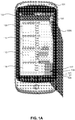
- FIG. 1A is an illustration of a hand held user computational device displaying a set of browser contexts, according to an embodiment.
- a handheld mobile device 101 such as a cellular phone, mobile station, smartphone or other handheld computational device is shown.
- the handheld device 101 includes a display area 103, which the user may view and control via a touch screen sensor configuration overlaid on the display area 103.
- a user hand silhouette 105A is illustrated as controlling the viewable content of the display area 103.
- the user may be viewing one browser context and may select a switcher icon 135 to change the view from one browser context to multiple browser contexts.
- the switcher icon 135 by selecting the switcher icon 135, the user's view switched from one browser context (not shown) to the current view of frames 109, 111, 113 and 115. Additional frames 117, 119, 121, 123, and 125 are stacked at the bottom of the page. Each of the plurality of frames may be open and running within the context of an operating system of the mobile device 101.
- the user may select a browser application and launch a browser context.
- the initial browser context may be opened and viewable as a homepage linked to the browser.
- the user may navigate to a particular web address and download a web page of interest.
- the user may desire to open additional browser contexts to view additional web pages without closing or navigating away from the previously accessed web page.
- a queue or list of browser contexts may be displayed by a group of frames 109, 111, 113, 115, 117, 119, 121, 123, and 125.
- Frame 109 may include a first webpage "www.webpageA.com” of a first browser context, and additional webpages "www.webpageB.com", “www.webpageC.com”, “www.webpageD.com”, “www.webpageE.com” “www.webpageF.com” “www.webpageG.com” “www.webpageH.com” and “www.webpageI.com” may be displayed in additional frames 111, 113, 115, 117, 119, 121, 123, and 125, respectively.
- the order of the frames 109, 111, 113, 115, 117, 119, 121, 123, and 125 may be dictated by the order of accessing the webpages via the browser application. For example, the user may launch a browser application and access a first webpage, then minimize or move the current view of that webpage via its browser context in order to launch additional browser contexts. Switching views may be performed by selecting the switcher icon 135. This procedure may be performed multiple times to launch numerous different browser contexts and corresponding frames containing web pages. As the number of frames continues to increase, the display may only provide a maximum number of viewable frames at any given time. In the present view of FIG. 1A , only four frames 109, 111, 113, and 115 are displayed at a time. The other frames, 117, 119, 121, 123 and 125 are stacked at the bottom of the display area 103. The number of frames viewable per display may vary. However, the display screen real estate is limited to only a finite number of frames.
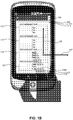
- FIG. 1B is an illustration of a hand held user computational device displaying another set of browser contexts, according to an example embodiment.
- the user may perform a scrolling operation by scrolling upward from the bottom of the screen, as indicated by the arrow 129, additional frames not previously illustrated may effectively scroll into the viewing area of the display area 103 due to the user's scrolling movement.
- frames 117, 119, and 121 are additional frames containing different browser contexts that may not have been visible prior to the user's hand movement scrolling upward as indicated by the user's hand position 105B.
- the user hand movement 105B scrolling upward caused the additional frames 117, 119, and 121 to be visible, while stacking frames 109, 11, and 113 at the top of the screen.
- Frame 115 from FIG. 1A is still visible at the bottom of the display area 103.
- Frames 123 and 125 remain stacked at the bottom.
- Additional user hand movements may cause browser contexts to be removed or added. For example, a downward scrolling, or by touching a particular browser context and moving to the right, as indicated by arrow 127, may cause the manipulated browser context to be permanently removed from the list of available browser contexts included in the display area 103.
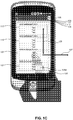
- the user can continue to scroll upward with the movement 105B as shown in FIG. 1C and frame 115 is then stacked at the top with frames 109, 11, and 113.
- Frame 123 is now visible in display area 103, and frame 125 remains stacked at the bottom of the display area.
- browser contexts may include a web page.
- a toolbar at the top of the display screen 103 may include a switcher icon 135.
- the switcher icon 135 may operate to turn on the page switcher mode.
- the current page size may be slightly reduced as if the visible area zoomed out by approximately 10-15%. This modification to the area reveals a frame for each web page.
- Each frame features the corresponding web page title, a favicon illustration indicative of the logo or certain content of the web page (not shown) and an option to close the frame and its corresponding contents.
- a favicon can also be referred to as a shortcut icon, a website icon, a URL icon, or a bookmark icon.
- the favicon is a file containing one or more small icon associated with a particular webpage or website.
- the present view of the display 103 may include from 1 to N web pages, the layout divides the available vertical space evenly between web pages. Beyond N pages, the layout decreases the visible area for each web page progressively, starting from the current page.
- a display configuration may be derived from a display algorithm. For example, the spacing available for each web page is determined by the formula: (HeightOfTotalArea - padding) / (NumberOfPages * ScaleAmount).
- the "HeightOfTotalArea” is the total area available for viewing in the display area 103
- the "padding” is the distance between each frame
- the “NumberOfPages” is the total number of browser contexts open
- the “ScaleAmount” is a scaling variable that is inversely proportional to the total number of browser contexts open. For example, the larger the number of browser contexts open, the smaller the scale amount will be to accommodate each of the browser contexts as a percentage of the total display area height.
- the spacing may also be capped to a minimum amount (e.g., 230 pixels) to ensure that there is always enough of the page visible for other purposes.
- Touching the stack automatically expands the stack from the top or bottom. For example, if a user touched the stack in FIG. 1A at the bottom where frames 117, 119, 121, 123, and 125 are stacked, the frames expand from the bottom upward with frames 119, 121, 123, and 125 visible and frames 109, 111, 113, 115, and 117 stacked at the top of the display area. Touching the stack at the bottom would expand the frames upward until no more frames were left at the bottom of the display area.
- Frames may move freely and linearly up to a certain degree. Thereafter, the frames begin to decelerate using a dampening curve, such as ((y / 2) + 0.5) ⁇ 2 which is multiplied to its linear vertical position. This is bounded at the top by a constant value.
- Users can control the frame overlapping feature to navigate to the frame that contains their desired browser context. For example, each frame can be moved by sliding the frame by touching the screen. In the switcher 125, pressing the switcher button selects the page that was previously visible. This allows users to easily and naturally identify web pages included in browser context frames, since they are only slightly smaller 10% to 15% than normal and are still readable.
- the constant "N" may be currently set to a value, such as 2, 3 or 4 on mobile phones. Examples discussed above are described in portrait mode but modifications may also be adapted to display content in landscape mode with frames ordered horizontally.
- FIG. 2 is a block diagram of a content display system 210 configured to perform content display operations, according to an embodiment.
- System 210 may be part of or may be implemented with a computing device.
- Examples of computing devices include, but are not limited to, a computer, workstation, distributed computing system, computer cluster, embedded system, stand-alone electronic device, networked device, mobile device (e.g. mobile phone, smart phone, navigation device, tablet or mobile computing device), rack server, set-top box, or other type of computer system having at least one processor and memory.
- Such a computing device may include software, firmware, hardware, or a combination thereof.
- Software may include one or more applications and an operating system.
- Hardware can include, but is not limited to, a processor, memory and user interface display.
- System 210 may include an input receiver 212 and a content adjustor 214.
- the system 210 is in communication with a display device 220, which may be used to display any of the example display configurations discussed in detail above.
- the input receiver 212 may receive a command to perform a display operation.
- the content adjustor 214 may use the command to initiate a content display of one or more frames.
- the frame data may be transmitted to the display device 220 to be viewed by the user.
- Content adjustor 214 may be used to implement the embodiments described above with FIGs. 1A-1B .
- Examples of the embodiments for exemplary system 210 or subsystem components, such as input receiver 212 and content adjustor 214, and methods or any parts or function(s) thereof may be implemented using hardware, software modules, firmware, tangible computer readable or computer usable storage media having instructions stored thereon, or a combination thereof and may be implemented in one or more computer systems or other processing systems.
- FIG. 3 is an illustration of a flow diagram of an example method of operation, according to an embodiment.
- the method may include initializing two or more windows on a mobile device, at step 301, and displaying a first window of the two or more windows on the mobile device, at step 302.
- the method may also include receiving an on-screen switcher indication causing a display view change from the first window being displayed to a combination of the first window and at least one more of the two or more additional windows being displayed, at step 303, and determining a space amount for each of the two or more windows, at step 304.
- the method may also include adjusting a size of each of the two or more windows based on the space amount, at step 305, displaying a frame around each of the two or more windows with the respective adjusted size, at step 306, and displaying each frame overlaid on top of one another, at step 307.
- steps 301-305 may be performed by system 210 with the assistance of display device 220.
- Embodiments may be directed to computer products comprising software stored on any computer usable medium.
- Such software when executed in one or more data processing device, causes a data processing device(s) to operate as described herein.
- Embodiments may be implemented in hardware, software, firmware, or a combination thereof. Embodiments may be implemented via a set of programs running in parallel on multiple machines.
Landscapes
- Engineering & Computer Science (AREA)
- Theoretical Computer Science (AREA)
- General Engineering & Computer Science (AREA)
- Human Computer Interaction (AREA)
- Physics & Mathematics (AREA)
- General Physics & Mathematics (AREA)
- Software Systems (AREA)
- Databases & Information Systems (AREA)
- Computer Networks & Wireless Communication (AREA)
- Signal Processing (AREA)
- Data Mining & Analysis (AREA)
- User Interface Of Digital Computer (AREA)
Description
- The field relates to operating systems, software applications and user interface devices, and, more particularly, to a system, method, apparatus or non-transitory computer program product of scaling multiple browser contexts within the display area of a mobile device display.
- A web browser is commonly used with computational devices, such as laptops, smartphones, tablet computing devices, personal digital assistants (PDAs), etc. Web browsers continue to grow in popularity as a tool used to access a particular web page, and perform related features. It is common for a user's homepage to include customized user settings, such as a default web page, and other sources of information. For example, customized web pages may include local weather, email, text messaging, horoscopes, video plug-ins, backgrounds, etc.
- Currently, web browsers use a tab metaphor to represent a browser context presently running within the browser. A web browser may have multiple browser contexts running at any given time. Any of the browser contexts may be selected for display via their respective tabs. Each tab is associated with a corresponding uniform resource locator (URL) field that includes a web address. Also, some additional tools or buttons may be present allowing the user to navigate backward and forward between the various browser contexts. Each tab can be selected at any time providing the user with the option to switch to a different browser context.
- On mobile devices, the tab metaphor cannot be used to represent browsing contexts because the screen real estate is not large enough. Within the display area of a mobile device, tabs would occupy a large portion of the screen and would not scale very well horizontally as the number of tabs increases. Tabs would also be more difficult to select given the imprecision inherent to small screen touch-based user interfaces.
US 2011/047491 A1 relates to technology that allows a user to interface when executing a web browser in a mobile communication terminal mounted with a touch screen, wherein icons of web pages which are currently registered are displayed in the shape of a ring or a portion of a ring, if a favorite icon is touched by the user.
EP 1901186 A1 discloses that an output module of an apparatus displays a sequence of frames on a screen, wherein the maximum number of frames that can be displayed on the screen is determined according to the size of the screen. If the number of frames exceeds the maximum number of frames that can be displayed on the screen, then a number of frames corresponding to the difference between the number of frames and the maximum number of frames that can be displayed on the screen may be grouped into one or more tabs, and the tabs may be displayed at a predefined location on the screen.
WO 2006/092464 A1 discloses a sliding tab tabbed pane user interface component implementable in an electronic device, wherein the user interface component provides a user interface of the electronic device with items belonging to a plurality of different categories, each category being associated with a different sliding tab and the sliding tabs are arranged such that at least a portion of the items of at least two sliding tabs is visible. - In an embodiment, a method may include initializing two or more windows on a mobile device, and displaying a first window of the two or more windows on the mobile device. The method may also include receiving an on-screen switcher indication causing a display view change from the first window being displayed to a combination of the first window and at least one more of the two or more additional windows being displayed, determining a space amount for each of the two or more windows, adjusting a size of each of the two or more windows based on the space amount, displaying a frame around each of the two or more windows with the respective adjusted size, and displaying each frame overlaid on top of one another.
- In another embodiment, a system may include a content adjuster, implemented with a computing device, configured to perform various operations. Those operations may include to initialize two or more windows on a mobile device, provide a display a first window of the two or more windows on the mobile device, receive an on-screen switcher indication causing a display view change from the first window being displayed to a combination of the first window and at least one more of the two or more additional windows being displayed, determine a space amount for each of the two or more windows, and adjust a size of each of the two or more windows based on the space amount. The system may also include a display device configured to display a frame around each of the two or more windows with the respective adjusted size, and display each frame overlaid on top of one another.
- In another embodiment, a non-transitory computer readable storage medium is configured to store instructions that when executed causes a processor to perform certain operations. The operations may include initializing two or more windows on a mobile device, displaying a first window of the two or more windows on the mobile device, receiving an on-screen switcher indication causing a display view change from the first window being displayed to a combination of the first window and at least one more of the two or more additional windows being displayed, determining a space amount for each of the two or more windows, and adjusting a size of each of the two or more windows based on the space amount. The operations may also include displaying a frame around each of the two or more windows with the respective adjusted size, and displaying each frame overlaid on top of one another.
- Further embodiments, features, and advantages, as well as the structure and operation of the various embodiments are described in detail below with reference to accompanying drawings.
- Embodiments are described with reference to the accompanying drawings. In the drawings, like reference numbers may indicate identical or functionally similar elements. The drawing in which an element first appears is generally indicated by the left-most digit in the corresponding reference number.
-
FIG. 1A is an illustration of a hand held user computational device displaying a set of browser contexts, according to an embodiment. -
FIG. 1B is an illustration of a hand held user computational device displaying an additional set of browser contexts, according to an embodiment. -
FIG. 1C is an illustration of a hand held user computational device displaying an additional set of browser contexts, according to an embodiment. -
FIG. 2 is an illustration of a display system, according to an embodiment. -
FIG. 3 is an illustration of a flow diagram of a method of operation, according to an embodiment. - Embodiments described herein refer to illustrations for particular applications. It should be understood that the invention is not limited to the embodiments. Those skilled in the art with access to the teachings provided herein will recognize additional modifications, applications, and embodiments within the scope thereof and additional fields in which the invention would be of significant utility.
- In the detailed description of embodiments that follows, references to "one embodiment", "an embodiment", "an example embodiment", etc., indicate that the embodiment described may include a particular feature, structure, or characteristic, but every embodiment may not necessarily include the particular feature, structure, or characteristic. Moreover, such phrases are not necessarily referring to the same embodiment. Further, when a particular feature, structure, or characteristic is described in connection with an embodiment, it is submitted that it is within the knowledge of one skilled in the art to affect such feature, structure, or characteristic in connection with other embodiments whether or not explicitly described.
- Example embodiments may provide a way to visualize and switch between several browser contexts currently displayed on a mobile device. The browser contexts may be optimized for touch-based mobile devices that are equipped with a small screen. Example embodiments provide a way for users to have multiple browser contexts displayed on a mobile device having a relatively small display screen. Each browser context is represented by a frame that encloses the browser context. The frame may include a web page viewable to the user. Frames may overlap freely, allowing users to select which browser context they would like to view or interact with at any given time.
-
FIG. 1A is an illustration of a hand held user computational device displaying a set of browser contexts, according to an embodiment. Referring toFIG. 1A , a handheldmobile device 101, such as a cellular phone, mobile station, smartphone or other handheld computational device is shown. Thehandheld device 101 includes adisplay area 103, which the user may view and control via a touch screen sensor configuration overlaid on thedisplay area 103. Auser hand silhouette 105A is illustrated as controlling the viewable content of thedisplay area 103. For example, the user may be viewing one browser context and may select aswitcher icon 135 to change the view from one browser context to multiple browser contexts. In this example, by selecting theswitcher icon 135, the user's view switched from one browser context (not shown) to the current view offrames Additional frames mobile device 101. - In operation, the user may select a browser application and launch a browser context. The initial browser context may be opened and viewable as a homepage linked to the browser. The user may navigate to a particular web address and download a web page of interest. Upon selecting a web page, the user may desire to open additional browser contexts to view additional web pages without closing or navigating away from the previously accessed web page. As multiple browser contexts are opened, a queue or list of browser contexts may be displayed by a group of
frames Frame 109 may include a first webpage "www.webpageA.com" of a first browser context, and additional webpages "www.webpageB.com", "www.webpageC.com", "www.webpageD.com", "www.webpageE.com" "www.webpageF.com" "www.webpageG.com" "www.webpageH.com" and "www.webpageI.com" may be displayed inadditional frames - The order of the
frames switcher icon 135. This procedure may be performed multiple times to launch numerous different browser contexts and corresponding frames containing web pages. As the number of frames continues to increase, the display may only provide a maximum number of viewable frames at any given time. In the present view ofFIG. 1A , only fourframes display area 103. The number of frames viewable per display may vary. However, the display screen real estate is limited to only a finite number of frames. -
FIG. 1B is an illustration of a hand held user computational device displaying another set of browser contexts, according to an example embodiment. Referring toFIG. 1B , the user may perform a scrolling operation by scrolling upward from the bottom of the screen, as indicated by thearrow 129, additional frames not previously illustrated may effectively scroll into the viewing area of thedisplay area 103 due to the user's scrolling movement. For example, frames 117, 119, and 121 are additional frames containing different browser contexts that may not have been visible prior to the user's hand movement scrolling upward as indicated by the user'shand position 105B. Theuser hand movement 105B scrolling upward caused theadditional frames frames Frame 115 fromFIG. 1A is still visible at the bottom of thedisplay area 103.Frames arrow 127, may cause the manipulated browser context to be permanently removed from the list of available browser contexts included in thedisplay area 103. The user can continue to scroll upward with themovement 105B as shown inFIG. 1C andframe 115 is then stacked at the top withframes Frame 123 is now visible indisplay area 103, and frame 125 remains stacked at the bottom of the display area. - As indicated above, browser contexts may include a web page. Referring again to
FIG. 1B , a toolbar at the top of thedisplay screen 103 may include aswitcher icon 135. Theswitcher icon 135 may operate to turn on the page switcher mode. When theswitcher icon 135 is selected, the current page size may be slightly reduced as if the visible area zoomed out by approximately 10-15%. This modification to the area reveals a frame for each web page. Each frame features the corresponding web page title, a favicon illustration indicative of the logo or certain content of the web page (not shown) and an option to close the frame and its corresponding contents. A favicon can also be referred to as a shortcut icon, a website icon, a URL icon, or a bookmark icon. The favicon is a file containing one or more small icon associated with a particular webpage or website. - Other frames and their corresponding web pages are overlapped over or under the current web page frame. The present view of the
display 103 may include from 1 to N web pages, the layout divides the available vertical space evenly between web pages. Beyond N pages, the layout decreases the visible area for each web page progressively, starting from the current page. Such a display configuration may be derived from a display algorithm. For example, the spacing available for each web page is determined by the formula: (HeightOfTotalArea - padding) / (NumberOfPages * ScaleAmount). The "HeightOfTotalArea" is the total area available for viewing in thedisplay area 103, the "padding" is the distance between each frame, the "NumberOfPages" is the total number of browser contexts open and the "ScaleAmount" is a scaling variable that is inversely proportional to the total number of browser contexts open. For example, the larger the number of browser contexts open, the smaller the scale amount will be to accommodate each of the browser contexts as a percentage of the total display area height. - The spacing may also be capped to a minimum amount (e.g., 230 pixels) to ensure that there is always enough of the page visible for other purposes. On the top and bottom of the screen, the user can view a stack of pages. Touching the stack automatically expands the stack from the top or bottom. For example, if a user touched the stack in
FIG. 1A at the bottom where frames 117, 119, 121, 123, and 125 are stacked, the frames expand from the bottom upward withframes FIG. 1C at the top whereframes frames - An example formula used for stacking browser context frames at the top of the screen is discussed below. Frames may move freely and linearly up to a certain degree. Thereafter, the frames begin to decelerate using a dampening curve, such as ((y / 2) + 0.5)^2 which is multiplied to its linear vertical position. This is bounded at the top by a constant value. Users can control the frame overlapping feature to navigate to the frame that contains their desired browser context. For example, each frame can be moved by sliding the frame by touching the screen. In the
switcher 125, pressing the switcher button selects the page that was previously visible. This allows users to easily and naturally identify web pages included in browser context frames, since they are only slightly smaller 10% to 15% than normal and are still readable. - While overlapping frames may obscure some web page contents, web sites are generally designed to have some strong brand identity at the top of the page. This allows an optimized view to be displayed at the top of each web page at almost full size. As noted above, the constant "N" may be currently set to a value, such as 2, 3 or 4 on mobile phones. Examples discussed above are described in portrait mode but modifications may also be adapted to display content in landscape mode with frames ordered horizontally.
-
FIG. 2 is a block diagram of acontent display system 210 configured to perform content display operations, according to an embodiment.System 210, or any combination of its components, may be part of or may be implemented with a computing device. Examples of computing devices include, but are not limited to, a computer, workstation, distributed computing system, computer cluster, embedded system, stand-alone electronic device, networked device, mobile device (e.g. mobile phone, smart phone, navigation device, tablet or mobile computing device), rack server, set-top box, or other type of computer system having at least one processor and memory. Such a computing device may include software, firmware, hardware, or a combination thereof. Software may include one or more applications and an operating system. Hardware can include, but is not limited to, a processor, memory and user interface display. -
System 210 may include aninput receiver 212 and acontent adjustor 214. Thesystem 210 is in communication with adisplay device 220, which may be used to display any of the example display configurations discussed in detail above. Theinput receiver 212 may receive a command to perform a display operation. Thecontent adjustor 214 may use the command to initiate a content display of one or more frames. The frame data may be transmitted to thedisplay device 220 to be viewed by the user.Content adjustor 214 may be used to implement the embodiments described above withFIGs. 1A-1B . Examples of the embodiments forexemplary system 210 or subsystem components, such asinput receiver 212 andcontent adjustor 214, and methods or any parts or function(s) thereof may be implemented using hardware, software modules, firmware, tangible computer readable or computer usable storage media having instructions stored thereon, or a combination thereof and may be implemented in one or more computer systems or other processing systems. -
FIG. 3 is an illustration of a flow diagram of an example method of operation, according to an embodiment. Referring toFIG. 3 , the method may include initializing two or more windows on a mobile device, atstep 301, and displaying a first window of the two or more windows on the mobile device, atstep 302. The method may also include receiving an on-screen switcher indication causing a display view change from the first window being displayed to a combination of the first window and at least one more of the two or more additional windows being displayed, atstep 303, and determining a space amount for each of the two or more windows, atstep 304. The method may also include adjusting a size of each of the two or more windows based on the space amount, atstep 305, displaying a frame around each of the two or more windows with the respective adjusted size, atstep 306, and displaying each frame overlaid on top of one another, atstep 307. According to an embodiment, steps 301-305 may be performed bysystem 210 with the assistance ofdisplay device 220. - Embodiments may be directed to computer products comprising software stored on any computer usable medium. Such software, when executed in one or more data processing device, causes a data processing device(s) to operate as described herein.
- Embodiments may be implemented in hardware, software, firmware, or a combination thereof. Embodiments may be implemented via a set of programs running in parallel on multiple machines.
- The summary and abstract sections may set forth one or more but not all exemplary embodiments of the present invention as contemplated by the inventor(s), and thus, are not intended to limit the present invention and the appended claims in any way.
- Embodiments have been described above with the aid of functional building blocks illustrating the implementation of specified functions and relationships thereof. The boundaries of these functional building blocks have been arbitrarily defined herein for the convenience of the description. Alternate boundaries can be defined so long as the specified functions and relationships thereof are appropriately performed. The breadth and scope of the present invention should not be limited by any of the above-described exemplary embodiments.
- The foregoing description of the specific embodiments will so fully reveal the general nature of the invention that others can, by applying knowledge within the skill of the art, readily modify and/or adapt for various applications such specific embodiments, without undue experimentation, without departing from the general concept of the present invention. Therefore, such adaptations and modifications are intended to be within the meaning and range of equivalents of the disclosed embodiments, based on the teaching and guidance presented herein. It is to be understood that the phraseology or terminology herein is for the purpose of description and not of limitation, such that the terminology or phraseology of the present specification is to be interpreted by the skilled artisan in light of the teachings and guidance.
Claims (15)
- A computer-implemented method, comprising:initializing two or more windows on a mobile device (101), wherein the two or more windows comprise:at least one window, andone or more remaining windows;displaying the at least one window of the two or more windows on the mobile device (101) such that the one or more remaining windows are hidden from display (103);receiving an on-screen switcher indication (135); andin response to receiving the on-screen switcher indication (135):determining a space amount for each of the two or more windows,adjusting a size of each of the two or more windows based on the space amount,displaying, in a viewing area of the display, frames (109, 111, 112, 115, 117, 119, 121, 123, 125) for each of the at least one window, wherein each of the respective frames includes a viewable portion corresponding to the adjusted size of its respective window and at least portions of the respective frames are overlaid on top of each other, and wherein the frames are arranged vertically on top of each other,stacking vertically the one or more remaining windows, wherein the stacking comprises displaying a respective frame (109, 111, 112, 115, 117, 119, 121, 123, 125) for each of the one or more remaining windows such that a respective window and a respective title associated with the respective window are hidden,scrolling upward the frames of the two or more windows, wherein at least one frame of the one or more stacked remaining windows, which was stacked at the bottom of the display before the scrolling, is displayed in the viewing area, and wherein at least one upper frame, displayed in the viewing area before the scrolling, is stacked vertically at the top of the display,wherein touching the frame stack at the bottom of the display causes displaying in the viewing area of the frames, which were stacked before the touching of the frame stack at the bottom of the display, and stacking vertically the frames, which were displayed in the viewing area of the display before the touching of the frame stack at the bottom of the display, at the top of the display, andwherein touching the frame stack at the top of the display causes displaying in the viewing area of the frames, which were stacked before the touching of the frame stack at the top of the display, and stacking vertically the frames, which were displayed in the viewing area of the display before the touching of the frame stack at the top of the display, at the bottom of the display.
- The method of claim 1, wherein determining a space amount for each of two or more windows comprises:
determining the space amount for each window according to the following formula: (a height of total area - a padding) / (a number of pages * a scale amount), wherein the height of total area is a height of the area on the mobile device, padding is a predetermined amount of space between each window, the number of pages is the number of windows initialized, and the scale amount is a scaling factor variable that is inversely proportional to the number of pages. - The method of claim 1, wherein each of the two or more windows is at least one of an application or a webpage and each frame includes an associated title and an associated favicon.
- The method of claim 1, further comprising:receiving a selection associated with a window of the two or more windows;displaying the window associated with the selection without a frame; andremoving from display each of the two or more windows not associated with the selection.
- The method of claim 1, wherein receiving the on-screen switcher indication comprises receiving an input from a switcher icon.
- The method of claim 1, wherein the stacking comprising displaying the respective frame (117) for each of the one or more remaining windows such that only an outline of the respective frame (117) is viewable.
- The method of claim 1, wherein the at least one window comprises at least a first window and a second window, each of the respective frames for the first window and the second window comprising a respective title associated with a respective window.
- The method of claim 1, further comprising:initializing one or more additional windows on the mobile device (101);stacking the one or more additional windows, wherein the stacking includes displaying frames (121) for each of the one or more additional windows, wherein the frames (121) are stacked such that only a portion of the frames (12 1) are viewable and their respective windows are hidden.
- The method of claim 8, further comprising:receiving a touch indication associated with the one or more additional windows displayed on the mobile device (101);removing from display each of two or more windows; anddisplaying each of the one or more additional windows until the maximum number of windows is reached by:determining a space amount for each of the remaining number of windows, adjusting a size of each of the remaining windows based on the space amount, anddisplaying frames (121) for each of the one or more additional windows wherein each of the frames (121) includes a viewable portion corresponding to the adjusted size of its respective window and at least portions of the frames (121) are overlaid on top of each other.
- A system, comprising:a display device (220) configured to:
display at least one window of two or more windows initialized on a mobile device (101), wherein the two or more windows comprise:the at least one window, andone or more remaining windows, wherein the one or more remaining windows are hidden from display;an input receiver (212), implemented with a computing device, configured to received an on-screen switcher indication (135); anda content adjustor (214), implemented with a computing device, configured to:in response to receiving the on-screen switch indication (135):determine a space amount for each of the two or more windows,adjust a size of the two or more windows based on the space amount,provide to the display device (220) each of the at least one window including frames (109) displayed for each of the at least one window, wherein each of the respective frames (109) includes a viewable portion corresponding to the adjusted size of its respective window and at least portions of the respective frames (109) are overlaid on top of each other, andprovide to the display device (220) the one or more remaining windows in stacked form, wherein the stacked form comprises displaying a respective frame (117) for each of the one or more remaining windows such that a respective window and a respective title associated with the respective window are hidden, andprovide that scrolling upward the frames of the two or more windows, wherein at least one frame of the one or more stacked remaining windows, which was staked at the bottom of the display, before the scrolling, is displayed in the viewing area, and provide that at least one upper frame, displayed in the viewing area before the scrolling, is stacked vertically at the top of the display, and provide that the touching of the frame stack at the bottom of the display causes displaying in the viewing area of the frames, which were staked before the touching of the frame stack at the bottom of the display, and stacking vertically the frames, which were displayed in the viewing area of the display before the touching of the frame stack at the bottom of the display, at the top of the display, andprovide that the touching of the frame stack at the top of the display causes displaying in the viewing area of the frames, which were stacked before the touching of the frame stack at the top of the display, and stacking vertically the frames, which were displayed in the viewing area of the display before the touching of the frame stack at the top of the display, at the bottom of the display. - The system of claim 10, wherein each of the two or more windows is at least one of an application or a webpage and each window includes an associated title and an associated favicon.
- The system of claim 10, wherein the input receiver (212) is further configured to:
receive a selection associated with a window of the two or more windows, and wherein the display device (220) is further configured to:display the window associated with the selection without a frame, andremove from display each of the two or more windows not associated with the selection. - The system of claim 10, wherein the content adjuster (214) is further configured to:
provide to the display device (220) one or more additional windows in stacked form initialized on the mobile device (101), wherein the stacked form includes displaying frames (12 1) for each of the one or more additional windows, wherein the frames (121) are stacked such that only a portion of the frames (121) are viewable and their respective windows are hidden. - A non-transitory computer readable storage medium configured to store instructions that when executed causes a processor to perform the method of claim 1.
- A non-transitory computer readable storage medium configured to store instructions that when executed causes a processor to perform the method of claim 4.
Priority Applications (1)
| Application Number | Priority Date | Filing Date | Title |
|---|---|---|---|
| EP18199152.2A EP3474137A1 (en) | 2011-04-26 | 2012-04-26 | Mobile browser context switching |
Applications Claiming Priority (3)
| Application Number | Priority Date | Filing Date | Title |
|---|---|---|---|
| US13/094,489 US8713473B2 (en) | 2011-04-26 | 2011-04-26 | Mobile browser context switching |
| US13/247,924 US8819582B2 (en) | 2011-04-26 | 2011-09-28 | Mobile browser context switching |
| PCT/US2012/035137 WO2012149119A1 (en) | 2011-04-26 | 2012-04-26 | Mobile browser context switching |
Related Child Applications (1)
| Application Number | Title | Priority Date | Filing Date |
|---|---|---|---|
| EP18199152.2A Division EP3474137A1 (en) | 2011-04-26 | 2012-04-26 | Mobile browser context switching |
Publications (2)
| Publication Number | Publication Date |
|---|---|
| EP2702483A1 EP2702483A1 (en) | 2014-03-05 |
| EP2702483B1 true EP2702483B1 (en) | 2018-10-31 |
Family
ID=47068971
Family Applications (2)
| Application Number | Title | Priority Date | Filing Date |
|---|---|---|---|
| EP12722566.2A Active EP2702483B1 (en) | 2011-04-26 | 2012-04-26 | Mobile browser context switching |
| EP18199152.2A Withdrawn EP3474137A1 (en) | 2011-04-26 | 2012-04-26 | Mobile browser context switching |
Family Applications After (1)
| Application Number | Title | Priority Date | Filing Date |
|---|---|---|---|
| EP18199152.2A Withdrawn EP3474137A1 (en) | 2011-04-26 | 2012-04-26 | Mobile browser context switching |
Country Status (4)
| Country | Link |
|---|---|
| US (4) | US8713473B2 (en) |
| EP (2) | EP2702483B1 (en) |
| CN (3) | CN107256110A (en) |
| WO (1) | WO2012149119A1 (en) |
Families Citing this family (51)
| Publication number | Priority date | Publication date | Assignee | Title |
|---|---|---|---|---|
| US8296684B2 (en) | 2008-05-23 | 2012-10-23 | Hewlett-Packard Development Company, L.P. | Navigating among activities in a computing device |
| US8683362B2 (en) * | 2008-05-23 | 2014-03-25 | Qualcomm Incorporated | Card metaphor for activities in a computing device |
| KR101740436B1 (en) * | 2010-12-08 | 2017-05-26 | 엘지전자 주식회사 | Mobile terminal and method for controlling thereof |
| US8713473B2 (en) | 2011-04-26 | 2014-04-29 | Google Inc. | Mobile browser context switching |
| US9325378B2 (en) * | 2011-06-14 | 2016-04-26 | Broadcom Corporation | Computing device multiple display topology detection over radio |
| US8898589B2 (en) * | 2011-06-30 | 2014-11-25 | International Business Machines Corporation | Flattening a subset of configuration user interface (UI) panels in a hierarchy of UI panels |
| US9880640B2 (en) * | 2011-10-06 | 2018-01-30 | Amazon Technologies, Inc. | Multi-dimensional interface |
| CN103077171B (en) * | 2011-10-26 | 2014-04-16 | 腾讯科技(深圳)有限公司 | Method and terminal for adding quick link |
| KR20130046482A (en) * | 2011-10-28 | 2013-05-08 | 삼성전자주식회사 | Controlling method for basic screen and portable device supporting the same |
| US9360940B2 (en) * | 2011-11-14 | 2016-06-07 | Google Inc. | Multi-pane interface |
| US9395868B2 (en) | 2011-12-06 | 2016-07-19 | Google Inc. | Graphical user interface window spacing mechanisms |
| KR101960061B1 (en) * | 2012-05-21 | 2019-03-19 | 삼성전자주식회사 | The method and apparatus for converting and displaying between executing screens of a plurality of applications being executed on a device |
| KR101957173B1 (en) | 2012-09-24 | 2019-03-12 | 삼성전자 주식회사 | Method and apparatus for providing multi-window at a touch device |
| EP2741199B1 (en) * | 2012-12-06 | 2020-08-05 | Samsung Electronics Co., Ltd | Application individual lock mechanism for a touch screen device |
| KR102148725B1 (en) * | 2013-07-31 | 2020-08-28 | 삼성전자주식회사 | Method and Apparatus for displaying application |
| US9547525B1 (en) | 2013-08-21 | 2017-01-17 | Google Inc. | Drag toolbar to enter tab switching interface |
| US9569004B2 (en) * | 2013-08-22 | 2017-02-14 | Google Inc. | Swipe toolbar to switch tabs |
| SG11201605243RA (en) * | 2013-12-27 | 2016-08-30 | Mars Flag Corp | Information processing device, web server and computer program |
| CN104898914B (en) * | 2014-03-05 | 2019-04-02 | 腾讯科技(深圳)有限公司 | Method and device for displaying multiple pages |
| CN103970449A (en) * | 2014-05-26 | 2014-08-06 | 北京金山网络科技有限公司 | Multi-window sliding control method and device |
| CN104252288A (en) * | 2014-09-22 | 2014-12-31 | 可牛网络技术(北京)有限公司 | Browser and multi-label-page control method thereof |
| US20200218413A1 (en) | 2014-10-30 | 2020-07-09 | Google Llc | Systems and methods for presenting scrolling online content on mobile devices |
| US9939997B2 (en) * | 2014-12-10 | 2018-04-10 | International Business Machines Corporation | Transitioning browser tabs from one environment context to another |
| USD820915S1 (en) | 2015-09-22 | 2018-06-19 | Ags Llc | Gaming machine |
| USD813954S1 (en) | 2015-09-24 | 2018-03-27 | Ags Llc | Game tower |
| USD818048S1 (en) | 2015-10-05 | 2018-05-15 | Ags Llc | Gaming machine |
| US9997010B2 (en) | 2015-12-18 | 2018-06-12 | Ags Llc | Electronic gaming device with external lighting functionality |
| US10002488B2 (en) | 2015-12-17 | 2018-06-19 | Ags Llc | Electronic gaming device with call tower functionality |
| US10216370B2 (en) | 2016-03-29 | 2019-02-26 | Microsoft Technology Licensing, Llc | Tabs in system task switchers |
| US20170357414A1 (en) | 2016-06-12 | 2017-12-14 | Apple Inc. | Map Application with Novel Search, Browsing and Planning Tools |
| CN106502496B (en) * | 2016-10-19 | 2019-12-27 | Oppo广东移动通信有限公司 | Window switching method and device |
| CN107015721A (en) * | 2016-10-20 | 2017-08-04 | 阿里巴巴集团控股有限公司 | The management method and device of a kind of application interface |
| USD843473S1 (en) | 2017-04-07 | 2019-03-19 | Ags Llc | Gaming machine |
| USD865873S1 (en) | 2017-08-23 | 2019-11-05 | Ags Llc | Gaming machine |
| CN107728918A (en) * | 2017-09-27 | 2018-02-23 | 北京三快在线科技有限公司 | Browse the method, apparatus and electronic equipment of continuous page |
| USD852890S1 (en) | 2017-11-30 | 2019-07-02 | Ags Llc | Gaming machine |
| CN108268187A (en) * | 2018-01-23 | 2018-07-10 | 腾讯音乐娱乐科技(深圳)有限公司 | The display methods and device of intelligent terminal |
| USD899526S1 (en) | 2018-02-02 | 2020-10-20 | Ags Llc | Support structure for gaming machine display |
| USD939632S1 (en) | 2018-07-17 | 2021-12-28 | Ags Llc | Gaming machine |
| USD969926S1 (en) | 2019-04-24 | 2022-11-15 | Ags Llc | Gaming machine |
| US11520469B2 (en) * | 2019-05-01 | 2022-12-06 | Google Llc | Interface for multiple simultaneous interactive views |
| EP4287006A3 (en) | 2019-05-01 | 2024-02-21 | Google LLC | Interface for multiple simultaneous interactive views |
| US11385785B2 (en) | 2019-05-01 | 2022-07-12 | Google Llc | Interface for multiple simultaneous interactive views |
| USD978810S1 (en) | 2019-07-31 | 2023-02-21 | Ags Llc | LED matrix display |
| USD969927S1 (en) | 2019-08-02 | 2022-11-15 | Ags Llc | Gaming machine |
| US11380157B2 (en) | 2019-08-02 | 2022-07-05 | Ags Llc | Servicing and mounting features for gaming machine display screens and toppers |
| CN110941373B (en) * | 2019-10-09 | 2021-06-25 | 广州视源电子科技股份有限公司 | Interactive method, device, terminal device and storage medium for intelligent interactive tablet |
| CN116820289A (en) * | 2020-03-31 | 2023-09-29 | 腾讯科技(深圳)有限公司 | Information display method, device, equipment and storage medium |
| WO2022041162A1 (en) * | 2020-08-29 | 2022-03-03 | Citrix Systems, Inc. | Mask including moveable window for viewing content |
| USD1105254S1 (en) | 2023-04-18 | 2025-12-09 | Ags Llc | Gaming machine |
| CN118444867A (en) * | 2023-12-22 | 2024-08-06 | 荣耀终端有限公司 | Display method and related device |
Family Cites Families (70)
| Publication number | Priority date | Publication date | Assignee | Title |
|---|---|---|---|---|
| JP2557358B2 (en) * | 1986-12-26 | 1996-11-27 | 株式会社東芝 | Information processing device |
| US4866420A (en) * | 1988-04-26 | 1989-09-12 | Systron Donner Corp. | Method of detecting a fire of open uncontrolled flames |
| JPH03177893A (en) * | 1989-12-06 | 1991-08-01 | Toshiba Corp | Multiwindow display device |
| US5388202A (en) * | 1990-02-02 | 1995-02-07 | Viacom International Inc. | Method and apparatus for generating window borders having pictorial frame elements |
| US5377317A (en) * | 1991-12-20 | 1994-12-27 | International Business Machines Corporation | Method and apparatus for distinctively displaying windows on a computer display screen |
| EP0584913B1 (en) * | 1992-08-27 | 2000-05-03 | Sun Microsystems, Inc. | Method and apparatus for providing collection browsers |
| WO1994014155A1 (en) * | 1992-12-17 | 1994-06-23 | Seiko Epson Corporation | Graphics control planes for windowing and other display operations |
| US5588106A (en) * | 1993-08-16 | 1996-12-24 | Nec Corporation | Hardware arrangement for controlling multiple overlapping windows in a computer graphic system |
| US5522025A (en) * | 1993-10-25 | 1996-05-28 | Taligent, Inc. | Object-oriented window area display system |
| GB2301757B (en) * | 1995-06-01 | 2000-02-02 | Ibm | Graphical user interface |
| US5859639A (en) * | 1996-07-17 | 1999-01-12 | International Business Machines Corporation | Mechanism to control visible presence of desktop objects in a graphical user interface |
| US6008809A (en) * | 1997-09-22 | 1999-12-28 | International Business Machines Corporation | Apparatus and method for viewing multiple windows within a dynamic window |
| US6405222B1 (en) * | 1998-12-17 | 2002-06-11 | International Business Machines Corporation | Requesting concurrent entries via bookmark set |
| US20020054052A1 (en) | 1999-01-06 | 2002-05-09 | Nandini Sharma | Frame-based web browser |
| EP1171816B1 (en) * | 1999-03-24 | 2004-05-12 | Nokia Corporation | System and method employing last occurrence and sliding window technique for determining a minimum and maximum value |
| US6590594B2 (en) | 1999-03-25 | 2003-07-08 | International Business Machines Corporation | Window scroll-bar |
| US6567091B2 (en) | 2000-02-01 | 2003-05-20 | Interactive Silicon, Inc. | Video controller system with object display lists |
| KR100566242B1 (en) | 2002-07-19 | 2006-03-29 | 삼성전자주식회사 | Screen editing device and method in mobile communication terminal |
| US7739604B1 (en) * | 2002-09-25 | 2010-06-15 | Apple Inc. | Method and apparatus for managing windows |
| US6873341B1 (en) * | 2002-11-04 | 2005-03-29 | Silicon Image, Inc. | Detection of video windows and graphics windows |
| US7203901B2 (en) * | 2002-11-27 | 2007-04-10 | Microsoft Corporation | Small form factor web browsing |
| US20040189710A1 (en) * | 2003-03-28 | 2004-09-30 | Goulden David L. | Technique for displaying a window in a computer screen |
| JP4086714B2 (en) * | 2003-05-27 | 2008-05-14 | キヤノン株式会社 | Information processing apparatus, data display method thereof, and storage medium |
| US20050015726A1 (en) | 2003-05-27 | 2005-01-20 | Jere Tuominen | System, apparatus, and method for frame implementation within a mobile internet browser |
| JP3982454B2 (en) * | 2003-05-27 | 2007-09-26 | ソニー株式会社 | Portable electronic device, web page processing method and program |
| US20050021851A1 (en) * | 2003-06-09 | 2005-01-27 | Kimmo Hamynen | System, apparatus, and method for directional control input browsing in smart phones |
| FI118310B (en) | 2004-01-22 | 2007-09-28 | Nokia Corp | Presentation of a web page in a browser window and procedure for processing a web page |
| US7694233B1 (en) * | 2004-04-30 | 2010-04-06 | Apple Inc. | User interface presentation of information in reconfigured or overlapping containers |
| US20060020902A1 (en) * | 2004-07-22 | 2006-01-26 | International Business Machines Corporation | Interactive graphical user interfaces for computer display systems with simplified implementation for exposing completely hidden windows |
| JP2006038513A (en) | 2004-07-23 | 2006-02-09 | Navitime Japan Co Ltd | Navigation system, route search device, navigation unit, and program |
| US8560972B2 (en) | 2004-08-10 | 2013-10-15 | Microsoft Corporation | Surface UI for gesture-based interaction |
| US20060041846A1 (en) * | 2004-08-19 | 2006-02-23 | International Business Machines Corporation | Method of window management for a windowing system |
| CN100349104C (en) * | 2004-09-20 | 2007-11-14 | 英华达(南京)科技有限公司 | Method of displaying multi window on small screen communication equipment |
| US20060117269A1 (en) | 2004-11-29 | 2006-06-01 | Inventec Appliances Corporation | Method for displaying multiple frames on small screen of communication device |
| JP4804107B2 (en) | 2004-12-14 | 2011-11-02 | キヤノン株式会社 | Image encoding apparatus, image encoding method and program thereof |
| ATE493698T1 (en) | 2005-03-03 | 2011-01-15 | Nokia Corp | USER INTERFACE COMPONENT |
| US7596760B2 (en) * | 2005-04-07 | 2009-09-29 | Microsoft Corporation | System and method for selecting a tab within a tabbed browser |
| US20060253791A1 (en) * | 2005-05-03 | 2006-11-09 | Kuiken David P | Simplified interactive graphical user interfaces for sorting through a stack of overlapping windows on a display in order along the Z (depth) axis |
| US7475352B2 (en) * | 2005-10-28 | 2009-01-06 | Microsoft Corporation | Layout and management of browser panes |
| CN1996285A (en) * | 2006-01-06 | 2007-07-11 | 胡擘 | Window system of page browser |
| US7793231B2 (en) * | 2006-01-19 | 2010-09-07 | International Business Machines Corporation | Method and system for providing a primary window overlay |
| KR100818918B1 (en) * | 2006-02-14 | 2008-04-04 | 삼성전자주식회사 | Apparatus for managing the layout of windows and methods thereof |
| US8683362B2 (en) * | 2008-05-23 | 2014-03-25 | Qualcomm Incorporated | Card metaphor for activities in a computing device |
| TWI384413B (en) * | 2006-04-24 | 2013-02-01 | Sony Corp | An image processing apparatus, an image processing method, an image processing program, and a program storage medium |
| US8564544B2 (en) | 2006-09-06 | 2013-10-22 | Apple Inc. | Touch screen device, method, and graphical user interface for customizing display of content category icons |
| KR20080024734A (en) | 2006-09-14 | 2008-03-19 | 삼성전자주식회사 | Web document organization device and method and web document arrangement device |
| CA2565756A1 (en) * | 2006-10-26 | 2008-04-26 | Daniel Langlois | Interface system |
| US20080115081A1 (en) * | 2006-11-09 | 2008-05-15 | Microsoft Corporation | Enhanced windows management feature |
| US8214768B2 (en) * | 2007-01-05 | 2012-07-03 | Apple Inc. | Method, system, and graphical user interface for viewing multiple application windows |
| US8255824B2 (en) * | 2007-01-30 | 2012-08-28 | Oracle International Corporation | Toolbar/sidebar browser extension |
| CN101052043B (en) * | 2007-04-30 | 2013-03-20 | 北京策度集成电路设计有限公司 | TCP sending algorithm based on sending window and reciprocating time |
| US8667418B2 (en) * | 2007-06-08 | 2014-03-04 | Apple Inc. | Object stack |
| CN101079065B (en) * | 2007-06-25 | 2012-07-04 | 腾讯科技(深圳)有限公司 | Method and system for displaying pictures comprising picture group |
| CN100570610C (en) * | 2007-12-07 | 2009-12-16 | 腾讯科技(深圳)有限公司 | Multi-page browser webpage sub-window processing method and multi-page browser |
| US8356258B2 (en) * | 2008-02-01 | 2013-01-15 | Microsoft Corporation | Arranging display areas utilizing enhanced window states |
| CN101515227B (en) * | 2008-02-20 | 2011-05-25 | 联想(北京)有限公司 | Window management method and computer |
| CN101546305A (en) * | 2008-03-26 | 2009-09-30 | 天图信息技术(上海)有限公司 | Method for realizing fixation of advertisement position based on browser window |
| CN101377785A (en) * | 2008-09-19 | 2009-03-04 | 魏新成 | Method for displaying intelligent search result web page in specific search result window |
| KR101554039B1 (en) | 2008-10-09 | 2015-09-17 | 옵티스 셀룰러 테크놀로지, 엘엘씨 | A mobile terminal that provides a web page merging function and a method of operation thereof |
| CN101739420A (en) * | 2008-11-05 | 2010-06-16 | 上海埃帕信息科技有限公司 | Browser interface and operation method thereof |
| US20100146449A1 (en) * | 2008-12-09 | 2010-06-10 | Michael William Brown | Method, apparatus and system for management of application switching in an electronic device |
| KR101640460B1 (en) * | 2009-03-25 | 2016-07-18 | 삼성전자 주식회사 | Operation Method of Split Window And Portable Device supporting the same |
| CN101943988B (en) * | 2009-07-09 | 2013-04-24 | 深圳富泰宏精密工业有限公司 | System and method for automatically adjusting user interface of electronic device |
| KR100984817B1 (en) | 2009-08-19 | 2010-10-01 | 주식회사 컴퍼니원헌드레드 | User interface method using touch screen of mobile communication terminal |
| CN101699395A (en) * | 2009-10-23 | 2010-04-28 | 深圳市茁壮网络股份有限公司 | Multi-window management method and multi-window browser |
| CN101763213B (en) * | 2009-12-28 | 2011-12-21 | 广东威创视讯科技股份有限公司 | Window layout switching method and system thereof |
| CN101778166B (en) * | 2010-01-06 | 2014-12-31 | 宇龙计算机通信科技(深圳)有限公司 | Method and system for mobile terminal to control multi-window switching, and mobile terminal |
| US20110197156A1 (en) | 2010-02-09 | 2011-08-11 | Dynavox Systems, Llc | System and method of providing an interactive zoom frame interface |
| US8713473B2 (en) | 2011-04-26 | 2014-04-29 | Google Inc. | Mobile browser context switching |
| CN102243662A (en) * | 2011-07-27 | 2011-11-16 | 北京风灵创景科技有限公司 | Method for displaying browser interface on mobile equipment |
-
2011
- 2011-04-26 US US13/094,489 patent/US8713473B2/en active Active
- 2011-09-28 US US13/247,924 patent/US8819582B2/en active Active
-
2012
- 2012-04-26 CN CN201710433632.0A patent/CN107256110A/en active Pending
- 2012-04-26 CN CN201710432381.4A patent/CN107256159B/en active Active
- 2012-04-26 CN CN201280020208.9A patent/CN103597446B/en active Active
- 2012-04-26 EP EP12722566.2A patent/EP2702483B1/en active Active
- 2012-04-26 WO PCT/US2012/035137 patent/WO2012149119A1/en not_active Ceased
- 2012-04-26 EP EP18199152.2A patent/EP3474137A1/en not_active Withdrawn
-
2013
- 2013-07-19 US US13/946,973 patent/US8812996B1/en active Active
-
2014
- 2014-07-15 US US14/332,127 patent/US9015618B2/en active Active
Non-Patent Citations (1)
| Title |
|---|
| None * |
Also Published As
| Publication number | Publication date |
|---|---|
| WO2012149119A1 (en) | 2012-11-01 |
| US20120278756A1 (en) | 2012-11-01 |
| US8713473B2 (en) | 2014-04-29 |
| EP3474137A1 (en) | 2019-04-24 |
| US8812996B1 (en) | 2014-08-19 |
| CN107256159A (en) | 2017-10-17 |
| US9015618B2 (en) | 2015-04-21 |
| CN107256159B (en) | 2021-11-30 |
| CN103597446A (en) | 2014-02-19 |
| US20140250409A1 (en) | 2014-09-04 |
| US20140331171A1 (en) | 2014-11-06 |
| US8819582B2 (en) | 2014-08-26 |
| CN103597446B (en) | 2017-07-11 |
| US20120278757A1 (en) | 2012-11-01 |
| EP2702483A1 (en) | 2014-03-05 |
| CN107256110A (en) | 2017-10-17 |
Similar Documents
| Publication | Publication Date | Title |
|---|---|---|
| US8713473B2 (en) | Mobile browser context switching | |
| EP2754025B1 (en) | Pinch to adjust | |
| US8341543B2 (en) | Method and apparatus of scrolling a document displayed in a browser window | |
| US20110025720A1 (en) | Data scroll method and apparatus | |
| US9360993B2 (en) | Display navigation | |
| US20130152024A1 (en) | Electronic device and page zooming method thereof | |
| US9977523B2 (en) | Apparatus and method for displaying information in a portable terminal device | |
| EP2784653B1 (en) | Apparatus and method of controlling overlapping windows in a device | |
| US9170728B2 (en) | Electronic device and page zooming method thereof | |
| CN107111421B (en) | Electronic device and method for controlling a display | |
| EP2699995A1 (en) | Method and apparatus for intuitive wrapping of lists in a user interface | |
| US20140325400A1 (en) | Multi-panel view interface for a browser operating on a computing device | |
| EP3001294A2 (en) | Mobile terminal and method for controlling the same | |
| US20180088785A1 (en) | Navigating a set of selectable items in a user interface | |
| US20170205967A1 (en) | Display and interaction method in a user interface | |
| KR100795590B1 (en) | How to navigate, electronic devices, user interfaces, and computer program products |
Legal Events
| Date | Code | Title | Description |
|---|---|---|---|
| PUAI | Public reference made under article 153(3) epc to a published international application that has entered the european phase |
Free format text: ORIGINAL CODE: 0009012 |
|
| 17P | Request for examination filed |
Effective date: 20130916 |
|
| AK | Designated contracting states |
Kind code of ref document: A1 Designated state(s): AL AT BE BG CH CY CZ DE DK EE ES FI FR GB GR HR HU IE IS IT LI LT LU LV MC MK MT NL NO PL PT RO RS SE SI SK SM TR |
|
| DAX | Request for extension of the european patent (deleted) | ||
| STAA | Information on the status of an ep patent application or granted ep patent |
Free format text: STATUS: EXAMINATION IS IN PROGRESS |
|
| 17Q | First examination report despatched |
Effective date: 20170320 |
|
| RAP1 | Party data changed (applicant data changed or rights of an application transferred) |
Owner name: GOOGLE LLC |
|
| REG | Reference to a national code |
Ref country code: DE Ref legal event code: R079 Ref document number: 602012052861 Country of ref document: DE Free format text: PREVIOUS MAIN CLASS: G06F0009440000 Ipc: G06F0009451000 |
|
| GRAP | Despatch of communication of intention to grant a patent |
Free format text: ORIGINAL CODE: EPIDOSNIGR1 |
|
| RIC1 | Information provided on ipc code assigned before grant |
Ipc: G06F 3/0481 20130101ALI20180412BHEP Ipc: H04M 1/725 20060101ALI20180412BHEP Ipc: G06F 17/30 20060101ALI20180412BHEP Ipc: G06F 9/451 20180101AFI20180412BHEP |
|
| STAA | Information on the status of an ep patent application or granted ep patent |
Free format text: STATUS: GRANT OF PATENT IS INTENDED |
|
| INTG | Intention to grant announced |
Effective date: 20180517 |
|
| GRAS | Grant fee paid |
Free format text: ORIGINAL CODE: EPIDOSNIGR3 |
|
| GRAA | (expected) grant |
Free format text: ORIGINAL CODE: 0009210 |
|
| STAA | Information on the status of an ep patent application or granted ep patent |
Free format text: STATUS: THE PATENT HAS BEEN GRANTED |
|
| AK | Designated contracting states |
Kind code of ref document: B1 Designated state(s): AL AT BE BG CH CY CZ DE DK EE ES FI FR GB GR HR HU IE IS IT LI LT LU LV MC MK MT NL NO PL PT RO RS SE SI SK SM TR |
|
| REG | Reference to a national code |
Ref country code: CH Ref legal event code: EP Ref country code: GB Ref legal event code: FG4D |
|
| REG | Reference to a national code |
Ref country code: AT Ref legal event code: REF Ref document number: 1060220 Country of ref document: AT Kind code of ref document: T Effective date: 20181115 |
|
| REG | Reference to a national code |
Ref country code: DE Ref legal event code: R096 Ref document number: 602012052861 Country of ref document: DE |
|
| REG | Reference to a national code |
Ref country code: IE Ref legal event code: FG4D |
|
| REG | Reference to a national code |
Ref country code: NL Ref legal event code: MP Effective date: 20181031 |
|
| REG | Reference to a national code |
Ref country code: LT Ref legal event code: MG4D |
|
| REG | Reference to a national code |
Ref country code: AT Ref legal event code: MK05 Ref document number: 1060220 Country of ref document: AT Kind code of ref document: T Effective date: 20181031 |
|
| PG25 | Lapsed in a contracting state [announced via postgrant information from national office to epo] |
Ref country code: ES Free format text: LAPSE BECAUSE OF FAILURE TO SUBMIT A TRANSLATION OF THE DESCRIPTION OR TO PAY THE FEE WITHIN THE PRESCRIBED TIME-LIMIT Effective date: 20181031 Ref country code: PL Free format text: LAPSE BECAUSE OF FAILURE TO SUBMIT A TRANSLATION OF THE DESCRIPTION OR TO PAY THE FEE WITHIN THE PRESCRIBED TIME-LIMIT Effective date: 20181031 Ref country code: LT Free format text: LAPSE BECAUSE OF FAILURE TO SUBMIT A TRANSLATION OF THE DESCRIPTION OR TO PAY THE FEE WITHIN THE PRESCRIBED TIME-LIMIT Effective date: 20181031 Ref country code: NO Free format text: LAPSE BECAUSE OF FAILURE TO SUBMIT A TRANSLATION OF THE DESCRIPTION OR TO PAY THE FEE WITHIN THE PRESCRIBED TIME-LIMIT Effective date: 20190131 Ref country code: BG Free format text: LAPSE BECAUSE OF FAILURE TO SUBMIT A TRANSLATION OF THE DESCRIPTION OR TO PAY THE FEE WITHIN THE PRESCRIBED TIME-LIMIT Effective date: 20190131 Ref country code: HR Free format text: LAPSE BECAUSE OF FAILURE TO SUBMIT A TRANSLATION OF THE DESCRIPTION OR TO PAY THE FEE WITHIN THE PRESCRIBED TIME-LIMIT Effective date: 20181031 Ref country code: AT Free format text: LAPSE BECAUSE OF FAILURE TO SUBMIT A TRANSLATION OF THE DESCRIPTION OR TO PAY THE FEE WITHIN THE PRESCRIBED TIME-LIMIT Effective date: 20181031 Ref country code: IS Free format text: LAPSE BECAUSE OF FAILURE TO SUBMIT A TRANSLATION OF THE DESCRIPTION OR TO PAY THE FEE WITHIN THE PRESCRIBED TIME-LIMIT Effective date: 20190228 Ref country code: FI Free format text: LAPSE BECAUSE OF FAILURE TO SUBMIT A TRANSLATION OF THE DESCRIPTION OR TO PAY THE FEE WITHIN THE PRESCRIBED TIME-LIMIT Effective date: 20181031 Ref country code: LV Free format text: LAPSE BECAUSE OF FAILURE TO SUBMIT A TRANSLATION OF THE DESCRIPTION OR TO PAY THE FEE WITHIN THE PRESCRIBED TIME-LIMIT Effective date: 20181031 |
|
| PG25 | Lapsed in a contracting state [announced via postgrant information from national office to epo] |
Ref country code: RS Free format text: LAPSE BECAUSE OF FAILURE TO SUBMIT A TRANSLATION OF THE DESCRIPTION OR TO PAY THE FEE WITHIN THE PRESCRIBED TIME-LIMIT Effective date: 20181031 Ref country code: SE Free format text: LAPSE BECAUSE OF FAILURE TO SUBMIT A TRANSLATION OF THE DESCRIPTION OR TO PAY THE FEE WITHIN THE PRESCRIBED TIME-LIMIT Effective date: 20181031 Ref country code: AL Free format text: LAPSE BECAUSE OF FAILURE TO SUBMIT A TRANSLATION OF THE DESCRIPTION OR TO PAY THE FEE WITHIN THE PRESCRIBED TIME-LIMIT Effective date: 20181031 Ref country code: GR Free format text: LAPSE BECAUSE OF FAILURE TO SUBMIT A TRANSLATION OF THE DESCRIPTION OR TO PAY THE FEE WITHIN THE PRESCRIBED TIME-LIMIT Effective date: 20190201 Ref country code: PT Free format text: LAPSE BECAUSE OF FAILURE TO SUBMIT A TRANSLATION OF THE DESCRIPTION OR TO PAY THE FEE WITHIN THE PRESCRIBED TIME-LIMIT Effective date: 20190301 Ref country code: NL Free format text: LAPSE BECAUSE OF FAILURE TO SUBMIT A TRANSLATION OF THE DESCRIPTION OR TO PAY THE FEE WITHIN THE PRESCRIBED TIME-LIMIT Effective date: 20181031 |
|
| PG25 | Lapsed in a contracting state [announced via postgrant information from national office to epo] |
Ref country code: IT Free format text: LAPSE BECAUSE OF FAILURE TO SUBMIT A TRANSLATION OF THE DESCRIPTION OR TO PAY THE FEE WITHIN THE PRESCRIBED TIME-LIMIT Effective date: 20181031 Ref country code: DK Free format text: LAPSE BECAUSE OF FAILURE TO SUBMIT A TRANSLATION OF THE DESCRIPTION OR TO PAY THE FEE WITHIN THE PRESCRIBED TIME-LIMIT Effective date: 20181031 Ref country code: CZ Free format text: LAPSE BECAUSE OF FAILURE TO SUBMIT A TRANSLATION OF THE DESCRIPTION OR TO PAY THE FEE WITHIN THE PRESCRIBED TIME-LIMIT Effective date: 20181031 |
|
| REG | Reference to a national code |
Ref country code: DE Ref legal event code: R097 Ref document number: 602012052861 Country of ref document: DE |
|
| PG25 | Lapsed in a contracting state [announced via postgrant information from national office to epo] |
Ref country code: SM Free format text: LAPSE BECAUSE OF FAILURE TO SUBMIT A TRANSLATION OF THE DESCRIPTION OR TO PAY THE FEE WITHIN THE PRESCRIBED TIME-LIMIT Effective date: 20181031 Ref country code: EE Free format text: LAPSE BECAUSE OF FAILURE TO SUBMIT A TRANSLATION OF THE DESCRIPTION OR TO PAY THE FEE WITHIN THE PRESCRIBED TIME-LIMIT Effective date: 20181031 Ref country code: RO Free format text: LAPSE BECAUSE OF FAILURE TO SUBMIT A TRANSLATION OF THE DESCRIPTION OR TO PAY THE FEE WITHIN THE PRESCRIBED TIME-LIMIT Effective date: 20181031 Ref country code: SK Free format text: LAPSE BECAUSE OF FAILURE TO SUBMIT A TRANSLATION OF THE DESCRIPTION OR TO PAY THE FEE WITHIN THE PRESCRIBED TIME-LIMIT Effective date: 20181031 |
|
| PLBE | No opposition filed within time limit |
Free format text: ORIGINAL CODE: 0009261 |
|
| STAA | Information on the status of an ep patent application or granted ep patent |
Free format text: STATUS: NO OPPOSITION FILED WITHIN TIME LIMIT |
|
| 26N | No opposition filed |
Effective date: 20190801 |
|
| PG25 | Lapsed in a contracting state [announced via postgrant information from national office to epo] |
Ref country code: SI Free format text: LAPSE BECAUSE OF FAILURE TO SUBMIT A TRANSLATION OF THE DESCRIPTION OR TO PAY THE FEE WITHIN THE PRESCRIBED TIME-LIMIT Effective date: 20181031 |
|
| REG | Reference to a national code |
Ref country code: CH Ref legal event code: PL |
|
| REG | Reference to a national code |
Ref country code: BE Ref legal event code: MM Effective date: 20190430 |
|
| PG25 | Lapsed in a contracting state [announced via postgrant information from national office to epo] |
Ref country code: LU Free format text: LAPSE BECAUSE OF NON-PAYMENT OF DUE FEES Effective date: 20190426 Ref country code: MC Free format text: LAPSE BECAUSE OF FAILURE TO SUBMIT A TRANSLATION OF THE DESCRIPTION OR TO PAY THE FEE WITHIN THE PRESCRIBED TIME-LIMIT Effective date: 20181031 |
|
| PG25 | Lapsed in a contracting state [announced via postgrant information from national office to epo] |
Ref country code: CH Free format text: LAPSE BECAUSE OF NON-PAYMENT OF DUE FEES Effective date: 20190430 Ref country code: LI Free format text: LAPSE BECAUSE OF NON-PAYMENT OF DUE FEES Effective date: 20190430 |
|
| PG25 | Lapsed in a contracting state [announced via postgrant information from national office to epo] |
Ref country code: FR Free format text: LAPSE BECAUSE OF NON-PAYMENT OF DUE FEES Effective date: 20190430 Ref country code: BE Free format text: LAPSE BECAUSE OF NON-PAYMENT OF DUE FEES Effective date: 20190430 |
|
| PG25 | Lapsed in a contracting state [announced via postgrant information from national office to epo] |
Ref country code: TR Free format text: LAPSE BECAUSE OF FAILURE TO SUBMIT A TRANSLATION OF THE DESCRIPTION OR TO PAY THE FEE WITHIN THE PRESCRIBED TIME-LIMIT Effective date: 20181031 |
|
| PG25 | Lapsed in a contracting state [announced via postgrant information from national office to epo] |
Ref country code: IE Free format text: LAPSE BECAUSE OF NON-PAYMENT OF DUE FEES Effective date: 20190426 |
|
| PG25 | Lapsed in a contracting state [announced via postgrant information from national office to epo] |
Ref country code: CY Free format text: LAPSE BECAUSE OF FAILURE TO SUBMIT A TRANSLATION OF THE DESCRIPTION OR TO PAY THE FEE WITHIN THE PRESCRIBED TIME-LIMIT Effective date: 20181031 |
|
| PG25 | Lapsed in a contracting state [announced via postgrant information from national office to epo] |
Ref country code: HU Free format text: LAPSE BECAUSE OF FAILURE TO SUBMIT A TRANSLATION OF THE DESCRIPTION OR TO PAY THE FEE WITHIN THE PRESCRIBED TIME-LIMIT; INVALID AB INITIO Effective date: 20120426 Ref country code: MT Free format text: LAPSE BECAUSE OF FAILURE TO SUBMIT A TRANSLATION OF THE DESCRIPTION OR TO PAY THE FEE WITHIN THE PRESCRIBED TIME-LIMIT Effective date: 20181031 |
|
| PG25 | Lapsed in a contracting state [announced via postgrant information from national office to epo] |
Ref country code: MK Free format text: LAPSE BECAUSE OF FAILURE TO SUBMIT A TRANSLATION OF THE DESCRIPTION OR TO PAY THE FEE WITHIN THE PRESCRIBED TIME-LIMIT Effective date: 20181031 |
|
| P01 | Opt-out of the competence of the unified patent court (upc) registered |
Effective date: 20230505 |
|
| PGFP | Annual fee paid to national office [announced via postgrant information from national office to epo] |
Ref country code: DE Payment date: 20250429 Year of fee payment: 14 |
|
| PGFP | Annual fee paid to national office [announced via postgrant information from national office to epo] |
Ref country code: GB Payment date: 20250428 Year of fee payment: 14 |