EP1901186A1 - Apparatus and method of composing web document and apparatus of setting web document arrangement - Google Patents
Apparatus and method of composing web document and apparatus of setting web document arrangement Download PDFInfo
- Publication number
- EP1901186A1 EP1901186A1 EP07116060A EP07116060A EP1901186A1 EP 1901186 A1 EP1901186 A1 EP 1901186A1 EP 07116060 A EP07116060 A EP 07116060A EP 07116060 A EP07116060 A EP 07116060A EP 1901186 A1 EP1901186 A1 EP 1901186A1
- Authority
- EP
- European Patent Office
- Prior art keywords
- frames
- screen
- frame
- web document
- module
- Prior art date
- Legal status (The legal status is an assumption and is not a legal conclusion. Google has not performed a legal analysis and makes no representation as to the accuracy of the status listed.)
- Ceased
Links
Images



Classifications
-
- G—PHYSICS
- G06—COMPUTING OR CALCULATING; COUNTING
- G06F—ELECTRIC DIGITAL DATA PROCESSING
- G06F16/00—Information retrieval; Database structures therefor; File system structures therefor
- G06F16/90—Details of database functions independent of the retrieved data types
- G06F16/95—Retrieval from the web
- G06F16/957—Browsing optimisation, e.g. caching or content distillation
- G06F16/9577—Optimising the visualization of content, e.g. distillation of HTML documents
-
- G—PHYSICS
- G06—COMPUTING OR CALCULATING; COUNTING
- G06F—ELECTRIC DIGITAL DATA PROCESSING
- G06F3/00—Input arrangements for transferring data to be processed into a form capable of being handled by the computer; Output arrangements for transferring data from processing unit to output unit, e.g. interface arrangements
- G06F3/01—Input arrangements or combined input and output arrangements for interaction between user and computer
- G06F3/048—Interaction techniques based on graphical user interfaces [GUI]
- G06F3/0481—Interaction techniques based on graphical user interfaces [GUI] based on specific properties of the displayed interaction object or a metaphor-based environment, e.g. interaction with desktop elements like windows or icons, or assisted by a cursor's changing behaviour or appearance
-
- G—PHYSICS
- G06—COMPUTING OR CALCULATING; COUNTING
- G06F—ELECTRIC DIGITAL DATA PROCESSING
- G06F40/00—Handling natural language data
- G06F40/10—Text processing
-
- G—PHYSICS
- G06—COMPUTING OR CALCULATING; COUNTING
- G06F—ELECTRIC DIGITAL DATA PROCESSING
- G06F40/00—Handling natural language data
- G06F40/10—Text processing
- G06F40/103—Formatting, i.e. changing of presentation of documents
- G06F40/117—Tagging; Marking up; Designating a block; Setting of attributes
-
- G—PHYSICS
- G06—COMPUTING OR CALCULATING; COUNTING
- G06F—ELECTRIC DIGITAL DATA PROCESSING
- G06F40/00—Handling natural language data
- G06F40/10—Text processing
- G06F40/12—Use of codes for handling textual entities
- G06F40/14—Tree-structured documents
- G06F40/143—Markup, e.g. Standard Generalized Markup Language [SGML] or Document Type Definition [DTD]
-
- G—PHYSICS
- G06—COMPUTING OR CALCULATING; COUNTING
- G06F—ELECTRIC DIGITAL DATA PROCESSING
- G06F40/00—Handling natural language data
- G06F40/20—Natural language analysis
Definitions
- the present invention relates to an apparatus and method of composing a web document and an apparatus of setting a web document arrangement, and more particularly, to an apparatus and method of composing a web document and an apparatus of setting a web document arrangement which can efficiently output a web document to a device equipped with a limited screen.
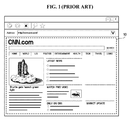
- a web document 10 includes a plurality of content items, such as text, moving pictures, and image files.
- content items such as text, moving pictures, and image files.
- a user is likely to have difficulty in looking over the web document 10 when the web document 10 is displayed on the screen of the mobile phone. Therefore, it is necessary to provide a user with convenient web services by efficiently arranging a plurality of pieces of information of a web document on a limited screen.
- the present embodiments provide an apparatus and method of composing a web document and an apparatus to set a web document arrangement which can provide users with convenient web services.
- the foregoing and/or other aspects are achieved by providing an apparatus to compose a web document.
- the apparatus includes a generation module which generates a plurality of frames by analyzing a source of a web document, a composition module which arranges the generated frames using a predetermined frame arrangement mode, and an output module which displays the arranged frames on a screen.
- the apparatus includes a generation module which generates a plurality of frames by analyzing a source of a web document, a composition module which arranges the generated frames using a predetermined frame arrangement mode, and an output module which displays the arranged frames on a screen, where the predetermined frame arrangement mode includes at least one of a cascade mode, a thumbnail mode, and a tree mode, the composition module arranges the generated frames so that titles of the generated frames can be prevented from overlapping one another, and, when the number of arranged frames exceeds the maximum number of frames that can be display on the screen by the output module, a number of frames corresponding to a difference between the number of arranged frames and the maximum number of frames that can be displayed on the screen by the output module are grouped into one or more tabs, and the tabs are displayed at a predefined location on the screen.
- the predetermined frame arrangement mode includes at least one of a cascade mode, a thumbnail mode, and a tree mode
- the apparatus includes a menu providing module which provides a setting menu to set a frame arrangement mode of arranging a plurality of frames on a screen, the frames being generated by analyzing a source of a web document, an arrangement module which arranges the frames using a predetermined frame arrangement so that titles of the frames can be prevented from overlapping one another, and a display module which displays the arranged frames on the screen.
- the apparatus may include a menu providing module setting the predetermined frame arrangement mode of arranging the plurality of frames on the screen.
- a method of setting a web document arrangement including: arranging a plurality of frames on a screen, the frames being generated by analyzing a source of a web document; and grouping the frames for display on the screen into at least one tab when the frames to be displayed exceed a maximum number of frames that can be displayed on the screen.
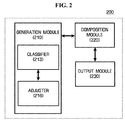
- FIG. 2 is a block diagram of an apparatus 200 to compose a web document according to an embodiment.
- the apparatus 200 includes a generation module 210, a composition module 220, and an output module 230.
- the generation module 210 includes a classifier 213 and an adjuster 216.
- the generation module 210 generates a plurality of frames by analyzing the source of a web document.
- a frame is a window with a predetermined size and contains the contents of a web document.
- the generation module 210 searches the source of a web document for tags that divide a web document into one or more paragraphs, and generates a frame by combining a plurality of pieces of information included between a start tag and an end tag that is paired with the start tag. For example, assuming that the tags that divide a web document into paragraphs are defined as " ⁇ div>", the generation module 210 may generate a frame by combining a plurality of pieces of information included between a start tag " ⁇ div>" and an end tag " ⁇ /div>".
- the generation module 210 may generate a frame based on each sub-paragraph.
- the tags that divide a web document into paragraphs may be defined as “ ⁇ div>”, “ ⁇ p>”, “ ⁇ table>”, etc., according to a language that provides web services, and may be defined as “ ⁇ div>”, “ ⁇ p>”, or “ ⁇ table>”, etc. in advance.
- the generation module 210 can determine the title of a frame title based on information included in the frame. For example, the generation module 210 may define a word or phrase that most frequently appears in information included in a frame as the title of the frame. Alternatively, the generation module 210 may define a word or phrase that appears first in a start tag as a frame title. The generation module 210 can determine the title of a frame so that a theme of the corresponding frame can be represented by the frame title.
- the classifier 213 analyzes a plurality of pieces of information included in each of the frames generated by the generation module 210 and classifies the plurality of pieces of information according to their content types. For example, the plurality of pieces of information may be classified into text, dynamic images, and static image. Then, the adjuster 216 alters at least one of font size, content size, and resolution according to the results of the classification performed by the classifier 213. For example, when image size and resolution are reduced, the amount of content that needs to be displayed can be reduced, thus increasing the speed of outputting a web document.
- the composition module 220 arranges the frames generated by the generation module 210 using a predetermined frame arrangement mode.
- the predetermined frame arrangement mode include a cascade mode, a thumbnail mode, and a tree mode.
- the composition module 220 may arrange the frames generated by the generation module 210 so that the titles of the corresponding frames can be prevented from overlapping one another.
- composition module 220 may move the selected frame forward to the top of the frame cascade and move a frame that is previously followed by the selected frame backward to the bottom of the frame cascade so that the selected frame and the frame that is previously followed by the selected frame can become first and last frames, respectively, of the resulting frame cascade.
- the output module 230 displays a sequence of frames obtained by the arrangement performed by the composition module 220 on a screen.
- the maximum number of frames that can be displayed on the screen is determined according to the size of the screen. If the number of frames obtained by the arrangement performed by the composition module 220 exceeds the maximum number of frames that can be displayed on the screen, then a number of frames corresponding to the difference between the number of frames obtained by the arrangement performed by the composition module 220 and the maximum number of frames that can be displayed on the screen may be grouped into one or more tabs, and the tabs may be displayed at a predefined location on the screen. Then, if one of the tabs is selected, the composition module 220 displays as a cascade a plurality of frames included in the selected tab on the screen with the aid of the output module 230.
- a user can select one of a plurality of frame arrangement modes that are provided by the apparatus 200 using an apparatus to set a web document arrangement, and this will hereinafter be described in detail with reference to FIG. 3.
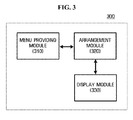
- FIG. 3 is a block diagram of an apparatus 300 to set a web document arrangement according to an embodiment.
- the apparatus 300 includes a menu providing module 310, an arrangement module 320, and a display module 330.
- the menu providing module 310 provides a setting menu to set a frame arrangement mode of arranging on a screen a plurality of frames that are generated through the analysis of a web document.
- the setting menu may provide a cascade mode, a thumbnail mode, and a tree mode, so a user can select one of the cascade mode, the thumbnail mode, and the tree mode.
- the present embodiment is not restricted to this. In other words, the present embodiment can be applied to various frame arrangement modes other than the cascade mode, the thumbnail mode, and the tree mode.
- the cascade mode may be set as a default frame arrangement mode.
- the menu providing module 310 may provide a setting menu to group a plurality of frames into one or more tabs, which are small windows that can be displayed at a predetermined location on the screen.
- a number of frames corresponding to the difference between the number of frames to be displayed on the screen and the maximum number of frames that can be displayed on the screen may be grouped into one or more tabs, and the tabs may be displayed on the screen.
- the arrangement module 320 arranges the frames generated by the generation module 210 using a frame arrangement mode that is currently being set.
- the arrangement module 320 arranges the frames generated by the generation module 210 so that the titles of the corresponding frames can be prevented from overlapping one another.
- the display module 330 displays a sequence of frames obtained by the arrangement performed by the arrangement module 320 on the screen. If the menu item 'tab' is selected and the number of frames to be displayed on a screen exceeds the maximum number of frames that can be displayed on the screen, then the display module 330 may group a number of frames corresponding to the difference between the number of frames to be displayed on the screen and the maximum number of frames that can be displayed on the screen into one or more tabs, and the tabs may be displayed at a predefined location on the screen.
- the menu providing module 310, the arrangement module 320, and the display module 320 may be included in the apparatus 200 illustrated in FIG. 2.
- the composition module 220 of the apparatus 200 may arrange a plurality of frames according to a frame arrangement mode set by the menu providing module 310, and the arrangement module 320 and the display module 330 are optional.
- module denotes, but is not limited to, a software component, a hardware component, a plurality of software components, a plurality of hardware components, a combination of a software component and a hardware component, a combination of a plurality of software components and a hardware component, a combination of a software component and a plurality of hardware components, or a combination of a plurality of software components and a plurality of hardware components, which performs certain tasks.
- a module may advantageously be configured to reside on the addressable storage medium/media and configured to execute on one or more processors.
- a module may include, by way of example, components, such as software components, application specific software components, object-oriented software components, class components and task components, processes, functions, operations, execution threads, attributes, procedures, subroutines, segments of program code, drivers, firmware, microcode, circuitry, data, databases, data structures, tables, arrays, and variables.
- components such as software components, application specific software components, object-oriented software components, class components and task components, processes, functions, operations, execution threads, attributes, procedures, subroutines, segments of program code, drivers, firmware, microcode, circuitry, data, databases, data structures, tables, arrays, and variables.
- the functionality provided for in the components or modules may be combined into fewer components or modules or may be further separated into additional components or modules.
- the components or modules can operate at least one processor (e.g. central processing unit (CPU)) provided in a device.
- processor e.g. central processing unit (CPU)
- examples of a hardware components include an application specific integrated circuit (ASIC) and
- the computer readable code/instructions and computer readable medium/media may be those specially designed and constructed for the purposes of embodiments, or they may be of the kind well-known and available to those skilled in the art of computer hardware and/or computer software.
- FIG. 4 is a flowchart illustrating a method of composing a web document according to an embodiment. The method illustrated in FIG. 4 may be performed by the apparatus 200 illustrated in FIG. 2.
- the generation module 210 generates a plurality of frames by analyzing the source of a web document.
- Web documents can be created using various Hyper Text Markup Languages (HTMLs).
- the generation module 210 may search the source of an HTML web document for a ⁇ div> tag, and generate a frame using information included between the identified ⁇ div> tag and a ⁇ /div> tag that is paired with the identified ⁇ div> tag.
- a plurality of pieces of information included in each of the frames generated by the generation module 210 may be classified according to their content types. Then, content size and resolution may be reduced according to the results of the classification, thereby reducing the amount of content that needs to be displayed.
- the composition module 220 arranges the frames generated by the generation module 210 using a predetermined frame arrangement mode.
- the predetermined frame arrangement mode include a cascade mode, a thumbnail mode, and a tree mode.
- the composition module 220 may arrange the frames generated by the generation module 210 so that the titles of the corresponding frames can be prevented from overlapping one another.
- the output module 230 displays a sequence of frames obtained by the arrangement performed by the composition module 220 on a screen. If the number of frames obtained by the arrangement performed by the composition module 220 exceeds the maximum number of frames that can be displayed on the screen, then the output module 230 may group a number of frames corresponding to the difference between the number of frames obtained by the arrangement performed by the composition module 220 and the maximum number of frames that can be displayed on the screen into one or more tabs, and display the tabs at a predefined location on the screen.
- FIG. 5 is a flowchart illustrating the setting of the output of a web document according to an embodiment. The method illustrated in FIG. 5 may be performed by the apparatus 300 illustrated in FIG. 3.
- the menu providing module 310 provides a setting menu to set a frame arrangement mode of arranging a plurality of frames that are generated through the analysis of the source of a web document on a screen.
- the arrangement module 320 arranges the frames according to a predetermined frame arrangement mode set using the setting menu.
- the display module 330 displays a sequence of frames obtained by the arrangement performed in operation S511 on the screen.
- FIGS. 6 and 7 are diagrams explaining a method of generating a frame of a web document according to an embodiment.
- a web document is generally divided into a plurality of paragraphs 602, 604, and 606 having different themes.
- the source of the web document includes a plurality of tags that divide the web document into the paragraphs 602, 604, and 606, and the generation module 210 of the apparatus 200 illustrated in FIG. 2 uses the tags to generate a plurality of frames based on the source of the web document.
- the generation module 210 may generate a frame by combining a plurality of pieces of information included between a start tag ⁇ table> and an end tag ⁇ /table>.
- the generation module 210 can determine the title of a frame based on information included in the frame. For example, the generation module 210 may determine a phrase 'Favorites' that follows a tag ⁇ tr> (704) as a frame title.
- information included in each frame may include different types of content items 608 such as text, dynamic images, and static images.
- the classifier 213 classifies the content items 608 according to their types.
- the adjuster 216 adjusts the content size and resolution according to the results of the classification performed by the classifier 213. For example, size and resolution adjustment may be performed for content items (e.g., images) with the extension 'jpg' or 'gif', and content items obtained by the size and resolution adjustment may be displayed in a frame as icons that are previously stored in a device.
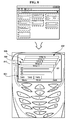
- FIGS. 8 and 9 are diagrams for explaining examples of the arrangement of frames on a screen according to an embodiment.
- a plurality of frames 802 are arranged as a cascade so that the titles of the frames 802 can be prevented from overlapping one another.
- a user can easily determine the content and structure of a web document, and easily select a frame of his/her interest from the frame cascade. If the user selects a frame from the frame cascade, then the composition module 220 of the apparatus 200 illustrated in FIG. 2 may move the selected frame to the top of the frame cascade and move a frame that is previously followed by the selected frame to the bottom of the frame cascade.
- a frame 808 with title 2 and a frame 810 with title 1 may be moved backward to the bottom of the frame cascade, and the frame 806 and one or more frames that follow the frame 806 may be moved forward to the top of the frame cascade.
- frames that are previously located near the bottom of the frame cascade may be moved forward, and frames that are previously located near the top of the frame cascade may be moved backward, for example.
- a plurality of frames 802 may be arranged in a thumbnail mode 902.
- the frames 802 may be arranged in a tree mode 904.
- the frames 802 may be arranged as blocks having a predefined size, where the predefined block size is determined according to the size of a screen on which the frames 802 are to be displayed.
- the frames 802 may be arranged as a tree having of one or more parent frames, each parent frame having one or more child frames. For example, when tags that divide a web document into paragraphs are defined as ⁇ table>, a frame 901 can be generated first based on information included between a start tag ⁇ table> and an end tag ⁇ /table>.
- the frame 901 includes another ⁇ table> tag
- one or more frames can be generated as child frames 903 of the frame 901 based on the ⁇ table> tag in the frame 901, so that the child frames 903 belong to a lower level than the frame 901.
- a web document can be divided into paragraphs having different themes, and each of the paragraphs can be divided into sub-paragraphs having sub-themes. Therefore, the tree mode 904 can enable a user to easily determine the content and structure of web documents and to easily select web documents of his/her interest.
- a state indicator 905 may be displayed on the screen in order to indicate whether a frame having one or more child frames is opened or closed. If a user clicks on the state indicator 905 for a closed frame, the frame may be opened so that the frame and a number of child frames of the frame are displayed as a tree.
- a number of frames corresponding to the difference between the number of frames that need to be displayed on the screen and the maximum number of frames that can be displayed on the screen may be grouped into one or more tabs, and the tabs may be displayed on the screen. For example, if the maximum number of frames that can be properly displayed on the screen without overlapping their titles and the number of frames that need to be displayed on the screen is greater than 10, then a number of frames corresponding to the maximum number of frames that can be properly displayed on the screen and the number of frames that need to be displayed on the screen are divided into one or more tabs 804, each tab including ten frames. If a user selects one of the tabs 804, then a plurality of frames included in the selected tab 804 may be displayed on the screen as a cascade.
- the apparatus and method of composing a web document and the method of setting a web document arrangement according to the present embodiment have the following advantages.
Landscapes
- Engineering & Computer Science (AREA)
- Theoretical Computer Science (AREA)
- General Engineering & Computer Science (AREA)
- Physics & Mathematics (AREA)
- General Physics & Mathematics (AREA)
- Databases & Information Systems (AREA)
- Health & Medical Sciences (AREA)
- Artificial Intelligence (AREA)
- Audiology, Speech & Language Pathology (AREA)
- Computational Linguistics (AREA)
- General Health & Medical Sciences (AREA)
- Data Mining & Analysis (AREA)
- Human Computer Interaction (AREA)
- User Interface Of Digital Computer (AREA)
- Processing Or Creating Images (AREA)
- Information Transfer Between Computers (AREA)
- Document Processing Apparatus (AREA)
Abstract
Description
- This application claims priority from
Korean Patent Application No. 10-2006-0089219 filed on September 14, 2006 - The present invention relates to an apparatus and method of composing a web document and an apparatus of setting a web document arrangement, and more particularly, to an apparatus and method of composing a web document and an apparatus of setting a web document arrangement which can efficiently output a web document to a device equipped with a limited screen.
- Recently, an increasing number of devices that can provide web services, such as mobile phones, personal digital assistants (PDAs), Internet TVs, smart phones, web screen phones, and navigators of automobiles have been developed. Web services provide web documents created using such languages as Hyper Text Markup Language, extensible Markup Language (XML), and Script. In general, referring to FIG. 1, a
web document 10 includes a plurality of content items, such as text, moving pictures, and image files. However, since the size of a screen of, for example, a mobile phone, is limited, a user is likely to have difficulty in looking over theweb document 10 when theweb document 10 is displayed on the screen of the mobile phone. Therefore, it is necessary to provide a user with convenient web services by efficiently arranging a plurality of pieces of information of a web document on a limited screen. - The present embodiments provide an apparatus and method of composing a web document and an apparatus to set a web document arrangement which can provide users with convenient web services.
- However, the aspects of the present embodiments are not restricted to the one set forth herein. The above and other aspects of the present embodiments will become more apparent to one of daily skill in the art to which the present invention pertains by referencing a detailed description given below.
- The foregoing and/or other aspects are achieved by providing an apparatus to compose a web document. The apparatus includes a generation module which generates a plurality of frames by analyzing a source of a web document, a composition module which arranges the generated frames using a predetermined frame arrangement mode, and an output module which displays the arranged frames on a screen.
- The foregoing and/or other aspects are achieved by providing an apparatus to compose a web document. The apparatus includes a generation module which generates a plurality of frames by analyzing a source of a web document, a composition module which arranges the generated frames using a predetermined frame arrangement mode, and an output module which displays the arranged frames on a screen, where the predetermined frame arrangement mode includes at least one of a cascade mode, a thumbnail mode, and a tree mode, the composition module arranges the generated frames so that titles of the generated frames can be prevented from overlapping one another, and, when the number of arranged frames exceeds the maximum number of frames that can be display on the screen by the output module, a number of frames corresponding to a difference between the number of arranged frames and the maximum number of frames that can be displayed on the screen by the output module are grouped into one or more tabs, and the tabs are displayed at a predefined location on the screen.
- The foregoing and/or other aspects are achieved by providing an apparatus to set a web document arrangement. The apparatus includes a menu providing module which provides a setting menu to set a frame arrangement mode of arranging a plurality of frames on a screen, the frames being generated by analyzing a source of a web document, an arrangement module which arranges the frames using a predetermined frame arrangement so that titles of the frames can be prevented from overlapping one another, and a display module which displays the arranged frames on the screen.
- The apparatus may include a menu providing module setting the predetermined frame arrangement mode of arranging the plurality of frames on the screen.
- The foregoing and/or other aspects are achieved by providing a method of setting a web document arrangement, the method including: arranging a plurality of frames on a screen, the frames being generated by analyzing a source of a web document; and grouping the frames for display on the screen into at least one tab when the frames to be displayed exceed a maximum number of frames that can be displayed on the screen.
- The above and other features and advantages of the present embodiments will become more apparent by describing in detail preferred embodiments thereof with reference to the attached drawings, in which:
- FIG. 1 illustrates a web document;
- FIG. 2 is a block diagram of an apparatus to compose a web document according to an embodiment;
- FIG. 3 is a block diagram of an apparatus to set a web document arrangement according to an embodiment;
- FIG. 4 is a flowchart illustrating a method of composing a web document according to an embodiment;
- FIG. 5 is a flowchart illustrating the setting of the output of a web document according to an embodiment;
- FIGS. 6 and 7 are diagrams for explaining a method of generating a frame of a web document according to an embodiment; and
- FIGS. 8 and 9 are diagrams for explaining examples of the arrangement of frames on a screen according to an embodiment.
- The present invention will now be described more fully with reference to the accompanying drawings, in which embodiments are shown. The invention may, however, be embodied in many different forms and should not be construed as being limited to the embodiments set forth herein; rather, these embodiments are provided so that this disclosure will be thorough and complete, and will fully convey the concept of the invention to those skilled in the art. Like reference numerals in the drawings denote like elements, and thus their description will be omitted.
- FIG. 2 is a block diagram of an
apparatus 200 to compose a web document according to an embodiment. Referring to FIG. 2, theapparatus 200 includes ageneration module 210, acomposition module 220, and anoutput module 230. Thegeneration module 210 includes aclassifier 213 and an adjuster 216. - The
generation module 210 generates a plurality of frames by analyzing the source of a web document. A frame is a window with a predetermined size and contains the contents of a web document. In detail, thegeneration module 210 searches the source of a web document for tags that divide a web document into one or more paragraphs, and generates a frame by combining a plurality of pieces of information included between a start tag and an end tag that is paired with the start tag. For example, assuming that the tags that divide a web document into paragraphs are defined as "<div>", thegeneration module 210 may generate a frame by combining a plurality of pieces of information included between a start tag "<div>" and an end tag "</div>". If a subparagraph using a tag "<table>" exists in "<div>...</div>", then thegeneration module 210 may generate a frame based on each sub-paragraph. The tags that divide a web document into paragraphs may be defined as "<div>", "<p>", "<table>", etc., according to a language that provides web services, and may be defined as "<div>", "<p>", or "<table>", etc. in advance. - The
generation module 210 can determine the title of a frame title based on information included in the frame. For example, thegeneration module 210 may define a word or phrase that most frequently appears in information included in a frame as the title of the frame. Alternatively, thegeneration module 210 may define a word or phrase that appears first in a start tag as a frame title. Thegeneration module 210 can determine the title of a frame so that a theme of the corresponding frame can be represented by the frame title. - The
classifier 213 analyzes a plurality of pieces of information included in each of the frames generated by thegeneration module 210 and classifies the plurality of pieces of information according to their content types. For example, the plurality of pieces of information may be classified into text, dynamic images, and static image. Then, the adjuster 216 alters at least one of font size, content size, and resolution according to the results of the classification performed by theclassifier 213. For example, when image size and resolution are reduced, the amount of content that needs to be displayed can be reduced, thus increasing the speed of outputting a web document. - The
composition module 220 arranges the frames generated by thegeneration module 210 using a predetermined frame arrangement mode. Examples of the predetermined frame arrangement mode include a cascade mode, a thumbnail mode, and a tree mode. Thecomposition module 220 may arrange the frames generated by thegeneration module 210 so that the titles of the corresponding frames can be prevented from overlapping one another. If thecomposition module 220 arranges the frames generated by thegeneration module 210 as a cascade and a frame is selected from the frame cascade, thecomposition module 220 may move the selected frame forward to the top of the frame cascade and move a frame that is previously followed by the selected frame backward to the bottom of the frame cascade so that the selected frame and the frame that is previously followed by the selected frame can become first and last frames, respectively, of the resulting frame cascade. - The
output module 230 displays a sequence of frames obtained by the arrangement performed by thecomposition module 220 on a screen. The maximum number of frames that can be displayed on the screen is determined according to the size of the screen. If the number of frames obtained by the arrangement performed by thecomposition module 220 exceeds the maximum number of frames that can be displayed on the screen, then a number of frames corresponding to the difference between the number of frames obtained by the arrangement performed by thecomposition module 220 and the maximum number of frames that can be displayed on the screen may be grouped into one or more tabs, and the tabs may be displayed at a predefined location on the screen. Then, if one of the tabs is selected, thecomposition module 220 displays as a cascade a plurality of frames included in the selected tab on the screen with the aid of theoutput module 230. - A user can select one of a plurality of frame arrangement modes that are provided by the
apparatus 200 using an apparatus to set a web document arrangement, and this will hereinafter be described in detail with reference to FIG. 3. - FIG. 3 is a block diagram of an
apparatus 300 to set a web document arrangement according to an embodiment. Referring to FIG. 3, theapparatus 300 includes amenu providing module 310, anarrangement module 320, and adisplay module 330. - The
menu providing module 310 provides a setting menu to set a frame arrangement mode of arranging on a screen a plurality of frames that are generated through the analysis of a web document. The setting menu may provide a cascade mode, a thumbnail mode, and a tree mode, so a user can select one of the cascade mode, the thumbnail mode, and the tree mode. However, the present embodiment is not restricted to this. In other words, the present embodiment can be applied to various frame arrangement modes other than the cascade mode, the thumbnail mode, and the tree mode. The cascade mode may be set as a default frame arrangement mode. - If the number of frames to be displayed on a screen exceeds the maximum number of frames that can be displayed on the screen, then the
menu providing module 310 may provide a setting menu to group a plurality of frames into one or more tabs, which are small windows that can be displayed at a predetermined location on the screen. In other words, if a user selects a menu item 'tab' from a setting menu, a number of frames corresponding to the difference between the number of frames to be displayed on the screen and the maximum number of frames that can be displayed on the screen may be grouped into one or more tabs, and the tabs may be displayed on the screen. - The
arrangement module 320 arranges the frames generated by thegeneration module 210 using a frame arrangement mode that is currently being set. Thearrangement module 320 arranges the frames generated by thegeneration module 210 so that the titles of the corresponding frames can be prevented from overlapping one another. - The
display module 330 displays a sequence of frames obtained by the arrangement performed by thearrangement module 320 on the screen. If the menu item 'tab' is selected and the number of frames to be displayed on a screen exceeds the maximum number of frames that can be displayed on the screen, then thedisplay module 330 may group a number of frames corresponding to the difference between the number of frames to be displayed on the screen and the maximum number of frames that can be displayed on the screen into one or more tabs, and the tabs may be displayed at a predefined location on the screen. - The
menu providing module 310, thearrangement module 320, and thedisplay module 320 may be included in theapparatus 200 illustrated in FIG. 2. In this case, thecomposition module 220 of theapparatus 200 may arrange a plurality of frames according to a frame arrangement mode set by themenu providing module 310, and thearrangement module 320 and thedisplay module 330 are optional. - The term "module", as used herein, denotes, but is not limited to, a software component, a hardware component, a plurality of software components, a plurality of hardware components, a combination of a software component and a hardware component, a combination of a plurality of software components and a hardware component, a combination of a software component and a plurality of hardware components, or a combination of a plurality of software components and a plurality of hardware components, which performs certain tasks. A module may advantageously be configured to reside on the addressable storage medium/media and configured to execute on one or more processors. Thus, a module may include, by way of example, components, such as software components, application specific software components, object-oriented software components, class components and task components, processes, functions, operations, execution threads, attributes, procedures, subroutines, segments of program code, drivers, firmware, microcode, circuitry, data, databases, data structures, tables, arrays, and variables. The functionality provided for in the components or modules may be combined into fewer components or modules or may be further separated into additional components or modules. Further, the components or modules can operate at least one processor (e.g. central processing unit (CPU)) provided in a device. In addition, examples of a hardware components include an application specific integrated circuit (ASIC) and Field Programmable Gate Array (FPGA). As indicated above, a module can also denote a combination of a software component(s) and a hardware component(s). These hardware components may also be one or more processors.
- The computer readable code/instructions and computer readable medium/media may be those specially designed and constructed for the purposes of embodiments, or they may be of the kind well-known and available to those skilled in the art of computer hardware and/or computer software.
- FIG. 4 is a flowchart illustrating a method of composing a web document according to an embodiment. The method illustrated in FIG. 4 may be performed by the
apparatus 200 illustrated in FIG. 2. - Referring to FIG. 4, in operation S401, the
generation module 210 generates a plurality of frames by analyzing the source of a web document. Web documents can be created using various Hyper Text Markup Languages (HTMLs). For example, thegeneration module 210 may search the source of an HTML web document for a <div> tag, and generate a frame using information included between the identified <div> tag and a </div> tag that is paired with the identified <div> tag. A plurality of pieces of information included in each of the frames generated by thegeneration module 210 may be classified according to their content types. Then, content size and resolution may be reduced according to the results of the classification, thereby reducing the amount of content that needs to be displayed. - Thereafter, in operation S411, the
composition module 220 arranges the frames generated by thegeneration module 210 using a predetermined frame arrangement mode. Examples of the predetermined frame arrangement mode include a cascade mode, a thumbnail mode, and a tree mode. Thecomposition module 220 may arrange the frames generated by thegeneration module 210 so that the titles of the corresponding frames can be prevented from overlapping one another. - In operation S421, the
output module 230 displays a sequence of frames obtained by the arrangement performed by thecomposition module 220 on a screen. If the number of frames obtained by the arrangement performed by thecomposition module 220 exceeds the maximum number of frames that can be displayed on the screen, then theoutput module 230 may group a number of frames corresponding to the difference between the number of frames obtained by the arrangement performed by thecomposition module 220 and the maximum number of frames that can be displayed on the screen into one or more tabs, and display the tabs at a predefined location on the screen. - FIG. 5 is a flowchart illustrating the setting of the output of a web document according to an embodiment. The method illustrated in FIG. 5 may be performed by the
apparatus 300 illustrated in FIG. 3. - Referring to FIG. 5, in operation S501, the
menu providing module 310 provides a setting menu to set a frame arrangement mode of arranging a plurality of frames that are generated through the analysis of the source of a web document on a screen. - In operation S511, the
arrangement module 320 arranges the frames according to a predetermined frame arrangement mode set using the setting menu. - In operation S521, the
display module 330 displays a sequence of frames obtained by the arrangement performed in operation S511 on the screen. - FIGS. 6 and 7 are diagrams explaining a method of generating a frame of a web document according to an embodiment.
- Referring to FIG. 6, a web document is generally divided into a plurality of
paragraphs paragraphs generation module 210 of theapparatus 200 illustrated in FIG. 2 uses the tags to generate a plurality of frames based on the source of the web document. - For example, referring to FIG. 7, if the tags that divide the web document into the
paragraphs generation module 210 may generate a frame by combining a plurality of pieces of information included between a start tag <table> and an end tag </table>. - The
generation module 210 can determine the title of a frame based on information included in the frame. For example, thegeneration module 210 may determine a phrase 'Favorites' that follows a tag <tr> (704) as a frame title. - Referring to FIG. 6, information included in each frame may include different types of
content items 608 such as text, dynamic images, and static images. Theclassifier 213 classifies thecontent items 608 according to their types. Then, the adjuster 216 adjusts the content size and resolution according to the results of the classification performed by theclassifier 213. For example, size and resolution adjustment may be performed for content items (e.g., images) with the extension 'jpg' or 'gif', and content items obtained by the size and resolution adjustment may be displayed in a frame as icons that are previously stored in a device. - FIGS. 8 and 9 are diagrams for explaining examples of the arrangement of frames on a screen according to an embodiment.
- Referring to FIG. 8, a plurality of
frames 802 are arranged as a cascade so that the titles of theframes 802 can be prevented from overlapping one another. Thus, a user can easily determine the content and structure of a web document, and easily select a frame of his/her interest from the frame cascade. If the user selects a frame from the frame cascade, then thecomposition module 220 of theapparatus 200 illustrated in FIG. 2 may move the selected frame to the top of the frame cascade and move a frame that is previously followed by the selected frame to the bottom of the frame cascade. For example, if the user clicks on aframe 806 withtitle 3, then aframe 808 withtitle 2 and aframe 810 withtitle 1 may be moved backward to the bottom of the frame cascade, and theframe 806 and one or more frames that follow theframe 806 may be moved forward to the top of the frame cascade. - Referring to FIG. 8, if a user moves from one frame to another in a direction (A) by clicking a button or using a scroll function, frames that are previously located near the bottom of the frame cascade may be moved forward, and frames that are previously located near the top of the frame cascade may be moved backward, for example.
- Referring to FIG. 9, a plurality of
frames 802 may be arranged in athumbnail mode 902. Alternatively, theframes 802 may be arranged in atree mode 904. In detail, in thethumbnail mode 902, theframes 802 may be arranged as blocks having a predefined size, where the predefined block size is determined according to the size of a screen on which theframes 802 are to be displayed. In thetree mode 904, theframes 802 may be arranged as a tree having of one or more parent frames, each parent frame having one or more child frames. For example, when tags that divide a web document into paragraphs are defined as <table>, aframe 901 can be generated first based on information included between a start tag <table> and an end tag </table>. If theframe 901 includes another <table> tag, one or more frames can be generated as child frames 903 of theframe 901 based on the <table> tag in theframe 901, so that the child frames 903 belong to a lower level than theframe 901. In general, a web document can be divided into paragraphs having different themes, and each of the paragraphs can be divided into sub-paragraphs having sub-themes. Therefore, thetree mode 904 can enable a user to easily determine the content and structure of web documents and to easily select web documents of his/her interest. According to the present embodiment, astate indicator 905 may be displayed on the screen in order to indicate whether a frame having one or more child frames is opened or closed. If a user clicks on thestate indicator 905 for a closed frame, the frame may be opened so that the frame and a number of child frames of the frame are displayed as a tree. - Referring to FIG. 8, if the number of frames that need to be displayed on a screen exceeds the maximum number of frames that can be displayed on the screen, then a number of frames corresponding to the difference between the number of frames that need to be displayed on the screen and the maximum number of frames that can be displayed on the screen may be grouped into one or more tabs, and the tabs may be displayed on the screen. For example, if the maximum number of frames that can be properly displayed on the screen without overlapping their titles and the number of frames that need to be displayed on the screen is greater than 10, then a number of frames corresponding to the maximum number of frames that can be properly displayed on the screen and the number of frames that need to be displayed on the screen are divided into one or
more tabs 804, each tab including ten frames. If a user selects one of thetabs 804, then a plurality of frames included in the selectedtab 804 may be displayed on the screen as a cascade. - As described above, the apparatus and method of composing a web document and the method of setting a web document arrangement according to the present embodiment have the following advantages.
- First, it possible to effectively display web documents on a limited screen.
- Second, it is possible to maximize user convenience by appropriately deciding how to arrange web documents.
- Although a few embodiments have been shown and described, it would be appreciated by those skilled in the art that changes may be made in these embodiments without departing from the principles and spirit of the invention, the scope of which is defined in the claims and their equivalents.
Claims (25)
- An apparatus to compose a web document, the apparatus comprising:a generation module generating a plurality of frames by analyzing a source of a web document;a composition module arranging the generated frames using a predetermined frame arrangement mode; andan output module displaying the arranged frames on a screen.
- The apparatus of claim 1, wherein:the composition module arranges the generated frames so that titles of the generated frames can be prevented from overlapping from one another; andthe predetermined frame arrangement mode includes at least one of a cascade mode, a thumbnail mode, and a tree mode.
- The apparatus of claim 1, wherein, when one of the arranged frames is selected, the composition module moves the selected frame forward and moves a frame previously followed by the selected frame backward so that the selected frame becomes a first frame and the frame previously followed by the selected frame becomes a last frame.
- The apparatus of claim 1, wherein:the output module displays a maximum of a predetermined number of frames on the screen, the predetermined number being determined according to a size of the screen; andwhen the number of arranged frames exceeds the maximum number of frames that can be display on the screen by the output module, the output module groups a number of frames corresponding to a difference between the number of arranged frames and the maximum number of frames that can be displayed on the screen by the output module into one or more tabs, and displays the tabs at a predefined location on the screen.
- The apparatus of claim 4, wherein, when one of the tabs is selected, the composition module arranges a plurality of frames included in the selected tab on the screen as a cascade.
- The apparatus of claim 1, wherein the generation module comprises a classifier which analyzes information included in each of the frames and classifies the information according to content type of the information.
- The apparatus of claim 6, wherein the generation module comprises an adjuster which alters at least one of content size and resolution according to a result of the classification performed by the classifier.
- The apparatus of claim 1, wherein the generation module searches for tags that divide the web document into one or more paragraphs and generates a frame based on a plurality of pieces of information included between a start tag and an end tag that is paired with the start tag.
- An apparatus to set a web document arrangement, the apparatus comprising:a menu providing module providing a setting menu to set a frame arrangement mode of arranging a plurality of frames on a screen, the frames being generated by analyzing a source of a web document;an arrangement module arranging the frames using a predetermined frame arrangement mode so that the titles of the frames can be prevented from overlapping one another; anda display module displaying the arranged frames on the screen.
- The apparatus of claim 9, wherein the predetermined frame arrangement mode includes at least one of a cascade mode, a thumbnail mode, and a tree mode.
- The apparatus of claim 10, wherein, when the number of arranged frames exceeds a maximum number of frames that can be displayed on the screen, the menu providing module provides a setting menu to group a number of frames corresponding to a difference between the number of arranged frames and the maximum number of frames that can be displayed on the screen into one or more tabs and to display the tabs on a predefined location on the screen.
- An apparatus to compose a web document, the apparatus comprising:a generation module generating a plurality of frames by analyzing a source of a web document;a composition module arranging the generated frames using a predetermined frame arrangement mode; andan output module displaying the arranged frames on a screen,wherein the predetermined frame arrangement mode includes at least one of a cascade mode, a thumbnail mode, and a tree mode, the composition module arranges the generated frames so that titles of the generated frames can be prevented from overlapping one another, and, when the number of arranged frames exceeds a maximum number of frames that can be displayed on the screen by the output module, a number of frames corresponding to a difference between the number of arranged frames and the maximum number of frames that can be displayed on the screen by the output module are grouped into one or more tabs and the tabs are displayed at a predefined location on the screen.
- A method of composing a web document, the method comprising:generating a plurality of frames by analyzing a source of a web document;arranging the generated frames using a predetermined frame arrangement mode; anddisplaying the arranged frames on a screen.
- The method of claim 13, wherein:the arranging comprises arranging the generated frames so that titles of the generated frames can be prevented from overlapping from one another; andthe predetermined frame arrangement mode comprises at least one of a cascade mode, a thumbnail mode, and a tree mode.
- The method of claim 13, wherein the arranging comprises, when one of the arranged frames is selected, moving the selected frame forward and moving a frame previously followed by the selected frame backward so that the selected frame becomes a first frame and the frame previously followed by the selected frame becomes a last frame.
- The method of claim 13, wherein the outputting comprises:outputting a predetermined number of frames on the screen, the predetermined number of frames being determined according to a size of the screen; andwhen the number of arranged frames exceeds a maximum number of frames that can be displayed on the screen by the output module, grouping a number of frames corresponding to a difference between the number of arranged frames and the maximum number of frames that can be displayed on the screen by the output module into one or more tabs, and displaying the tabs at a predefined location on the screen.
- The method of claim 16, wherein the arranging comprises, when one of the tabs is selected, arranging a plurality of frames included in the selected tab on the screen as a cascade.
- The method of claim 13, wherein the generating comprises analyzing information included in each of the frames and classifying the information according to content type of the information.
- The method of claim 18, wherein the generating further comprises altering at least one of content size and resolution according to results of the classification.
- The method of claim 13, wherein the generating comprises searching for tags that divide the web document into paragraphs and generating a frame based on a plurality of pieces of information included between a start tag and an end tag that is paired with the start tag.
- A method of setting a web document arrangement, the method comprising:providing a setting menu to set a frame arrangement mode of arranging a plurality of frames on a screen, the frames being generated by analyzing a source of a web document;arranging the frames using a predetermined frame arrangement mode so that titles of the frames can be prevented from overlapping one another; anddisplaying the arranged frames on the screen.
- The method of claim 21, wherein the predetermined frame arrangement mode includes at least one of a cascade mode, a thumbnail mode, and a tree mode.
- The method of claim 22, wherein the providing comprises, when the number of arranged frames exceeds a maximum number of frames that can be displayed on the screen, providing a setting menu to group a number of frames corresponding to a difference between the number of arranged frames and the maximum number of frames that can be displayed on the screen into one or more tabs and display the tabs on a predefined location on the screen.
- The apparatus of claim 1, further comprising a menu providing module setting the predetermined frame arrangement mode of arranging the plurality of frames on the screen.
- A method of setting a web document arrangement, the method comprising:arranging a plurality of frames on a screen, the frames being generated by analyzing a source of a web document; andgrouping the frames for display on the screen into at least one tab when the frames to be displayed exceed a maximum number of frames that can be displayed on the screen.
Applications Claiming Priority (1)
| Application Number | Priority Date | Filing Date | Title |
|---|---|---|---|
| KR1020060089219A KR20080024734A (en) | 2006-09-14 | 2006-09-14 | Web document organization device and method and web document arrangement device |
Publications (1)
| Publication Number | Publication Date |
|---|---|
| EP1901186A1 true EP1901186A1 (en) | 2008-03-19 |
Family
ID=38976049
Family Applications (1)
| Application Number | Title | Priority Date | Filing Date |
|---|---|---|---|
| EP07116060A Ceased EP1901186A1 (en) | 2006-09-14 | 2007-09-11 | Apparatus and method of composing web document and apparatus of setting web document arrangement |
Country Status (5)
| Country | Link |
|---|---|
| US (2) | US8266521B2 (en) |
| EP (1) | EP1901186A1 (en) |
| JP (1) | JP5154176B2 (en) |
| KR (1) | KR20080024734A (en) |
| CN (1) | CN101145161B (en) |
Cited By (1)
| Publication number | Priority date | Publication date | Assignee | Title |
|---|---|---|---|---|
| WO2012149119A1 (en) * | 2011-04-26 | 2012-11-01 | Google Inc. | Mobile browser context switching |
Families Citing this family (16)
| Publication number | Priority date | Publication date | Assignee | Title |
|---|---|---|---|---|
| KR102006470B1 (en) | 2011-12-28 | 2019-08-02 | 삼성전자 주식회사 | Method and apparatus for multi-tasking in a user device |
| US20150205454A1 (en) * | 2012-01-10 | 2015-07-23 | Google Inc. | Systems and methods for displaying preview data |
| GB2505410A (en) * | 2012-08-27 | 2014-03-05 | Ibm | Display of hypertext documents grouped according to their affinity |
| CN103905763B (en) * | 2012-12-28 | 2019-03-29 | 联想(北京)有限公司 | Processing method and electronic equipment |
| KR102273750B1 (en) * | 2013-02-28 | 2021-07-06 | 엘지전자 주식회사 | Apparatus and method for processing a multimedia commerce service |
| US9389759B2 (en) | 2013-05-07 | 2016-07-12 | Axure Software Solutions, Inc. | Environment for responsive graphical designs |
| US8671352B1 (en) | 2013-05-07 | 2014-03-11 | Axure Software Solutions, Inc. | Variable dimension version editing for graphical designs |
| US9946806B2 (en) | 2013-05-07 | 2018-04-17 | Axure Software Solutions, Inc. | Exporting responsive designs from a graphical design tool |
| KR102148725B1 (en) | 2013-07-31 | 2020-08-28 | 삼성전자주식회사 | Method and Apparatus for displaying application |
| CN103488777A (en) * | 2013-09-30 | 2014-01-01 | 乐视网信息技术(北京)股份有限公司 | Method and system for adjusting webpage display effect |
| KR102148948B1 (en) * | 2013-12-06 | 2020-08-27 | 삼성전자주식회사 | Multi tasking method of electronic apparatus and electronic apparatus thereof |
| KR20150111221A (en) * | 2014-03-25 | 2015-10-05 | 삼성전자주식회사 | Method for constructing page and electronic device supporting the same |
| US10409904B2 (en) | 2014-06-26 | 2019-09-10 | D2L Corporation | Methods and systems for providing an electronic form |
| KR20170059201A (en) * | 2015-11-20 | 2017-05-30 | 삼성전자주식회사 | Electronic device and content ouputting method thereof |
| KR20190001894A (en) | 2017-06-28 | 2019-01-07 | 주식회사 오리지널메이커스 | Method for creating web documents and Apparatus thereof |
| US10592589B1 (en) | 2018-08-21 | 2020-03-17 | Axure Software Solutions, Inc. | Multi-view masters for graphical designs |
Citations (3)
| Publication number | Priority date | Publication date | Assignee | Title |
|---|---|---|---|---|
| WO2004107081A2 (en) * | 2003-05-27 | 2004-12-09 | Nokia Corporation | System, apparatus, and method for frame implementation within a mobile internet browser |
| WO2005071567A1 (en) * | 2004-01-22 | 2005-08-04 | Nokia Corporation | Displaying a web page in a browser window and a method for handling a web page |
| US20060117269A1 (en) * | 2004-11-29 | 2006-06-01 | Inventec Appliances Corporation | Method for displaying multiple frames on small screen of communication device |
Family Cites Families (57)
| Publication number | Priority date | Publication date | Assignee | Title |
|---|---|---|---|---|
| FR2693810B1 (en) * | 1991-06-03 | 1997-01-10 | Apple Computer | USER INTERFACE SYSTEMS WITH DIRECT ACCESS TO A SECONDARY DISPLAY AREA. |
| JPH0773003A (en) * | 1993-09-06 | 1995-03-17 | Matsushita Electric Ind Co Ltd | Window title display control device and window title display control method |
| US5487143A (en) * | 1994-04-06 | 1996-01-23 | Altera Corporation | Computer user interface having tiled and overlapped window areas |
| US5559946A (en) * | 1994-08-30 | 1996-09-24 | Intel Corporation | Method and apparatus for adding a new tab to a tab bar window |
| US5838317A (en) * | 1995-06-30 | 1998-11-17 | Microsoft Corporation | Method and apparatus for arranging displayed graphical representations on a computer interface |
| US5917483A (en) * | 1995-09-18 | 1999-06-29 | Oracle Corporation | Advanced windows management for a computer system |
| US5712995A (en) * | 1995-09-20 | 1998-01-27 | Galileo Frames, Inc. | Non-overlapping tiling apparatus and method for multiple window displays |
| JP3461412B2 (en) * | 1995-10-11 | 2003-10-27 | シャープ株式会社 | Data processing device and data processing method |
| US5929854A (en) * | 1995-11-30 | 1999-07-27 | Ross; Michael M. | Dialog box method and system for arranging document windows |
| US5920315A (en) * | 1996-07-17 | 1999-07-06 | International Business Machines Corporation | Multi-pane window with recoiling workspaces |
| US6101510A (en) * | 1997-01-29 | 2000-08-08 | Microsoft Corporation | Web browser control for incorporating web browser functionality into application programs |
| US6021418A (en) * | 1997-02-18 | 2000-02-01 | International Business Machines Corporation | Apparatus and method for displaying control-objects |
| US6266684B1 (en) * | 1997-08-06 | 2001-07-24 | Adobe Systems Incorporated | Creating and saving multi-frame web pages |
| US6072484A (en) * | 1997-08-13 | 2000-06-06 | International Business Machines Corporation | Graphic user interface for tab setting with a re-sizeable scale |
| US6166736A (en) * | 1997-08-22 | 2000-12-26 | Natrificial Llc | Method and apparatus for simultaneously resizing and relocating windows within a graphical display |
| US6008809A (en) * | 1997-09-22 | 1999-12-28 | International Business Machines Corporation | Apparatus and method for viewing multiple windows within a dynamic window |
| CN100392634C (en) * | 1998-07-21 | 2008-06-04 | 三星电子株式会社 | Systems and methods for displaying World Wide Web documents |
| US6832355B1 (en) * | 1998-07-28 | 2004-12-14 | Microsoft Corporation | Web page display system |
| US6313854B1 (en) * | 1998-10-16 | 2001-11-06 | International Business Machines Corporation | Display mechanism for HTML frames |
| SE524391C2 (en) | 1998-12-28 | 2004-08-03 | Spyglass Inc | Method and system for content conversion of electronic documents for wireless clients. |
| US20020054052A1 (en) * | 1999-01-06 | 2002-05-09 | Nandini Sharma | Frame-based web browser |
| US6546397B1 (en) * | 1999-12-02 | 2003-04-08 | Steven H. Rempell | Browser based web site generation tool and run time engine |
| US6493000B1 (en) * | 2000-02-17 | 2002-12-10 | International Business Machines Corporation | Method and system for control of spawned web frames |
| US7707505B1 (en) * | 2000-03-23 | 2010-04-27 | Insweb Corporation | Dynamic tabs for a graphical user interface |
| US6556217B1 (en) * | 2000-06-01 | 2003-04-29 | Nokia Corporation | System and method for content adaptation and pagination based on terminal capabilities |
| KR20020006722A (en) | 2000-07-13 | 2002-01-26 | 권혁 | Method of reformatting webpage and method of providing webpage using the same |
| US6968536B2 (en) * | 2000-07-14 | 2005-11-22 | Borland Software Corporation | Frame component container |
| JP2002169751A (en) | 2000-12-01 | 2002-06-14 | Ntt Me Corp | Content change distribution system and method, and computer program |
| US20020073123A1 (en) * | 2000-12-08 | 2002-06-13 | Wen-Sung Tsai | Method for displaying overlapping documents in a computer environment |
| JP3835194B2 (en) * | 2001-03-30 | 2006-10-18 | セイコーエプソン株式会社 | Digital content creation system and digital content creation program |
| CN1177287C (en) * | 2001-04-18 | 2004-11-24 | 无敌科技(西安)有限公司 | Automatic format setting method for palm-type browser |
| JP2003122770A (en) * | 2001-10-09 | 2003-04-25 | Mitsubishi Electric Corp | Web browsing device |
| GB0124791D0 (en) * | 2001-10-16 | 2001-12-05 | Ibm | A method and system for controlling a tabbed pane in a graphical user interfaceof a data processing system |
| US20040030719A1 (en) * | 2002-02-13 | 2004-02-12 | Jie Wei | Web page based dynamic book for document presentation and operation |
| KR100566242B1 (en) * | 2002-07-19 | 2006-03-29 | 삼성전자주식회사 | Screen editing device and method in mobile communication terminal |
| CN1282149C (en) | 2002-08-22 | 2006-10-25 | 联想(北京)有限公司 | Method for controlling browser to display web page in low-resolution display equipment |
| KR100461019B1 (en) * | 2002-11-01 | 2004-12-09 | 한국전자통신연구원 | web contents transcoding system and method for small display devices |
| US7203901B2 (en) | 2002-11-27 | 2007-04-10 | Microsoft Corporation | Small form factor web browsing |
| US20040114042A1 (en) * | 2002-12-12 | 2004-06-17 | International Business Machines Corporation | Systems and methods for annotating digital images |
| US20050021851A1 (en) * | 2003-06-09 | 2005-01-27 | Kimmo Hamynen | System, apparatus, and method for directional control input browsing in smart phones |
| US7159189B2 (en) * | 2003-06-13 | 2007-01-02 | Alphabase Systems, Inc. | Method and system for controlling cascaded windows on a GUI desktop on a computer |
| US20040261039A1 (en) * | 2003-06-19 | 2004-12-23 | International Business Machines Corporation | Method and system for ordering on-screen windows for display |
| EP1652071A2 (en) * | 2003-07-11 | 2006-05-03 | Computer Associates Think, Inc. | System and method for dynamic generation of a graphical user interface |
| JP2005038064A (en) * | 2003-07-16 | 2005-02-10 | Fuji Electric Holdings Co Ltd | Screen layout setting program and program storage medium |
| US20050257131A1 (en) * | 2004-02-11 | 2005-11-17 | Lim Jing Y | Frame environment that supports the navigation buttons of a web browser |
| US7360168B2 (en) * | 2004-02-12 | 2008-04-15 | International Business Machines Corporation | Automatically scaling the information and controls in navigation tabs per available window area |
| CN100349104C (en) * | 2004-09-20 | 2007-11-14 | 英华达(南京)科技有限公司 | Method of displaying multi window on small screen communication equipment |
| US20060085741A1 (en) * | 2004-10-20 | 2006-04-20 | Viewfour, Inc. A Delaware Corporation | Method and apparatus to view multiple web pages simultaneously from network based search |
| US7676743B2 (en) * | 2004-11-30 | 2010-03-09 | Adobe Systems, Incorporated | Applying type fitting across grouped text frames in a page layout application |
| JP4106058B2 (en) * | 2005-01-04 | 2008-06-25 | インターナショナル・ビジネス・マシーンズ・コーポレーション | Information processing apparatus, frame rearrangement method, and program for rearranging frames in window |
| US7747965B2 (en) * | 2005-01-18 | 2010-06-29 | Microsoft Corporation | System and method for controlling the opacity of multiple windows while browsing |
| US20060224951A1 (en) * | 2005-03-30 | 2006-10-05 | Yahoo! Inc. | Multiple window browser interface and system and method of generating multiple window browser interface |
| US20060230335A1 (en) * | 2005-04-08 | 2006-10-12 | Ilja Fischer | Linking user interface frames |
| US20060248471A1 (en) * | 2005-04-29 | 2006-11-02 | Microsoft Corporation | System and method for providing a window management mode |
| US7487464B2 (en) * | 2006-02-16 | 2009-02-03 | International Business Machines Corporation | Enhanced visualization and selection of multi-layered elements in a containment hierarchy |
| GB0605587D0 (en) * | 2006-03-20 | 2006-04-26 | British Broadcasting Corp | Graphical user interface methods and systems |
| US8547347B2 (en) * | 2008-09-26 | 2013-10-01 | Htc Corporation | Method for generating multiple windows frames, electronic device thereof, and computer program product using the method |
-
2006
- 2006-09-14 KR KR1020060089219A patent/KR20080024734A/en not_active Ceased
-
2007
- 2007-08-31 US US11/896,449 patent/US8266521B2/en active Active
- 2007-09-11 EP EP07116060A patent/EP1901186A1/en not_active Ceased
- 2007-09-13 JP JP2007238159A patent/JP5154176B2/en not_active Expired - Fee Related
- 2007-09-14 CN CN2007101540967A patent/CN101145161B/en not_active Expired - Fee Related
-
2012
- 2012-08-14 US US13/584,976 patent/US9465886B2/en active Active
Patent Citations (3)
| Publication number | Priority date | Publication date | Assignee | Title |
|---|---|---|---|---|
| WO2004107081A2 (en) * | 2003-05-27 | 2004-12-09 | Nokia Corporation | System, apparatus, and method for frame implementation within a mobile internet browser |
| WO2005071567A1 (en) * | 2004-01-22 | 2005-08-04 | Nokia Corporation | Displaying a web page in a browser window and a method for handling a web page |
| US20060117269A1 (en) * | 2004-11-29 | 2006-06-01 | Inventec Appliances Corporation | Method for displaying multiple frames on small screen of communication device |
Non-Patent Citations (1)
| Title |
|---|
| ROTAN HANRAHAN ET AL: "Authoring Techniques for Device Independence", 18 February 2004 (2004-02-18), XP055489866, Retrieved from the Internet <URL:https://www.w3.org/TR/di-atdi/#varyLayout> [retrieved on 20180703] * |
Cited By (6)
| Publication number | Priority date | Publication date | Assignee | Title |
|---|---|---|---|---|
| WO2012149119A1 (en) * | 2011-04-26 | 2012-11-01 | Google Inc. | Mobile browser context switching |
| US8713473B2 (en) | 2011-04-26 | 2014-04-29 | Google Inc. | Mobile browser context switching |
| US8812996B1 (en) | 2011-04-26 | 2014-08-19 | Google Inc. | Methods and apparatus for processing application windows |
| US8819582B2 (en) | 2011-04-26 | 2014-08-26 | Google Inc. | Mobile browser context switching |
| US9015618B2 (en) | 2011-04-26 | 2015-04-21 | Google Inc. | Methods and apparatus for processing application windows |
| EP3474137A1 (en) * | 2011-04-26 | 2019-04-24 | Google LLC | Mobile browser context switching |
Also Published As
| Publication number | Publication date |
|---|---|
| JP2008071353A (en) | 2008-03-27 |
| US8266521B2 (en) | 2012-09-11 |
| JP5154176B2 (en) | 2013-02-27 |
| US9465886B2 (en) | 2016-10-11 |
| CN101145161A (en) | 2008-03-19 |
| US20080072146A1 (en) | 2008-03-20 |
| KR20080024734A (en) | 2008-03-19 |
| CN101145161B (en) | 2012-09-05 |
| US20120311432A1 (en) | 2012-12-06 |
Similar Documents
| Publication | Publication Date | Title |
|---|---|---|
| US9465886B2 (en) | Apparatus and method of composing web document and apparatus of setting web document arrangement | |
| US20080235563A1 (en) | Document displaying apparatus, document displaying method, and computer program product | |
| US8949707B2 (en) | Adaptive document displaying apparatus and method | |
| US9239884B2 (en) | Electronic document processing with automatic generation of links to cited references | |
| KR100914121B1 (en) | Extensible object previewer in a shell browser | |
| US8812500B2 (en) | System and method of displaying related sites | |
| US20080109787A1 (en) | Method and system for function reference of development tool | |
| US20060136839A1 (en) | Indicating related content outside a display area | |
| US20060253489A1 (en) | News feed browser | |
| KR20110099225A (en) | Preview of search results for proposed refinement terms and vertical searches | |
| US20050188304A1 (en) | Method and system for browsing a low-resolution image | |
| US20120144292A1 (en) | Providing summary view of documents | |
| US20110072036A1 (en) | Page-based content storage system | |
| US20090292671A1 (en) | Motion-based data review and zoom | |
| EP1758031A1 (en) | Selection and display of user-created documents | |
| CN113094286A (en) | Page testing method and device, storage medium and electronic equipment | |
| US20090305685A1 (en) | Terminal device, content displaying method, and content displaying program | |
| US20070124700A1 (en) | Method of generating icons for content items | |
| Hinz et al. | Personalization-based optimization of web interfaces for mobile devices | |
| US6683632B2 (en) | Method and system for presenting semilinear hierarchy | |
| Zhang et al. | Can convenience and effectiveness converge in mobile web? A critique of the state-of-the-art adaptation techniques for web navigation on mobile handheld devices | |
| KR20060043198A (en) | Method and system for browsing hypertext documents for shared display | |
| WO2007103827A2 (en) | Method and apparatus for associating text with animated graphics | |
| CN105095351B (en) | It is a kind of for providing the method and apparatus of local search suggestion | |
| US20080109716A1 (en) | Apparatus and method for editing and displaying web document |
Legal Events
| Date | Code | Title | Description |
|---|---|---|---|
| PUAI | Public reference made under article 153(3) epc to a published international application that has entered the european phase |
Free format text: ORIGINAL CODE: 0009012 |
|
| AK | Designated contracting states |
Kind code of ref document: A1 Designated state(s): AT BE BG CH CY CZ DE DK EE ES FI FR GB GR HU IE IS IT LI LT LU LV MC MT NL PL PT RO SE SI SK TR |
|
| AX | Request for extension of the european patent |
Extension state: AL BA HR MK YU |
|
| 17P | Request for examination filed |
Effective date: 20080917 |
|
| 17Q | First examination report despatched |
Effective date: 20081017 |
|
| AKX | Designation fees paid |
Designated state(s): DE FR GB |
|
| RAP1 | Party data changed (applicant data changed or rights of an application transferred) |
Owner name: SAMSUNG ELECTRONICS CO., LTD. |
|
| STAA | Information on the status of an ep patent application or granted ep patent |
Free format text: STATUS: THE APPLICATION HAS BEEN REFUSED |
|
| 18R | Application refused |
Effective date: 20190505 |