EP2698705A2 - Verfahren zur Anzeige auf einer graphischen Benutzerschnittstelle - Google Patents
Verfahren zur Anzeige auf einer graphischen Benutzerschnittstelle Download PDFInfo
- Publication number
- EP2698705A2 EP2698705A2 EP13180359.5A EP13180359A EP2698705A2 EP 2698705 A2 EP2698705 A2 EP 2698705A2 EP 13180359 A EP13180359 A EP 13180359A EP 2698705 A2 EP2698705 A2 EP 2698705A2
- Authority
- EP
- European Patent Office
- Prior art keywords
- gui
- components
- focus
- displayed
- component
- Prior art date
- Legal status (The legal status is an assumption and is not a legal conclusion. Google has not performed a legal analysis and makes no representation as to the accuracy of the status listed.)
- Withdrawn
Links
Images



Classifications
-
- G—PHYSICS
- G06—COMPUTING OR CALCULATING; COUNTING
- G06F—ELECTRIC DIGITAL DATA PROCESSING
- G06F3/00—Input arrangements for transferring data to be processed into a form capable of being handled by the computer; Output arrangements for transferring data from processing unit to output unit, e.g. interface arrangements
- G06F3/01—Input arrangements or combined input and output arrangements for interaction between user and computer
- G06F3/048—Interaction techniques based on graphical user interfaces [GUI]
- G06F3/0487—Interaction techniques based on graphical user interfaces [GUI] using specific features provided by the input device, e.g. functions controlled by the rotation of a mouse with dual sensing arrangements, or of the nature of the input device, e.g. tap gestures based on pressure sensed by a digitiser
- G06F3/0488—Interaction techniques based on graphical user interfaces [GUI] using specific features provided by the input device, e.g. functions controlled by the rotation of a mouse with dual sensing arrangements, or of the nature of the input device, e.g. tap gestures based on pressure sensed by a digitiser using a touch-screen or digitiser, e.g. input of commands through traced gestures
- G06F3/04886—Interaction techniques based on graphical user interfaces [GUI] using specific features provided by the input device, e.g. functions controlled by the rotation of a mouse with dual sensing arrangements, or of the nature of the input device, e.g. tap gestures based on pressure sensed by a digitiser using a touch-screen or digitiser, e.g. input of commands through traced gestures by partitioning the display area of the touch-screen or the surface of the digitising tablet into independently controllable areas, e.g. virtual keyboards or menus
-
- G—PHYSICS
- G09—EDUCATION; CRYPTOGRAPHY; DISPLAY; ADVERTISING; SEALS
- G09G—ARRANGEMENTS OR CIRCUITS FOR CONTROL OF INDICATING DEVICES USING STATIC MEANS TO PRESENT VARIABLE INFORMATION
- G09G5/00—Control arrangements or circuits for visual indicators common to cathode-ray tube indicators and other visual indicators
- G09G5/14—Display of multiple viewports
-
- G—PHYSICS
- G09—EDUCATION; CRYPTOGRAPHY; DISPLAY; ADVERTISING; SEALS
- G09G—ARRANGEMENTS OR CIRCUITS FOR CONTROL OF INDICATING DEVICES USING STATIC MEANS TO PRESENT VARIABLE INFORMATION
- G09G2340/00—Aspects of display data processing
- G09G2340/04—Changes in size, position or resolution of an image
- G09G2340/045—Zooming at least part of an image, i.e. enlarging it or shrinking it
-
- G—PHYSICS
- G09—EDUCATION; CRYPTOGRAPHY; DISPLAY; ADVERTISING; SEALS
- G09G—ARRANGEMENTS OR CIRCUITS FOR CONTROL OF INDICATING DEVICES USING STATIC MEANS TO PRESENT VARIABLE INFORMATION
- G09G2340/00—Aspects of display data processing
- G09G2340/04—Changes in size, position or resolution of an image
- G09G2340/0464—Positioning
- G09G2340/0485—Centering horizontally or vertically
-
- G—PHYSICS
- G09—EDUCATION; CRYPTOGRAPHY; DISPLAY; ADVERTISING; SEALS
- G09G—ARRANGEMENTS OR CIRCUITS FOR CONTROL OF INDICATING DEVICES USING STATIC MEANS TO PRESENT VARIABLE INFORMATION
- G09G2380/00—Specific applications
- G09G2380/10—Automotive applications
-
- G—PHYSICS
- G09—EDUCATION; CRYPTOGRAPHY; DISPLAY; ADVERTISING; SEALS
- G09G—ARRANGEMENTS OR CIRCUITS FOR CONTROL OF INDICATING DEVICES USING STATIC MEANS TO PRESENT VARIABLE INFORMATION
- G09G2380/00—Specific applications
- G09G2380/12—Avionics applications
Definitions
- GUI graphical user interface
- Figure 1 illustrates a portion of an aircraft 10 that may execute embodiments of the invention. It will be understood that any other suitable environment for a display may be used. While a commercial aircraft has been illustrated, it is contemplated that embodiments of the invention may be used in any type of suitable display environment including a personal computer, a hand-held device such as a PDA, and office equipment.
- a cockpit 12 may include a first user (e.g., a pilot) present in a seat 14 at the left side of the cockpit 12 and another user (e.g., a co-pilot) present at the right side of the cockpit 12 in a seat 16.
- a cockpit instrument panel 18 having various instruments 20 and multiple multifunction flight displays 22 may be located in front of the pilot and co-pilot and may provide the flight crew with information to aid in flying the aircraft 10.
- the flight displays 22 may include either primary flight displays or multi-function displays and may display a wide range of aircraft, flight, navigation, and other information used in the operation and control of the aircraft 10.
- the flight displays 22 may be capable of displaying color graphics and text to a user.
- the flight displays 22 may be laid out in any manner including having fewer or more displays and need not be coplanar or the same size.
- a touch screen display or touch screen surface 24 may be included in the flight display 22 and may be used by one or more flight crew members, including the pilot and co-pilot, to interact with the systems of the aircraft 10. It is contemplated that one or more cursor control devices 26 and one or more multifunction keyboards 28 may be included in the cockpit 12 and may also be used by one or more flight crew members to interact with the systems of the aircraft 10.
- a controller 30 may be operably coupled to components of the aircraft 10 including the flight displays 22, touch screen surface 24, cursor control devices 26, and multifunction keyboards 28.
- the controller 30 may also be connected with other controllers (not shown) of the aircraft 10.
- the controller 30 may include memory 32 and a processor 34, which may be running any suitable programs to implement a GUI and operating system. These programs typically include a device driver that allows the user to perform functions on the touch screen surface 24 such as selecting options, inputting commands and other data, selecting and opening files, and moving icons through the touch screen surface 24.
- the memory 32 may include random access memory (RAM), read-only memory (ROM), flash memory, or one or more different types of portable electronic memory, such as discs, DVDs, CD-ROMs, etc., or any suitable combination of these types of memory.
- the controller 30 may also be connected with other controllers (not shown) of the aircraft 10.
- a computer searchable database of information may be stored in the memory 32 and accessible by the processor 34 or the controller 30 may be operably coupled to a database of information.
- a database may be stored on an alternative computer or controller.
- the database may be any suitable database, including a single database having multiple sets of data, multiple discrete databases linked together, or even a simple table of data.
- the controller 30 may also receive information from various sources including external memory, communication links such as a wireless communication link, and additional controllers or processors.
- the controller 30 may utilize inputs from the pilot, the database, and/or various other sources to display multiple sources of information in a GUI on the flight display 22 of the aircraft 10.
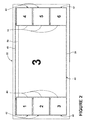
- a first embodiment showing a display of multiple sources of information in a GUI 40 is illustrated.
- the GUI 40 may be implemented over an entirety of the flight display 22 or a portion of the flight display 22.
- Multiple sources of information may be separately displayed within multiple GUI components 42 within the GUI 40 on the flight display 22.
- the GUI 40 has been illustrated as covering an entirety of the flight display 22 although this need not be the case.
- the multiple sources of information have been labeled 1, 2, 3, 4, 5, and 6 for ease of reference and clarity. It will be understood that such multiple sources of information may be any suitable sources of information and that what source of information is displayed on each of the multiple GUI components 42 at any one time may be changed and controlled by the controller 30.
- each of the multiple GUI components 42 may be continuously updated by the controller 30 and the respective source of information and each of the multiple GUI components 42 may include user inputs, which may be interacted with by a user. In this manner a user may interact with various systems, sources of information, etc. on the flight display 22.
- All of the multiple GUI components 42 may be displayed within the GUI 40 on the flight display 22.
- the GUI 40 has multiple GUI components 42 showing six sources of information. This is merely for illustrative purposes and it will be understood that the GUI 40 may have any suitable number of multiple GUI components 42 showing any number of sources of information.
- the controller 30 may be capable of receiving input from a user regarding what number of multiple GUI components 42 to display. Initially upon display, the multiple GUI components 42 may be displayed in a default size and arrangement.
- the multiple GUI components 42 may be thought of as including multiple viewing components 44 and one or more focus GUI components 50. For example, the multiple viewing components 44 of the multiple GUI components 42 have been displayed on the leftmost and rightmost perimeter of the flight display 22 and are of a smaller size.
- a focus GUI component 50 is also displayed; the focus GUI component 50 is a duplicate of one of the other multiple GUI components 42 and is displayed within the GUI 40 at a larger size than any of the other displayed multiple GUI components 42.
- the term duplicate is used here to mean that the focus GUI component 50 includes the same source of information, thus two of the multiple GUI components 42 including the focus GUI component 50 are labeled with the third source of information. A user would be able to equally interact with either the focus GUI component 50 and/or the corresponding one of the multiple viewing components 44 having the same source of information.
- the focus GUI component 50 would display the same video signal as the corresponding GUI component 42. While it is contemplated that the same source information will be displayed in the same manner for both the GUI component 42 and the focus GUI component 50, it is within the scope of the invention for the same source information to be displayed differently.
- the video signal displayed in the focus GUI component 50 may be cropped differently than the video signal in the corresponding GUI component 42.
- the focus GUI component 50 may be considered to be the one of the multiple GUI components 42 a user is likely to focus on it will be understood that the focus GUI component 50 does not completely obscure any of the other displayed multiple GUI components 42 and any of the displayed multiple GUI components 42 as well as the focus GUI component 50 may be used at any time. In the illustrated example, the focus GUI component 50 does not obscure any of the other displayed multiple GUI components 42; although this need not be the case and the focus GUI component 50 may at least partially obscure one or more of the other displayed multiple GUI components 42.
- the other displayed multiple GUI components 42 and the focus GUI component 50 are arranged in a tile configuration.
- tile configuration aids the user's ability to interact with any of the displayed multiple GUI components 42 as well as the focus GUI component 50.
- the focus GUI component 50 is displayed in a larger size tile than the other displayed multiple GUI components 42 for ease of use by the user.
- the multiple viewing components 44 have been illustrated as being the same size tiles although this need not be the case.
- the focus GUI component 50 may be located at a predetermined location in the GUI 40.
- the focus GUI component 50 may be centered within the GUI 40. This may also include the focus GUI component 50 being located at a focus position within the GUI 40. If the flight display 22 is offset from a location of the user, such as being to the right of the user, such a focus position may be at the left side of the GUI 40.
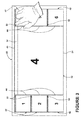
- FIG. 3 is a schematic view of an illustration of a selection of another one of the multiple GUI components 42 within the GUI 40 according to a second embodiment of the invention.
- each of the GUI components includes a selector 52, which when selected by a user automatically makes that GUI component 42 the focus GUI component 50.
- the selector 52 may include any suitable indicia to define or indicate the purpose of the selector 52.
- the selector 52 may correlate with a portion of the multiple GUI components 42 and no indicia may be included.
- a user may select a specific spot of one of the multiple GUI components 42, such as the upper right corner of one of the multiple GUI components 42 to select it to be displayed as the focus GUI component 50.
- selection of one of the multiple viewing components 44 to be displayed as the focus GUI component 50 may be achieved using one of the cursor control devices 26 and /or one of the multifunction keyboards 28.
- the selector 52 may be included in the touchscreen surface 24 and that selection of one of the multiple GUI components 42 to be displayed as the focus GUI component 50 may be achieved through interaction with the touchscreen as illustrated in Figure 3 . More specifically, it has been illustrated that the user has selected the fourth source of information to be displayed on the focus GUI component 50.
- a selector may not be included in the GUI 40 and a button on one of the multifunction keyboards 28 may allow a user to select one of the multiple GUI components 42 to be displayed as the focus GUI component 50.
- voice commands may be received by the controller 30 regarding which one of the multiple GUI components 42 the user desires to be displayed as the focus GUI component 50.
- the focus GUI component 50 may be selected based on events occurring in the multiple GUI components 42. In this manner, the controller 30 may automatically display as the focus GUI component 50 one of the multiple GUI components 42 when a specific event occurs. In this manner, the controller 30 may notify the user of the event by automatically enlarging one of the multiple GUI components 42 to be displayed as the focus GUI component 50 based on previously specified criteria.
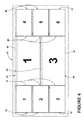
- Figure 4 is a schematic view of an illustration of a display of GUI components within the GUI 40 according to a third embodiment of the invention. More specifically, the display of the multiple GUI components 42 includes the display of multiple focus GUI components 50. In the illustrated example, the focus GUI components 50 are duplicates of the first and third sources of information also displayed in two of the multiple viewing components 44. Although each of the multiple focus GUI components 50 are the same size and centered within the GUI 40 this need not be the case. The focus GUI components 50 may be sized and arranged in any suitable manner.
- At least one of the multiple GUI components 42 may be resized. This may include that the multiple viewing components 44 and/or the focus GUI component 50 may be resized. Based on the resizing of the GUI components the display of any number of the other GUI components may be adjusted.
- the focus GUI component 50 is resized through use of a mouse 60 controlled by one of the cursor control devices 26. It is contemplated that the focus GUI component 50 may be resized in any suitable manner including by use of one of the multifunction keyboards 28 or the touch screen surface 24.
- the focus GUI component 50 has been illustrated as being resized by the user over at least one of the multiple viewing components 44.
- the multiple viewing components 44 may be resized so that all of the multiple viewing components 44 remain visible.
- the multiple viewing components 44 have been rearranged and resized so that they remain visible and completely un-obscured at the bottom edge of the GUI 40.
- the above described embodiments provide a variety of benefits including that the flight display may be more efficiently used.
- a beneficial effect of the embodiments of the invention is that the user may have multi-data awareness through a variety of GUI components and may multitask using all of the displayed GUI components. Unlike prior displays that utilize dialog boxes, tabbed windows, and buttons to advance the GUI with attached breadcrumbs, etc. the above described embodiments allows for all of the multiple GUI components to be continuously updated regardless of size or location. Furthermore, the user can always interact with any GUI component regardless or its size or location.
Landscapes
- Engineering & Computer Science (AREA)
- Theoretical Computer Science (AREA)
- General Engineering & Computer Science (AREA)
- Physics & Mathematics (AREA)
- General Physics & Mathematics (AREA)
- Human Computer Interaction (AREA)
- Computer Hardware Design (AREA)
- User Interface Of Digital Computer (AREA)
Applications Claiming Priority (1)
| Application Number | Priority Date | Filing Date | Title |
|---|---|---|---|
| US13/585,984 US20140053101A1 (en) | 2012-08-15 | 2012-08-15 | Methods for displaying on a graphical user interface |
Publications (2)
| Publication Number | Publication Date |
|---|---|
| EP2698705A2 true EP2698705A2 (de) | 2014-02-19 |
| EP2698705A3 EP2698705A3 (de) | 2015-04-15 |
Family
ID=48986007
Family Applications (1)
| Application Number | Title | Priority Date | Filing Date |
|---|---|---|---|
| EP13180359.5A Withdrawn EP2698705A3 (de) | 2012-08-15 | 2013-08-14 | Verfahren zur Anzeige auf einer graphischen Benutzerschnittstelle |
Country Status (6)
| Country | Link |
|---|---|
| US (1) | US20140053101A1 (de) |
| EP (1) | EP2698705A3 (de) |
| JP (1) | JP2014038619A (de) |
| CN (1) | CN103593109A (de) |
| BR (1) | BR102013020697A2 (de) |
| CA (1) | CA2822940A1 (de) |
Families Citing this family (80)
| Publication number | Priority date | Publication date | Assignee | Title |
|---|---|---|---|---|
| US9318108B2 (en) | 2010-01-18 | 2016-04-19 | Apple Inc. | Intelligent automated assistant |
| US8977255B2 (en) | 2007-04-03 | 2015-03-10 | Apple Inc. | Method and system for operating a multi-function portable electronic device using voice-activation |
| US8676904B2 (en) | 2008-10-02 | 2014-03-18 | Apple Inc. | Electronic devices with voice command and contextual data processing capabilities |
| US10255566B2 (en) | 2011-06-03 | 2019-04-09 | Apple Inc. | Generating and processing task items that represent tasks to perform |
| US10276170B2 (en) | 2010-01-18 | 2019-04-30 | Apple Inc. | Intelligent automated assistant |
| US10057736B2 (en) | 2011-06-03 | 2018-08-21 | Apple Inc. | Active transport based notifications |
| US10417037B2 (en) | 2012-05-15 | 2019-09-17 | Apple Inc. | Systems and methods for integrating third party services with a digital assistant |
| CN113470641B (zh) | 2013-02-07 | 2023-12-15 | 苹果公司 | 数字助理的语音触发器 |
| US10652394B2 (en) | 2013-03-14 | 2020-05-12 | Apple Inc. | System and method for processing voicemail |
| US10748529B1 (en) | 2013-03-15 | 2020-08-18 | Apple Inc. | Voice activated device for use with a voice-based digital assistant |
| US10176167B2 (en) | 2013-06-09 | 2019-01-08 | Apple Inc. | System and method for inferring user intent from speech inputs |
| KR101922663B1 (ko) | 2013-06-09 | 2018-11-28 | 애플 인크. | 디지털 어시스턴트의 둘 이상의 인스턴스들에 걸친 대화 지속성을 가능하게 하기 위한 디바이스, 방법 및 그래픽 사용자 인터페이스 |
| US10791216B2 (en) | 2013-08-06 | 2020-09-29 | Apple Inc. | Auto-activating smart responses based on activities from remote devices |
| USD766287S1 (en) * | 2013-12-05 | 2016-09-13 | Lg Electronics Inc. | Display of a television receiver with graphical user interface |
| USD754680S1 (en) * | 2013-12-05 | 2016-04-26 | Lg Electronics Inc. | Display of a television receiver with graphical user interface |
| USD771087S1 (en) * | 2013-12-05 | 2016-11-08 | Lg Electronics Inc. | Display of a television receiver with graphical user interface |
| USD766288S1 (en) * | 2013-12-05 | 2016-09-13 | Lg Electronics Inc. | Display of a television receiver with graphical user interface |
| USD766286S1 (en) * | 2013-12-05 | 2016-09-13 | Lg Electronics Inc. | Display of a television receiver with graphical user interface |
| USD755202S1 (en) * | 2013-12-30 | 2016-05-03 | Samsung Electronics Co., Ltd. | Display screen or portion thereof with graphical user interface |
| USD754678S1 (en) * | 2013-12-30 | 2016-04-26 | Samsung Electronics Co., Ltd. | Display screen or portion thereof with graphical user interface |
| US9428056B2 (en) | 2014-03-11 | 2016-08-30 | Textron Innovations, Inc. | Adjustable synthetic vision |
| US10347140B2 (en) | 2014-03-11 | 2019-07-09 | Textron Innovations Inc. | Flight planning and communication |
| WO2015138318A1 (en) | 2014-03-11 | 2015-09-17 | Cessna Aircraft Company | Standby instrument panel for aircraft |
| US10042456B2 (en) * | 2014-03-11 | 2018-08-07 | Textron Innovations Inc. | User interface for an aircraft |
| TWI566107B (zh) | 2014-05-30 | 2017-01-11 | 蘋果公司 | 用於處理多部分語音命令之方法、非暫時性電腦可讀儲存媒體及電子裝置 |
| US9715875B2 (en) | 2014-05-30 | 2017-07-25 | Apple Inc. | Reducing the need for manual start/end-pointing and trigger phrases |
| US10170123B2 (en) | 2014-05-30 | 2019-01-01 | Apple Inc. | Intelligent assistant for home automation |
| US9338493B2 (en) | 2014-06-30 | 2016-05-10 | Apple Inc. | Intelligent automated assistant for TV user interactions |
| US9886953B2 (en) | 2015-03-08 | 2018-02-06 | Apple Inc. | Virtual assistant activation |
| US10460227B2 (en) | 2015-05-15 | 2019-10-29 | Apple Inc. | Virtual assistant in a communication session |
| US10083688B2 (en) * | 2015-05-27 | 2018-09-25 | Apple Inc. | Device voice control for selecting a displayed affordance |
| US10200824B2 (en) | 2015-05-27 | 2019-02-05 | Apple Inc. | Systems and methods for proactively identifying and surfacing relevant content on a touch-sensitive device |
| US20160378747A1 (en) | 2015-06-29 | 2016-12-29 | Apple Inc. | Virtual assistant for media playback |
| US10671428B2 (en) | 2015-09-08 | 2020-06-02 | Apple Inc. | Distributed personal assistant |
| US10331312B2 (en) | 2015-09-08 | 2019-06-25 | Apple Inc. | Intelligent automated assistant in a media environment |
| US10740384B2 (en) | 2015-09-08 | 2020-08-11 | Apple Inc. | Intelligent automated assistant for media search and playback |
| US10747498B2 (en) | 2015-09-08 | 2020-08-18 | Apple Inc. | Zero latency digital assistant |
| US10162514B2 (en) * | 2015-09-15 | 2018-12-25 | Rockwell Collins, Inc. | Large display format touch gesture interface |
| US11587559B2 (en) | 2015-09-30 | 2023-02-21 | Apple Inc. | Intelligent device identification |
| US10691473B2 (en) | 2015-11-06 | 2020-06-23 | Apple Inc. | Intelligent automated assistant in a messaging environment |
| US10956666B2 (en) | 2015-11-09 | 2021-03-23 | Apple Inc. | Unconventional virtual assistant interactions |
| US10223066B2 (en) | 2015-12-23 | 2019-03-05 | Apple Inc. | Proactive assistance based on dialog communication between devices |
| US12223282B2 (en) | 2016-06-09 | 2025-02-11 | Apple Inc. | Intelligent automated assistant in a home environment |
| US10586535B2 (en) | 2016-06-10 | 2020-03-10 | Apple Inc. | Intelligent digital assistant in a multi-tasking environment |
| DK201670540A1 (en) | 2016-06-11 | 2018-01-08 | Apple Inc | Application integration with a digital assistant |
| DK179415B1 (en) | 2016-06-11 | 2018-06-14 | Apple Inc | Intelligent device arbitration and control |
| US12197817B2 (en) | 2016-06-11 | 2025-01-14 | Apple Inc. | Intelligent device arbitration and control |
| US11204787B2 (en) | 2017-01-09 | 2021-12-21 | Apple Inc. | Application integration with a digital assistant |
| DK180048B1 (en) | 2017-05-11 | 2020-02-04 | Apple Inc. | MAINTAINING THE DATA PROTECTION OF PERSONAL INFORMATION |
| US10726832B2 (en) | 2017-05-11 | 2020-07-28 | Apple Inc. | Maintaining privacy of personal information |
| DK201770429A1 (en) | 2017-05-12 | 2018-12-14 | Apple Inc. | LOW-LATENCY INTELLIGENT AUTOMATED ASSISTANT |
| DK179496B1 (en) | 2017-05-12 | 2019-01-15 | Apple Inc. | USER-SPECIFIC Acoustic Models |
| DK179745B1 (en) | 2017-05-12 | 2019-05-01 | Apple Inc. | SYNCHRONIZATION AND TASK DELEGATION OF A DIGITAL ASSISTANT |
| DK201770411A1 (en) | 2017-05-15 | 2018-12-20 | Apple Inc. | Multi-modal interfaces |
| US20180336892A1 (en) | 2017-05-16 | 2018-11-22 | Apple Inc. | Detecting a trigger of a digital assistant |
| US20180336275A1 (en) | 2017-05-16 | 2018-11-22 | Apple Inc. | Intelligent automated assistant for media exploration |
| DK179549B1 (en) | 2017-05-16 | 2019-02-12 | Apple Inc. | FAR-FIELD EXTENSION FOR DIGITAL ASSISTANT SERVICES |
| US10818288B2 (en) | 2018-03-26 | 2020-10-27 | Apple Inc. | Natural assistant interaction |
| US10928918B2 (en) | 2018-05-07 | 2021-02-23 | Apple Inc. | Raise to speak |
| US11145294B2 (en) | 2018-05-07 | 2021-10-12 | Apple Inc. | Intelligent automated assistant for delivering content from user experiences |
| DK180639B1 (en) | 2018-06-01 | 2021-11-04 | Apple Inc | DISABILITY OF ATTENTION-ATTENTIVE VIRTUAL ASSISTANT |
| DK179822B1 (da) | 2018-06-01 | 2019-07-12 | Apple Inc. | Voice interaction at a primary device to access call functionality of a companion device |
| DK201870355A1 (en) | 2018-06-01 | 2019-12-16 | Apple Inc. | VIRTUAL ASSISTANT OPERATION IN MULTI-DEVICE ENVIRONMENTS |
| US10892996B2 (en) | 2018-06-01 | 2021-01-12 | Apple Inc. | Variable latency device coordination |
| US11462215B2 (en) | 2018-09-28 | 2022-10-04 | Apple Inc. | Multi-modal inputs for voice commands |
| USD885419S1 (en) * | 2018-10-04 | 2020-05-26 | Intuitive Surgical Operations, Inc. | Combined display screens or portions thereof with graphical user interface |
| US11348573B2 (en) | 2019-03-18 | 2022-05-31 | Apple Inc. | Multimodality in digital assistant systems |
| DK201970509A1 (en) | 2019-05-06 | 2021-01-15 | Apple Inc | Spoken notifications |
| US11307752B2 (en) | 2019-05-06 | 2022-04-19 | Apple Inc. | User configurable task triggers |
| US11140099B2 (en) | 2019-05-21 | 2021-10-05 | Apple Inc. | Providing message response suggestions |
| DK201970511A1 (en) | 2019-05-31 | 2021-02-15 | Apple Inc | Voice identification in digital assistant systems |
| DK180129B1 (en) | 2019-05-31 | 2020-06-02 | Apple Inc. | User activity shortcut suggestions |
| US11227599B2 (en) | 2019-06-01 | 2022-01-18 | Apple Inc. | Methods and user interfaces for voice-based control of electronic devices |
| US11459105B2 (en) * | 2020-03-04 | 2022-10-04 | Rockwell Collins, Inc. | Reconfigurable avionics systems heatmap |
| US11061543B1 (en) | 2020-05-11 | 2021-07-13 | Apple Inc. | Providing relevant data items based on context |
| US12301635B2 (en) | 2020-05-11 | 2025-05-13 | Apple Inc. | Digital assistant hardware abstraction |
| US11183193B1 (en) | 2020-05-11 | 2021-11-23 | Apple Inc. | Digital assistant hardware abstraction |
| US12045437B2 (en) | 2020-05-22 | 2024-07-23 | Apple Inc. | Digital assistant user interfaces and response modes |
| US11490204B2 (en) | 2020-07-20 | 2022-11-01 | Apple Inc. | Multi-device audio adjustment coordination |
| US11438683B2 (en) | 2020-07-21 | 2022-09-06 | Apple Inc. | User identification using headphones |
Family Cites Families (4)
| Publication number | Priority date | Publication date | Assignee | Title |
|---|---|---|---|---|
| US7987431B2 (en) * | 1999-10-29 | 2011-07-26 | Surfcast, Inc. | System and method for simultaneous display of multiple information sources |
| US8395664B2 (en) * | 2006-09-13 | 2013-03-12 | Smartvue Corp. | Wireless surveillance system and method for 3-D visualization and user-controlled analytics of captured data |
| US7933632B2 (en) * | 2005-09-16 | 2011-04-26 | Microsoft Corporation | Tile space user interface for mobile devices |
| US8881012B2 (en) * | 2009-11-17 | 2014-11-04 | LHS Productions, Inc. | Video storage and retrieval system and method |
-
2012
- 2012-08-15 US US13/585,984 patent/US20140053101A1/en not_active Abandoned
-
2013
- 2013-08-01 CA CA2822940A patent/CA2822940A1/en not_active Abandoned
- 2013-08-12 JP JP2013167219A patent/JP2014038619A/ja active Pending
- 2013-08-14 EP EP13180359.5A patent/EP2698705A3/de not_active Withdrawn
- 2013-08-14 BR BR102013020697A patent/BR102013020697A2/pt not_active IP Right Cessation
- 2013-08-15 CN CN201310356105.6A patent/CN103593109A/zh active Pending
Non-Patent Citations (1)
| Title |
|---|
| None |
Also Published As
| Publication number | Publication date |
|---|---|
| JP2014038619A (ja) | 2014-02-27 |
| US20140053101A1 (en) | 2014-02-20 |
| CA2822940A1 (en) | 2014-02-15 |
| CN103593109A (zh) | 2014-02-19 |
| BR102013020697A2 (pt) | 2016-03-15 |
| EP2698705A3 (de) | 2015-04-15 |
Similar Documents
| Publication | Publication Date | Title |
|---|---|---|
| US20140053101A1 (en) | Methods for displaying on a graphical user interface | |
| US9007327B1 (en) | Touch interfaces and controls for aviation displays | |
| US9921714B1 (en) | Graphical method to select formats | |
| US9201567B2 (en) | Method for indicating a cursor location on a flight deck having multiple flight displays | |
| US9377852B1 (en) | Eye tracking as a method to improve the user interface | |
| CN106527676B (zh) | 航空电子显示系统 | |
| US7212890B2 (en) | Aircraft dialog device for dialog with system of aircraft | |
| US9128594B1 (en) | Touch interfaces and controls for aviation displays | |
| CN106233238B (zh) | 用于飞机显示装置的光标控制 | |
| EP2431713B1 (de) | Anzeigesystem und Verfahren mit reizempfindlicher Multifunktionsanzeige mit konsolidierten Steuerungsfunktionen | |
| US20100262318A1 (en) | Electronic flight bag user interface system | |
| WO2002025212A2 (en) | Methods and apparatus for displaying information | |
| JP2014094746A (ja) | 航空機のハプティックタッチスクリーンおよびその操作方法 | |
| EP1965174B1 (de) | Stimulus-empfindlicher Anzeigebildschirm mit konsolidierten Steuerfunktionen | |
| CA2866486C (en) | Method and system for displaying information | |
| US9411485B2 (en) | Method for displaying the geographical situation of an aircraft | |
| US10175921B2 (en) | Method and system for interaction between displays in a cockpit of an aircraft | |
| EP3667482B1 (de) | Systeme und verfahren zur verwaltung von konfigurationen mehrerer anzeigen eines fahrzeugs | |
| EP3292549A1 (de) | Elektronisches system und verfahren zur planung und durchführung einer mit einem fahrzeug durchzuführenden mission |
Legal Events
| Date | Code | Title | Description |
|---|---|---|---|
| AK | Designated contracting states |
Kind code of ref document: A2 Designated state(s): AL AT BE BG CH CY CZ DE DK EE ES FI FR GB GR HR HU IE IS IT LI LT LU LV MC MK MT NL NO PL PT RO RS SE SI SK SM TR |
|
| AX | Request for extension of the european patent |
Extension state: BA ME |
|
| PUAI | Public reference made under article 153(3) epc to a published international application that has entered the european phase |
Free format text: ORIGINAL CODE: 0009012 |
|
| PUAL | Search report despatched |
Free format text: ORIGINAL CODE: 0009013 |
|
| AK | Designated contracting states |
Kind code of ref document: A3 Designated state(s): AL AT BE BG CH CY CZ DE DK EE ES FI FR GB GR HR HU IE IS IT LI LT LU LV MC MK MT NL NO PL PT RO RS SE SI SK SM TR |
|
| AX | Request for extension of the european patent |
Extension state: BA ME |
|
| RIC1 | Information provided on ipc code assigned before grant |
Ipc: G06F 3/147 20060101AFI20150311BHEP |
|
| STAA | Information on the status of an ep patent application or granted ep patent |
Free format text: STATUS: THE APPLICATION IS DEEMED TO BE WITHDRAWN |
|
| 18D | Application deemed to be withdrawn |
Effective date: 20151016 |