EP2592545B1 - Systeme und Verfahren zur Skalierung von Visualisierungen - Google Patents
Systeme und Verfahren zur Skalierung von Visualisierungen Download PDFInfo
- Publication number
- EP2592545B1 EP2592545B1 EP12192240.5A EP12192240A EP2592545B1 EP 2592545 B1 EP2592545 B1 EP 2592545B1 EP 12192240 A EP12192240 A EP 12192240A EP 2592545 B1 EP2592545 B1 EP 2592545B1
- Authority
- EP
- European Patent Office
- Prior art keywords
- scaled
- display device
- text
- controller
- secondary display
- Prior art date
- Legal status (The legal status is an assumption and is not a legal conclusion. Google has not performed a legal analysis and makes no representation as to the accuracy of the status listed.)
- Active
Links
Images

Classifications
-
- G—PHYSICS
- G06—COMPUTING OR CALCULATING; COUNTING
- G06F—ELECTRIC DIGITAL DATA PROCESSING
- G06F3/00—Input arrangements for transferring data to be processed into a form capable of being handled by the computer; Output arrangements for transferring data from processing unit to output unit, e.g. interface arrangements
- G06F3/01—Input arrangements or combined input and output arrangements for interaction between user and computer
- G06F3/048—Interaction techniques based on graphical user interfaces [GUI]
- G06F3/0484—Interaction techniques based on graphical user interfaces [GUI] for the control of specific functions or operations, e.g. selecting or manipulating an object, an image or a displayed text element, setting a parameter value or selecting a range
-
- G—PHYSICS
- G06—COMPUTING OR CALCULATING; COUNTING
- G06F—ELECTRIC DIGITAL DATA PROCESSING
- G06F3/00—Input arrangements for transferring data to be processed into a form capable of being handled by the computer; Output arrangements for transferring data from processing unit to output unit, e.g. interface arrangements
- G06F3/14—Digital output to display device ; Cooperation and interconnection of the display device with other functional units
- G06F3/1423—Digital output to display device ; Cooperation and interconnection of the display device with other functional units controlling a plurality of local displays, e.g. CRT and flat panel display
-
- G—PHYSICS
- G06—COMPUTING OR CALCULATING; COUNTING
- G06T—IMAGE DATA PROCESSING OR GENERATION, IN GENERAL
- G06T3/00—Geometric image transformations in the plane of the image
- G06T3/40—Scaling of whole images or parts thereof, e.g. expanding or contracting
-
- G—PHYSICS
- G09—EDUCATION; CRYPTOGRAPHY; DISPLAY; ADVERTISING; SEALS
- G09G—ARRANGEMENTS OR CIRCUITS FOR CONTROL OF INDICATING DEVICES USING STATIC MEANS TO PRESENT VARIABLE INFORMATION
- G09G5/00—Control arrangements or circuits for visual indicators common to cathode-ray tube indicators and other visual indicators
- G09G5/22—Control arrangements or circuits for visual indicators common to cathode-ray tube indicators and other visual indicators characterised by the display of characters or indicia using display control signals derived from coded signals representing the characters or indicia, e.g. with a character-code memory
- G09G5/24—Generation of individual character patterns
- G09G5/26—Generation of individual character patterns for modifying the character dimensions, e.g. double width, double height
-
- G—PHYSICS
- G09—EDUCATION; CRYPTOGRAPHY; DISPLAY; ADVERTISING; SEALS
- G09G—ARRANGEMENTS OR CIRCUITS FOR CONTROL OF INDICATING DEVICES USING STATIC MEANS TO PRESENT VARIABLE INFORMATION
- G09G2320/00—Control of display operating conditions
- G09G2320/08—Arrangements within a display terminal for setting, manually or automatically, display parameters of the display terminal
-
- G—PHYSICS
- G09—EDUCATION; CRYPTOGRAPHY; DISPLAY; ADVERTISING; SEALS
- G09G—ARRANGEMENTS OR CIRCUITS FOR CONTROL OF INDICATING DEVICES USING STATIC MEANS TO PRESENT VARIABLE INFORMATION
- G09G2340/00—Aspects of display data processing
- G09G2340/04—Changes in size, position or resolution of an image
- G09G2340/0407—Resolution change, inclusive of the use of different resolutions for different screen areas
-
- G—PHYSICS
- G09—EDUCATION; CRYPTOGRAPHY; DISPLAY; ADVERTISING; SEALS
- G09G—ARRANGEMENTS OR CIRCUITS FOR CONTROL OF INDICATING DEVICES USING STATIC MEANS TO PRESENT VARIABLE INFORMATION
- G09G2340/00—Aspects of display data processing
- G09G2340/14—Solving problems related to the presentation of information to be displayed
-
- G—PHYSICS
- G09—EDUCATION; CRYPTOGRAPHY; DISPLAY; ADVERTISING; SEALS
- G09G—ARRANGEMENTS OR CIRCUITS FOR CONTROL OF INDICATING DEVICES USING STATIC MEANS TO PRESENT VARIABLE INFORMATION
- G09G2354/00—Aspects of interface with display user
-
- G—PHYSICS
- G09—EDUCATION; CRYPTOGRAPHY; DISPLAY; ADVERTISING; SEALS
- G09G—ARRANGEMENTS OR CIRCUITS FOR CONTROL OF INDICATING DEVICES USING STATIC MEANS TO PRESENT VARIABLE INFORMATION
- G09G2360/00—Aspects of the architecture of display systems
- G09G2360/04—Display device controller operating with a plurality of display units
-
- G—PHYSICS
- G09—EDUCATION; CRYPTOGRAPHY; DISPLAY; ADVERTISING; SEALS
- G09G—ARRANGEMENTS OR CIRCUITS FOR CONTROL OF INDICATING DEVICES USING STATIC MEANS TO PRESENT VARIABLE INFORMATION
- G09G2370/00—Aspects of data communication
- G09G2370/04—Exchange of auxiliary data, i.e. other than image data, between monitor and graphics controller
-
- G—PHYSICS
- G09—EDUCATION; CRYPTOGRAPHY; DISPLAY; ADVERTISING; SEALS
- G09G—ARRANGEMENTS OR CIRCUITS FOR CONTROL OF INDICATING DEVICES USING STATIC MEANS TO PRESENT VARIABLE INFORMATION
- G09G2370/00—Aspects of data communication
- G09G2370/22—Detection of presence or absence of input display information or of connection or disconnection of a corresponding information source
Definitions
- Embodiments of the present disclosure relate generally to the field of industrial automation systems. More particularly, embodiments of the present disclosure relate to methods for creating and scaling visualizations depicted on a human machine interface (HMI) screen to smaller and larger display screens used in the field of industrial automation systems.
- HMI human machine interface
- Automation control and monitoring systems are managed and operated using automation control and monitoring systems.
- a wide range of applications exist for automation control and monitoring systems, particularly in industrial automation settings.
- Such applications may include the powering of a wide range of actuators, such as valves, electric motors, and so forth, and the collection of data via sensors.
- Typical automation control and monitoring systems may include one or more components, such as: automation controllers, input/output (I/O) modules, human-machine interface (HMI) terminals, and/or programming terminals (e.g., HMI configuration software).
- I/O input/output
- HMI human-machine interface
- programming terminals e.g., HMI configuration software
- HMIs human machine interfaces
- HMIs may be employed in numerous different settings, such as in automobiles, aircraft, commercial settings, and a host of other applications.
- the HMIs may read from or write to specific registers such that they can reflect the operating state of various machines, sensors, processes, and so forth. As such, the HMIs may display valuable information on HMI screens such that operators can sufficiently manage the industrial automation system.
- FR 2 892 538 relates to an imaging device like a liquid crystal display screen.
- a testing and developing method for e.g. television is provided. The method involves using a reception unit for transforming a received BUS data for creating a representation identical to parallel raw data provided by a computer.
- a filter unit is provided for filtering the parallel raw data.
- a unit is provided for detecting the position of video data in the parallel raw data.
- the parallel data is transmitted towards the filtering unit which selects only the video data.
- the video data is transmitted towards an imaging device.
- Koroush Ghazi "ATI Catalyst Tweak Guide, page 5", and "ATI Catalyst Tweak Guide, page 6" tweak guides, 30 June 2009 , relate to the Windows Graphic Control Panel and the Control Center of Catalyst, through which display properties can be set.
- DualHead technology is provided for getting an image on two receivers (for instance, two monitors).
- An option called “DualHead Clone” allows copying the desktop of the first monitor on the second one
- another option called “DualHead Zoom” allows displaying an enlarged part of the desktop on the second monitor.
- the present disclosure is generally directed towards scaling visualizations depicted on a human-machine interface (HMI) screen to smaller or larger display screens that may be used to manage various types of equipment, components, and processes in industrial automation systems.
- the HMI may provide an operator options in which visualizations depicted on the HMI screen may be scaled onto another display screen. For instance, upon receiving an indication that the HMI has been coupled to another display screen, the HMI may automatically present the operator an option to stretch, fit, or pixel-match the visualizations depicted on the HMI screen onto the display screen coupled to the HMI. As such, the HMI may present the operator visualization options while operating in a run-time environment.
- the visualization options may be presented while the HMI is executing various applications that may be used to manage the industrial automation system.
- the HMI may perform a read-only type scaling such that the original visualizations may be scaled and displayed on the display screen with a new terminal size.
- the HMI when scaling visualizations depicted on the HMI screen, the HMI may scale text depicted within text objects differently as compared to other graphical objects. That is, the HMI may use two different scaling algorithms to scale text object visualizations and other object visualizations (e.g., images, icons, background). More specifically, the HMI may scale text within text objects using an algorithm that enables the text depicted within the scaled text objects without clipping or deleting portions of the text. As a result, the scaled test may be more easily readable when rendered on the coupled display screen and minimally skewed. Additional details regarding scaling visualizations from the HMI screen to another display screen will be described below with reference to FIGS. 1-16 .
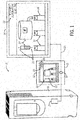
- FIG. 1 is a representative diagram 10 of visualizations depicted on a human machine interface (HMI) screen 12 of an HMI 13 being scaled and depicted on a secondary display device 14.
- Visualizations may include objects that depict images, text, animation, and the like when rendered on the HMI screen 12.
- the HMI screen 12 may be mounted in a panel (e.g., HMI 13) separate from the industrial automation device 16.
- the HMI screen 12 may be disposed within an industrial automation device 16 such as an industrial automation drive, motor starter, contactor, switchgear, energy meter, robot, and the like.
- the HMI screen 12 may be used as an operator interface to control and/or various properties associated with monitor the respective industrial automation device 16 or various other components in an industrial automation system.
- visualizations depicted on the HMI screen 12 may be generated or provided by a controller 18, which may receive information with regard to the industrial automation device 16 or various other components in an industrial automation system and display various visualizations on the HMI screen 12 that may represent the received information.
- the visualizations depicted on the HMI screen 12 may enable an operator to better understand how the industrial automation system is operating and efficiently manage the operations related to the industrial automation system.
- the visualizations depicted on the HMI screen 12 may be provided by a controller 18.
- the controller 18 may perform various processes and analyze different types of data and depict visualizations that correspond to those processes and analysis on the HMI screen 12.
- the controller 18 may include a communication component, a processor, a memory, a storage, and the like.
- the communication component may be a wireless or wired communication component that may facilitate communication between the controller 18 and other controllers disposed on other devices in the industrial automation system.
- the processor may be any type of computer processor or microprocessor capable of executing computer-executable code.
- the memory and the storage may be any suitable articles of manufacture that can serve as media to store processor-executable code.
- controller 18 may represent computer-readable media (i.e., any suitable form of memory or storage) that may store the processor-executable code used by the processor to perform the presently disclosed techniques.
- controller 18 is illustrated as being disposed on the HMI 13, it should be noted that the controller 18 may be a stand-alone controller, disposed within the industrial automation device 16; or disposed in any other device.
- the controller 18 may communicate with other controllers disposed on other industrial automation devices. For instance, the controller 18 may communicate with a controller 19 that may be communicatively coupled to the industrial automation device 16.
- the controller 19 may be a similar device as the controller 18 and may control various operations of the industrial automation device 16.
- the controller 18 may communicate with the controller 19 to control the industrial automation device 16 based on inputs received from the HMI screen 12 or the HMI 13.
- the operator of the HMI screen 12 may wish to replace the HMI screen 12 with another display device. For instance, if the HMI screen 12 cracks or is no longer operational, the operator may replace the HMI screen 12 with another display device to maintain control of the industrial automation device 16 or the industrial automation system. Moreover, as display technology improves, the operator may be inclined to replace the existing display device for the HMI screen 12 or present the visualizations of the HMI screen 12 on a higher quality display device (e.g., the secondary display device 14). As such, the operator may couple the HMI 13 or the controller 18 to the secondary display device 14 such that the HMI screen 12 may be used simultaneously with the secondary display device 14 or such that the secondary display device 14 may be used in lieu of the HMI screen 12.
- the HMI 13 or the controller 18 may couple the secondary display device 14 such that the HMI screen 12 may be used simultaneously with the secondary display device 14 or such that the secondary display device 14 may be used in lieu of the HMI screen 12.
- the secondary display device 14 may be coupled to the controller 17 or the HMI 13 using some cable connector 20 such as a High-Definition Multimedia Interface (HDMI) cable or the like.
- the cable connector 20 may be any kind of cable that may enable the visualizations depicted on the HMI screen 12 to be depicted on the secondary display device 14.
- the secondary display device 14 may include any type of display such as a liquid crystal display, light-emitting diode display, plasma display, and the like.
- the secondary display 14 may be smaller or larger that the HMI screen 12.
- the controller 18 may render images on a display device by transforming elements in a data model into a view model that may be displayed for the particular application or program being executed by the controller 18. That is, the view model may transform elements or data in the data model such that the visualizations depicted on the HMI screen 12 or the secondary display device 14 have a particular size and position within its respective HMI screen 12 or respective secondary display device 14.
- the view model may define how images are depicted and/or drawn on the display device for the executed application or program.
- the view model may include information related to text objects 22 or image objects 24 ( FIG. 1 ) which may be depicted on the display device.
- the view model may be bound to the data model, which may include data related to various objects being displayed.
- the controller 18 may perform operations using the view model or images being depicted on the display device without interfering with the underlying data model of the objects that correspond to the images being depicted.
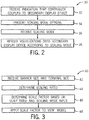
- FIG. 2 provides a flow chart of a method 30 for scaling visualizations between two display devices.
- the controller 18 may perform the processes described below with reference to the method 30.
- the various techniques described below may be provided with reference to the HMI screen 12 described above, it should be noted that all of the techniques described herein are not limited for use by just the HMI screen 12. Instead, the techniques described herein may be applied to any type of display.
- the controller 18 may receive an indication that the controller 18 has been coupled to the secondary display device 14.
- the controller 18 may receive a signal from the secondary display device 14 that may include information identifying the type (e.g., manufacturer, make, model) of the secondary display device 14, a display width of the secondary display device 14, a display height of the secondary display device 14, and the like.
- the controller 18 may present scaling mode options on the HMI screen 12 (i.e., original screen), which may determine how the visualizations depicted on the HMI screen 12 may be scaled or presented on the secondary display device 14.
- the scaling mode options may include a stretch mode, a fit mode, or a pixel-match mode.
- the stretch mode option may stretch or shrink the original visualizations depicted the HMI screen 12 such that the stretched visualizations may fit within the entire display area of the secondary display device 14.
- the fit mode may stretch or shrink the original visualizations depicted in the HMI screen 12 such that the aspect ratio of the original visualizations is maintained in the secondary display device 14. For example, if the HMI screen 12 has an aspect ratio of 4:3 and the secondary display device 14 has an aspect ratio of 16:9, the fit mode may cause the controller 18 to depict the scaled visualizations in a letterbox view such that the aspect ratio of the scaled visualizations are maintained. By maintaining the aspect ratio of the visualizations, the fit mode may prevent images and objects from becoming skewed or distorted, thereby increasing the operator's experience in working with the visualizations.
- the pixel-match mode may not perform any scaling operations to the original visualizations. Instead, the pixel-match mode may specify that the visualizations depicted on the HMI screen 12 be depicted in the exact same manner on the secondary display device 14. That is, the visualizations depicted on the HMI screen 12 and the visualizations depicted on the secondary display device 14 may be scaled by a factor of 1 and thus have the same pixel dimensions. If the secondary display device 14 is larger than the HMI screen 12, the pixel-match mode may enable additional visualizations, which may not be currently displayed on the HMI screen 12, to be depicted on the secondary display device 14. As such, the operator may use the secondary display device 14 to monitor more aspects of the industrial automation system.
- the pixel-match mode may be disabled and the visualizations may instead be scaled using the stretch model. In this way, visualizations depicted on the larger HMI screen 12 may still be depicted on the smaller secondary display device 14.
- the controller 18 may receive an input from the operator that corresponds to one of the scaling mode options described above.
- the controller 18 may provide visualizations on the HMI screen 12 requesting an input to indicate which scaling mode option to use when depicting the visualizations of the HMI screen 12 on the secondary display device 14.
- the controller 18 may receive inputs directly from the HMI screen 12, which may be a touch screen device or the like.
- the controller 18 may scale the visualizations depicted on the HMI screen 12 based on the selected scaling mode and may render the scaled visualizations on the secondary display device 14. In one embodiment, if the controller 18 does not receive any input at block 36, the controller 18 may scale the visualizations based on the fit mode, which may be the default scaling mode. In certain embodiments, certain default scaling may be applied without an input option.
- the controller 18 may perform different scaling operations based on the software environment in which the visualizations are being scaled.
- the controller 18 may include a framework that allows two interrelated software environments (e.g., run-time environment or a design-time environment).
- a run-time environment enables the operator to interact with the application or program currently being executed by the controller 18 during run-time or while the application or program is being executed (e.g., during use of the HMI interface).
- a design-time environment may permit the operator to configure the application or program prior to being executed by the controller 18 and thus prior to the corresponding visualizations being depicted on the HMI screen 12.
- the design-time environment may permit the operator to interactively resize objects by interacting with input devices (e.g., keyboard key and mouse) within the design-time environment.
- input devices e.g., keyboard key and mouse
- the corresponding font sizes may be modified to match the resized text object.
- the controller 18 may simulate the run-time environment in the design-time environment. As such, the controller 18 may be able to depict animations despite differences between the size of the secondary display device 14 and the HMI screen 12.
- the controller 18 may employ a method 40 of FIG. 3 to scale the visualizations of the HMI screen 12 onto the secondary display device 14. That is, if the operator coupled the cable connector 20 from the HMI screen 12 or the controller 18 to the secondary display device 14 without entering the design-time environment, the controller 18 may employ the following process to scale the visualizations of the HMI screen 12 onto the secondary display device 14.
- the controller 18 may receive banner dimensions from the view model that correspond to the application or program being executed and terminal dimensions that correspond to the secondary display device 14.
- the banner dimensions may specify the height and width of the banner displayed on the HMI screen 12.
- the banner includes the top portion 26 of the visualizations depicted in the HMI screen 12.
- the terminal dimensions may correspond to a height and width of a display area of the secondary display device 14.
- the controller 18 may receive terminal type information from the secondary display device 14 when the controller 18 connects to the secondary display device 14.
- the terminal type information may specify a make and model of the secondary display device 14 or may specify the terminal dimensions of the display device 14.
- the controller 18 may determine a scaling ratio for the scaling operation between the HMI screen 12 and the secondary display device 14.
- the scaling ratio may correspond to a ratio between the height and width of the HMI screen 12 and the height and width of the secondary display device 14. That is, the scaling ratio may account for the difference between the height and width of the HMI screen 12 and the height and width of the secondary display device 14.
- the controller 18 may determine a scaling factor to apply to the view model based on the scaling ratio and a scaling mode, which may be selected by the operator as described above.
- the scaling factor may be 1.0 for the pixel-match mode (i.e., no scale option).
- the scaling factor may be the smaller of either the height or width of the scaling ratio for the fit-mode (i.e., fixed aspect ratio).
- the scaling factor may be equal to scaling ratio for the stretch mode.
- the controller 18 may center the visualizations on its respective screen. However, while operating in the design-time environment, the controller 18 may anchor the visualizations to the upper left corner of its respective screen to minimize pixel-based changes for animated visualizations.
- the controller 18 may apply the scaling factor to the visualizations depicted in the HMI screen 12. That is, the controller 18 may apply the scaling factor to the data model that corresponds to the visualizations depicted in the HMI screen 12 and store the results in the view model. For instance, the controller 18 may multiply each coefficient within the data model for each object depicted in the HMI screen 12 by the scaling factor. The controller 18 may then display the scaled data model on the secondary display device 14 using the resulting view model.
- the controller 18 may employ a method 50 of FIG. 4 to scale the visualizations of the HMI screen 12 onto the secondary display device 14. That is, if the operator enters the design-time environment to configure the scaling operation before depicting the visualizations of the HMI screen 12 on to the secondary display device 14, the controller 18 may employ the following process to scale the visualizations of the HMI screen 12 onto the secondary display device 14.
- the controller 18 may receive information indicating the type of the secondary display device 14 will be coupled to the controller 18, the height and width of a display area of the secondary display device 14, or the like from the operator in the design-time environment. In one embodiment, upon receiving information related to the type of the secondary display device 14, the controller 18 may determine the height and width of the secondary display device 14.
- the controller 18 may determine a scale factor that may be used to scale the visualizations depicted on the HMI screen 12 onto the secondary display device 14.
- the scaling factor may generally be based on a difference between a display area of the HMI screen 12 and the display area of the secondary display device 14 and the scaling mode.
- the scaling factor may be calculated differently for each pointer or alias type that corresponds to different types of objects.
- the scaling factor may correspond to the fit mode for line thickness, corner radius, and margin of the visualizations, while the scaling factor may correspond to the stretch mode for a text object while the font size in the stretched text object may be displayed based on a font scaling algorithm, which may be described in greater detail below with reference to FIGS. 5-18 below.
- the scaling factor may be determined as described above with reference to block 46 of FIG. 3 .
- the controller 18 may identify pointers or aliases for objects that may be present in the data model that corresponds to the visualizations depicted in the HMI screen 12.
- the pointer for each respective object may be a symbolic name used to reference data in a memory of the controller 18.
- the pointer may be converted into a memory pointer that indicates a memory location inside the controller 18.
- the memory location may include information related to the height and width dimensions of the respective object.
- not all objects present in the data model may have pointers or aliases associated with them.
- pointers or aliases may be provided for objects that are user-defined reusable objects or system-defined reusable objects.
- User-defined reusable objects may include objects that have previously been defined in the design-time environment, and system-defined reusable objects may include objects that display their respective dimensions on the HMI screen 12 in the design-time environment.
- the controller 18, at block 58 may collect the dimensional data for each of these objects accessed via the pointers.
- the pointers may indicate memory locations within the controller 18 or network addresses that correspond to a networked system (e.g., local area network, wide area network, etc.).
- the controller 18 may retrieve the dimensional data for each object having a pointer by retrieving the data from the corresponding memory locations or network addresses.
- the controller 18 may collect dimensional data from the remaining objects depicted on the HMI screen 12. That is, the controller 18 may collect dimensional data from the objects that do not have pointers or aliases associated with them.
- the objects that do not have pointers or aliases may be generic objects that may be indexed in a browse-able catalog or database having a listing of a number of generic objects and their corresponding dimensions.
- the controller 18 may apply the scale factor determined at block 54 to the data collected at blocks 58 and 60.
- the controller 18 may apply the scale factor to the data model of each respective object.
- the controller 18 may apply the scale factor to the vector graphics expressions that correspond to each respective object.
- the controller 18 may then display a view model that corresponds to the scaled data model on the secondary display device 14.
- the methods 40, 50 describe processes that may be employed to scale objects by collecting dimensional data from the objects depicted on the HMI screen 12. However, in certain embodiments, it may not be beneficial to scale fonts or text depicted in text objects using the same scale factor used to scale graphical objects. For instance, if the scale mode corresponds to a stretch mode, applying stretch scale factors to fonts with the text objects may cause the font or text depicted in the secondary display device 14 to become skewed or difficult to read. Since the text depicted on the HMI screen 12 may include valuable or critical information with regard to the operation of the industrial automation system, it may be beneficial to take additional care when scaling the text in these text objects.
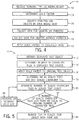
- FIG. 5 depicts a flow chart of a method 70 for scaling text depicted within text objects rendered on the HMI screen 12 onto the secondary display device 14 while operating in the design-time environment.
- the method 70 determines a new font size for each text object based on the width of a single line in the text object.
- the method 70 may generally be used for scaling text in text objects having a single line of text or for a text object that does not wrap words.
- the controller 18 may identify a line of text within a text object depicted on the HMI screen 12. After identifying the line of text, the controller 18 may fit each text character in the line of text in an equal-sized character tile.
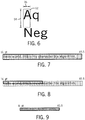
- FIG. 6 illustrates an example of a character tile 92.
- the character tile 92 may be defined by a tile height dimension 94 and a tile width dimension 96.
- the tile height dimension 94 and the tile width dimension 96 may be determine based on an average height and width of the characters depicted within the line of text including the empty space between each character in both the vertical and horizontal directions.
- the character tile 92 may be determined based at least partly on the font size used to render the text in the text object.
- the controller 18 may determine a total number of character tiles 92 that may fit within the line of text identified at block 72.
- FIG. 7 illustrates an example of a line of text that has 45.5 character tiles 92 within the line of text that has characters with a 16-point font size.
- the controller 18 may apply a scale factor to the text object depicted in the HMI screen 12.
- the scale factor may be determined as described above with reference to block 46 of FIG. 3 .
- the controller 18 may determine an initial scaled font size and scaled character tile for the scaled text object.
- the scaled font size may be determined based on a difference between the number of character tiles 92 that may fit within the area of the original text object determined at block 74 and a number of similarly sized character tiles 92 that may fit within the scaled text object. That is, the scaled font size may be determined based on a ratio between the number of character tiles 92 that may fit within the area of the original text object determined at block 74 and a number of similarly sized character tiles 92 that may fit within the scaled text object.
- FIG. 8 illustrates an example of the text object depicted in FIG.
- the controller 18 may initially reduce the 16-point font size of the text depicted in FIG. 7 to an 8-point font size based on this ratio. After determining the initial scaled font size, the controller 18 may determine the dimensions for the scaled character tile based on the initial scaled font size using a similar process as described above.
- the controller 18 may determine a number of scaled character tiles that may fit within the scaled text object. The controller 18 may then, at block 82, determine whether the number of scaled character tiles that fit within the scaled text object is equal to or less than the original number of character tiles (block 74). If the number of scaled character tiles that fit within the scaled text object is not equal to or less than the original number of character tiles, the controller 18 may proceed to block 84 and increase or decrease the font size accordingly.
- the controller 18 may adjust the increment in which the font size is increased or decreased at block 84 for use in the next iteration. Likewise, if after changing the font size, the controller 18 determines that a change in the number of character tiles determined at block 80, the controller 18 may decrease the increment in which the font size is increased or decreased at block 84 for use in the next iteration. In this way, the controller 18 may improve a speed at which the method 70 may be performed while working within the constraints of a Nyquist Criterion. After increasing or decreasing the font size at block 84, the controller 18 may return to block 80 until the number of scaled character tiles that fit within the scaled text object is equal to or less than the original number of character tiles.
- the controller 18 may proceed to block 86 and render the text of the text object on the secondary display device 14 using the scaled font size.
- FIG. 9 illustrates an example of the scaled text object of FIG. 8 having approximately the same number of character tiles as the text object of FIG. 7 .
- the scaled text depicted in the secondary display device 14 may maintain its readability characteristics. That is, since the text is reprinted using a pre-defined font size as opposed to being structured, the scaled text is rendered as if printed using a different font size. Moreover, by including the empty space between characters when determining character tiles 92, the controller 18 may prevent text from being clipped off at its edges because the scaled font size is configured to fit within the scaled character tiles. Furthermore, by using character tiles 92, the controller 18 may determine a new font size independent of the actual text that is being displayed in the text object, including instances when no text is being displayed at all. As a result, the controller 18 may scale font sizes in text objects even when the actual text is unknown or when the text is dynamically presented to the controller 18 while operating in the run-time environment.
- FIG. 10 depicts a flow chart of a method 100 for scaling text within text objects that have multiple lines onto the secondary display device 14 based on a character tile area in the text object.
- the controller 18 may identify a text object depicted in the HMI screen 12.
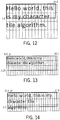
- the controller 18 may determine a number of character tiles that may fit within the text object area. As such, the controller 18 may determine the dimensions of a character tile as described above and fit the resulting character tiles in the area of the text object. For instance, FIG. 11 illustrates an example of an area of text that has characters with a 16-point font size. In this example, the controller 18 may fit character tiles within the text object area such that the text object may be characterized as having a height of 3.25 character tiles and a width of 15.4 character tiles. As such, the area of the text object of FIG. 10 is approximately 50 squared character tiles (i.e., 3.25 x 15.4). As such, the character tiles 92 within the line of text may have characters with a 16-point font size.
- the controller 18 may determine a number of character tiles that may fit within the scaled text object area. For instance, using the example provided in FIG. 11 , if the scaling factor called for the height of the text object to be reduced by a factor of 2, the controller 18 may determine that the resulting text object area may be characterized as having a height of 1.8 character tiles and a width of 15.4 character tiles, as illustrated in FIG. 12 .
- the controller 18 may, at block 108, determine an initial scale factor for the original font size depicted in the HMI screen 12. In one embodiment, the controller 18 may determine the initial scale factor by dividing the character tile area of the scaled text object by the original character tile area of the text object depicted on the HMI screen 12. Referring back to the example described above with respect to FIG. 11 , the controller 18 may determine that the initial scale factor for the original font may be 0.55.
- the initial scale factor for the 16-point font of the text depicted in FIG. 10 may be determined to 0.55 by dividing the character tile area of the scaled text object (27.7) by the original character tile area of the text object (50).
- the controller 18 may determine an initial font size for the scaled text object area using the initial scale factor determined at block 108. That is, the controller 18 may apply the initial scale factor for the original font size to the original font size. As such, the 16-point font depicted in the text object of FIG. 11 may be scaled by 0.55 such that the resulting font size may be 8.8-point font.
- the controller 18 may determine the number of scaled character tiles that may fit within the scaled text object area. That is, the controller 18 may first determine dimensions for a scaled character tile based on the scaled font size and then fit a number of the scaled character tiles within the scaled text object area. Keeping this in mind and referring back to the example above, the controller 18 may first determine the dimensions for a scaled character tile based on an 8.8-point font size, and then the controller 18 may fit a number of scaled character tiles within the text object. As a result, the text object may be characterized as having a height of 3.25 scaled character tiles and a width of 28.1 scaled character tiles, as illustrated in FIG. 13 .
- the controller 18 may iteratively increase or decrease the scaled font size until the scaled character tile area is equal to or less than the original character tile area of the text object depicted on the HMI screen 12. As mentioned above with reference to block 78 of FIG. 5 , if after changing the font size, the controller 18 determines that there has been no change to the number of character tiles determined at block 80, the controller 18 may adjust the increment in which the font size is increased or decreased at block 84 for use in the next iteration. Likewise, if after changing the font size, the controller 18 determines that a change in the number of character tiles determined at block 80, the controller 18 may decrease the increment in which the font size is increased or decreased at block 84 for use in the next iteration.
- the controller 18 may return to a previous scaled font size such that all of the characters depicted in the original text object are still depicted in the scaled text object.
- the controller 18 may increase the scaled font size to an 11.4-point font size.
- the scaled character tile area in the scaled text object may be 54.5 scaled character tiles, as shown in FIG. 14 (i.e., 2.5 character tiles x 21.8 character tiles).
- FIG. 14 i.e., 2.5 character tiles x 21.8 character tiles.
- the controller 18 may return to the previous scaled font size (11.3-point font size) and print the text of the original text object within the scaled text object, as shown in FIG. 15 .
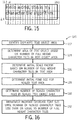
- FIG. 16 depicts a flow chart of a method 120 for scaling text within text objects that have multiple lines on to the secondary display device 14 based on a character tile layout in the text object.
- the character tile layout refers to rows of character tiles in the text object that do not include any partial (i.e., clipped-off) character tile. This may enable the controller 18 to determine a more accurate font size that does not delete or clip off any text in the scaled text object. Keeping this in mind, at block 122, the controller 18 may first identify a text object depicted in the HMI screen 12.
- the controller 18 may determine a square character tile area for the text object based on a number of full height character tiles that may fit within the text object area.
- the square character tile area of full height character tiles for the text object of FIG. 11 may be 46.2 square character tiles. That is, the number of full height character tiles in the text object of FIG. 11 may include 15.4 character tiles in the horizontal direction and 3 full height character tiles in the vertical direction.
- the controller 18 may determine the character tile area for the text object of FIG. 11 to be 46.2 square character tiles by multiplying the 1 5.4 character tiles in the horizontal direction and the 3 full height character tiles in the vertical direction.
- the controller 18 may determine an initial scale factor for the original font size depicted in the HMI screen 12.
- the controller 18 may determine the initial scale factor by dividing a number of full height character tiles that fit within an area of the scaled text object by the character tile area of the text object determined at block 124. For instance, referring to FIG. 12 , the controller 18 may first determine that the scaled text object may include just 1 5.4 full height character tiles that fit within scaled text object. Keeping this in mind, the controller 18 may then determine that the initial scale factor for the original font may be 0.333.
- the initial scale factor for the 16-point font of the text depicted in FIG. 11 may be determined to 0.333 by dividing the character tile area of the single line of the text object (15.4) by the character tile area of the text object as determined at block 124 (46.2).
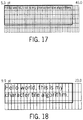
- the controller 18 may determine an initial font size for the scaled text object area using the initial scale factor determined at block 126. As such, the controller 18 may apply the initial scale factor to the original font size. For example, the 16-point font depicted in the text object of FIG. 11 may be scaled by 0.333 such that the resulting font size may be a 5.3-point font size, as shown in FIG. 17 .
- the controller 18 may determine the number of full height scaled character tiles that may fit within the scaled text object area.
- the controller 18 may first determine a scaled character tile based on the initial font size and then fit a number of the scaled character tiles within the scaled text object area.
- the controller 18 may first determine the dimensions for a scaled character tile based on a 5.3-point font size, and then the controller 18 may fit a number of character tiles within the text object.
- the text object may be characterized as having a height of 5 full height scaled character tiles and a width of 45 full height scaled character tiles, as illustrated in FIG. 17 .
- the controller 18 may iteratively increase or decrease the scaled font size until the scaled character tile area is approximately equal to the original character tile area of the text object depicted on the HMI screen 12. As mentioned above with reference to block 78 of FIG. 5 , if after changing the font size, the controller 18 determines that there has been no change to the number of character tiles determined at block 80, the controller 18 may adjust the increment in which the font size is increased or decreased at block 84 for use in the next iteration. Likewise, if after changing the font size, the controller 18 determines that a change in the number of character tiles determined at block 80, the controller 18 may decrease the increment in which the font size is increased or decreased at block 84 for use in the next iteration.
- the controller 18 may employ a similar process as described above with reference to block 114 of FIG. 9 . As such, the controller 18 may iteratively adjust the scaled font size until the text depicted in the scaled text object best fits the scaled text object area. Returning to the example above, the controller 18 may determine that the scaled font size should be a 9.9-point font size such that the character tile area in the text object is equal to or less than 46 square tiles, as shown in FIG. 18 .
Landscapes
- Engineering & Computer Science (AREA)
- Theoretical Computer Science (AREA)
- Physics & Mathematics (AREA)
- General Physics & Mathematics (AREA)
- General Engineering & Computer Science (AREA)
- Human Computer Interaction (AREA)
- Computer Hardware Design (AREA)
- Controls And Circuits For Display Device (AREA)
- User Interface Of Digital Computer (AREA)
Claims (9)
- System, umfassend:eine Mensch-Maschinen-Schnittstelle, HMI (13), die zum Überwachen oder Steuern von Vorgängen in einem industriellen Automatisierungssystem verwendet wird und dazu eingerichtet ist, eine Visualisierung auf einem ersten Bildschirm (12) anzuzeigen, wobei der erste Bildschirm Teil des Systems ist;eine sekundäre Anzeigevorrichtung (14), die dazu eingerichtet ist, eine skalierte Visualisierung anzuzeigen, wobei die skalierte Visualisierung wenigstens teilweise basierend auf der Visualisierung bestimmt wird; undeine Steuereinheit (18) die dazu eingerichtet ist:einen Hinweis zu beziehen, dass die sekundäre Anzeigevorrichtung mit der HMI gekoppelt wurde;zwei oder mehr Skalierungsmodusoptionen auf dem Bildschirm oder der sekundären Anzeigevorrichtung anzuzeigen;eine Eingabe zu empfangen, die einem der Skalierungsmodi entspricht;die skalierte Visualisierung durch Anwenden verschiedener Skalierungsfaktoren auf verschiedene Typen von Objekten der Visualisierung zu erzeugen; unddas Senden der skalierten Visualisierung an die sekundäre Anzeigevorrichtung zu ermöglichen;wobei die Steuereinheit dazu eingerichtet ist, Informationen zu empfangen, die einen Typ der sekundären Anzeigevorrichtung, eine Anzeigebreite der sekundären Anzeigevorrichtung, eine Anzeigehöhe der sekundären Anzeigevorrichtung oder eine Kombination davon kennzeichnen;wobei der Typ der sekundären Anzeigevorrichtung Informationen umfasst, die einem Hersteller der sekundären Anzeigevorrichtung, einer Marke der sekundären Anzeigevorrichtung, einem Modell der sekundären Anzeigevorrichtung oder einer Kombination davon entsprechen, undein Typ der verschiedenen Objekttypen ein Textobjekt ist und ein weiterer Typ der verschiedenen Objekttypen ein grafisches Objekt ist und der auf das Textobjekt angewendete Skalierungsfaktor so ausgeführt wird, dass der skalierte Text des Textobjekts abgebildet wird, ohne Teile des Texts zu beschneiden oder zu löschen, und so, dass der skalierte Text beim Lesen auf der sekundären Anzeigevorrichtung leicht lesbar ist.
- System nach Anspruch 1, bei dem die HMI dazu eingerichtet ist, mehrere Visualisierungen auf dem ersten Bildschirm anzuzeigen.
- System nach Anspruch 1, bei dem die Steuereinheit dazu eingerichtet ist:die skalierte Visualisierung zu erzeugen, indem sie die Skalierungsfaktoren auf ein Ansichtsmodell anwendet, das der Visualisierung entspricht; oderdie skalierte Visualisierung zu erzeugen, indem sie die Skalierungsfaktoren auf ein Datenmodell anwendet, das der Visualisierung entspricht.
- System nach Anspruch 1, bei dem die Steuereinheit dazu eingerichtet ist, die skalierte Visualisierung zu erzeugen durch:Identifizieren eines oder mehrerer Verweise für einen ersten Satz von Objekten, die einem ersten Teil der Visualisierung entsprechen;Sammeln eines ersten Datensatzes, der dem ersten Satz von Objekten entspricht, über die Verweise, wobei der erste Datensatz Höhen- und Breitenabmessungen umfasst, die jedem Objekt in dem ersten Satz von Objekten entsprechen;Sammeln eines zweiten Datensatzes, der einem zweiten Satz von Objekten entspricht, der einem zweiten Teil der Visualisierung entspricht, wobei der zweite Datensatz aus einer Datenbank gesammelt wird, die eine Information umfasst, die einer Vielzahl von generischen Objekten entspricht, die zum Anzeigen auf dem HMI-Bildschirm eingerichtet sind; undAnwenden verschiedener Skalierungsfaktoren auf den ersten Datensatz und den zweiten Datensatz.
- System nach Anspruch 1, bei dem für ein Objekt vom Typ Textobjekt, dessen Text in einer ersten Anzeigevorrichtung angezeigt wird, die Steuereinheit dazu eingerichtet ist, den Skalierungsfaktor zu berechnen, der auf das Textobjekt angewendet werden soll durch:Bestimmen der Abmessungen für eine Zeichenkachel, wenigstens teilweise basierend auf einer Schriftgröße, die dem Text in dem Textobjekt entspricht;Bestimmen einer Anzahl von Zeichenkacheln, die in einen Bereich des Textobjekts passen, wenigstens teilweise basierend auf den Abmessungen für die Zeichenkachel;Bestimmen einer skalierten Schriftgröße basierend wenigstens teilweise auf einem Skalierungsfaktor, der auf das Textobjekt angewendet wird, um ein skaliertes Textobjekt zu erzeugen, das auf einer zweiten Anzeigevorrichtung angezeigt werden soll;Bestimmen der Abmessungen für eine skalierte Zeichenkachel, wenigstens teilweise basierend auf der skalierten Schriftgröße;Bestimmen einer Anzahl von skalierten Zeichenkacheln, die in einen Bereich des skalierten Textobjekts passen, basierend wenigstens teilweise auf den Abmessungen für die skalierte Zeichenkachel;Ändern der skalierten Schriftgröße wenigstens teilweise basierend darauf, ob die Anzahl der skalierten Zeichenkacheln gleich oder kleiner als die Anzahl der Zeichenkacheln ist; undDarstellen des Texts mit der geänderten skalierten Schriftgröße auf der zweiten Anzeigevorrichtung.
- System nach Anspruch 5, bei dem die Steuereinheit weiterhin dazu eingerichtet ist:iterativ die Anzahl der skalierten Zeichenkacheln und iterativ die skalierte Schriftgröße zu ändern, bis die Anzahl der skalierten Zeichenkacheln gleich oder kleiner als die Anzahl der Zeichenkacheln ist; oderdie Abmessungen für die Zeichenkachel durch Bestimmen einer durchschnittlichen Höhe und durchschnittlichen Breite jedes Textzeichens in der Textzeile in dem Textobjekt zu bestimmen; oderdie Abmessungen für die Zeichenkachel wenigstens teilweise anhand des Leerraums zwischen dem Text zu bestimmen.
- System nach Anspruch 5, bei dem der Skalierungsfaktor ein Verhältnis zwischen der Fläche des Textobjekts und der Fläche des skalierten Textobjekts umfasst.
- Verfahren an einer Steuereinheit, umfassend:Empfangen (32) einer Anzeige, dass eine sekundäre Anzeigevorrichtung mit einer Mensch-Maschinen-Schnittstelle (HMI) gekoppelt wurde, die zum Überwachen oder Steuern von Vorgängen in einem industriellen Automatisierungssystem verwendet wird und dazu eingerichtet ist, eine Visualisierung auf einem Bildschirm anzuzeigen;Empfangen von Informationen, die einen Typ der sekundären Anzeigevorrichtung, eine Anzeigebreite der sekundären Anzeigevorrichtung, eine Anzeigehöhe der sekundären Anzeigevorrichtung oder eine Kombination davon kennzeichnen, wobei der Typ der sekundären Anzeigevorrichtung Informationen umfasst, die einem Hersteller der sekundären Anzeigevorrichtung, einer Marke der sekundären Anzeigevorrichtung, einem Modell der sekundären Anzeigevorrichtung oder einer Kombination daraus entsprechen;Darstellen (34) von zwei oder mehr Skalierungsmodusoptionen auf dem Bildschirm oder der sekundären Anzeigevorrichtung;Empfangen (36) einer Eingabe, die einem der Skalierungsmodi entspricht;Erzeugen (38) der skalierten Visualisierung durch Anwenden verschiedener Skalierungsfaktoren auf verschiedene Typen von Objekten der Visualisierung, wobei ein Typ der verschiedenen Typen von Objekten ein Textobjekt ist und ein anderer Typ der verschiedenen Typen von Objekten ein grafisches Objekt ist, und der auf das Textobjekt angewendete Skalierungsfaktor so ausgeführt wird, dass der skalierte Text des Textobjekts dargestellt wird, ohne Teile des Textes zu beschneiden oder zu löschen, und dass der skalierte Text beim Darstellen auf der sekundären Anzeigevorrichtung leicht lesbar ist; undErmöglichen des Sendens der skalierten Visualisierung an die sekundäre Anzeigevorrichtung.
- Computerlesbares Medium, das computerausführbare Anweisungen speichert, die, wenn sie von einem Prozessor ausgeführt werden, den Prozessor veranlassen, das Verfahren nach Anspruch 8 auszuführen.
Applications Claiming Priority (2)
| Application Number | Priority Date | Filing Date | Title |
|---|---|---|---|
| US201161558985P | 2011-11-11 | 2011-11-11 | |
| US13/666,480 US9122442B2 (en) | 2011-11-11 | 2012-11-01 | Systems and methods for scaling visualizations |
Publications (3)
| Publication Number | Publication Date |
|---|---|
| EP2592545A2 EP2592545A2 (de) | 2013-05-15 |
| EP2592545A3 EP2592545A3 (de) | 2014-08-13 |
| EP2592545B1 true EP2592545B1 (de) | 2021-02-24 |
Family
ID=47500881
Family Applications (1)
| Application Number | Title | Priority Date | Filing Date |
|---|---|---|---|
| EP12192240.5A Active EP2592545B1 (de) | 2011-11-11 | 2012-11-12 | Systeme und Verfahren zur Skalierung von Visualisierungen |
Country Status (3)
| Country | Link |
|---|---|
| US (2) | US9122442B2 (de) |
| EP (1) | EP2592545B1 (de) |
| CN (2) | CN107273007B (de) |
Families Citing this family (12)
| Publication number | Priority date | Publication date | Assignee | Title |
|---|---|---|---|---|
| US9535415B2 (en) * | 2011-07-20 | 2017-01-03 | Rockwell Automation Technologies, Inc. | Software, systems, and methods for mobile visualization of industrial automation environments |
| CN103902177B (zh) * | 2012-12-27 | 2018-10-12 | 联想(北京)有限公司 | 一种显示控制方法和电子设备 |
| US10268666B2 (en) * | 2013-10-30 | 2019-04-23 | Rockwell Automation Technologies, Inc. | Industrial automation workstation and display method for scaling and displaying text destined for a target industrial automation device |
| KR20150124600A (ko) * | 2014-04-29 | 2015-11-06 | 삼성전자주식회사 | 객체 표시 방법 및 그 전자 장치 |
| US20150355611A1 (en) * | 2014-06-06 | 2015-12-10 | Honeywell International Inc. | Apparatus and method for combining visualization and interaction in industrial operator consoles |
| JP6394175B2 (ja) * | 2014-08-19 | 2018-09-26 | 富士ゼロックス株式会社 | サーバ装置、情報処理システムおよびプログラム |
| US20160110900A1 (en) * | 2014-10-20 | 2016-04-21 | Mateen Moosa | System And Method For Dynamically Combining Images To Display Textual Content In The Form Of An Image |
| US11762542B2 (en) * | 2014-12-19 | 2023-09-19 | Rockwell Automation Technologies, Inc. | Industrial automation visualization dashboard creation paradigm |
| US9786032B2 (en) * | 2015-07-28 | 2017-10-10 | Google Inc. | System for parametric generation of custom scalable animated characters on the web |
| CN112684966B (zh) * | 2017-12-13 | 2024-10-15 | 创新先进技术有限公司 | 一种图片缩放方法、装置以及电子设备 |
| EP3716037A1 (de) * | 2019-03-28 | 2020-09-30 | ABB Schweiz AG | Reaktionsfähiges automatisches layouten von industriellen prozessgrafiken |
| US11468224B2 (en) * | 2020-08-17 | 2022-10-11 | IT Cadre, LLC | Method for resizing elements of a document |
Family Cites Families (12)
| Publication number | Priority date | Publication date | Assignee | Title |
|---|---|---|---|---|
| US6708222B1 (en) * | 1997-05-01 | 2004-03-16 | Microsoft Corporation | Method and system for locating enclosing owners of embedded objects |
| US20040125107A1 (en) * | 2002-12-26 | 2004-07-01 | Mccully Nathaniel M. | Coordinating grid tracking and mojikumi spacing of Japanese text |
| US7398478B2 (en) * | 2003-11-14 | 2008-07-08 | Microsoft Corporation | Controlled non-proportional scaling display |
| US7345688B2 (en) * | 2004-10-18 | 2008-03-18 | Microsoft Corporation | Semantic thumbnails |
| US7689908B2 (en) * | 2005-01-31 | 2010-03-30 | Microsoft Corporation | Method and system for a target device display simulation |
| US7646433B2 (en) * | 2005-05-31 | 2010-01-12 | D-Link Systems, Inc. | User selectable image scaling |
| FR2892538B1 (fr) | 2005-10-24 | 2007-12-14 | Cynove Sarl | Procedes et dispositifs pour le test de materiels informatiques, de televisions et/ou d'imagerie |
| US20080079757A1 (en) * | 2006-09-29 | 2008-04-03 | Hochmuth Roland M | Display resolution matching or scaling for remotely coupled systems |
| KR20090036779A (ko) * | 2007-10-10 | 2009-04-15 | 삼성전자주식회사 | 디스플레이 장치, 시스템 및 방법 |
| WO2009122684A1 (ja) | 2008-04-01 | 2009-10-08 | Yanase Takatoshi | 表示システム、表示方法、プログラム、及び記録媒体 |
| CN101582254B (zh) * | 2008-05-13 | 2011-06-15 | 华为终端有限公司 | 一种图像呈现方法及装置 |
| US8416243B2 (en) | 2011-03-10 | 2013-04-09 | Konica Minolta Laboratory U.S.A., Inc. | Approximating font metrics for a missing font when substituting an available replacement |
-
2012
- 2012-11-01 US US13/666,480 patent/US9122442B2/en active Active
- 2012-11-12 EP EP12192240.5A patent/EP2592545B1/de active Active
- 2012-11-12 CN CN201710342799.6A patent/CN107273007B/zh active Active
- 2012-11-12 CN CN201210451738.0A patent/CN103558966B/zh not_active Expired - Fee Related
-
2015
- 2015-08-17 US US14/827,903 patent/US9767531B2/en active Active
Non-Patent Citations (1)
| Title |
|---|
| None * |
Also Published As
| Publication number | Publication date |
|---|---|
| EP2592545A2 (de) | 2013-05-15 |
| CN103558966A (zh) | 2014-02-05 |
| US9767531B2 (en) | 2017-09-19 |
| CN107273007B (zh) | 2020-05-05 |
| US20150356706A1 (en) | 2015-12-10 |
| CN107273007A (zh) | 2017-10-20 |
| US20130120462A1 (en) | 2013-05-16 |
| EP2592545A3 (de) | 2014-08-13 |
| CN103558966B (zh) | 2017-06-20 |
| US9122442B2 (en) | 2015-09-01 |
Similar Documents
| Publication | Publication Date | Title |
|---|---|---|
| EP2592545B1 (de) | Systeme und Verfahren zur Skalierung von Visualisierungen | |
| CN102640098B (zh) | 用于提供用于监视和控制过程的过程控制系统中的hmi的方法和系统 | |
| EP2715531B1 (de) | Asynchrone handhabung einer benutzerschnittstellenmanipulation | |
| US8823744B2 (en) | Method for indicating annotations associated with a particular display view of a three-dimensional model independent of any display view | |
| US20050093860A1 (en) | Information processing apparatus and method, program for executing said method, and storage medium storing said program | |
| CN106095471A (zh) | 在线监测的图形组态方法及系统 | |
| EP2485190A1 (de) | Die Anpassung der Auflösung der grafischen Darstellung von Metadaten | |
| US6864895B1 (en) | Pseudo-linear frame buffer mapping system and method | |
| JP4870034B2 (ja) | プラント監視制御装置 | |
| CN109637628B (zh) | 信息处理装置、方法及非瞬态计算机可读存储介质 | |
| US11099864B2 (en) | Responsive auto-layouting of industrial process graphics | |
| CN112416332B (zh) | 一种图形化编程的界面展示方法、装置、设备及介质 | |
| EP3301529A1 (de) | Verfahren und vorrichtung zum anzeigen von überwachungsinformationen | |
| US6392662B1 (en) | Draw order preservation in a computer-implemented graphics system | |
| CN109471613A (zh) | 核安全级应用的图形文件生成方法和系统 | |
| JP4909755B2 (ja) | 画像処理装置、画像処理方法および画像処理プログラム | |
| EP2602712A1 (de) | Programmerstellungsvorrichtung und bildsteuerungssystem | |
| US20110131016A1 (en) | Parallel Navigation in a Plurality of CAD Models | |
| US20030174169A1 (en) | Porting screens designed for a higher resolution HMI to a lower resolution HMI | |
| JP3198754B2 (ja) | Cadシステム用図形指示受取装置 | |
| CN117221462A (zh) | 视频处理器的控制方法、装置、视频处理器及存储介质 | |
| JP2005284460A (ja) | 電力系統監視装置 | |
| JP5144692B2 (ja) | 画面作成装置および画面作成方法 | |
| CN117555466A (zh) | 多样化地图可视化装置 | |
| JPH10301749A (ja) | コンピュータ画面における情報表示装置および同装置を用いた電子部品実装装置 |
Legal Events
| Date | Code | Title | Description |
|---|---|---|---|
| PUAI | Public reference made under article 153(3) epc to a published international application that has entered the european phase |
Free format text: ORIGINAL CODE: 0009012 |
|
| AK | Designated contracting states |
Kind code of ref document: A2 Designated state(s): AL AT BE BG CH CY CZ DE DK EE ES FI FR GB GR HR HU IE IS IT LI LT LU LV MC MK MT NL NO PL PT RO RS SE SI SK SM TR |
|
| AX | Request for extension of the european patent |
Extension state: BA ME |
|
| PUAL | Search report despatched |
Free format text: ORIGINAL CODE: 0009013 |
|
| RIC1 | Information provided on ipc code assigned before grant |
Ipc: G06F 3/14 20060101AFI20140703BHEP |
|
| AK | Designated contracting states |
Kind code of ref document: A3 Designated state(s): AL AT BE BG CH CY CZ DE DK EE ES FI FR GB GR HR HU IE IS IT LI LT LU LV MC MK MT NL NO PL PT RO RS SE SI SK SM TR |
|
| AX | Request for extension of the european patent |
Extension state: BA ME |
|
| 17P | Request for examination filed |
Effective date: 20150204 |
|
| RBV | Designated contracting states (corrected) |
Designated state(s): AL AT BE BG CH CY CZ DE DK EE ES FI FR GB GR HR HU IE IS IT LI LT LU LV MC MK MT NL NO PL PT RO RS SE SI SK SM TR |
|
| STAA | Information on the status of an ep patent application or granted ep patent |
Free format text: STATUS: EXAMINATION IS IN PROGRESS |
|
| 17Q | First examination report despatched |
Effective date: 20180611 |
|
| GRAP | Despatch of communication of intention to grant a patent |
Free format text: ORIGINAL CODE: EPIDOSNIGR1 |
|
| STAA | Information on the status of an ep patent application or granted ep patent |
Free format text: STATUS: GRANT OF PATENT IS INTENDED |
|
| INTG | Intention to grant announced |
Effective date: 20200930 |
|
| GRAS | Grant fee paid |
Free format text: ORIGINAL CODE: EPIDOSNIGR3 |
|
| GRAA | (expected) grant |
Free format text: ORIGINAL CODE: 0009210 |
|
| STAA | Information on the status of an ep patent application or granted ep patent |
Free format text: STATUS: THE PATENT HAS BEEN GRANTED |
|
| AK | Designated contracting states |
Kind code of ref document: B1 Designated state(s): AL AT BE BG CH CY CZ DE DK EE ES FI FR GB GR HR HU IE IS IT LI LT LU LV MC MK MT NL NO PL PT RO RS SE SI SK SM TR |
|
| REG | Reference to a national code |
Ref country code: GB Ref legal event code: FG4D |
|
| REG | Reference to a national code |
Ref country code: CH Ref legal event code: EP |
|
| REG | Reference to a national code |
Ref country code: DE Ref legal event code: R096 Ref document number: 602012074481 Country of ref document: DE |
|
| REG | Reference to a national code |
Ref country code: AT Ref legal event code: REF Ref document number: 1365323 Country of ref document: AT Kind code of ref document: T Effective date: 20210315 |
|
| REG | Reference to a national code |
Ref country code: IE Ref legal event code: FG4D |
|
| REG | Reference to a national code |
Ref country code: LT Ref legal event code: MG9D |
|
| REG | Reference to a national code |
Ref country code: NL Ref legal event code: MP Effective date: 20210224 |
|
| PG25 | Lapsed in a contracting state [announced via postgrant information from national office to epo] |
Ref country code: BG Free format text: LAPSE BECAUSE OF FAILURE TO SUBMIT A TRANSLATION OF THE DESCRIPTION OR TO PAY THE FEE WITHIN THE PRESCRIBED TIME-LIMIT Effective date: 20210524 Ref country code: NO Free format text: LAPSE BECAUSE OF FAILURE TO SUBMIT A TRANSLATION OF THE DESCRIPTION OR TO PAY THE FEE WITHIN THE PRESCRIBED TIME-LIMIT Effective date: 20210524 Ref country code: GR Free format text: LAPSE BECAUSE OF FAILURE TO SUBMIT A TRANSLATION OF THE DESCRIPTION OR TO PAY THE FEE WITHIN THE PRESCRIBED TIME-LIMIT Effective date: 20210525 Ref country code: HR Free format text: LAPSE BECAUSE OF FAILURE TO SUBMIT A TRANSLATION OF THE DESCRIPTION OR TO PAY THE FEE WITHIN THE PRESCRIBED TIME-LIMIT Effective date: 20210224 Ref country code: FI Free format text: LAPSE BECAUSE OF FAILURE TO SUBMIT A TRANSLATION OF THE DESCRIPTION OR TO PAY THE FEE WITHIN THE PRESCRIBED TIME-LIMIT Effective date: 20210224 Ref country code: PT Free format text: LAPSE BECAUSE OF FAILURE TO SUBMIT A TRANSLATION OF THE DESCRIPTION OR TO PAY THE FEE WITHIN THE PRESCRIBED TIME-LIMIT Effective date: 20210624 Ref country code: LT Free format text: LAPSE BECAUSE OF FAILURE TO SUBMIT A TRANSLATION OF THE DESCRIPTION OR TO PAY THE FEE WITHIN THE PRESCRIBED TIME-LIMIT Effective date: 20210224 |
|
| REG | Reference to a national code |
Ref country code: AT Ref legal event code: MK05 Ref document number: 1365323 Country of ref document: AT Kind code of ref document: T Effective date: 20210224 |
|
| PG25 | Lapsed in a contracting state [announced via postgrant information from national office to epo] |
Ref country code: SE Free format text: LAPSE BECAUSE OF FAILURE TO SUBMIT A TRANSLATION OF THE DESCRIPTION OR TO PAY THE FEE WITHIN THE PRESCRIBED TIME-LIMIT Effective date: 20210224 Ref country code: NL Free format text: LAPSE BECAUSE OF FAILURE TO SUBMIT A TRANSLATION OF THE DESCRIPTION OR TO PAY THE FEE WITHIN THE PRESCRIBED TIME-LIMIT Effective date: 20210224 Ref country code: PL Free format text: LAPSE BECAUSE OF FAILURE TO SUBMIT A TRANSLATION OF THE DESCRIPTION OR TO PAY THE FEE WITHIN THE PRESCRIBED TIME-LIMIT Effective date: 20210224 Ref country code: LV Free format text: LAPSE BECAUSE OF FAILURE TO SUBMIT A TRANSLATION OF THE DESCRIPTION OR TO PAY THE FEE WITHIN THE PRESCRIBED TIME-LIMIT Effective date: 20210224 Ref country code: RS Free format text: LAPSE BECAUSE OF FAILURE TO SUBMIT A TRANSLATION OF THE DESCRIPTION OR TO PAY THE FEE WITHIN THE PRESCRIBED TIME-LIMIT Effective date: 20210224 |
|
| PG25 | Lapsed in a contracting state [announced via postgrant information from national office to epo] |
Ref country code: IS Free format text: LAPSE BECAUSE OF FAILURE TO SUBMIT A TRANSLATION OF THE DESCRIPTION OR TO PAY THE FEE WITHIN THE PRESCRIBED TIME-LIMIT Effective date: 20210624 |
|
| PG25 | Lapsed in a contracting state [announced via postgrant information from national office to epo] |
Ref country code: CZ Free format text: LAPSE BECAUSE OF FAILURE TO SUBMIT A TRANSLATION OF THE DESCRIPTION OR TO PAY THE FEE WITHIN THE PRESCRIBED TIME-LIMIT Effective date: 20210224 Ref country code: EE Free format text: LAPSE BECAUSE OF FAILURE TO SUBMIT A TRANSLATION OF THE DESCRIPTION OR TO PAY THE FEE WITHIN THE PRESCRIBED TIME-LIMIT Effective date: 20210224 Ref country code: AT Free format text: LAPSE BECAUSE OF FAILURE TO SUBMIT A TRANSLATION OF THE DESCRIPTION OR TO PAY THE FEE WITHIN THE PRESCRIBED TIME-LIMIT Effective date: 20210224 Ref country code: SM Free format text: LAPSE BECAUSE OF FAILURE TO SUBMIT A TRANSLATION OF THE DESCRIPTION OR TO PAY THE FEE WITHIN THE PRESCRIBED TIME-LIMIT Effective date: 20210224 |
|
| REG | Reference to a national code |
Ref country code: DE Ref legal event code: R097 Ref document number: 602012074481 Country of ref document: DE |
|
| PG25 | Lapsed in a contracting state [announced via postgrant information from national office to epo] |
Ref country code: DK Free format text: LAPSE BECAUSE OF FAILURE TO SUBMIT A TRANSLATION OF THE DESCRIPTION OR TO PAY THE FEE WITHIN THE PRESCRIBED TIME-LIMIT Effective date: 20210224 Ref country code: ES Free format text: LAPSE BECAUSE OF FAILURE TO SUBMIT A TRANSLATION OF THE DESCRIPTION OR TO PAY THE FEE WITHIN THE PRESCRIBED TIME-LIMIT Effective date: 20210224 Ref country code: SK Free format text: LAPSE BECAUSE OF FAILURE TO SUBMIT A TRANSLATION OF THE DESCRIPTION OR TO PAY THE FEE WITHIN THE PRESCRIBED TIME-LIMIT Effective date: 20210224 Ref country code: RO Free format text: LAPSE BECAUSE OF FAILURE TO SUBMIT A TRANSLATION OF THE DESCRIPTION OR TO PAY THE FEE WITHIN THE PRESCRIBED TIME-LIMIT Effective date: 20210224 |
|
| PLBE | No opposition filed within time limit |
Free format text: ORIGINAL CODE: 0009261 |
|
| STAA | Information on the status of an ep patent application or granted ep patent |
Free format text: STATUS: NO OPPOSITION FILED WITHIN TIME LIMIT |
|
| PG25 | Lapsed in a contracting state [announced via postgrant information from national office to epo] |
Ref country code: AL Free format text: LAPSE BECAUSE OF FAILURE TO SUBMIT A TRANSLATION OF THE DESCRIPTION OR TO PAY THE FEE WITHIN THE PRESCRIBED TIME-LIMIT Effective date: 20210224 |
|
| 26N | No opposition filed |
Effective date: 20211125 |
|
| PG25 | Lapsed in a contracting state [announced via postgrant information from national office to epo] |
Ref country code: SI Free format text: LAPSE BECAUSE OF FAILURE TO SUBMIT A TRANSLATION OF THE DESCRIPTION OR TO PAY THE FEE WITHIN THE PRESCRIBED TIME-LIMIT Effective date: 20210224 |
|
| PG25 | Lapsed in a contracting state [announced via postgrant information from national office to epo] |
Ref country code: IT Free format text: LAPSE BECAUSE OF FAILURE TO SUBMIT A TRANSLATION OF THE DESCRIPTION OR TO PAY THE FEE WITHIN THE PRESCRIBED TIME-LIMIT Effective date: 20210224 |
|
| PG25 | Lapsed in a contracting state [announced via postgrant information from national office to epo] |
Ref country code: IS Free format text: LAPSE BECAUSE OF FAILURE TO SUBMIT A TRANSLATION OF THE DESCRIPTION OR TO PAY THE FEE WITHIN THE PRESCRIBED TIME-LIMIT Effective date: 20210624 |
|
| PG25 | Lapsed in a contracting state [announced via postgrant information from national office to epo] |
Ref country code: MC Free format text: LAPSE BECAUSE OF FAILURE TO SUBMIT A TRANSLATION OF THE DESCRIPTION OR TO PAY THE FEE WITHIN THE PRESCRIBED TIME-LIMIT Effective date: 20210224 |
|
| REG | Reference to a national code |
Ref country code: CH Ref legal event code: PL |
|
| PG25 | Lapsed in a contracting state [announced via postgrant information from national office to epo] |
Ref country code: LU Free format text: LAPSE BECAUSE OF NON-PAYMENT OF DUE FEES Effective date: 20211112 Ref country code: BE Free format text: LAPSE BECAUSE OF NON-PAYMENT OF DUE FEES Effective date: 20211130 |
|
| REG | Reference to a national code |
Ref country code: BE Ref legal event code: MM Effective date: 20211130 |
|
| PG25 | Lapsed in a contracting state [announced via postgrant information from national office to epo] |
Ref country code: IE Free format text: LAPSE BECAUSE OF NON-PAYMENT OF DUE FEES Effective date: 20211112 |
|
| PG25 | Lapsed in a contracting state [announced via postgrant information from national office to epo] |
Ref country code: HU Free format text: LAPSE BECAUSE OF FAILURE TO SUBMIT A TRANSLATION OF THE DESCRIPTION OR TO PAY THE FEE WITHIN THE PRESCRIBED TIME-LIMIT; INVALID AB INITIO Effective date: 20121112 Ref country code: CY Free format text: LAPSE BECAUSE OF FAILURE TO SUBMIT A TRANSLATION OF THE DESCRIPTION OR TO PAY THE FEE WITHIN THE PRESCRIBED TIME-LIMIT Effective date: 20210224 |
|
| P01 | Opt-out of the competence of the unified patent court (upc) registered |
Effective date: 20230404 |
|
| PG25 | Lapsed in a contracting state [announced via postgrant information from national office to epo] |
Ref country code: LI Free format text: LAPSE BECAUSE OF NON-PAYMENT OF DUE FEES Effective date: 20220630 Ref country code: CH Free format text: LAPSE BECAUSE OF NON-PAYMENT OF DUE FEES Effective date: 20220630 |
|
| PG25 | Lapsed in a contracting state [announced via postgrant information from national office to epo] |
Ref country code: MK Free format text: LAPSE BECAUSE OF FAILURE TO SUBMIT A TRANSLATION OF THE DESCRIPTION OR TO PAY THE FEE WITHIN THE PRESCRIBED TIME-LIMIT Effective date: 20210224 |
|
| PG25 | Lapsed in a contracting state [announced via postgrant information from national office to epo] |
Ref country code: TR Free format text: LAPSE BECAUSE OF FAILURE TO SUBMIT A TRANSLATION OF THE DESCRIPTION OR TO PAY THE FEE WITHIN THE PRESCRIBED TIME-LIMIT Effective date: 20210224 |
|
| PG25 | Lapsed in a contracting state [announced via postgrant information from national office to epo] |
Ref country code: MT Free format text: LAPSE BECAUSE OF FAILURE TO SUBMIT A TRANSLATION OF THE DESCRIPTION OR TO PAY THE FEE WITHIN THE PRESCRIBED TIME-LIMIT Effective date: 20210224 |
|
| PGFP | Annual fee paid to national office [announced via postgrant information from national office to epo] |
Ref country code: DE Payment date: 20251022 Year of fee payment: 14 |
|
| PGFP | Annual fee paid to national office [announced via postgrant information from national office to epo] |
Ref country code: GB Payment date: 20251023 Year of fee payment: 14 |
|
| PGFP | Annual fee paid to national office [announced via postgrant information from national office to epo] |
Ref country code: FR Payment date: 20251022 Year of fee payment: 14 |