EP2587350A2 - Verfahren zur Bestimmung gültiger Berührungsbildschirmeingaben - Google Patents
Verfahren zur Bestimmung gültiger Berührungsbildschirmeingaben Download PDFInfo
- Publication number
- EP2587350A2 EP2587350A2 EP12189635.1A EP12189635A EP2587350A2 EP 2587350 A2 EP2587350 A2 EP 2587350A2 EP 12189635 A EP12189635 A EP 12189635A EP 2587350 A2 EP2587350 A2 EP 2587350A2
- Authority
- EP
- European Patent Office
- Prior art keywords
- touch
- input touch
- input
- touch screen
- human
- Prior art date
- Legal status (The legal status is an assumption and is not a legal conclusion. Google has not performed a legal analysis and makes no representation as to the accuracy of the status listed.)
- Withdrawn
Links
Images

Classifications
-
- G—PHYSICS
- G06—COMPUTING OR CALCULATING; COUNTING
- G06F—ELECTRIC DIGITAL DATA PROCESSING
- G06F3/00—Input arrangements for transferring data to be processed into a form capable of being handled by the computer; Output arrangements for transferring data from processing unit to output unit, e.g. interface arrangements
- G06F3/01—Input arrangements or combined input and output arrangements for interaction between user and computer
- G06F3/03—Arrangements for converting the position or the displacement of a member into a coded form
- G06F3/041—Digitisers, e.g. for touch screens or touch pads, characterised by the transducing means
- G06F3/0416—Control or interface arrangements specially adapted for digitisers
- G06F3/0418—Control or interface arrangements specially adapted for digitisers for error correction or compensation, e.g. based on parallax, calibration or alignment
-
- B—PERFORMING OPERATIONS; TRANSPORTING
- B64—AIRCRAFT; AVIATION; COSMONAUTICS
- B64D—EQUIPMENT FOR FITTING IN OR TO AIRCRAFT; FLIGHT SUITS; PARACHUTES; ARRANGEMENT OR MOUNTING OF POWER PLANTS OR PROPULSION TRANSMISSIONS IN AIRCRAFT
- B64D43/00—Arrangements or adaptations of instruments
-
- G—PHYSICS
- G06—COMPUTING OR CALCULATING; COUNTING
- G06F—ELECTRIC DIGITAL DATA PROCESSING
- G06F3/00—Input arrangements for transferring data to be processed into a form capable of being handled by the computer; Output arrangements for transferring data from processing unit to output unit, e.g. interface arrangements
- G06F3/01—Input arrangements or combined input and output arrangements for interaction between user and computer
- G06F3/048—Interaction techniques based on graphical user interfaces [GUI]
- G06F3/0487—Interaction techniques based on graphical user interfaces [GUI] using specific features provided by the input device, e.g. functions controlled by the rotation of a mouse with dual sensing arrangements, or of the nature of the input device, e.g. tap gestures based on pressure sensed by a digitiser
- G06F3/0488—Interaction techniques based on graphical user interfaces [GUI] using specific features provided by the input device, e.g. functions controlled by the rotation of a mouse with dual sensing arrangements, or of the nature of the input device, e.g. tap gestures based on pressure sensed by a digitiser using a touch-screen or digitiser, e.g. input of commands through traced gestures
Definitions
- Contemporary aircraft cockpits include a flight deck having multiple flight displays, which may display to the flight crew a wide range of aircraft, flight, navigation, and other information used in the operation and control of the aircraft.
- the multiple flight displays may include touch screens to control various features of the aircraft. During periods of heavy turbulence, vibrations are created in the aircraft as a whole making it difficult to touch the touch screen in the desired manner or location.
- Current touch screen displays may utilize a physical stabilization device such as a palm or wrist rest or may have a smaller touch surface and may utilize an edge of the touch screen display as a resting device. Both options limit the size of the touch screen, which is undesirable in the limited space of an aircraft cockpit. Alternative touch screen displays having larger touch areas are unable to be effectively utilized during periods of heavy turbulence because a user will stabilize their hand on the touch surface of the display. Such stabilization becomes an additional touch on the screen, which may result in an input that the user did not intend.
- a method of operating an aircraft having a cockpit with a flight deck having at least one touch screen display includes detecting movement indicative of turbulence, sensing an object touching on the at least one touch screen display to define an input touch, determining at least one characteristic of the input touch, comparing the at least one characteristic of the input touch to a reference characteristic, and determining whether the input touch is invalid based on the detected turbulence and the comparison
- a method of operating an aircraft having a cockpit with a flight deck having at least one touch screen display includes sensing an object touching on the at least one touch screen display to define an input touch, determining a human bio-mechanical signature the input touch, comparing the at least one characteristic of the input touch to a reference characteristic, and determining whether the input touch is invalid based on the comparison.
- Figure 1 illustrates a portion of an aircraft 10 having a cockpit 12. While a commercial aircraft has been illustrated, it is contemplated that the invention may be used in any type of aircraft, for example, without limitation, fixed-wing, rotating-wing, rocket, personal aircraft, and military aircraft.
- a first user e.g., a pilot
- another user e.g., a co-pilot
- a flight deck 18 having various instruments 20 and multiple multifunction flight displays 22 may be located in front of the pilot and co-pilot and may provide the flight crew with information to aid in flying the aircraft 10.
- the flight displays 22 may include either primary flight displays or multi-function displays and may display a wide range of aircraft, flight, navigation, and other information used in the operation and control of the aircraft 10.
- the flight displays 22 have been illustrated as being in a spaced, side-by-side arrangement with each other.
- the flight displays 22 may be laid out in any manner including having fewer or more displays. Further, the flight displays 22 need not be coplanar and need not be the same size.
- a touch screen display or touch screen surface 24 may be included in the flight display 22 and may be used by one or more flight crew members, including the pilot and co-pilot, to interact with the systems of the aircraft 10.
- touch screen surface 24 may take any suitable form including that of a liquid crystal display (LCD) and may use various physical or electrical attributes to sense inputs from the flight crew. While all of the flight displays 22 have been illustrated as including touch screen surfaces 24, it is contemplated that only some of the flight displays 22 may include such touch screen surfaces 24.
- cursor control devices 26 and one or more multifunction keyboards 28 may be included in the cockpit 12 and may also be used by one or more flight crew members to interact with the systems of the aircraft 10.
- a suitable cursor control device 26 may include any device suitable to accept input from a user and to convert that input to a graphical position on any of the multiple flight displays 22.
- Various joysticks, multi-way rocker switches, mice, trackballs, and the like are suitable for this purpose and each user may have separate cursor control device(s) 26 and keyboard(s) 28.
- a turbulence detector 30 may be included within the aircraft 10.
- the turbulence detector 30 may be placed in any suitable location such as the cabin or storage area of the aircraft and has by way of non-limiting example been illustrated within the cockpit 12.
- the turbulence detector 30 may be any suitable mechanism for detecting turbulence including by way of non-limiting examples, a vertical accelerometer, a longitudinal accelerometer, a toroidal accelerometer, a vibration indicator, or any combination of the previous examples or equivalents thereof.
- the turbulence detector 30 may output a signal indicative of turbulence or may output a signal that may be used to determine if turbulence is present.
- a controller 32 may be operably coupled to components of the aircraft 10 including the flight displays 22, touch screen surface 24, cursor control devices 26, keyboards 28, and turbulence detector 30.
- the controller 32 may also be connected with other controllers (not shown) of the aircraft 10.
- the controller 32 may include memory and processing units, which may be running any suitable programs to implement a graphical user interface (GUI) and operating system. These programs typically include a device driver that allows the user to perform functions on the touch screen surface 24 such as selecting and opening files, moving icons, selecting options, and inputting commands and other data through the touch screen surface 24.
- GUI graphical user interface
- the turbulence detector 30 may provide turbulence information to the controller 32 including that turbulence has been detected.
- the controller 32 may process the data output from the turbulence detector 30 and determine from the output that the aircraft 10 is experiencing turbulence.
- the controller 32 may also receive inputs from one or more other additional sensors (not shown), which may provide the controller 32 with various information to aid in the operation of the aircraft 10.
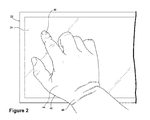
- the user 40 may use a fingertip 42 to write, tap, or provide other types of input on the touch screen surface 24. It is expected that occasionally a user 40 will inadvertently touch the touch screen surface 24 with the other portions of the user's palm or hand 44 or wrist 46 while providing input to the touch screen surface 24. For example, the user 40 may rest a portion of their hand 44 on the touch screen surface 24 while writing on the touch screen surface 24. This is increasingly likely during turbulent conditions of the aircraft 10 as a user 40 will need to steady their hand 44 or wrist 46 in order to make an accurate input touch with their fingertip 42.
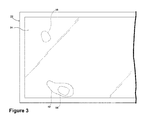
- Figure 3 illustrates that when the user 40 touches the touch screen surface 24 in the above described manner various input touches may be recognized.
- an input touch 50 may occur when the fingertip 42 touches the touch screen surface 24 and an input touch 52 may occur as a portion of the user's hand 44 rests on the screen and the user 40 selects an option with their finger 42.
- the input touch 50 and the input touch 52 may or may not be simultaneous.
- a smaller portion of the user's hand 44 may rest upon the touch screen surface 24 to create an alternative input touch 54.
- the aircraft 10 may be operated such that input touches that are made by other than the user's fingertip 42 may be determined by the controller 32 as invalid and may be ignored as inputs by the controller 32.
- the controller 32 may make determinations about the touch inputs on the touch screen surface 24 and take specific actions with respect to such touch inputs.
- the determination of invalid touches may be made in a multitude of ways but it is contemplated that such determinations may be based on one or more characteristics of the input touch itself either alone or in combination with turbulence being detected.
- a first embodiment may determine such an inadvertent or stabilization touch made by the palm 44 or wrist 46 of the user 40 through detection of a bio-mechanical signature of the input touches.
- Such a method may include sensing an object touching on the touch screen surface 24 to define an input touch.
- the controller 32 may continuously receive output signals from the touch screen display 22 or may receive output signals from the touch screen display 22 only when an input touch is sensed. Regardless of the output mechanism, the controller 32 may determine a human bio-mechanical signature from the sensed input touch or sensed input touches.
- Such a human bio-mechanical signature may include, by way of non-limiting example, a pulse strength of the sensed input touch. Any suitable mechanism may detect the pulse strength of the sensed input touch.
- the flight display 22 may include a sensor, such as a finger pulse oximeter, for detecting the pulse strength on the touch screen surface 24. The controller 32 may then compare the determined human bio-mechanical signature to a reference characteristic to determine whether the input touch is invalid based on the comparison.
- the input touch may be determined invalid when the comparison indicates that the pulse strength is not indicative of the pulse in a human fingertip 42.
- the input touch may be determined invalid when the pulse strength is indicative of a pulse strength of a human palm.
- Fingertips 42 have a stronger pulse than the pulse in the palm 44 or wrist 46; thus, the reference characteristic could be any predetermined range or value that is indicative of a non-fingertip pulse strength.
- reference values may be easily selected or numerically modified such that any typical comparison may be substituted (greater than, less than, equal to, not equal to, etc.).
- a second embodiment may include determining whether the input touch is invalid based on detected turbulence and a comparison between a determined characteristic of the input touch and a reference characteristic.
- Such a method may be used in operating the aircraft 10 described above and may include detecting movement indicative of turbulence. More specifically, the turbulence detector 30 may provide turbulence information or an output indicative of turbulence to the controller 32. Alternatively, the turbulence detector 30 may provide an output signal to the controller 32 and the controller 32 may determine from the output signal if turbulence is present.
- the turbulence detector 30 may provide an output signal indicative of the acceleration of the aircraft 10 and if the acceleration is greater than a predetermined threshold the controller 32 may determine that the aircraft 10 is experiencing turbulence.
- the controller 32 may directly compare the output of the turbulence detector 30 to such a predetermined threshold or intermediate functions such as filtering and averaging may be implemented before the comparison is made with the predetermined threshold.
- predetermined threshold may be easily selected or numerically modified such that any typical comparison may be substituted (greater than, less than, equal to, not equal to, etc.).
- an object touching on the touch screen surface 24 may be sensed to define an input touch.
- the controller 32 may determine at least one characteristic of the input touch and that at least one characteristic may be compared to a reference characteristic. Any number of characteristics may be determined from the input touch including by way of non-limiting examples dwell time and touch area.
- the reference characteristic may be a dwell time indicative of an inadvertent touch.
- an inadvertent touch may include a dwell time indicative of a portion of a palm 44 or a portion of a wrist 46 resting on the touch screen surface 24 during turbulent conditions. The comparison may indicate that any dwell time above a certain amount is indicative of an invalid input touch.
- Such predetermined reference dwell times related to inadvertent touches may be experimentally or otherwise determined.
- the at least one characteristic of the input touch may be indicative of a human physiological attribute.
- a physiological attribute may include a fingertip size or a pulse strength as described above.
- the characteristic of the input touch that is determined may be an area of the input touch.
- the comparison may be made between the determined area of the input touch and a standard area of a human fingertip.
- the standard area may be predetermined in any way but it is contemplated that the standard area may be selected based on a subset of human fingertips. Such subsets may be based on geographic origin and average fingertip sizes corresponding thereto, see for example the disclosure in the Handbook of Normal Physical Measurements. ( Hall, Judith G., Ursula G. Froster-Iskenius, Judith E. Allanson.
- a user from a specific geographic origin may input such information into the controller 32 and the appropriate subset may be used in the comparison.
- the subset may be based on a pilot profile, which may include standard areas for that specific user.
- the controller 32 may include a database of each user's unique measurements or may include a default reference characteristic representing a generic or geographic specific set of fingertip measurements.
- the input touch may be determined invalid when the comparison indicates that the determined area of the input touch is greater than 1.5 times the reference standard area.
- the controller 32 may then determine the validity of the input touch based on the detected turbulence and the comparison.
- the predetermined threshold is used herein to mean that the difference satisfies the predetermined threshold, such as being equal to or less than some threshold value. It will be understood that such a determination may easily be altered to be satisfied by a positive/negative comparison or a true/false comparison.
- the threshold may be experimentally determined and it is contemplated that the comparison may change depending upon the amount of turbulence detected. For purposes of this description, it may be understood that comparison and reference characteristics may be easily selected or numerically modified such that any typical comparison may be substituted (greater than, less than, equal to, not equal to, etc.).
- the location of the input touches on the touch screen surface 24 may be determined.
- the determination of the invalid touch may be based on the determined comparison and/or the determined turbulence and the location of the input touch. For example, if turbulence is detected and the location of the input touch is in an area normally associated with stabilization then the input touch may be determined invalid. Another example is when the touch occurs at a location where no input is expected, such as a portion of the display where no input icon is being displayed.
- a touch screen surface 24 may be set for a right handed or a left handed user.
- the controller 32 may determine that only the left most or right most input touches are valid. For example, on a right handed setting, a user may place all of their finger tips on the screen for stabilization during turbulence and only the left most or index finger would be determined valid and registered as an active control. As the right-handed user moves their hand to the right edge and fingers are removed from the screen, the left most fingertip will remain active. Further, the controller 32 may be programmed to ignore input from specific areas of the touch screen surface 24 where there are no meaningful user-selectable options offered.
- the aircraft 10 may be operated to reduce the options available on the touch screen display 22 or that such options may be associated with larger graphics and areas on the flight display 22. This may be done automatically when turbulence is detected.
- an actuator such as a button near the flight display 22, or the cursor control device 26, or the keyboard 28 may be used to initiate such a screen decluttering mode to increase the precision at which selections could be made via the touch screen surface 24.
- the above described embodiments allow for the determination of inadvertent touches by the user and allow use of the full area of the flight display for the touch screen surface. This may be especially important during periods of turbulence where a user is more likely to rest portions of their hand on the touch screen or inadvertently touch portions of the touch screen.
- the above described methods determine touch invalidity on a touch sensitive screen and mitigate the effects of turbulent environmental motions on inputs into the system and eliminate the need of a physical stabilization device.
Landscapes
- Engineering & Computer Science (AREA)
- General Engineering & Computer Science (AREA)
- Theoretical Computer Science (AREA)
- Human Computer Interaction (AREA)
- Physics & Mathematics (AREA)
- General Physics & Mathematics (AREA)
- Aviation & Aerospace Engineering (AREA)
- Position Input By Displaying (AREA)
- User Interface Of Digital Computer (AREA)
Applications Claiming Priority (1)
| Application Number | Priority Date | Filing Date | Title |
|---|---|---|---|
| US13/279,417 US20130100043A1 (en) | 2011-10-24 | 2011-10-24 | Method for determining valid touch screen inputs |
Publications (1)
| Publication Number | Publication Date |
|---|---|
| EP2587350A2 true EP2587350A2 (de) | 2013-05-01 |
Family
ID=47044905
Family Applications (1)
| Application Number | Title | Priority Date | Filing Date |
|---|---|---|---|
| EP12189635.1A Withdrawn EP2587350A2 (de) | 2011-10-24 | 2012-10-23 | Verfahren zur Bestimmung gültiger Berührungsbildschirmeingaben |
Country Status (6)
| Country | Link |
|---|---|
| US (1) | US20130100043A1 (de) |
| EP (1) | EP2587350A2 (de) |
| JP (1) | JP2013093025A (de) |
| CN (1) | CN103064611A (de) |
| BR (1) | BR102012026623A2 (de) |
| CA (1) | CA2792590A1 (de) |
Cited By (7)
| Publication number | Priority date | Publication date | Assignee | Title |
|---|---|---|---|---|
| DE102014215049A1 (de) | 2013-08-09 | 2015-02-12 | Ford Global Technologies, Llc | Verfahren sowie Bedienvorrichtung zum Bedienen eines elektronischen Gerätes über einen Touchscreen |
| DE102013215742A1 (de) | 2013-08-09 | 2015-02-12 | Ford Global Technologies, Llc | Verfahren sowie Bedienvorrichtung zum Bedienen eines elektronischen Gerätes über einen Touchscreen |
| WO2015023133A1 (en) * | 2013-08-13 | 2015-02-19 | Samsung Electronics Co., Ltd. | Interaction sensing |
| EP2960773A1 (de) | 2014-06-27 | 2015-12-30 | Airbus Helicopters | Verfahren und vorrichtung zur steuerung mindestens einer apparatur |
| EP3239053A1 (de) * | 2016-04-27 | 2017-11-01 | Bell Helicopter Textron Inc. | Zentrale sockelanzeige |
| US10042446B2 (en) | 2013-08-13 | 2018-08-07 | Samsung Electronics Company, Ltd. | Interaction modes for object-device interactions |
| EP3719450A1 (de) * | 2019-03-29 | 2020-10-07 | Honeywell International Inc. | Intelligenter und ergonomischer flugdeckarbeitsplatz |
Families Citing this family (22)
| Publication number | Priority date | Publication date | Assignee | Title |
|---|---|---|---|---|
| US9733707B2 (en) * | 2012-03-22 | 2017-08-15 | Honeywell International Inc. | Touch screen display user interface and method for improving touch interface utility on the same employing a rules-based masking system |
| US9423871B2 (en) | 2012-08-07 | 2016-08-23 | Honeywell International Inc. | System and method for reducing the effects of inadvertent touch on a touch screen controller |
| US9442587B2 (en) * | 2012-12-04 | 2016-09-13 | L-3 Communications Corporation | Touch sensor controller responsive to environmental operating conditions |
| TW201443763A (zh) * | 2013-05-14 | 2014-11-16 | Acer Inc | 誤觸識別方法與裝置 |
| US9696831B2 (en) | 2014-09-26 | 2017-07-04 | Symbol Technologies, Llc | Touch sensor and method for detecting touch input |
| US9747734B2 (en) | 2014-12-12 | 2017-08-29 | International Busines Machines Corporation | Authentication of users with tremors |
| US9588611B2 (en) | 2015-01-19 | 2017-03-07 | Honeywell International Inc. | System and method for guarding emergency and critical touch targets |
| CN106137217A (zh) * | 2015-03-23 | 2016-11-23 | 北京智谷睿拓技术服务有限公司 | 血氧信息检测方法和设备 |
| CN106137216B (zh) * | 2015-03-23 | 2022-01-18 | 北京智谷睿拓技术服务有限公司 | 血氧信息检测方法和设备 |
| CN106137215A (zh) * | 2015-03-23 | 2016-11-23 | 北京智谷睿拓技术服务有限公司 | 血氧信息检测方法和设备 |
| KR20170003041A (ko) * | 2015-06-30 | 2017-01-09 | 삼성전자주식회사 | 유효한 유저 입력을 판단하는 전자 장치 |
| US10345969B1 (en) * | 2015-10-23 | 2019-07-09 | Rockwell Collins, Inc. | Touch sensor behind emissive displays |
| FR3046262B1 (fr) * | 2015-12-24 | 2018-06-15 | Dassault Aviation | Systeme et procede de commande et de surveillance d'equipements d'un aeronef |
| GB2551520B (en) * | 2016-06-20 | 2018-11-21 | Ge Aviat Systems Ltd | Correction of vibration-induced error for touch screen display in an aircraft |
| US10019109B2 (en) | 2016-06-28 | 2018-07-10 | Google Llc | Enhancing touch-sensitive device precision |
| TWI606376B (zh) * | 2016-08-08 | 2017-11-21 | 意象無限股份有限公司 | 觸控感測裝置及濾除誤觸的觸控方法 |
| CN106444830B (zh) * | 2016-09-23 | 2021-07-30 | 河北雄安远度科技有限公司 | 一种飞行装置的制动方法和装置 |
| JP6919174B2 (ja) * | 2016-10-26 | 2021-08-18 | セイコーエプソン株式会社 | タッチパネル装置およびタッチパネル制御プログラム |
| WO2018227623A1 (zh) * | 2017-06-16 | 2018-12-20 | 深圳市大疆创新科技有限公司 | 控制方法、飞行器系统和显示终端 |
| GB2577480B (en) * | 2018-09-11 | 2022-09-07 | Ge Aviat Systems Ltd | Touch screen display assembly and method of operating vehicle having same |
| CN111949046A (zh) * | 2020-08-20 | 2020-11-17 | 中国商用飞机有限责任公司 | 飞机及用于飞机的飞行模式控制装置和飞行模式控制方法 |
| JP2024127245A (ja) * | 2023-03-09 | 2024-09-20 | アルプスアルパイン株式会社 | 操作検出装置、操作検出ユニットおよび情報処理方法 |
Family Cites Families (42)
| Publication number | Priority date | Publication date | Assignee | Title |
|---|---|---|---|---|
| US4525859A (en) * | 1982-09-03 | 1985-06-25 | Bowles Romald E | Pattern recognition system |
| US4805623A (en) * | 1987-09-04 | 1989-02-21 | Vander Corporation | Spectrophotometric method for quantitatively determining the concentration of a dilute component in a light- or other radiation-scattering environment |
| US4860759A (en) * | 1987-09-08 | 1989-08-29 | Criticare Systems, Inc. | Vital signs monitor |
| CN1226811A (zh) * | 1997-03-28 | 1999-08-25 | 精工爱普生株式会社 | 触觉检测器,触觉报告器,信息输入器,触觉复现器,触觉传输系统,脉博诊断器,脉博诊断训练器以及脉博诊断信息传输器 |
| US6366277B1 (en) * | 1999-10-13 | 2002-04-02 | Elo Touchsystems, Inc. | Contaminant processing system for an acoustic touchscreen |
| AU1573301A (en) * | 1999-10-21 | 2001-04-30 | Cirque Corporation | Improved kiosk touchpad |
| CN1393823A (zh) * | 2001-07-02 | 2003-01-29 | 国际商业机器公司 | 人体生物特征辅助识别装置,人体生物特征辅助识别方法 |
| EP1353292B1 (de) * | 2002-04-12 | 2011-10-26 | STMicroelectronics (Research & Development) Limited | Gerät und Verfahren zur Erfassung biometrischer Daten |
| NO321659B1 (no) * | 2002-05-14 | 2006-06-19 | Idex Asa | Volumspesifikk karakterisering av menneskehud ved elektrisk immitans |
| US6643531B1 (en) * | 2002-08-22 | 2003-11-04 | Bci, Inc. | Combination fingerprint and oximetry device |
| US20080148059A1 (en) * | 2003-07-25 | 2008-06-19 | Shapiro Michael F | Universal, Biometric, Self-Authenticating Identity Computer Having Multiple Communication Ports |
| US7561146B1 (en) * | 2004-08-25 | 2009-07-14 | Apple Inc. | Method and apparatus to reject accidental contact on a touchpad |
| ATE526212T1 (de) * | 2005-07-11 | 2011-10-15 | Volvo Technology Corp | Verfahren und anordnung zur durchführung von fahreridentitätsüberprüfung |
| JP2007079729A (ja) * | 2005-09-12 | 2007-03-29 | Denso Corp | タッチパネル入力装置 |
| KR101187579B1 (ko) * | 2005-11-01 | 2012-10-02 | 삼성전자주식회사 | 디스플레이 기능을 갖는 버튼을 구비한 단말기 및 이를위한 디스플레이 방법 |
| JP2007143623A (ja) * | 2005-11-24 | 2007-06-14 | Seiko Instruments Inc | 生体情報測定装置 |
| EP1792564B1 (de) * | 2005-12-02 | 2010-11-24 | General Electric Company | Sonde und Methode zur Benutzung der Sonde |
| US20070255464A1 (en) * | 2006-04-26 | 2007-11-01 | Amita Singh | Car intelligence |
| JP4162023B2 (ja) * | 2006-08-24 | 2008-10-08 | ミツミ電機株式会社 | 指紋検出装置 |
| US20080106523A1 (en) * | 2006-11-07 | 2008-05-08 | Conrad Richard H | Ergonomic lift-clicking method and apparatus for actuating home switches on computer input devices |
| US20080153597A1 (en) * | 2006-12-26 | 2008-06-26 | Oliveras R Martin | Gaming system and method featuring dynamic graphical wagering |
| US9031857B2 (en) * | 2007-04-03 | 2015-05-12 | International Business Machines Corporation | Generating customized marketing messages at the customer level based on biometric data |
| EP1988489B1 (de) * | 2007-05-04 | 2021-02-17 | STMicroelectronics (Research & Development) Limited | Biometrische Sensorvorrichtung und entsprechendes Verfahren |
| US20080300112A1 (en) * | 2007-06-01 | 2008-12-04 | Gene Crout | Finger exerciser |
| EP2212764B1 (de) * | 2007-10-11 | 2017-06-14 | Microsoft Technology Licensing, LLC | Verfahren zur handflächenberührungsidentifikation in mehrfachberührungs-digitalisierungssystemen |
| US8031175B2 (en) * | 2008-04-21 | 2011-10-04 | Panasonic Corporation | Touch sensitive remote control system that detects hand size characteristics of user and adapts mapping to screen display |
| JP5414173B2 (ja) * | 2007-12-27 | 2014-02-12 | 株式会社東芝 | 脈波計測装置 |
| KR20100030388A (ko) * | 2008-09-10 | 2010-03-18 | 삼성디지털이미징 주식회사 | 터치 스크린 |
| DE102008056251A1 (de) * | 2008-10-07 | 2010-04-15 | Fraunhofer-Gesellschaft zur Förderung der angewandten Forschung e.V. | Vorrichtung und Verfahren zum Erfassen eines Vitalparameters |
| US20100113952A1 (en) * | 2008-11-03 | 2010-05-06 | Raguin Daniel H | Apparatus and method for the identification of fake fingerprints |
| US8289162B2 (en) * | 2008-12-22 | 2012-10-16 | Wimm Labs, Inc. | Gesture-based user interface for a wearable portable device |
| US8320985B2 (en) * | 2009-04-02 | 2012-11-27 | Empire Technology Development Llc | Touch screen interfaces with pulse oximetry |
| US8028348B2 (en) * | 2009-04-10 | 2011-10-04 | Summit Glove Inc. | Ambidextrous glove |
| CN101887333A (zh) * | 2009-05-11 | 2010-11-17 | 智点科技(深圳)有限公司 | 一种数字式电容触控屏 |
| US20110069021A1 (en) * | 2009-06-12 | 2011-03-24 | Hill Jared C | Reducing false touchpad data by ignoring input when area gesture does not behave as predicted |
| US8321006B1 (en) * | 2009-07-23 | 2012-11-27 | Humana Inc. | Biometric data display system and method |
| US8334849B2 (en) * | 2009-08-25 | 2012-12-18 | Pixart Imaging Inc. | Firmware methods and devices for a mutual capacitance touch sensing device |
| US8587532B2 (en) * | 2009-12-18 | 2013-11-19 | Intel Corporation | Multi-feature interactive touch user interface |
| US20110187651A1 (en) * | 2010-02-03 | 2011-08-04 | Honeywell International Inc. | Touch screen having adaptive input parameter |
| TW201203017A (en) * | 2010-07-08 | 2012-01-16 | Acer Inc | Input controlling method for a software keyboard and a device implementing the method |
| US20120143285A1 (en) * | 2010-10-07 | 2012-06-07 | Jian Wang | Handheld excitation terminal and emf emitter providing dynamic optimization of emission and therapeutic effect and remote therapeutic system |
| US9485345B2 (en) * | 2011-09-21 | 2016-11-01 | University Of North Texas | 911 services and vital sign measurement utilizing mobile phone sensors and applications |
-
2011
- 2011-10-24 US US13/279,417 patent/US20130100043A1/en not_active Abandoned
-
2012
- 2012-10-17 BR BR102012026623-7A patent/BR102012026623A2/pt not_active IP Right Cessation
- 2012-10-18 CA CA2792590A patent/CA2792590A1/en not_active Abandoned
- 2012-10-22 JP JP2012232460A patent/JP2013093025A/ja active Pending
- 2012-10-23 EP EP12189635.1A patent/EP2587350A2/de not_active Withdrawn
- 2012-10-24 CN CN201210409529XA patent/CN103064611A/zh active Pending
Non-Patent Citations (1)
| Title |
|---|
| HALL, JUDITH G.; URSULA G. FROSTER-ISKENIUS; JUDITH E. ALLANSON.: "Handbook of Normal Physical Measurements", vol. 177, 1989, OXFORD UNIVERSITY PRESS |
Cited By (13)
| Publication number | Priority date | Publication date | Assignee | Title |
|---|---|---|---|---|
| DE102013215742A1 (de) | 2013-08-09 | 2015-02-12 | Ford Global Technologies, Llc | Verfahren sowie Bedienvorrichtung zum Bedienen eines elektronischen Gerätes über einen Touchscreen |
| DE102014215049A1 (de) | 2013-08-09 | 2015-02-12 | Ford Global Technologies, Llc | Verfahren sowie Bedienvorrichtung zum Bedienen eines elektronischen Gerätes über einen Touchscreen |
| US10126871B2 (en) | 2013-08-09 | 2018-11-13 | Ford Global Technologies, Llc | Method and device operating an electronic device in a vehicle via a touchscreen through filtering |
| US10108305B2 (en) | 2013-08-13 | 2018-10-23 | Samsung Electronics Company, Ltd. | Interaction sensing |
| WO2015023133A1 (en) * | 2013-08-13 | 2015-02-19 | Samsung Electronics Co., Ltd. | Interaction sensing |
| US9569055B2 (en) | 2013-08-13 | 2017-02-14 | Samsung Electronics Company, Ltd. | Interaction sensing |
| US10318090B2 (en) | 2013-08-13 | 2019-06-11 | Samsung Electronics Company, Ltd. | Interaction sensing |
| US10042504B2 (en) | 2013-08-13 | 2018-08-07 | Samsung Electronics Company, Ltd. | Interaction sensing |
| US10042446B2 (en) | 2013-08-13 | 2018-08-07 | Samsung Electronics Company, Ltd. | Interaction modes for object-device interactions |
| EP2960773A1 (de) | 2014-06-27 | 2015-12-30 | Airbus Helicopters | Verfahren und vorrichtung zur steuerung mindestens einer apparatur |
| US9619082B2 (en) | 2014-06-27 | 2017-04-11 | Airbus Helicopters | Method and a device for controlling at least one piece of equipment |
| EP3239053A1 (de) * | 2016-04-27 | 2017-11-01 | Bell Helicopter Textron Inc. | Zentrale sockelanzeige |
| EP3719450A1 (de) * | 2019-03-29 | 2020-10-07 | Honeywell International Inc. | Intelligenter und ergonomischer flugdeckarbeitsplatz |
Also Published As
| Publication number | Publication date |
|---|---|
| CN103064611A (zh) | 2013-04-24 |
| CA2792590A1 (en) | 2013-04-24 |
| BR102012026623A2 (pt) | 2014-10-29 |
| US20130100043A1 (en) | 2013-04-25 |
| JP2013093025A (ja) | 2013-05-16 |
Similar Documents
| Publication | Publication Date | Title |
|---|---|---|
| EP2587350A2 (de) | Verfahren zur Bestimmung gültiger Berührungsbildschirmeingaben | |
| US20140132528A1 (en) | Aircraft haptic touch screen and method for operating same | |
| CN102866797B (zh) | 用于提供稳定触摸的触摸屏及方法 | |
| US8976131B2 (en) | Information processing device, display control method, and program | |
| US9377852B1 (en) | Eye tracking as a method to improve the user interface | |
| US9785243B2 (en) | System and method for providing an ergonomic three-dimensional, gesture based, multimodal interface for use in flight deck applications | |
| EP2363785A1 (de) | Berührungsbildschirm mit adaptivem Eingabeparameter | |
| US10996793B2 (en) | Correction of vibration-induced error for touch screen display in an aircraft | |
| CN103870059B (zh) | 用于利用智能模板掩模与触摸屏界面交互的系统和方法 | |
| US20140062893A1 (en) | System and method for reducing the probability of accidental activation of control functions on a touch screen | |
| EP2431713B1 (de) | Anzeigesystem und Verfahren mit reizempfindlicher Multifunktionsanzeige mit konsolidierten Steuerungsfunktionen | |
| EP2787428A1 (de) | Berührungsbildschirmsteuersysteme für die Luftfahrt und Programmprodukte mit blickfreier Steuerungsauswahlfunktion | |
| US10838554B2 (en) | Touch screen display assembly and method of operating vehicle having same | |
| EP2998840A1 (de) | Kapazitive berührungssensorvorrichtung und -steuerung | |
| US20130314328A1 (en) | Methods and systems for enhancing touch screen operation in a display of an aircraft | |
| US9690426B1 (en) | Heuristic touch interface system and method | |
| US9829995B1 (en) | Eye tracking to move the cursor within view of a pilot | |
| US9846495B2 (en) | Human machine interface system for controlling vehicular graphical user interface display | |
| EP2851781B1 (de) | Berührungsschaltermodul | |
| US20140358332A1 (en) | Methods and systems for controlling an aircraft | |
| Dodd et al. | Touch on the flight deck: The impact of display location, size, touch technology & turbulence on pilot performance | |
| US20190324583A1 (en) | Touch screen display with stabilizing feature | |
| CA2852100A1 (en) | Aircraft instrument cursor control using multi-touch deep sensors | |
| US9317167B2 (en) | Touch control system and signal processing method thereof |
Legal Events
| Date | Code | Title | Description |
|---|---|---|---|
| PUAI | Public reference made under article 153(3) epc to a published international application that has entered the european phase |
Free format text: ORIGINAL CODE: 0009012 |
|
| AK | Designated contracting states |
Kind code of ref document: A2 Designated state(s): AL AT BE BG CH CY CZ DE DK EE ES FI FR GB GR HR HU IE IS IT LI LT LU LV MC MK MT NL NO PL PT RO RS SE SI SK SM TR |
|
| AX | Request for extension of the european patent |
Extension state: BA ME |
|
| STAA | Information on the status of an ep patent application or granted ep patent |
Free format text: STATUS: THE APPLICATION IS DEEMED TO BE WITHDRAWN |
|
| 18D | Application deemed to be withdrawn |
Effective date: 20150501 |