EP2525558A1 - Image forming apparatus, image forming system, image forming system control method, and program - Google Patents
Image forming apparatus, image forming system, image forming system control method, and program Download PDFInfo
- Publication number
- EP2525558A1 EP2525558A1 EP20120168499 EP12168499A EP2525558A1 EP 2525558 A1 EP2525558 A1 EP 2525558A1 EP 20120168499 EP20120168499 EP 20120168499 EP 12168499 A EP12168499 A EP 12168499A EP 2525558 A1 EP2525558 A1 EP 2525558A1
- Authority
- EP
- European Patent Office
- Prior art keywords
- data
- printing
- electronic mail
- image forming
- received
- Prior art date
- Legal status (The legal status is an assumption and is not a legal conclusion. Google has not performed a legal analysis and makes no representation as to the accuracy of the status listed.)
- Granted
Links
Images


Classifications
-
- H—ELECTRICITY
- H04—ELECTRIC COMMUNICATION TECHNIQUE
- H04N—PICTORIAL COMMUNICATION, e.g. TELEVISION
- H04N1/00—Scanning, transmission or reproduction of documents or the like, e.g. facsimile transmission; Details thereof
- H04N1/32—Circuits or arrangements for control or supervision between transmitter and receiver or between image input and image output device, e.g. between a still-image camera and its memory or between a still-image camera and a printer device
- H04N1/32609—Fault detection or counter-measures, e.g. original mis-positioned, shortage of paper
- H04N1/32625—Fault detection
- H04N1/32635—Fault detection of reproducing apparatus or receiver, e.g. out of paper
-
- G—PHYSICS
- G06—COMPUTING OR CALCULATING; COUNTING
- G06F—ELECTRIC DIGITAL DATA PROCESSING
- G06F3/00—Input arrangements for transferring data to be processed into a form capable of being handled by the computer; Output arrangements for transferring data from processing unit to output unit, e.g. interface arrangements
- G06F3/12—Digital output to print unit, e.g. line printer, chain printer
- G06F3/1296—Printer job scheduling or printer resource handling
-
- H—ELECTRICITY
- H04—ELECTRIC COMMUNICATION TECHNIQUE
- H04N—PICTORIAL COMMUNICATION, e.g. TELEVISION
- H04N1/00—Scanning, transmission or reproduction of documents or the like, e.g. facsimile transmission; Details thereof
- H04N1/00095—Systems or arrangements for the transmission of the picture signal
- H04N1/001—Systems or arrangements for the transmission of the picture signal specially adapted for transmission via digital wireline networks
-
- H—ELECTRICITY
- H04—ELECTRIC COMMUNICATION TECHNIQUE
- H04N—PICTORIAL COMMUNICATION, e.g. TELEVISION
- H04N1/00—Scanning, transmission or reproduction of documents or the like, e.g. facsimile transmission; Details thereof
- H04N1/00127—Connection or combination of a still picture apparatus with another apparatus, e.g. for storage, processing or transmission of still picture signals or of information associated with a still picture
- H04N1/00204—Connection or combination of a still picture apparatus with another apparatus, e.g. for storage, processing or transmission of still picture signals or of information associated with a still picture with a digital computer or a digital computer system, e.g. an internet server
-
- H—ELECTRICITY
- H04—ELECTRIC COMMUNICATION TECHNIQUE
- H04N—PICTORIAL COMMUNICATION, e.g. TELEVISION
- H04N1/00—Scanning, transmission or reproduction of documents or the like, e.g. facsimile transmission; Details thereof
- H04N1/00127—Connection or combination of a still picture apparatus with another apparatus, e.g. for storage, processing or transmission of still picture signals or of information associated with a still picture
- H04N1/00204—Connection or combination of a still picture apparatus with another apparatus, e.g. for storage, processing or transmission of still picture signals or of information associated with a still picture with a digital computer or a digital computer system, e.g. an internet server
- H04N1/00209—Transmitting or receiving image data, e.g. facsimile data, via a computer, e.g. using e-mail, a computer network, the internet, I-fax
-
- H—ELECTRICITY
- H04—ELECTRIC COMMUNICATION TECHNIQUE
- H04N—PICTORIAL COMMUNICATION, e.g. TELEVISION
- H04N1/00—Scanning, transmission or reproduction of documents or the like, e.g. facsimile transmission; Details thereof
- H04N1/00912—Arrangements for controlling a still picture apparatus or components thereof not otherwise provided for
- H04N1/00915—Assigning priority to, or interrupting, a particular operation
-
- H—ELECTRICITY
- H04—ELECTRIC COMMUNICATION TECHNIQUE
- H04N—PICTORIAL COMMUNICATION, e.g. TELEVISION
- H04N1/00—Scanning, transmission or reproduction of documents or the like, e.g. facsimile transmission; Details thereof
- H04N1/00912—Arrangements for controlling a still picture apparatus or components thereof not otherwise provided for
- H04N1/00915—Assigning priority to, or interrupting, a particular operation
- H04N1/00917—Resuming after an intentional interruption, e.g. resetting parameters
-
- H—ELECTRICITY
- H04—ELECTRIC COMMUNICATION TECHNIQUE
- H04N—PICTORIAL COMMUNICATION, e.g. TELEVISION
- H04N1/00—Scanning, transmission or reproduction of documents or the like, e.g. facsimile transmission; Details thereof
- H04N1/23—Reproducing arrangements
- H04N1/2307—Circuits or arrangements for the control thereof, e.g. using a programmed control device, according to a measured quantity
- H04N1/2346—Circuits or arrangements for the control thereof, e.g. using a programmed control device, according to a measured quantity according to a detected condition or state of the reproducing device, e.g. temperature or ink quantity
-
- H—ELECTRICITY
- H04—ELECTRIC COMMUNICATION TECHNIQUE
- H04N—PICTORIAL COMMUNICATION, e.g. TELEVISION
- H04N1/00—Scanning, transmission or reproduction of documents or the like, e.g. facsimile transmission; Details thereof
- H04N1/32—Circuits or arrangements for control or supervision between transmitter and receiver or between image input and image output device, e.g. between a still-image camera and its memory or between a still-image camera and a printer device
- H04N1/32005—Automation of particular receiver jobs, e.g. rejecting unwanted calls
- H04N1/32021—Automation of particular receiver jobs, e.g. rejecting unwanted calls according to the type of received information
-
- H—ELECTRICITY
- H04—ELECTRIC COMMUNICATION TECHNIQUE
- H04N—PICTORIAL COMMUNICATION, e.g. TELEVISION
- H04N1/00—Scanning, transmission or reproduction of documents or the like, e.g. facsimile transmission; Details thereof
- H04N1/32—Circuits or arrangements for control or supervision between transmitter and receiver or between image input and image output device, e.g. between a still-image camera and its memory or between a still-image camera and a printer device
- H04N1/32609—Fault detection or counter-measures, e.g. original mis-positioned, shortage of paper
- H04N1/32646—Counter-measures
- H04N1/32673—Adjusting or controlling an operating mode, e.g. from paper reception to memory reception
-
- G—PHYSICS
- G06—COMPUTING OR CALCULATING; COUNTING
- G06K—GRAPHICAL DATA READING; PRESENTATION OF DATA; RECORD CARRIERS; HANDLING RECORD CARRIERS
- G06K15/00—Arrangements for producing a permanent visual presentation of the output data, e.g. computer output printers
-
- H—ELECTRICITY
- H04—ELECTRIC COMMUNICATION TECHNIQUE
- H04N—PICTORIAL COMMUNICATION, e.g. TELEVISION
- H04N1/00—Scanning, transmission or reproduction of documents or the like, e.g. facsimile transmission; Details thereof
- H04N1/32—Circuits or arrangements for control or supervision between transmitter and receiver or between image input and image output device, e.g. between a still-image camera and its memory or between a still-image camera and a printer device
- H04N1/32358—Circuits or arrangements for control or supervision between transmitter and receiver or between image input and image output device, e.g. between a still-image camera and its memory or between a still-image camera and a printer device using picture signal storage, e.g. at transmitter
- H04N1/32459—Circuits or arrangements for control or supervision between transmitter and receiver or between image input and image output device, e.g. between a still-image camera and its memory or between a still-image camera and a printer device using picture signal storage, e.g. at transmitter for changing the arrangement of the stored data
- H04N1/3247—Changing the arrangement of data in a page, e.g. reversing the order to produce a mirror image
-
- H—ELECTRICITY
- H04—ELECTRIC COMMUNICATION TECHNIQUE
- H04N—PICTORIAL COMMUNICATION, e.g. TELEVISION
- H04N2201/00—Indexing scheme relating to scanning, transmission or reproduction of documents or the like, and to details thereof
- H04N2201/0008—Connection or combination of a still picture apparatus with another apparatus
- H04N2201/0015—Control of image communication with the connected apparatus, e.g. signalling capability
- H04N2201/0024—Converting image communication control signals, e.g. group 3 facsimile protocol signals, to non-image communication control signals or vice versa
-
- H—ELECTRICITY
- H04—ELECTRIC COMMUNICATION TECHNIQUE
- H04N—PICTORIAL COMMUNICATION, e.g. TELEVISION
- H04N2201/00—Indexing scheme relating to scanning, transmission or reproduction of documents or the like, and to details thereof
- H04N2201/0077—Types of the still picture apparatus
- H04N2201/0082—Image hardcopy reproducer
-
- H—ELECTRICITY
- H04—ELECTRIC COMMUNICATION TECHNIQUE
- H04N—PICTORIAL COMMUNICATION, e.g. TELEVISION
- H04N2201/00—Indexing scheme relating to scanning, transmission or reproduction of documents or the like, and to details thereof
- H04N2201/0077—Types of the still picture apparatus
- H04N2201/0093—Facsimile machine
-
- H—ELECTRICITY
- H04—ELECTRIC COMMUNICATION TECHNIQUE
- H04N—PICTORIAL COMMUNICATION, e.g. TELEVISION
- H04N2201/00—Indexing scheme relating to scanning, transmission or reproduction of documents or the like, and to details thereof
- H04N2201/0077—Types of the still picture apparatus
- H04N2201/0094—Multifunctional device, i.e. a device capable of all of reading, reproducing, copying, facsimile transception, file transception
-
- H—ELECTRICITY
- H04—ELECTRIC COMMUNICATION TECHNIQUE
- H04N—PICTORIAL COMMUNICATION, e.g. TELEVISION
- H04N2201/00—Indexing scheme relating to scanning, transmission or reproduction of documents or the like, and to details thereof
- H04N2201/32—Circuits or arrangements for control or supervision between transmitter and receiver or between image input and image output device, e.g. between a still-image camera and its memory or between a still-image camera and a printer device
- H04N2201/3201—Display, printing, storage or transmission of additional information, e.g. ID code, date and time or title
- H04N2201/3225—Display, printing, storage or transmission of additional information, e.g. ID code, date and time or title of data relating to an image, a page or a document
- H04N2201/3226—Display, printing, storage or transmission of additional information, e.g. ID code, date and time or title of data relating to an image, a page or a document of identification information or the like, e.g. ID code, index, title, part of an image, reduced-size image
Definitions
- the present invention relates to an image forming system configured from a data communication apparatus that transmits electronic mail data generated based on facsimile data received via a public line and an image forming apparatus that forms an image based on that electronic mail data.
- Internet FAX apparatus Conventionally, an image forming apparatus that has a facsimile function for transmitting and receiving facsimile data via a public line has been generally known. Further, in recent years Internet facsimile apparatuses (hereinafter sometimes also referred to as "Internet FAX apparatus") have been also becoming commonplace as a facsimile apparatus capable of performing facsimile communication via the Internet using an electronic mail protocol. An Internet FAX transmits data by using an electronic mail protocol (simple mail transfer protocol (“SMTP”)) instead of a telephone line, and is recommended by the International Telecommunication Union (ITU).
- SMTP simple mail transfer protocol
- An Internet FAX apparatus can utilize the Internet or an intranet to transmit and receive a facsimile. Compared with a facsimile apparatus that utilizes a telephone line, an Internet FAX apparatus can realize a reduction in communication costs, can computerize paper documents by a simple operation equivalent to a facsimile, and can attach that computerized document to an electronic mail and transmit it to a personal computer. Under an Internet FAX apparatus standard called "simple mode", image data with an A4 printing paper size and 200 dots per inch (dpi) printing resolution can be transmitted from the Internet FAX apparatus to a printer, and the image data received by the printer can be printed out.
- dpi dots per inch
- the above-described image forming apparatus can also receive and print out electronic mail other than electronic mail transmitted based on the Internet FAX standard.
- the above-described image forming apparatus may include a function for printing print data generated by a printer driver on a personal computer (PC) received via a network.
- PC personal computer
- Such a printer can also print electronic mail and page description language (PDL) data received in parallel.
- PDL page description language
- Japanese Patent Application Laid-Open No. 2002-64670 discusses a FAX apparatus that restricts printing when a toner remaining amount is less than a predetermined value in order to prevent a print product from becoming faint due to lowering of the toner remaining amount.
- the present invention is directed to providing means for restricting printing depending on the type of data.
- the present invention in its first aspect provides an image forming apparatus as specified in claims 1 to 3.
- image formation can be suitably restricted based on the type of data that is received via a network.
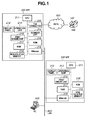
- Fig. 1 illustrates a configuration of a network system configured from a PC, a multi function peripheral (MFP), and a single function peripheral (SFP).
- MFP multi function peripheral
- SFP single function peripheral
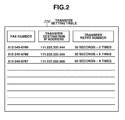
- Fig. 2 is a configuration diagram of a transfer setting table stored in the MFP, illustrating data transfer to the SFP.
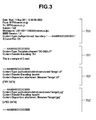
- Fig. 3 is a data configuration diagram of an electronic mail.
- Fig. 4 is a print example of the electronic mail illustrated in Fig. 3 .
- Fig. 5 is a sequence diagram among a FAX apparatus, an MFP, and an SFP.
- Fig. 6 is a flowchart illustrating the processing performed by the MFP of Fig. 1 .
- Fig. 7 is a flowchart illustrating the processing performed by the SFP of Fig. 1 .
- Fig. 1 is a block diagram illustrating a configuration of an image forming system according to the present embodiment.
- This image forming system is configured from a facsimile apparatus 100 (hereinafter, "FAX apparatus") for transmitting facsimile data, an MFP 200 that includes a plurality of functions, such as a facsimile function, a print function, and an E-mail transmission function, a single function apparatus (hereinafter, "SFP") 300 for printing, and a versatile personal computer (hereinafter, "PC”) 400.
- FAX apparatus facsimile apparatus 100
- MFP 200 that includes a plurality of functions, such as a facsimile function, a print function, and an E-mail transmission function
- SFP single function apparatus
- PC versatile personal computer
- the FAX apparatus 100 and the MFP 200 are connected by a public switched telephone network (PSTN) or an integrated service digital network (ISDN).
- PSTN public switched telephone network
- ISDN integrated service digital network
- the MFP 200, the SFP 300, and the PC 400 are communicably connected to each other on a local area network (LAN) 600.
- LAN local area network
- the MFP 200 has a plurality of FAX lines and FAX numbers. Further, the MFP 200 can set one transfer destination apparatus per FAX number, so that the facsimile data received by the MFP 200 can be transferred to different transfer destinations.
- the MFP 200 can convert the facsimile data received from the FAX apparatus 100 into image data in a file format that can be printed by the SFP 300, attach the image data to an electronic mail as an image file, and transfer that electronic mail to the SFP 300 via the LAN 600.
- the image data is directly transferred to the SFP 300 without going via an electronic mail server by using an electronic mail transmission protocol called "simple mail transfer protocol" (SMTP).
- SMTP simple mail transfer protocol
- the MFP includes a function called "direct SMTP", which enables the MFP to transmit image data generated by reading a document with a scanner by electronic mail using the SMTP protocol, and to make the SFP 300 print the image data.
- the SFP 300 receives the electronic mail data via the LAN 600, and prints the received data. At this stage, if the received electronic mail data was transferred from the FAX apparatus 100 via the MFP 200, the SFP 300 prints the image file attached to the electronic mail data. If the data was not received in this manner, the SFP 300 prints the body text of the electronic mail and the attachment image file. Further, the SFP 300 can also receive and print PDL data transmitted from a printer driver in the PC 400.
- the data that flows through the LAN 600 is transmitted based on a transmission protocol up to the transport layer called transmission control protocol / Internet protocol (TCP/IP). Further, the electronic mail data can be transmitted and received by using SMTP as an upper layer communication protocol.
- TCP/IP transmission control protocol / Internet protocol
- a central processing unit (CPU) 211 controls the MFP 200.
- a read-only memory (ROM) 216 stores program codes for controlling the CPU 211, a display panel 212, an operation unit 213, a scanner unit 214, and a print engine unit 215. By using a rewritable flash ROM for the ROM 216, the program codes stored in the ROM can be updated.
- a random access memory (RAM) 217 can be used to serve as a work memory for the control program codes, as well as to temporarily store images to be output for print to the print engine unit 215.
- a non-volatile memory 218 temporarily stores the received facsimile data, electronic mail, and attached image files.
- the non-volatile memory 218 is configured from a hard disk drive (HDD), a flash ROM and the like.
- the print engine unit 215 performs image formation based on the image data.
- the print engine unit 215 acquires a remaining amount of toner required for image formation at periodic intervals, or when one image page is printed, or when toner is replenished.
- the acquired toner remaining amount is stored in the RAM 217.
- the scanner unit 214 reads a document and converts it into image data.
- Various keys for receiving operations from the user are provided on the operation unit 213, so that the user can issue execution instructions for the various programs.
- the display panel 212 displays operation screens for functions, settings and the like. Electronic mail data generated from the image data converted by the scanner unit 214 can also be transmitted to an external device.
- An Ethernet ® interface 219 for connecting to the LAN 600 can transmit and receive electronic mail data and PDL data.
- a FAX connector 220 for connecting to a public switched telephone network (PSTN) 500 facsimile data from the FAX apparatus 100 can be transmitted and received.
- PSTN public switched telephone network
- a CPU 311 controls the SFP 300.
- a control program for executing the processing described below in Fig. 7 is stored in the CPU 311.
- a display panel 312 displays functions and settings.
- An operation unit 313 issues execution instructions for the various programs.
- a print engine unit 315 is configured to print image data.
- a ROM 316 stores program codes for controlling the CPU 311, the display panel 312, the operation unit 313, and the print engine unit 315.
- a RAM 317 can be used to serve as a work memory for the control program codes, as well as to temporarily store images to be printed by the print engine unit 315.
- a non-volatile memory 318 temporarily stores electronic mail and attached image files.
- An Ethernet ® interface 319 for connecting to the LAN 600 can transmit and receive electronic mail data and PDL data.
- the MFP 200 transfers facsimile data transmitted from the FAX apparatus 100 to the SFP 300 by electronic mail, and performs printing based on the transferred electronic mail with the SFP 300.
- Fig. 2 is a table illustrating a facsimile data transfer setting stored in the non-volatile memory 218 of the MFP 200.
- the transfer setting table 230 is used to check a reception condition to determine whether facsimile data received from the FAX apparatus 100 should be printed by the MFP 200 itself or should be transferred to another apparatus. Further, the transfer setting table 230 is referred to in order to specify the transfer destination apparatus when transferring facsimile data.
- the transfer setting table 230 is configured from FAX numbers, transfer destination IP addresses, and transfer retry numbers.
- facsimile data is received as to a FAX number
- data transfer is performed to the apparatus set as the transfer destination IP address based on SMTP, which is the protocol used for electronic mail data transfer.
- the MFP 200 again tries to transfer the data.
- the number of times that the MFP 200 retries transfer of the data is set by the transfer retry number. If the number of retries exceeds the set value for the transfer retry number, the MFP 200 stops data transfer, and performs proxy printing by itself.
- the FAX numbers, the transfer destination IP addresses, and the transfer retry numbers set in the transfer setting table 230 can be freely rewritten via the display panel 212 and the operation unit 213. Further, these settings can also be configured such that only a person having a special authority, such as an administrator, can set them.
- Fig. 3 illustrates an example of electronic mail data transmitted and received by the MFP 200 and the SFP 300.
- the electronic mail data in Fig. 3 is configured from an E-mail header 700, an E-mail body 701, and attached image files (attachment image file) 702 and 703.
- the E-mail header 700 is configured from a "Date” field for setting the transmission date and time, a "From” field for setting the electronic mail address of the sender, and a “To” field for setting the mail address of the receiver. Further, the E-mail header 700 also includes a "Subject” field for setting the subject of the electronic mail, and a "Message-ID” field for setting a unique identification (ID) that is generated based on the transmission date and time and the mail address of the sender device in order to identify the electronic mail data.
- ID unique identification
- the E-mail header 700 can be configured such that it includes a field ("X-Canon-Fax") for indicating transfer printing from the FAX apparatus 100.
- X-Canon-Fax a field for indicating transfer printing from the FAX apparatus 100.
- the SFP 300 receiving the electronic mail data determines that the received electronic mail was transferred from the FAX apparatus 100 via the MFP 200, and prints only the attachment image file of the electronic mail data.
- this field attribute may be set to OFF.
- E-mail data has to be information that can be read in 7-bit code
- the attachment image file is binary data it cannot be transmitted as is. Therefore, the E-mail body and the attachment image files 702 and 703 are transmitted by converting the data into a multipurpose Internet mail extension (MIME) format.
- MIME multipurpose Internet mail extension
- the MIME version is set by the "MIME-Version" field in the E-mail header 700.
- Various data attributes are set in a "Content-Type" field of the E-mail body 701 and the attachment image files 702 and 703.
- a coding method of the data is set in a "Content-Transfer-Encoding" field.
- the E-mail body 701 is configured from "ISO-2022-JP" language system text data.
- the attachment image file 702 is configured from image data in a tagged image file format (TIFF) that uses a coding method called "base 64".
- TIFF tagged image file format
- the attachment image file 703 is configured from image data in a joint photographic experts group (JPEG) format that uses the same "base 64" coding method.
- JPEG joint photographic experts group
- the two attachment image files 702 and 703 are attached to the electronic mail.
- the number of image files attached to the electronic mail and the compression format of the attachment image files are not especially limited.
- the attachment image file can be configured from multiple pages in which a plurality of images are stored in a single file. Consequently, image printing of a plurality of pages can be realized by sending one attachment image file in the electronic mail.
- a portable document format (PDF) file may also be attached to the electronic mail.
- PDF portable document format
- Fig. 4 illustrates a printing example of the E-mail body and the attachment image file of the electronic mail data illustrated in Fig. 3 .
- the images are printed one by one.
- the E-mail body 701 is printed at the first page
- the attachment image file 702 is printed at the second page
- the attachment image file 703 is printed at the third page.
- this field is ON or OFF, it can be determined whether to omit the printing of the E-mail body 701 in non-existent electronic mail data when transmitting image data from the FAX apparatus 100 to the MFP 200.
- Fig. 5 illustrates the basic operation sequence among the FAX apparatus 100, the MFP 200, and the SFP 300.
- the sequence in Fig. 5 is an operation procedure for transferring facsimile data received from the FAX apparatus 100 by the MFP 200 to the SFP 300 by electronic mail, and printing the transferred data with the SFP.
- the sequence illustrated in Fig. 5 is described assuming that the facsimile data received by the MFP 200 matches a transferring condition to the SFP 300, the amount of toner required for printing by the print engine unit 315 in the SFP 300 is sufficient to perform printing normally.
- step S100 the facsimile data transmitted from the FAX apparatus 100 is received by the MFP 200 based on a known facsimile procedure.
- step S101 the facsimile data is temporarily stored in the non-volatile memory 218 of the MFP 200, and the completion of reception is notified to the FAX apparatus 100.
- step S102 the electronic mail data and attachment image files are generated for transfer to the SFP 300.
- the attachment image files are generated based on the facsimile data stored in step S101, and are configured from an image file in a TIFF format or a JPEG format.
- step S103 to S108 and step S112 the electronic mail data and the attachment image files generated in step S102 are transmitted via SMTP commands.
- the completion of printing is notified by returning a message indicating "success" after the below-described printing processing has been completed.
- step S109 the SFP 300 analyzes the electronic mail data received in a MIME format, and restores the E-mail body 701 and attachment image files 702 and 703 by decoding.
- step S110 the SFP 300 generates an image for printing based on the restored E-mail body 701 and attachment image files 702 and 703.
- step S111 the SFP 300 prints the generated image.
- step S112 the SFP 300 returns an SMTP session finish command (QUIT) as a response to the data finish command.
- QUIT SMTP session finish command
- step S113 the MFP 200 confirms that the printing in step S108 has been completed, and then deletes the facsimile data that is temporarily stored in the non-volatile memory 218 of the MFP 200.
- Fig. 6 is a flowchart illustrating the processing performed by the MFP 200.
- the control program code for executing the respective steps in this flowchart is stored in the ROM 216, and executed by the CPU 211.
- step S200 the MFP 200 receives facsimile data from the FAX apparatus 100 and stores the facsimile data in the non-volatile memory 218.
- This processing corresponds to steps S100 and S101 in Fig. 5 .
- step S201 the CPU 211 determines whether the facsimile data was received with a transferring condition to one or a plurality of pre-registered SFPs. Specifically, the CPU 211 refers to the transfer setting table 230 illustrated in Fig. 2 to determine whether the FAX number when the facsimile data is received, matches any of the FAX numbers registered in the transfer setting table of Fig. 2 , and determines whether a transfer setting to the SFP is set.
- step S201 If it is determined in step S201 that a transfer setting is not set (NO in step S201), the processing proceeds to step S210.
- step S210 the print engine unit 215 prints the facsimile data.
- step S201 if it is determined in step S201 that a transfer setting is set (YES in step S201), in step S202, the CPU 211 generates electronic mail data for transmission to the transfer apparatus indicated by the IP address corresponding to the received FAX number.
- the following description will be based on the assumption that the apparatus to which the facsimile data is transmitted is the SFP 300 illustrated in Fig. 1 .
- the "X-Canon-FAX" field in the E-mail header 700 of the electronic mail data generated in step S202 is set to "ON". Further, the electronic mail data is generated such that the format of the attachment image files can be printed by the SFP 300 (e.g., a TIFF format or a JPEG format).
- step S203 the CPU 211 starts an SMTP session for transmitting the electronic mail data to the IP address of the transfer apparatus. This processing corresponds to step S103 in Fig. 5 .
- step S204 the CPU 211 determines whether it was possible to start the SMTP session. If the session could not be started (NO in step S204), the CPU 211 determines that the electronic mail data cannot be transmitted to the SFP 300, and after a predetermined time period has elapsed the CPU 211 again issues a request to start a SMTP session. This session start request is repeated the number of times indicated by the transfer retry number corresponding to the IP address of the transfer apparatus illustrated in Fig. 2 .
- step S205 the CPU 211 determines whether the number of retries has reached the transfer retry number (upper limit) in Fig. 2 . If it is determined that the upper limit has been reached (YES in step S205), the CPU 211 stops the transfer to the SFP 300 and the processing proceeds to step S210. In step S210, printing is performed by the MFP 200.
- step S206 the electronic mail data generated in step S202 is transmitted. This processing corresponds to step S107 in Fig. 5 .
- step S207 the CPU 211 monitors whether the MFP 200 has switched from a state in which an SMTP session is established to a state in which an SMTP session is not established (whether the session has ended). If the session has ended in the middle of the electronic mail data transmission (YES in step S207), the processing returns to step S203 and electronic mail data transmission is performed from the start.
- step S208 the CPU 211 determines whether transmission is completed. If it is determined that electronic mail transmission has finished normally (YES in step S208), the processing proceeds to step S209. In step S209, the CPU 211 deletes the facsimile data that was temporarily stored in the RAM 217 and the non-volatile memory 218, and finishes the processing performed in this flowchart.
- Fig. 7 is a flowchart illustrating the processing performed by the SFP 300.
- the control program for executing the respective steps in this flowchart is stored in the ROM 316, and executed by the CPU 311.
- the processing illustrated in the flowchart of Fig. 7 is started based on the reception of data via the LAN 600 and the Ethernet ® interface 319 from either the MFP 200 or the PC 400.
- step S300 the SFP 300 determines whether the data received by the Ethernet ® interface 319 is electronic mail data or PDL data based on the protocol and a port number.
- step S301 the CPU 311 checks the "X-Canon-Fax" field included in the received electronic mail data by referring to the E-mail header 700 in the electronic mail data illustrated in Fig. 3 in order to determine whether the received data is electronic mail data transferred from the FAX apparatus 100 (FAX transfer) or is some other electronic mail data (e.g., electronic mail data that uses a direct SMTP function). If the "X-Canon-Fax" field is ON, the CPU 311 determines that the received data is a FAX transfer (YES in step S301), and the processing proceeds to step S302.
- FAX transfer electronic mail data transferred from the FAX apparatus 100
- some other electronic mail data e.g., electronic mail data that uses a direct SMTP function
- step S301 determines that the received data is not a FAX transfer (NO in step S301), and the processing proceeds to step S305.
- step S302 the CPU 311 checks the toner remaining amount stored in the RAM 317.
- the acquired toner remaining amount was written in the RAM 317 when the print engine unit 315 collected the status at a predetermined timing as described above.
- step S303 the CPU 311 compares the toner remaining amount acquired in step S302 with a reference value (defined value) determined in advance by the SFP 300.
- the defined value for the toner remaining amount in the present embodiment indicates a stage at which faint printing due to an insufficient toner remaining amount does not occur, and is a reference for guaranteeing normal printing. If it is determined that the toner remaining amount is less than the predetermined reference value (defined value) by the SFP 300 (YES in step S303), in step S304, the CPU 311 refuses to receive the electronic mail data by transmitting a QUIT command as a response to the HELO command from the MFP 200. Then, the processing in this flowchart is finished. Consequently, printing of the electronic mail data transferred from the MFP 200 is restricted.
- step S303 determines whether the toner remaining amount is equal to or greater than the defined value, so that there is a guarantee that a output print product is not faint (NO in step S303).
- step S305 the CPU 311 allows the SFP 300 to receive the data, and generates a print image based on the received data. If the received data is electronic mail data, the CPU 311 restores the E-mail body 701 and the attachment image files 702 and 703 by analyzing and decoding the MIME-format data and generates the print image.
- step S301 If it is determined in step S301 that the received data is a FAX transfer, an image is generated without the E-mail body 701 portion of the electronic mail data.
- the received data is PDL data
- step S305 the CPU 311 analyzes the PDL data, and generates a bitmap image based on the respective commands described in the PDL data.
- step S306 the image generated in step S305 is printed.
- step S307 if the CPU 311 determines that printing of all the page images has been completed (YES in step S307), the processing in this flowchart is finished. On the other hand, if the CPU 311 determines that printing of all the page images has not yet been completed (NO in step S307), the processing proceeds to step S308.
- step S308 the CPU 311 determines whether the received data is electronic mail data. If it is determined that the received data is electronic mail (YES in step S308), the processing proceeds to step S309. In step S309, based on the received electronic mail data, the CPU 311 checks whether the received data is electronic mail data that was transmitted from the FAX apparatus 100 via the MFP 200. If it is determined that the received data is electronic mail data transmitted from the FAX apparatus 100 via the MFP 200 (YES in step S309), the processing proceeds to step S310. In step S310, the toner remaining amount is confirmed based on the same procedure as in step S302 when the image of each page is printed and discharged onto a discharge unit in the SFP 300.
- step S311 the CPU 311 determines whether the toner remaining amount is less than the defined value based on the same procedure as in step S303. If it is determined that the toner remaining amount is less than the defined value (YES in step S311), the CPU 311 stops printing of the electronic mail data, ends the SMTP session to notify the MFP 200, which is still transmitting the electronic mail data, that printing was unsuccessful. Further, the CPU 311 deletes the received electronic mail and the attachment image files, and finishes the processing performed in this flowchart.
- the MFP 200 When this notification is transmitted to the MFP 200, the MFP 200 attempts to transmit the data a number of times for retry indicated in the transfer setting table 230. If transmission is still unsuccessful even after these retries, proxy printing is performed.
- step S308 If it is determined in step S308 that the printing is based on PDL data (NO in step S308), or determined in step S309 that the received data is not a FAX transfer (NO in step S309), the processing returns to step S305, and print image generation of the next page is continued.
- the toner remaining amount is confirmed in steps S302 and S303 when the electronic mail data starts to be received, and in steps S308 and S309 while the electronic mail is being received on a page-by-page basis.
- the toner remaining amount may vary and reception of the electronic mail data is restarted.
- reception/printing are restricted based on whether the data received by the Ethernet interface 319 is electronic mail data or PDL data. Consequently, when an electronic mail is received, faint printing is prevented by stopping reception and printing, while if the received data is PDL data, reception and printing are continued.
- an SMTP session start request is refused as the method for restricting printing based on the electronic mail data from the MFP 200.
- the electronic mail data per se is not received by the SFP 300. Consequently, a situation in which the electronic mail data is left stored in the SFP 300 without being printed can be prevented.
- step S301 whether the received electronic mail data was transferred from the FAX apparatus 100 is determined. Then based on this determination, it is determined whether print processing is performed confirming the toner remaining amount or without confirming the toner remaining amount (see steps S302 and S303). However, if the received data is electronic mail data, the processing of step S302 may be performed across the board without performing the above-described determinations. Thus, the contents of the E-mail header 700 in the received electronic mail data do not have to be analyzed, so that faster processing can be performed.
- the E-mail header 700 of the electronic mail data illustrated in Fig. 3 is referred to (see step S301).
- this determination may be made in a different way.
- the determination can be made based on whether the electronic mail was received in the procedure illustrated in Fig. 5 (i.e., SMTP protocol procedure), or whether the electronic mail was received from a post office protocol (POP) 3 server, for example.
- POP post office protocol
- the image forming system is configured such that facsimile data from the FAX apparatus 100 is transferred by the MFP 200 based on an SMTP protocol. Consequently, on the SFP 300 side, when the received data is received based on the SMTP protocol, the received data is determined to be a FAX transfer (see step S300 and S301). However, if the protocol used by the MFP 200 to transfer the data to the SFP 300 is not SMTP, but is some other protocol (e.g., file transfer protocol (FTP)), it may be determined that the received data is a FAX transfer based on that other protocol.
- FTP file transfer protocol
- aspects of the present invention can also be realized by a computer of a system or apparatus (or devices such as a CPU or MPU) that reads out and executes a program recorded on a memory device to perform the functions of the above-described embodiment (s), and by a method, the steps of which are performed by a computer of a system or apparatus by, for example, reading out and executing a program recorded on a memory device to perform the functions of the above-described embodiment(s).
- the program is provided to the computer for example via a network or from a recording medium of various types serving as the memory device (e.g., computer-readable medium).
Landscapes
- Engineering & Computer Science (AREA)
- Multimedia (AREA)
- Signal Processing (AREA)
- General Engineering & Computer Science (AREA)
- Theoretical Computer Science (AREA)
- General Physics & Mathematics (AREA)
- Physics & Mathematics (AREA)
- Human Computer Interaction (AREA)
- Computing Systems (AREA)
- Automation & Control Theory (AREA)
- Facsimiles In General (AREA)
- Information Transfer Between Computers (AREA)
- Accessory Devices And Overall Control Thereof (AREA)
- Control Or Security For Electrophotography (AREA)
Abstract
Description
- The present invention relates to an image forming system configured from a data communication apparatus that transmits electronic mail data generated based on facsimile data received via a public line and an image forming apparatus that forms an image based on that electronic mail data.
- Conventionally, an image forming apparatus that has a facsimile function for transmitting and receiving facsimile data via a public line has been generally known. Further, in recent years Internet facsimile apparatuses (hereinafter sometimes also referred to as "Internet FAX apparatus") have been also becoming commonplace as a facsimile apparatus capable of performing facsimile communication via the Internet using an electronic mail protocol. An Internet FAX transmits data by using an electronic mail protocol (simple mail transfer protocol ("SMTP")) instead of a telephone line, and is recommended by the International Telecommunication Union (ITU).
- An Internet FAX apparatus can utilize the Internet or an intranet to transmit and receive a facsimile. Compared with a facsimile apparatus that utilizes a telephone line, an Internet FAX apparatus can realize a reduction in communication costs, can computerize paper documents by a simple operation equivalent to a facsimile, and can attach that computerized document to an electronic mail and transmit it to a personal computer. Under an Internet FAX apparatus standard called "simple mode", image data with an A4 printing paper size and 200 dots per inch (dpi) printing resolution can be transmitted from the Internet FAX apparatus to a printer, and the image data received by the printer can be printed out.
- Further, the above-described image forming apparatus can also receive and print out electronic mail other than electronic mail transmitted based on the Internet FAX standard. Moreover, in addition to the electronic mail receiving function, the above-described image forming apparatus may include a function for printing print data generated by a printer driver on a personal computer (PC) received via a network. Such a printer can also print electronic mail and page description language (PDL) data received in parallel.
- Japanese Patent Application Laid-Open No.
2002-64670 - When printing the received PDL data, although printing can be repeated by re-transmitting the data from the PC, if the received data is electronic mail data, since the sender and the receiver are different, in many cases it is impossible for the receiver to re-transmit and print the data.
- Consequently, if printing is prohibited across the board regardless of the type of data when the toner remaining amount falls below the predetermined value as carried out in the conventional method, when receiving and printing the print data, printing is restricted despite the fact that a few pages can be printed even though the toner remaining amount has fallen below the predetermined value. Consequently, user convenience is dramatically reduced.
- The present invention is directed to providing means for restricting printing depending on the type of data.
- The present invention in its first aspect provides an image forming apparatus as specified in claims 1 to 3.
- According to the present invention, image formation can be suitably restricted based on the type of data that is received via a network.
- Further features and aspects of the present invention will become apparent from the following detailed description of embodiments with reference to the attached drawings.
- The accompanying drawings, which are incorporated in and constitute a part of the specification, illustrate embodiments, features, and aspects of the invention and, together with the description, serve to explain the principles of the invention.
-
Fig. 1 illustrates a configuration of a network system configured from a PC, a multi function peripheral (MFP), and a single function peripheral (SFP). -
Fig. 2 is a configuration diagram of a transfer setting table stored in the MFP, illustrating data transfer to the SFP. -
Fig. 3 is a data configuration diagram of an electronic mail. -
Fig. 4 is a print example of the electronic mail illustrated inFig. 3 . -
Fig. 5 is a sequence diagram among a FAX apparatus, an MFP, and an SFP. -
Fig. 6 is a flowchart illustrating the processing performed by the MFP ofFig. 1 . -
Fig. 7 is a flowchart illustrating the processing performed by the SFP ofFig. 1 . - Various exemplary embodiments, features, and aspects of the invention will be described in detail below with reference to the drawings.
- An embodiment of the present invention will now be described using the drawings.
-
Fig. 1 is a block diagram illustrating a configuration of an image forming system according to the present embodiment. This image forming system is configured from a facsimile apparatus 100 (hereinafter, "FAX apparatus") for transmitting facsimile data, an MFP 200 that includes a plurality of functions, such as a facsimile function, a print function, and an E-mail transmission function, a single function apparatus (hereinafter, "SFP") 300 for printing, and a versatile personal computer (hereinafter, "PC") 400. In the present embodiment, the MFP is described as an example of a data communication apparatus, and the SFP is described as an example of an image forming apparatus. - The
FAX apparatus 100 and the MFP 200 are connected by a public switched telephone network (PSTN) or an integrated service digital network (ISDN). - The MFP 200, the SFP 300, and the PC 400 are communicably connected to each other on a local area network (LAN) 600.
- The MFP 200 has a plurality of FAX lines and FAX numbers. Further, the
MFP 200 can set one transfer destination apparatus per FAX number, so that the facsimile data received by theMFP 200 can be transferred to different transfer destinations. - The MFP 200 can convert the facsimile data received from the
FAX apparatus 100 into image data in a file format that can be printed by the SFP 300, attach the image data to an electronic mail as an image file, and transfer that electronic mail to the SFP 300 via theLAN 600. In this data transfer, the image data is directly transferred to the SFP 300 without going via an electronic mail server by using an electronic mail transmission protocol called "simple mail transfer protocol" (SMTP). - The MFP includes a function called "direct SMTP", which enables the MFP to transmit image data generated by reading a document with a scanner by electronic mail using the SMTP protocol, and to make the SFP 300 print the image data.
- The SFP 300 receives the electronic mail data via the
LAN 600, and prints the received data. At this stage, if the received electronic mail data was transferred from theFAX apparatus 100 via theMFP 200, the SFP 300 prints the image file attached to the electronic mail data. If the data was not received in this manner, the SFP 300 prints the body text of the electronic mail and the attachment image file. Further, the SFP 300 can also receive and print PDL data transmitted from a printer driver in the PC 400. - The data that flows through the
LAN 600 is transmitted based on a transmission protocol up to the transport layer called transmission control protocol / Internet protocol (TCP/IP). Further, the electronic mail data can be transmitted and received by using SMTP as an upper layer communication protocol. - Next, a hardware configuration of the MFP 200 will be described. A central processing unit (CPU) 211 controls the
MFP 200. A read-only memory (ROM) 216 stores program codes for controlling theCPU 211, adisplay panel 212, anoperation unit 213, ascanner unit 214, and aprint engine unit 215. By using a rewritable flash ROM for theROM 216, the program codes stored in the ROM can be updated. A random access memory (RAM) 217 can be used to serve as a work memory for the control program codes, as well as to temporarily store images to be output for print to theprint engine unit 215. A non-volatilememory 218 temporarily stores the received facsimile data, electronic mail, and attached image files. Thenon-volatile memory 218 is configured from a hard disk drive (HDD), a flash ROM and the like. - The
print engine unit 215 performs image formation based on the image data. Theprint engine unit 215 acquires a remaining amount of toner required for image formation at periodic intervals, or when one image page is printed, or when toner is replenished. The acquired toner remaining amount is stored in theRAM 217. - The
scanner unit 214 reads a document and converts it into image data. Various keys for receiving operations from the user are provided on theoperation unit 213, so that the user can issue execution instructions for the various programs. Thedisplay panel 212 displays operation screens for functions, settings and the like. Electronic mail data generated from the image data converted by thescanner unit 214 can also be transmitted to an external device. - An Ethernet®
interface 219 for connecting to theLAN 600 can transmit and receive electronic mail data and PDL data. - Via a
FAX connector 220 for connecting to a public switched telephone network (PSTN) 500, facsimile data from theFAX apparatus 100 can be transmitted and received. - Next, the parts of the hardware configuration of the
SFP 300 that are different from theMFP 200 will be described. ACPU 311 controls theSFP 300. A control program for executing the processing described below inFig. 7 is stored in theCPU 311. Adisplay panel 312 displays functions and settings. Anoperation unit 313 issues execution instructions for the various programs. Aprint engine unit 315 is configured to print image data. AROM 316 stores program codes for controlling theCPU 311, thedisplay panel 312, theoperation unit 313, and theprint engine unit 315. ARAM 317 can be used to serve as a work memory for the control program codes, as well as to temporarily store images to be printed by theprint engine unit 315. Anon-volatile memory 318 temporarily stores electronic mail and attached image files. An Ethernet® interface 319 for connecting to theLAN 600 can transmit and receive electronic mail data and PDL data. - The overall configuration of the system according to the present embodiment was described above. Next, an operation will be described in which the
MFP 200 transfers facsimile data transmitted from theFAX apparatus 100 to theSFP 300 by electronic mail, and performs printing based on the transferred electronic mail with theSFP 300. -
Fig. 2 is a table illustrating a facsimile data transfer setting stored in thenon-volatile memory 218 of theMFP 200. The transfer setting table 230 is used to check a reception condition to determine whether facsimile data received from theFAX apparatus 100 should be printed by theMFP 200 itself or should be transferred to another apparatus. Further, the transfer setting table 230 is referred to in order to specify the transfer destination apparatus when transferring facsimile data. - The transfer setting table 230 is configured from FAX numbers, transfer destination IP addresses, and transfer retry numbers. When facsimile data is received as to a FAX number, data transfer is performed to the apparatus set as the transfer destination IP address based on SMTP, which is the protocol used for electronic mail data transfer.
- If a session cannot be established during data transfer, specifically, if an SMTP session start request is refused by the transfer apparatus, the
MFP 200 again tries to transfer the data. The number of times that theMFP 200 retries transfer of the data is set by the transfer retry number. If the number of retries exceeds the set value for the transfer retry number, theMFP 200 stops data transfer, and performs proxy printing by itself. - The FAX numbers, the transfer destination IP addresses, and the transfer retry numbers set in the transfer setting table 230 can be freely rewritten via the
display panel 212 and theoperation unit 213. Further, these settings can also be configured such that only a person having a special authority, such as an administrator, can set them. -
Fig. 3 illustrates an example of electronic mail data transmitted and received by theMFP 200 and theSFP 300. The electronic mail data inFig. 3 is configured from anE-mail header 700, anE-mail body 701, and attached image files (attachment image file) 702 and 703. - The
E-mail header 700 is configured from a "Date" field for setting the transmission date and time, a "From" field for setting the electronic mail address of the sender, and a "To" field for setting the mail address of the receiver. Further, theE-mail header 700 also includes a "Subject" field for setting the subject of the electronic mail, and a "Message-ID" field for setting a unique identification (ID) that is generated based on the transmission date and time and the mail address of the sender device in order to identify the electronic mail data. - In addition, according to the present embodiment, the
E-mail header 700 can be configured such that it includes a field ("X-Canon-Fax") for indicating transfer printing from theFAX apparatus 100. By adding the "X-Canon-Fax" field to theE-mail header 700 illustrated inFig. 3 , transfer printing from theFAX apparatus 100 can be indicated. If the "X-Canon-Fax" field attribute is added, theSFP 300 receiving the electronic mail data determines that the received electronic mail was transferred from theFAX apparatus 100 via theMFP 200, and prints only the attachment image file of the electronic mail data. On the other hand, if the "X-Canon-Fax" field attribute is "OFF", or if the "X-Canon-Fax" field attribute is not added to theE-mail header 700, both the electronic mail body and the attachment image file are printed. - When the
MFP 200 utilizes the direct SMTP function to transmit electronic mail data including text data in the E-mail body to theSFP 300, this field attribute may be set to OFF. - Since E-mail data has to be information that can be read in 7-bit code, if the attachment image file is binary data it cannot be transmitted as is. Therefore, the E-mail body and the attachment image files 702 and 703 are transmitted by converting the data into a multipurpose Internet mail extension (MIME) format. The MIME version is set by the "MIME-Version" field in the
E-mail header 700. Various data attributes are set in a "Content-Type" field of theE-mail body 701 and the attachment image files 702 and 703. A coding method of the data is set in a "Content-Transfer-Encoding" field. - In the present embodiment, the
E-mail body 701 is configured from "ISO-2022-JP" language system text data. - In the present embodiment, the
attachment image file 702 is configured from image data in a tagged image file format (TIFF) that uses a coding method called "base 64". - The attachment image file 703 is configured from image data in a joint photographic experts group (JPEG) format that uses the same "base 64" coding method.
- In the present embodiment, the two attachment image files 702 and 703 are attached to the electronic mail. However, the number of image files attached to the electronic mail and the compression format of the attachment image files are not especially limited. In a case of a TIFF format, the attachment image file can be configured from multiple pages in which a plurality of images are stored in a single file. Consequently, image printing of a plurality of pages can be realized by sending one attachment image file in the electronic mail.
- For example, in addition to image files in a TIFF format or a JPEG format, a portable document format (PDF) file may also be attached to the electronic mail.
-
Fig. 4 illustrates a printing example of the E-mail body and the attachment image file of the electronic mail data illustrated inFig. 3 . - In
Fig. 4 , the images are printed one by one. TheE-mail body 701 is printed at the first page, theattachment image file 702 is printed at the second page, and the attachment image file 703 is printed at the third page. - In addition, if the "X-Canon-Fax" field indicating transfer printing from the
FAX apparatus 100 described inFig. 3 is not added or if the "X-Canon-Fax" field attribute is OFF, theelectronic mail body 701 and the attachment image files 702 and 703 are printed. - On the other hand, if the "X-Canon-Fax" field attribute is "ON", printing of the
E-mail body 701 is omitted, and just the attachment image files 702 and 703 are printed. - By referring to whether this field is ON or OFF, it can be determined whether to omit the printing of the
E-mail body 701 in non-existent electronic mail data when transmitting image data from theFAX apparatus 100 to theMFP 200. -
Fig. 5 illustrates the basic operation sequence among theFAX apparatus 100, theMFP 200, and theSFP 300. The sequence inFig. 5 is an operation procedure for transferring facsimile data received from theFAX apparatus 100 by theMFP 200 to theSFP 300 by electronic mail, and printing the transferred data with the SFP. The sequence illustrated inFig. 5 is described assuming that the facsimile data received by theMFP 200 matches a transferring condition to theSFP 300, the amount of toner required for printing by theprint engine unit 315 in theSFP 300 is sufficient to perform printing normally. - In step S100, the facsimile data transmitted from the
FAX apparatus 100 is received by theMFP 200 based on a known facsimile procedure. In step S101, the facsimile data is temporarily stored in thenon-volatile memory 218 of theMFP 200, and the completion of reception is notified to theFAX apparatus 100. - In step S102, the electronic mail data and attachment image files are generated for transfer to the
SFP 300. - The attachment image files are generated based on the facsimile data stored in step S101, and are configured from an image file in a TIFF format or a JPEG format.
- In steps S103 to S108 and step S112, the electronic mail data and the attachment image files generated in step S102 are transmitted via SMTP commands.
- Although a detailed description of the SMTP commands and their contents is omitted in the present embodiment, in the command indicating finishing of data transmission in step S112, the completion of printing is notified by returning a message indicating "success" after the below-described printing processing has been completed.
- In step S109, the
SFP 300 analyzes the electronic mail data received in a MIME format, and restores theE-mail body 701 and attachment image files 702 and 703 by decoding. - In step S110, the
SFP 300 generates an image for printing based on the restoredE-mail body 701 and attachment image files 702 and 703. - In step S111, the
SFP 300 prints the generated image. In step S112, theSFP 300 returns an SMTP session finish command (QUIT) as a response to the data finish command. - In step S113, the
MFP 200 confirms that the printing in step S108 has been completed, and then deletes the facsimile data that is temporarily stored in thenon-volatile memory 218 of theMFP 200. - The above was a description of the operation sequence among the
FAX apparatus 100, theMFP 200, and theSFP 300. -
Fig. 6 is a flowchart illustrating the processing performed by theMFP 200. The control program code for executing the respective steps in this flowchart is stored in theROM 216, and executed by theCPU 211. - First, in step S200, the
MFP 200 receives facsimile data from theFAX apparatus 100 and stores the facsimile data in thenon-volatile memory 218. This processing corresponds to steps S100 and S101 inFig. 5 . - In step S201, the
CPU 211 determines whether the facsimile data was received with a transferring condition to one or a plurality of pre-registered SFPs. Specifically, theCPU 211 refers to the transfer setting table 230 illustrated inFig. 2 to determine whether the FAX number when the facsimile data is received, matches any of the FAX numbers registered in the transfer setting table ofFig. 2 , and determines whether a transfer setting to the SFP is set. - If it is determined in step S201 that a transfer setting is not set (NO in step S201), the processing proceeds to step S210. In step S210, the
print engine unit 215 prints the facsimile data. - On the other hand, if it is determined in step S201 that a transfer setting is set (YES in step S201), in step S202, the
CPU 211 generates electronic mail data for transmission to the transfer apparatus indicated by the IP address corresponding to the received FAX number. In the present embodiment, the following description will be based on the assumption that the apparatus to which the facsimile data is transmitted is theSFP 300 illustrated inFig. 1 . - The "X-Canon-FAX" field in the
E-mail header 700 of the electronic mail data generated in step S202 is set to "ON". Further, the electronic mail data is generated such that the format of the attachment image files can be printed by the SFP 300 (e.g., a TIFF format or a JPEG format). - In step S203, the
CPU 211 starts an SMTP session for transmitting the electronic mail data to the IP address of the transfer apparatus. This processing corresponds to step S103 inFig. 5 . - In step S204, the
CPU 211 determines whether it was possible to start the SMTP session. If the session could not be started (NO in step S204), theCPU 211 determines that the electronic mail data cannot be transmitted to theSFP 300, and after a predetermined time period has elapsed theCPU 211 again issues a request to start a SMTP session. This session start request is repeated the number of times indicated by the transfer retry number corresponding to the IP address of the transfer apparatus illustrated inFig. 2 . - In step S205, the
CPU 211 determines whether the number of retries has reached the transfer retry number (upper limit) inFig. 2 . If it is determined that the upper limit has been reached (YES in step S205), theCPU 211 stops the transfer to theSFP 300 and the processing proceeds to step S210. In step S210, printing is performed by theMFP 200. - In step S206, the electronic mail data generated in step S202 is transmitted. This processing corresponds to step S107 in
Fig. 5 . - In step S207, the
CPU 211 monitors whether theMFP 200 has switched from a state in which an SMTP session is established to a state in which an SMTP session is not established (whether the session has ended). If the session has ended in the middle of the electronic mail data transmission (YES in step S207), the processing returns to step S203 and electronic mail data transmission is performed from the start. - In step S208, the
CPU 211 determines whether transmission is completed. If it is determined that electronic mail transmission has finished normally (YES in step S208), the processing proceeds to step S209. In step S209, theCPU 211 deletes the facsimile data that was temporarily stored in theRAM 217 and thenon-volatile memory 218, and finishes the processing performed in this flowchart. -
Fig. 7 is a flowchart illustrating the processing performed by theSFP 300. The control program for executing the respective steps in this flowchart is stored in theROM 316, and executed by theCPU 311. The processing illustrated in the flowchart ofFig. 7 is started based on the reception of data via theLAN 600 and the Ethernet® interface 319 from either theMFP 200 or thePC 400. - First, in step S300, the
SFP 300 determines whether the data received by the Ethernet® interface 319 is electronic mail data or PDL data based on the protocol and a port number. - If it is determined that the received data is electronic mail data (YES in step S300), in step S301, the
CPU 311 checks the "X-Canon-Fax" field included in the received electronic mail data by referring to theE-mail header 700 in the electronic mail data illustrated inFig. 3 in order to determine whether the received data is electronic mail data transferred from the FAX apparatus 100 (FAX transfer) or is some other electronic mail data (e.g., electronic mail data that uses a direct SMTP function). If the "X-Canon-Fax" field is ON, theCPU 311 determines that the received data is a FAX transfer (YES in step S301), and the processing proceeds to step S302. On the other hand, if the "X-Canon-Fax" field is OFF or if this field is not added, theCPU 311 determines that the received data is not a FAX transfer (NO in step S301), and the processing proceeds to step S305. - Next, in step S302, the
CPU 311 checks the toner remaining amount stored in theRAM 317. The acquired toner remaining amount was written in theRAM 317 when theprint engine unit 315 collected the status at a predetermined timing as described above. - In step S303, the
CPU 311 compares the toner remaining amount acquired in step S302 with a reference value (defined value) determined in advance by theSFP 300. The defined value for the toner remaining amount in the present embodiment indicates a stage at which faint printing due to an insufficient toner remaining amount does not occur, and is a reference for guaranteeing normal printing. If it is determined that the toner remaining amount is less than the predetermined reference value (defined value) by the SFP 300 (YES in step S303), in step S304, theCPU 311 refuses to receive the electronic mail data by transmitting a QUIT command as a response to the HELO command from theMFP 200. Then, the processing in this flowchart is finished. Consequently, printing of the electronic mail data transferred from theMFP 200 is restricted. - On the other hand, if it is determined in step S303 that the toner remaining amount is equal to or greater than the defined value, so that there is a guarantee that a output print product is not faint (NO in step S303), in step S305, the
CPU 311 allows theSFP 300 to receive the data, and generates a print image based on the received data. If the received data is electronic mail data, theCPU 311 restores theE-mail body 701 and the attachment image files 702 and 703 by analyzing and decoding the MIME-format data and generates the print image. - If it is determined in step S301 that the received data is a FAX transfer, an image is generated without the
E-mail body 701 portion of the electronic mail data. On the other hand, if the received data is PDL data, in step S305, theCPU 311 analyzes the PDL data, and generates a bitmap image based on the respective commands described in the PDL data. - In step S306, the image generated in step S305 is printed. In step S307, if the
CPU 311 determines that printing of all the page images has been completed (YES in step S307), the processing in this flowchart is finished. On the other hand, if theCPU 311 determines that printing of all the page images has not yet been completed (NO in step S307), the processing proceeds to step S308. - In step S308, the
CPU 311 determines whether the received data is electronic mail data. If it is determined that the received data is electronic mail (YES in step S308), the processing proceeds to step S309. In step S309, based on the received electronic mail data, theCPU 311 checks whether the received data is electronic mail data that was transmitted from theFAX apparatus 100 via theMFP 200. If it is determined that the received data is electronic mail data transmitted from theFAX apparatus 100 via the MFP 200 (YES in step S309), the processing proceeds to step S310. In step S310, the toner remaining amount is confirmed based on the same procedure as in step S302 when the image of each page is printed and discharged onto a discharge unit in theSFP 300. - In step S311, the
CPU 311 determines whether the toner remaining amount is less than the defined value based on the same procedure as in step S303. If it is determined that the toner remaining amount is less than the defined value (YES in step S311), theCPU 311 stops printing of the electronic mail data, ends the SMTP session to notify theMFP 200, which is still transmitting the electronic mail data, that printing was unsuccessful. Further, theCPU 311 deletes the received electronic mail and the attachment image files, and finishes the processing performed in this flowchart. - When this notification is transmitted to the
MFP 200, theMFP 200 attempts to transmit the data a number of times for retry indicated in the transfer setting table 230. If transmission is still unsuccessful even after these retries, proxy printing is performed. - If it is determined in step S308 that the printing is based on PDL data (NO in step S308), or determined in step S309 that the received data is not a FAX transfer (NO in step S309), the processing returns to step S305, and print image generation of the next page is continued.
- In
Fig. 7 , the toner remaining amount is confirmed in steps S302 and S303 when the electronic mail data starts to be received, and in steps S308 and S309 while the electronic mail is being received on a page-by-page basis. Thus, when the toner is replenished, the toner remaining amount may vary and reception of the electronic mail data is restarted. - As described above, according to the present embodiment, reception/printing are restricted based on whether the data received by the
Ethernet interface 319 is electronic mail data or PDL data. Consequently, when an electronic mail is received, faint printing is prevented by stopping reception and printing, while if the received data is PDL data, reception and printing are continued. - Further, in the present embodiment, when the toner remaining amount in the
SFP 300 is less than the defined value, an SMTP session start request is refused as the method for restricting printing based on the electronic mail data from theMFP 200. Specifically, the electronic mail data per se is not received by theSFP 300. Consequently, a situation in which the electronic mail data is left stored in theSFP 300 without being printed can be prevented. - In the flowchart of
Fig. 7 , whether the received electronic mail data was transferred from theFAX apparatus 100 is determined (see step S301). Then based on this determination, it is determined whether print processing is performed confirming the toner remaining amount or without confirming the toner remaining amount (see steps S302 and S303). However, if the received data is electronic mail data, the processing of step S302 may be performed across the board without performing the above-described determinations. Thus, the contents of theE-mail header 700 in the received electronic mail data do not have to be analyzed, so that faster processing can be performed. - Further, in the present embodiment, to determine whether the received electronic mail was transferred from the
FAX apparatus 100, theE-mail header 700 of the electronic mail data illustrated inFig. 3 is referred to (see step S301). However, this determination may be made in a different way. For example, the determination can be made based on whether the electronic mail was received in the procedure illustrated inFig. 5 (i.e., SMTP protocol procedure), or whether the electronic mail was received from a post office protocol (POP) 3 server, for example. In this case, if the electronic mail was received in the procedure illustrated inFig. 5 , in step S301 it is determined to be "YES", while if the electronic mail was received from a POP sever, in step S301 it is determined to be "NO". - The image forming system according to the present embodiment is configured such that facsimile data from the
FAX apparatus 100 is transferred by theMFP 200 based on an SMTP protocol. Consequently, on theSFP 300 side, when the received data is received based on the SMTP protocol, the received data is determined to be a FAX transfer (see step S300 and S301). However, if the protocol used by theMFP 200 to transfer the data to theSFP 300 is not SMTP, but is some other protocol (e.g., file transfer protocol (FTP)), it may be determined that the received data is a FAX transfer based on that other protocol. - Aspects of the present invention can also be realized by a computer of a system or apparatus (or devices such as a CPU or MPU) that reads out and executes a program recorded on a memory device to perform the functions of the above-described embodiment (s), and by a method, the steps of which are performed by a computer of a system or apparatus by, for example, reading out and executing a program recorded on a memory device to perform the functions of the above-described embodiment(s). For this purpose, the program is provided to the computer for example via a network or from a recording medium of various types serving as the memory device (e.g., computer-readable medium).
- While the present invention has been described with reference to embodiments, it is to be understood that the invention is not limited to the disclosed embodiments. It will of course be understood that this invention has been described above by way of example only, and that modifications of detail can be made within the scope of this invention.
Claims (9)
- An image forming apparatus comprising:receiving means (100) configured to receive data via a network;printing means (200, 300) configured to print an image based on the data received from the receiving means (100); andcontrol means (211) configured to control the receiving means (100) to refuse a data reception based on a simple mail transfer protocol (SMTP) when a toner remaining amount for the printing means (200, 300) is less than a predetermined value,wherein the printing means (200, 300) is configured to print, in the case that the receiving means (100) receives page description language (PDL) data, an image based on the received PDL data even if the toner remaining amount is less than the predetermined value.
- The image forming apparatus according to claim 1, wherein the control means (211) is configured to control the receiving means (100) to refuse data reception based on SMTP, when the toner remaining amount becomes less than the predetermined value prior to completion of printing by the printing means (200, 300).
- The image forming apparatus according to claim 2, wherein the printing means is configured to stop the printing when the toner remaining amount becomes less than the predetermined value prior to completion of printing.
- The image forming apparatus according to claim 1 or claim 2, wherein the control means (211) is configured to control the receiving means (100) to refuse data reception based on SMTP, in the case that the toner remaining amount is less than the predetermined value and the reception means receives the data including information which indicates a transfer from a facsimile apparatus.
- The image forming apparatus according to any one of claims 1 to 4, wherein the receiving means is configured to receive the data as electronic-mail data.
- The image forming apparatus according to claim 5, wherein the printing means is configured to print the image based on a file, which is attached with the electronic-mail data.
- A method for controlling an image forming apparatus, comprising:receiving data via a network;printing an image based on the received data with printing means (200, 300);refusing data reception based on SMTP when a toner remaining amount for the printing means (200, 300) is less than a predetermined value; andprinting, in the case that PDL data is received, an image based on the received data even if the toner remaining amount is less than the predetermined value.
- A program which, when run on a device, causes the device to execute the method according to claim 7.
- A non-transitory storage medium storing the program according to claim 8.
Priority Applications (1)
| Application Number | Priority Date | Filing Date | Title |
|---|---|---|---|
| EP18198439.4A EP3457678B1 (en) | 2011-05-20 | 2012-05-18 | Image forming apparatus and image forming system |
Applications Claiming Priority (1)
| Application Number | Priority Date | Filing Date | Title |
|---|---|---|---|
| JP2011113828A JP5791369B2 (en) | 2011-05-20 | 2011-05-20 | Image forming apparatus, image forming system, image forming system control method, and program |
Related Child Applications (1)
| Application Number | Title | Priority Date | Filing Date |
|---|---|---|---|
| EP18198439.4A Division EP3457678B1 (en) | 2011-05-20 | 2012-05-18 | Image forming apparatus and image forming system |
Publications (2)
| Publication Number | Publication Date |
|---|---|
| EP2525558A1 true EP2525558A1 (en) | 2012-11-21 |
| EP2525558B1 EP2525558B1 (en) | 2018-10-31 |
Family
ID=46146718
Family Applications (2)
| Application Number | Title | Priority Date | Filing Date |
|---|---|---|---|
| EP18198439.4A Active EP3457678B1 (en) | 2011-05-20 | 2012-05-18 | Image forming apparatus and image forming system |
| EP12168499.7A Not-in-force EP2525558B1 (en) | 2011-05-20 | 2012-05-18 | Image forming apparatus, image forming system, image forming system control method, and program |
Family Applications Before (1)
| Application Number | Title | Priority Date | Filing Date |
|---|---|---|---|
| EP18198439.4A Active EP3457678B1 (en) | 2011-05-20 | 2012-05-18 | Image forming apparatus and image forming system |
Country Status (5)
| Country | Link |
|---|---|
| US (2) | US9118793B2 (en) |
| EP (2) | EP3457678B1 (en) |
| JP (1) | JP5791369B2 (en) |
| KR (1) | KR101539823B1 (en) |
| CN (1) | CN102801885B (en) |
Families Citing this family (10)
| Publication number | Priority date | Publication date | Assignee | Title |
|---|---|---|---|---|
| JP5247540B2 (en) * | 2009-03-02 | 2013-07-24 | キヤノン株式会社 | Information processing system, control method therefor, and program |
| US9338108B2 (en) * | 2012-07-23 | 2016-05-10 | Xpedite Systems, Llc | Inter-modal messaging communications |
| JP5847120B2 (en) * | 2013-06-03 | 2016-01-20 | 京セラドキュメントソリューションズ株式会社 | Internet facsimile machine |
| US9288361B2 (en) | 2013-06-06 | 2016-03-15 | Open Text S.A. | Systems, methods and computer program products for fax delivery and maintenance |
| JP5907934B2 (en) * | 2013-08-26 | 2016-04-26 | 京セラドキュメントソリューションズ株式会社 | Facsimile machine |
| US11595335B2 (en) * | 2015-08-04 | 2023-02-28 | Blackberry Limited | Method and device for attaching messages stored at a device as attachments to a message being composed at the device |
| JP2019040255A (en) * | 2017-08-22 | 2019-03-14 | 富士ゼロックス株式会社 | Information processing device and program |
| JP7000977B2 (en) * | 2018-04-27 | 2022-01-19 | 京セラドキュメントソリューションズ株式会社 | Image forming device |
| JP7275806B2 (en) * | 2019-04-22 | 2023-05-18 | 富士フイルムビジネスイノベーション株式会社 | Information processing device, information processing system and program |
| US11095793B2 (en) * | 2019-09-20 | 2021-08-17 | Toshiba Tec Kabushiki Kaisha | Reception device and method to transmit data based on one or more tables |
Citations (3)
| Publication number | Priority date | Publication date | Assignee | Title |
|---|---|---|---|---|
| US5706037A (en) * | 1995-09-28 | 1998-01-06 | Xerox Corporation | System and method for overriding a low marking material status in a facsimile environment |
| JP2002064670A (en) | 2000-08-18 | 2002-02-28 | Murata Mach Ltd | Communication terminal |
| EP1338952A2 (en) * | 2002-02-19 | 2003-08-27 | Ricoh Company | Email based printer systems |
Family Cites Families (12)
| Publication number | Priority date | Publication date | Assignee | Title |
|---|---|---|---|---|
| JP3542394B2 (en) * | 1995-02-24 | 2004-07-14 | キヤノン株式会社 | Image forming device |
| KR0153386B1 (en) * | 1995-08-12 | 1998-12-15 | 김광호 | Toner Control Method of Image Recording Apparatus |
| JPH1032659A (en) | 1996-07-13 | 1998-02-03 | Ricoh Co Ltd | Facsimile system |
| JP2000224355A (en) * | 1999-02-04 | 2000-08-11 | Fuji Xerox Co Ltd | Network facsimile machine and its communication control method |
| JP3608995B2 (en) * | 1999-12-24 | 2005-01-12 | 村田機械株式会社 | Facsimile device |
| JP4118533B2 (en) * | 2001-05-24 | 2008-07-16 | 株式会社リコー | Facsimile multifunction machine and image processing method thereof |
| JP3810358B2 (en) * | 2002-09-02 | 2006-08-16 | 株式会社リコー | Network terminal equipment |
| JP2007158581A (en) * | 2005-12-02 | 2007-06-21 | Murata Mach Ltd | Facsimile machine |
| JP4186122B2 (en) * | 2006-04-28 | 2008-11-26 | 村田機械株式会社 | Communication terminal device |
| JP4773881B2 (en) * | 2006-05-24 | 2011-09-14 | キヤノン株式会社 | Image processing apparatus, data processing method, storage medium, and program |
| JP4894886B2 (en) | 2009-05-29 | 2012-03-14 | ブラザー工業株式会社 | Image forming apparatus, image forming system, and program |
| JP5316289B2 (en) * | 2009-07-30 | 2013-10-16 | 株式会社リコー | Image processing apparatus, control method thereof, and program |
-
2011
- 2011-05-20 JP JP2011113828A patent/JP5791369B2/en active Active
-
2012
- 2012-05-14 US US13/471,330 patent/US9118793B2/en active Active
- 2012-05-18 EP EP18198439.4A patent/EP3457678B1/en active Active
- 2012-05-18 EP EP12168499.7A patent/EP2525558B1/en not_active Not-in-force
- 2012-05-18 KR KR1020120052859A patent/KR101539823B1/en active Active
- 2012-05-21 CN CN201210159615.XA patent/CN102801885B/en active Active
-
2015
- 2015-07-16 US US14/801,593 patent/US9241088B2/en active Active
Patent Citations (3)
| Publication number | Priority date | Publication date | Assignee | Title |
|---|---|---|---|---|
| US5706037A (en) * | 1995-09-28 | 1998-01-06 | Xerox Corporation | System and method for overriding a low marking material status in a facsimile environment |
| JP2002064670A (en) | 2000-08-18 | 2002-02-28 | Murata Mach Ltd | Communication terminal |
| EP1338952A2 (en) * | 2002-02-19 | 2003-08-27 | Ricoh Company | Email based printer systems |
Also Published As
| Publication number | Publication date |
|---|---|
| CN102801885B (en) | 2015-06-03 |
| KR20120130288A (en) | 2012-11-30 |
| EP2525558B1 (en) | 2018-10-31 |
| JP2012244485A (en) | 2012-12-10 |
| US9118793B2 (en) | 2015-08-25 |
| EP3457678A1 (en) | 2019-03-20 |
| JP5791369B2 (en) | 2015-10-07 |
| EP3457678B1 (en) | 2021-09-08 |
| KR101539823B1 (en) | 2015-07-27 |
| US20150319334A1 (en) | 2015-11-05 |
| US20120293836A1 (en) | 2012-11-22 |
| CN102801885A (en) | 2012-11-28 |
| US9241088B2 (en) | 2016-01-19 |
Similar Documents
| Publication | Publication Date | Title |
|---|---|---|
| EP2525558B1 (en) | Image forming apparatus, image forming system, image forming system control method, and program | |
| US7397575B2 (en) | Communication apparatus and method having electronic mail communication function, and program | |
| US8184317B2 (en) | Internet facsimile apparatus, communication processing method and communication processing program | |
| JP5498134B2 (en) | Image reading apparatus, method, and program | |
| JP2006343862A (en) | Image processing apparatus, control method therefor, and program | |
| JP4039276B2 (en) | Service processing system and program | |
| JP2004171532A (en) | Image forming apparatus and storage area acquisition method | |
| CN1774911B (en) | Image processing system, image processing device and image processing method | |
| US10291810B2 (en) | Image forming apparatus and method for controlling image forming apparatus to selectively print and delete attached file in electronic mail | |
| US7116433B1 (en) | Image communication apparatus and image communication method | |
| US8937733B2 (en) | Internet facsimile and image transmission method | |
| US8593674B2 (en) | Method and apparatus for estimating file size before transmission of image data | |
| EP1768374A2 (en) | Network scanning method and image scanning device | |
| JP2003216390A (en) | Printing system, server computer, printing device, and control program for server computer and printing device | |
| JP2004236005A (en) | Image communication apparatus | |
| JP4762180B2 (en) | Image transfer device, image reception device, and image transfer system including the same | |
| US8520241B2 (en) | Image processing apparatus and control method thereof | |
| JP6129252B2 (en) | Image forming system | |
| JP2003288307A (en) | Data transmission device and program | |
| JP4595973B2 (en) | Data transmitting apparatus and program | |
| US9641473B2 (en) | Data communication apparatus, data communication apparatus control method, and program | |
| JP2006165622A (en) | Broadcast transmission control device | |
| JP2010034767A (en) | Image transmitting apparatus | |
| JP2021100178A (en) | Image forming apparatus | |
| JP2011103571A (en) | Printing system |
Legal Events
| Date | Code | Title | Description |
|---|---|---|---|
| PUAI | Public reference made under article 153(3) epc to a published international application that has entered the european phase |
Free format text: ORIGINAL CODE: 0009012 |
|
| AK | Designated contracting states |
Kind code of ref document: A1 Designated state(s): AL AT BE BG CH CY CZ DE DK EE ES FI FR GB GR HR HU IE IS IT LI LT LU LV MC MK MT NL NO PL PT RO RS SE SI SK SM TR |
|
| AX | Request for extension of the european patent |
Extension state: BA ME |
|
| 17P | Request for examination filed |
Effective date: 20130521 |
|
| GRAP | Despatch of communication of intention to grant a patent |
Free format text: ORIGINAL CODE: EPIDOSNIGR1 |
|
| STAA | Information on the status of an ep patent application or granted ep patent |
Free format text: STATUS: GRANT OF PATENT IS INTENDED |
|
| INTG | Intention to grant announced |
Effective date: 20180515 |
|
| GRAS | Grant fee paid |
Free format text: ORIGINAL CODE: EPIDOSNIGR3 |
|
| GRAA | (expected) grant |
Free format text: ORIGINAL CODE: 0009210 |
|
| STAA | Information on the status of an ep patent application or granted ep patent |
Free format text: STATUS: THE PATENT HAS BEEN GRANTED |
|
| AK | Designated contracting states |
Kind code of ref document: B1 Designated state(s): AL AT BE BG CH CY CZ DE DK EE ES FI FR GB GR HR HU IE IS IT LI LT LU LV MC MK MT NL NO PL PT RO RS SE SI SK SM TR |
|
| REG | Reference to a national code |
Ref country code: CH Ref legal event code: EP Ref country code: GB Ref legal event code: FG4D |
|
| REG | Reference to a national code |
Ref country code: AT Ref legal event code: REF Ref document number: 1060786 Country of ref document: AT Kind code of ref document: T Effective date: 20181115 |
|
| REG | Reference to a national code |
Ref country code: DE Ref legal event code: R096 Ref document number: 602012052798 Country of ref document: DE |
|
| REG | Reference to a national code |
Ref country code: IE Ref legal event code: FG4D |
|
| REG | Reference to a national code |
Ref country code: NL Ref legal event code: MP Effective date: 20181031 |
|
| REG | Reference to a national code |
Ref country code: LT Ref legal event code: MG4D |
|
| REG | Reference to a national code |
Ref country code: AT Ref legal event code: MK05 Ref document number: 1060786 Country of ref document: AT Kind code of ref document: T Effective date: 20181031 |
|
| PG25 | Lapsed in a contracting state [announced via postgrant information from national office to epo] |
Ref country code: IS Free format text: LAPSE BECAUSE OF FAILURE TO SUBMIT A TRANSLATION OF THE DESCRIPTION OR TO PAY THE FEE WITHIN THE PRESCRIBED TIME-LIMIT Effective date: 20190228 Ref country code: FI Free format text: LAPSE BECAUSE OF FAILURE TO SUBMIT A TRANSLATION OF THE DESCRIPTION OR TO PAY THE FEE WITHIN THE PRESCRIBED TIME-LIMIT Effective date: 20181031 Ref country code: AT Free format text: LAPSE BECAUSE OF FAILURE TO SUBMIT A TRANSLATION OF THE DESCRIPTION OR TO PAY THE FEE WITHIN THE PRESCRIBED TIME-LIMIT Effective date: 20181031 Ref country code: NO Free format text: LAPSE BECAUSE OF FAILURE TO SUBMIT A TRANSLATION OF THE DESCRIPTION OR TO PAY THE FEE WITHIN THE PRESCRIBED TIME-LIMIT Effective date: 20190131 Ref country code: PL Free format text: LAPSE BECAUSE OF FAILURE TO SUBMIT A TRANSLATION OF THE DESCRIPTION OR TO PAY THE FEE WITHIN THE PRESCRIBED TIME-LIMIT Effective date: 20181031 Ref country code: LT Free format text: LAPSE BECAUSE OF FAILURE TO SUBMIT A TRANSLATION OF THE DESCRIPTION OR TO PAY THE FEE WITHIN THE PRESCRIBED TIME-LIMIT Effective date: 20181031 Ref country code: HR Free format text: LAPSE BECAUSE OF FAILURE TO SUBMIT A TRANSLATION OF THE DESCRIPTION OR TO PAY THE FEE WITHIN THE PRESCRIBED TIME-LIMIT Effective date: 20181031 Ref country code: LV Free format text: LAPSE BECAUSE OF FAILURE TO SUBMIT A TRANSLATION OF THE DESCRIPTION OR TO PAY THE FEE WITHIN THE PRESCRIBED TIME-LIMIT Effective date: 20181031 Ref country code: ES Free format text: LAPSE BECAUSE OF FAILURE TO SUBMIT A TRANSLATION OF THE DESCRIPTION OR TO PAY THE FEE WITHIN THE PRESCRIBED TIME-LIMIT Effective date: 20181031 Ref country code: BG Free format text: LAPSE BECAUSE OF FAILURE TO SUBMIT A TRANSLATION OF THE DESCRIPTION OR TO PAY THE FEE WITHIN THE PRESCRIBED TIME-LIMIT Effective date: 20190131 |
|
| PG25 | Lapsed in a contracting state [announced via postgrant information from national office to epo] |
Ref country code: AL Free format text: LAPSE BECAUSE OF FAILURE TO SUBMIT A TRANSLATION OF THE DESCRIPTION OR TO PAY THE FEE WITHIN THE PRESCRIBED TIME-LIMIT Effective date: 20181031 Ref country code: NL Free format text: LAPSE BECAUSE OF FAILURE TO SUBMIT A TRANSLATION OF THE DESCRIPTION OR TO PAY THE FEE WITHIN THE PRESCRIBED TIME-LIMIT Effective date: 20181031 Ref country code: GR Free format text: LAPSE BECAUSE OF FAILURE TO SUBMIT A TRANSLATION OF THE DESCRIPTION OR TO PAY THE FEE WITHIN THE PRESCRIBED TIME-LIMIT Effective date: 20190201 Ref country code: SE Free format text: LAPSE BECAUSE OF FAILURE TO SUBMIT A TRANSLATION OF THE DESCRIPTION OR TO PAY THE FEE WITHIN THE PRESCRIBED TIME-LIMIT Effective date: 20181031 Ref country code: PT Free format text: LAPSE BECAUSE OF FAILURE TO SUBMIT A TRANSLATION OF THE DESCRIPTION OR TO PAY THE FEE WITHIN THE PRESCRIBED TIME-LIMIT Effective date: 20190301 Ref country code: RS Free format text: LAPSE BECAUSE OF FAILURE TO SUBMIT A TRANSLATION OF THE DESCRIPTION OR TO PAY THE FEE WITHIN THE PRESCRIBED TIME-LIMIT Effective date: 20181031 |
|
| PG25 | Lapsed in a contracting state [announced via postgrant information from national office to epo] |
Ref country code: CZ Free format text: LAPSE BECAUSE OF FAILURE TO SUBMIT A TRANSLATION OF THE DESCRIPTION OR TO PAY THE FEE WITHIN THE PRESCRIBED TIME-LIMIT Effective date: 20181031 Ref country code: IT Free format text: LAPSE BECAUSE OF FAILURE TO SUBMIT A TRANSLATION OF THE DESCRIPTION OR TO PAY THE FEE WITHIN THE PRESCRIBED TIME-LIMIT Effective date: 20181031 Ref country code: DK Free format text: LAPSE BECAUSE OF FAILURE TO SUBMIT A TRANSLATION OF THE DESCRIPTION OR TO PAY THE FEE WITHIN THE PRESCRIBED TIME-LIMIT Effective date: 20181031 |
|
| REG | Reference to a national code |
Ref country code: DE Ref legal event code: R097 Ref document number: 602012052798 Country of ref document: DE |
|
| PG25 | Lapsed in a contracting state [announced via postgrant information from national office to epo] |
Ref country code: SM Free format text: LAPSE BECAUSE OF FAILURE TO SUBMIT A TRANSLATION OF THE DESCRIPTION OR TO PAY THE FEE WITHIN THE PRESCRIBED TIME-LIMIT Effective date: 20181031 Ref country code: SK Free format text: LAPSE BECAUSE OF FAILURE TO SUBMIT A TRANSLATION OF THE DESCRIPTION OR TO PAY THE FEE WITHIN THE PRESCRIBED TIME-LIMIT Effective date: 20181031 Ref country code: RO Free format text: LAPSE BECAUSE OF FAILURE TO SUBMIT A TRANSLATION OF THE DESCRIPTION OR TO PAY THE FEE WITHIN THE PRESCRIBED TIME-LIMIT Effective date: 20181031 Ref country code: EE Free format text: LAPSE BECAUSE OF FAILURE TO SUBMIT A TRANSLATION OF THE DESCRIPTION OR TO PAY THE FEE WITHIN THE PRESCRIBED TIME-LIMIT Effective date: 20181031 |
|
| PLBE | No opposition filed within time limit |
Free format text: ORIGINAL CODE: 0009261 |
|
| STAA | Information on the status of an ep patent application or granted ep patent |
Free format text: STATUS: NO OPPOSITION FILED WITHIN TIME LIMIT |
|
| 26N | No opposition filed |
Effective date: 20190801 |
|
| PG25 | Lapsed in a contracting state [announced via postgrant information from national office to epo] |
Ref country code: SI Free format text: LAPSE BECAUSE OF FAILURE TO SUBMIT A TRANSLATION OF THE DESCRIPTION OR TO PAY THE FEE WITHIN THE PRESCRIBED TIME-LIMIT Effective date: 20181031 |
|
| REG | Reference to a national code |
Ref country code: CH Ref legal event code: PL |
|
| GBPC | Gb: european patent ceased through non-payment of renewal fee |
Effective date: 20190518 |
|
| PG25 | Lapsed in a contracting state [announced via postgrant information from national office to epo] |
Ref country code: CH Free format text: LAPSE BECAUSE OF NON-PAYMENT OF DUE FEES Effective date: 20190531 Ref country code: LI Free format text: LAPSE BECAUSE OF NON-PAYMENT OF DUE FEES Effective date: 20190531 Ref country code: MC Free format text: LAPSE BECAUSE OF FAILURE TO SUBMIT A TRANSLATION OF THE DESCRIPTION OR TO PAY THE FEE WITHIN THE PRESCRIBED TIME-LIMIT Effective date: 20181031 |
|
| REG | Reference to a national code |
Ref country code: BE Ref legal event code: MM Effective date: 20190531 |
|
| PG25 | Lapsed in a contracting state [announced via postgrant information from national office to epo] |
Ref country code: LU Free format text: LAPSE BECAUSE OF NON-PAYMENT OF DUE FEES Effective date: 20190518 |
|
| PG25 | Lapsed in a contracting state [announced via postgrant information from national office to epo] |
Ref country code: TR Free format text: LAPSE BECAUSE OF FAILURE TO SUBMIT A TRANSLATION OF THE DESCRIPTION OR TO PAY THE FEE WITHIN THE PRESCRIBED TIME-LIMIT Effective date: 20181031 |
|
| PG25 | Lapsed in a contracting state [announced via postgrant information from national office to epo] |
Ref country code: IE Free format text: LAPSE BECAUSE OF NON-PAYMENT OF DUE FEES Effective date: 20190518 Ref country code: GB Free format text: LAPSE BECAUSE OF NON-PAYMENT OF DUE FEES Effective date: 20190518 |
|
| PG25 | Lapsed in a contracting state [announced via postgrant information from national office to epo] |
Ref country code: BE Free format text: LAPSE BECAUSE OF NON-PAYMENT OF DUE FEES Effective date: 20190531 |
|
| PG25 | Lapsed in a contracting state [announced via postgrant information from national office to epo] |
Ref country code: FR Free format text: LAPSE BECAUSE OF NON-PAYMENT OF DUE FEES Effective date: 20190531 |
|
| PG25 | Lapsed in a contracting state [announced via postgrant information from national office to epo] |
Ref country code: CY Free format text: LAPSE BECAUSE OF FAILURE TO SUBMIT A TRANSLATION OF THE DESCRIPTION OR TO PAY THE FEE WITHIN THE PRESCRIBED TIME-LIMIT Effective date: 20181031 |
|
| PG25 | Lapsed in a contracting state [announced via postgrant information from national office to epo] |
Ref country code: MT Free format text: LAPSE BECAUSE OF FAILURE TO SUBMIT A TRANSLATION OF THE DESCRIPTION OR TO PAY THE FEE WITHIN THE PRESCRIBED TIME-LIMIT Effective date: 20181031 Ref country code: HU Free format text: LAPSE BECAUSE OF FAILURE TO SUBMIT A TRANSLATION OF THE DESCRIPTION OR TO PAY THE FEE WITHIN THE PRESCRIBED TIME-LIMIT; INVALID AB INITIO Effective date: 20120518 |
|
| PG25 | Lapsed in a contracting state [announced via postgrant information from national office to epo] |
Ref country code: MK Free format text: LAPSE BECAUSE OF FAILURE TO SUBMIT A TRANSLATION OF THE DESCRIPTION OR TO PAY THE FEE WITHIN THE PRESCRIBED TIME-LIMIT Effective date: 20181031 |
|
| PGFP | Annual fee paid to national office [announced via postgrant information from national office to epo] |
Ref country code: DE Payment date: 20220420 Year of fee payment: 11 |
|
| REG | Reference to a national code |
Ref country code: DE Ref legal event code: R119 Ref document number: 602012052798 Country of ref document: DE |
|
| PG25 | Lapsed in a contracting state [announced via postgrant information from national office to epo] |
Ref country code: DE Free format text: LAPSE BECAUSE OF NON-PAYMENT OF DUE FEES Effective date: 20231201 |