EP2372518A2 - Vorrichtung und Verfahren zur Berührungseingabe auf einem tragbaren Endgerät - Google Patents
Vorrichtung und Verfahren zur Berührungseingabe auf einem tragbaren Endgerät Download PDFInfo
- Publication number
- EP2372518A2 EP2372518A2 EP11160637A EP11160637A EP2372518A2 EP 2372518 A2 EP2372518 A2 EP 2372518A2 EP 11160637 A EP11160637 A EP 11160637A EP 11160637 A EP11160637 A EP 11160637A EP 2372518 A2 EP2372518 A2 EP 2372518A2
- Authority
- EP
- European Patent Office
- Prior art keywords
- input
- user
- touch
- touch input
- regions
- Prior art date
- Legal status (The legal status is an assumption and is not a legal conclusion. Google has not performed a legal analysis and makes no representation as to the accuracy of the status listed.)
- Withdrawn
Links
Images


Classifications
-
- G—PHYSICS
- G06—COMPUTING OR CALCULATING; COUNTING
- G06F—ELECTRIC DIGITAL DATA PROCESSING
- G06F3/00—Input arrangements for transferring data to be processed into a form capable of being handled by the computer; Output arrangements for transferring data from processing unit to output unit, e.g. interface arrangements
- G06F3/01—Input arrangements or combined input and output arrangements for interaction between user and computer
- G06F3/048—Interaction techniques based on graphical user interfaces [GUI]
- G06F3/0487—Interaction techniques based on graphical user interfaces [GUI] using specific features provided by the input device, e.g. functions controlled by the rotation of a mouse with dual sensing arrangements, or of the nature of the input device, e.g. tap gestures based on pressure sensed by a digitiser
- G06F3/0488—Interaction techniques based on graphical user interfaces [GUI] using specific features provided by the input device, e.g. functions controlled by the rotation of a mouse with dual sensing arrangements, or of the nature of the input device, e.g. tap gestures based on pressure sensed by a digitiser using a touch-screen or digitiser, e.g. input of commands through traced gestures
- G06F3/04886—Interaction techniques based on graphical user interfaces [GUI] using specific features provided by the input device, e.g. functions controlled by the rotation of a mouse with dual sensing arrangements, or of the nature of the input device, e.g. tap gestures based on pressure sensed by a digitiser using a touch-screen or digitiser, e.g. input of commands through traced gestures by partitioning the display area of the touch-screen or the surface of the digitising tablet into independently controllable areas, e.g. virtual keyboards or menus
-
- G—PHYSICS
- G06—COMPUTING OR CALCULATING; COUNTING
- G06F—ELECTRIC DIGITAL DATA PROCESSING
- G06F1/00—Details not covered by groups G06F3/00 - G06F13/00 and G06F21/00
- G06F1/16—Constructional details or arrangements
- G06F1/1613—Constructional details or arrangements for portable computers
- G06F1/1626—Constructional details or arrangements for portable computers with a single-body enclosure integrating a flat display, e.g. Personal Digital Assistants [PDAs]
-
- G—PHYSICS
- G06—COMPUTING OR CALCULATING; COUNTING
- G06F—ELECTRIC DIGITAL DATA PROCESSING
- G06F1/00—Details not covered by groups G06F3/00 - G06F13/00 and G06F21/00
- G06F1/16—Constructional details or arrangements
- G06F1/1613—Constructional details or arrangements for portable computers
- G06F1/1633—Constructional details or arrangements of portable computers not specific to the type of enclosures covered by groups G06F1/1615 - G06F1/1626
- G06F1/1637—Details related to the display arrangement, including those related to the mounting of the display in the housing
- G06F1/1643—Details related to the display arrangement, including those related to the mounting of the display in the housing the display being associated to a digitizer, e.g. laptops that can be used as penpads
-
- G—PHYSICS
- G06—COMPUTING OR CALCULATING; COUNTING
- G06F—ELECTRIC DIGITAL DATA PROCESSING
- G06F1/00—Details not covered by groups G06F3/00 - G06F13/00 and G06F21/00
- G06F1/16—Constructional details or arrangements
- G06F1/1613—Constructional details or arrangements for portable computers
- G06F1/1633—Constructional details or arrangements of portable computers not specific to the type of enclosures covered by groups G06F1/1615 - G06F1/1626
- G06F1/1662—Details related to the integrated keyboard
-
- G—PHYSICS
- G06—COMPUTING OR CALCULATING; COUNTING
- G06F—ELECTRIC DIGITAL DATA PROCESSING
- G06F3/00—Input arrangements for transferring data to be processed into a form capable of being handled by the computer; Output arrangements for transferring data from processing unit to output unit, e.g. interface arrangements
- G06F3/01—Input arrangements or combined input and output arrangements for interaction between user and computer
- G06F3/02—Input arrangements using manually operated switches, e.g. using keyboards or dials
- G06F3/023—Arrangements for converting discrete items of information into a coded form, e.g. arrangements for interpreting keyboard generated codes as alphanumeric codes, operand codes or instruction codes
-
- G—PHYSICS
- G06—COMPUTING OR CALCULATING; COUNTING
- G06F—ELECTRIC DIGITAL DATA PROCESSING
- G06F3/00—Input arrangements for transferring data to be processed into a form capable of being handled by the computer; Output arrangements for transferring data from processing unit to output unit, e.g. interface arrangements
- G06F3/01—Input arrangements or combined input and output arrangements for interaction between user and computer
- G06F3/03—Arrangements for converting the position or the displacement of a member into a coded form
- G06F3/041—Digitisers, e.g. for touch screens or touch pads, characterised by the transducing means
-
- G—PHYSICS
- G06—COMPUTING OR CALCULATING; COUNTING
- G06F—ELECTRIC DIGITAL DATA PROCESSING
- G06F3/00—Input arrangements for transferring data to be processed into a form capable of being handled by the computer; Output arrangements for transferring data from processing unit to output unit, e.g. interface arrangements
- G06F3/14—Digital output to display device ; Cooperation and interconnection of the display device with other functional units
Definitions
- the present invention relates generally to an apparatus and method for touch input in a portable terminal. More particularly, the present invention relates to an apparatus and method for adaptively changing a range of a key input region to accurately determine the touch input of a user in a portable terminal with a QWERTY keypad.
- the portable terminals provide various functions such as a phone book, a game, a scheduler, a Short Message Service (SMS), a Multimedia Message Service (MMS), a Broadcast Message Service (BMS), an Internet service, an Electronic mail (E-mail) service, a morning call, a Motion Picture Expert Group (MPEG)-1 or MPEG-2 Audio Layer-3 (MP3) player, a digital camera, and other similar products and services.
- SMS Short Message Service
- MMS Multimedia Message Service
- BMS Broadcast Message Service
- E-mail Electronic mail
- MPEG Motion Picture Expert Group
- MP3 MPEG-2 Audio Layer-3
- a touchscreen-type portable terminal is developed to enable the user to easily write a text or draw a line in the portable terminal with a stylus pen or a finger, and it may provide a QWERTY keyboard function for displaying a keyboard format on the touchscreen.
- the portable terminal detects the (X, Y) coordinates of a user's touch input point and performs a mapping operation on the detected (X, Y) coordinates.
- the QWERTY keyboard has keys arranged at short intervals, thus making it difficult to provide a desired touch input of the user.
- a touch point error may occur according to an input direction (e.g., from the left hand or the right hand) and the finger area of the user, regardless of the user's intentions.
- an aspect of the present invention is to provide an apparatus and method for reducing a touch input error of a QWERTY keypad in a portable terminal.
- Another aspect of the present invention is to provide an apparatus and method for reducing the touch input error of a QWERTY keypad in a portable terminal by controlling the touch input range of the QWERTY pad.
- Another aspect of the present invention is to provide an apparatus and method for determining a user touch input region on a basis of the X-axis information of a QWERTY keypad in a portable terminal.
- Another aspect of the present invention is to provide an apparatus and method for changing the X-axis information of a QWERTY keypad according to an input pattern of a user in a portable terminal.
- an apparatus for touch input in a portable terminal includes a pattern determining unit for determining an input pattern of a user by analyzing a touch input generated at a point outside an input region set to input data, and an input determining unit for determining candidate input regions in a vicinity of coordinates of the touch input point and for estimating a desired input region of the user among the candidate input regions on a basis of the input pattern of the user.
- a method for touch input in a portable terminal includes obtaining coordinates of a touch input point when it is determined that a touch input is generated at a point outside an input region set to input data, determining candidate input regions in a vicinity of the coordinates of the touch input point, and estimating a desired input region of a user among the candidate input regions on a basis of the input pattern of a user.
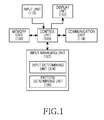
- FIG. 1 is a block diagram of a portable terminal according to an exemplary embodiment of the present invention
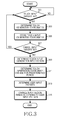
- FIG. 2 is a flow diagram illustrating a process for determining a touch input of a user in a portable terminal according to an exemplary embodiment of the present invention
- FIG. 3 is a flow diagram illustrating a process for changing a predetermined input region of a QWERTY keypad in a portable terminal according to an exemplary embodiment of the present invention
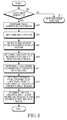
- FIG. 4 is a flow diagram illustrating a process for determining a touch input of a user in a portable terminal according to another exemplary embodiment of the present invention
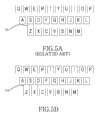
- FIG. 5A is a diagram illustrating a configuration of a QWERTY keypad of a general portable terminal according to the related art
- FIG. 5B is a diagram illustrating a configuration of a QWERTY keypad of a portable terminal according to an exemplary embodiment of the present invention
- FIG. 6A is a diagram illustrating a state of determining a touch input of a user at a point outside an input region in a portable terminal according to an exemplary embodiment of the present invention
- FIG. 6B is a diagram illustrating a process for determining a candidate input region corresponding to a touch input of a user in a portable terminal according to an exemplary embodiment of the present invention.
- FIG. 6C is a diagram illustrating a process for determining a desired touch input region of a user in a portable terminal according to an exemplary embodiment of the present invention.
- Exemplary embodiments of the present invention include an apparatus and method for adaptively changing a key input range of a QWERTY keypad in a portable terminal to accurately determine a touch input of a user.
- a touch input region corresponds to an input button displayed on the QWERTY keypad
- an input range of an input region corresponds to a touch input range capable of inputting data corresponding to the input region.
- a point outside the input region corresponds to a region that is not used for data input while being displayed on the QWERTY keypad. If the user touches a point outside the input region, the portable terminal does not perform a data input corresponding to the touch point.
- FIGs. 1 through 6C described below, and the various exemplary embodiments of the present invention provided are by way of illustration only and should not be construed in any way that would limit the scope of the present invention.
- Those skilled in the art will understand that the principles of the present disclosure may be implemented in any suitably arranged communications system.
- a set is defined as a non-empty set including at least one element.
- FIG. 1 is a block diagram of a portable terminal according to an exemplary embodiment of the present invention.
- the portable terminal may include a control unit 100, an input managing unit 102, a memory unit 108, an input unit 110, a display unit 112, and a communication unit 114.
- the input managing unit 102 may include an input determining unit 104 and a pattern determining unit 106.
- the portable terminal may include additional units that are not illustrated here merely for sake of clarity. Similarly, the functionality of two or more of the above units may be integrated into a single component.
- the control unit 100 controls an overall operation of the portable terminal. For example, the control unit 100 processes and controls voice communication and data communication. In addition to the general functions, the control unit 100 may analyze the touch input coordinates of a user if the touch input is generated for a predetermined time, determines the touch input pattern of the user, and resets the touch input range according to the determined pattern.
- control unit 100 compares the distances between the touch input point and input regions in the vicinity to determine a desired touch input region of the user.
- control unit 100 controls the input managing unit 102 to compare distances from the touch input point outside the input regions to centers (center coordinates) of the input regions.
- the input managing unit 102 determines a user touch input, determines a user touch input pattern, and resets the touch input range according to the determined pattern. That is, when determining a user touch input at a point outside the input region on the QWERTY keypad, the input managing unit 102 estimates a desired touch input region of the user and performs an operation corresponding to the estimated input region.
- the input determining unit 104 estimates a desired touch input region of the user.
- the input determining unit 104 generates a list of input regions in a vicinity of the point outside the touch input region, and obtains the X-axis information of the input region included in the list.
- the input determining unit 104 determines an input region with a small X-axis distance from the user touch input point, and estimates the desired touch input region of the user to be the determined input region. This is based on the fact that the user performs a touch input in a vicinity of the touch input range and a touch input error occurs due to the touch input pattern (physical characteristics) of the user. That is, when determining the touch input pattern of the user by another method, the input determining unit 104 may determine the user touch input region according to the touch input pattern of the user.
- the pattern determining unit 106 analyzes the touch input pattern of the user to control the input region of the QWERTY keypad. That is, the pattern determining unit 106 determines whether the user performs an upper touch or a lower touch with respect to the input region, and adjusts (extends) the Y-axis information of the input region of the QWERTY keypad according to the determination result to prevent a user touch input error.
- the memory unit 108 may include a Read Only Memory (ROM), a Random Access Memory (RAM), a flash ROM, or other similar storage devices.
- ROM Read Only Memory
- RAM Random Access Memory
- flash ROM flash ROM
- the ROM stores various reference data and microcodes of a program for the process and control of the control unit 100 and the input managing unit 102.
- the RAM is a working memory of the control unit 100, which stores temporary data that are generated during the execution of various programs.
- the flash ROM stores various updatable data such as a phone book, outgoing messages, incoming messages, user touch input points, and other similar data.
- the input unit 110 includes numeric keys of digits 0-9 and a plurality of function keys, such as a Menu key, a Cancel (Delete) key, a Confirmation key, a Talk key, an End key, an Internet connection key, Navigation keys (or Direction keys), character input keys and other similar input keys and buttons.
- the input unit 110 provides the control unit 100 with key input data that corresponds to a key pressed by the user.
- the display unit 112 displays a QWERTY keypad, numerals and characters, moving pictures, still pictures and status information generated during an operation of the portable terminal.
- the display unit 112 may be a color Liquid Crystal Display (LCD), an Active Mode Organic Light Emitting Diode (AMOLED) display, or other similar display apparatuses. If the display unit 112 has a touch input device and is applied to a touch input type portable terminal, it can be used as the input unit 110.
- the communication unit 114 transmits/receives Radio Frequency (RF) signals inputted/outputted through an antenna (not illustrated). For example, in a transmitting (TX) mode, the communication unit 114 channel-encodes, spreads and RF-processes TX data prior to transmission. In a receiving (RX) mode, the communication unit 114 converts a received RF signal into a baseband signal and despreads and channel-decodes the baseband signal to restore the original data
- TX transmitting
- RX receiving
- the control unit 100 of the portable terminal may be configured to perform the function of the input managing unit 102. Although separate units are provided for respective functions of the control unit 100, the control unit 100 may be configured to perform all or some of the functions on behalf of such separate units.
- FIG. 2 is a flow diagram illustrating a process for determining a touch input of the user in the portable terminal according to an exemplary embodiment of the present invention.
- the portable terminal includes a QWERTY keypad including a plurality of touch inputs (e.g., alphabet buttons), wherein the X-axis center of each touch input region does not accord with the X-axis centers of other key input regions in the vicinity.
- touch inputs e.g., alphabet buttons
- step 201 the portable terminal determines whether a touch input is generated from the user.
- step 201 If it is determined that a touch input is not generated from the user in step 201, the portable terminal proceeds to step 215. In step 215, the portable terminal performs another function (e.g., an idle mode).
- another function e.g., an idle mode
- step 201 if it is determined that a touch input is generated from the user in step 201, the portable terminal proceeds to step 203.
- step 203 the portable terminal determines touch generation coordinates of the touch input.
- step 205 it is determined whether the user touch input is generated at a point outside an input region.
- the input region corresponds to a key region of the QWERTY keypad capable of data input by a touch input of the user
- the point outside the input region corresponds to a non-key region that is not used for data input and divides and separates the input region from other input regions in the vicinity.
- step 205 If the user touch input is not generated at a point outside the input region in step 205, that is, if the user touch input is generated in the input region of a key of the QWERTY keypad, the portable terminal proceeds to step 215. In step 215, the portable terminal performs another function (e.g., a function corresponding to the input region).
- another function e.g., a function corresponding to the input region.
- step 205 determines candidate input regions.
- the portable terminal defines input regions, located in the vicinity of the user touch point, as candidate input regions, and determines candidate input regions for a desired touch input region of the user in a case where the user does not accurately touch the desired touch input region.
- step 209 the portable terminal determines the X-axis coordinates of the center coordinates of the candidate input regions determined in step 207.
- step 211 the portable terminal determines the distances from the coordinates of the user touch point to the coordinates of the centers of the candidate input regions.
- step 213 on the basis of the determined distances, the portable terminal determines that the candidate input region of the smallest X-axis distance is the desired touch input region of the user.
- the portable terminal determines a desired touch input region among the candidate input regions.
- the portable terminal may determine the user touch input point by determining (X, Y) coordinates of a touchscreen.
- the portable terminal determines that the candidate input region nearest to the user touch input point is the desired touch input region of the user.
- the portable terminal ends the algorithm according to an exemplary embodiment of the present invention.
- FIG. 3 is a flow diagram illustrating a process for changing a predetermined input region of a QWERTY keypad in a portable terminal according to an exemplary embodiment of the present invention.
- step 301 the portable terminal determines whether a touch input is generated by the user.
- step 301 If it is determined that a touch input is not generated by the user in step 301, the portable terminal again performs an operation of step 301.
- step 301 the portable terminal proceeds to step 303.
- step 303 the portable terminal determines the coordinates of the user touch input point.
- step 305 the portable terminal stores the determined touch input generation coordinates.
- the portable terminal determines whether a cancel input is generated by the user.
- the cancel input means an input (e.g., a backspace input) for cancelling an input character through a touch input.
- step 307 If it is determined that a cancel input is generated by the user in step 307, the portable terminal returns to step 301.
- step 307 if it is not determined that a cancel input is generated by the user in step 307 (e.g., a touch of another region, or a touch of a character input button), the portable terminal proceeds to step 309.
- step 309 the portable terminal determines an input region corresponding to the touch input point.
- step 311 the portable terminal determines a touch generation coordinate change for a predetermined period.
- the portable terminal analyzes the user touch input coordinates to determine a user input pattern.
- the portable terminal may determine the user input pattern from a touch generation coordinate change.
- step 313 the portable terminal determines the user touch input pattern on a basis of the touch generation coordinate change determined in step 311.
- the portable terminal changes the input range of the input region according to the user input pattern.
- the portable terminal performs the following operations.
- the input region coordinates (1, 5) are the center coordinates of the input region, and the input range of the input region extends from the center coordinates by a predetermined value.
- the user If the user has attempted to touch the input region but the coordinates of the touch input point according to the input pattern are (1, 3), the alphabet 'H' is not displayed, because the coordinates do not correspond to the input region. Accordingly, the user cancels the incorrectly-input character through a backspace input, and reattempts a touch input in the vicinity of the input region.
- the portable terminal may extend a range of the input region downward by a predetermined amount.
- the portable terminal may extend the range of the input region to the Y axis for the normal touch input (from (1, 5) to (1, 4)).
- the portable terminal determines the input pattern of the user by the input region determined on the basis of the distance of the X-axis coordinates of the input region, and resets the range of the input region to a range corresponding to the user input pattern.
- the portable terminal ends the algorithm according to an exemplary embodiment of the present invention.
- FIG. 4 is a flow diagram illustrating a process for determining a touch input of a user in a portable terminal according to another exemplary embodiment of the present invention.
- the portable terminal performs the process of FIG. 2 and the process of FIG. 3 in an integrated manner.
- step 401 the portable terminal determines whether a touch input is generated from the user.
- step 401 If it is not determined that a touch input is generated from the user in step 401, the portable terminal proceeds to step 417.
- step 417 the portable terminal performs another function (e.g., an idle mode).
- step 401 if it is determined that a touch input is generated from the user in step 401, the portable terminal proceeds to step 403. In step 403, the portable terminal determines touch input generation coordinates. In step 405, the portable terminal determines an input pattern of the user by the determined coordinates of the touch input generated by the user.
- the portable terminal extends a range of the input region by weighting the X axis of the input region (e.g., the input region of a QWERTY keypad) according to the input pattern determined in step 403.
- the portable terminal determines candidate input regions on a basis of the weighted input region.
- step 411 the portable terminal determines the X-axis coordinates of the center coordinates of the candidate input regions determined in step 409. In step 413, the portable terminal determines distances from the coordinates of the user touch point to the coordinates of the centers of the candidate input regions.
- step 415 on a basis of the determined distances, the portable terminal determines that the candidate input region of the smallest X-axis distance is the desired touch input region of the user.
- the portable terminal ends the algorithm according to an exemplary embodiment of the present invention.
- FIGs. 5A and 5B are diagrams illustrating a comparison of a QWERTY keypad of a portable terminal of the related art and a QWERTY keypad of a portable terminal according to an exemplary embodiment of the present invention.
- FIG. 5A is a diagram illustrating a configuration of a QWERTY keypad of a portable terminal of the related art.
- the QWERTY keypad of the related art has a shape of a keyboard, and includes a plurality of lines with a plurality of input regions in each line.
- the QWERTY keypad of the related art is configured such that some input regions of the second line have the same center lines as corresponding input regions of the third line.
- the center of the 'S' key input region and the center of the 'Z' key input region below it are located on the same vertical straight line 501.
- FIG. 5B is a diagram illustrating a configuration of a QWERTY keypad of a portable terminal according to an exemplary embodiment of the present invention.
- the QWERTY keypad according to an exemplary embodiment of the present invention is configured such that the input region of a key of the second line does not have the same center line as the input region of a key of the first line or a key of the third line.
- the X-axis center of the 'S' key input region and of the 'Z' key input region below it are located on the same vertical straight line.
- the 'Z' key input region 510 is located between the 'S' key input region and the 'A' key input region so that the center of the 'S' key input region or of the 'A' key input region and the center of the 'Z' input region below them are not located on the same straight line.
- FIGs. 6A to 6C are diagrams illustrating a process for determining a touch input of a user in a portable terminal according to an exemplary embodiment of the present invention.
- FIG. 6A is a diagram illustrating a state of determining a touch input of a user at a point outside an input region in a portable terminal according to an exemplary embodiment of the present invention.
- the user of the portable terminal has attempted to touch a 'D' key input region, but the touch input is performed at a point above the 'D' key input region due to the user's input pattern.
- the touch input point 601 is a point outside the input region (i.e., in a shaded region 603), and a character input corresponding to the user touch input is unknown.
- FIG. 6B is a diagram illustrating a process for determining a candidate input region corresponding to a touch input of the user in the portable terminal according to an exemplary embodiment of the present invention.
- the portable terminal determines candidate input regions in the vicinity to determine a desired touch input region of the user.
- the portable terminal determines the input regions located within a predetermined distance from the user touch input point. For example, if the portable terminal determines distances from the user touch input point to center points of the input regions in the vicinity, and defines the determined distances as d1 d2, and d3, the portable terminal compares the determined distances with a threshold value to determine candidate input regions.
- the portable terminal may determine the input regions E, D, and S corresponding to the candidates 1, 2, and 3, respectively, to be the candidate input regions.
- FIG. 6C is a diagram illustrating a process for determining a desired touch input region of a user in a portable terminal according to an exemplary embodiment of the present invention.
- the portable terminal determines a desired touch input region of the user on a basis of determined distances from the user touch input point to the candidate input regions.
- the portable terminal may determine that a candidate input region having the same X-axis coordinate as the user touch input point is the desired touch input region of the user.
- the portable terminal may determine that the user has attempted to touch the input region 'D'.
- a user touch region is determined on a basis of the X-axis information of a key input region, thereby making it possible to determine and correct a touch input error caused by having to touch a fixed touch input range.
Landscapes
- Engineering & Computer Science (AREA)
- Theoretical Computer Science (AREA)
- General Engineering & Computer Science (AREA)
- Human Computer Interaction (AREA)
- Physics & Mathematics (AREA)
- General Physics & Mathematics (AREA)
- Computer Hardware Design (AREA)
- Telephone Function (AREA)
- Input From Keyboards Or The Like (AREA)
- User Interface Of Digital Computer (AREA)
- Position Input By Displaying (AREA)
Applications Claiming Priority (1)
| Application Number | Priority Date | Filing Date | Title |
|---|---|---|---|
| KR1020100030244A KR20110110940A (ko) | 2010-04-02 | 2010-04-02 | 휴대용 단말기의 터치 입력 장치 및 방법 |
Publications (2)
| Publication Number | Publication Date |
|---|---|
| EP2372518A2 true EP2372518A2 (de) | 2011-10-05 |
| EP2372518A3 EP2372518A3 (de) | 2015-03-18 |
Family
ID=44021750
Family Applications (1)
| Application Number | Title | Priority Date | Filing Date |
|---|---|---|---|
| EP11160637.2A Withdrawn EP2372518A3 (de) | 2010-04-02 | 2011-03-31 | Vorrichtung und Verfahren zur Berührungseingabe auf einem tragbaren Endgerät |
Country Status (3)
| Country | Link |
|---|---|
| US (1) | US20110242032A1 (de) |
| EP (1) | EP2372518A3 (de) |
| KR (1) | KR20110110940A (de) |
Families Citing this family (25)
| Publication number | Priority date | Publication date | Assignee | Title |
|---|---|---|---|---|
| US20080168402A1 (en) | 2007-01-07 | 2008-07-10 | Christopher Blumenberg | Application Programming Interfaces for Gesture Operations |
| US20080168478A1 (en) | 2007-01-07 | 2008-07-10 | Andrew Platzer | Application Programming Interfaces for Scrolling |
| US8416196B2 (en) | 2008-03-04 | 2013-04-09 | Apple Inc. | Touch event model programming interface |
| US8717305B2 (en) | 2008-03-04 | 2014-05-06 | Apple Inc. | Touch event model for web pages |
| US8645827B2 (en) * | 2008-03-04 | 2014-02-04 | Apple Inc. | Touch event model |
| US8566045B2 (en) | 2009-03-16 | 2013-10-22 | Apple Inc. | Event recognition |
| US9684521B2 (en) | 2010-01-26 | 2017-06-20 | Apple Inc. | Systems having discrete and continuous gesture recognizers |
| US8285499B2 (en) | 2009-03-16 | 2012-10-09 | Apple Inc. | Event recognition |
| US9311112B2 (en) | 2009-03-16 | 2016-04-12 | Apple Inc. | Event recognition |
| US10216408B2 (en) | 2010-06-14 | 2019-02-26 | Apple Inc. | Devices and methods for identifying user interface objects based on view hierarchy |
| US9298363B2 (en) | 2011-04-11 | 2016-03-29 | Apple Inc. | Region activation for touch sensitive surface |
| WO2012160601A1 (ja) * | 2011-05-24 | 2012-11-29 | 三菱電機株式会社 | 文字入力装置およびそれを備えたカーナビゲーション装置 |
| US20140223328A1 (en) * | 2011-12-28 | 2014-08-07 | Vishal Thomas | Apparatus and method for automatically controlling display screen density |
| US9046958B2 (en) * | 2012-03-15 | 2015-06-02 | Nokia Technologies Oy | Method, apparatus and computer program product for user input interpretation and input error mitigation |
| DE102013001058A1 (de) * | 2013-01-22 | 2014-07-24 | GM Global Technology Operations LLC (n. d. Gesetzen des Staates Delaware) | Verfahren und Vorrichtung zum Betreiben eines Touchscreens |
| US9733716B2 (en) | 2013-06-09 | 2017-08-15 | Apple Inc. | Proxy gesture recognizer |
| US9509827B2 (en) * | 2014-03-12 | 2016-11-29 | Intel IP Corporation | Apparatus, system and method of managing at a mobile device execution of an application by a computing device |
| CN105320316B (zh) * | 2014-06-17 | 2020-12-11 | 中兴通讯股份有限公司 | 一种触摸屏的去抖动方法、装置及终端 |
| US10235150B2 (en) * | 2014-12-04 | 2019-03-19 | Google Technology Holdings LLC | System and methods for touch pattern detection and user interface adaptation |
| KR20160096434A (ko) * | 2015-02-05 | 2016-08-16 | 삼성전자주식회사 | 키패드의 감도를 조절하는 전자 장치 및 방법 |
| US10528368B2 (en) | 2017-06-28 | 2020-01-07 | International Business Machines Corporation | Tap data to determine user experience issues |
| US10521090B2 (en) * | 2017-07-13 | 2019-12-31 | International Business Machines Corporation | Dashboard generation based on user interaction |
| CN112088350A (zh) * | 2018-03-28 | 2020-12-15 | 萨罗尼科斯贸易与服务一人有限公司 | 用于提高触摸屏上的触摸的可靠性的移动设备和方法 |
| KR20220128892A (ko) | 2021-03-15 | 2022-09-22 | 삼성전자주식회사 | 전자 장치 및 오타 보정 방법 |
| US12487742B2 (en) * | 2023-03-28 | 2025-12-02 | Microsoft Technology Licensing, Llc | Touch classifier system using context data |
Family Cites Families (6)
| Publication number | Priority date | Publication date | Assignee | Title |
|---|---|---|---|---|
| US7844914B2 (en) * | 2004-07-30 | 2010-11-30 | Apple Inc. | Activating virtual keys of a touch-screen virtual keyboard |
| KR100723738B1 (ko) * | 1999-05-27 | 2007-05-30 | 에이오엘 엘엘씨 | 자동 교정 기능을 갖는 키보드 시스템 |
| US6597345B2 (en) * | 2000-03-03 | 2003-07-22 | Jetway Technologies Ltd. | Multifunctional keypad on touch screen |
| US7973762B2 (en) * | 2006-03-06 | 2011-07-05 | Triggerfinger Software, Inc. | Character input using multidirectional input device |
| US7843427B2 (en) * | 2006-09-06 | 2010-11-30 | Apple Inc. | Methods for determining a cursor position from a finger contact with a touch screen display |
| TWI428812B (zh) * | 2008-07-18 | 2014-03-01 | Htc Corp | 操控應用程式的方法、其電子裝置、儲存媒體,及使用此方法之電腦程式產品 |
-
2010
- 2010-04-02 KR KR1020100030244A patent/KR20110110940A/ko not_active Ceased
-
2011
- 2011-03-31 US US13/076,801 patent/US20110242032A1/en not_active Abandoned
- 2011-03-31 EP EP11160637.2A patent/EP2372518A3/de not_active Withdrawn
Non-Patent Citations (1)
| Title |
|---|
| None |
Also Published As
| Publication number | Publication date |
|---|---|
| EP2372518A3 (de) | 2015-03-18 |
| US20110242032A1 (en) | 2011-10-06 |
| KR20110110940A (ko) | 2011-10-10 |
Similar Documents
| Publication | Publication Date | Title |
|---|---|---|
| EP2372518A2 (de) | Vorrichtung und Verfahren zur Berührungseingabe auf einem tragbaren Endgerät | |
| US10373009B2 (en) | Character recognition and character input apparatus using touch screen and method thereof | |
| US9639163B2 (en) | Content transfer involving a gesture | |
| US7552142B2 (en) | On-screen diagonal cursor navigation on a handheld communication device having a reduced alphabetic keyboard | |
| US7802201B2 (en) | System and method for panning and zooming an image on a display of a handheld electronic device | |
| US10915750B2 (en) | Method and device for searching stripe set | |
| CN109933252B (zh) | 一种图标移动方法及终端设备 | |
| US9116618B2 (en) | Terminal having touch screen and method for displaying key on terminal | |
| CN104932815A (zh) | 移动终端及其操作方法 | |
| KR102639193B1 (ko) | 메시지 처리 방법 및 전자기기 | |
| US20120242582A1 (en) | Apparatus and method for improving character input function in mobile terminal | |
| CN106127152A (zh) | 一种指纹模板更新方法及终端设备 | |
| US20100083150A1 (en) | User interface, device and method for providing a use case based interface | |
| CN110167006B (zh) | 一种控制应用程序使用sim卡的方法及终端设备 | |
| CN108388354A (zh) | 一种输入法候选区域的显示方法和移动终端 | |
| CN111596815B (zh) | 应用图标显示方法及电子设备 | |
| CN105630376A (zh) | 终端控制方法和装置 | |
| CN108646967A (zh) | 显示切换方法、装置、移动终端以及存储介质 | |
| US20140289664A1 (en) | Portable terminal device, non-transitory storage medium and method for suppressing implementation | |
| CN111459300A (zh) | 一种字符显示方法及电子设备 | |
| US11212020B2 (en) | FM channel finding and searching method, mobile terminal and storage apparatus | |
| EP3115864B1 (de) | Tragbare elektronische vorrichtung einschliesslich tastatur und verfahren zur steuerung davon | |
| CN109639880B (zh) | 一种天气信息显示方法及终端设备 | |
| US9894497B2 (en) | Method and apparatus for processing memo while performing audio communication in mobile terminal | |
| CN106325738A (zh) | 一种操作管理的方法和装置 |
Legal Events
| Date | Code | Title | Description |
|---|---|---|---|
| PUAI | Public reference made under article 153(3) epc to a published international application that has entered the european phase |
Free format text: ORIGINAL CODE: 0009012 |
|
| AK | Designated contracting states |
Kind code of ref document: A2 Designated state(s): AL AT BE BG CH CY CZ DE DK EE ES FI FR GB GR HR HU IE IS IT LI LT LU LV MC MK MT NL NO PL PT RO RS SE SI SK SM TR |
|
| AX | Request for extension of the european patent |
Extension state: BA ME |
|
| RAP1 | Party data changed (applicant data changed or rights of an application transferred) |
Owner name: SAMSUNG ELECTRONICS CO., LTD. |
|
| PUAL | Search report despatched |
Free format text: ORIGINAL CODE: 0009013 |
|
| AK | Designated contracting states |
Kind code of ref document: A3 Designated state(s): AL AT BE BG CH CY CZ DE DK EE ES FI FR GB GR HR HU IE IS IT LI LT LU LV MC MK MT NL NO PL PT RO RS SE SI SK SM TR |
|
| AX | Request for extension of the european patent |
Extension state: BA ME |
|
| RIC1 | Information provided on ipc code assigned before grant |
Ipc: G06F 3/048 20130101AFI20150210BHEP |
|
| 17P | Request for examination filed |
Effective date: 20150918 |
|
| STAA | Information on the status of an ep patent application or granted ep patent |
Free format text: STATUS: THE APPLICATION HAS BEEN WITHDRAWN |
|
| 18W | Application withdrawn |
Effective date: 20161215 |