EP2320337A2 - Benutzerschnittstellenvorrichtung mit dreidimensionalen Achsen und Benutzerschnittstellenvorrichtung mit aus dreidimensionalen Achsen gebildeten zweidimensionalen Ebenen - Google Patents
Benutzerschnittstellenvorrichtung mit dreidimensionalen Achsen und Benutzerschnittstellenvorrichtung mit aus dreidimensionalen Achsen gebildeten zweidimensionalen Ebenen Download PDFInfo
- Publication number
- EP2320337A2 EP2320337A2 EP10172143A EP10172143A EP2320337A2 EP 2320337 A2 EP2320337 A2 EP 2320337A2 EP 10172143 A EP10172143 A EP 10172143A EP 10172143 A EP10172143 A EP 10172143A EP 2320337 A2 EP2320337 A2 EP 2320337A2
- Authority
- EP
- European Patent Office
- Prior art keywords
- user interface
- item
- interface apparatus
- dimensional
- primary
- Prior art date
- Legal status (The legal status is an assumption and is not a legal conclusion. Google has not performed a legal analysis and makes no representation as to the accuracy of the status listed.)
- Withdrawn
Links
Images




Classifications
-
- G—PHYSICS
- G06—COMPUTING OR CALCULATING; COUNTING
- G06F—ELECTRIC DIGITAL DATA PROCESSING
- G06F3/00—Input arrangements for transferring data to be processed into a form capable of being handled by the computer; Output arrangements for transferring data from processing unit to output unit, e.g. interface arrangements
- G06F3/01—Input arrangements or combined input and output arrangements for interaction between user and computer
- G06F3/03—Arrangements for converting the position or the displacement of a member into a coded form
- G06F3/033—Pointing devices displaced or positioned by the user, e.g. mice, trackballs, pens or joysticks; Accessories therefor
- G06F3/0346—Pointing devices displaced or positioned by the user, e.g. mice, trackballs, pens or joysticks; Accessories therefor with detection of the device orientation or free movement in a three-dimensional [3D] space, e.g. 3D mice, 6-DOF [six degrees of freedom] pointers using gyroscopes, accelerometers or tilt-sensors
-
- G—PHYSICS
- G06—COMPUTING OR CALCULATING; COUNTING
- G06F—ELECTRIC DIGITAL DATA PROCESSING
- G06F16/00—Information retrieval; Database structures therefor; File system structures therefor
- G06F16/30—Information retrieval; Database structures therefor; File system structures therefor of unstructured textual data
- G06F16/34—Browsing; Visualisation therefor
-
- G—PHYSICS
- G06—COMPUTING OR CALCULATING; COUNTING
- G06F—ELECTRIC DIGITAL DATA PROCESSING
- G06F3/00—Input arrangements for transferring data to be processed into a form capable of being handled by the computer; Output arrangements for transferring data from processing unit to output unit, e.g. interface arrangements
- G06F3/14—Digital output to display device ; Cooperation and interconnection of the display device with other functional units
-
- G—PHYSICS
- G06—COMPUTING OR CALCULATING; COUNTING
- G06F—ELECTRIC DIGITAL DATA PROCESSING
- G06F2203/00—Indexing scheme relating to G06F3/00 - G06F3/048
- G06F2203/041—Indexing scheme relating to G06F3/041 - G06F3/045
- G06F2203/04101—2.5D-digitiser, i.e. digitiser detecting the X/Y position of the input means, finger or stylus, also when it does not touch, but is proximate to the digitiser's interaction surface and also measures the distance of the input means within a short range in the Z direction, possibly with a separate measurement setup
Definitions
- the following description relates to a user interface for user input/output.
- a conventional mobile communication terminal having multi-level submenus subordinate to a main menu in a tree structure to be two-dimensionally viewed requires a user to perform a plurality of user input operations to enter a desired submenu.
- Exemplary embodiments of the present invention provide a user interface apparatus that decreases the number of user inputs in a mobile communication terminal using three-dimensional axes or two-dimensional planes, each two-dimensional plane formed by two of the three-dimensional axes.
- Exemplary embodiments of the present invention provide a user interface apparatus using three-dimensional axes, the user interface apparatus including at least one primary item provided along one of the three-dimensional axes, and at least one secondary item provided along another axis other than the axis along which the primary item is provided.
- An exemplary embodiment provides a user interface apparatus using three-dimensional axes, the user interface apparatus including an operating portion to select a primary item provided on a first axis among the three-dimensional axes, and a plurality of secondary items provided along a second axis different from the first axis, the plurality of second items being related to the primary item selected by the operating portion.
- An exemplary embodiment provides a user interface apparatus using two-dimensional planes, each two-dimensional plane formed by two of three-dimensional axes, the user interface apparatus including at least one primary item provided on at least a first two-dimensional plane, and at least one secondary item provided on a second two-dimensional plane other than the first two-dimensional plane on which the at least one primary item is provided.
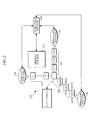
- FIG. 1 is a diagram illustrating an example of a user interface apparatus using three-dimensional axes.
- FIG. 2 is a diagram illustrating an example of a search screen of the user interface apparatus of FIG. 1 .
- FIG. 3 is a diagram illustrating another example of a search screen of the user interface apparatus of FIG. 1 .
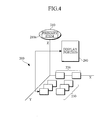
- FIG. 4 is a diagram illustrating another example of a user interface apparatus using three-dimensional axes.
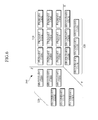
- FIG. 5 is an example of a search screen of a user interface apparatus using three-dimensional axes.
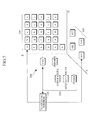
- FIG. 6 is a diagram illustrating another example of a user interface apparatus using two-dimensional planes, each of which is formed by two of the three-dimensional axes.
- FIG. 7 is a diagram illustrating an example of a search screen of the user interface apparatus of FIG. 6 .
- FIG. 8 is a diagram illustrating an example of a search result display screen of the user interface apparatus of FIG. 7 .
- FIG. 1 illustrates an example of a user interface apparatus 100 using three-dimensional axes.
- the user interface apparatus 100 includes at least one primary item 110 and at least one secondary item 120.
- the primary item 110 is represented or displayed along at least one axis of the three-dimensional axes.
- the secondary item 120 is represented or displayed along at least one axis of the three-dimensional axes other than the axis on which the primary item 110 is provided.
- the secondary item 120 may be subordinate to the primary item 110 or may be independent of the primary item 110.
- the primary items 110 including z1 and zk are represented along a Z-axis of the three-dimensional axes
- the secondary items 120 including x1 and xm are represented along an X-axis
- the secondary items 120 including y1 and yn are represented along a Y-axis.
- the primary items 110 and the secondary items 120 can be simultaneously displayed on a screen of a device, such as a mobile communication terminal, and thus, the user interface apparatus 100 can reduce the number of user input operations used to access various menus and submenus compared to the conventional interface apparatus that requires a user to enter submenus a number of times to obtain a desired result.
- the user interface apparatus 100 may further include at least one operating portion 130.
- the operating portion 130 controls movement of the primary items 110 or the secondary items 120.
- the operating portions 130 may be disposed at ends of the respective axes.
- the operating portions 130 may control the primary items 110 or the secondary items 120 to move in a circular manner or to scroll continuously through or along the primary items 110 or the secondary items 120.
- the operating portions 130 are respectively located at the ends of the X-axis, the Y-axis, and the Z-axis.
- the operating portions 130 may be configured to move at least one of the primary items 110 or at least one of the secondary items 120 in response to detecting a user's touch.
- the operating portions 130 may be configured to move at least one of the primary items 110 or at least one of the secondary items 120 in a forward direction or a reverse direction according to a direction of the user's touch.
- a display currently being viewed can be changed by the operating portions 130 that move the primary items 110 or the secondary items 120.
- the user interface apparatus 100 may further include a searching portion 140.
- FIG. 2 and FIG. 3 illustrate examples of a search screen of the user interface apparatus 100 shown in FIG. 1 .
- the searching portion 140 may be configured to search for information corresponding to the primary items 110 and the secondary items 120 which meet at an intersection point of the three-dimensional axes.
- Each of the primary items 110 and the secondary items 120 may be a searchable category.
- the primary items 110 are initial letters of names in an alphabetical order, a through z, and provided along the Z-axis
- the secondary items 120 are telephone office numbers, such as '011', '017', '018', and '010', and provided along the X-axis
- the secondary items 120 describe relations with the user, such as 'family', 'friends', 'colleagues', and 'acquaintances', and are provided along the Y-axis.
- the searching portion 140 searches to find information corresponding to the items, 'z', '011', and 'family'.
- the searching portion 140 shown in FIG. 3 searches to find information corresponding to the primary items 110 and the secondary items 120, each of which is located at specific coordinates, each spaced a specific distance from the intersection point of the three-dimensional axes.
- the primary items 110 are initial letters of names in an alphabetical order, a through z, and represented along the Z-axis
- the secondary items 120 are telephone office numbers, such as '011', '017', '018', and '010', and represented along the X-axis
- the secondary items 120 describe relations with the user, such as 'family', 'friends', 'colleagues', and 'acquaintances', and are represented along the Y-axis.
- the searching portion 140 searches to find information corresponding to the factors, 'z', '011', and 'family'.
- the user interface apparatus 100 allows the user to search for desired information with a decreased number of user inputs using the three-dimensional axes, compared to the conventional interface apparatus that requires a user to enter submenus a number of times to obtain a desired result.
- the user interface apparatus 100 may further include a display portion 150.
- the display portion 150 displays a search result of the searching portion 140.
- the display portion 150 may be configured to display a search result on at least one of two-dimensional planes including the X-Y plane, the Y-Z plane, and the X-Z plane.
- the display portion 150 may be configured to display a search result in a manner that the result is shown as overlaying at least one of the two-dimensional planes. Referring to the examples shown in FIG. 2 and FIG. 3 , the display portion 150 displays the search result of the searching portion 140 on the two-dimensional plane formed by the X-axis and Z-axis.
- the user interface apparatus 100 may allow the user to search for desired information with a decreased number of user inputs by using three-dimensional axes in a device, such as a mobile communication terminal.
- FIG. 4 illustrates another example of a user interface apparatus 200 using three-dimensional axes.
- the user interface apparatus 200 includes an operating portion 210, a selected primary item 210a, and secondary items 220.
- the operating portion 210 selects the primary item 210a located on one of the three-dimensional axes according to a user's operation.
- the operating portion 210 may be located at an end of any of the three-dimensional axes. Referring to the example shown in FIG. 4 , the operating portion 210 is located at the end of the Z-axis, and the primary item 210a, which is currently selected, is displayed in the operating portion 210.
- the primary item 210a displayed in the operating portion 210 may be selected by operating the operating portion 210 in response to detecting a user's touch.
- the operating portion 210 may be configured to move the primary item 210a in a forward or a reverse direction according to a direction of the user's touch.
- the secondary items 220 are displayed along another axis than the axis on which the primary item 210a is located.
- the secondary items 220 are related to the primary item 210a selected by the operating portion 210.
- the secondary items 220 may be submenus of the selected primary item 210a.
- the user interface apparatus 200 shown in the above example may allow the user to access a desired menu with a decreased number of inputs by operating the operating portion 210 to move the secondary items 220 related to the primary item 210a using the three-dimensional axes.
- the user interface apparatus 200 may further include a group of tertiary items 230.
- the tertiary items 230 are aligned on or in a same plane on or in which the secondary items 220 are placed, and the tertiary items 230 may be related to the secondary items 220.
- the tertiary items 230 may be submenus of the selected primary item 210a and/or submenus of one or more of the secondary items 220. Further, the tertiary items 230 may be content associated with the selected primary item 210a and/or one or more of the secondary items 220.
- FIG. 5 illustrates an example of a search screen of a user interface apparatus using three-dimensional axes.
- an operating portion 210 is provided at an end of the Z-axis.
- a primary item 210a displayed in the operating portion 210 is selected by operating the operating portion 210 in response to detecting a user's touch.
- the primary item 210a includes 'all names', 'family', 'friends', 'colleagues', 'acquaintances', and 'others', and 'all names' is selected and displayed as the primary item 210a in the operating portion 210, letters a through z are displayed as the secondary items 220 along the X-axis and all names starting with the respective letters a through z are aligned on or in the X-Y plane as tertiary items 230.
- the tertiary items 230 may correspond to a secondary item 220 that is selected by the user's touch. That is, in the example shown in FIG. 5 , when the user touches one of the secondary items 220, the tertiary items 230 in connection with the selected secondary item 220 are displayed.
- the tertiary items 230 may be submenus of the selected primary item 210a and/or submenus of one or more of the secondary items 220. Further, the tertiary items 230 may be content associated with the selected primary item 210a and/or one or more of the secondary items 220.
- the tertiary items 230 may also be searchable categories.
- the user interface apparatus 200 may further include a display portion 240.
- the display portion 240 displays detailed information of a tertiary item 230 that is selected by a user's touch.
- the display unit 240 displays detailed information of the selected tertiary item 230, and thus the user is enabled to obtain the final specific information.
- the user interface apparatus 200 allows the user to search for desired information with a decreased number of user inputs, and displays the found information using three-dimensional axes in a device, such as a mobile terminal.
- FIG. 6 illustrates an another example of a user interface apparatus 300 using two-dimensional planes, each of which is formed by two of the three-dimensional axes.
- the user interface apparatus 300 includes at least one primary item 310, and at least one secondary item 320.
- the primary item 310 is provided on or in one of the two-dimensional planes, each of which is formed by two of the three-dimensional axes.
- the secondary item 320 is provided on or in another of the two-dimensional planes other than the plane on or in which the primary item 310 is provided.
- the secondary item 320 may be subordinate to the primary item 310, or be independent of the primary item 310.
- the secondary item 320 may be a submenu of the primary item 310.
- the primary item 310 and the secondary item 320 may be searchable categories and/or searchable content.
- a plurality of primary items 310 are aligned on or in a two-dimensional plane formed by the X-axis and the Z-axis
- a plurality of secondary items 320 are aligned on or in a two-dimensional plane formed by the X-axis and the Y-axis
- a plurality of secondary items 320 are aligned on or in a two-dimensional plane formed by the Y-axis and the Z-axis.
- the user interface apparatus 300 displays the primary items 310 and the secondary items 320 simultaneously on the two-dimensional planes, each of which is formed by two of the three-dimensional axes.
- the user interface apparatus 300 using two-dimensional planes may further include a searching portion 330 (referring to FIG. 7 ).
- the searching portion 330 searches for information corresponding to the primary item 310 or the secondary item 320 which is selected on or in a two-dimensional plane.
- FIG. 7 illustrates an example of a search screen of a user interface apparatus 300 using two-dimensional planes, each of which is formed by two of the three-dimensional axes.
- a telephone number search it is assumed for a telephone number search that the initial letters of names in an alphabetical order, a through z, are provided as primary items 310 on a two-dimensional plane formed by the X-axis and the Z-axis, telephone office numbers, '011', '017', '018', and '010', are provided as the secondary items 320 on a two-dimensional plane formed by the X-axis and the Y-axis, and the relations with a user, 'family', 'friends', 'colleagues', 'acquaintances', and 'others', are provided as secondary items 320 on a two-dimensional plane formed by the Y-axis and the Z-axis.
- the searching portion 330 searches for information corresponding to 'a', '018', and 'family'.
- the user interface apparatus 300 may allow the user to search for desired information.
- FIG. 8 illustrates an example of a search screen of the user interface apparatus 300 shown in FIG. 7 .
- a display portion 340 displays a search result of the searching portion 330.
- the display portion 340 may be configured to display the search result in a manner that the search result is shown as overlaying at least one of the two-dimensional planes.
- the display portion 340 is displayed as overlaying all of two-dimensional planes, which are respectively formed by the X-axis and the Z-axis, by the X-axis and the Y-axis, and by the Y-axis and the Z-axis.
- the user interface apparatus 300 enables the user to search for desired information with a decreased number of inputs using the two-dimensional planes, each formed by two of the three-dimensional axes, and displays the search result.
- a user interface apparatus using three-dimensional axes or two-dimensional planes, each formed by two of the three-dimensional axes, may decrease a number of user's inputs when the user selects a menu or searches for desired information.
- a user interface apparatus using three-dimensional axes and a user interface apparatus using two-dimensional planes, each of the two-dimensional planes being formed by two of three-dimensional axes, are provided.
- the user interface apparatus uses the three-dimensional axes or the two-dimensional planes to select a menu or to search for desired information in a device, such as a mobile terminal.
Landscapes
- Engineering & Computer Science (AREA)
- Theoretical Computer Science (AREA)
- General Engineering & Computer Science (AREA)
- Physics & Mathematics (AREA)
- General Physics & Mathematics (AREA)
- Data Mining & Analysis (AREA)
- Databases & Information Systems (AREA)
- Human Computer Interaction (AREA)
- User Interface Of Digital Computer (AREA)
- Telephone Function (AREA)
- Position Input By Displaying (AREA)
Applications Claiming Priority (1)
| Application Number | Priority Date | Filing Date | Title |
|---|---|---|---|
| KR1020090106594A KR101185186B1 (ko) | 2009-11-05 | 2009-11-05 | 3차원 축을 이용한 사용자 인터페이스 장치 및 3차원 축을 경계로 하는 2차원 평면을 이용한 사용자 인터페이스 장치 |
Publications (2)
| Publication Number | Publication Date |
|---|---|
| EP2320337A2 true EP2320337A2 (de) | 2011-05-11 |
| EP2320337A3 EP2320337A3 (de) | 2011-06-01 |
Family
ID=43617879
Family Applications (1)
| Application Number | Title | Priority Date | Filing Date |
|---|---|---|---|
| EP10172143A Withdrawn EP2320337A3 (de) | 2009-11-05 | 2010-08-06 | Benutzerschnittstellenvorrichtung mit dreidimensionalen Achsen und Benutzerschnittstellenvorrichtung mit aus dreidimensionalen Achsen gebildeten zweidimensionalen Ebenen |
Country Status (4)
| Country | Link |
|---|---|
| US (1) | US20110107210A1 (de) |
| EP (1) | EP2320337A3 (de) |
| KR (1) | KR101185186B1 (de) |
| CN (1) | CN102053780A (de) |
Families Citing this family (1)
| Publication number | Priority date | Publication date | Assignee | Title |
|---|---|---|---|---|
| CN102375660B (zh) * | 2010-08-20 | 2013-11-06 | 国基电子(上海)有限公司 | 电子装置及控制其用户界面的方法 |
Family Cites Families (19)
| Publication number | Priority date | Publication date | Assignee | Title |
|---|---|---|---|---|
| AU5670394A (en) * | 1992-11-23 | 1994-06-22 | Paragon Concepts, Inc. | Computer filing system with user selected categories to provide file access |
| US5724492A (en) * | 1995-06-08 | 1998-03-03 | Microsoft Corporation | Systems and method for displaying control objects including a plurality of panels |
| US5745109A (en) * | 1996-04-30 | 1998-04-28 | Sony Corporation | Menu display interface with miniature windows corresponding to each page |
| US6768999B2 (en) * | 1996-06-28 | 2004-07-27 | Mirror Worlds Technologies, Inc. | Enterprise, stream-based, information management system |
| US6016487A (en) * | 1997-03-26 | 2000-01-18 | National Research Council Of Canada | Method of searching three-dimensional images |
| US6281898B1 (en) * | 1997-05-16 | 2001-08-28 | Philips Electronics North America Corporation | Spatial browsing approach to multimedia information retrieval |
| US6121969A (en) * | 1997-07-29 | 2000-09-19 | The Regents Of The University Of California | Visual navigation in perceptual databases |
| WO1999008178A1 (en) * | 1997-08-12 | 1999-02-18 | Matsushita Electric Industrial Co., Ltd. | Window display |
| US6243093B1 (en) * | 1998-09-14 | 2001-06-05 | Microsoft Corporation | Methods, apparatus and data structures for providing a user interface, which exploits spatial memory in three-dimensions, to objects and which visually groups matching objects |
| US6327590B1 (en) * | 1999-05-05 | 2001-12-04 | Xerox Corporation | System and method for collaborative ranking of search results employing user and group profiles derived from document collection content analysis |
| US6473751B1 (en) * | 1999-12-10 | 2002-10-29 | Koninklijke Philips Electronics N.V. | Method and apparatus for defining search queries and user profiles and viewing search results |
| US6505194B1 (en) * | 2000-03-29 | 2003-01-07 | Koninklijke Philips Electronics N.V. | Search user interface with enhanced accessibility and ease-of-use features based on visual metaphors |
| US6499029B1 (en) * | 2000-03-29 | 2002-12-24 | Koninklijke Philips Electronics N.V. | User interface providing automatic organization and filtering of search criteria |
| US8001476B2 (en) * | 2004-11-16 | 2011-08-16 | Open Text Inc. | Cellular user interface |
| US8046714B2 (en) * | 2005-03-17 | 2011-10-25 | Clarion Co., Ltd. | Method, program and device for displaying menu |
| CN101300621B (zh) * | 2005-09-13 | 2010-11-10 | 时空3D公司 | 用于提供三维图形用户界面的系统和方法 |
| US7774695B2 (en) * | 2006-05-11 | 2010-08-10 | International Business Machines Corporation | Presenting data to a user in a three-dimensional table |
| KR100878535B1 (ko) * | 2006-10-26 | 2009-01-13 | 삼성전자주식회사 | 콘텐츠 검색 장치 및 방법 |
| KR20080064056A (ko) * | 2007-01-03 | 2008-07-08 | 삼성전자주식회사 | 3차원의 입력장치를 이용한 3차원 메뉴의 사용자인터페이스 장치 및 방법 |
-
2009
- 2009-11-05 KR KR1020090106594A patent/KR101185186B1/ko not_active Expired - Fee Related
-
2010
- 2010-08-06 EP EP10172143A patent/EP2320337A3/de not_active Withdrawn
- 2010-08-31 US US12/872,399 patent/US20110107210A1/en not_active Abandoned
- 2010-09-15 CN CN2010102815526A patent/CN102053780A/zh active Pending
Non-Patent Citations (1)
| Title |
|---|
| None |
Also Published As
| Publication number | Publication date |
|---|---|
| US20110107210A1 (en) | 2011-05-05 |
| KR101185186B1 (ko) | 2012-09-24 |
| CN102053780A (zh) | 2011-05-11 |
| KR20110049535A (ko) | 2011-05-12 |
| EP2320337A3 (de) | 2011-06-01 |
Similar Documents
| Publication | Publication Date | Title |
|---|---|---|
| TWI503739B (zh) | 終端機與選單顯示方法 | |
| KR100617827B1 (ko) | 이동통신 단말기에서 계층 구조의 메뉴를 표시하는 장치및 방법 | |
| CN101241413B (zh) | 终端和菜单显示方法 | |
| EP1469375B1 (de) | Menüelementauswahleinrichtung und verfahren | |
| US20080120568A1 (en) | Method and device for entering data using a three dimensional position of a pointer | |
| KR101882724B1 (ko) | 카테고리 검색 방법 및 이를 지원하는 단말기 | |
| US20100138782A1 (en) | Item and view specific options | |
| US20090128500A1 (en) | User interface, apparatus, method, and computer program for viewing of content on a screen | |
| US20090049412A1 (en) | Apparatus and method of providing graphical user interface | |
| US20060236266A1 (en) | User interface | |
| CN102946462A (zh) | 一种基于手机的联系人信息分组处理方法及手机 | |
| KR20110093098A (ko) | 휴대 단말기의 화면 표시 방법 및 장치 | |
| KR20140122662A (ko) | 어플리케이션의 이용 이력 정보를 표시하는 방법, 저장 매체 및 장치 | |
| US20100138781A1 (en) | Phonebook arrangement | |
| US20160026350A1 (en) | User interface apparatus for path search and method thereof | |
| US12405707B2 (en) | Apparatus and method for a simplified menu screen in handheld wireless devices | |
| EP2320337A2 (de) | Benutzerschnittstellenvorrichtung mit dreidimensionalen Achsen und Benutzerschnittstellenvorrichtung mit aus dreidimensionalen Achsen gebildeten zweidimensionalen Ebenen | |
| US9851884B2 (en) | Information processing device | |
| US20090049477A1 (en) | Apparatua and method of browsing content | |
| JP2002007023A (ja) | メニュー選択装置およびその方法、ならびにメニュー選択プログラムを記録したコンピュータ読取可能な記録媒体 | |
| US20090110173A1 (en) | One touch connect for calendar appointments | |
| EP2081108A1 (de) | System und Verfahren zur Navigation durch Elemente einer graphischen Benutzerschnittstelle | |
| KR20070066568A (ko) | 이동 통신 단말기에서 키 스트로크 인식 인터페이스 입력방법 | |
| KR20120112291A (ko) | 3차원 축을 이용한 사용자 인터페이스 장치 및 3차원 축을 경계로 하는 2차원 평면을 이용한 사용자 인터페이스 장치 | |
| EP2189888A1 (de) | Verfahren und Vorrichtung zur dynamischen Anordnung der Position einer virtuellen Taste in einer hierarchischen Struktur |
Legal Events
| Date | Code | Title | Description |
|---|---|---|---|
| PUAI | Public reference made under article 153(3) epc to a published international application that has entered the european phase |
Free format text: ORIGINAL CODE: 0009012 |
|
| PUAL | Search report despatched |
Free format text: ORIGINAL CODE: 0009013 |
|
| 17P | Request for examination filed |
Effective date: 20100806 |
|
| AK | Designated contracting states |
Kind code of ref document: A2 Designated state(s): AL AT BE BG CH CY CZ DE DK EE ES FI FR GB GR HR HU IE IS IT LI LT LU LV MC MK MT NL NO PL PT RO SE SI SK SM TR |
|
| AX | Request for extension of the european patent |
Extension state: BA ME RS |
|
| AK | Designated contracting states |
Kind code of ref document: A3 Designated state(s): AL AT BE BG CH CY CZ DE DK EE ES FI FR GB GR HR HU IE IS IT LI LT LU LV MC MK MT NL NO PL PT RO SE SI SK SM TR |
|
| AX | Request for extension of the european patent |
Extension state: BA ME RS |
|
| RIN1 | Information on inventor provided before grant (corrected) |
Inventor name: LEE, EUN-MI |
|
| STAA | Information on the status of an ep patent application or granted ep patent |
Free format text: STATUS: THE APPLICATION HAS BEEN WITHDRAWN |
|
| 18W | Application withdrawn |
Effective date: 20141031 |