EP2306300A2 - Terminal device to be connected with internet - Google Patents
Terminal device to be connected with internet Download PDFInfo
- Publication number
- EP2306300A2 EP2306300A2 EP20100008890 EP10008890A EP2306300A2 EP 2306300 A2 EP2306300 A2 EP 2306300A2 EP 20100008890 EP20100008890 EP 20100008890 EP 10008890 A EP10008890 A EP 10008890A EP 2306300 A2 EP2306300 A2 EP 2306300A2
- Authority
- EP
- European Patent Office
- Prior art keywords
- printer
- specific
- specific data
- unit
- processing unit
- Prior art date
- Legal status (The legal status is an assumption and is not a legal conclusion. Google has not performed a legal analysis and makes no representation as to the accuracy of the status listed.)
- Granted
Links
Images

Classifications
-
- G—PHYSICS
- G06—COMPUTING OR CALCULATING; COUNTING
- G06F—ELECTRIC DIGITAL DATA PROCESSING
- G06F3/00—Input arrangements for transferring data to be processed into a form capable of being handled by the computer; Output arrangements for transferring data from processing unit to output unit, e.g. interface arrangements
- G06F3/12—Digital output to print unit, e.g. line printer, chain printer
- G06F3/1201—Dedicated interfaces to print systems
- G06F3/1202—Dedicated interfaces to print systems specifically adapted to achieve a particular effect
- G06F3/1203—Improving or facilitating administration, e.g. print management
- G06F3/1205—Improving or facilitating administration, e.g. print management resulting in increased flexibility in print job configuration, e.g. job settings, print requirements, job tickets
-
- G—PHYSICS
- G06—COMPUTING OR CALCULATING; COUNTING
- G06F—ELECTRIC DIGITAL DATA PROCESSING
- G06F3/00—Input arrangements for transferring data to be processed into a form capable of being handled by the computer; Output arrangements for transferring data from processing unit to output unit, e.g. interface arrangements
- G06F3/12—Digital output to print unit, e.g. line printer, chain printer
- G06F3/1201—Dedicated interfaces to print systems
- G06F3/1223—Dedicated interfaces to print systems specifically adapted to use a particular technique
- G06F3/1224—Client or server resources management
- G06F3/1226—Discovery of devices having required properties
-
- G—PHYSICS
- G06—COMPUTING OR CALCULATING; COUNTING
- G06F—ELECTRIC DIGITAL DATA PROCESSING
- G06F3/00—Input arrangements for transferring data to be processed into a form capable of being handled by the computer; Output arrangements for transferring data from processing unit to output unit, e.g. interface arrangements
- G06F3/12—Digital output to print unit, e.g. line printer, chain printer
- G06F3/1201—Dedicated interfaces to print systems
- G06F3/1223—Dedicated interfaces to print systems specifically adapted to use a particular technique
- G06F3/1224—Client or server resources management
- G06F3/1228—Printing driverless or using generic drivers
-
- G—PHYSICS
- G06—COMPUTING OR CALCULATING; COUNTING
- G06F—ELECTRIC DIGITAL DATA PROCESSING
- G06F3/00—Input arrangements for transferring data to be processed into a form capable of being handled by the computer; Output arrangements for transferring data from processing unit to output unit, e.g. interface arrangements
- G06F3/12—Digital output to print unit, e.g. line printer, chain printer
- G06F3/1201—Dedicated interfaces to print systems
- G06F3/1223—Dedicated interfaces to print systems specifically adapted to use a particular technique
- G06F3/1237—Print job management
- G06F3/1268—Job submission, e.g. submitting print job order or request not the print data itself
- G06F3/1272—Digital storefront, e.g. e-ordering, web2print, submitting a job from a remote submission screen
-
- G—PHYSICS
- G06—COMPUTING OR CALCULATING; COUNTING
- G06F—ELECTRIC DIGITAL DATA PROCESSING
- G06F3/00—Input arrangements for transferring data to be processed into a form capable of being handled by the computer; Output arrangements for transferring data from processing unit to output unit, e.g. interface arrangements
- G06F3/12—Digital output to print unit, e.g. line printer, chain printer
- G06F3/1201—Dedicated interfaces to print systems
- G06F3/1278—Dedicated interfaces to print systems specifically adapted to adopt a particular infrastructure
- G06F3/1285—Remote printer device, e.g. being remote from client or server
- G06F3/1286—Remote printer device, e.g. being remote from client or server via local network
Definitions
- the technique disclosed in this specification relates to a terminal device configured to be connected with an internet.
- a printer driver stored in a host computer is known (for example, JP9022335A ).
- the printer driver transforms character data into printer language.
- the printer driver sends the printer language that was transformed from the character data to the printer.
- the printer performs printing process according to the printer language.
- the terminal device may comprise a memory configured to store a browser application including a first program and a second program, and a processor comprising a first processing unit and a second processing unit.
- the first processing unit configured to acquire specific data from the internet in accordance with the first program and display a browser screen including the specific data on a displaying unit in accordance with the first program
- the second processing unit configured to execute a process in accordance with the second program.
- the second processing unit may comprise a first display processing unit, an acquiring unit, and an acquiring unit.
- the first display processing unit may be configured to display a predetermined inputting portion on the browser screen.
- the acquiring unit may be configured to acquire new specific data in a case where the predetermined inputting portion is operated.
- the new specific data may be transformed from the specific data being displayed on the browser screen,
- the new specific data may have a specific format that a specific printer can interpret.
- the sending unit may be configured to send the new specific data to the specific printer.
- the browser application when the user operates the predetermined inputting portion, the browser application is able to acquire the new specific data that was transformed from the specific data that is displayed on the browser screen, and send the new specific data to the specific printer.
- the specific printer is able to perform the printing process according to the new specific data. Consequently, the image that is represented by the specific data displayed on the browser screen is printed.
- the acquisition of the new specific data and the sending of the new specific data are performed by the browser application (particularly the second program). Specifically, the image that is represented by the specific data displayed on the browser screen can be printed without having to use the printer driver.
- the acquiring unit may acquire the new specific data by transforming the specific data into the new specific data. According to this technique, since the transforming process from the specific data to the new specific data can be performed by the terminal device itself, the terminal device is not required to request another device to perform the transforming process.
- the processor may further comprise an installing unit configured to install the second program to the browser application as an extension program.
- the second program can be installed as the extension program of the browser application. The terminal device is thereby able to perform the process of acquiring the new specific data and other processes according to the second program.
- the terminal device may be connected with the internet via a local area network.
- the second processing unit may further comprise a search unit configured to search one or more printers being connected with the local area network, and a storage controlling unit configured to store printer information related to the specific printer among the one or more printers in a specific storage area in the memory.
- the sending unit may be configured to send the new specific data to the specific printer by using the printer information being stored in the specific storage area in the memory. According to this technique, by the terminal device executing the search of the printers, information concerning the printer of the destination of the new specific data to be acquired by the browser application (that is, the data to be printed) can be stored in the memory.
- the second processing unit may further comprise a second display processing unit configured to display a printer selection screen on the displaying unit in a case where a plurality of printers is searched by the search unit, the printer selection screen allowing a user to select one printer among the plurality of printers.
- the storage controlling unit may be configured to store the printer information related to the specific printer selected by the user in the specific storage area. According to this configuration, the user is able to select the printer of the destination of the new specific data to be acquired by the browser application (that is, the data to be printed) among the plurality of printers.
- the second processing unit may further comprise a third display processing unit configured to display status information of the specific printer on the browser screen.
- a third display processing unit configured to display status information of the specific printer on the browser screen.
- the second processing unit may further comprise a fourth display processing unit configured to display a print setting selection screen on the displaying unit, the print setting selection screen allowing a user to select a print setting.
- the sending unit may be configured to send print setting information indicating a specific print setting selected by the user and the new specific data to the specific printer. According to this technique, the user is able to cause the specific printer to perform printing according to the desired print setting.
- Another aspect of the technique disclosed herein may be as a program (that is, the second program) to be installed to the browser application as an extension program.
- a non-transitory computer readable medium storing the program is also novel and useful.
- the control method and the browser application that is, combination of the first program and the second program for realizing the terminal device are also novel and useful.
- the system including the terminal device and the specific printer is also novel and useful.
- Fig. 1 shows an example of a configuration of a terminal system
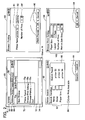
- Fig. 2 is a diagram explaining respective screens that are displayed on a displaying unit
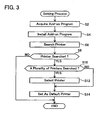
- Fig. 3 shows a flowchart of a setting process that is performed by a terminal device
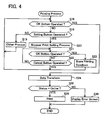
- Fig. 4 shows a flowchart of a printing process that is performed by the terminal device.
- Fig. 1 shows a schematic diagram of a terminal system 2 of this embodiment.
- the terminal system 2 comprises a PC 4, an internet 27, a router 28, a LAN 50, and a plurality of printers 52 to 56.
- the PC 4 and the printers 52 to 56 are connected to the LAN 50.
- the PC 4 and the respective printers 52 to 56 are mutually communicable via the LAN 50.
- the LAN 50 is connected to the internet 27 via the router 28.
- the PC 4 is able to access the internet 27 via the LAN 50 and the router 28.
- Each printer 52 to 56 is a device at least including a print function.
- Each printer 52 to 56 may also be a multi-function device additionally including a scanner function, copy function, FAX function, telephone function, and other functions.
- the plurality of printers 52 to 56 has the same configuration.
- the configuration of the PC 4 is now explained.
- the PC 4 comprises a displaying unit 6, an operation unit 8, an NVRAM 10, a controller 14, a network interface 30, and a ROM 32.
- the displaying unit 6 is a display for displaying various types of information.
- the operation unit 8 is configured from a keyboard and a mouse. A user is able to input various commands into the PC 4 by operating the operation unit 8.
- the NVRAM 10 is a nonvolatile memory, and includes a setting storage area 12.
- the setting storage area 12 stores the browser print conditions of the printer (for example, the printer 52) that is connected to the LAN 50.
- the browser print conditions will be described later in detail.
- the network interface 30 is connected to the LAN 50.
- the ROM 32 stores the browser application 34.
- the browser application 34 includes a browser program 38 and an add-on program 36. Incidentally, the ROM 32 additionally stores an OS (Operating System) program not shown.
- OS Operating System
- the controller 14 is configured from a CPU. As a result of the controller 14 performing processes according to the browser program 38 and the add-on program 36 included in the browser application 34 stored in the ROM 32, the functions of the first processing unit 16 and the second processing unit 18 are realized.
- the first processing unit 16 displays a browser screen on the displaying unit 6 according to the browser program 38.
- the second processing unit 18 performs various processes according to the add-on program 36. As a result of the second processing unit 18 performing processes according to the add-on program 36, the functions of the first to fourth display processing units 20, 44 to 48, the acquiring unit 22, the sending unit 24, the search unit 26, and the storage controlling unit 42 are realized.
- the controller 14 performing processes according to the OS program stored in the ROM 32, the function of the installing unit 40 is realized. If the add-on program 36 is not included in the browser application 34, the installing unit 40 installs the add-on program 36 to the browser application 34.
- FIG. 2 A browser screen 60 and a printer search screen 80 that are displayed on the displaying unit 6 of the PC 4 are now explained with reference to Fig. 2 .
- Displayed on the displaying unit 6 of the PC 4 are the browser screen 60, the printer search screen 80, a browser print screen 90, and a browser print setting screen 100.
- the browser print screen 90 and the browser print setting screen 100 will be explained with reference to the printing process described later.
- the first processing unit 16 displays the browser screen 60 (browser window 60) on the displaying unit 6 according to the browser program 38 (refer to Fig. 1 ). There is no particular limitation in the type of browser.
- the second processing unit 18 displays the printer search screen 80, the browser print screen 90 and the browser print setting screen 100 on the displaying unit 6 according to the add-on program 36.
- the printing via the browser without using the printer driver will be referred to as "browser print” in the ensuing explanation.
- the upper left diagram in Fig. 2 shows an example of the layout of the browser screen 60.
- the browser screen 60 includes a title bar 62, an address bar 66, a menu bar 68, a view 72, and a status bar 74.
- the title bar 62 displays the name of the web page ("AAA" in the example of Fig. 2 ) that is displayed on the view 72.
- the address bar 66 displays the address 64 of the web page that is displayed on the view 72.
- the menu bar 68 displays a list of menus that can be performed on the browser screen 60.
- the view 72 displays the web page.
- the status bar 74 displays the reading status of the web page.
- the status 76 is not displayed at the right end of the status bar 74.
- the third display processing unit 46 displays the status 76 of the printer that is set as the default printer in the setting process described later at the right end of the status bar 74.
- the second processing unit 18 sends an SNMP (Simple Network Management Protocol) status request command to the default printer at predetermined time cycle.
- the PC 4 thereby acquires the status of the default printer. For example, in a state where the PC 4 is communicable with the default printer, "online" is displayed as the status 76.
- buttons 70a, 70b, 70c are displayed below the "file” menu.
- the first display processing unit 16 displays the buttons 70a, 70b, 70c in addition to the specific button group.
- the button 70a is a button for displaying the printer search screen 80.
- the button 70b is a button for displaying the browser print setting screen 100.
- the button 70c is a button for displaying the browser print screen 90.
- the printer search screen 80 is now explained.
- the second display processing unit 44 (refer to Fig. 1 ) displays the printer search screen 80 on the displaying unit 6.
- the lower left drawing in Fig. 2 shows an example of the layout of the printer search screen 80.
- the printer search screen 80 is a screen for searching for the printer to be set as the default printer.
- the printer search screen 80 includes a column 82 for inputting the search conditions, a column 84 for inputting the additional conditions, and a command button group 86.
- the user is able to input the search conditions into the column 82 by operating the operation unit 8.
- the printer name (node name), model name and paper size are input into the search condition column.
- the user is able to input detailed search conditions into the additional condition column 84 by operating the operation unit 8. Information showing whether color printing is possible is input into the additional condition column 84.
- the user is able to operate (for instance, click) the search button of the command button group 86 by operating the operation unit 8.
- the search unit 26 broadcasts a predetermined command (for example, GET command of SNMP) to the LAN 50. Consequently, the plurality of printers 52, 54, 56 connected to the LAN 50 sends a response to the PC 4, respectively in accordance with the predetermined command, including one's node name, one's model name, one's IP address, type of format that it can interpret, and other information.
- the search unit 26 thereby acquires the responses from the plurality of printers 52, 54, 56.
- the above other information includes information on the print paper size that can be printed by the printer, and whether the printer is able to perform color printing.
- the search unit 26 determines, for each of the plurality of responses, whether the information (node name, model name, paper size and so on) included in the relevant response satisfies all of the conditions that were input into the column 82 and the column 84.
- the search unit 26 specifies the node name that is included in the response to which a positive determination has been given.
- the second display processing unit 44 displays the search result screen 88 including a list of node names specified with the search unit 26 on the displaying unit 6.
- the user is able to select one printer from the list of printers (node names) displayed on the search result screen 88 by operating the operation unit 8.
- the storage controlling unit 42 sets the selected printer as the default printer. Specifically, the storage controlling unit 42 stores all information (node name, model name, IP address, type of format that can be interpreted, and so on) included in the response from the selected printer in the setting storage area 12 of the NVRAM 10.
- the setting process that is performed by the controller 14 of the PC 4 is now explained with reference to Fig. 3 .
- the user is able to perform a predetermined operation for activating the browser application 34 with the operation unit 8 of the PC 4.
- the first processing unit 16 displays the browser screen 60 (refer to Fig. 2 ) on the displaying unit 6 according to the browser program 38.
- the user is able to perform operations for acquiring the add-on program 36 on the browser screen 60.
- the installing unit 40 downloads the add-on program 32 from the specific site on the internet 27 (S2). Subsequently, the installing unit 40 installs the downloaded add-on program 32 to the browser application 34 (S4). More specifically, the installing unit 40 installs the add-on program 32 as an extension program of the browser application 34.
- the search unit 26 searches for printers that are connected to the LAN 50 (S6). Specifically, the search unit 26 broadcasts the predetermined command to the LAN 50. Consequently, the plurality of printers 52, 54, 56 each sends to the PC 4 a response including one's node name, one's model name, one's IP address, the type of format that it can interpret, and other information.
- the search unit 26 determines whether any response was received (S8). If the determination is YES, the controller 14 continues to S10. If the determination is NO, the setting process is ended.
- the search unit 26 determines whether a plurality of responses was received. If the determination is YES, the routine proceeds to S12. If the determination is NO, the controller 14 continues to S14.
- the search unit 26 specifies the node name from each of the plurality of responses, and displays the search result screen 88 (refer to Fig. 2 ) including a list of the specified plurality of node names on the displaying unit 6. By operating the operation unit 8, the user is able to select one printer from the list of printers (node names) displayed on the search result screen. 88. When the user selects one printer, the storage controlling unit 42 sets the selected printer as the default printer (S14).
- the process of S14 is the same as the setting of the default printer explained with reference to the printer search screen 80 of Fig. 2 .
- the search unit 26 sets the one printer to which the response was sent as the default printer.
- the printing process that is performed by the PC 4 is now explained with reference to Fig. 4 .
- the user is able to input the address of the desired web server in the address bar 66 (refer to Fig. 2 ) on the browser screen 60.
- the first processing unit 16 thereby acquires data from the web server according to the browser program 38.
- the data acquired here includes, for example, the HTML (Hyper Text Markup Language) format.
- the first processing unit 16 displays the data on the view 72 on the browser screen 60.
- the user operates "file" in the menu bar 68.
- the first display processing unit 20 displays the button group 70 including buttons 70a, 70b, 70c according to the add-on program 36.
- the printing process is completed when the user operates the button 70c.
- the fourth display processing unit 48 displays the browser print screen 90 (refer to Fig. 2 ) on the displaying unit 6.
- the browser print screen 90 is a separate screen (that is, a separate window) from the browser screen 60.
- the browser print screen 90 is now explained.
- the upper right diagram in Fig. 2 shows an example of the layout of the browser print screen 90.
- the browser print screen 90 is a screen for inputting commands for starting the browser print.
- the browser print screen 90 includes a default printer display column 91, a setting button 92, a number of print setting column 94, and a command button group 96.
- the node name of the current default printer that was set via the setting process of Fig. 3 or the printer search screen 80 of Fig. 2 is displayed on the column 91.
- the setting button 92 is a button for displaying the browser print setting screen 100 (refer to Fig. 2 ).
- the column 94 is a column for setting the number of browser prints. The user is able to input the number of prints in the column 94.
- the print preview button of the command button group 96 is operated by the user, the preview print screen of the data displayed on the view 72 is displayed.
- the OK button of the command button group 96 is operated by the
- the printing process When the printing process is started, it enters a user operation waiting state. As shown in Fig. 4 , if the OK button of the command button group 96 is operated by the user in the browser print screen 90 (S16: YES), the second processing unit 18 proceeds to S24. Moreover, if the setting button 92 is operated by the user in the browser print screen 90 (S18: YES), the second processing unit 18 proceeds to the browser print setting process (S20). If a button (for example, the print preview button, cancel button or the like) other than the OK button and the setting button is operated, the process according to the button operated by the user is performed (S19).
- a button for example, the print preview button, cancel button or the like
- the browser print setting screen 100 is a screen for setting the printing conditions of the browser print.
- the browser print setting screen 100 includes a column 102 and a command button group 104.
- the column 102 is a column for inputting various printing conditions. By operating the operation unit 8, the user is able to input the printing conditions into the column 102.
- the paper size, layout (so-called 2 in 1, 4 in 1 and so on), number of prints, and with or without duplex printing are input into the column 102. As shown in Fig.
- the second processing unit 18 waits until the printing conditions are input into the column 102 and one of the buttons of the command button group 104 is subsequently operated.
- the storage controlling unit 42 stores the printing conditions that were input into the column 102 in the setting storage area 12 in the NVRAM 10 (S23), and the controller 14 closes the browser print setting screen 100.
- the cancel button is operated (S22: YES)
- the controller 14 closes the browser print setting screen 100 without storing the printing conditions that were input into the column 102 in the setting storage area 12 in the NVRAM 10.
- the browser print setting screen 100 is closed, it returns to the user operation waiting state as in the browser print screen 90.
- the acquiring unit 22 reads a format (set via the setting process of Fig. 3 or the printer search screen 80 of Fig. 2 ) that can be interpreted by the default printer from the setting storage area 12 in the NVRAM 10. Subsequently, the acquiring unit 22 transforms the HTML format data that is displayed on the view 72 of the browser screen 60 (refer to Fig. 2 ) into the read format (for example, XML data, PDF data or the like). The acquiring unit 22 thereby acquires the transformed new data. Subsequently, the second processing unit 18 determines whether the status of the default printer is "online" (S26).
- This determination may be made, for example, by making inquiries to the default printer at the timing of performing the process of S26, or based on whether or not the status 76 displayed on the status bar 74 (refer to Fig. 2 ) of the browser screen 60 is "online.”
- the controller 14 continues to S28. If the determination is NO, the controller 14 continues to S30.
- the sending unit 24 reads the IP address of the default printer from the setting storage area 12 of the NVRAM 10. Moreover, the sending unit 24 reads the printing conditions that were input with the browser print setting screen 100 from the setting storage area 12 in the NVRAM 10. In addition, the sending unit 24 reads the number of prints that was input into the number of print setting column 94 of Fig.
- the printing conditions read above and the number of prints are collectively referred to as the "specific printing conditions.”
- the sending unit 24 sends the transformed new data and the specific printing conditions with the read IP address as the destination.
- the transformed new data is filed and sent according to a printing method set forth in the Web Service or UPnP.
- the default printer (for example, the printer 52) receives the transformed new data and the specific printing conditions.
- the default printer prints the image that is represented by the transformed new data according to the specific printing conditions.
- the second processing unit 18 displays an error screen on the displaying unit 6 (S30). When the process of S28 or S30 is performed, the printing process is completed.
- the fourth display processing unit 48 displays the browser print setting screen 100 (refer to Fig. 2 ) on the displaying unit 6.
- the storage controlling unit 42 stores the printing conditions that were input into the column 102 in the setting storage area 12 of the NVRAM 10. The printing conditions in the setting storage area 12 are thereby updated.
- the first display processing unit 20 displays the browser print button 70c on the browser screen 60.
- the acquiring unit 22 acquires transformed new data from the data that is displayed on the view 72 of the browser screen 60.
- the sending unit 24 sends the transformed new data to the default printer. Consequently, the default printer performs printing according to the transformed new data.
- the image that is represented by the data displayed on the browser screen 60 can be printed without having to use a printer driver.
- the acquiring unit 22 transforms the HTML data that is displayed on the view 72 of the browser screen 60 into a format that can be interpreted by the printer. Since the transforming process can be performed by the PC 4 itself, it is not necessary to request another device to perform the transforming process.
- the installing unit 40 is able to install the add-on program 36 to the browser application 34.
- the add-on program 36 is not installed, such add-on program 36 can be installed to the browser application 34 thereby.
- the search unit 26 searches for a printer that is connected to the LAN 4.
- the storage controlling unit 42 sets the searched printer as the default printer. Information concerning the destination printer of the transformed new data can thereby be stored in the setting storage area 12.
- the second display processing unit 44 displays the search result screen 88.
- the user is able to select a desired default printer among the plurality of printers.
- the third display processing unit 46 displays the status 76 on the browser screen 60.
- the user is able to know the status information of the default printer by viewing the browser screen 60.
- the user is able to determine whether or not to operate the browser print button 70c (that is, whether or not to cause the default printer to perform printing) based on the status information.
- the fourth display processing unit 48 displays the browser print setting screen 100 for the user to select the printing conditions on the displaying unit 6.
- the sending unit 24 sends the specific printing conditions including the printing conditions selected by the user, and the transformed new data to the default printer.
- the user is able to cause the default printer to perform printing according to the desired printing conditions.
- the browser program 38 is an example of the "first program.”
- the add-on program 36 is an example of the "second program.”
- the data that is displayed on the view 72 is an example of the "specific data.”
- the buttons 70a, 70b, 70c are an example of the "predetermined inputting portion.”
- the default printer is an example of the "specific printer.”
- the transformed new data is an example of the "new specific data.”
- the setting storage area 12 is an example of the "specific storage area.” Accordingly, the NVRAM 10 and the ROM 32 are an example of the "memory.”
- the browser print setting screen is an example of the "print setting selection screen.”
- the controller 14 is an example of the "processor.”
- the first display processing unit 20 may also display a so-called tool bar at a part of the browser screen 60 according to the add-on program 36.
- the tool bar may include buttons 70a, 70b, 70c for respectively displaying the printer search screen 80, the browser print screen 90, and the browser print setting screen 100.
- the installing unit 40 does not have to acquire the add-on program 36 from the internet 27 at S2 of Fig. 3 .
- the installing unit 40 may alternately acquire the add-on program 36 from a storage medium (CD-ROM or the like) storing the add-on program 36.
- the acquiring unit 22 may send the HTML data displayed on the view 72 and information showing the format that can be interpreted by the default printer to other device.
- the other device may transform the HTML data into the above format and send the transformed new data to the PC 4.
- the acquiring unit 22 may also acquire the transformed new data by receiving the transformed new data.
- the PC 4 is an example of the "terminal device." Nevertheless, the technique of this embodiment may alternately be applied to other types of terminal devices. The technique of this embodiment may be applied to, for example, a TV, a game machine and the like.
Landscapes
- Engineering & Computer Science (AREA)
- Theoretical Computer Science (AREA)
- Human Computer Interaction (AREA)
- Physics & Mathematics (AREA)
- General Engineering & Computer Science (AREA)
- General Physics & Mathematics (AREA)
- Accessory Devices And Overall Control Thereof (AREA)
- Information Transfer Between Computers (AREA)
Abstract
Description
- The technique disclosed in this specification relates to a terminal device configured to be connected with an internet.
- A printer driver stored in a host computer is known (for example,
JP9022335A - There are cases where a user wishes to print an image represented by data that is acquired from the internet and displayed on a browser screen. With conventional technique, the image cannot be printed unless the printer driver is used. This specification discloses technique that enables the printing of the image represented by the data that is displayed on the browser screen without having to use the printer driver.
- One aspect of techniques disclosed in the present specification is a terminal device to be connected with an internet. The terminal device may comprise a memory configured to store a browser application including a first program and a second program, and a processor comprising a first processing unit and a second processing unit. The first processing unit configured to acquire specific data from the internet in accordance with the first program and display a browser screen including the specific data on a displaying unit in accordance with the first program, and the second processing unit configured to execute a process in accordance with the second program. The second processing unit may comprise a first display processing unit, an acquiring unit, and an acquiring unit. The first display processing unit may be configured to display a predetermined inputting portion on the browser screen. The acquiring unit may be configured to acquire new specific data in a case where the predetermined inputting portion is operated. The new specific data may be transformed from the specific data being displayed on the browser screen, The new specific data may have a specific format that a specific printer can interpret. The sending unit may be configured to send the new specific data to the specific printer.
- With the above technique, when the user operates the predetermined inputting portion, the browser application is able to acquire the new specific data that was transformed from the specific data that is displayed on the browser screen, and send the new specific data to the specific printer. The specific printer is able to perform the printing process according to the new specific data. Consequently, the image that is represented by the specific data displayed on the browser screen is printed. With this technique, the acquisition of the new specific data and the sending of the new specific data are performed by the browser application (particularly the second program). Specifically, the image that is represented by the specific data displayed on the browser screen can be printed without having to use the printer driver.
- The acquiring unit may acquire the new specific data by transforming the specific data into the new specific data. According to this technique, since the transforming process from the specific data to the new specific data can be performed by the terminal device itself, the terminal device is not required to request another device to perform the transforming process.
- Moreover, the processor may further comprise an installing unit configured to install the second program to the browser application as an extension program. According to this technique, if the browser application does not include the second program, the second program can be installed as the extension program of the browser application. The terminal device is thereby able to perform the process of acquiring the new specific data and other processes according to the second program.
- The terminal device may be connected with the internet via a local area network. The second processing unit may further comprise a search unit configured to search one or more printers being connected with the local area network, and a storage controlling unit configured to store printer information related to the specific printer among the one or more printers in a specific storage area in the memory. The sending unit may be configured to send the new specific data to the specific printer by using the printer information being stored in the specific storage area in the memory. According to this technique, by the terminal device executing the search of the printers, information concerning the printer of the destination of the new specific data to be acquired by the browser application (that is, the data to be printed) can be stored in the memory.
- The second processing unit may further comprise a second display processing unit configured to display a printer selection screen on the displaying unit in a case where a plurality of printers is searched by the search unit, the printer selection screen allowing a user to select one printer among the plurality of printers. The storage controlling unit may be configured to store the printer information related to the specific printer selected by the user in the specific storage area. According to this configuration, the user is able to select the printer of the destination of the new specific data to be acquired by the browser application (that is, the data to be printed) among the plurality of printers.
- The second processing unit may further comprise a third display processing unit configured to display status information of the specific printer on the browser screen. According to this technique, the user is able to know the status information of the specific printer by viewing the browser screen. The user is able to determine whether or not to operate the predetermined button (that is, whether or not to cause the specific printer to perform printing) based on the status information.
- The second processing unit may further comprise a fourth display processing unit configured to display a print setting selection screen on the displaying unit, the print setting selection screen allowing a user to select a print setting. The sending unit may be configured to send print setting information indicating a specific print setting selected by the user and the new specific data to the specific printer. According to this technique, the user is able to cause the specific printer to perform printing according to the desired print setting.
- Another aspect of the technique disclosed herein may be as a program (that is, the second program) to be installed to the browser application as an extension program. Further, a non-transitory computer readable medium storing the program is also novel and useful. Incidentally, the control method and the browser application (that is, combination of the first program and the second program) for realizing the terminal device are also novel and useful. Moreover, the system including the terminal device and the specific printer is also novel and useful.
-
Fig. 1 shows an example of a configuration of a terminal system;Fig. 2 is a diagram explaining respective screens that are displayed on a displaying unit;Fig. 3 shows a flowchart of a setting process that is performed by a terminal device; andFig. 4 shows a flowchart of a printing process that is performed by the terminal device. - (Configuration of system) An embodiment is now explained with reference to the attached drawings.
Fig. 1 shows a schematic diagram of aterminal system 2 of this embodiment. Theterminal system 2 comprises a PC 4, aninternet 27, arouter 28, a LAN 50, and a plurality ofprinters 52 to 56. The PC 4 and theprinters 52 to 56 are connected to the LAN 50. The PC 4 and therespective printers 52 to 56 are mutually communicable via the LAN 50. The LAN 50 is connected to theinternet 27 via therouter 28. The PC 4 is able to access theinternet 27 via the LAN 50 and therouter 28. Eachprinter 52 to 56 is a device at least including a print function. Eachprinter 52 to 56 may also be a multi-function device additionally including a scanner function, copy function, FAX function, telephone function, and other functions. The plurality ofprinters 52 to 56 has the same configuration. - (Configuration of PC 4) The configuration of the PC 4 is now explained. The PC 4 comprises a displaying
unit 6, anoperation unit 8, an NVRAM 10, acontroller 14, anetwork interface 30, and aROM 32. The displayingunit 6 is a display for displaying various types of information. Theoperation unit 8 is configured from a keyboard and a mouse. A user is able to input various commands into the PC 4 by operating theoperation unit 8. The NVRAM 10 is a nonvolatile memory, and includes asetting storage area 12. Thesetting storage area 12 stores the browser print conditions of the printer (for example, the printer 52) that is connected to the LAN 50. The browser print conditions will be described later in detail. Thenetwork interface 30 is connected to the LAN 50. TheROM 32 stores thebrowser application 34. Thebrowser application 34 includes abrowser program 38 and an add-onprogram 36. Incidentally, theROM 32 additionally stores an OS (Operating System) program not shown. - The
controller 14 is configured from a CPU. As a result of thecontroller 14 performing processes according to thebrowser program 38 and the add-onprogram 36 included in thebrowser application 34 stored in theROM 32, the functions of thefirst processing unit 16 and thesecond processing unit 18 are realized. Thefirst processing unit 16 displays a browser screen on the displayingunit 6 according to thebrowser program 38. Thesecond processing unit 18 performs various processes according to the add-onprogram 36. As a result of thesecond processing unit 18 performing processes according to the add-onprogram 36, the functions of the first to fourthdisplay processing units unit 22, the sendingunit 24, thesearch unit 26, and thestorage controlling unit 42 are realized. In addition, as a result of thecontroller 14 performing processes according to the OS program stored in theROM 32, the function of the installingunit 40 is realized. If the add-onprogram 36 is not included in thebrowser application 34, the installingunit 40 installs the add-onprogram 36 to thebrowser application 34. - (Explanation of browser print screen and printer search screen) A
browser screen 60 and aprinter search screen 80 that are displayed on the displayingunit 6 of the PC 4 are now explained with reference toFig. 2 . Displayed on the displayingunit 6 of the PC 4 are thebrowser screen 60, theprinter search screen 80, abrowser print screen 90, and a browserprint setting screen 100. Incidentally, thebrowser print screen 90 and the browserprint setting screen 100 will be explained with reference to the printing process described later. Thefirst processing unit 16 displays the browser screen 60 (browser window 60) on the displayingunit 6 according to the browser program 38 (refer toFig. 1 ). There is no particular limitation in the type of browser. Thesecond processing unit 18 displays theprinter search screen 80, thebrowser print screen 90 and the browserprint setting screen 100 on the displayingunit 6 according to the add-onprogram 36. Incidentally, the printing via the browser without using the printer driver will be referred to as "browser print" in the ensuing explanation. - The upper left diagram in
Fig. 2 shows an example of the layout of thebrowser screen 60. Thebrowser screen 60 includes atitle bar 62, anaddress bar 66, amenu bar 68, aview 72, and astatus bar 74. Thetitle bar 62 displays the name of the web page ("AAA" in the example ofFig. 2 ) that is displayed on theview 72. Theaddress bar 66 displays theaddress 64 of the web page that is displayed on theview 72. Themenu bar 68 displays a list of menus that can be performed on thebrowser screen 60. Theview 72 displays the web page. Thestatus bar 74 displays the reading status of the web page. In a state where the add-onprogram 36 is not installed to thebrowser application 34, the status 76 is not displayed at the right end of thestatus bar 74. In a state where the add-onprogram 36 is installed to thebrowser application 34, the thirddisplay processing unit 46 displays the status 76 of the printer that is set as the default printer in the setting process described later at the right end of thestatus bar 74. In a state where thebrowser screen 60 is activated, thesecond processing unit 18 sends an SNMP (Simple Network Management Protocol) status request command to the default printer at predetermined time cycle. The PC 4 thereby acquires the status of the default printer. For example, in a state where the PC 4 is communicable with the default printer, "online" is displayed as the status 76. In a state where the PC 4 is not communicable with the default printer, "offline" is displayed as the status 76. In a state where some kind of error has occurred in the default printer, "error" is displayed as the status 76. In a state where printing is performed in the default printer, "printing" is displayed as the status 76. Moreover, if the printing is completed in the default printer, "print complete" is displayed as the status 76 for a predetermined time after the completion of printing. - When the user operates "file" from the
menu bar 68, abutton group 70 is displayed below the "file" menu. In a state where the add-onprogram 36 is not installed to thebrowser application 34, of thebutton group 70 shown inFig. 2 , only a specific button group other than thebuttons program 36 is installed to thebrowser application 34, the firstdisplay processing unit 16 displays thebuttons button 70a is a button for displaying theprinter search screen 80. Thebutton 70b is a button for displaying the browserprint setting screen 100. Thebutton 70c is a button for displaying thebrowser print screen 90. - The
printer search screen 80 is now explained. When thebutton 70a is operated by the user, the second display processing unit 44 (refer toFig. 1 ) displays theprinter search screen 80 on the displayingunit 6. The lower left drawing inFig. 2 shows an example of the layout of theprinter search screen 80. Theprinter search screen 80 is a screen for searching for the printer to be set as the default printer. Theprinter search screen 80 includes acolumn 82 for inputting the search conditions, acolumn 84 for inputting the additional conditions, and acommand button group 86. The user is able to input the search conditions into thecolumn 82 by operating theoperation unit 8. The printer name (node name), model name and paper size are input into the search condition column. The user is able to input detailed search conditions into theadditional condition column 84 by operating theoperation unit 8. Information showing whether color printing is possible is input into theadditional condition column 84. - The user is able to operate (for instance, click) the search button of the
command button group 86 by operating theoperation unit 8. In this case, the search unit 26 (refer toFig. 1 ) broadcasts a predetermined command (for example, GET command of SNMP) to the LAN 50. Consequently, the plurality ofprinters search unit 26 thereby acquires the responses from the plurality ofprinters search unit 26 determines, for each of the plurality of responses, whether the information (node name, model name, paper size and so on) included in the relevant response satisfies all of the conditions that were input into thecolumn 82 and thecolumn 84. Thesearch unit 26 specifies the node name that is included in the response to which a positive determination has been given. Subsequently, the seconddisplay processing unit 44 displays thesearch result screen 88 including a list of node names specified with thesearch unit 26 on the displayingunit 6. The user is able to select one printer from the list of printers (node names) displayed on thesearch result screen 88 by operating theoperation unit 8. When the user selects one printer, the storage controlling unit 42 (refer toFig. 1 ) sets the selected printer as the default printer. Specifically, thestorage controlling unit 42 stores all information (node name, model name, IP address, type of format that can be interpreted, and so on) included in the response from the selected printer in the settingstorage area 12 of theNVRAM 10. - (Setting process that is performed by the PC 4) The setting process that is performed by the
controller 14 of the PC 4 is now explained with reference toFig. 3 . The user is able to perform a predetermined operation for activating thebrowser application 34 with theoperation unit 8 of the PC 4. In this case, thefirst processing unit 16 displays the browser screen 60 (refer toFig. 2 ) on the displayingunit 6 according to thebrowser program 38. The user is able to perform operations for acquiring the add-onprogram 36 on thebrowser screen 60. In this case, the installingunit 40 downloads the add-onprogram 32 from the specific site on the internet 27 (S2). Subsequently, the installingunit 40 installs the downloaded add-onprogram 32 to the browser application 34 (S4). More specifically, the installingunit 40 installs the add-onprogram 32 as an extension program of thebrowser application 34. - Subsequently, the
search unit 26 searches for printers that are connected to the LAN 50 (S6). Specifically, thesearch unit 26 broadcasts the predetermined command to the LAN 50. Consequently, the plurality ofprinters search unit 26 determines whether any response was received (S8). If the determination is YES, thecontroller 14 continues to S10. If the determination is NO, the setting process is ended. - At S10, the
search unit 26 determines whether a plurality of responses was received. If the determination is YES, the routine proceeds to S12. If the determination is NO, thecontroller 14 continues to S14. At S12, thesearch unit 26 specifies the node name from each of the plurality of responses, and displays the search result screen 88 (refer toFig. 2 ) including a list of the specified plurality of node names on the displayingunit 6. By operating theoperation unit 8, the user is able to select one printer from the list of printers (node names) displayed on the search result screen. 88. When the user selects one printer, thestorage controlling unit 42 sets the selected printer as the default printer (S14). The process of S14 is the same as the setting of the default printer explained with reference to theprinter search screen 80 ofFig. 2 . Incidentally, if the determination is NO at S10, at S14, thesearch unit 26 sets the one printer to which the response was sent as the default printer. - (Printing process that is performed by the PC 4) The printing process that is performed by the PC 4 is now explained with reference to
Fig. 4 . The user is able to input the address of the desired web server in the address bar 66 (refer toFig. 2 ) on thebrowser screen 60. Thefirst processing unit 16 thereby acquires data from the web server according to thebrowser program 38. The data acquired here includes, for example, the HTML (Hyper Text Markup Language) format. Thefirst processing unit 16 displays the data on theview 72 on thebrowser screen 60. The user operates "file" in themenu bar 68. In the above case, the firstdisplay processing unit 20 displays thebutton group 70 includingbuttons program 36. The printing process is completed when the user operates thebutton 70c. In the above case, the fourthdisplay processing unit 48 displays the browser print screen 90 (refer toFig. 2 ) on the displayingunit 6. Thebrowser print screen 90 is a separate screen (that is, a separate window) from thebrowser screen 60. - The
browser print screen 90 is now explained. The upper right diagram inFig. 2 shows an example of the layout of thebrowser print screen 90. Thebrowser print screen 90 is a screen for inputting commands for starting the browser print. Thebrowser print screen 90 includes a defaultprinter display column 91, asetting button 92, a number ofprint setting column 94, and acommand button group 96. The node name of the current default printer that was set via the setting process ofFig. 3 or theprinter search screen 80 ofFig. 2 is displayed on thecolumn 91. Thesetting button 92 is a button for displaying the browser print setting screen 100 (refer toFig. 2 ). Thecolumn 94 is a column for setting the number of browser prints. The user is able to input the number of prints in thecolumn 94. When the print preview button of thecommand button group 96 is operated by the user, the preview print screen of the data displayed on theview 72 is displayed. When the OK button of thecommand button group 96 is operated by the user, the printing process described later is started. - The contents of the printing process are now explained. When the printing process is started, it enters a user operation waiting state. As shown in
Fig. 4 , if the OK button of thecommand button group 96 is operated by the user in the browser print screen 90 (S16: YES), thesecond processing unit 18 proceeds to S24. Moreover, if thesetting button 92 is operated by the user in the browser print screen 90 (S18: YES), thesecond processing unit 18 proceeds to the browser print setting process (S20). If a button (for example, the print preview button, cancel button or the like) other than the OK button and the setting button is operated, the process according to the button operated by the user is performed (S19). - In the browser print setting process, the fourth
display processing unit 48 displays the browser print setting screen 100 (refer toFig. 2 ) on the displayingunit 6. The browserprint setting screen 100 is now explained. The lower right drawing inFig. 2 shows an example of the layout of the browserprint setting screen 100. The browserprint setting screen 100 is a screen for setting the printing conditions of the browser print. The browserprint setting screen 100 includes acolumn 102 and acommand button group 104. Thecolumn 102 is a column for inputting various printing conditions. By operating theoperation unit 8, the user is able to input the printing conditions into thecolumn 102. The paper size, layout (so-called 2 in 1, 4 in 1 and so on), number of prints, and with or without duplex printing are input into thecolumn 102. As shown inFig. 4 , thesecond processing unit 18 waits until the printing conditions are input into thecolumn 102 and one of the buttons of thecommand button group 104 is subsequently operated. When the user operates the OK button of the command button group 104 (S21: YES), thestorage controlling unit 42 stores the printing conditions that were input into thecolumn 102 in the settingstorage area 12 in the NVRAM 10 (S23), and thecontroller 14 closes the browserprint setting screen 100. Meanwhile, when the cancel button is operated (S22: YES), thecontroller 14 closes the browserprint setting screen 100 without storing the printing conditions that were input into thecolumn 102 in the settingstorage area 12 in theNVRAM 10. When the browserprint setting screen 100 is closed, it returns to the user operation waiting state as in thebrowser print screen 90. - At S24 of
Fig. 4 , the acquiringunit 22 reads a format (set via the setting process ofFig. 3 or theprinter search screen 80 ofFig. 2 ) that can be interpreted by the default printer from the settingstorage area 12 in theNVRAM 10. Subsequently, the acquiringunit 22 transforms the HTML format data that is displayed on theview 72 of the browser screen 60 (refer toFig. 2 ) into the read format (for example, XML data, PDF data or the like). The acquiringunit 22 thereby acquires the transformed new data. Subsequently, thesecond processing unit 18 determines whether the status of the default printer is "online" (S26). This determination may be made, for example, by making inquiries to the default printer at the timing of performing the process of S26, or based on whether or not the status 76 displayed on the status bar 74 (refer toFig. 2 ) of thebrowser screen 60 is "online." Here, if the determination at S26 is YES, thecontroller 14 continues to S28. If the determination is NO, thecontroller 14 continues to S30. At S28, the sendingunit 24 reads the IP address of the default printer from the settingstorage area 12 of theNVRAM 10. Moreover, the sendingunit 24 reads the printing conditions that were input with the browserprint setting screen 100 from the settingstorage area 12 in theNVRAM 10. In addition, the sendingunit 24 reads the number of prints that was input into the number ofprint setting column 94 ofFig. 2 . In the ensuing explanation, the printing conditions read above and the number of prints are collectively referred to as the "specific printing conditions." The sendingunit 24 sends the transformed new data and the specific printing conditions with the read IP address as the destination. Incidentally, the transformed new data is filed and sent according to a printing method set forth in the Web Service or UPnP. The default printer (for example, the printer 52) receives the transformed new data and the specific printing conditions. The default printer prints the image that is represented by the transformed new data according to the specific printing conditions. Meanwhile, at S30, thesecond processing unit 18 displays an error screen on the displaying unit 6 (S30). When the process of S28 or S30 is performed, the printing process is completed. - If the
button 70b of thebrowser screen 60 ofFig. 2 is operated, the fourthdisplay processing unit 48 displays the browser print setting screen 100 (refer toFig. 2 ) on the displayingunit 6. When the printing conditions are input into thecolumn 102 and the OK button of thecommand button group 104 is subsequently operated, thestorage controlling unit 42 stores the printing conditions that were input into thecolumn 102 in the settingstorage area 12 of theNVRAM 10. The printing conditions in the settingstorage area 12 are thereby updated. - The
terminal system 2 of this embodiment was explained in detail above. In this embodiment, the firstdisplay processing unit 20 displays thebrowser print button 70c on thebrowser screen 60. When thebrowser print button 70c is operated and the OK button of thebrowser print screen 90 is subsequently operated, the acquiringunit 22 acquires transformed new data from the data that is displayed on theview 72 of thebrowser screen 60. The sendingunit 24 sends the transformed new data to the default printer. Consequently, the default printer performs printing according to the transformed new data. According to this embodiment, the image that is represented by the data displayed on thebrowser screen 60 can be printed without having to use a printer driver. - Moreover, in this embodiment, the acquiring
unit 22 transforms the HTML data that is displayed on theview 72 of thebrowser screen 60 into a format that can be interpreted by the printer. Since the transforming process can be performed by the PC 4 itself, it is not necessary to request another device to perform the transforming process. - In this embodiment, the installing
unit 40 is able to install the add-onprogram 36 to thebrowser application 34. Thus, if the add-onprogram 36 is not installed, such add-onprogram 36 can be installed to thebrowser application 34 thereby. - In this embodiment, the
search unit 26 searches for a printer that is connected to the LAN 4. Thestorage controlling unit 42 sets the searched printer as the default printer. Information concerning the destination printer of the transformed new data can thereby be stored in the settingstorage area 12. - Moreover, in cases where the
search unit 26 searches for a plurality of printers, the seconddisplay processing unit 44 displays thesearch result screen 88. The user is able to select a desired default printer among the plurality of printers. - In this embodiment, the third
display processing unit 46 displays the status 76 on thebrowser screen 60. Thus, the user is able to know the status information of the default printer by viewing thebrowser screen 60. The user is able to determine whether or not to operate thebrowser print button 70c (that is, whether or not to cause the default printer to perform printing) based on the status information. - Moreover, in this embodiment, the fourth
display processing unit 48 displays the browserprint setting screen 100 for the user to select the printing conditions on the displayingunit 6. In addition, the sendingunit 24 sends the specific printing conditions including the printing conditions selected by the user, and the transformed new data to the default printer. Thus, the user is able to cause the default printer to perform printing according to the desired printing conditions. - The
browser program 38 is an example of the "first program." The add-onprogram 36 is an example of the "second program." The data that is displayed on theview 72 is an example of the "specific data." Thebuttons storage area 12 is an example of the "specific storage area." Accordingly, theNVRAM 10 and theROM 32 are an example of the "memory." Moreover, the browser print setting screen is an example of the "print setting selection screen." Thecontroller 14 is an example of the "processor." - The modified examples of the above embodiment are listed below. (1) The first
display processing unit 20 may also display a so-called tool bar at a part of thebrowser screen 60 according to the add-onprogram 36. In the above case, the tool bar may includebuttons printer search screen 80, thebrowser print screen 90, and the browserprint setting screen 100. - (2) The installing
unit 40 does not have to acquire the add-onprogram 36 from theinternet 27 at S2 ofFig. 3 . For example, the installingunit 40 may alternately acquire the add-onprogram 36 from a storage medium (CD-ROM or the like) storing the add-onprogram 36. - (3) In substitute for S24 of
Fig. 4 , the acquiringunit 22 may send the HTML data displayed on theview 72 and information showing the format that can be interpreted by the default printer to other device. The other device may transform the HTML data into the above format and send the transformed new data to the PC 4. The acquiringunit 22 may also acquire the transformed new data by receiving the transformed new data. - (4) In this embodiment, the PC 4 is an example of the "terminal device." Nevertheless, the technique of this embodiment may alternately be applied to other types of terminal devices. The technique of this embodiment may be applied to, for example, a TV, a game machine and the like.
Claims (13)
- A terminal device (4) configured to be connected with an internet (27), the terminal device (4) comprising:a memory (10, 32) configured to store a browser application (34) including a first program (38) and a second program (36); anda processor (14) configured to comprise a first processing unit (16) and a second processing unit (18); whereinthe first processing unit (16) configured to acquire specific data from the internet (27) in accordance with the first program (38) and display a browser screen (60) including the specific data on a displaying unit (6) in accordance with the first program (38); andthe second processing unit (18) configured to execute a process in accordance with the second program (38), whereinthe second processing unit (18) comprises:a first display processing unit (20) configured to display a predetermined inputting portion (70a, 70b, 70c) on the browser screen (60);an acquiring unit (22) configured to acquire new specific data in a case where the predetermined inputting portion (70a, 70b, 70c) is operated, the new specific data being transformed from the specific data being displayed on the browser screen (60), the new specific data having a specific format that a specific printer can interpret; anda sending unit (24) configured to send the new specific data to the specific printer.
- The terminal device (4) as in claim 1, wherein
the acquiring unit (22) is configured to acquire the new specific data by transforming the specific data to the new specific data. - The terminal device (4) as in claim 1 or 2, wherein
the processor further comprises an installing unit (40) configured to install the second program (36) to the browser application (34) as an extension program. - The terminal device (4) as in any one of claims 1 to 3, wherein
the terminal device (4) is configured to be connected with the internet (27) via a local area network (50), and
the second processing unit (18) further comprises:a search unit (26) configured to search one or more printers (52, 54, 56) being connected with the local area network (50); anda storage controlling unit (42) configured to store printer information related to the specific printer among the one or more printers (52, 54, 56) in a specific storage area (12) in the memory (10, 32),wherein the sending unit (24) is configured to send the new specific data to the specific printer by using the printer information being stored in the specific storage area (12) in the memory (10, 32). - The terminal device (4) as in claim 4, wherein
the second processing unit (18) further comprises a second display processing unit (44) configured to display a printer selection screen (80) on the displaying unit (6) in a case where a plurality of printers (52, 54, 56) is searched by the search unit (26), the printer selection screen (80) allowing a user to select one printer among the plurality of printers (52, 54, 56), and
the storage controlling unit (42) is configured to store the printer information related to the specific printer selected by the user in the specific storage area (12). - The terminal device (4) as in any one of claims 1 to 5, wherein
the second processing unit (18) further comprises a third display processing unit (46) configured to display status information of the specific printer on the browser screen (60). - The terminal device (4) as in any one of claims 1 to 6, wherein
the second processing unit (18) further comprises a fourth display processing unit (48) configured to display a print setting selection screen (100) on the displaying unit (6), the print setting selection screen (100) allowing a user to select a print setting, and
the sending unit (24) is configured to send print setting information indicating a specific print setting selected by the user and the new specific data to the specific printer. - A computer program (36) to be installed to a browser application (34) as an extension program,
the computer program (36) including instructions for ordering a computer (14) mounted on a terminal device (4) configured to be connected with an internet (27) to execute:displaying a predetermined inputting portion (70a, 70b, 70c) on a browser screen (60) that is displayed in accordance with the browser application (34);acquiring new specific data in a case where the predetermined inputting portion (70a, 70b, 70c) is operated, the new specific data being transformed from specific data displayed on the browser screen (60), the new specific data having a specific format that a specific printer can interpret; andsending the new specific data to the specific printer. - The computer program (36) as in claim 8, wherein
in the acquiring, the new specific data is acquired by transforming the specific data to the new specific data. - The computer program (36) as in claims 8 or 9, wherein
the terminal device (4) is configured to be connected with the internet (27) via a local area network (50),
the computer program (36) further includes instructions for ordering the computer (14) to execute:searching one or more printers (52, 54, 56) being connected with the local area network (50); andstoring printer information related to the specific printer among the one or more printers (52, 54, 56) in a specific storage area (12) in a memory (10, 32) of the terminal device (4);wherein in the sending, the new specific data is sent to the specific printer by using the printer information being stored in the specific storage area (12). - The computer program (36) as in claim 10, further including instructions for ordering the computer (14) to execute:displaying a printer selection screen (80) on a displaying unit (6) of the terminal device (4) in a case where a plurality of printers (52, 54, 56) is searched, the printer selection (80) screen allowing a user to select one printer among the plurality of printers (52, 54, 56), andwherein in the storing, the printer information related to the specific printer selected by the user is stored in the specific storage area (12).
- The computer program (36) as in claims 8 to 11, further including instructions for ordering the computer (14) to execute:displaying status information of the specific printer on the browser screen (60).
- The computer program (36) as in claims 8 to 12, further including instructions for ordering the computer (14) to execute:displaying a print setting selection screen (100) on a displaying unit (6) of the terminal device (4), the print setting selection screen (100) allowing a user to select a print setting, andwherein in the sending, print setting information indicating a specific print setting selected by the user and the new specific data are sent to the specific printer.
Applications Claiming Priority (1)
| Application Number | Priority Date | Filing Date | Title |
|---|---|---|---|
| JP2009224052A JP5434435B2 (en) | 2009-09-29 | 2009-09-29 | Terminal device connected to the Internet |
Publications (3)
| Publication Number | Publication Date |
|---|---|
| EP2306300A2 true EP2306300A2 (en) | 2011-04-06 |
| EP2306300A3 EP2306300A3 (en) | 2012-10-03 |
| EP2306300B1 EP2306300B1 (en) | 2018-11-28 |
Family
ID=42829410
Family Applications (1)
| Application Number | Title | Priority Date | Filing Date |
|---|---|---|---|
| EP10008890.5A Not-in-force EP2306300B1 (en) | 2009-09-29 | 2010-08-26 | Terminal device to be connected with internet |
Country Status (4)
| Country | Link |
|---|---|
| US (1) | US8619292B2 (en) |
| EP (1) | EP2306300B1 (en) |
| JP (1) | JP5434435B2 (en) |
| CN (1) | CN102033724B (en) |
Cited By (1)
| Publication number | Priority date | Publication date | Assignee | Title |
|---|---|---|---|---|
| WO2015015503A1 (en) | 2013-07-31 | 2015-02-05 | Hewlett-Packard Development Company, L. P. | Authorizing marking agent consumption at discovered printers |
Families Citing this family (10)
| Publication number | Priority date | Publication date | Assignee | Title |
|---|---|---|---|---|
| JP5586968B2 (en) * | 2010-01-21 | 2014-09-10 | キヤノン株式会社 | Image forming apparatus, device cooperation system, service providing method, and program thereof |
| JP5974364B2 (en) * | 2012-07-24 | 2016-08-23 | セイコーエプソン株式会社 | Device control apparatus, device apparatus, control method, and control program |
| US10474406B2 (en) * | 2012-10-12 | 2019-11-12 | Hp Printing Korea Co., Ltd. | Method of printing content shared between applications and computing apparatus to perform the method |
| JP6167711B2 (en) * | 2013-07-12 | 2017-07-26 | ブラザー工業株式会社 | Print processing program |
| JP6324251B2 (en) * | 2014-07-24 | 2018-05-16 | キヤノン株式会社 | Information processing apparatus, program, and control method |
| JP6570443B2 (en) * | 2015-12-17 | 2019-09-04 | キヤノン株式会社 | Information processing apparatus, program, and control method |
| JP6642039B2 (en) * | 2016-01-26 | 2020-02-05 | コニカミノルタ株式会社 | Information processing apparatus, apparatus search program, and search method |
| JP7095268B2 (en) | 2017-11-30 | 2022-07-05 | ブラザー工業株式会社 | program |
| JP6407465B2 (en) * | 2018-04-11 | 2018-10-17 | キヤノン株式会社 | Information processing apparatus, program, and control method |
| JP6662482B2 (en) * | 2019-04-26 | 2020-03-11 | ブラザー工業株式会社 | Function execution device |
Citations (1)
| Publication number | Priority date | Publication date | Assignee | Title |
|---|---|---|---|---|
| JPH0922335A (en) | 1995-07-06 | 1997-01-21 | Ricoh Co Ltd | Printer driver |
Family Cites Families (21)
| Publication number | Priority date | Publication date | Assignee | Title |
|---|---|---|---|---|
| US7339690B2 (en) * | 1999-07-14 | 2008-03-04 | Fargo Electronics, Inc. | Identification card printer with client/server |
| US20010013063A1 (en) * | 2000-02-08 | 2001-08-09 | Hall David M. | System and method for applying printer-specific formatting |
| US20020120742A1 (en) * | 2001-02-14 | 2002-08-29 | Cherry Darrel D. | Dynamic user interface for facilitating network device capability utilization |
| JP4338905B2 (en) * | 2001-03-09 | 2009-10-07 | インフォプリント ソリューションズ カンパニー,エルエルシー | Print instruction program and print instruction method for printer with PDF direct printing function |
| JP2003036152A (en) * | 2001-05-17 | 2003-02-07 | Matsushita Electric Ind Co Ltd | Information printing system |
| US20030079030A1 (en) * | 2001-08-22 | 2003-04-24 | Cocotis Thomas A. | Output management system and method for enabling access to private network resources |
| US7307745B2 (en) * | 2002-01-21 | 2007-12-11 | Canon Kabushiki Kaisha | Web-based print server and client |
| JP2003216367A (en) * | 2002-01-21 | 2003-07-31 | Canon Inc | Information processing apparatus, information processing method, and print control program |
| JP2004145380A (en) * | 2002-10-21 | 2004-05-20 | Hitachi Software Eng Co Ltd | System for arranging and collecting web content information |
| JP2004213275A (en) * | 2002-12-27 | 2004-07-29 | Canon Inc | Data processing device |
| US7636584B2 (en) * | 2003-10-17 | 2009-12-22 | Hewlett-Packard Development Company, L.P. | Computing device and methods for mobile-printing |
| JP4289987B2 (en) * | 2003-11-25 | 2009-07-01 | キヤノン株式会社 | Print control apparatus, print control method, and computer program |
| JP2005157880A (en) * | 2003-11-27 | 2005-06-16 | Canon Inc | Information processing apparatus, information processing method, recording medium thereof, and program |
| US20060279772A1 (en) * | 2005-06-14 | 2006-12-14 | Bottomline Technologies (De) Inc. | Secure web based system for generating a printed document at a remote printer |
| JP4574520B2 (en) * | 2005-11-14 | 2010-11-04 | シャープ株式会社 | Information processing apparatus, server apparatus, program, and recording medium |
| JP4328972B2 (en) | 2005-11-30 | 2009-09-09 | ブラザー工業株式会社 | Printing system |
| JP4716900B2 (en) * | 2006-03-01 | 2011-07-06 | 株式会社弘染塾 | Information batch output system and information batch output program |
| JP2008060677A (en) * | 2006-08-29 | 2008-03-13 | Kyocera Mita Corp | Printer controller |
| US8286167B2 (en) * | 2006-12-01 | 2012-10-09 | Ricoh Company, Ltd. | Image processing apparatus, job management method, and storage medium |
| US7861182B2 (en) * | 2007-09-20 | 2010-12-28 | Ricoh Company, Ltd. | Dynamic printer driver user interface generation |
| EP2291745B1 (en) * | 2008-04-15 | 2013-07-03 | Foresee Results | Method and medium for remote tracking of user interaction with a webpage |
-
2009
- 2009-09-29 JP JP2009224052A patent/JP5434435B2/en active Active
-
2010
- 2010-08-26 EP EP10008890.5A patent/EP2306300B1/en not_active Not-in-force
- 2010-08-31 US US12/873,056 patent/US8619292B2/en not_active Expired - Fee Related
- 2010-09-29 CN CN201010505573.1A patent/CN102033724B/en not_active Expired - Fee Related
Patent Citations (1)
| Publication number | Priority date | Publication date | Assignee | Title |
|---|---|---|---|---|
| JPH0922335A (en) | 1995-07-06 | 1997-01-21 | Ricoh Co Ltd | Printer driver |
Cited By (2)
| Publication number | Priority date | Publication date | Assignee | Title |
|---|---|---|---|---|
| WO2015015503A1 (en) | 2013-07-31 | 2015-02-05 | Hewlett-Packard Development Company, L. P. | Authorizing marking agent consumption at discovered printers |
| EP3028158A4 (en) * | 2013-07-31 | 2017-03-15 | Hewlett-Packard Development Company, L.P. | Authorizing marking agent consumption at discovered printers |
Also Published As
| Publication number | Publication date |
|---|---|
| CN102033724A (en) | 2011-04-27 |
| CN102033724B (en) | 2014-09-10 |
| US20110075203A1 (en) | 2011-03-31 |
| JP5434435B2 (en) | 2014-03-05 |
| US8619292B2 (en) | 2013-12-31 |
| JP2011076171A (en) | 2011-04-14 |
| EP2306300B1 (en) | 2018-11-28 |
| EP2306300A3 (en) | 2012-10-03 |
Similar Documents
| Publication | Publication Date | Title |
|---|---|---|
| US8619292B2 (en) | Terminal device for printing data from the internet | |
| US9069504B2 (en) | Printing apparatus and method for increasing storage area | |
| KR101410348B1 (en) | Information processing device communicating with peripheral device, information processing method, and recording medium | |
| JP6455195B2 (en) | Operation screen providing system, relay device, and program | |
| EP2423812A1 (en) | Device and help server | |
| EP2337331A2 (en) | Printer having web server function | |
| JP2021096869A (en) | Information processing device, program, and method | |
| EP2388685A2 (en) | Information processing apparatus and control method thereof, and storage medium | |
| US20070206217A1 (en) | Printer device | |
| EP2369482B1 (en) | Display screen control device, display screen control method, and computer readable medium | |
| JP6737170B2 (en) | Server device, image processing unit and program | |
| JP4386051B2 (en) | Software installation method, program, and storage medium | |
| JP2007200235A (en) | Removable media device, removable media device control program, and network device control program | |
| CN101458615A (en) | Information processing device, information processing device controlling method, and computer-readable recording medium | |
| US9386082B2 (en) | Information processing apparatus, and control method and storage medium therefor | |
| JP4415810B2 (en) | Image processing apparatus, control method thereof, and control program | |
| EP2369828B1 (en) | Display screen control device, display screen control method, and computer readable medium | |
| JP2008210371A (en) | Information processing system | |
| JP5063334B2 (en) | Electronic device system and operation screen display program | |
| JP4428374B2 (en) | User interface program, input support method, and information terminal device | |
| JP5738388B2 (en) | Information processing apparatus, method, and control program for communicating with peripheral device | |
| JP2008090367A (en) | Control device, image formation system, and program | |
| JP2006215716A (en) | Equipment information setting system |
Legal Events
| Date | Code | Title | Description |
|---|---|---|---|
| PUAI | Public reference made under article 153(3) epc to a published international application that has entered the european phase |
Free format text: ORIGINAL CODE: 0009012 |
|
| AK | Designated contracting states |
Kind code of ref document: A2 Designated state(s): AL AT BE BG CH CY CZ DE DK EE ES FI FR GB GR HR HU IE IS IT LI LT LU LV MC MK MT NL NO PL PT RO SE SI SK SM TR |
|
| AX | Request for extension of the european patent |
Extension state: BA ME RS |
|
| PUAL | Search report despatched |
Free format text: ORIGINAL CODE: 0009013 |
|
| AK | Designated contracting states |
Kind code of ref document: A3 Designated state(s): AL AT BE BG CH CY CZ DE DK EE ES FI FR GB GR HR HU IE IS IT LI LT LU LV MC MK MT NL NO PL PT RO SE SI SK SM TR |
|
| AX | Request for extension of the european patent |
Extension state: BA ME RS |
|
| RIC1 | Information provided on ipc code assigned before grant |
Ipc: G06F 3/12 20060101AFI20120824BHEP |
|
| 17P | Request for examination filed |
Effective date: 20130403 |
|
| 17Q | First examination report despatched |
Effective date: 20150330 |
|
| STAA | Information on the status of an ep patent application or granted ep patent |
Free format text: STATUS: EXAMINATION IS IN PROGRESS |
|
| GRAP | Despatch of communication of intention to grant a patent |
Free format text: ORIGINAL CODE: EPIDOSNIGR1 |
|
| STAA | Information on the status of an ep patent application or granted ep patent |
Free format text: STATUS: GRANT OF PATENT IS INTENDED |
|
| INTG | Intention to grant announced |
Effective date: 20180716 |
|
| RAP1 | Party data changed (applicant data changed or rights of an application transferred) |
Owner name: BROTHER KOGYO KABUSHIKI KAISHA |
|
| GRAS | Grant fee paid |
Free format text: ORIGINAL CODE: EPIDOSNIGR3 |
|
| GRAA | (expected) grant |
Free format text: ORIGINAL CODE: 0009210 |
|
| STAA | Information on the status of an ep patent application or granted ep patent |
Free format text: STATUS: THE PATENT HAS BEEN GRANTED |
|
| AK | Designated contracting states |
Kind code of ref document: B1 Designated state(s): AL AT BE BG CH CY CZ DE DK EE ES FI FR GB GR HR HU IE IS IT LI LT LU LV MC MK MT NL NO PL PT RO SE SI SK SM TR |
|
| REG | Reference to a national code |
Ref country code: GB Ref legal event code: FG4D |
|
| REG | Reference to a national code |
Ref country code: CH Ref legal event code: EP |
|
| REG | Reference to a national code |
Ref country code: DE Ref legal event code: R096 Ref document number: 602010055391 Country of ref document: DE |
|
| REG | Reference to a national code |
Ref country code: AT Ref legal event code: REF Ref document number: 1071001 Country of ref document: AT Kind code of ref document: T Effective date: 20181215 |
|
| REG | Reference to a national code |
Ref country code: IE Ref legal event code: FG4D |
|
| REG | Reference to a national code |
Ref country code: NL Ref legal event code: MP Effective date: 20181128 |
|
| REG | Reference to a national code |
Ref country code: LT Ref legal event code: MG4D |
|
| REG | Reference to a national code |
Ref country code: AT Ref legal event code: MK05 Ref document number: 1071001 Country of ref document: AT Kind code of ref document: T Effective date: 20181128 |
|
| PG25 | Lapsed in a contracting state [announced via postgrant information from national office to epo] |
Ref country code: LT Free format text: LAPSE BECAUSE OF FAILURE TO SUBMIT A TRANSLATION OF THE DESCRIPTION OR TO PAY THE FEE WITHIN THE PRESCRIBED TIME-LIMIT Effective date: 20181128 Ref country code: AT Free format text: LAPSE BECAUSE OF FAILURE TO SUBMIT A TRANSLATION OF THE DESCRIPTION OR TO PAY THE FEE WITHIN THE PRESCRIBED TIME-LIMIT Effective date: 20181128 Ref country code: HR Free format text: LAPSE BECAUSE OF FAILURE TO SUBMIT A TRANSLATION OF THE DESCRIPTION OR TO PAY THE FEE WITHIN THE PRESCRIBED TIME-LIMIT Effective date: 20181128 Ref country code: NO Free format text: LAPSE BECAUSE OF FAILURE TO SUBMIT A TRANSLATION OF THE DESCRIPTION OR TO PAY THE FEE WITHIN THE PRESCRIBED TIME-LIMIT Effective date: 20190228 Ref country code: LV Free format text: LAPSE BECAUSE OF FAILURE TO SUBMIT A TRANSLATION OF THE DESCRIPTION OR TO PAY THE FEE WITHIN THE PRESCRIBED TIME-LIMIT Effective date: 20181128 Ref country code: FI Free format text: LAPSE BECAUSE OF FAILURE TO SUBMIT A TRANSLATION OF THE DESCRIPTION OR TO PAY THE FEE WITHIN THE PRESCRIBED TIME-LIMIT Effective date: 20181128 Ref country code: IS Free format text: LAPSE BECAUSE OF FAILURE TO SUBMIT A TRANSLATION OF THE DESCRIPTION OR TO PAY THE FEE WITHIN THE PRESCRIBED TIME-LIMIT Effective date: 20190328 Ref country code: ES Free format text: LAPSE BECAUSE OF FAILURE TO SUBMIT A TRANSLATION OF THE DESCRIPTION OR TO PAY THE FEE WITHIN THE PRESCRIBED TIME-LIMIT Effective date: 20181128 Ref country code: BG Free format text: LAPSE BECAUSE OF FAILURE TO SUBMIT A TRANSLATION OF THE DESCRIPTION OR TO PAY THE FEE WITHIN THE PRESCRIBED TIME-LIMIT Effective date: 20190228 |
|
| PG25 | Lapsed in a contracting state [announced via postgrant information from national office to epo] |
Ref country code: AL Free format text: LAPSE BECAUSE OF FAILURE TO SUBMIT A TRANSLATION OF THE DESCRIPTION OR TO PAY THE FEE WITHIN THE PRESCRIBED TIME-LIMIT Effective date: 20181128 Ref country code: PT Free format text: LAPSE BECAUSE OF FAILURE TO SUBMIT A TRANSLATION OF THE DESCRIPTION OR TO PAY THE FEE WITHIN THE PRESCRIBED TIME-LIMIT Effective date: 20190328 Ref country code: SE Free format text: LAPSE BECAUSE OF FAILURE TO SUBMIT A TRANSLATION OF THE DESCRIPTION OR TO PAY THE FEE WITHIN THE PRESCRIBED TIME-LIMIT Effective date: 20181128 Ref country code: GR Free format text: LAPSE BECAUSE OF FAILURE TO SUBMIT A TRANSLATION OF THE DESCRIPTION OR TO PAY THE FEE WITHIN THE PRESCRIBED TIME-LIMIT Effective date: 20190301 |
|
| PG25 | Lapsed in a contracting state [announced via postgrant information from national office to epo] |
Ref country code: NL Free format text: LAPSE BECAUSE OF FAILURE TO SUBMIT A TRANSLATION OF THE DESCRIPTION OR TO PAY THE FEE WITHIN THE PRESCRIBED TIME-LIMIT Effective date: 20181128 |
|
| PG25 | Lapsed in a contracting state [announced via postgrant information from national office to epo] |
Ref country code: PL Free format text: LAPSE BECAUSE OF FAILURE TO SUBMIT A TRANSLATION OF THE DESCRIPTION OR TO PAY THE FEE WITHIN THE PRESCRIBED TIME-LIMIT Effective date: 20181128 Ref country code: CZ Free format text: LAPSE BECAUSE OF FAILURE TO SUBMIT A TRANSLATION OF THE DESCRIPTION OR TO PAY THE FEE WITHIN THE PRESCRIBED TIME-LIMIT Effective date: 20181128 Ref country code: IT Free format text: LAPSE BECAUSE OF FAILURE TO SUBMIT A TRANSLATION OF THE DESCRIPTION OR TO PAY THE FEE WITHIN THE PRESCRIBED TIME-LIMIT Effective date: 20181128 Ref country code: DK Free format text: LAPSE BECAUSE OF FAILURE TO SUBMIT A TRANSLATION OF THE DESCRIPTION OR TO PAY THE FEE WITHIN THE PRESCRIBED TIME-LIMIT Effective date: 20181128 |
|
| REG | Reference to a national code |
Ref country code: DE Ref legal event code: R097 Ref document number: 602010055391 Country of ref document: DE |
|
| PG25 | Lapsed in a contracting state [announced via postgrant information from national office to epo] |
Ref country code: SM Free format text: LAPSE BECAUSE OF FAILURE TO SUBMIT A TRANSLATION OF THE DESCRIPTION OR TO PAY THE FEE WITHIN THE PRESCRIBED TIME-LIMIT Effective date: 20181128 Ref country code: EE Free format text: LAPSE BECAUSE OF FAILURE TO SUBMIT A TRANSLATION OF THE DESCRIPTION OR TO PAY THE FEE WITHIN THE PRESCRIBED TIME-LIMIT Effective date: 20181128 Ref country code: SK Free format text: LAPSE BECAUSE OF FAILURE TO SUBMIT A TRANSLATION OF THE DESCRIPTION OR TO PAY THE FEE WITHIN THE PRESCRIBED TIME-LIMIT Effective date: 20181128 Ref country code: RO Free format text: LAPSE BECAUSE OF FAILURE TO SUBMIT A TRANSLATION OF THE DESCRIPTION OR TO PAY THE FEE WITHIN THE PRESCRIBED TIME-LIMIT Effective date: 20181128 |
|
| PLBE | No opposition filed within time limit |
Free format text: ORIGINAL CODE: 0009261 |
|
| STAA | Information on the status of an ep patent application or granted ep patent |
Free format text: STATUS: NO OPPOSITION FILED WITHIN TIME LIMIT |
|
| PG25 | Lapsed in a contracting state [announced via postgrant information from national office to epo] |
Ref country code: SI Free format text: LAPSE BECAUSE OF FAILURE TO SUBMIT A TRANSLATION OF THE DESCRIPTION OR TO PAY THE FEE WITHIN THE PRESCRIBED TIME-LIMIT Effective date: 20181128 |
|
| 26N | No opposition filed |
Effective date: 20190829 |
|
| PG25 | Lapsed in a contracting state [announced via postgrant information from national office to epo] |
Ref country code: TR Free format text: LAPSE BECAUSE OF FAILURE TO SUBMIT A TRANSLATION OF THE DESCRIPTION OR TO PAY THE FEE WITHIN THE PRESCRIBED TIME-LIMIT Effective date: 20181128 |
|
| GBPC | Gb: european patent ceased through non-payment of renewal fee |
Effective date: 20190826 |
|
| PG25 | Lapsed in a contracting state [announced via postgrant information from national office to epo] |
Ref country code: LU Free format text: LAPSE BECAUSE OF NON-PAYMENT OF DUE FEES Effective date: 20190826 Ref country code: CH Free format text: LAPSE BECAUSE OF NON-PAYMENT OF DUE FEES Effective date: 20190831 Ref country code: LI Free format text: LAPSE BECAUSE OF NON-PAYMENT OF DUE FEES Effective date: 20190831 Ref country code: MC Free format text: LAPSE BECAUSE OF FAILURE TO SUBMIT A TRANSLATION OF THE DESCRIPTION OR TO PAY THE FEE WITHIN THE PRESCRIBED TIME-LIMIT Effective date: 20181128 |
|
| REG | Reference to a national code |
Ref country code: BE Ref legal event code: MM Effective date: 20190831 |
|
| PG25 | Lapsed in a contracting state [announced via postgrant information from national office to epo] |
Ref country code: FR Free format text: LAPSE BECAUSE OF NON-PAYMENT OF DUE FEES Effective date: 20190831 Ref country code: IE Free format text: LAPSE BECAUSE OF NON-PAYMENT OF DUE FEES Effective date: 20190826 |
|
| PG25 | Lapsed in a contracting state [announced via postgrant information from national office to epo] |
Ref country code: GB Free format text: LAPSE BECAUSE OF NON-PAYMENT OF DUE FEES Effective date: 20190826 Ref country code: BE Free format text: LAPSE BECAUSE OF NON-PAYMENT OF DUE FEES Effective date: 20190831 |
|
| PG25 | Lapsed in a contracting state [announced via postgrant information from national office to epo] |
Ref country code: CY Free format text: LAPSE BECAUSE OF FAILURE TO SUBMIT A TRANSLATION OF THE DESCRIPTION OR TO PAY THE FEE WITHIN THE PRESCRIBED TIME-LIMIT Effective date: 20181128 |
|
| PG25 | Lapsed in a contracting state [announced via postgrant information from national office to epo] |
Ref country code: HU Free format text: LAPSE BECAUSE OF FAILURE TO SUBMIT A TRANSLATION OF THE DESCRIPTION OR TO PAY THE FEE WITHIN THE PRESCRIBED TIME-LIMIT; INVALID AB INITIO Effective date: 20100826 Ref country code: MT Free format text: LAPSE BECAUSE OF FAILURE TO SUBMIT A TRANSLATION OF THE DESCRIPTION OR TO PAY THE FEE WITHIN THE PRESCRIBED TIME-LIMIT Effective date: 20181128 |
|
| PG25 | Lapsed in a contracting state [announced via postgrant information from national office to epo] |
Ref country code: MK Free format text: LAPSE BECAUSE OF FAILURE TO SUBMIT A TRANSLATION OF THE DESCRIPTION OR TO PAY THE FEE WITHIN THE PRESCRIBED TIME-LIMIT Effective date: 20181128 |
|
| PGFP | Annual fee paid to national office [announced via postgrant information from national office to epo] |
Ref country code: DE Payment date: 20230711 Year of fee payment: 14 |
|
| REG | Reference to a national code |
Ref country code: DE Ref legal event code: R119 Ref document number: 602010055391 Country of ref document: DE |
|
| PG25 | Lapsed in a contracting state [announced via postgrant information from national office to epo] |
Ref country code: DE Free format text: LAPSE BECAUSE OF NON-PAYMENT OF DUE FEES Effective date: 20250301 |