EP2240879B1 - Benutzerindikator zur anzeige eines sicheren modus - Google Patents
Benutzerindikator zur anzeige eines sicheren modus Download PDFInfo
- Publication number
- EP2240879B1 EP2240879B1 EP09707489.2A EP09707489A EP2240879B1 EP 2240879 B1 EP2240879 B1 EP 2240879B1 EP 09707489 A EP09707489 A EP 09707489A EP 2240879 B1 EP2240879 B1 EP 2240879B1
- Authority
- EP
- European Patent Office
- Prior art keywords
- operating system
- user
- mode
- indicator device
- secure
- Prior art date
- Legal status (The legal status is an assumption and is not a legal conclusion. Google has not performed a legal analysis and makes no representation as to the accuracy of the status listed.)
- Not-in-force
Links
Images



Classifications
-
- G—PHYSICS
- G06—COMPUTING OR CALCULATING; COUNTING
- G06F—ELECTRIC DIGITAL DATA PROCESSING
- G06F21/00—Security arrangements for protecting computers, components thereof, programs or data against unauthorised activity
- G06F21/70—Protecting specific internal or peripheral components, in which the protection of a component leads to protection of the entire computer
- G06F21/82—Protecting input, output or interconnection devices
- G06F21/84—Protecting input, output or interconnection devices output devices, e.g. displays or monitors
-
- G—PHYSICS
- G06—COMPUTING OR CALCULATING; COUNTING
- G06F—ELECTRIC DIGITAL DATA PROCESSING
- G06F21/00—Security arrangements for protecting computers, components thereof, programs or data against unauthorised activity
- G06F21/50—Monitoring users, programs or devices to maintain the integrity of platforms, e.g. of processors, firmware or operating systems
- G06F21/55—Detecting local intrusion or implementing counter-measures
- G06F21/554—Detecting local intrusion or implementing counter-measures involving event detection and direct action
-
- G—PHYSICS
- G06—COMPUTING OR CALCULATING; COUNTING
- G06F—ELECTRIC DIGITAL DATA PROCESSING
- G06F21/00—Security arrangements for protecting computers, components thereof, programs or data against unauthorised activity
- G06F21/60—Protecting data
- G06F21/62—Protecting access to data via a platform, e.g. using keys or access control rules
- G06F21/629—Protecting access to data via a platform, e.g. using keys or access control rules to features or functions of an application
-
- G—PHYSICS
- G06—COMPUTING OR CALCULATING; COUNTING
- G06F—ELECTRIC DIGITAL DATA PROCESSING
- G06F21/00—Security arrangements for protecting computers, components thereof, programs or data against unauthorised activity
- G06F21/70—Protecting specific internal or peripheral components, in which the protection of a component leads to protection of the entire computer
- G06F21/71—Protecting specific internal or peripheral components, in which the protection of a component leads to protection of the entire computer to assure secure computing or processing of information
- G06F21/74—Protecting specific internal or peripheral components, in which the protection of a component leads to protection of the entire computer to assure secure computing or processing of information operating in dual or compartmented mode, i.e. at least one secure mode
-
- G—PHYSICS
- G06—COMPUTING OR CALCULATING; COUNTING
- G06F—ELECTRIC DIGITAL DATA PROCESSING
- G06F21/00—Security arrangements for protecting computers, components thereof, programs or data against unauthorised activity
- G06F21/70—Protecting specific internal or peripheral components, in which the protection of a component leads to protection of the entire computer
- G06F21/82—Protecting input, output or interconnection devices
- G06F21/83—Protecting input, output or interconnection devices input devices, e.g. keyboards, mice or controllers thereof
-
- G—PHYSICS
- G06—COMPUTING OR CALCULATING; COUNTING
- G06F—ELECTRIC DIGITAL DATA PROCESSING
- G06F2221/00—Indexing scheme relating to security arrangements for protecting computers, components thereof, programs or data against unauthorised activity
- G06F2221/21—Indexing scheme relating to G06F21/00 and subgroups addressing additional information or applications relating to security arrangements for protecting computers, components thereof, programs or data against unauthorised activity
- G06F2221/2105—Dual mode as a secondary aspect
Definitions
- operating systems provide a variety of utilities that assist in providing a user access to a secure desktop.
- privileged information such as a login identification, a password, or other forms of authentication (e.g., fingerprint, iris scan, facial/voice recognition information, etc.).
- the privileged information is utilized by the operating system to gain access to secure websites, to grant administrative rights (e.g., allowing the user to install third-party software), to login to a computing session, and to perform other operations normally prohibited to users without knowledge of the privileged information.
- malicious applications running on the operating system attempt to record the user's privileged information when being input at the secure desktop.
- these applications may gain unauthorized access or rights to protected information.
- applications carry out recording, or "sniffing," of the privileged information by rendering a display area that appears similar to a display area presented in the secure desktop, thereby prompting an unsuspecting user to provide the privileged information.
- these applications can manifest representations of many styles of legitimate display areas, a user is not likely to distinguish a counterfeit secure desktop from a valid secure desktop. Accordingly, the inability to detect a counterfeit secure desktop may cause a user to relinquish privileged information to an entity sponsoring the application, who may utilize that information for fraudulent purposes (e.g., identity theft, accessing confidential files, and the like).
- US 2004/0123118 A1 discloses a digital system with a secure mode.
- the secure mode is accessed via trusted software stored in a secure ROM.
- the trusted software takes over the execution flow of a processor and activates a secure mode indicator in order to inform a user that the digital system entered secure mode and sensitive data may be provided.
- US 2005/0166064 A1 discloses a trusted user interface for mobile devices that allows content of a secure screen memory to be modifiable only by authorized applications.
- the activation of the trusted user interface may be indicated using a LED.
- WO 02/42891 A2 discloses a touch pad device that confirms its security by displaying information on a display.
- the touch pad is controlled using an encryption circuit and several controllers.
- Embodiments of the present invention provide computerized methods, computer systems, and computer-readable media having computer-executable instructions embodied thereon for alerting a user that an operating system has entered a secure mode.
- an indication of the transition is automatically communicated to an indicator device. Consequently, the indicator device generates a user-perceivable output that notifies the user that the computing device is in the secure mode.
- the user can quickly recognize that it is safe to input privileged information without the threat of an unauthorized application stealing the information.
- the embodiments of the present invention provide one or more computer-readable media having computer-executable instructions embodied thereon that, when executed, perform a method for alerting a user that an operating system has entered a secure mode.
- the operating system is responsible for providing an alert to the user that the secure mode has been entered, while an application is not capable of replicating the secure mode.
- inputs are received at the operating system residing in a default mode.
- the default mode allows applications running on the operating system to access the inputs.
- the inputs are identified as a call to perform a protected operation.
- the operating system transitions from the default mode to the secure mode.
- the secure mode restricts the applications running on the operating system from intercepting the inputs.
- An indication of the transition to the secure mode is automatically communicated to an indicator device.
- the indicator device is configured for producing an alert to notify the user of the transition to the secure mode.
- login credentials may be received at the operating system.
- the operating system may transition from the secure mode to the default mode.
- An indication of the transition to the default mode is automatically communicated to the indicator device.
- the indicator device is configured to relax the alert, thereby notifying the user of the transition to the default mode.
- a computerized method for controlling an indicator device located within at least one human interface device (HID) according to a user-initiated input includes a computing device, a first HID, and a display device.
- the computing device may have an operating system residing thereon.
- the operating system is configured to determine whether the user-initiated input invokes a change in an environment status of the operating system.
- the change in the environment status includes a transition between a default mode and a secure mode.
- the first HID may have a first indicator device disposed thereon that is exclusively controlled by the operating system.
- the first indicator device may be a light-emitting diode (LED), a display indicator, luminous device, a speaker, a Braille feedback or other accessibility input device, or a tactile-feedback device.
- the first indicator device may receive an indication that the user-initiated input invoked a change in the environment status of the operating system.
- the first indication device may generate a user-perceivable output.
- generating the user-perceivable output includes receiving a message from the operating system over a secured pathway; interpreting the message to determine whether the indication invoked a change in the environment status; and controlling the generation of the user-perceivable output based on the interpretation of the message.
- the display device is operably coupled to the operating system.
- the display device includes a user-interface (UI) display that renders a secure login screen upon receiving the indication that the user-initiated input invoked a change in the environment status of the operating system from the default mode to the secure mode.
- UI user-interface
- an application running on the operating system, may have the capability to replicate the secure login screen at the UI display; however, the application is not able to direct the first indication device to generate the user-perceivable output. Accordingly, the user-perceivable output accurately alerts the user that the environment status of the operating system is set to the secure mode.
- embodiments of the present invention relate to a computerized method for providing a user-perceivable indication of an environment status of an operating system.
- the method includes the following steps: tracking operations of an application that is hosted by the operating system; and determining whether the tracked operations of the application trigger a transition of the environment status from the default mode to a secure mode. If the transition of the environment status is triggered, the user is alerted of the transition by conveying a signal to an indicator device that is exclusively controlled by the operating system. Typically, the indicator device is configured to alert the user by providing the user-perceivable indication. However, If the tracked operations fail to trigger the transition of the environment status, the operating system is maintained in the default mode, thereby abstaining from conveying the signal to the indicator device.
- Embodiments of the present invention relate to computer-readable media, computerized methods, and computer systems for alerting a user that an operating system has entered a secure mode.
- inputs are received at an operating system residing in a default mode.
- the default mode allows applications running on the operating system to access the inputs.
- the operating system is transitioned from the default mode to the secure mode.
- the secure mode restricts the applications from intercepting the inputs.
- the transition to the secure mode is automatically communicated to the user via an indicator device.
- automatic communication includes providing a message from the operating system to the indicator device over a secure pathway that triggers the indicator device to generate a user-perceivable output.
- the operating system exerts exclusive control over the operation of the indicator device. Accordingly, the user is assured that the operating system is presently excluding malicious applications from stealing privileged information that may be input while in the secure mode.
- embodiments of the present invention relate to alerting a user of a change in the environment status of an operating system.
- a signal is automatically provided to an indicator device to notify the user that the environment status of the operating system has transitioned from a default mode to a secure mode.
- the default mode allows applications that are hosted (e.g., running simultaneously) on the operating system to read inputs provided to the operating system by a user (e.g., via input devices, as more fully discussed below).
- the applications establish "hooks" in the operating system upon installation. These hooks allow the application to listen to keystrokes, or any other user-initiated input, provided to the operating system.
- the application can listen to the keystrokes in the default mode, the application can store the keystrokes, emulate the keystrokes, inject additional inputs between the keystrokes, or modify the keystrokes. Typically, these operations related to keystrokes, or any other user-initiated input, are utilized by the application to carry out normal processing functions.
- a malicious application unintentionally installed on the operating system, may establish a hook and acquire similar access to the keystrokes, or any other user-initiated inputs.
- the malicious application may render a manifestation of a valid secure login screen at a UI display to prompt a user to provide privileged information therein.
- a user or application should change the environment status of the operating system from the default mode to the secured desktop mode.
- a transition from the default mode to the secured desktop mode is affected upon identifying a user-initiated input as a call to perform a protected function.
- the phrase "call to perform a protected function" is not meant to be limiting, but to encompass all inputs that invoke the operating system to request privileged information from the user.
- privileged information includes, at least, personal information, passwords, login identification, social security number, bank account numbers, credit card numbers, email addresses, user credentials, and the like.
- an input that invokes the operating system to request privileged information from the user is a request to login into a bank account at a web browser application. This instance is more fully described below with reference to FIG. 4 .
- an input that invokes the operating system to request privileged information from the user is a command to open an application (e.g., based on licensing), or a folder (e.g., file system formatting, secured system configurations, and the like) that require administrative rights for access.
- applications that have administrative rights tied thereto may include a user access control (UAC) condition.
- UAC user access control
- these secure login screens simply popup windows that are presented in the context of normal computing. Accordingly, these secure login screens requesting information to satisfy the access control UAC condition are easily replicated by a malicious application.
- a signal is sent to an indicator device to alert the user that the secured desktop mode is established, and it is safe to submit privileged information.
- the secure mode restricts applications hosted on the operating system from listening, or intercepting, the user-initiated inputs.
- the secure mode is a protective shell offered by the operating system that blocks applications from listening to keystrokes, or other inputs. In one instance, blocking is carried out be "unhooking" the hooks that have been established by applications installed on the operation system. According, the link utilized by the applications to access the user-initiated inputs is severed. That is, in the secure mode, the applications are prohibited from listening to the inputs, such as privileged information, provided by the user. Occasionally, applications may gain access to the inputs provided while in the secure mode.
- gaining access typically involves the operating system establishing a security level with a very high threshold and interrogating applications hosted on the operating system to identify secure programs that satisfy the established security level.
- secure programs are identified from an access control list stored on the operating system. These secure programs may be provided with access to the user-initiated inputs for various reasons. But, in the secure mode, the operating system is able to determine which applications are considered secure programs, thereby filtering out the malicious programs.
- the operating system substantially locks the UI display presented on a display device.
- one of several expected inputs should by provided to input areas rendered on the UI display (e.g., a secure login screen as discussed more fully with reference to FIG. 5 ).
- the expected inputs include proper login credentials that satisfy an authentication procedure that is performed by the operating system, an application requiring login credentials, or a combination thereof.
- the environment status of the operating system grants the user access to the protected application or file, and reverts back to the default state.
- an expected input may be an exit command signifying that the user no longer intends to provide privileged information.
- a signal is sent to an indicator device to alert the user that the default mode is established, and it is unsafe to submit privileged information.
- embodiments of the present invention consider a variety of modes that are mapped to particular signals that, when communicated to HID, invoke the HID to generate an individual, or common, user-perceived output that indicates which of the variety of modes is the presently active. Further, embodiments of the present invention consider applying the structure of an indicator device that is exclusively controlled by the operating system to providing an alert at an HID upon the operating system detecting a change to any functions being executed by the operating system, an application, or other software.
- the indicator device is disposed within, or on the surface of, an input device or any other device operably coupled to the operating system.
- the indictor device is a LED located at a HID.
- the LED will receive a signal from the operating system via the HID that indicates the environment status of the operating system is the secure mode. This signal serves to control the function of the LED, either directly or indirectly.
- controlling the function of the LED includes instructing the LED to generate a user-perceivable output (e.g., emit illumination) or cease generating the user-perceivable output.
- the signal is preprocessed by the HID.
- the acronym "HID" is not meant to be limiting and may encompass any type of computer device that interacts with the user. Interaction may include receiving input from the user, delivering output to the user, or a combination thereof.
- the HID may include one or more of the following devices: a keyboard (e.g., internal keyboard of a laptop computer, external keyboard of a desktop computer), a mouse, a trackball, a joystick, a digital image recorder/player, a Braille output indicator, a graphic tablet, a game pad, a computer, an LCD display, and a monitor.
- the HID provides a self-describing package to the operating system that contains data that assists the operating system in formatting the signal, or message, for that particular HID. Accordingly, the operating system may format the signal to the HID in a format specific to the recognized HID, thereby promoting functionality of the HID and LED, or LEDs, paired therewith.
- the operating system is operably coupled to a driver that processes the signal prior to transmitting it to the HID.
- processing includes generating a message for conveyance to the HID, where the message includes protocol that has usage definitions configured according to installation attributes of the HID, or indicator device. As discussed above, the installation attributes of the HID may be passed to the operating system as data in the self-describing package.
- processing includes building security and authentication values into the signal so that the operating system exerts unique control over the HID, or indicator device.
- processing includes communicating the signal in a protocol (e.g., USB protocol) that defines a particular security level, thus, establishing a secure pathway between the HID and the operating system.
- a handshaking operation between the operating system and HID is executed that allows the operating system to exert exclusive control over the HID.
- exclusive control includes conditions where only the operating system may manipulate the HID, the operating system and authorized sources can manipulate the HID, or various sources can manipulate the HID, but the operating system gets the highest priority when providing a signal.
- the communication sent by the operating system may vary from a basic electrical output to a formatted signal to an encrypted message with priorities attached.
- the formatting of the message depends on the configuration of the HID, and/or indicator device, particularly if the HID is provided with logic to interpret the message and implement the instructions embedded therein.
- the steps of processing the signal and communicating the signal are performed automatically upon recognizing the environment status of the operating system is the secure mode.
- these steps may be performed independently, serially, or in parallel.
- these steps may be performed upon a predefined delay.
- the steps above may be carried out upon recognizing the environment status of the operating system, another mode, or the default mode. Accordingly, embodiments of the present invention consider controlling the HID to generate a user-perceivable output upon a transition to one of a variety of prescribed modes (e.g., of interest to a user), where the user-perceivable output may be distinct for each of the variety of modes, respectively.
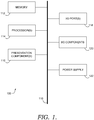
- computing device 100 an exemplary operating environment for implementing embodiments of the present invention is shown and designated generally as computing device 100.
- Computing device 100 is but one example of a suitable computing environment and is not intended to suggest any limitation as to the scope of use or functionality of the invention. Neither should the computing device 100 be interpreted as having any dependency or requirement relating to any one or combination of components illustrated.
- the invention may be described in the general context of computer code or machine-useable instructions, including computer-executable instructions such as program components, being executed by a computer or other machine, such as a personal data assistant or other handheld device.
- program components including routines, programs, objects, components, data structures, and the like refer to code that performs particular tasks, or implements particular abstract data types.
- Embodiments of the present invention may be practiced in a variety of system configurations, including hand-held devices, consumer electronics, general-purpose computers, specialty computing devices, etc.
- Embodiments of the invention may also be practiced in distributed computing environments where tasks are performed by remote-processing devices that are linked through a communications network.
- computing device 100 includes a bus 110 that directly or indirectly couples the following devices: memory 112, one or more processors 114, one or more presentation components 116, input/output (I/O) ports 118, I/O components 120, and an illustrative power supply 122.
- Bus 110 represents what may be one or more busses (such as an address bus, data bus, or combination thereof).
- FIG. 1 is merely illustrative of an exemplary computing device that can be used in connection with one or more embodiments of the present invention. Distinction is not made between such categories as “workstation,” “server,” “laptop,” “hand-held device,” etc., as all are contemplated within the scope of FIG. 1 and reference to "computer” or "computing device.”
- Computing device 100 typically includes a variety of computer-readable media.
- computer-readable media may comprise Random Access Memory (RAM); Read Only Memory (ROM); Electronically Erasable Programmable Read Only Memory (EEPROM); flash memory or other memory technologies; CDROM, digital versatile disks (DVD) or other optical or holographic media; magnetic cassettes, magnetic tape, magnetic disk storage or other magnetic storage devices, carrier wave or any other medium that can be used to encode desired information and be accessed by computing device 100.
- RAM Random Access Memory
- ROM Read Only Memory
- EEPROM Electronically Erasable Programmable Read Only Memory
- flash memory or other memory technologies
- CDROM compact discs
- DVD digital versatile disks
- magnetic cassettes magnetic tape, magnetic disk storage or other magnetic storage devices, carrier wave or any other medium that can be used to encode desired information and be accessed by computing device 100.
- Memory 112 includes computer-storage media in the form of volatile and/or nonvolatile memory.
- the memory may be removable, non-removable, or a combination thereof.
- Exemplary hardware devices include solid-state memory, hard drives, optical-disc drives, etc.
- Computing device 100 includes one or more processors that read data from various entities such as memory 112 or I/O components 120.
- Presentation component(s) 116 present data indications to a user or other device.
- Exemplary presentation components include a display device, speaker, printing component, vibrating component, etc.
- I/O ports 118 allow computing device 100 to be logically coupled to other devices including I/O components 120, some of which may be built in.
- Illustrative components include a microphone, joystick, game pad, satellite dish, scanner, printer, wireless device, etc.
- FIG. 2 a schematic diagram of an exemplary system architecture 200 suitable for use in implementing embodiments of the present invention is shown, in accordance with an embodiment of the present invention
- the exemplary system architecture 200 shown in FIG. 2 is merely an example of one suitable computing environment and is not intended to suggest any limitation as to the scope of use or functionality of the present invention. Neither should the exemplary system architecture 200 be interpreted as having any dependency or requirement related to any single component or combination of components illustrated therein. Further, logic within the operating system 220 supporting the exemplary system architecture 200 may be provided as a stand-alone product, as part of a software package, or any combination thereof.
- Exemplary system architecture 200 includes a computing device 210 for alerting a user that a change has occurred to the environment status of the operating system by providing an alert at an exclusively controlled indicator device.
- the computing device 210 may take the form of various types of computing devices.
- the computing device 210 may be a personal computing device (e.g., computing device 100 of FIG. 1 ), handheld device (e.g., personal digital assistant), laptop, consumer electronic device, various servers, and the like. Additionally, the computing device may comprise two or more electronic devices configured to share information therebetween.
- the computing device 210 includes a display device 215, input devices 216, 217, and 219, and hardware with an operating system 220 installed thereon.
- the computing device 210 is configured to present a UI display 225 on the display device 215.
- the display device 215, which is operably coupled to the computing device 210 may be configured as any presentation component that is capable of presenting information to a user, such as a monitor, electronic display panel, touch-screen, and the like.
- the UI display 225 is configured to present a valid secure login screen (not shown), and/or to render content as required by the application 230, where a display area (see FIG. 5 ) is typically employed to publish content generated by application 230.
- the UI display 225 is capable of producing fraudulent secure login screens as offered by malicious applications that are unintentionally hosted on the operating system 220.
- the input devices 216, 217, and 290 are provided to provide input(s) affecting, among other things, whether the environment status of the operating system 210 is the default mode or the secure mode.
- Illustrative devices include a key pad (as indicated by reference numeral 216), a mouse (as indicated by reference number 217), a joystick, a login button (as indicated by reference numeral 290), a microphone, the I/O components 120 of FIG. 1 , or any other component capable of receiving a user input and communicating an indication of that input to the computing device 210.
- the input devices 216 and 217 control the input of login credentials, or other privileged information, that is generally rendered at the UI display 225.
- the input device 216 provides a user-initiated instruction to perform a protected operation.
- the input device 216 may be prompted to provide the instruction to perform a protected operation (e.g., log into a secured website as discussed above) upon receiving a user input.
- the user input may be a hotkey, sequence of keystrokes, login key combination (e.g., Ctrl + Alt + Delete), or any other secure attention sequence (SAS) that indicates to the operating system 220 that a change on the environment status thereof has been initiated.
- SAS secure attention sequence
- the input device 290 may be a physical button that is dedicated for logging into a computing session, or triggering a secure event, within the operating system 220.
- the physical button is a physical login button that triggers a secure signal-that cannot be intercepted or otherwise tampered with-to the operating system 220 only.
- the operating system 220 may perform a variety of functions, including initiating a login sequence.
- the secure signal is communicated directly to the operating system 220 such that it is transparent to other components and/or applications.
- user-initiated actuation of the physical login button would generate a generally similar command to the Ctrl-Alt-Delete command.
- the physical button controls a power-up function of the computing device 210 and/or a login function that invokes an initial secure login screen.
- the physical button may be reprogrammable to provide user-initiated inputs that direct the operating system 220 to execute a variety of functions or secure events.
- reprogramming the physical button includes setting the button to request the operating system 220 to perform a "fast user switch" that allows a subsequent user to log into a current session on the operating system 220.
- the input device 290 may be configured as any device that accepts a single user actuation as a complete input, and may be configured to reside on any electronic device (e.g., the display device 215, the computing device 210, the input device 217, a laptop computer, and the like). Accordingly, the input device 290 provides rapid and convenient access to a secure operating system 220, by triggering the secure mode with a single motion, or click.
- the operating system (OS) 220 refers generally to the software that manages the sharing of the resources of the computing device 210 and provides programmers with an interface used to access those resources.
- the operating system 220 interprets system data and detects user inputs (e.g., via the input devices 216, 217, and 290), and responds by executing such processes as the following: processing the one or more inputs (e.g., utilizing receiving component 240) at the operating system 220 residing in a default mode; identifying the one or more inputs as a call to perform a protected operation (e.g., utilizing determining component 245); transitioning between the default mode, the secure mode, and any other available modes (e.g., utilizing transitioning component 250); and automatically communicating an indication of the transition to the secure mode to an indicator device 270 (utilizing communicating element 252), where the indicator device 270 may produce an alert by way of an implementing element 272 therein.
- processing the one or more inputs e.g., utilizing receiving component 240
- the operating system functions to perform the following logical steps: receiving one or more login credentials (e.g., utilizing the receiving component 240) at the operating system 220 residing in the secure mode; authenticating the one or more login credentials (e.g., utilizing authenticating component 255); transitioning from the secure mode to the default mode (e.g., utilizing the transitioning component 250); and automatically communicating an indication of the transition to the default mode to the indicator device 270 (e.g., utilizing the communicating element 252), where the indicator device 270 may relax the alert, thereby notifying the user of the transition to the default mode.
- the indicator device 270 e.g., utilizing the communicating element 252
- the operating system 220 includes a receiving component 240, a determining component 245, a transitioning component 250, and an authenticating component 255.
- the operating system 220 may host the application 230, or multiple applications running simultaneously, thereon.
- the operating system 220 may be operably coupled to the indicator device 270, via a secure pathway 265, and to the display device 215, thereby affecting the content being rendered at the UI display 225.
- This operating-system structure of the operating-system component 220 is but one example of a suitable structure that may be run on the computing device 210 and is not intended to suggest any limitation as to the scope of use or functionality of the invention. Neither should the illustrated operating system 220 be interpreted as having any dependency or requirement relating to any one or combination of the components 240, 245, 250, and 255 as illustrated. In some embodiments, one or more of the components 240, 245, 250, and 255 may be implemented as stand-alone applications. In other embodiments, one or more of the components 240, 245, 250, and 255 may be integrated directly into the display device 215 of the computing device 210, the application 230, or a combination thereof.
- a rendering element 253 of the transitioning component 220 may be housed in association with the display device 215. It will be understood by those of ordinary skill in the art that the components 240, 245, 250, and 255 illustrated in FIG. 2 are exemplary in nature and in number and should not be construed as limiting.
- FIG. 2 Any number of components may be employed to achieve the desired functionality within the scope of embodiments of the present invention.
- FIG. 2 is shown with lines for the sake of clarity, in reality, delineating various components/elements is not so clear, and metaphorically, the lines would more accurately be grey or fuzzy.
- FIG. 2 is depicted as single blocks, the depictions are exemplary in nature and in number and are not to be construed as limiting (e.g., although only one display device 215 is shown, many more may be operably coupled to the computing device 210, thereby functioning in conjunction to present the UI display 225).
- the receiving component 240 is configured to receive and process inputs from the input devices 216, 217, and 290 and/or tracked movements from the input device 217. It should be understood and appreciated that other inputs from various other input devices (e.g., touch-screen panel) may be received and interpreted by the receiving component 240; accordingly, the scope of the present invention is not limited to the inputs and input devices described herein.
- inputs may be received from applications (e.g., the application 230) without, or with limited, user interaction.
- the inputs provided by applications may trigger a change in the environment status of the operating system 220, for instance, according to a UAC condition of the application. Accordingly, the receiving component 240 is capable of receiving and interpreting a variety of inputs that originated from user-initiated input events, from internal automated inputs created by applications, or from any other device that is operably coupled to the operating system.
- these inputs may include a call to perform a protected operation.
- a determination of whether the call is present in the input is conducted by the determining component 245.
- the determining component 245 receives a processed input from the receiving component 240.
- the input is analyzed to identify if the call exists within input. For instance, the determining component 245 determines whether the input, such as tracked operations of the application 230, would trigger a transition of the environment status of the operating system 220. If so, the determining component 245 extracts the call from the input and passes the call to the transitioning component 250. If not, the determining component 245 attempts to identify the contents of the input and distribute them to the appropriate locations within the operating system 220. For instance, if the input includes information related to security credentials (e.g., a scanned fingerprint file), the determining component 245 conveys the input to the authenticating component 255.
- security credentials e.g., a scanned fingerprint file
- the transitioning component 250 receives calls extracted from the input by the receiving component 240 and compares the instructions within the call to the present environment status of the operating system 220. That is, if the instructions of the call direct the operating system 220 to a mode that is not the current mode, a transition process is triggered. Otherwise, the current mode is maintained.
- the present environment status is a default mode and the instructions in the call (e.g., a login request from the login button 290) indicate an intent to change to the secure mode, a transition of the environment status is triggered. Accordingly, the indicator device 270 is alerted by conveying a signal 260 thereto over a secured pathway 265. If the instructions in the call indicate no intent to transition to the secure mode, the input fails to trigger a change of the environment status. Accordingly, the operating system 220 is maintained in the default mode, thereby abstaining from conveying the signal to the indicator device 270.
- the transitioning component 250 comprises a locking element 251, a communicating element 252, and a rendering element 253.
- the locking element 521 adjusts configuration settings of the operating system 220 to correspond with the mode that is identified within the call. For instance, if the secure mode is identified, the locking component 251 sets to the configuration settings in accordance therewith. That is, in one embodiment, the locking element 251 locks out the UI display 225, operably coupled to the operating system 220, from rendering content provided by the application 230. Also, the locking element 251 may restrict the application 230 from listening to inputs provided by the input devices 216, 217, and 290.
- the locking component 251 sets the configuration settings in accordance therewith. That is, the locking component opens the operating system 220 for normal operation of applications hosted thereon.
- the rendering element 253 is configured to render content on the UI display 225 of the display device 215 according to the present environment status of the operating system 220. For instance, if a transition to the secure mode is triggered at the transitioning component 250, the rendering element 253 may direct the UI display 225 to present a secure login screen and restrict the application 230 from presenting content on the UI display 225. In another instance, if the default mode is the present environment status, then the application 230 is not restricted from rendering content on the UI display 225 by the rendering element 253.
- the communicating element 252 communicates the signal 265 indicating the present environment status to the indicator device 270.
- the signal is provided upon triggering a transition at the transitioning component 250.
- the signals 260 are provided by the communicating element 252 continuously, periodically at predefined times, at incremental intervals, or using any other transition scheme known in the relevant field of practice.
- the signals 260 may also take any number of forms, as more fully discussed above.
- the communicating element 252 provides the signals over the secured pathway 265.
- the secured path may be embodied as any operable coupling between the communicating element 252 of the operating system 220 and the indicator device 270.
- the secured pathway 265 may be wired or wireless. Examples of particular wired embodiments of the secured pathway 265, within the scope of the present invention, include USB connections and cable connections. Examples of particular wireless embodiments of the secured pathway 265, within the scope of the present invention, include a near-range wireless network and radio-frequency technology.
- near-range wireless network is not meant to be limiting, and should be interpreted broadly to include at least the following technologies: negotiated wireless peripheral (NWP) devices; short-range wireless air interference networks (e.g., wireless personal area network (wPAN), wireless local area network (wLAN), wireless wide area network (wWAN), BluetoothTM, and the like); wireless peer-to-peer communication (e.g., Ultra Wideband); and any protocol that supports wireless communication of data between devices.
- NWP wireless peripheral
- wPAN wireless personal area network
- wLAN wireless local area network
- wWAN wireless wide area network
- BluetoothTM wireless peer-to-peer communication
- Ultra Wideband any protocol that supports wireless communication of data between devices.
- Person familiar with the field of the invention will realize that a near-range wireless network may be practiced by various data-transfer methods (e.g., cable connection, satellite transmission, telecommunications network, etc.) that are different from the specific illustrated embodiment. Therefore it is emphasized that embodiments of the secured pathway 265 are not limited
- the authenticating component 255 functions to validate user credentials submitted in response to a valid secure login screen on the UI display 225. Validating may include executing an authentication procedure related to the application 230 or file that the user is attempting to access. In a particular instance, the authentication procedure compares the received credentials against expected security credentials to determine if a match exists. Typically, if a match exists, the authenticating component 255 authorizes a user to continue with the workflow that invoked secure login screen. In an exemplary embodiment, the secure login screen is invoked upon triggering a transition to the secure mode. Also, upon determining that the expected security credentials are satisfied, the authenticating component 255 provides an indication to the transitioning component 250 to transition from the secured desktop mode to the default mode. Also, failure conditions or time-out criteria, as discussed above, may cause an indication to be sent to the transitioning component 250 to transition from the secured desktop mode to the default mode.
- the indicator device 270 is generally configured to provide an alert to a user upon receiving the signal 265 from the operating system 220.
- the indication device 270 may provide one or more types of user-perceived outputs that are based on the environment status of the operating system 220. For instance, if the indicator device 270 is an LED in a USB mouse (e.g., an HID), an indication of a transition to the secured desktop mode would be communicated by the signal 260 to the mouse, which would induce the LED to illuminate. In the example above, an indication of a transition to the default mode communicated by the signal 260 to the mouse would induce the LED turn off.
- a USB mouse e.g., an HID
- the indicator device 270 is speaker
- an indication of a transition to the secured desktop mode, communicated by the signal 260 to the speaker would induce the speaker to broadcast continuous or intermittent sounds.
- the sounds provide a reliable method for a visually impaired user to detect the operating system 220 is presenting a valid login screen.
- the user should identify the speaker that is originating the sound as the indicator device 270, and not a corollary speaker.
- an indication of a transition to the default mode, communicated by the signal 260 to the speaker would induce the speaker to turn off, or to produce a different sound.
- a detecting element 271 and an implementing element 272 may be included in the indicator device.
- the elements 271 and 272 are expressed individually for exemplary purpose only and may, in actuality, be embodied as one or many elements.
- the detecting element 271 is configured to receive the signal 260, or message, from the operating system 220. In one instance, the detecting element 271 is configured to interpret the signal 260 to determine whether to invoke a change in the user-perceived output. By way of example, a signal 260 that indicates a mode similar to the previous indicated mode would not invoke a change.
- the implementing element 272 is generally configured to control the type and duration of the user-perceived output according to the interpretation of the signal 260. For instance, modes may by mapped to varying levels of illumination, or frequencies for flashing a bulb, of an LED. Utilizing the interpretation of the signal 260, the implementing element 272 invokes the appropriate, or mapped, output to occur (e.g., associated with the present mode).
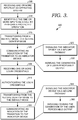
- FIG. 3 a flow diagram is shown that illustrates an overall method 300 for alerting a user that an operating system has entered a secure mode, in accordance with an embodiment of the present invention.
- an operating system e.g., the operating system 220 of FIG. 2
- These inputs may be identified as a call to perform a protected operation, as indicated at block 310.
- the operating system is transitioned from a default mode to a secure mode, as indicated at block 315.
- an indication of the transition is communicated to an indicator device (e.g., the indicator device 270 of FIG. 2 ).
- communication is carried out by signaling the indicator device via a secure pathway, as indicated at block 325. Accordingly, generation of a user-perceivable output is induced, as indication at block 330.
- one or more login credentials are received.
- An authentication procedure is performed on the login credentials (see block 340), and if they are valid, or cause the operating system to exit the secure mode, a transition to the default mode is triggered (see block 345).
- an indication of the transition is communicated to an indicator device.
- communication is carried out by signaling the indicator device via a secure pathway, as indicated at block 355. Accordingly, ceasing the generation of a user-perceivable output is induced, as indication at block 360.
- a progressive screen display 400 illustrating stages for transitioning an indicator device between a passive state and a notification state is shown, in accordance with embodiments of the present invention.
- an operating system is in the default mode.
- a UI display is in the normal condition 410, thereby allowing applications to render content 415 thereon and listen to user-initiated inputs.
- an HID 450 is operably coupled to the operating system (e.g., via a secured pathway that provides for exclusive control over the indicator device 460).
- the HID 450 receives a signal, or some indication, that the operating system is residing in the default mode and accordingly invokes a passive state at the indicator device 460.
- the passive state causes the indicator device 460 to alert a user that the operating system is not in a secure mode and to refrain from providing privileged information.
- the UI display Upon a trigger to transition to the secure mode, the UI display is switched to a locked condition 420.
- the locked condition 420 the UI display provides a secure login screen 430 and the operating system restricts applications from listening to inputs provided by the user.
- the HID 450 receives an indication that the operating system is in the secure mode (e.g., via the signal 260 of FIG. 2 ), and invokes the indicator device 460 to change states to a notification state.
- the indicator device 460 alerts the user that it is safe to provide privileged information as security credentials 435 to satisfy the secure login screen 430.
- the operating system reverts back to the default mode. Accordingly, the HID 450 is notified of the transition, and the indicator device 460 is invoked to provide an appropriate user-perceived output, if any, corresponding to the default mode.
- a second HID that controls, or houses, a second indicator device, which is exclusively controlled by the operating system, may be provided.
- the second indicator device is configured for generating a user-perceivable output upon receiving an indication that an input has triggered a change in the environment status of the operating system.
- a user-perceivable output generated by the second indicator device may correspond with the user-perceivable output generated by the indicator device 460.
- FIG. 5 a diagrammatic view of an exemplary UI display 510 providing a secure login screen 540 is shown, in accordance with an embodiment of the present invention.
- applications are allowed to render content 515 on the UI display 510.
- the secure login screen 540 is presented.
- a login entry area 530 is provided for a user to enter security credentials comprising a personal ID 550 and a password 560.
- security credentials comprising a personal ID 550 and a password 560.
- an indicator device is alerting the user that the operating system is blocking out malicious applications, s/he may confidently enter privileged information without a threat of identity theft.
- a web browser which is accessing a bank website as shown, allows the user to continue with accessing an appropriate account. Accordingly, the indicator device reliably notifies the user when, and when not to, provide privileged information.
Landscapes
- Engineering & Computer Science (AREA)
- Theoretical Computer Science (AREA)
- Computer Hardware Design (AREA)
- Physics & Mathematics (AREA)
- Computer Security & Cryptography (AREA)
- Software Systems (AREA)
- General Engineering & Computer Science (AREA)
- General Physics & Mathematics (AREA)
- Mathematical Physics (AREA)
- Health & Medical Sciences (AREA)
- Bioethics (AREA)
- General Health & Medical Sciences (AREA)
- User Interface Of Digital Computer (AREA)
Claims (14)
- Verfahren zum Warnen eines Benutzers, dass ein Betriebssystem in einen sicheren Modus eingetreten ist, wobei das Verfahren folgende Schritte umfasst:Tracken (305) von Operationen einer Anwendung, die von dem Betriebssystem gehostet wird, wobei der Umgebungszustand des Betriebssystems ein Standardmodus ist;Bestimmen (310), ob die getrackten Operationen der Anwendung einen Übergang des Umgebungszustands aus dem Standardmodus in einen sicheren Modus auslösen, wobei die Anwendung in dem sicheren Modus daran gehindert wird, Eingaben an das Betriebssystem, die von einem Benutzer initiiert werden, zu lesen;Überführen (315) des Umgebungszustands aus dem Standardmodus in den sicheren Modus beim Bestimmen (310), dass die getrackten Operationen der Anwendung den Übergang in den sicheren Modus auslösen, gekennzeichnet durch:Rendern von Eingabebereichen auf einer Benutzerschnittstellenanzeige, die beim Empfangen einer oder mehrerer erwarteter Eingaben ein Überführen in den Standardmodus ermöglichen; undautomatisches Kommunizieren (320) eines Hinweises auf den Übergang in den sicheren Modus von dem Betriebssystem an eine Hinweisvorrichtung, wobei die Hinweisvorrichtung ausschließlich durch das Betriebssystem gesteuert wird und nur das Betriebssystem die Hinweisvorrichtung manipulieren kann und zum Produzieren (330) einer Warnung eingerichtet ist, um den Benutzer von dem Übergang in den sicheren Modus zu benachrichtigen.
- Verfahren nach Anspruch 1, das ferner folgende Schritte umfasst:Empfangen (335) einer oder mehrerer Formen von Anmeldedaten an dem Betriebssystem, das im sicheren Modus verweilt;Authentifizieren (340) der einen oder mehreren Formen der Anmeldedaten; undÜberführen (345) aus dem sicheren Modus in den Standardmodus.
- Verfahren nach Anspruch 2, das ferner inzident zum Überführen (345) aus dem sicheren Modus in den Standardmodus ein automatisches Kommunizieren (355) eines Hinweises auf den Übergang in den Standardmodus an die Hinweisvorrichtung umfasst, wobei die Hinweisvorrichtung zum Lockern (360) der Warnung eingerichtet ist, wodurch der Benutzer von dem Übergang in den Standardmodus benachrichtigt wird.
- Verfahren nach Anspruch 1, wobei das Hindern der Anwendung am Lesen der Eingaben folgende Schritte umfasst:Errichten eines Sicherheitsniveaus, um Zugriff auf die Eingaben zu erhalten; undAbfragen der Anwendung, um sichere Programme der Anwendung zu identifizieren, die das Sicherheitsniveau erfüllen.
- Verfahren nach Anspruch 1, wobei das automatische Kommunizieren (320) des Übergangs in den sicheren Modus an die Hinweisvorrichtung ein Übermitteln (325) einer Nachricht an die Hinweisvorrichtung umfasst, wobei die Nachricht ein Protokoll mit Nutzungsdefinitionen aufweist, die gemäß Attributen eingerichtet sind, die bei einer Installation der Hinweisvorrichtung extrahiert werden.
- Verfahren nach Anspruch 1, wobei ein Identifizieren (310) der einen oder mehreren Eingaben als ein Aufruf, um eine geschützte Operation durchzuführen, ein Erkennen eines Ereignisses einer Secure Attention Sequence (SAS) von einer Peripherievorrichtung umfasst.
- Verfahren nach Anspruch 1, wobei die Hinweisvorrichtung eingerichtet ist, in einem passiven Zustand zu verweilen, wenn sich das Betriebssystem in dem Standardmodus befindet, und sich an einen Hinweiszustand anzupassen, der besagt, dass das Betriebssystem im sicheren Modus ist.
- Verfahren nach Anspruch 7, das ferner ein Überführen des Umgebungszustands in den Standardmodus beim Empfangen eines Sicherheitsberechtigungsnachweises, der eine Authentifizierungsprozedur der Anwendung erfüllt, und beim Überführen in den Standardmodus ein Anpassen der Hinweisvorrichtung, die im Hinweiszustand verweilt, auf den passiven Zustand umfasst, der besagt, dass das Betriebssystem im Standardmodus ist.
- Ein oder mehrere computerlesbare Medien mit darauf verkörperten computerausführbaren Befehlen, die, wenn sie von einer Rechenvorrichtung ausgeführt werden, die Rechenvorrichtung einrichten, ein Computerverfahren gemäß einem der vorhergehenden Ansprüche durchzuführen.
- Computersystem zum ausschließlichen Steuern einer Hinweisvorrichtung, die sich innerhalb mindestens einer Human-Interface-Vorrichtung (HID) befindet, gemäß einer benutzerinitiierten Eingabe, wobei das System Folgendes umfasst:eine Rechenvorrichtung (210) mit einem sich darauf befindenden Betriebssystem (220), wobei das Betriebssystem (220) eingerichtet ist, Operationen einer Anwendung, die von dem Betriebssystem (220) gehostet wird, zu tracken, wobei der Umgebungszustand des Betriebssystems (220) ein Standardmodus ist, zu bestimmen, ob die getrackten Operationen eine Änderung in einem Umgebungszustand des Betriebssystems (220) aktivieren, wobei die Änderung in dem Umgebungszustand einen Übergang zwischen einem Standardmodus und einem sicheren Modus aufweist, wobei die Anwendung in dem sicheren Modus daran gehindert wird, Eingaben an das Betriebssystem, die von einem Benutzer initiiert werden, zu lesen, und den Umgebungszustand aus dem Standardmodus in den sicheren Modus zu überführen, beim Bestimmen, dass die getrackten Operationen der Anwendung den Übergang in den sicheren Modus auslösen;eine erste HID (290) mit einer darauf angeordneten ersten Hinweisvorrichtung (270), die ausschließlich durch das Betriebssystem (220) gesteuert wird und wobei nur das Betriebssystem (220) die Hinweisvorrichtung (270) manipulieren kann, wobei die erste Hinweisvorrichtung (270) zum Empfangen eines Hinweises auf den Übergang des Umgebungszustands des Betriebssystems (220) in den sicheren Modus und zum Erzeugen einer benutzerwahrnehmbaren Ausgabe eingerichtet ist; undeine zweite HID zum Rendern von Eingabebereichen, die beim Empfangen einer oder mehrerer erwarteter Eingaben ein Überführen in den Standardmodus ermöglichen.
- System nach Anspruch 10, wobei die erste Hinweisvorrichtung (270) ferner eingerichtet ist zum:Empfangen einer Nachricht von dem Betriebssystem (220) über einen abgesicherten Pfad (265);Interpretieren der Nachricht, um zu bestimmen, ob der Hinweis eine Änderung des Umgebungszustands verursacht hat; undSteuern der Erzeugung der benutzerwahrnehmbaren Ausgabe basierend auf der Interpretation der Nachricht.
- System nach Anspruch 11, das ferner eine dritte HID mit einer zweiten Hinweisvorrichtung aufweist, die ausschließlich durch das Betriebssystem (220) gesteuert wird, wobei die zweite Hinweisvorrichtung zum Erzeugen einer benutzerwahrnehmbaren Ausgabe beim Empfangen des Hinweises auf den Übergang des Umgebungszustands des Betriebssystems (220) eingerichtet ist, sodass die benutzerwahrnehmbare Ausgabe, die von der zweiten Hinweisvorrichtung erzeugt wird, der benutzerwahrnehmbaren Ausgabe entspricht, die von der ersten Hinweisvorrichtung (270) erzeugt wird.
- System nach Anspruch 10, wobei das Aktivieren einer Änderung in dem Umgebungszustand des Betriebssystems (220) ein Überführen zwischen einem oder mehreren Modi des Betriebssystems (220) umfasst, wobei die erste Hinweisvorrichtung (270) ferner zum Erzeugen einer oder mehrerer unterschiedlicher benutzerwahrnehmbarer Ausgaben eingerichtet ist, wobei jede einem entsprechenden Modus aus dem einen oder den mehreren Modi entspricht, und wobei der eine oder die mehreren Modi den sicheren Modus aufweisen.
- System nach Anspruch 10, wobei die zweite HID eine Anzeigevorrichtung (215) umfasst, die betriebsfähig an das Betriebssystem (220) gekoppelt ist, wobei die Anzeigevorrichtung (215) eine Benutzerschnittstellen- (UI) Anzeige (225) aufweist, die eingerichtet ist, einen sicheren Anmeldebildschirm beim Empfangen eines Hinweises auf den Übergang des Umgebungszustands des Betriebssystems (220) aus dem Standardmodus in den sicheren Modus zu rendern.
Applications Claiming Priority (2)
| Application Number | Priority Date | Filing Date | Title |
|---|---|---|---|
| US12/028,297 US8793786B2 (en) | 2008-02-08 | 2008-02-08 | User indicator signifying a secure mode |
| PCT/US2009/030555 WO2009099706A1 (en) | 2008-02-08 | 2009-01-09 | User indicator signifying a secure mode |
Publications (3)
| Publication Number | Publication Date |
|---|---|
| EP2240879A1 EP2240879A1 (de) | 2010-10-20 |
| EP2240879A4 EP2240879A4 (de) | 2012-09-05 |
| EP2240879B1 true EP2240879B1 (de) | 2018-05-23 |
Family
ID=40952410
Family Applications (1)
| Application Number | Title | Priority Date | Filing Date |
|---|---|---|---|
| EP09707489.2A Not-in-force EP2240879B1 (de) | 2008-02-08 | 2009-01-09 | Benutzerindikator zur anzeige eines sicheren modus |
Country Status (4)
| Country | Link |
|---|---|
| US (1) | US8793786B2 (de) |
| EP (1) | EP2240879B1 (de) |
| CN (1) | CN101939750A (de) |
| WO (1) | WO2009099706A1 (de) |
Families Citing this family (39)
| Publication number | Priority date | Publication date | Assignee | Title |
|---|---|---|---|---|
| US9130986B2 (en) | 2008-03-19 | 2015-09-08 | Websense, Inc. | Method and system for protection against information stealing software |
| US9015842B2 (en) * | 2008-03-19 | 2015-04-21 | Websense, Inc. | Method and system for protection against information stealing software |
| JP5263767B2 (ja) * | 2008-09-26 | 2013-08-14 | 株式会社ザクティ | 撮像装置及びモード適否判定方法 |
| JP4886063B2 (ja) | 2009-12-04 | 2012-02-29 | 株式会社エヌ・ティ・ティ・ドコモ | 状態報知装置、状態報知方法及びプログラム |
| DE102011018431A1 (de) * | 2011-04-21 | 2012-10-25 | Giesecke & Devrient Gmbh | Verfahren zur Anzeige von Informationen auf einer Anzeigeeinrichtung eines Endgeräts |
| WO2013022655A1 (en) * | 2011-08-08 | 2013-02-14 | Intel Corporation | Delivering data from a range of input devices over a secure path to trusted services in a secure element |
| KR101160681B1 (ko) * | 2011-10-19 | 2012-06-28 | 배경덕 | 이동 통신 단말기의 활성화 시에 특정 동작이 수행되도록 하기 위한 방법, 이동 통신 단말기 및 컴퓨터 판독 가능 기록 매체 |
| US20130145475A1 (en) * | 2011-12-02 | 2013-06-06 | Samsung Electronics Co., Ltd. | Method and apparatus for securing touch input |
| CN103179254B (zh) * | 2011-12-23 | 2015-04-01 | 宇龙计算机通信科技(深圳)有限公司 | 进入桌面系统的方法和移动终端 |
| CN103313240B (zh) * | 2012-03-15 | 2016-12-14 | 中国移动通信集团公司 | 一种安全访问方法、装置及系统 |
| CN104205112B (zh) | 2012-04-16 | 2018-09-21 | 英特尔公司 | 安全控制器、电子设备、用于可信用户交互的方法和装置 |
| KR20140023606A (ko) * | 2012-08-16 | 2014-02-27 | 삼성전자주식회사 | 트러스트 존에 의한 실행 환경에서 결제 요청을 처리하는 디바이스 및 방법 |
| FR3003373B1 (fr) * | 2013-03-14 | 2015-04-03 | Compagnie Ind Et Financiere Dingenierie Ingenico | Procede et dispositif de visualisation securisee sur un ecran d'un terminal electronique, terminal correspondant |
| CN107944271A (zh) * | 2013-03-14 | 2018-04-20 | 英特尔公司 | 到安全操作系统环境的基于上下文的切换 |
| CN104252597B (zh) * | 2013-06-25 | 2017-05-31 | 中国银联股份有限公司 | 一种指示移动设备操作环境的方法和能够指示操作环境的移动设备 |
| US20150006405A1 (en) * | 2013-06-28 | 2015-01-01 | James Roy Palmer | System and methods for secure entry of a personal identification number (pin) using multi-touch trackpad technologies |
| US11044248B2 (en) * | 2013-09-13 | 2021-06-22 | Symbol Technologies, Llc | Method and device for facilitating mutual authentication between a server and a user using haptic feedback |
| EP2905714A1 (de) * | 2014-02-06 | 2015-08-12 | Thomson Licensing | Verfahren und Vorrichtung zur sicheren Eingabe von Benutzerberechtigungen |
| KR102204247B1 (ko) | 2014-02-19 | 2021-01-18 | 삼성전자 주식회사 | 전자 장치의 생체 정보 처리 방법 및 장치 |
| US10885218B2 (en) * | 2014-03-31 | 2021-01-05 | Huawei Technologies Co., Ltd. | Privacy protection method and terminal device |
| US10318765B2 (en) | 2014-05-02 | 2019-06-11 | Avago Technologies International Sales Pte. Limited | Protecting critical data structures in an embedded hypervisor system |
| KR101952226B1 (ko) * | 2014-08-21 | 2019-02-26 | 후아웨이 테크놀러지 컴퍼니 리미티드 | 보안 인터렉션 방법 및 장치 |
| US9927857B2 (en) * | 2014-08-22 | 2018-03-27 | Intel Corporation | Profiling a job power and energy consumption for a data processing system |
| CN104216777B (zh) * | 2014-08-29 | 2017-09-08 | 宇龙计算机通信科技(深圳)有限公司 | 双系统电子装置及终端 |
| CN104615927B (zh) * | 2014-12-31 | 2018-02-13 | 宇龙计算机通信科技(深圳)有限公司 | 多系统安全验证方法、多系统安全验证装置和终端 |
| CN104598793A (zh) * | 2015-01-08 | 2015-05-06 | 百度在线网络技术(北京)有限公司 | 一种指纹认证方法和装置 |
| KR102130744B1 (ko) * | 2015-07-21 | 2020-07-06 | 삼성전자주식회사 | 전자 장치 및 이의 제어 방법 |
| EP3460701A4 (de) * | 2016-06-23 | 2019-05-22 | Mitsubishi Electric Corporation | Eindringungsdetektor und eindringungsdetektionsprogramm |
| US10841337B2 (en) | 2016-11-28 | 2020-11-17 | Secureworks Corp. | Computer implemented system and method, and computer program product for reversibly remediating a security risk |
| US10735470B2 (en) | 2017-11-06 | 2020-08-04 | Secureworks Corp. | Systems and methods for sharing, distributing, or accessing security data and/or security applications, models, or analytics |
| JP7056446B2 (ja) * | 2018-07-30 | 2022-04-19 | 日本電信電話株式会社 | 情報処理装置、情報処理システム及び情報処理方法 |
| US11522877B2 (en) | 2019-12-16 | 2022-12-06 | Secureworks Corp. | Systems and methods for identifying malicious actors or activities |
| US11588834B2 (en) | 2020-09-03 | 2023-02-21 | Secureworks Corp. | Systems and methods for identifying attack patterns or suspicious activity in client networks |
| CN114547593A (zh) * | 2020-11-18 | 2022-05-27 | 成都鼎桥通信技术有限公司 | 终端应用认证方法、装置及设备 |
| US11528294B2 (en) * | 2021-02-18 | 2022-12-13 | SecureworksCorp. | Systems and methods for automated threat detection |
| US12135789B2 (en) | 2021-08-04 | 2024-11-05 | Secureworks Corp. | Systems and methods of attack type and likelihood prediction |
| US12034751B2 (en) | 2021-10-01 | 2024-07-09 | Secureworks Corp. | Systems and methods for detecting malicious hands-on-keyboard activity via machine learning |
| US12556566B2 (en) | 2022-05-11 | 2026-02-17 | Secureworks Corp. | Systems and methods for dynamic vulnerability scoring |
| US12015623B2 (en) | 2022-06-24 | 2024-06-18 | Secureworks Corp. | Systems and methods for consensus driven threat intelligence |
Family Cites Families (16)
| Publication number | Priority date | Publication date | Assignee | Title |
|---|---|---|---|---|
| JPH09135399A (ja) * | 1995-11-09 | 1997-05-20 | Sony Corp | 画像表示装置及びパワーセーブモード表示方法 |
| US6633905B1 (en) | 1998-09-22 | 2003-10-14 | Avocent Huntsville Corporation | System and method for accessing and operating personal computers remotely |
| EP1056014A1 (de) * | 1999-05-28 | 2000-11-29 | Hewlett-Packard Company | System und Verfahren zur Versorgung einer vertrauenswürdigen Benutzerschnittstelle |
| KR20010011667A (ko) | 1999-07-29 | 2001-02-15 | 이종우 | 보안 기능을 갖는 키보드 및 이를 이용한 시스템 |
| AU2002228624A1 (en) | 2000-11-21 | 2002-06-03 | @Pos.Com, Inc. | A touch pad that confirms its security |
| EP1329787B1 (de) * | 2002-01-16 | 2019-08-28 | Texas Instruments Incorporated | Anzeige des sicheren Moduses für intelligente Telefone und persönliche digitale Assistenten |
| GB0212308D0 (en) | 2002-05-28 | 2002-07-10 | Symbian Ltd | Trusted user interface for a secure mobile wireless device |
| KR20040054493A (ko) * | 2002-12-18 | 2004-06-25 | 텍사스 인스트루먼츠 인코포레이티드 | 스마트 폰 또는 pda용 보안 모드 지시기 |
| US7559083B2 (en) * | 2003-01-14 | 2009-07-07 | Microsoft Corporation | Method and apparatus for generating secured attention sequence |
| US7783891B2 (en) | 2004-02-25 | 2010-08-24 | Microsoft Corporation | System and method facilitating secure credential management |
| US7373505B2 (en) * | 2004-04-15 | 2008-05-13 | Microsoft Corporation | Displaying a security element with a browser window |
| US7464406B2 (en) | 2004-04-22 | 2008-12-09 | Lenovo (Singapore) Pte. Ltd. | System and method for user determination of secure software |
| EP1605330A1 (de) | 2004-06-11 | 2005-12-14 | ARM Limited | Anzeige eines gesicherten Bedienungszustandes |
| US8438400B2 (en) | 2005-01-11 | 2013-05-07 | Indigo Identityware, Inc. | Multiple user desktop graphical identification and authentication |
| US7661126B2 (en) | 2005-04-01 | 2010-02-09 | Microsoft Corporation | Systems and methods for authenticating a user interface to a computer user |
| US7996682B2 (en) | 2005-10-17 | 2011-08-09 | Microsoft Corporation | Secure prompting |
-
2008
- 2008-02-08 US US12/028,297 patent/US8793786B2/en active Active
-
2009
- 2009-01-09 CN CN2009801050077A patent/CN101939750A/zh active Pending
- 2009-01-09 EP EP09707489.2A patent/EP2240879B1/de not_active Not-in-force
- 2009-01-09 WO PCT/US2009/030555 patent/WO2009099706A1/en not_active Ceased
Also Published As
| Publication number | Publication date |
|---|---|
| US20100031320A1 (en) | 2010-02-04 |
| EP2240879A1 (de) | 2010-10-20 |
| WO2009099706A1 (en) | 2009-08-13 |
| US8793786B2 (en) | 2014-07-29 |
| EP2240879A4 (de) | 2012-09-05 |
| CN101939750A (zh) | 2011-01-05 |
Similar Documents
| Publication | Publication Date | Title |
|---|---|---|
| EP2240879B1 (de) | Benutzerindikator zur anzeige eines sicheren modus | |
| USRE50053E1 (en) | Methods and apparatus to monitor permission-controlled hidden sensitive application behavior at run-time | |
| US20200034528A1 (en) | Personalized and cryptographically secure access control in trusted execution environment | |
| US11659005B2 (en) | Systems and methods for self-protecting and self-refreshing workspaces | |
| US10104122B2 (en) | Verified sensor data processing | |
| US20130067236A1 (en) | Systems for validating hardware devices | |
| US9251354B2 (en) | Secure access supersession on shared workstations | |
| CN104813326B (zh) | 基于安全模型限制软件程序的功能 | |
| EP4569741A1 (de) | Identifizierung eines ressourcenangriffspfades durch verbindung von code, konfiguration und telemetrie | |
| WO2022132218A1 (en) | Creating and handling workspace indicators of compromise (ioc) based upon configuration drift | |
| US8898321B2 (en) | Remote device communication platform user interface | |
| WO2002087152A1 (en) | Universal, customizable security system for computers and other devices | |
| CN105874462A (zh) | 应用许可的通知 | |
| AU2008281314A1 (en) | A computer-implemented security method and system | |
| Farhi et al. | Malboard: A novel user keystroke impersonation attack and trusted detection framework based on side-channel analysis | |
| JP2006107455A (ja) | セキュリティ状態ウォッチャ | |
| US10354075B1 (en) | Trustworthy indication of software integrity | |
| CN104036166A (zh) | 支持强制访问控制的用户提权方法 | |
| Yang et al. | Eavesdropping user credentials via GPU side channels on smartphones | |
| Plus | User's Guide | |
| US8732821B1 (en) | Method and apparatus for preventing accidential disclosure of confidential information via visual representation objects | |
| KR20060093932A (ko) | 윈도우즈 운영체제에서 보안 입력 필터 드라이버와 인터넷익스플로러 내부의 키보드 보안 입력 비에이치오를 통한 인터넷 익스플로러 사용자의 키보드 입력 정보 해킹 방지 방법 | |
| US20230283633A1 (en) | Credential input detection and threat analysis | |
| Jansen et al. | A Unified Framework for Mobile Device Security. | |
| CN101071459A (zh) | 计算机系统的安全防护设置方法及其设备 |
Legal Events
| Date | Code | Title | Description |
|---|---|---|---|
| PUAI | Public reference made under article 153(3) epc to a published international application that has entered the european phase |
Free format text: ORIGINAL CODE: 0009012 |
|
| 17P | Request for examination filed |
Effective date: 20100617 |
|
| AK | Designated contracting states |
Kind code of ref document: A1 Designated state(s): AT BE BG CH CY CZ DE DK EE ES FI FR GB GR HR HU IE IS IT LI LT LU LV MC MK MT NL NO PL PT RO SE SI SK TR |
|
| AX | Request for extension of the european patent |
Extension state: AL BA RS |
|
| RIN1 | Information on inventor provided before grant (corrected) |
Inventor name: WRIGHT, STEVE Inventor name: YAMAMOTO, HIROFUMI Inventor name: SHERMAN, NATHAN C. Inventor name: SETHI, YASHABH Inventor name: MICHAUD, ALAIN Inventor name: BHESANIA, FIRDOSH K. |
|
| RIN1 | Information on inventor provided before grant (corrected) |
Inventor name: MICHAUD, ALAIN Inventor name: BHESANIA, FIRDOSH K. Inventor name: SHERMAN, NATHAN C. Inventor name: YAMAMOTO, HIROFUMI Inventor name: SETHI, YASHABH Inventor name: WRIGHT, STEVE |
|
| DAX | Request for extension of the european patent (deleted) | ||
| A4 | Supplementary search report drawn up and despatched |
Effective date: 20120807 |
|
| RIC1 | Information provided on ipc code assigned before grant |
Ipc: G06F 21/02 20060101ALI20120801BHEP Ipc: G06F 21/04 20060101ALI20120801BHEP Ipc: G06F 21/00 20060101AFI20120801BHEP Ipc: G06F 21/22 20060101ALI20120801BHEP |
|
| RAP1 | Party data changed (applicant data changed or rights of an application transferred) |
Owner name: MICROSOFT TECHNOLOGY LICENSING, LLC |
|
| STAA | Information on the status of an ep patent application or granted ep patent |
Free format text: STATUS: EXAMINATION IS IN PROGRESS |
|
| 17Q | First examination report despatched |
Effective date: 20170516 |
|
| REG | Reference to a national code |
Ref country code: DE Ref legal event code: R079 Ref document number: 602009052424 Country of ref document: DE Free format text: PREVIOUS MAIN CLASS: G06F0021000000 Ipc: G06F0021830000 |
|
| GRAP | Despatch of communication of intention to grant a patent |
Free format text: ORIGINAL CODE: EPIDOSNIGR1 |
|
| STAA | Information on the status of an ep patent application or granted ep patent |
Free format text: STATUS: GRANT OF PATENT IS INTENDED |
|
| RIC1 | Information provided on ipc code assigned before grant |
Ipc: G06F 21/83 20130101AFI20170928BHEP Ipc: G06F 21/62 20130101ALI20170928BHEP Ipc: G06F 21/55 20130101ALI20170928BHEP Ipc: G06F 21/74 20130101ALI20170928BHEP Ipc: G06F 21/84 20130101ALI20170928BHEP |
|
| INTG | Intention to grant announced |
Effective date: 20171018 |
|
| GRAJ | Information related to disapproval of communication of intention to grant by the applicant or resumption of examination proceedings by the epo deleted |
Free format text: ORIGINAL CODE: EPIDOSDIGR1 |
|
| STAA | Information on the status of an ep patent application or granted ep patent |
Free format text: STATUS: EXAMINATION IS IN PROGRESS |
|
| GRAP | Despatch of communication of intention to grant a patent |
Free format text: ORIGINAL CODE: EPIDOSNIGR1 |
|
| STAA | Information on the status of an ep patent application or granted ep patent |
Free format text: STATUS: GRANT OF PATENT IS INTENDED |
|
| INTC | Intention to grant announced (deleted) | ||
| INTG | Intention to grant announced |
Effective date: 20180205 |
|
| GRAS | Grant fee paid |
Free format text: ORIGINAL CODE: EPIDOSNIGR3 |
|
| GRAA | (expected) grant |
Free format text: ORIGINAL CODE: 0009210 |
|
| STAA | Information on the status of an ep patent application or granted ep patent |
Free format text: STATUS: THE PATENT HAS BEEN GRANTED |
|
| AK | Designated contracting states |
Kind code of ref document: B1 Designated state(s): AT BE BG CH CY CZ DE DK EE ES FI FR GB GR HR HU IE IS IT LI LT LU LV MC MK MT NL NO PL PT RO SE SI SK TR |
|
| REG | Reference to a national code |
Ref country code: GB Ref legal event code: FG4D |
|
| REG | Reference to a national code |
Ref country code: CH Ref legal event code: EP |
|
| REG | Reference to a national code |
Ref country code: IE Ref legal event code: FG4D |
|
| REG | Reference to a national code |
Ref country code: AT Ref legal event code: REF Ref document number: 1002089 Country of ref document: AT Kind code of ref document: T Effective date: 20180615 |
|
| REG | Reference to a national code |
Ref country code: DE Ref legal event code: R096 Ref document number: 602009052424 Country of ref document: DE |
|
| REG | Reference to a national code |
Ref country code: NL Ref legal event code: FP |
|
| REG | Reference to a national code |
Ref country code: LT Ref legal event code: MG4D |
|
| PG25 | Lapsed in a contracting state [announced via postgrant information from national office to epo] |
Ref country code: ES Free format text: LAPSE BECAUSE OF FAILURE TO SUBMIT A TRANSLATION OF THE DESCRIPTION OR TO PAY THE FEE WITHIN THE PRESCRIBED TIME-LIMIT Effective date: 20180523 Ref country code: LT Free format text: LAPSE BECAUSE OF FAILURE TO SUBMIT A TRANSLATION OF THE DESCRIPTION OR TO PAY THE FEE WITHIN THE PRESCRIBED TIME-LIMIT Effective date: 20180523 Ref country code: SE Free format text: LAPSE BECAUSE OF FAILURE TO SUBMIT A TRANSLATION OF THE DESCRIPTION OR TO PAY THE FEE WITHIN THE PRESCRIBED TIME-LIMIT Effective date: 20180523 Ref country code: NO Free format text: LAPSE BECAUSE OF FAILURE TO SUBMIT A TRANSLATION OF THE DESCRIPTION OR TO PAY THE FEE WITHIN THE PRESCRIBED TIME-LIMIT Effective date: 20180823 Ref country code: BG Free format text: LAPSE BECAUSE OF FAILURE TO SUBMIT A TRANSLATION OF THE DESCRIPTION OR TO PAY THE FEE WITHIN THE PRESCRIBED TIME-LIMIT Effective date: 20180823 Ref country code: FI Free format text: LAPSE BECAUSE OF FAILURE TO SUBMIT A TRANSLATION OF THE DESCRIPTION OR TO PAY THE FEE WITHIN THE PRESCRIBED TIME-LIMIT Effective date: 20180523 |
|
| PG25 | Lapsed in a contracting state [announced via postgrant information from national office to epo] |
Ref country code: HR Free format text: LAPSE BECAUSE OF FAILURE TO SUBMIT A TRANSLATION OF THE DESCRIPTION OR TO PAY THE FEE WITHIN THE PRESCRIBED TIME-LIMIT Effective date: 20180523 Ref country code: LV Free format text: LAPSE BECAUSE OF FAILURE TO SUBMIT A TRANSLATION OF THE DESCRIPTION OR TO PAY THE FEE WITHIN THE PRESCRIBED TIME-LIMIT Effective date: 20180523 Ref country code: GR Free format text: LAPSE BECAUSE OF FAILURE TO SUBMIT A TRANSLATION OF THE DESCRIPTION OR TO PAY THE FEE WITHIN THE PRESCRIBED TIME-LIMIT Effective date: 20180824 |
|
| REG | Reference to a national code |
Ref country code: CH Ref legal event code: PK Free format text: BERICHTIGUNGEN |
|
| REG | Reference to a national code |
Ref country code: AT Ref legal event code: MK05 Ref document number: 1002089 Country of ref document: AT Kind code of ref document: T Effective date: 20180523 |
|
| RIC2 | Information provided on ipc code assigned after grant |
Ipc: G06F 21/62 20130101ALI20170928BHEP Ipc: G06F 21/84 20130101ALI20170928BHEP Ipc: G06F 21/74 20130101ALI20170928BHEP Ipc: G06F 21/55 20130101ALI20170928BHEP Ipc: G06F 21/83 20130101AFI20170928BHEP |
|
| PG25 | Lapsed in a contracting state [announced via postgrant information from national office to epo] |
Ref country code: PL Free format text: LAPSE BECAUSE OF FAILURE TO SUBMIT A TRANSLATION OF THE DESCRIPTION OR TO PAY THE FEE WITHIN THE PRESCRIBED TIME-LIMIT Effective date: 20180523 Ref country code: SK Free format text: LAPSE BECAUSE OF FAILURE TO SUBMIT A TRANSLATION OF THE DESCRIPTION OR TO PAY THE FEE WITHIN THE PRESCRIBED TIME-LIMIT Effective date: 20180523 Ref country code: DK Free format text: LAPSE BECAUSE OF FAILURE TO SUBMIT A TRANSLATION OF THE DESCRIPTION OR TO PAY THE FEE WITHIN THE PRESCRIBED TIME-LIMIT Effective date: 20180523 Ref country code: RO Free format text: LAPSE BECAUSE OF FAILURE TO SUBMIT A TRANSLATION OF THE DESCRIPTION OR TO PAY THE FEE WITHIN THE PRESCRIBED TIME-LIMIT Effective date: 20180523 Ref country code: AT Free format text: LAPSE BECAUSE OF FAILURE TO SUBMIT A TRANSLATION OF THE DESCRIPTION OR TO PAY THE FEE WITHIN THE PRESCRIBED TIME-LIMIT Effective date: 20180523 Ref country code: CZ Free format text: LAPSE BECAUSE OF FAILURE TO SUBMIT A TRANSLATION OF THE DESCRIPTION OR TO PAY THE FEE WITHIN THE PRESCRIBED TIME-LIMIT Effective date: 20180523 Ref country code: EE Free format text: LAPSE BECAUSE OF FAILURE TO SUBMIT A TRANSLATION OF THE DESCRIPTION OR TO PAY THE FEE WITHIN THE PRESCRIBED TIME-LIMIT Effective date: 20180523 |
|
| REG | Reference to a national code |
Ref country code: CH Ref legal event code: PK Free format text: BERICHTIGUNGEN |
|
| RIC2 | Information provided on ipc code assigned after grant |
Ipc: G06F 21/55 20130101ALI20170928BHEP Ipc: G06F 21/83 20130101AFI20170928BHEP Ipc: G06F 21/84 20130101ALI20170928BHEP Ipc: G06F 21/62 20130101ALI20170928BHEP Ipc: G06F 21/74 20130101ALI20170928BHEP |
|
| REG | Reference to a national code |
Ref country code: DE Ref legal event code: R097 Ref document number: 602009052424 Country of ref document: DE |
|
| PG25 | Lapsed in a contracting state [announced via postgrant information from national office to epo] |
Ref country code: IT Free format text: LAPSE BECAUSE OF FAILURE TO SUBMIT A TRANSLATION OF THE DESCRIPTION OR TO PAY THE FEE WITHIN THE PRESCRIBED TIME-LIMIT Effective date: 20180523 |
|
| PLBE | No opposition filed within time limit |
Free format text: ORIGINAL CODE: 0009261 |
|
| STAA | Information on the status of an ep patent application or granted ep patent |
Free format text: STATUS: NO OPPOSITION FILED WITHIN TIME LIMIT |
|
| REG | Reference to a national code |
Ref country code: DE Ref legal event code: R082 Ref document number: 602009052424 Country of ref document: DE Representative=s name: GRUENECKER PATENT- UND RECHTSANWAELTE PARTG MB, DE |
|
| 26N | No opposition filed |
Effective date: 20190226 |
|
| PG25 | Lapsed in a contracting state [announced via postgrant information from national office to epo] |
Ref country code: SI Free format text: LAPSE BECAUSE OF FAILURE TO SUBMIT A TRANSLATION OF THE DESCRIPTION OR TO PAY THE FEE WITHIN THE PRESCRIBED TIME-LIMIT Effective date: 20180523 |
|
| PG25 | Lapsed in a contracting state [announced via postgrant information from national office to epo] |
Ref country code: MC Free format text: LAPSE BECAUSE OF FAILURE TO SUBMIT A TRANSLATION OF THE DESCRIPTION OR TO PAY THE FEE WITHIN THE PRESCRIBED TIME-LIMIT Effective date: 20180523 |
|
| REG | Reference to a national code |
Ref country code: CH Ref legal event code: PL |
|
| PG25 | Lapsed in a contracting state [announced via postgrant information from national office to epo] |
Ref country code: LU Free format text: LAPSE BECAUSE OF NON-PAYMENT OF DUE FEES Effective date: 20190109 |
|
| REG | Reference to a national code |
Ref country code: BE Ref legal event code: MM Effective date: 20190131 |
|
| REG | Reference to a national code |
Ref country code: IE Ref legal event code: MM4A |
|
| PG25 | Lapsed in a contracting state [announced via postgrant information from national office to epo] |
Ref country code: BE Free format text: LAPSE BECAUSE OF NON-PAYMENT OF DUE FEES Effective date: 20190131 |
|
| PG25 | Lapsed in a contracting state [announced via postgrant information from national office to epo] |
Ref country code: LI Free format text: LAPSE BECAUSE OF NON-PAYMENT OF DUE FEES Effective date: 20190131 Ref country code: CH Free format text: LAPSE BECAUSE OF NON-PAYMENT OF DUE FEES Effective date: 20190131 |
|
| PG25 | Lapsed in a contracting state [announced via postgrant information from national office to epo] |
Ref country code: IE Free format text: LAPSE BECAUSE OF NON-PAYMENT OF DUE FEES Effective date: 20190109 |
|
| PG25 | Lapsed in a contracting state [announced via postgrant information from national office to epo] |
Ref country code: TR Free format text: LAPSE BECAUSE OF FAILURE TO SUBMIT A TRANSLATION OF THE DESCRIPTION OR TO PAY THE FEE WITHIN THE PRESCRIBED TIME-LIMIT Effective date: 20180523 |
|
| PG25 | Lapsed in a contracting state [announced via postgrant information from national office to epo] |
Ref country code: PT Free format text: LAPSE BECAUSE OF FAILURE TO SUBMIT A TRANSLATION OF THE DESCRIPTION OR TO PAY THE FEE WITHIN THE PRESCRIBED TIME-LIMIT Effective date: 20180924 Ref country code: MT Free format text: LAPSE BECAUSE OF NON-PAYMENT OF DUE FEES Effective date: 20190109 |
|
| PG25 | Lapsed in a contracting state [announced via postgrant information from national office to epo] |
Ref country code: CY Free format text: LAPSE BECAUSE OF FAILURE TO SUBMIT A TRANSLATION OF THE DESCRIPTION OR TO PAY THE FEE WITHIN THE PRESCRIBED TIME-LIMIT Effective date: 20180523 |
|
| PG25 | Lapsed in a contracting state [announced via postgrant information from national office to epo] |
Ref country code: IS Free format text: LAPSE BECAUSE OF FAILURE TO SUBMIT A TRANSLATION OF THE DESCRIPTION OR TO PAY THE FEE WITHIN THE PRESCRIBED TIME-LIMIT Effective date: 20180923 |
|
| PG25 | Lapsed in a contracting state [announced via postgrant information from national office to epo] |
Ref country code: HU Free format text: LAPSE BECAUSE OF FAILURE TO SUBMIT A TRANSLATION OF THE DESCRIPTION OR TO PAY THE FEE WITHIN THE PRESCRIBED TIME-LIMIT; INVALID AB INITIO Effective date: 20090109 |
|
| PG25 | Lapsed in a contracting state [announced via postgrant information from national office to epo] |
Ref country code: MK Free format text: LAPSE BECAUSE OF FAILURE TO SUBMIT A TRANSLATION OF THE DESCRIPTION OR TO PAY THE FEE WITHIN THE PRESCRIBED TIME-LIMIT Effective date: 20180523 |
|
| PGFP | Annual fee paid to national office [announced via postgrant information from national office to epo] |
Ref country code: NL Payment date: 20221220 Year of fee payment: 15 |
|
| P01 | Opt-out of the competence of the unified patent court (upc) registered |
Effective date: 20230505 |
|
| PGFP | Annual fee paid to national office [announced via postgrant information from national office to epo] |
Ref country code: GB Payment date: 20231219 Year of fee payment: 16 |
|
| PGFP | Annual fee paid to national office [announced via postgrant information from national office to epo] |
Ref country code: FR Payment date: 20231219 Year of fee payment: 16 |
|
| PGFP | Annual fee paid to national office [announced via postgrant information from national office to epo] |
Ref country code: DE Payment date: 20231219 Year of fee payment: 16 |
|
| REG | Reference to a national code |
Ref country code: NL Ref legal event code: MM Effective date: 20240201 |
|
| PG25 | Lapsed in a contracting state [announced via postgrant information from national office to epo] |
Ref country code: NL Free format text: LAPSE BECAUSE OF NON-PAYMENT OF DUE FEES Effective date: 20240201 |
|
| PG25 | Lapsed in a contracting state [announced via postgrant information from national office to epo] |
Ref country code: NL Free format text: LAPSE BECAUSE OF NON-PAYMENT OF DUE FEES Effective date: 20240201 |
|
| REG | Reference to a national code |
Ref country code: DE Ref legal event code: R119 Ref document number: 602009052424 Country of ref document: DE |
|
| GBPC | Gb: european patent ceased through non-payment of renewal fee |
Effective date: 20250109 |
|
| PG25 | Lapsed in a contracting state [announced via postgrant information from national office to epo] |
Ref country code: DE Free format text: LAPSE BECAUSE OF NON-PAYMENT OF DUE FEES Effective date: 20250801 |
|
| PG25 | Lapsed in a contracting state [announced via postgrant information from national office to epo] |
Ref country code: GB Free format text: LAPSE BECAUSE OF NON-PAYMENT OF DUE FEES Effective date: 20250109 |
|
| PG25 | Lapsed in a contracting state [announced via postgrant information from national office to epo] |
Ref country code: FR Free format text: LAPSE BECAUSE OF NON-PAYMENT OF DUE FEES Effective date: 20250131 |