EP2237205A2 - Profilabtaster - Google Patents
Profilabtaster Download PDFInfo
- Publication number
- EP2237205A2 EP2237205A2 EP10250586A EP10250586A EP2237205A2 EP 2237205 A2 EP2237205 A2 EP 2237205A2 EP 10250586 A EP10250586 A EP 10250586A EP 10250586 A EP10250586 A EP 10250586A EP 2237205 A2 EP2237205 A2 EP 2237205A2
- Authority
- EP
- European Patent Office
- Prior art keywords
- data
- computer
- user
- custodian
- identifying data
- Prior art date
- Legal status (The legal status is an assumption and is not a legal conclusion. Google has not performed a legal analysis and makes no representation as to the accuracy of the status listed.)
- Ceased
Links
Images




Classifications
-
- G—PHYSICS
- G06—COMPUTING OR CALCULATING; COUNTING
- G06Q—INFORMATION AND COMMUNICATION TECHNOLOGY [ICT] SPECIALLY ADAPTED FOR ADMINISTRATIVE, COMMERCIAL, FINANCIAL, MANAGERIAL OR SUPERVISORY PURPOSES; SYSTEMS OR METHODS SPECIALLY ADAPTED FOR ADMINISTRATIVE, COMMERCIAL, FINANCIAL, MANAGERIAL OR SUPERVISORY PURPOSES, NOT OTHERWISE PROVIDED FOR
- G06Q10/00—Administration; Management
- G06Q10/10—Office automation; Time management
Definitions
- embodiments of the invention relate to methods, systems and computer program products for identifying users of personal computers within a network.
- Electronic discovery commonly referred to as e-discovery, refers to any process in which electronic data is sought, located, secured and searched with the intent of using it as evidence in a legal proceeding, an audit, a securities investigation , a forensics investigation or the like.
- E-discovery can be carried out offline on a particular computer or it can be accomplished in a network environment.
- digital data makes it extremely well-suited for investigation.
- digital data can be electronically searched with ease, whereas paper documents must be scrutinized manually.
- digital data is difficult or impossible to completely destroy, particularly if the data is stored in a network environment. This is because the data appears on multiple hard drives, and because digital files, even if deleted, generally can be undeleted.
- the only reliable means of destroying digital data is to physically destroy any and all hard drives where it is stored.
- Electronic mail i.e., e-mail
- e-mail can be an especially valuable source of evidence in civil or criminal litigation, because people are often less careful in these exchanges than in hard copy correspondence such as written memos or postal letters.
- E-discovery is an evolving field that goes far beyond mere technology. It gives rise to multiple issues, many of which have yet to be resolved. For example, identifying data required to satisfy a given discovery request, locating the appropriate set of data that has been identified, and retrieving the data once it has been identified and located all pose problems in and of themselves. This is especially evident if the data that is being identified, located and retrieved comes from an evolving or disparate enterprise, such as a corporation that has experienced mergers, acquisitions, downsizing and the like. Mergers and acquisitions mean that the technology infrastructure across the enterprise may vary, at least in the interim. However, e-discovery must be able locate and retrieve data from these disparate technology infrastructure in a timely fashion, sometimes within days of when the merger/acquisition occurs.
- e-discovery as opposed as conventional discovery of printed materials, provides for the ability to filter or search the data so as to reduce the volume of data to only that which is relevant to the request. Such searching is typically accomplished by determining a specific date range for the request, providing key words relevant to the case and the like. Improvements in the area of searching are greatly in need to further add efficiency to the overall e-discovery process.
- Embodiments of the invention relate to systems, methods, and computer program products for identifying users of personal computers within a network, and in particular, for generating a list of personal computers associated with custodians for the purposes of conducting electronic discovery.
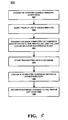
- Some embodiments of the present invention provide a method for identifying users of personal computers within a network for the purposes of electronic discovery, wherein the method comprises: (1) accessing the personal computers via the network, (2) querying the profile list on each personal computer, (3) transmitting for each personal computer computer-identifying data associated with the personal computer and user-identifying data associated with a user of the personal computer, and (4) storing the computer-identifying data in a database.
- storing the computer-identifying data in a database comprises adding the computer-identifying data to an existing entry in a custodian directory associated with the user.
- the method also includes using the user-identifying information to store the computer-identifying data in the database.
- the method also includes using the user-identifying information to link the computer-identifying data stored in the database to an existing entry in a custodian directory associated with the user.
- querying the profile list comprises reading the registry key list.
- the computer-identifying data comprises a computer name.
- the computer-identifying data comprises an IP address.
- querying the profile list comprises reading a registry key list on the personal computer comprising at least one registry key.
- the user-identifying data comprises at least a portion of a registry key.
- the method also includes presenting the computer-identifying data to an electronic discovery manager upon the identification of the user as a subject for electronic discovery.
- the method also includes transmitting log-on data associated with the user of the personal computer.
- the log-on data is transmitted in conjunction with the transmission of the computer-identifying data.
- the log-on data comprises the last date and time that the user logged on to the personal computer.
- the log-on data comprises the number of times that the user logged on to the personal computer during a predetermined period of time.
- Some embodiments of the present invention provide a method for identifying users of personal computers within a network for the purposes of electronic discovery, wherein the method comprises: (1) installing on the personal computers a tool configured to transmit computer-identifying data and user-identifying to a database server, (2) accessing a preexisting directory comprising data relating to the users, (3) locating in the directory an entry that comprises data matching the user-identifying data, and (4) linking the computer-identifying data to the entry.
- the tool is configured to transmit the computer identifying data and the user-identifying data every time a user logs on to a personal computer.
- the user-identifying data comprises a network user identification.
- the computer-identifying data comprises a computer name.
- the computer-identifying data comprises an IP address.
- linking the computer-identifying data to the entry comprises recording the computer-identifying data in the entry.
- the method also includes storing the computer-identifying data in a database configured to be in communication with the directory.
- the method also includes presenting the computer-identifying data to an electronic discovery manager upon the identification of the user as a subject for electronic discovery.
- Some embodiments of the present invention provide a system for identifying users of personal computers within a network for the purposes of electronic discovery, wherein the system comprises: a profile scanning tool configured to scan the personal computers, query the profile list on each personal computer, and transmit to a database server for each personal computer computer computer-identifying data associated with the personal computer and user-identifying data associated with a user of the personal computer, a database server configured to receive the computer-identifying data and the user-identifying data from the profile scanning tool and store the computer-identifying data in a database, and an electronic discovery management server in communication with the database server via the network configured to retrieve from the database server the computer-identifying data in response to an electronic discovery request targeting the user.
- a profile scanning tool configured to scan the personal computers, query the profile list on each personal computer, and transmit to a database server for each personal computer computer computer-identifying data associated with the personal computer and user-identifying data associated with a user of the personal computer
- a database server configured to receive the computer-identifying data and the user-identifying data from the profile scanning tool and store the computer-identifying
- the database server is configured to access a preexisting directory comprising data relating to the users and locate in the directory an entry that comprises data matching the user-identifying data.
- the database is the directory and the database server is configured to store the computer-identifying data in the entry.
- Some embodiments of the present invention provide a computer program product for maintaining a custodian management system in for the purposes of performing electronic discovery in an enterprise environment, the computer program product comprising a computer readable medium having computer readable program instructions stored therein, wherein the computer readable program instructions comprise: first instructions configured for accessing the personal computers via the network, second instructions configured for querying the profile list on each personal computer, third instructions configured for transmitting for each personal computer computer-identifying data associated with the personal computer and user-identifying data associated with a user of the personal computer, and fourth instructions configured for storing the computer-identifying data in a database.
- FIG. 1 illustrates a network environment in which the processes described herein are implemented, according to one embodiment of the invention
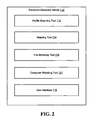
- FIG. 2 is a block diagram of an electronic discovery management server, in accordance with embodiment of the present invention.
- FIG. 3 is a block diagram of a database server, in accordance with an embodiment of the present invention.
- FIG. 4 is a block diagram of a collection server, in accordance with an embodiment of the present invention.
- Figure 5 is a flow diagram of a method for identifying users of personal computers within a network, according to one embodiment of the invention.
- FIG. 6 is block diagram illustrating electronic discovery management structure, in accordance with an embodiment of the invention.
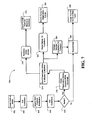
- Figure 7 is a flow diagram of a method for initiating a case or matter including creating search terms, creating and sending preservation notices, sending reminder notices and creating and sending surveys to custodians, in accordance with embodiments of the present invention
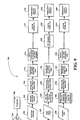
- Figure 8 is a flow diagram of a method for custodian management in an electronic discovery system, in accordance with an embodiment of the present invention.
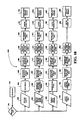
- FIGS 9 and 10 are flow diagrams of methods for harvesting different data types in an electronic discovery system; in accordance with an embodiment of the present invention.
- the present invention may be embodied as a method, system, computer program product, or a combination of the foregoing. Accordingly, the present invention may take the form of an entirely software embodiment (including firmware, resident software, micro-code, etc.) or an embodiment combining software and hardware aspects that may generally be referred to herein as a "system.” Furthermore, embodiments of the present invention may take the form of a computer program product on a computer-readable medium having computer-usable program code embodied in the medium.
- the computer-readable medium may be, for example but not limited to, an electronic, magnetic, optical, electromagnetic, infrared, or semiconductor system, apparatus, device, or propagation medium. More specific examples of the computer readable medium include, but are not limited to, the following: an electrical connection having one or more wires; a tangible storage medium such as a portable computer diskette, a hard disk, a random access memory (RAM), a read-only memory (ROM), an erasable programmable read-only memory (EPROM or Flash memory), a compact disc read-only memory (CD-ROM), or other optical or magnetic storage device; or transmission media such as those supporting the Internet or an intranet.
- a tangible storage medium such as a portable computer diskette, a hard disk, a random access memory (RAM), a read-only memory (ROM), an erasable programmable read-only memory (EPROM or Flash memory), a compact disc read-only memory (CD-ROM), or other optical or magnetic storage device
- transmission media such as those supporting the Internet or an intranet.
- the computer-readable medium could even be paper or another suitable medium upon which the program is printed, as the program can be electronically captured, via, for instance, optical scanning of the paper or other medium, then compiled, interpreted, or otherwise processed in a suitable manner, if necessary, and then stored in a computer memory.
- Computer program code for carrying out operations of embodiments of the present invention may be written in an object oriented, scripted or unscripted programming language such as Java, Perl, Smalltalk, C++, or the like.
- the computer program code for carrying out operations of embodiments of the present invention may also be written in conventional procedural programming languages, such as the "C" programming language or similar programming languages.
- Embodiments of the present invention are described below with reference to flowchart illustrations and/or block diagrams of methods, apparatus (systems), and computer program products. It may be understood that each block of the flowchart illustrations and/or block diagrams, and/or combinations of blocks in the flowchart illustrations and/or block diagrams, can be implemented by computer program instructions. These computer program instructions may be provided to a processor of a general purpose computer, special purpose computer, or other programmable data processing apparatus to produce a machine, such that the instructions, which execute via the processor of the computer or other programmable data processing apparatus, create mechanisms for implementing the functions/acts specified in the flowchart and/or block diagram block or blocks.
- These computer program instructions may also be stored in a computer-readable memory that can direct a computer or other programmable data processing apparatus to function in a particular manner, such that the instructions stored in the computer readable memory produce an article of manufacture including instruction means which implement the function/act specified in the flowchart and/or block diagram block(s).
- the computer program instructions may also be loaded onto a computer or other programmable data processing apparatus to cause a series of operational steps to be performed on the computer or other programmable apparatus to produce a computer-implemented process such that the instructions which execute on the computer or other programmable apparatus provide steps for implementing the functions/acts specified in the flowchart and/or block diagram block(s).
- computer program implemented steps or acts may be combined with operator or human implemented steps or acts in order to carry out an embodiment of the invention.
- Embodiments of the present invention provide a profile scanning tool configured to scan each of the personal computers residing on a communication network and identifying which network users have used each personal computer.
- a profile scanning tool configured to scan each of the personal computers residing on a communication network and identifying which network users have used each personal computer.
- employees may log on to and use personal computers within the network that are not assigned to them.
- custodians within the business who may be the subject of an electronic discovery effort may have stored data on personal computers that would not ordinarily be targeted during the electronic discovery process. Indeed, in such instances, unless the custodians themselves actually identify each and every computer the custodian has used to store data, there is a high likelihood that the data belonging to the custodian and stored on the unassigned machines would avoid collection completely.
- the profile scanning tool of the present invention solves this problem by generating a list of personal computers that have been used by each custodian and storing this list for future reference during electronic discovery.
- the greater environment in which such systems and processes shall operate should first be explained.
- Figure 1 illustrates an exemplary electronic discovery system 100 in accordance with an embodiment of the invention.
- the environment of the electronic discovery system 100 is the information technology platform of an enterprise, for example a national or multi-national corporation, and includes a multitude of servers, machines, and network storage devices in communication with one another over a communication network.
- an electronic discovery management server 110 at least one database server 120, a collections server 130, enterprise personal computers 140, enterprise file servers 150, including at least one personal network storage area and at least one shared network storage area, enterprise email servers 160, a conversion services server 170, a short-term staging drive 180, and a long-term network storage network 190 are all in communication over a communication network 102.
- the communication network 102 may be a wide area network, including the Internet, a local area network or intranet, a wireless network, or the like.
- the electronic discovery management server 110 provides user interface management for via user interface 118.
- the electronic discovery management server 110 is a web server that can be accessed via a web browser.
- the electronic discovery management server 110 is an intranet website server that may be accessed utilizing a web browser on a machine within the enterprise.
- the user interface 118 may be presented to a user for the purposes of managing the electronic discovery process and all processes described herein that are inherent thereto.
- the primary user interacting with the user interface 118 is an employee or contractor of the company who serves an electronic discovery management role, and hereafter is referred to as the "e-discovery manager.”
- the e-discovery manager may utilize the user interface 118 to manage cases, custodians, collections, and collected data. It should be appreciated, however, that any individual could use the user interface 118 to perform the manual functions herein attributed to the e-discovery manager, and, indeed, that an automated process could perform those functions as well.
- the electronic discovery management server 110 is in communication with the database server 120 and the collections server 130 via the communication network 102.
- the database server 120 is configured to provide database services for the electronic discovery management server 110, including housing the Unified Directory/custodian database 122, which includes data relating to individual custodians, the case database 124, which includes data relating to particular cases, and ongoing collections database 126, which includes data relating to collections being undertaken by the collections server 130.
- Unified Directory/custodian database 122 which includes data relating to individual custodians
- the case database 124 which includes data relating to particular cases
- ongoing collections database 126 which includes data relating to collections being undertaken by the collections server 130.
- the Unified Directory 122 could be stored in one database server and the ongoing collections data 126 could be stored in another database server.
- the collections server 130 is configured to operate a number of tools, including the local collection tool 132, the file server collection tool 134, and the active email collection tool 136 in order to collect different types of data and store such data such that the data may be managed apart from cases.
- custodian data in the Unified Directory 122 and case data in the case database 124 may be linked or correlated within the database server 120, for example, when custodians are assigned to particular cases, custodians may be managed separately from cases. Therefore, when a case is initialized and a custodian is assigned to the case, information for that custodian (such as data storage locations for that custodian) is accessed by the electronic discovery management server 110 in the Unified Directory 122 in the database server 120 and linked to the particular case, rather than manually input by the e-discovery manager into the case.
- data management processes relating to the collection of data from custodian storage locations during electronic discovery are also separated from case management and custodian management processes.
- the data collected from a particular custodian is stored separately from both the custodian information and any relevant case information (as discussed below, it is stored in long-term network storage network 190), but is linked to a custodian, which is in turn linked to one or more cases. This is advantageous because in the event a particular custodian is assigned to multiple cases, data collected from the custodian may be shared with the other case(s) to which the custodian is assigned.
- the various processes and components of the electronic discovery system 100 may be categorized within one of case management, custodian management, or data management. And even though cases, custodians, and collected data may all be managed separately, there are necessarily links between the various datastores to allow management of the overall electronic discovery process.
- the Unified Directory/custodian database 122 houses information relating to all potential custodians within the enterprise and the locations where those custodians store data.
- the information stored in the Unified Directory 122 may include for a particular custodian, for example, the custodian's name, position, human resources identifier (a unique number for each employee of the enterprise), employment location, domain, email addresses, network user identification, personal computer(s) name, paths of network storage devices used by the custodian, including Shared Drives and HomeSpaces, work history, related persons (such as managers, team members or subordinates), and any other information that may be relevant to the discovery process.
- the Unified Directory 122 may be organized around the human resources identifier. All of the information relating to how the Unified Directory 122 is generated is a multi-step process that utilizes multiple tools and methods of identifying relevant information.
- the electronic discovery management server 110 or the database server 120 may interface with the computer databases of the human resources computer systems of the enterprise to copy the information from the human resources databases into the Unified Directory 122.
- the electronic discovery management server 110 may also reach out to a network directory, such as Windows Active Directory, to identify network resources related to particular custodians and integrate this information into the custodian entries including the copied human resources information.
- Information for the Unified Directory 122 may also be obtained from the managers of the information technology network, i.e., those individuals responsible for setting up email accounts for custodians and managing the various file servers of the enterprise.
- information in the Unified Directory 122 is generated through tools initialized and/or deployed by the electronic discovery management server 110.
- a profile scanning tool 112 and a mapping tool 114 are provided.
- the profile scanning tool 112 is utilized by the electronic discovery management server 110 in order to identify which of the enterprise personal computers 140 are associated with a particular custodian. While many custodians within an enterprise will be assigned one or more personal computers, and that information may already be stored in the Unified Directory 122 because it was received from human resources or information technology records and directories, custodians may have also used and stored data on personal computers that were not assigned to them. In some instances, however, there may be no personal computer information stored for a custodian within the Unified Directory 122. In such instances, the profile scanning tool 112 may be the only source of information about what local machines a custodian is using to store data.
- the profile scanning tool 112 provides a complete list of computers used by the custodians and may supplement any other personal computer information received from alternative sources. This advantageously allows the e-discovery manager to be in a position to collect all of the relevant data from the custodian.
- the profile scanning tool 112 is initialized by the electronic discovery management server 110 and scans the enterprise personal computers 140 residing on the communication network 102.
- the profile scanning tool 112 may be scheduled to automatically run on a periodic basis, such as once a day or once a week, or may be manually run at any time by the e-discovery manager through the user interface 118.
- the profile scanning tool 112 may be run on the electronic discovery management server 110, the collection server 130, or another server in the communication network 102.
- the profile scanning tool 112 will access each of the personal computers 140 that meet certain criteria that enable such computers to be scanned. Eligible machines are those of the enterprise personal computers 140 that are on the domain, are enabled, and are identified as workstations rather than servers.
- the profile scanning tool 112 queries the profile list on each of the eligible personal computers located during the scan. In some embodiments, for example, in a Microsoft Windows environment, querying the profile list comprises reading the registry key list in the Documents and Settings directory.
- the profile list for the computer contains entries for each different network user identification that has been used to log on to the computer, as well as the dates and times of each log-on for each user identification.
- the profile scanning tool 112 transmits to the database server 120 the relevant data retrieved from about each computer, such as computer name and IP address, as well as a list of all profiles, including demographics information, (or network user identification) associated with each computer.
- the profile scanning tool 112 is further configured to identify and transmit to the database server 120 the most recent date and time at which a particular profile was logged on to the machine and/or the number of times that a particular profile was logged on to the machine.
- all of the data transmitted by the profile scanning tool 112 is stored in the database server 120.
- the data from the profile scanning tool 112 will be stored in a table in the database server 122 within the Unified Directory, but distinct from the rest of the Unified Directory 122, i.e. the data coming from other sources, such as human resources databases, Active Directory, etc.
- the database server 120 or the electronic discovery management server 110 links the profile scanning data to the related custodian entries in the Unified Directory 122 by matching the network user identifications appearing in the profile scanning data to the unique human resources identifiers that are associated with such user identifications.
- the profile scanning tool 112 transmits for each personal computer, the profile list that was located thereon, which includes user identifications. Therefore, as transmitted by the profile scanning tool 112, the personal computer identifying information, such as computer name and IP address, for each computer is related to one or more network user identifications.
- each human resources identifier is related to one or more network user identifications, and this data is already stored in the Unified Directory 122.
- the database server 120 or the electronic discovery management server 110 compares the user identifications appearing in the sub-database in relation to the computer identifying information to the user identifications already stored in the Unified Directory 122 in relation to the unique human resources identifiers. When a match is located, a link is made between the computer identifying information and the human resources identifier associated with the matching user identification. The link essentially adds the computer identifying information (such as date, time, number of log-ons, etc.) to the profile/entry in the Unified Directory of the custodian having that human resources identifier. The profile log-on information would be linked into the custodian profiles with the computer identifying information or in the same manner.
- the profile scanning tool 112 ultimately generates a list of personal computers used by each custodian in the custodian's profile in the Unified Directory 122, including relevant log-on information.
- This list may be presented to the e-discovery manager when a collection of a custodian's local machine(s) is initialized, as discussed in detail below, and the e-discovery manager may review the list and the accompanying data to determine which machines to target during the collection process.
- the profile scanning tool 112 itself may be configured to determine the human resources identifier to which the network user identifications appearing in the profile list relate, and transmit the computer identifying information and related data to be directly stored in the appropriate custodian profiles in the Unified Directory 122, without the need for the database server 120 or electronic discovery management server 110 to perform matching processes or linking.
- the data is transmitted by the profile scanning tool 112 to the database server 120, and the database server 120 or electronic discovery management server performs the user identification matching process described above before storing the computer-identifying information and related data directly into the appropriate custodian profiles in the Unified Directory 122. It should be understood that, according to the present invention, there are multiple ways to populate the custodian profiles in the Unified Directory 122 with the information retrieved by the profile scanning tool 112.
- Another object of the present invention is to record in the database server 120 any changes to profile data and/or computer-identifying data that occurs between scans.
- the profile scanning data is updated in the database server 120 and any changes in the profile scanning tool since the last execution of the profile scanning tool 112 is recorded. This creates a historical record of when custodians were using particular machines within the network 102.
- the database server 120 maintains a historic record of all profiles that have appeared on a particular computer.
- the profile scanning tool 112 or the electronic discovery management server 110 is configured to review Active Directory (or an analogous directory if in a non-Windows environment) to determine if a personal computer has been removed from the system. Computers will often not appear to the profile scanning tool 112 because they are simply not online and capable of communicating via the network 102. However, in some instances, computers will be retired or wiped and reimaged. If it is determined that a computer has been removed from the system for retirement or wiping, the database server 120 will store a record of all of the profiles associated with that computer.
- Active Directory or an analogous directory if in a non-Windows environment
- the database server 120 will record that the computer was wiped and store the profiles that used the computer prior to its removal.
- the database server 120 is configured to store in the Unified Directory 122 the information for each computer, as well as indications as to when the new computer was first identified and when the old computer was no longer identified.
- the custodian profile within the Unified Database 122 may include a history of the personal computers used by the custodian and a record is also created for each computer of when it was imaged and who has logged on to it and when. Such information may be relevant at the time of investigation or collection of the custodian.
- the profile scanning tool 112 may be a tool that operates within the enterprise personal computers 140 themselves or within the domain controller to push the profile information out to the database server 120 for storage in the Unified Directory 122.
- the machine reaches out to the domain controller to verify the log-in information
- data regarding the user identification used and the particular machine, including IP address and computer name would be sent to the Unified Directory 122, either from the machine directly or from the domain controller, to be stored in connection with the human resources identifier to which the user identification relates.
- the mapping tool 114 is configured to crawl the communication network 102 and examine the enterprise file servers 150 residing on the communication network 102 to locate and identify the path of any personal network storage area on each server.
- a personal network storage area is a network storage area associated with a single user who reads data from or writes data to it.
- Personal network storage areas may be in the form of network storage devices or folders or other resources within a network storage device and may be referred to hereafter for clarity purposes as "HomeSpaces.”
- the mapping tool 114 may be run on the electronic discovery management server 110, the collection server 130, or another server in the communication network 102.
- the mapping tool 114 is a Windows service that is scheduled to execute through use of Windows Scheduled Task. As the mapping tool 114 crawls the communication network 102, it is configured to examine each file server and transmit to the database server 120 the path of any network storage area within the plurality of servers 134 that it positively identifies as a HomeSpace. In some embodiments, the mapping tool 114 is configured to explore the enterprise file servers 150 by obtaining and reviewing the directories on each server and evaluating the paths of each network storage area therein, including folders and other storage devices and resources.
- the mapping tool 114 is configured to utilize conventional naming techniques for paths in the communication network 102 to identify those paths of network storage areas within the enterprise file servers 150 that include an indicator, based on the conventional naming techniques, that the particular storage areas associated with those paths are accessed and used by only one user, and are therefore HomeSpaces.
- each user of the communication network 102 is assigned to at least one user identification and those user identifications are the indicators that the mapping tool 114 attempts to locate within paths when identifying HomeSpaces. In such embodiments, it is the convention that the paths of HomeSpaces on the communication network 102 include the user's user identification.
- mapping tool 114 may explore the directories of each server within the plurality of servers, evaluate each path in turn, and make a determination as to whether or not the path includes a user identification.
- the mapping tool 114 is configured to positively identify the particular network storage area identified by that path as a HomeSpace and transmit to the database server 120 the particular user identification and the path of the HomeSpace. When that information is received by the database server 120, the database server 120 uses the user identification to link the particular HomeSpace to the custodian in the Unified Directory 122 associated with that user identification. In some embodiments, the mapping tool 114 is also configured to recognize and transmit, and the database server 120 is configured to house, an indication of the last time the HomeSpace was accessed by the particular user, for example, the last time any data was read from and/or written to the HomeSpace.
- the mapping tool 114 is configured to recognize when multiple paths map to the same network storage area.
- the collection server 130 compares paths for the same user to determine if duplicative entries exist. This advantageously enables avoidance of multiple collections of the same data.
- the mapping tool 114 ultimately generates a list of HomeSpaces used by each custodian, and this list may be presented to the e-discovery manager when a collection of a custodian's HomeSpaces is initialized, as discussed in detail below.
- the database server 120 is also configured to store a list of any shared network storage areas used by the custodian.
- a shared network storage area is a network storage area associated with multiple users who read data from and/or write data to it.
- Shared network storage areas may also be in the form of network storage devices or folders or other resources within network storage devices and may be referred to hereafter for clarity purposes as "Shared Drives.”
- the user interface 118 is configured to receive a path of a Shared Drive input by the e-discovery manager and store the path in the Unified Directory 122 in relation to one or more custodians' human resources identifier(s). More particularly, in some embodiments, once a particular user of the communication network 102 is chosen for the collection process, the e-discovery manager may undertake to identify the particular shared network resources that that individual is using, and eventually, the paths associated with those shared network resources.
- the file browsing tool 116 is configured to be utilized by the e-discovery manager through the user interface 118.
- the file browsing tool 116 gives the e-discovery manager elevated authority within the communication network 102 to access, in a limited manner, the enterprise file servers 150 within the communication network 102. While the file browsing tool 116 may not allow access to the actual files stored on certain file servers, it allows the e-discovery manager to browse through the directories of the file servers 150, locate files that have been accessed by the custodian, and determine the size of the files.
- the e-discovery manager may initially have a general idea of a particular file server within the enterprise file servers 150 that the custodian has used in the past. For example, the custodian may communicate to the e-discovery manager a particular folder name and/or drive name on which he/she has stored files. Additionally, in some embodiments, the e-discovery manager may have already undertaken a local collection process on the custodian's machine, wherein the local collection tool 132 returned a list of the network resources that the user of that machine has used. In that event, the e-discovery manager may be aware of the particular drive referenced by the user.
- the e-discovery manager may then employ the file browsing tool 116 to browse out to the particular drive mentioned, scan the folders for any folder having a name resembling that name given by the user, identify any particular files created by and/or accessed by the user, determine the size of such files, and retrieve the path of any folder (or Shared Drive) including data belonging to the user.
- the retrieved paths of the Shared Drives may then be added, either manually or automatically, to the Unified Directory 122 in the database server 120.
- the Unified Directory 122 may store in connection with one custodian (and in particular in relation to the custodian's human resources identifier) a list of the personal computers, HomeSpaces, and Shared Drives associated with that custodian. Each of these locations is a potential source of data stored by the custodian, and once an investigation or collection of a custodian is initiated, the location information stored in the Unified Directory 122 may be accessed to determine the particular storage locations that need to be addressed during the investigation/collection. This is advantageous as it allows a completely automated investigation/collection process, rather than relying on the e-discovery manager to manually input the targeted machines and file servers at the time of collection.
- the Unified Directory 122 may be regularly or continuously updated as new information is gathered using the tools described herein. More particularly, the electronic discovery management server 110 may be configured to automatically retrieve data from the human resources databases and Active Directory and any other relevant sources, such as information technology directories or lists, as well as deploy the profile scanning tool 112 and the mapping tool 114, at regularly scheduled intervals. Alternatively, rather than periodically retrieving data from the various data sources such as the human resources databases, the system 100 may be configured such that the database server 120 is continuously interfacing with the data sources such that the Unified Directory 122 is updated in real-time as the data within the data sources change. In either instance, each of the feeds of information into the Unified Directory 122 is regularly updated to ensure that the data in the Unified Directory 122 is current.
- the database server 120 is configured such that all historical data relating to a custodian is stored in relation to that custodian's human resources identifier in the Unified Directory 122.
- the database server 120 is configured to store in the Unified Directory 122 the new data and any relevant metadata, including, for example, the time and date of the change, as well as maintain a record of the old data so that it is still a part of the custodian's profile in the Unified Directory 122.
- the database server 120 is configured to store in the Unified Directory 122 the information for each computer, as well as indications as to when the new computer was first identified and when the old computer was no longer identified.
- the custodian profile within the Unified Database 122 may include a history of the personal computers used by the custodian. Such information may be relevant at the time of investigation or collection of the custodian.
- One feed of information into the Unified Directory 122 which is particularly relevant to electronic discovery is employment status.
- the electronic discovery management server 110 is configured to recognize the change and possibly perform particular functions in response.
- the electronic discovery management server 110 is configured to determine whether the custodian is assigned to any case or matter, and, if so, to transmit to the designated manager or contact for the case or matter an electronic communication notifying the manager of the terminated status and inquiring as to whether the manager would like the terminated custodian's data collected. In the event the manager responds in the affirmative, the electronic discovery management server 110 is configured to automatically initiate the various collection processes of the present invention. Therefore, the custodian's data may be advantageously collected prior to any destruction or unavailability that could be caused by the termination. Alternatively, in other embodiments, the electronic discovery management server 110 may not communicate with the manager and may automatically initiate collection upon recognizing a change in employment status.
- a case may be initialized by the e-discovery manager utilizing the user interface 118.
- the e-discovery manager may enter into the user interface 118 certain information about a particular matter or case, such as a case name and/or number, a short description of the matter/case, a legal identifier, the particular requester ( i.e ., who asked for the case to be opened), managers or contacts for the matter (i.e., individuals involved in the substance of the matter rather than the process, like the e-discovery manager), custodians, etc.
- the electronic discovery management server 110 is configured to store this information in the case database 124 in the database server 120.
- the case database 124 is configured to house this information such that all information relating to a particular matter or case is related within the case database 124 and a user can use the user interface 118 to view a profile of the matter or case including all the information.
- the e-discovery manager may add custodians to the matter or case.
- the electronic discovery management server 110 is configured to add numerous custodians to a single matter or case at one time.
- the e-discovery manager may use the user interface 118 to enter in identifying information about the custodians.
- the identifying information for each custodian does not have to be of the same type. For example, a name may be entered for one custodian, an email address for another, a network user identification for another, and a human resources identifier for another.
- the user interface 118 8 is configured to receive the identifying information in different input areas depending upon the type of identifying information being received.
- the electronic discovery management server 110 is configured to use the input information to search the Unified Directory 122 in the database server 120 to determine which custodians are associated with the input information. In the case of a human resources identifier being entered, only one custodian in the Unified Directory 122 may be a match. On the other hand, in the case of a name being entered, multiple custodians may be a match.
- the electronic discovery management server 110 after searching the Unified Directory 122 with the input identifying information, is configured to present through the user interface 118 a list of all custodians matching the input identifying information. In the event only one match was returned for a particular set of input identifying information, the electronic discovery management server 110 is configured to automatically select the custodian to be added to the case or matter. On the other hand, in the event more than one match was located for a particular set of input identifying information, then the multiple matches may be presented together to the e-discovery manager through the user interface 118 and marked so that the e-discovery manager must review the multiple custodian profiles associated with the matches to determine the correct custodian that should be added to the case or matter.
- the e-discovery manager may consider the other information in the profiles, such as corporate title, work location, associated custodians, etc . Such information can inform the e-discovery manager as to whether the located custodian is the one intended. The e-discovery manager may then select the correct custodian for addition to the case or matter and confirm that all custodians selected may be added to the case or matter.
- "adding" a custodian to a case or matter involves linking correlating the custodian profile in the Unified Directory 122 to the case or matter in the Case database 124.
- the electronic discovery management server 110 upon adding custodians to a matter, is configured to initiate the transmission of preservation notices and surveys to the custodians.
- preservation notices and surveys relevant to the particular case or matter are stored in or linked to the case profile in the case database 124.
- Transmission of the preservation notices and surveys to custodians added to the case may be automated, for example, there may be preset instructions within the case profile that cause the electronic discovery management server 110 to transmit a particular preservation notice and survey at a particular date or time or upon a particular triggering event, such as a custodian being added to the case, or the e-discovery manager may manually cause the preservation notices and surveys to be transmitted.
- the electronic discovery management server 110 is configured to transmit the preservation notices and surveys via a standard email function.
- the surveys may be tied to the preservation notices such that they are transmitted to custodians together, and one survey may be tied to more than one preservation notice.
- the survey response is received by the electronic discovery management server 110 and stored in relation to the relevant custodian in the case profile in the case database 124.
- the electronic discovery management server 110 may be configured to store all or a portion of the data received in the survey response in the Unified Directory 122 in the custodian's profile.
- each transmission of a preservation notice and survey to a custodian, and each corresponding response is tracked in the relevant case profile in the case database 124.
- the electronic discovery management server 110 may also be configured to transmit reminder notices if responses to the surveys are not received within a predefined period of time.
- the electronic discovery management server 110 may also be configured to schedule reminder notices to be sent to custodians to periodically refresh the custodians' memory of their duty to preserve files/documents pertaining to the matter.
- the electronic discovery management server 110 may undertake to prevent any reimaging or refreshing of the custodian's personal computer(s) by transmitting an alert of the preservation notice to the enterprise's information technology management group.
- the survey responses received from custodians serve to inform the collection process. For example, one survey may inquire as to what network storage devices the custodian uses when storing data. The answer that the custodian gives to the survey may inform the addition of Shared Drives to the custodian profile in the Unified Database 122 that may be used later in collection.
- the e-discovery manager may utilize the user interface 118 to add attachments, notes, tasks, and search terms to a case or matter.
- the contacts/managers for a case may also access the case profile in the case database 124 using a web browser and may add attachments, notes, tasks, and search terms to be stored therein.
- the e-discovery manager may not be the only entity with access to the case and case management tools of the electronic discovery management server 110.
- the subject matter of the attachments, notes and tasks could be anything relevant to the case or matter.
- the tasks are tasks that particular custodians must complete and the electronic discovery management server 110 is configured to transmit a notice to the custodians that that the task needs to be completed, perhaps using standard email functions.
- the e-discovery manager, or the contact/manager of the case may upload relevant files to be attached to the case profile.
- the e-discovery manager or the case contacts or managers may add certain terms to the case profile to be applied when searching the collected data to locate data responsive or relevant to the underlying issues in the case. Storing the search terms within the case profile is advantageous as it creates a record of the searching that is to be undertaken with respect to the data and aids in organization of the data, as discussed further below.
- the e-discovery manager may use the user interface 118 to release the custodians from the matter to the underlying case. This release triggers the commencement of collection of the custodians' data.
- the electronic discovery management server 110 is configured to allow all custodians assigned to the matter to be released to the case at the same time.
- the electronic discovery management server 110 is configured to allow a group of custodians to be released from a matter to a case at the same time.
- the electronic discovery system 100 is configured to automatically collect the custodian's data using the location information stored in the Unified Directory 122. Therefore, the electronic discovery management server 110 accesses the custodian profile of the custodian to be collected in the Unified Directory 122 and determines, from the information stored therein, the different locations of data storage for the particular custodian that must be collected. There are many different locations that the system 100 can address, including personal computers, email accounts, and network storage areas, including HomeSpaces and Shared Drives.
- a custodian profile for a custodian released for collection
- the electronic discovery management server 110 may undertake to collect the files on these machines. Therefore, the electronic discovery management server 110 may retrieve the relevant machine identifying information, such as domain, name, IP address, etc., and may initialize deployment of a local collection tool 132 running on collections server 130 (as shown in Figure 4 ).
- the local collection tool 132 is configured to be deployed from the collections server 130 or another server within the network 102 to any of the enterprise personal computers 140. Therefore, for a particular custodian, the local collection tool 132 is configured to utilize the machine identifying information supplied by the electronic discovery management server 110 to be deployed to the identified custodian computer. According to one embodiment, the local collection tool 132 is configured to be automatically installed on the target custodian's personal computer. The local collection tool 132 is further configured to generate a snapshot of the data residing on the local storage of the personal computer 140, for example, by using a commercially available tool such as the Volume Shadow Copy Service, store the snapshot in a storage area on the personal computer, and transmit copies of the files included in the snapshot to the collections server 130.
- a commercially available tool such as the Volume Shadow Copy Service
- the local collection tool 132 advantageously allows the custodian to continue to use her machine without substantial interference from the local collection tool 132 and even interact with the data stored on the hard drive as the snapshot of the data is being transmitted to the collections server 130.
- the local collection tool 132 may also be configured to transmit to the database server 120 a catalog of the files included in the snapshot to be stored in the ongoing collections database. This catalog may be referenced by the collections server 130 in order to determine whether collection is complete and to resume interrupted collections at the point of interruption. Additionally, in accordance with some embodiments, the local collection tool 132 is configured to compile and transmit to the electronic discovery management server 110 a list of network resources the user is using, including, for example, network applications and file servers that the user has used or accessed. This list of resources may be stored in the database server 120 in the custodian's profile in the Unified Directory 122. With regard to transmission of the files themselves, according to one embodiment of the invention, the local collection tool 132 is configured to compress, hash, and upload the files included in the snapshot to the collections server 130.
- the electronic discovery management server 110 may utilize a computer watching tool 117 to determine when to attempt a collection from a custodian's machine.
- the computer watching tool 117 is configured to monitor the network 102 and determine which of the enterprise personal computers 140 are online. Therefore, in the event there is a custodian whose local machine needs to be collected, the computer watching tool 117 is configured to determine when that machine joins the network 102 (i.e., when it appears to the computer watching tool 117) and inform the electronic discovery management server 110 that it should initialize the local collection tool 132 immediately.
- a custodian profile for a custodian released for collection
- the electronic discovery management server 110 may undertake to collect the files from these file servers by initializing the file server collection tool 134 running on collection server 130 (as shown in Figure 4 ).
- the file server collection tool 134 is configured to access the file server located at the given path, whether the file server is a HomeSpace or a Shared Drive, copy the data residing on the file server, and compress, hash, and transmit the copied data to the collections server 130.
- the file server collection tool 134 may be programmed with preset instructions that allow it to only copy files meeting certain criteria, for example, files that have certain file extensions.
- the programmed instructions may prevent the file server collection tool 134 from copying files having certain file extensions or other attributes. Either of the foregoing is advantageous if the e-discovery manager is not interested in copying executable files or source code, for example.
- the file server collection tool 134 is also configured to generate a size estimate of the files residing on the targeted file server. In one embodiment, the file server collection tool 134 may automatically begin the collection process (copying and transmitting data) if the size estimate falls below a predetermined threshold.
- the file server collection tool 134 is configured to determine whether a particular folder that it is collecting from a file server includes more than a token amount of nearline files, and, in the event that the folder does include such nearline files, choose to not collect such files so as to avoid overloading the server. Therefore, according to different embodiments, the file server collection tool 134 copies all or a portion of the files residing on a file server located at the path given in the released custodian's profile and transmits them to the collections server 130.
- a custodian profile for a custodian released for collection
- the electronic discovery management server 110 may undertake to collect the files from the enterprise email server 160 by initializing the active email collection tool 136 running on collections server 130 (as shown in Figure 4 ).
- the active email collection tool 136 is configured to access the particular Microsoft Exchange server within the enterprise email server 160 on which the custodian's account resides (which is known based on the information included in the Unified Directory 122), copy all email located there, including emails deleted by the custodian up to a predetermined period of time prior to the collection, (for example, seven days prior to the collection) and transmit the copied emails to the collections server 130.
- the collections server 130 is configured to store the data first (while the collection is still ongoing) in the short-term staging drive 180 until the particular collection is complete, attach a barcode to the set of data resulting from the particular collection, and then copy the data set to the long-term storage area network 190 for permanent storage. Furthermore, the collections server 130 transmits the barcode information to the electronic discovery management server 110 to be stored in the database server 120, for example, in the custodian's profile in the Unified Database 122, in relation to the stored information about the particular collection, whether it was a local collection, an active email collection, a file server collection, etc.
- the barcode can be used for reference at a later date to determine the origin of the data.
- the collections server 130 compares the hashing of the data in permanent storage to the original data in the staging drive 180 and, if the hashing is identical, purges the data from the staging drive 180.
- the data Once the data has entered the long-term storage area network 190, it is not necessarily ready for review. Indeed, it is likely that the data may need to be processed before it is searchable and suitable for review by investigators and attorneys.
- the files may be encrypted in the form in which they are collected and sent to the long-term storage area network 190. Therefore, according to some embodiments, the data may be copied to the conversion services server 170 where a series of decryption and standardization functions may be applied to it. After the data is decrypted and standardized, it is returned to the long-term storage area network 190 and may remain there to be accessed for review purposes.
- FIG. 6 a block diagram is provided that illustrates the electronic discovery management structure of the present invention, according to some embodiments.
- certain processes described herein may be categorized within one of case management, as represented by Block 200, custodian management, as represented by Block 220, or data management, as represented by Block 240.
- the electronic discovery system 100 is arranged such that cases, custodians and data may be managed independent of one another.
- the first process that falls within the case management category is creation of a matter or case as a framework for litigation support activities, as shown in Block 202.
- the e-discovery manager may enter into the user interface 118 certain information about a particular matter or case, such as a case name and/or number, a short description of the matter/case, a legal identifier, the particular requester ( i.e ., who asked for the case to be opened), managers or contacts for the matter (i.e., individuals involved in the substance of the matter rather than the process, like the e-discovery manager) etc.
- custodian information is stored separately from the case information allowing for the same custodian in multiple cases. This provides for the electronic discovery system of the present invention to have scalability, whereby evidence associated with one custodian may be used in multiple cases.
- the electronic discovery management server 110 stores this information in the case database 124 in the database server 120.
- the case database 124 houses this information such that all information relating to a particular matter or case is related within the case database 124 and a user, such as a manager or contact, can use the user interface 118 to view and edit a profile of the matter or case.
- the next process within case management is the creation of preservation notices and surveys specific to the matter, as shown in Block 204.
- the e-discovery manager may, through the user interface 118, either generate a new preservation notices or surveys relevant to the particular case or matter to be stored in the case profile in the case database 124 or, alternatively, link a preservation notice or survey already stored in the database server 120 to the case profile of the specific case or matter at issue.
- the creation of search terms pertinent to the case as represented by Block 206.
- the e-discovery manager or a contact or manager for the case may use the user interface 118 to input individual search terms or search term sets to be applied to the data harvested in the case.
- the search terms may be limited to be used with particular custodians and/or with particular harvested data types.
- the search terms will be saved in the case database 124 so that they may be readily applied to harvested data and used in connection with storing the resulting responsive data.
- the processes of entering relevant attachments, notes and updates to a particular case or matter also falls within the case management category, as demonstrated by Blocks 208 and 210.
- the e-discovery manager or a case contact or manager may use the user interface 118 to upload documents and enter notes and other relevant data, including updates and reminders, to be stored in the case profile of the case in the case database 124. Once these attachments, notes and updates are added, they may be referenced whenever a user views the case profile through the user interface 118.
- the cost estimation modules of the present invention are also processes that are categorized as case management processes, as shown in Block 212.
- the electronic discovery management server 110 utilizes a cost estimation tool to determine the cost of harvesting and reviewing data, based on a number of factors including, for example, number of custodians, amount of harvested data, data types, etc.
- case management also includes a number of tasking and workflow processes that are represented by block 214.
- Block 220 While the processes involving generation of the Unified Directory 122 certainly could be categorized as custodian management, the processes shown in Figure 6 include those processes involving management of custodians within the scope of a case or matter.
- the first process of custodian management included in Figure 6 is the addition of custodians to a case or matter, as shown in Block 222.
- the e-discovery manager may use the user interface 118 to link a custodian's profile from the Unified Directory 122 to the particular case profile in the case database 124.
- the custodian profile and case profile are correlated.
- the electronic discovery management server 110 uses the contact information in the custodian's profile in the Unified Directory 122 to transmit the preservation notice(s) and survey(s) stored in the case profile to the custodian.
- a standard email function is used, so that the only information needed from the Unified Directory 122 is the custodian's email address.
- the custodian checks her email, the survey will appear as a message therein, and when she opens that message, the survey will be presented to her.
- the survey may be configured such that when she fills it out, the survey is automatically transmitted back to the database server 120 for storage in the case profile and the custodian's profile.
- custodian management also includes a number of tasking and workflow processes that are represented by Block 232.
- the last category is data management, represented by Block 240.
- One major set of processes within data management are the processes relating to the harvesting of data, as shown in Block 242. These processes include the collection of data from all the different storage areas of a particular custodian, including the custodian's local storage on her personal computer(s), the custodian's network storage areas, the custodian's email, and any other areas, as are described herein. All of the data in the various storage areas is copied and transmitted to the collections server 130, as described in detail for each particular collection tool or process.
- Block 244 Upon reaching the collections server 130, data resulting from a particular collection is temporarily stored in the short-term staging drive 180 until the collection is complete, at which point it is stored in the long-term storage area network 190 in association with a specific identifying barcode.
- the foregoing process is represented by Block 244.
- the data may require decryption or standardization functions to be applied to it in order for it to be searchable and/or otherwise usable, so the next process that falls within data management is the copying of the data to the conversion services server 170 for analysis and conversion as necessary, as shown in Block 246. Once the data is converted, it is returned to the long-term storage area network 190 to be used in review.
- data management also includes a number of tasking and workflow processes that are represented by Block 250.
- Block 302 a case or matter is created by the e-discovery manager and stored in the case database 124.
- custodians are added to the case, as shown in Block 304, by linking the custodian profiles of the Unified Directory 122 to the case profile.
- Block 306 the e-discovery manager and/or the case contact or manager adds search terms to be applied to data harvested for the case, including instructions as to applying the search terms to particular data types or custodians.
- Block 310 represents the determination that must be made as to whether there is a matter or just a case.
- the preservation notice as shown in Block 314 is transmitted to the custodians added to the matter, perhaps using email.
- a reminder notice module may be employed.
- the reminder notice module transmits periodic reminder notices to custodians.
- the notices may be sent over email and may remind custodians about the preservation notice and/or remind custodians to fill out surveys.
- surveys in the event a survey is required or desired, according to Block 320, a survey is created.
- the survey may be saved in the case profile in the case database 124.
- the e-discovery manager may release custodians from the matter to the case, which initialized collection of the custodian's data.
- the e-discovery manager or the electronic discovery management server 122 accesses the custodian profile, determines the data types and location to be collected, and initializes the applicable collection tools to go collect the data.
- the search terms previously stored in the case profile may be assigned to the dataset based on the input instructions regarding the search terms. These search terms may be applied to the dataset and the results saved to be presented to reviewers for analysis.
- a custodian is added to a matter or case.
- the custodian's profile in the Unified Directory 122 is linked to the relevant case or matter profile.
- a custodian search module may be employed, as shown in Block 404. Therefore, the e-discovery manager may enter any identifying information about the custodian, whether it is the custodian's name, network user identification, email address, etc.
- the custodian search module will take the input information and search the Unified Directory 122 for a match.
- the user interface 118 will present all matches and allow the e-discovery manager to browse the associated profiles to determine the intended custodian. In this way, the correct custodian is identified and the profile of that custodian is linked to the appropriate case or matter.
- the electronic discovery management server 110 may determine whether the particular custodian added is a member of the enterprise "do-not-call list." In this regard, there may be an indication in the custodian's profile in the Unified Directory 122 that the particular custodian should not be contacted regarding collections, and an alternative contact should be used, such as an administrative assistant of the custodian. Alternatively, there may be a separate do-not-call list stored in the database server 120 that must be accessed and searched to determine whether or not the custodian appears on that list.
- the custodian may then be inactivated from the case because, for some reason, data does not need to be collected from the custodian. In the future, when it comes time to collect from the custodian, the custodian will be reactivated, as shown in Block 422.
- the custodian is released from the matter to the case, as shown in Block 418, and the various collection tools are initialized by the electronic discovery management server 110 for collection of the custodian's data, as shown in Block 428.
- the custodian's profile in the Unified Directory 122 is accessed in order to determine the various locations where the custodian may have stored data.
- the custodian's data is collected.
- FIG. 9 flow diagrams are presented of a method 500 for harvest data from various data sources, in accordance with embodiments of the present invention.
- Event 502 the collection of data ensues and, at Event 504, the type of data is identified.
- Data Block 506 signifies active email that is collected from an exchange system or the like.
- Event 508 the automated active email collection tool is implemented to collect email from identified email address.
- the electronic discovery management server (110) may undertake to collect the files from the enterprise email server (160) by initializing the active email collection tool (136) running on collections server (130).
- the active email collection tool (136) is configured to access the particular Microsoft Exchange server within the enterprise email server 160 on which the custodian's account resides (which is known based on the information included in the Unified Directory 122), copy all email located there, including emails deleted up to a designated prior period, for example, seven days prior to the collection, and transmit the copied emails to the collections server (130).
- the email collection tool is also capable of implementing bulk requests and for collecting email on a scheduled basis, such as daily.
- the email collection tool is additionally capable of being implementing enterprise wide and requires no server identifiers or the like to collect the active email.
- the email collection tool (136) serves to reduce security risk.
- a barcoding tool is implemented at a staging location, such as short-term staging drive (180) to attach a barcode to the set of email resulting from the particular collection.
- the barcoded data is then copied and communicated to the long-term storage area network (190) for permanent storage.
- the collections server (130) transmits the barcode information to the electronic discovery management server (110) to be stored in the database server (120), for example, in the custodian's profile in the Unified Database (122), in relation to the stored information about the particular collection. Therefore, the barcode can be used for reference at a later date to determine the origin of the data.
- the collections server (130) compares the hashing of the data in permanent storage to the original data in the staging drive (180) and, if the hashing is identical, purges the data from the staging drive (180).
- barcoding is performed without the need to execute the barcoding tool on an exchange server and, as such no human intervention is needed in the barcode process.
- one barcode may be assigned per custodian, per data type and per event ( i.e. , case, matter, etc.)
- the collected email data may be associated with a specific search term set or sets.
- search term hit list a listing of the files and documents including those terms (the "search term hit list") are presented to the reviewer and also stored in the database server (120).
- the reviewer may provide an indication of this to the electronic discovery management server 110, which may then make a determination that other documents within the search term hit list are more likely to be responsive.
- the collected and barcoded active email data is copied to a processing drive for subsequent analysis. It should be noted that the nature of email data obviates the need to perform conversion and/or decryption on the data set.
- the active email data set is loaded into the analysis tool and, at Event 518, the data set is exported to the requestor/reviewer for analysis.
- Data Block 520 signifies other non-exchange server based email, such as email accessed through a client-server, collaborative application, such as Lotus Notes® or the like.
- NSF files or any other file types associated with non-exchange server based email is manually harvested from an enterprise-grade email server having collaborative capabilities, such as a Lotus Domino server or the like.
- a barcoding tool is implemented at a staging location, such as short-term staging drive (180) to attach a barcode to the set of non-exchange server email resulting from the particular collection.
- the barcoded data is then copied and communicated to the long-term storage area network (190) for permanent storage.
- the collections server (130) transmits the barcode information to the electronic discovery management server (110) to be stored in the database server (120), for example, in the custodian's profile in the Unified Database (122), in relation to the stored information about the particular collection. Therefore, the barcode can be used for reference at a later date to determine the origin of the data.
- the collections server (130) compares the hashing of the data in permanent storage to the original data in the staging drive (180) and, if the hashing is identical, purges the data from the staging drive (180).
- the collected non-exchange server email data may be associated with a specific search term set or sets.
- search term hit list a listing of the files and documents including those terms (the "search term hit list") are presented to the reviewer and also stored in the database server (120).
- the reviewer may provide an indication of this to the electronic discovery management server 110, which may then make a determination that other documents within the search term hit list are more likely to be responsive.
- the NSF files or any other file types associated with non-exchange server based email that may be encrypted is decrypted using a decryption tool, in accordance with embodiments of the present invention.
- the encryption of NSF files occurs at the user level and, therefore only the user has the password necessary for decryption.
- the decryption tool allows for decryption of the NSF file-type data without the knowledge of the user/encrypter.
- the decryption tool finds ID files that exist anywhere in the enterprise system, creates a database of the ID files, associates the database with the user/encrypter and subsequently decrypts the data.
- the non-exchange server email data set is loaded into the analysis tool and, at Event 532, the data set is exported to the requestor/reviewer for analysis.
- Data Block 534 signifies journaled data, such as electronic commerce data stored on a repository for the purpose of regulation, compliance to regulating bodies, such as the Securities and Exchange Commission (SEC) or the like.
- SEC Securities and Exchange Commission
- the barcoding tool is implemented at a staging location, such as short-term staging drive (180) to attach a barcode to the set of journaled data resulting from the particular collection.
- the barcoded data is then copied and communicated to the long-term storage area network (190) for permanent storage.
- the collected and barcoded journaled data may be associated with a specific search term set or sets.
- source-to-processing is implemented to insure that any loose files are properly formatted in a standardized format.
- loose files are examined for relevancy and, if relevant, stored in a proper data format, such as a PST file or the like.
- the metadata associated with the non-standardized files is retained and remains with the reformatted data files.
- Source to processing file conversions may be required on EML formatted files, MSG formatted files and the like.
- journaled data set is loaded into the analysis tool and, at Event 546, the journaled data set is exported to the requestor/reviewer for analysis.
- data block 548 signifies data from a local Personal Computer (PC), such as enterprise PC (140).
- PC personal Computer
- the local collection tool (132) is implemented to collect data from designated PCs by taking a "snapshot" of the device's hard drive.
- the local collection tool may be autodeployed thus, obviating the need for any manual entry by the e-discovery manager or the like.
- the local collection tool (132) may be employed to collect data from network storage.
- the barcoding tool is implemented at a staging location, such as short-term staging drive (180) to attach a barcode to the set of local PC data resulting from the particular collection.
- the barcoded data is then copied and communicated to the long-term storage area network (190) for permanent storage.
- the collected and barcoded local PC data may be associated with a specific search term set or sets.
- source-to-processing is implemented to insure that any loose files are properly formatted in a standardized format.
- loose files are examined for relevancy and, if relevant, stored in a proper data format, such as a PST file or the like.
- the metadata associated with the non-standardized files is retained and remains with the reformatted data files.
- Source to processing file conversions may be required on EML formatted files, MSG formatted files, IPD formatted files and the like.
- the local PC files that may be encrypted are decrypted using a decryption tool, in accordance with embodiments of the present invention.
- the decryption tool allows for decryption of the PC files data without the knowledge of the user/encrypter.
- the decryption tool finds ID files that exist anywhere in the enterprise system, creates a database of the ID files, associates the database with the user/encrypter and subsequently decrypts the data.
- the local PC data set is loaded into the analysis tool and, at Event 562, the local PC data set is exported to the requestor/reviewer for analysis.
- Data block 564 signifies data from network storage, such as a shared drive or HomeSpace.
- the file server collection tool (134) is implemented to automatically collect data from shared drives and/or HomeSpace. According to one embodiment of the invention, the file server collection tool (134) may be autodeployed thus, obviating the need for any manual entry by the e-discovery manager or the like.
- the barcoding tool is implemented at a staging location, such as short-term staging drive (180) to attach a barcode to the set of network storage data resulting from the particular collection.
- the barcoded data is then copied and communicated to the long-term storage area network (190) for permanent storage.
- the collected and barcoded network storage data may be associated with a specific search term set or sets.
- source-to-processing is implemented to insure that any loose files are properly formatted in a standardized format.
- loose files are examined for relevancy and, if relevant, stored in a proper data format, such as a PST file or the like.
- the metadata associated with the non-standardized files is retained and remains with the reformatted data files.
- Source to processing file conversions may be required on EML formatted files, MSG formatted files, IPD formatted files and the like.
- the network storage files that may be encrypted are decrypted using a decryption tool, in accordance with embodiments of the present invention.
- the decryption tool allows for decryption of the network storage data without the knowledge of the user/encrypter.
- the decryption tool finds ID files that exist anywhere in the enterprise system, creates a database of the ID files, associates the database with the user/encrypter and subsequently decrypts the data.
- the network storage data set is loaded into the analysis tool and, at Event 578, the network storage data set is exported to the requestor/reviewer for analysis.
- Data block 580 signifies electronic data for forensics.
- a forensic collector tool such as EnCase® may be executed on the devices of interest to collect data.
- the forensic collector tool may be automatically deployed on the device of interest without the knowledge of the device user.
- a computer watcher tool may be implemented (not shown in Figure 10 ) that watches the network to determine the addition or subtraction of computers to the network based on ID's/IP addresses returned from the network.
- the barcoding tool is implemented at a staging location, such as short-term staging drive (180) to attach a barcode to the set of forensic data resulting from the particular collection.
- the barcoded data is then copied and communicated to the long-term storage area network (190) for permanent storage.
- the collected and barcoded forensic data may be associated with a specific search term set or sets.
- source-to-processing is implemented to insure that any loose files are properly formatted in a standardized format.
- loose files are examined for relevancy and, if relevant, stored in a proper data format, such as a PST file or the like.
- the metadata associated with the non-standardized files is retained and remains with the reformatted data files.
- Source to processing may be required on EML formatted files, MSG formatted files, IPD formatted files and the like.
- the forensic files that may be encrypted are decrypted using a decryption tool, in accordance with embodiments of the present invention.
- the decryption tool allows for decryption of the network storage data without the knowledge of the user/encrypter.
- the decryption tool finds ID files that exist anywhere in the enterprise system, creates a database of the ID files, associates the database with the user/encrypter and subsequently decrypts the data.
- the forensic data set is loaded into the analysis tool and, at Event 594, the network storage data set is exported to the requestor/reviewer for analysis.
- Data block 596 signifies collaborative data, such as data residing at discovery sites, for example LiveLink® or the like.
- a discovery site collector tool such as a LiveLink® collector tool may be executed on the devices of interest to collect data.
- the discovery site collector preserves at least a portion of the discovery site database in the e-discovery database, including all files and all revisions of the files.
- the discovery site collector tool queries against the database to define what files need to be retrieved, then copies those files based on the result of the query. Metadata pertaining to the files is retained in the case management system tables.
- the discovery site collector tool collects the documents and the related metadata and uses the metadata to automatically rename the files.
- the barcoding tool is implemented at a staging location, such as short-term staging drive (180) to attach a barcode to the set of discovery site data resulting from the particular collection.
- the barcoded data is then copied and communicated to the long-term storage area network (190) for permanent storage.
- the collected and barcoded discovery site data may be associated with a specific search term set or sets.
- source-to-processing is implemented to insure that any loose files are properly formatted in a standardized format.
- loose files are examined for relevancy and, if relevant, stored in a proper data format, such as a PST file or the like.
- the metadata associated with the non-standardized files is retained and remains with the reformatted data files.
- Source to processing may be required on EML formatted files, MSG formatted files, IPD formatted files and the like.
- the discovery site data set is loaded into the analysis tool and, at Event 608, the discovery site data set is exported to the requestor/reviewer for analysis.
- Embodiments herein disclosed provide for improvements in electronic discovery.
- Embodiments herein disclosed provide for an enterprise wide e-discovery system that provides for data to be identified, located, retrieved, preserved, searched, reviewed and produced in an efficient and cost-effective manner across the entire enterprise system.
- an enterprise wide e-discovery system that provides for data to be identified, located, retrieved, preserved, searched, reviewed and produced in an efficient and cost-effective manner across the entire enterprise system.
- structuring management of e-discovery based on case/matter, custodian and data and providing for linkage between the same, further efficiencies are realized in terms of identifying, locating and retrieving data and leveraging results of previous e-discoveries with current requests.
Landscapes
- Engineering & Computer Science (AREA)
- Business, Economics & Management (AREA)
- Strategic Management (AREA)
- Entrepreneurship & Innovation (AREA)
- Human Resources & Organizations (AREA)
- Operations Research (AREA)
- Economics (AREA)
- Marketing (AREA)
- Data Mining & Analysis (AREA)
- Quality & Reliability (AREA)
- Tourism & Hospitality (AREA)
- Physics & Mathematics (AREA)
- General Business, Economics & Management (AREA)
- General Physics & Mathematics (AREA)
- Theoretical Computer Science (AREA)
- Information Transfer Between Computers (AREA)
- Facsimiles In General (AREA)
- Stored Programmes (AREA)
Applications Claiming Priority (2)
| Application Number | Priority Date | Filing Date | Title |
|---|---|---|---|
| US16427609P | 2009-03-27 | 2009-03-27 | |
| US12/730,851 US8417716B2 (en) | 2009-03-27 | 2010-03-24 | Profile scanner |
Publications (2)
| Publication Number | Publication Date |
|---|---|
| EP2237205A2 true EP2237205A2 (de) | 2010-10-06 |
| EP2237205A3 EP2237205A3 (de) | 2010-11-24 |
Family
ID=42635187
Family Applications (1)
| Application Number | Title | Priority Date | Filing Date |
|---|---|---|---|
| EP10250586A Ceased EP2237205A3 (de) | 2009-03-27 | 2010-03-26 | Profilabtaster |
Country Status (3)
| Country | Link |
|---|---|
| US (1) | US8417716B2 (de) |
| EP (1) | EP2237205A3 (de) |
| SG (1) | SG165284A1 (de) |
Families Citing this family (6)
| Publication number | Priority date | Publication date | Assignee | Title |
|---|---|---|---|---|
| US9330374B2 (en) | 2009-03-27 | 2016-05-03 | Bank Of America Corporation | Source-to-processing file conversion in an electronic discovery enterprise system |
| US9721227B2 (en) | 2009-03-27 | 2017-08-01 | Bank Of America Corporation | Custodian management system |
| US8706854B2 (en) * | 2010-06-30 | 2014-04-22 | Raytheon Company | System and method for organizing, managing and running enterprise-wide scans |
| WO2015035351A1 (en) | 2013-09-09 | 2015-03-12 | UnitedLex Corp. | Interactive case management system |
| US11030651B2 (en) * | 2016-05-06 | 2021-06-08 | Adp, Llc | Segmented user profiles |
| US10699028B1 (en) * | 2017-09-28 | 2020-06-30 | Csidentity Corporation | Identity security architecture systems and methods |
Citations (1)
| Publication number | Priority date | Publication date | Assignee | Title |
|---|---|---|---|---|
| US6792545B2 (en) * | 2002-06-20 | 2004-09-14 | Guidance Software, Inc. | Enterprise computer investigation system |
Family Cites Families (77)
| Publication number | Priority date | Publication date | Assignee | Title |
|---|---|---|---|---|
| US6119137A (en) | 1997-01-30 | 2000-09-12 | Tumbleweed Communications Corp. | Distributed dynamic document conversion server |
| IL121071A0 (en) | 1997-03-27 | 1997-11-20 | El Mar Software Ltd | Automatic conversion server |
| US7451103B1 (en) * | 1999-03-29 | 2008-11-11 | Citibank, N.A. | System and method for centralized automated reconciliation of custody accounts |
| US6658625B1 (en) | 1999-04-14 | 2003-12-02 | International Business Machines Corporation | Apparatus and method for generic data conversion |
| US6941361B1 (en) | 1999-08-26 | 2005-09-06 | Lucent Technologies Inc. | Method and apparatus for obtaining inventory and user information for a remote computer device |
| WO2001027765A1 (en) | 1999-10-12 | 2001-04-19 | Ecommercial.Com, Inc. | Custodial database for on-line marketing and purchasing |
| JP2001175765A (ja) | 1999-10-15 | 2001-06-29 | Crossmar Inc | ファンド・マネージャーをブローカーにマッチングさせるシステムおよび方法 |
| US20030208689A1 (en) | 2000-06-16 | 2003-11-06 | Garza Joel De La | Remote computer forensic evidence collection system and process |
| US7660819B1 (en) | 2000-07-31 | 2010-02-09 | Alion Science And Technology Corporation | System for similar document detection |
| US7197716B2 (en) | 2000-12-22 | 2007-03-27 | Merchant & Gould, P.C. | Litigation management system and method |
| US20020198629A1 (en) | 2001-04-27 | 2002-12-26 | Enerwise Global Technologies, Inc. | Computerized utility cost estimation method and system |
| US20020194097A1 (en) | 2001-05-07 | 2002-12-19 | Reitz James T. | Method and system for two-way communication between asset managers and asset custodians |
| US7194492B2 (en) | 2001-10-29 | 2007-03-20 | Emc Corporation | Method and apparatus for efficiently copying distributed data files |
| US8266124B2 (en) | 2001-12-18 | 2012-09-11 | Caldvor Acquisitions Ltd., Llc | Integrated asset management |
| US7134020B2 (en) | 2002-01-31 | 2006-11-07 | Peraogulne Corp. | System and method for securely duplicating digital documents |
| WO2003065256A1 (en) | 2002-02-01 | 2003-08-07 | Global Straight Through Processing Association Ltd | Post-trade, pre-settlement information matching for securities transactions |
| US7076543B1 (en) | 2002-02-13 | 2006-07-11 | Cisco Technology, Inc. | Method and apparatus for collecting, aggregating and monitoring network management information |
| JP4142881B2 (ja) | 2002-03-07 | 2008-09-03 | 富士通株式会社 | 文書類似度算出装置、クラスタリング装置および文書抽出装置 |
| US7475098B2 (en) | 2002-03-19 | 2009-01-06 | Network Appliance, Inc. | System and method for managing a plurality of snapshots |
| US7636754B2 (en) | 2002-03-21 | 2009-12-22 | Cisco Technology, Inc. | Rich multi-media format for use in a collaborative computing system |
| US7421491B2 (en) | 2002-04-23 | 2008-09-02 | Seer Insight Security K.K. | Method and system for monitoring individual devices in networked environments |
| US7450742B2 (en) | 2002-05-08 | 2008-11-11 | Canon Kabushiki Kaisha | Information processing apparatus, information processing system, information processing method, storage medium, and program |
| US20030233287A1 (en) * | 2002-06-12 | 2003-12-18 | Dean Sadler | Internet-based apparatus and method of tracking and reporting assets |
| US20070011450A1 (en) | 2004-09-14 | 2007-01-11 | Mccreight Shawn | System and method for concurrent discovery and survey of networked devices |
| US8924484B2 (en) | 2002-07-16 | 2014-12-30 | Sonicwall, Inc. | Active e-mail filter with challenge-response |
| US7376969B1 (en) | 2002-12-02 | 2008-05-20 | Arcsight, Inc. | Real time monitoring and analysis of events from multiple network security devices |
| WO2004092902A2 (en) | 2003-04-11 | 2004-10-28 | Cricket Technologies Llc | Electronic discovery apparatus, system, method, and electronically stored computer program product |
| US20040267593A1 (en) | 2003-06-11 | 2004-12-30 | Sammons Barbara N. | Systems and methods for managing litigation and other matters |
| US7496959B2 (en) | 2003-06-23 | 2009-02-24 | Architecture Technology Corporation | Remote collection of computer forensic evidence |
| US7124249B1 (en) | 2003-06-26 | 2006-10-17 | Emc Corporation | Method and apparatus for implementing a software cache |
| US7133916B2 (en) | 2003-07-28 | 2006-11-07 | Etelemetry, Inc. | Asset tracker for identifying user of current internet protocol addresses within an organization's communications network |
| JP2005196904A (ja) | 2004-01-09 | 2005-07-21 | Hitachi Ltd | データ記録方法 |
| US20050177527A1 (en) | 2004-02-11 | 2005-08-11 | Morris Glyn P. | Transaction management tool |
| JP2006135465A (ja) | 2004-11-04 | 2006-05-25 | Fuji Xerox Co Ltd | 文書管理装置、および文書管理方法、並びにコンピュータ・プログラム |
| US20060101382A1 (en) | 2004-11-04 | 2006-05-11 | Robert Jeffries | System for and method of litigation management and support |
| US20060167877A1 (en) | 2004-11-23 | 2006-07-27 | Bowe Bell + Howell Company | Inbound link incoming mail stream |
| US20060178954A1 (en) * | 2004-12-13 | 2006-08-10 | Rohit Thukral | Iterative asset reconciliation process |
| US20060256739A1 (en) | 2005-02-19 | 2006-11-16 | Kenneth Seier | Flexible multi-media data management |
| US20070027974A1 (en) | 2005-08-01 | 2007-02-01 | Microsoft Corporation | Online service monitoring |
| CA2622625A1 (en) | 2005-09-14 | 2007-03-22 | O-Ya!, Inc. | Networked information indexing and search apparatus and method |
| US7809686B2 (en) * | 2005-10-06 | 2010-10-05 | Guidance Software, Inc. | Electronic discovery system and method |
| US9047344B2 (en) | 2005-10-17 | 2015-06-02 | International Business Machines Corporation | Guaranteeing data and metadata referential integrity in content management archival solutions |
| US20070139231A1 (en) * | 2005-10-19 | 2007-06-21 | Advanced Digital Forensic Solutions, Inc. | Systems and methods for enterprise-wide data identification, sharing and management in a commercial context |
| US7644138B2 (en) | 2005-12-06 | 2010-01-05 | David Sun | Forensics tool for examination and recovery and computer data |
| US20070156706A1 (en) | 2005-12-27 | 2007-07-05 | Christian Hayes | Apparatus, system, and method for monitoring the usage of computers and groups of computers |
| US20070162547A1 (en) | 2006-01-11 | 2007-07-12 | Groope.Com Llc | Methods and apparatus for community organization |
| US20070208918A1 (en) | 2006-03-01 | 2007-09-06 | Kenneth Harbin | Method and apparatus for providing virtual machine backup |
| US20070220187A1 (en) | 2006-03-20 | 2007-09-20 | Lawrence Kates | Virus-resistant computer with data interface for filtering data |
| US20070271517A1 (en) | 2006-05-19 | 2007-11-22 | Navigant Consulting, Inc. | System and method for providing a web portal for managing litigation activities |
| GB2440174A (en) | 2006-07-19 | 2008-01-23 | Chronicle Solutions | Determining similarity of electronic documents by comparing hashed alphabetically ordered phrases |
| US20080027895A1 (en) | 2006-07-28 | 2008-01-31 | Jean-Christophe Combaz | System for searching, collecting and organizing data elements from electronic documents |
| US20080046260A1 (en) | 2006-08-07 | 2008-02-21 | Jeffrey Brian Ghielmetti | Automated litigation discovery method and system |
| US20110173033A1 (en) | 2006-08-16 | 2011-07-14 | Pss Systems, Inc. | Systems and methods for utilizing an enterprise map to determine affected entities |
| US8200690B2 (en) | 2006-08-16 | 2012-06-12 | International Business Machines Corporation | System and method for leveraging historical data to determine affected entities |
| JP5028920B2 (ja) | 2006-09-13 | 2012-09-19 | コニカミノルタビジネステクノロジーズ株式会社 | バーコード画像生成装置、及びバーコード画像読取装置、及びバーコード画像生成読取システム |
| EP2069905A1 (de) | 2006-09-27 | 2009-06-17 | Hewlett-Packard Development Company, L.P. | Verfahren und vorrichtung zum detektieren einer uneinheitlichkeit beim doppelseitigen drucken |
| US8892735B2 (en) | 2006-09-28 | 2014-11-18 | Guidance Software, Inc. | Phone home servlet in a computer investigation system |
| WO2008070415A2 (en) | 2006-11-14 | 2008-06-12 | Deepdive Technologies Inc. | Networked information collection apparatus and method |
| US8468244B2 (en) * | 2007-01-05 | 2013-06-18 | Digital Doors, Inc. | Digital information infrastructure and method for security designated data and with granular data stores |
| WO2008128239A1 (en) | 2007-04-16 | 2008-10-23 | Nuance Communications, Inc. | Personal network scanning profiles |
| US20080294492A1 (en) | 2007-05-24 | 2008-11-27 | Irina Simpson | Proactively determining potential evidence issues for custodial systems in active litigation |
| US7895229B1 (en) | 2007-05-24 | 2011-02-22 | Pss Systems, Inc. | Conducting cross-checks on legal matters across an enterprise system |
| US20090043819A1 (en) | 2007-06-27 | 2009-02-12 | Lehman Brothers Inc. | System and method for document hold management |
| US8348160B2 (en) * | 2007-06-29 | 2013-01-08 | Frequentz, Llc | Enhancing discovery services in an EPC network |
| US8407669B2 (en) * | 2007-07-25 | 2013-03-26 | Oracle International Corporation | Device based software authorizations for software asset management |
| US20090132262A1 (en) | 2007-09-14 | 2009-05-21 | Pss Systems | Proactively determining evidence issues on legal matters involving employee status changes |
| WO2009052092A1 (en) | 2007-10-15 | 2009-04-23 | Quinn Thomas F Jr | System and method for managing legal service providers |
| US8396838B2 (en) * | 2007-10-17 | 2013-03-12 | Commvault Systems, Inc. | Legal compliance, electronic discovery and electronic document handling of online and offline copies of data |
| WO2009085239A2 (en) * | 2007-12-20 | 2009-07-09 | E-Fense, Inc. | Computer forensics, e-discovery and incident response methods and systems |
| US8312023B2 (en) * | 2007-12-21 | 2012-11-13 | Georgetown University | Automated forensic document signatures |
| US8112406B2 (en) | 2007-12-21 | 2012-02-07 | International Business Machines Corporation | Method and apparatus for electronic data discovery |
| US20090286219A1 (en) | 2008-05-15 | 2009-11-19 | Kisin Roman | Conducting a virtual interview in the context of a legal matter |
| US20100017239A1 (en) | 2008-06-30 | 2010-01-21 | Eric Saltzman | Forecasting Discovery Costs Using Historic Data |
| US8073729B2 (en) | 2008-09-30 | 2011-12-06 | International Business Machines Corporation | Forecasting discovery costs based on interpolation of historic event patterns |
| JP5199003B2 (ja) | 2008-09-25 | 2013-05-15 | 株式会社日立製作所 | 管理装置及び計算機システム |
| US20100205020A1 (en) | 2009-02-09 | 2010-08-12 | Losey Ralph C | System and method for establishing, managing, and controlling the time, cost, and quality of information retrieval and production in electronic discovery |
| US20110040600A1 (en) | 2009-08-17 | 2011-02-17 | Deidre Paknad | E-discovery decision support |
-
2010
- 2010-03-24 US US12/730,851 patent/US8417716B2/en active Active
- 2010-03-26 SG SG201002141-8A patent/SG165284A1/en unknown
- 2010-03-26 EP EP10250586A patent/EP2237205A3/de not_active Ceased
Patent Citations (1)
| Publication number | Priority date | Publication date | Assignee | Title |
|---|---|---|---|---|
| US6792545B2 (en) * | 2002-06-20 | 2004-09-14 | Guidance Software, Inc. | Enterprise computer investigation system |
Non-Patent Citations (1)
| Title |
|---|
| MICROSOFT CORPORATION: "Developing Efficient Background Processes for Windows", 20 January 2009 (2009-01-20), XP055069554, Retrieved from the Internet <URL:http://msdn.microsoft.com/en-us/library/windows/hardware/gg463211.aspx> [retrieved on 20130704] * |
Also Published As
| Publication number | Publication date |
|---|---|
| EP2237205A3 (de) | 2010-11-24 |
| US20100250484A1 (en) | 2010-09-30 |
| SG165284A1 (en) | 2010-10-28 |
| US8417716B2 (en) | 2013-04-09 |
Similar Documents
| Publication | Publication Date | Title |
|---|---|---|
| US8224924B2 (en) | Active email collector | |
| US8868561B2 (en) | Electronic discovery system | |
| US8250037B2 (en) | Shared drive data collection tool for an electronic discovery system | |
| US9547660B2 (en) | Source-to-processing file conversion in an electronic discovery enterprise system | |
| US20100250308A1 (en) | Initiating collection of data in an electronic discovery system based on status update notification | |
| US20100250735A1 (en) | Monitoring an enterprise network for determining specified computing device usage | |
| US8200635B2 (en) | Labeling electronic data in an electronic discovery enterprise system | |
| US20100250455A1 (en) | Suggesting potential custodians for cases in an enterprise-wide electronic discovery system | |
| US9934487B2 (en) | Custodian management system | |
| US8806358B2 (en) | Positive identification and bulk addition of custodians to a case within an electronic discovery system | |
| US8417716B2 (en) | Profile scanner | |
| US20100250456A1 (en) | Suggesting preservation notice and survey recipients in an electronic discovery system | |
| EP2237208A2 (de) | Kostenschätzung in einem elektronischen Entdeckungssystem | |
| HK1149355A (en) | Profile scanner | |
| HK1149354A (en) | Positive identification and bulk addition of custodians to a case within an electronic discovery system | |
| HK1149359A (en) | Active email collector | |
| HK1148848A (en) | Custodian management system | |
| HK1149358A (en) | Cost estimations in an electronic discovery system | |
| HK1148851A (en) | Suggesting preservation notice and survey recipients in an electronic discovery system | |
| HK1148849A (en) | Electronic discovery system | |
| HK1148850A (en) | Labeling electronic data in an electronic discovery enterprise system | |
| HK1148847A (en) | Suggesting potential custodians for cases in an enterprise-wide electronic discovery system | |
| HK1148844A (en) | Monitoring an enterprise network for determining specified computing device usage | |
| HK1148846A (en) | Shared drive data collection tool for an electronic discovery system |
Legal Events
| Date | Code | Title | Description |
|---|---|---|---|
| PUAI | Public reference made under article 153(3) epc to a published international application that has entered the european phase |
Free format text: ORIGINAL CODE: 0009012 |
|
| AK | Designated contracting states |
Kind code of ref document: A2 Designated state(s): AT BE BG CH CY CZ DE DK EE ES FI FR GB GR HR HU IE IS IT LI LT LU LV MC MK MT NL NO PL PT RO SE SI SK SM TR |
|
| AX | Request for extension of the european patent |
Extension state: AL BA ME RS |
|
| PUAL | Search report despatched |
Free format text: ORIGINAL CODE: 0009013 |
|
| AK | Designated contracting states |
Kind code of ref document: A3 Designated state(s): AT BE BG CH CY CZ DE DK EE ES FI FR GB GR HR HU IE IS IT LI LT LU LV MC MK MT NL NO PL PT RO SE SI SK SM TR |
|
| AX | Request for extension of the european patent |
Extension state: AL BA ME RS |
|
| 17P | Request for examination filed |
Effective date: 20110520 |
|
| REG | Reference to a national code |
Ref country code: HK Ref legal event code: DE Ref document number: 1149355 Country of ref document: HK |
|
| 17Q | First examination report despatched |
Effective date: 20120425 |
|
| STAA | Information on the status of an ep patent application or granted ep patent |
Free format text: STATUS: THE APPLICATION HAS BEEN REFUSED |
|
| 18R | Application refused |
Effective date: 20131204 |
|
| REG | Reference to a national code |
Ref country code: HK Ref legal event code: WD Ref document number: 1149355 Country of ref document: HK |