EP2228713A2 - Print control apparatus and method - Google Patents
Print control apparatus and method Download PDFInfo
- Publication number
- EP2228713A2 EP2228713A2 EP10154447A EP10154447A EP2228713A2 EP 2228713 A2 EP2228713 A2 EP 2228713A2 EP 10154447 A EP10154447 A EP 10154447A EP 10154447 A EP10154447 A EP 10154447A EP 2228713 A2 EP2228713 A2 EP 2228713A2
- Authority
- EP
- European Patent Office
- Prior art keywords
- paper
- user
- print setting
- printing
- Prior art date
- Legal status (The legal status is an assumption and is not a legal conclusion. Google has not performed a legal analysis and makes no representation as to the accuracy of the status listed.)
- Granted
Links
Images



Classifications
-
- G—PHYSICS
- G06—COMPUTING OR CALCULATING; COUNTING
- G06F—ELECTRIC DIGITAL DATA PROCESSING
- G06F3/00—Input arrangements for transferring data to be processed into a form capable of being handled by the computer; Output arrangements for transferring data from processing unit to output unit, e.g. interface arrangements
- G06F3/12—Digital output to print unit, e.g. line printer, chain printer
- G06F3/1201—Dedicated interfaces to print systems
- G06F3/1223—Dedicated interfaces to print systems specifically adapted to use a particular technique
- G06F3/1237—Print job management
- G06F3/1253—Configuration of print job parameters, e.g. using UI at the client
- G06F3/1256—User feedback, e.g. print preview, test print, proofing, pre-flight checks
-
- G—PHYSICS
- G06—COMPUTING OR CALCULATING; COUNTING
- G06F—ELECTRIC DIGITAL DATA PROCESSING
- G06F3/00—Input arrangements for transferring data to be processed into a form capable of being handled by the computer; Output arrangements for transferring data from processing unit to output unit, e.g. interface arrangements
- G06F3/12—Digital output to print unit, e.g. line printer, chain printer
- G06F3/1201—Dedicated interfaces to print systems
- G06F3/1202—Dedicated interfaces to print systems specifically adapted to achieve a particular effect
- G06F3/1218—Reducing or saving of used resources, e.g. avoiding waste of consumables or improving usage of hardware resources
- G06F3/1219—Reducing or saving of used resources, e.g. avoiding waste of consumables or improving usage of hardware resources with regard to consumables, e.g. ink, toner, paper
-
- G—PHYSICS
- G06—COMPUTING OR CALCULATING; COUNTING
- G06F—ELECTRIC DIGITAL DATA PROCESSING
- G06F3/00—Input arrangements for transferring data to be processed into a form capable of being handled by the computer; Output arrangements for transferring data from processing unit to output unit, e.g. interface arrangements
- G06F3/12—Digital output to print unit, e.g. line printer, chain printer
- G06F3/1201—Dedicated interfaces to print systems
- G06F3/1223—Dedicated interfaces to print systems specifically adapted to use a particular technique
- G06F3/1229—Printer resources management or printer maintenance, e.g. device status, power levels
- G06F3/1232—Transmitting printer device capabilities, e.g. upon request or periodically
-
- G—PHYSICS
- G06—COMPUTING OR CALCULATING; COUNTING
- G06F—ELECTRIC DIGITAL DATA PROCESSING
- G06F3/00—Input arrangements for transferring data to be processed into a form capable of being handled by the computer; Output arrangements for transferring data from processing unit to output unit, e.g. interface arrangements
- G06F3/12—Digital output to print unit, e.g. line printer, chain printer
- G06F3/1201—Dedicated interfaces to print systems
- G06F3/1223—Dedicated interfaces to print systems specifically adapted to use a particular technique
- G06F3/1237—Print job management
- G06F3/125—Page layout or assigning input pages onto output media, e.g. imposition
- G06F3/1251—Page layout or assigning input pages onto output media, e.g. imposition for continuous media, e.g. web media, rolls
-
- G—PHYSICS
- G06—COMPUTING OR CALCULATING; COUNTING
- G06F—ELECTRIC DIGITAL DATA PROCESSING
- G06F3/00—Input arrangements for transferring data to be processed into a form capable of being handled by the computer; Output arrangements for transferring data from processing unit to output unit, e.g. interface arrangements
- G06F3/12—Digital output to print unit, e.g. line printer, chain printer
- G06F3/1201—Dedicated interfaces to print systems
- G06F3/1223—Dedicated interfaces to print systems specifically adapted to use a particular technique
- G06F3/1237—Print job management
- G06F3/1253—Configuration of print job parameters, e.g. using UI at the client
- G06F3/1254—Automatic configuration, e.g. by driver
-
- G—PHYSICS
- G06—COMPUTING OR CALCULATING; COUNTING
- G06F—ELECTRIC DIGITAL DATA PROCESSING
- G06F3/00—Input arrangements for transferring data to be processed into a form capable of being handled by the computer; Output arrangements for transferring data from processing unit to output unit, e.g. interface arrangements
- G06F3/12—Digital output to print unit, e.g. line printer, chain printer
- G06F3/1201—Dedicated interfaces to print systems
- G06F3/1223—Dedicated interfaces to print systems specifically adapted to use a particular technique
- G06F3/1237—Print job management
- G06F3/1253—Configuration of print job parameters, e.g. using UI at the client
- G06F3/1255—Settings incompatibility, e.g. constraints, user requirements vs. device capabilities
-
- G—PHYSICS
- G06—COMPUTING OR CALCULATING; COUNTING
- G06K—GRAPHICAL DATA READING; PRESENTATION OF DATA; RECORD CARRIERS; HANDLING RECORD CARRIERS
- G06K15/00—Arrangements for producing a permanent visual presentation of the output data, e.g. computer output printers
-
- G—PHYSICS
- G06—COMPUTING OR CALCULATING; COUNTING
- G06K—GRAPHICAL DATA READING; PRESENTATION OF DATA; RECORD CARRIERS; HANDLING RECORD CARRIERS
- G06K15/00—Arrangements for producing a permanent visual presentation of the output data, e.g. computer output printers
- G06K15/002—Interacting with the operator
- G06K15/005—Interacting with the operator only locally
-
- G—PHYSICS
- G06—COMPUTING OR CALCULATING; COUNTING
- G06K—GRAPHICAL DATA READING; PRESENTATION OF DATA; RECORD CARRIERS; HANDLING RECORD CARRIERS
- G06K15/00—Arrangements for producing a permanent visual presentation of the output data, e.g. computer output printers
- G06K15/002—Interacting with the operator
- G06K15/007—Interacting with the operator only remotely, e.g. at a host computer
-
- G—PHYSICS
- G06—COMPUTING OR CALCULATING; COUNTING
- G06K—GRAPHICAL DATA READING; PRESENTATION OF DATA; RECORD CARRIERS; HANDLING RECORD CARRIERS
- G06K15/00—Arrangements for producing a permanent visual presentation of the output data, e.g. computer output printers
- G06K15/02—Arrangements for producing a permanent visual presentation of the output data, e.g. computer output printers using printers
- G06K15/18—Conditioning data for presenting it to the physical printing elements
- G06K15/1801—Input data handling means
- G06K15/1803—Receiving particular commands
- G06K15/1806—Receiving job control commands
-
- G—PHYSICS
- G06—COMPUTING OR CALCULATING; COUNTING
- G06K—GRAPHICAL DATA READING; PRESENTATION OF DATA; RECORD CARRIERS; HANDLING RECORD CARRIERS
- G06K15/00—Arrangements for producing a permanent visual presentation of the output data, e.g. computer output printers
- G06K15/40—Details not directly involved in printing, e.g. machine management, management of the arrangement as a whole or of its constitutive parts
- G06K15/4065—Managing print media, e.g. determining available sheet sizes
Definitions
- the present invention relates to print control apparatus and method for allowing a printer apparatus to execute a printing based on print settings set by a user.
- a printer apparatus when allowed to execute a printing, the user makes print settings such as size and orientation of a sheet (or paper) and subsequently instructs the printing.
- print settings such as size and orientation of a sheet (or paper)
- subsequently instructs the printing when the printing is instructed, there is also a case where in a printer driver or the like, the printing is executed according to the print settings which have already been made, without displaying a display screen for print setting.
- a print preview function for enabling the user to previously confirm how an image is arranged on the paper prior to executing the printing has been known (refer to Japanese Patent Application Laid-Open No. 2006-202112 ).
- the user can execute the printing after confirming that, for example, if the image is rotated by 90°, the paper can be unwastefully used.
- Another aspect of the invention is to allow the user to execute a printing based on print settings in which paper can be saved.
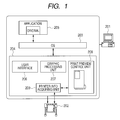
- FIG. 1 is a diagram illustrating a construction of a print processing system PR1.
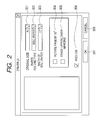
- FIG. 2 is a diagram illustrating a user interface of a printer driver.
- FIG. 3 is a flowchart illustrating a flow for processes at the time of activating the printer driver.
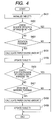
- FIG. 4 is a flowchart illustrating a process for determining whether or not the paper can be saved.
- FIG. 5 is a diagram illustrating a table T1 showing a determination result.
- FIG. 6 is a diagram illustrating examples of a print preview.
- FIG. 7 is a diagram illustrating an example of a dialog adapted to notify that the paper can be saved.
- FIG. 8 is a diagram illustrating examples of a print preview.
- FIG. 9 is a diagram illustrating examples of a print preview.
- FIG. 10 is a diagram illustrating examples of a print preview.
- FIG. 1 is a diagram illustrating a construction of a print processing system PR1 including a personal computer (hereinbelow, referred to as a PC) 201 as an example of a print control apparatus of the invention and a large-sized printer (hereinbelow, referred to as a printer) 202 as an example of a printer apparatus.
- the PC 201 and the printer 202 are mutually connected through a network or a local interface and can exchange various kinds of information.
- the PC 201 can be realized by a general personal computer and includes processing modules 203 to 209, which will be described hereinbelow. Those modules can be installed into the PC 201 by using an installer obtained from a storage medium such as a CD-ROM or from the outside. Each module installed into the PC 201 is stored into a storage device of the PC 201. A CPU executes each module, so that processes, which will be described hereinafter, are realized. A display is connected to the PC 201. The various kinds of information are displayed onto the display, thereby enabling the user to be notified of the various kinds of information. Input devices such as keyboard, mouse, and the like are connected to the PC 201. The user inputs various kinds of instructions from the input device with reference to a display screen displayed on the display. The following various kinds of processes are executed according to the contents which were input.
- An OS 203 is an operating system.
- the processing modules 204 to 209 operate on the OS 203.
- a printer driver 204 controls the operation of the printer 202 according to print settings designated by the user.
- the printer driver 204 provides at least functions 206 to 208.
- An application 205 is software to form a desired original (document) as a print target. The user selects the printer 202 from a print menu of the application 205, so that the printer driver 204 can be activated.
- a user interface (UI) 206 provides a setting display screen which is used by the user to make the print settings or the like. The setting display screen which is provided by the user interface 206 is displayed on the display of the PC 201.
- a graphic processing unit 207 processes the original obtained from the application 205 according to the print settings designated by the user and converts it into print data which can be handled by the printer 202.
- the user interface 206 forms display screen information which is used by the user to make various kinds of settings such as print setting and the like.
- An operating display screen based on the display screen information is displayed on the display of the PC 201.
- the graphic processing unit 207 converts the original received from the application 205 into the print data of a format which can be handled by the printer 202.
- a print preview control unit 208 forms print preview information showing how an image based on the original is arranged on the sheet.
- the print preview information formed here is displayed on the display of the PC 201.
- a printer information acquiring unit 209 acquires various kinds of information such as size information and the like of the set paper from the printer 202.
- the printer 202 receives the print data transmitted from the PC 201 and prints the image onto the paper according to the print data.
- the printer 202 can use roll paper as paper (recording medium) to print the image.
- the printer 202 prints the image by applying the recording material onto the roll paper which is fed from a roll paper feeding unit.
- a material of the recording medium is not limited to the paper but various kinds of materials can be used. However, it is assumed hereinbelow that the recording medium is expressed as roll paper.
- the printer 202 can print the image of an arbitrary length (in a paper feeding direction) so long as it is a permissible length.
- the roll paper After completion of the printing of the length designated from the printer driver 204, the roll paper can be cut.
- the printer 202 may be provided with a feeding unit for the cut paper and can also print the image onto the cut paper.
- size information the printer 202 transmits information showing a width of roll paper with respect to the roll paper and information showing a width/length size with respect to the cut paper, to the printer information acquiring unit 209.
- FIG. 2 illustrates an operating display screen (driver UI) which is displayed on the display of the PC 201 based on the display screen information which is formed by the user interface 206.
- the display screen of FIG. 2 is displayed in the case where the user selected the printer 202 from the print menu of the application 205.
- a combo box 301 is provided to designate the size of original formed by the application 205.
- the original size designated when the original is formed by the application 205 is automatically input. When a different size is designated here, the original is zoomed according to the size.
- a combo box 302 is provided to designate a type of feeding the paper which is used to print the image. As a paper feeding type which can be designated, there is roll paper, a cassette (in which the cut paper has been set), a manual insertion, or the like. If there are a plurality of paper feeding units which can feed the roll paper, a paper feeding stage can be also designated.
- a combo box 303 displays the width of roll paper set in the printer 202.
- the roll paper width is acquired from the printer 202 by the printer information acquiring unit 209. However, if the roll paper width cannot be acquired from the printer 202 by the printer information acquiring unit 209, it may be selected by the operation of the user and displayed. In the subsequent processes, the roll paper width acquired by the printer information acquiring unit 209 or the roll paper width selected by the user is also similarly handled.
- a size of cut paper size of the A series or the B series of ISO
- a check box 304 is one of paper saving functions and is provided to designate whether or not the original is rotated by 90° to execute printing. If the paper feeding type indicates the roll paper and the original is vertically long and a length of long side of the original is equal to or less than the width of roll paper, the original is rotated by 90° for printing, whereby margins (portions other than the original) are smaller than margins which are obtained by printing in a state where the original is held to be vertically long. Thus, since a paper feeding amount is decreased, the paper can be saved. In such a case, by marking the check box 304, the graphic processing unit 207 allows the original to be rotated and, thereafter, transmits the print data to the printer 202.
- the paper saving cannot be accomplished (for example, in the case where the original is vertically long and the length of long side of the original is longer than the width of roll paper), the printing is not executed even if the check box 304 was marked.
- Original image data may include margins as well as a valid image.
- a valid image represents an image for which the recording material (ink or toner) should be applied upon printing the image on the paper, while the recording material is not applied for margins.
- a check box 305 is one of the paper saving functions and is provided to designate whether or not portions (upper and lower margins) in which a valid image (image to which the recording material should be applied upon printing) is not included in the original received from the application 205 are erased.
- the paper feeding type indicates the roll paper and the upper and lower (portions corresponding to the upstream and downstream positions in the paper feeding direction of the roll paper) margins of the original are erased irrespective of the designated original size, an amount of the roll paper which is used can be reduced, so that the paper can be saved.
- the graphic processing unit 207 allows the upper and lower portions where the valid image is not included to be erased from the original, and thereafter transmits the print data to the printer 202.
- the invention is not limited to them but a function of saving the paper by another method may be added, the above method may be replaced by another method, or one of the above two methods may be used.
- a check box 306 is provided to designate whether or not a print preview is performed before executing the printing. If an OK button 307 is designated in a state where the check box 306 has been marked, the print preview is executed. If the printing is instructed after the print preview was executed, the print data is transmitted to the printer 202. If the OK button 307 is designated in a state where the check box 306 is not marked, the print data is transmitted to the printer 202 without executing the print preview.
- the print data to which the foregoing setting contents have been reflected is sent to the graphic processing unit 207 and the window (driver UI) of FIG. 2 is closed.
- the graphic processing unit 207 transmits the print data to which the contents set by the driver UI have been reflected to the print preview control unit 208. If the print preview is not executed, the print data is transferred to the printer 202 and the printing is executed. If a cancel button 308 is designated, the contents which have been set and changed by the user on the display screen of FIG. 2 are not validated and the window of FIG. 2 is closed in a state before the display screen of FIG. 2 is displayed.
- FIG. 3 is a flowchart illustrating a flow for the processes.
- the flowchart shows the processes which are executed in the case where the CPU of the PC 201 reads out the program of the printer driver 204 from a storage device, loads it into the RAM, and executes the program.
- the printer driver 204 When the user forms the original as a print target by the application 205 and selects the printer 202 from the print menu of the application 205, the printer driver 204 is activated and the contents which have been set at present by the combo boxes 301 and 302 and the check boxes 304 to 306 in FIG. 2 are acquired (S101). It is assumed here that the "roll paper" has been set as a paper feeding type and the check box 306 has been marked.
- the printer information acquiring unit 209 determines whether or not size information (in this instance, since the paper feeding type indicates the roll paper, the width of roll paper) of the paper which is used for printing can be acquired from the printer 202. If it can be acquired, information of the width of roll paper which has been set in the printer 202 at present and is used for printing is acquired by the printer information acquiring unit 209 in S103. If it cannot be acquired, information of the width of roll paper which has been designated in the combo box 303 is acquired. The acquired information of the roll paper width is stored into the RAM in the PC 201.
- the processing routine advances to S104 and whether or not the printing in which the paper is saved can be performed is determined based on the size of original as a print target and the width of roll paper which is used for printing.
- FIG. 4 is a flowchart illustrating details of the process of S104.
- a table T1 for determining whether or not the printing in which the paper is saved can be performed is formed in the RAM.
- the table T1 is initialized in S401.
- FIG. 5 is a diagram illustrating an example of the table T1.
- the following items 501 to 503 are involved in the table T1 as items of the paper saving functions.
- the item 501 shows a processing result in the case where the page has been rotated by 90°.
- the item 502 shows a processing result in the case where the upper and lower margins have been erased and the page has been rotated by 90°.
- the item 503 shows a processing result in the case where the upper and lower margins have been erased but the page is not rotated by 90°.
- "False" is written in all of the determination results and "0 mm (zero millimeter)" is written in all of the paper saving amounts.
- the determination result in the item 501 on the table T1 indicates "True” and the paper saving amount is updated to the length (of paper which can be saved) calculated in S404. If the size of the original is the laterally long size and the paper at the time when the original is rotated by 90° cannot be saved, it is determined and its determination result may be reflected to the table T1.
- Whether or not the check box 305 has been marked is determined in S406 based on the information acquired in S101. If it has been marked, since this means that the user has already instructed the operation for erasing the upper and lower margins as a paper saving function, whether or not the paper can be saved by erasing the upper and lower margins is not determined but the processing routine is finished. If the check box 305 is not marked, S407 follows, and whether or not there are the upper and lower margins which can be erased in the case where the original as a print target has been rotated by 90° and in the case where it is not rotated, is determined.
- the paper saving amounts of the upper and lower margins in the case where the original has been rotated by 90° and those in the case where it is not rotated are calculated in S408.
- the determination results in the items 502 and 503 on the table T1 indicate "True” and the paper saving amount is updated to the length (of paper which can be saved) calculated in S408. If the upper and lower margins which can be erased do not exist in the case where the original has been rotated by 90° or in the case where it is not rotated, the determination result is held to be "False".
- the processing routine advances to S106. Since the check box 306 has been marked here, the print preview is performed. At this time, a largest one of the paper saving amounts on the table T1 is also simultaneously displayed. If the determination result of "True" is not included in the items 501 to 503, this means that the paper saving function cannot be used. The processing routine advances to S107 and the print preview is displayed without notifying that the paper can be saved.
- FIG. 6 is a diagram illustrating an example of the print preview which is displayed in S106.
- the print preview is displayed on the display of the PC 201 under control of the print preview control unit 208.
- a print preview display area 601, a print button 602, a cancel button 603, a button 604, and a paper saving possible amount display area 605 are included in the preview display screen.
- the paper feeding direction is a direction which is oriented from the lower position to the upper position.
- a larger one of the paper saving possible amount in the item 503 and the sum of the paper saving possible amounts in the items 501 and 502 is used here based on the table T1. That is, since the sum of the paper saving possible amounts in the items 501 and 502 is equal to 140 mm and the paper saving possible amount in the item 503 is equal to 150 mm in FIG. 6 , 150 mm is displayed in the display area 605.
- the paper saving possible amount is displayed in a display area 703 according to the selecting states of the check boxes 701 and 702. Since the check box 701 has been marked in FIG. 7 , 90 mm is displayed with reference to the value in the item 501 on the table T1.
- FIG. 8 is a diagram illustrating the print preview which is displayed in the case where the OK button 704 is designated in the state where the check box 701 has been marked.
- a print preview display area 801 illustrates a state where the original of FIG. 6 has been rotated by 90°.
- the print button is designated in this state, in the graphic processing unit 207, the original as a print target is rotated by 90° and, thereafter, it is converted into the print data and the print data is transmitted to the printer 202. In the display, the paper saving possible amount may be also simultaneously displayed.
- the display screen is returned to the display screen of FIG. 6 .
- FIG. 9 is a diagram illustrating the print preview which is displayed in the case where the OK button 704 is designated in the state where the check box 702 has been marked.
- a print preview display area 901 illustrates a state where the upper and lower margins have been erased from the original of FIG. 6 .
- the print button is designated in this state, in the graphic processing unit 207, the upper and lower margins are erased from the original as a print target and, thereafter, the original is converted into the print data and the print data is transmitted to the printer 202.
- Other operations are similar to those in the example of FIG. 8 .
- the print preview in the case where the paper saving function is used and the print preview in the case where it is not used may be simultaneously displayed as illustrated in FIG. 10 . That is, when the OK button 704 is designated in the dialog of FIG. 7 , the print preview of FIG. 10 is displayed in place of the print previews of FIGS. 8 and 9 .
- a print preview display area 1001 is similar to that of FIG. 6 .
- a print preview display area 1002 is similar to those of FIGS. 8 and 9 .
- a button 1003, a print button 1004, and a cancel button 1005 are also similar to those described above and their description is omitted here.
- the user when the user does not use the paper saving function, the user can easily recognize the existence of the paper saving function which was not used.
- the printing in which the paper can be saved by an amount larger than that in the case of the present print settings can be performed the user can easily recognize it.
- the user can easily recognize the paper saving amount which can be saved by setting the paper saving function. Moreover, the user can easily compare the print result obtained in the case where the paper saving function has been set and that in the case where the paper saving function is not set. The user can easily select the setting of the paper saving function.
- the user can easily set the paper saving function while previously confirming the print result and can properly suppress wasteful use of the paper upon printing.
- the marking states of the check boxes 701 and 702 may be reflected so that the maximum amount of paper can be saved. That is, since it is the item 503 that the printer driver 204 can mostly save the paper amount with reference to the table T1, the marking of the check box 701 is reset and the check box 702 is marked in the dialog of FIG. 7 .
- the OK button 704 with the check box 702 marked and the check box 701 unmarked, the user can execute the printing in which the paper amount can be saved the most.
- the printer 202 is a print control apparatus, the processes executed by the PC 201 as described above are executed by the printer 202 and the display information is displayed onto an operation panel or the like of the printer 202.
- a controller (print control apparatus) of the printer 202 allows its own printer unit (printer apparatus) to execute the printing.
- the invention is also realized by executing the following processes: processes which are executed in the case where software (program) for realizing the functions of the embodiments mentioned above is supplied to a system or an apparatus through a network or various kinds of storage media and a computer (or a CPU, an MPU, or the like) of the system or apparatus reads out and executes the program.
- the program which is executed by the printer apparatus may be executed by one CPU or may be executed by a plurality of CPUs in an interlocking relational manner.
- the processes may be executed by properly combining software and hardware.
- the program may be executed by a CPU of an apparatus provided outside the printer apparatus in place of the CPU in the printer apparatus.
Landscapes
- Engineering & Computer Science (AREA)
- Theoretical Computer Science (AREA)
- General Engineering & Computer Science (AREA)
- Physics & Mathematics (AREA)
- General Physics & Mathematics (AREA)
- Human Computer Interaction (AREA)
- Accessory Devices And Overall Control Thereof (AREA)
- Record Information Processing For Printing (AREA)
Abstract
Description
- The present invention relates to print control apparatus and method for allowing a printer apparatus to execute a printing based on print settings set by a user.
- In the related art, when a printer apparatus is allowed to execute a printing, the user makes print settings such as size and orientation of a sheet (or paper) and subsequently instructs the printing. When the printing is instructed, there is also a case where in a printer driver or the like, the printing is executed according to the print settings which have already been made, without displaying a display screen for print setting.
- A print preview function for enabling the user to previously confirm how an image is arranged on the paper prior to executing the printing has been known (refer to Japanese Patent Application Laid-Open No.
2006-202112 - However, in the related art, in order to execute the printing in which the paper is unwastefully used, the user needs to preliminarily know the settings adapted to print without wastefully using the paper and to make such settings.
- It is an aspect of the invention to solve the above problems.
- Another aspect of the invention is to allow the user to execute a printing based on print settings in which paper can be saved.
- The above-mentioned aspects and further features of the present invention will become apparent from the following description of exemplary embodiments with reference to the attached drawings.
-
FIG. 1 is a diagram illustrating a construction of a print processing system PR1. -
FIG. 2 is a diagram illustrating a user interface of a printer driver. -
FIG. 3 is a flowchart illustrating a flow for processes at the time of activating the printer driver. -
FIG. 4 is a flowchart illustrating a process for determining whether or not the paper can be saved. -
FIG. 5 is a diagram illustrating a table T1 showing a determination result. -
FIG. 6 is a diagram illustrating examples of a print preview. -
FIG. 7 is a diagram illustrating an example of a dialog adapted to notify that the paper can be saved. -
FIG. 8 is a diagram illustrating examples of a print preview. -
FIG. 9 is a diagram illustrating examples of a print preview. -
FIG. 10 is a diagram illustrating examples of a print preview. - An embodiment of the invention will be described in detail hereinbelow with reference to the drawings. A construction illustrated in the following embodiment is nothing but an example and the invention is not limited to the illustrated construction.
-
FIG. 1 is a diagram illustrating a construction of a print processing system PR1 including a personal computer (hereinbelow, referred to as a PC) 201 as an example of a print control apparatus of the invention and a large-sized printer (hereinbelow, referred to as a printer) 202 as an example of a printer apparatus. The PC 201 and theprinter 202 are mutually connected through a network or a local interface and can exchange various kinds of information. - The PC 201 can be realized by a general personal computer and includes
processing modules 203 to 209, which will be described hereinbelow. Those modules can be installed into the PC 201 by using an installer obtained from a storage medium such as a CD-ROM or from the outside. Each module installed into the PC 201 is stored into a storage device of the PC 201. A CPU executes each module, so that processes, which will be described hereinafter, are realized. A display is connected to the PC 201. The various kinds of information are displayed onto the display, thereby enabling the user to be notified of the various kinds of information. Input devices such as keyboard, mouse, and the like are connected to the PC 201. The user inputs various kinds of instructions from the input device with reference to a display screen displayed on the display. The following various kinds of processes are executed according to the contents which were input. - An OS 203 is an operating system. The
processing modules 204 to 209 operate on theOS 203. Aprinter driver 204 controls the operation of theprinter 202 according to print settings designated by the user. Theprinter driver 204 provides at leastfunctions 206 to 208. Anapplication 205 is software to form a desired original (document) as a print target. The user selects theprinter 202 from a print menu of theapplication 205, so that theprinter driver 204 can be activated. A user interface (UI) 206 provides a setting display screen which is used by the user to make the print settings or the like. The setting display screen which is provided by theuser interface 206 is displayed on the display of the PC 201. Agraphic processing unit 207 processes the original obtained from theapplication 205 according to the print settings designated by the user and converts it into print data which can be handled by theprinter 202. - The
user interface 206 forms display screen information which is used by the user to make various kinds of settings such as print setting and the like. An operating display screen based on the display screen information is displayed on the display of the PC 201. According to the print settings set based on the display screen information formed by theuser interface 206, thegraphic processing unit 207 converts the original received from theapplication 205 into the print data of a format which can be handled by theprinter 202. Before the original received from theapplication 205 is printed by theprinter 202, a printpreview control unit 208 forms print preview information showing how an image based on the original is arranged on the sheet. The print preview information formed here is displayed on the display of the PC 201. A printerinformation acquiring unit 209 acquires various kinds of information such as size information and the like of the set paper from theprinter 202. - The
printer 202 receives the print data transmitted from the PC 201 and prints the image onto the paper according to the print data. When the image is printed, one of ink and toner is used as a recording material. Theprinter 202 can use roll paper as paper (recording medium) to print the image. Theprinter 202 prints the image by applying the recording material onto the roll paper which is fed from a roll paper feeding unit. A material of the recording medium is not limited to the paper but various kinds of materials can be used. However, it is assumed hereinbelow that the recording medium is expressed as roll paper. When the image is printed onto the roll paper, based on an instruction from theprinter driver 204, theprinter 202 can print the image of an arbitrary length (in a paper feeding direction) so long as it is a permissible length. After completion of the printing of the length designated from theprinter driver 204, the roll paper can be cut. Theprinter 202 may be provided with a feeding unit for the cut paper and can also print the image onto the cut paper. As size information, theprinter 202 transmits information showing a width of roll paper with respect to the roll paper and information showing a width/length size with respect to the cut paper, to the printerinformation acquiring unit 209. - Subsequently, the operation contents at the time when the user instructs the printing from the PC 201 will be described.
FIG. 2 illustrates an operating display screen (driver UI) which is displayed on the display of the PC 201 based on the display screen information which is formed by theuser interface 206. The display screen ofFIG. 2 is displayed in the case where the user selected theprinter 202 from the print menu of theapplication 205. - In
FIG. 2 , acombo box 301 is provided to designate the size of original formed by theapplication 205. The original size designated when the original is formed by theapplication 205 is automatically input. When a different size is designated here, the original is zoomed according to the size. Acombo box 302 is provided to designate a type of feeding the paper which is used to print the image. As a paper feeding type which can be designated, there is roll paper, a cassette (in which the cut paper has been set), a manual insertion, or the like. If there are a plurality of paper feeding units which can feed the roll paper, a paper feeding stage can be also designated. Acombo box 303 displays the width of roll paper set in theprinter 202. When the roll paper is selected as a paper feeding type, the roll paper width is acquired from theprinter 202 by the printerinformation acquiring unit 209. However, if the roll paper width cannot be acquired from theprinter 202 by the printerinformation acquiring unit 209, it may be selected by the operation of the user and displayed. In the subsequent processes, the roll paper width acquired by the printerinformation acquiring unit 209 or the roll paper width selected by the user is also similarly handled. When the cassette is selected as a paper feeding type, a size of cut paper (size of the A series or the B series of ISO) is displayed. - A
check box 304 is one of paper saving functions and is provided to designate whether or not the original is rotated by 90° to execute printing. If the paper feeding type indicates the roll paper and the original is vertically long and a length of long side of the original is equal to or less than the width of roll paper, the original is rotated by 90° for printing, whereby margins (portions other than the original) are smaller than margins which are obtained by printing in a state where the original is held to be vertically long. Thus, since a paper feeding amount is decreased, the paper can be saved. In such a case, by marking thecheck box 304, thegraphic processing unit 207 allows the original to be rotated and, thereafter, transmits the print data to theprinter 202. In a case, though the original was rotated by 90°, the paper saving cannot be accomplished (for example, in the case where the original is vertically long and the length of long side of the original is longer than the width of roll paper), the printing is not executed even if thecheck box 304 was marked. - Original image data may include margins as well as a valid image. A valid image represents an image for which the recording material (ink or toner) should be applied upon printing the image on the paper, while the recording material is not applied for margins. A
check box 305 is one of the paper saving functions and is provided to designate whether or not portions (upper and lower margins) in which a valid image (image to which the recording material should be applied upon printing) is not included in the original received from theapplication 205 are erased. When the paper feeding type indicates the roll paper and the upper and lower (portions corresponding to the upstream and downstream positions in the paper feeding direction of the roll paper) margins of the original are erased irrespective of the designated original size, an amount of the roll paper which is used can be reduced, so that the paper can be saved. In such a case, by marking thecheck box 305, thegraphic processing unit 207 allows the upper and lower portions where the valid image is not included to be erased from the original, and thereafter transmits the print data to theprinter 202. - Although the case where the page is rotated by 90° and the case where the upper and lower margins are erased have been shown as paper saving functions, the invention is not limited to them but a function of saving the paper by another method may be added, the above method may be replaced by another method, or one of the above two methods may be used.
- A
check box 306 is provided to designate whether or not a print preview is performed before executing the printing. If anOK button 307 is designated in a state where thecheck box 306 has been marked, the print preview is executed. If the printing is instructed after the print preview was executed, the print data is transmitted to theprinter 202. If theOK button 307 is designated in a state where thecheck box 306 is not marked, the print data is transmitted to theprinter 202 without executing the print preview. - If the
OK button 307 is designated, the print data to which the foregoing setting contents have been reflected is sent to thegraphic processing unit 207 and the window (driver UI) ofFIG. 2 is closed. When the print preview is executed, thegraphic processing unit 207 transmits the print data to which the contents set by the driver UI have been reflected to the printpreview control unit 208. If the print preview is not executed, the print data is transferred to theprinter 202 and the printing is executed. If a cancelbutton 308 is designated, the contents which have been set and changed by the user on the display screen ofFIG. 2 are not validated and the window ofFIG. 2 is closed in a state before the display screen ofFIG. 2 is displayed. - Subsequently, a flow for processes when the
printer driver 204 is activated will be described.FIG. 3 is a flowchart illustrating a flow for the processes. The flowchart shows the processes which are executed in the case where the CPU of thePC 201 reads out the program of theprinter driver 204 from a storage device, loads it into the RAM, and executes the program. - When the user forms the original as a print target by the
application 205 and selects theprinter 202 from the print menu of theapplication 205, theprinter driver 204 is activated and the contents which have been set at present by thecombo boxes check boxes 304 to 306 inFIG. 2 are acquired (S101). It is assumed here that the "roll paper" has been set as a paper feeding type and thecheck box 306 has been marked. - Subsequently, whether or not size information (in this instance, since the paper feeding type indicates the roll paper, the width of roll paper) of the paper which is used for printing can be acquired from the
printer 202 is determined in the printer information acquiring unit 209 (S102). If it can be acquired, information of the width of roll paper which has been set in theprinter 202 at present and is used for printing is acquired by the printerinformation acquiring unit 209 in S103. If it cannot be acquired, information of the width of roll paper which has been designated in thecombo box 303 is acquired. The acquired information of the roll paper width is stored into the RAM in thePC 201. - Subsequently, the processing routine advances to S104 and whether or not the printing in which the paper is saved can be performed is determined based on the size of original as a print target and the width of roll paper which is used for printing.
-
FIG. 4 is a flowchart illustrating details of the process of S104. - When the process is started, first, a table T1 for determining whether or not the printing in which the paper is saved can be performed is formed in the RAM. The table T1 is initialized in S401.
-
FIG. 5 is a diagram illustrating an example of the table T1. The followingitems 501 to 503 are involved in the table T1 as items of the paper saving functions. Theitem 501 shows a processing result in the case where the page has been rotated by 90°. Theitem 502 shows a processing result in the case where the upper and lower margins have been erased and the page has been rotated by 90°. Theitem 503 shows a processing result in the case where the upper and lower margins have been erased but the page is not rotated by 90°. The processing result showing whether or not the paper can be saved (possible = True/impossible = False) and a paper saving amount (length) in the case of "True" are written in each of the items. In a state where the table T1 has been initialized, "False" is written in all of the determination results and "0 mm (zero millimeter)" is written in all of the paper saving amounts. - Subsequently, whether or not the
check box 304 has been marked is determined in S402 based on the information acquired in S101. If it has been marked, since this means that the user has already instructed that the page is rotated by 90° as a paper saving function, whether or not the paper can be saved by rotating the page by 90° is not determined but the processing routine advances to S406. If thecheck box 304 is not marked, S403 follows and whether or not the original can be rotated by 90° and printed is determined based on the size of original as a print target displayed in thecombo box 301 and the acquired width of roll paper which is used for printing. That is, whether or not the length of original in the direction corresponding to the roll paper width in the case where the original has been rotated by 90° is equal to or less than the acquired roll paper width is determined. If the printing in which the original has been rotated by 90° cannot be performed, S406 follows. In S404, the length of paper which can be saved when the original has been rotated by 90° as compared with that in the case where it is not rotated is calculated. It is assumed here that the size of the original is the vertically long size and the paper at the time when the original is rotated by 90° can be saved. Since the paper at the time when the original is rotated by 90° can be saved, in S405, the determination result in theitem 501 on the table T1 indicates "True" and the paper saving amount is updated to the length (of paper which can be saved) calculated in S404. If the size of the original is the laterally long size and the paper at the time when the original is rotated by 90° cannot be saved, it is determined and its determination result may be reflected to the table T1. - Whether or not the
check box 305 has been marked is determined in S406 based on the information acquired in S101. If it has been marked, since this means that the user has already instructed the operation for erasing the upper and lower margins as a paper saving function, whether or not the paper can be saved by erasing the upper and lower margins is not determined but the processing routine is finished. If thecheck box 305 is not marked, S407 follows, and whether or not there are the upper and lower margins which can be erased in the case where the original as a print target has been rotated by 90° and in the case where it is not rotated, is determined. If there are the margins which can be erased, the paper saving amounts of the upper and lower margins in the case where the original has been rotated by 90° and those in the case where it is not rotated are calculated in S408. In S409, the determination results in theitems - Returning to
FIG. 3 , the contents of the table T1 updated as illustrated inFIG. 4 are confirmed in S105. If the determination result of "True" is included in any one of theitems 501 to 503, the processing routine advances to S106. Since thecheck box 306 has been marked here, the print preview is performed. At this time, a largest one of the paper saving amounts on the table T1 is also simultaneously displayed. If the determination result of "True" is not included in theitems 501 to 503, this means that the paper saving function cannot be used. The processing routine advances to S107 and the print preview is displayed without notifying that the paper can be saved. -
FIG. 6 is a diagram illustrating an example of the print preview which is displayed in S106. The print preview is displayed on the display of thePC 201 under control of the printpreview control unit 208. - A print
preview display area 601, aprint button 602, a cancelbutton 603, abutton 604, and a paper saving possibleamount display area 605 are included in the preview display screen. - How the original as a print target is arranged on the roll paper which is used for printing based on the information obtained in S101 and S103 is displayed in the print
preview display area 601. The case where the roll paper has been selected as a paper feeding type is illustrated inFIG. 6 . The paper feeding direction is a direction which is oriented from the lower position to the upper position. When theprint button 602 is designated in this state, in thegraphic processing unit 207, the process based on the paper saving function is not executed to the original as a print target but the original is converted into the print data and the print data is transmitted to theprinter 202. When the cancelbutton 603 is designated, the window ofFIG. 6 is closed and the printing process is cancelled. A maximum value of the paper saving possible amount is displayed in thedisplay area 605. A larger one of the paper saving possible amount in theitem 503 and the sum of the paper saving possible amounts in theitems items item 503 is equal to 150 mm inFIG. 6 , 150 mm is displayed in thedisplay area 605. - When the
button 604 is designated, a dialog likeFIG. 7 for notifying the user that the paper can be saved is displayed. Althoughcheck boxes - The paper saving possible amount is displayed in a
display area 703 according to the selecting states of thecheck boxes check box 701 has been marked inFIG. 7 , 90 mm is displayed with reference to the value in theitem 501 on the table T1. - When an
OK button 704 is designated, the contents designated in thecheck boxes button 705 is designated, the display screen is returned to the display screen ofFIG. 6 . -
FIG. 8 is a diagram illustrating the print preview which is displayed in the case where theOK button 704 is designated in the state where thecheck box 701 has been marked. A printpreview display area 801 illustrates a state where the original ofFIG. 6 has been rotated by 90°. When the print button is designated in this state, in thegraphic processing unit 207, the original as a print target is rotated by 90° and, thereafter, it is converted into the print data and the print data is transmitted to theprinter 202. In the display, the paper saving possible amount may be also simultaneously displayed. When abutton 802 is designated, the display screen is returned to the display screen ofFIG. 6 . -
FIG. 9 is a diagram illustrating the print preview which is displayed in the case where theOK button 704 is designated in the state where thecheck box 702 has been marked. A printpreview display area 901 illustrates a state where the upper and lower margins have been erased from the original ofFIG. 6 . When the print button is designated in this state, in thegraphic processing unit 207, the upper and lower margins are erased from the original as a print target and, thereafter, the original is converted into the print data and the print data is transmitted to theprinter 202. Other operations are similar to those in the example ofFIG. 8 . - When both of the
check boxes FIG. 7 , the original in the case where the original was rotated by 90° and the upper and lower margins were erased is displayed. Other operations are similar to those in the cases ofFIGS. 8 and9 . - The print preview in the case where the paper saving function is used and the print preview in the case where it is not used may be simultaneously displayed as illustrated in
FIG. 10 . That is, when theOK button 704 is designated in the dialog ofFIG. 7 , the print preview ofFIG. 10 is displayed in place of the print previews ofFIGS. 8 and9 . A printpreview display area 1001 is similar to that ofFIG. 6 . A printpreview display area 1002 is similar to those ofFIGS. 8 and9 . Abutton 1003, aprint button 1004, and a cancelbutton 1005 are also similar to those described above and their description is omitted here. - According to the embodiment as mentioned above, when the user does not use the paper saving function, the user can easily recognize the existence of the paper saving function which was not used. When the printing in which the paper can be saved by an amount larger than that in the case of the present print settings can be performed, the user can easily recognize it.
- Further, according to the embodiment mentioned above, the user can easily recognize the paper saving amount which can be saved by setting the paper saving function. Moreover, the user can easily compare the print result obtained in the case where the paper saving function has been set and that in the case where the paper saving function is not set. The user can easily select the setting of the paper saving function.
- By the print preview having those functions, the user can easily set the paper saving function while previously confirming the print result and can properly suppress wasteful use of the paper upon printing.
- In the above embodiment, when the dialog of
FIG. 7 is displayed, the marking states of thecheck boxes item 503 that theprinter driver 204 can mostly save the paper amount with reference to the table T1, the marking of thecheck box 701 is reset and thecheck box 702 is marked in the dialog ofFIG. 7 . Thus, in this example merely by designating theOK button 704 with thecheck box 702 marked and thecheck box 701 unmarked, the user can execute the printing in which the paper amount can be saved the most. - When the print preview of
FIG. 6 is displayed, such a print preview that the state of theitem 503 in which the paper amount can be mostly saved has been reflected may be displayed. Consequently, merely by designating theprint button 602 as it is, the user can execute the printing in which the paper amount can be saved the most. - Although the case where the print data is transmitted from the
PC 201 to theprinter 202 and printed has been described above as an example, the invention can be also applied to such a system that a scanner for reading the original is provided for theprinter 202 and an image of the original read out by the scanner is printed. In this case, theprinter 202 is a print control apparatus, the processes executed by thePC 201 as described above are executed by theprinter 202 and the display information is displayed onto an operation panel or the like of theprinter 202. A controller (print control apparatus) of theprinter 202 allows its own printer unit (printer apparatus) to execute the printing. - The invention is also realized by executing the following processes: processes which are executed in the case where software (program) for realizing the functions of the embodiments mentioned above is supplied to a system or an apparatus through a network or various kinds of storage media and a computer (or a CPU, an MPU, or the like) of the system or apparatus reads out and executes the program. The program which is executed by the printer apparatus may be executed by one CPU or may be executed by a plurality of CPUs in an interlocking relational manner. The processes may be executed by properly combining software and hardware. The program may be executed by a CPU of an apparatus provided outside the printer apparatus in place of the CPU in the printer apparatus.
- The invention is not limited to the foregoing embodiments but various modifications (including a combination of a plurality of embodiments) are possible based on a spirit of the invention and they are not excluded from the scope of the invention.
- Although the various examples and embodiments of the invention have been described above, the spirit and scope of the invention is not limited by the specific
- While the present invention has been described with reference to exemplary embodiments, it is to be understood that the invention is not limited to the disclosed exemplary embodiments. The scope of the following claims is to be accorded the broadest interpretation so as to encompass all such modifications and equivalent structures and functions.
Claims (8)
- A print control apparatus for controlling a printer apparatus (202) to execute a printing of a document using paper, based on a print setting set by a user, comprising:determining means configured to determine whether or not a print setting different from that set by the user exists which makes possible a saving of an amount of paper compared to the set print setting; andnotifying means configured, in the case that the determining means determines such a paper saving print setting exists, to notify (S106) the user of the existence of the paper saving print setting determined by the determining means.
- An apparatus according to claim 1, wherein the determining means is configured to make the determination based on a size of the document and a size of the paper used for printing.
- An apparatus according to claim 1 or 2, further comprising specifying means configured to specify the amount of paper which can be saved in the case of printing according to the paper saving print setting as compared with printing according to the print setting set by the user,
wherein the notifying means is further configured to notify the user of the paper amount specified by the specifying means. - An apparatus according to any one of claims 1 to 3, further comprising preview means (208) configured to provide a print preview (801) to be displayed on a display device showing how the document is arranged on the paper in the case of printing according to the paper saving print setting.
- An apparatus according to claim 4, wherein the preview means is configured to provide a print preview (1001) in the case of printing according to the print setting set by the user and a print preview (1002) in the case of printing according to the paper saving print setting to be displayed.
- A print control method of controlling a printer apparatus to execute a printing of a document using paper, based on a print setting set by a user, the method comprising:determining (S104) whether or not a print setting different from that set by the user exists which makes possible a saving of an amount of paper compared to the set print setting; andin the case that it is determined that such a paper saving print setting exists, notifying (S106) the user of the existence of the paper saving print setting determined in the determining step.
- A computer program which, when run on a device, causes the device to act as a print control apparatus according to any one of claims 1 to 5.
- A computer readable storage medium storing a computer program according to claim 7.
Applications Claiming Priority (1)
| Application Number | Priority Date | Filing Date | Title |
|---|---|---|---|
| JP2009056096 | 2009-03-10 |
Publications (3)
| Publication Number | Publication Date |
|---|---|
| EP2228713A2 true EP2228713A2 (en) | 2010-09-15 |
| EP2228713A3 EP2228713A3 (en) | 2012-12-12 |
| EP2228713B1 EP2228713B1 (en) | 2018-07-18 |
Family
ID=42077206
Family Applications (1)
| Application Number | Title | Priority Date | Filing Date |
|---|---|---|---|
| EP10154447.6A Active EP2228713B1 (en) | 2009-03-10 | 2010-02-23 | Print control apparatus and method |
Country Status (4)
| Country | Link |
|---|---|
| US (2) | US9058140B2 (en) |
| EP (1) | EP2228713B1 (en) |
| JP (2) | JP5693023B2 (en) |
| CN (2) | CN101833429A (en) |
Families Citing this family (19)
| Publication number | Priority date | Publication date | Assignee | Title |
|---|---|---|---|---|
| CN102452233B (en) * | 2010-10-25 | 2014-09-03 | 山东新北洋信息技术股份有限公司 | Printing control method and device, and printing device |
| KR20120095242A (en) * | 2011-02-18 | 2012-08-28 | 삼성전자주식회사 | Print controling terminal and method for controling print |
| US8937744B1 (en) | 2011-07-30 | 2015-01-20 | PrintEco, Inc. | Modifying electronic data layout for efficient printing of electronic data |
| CN102693217B (en) * | 2012-05-15 | 2014-11-26 | 中国人民解放军91550部队 | Automatic layout method by table font and paper size analysis |
| JP6188398B2 (en) * | 2013-04-19 | 2017-08-30 | キヤノン株式会社 | Printing control apparatus, method and program |
| JP6338355B2 (en) * | 2013-11-07 | 2018-06-06 | キヤノン株式会社 | Image processing apparatus, image processing method, and program |
| JP6333027B2 (en) * | 2014-04-01 | 2018-05-30 | キヤノン株式会社 | Printing system, printing control apparatus, printing apparatus, program, and storage medium |
| JP2018028741A (en) * | 2016-08-16 | 2018-02-22 | 富士ゼロックス株式会社 | Printing system, image display device, and image display program |
| JP7250436B2 (en) | 2018-05-24 | 2023-04-03 | キヤノン株式会社 | PRINT CONTROL METHOD, PROGRAM, AND INFORMATION PROCESSING APPARATUS |
| JP7307555B2 (en) * | 2019-02-27 | 2023-07-12 | キヤノン株式会社 | Program, print control device, and control method |
| JP7282567B2 (en) * | 2019-03-29 | 2023-05-29 | キヤノン株式会社 | Information processing device and program |
| JP7284620B2 (en) * | 2019-04-09 | 2023-05-31 | キヤノン株式会社 | Information processing method, information processing device, and program |
| CN112306424B (en) * | 2019-07-31 | 2021-11-09 | 中铁第五勘察设计院集团有限公司 | Method for printing Web graphic format file |
| JP7362475B2 (en) * | 2019-12-27 | 2023-10-17 | キヤノン株式会社 | Information processing device, control method for information processing device, and program |
| JP7413814B2 (en) * | 2020-02-14 | 2024-01-16 | ブラザー工業株式会社 | Programs and information processing equipment |
| JP7351238B2 (en) * | 2020-02-26 | 2023-09-27 | 沖電気工業株式会社 | Information processing device and information processing method |
| JP7600826B2 (en) | 2021-03-31 | 2024-12-17 | ブラザー工業株式会社 | Programs and Printers |
| JP7647258B2 (en) * | 2021-04-07 | 2025-03-18 | ブラザー工業株式会社 | program |
| CN115756348A (en) * | 2022-11-24 | 2023-03-07 | 维沃移动通信有限公司 | Partition printing method and device |
Citations (1)
| Publication number | Priority date | Publication date | Assignee | Title |
|---|---|---|---|---|
| JP2006202112A (en) | 2005-01-21 | 2006-08-03 | Canon Inc | Information processing apparatus, control method therefor, storage medium, and program |
Family Cites Families (28)
| Publication number | Priority date | Publication date | Assignee | Title |
|---|---|---|---|---|
| US5745659A (en) * | 1996-04-25 | 1998-04-28 | Hewlett-Packard Company | Versatile scaling of drawings |
| JP2001346030A (en) * | 2000-06-02 | 2001-12-14 | Hitachi Ltd | Information posting method and document processing terminal |
| JP4480114B2 (en) | 2000-12-13 | 2010-06-16 | キヤノン株式会社 | Image forming apparatus, apparatus for providing user interface, and display method |
| JP2003008862A (en) * | 2001-06-27 | 2003-01-10 | Ricoh Co Ltd | Document storage device |
| JP3899962B2 (en) * | 2002-03-08 | 2007-03-28 | 富士ゼロックス株式会社 | Image forming apparatus |
| JP2004330639A (en) * | 2003-05-08 | 2004-11-25 | Seiko Epson Corp | PRINTING DEVICE, PRINT MANAGEMENT SYSTEM, PRINTING DEVICE CONTROL PROGRAM, PRINT MANAGEMENT PROGRAM, AND PRINTER |
| JP2005094413A (en) * | 2003-09-18 | 2005-04-07 | Ricoh Co Ltd | Image forming apparatus |
| JP2005088506A (en) * | 2003-09-19 | 2005-04-07 | Fuji Xerox Co Ltd | Image forming apparatus, image forming method and its program |
| JP4136917B2 (en) * | 2003-12-10 | 2008-08-20 | キヤノン株式会社 | Document processing apparatus and document processing method |
| JP2005231154A (en) | 2004-02-19 | 2005-09-02 | Canon Inc | Print control system |
| JP4095589B2 (en) * | 2004-02-27 | 2008-06-04 | キヤノン株式会社 | Electrophotographic image forming apparatus and process cartridge |
| JP2005305867A (en) * | 2004-04-22 | 2005-11-04 | Seiko Epson Corp | Image processing system, image display device, printer, and printing method |
| JP4250569B2 (en) * | 2004-06-25 | 2009-04-08 | キヤノン株式会社 | Print control apparatus and print control method |
| KR100621366B1 (en) * | 2004-11-30 | 2006-09-19 | 삼성전자주식회사 | Image forming apparatus, host device connected thereto and control method thereof |
| JP2006150839A (en) * | 2004-11-30 | 2006-06-15 | Canon Inc | Printer apparatus, image processing apparatus, printing method, image processing method, and computer program |
| JP4688202B2 (en) * | 2004-12-08 | 2011-05-25 | キヤノンファインテック株式会社 | Conflict guide display method and program |
| JP4522280B2 (en) * | 2005-02-04 | 2010-08-11 | キヤノン株式会社 | Information processing apparatus, control method therefor, and program |
| JP2006352801A (en) * | 2005-06-20 | 2006-12-28 | Fuji Xerox Co Ltd | Copying control apparatus, copying system, copying control method and program |
| JP4380602B2 (en) * | 2005-07-27 | 2009-12-09 | キヤノン株式会社 | Image forming apparatus and control method thereof |
| JP4693664B2 (en) * | 2006-03-13 | 2011-06-01 | キヤノン株式会社 | Printer apparatus, program, and printing method |
| JP4229955B2 (en) | 2006-07-06 | 2009-02-25 | シャープ株式会社 | Image forming apparatus, image forming method, and program |
| US20080029149A1 (en) * | 2006-08-02 | 2008-02-07 | Daniel Simon | Method and apparatus for arranging a solar cell and reflector |
| JP2008046159A (en) * | 2006-08-10 | 2008-02-28 | Konica Minolta Business Technologies Inc | Image forming apparatus, printing condition setting method, and printing condition setting program |
| JP5032919B2 (en) * | 2007-08-31 | 2012-09-26 | キヤノン株式会社 | Image processing apparatus, print preview method, and program |
| JP4962310B2 (en) * | 2007-12-27 | 2012-06-27 | セイコーエプソン株式会社 | RECORDING CONTROL DEVICE, RECORDING CONTROL METHOD, AND PROGRAM |
| JP2009232154A (en) * | 2008-03-24 | 2009-10-08 | Kyocera Mita Corp | Image forming apparatus |
| US20100165361A1 (en) * | 2008-12-29 | 2010-07-01 | James Ronald Booth | Method for Reducing Consumables Usage Based on Job Size |
| US20100171975A1 (en) * | 2009-01-05 | 2010-07-08 | Konica Minolta Systems Laboratory, Inc. | Focus Image Centering and Printing on a Specified Paper Size |
-
2010
- 2010-02-16 US US12/706,699 patent/US9058140B2/en active Active
- 2010-02-23 EP EP10154447.6A patent/EP2228713B1/en active Active
- 2010-03-05 JP JP2010049317A patent/JP5693023B2/en active Active
- 2010-03-10 CN CN201010133385A patent/CN101833429A/en active Pending
- 2010-03-10 CN CN201510246117.2A patent/CN104850368B/en active Active
-
2015
- 2015-02-05 JP JP2015021650A patent/JP6074444B2/en active Active
- 2015-05-12 US US14/709,820 patent/US20150242173A1/en not_active Abandoned
Patent Citations (1)
| Publication number | Priority date | Publication date | Assignee | Title |
|---|---|---|---|---|
| JP2006202112A (en) | 2005-01-21 | 2006-08-03 | Canon Inc | Information processing apparatus, control method therefor, storage medium, and program |
Also Published As
| Publication number | Publication date |
|---|---|
| CN104850368B (en) | 2018-04-17 |
| CN104850368A (en) | 2015-08-19 |
| US20100231960A1 (en) | 2010-09-16 |
| EP2228713A3 (en) | 2012-12-12 |
| CN101833429A (en) | 2010-09-15 |
| US20150242173A1 (en) | 2015-08-27 |
| JP2015111449A (en) | 2015-06-18 |
| JP2010238231A (en) | 2010-10-21 |
| US9058140B2 (en) | 2015-06-16 |
| JP6074444B2 (en) | 2017-02-01 |
| JP5693023B2 (en) | 2015-04-01 |
| EP2228713B1 (en) | 2018-07-18 |
Similar Documents
| Publication | Publication Date | Title |
|---|---|---|
| EP2228713B1 (en) | Print control apparatus and method | |
| US8614824B2 (en) | Printing control apparatus, printing control method, and storage medium | |
| US8396409B2 (en) | Printing apparatus | |
| US20120140278A1 (en) | Document information display control device, document information display method, and computer-readable storage medium for computer program | |
| JP6415127B2 (en) | Image forming apparatus, image forming apparatus control method and program | |
| JP6333027B2 (en) | Printing system, printing control apparatus, printing apparatus, program, and storage medium | |
| US11288020B2 (en) | Non-transitory computer-readable medium storing application program and method for controlling information processing device for printing by a plurality of printers | |
| EP2816416B1 (en) | Display device, image forming apparatus, and computer-readable recording medium storing display control program | |
| US11336784B2 (en) | Information processing apparatus and control method | |
| US20200409637A1 (en) | Control apparatus, control method, and storage medium | |
| US9223526B2 (en) | Apparatus, method, and storage medium | |
| US20100060908A1 (en) | Printing control apparatus, printing control method, and storage medium | |
| US10897546B2 (en) | Print system system for displaying a preview for a job containing a plurality of different roll media | |
| US20090103138A1 (en) | Image forming indicating terminal and image forming indicating method | |
| JP2012063552A (en) | Apparatus, method and system for forming image | |
| US8848235B2 (en) | Systems and methods for displaying a print preview | |
| JP7250605B2 (en) | PRINTING METHOD, PRINTING SYSTEM AND PRINTING APPARATUS | |
| JP2006268318A (en) | Image forming device and method, and printer driver | |
| EP4715563A1 (en) | Method for controlling information processing device, information processing device and computer-readable storage medium | |
| JP7815752B2 (en) | Program and information processing device | |
| JP4933919B2 (en) | Image forming apparatus, document orientation determination method, and document orientation determination program | |
| JP2010198497A (en) | Printing system | |
| JP2026058226A (en) | Information processing device and program, information processing method | |
| EP1903430A1 (en) | Folding system |
Legal Events
| Date | Code | Title | Description |
|---|---|---|---|
| PUAI | Public reference made under article 153(3) epc to a published international application that has entered the european phase |
Free format text: ORIGINAL CODE: 0009012 |
|
| AK | Designated contracting states |
Kind code of ref document: A2 Designated state(s): AT BE BG CH CY CZ DE DK EE ES FI FR GB GR HR HU IE IS IT LI LT LU LV MC MK MT NL NO PL PT RO SE SI SK SM TR |
|
| AX | Request for extension of the european patent |
Extension state: AL BA RS |
|
| PUAL | Search report despatched |
Free format text: ORIGINAL CODE: 0009013 |
|
| AK | Designated contracting states |
Kind code of ref document: A3 Designated state(s): AT BE BG CH CY CZ DE DK EE ES FI FR GB GR HR HU IE IS IT LI LT LU LV MC MK MT NL NO PL PT RO SE SI SK SM TR |
|
| AX | Request for extension of the european patent |
Extension state: AL BA RS |
|
| RIC1 | Information provided on ipc code assigned before grant |
Ipc: G06F 3/12 20060101AFI20121105BHEP |
|
| 17P | Request for examination filed |
Effective date: 20130612 |
|
| RBV | Designated contracting states (corrected) |
Designated state(s): AT BE BG CH CY CZ DE DK EE ES FI FR GB GR HR HU IE IS IT LI LT LU LV MC MK MT NL NO PL PT RO SE SI SK SM TR |
|
| STAA | Information on the status of an ep patent application or granted ep patent |
Free format text: STATUS: EXAMINATION IS IN PROGRESS |
|
| 17Q | First examination report despatched |
Effective date: 20170403 |
|
| RIC1 | Information provided on ipc code assigned before grant |
Ipc: G06K 15/00 20060101ALI20180109BHEP Ipc: G06F 3/12 20060101AFI20180109BHEP |
|
| GRAP | Despatch of communication of intention to grant a patent |
Free format text: ORIGINAL CODE: EPIDOSNIGR1 |
|
| STAA | Information on the status of an ep patent application or granted ep patent |
Free format text: STATUS: GRANT OF PATENT IS INTENDED |
|
| INTG | Intention to grant announced |
Effective date: 20180219 |
|
| GRAS | Grant fee paid |
Free format text: ORIGINAL CODE: EPIDOSNIGR3 |
|
| GRAA | (expected) grant |
Free format text: ORIGINAL CODE: 0009210 |
|
| STAA | Information on the status of an ep patent application or granted ep patent |
Free format text: STATUS: THE PATENT HAS BEEN GRANTED |
|
| AK | Designated contracting states |
Kind code of ref document: B1 Designated state(s): AT BE BG CH CY CZ DE DK EE ES FI FR GB GR HR HU IE IS IT LI LT LU LV MC MK MT NL NO PL PT RO SE SI SK SM TR |
|
| REG | Reference to a national code |
Ref country code: GB Ref legal event code: FG4D |
|
| REG | Reference to a national code |
Ref country code: CH Ref legal event code: EP |
|
| REG | Reference to a national code |
Ref country code: IE Ref legal event code: FG4D |
|
| REG | Reference to a national code |
Ref country code: AT Ref legal event code: REF Ref document number: 1020046 Country of ref document: AT Kind code of ref document: T Effective date: 20180815 |
|
| REG | Reference to a national code |
Ref country code: DE Ref legal event code: R096 Ref document number: 602010051953 Country of ref document: DE |
|
| REG | Reference to a national code |
Ref country code: NL Ref legal event code: MP Effective date: 20180718 |
|
| REG | Reference to a national code |
Ref country code: LT Ref legal event code: MG4D |
|
| REG | Reference to a national code |
Ref country code: AT Ref legal event code: MK05 Ref document number: 1020046 Country of ref document: AT Kind code of ref document: T Effective date: 20180718 |
|
| PG25 | Lapsed in a contracting state [announced via postgrant information from national office to epo] |
Ref country code: NL Free format text: LAPSE BECAUSE OF FAILURE TO SUBMIT A TRANSLATION OF THE DESCRIPTION OR TO PAY THE FEE WITHIN THE PRESCRIBED TIME-LIMIT Effective date: 20180718 |
|
| PG25 | Lapsed in a contracting state [announced via postgrant information from national office to epo] |
Ref country code: LT Free format text: LAPSE BECAUSE OF FAILURE TO SUBMIT A TRANSLATION OF THE DESCRIPTION OR TO PAY THE FEE WITHIN THE PRESCRIBED TIME-LIMIT Effective date: 20180718 Ref country code: IS Free format text: LAPSE BECAUSE OF FAILURE TO SUBMIT A TRANSLATION OF THE DESCRIPTION OR TO PAY THE FEE WITHIN THE PRESCRIBED TIME-LIMIT Effective date: 20181118 Ref country code: PL Free format text: LAPSE BECAUSE OF FAILURE TO SUBMIT A TRANSLATION OF THE DESCRIPTION OR TO PAY THE FEE WITHIN THE PRESCRIBED TIME-LIMIT Effective date: 20180718 Ref country code: SE Free format text: LAPSE BECAUSE OF FAILURE TO SUBMIT A TRANSLATION OF THE DESCRIPTION OR TO PAY THE FEE WITHIN THE PRESCRIBED TIME-LIMIT Effective date: 20180718 Ref country code: GR Free format text: LAPSE BECAUSE OF FAILURE TO SUBMIT A TRANSLATION OF THE DESCRIPTION OR TO PAY THE FEE WITHIN THE PRESCRIBED TIME-LIMIT Effective date: 20181019 Ref country code: FI Free format text: LAPSE BECAUSE OF FAILURE TO SUBMIT A TRANSLATION OF THE DESCRIPTION OR TO PAY THE FEE WITHIN THE PRESCRIBED TIME-LIMIT Effective date: 20180718 Ref country code: NO Free format text: LAPSE BECAUSE OF FAILURE TO SUBMIT A TRANSLATION OF THE DESCRIPTION OR TO PAY THE FEE WITHIN THE PRESCRIBED TIME-LIMIT Effective date: 20181018 Ref country code: AT Free format text: LAPSE BECAUSE OF FAILURE TO SUBMIT A TRANSLATION OF THE DESCRIPTION OR TO PAY THE FEE WITHIN THE PRESCRIBED TIME-LIMIT Effective date: 20180718 Ref country code: BG Free format text: LAPSE BECAUSE OF FAILURE TO SUBMIT A TRANSLATION OF THE DESCRIPTION OR TO PAY THE FEE WITHIN THE PRESCRIBED TIME-LIMIT Effective date: 20181018 |
|
| PG25 | Lapsed in a contracting state [announced via postgrant information from national office to epo] |
Ref country code: LV Free format text: LAPSE BECAUSE OF FAILURE TO SUBMIT A TRANSLATION OF THE DESCRIPTION OR TO PAY THE FEE WITHIN THE PRESCRIBED TIME-LIMIT Effective date: 20180718 Ref country code: HR Free format text: LAPSE BECAUSE OF FAILURE TO SUBMIT A TRANSLATION OF THE DESCRIPTION OR TO PAY THE FEE WITHIN THE PRESCRIBED TIME-LIMIT Effective date: 20180718 Ref country code: ES Free format text: LAPSE BECAUSE OF FAILURE TO SUBMIT A TRANSLATION OF THE DESCRIPTION OR TO PAY THE FEE WITHIN THE PRESCRIBED TIME-LIMIT Effective date: 20180718 |
|
| REG | Reference to a national code |
Ref country code: DE Ref legal event code: R097 Ref document number: 602010051953 Country of ref document: DE |
|
| PG25 | Lapsed in a contracting state [announced via postgrant information from national office to epo] |
Ref country code: IT Free format text: LAPSE BECAUSE OF FAILURE TO SUBMIT A TRANSLATION OF THE DESCRIPTION OR TO PAY THE FEE WITHIN THE PRESCRIBED TIME-LIMIT Effective date: 20180718 Ref country code: RO Free format text: LAPSE BECAUSE OF FAILURE TO SUBMIT A TRANSLATION OF THE DESCRIPTION OR TO PAY THE FEE WITHIN THE PRESCRIBED TIME-LIMIT Effective date: 20180718 Ref country code: CZ Free format text: LAPSE BECAUSE OF FAILURE TO SUBMIT A TRANSLATION OF THE DESCRIPTION OR TO PAY THE FEE WITHIN THE PRESCRIBED TIME-LIMIT Effective date: 20180718 Ref country code: EE Free format text: LAPSE BECAUSE OF FAILURE TO SUBMIT A TRANSLATION OF THE DESCRIPTION OR TO PAY THE FEE WITHIN THE PRESCRIBED TIME-LIMIT Effective date: 20180718 |
|
| PLBE | No opposition filed within time limit |
Free format text: ORIGINAL CODE: 0009261 |
|
| STAA | Information on the status of an ep patent application or granted ep patent |
Free format text: STATUS: NO OPPOSITION FILED WITHIN TIME LIMIT |
|
| PG25 | Lapsed in a contracting state [announced via postgrant information from national office to epo] |
Ref country code: DK Free format text: LAPSE BECAUSE OF FAILURE TO SUBMIT A TRANSLATION OF THE DESCRIPTION OR TO PAY THE FEE WITHIN THE PRESCRIBED TIME-LIMIT Effective date: 20180718 Ref country code: SK Free format text: LAPSE BECAUSE OF FAILURE TO SUBMIT A TRANSLATION OF THE DESCRIPTION OR TO PAY THE FEE WITHIN THE PRESCRIBED TIME-LIMIT Effective date: 20180718 Ref country code: SM Free format text: LAPSE BECAUSE OF FAILURE TO SUBMIT A TRANSLATION OF THE DESCRIPTION OR TO PAY THE FEE WITHIN THE PRESCRIBED TIME-LIMIT Effective date: 20180718 |
|
| 26N | No opposition filed |
Effective date: 20190423 |
|
| PG25 | Lapsed in a contracting state [announced via postgrant information from national office to epo] |
Ref country code: SI Free format text: LAPSE BECAUSE OF FAILURE TO SUBMIT A TRANSLATION OF THE DESCRIPTION OR TO PAY THE FEE WITHIN THE PRESCRIBED TIME-LIMIT Effective date: 20180718 |
|
| REG | Reference to a national code |
Ref country code: CH Ref legal event code: PL |
|
| GBPC | Gb: european patent ceased through non-payment of renewal fee |
Effective date: 20190223 |
|
| PG25 | Lapsed in a contracting state [announced via postgrant information from national office to epo] |
Ref country code: LU Free format text: LAPSE BECAUSE OF NON-PAYMENT OF DUE FEES Effective date: 20190223 Ref country code: MC Free format text: LAPSE BECAUSE OF FAILURE TO SUBMIT A TRANSLATION OF THE DESCRIPTION OR TO PAY THE FEE WITHIN THE PRESCRIBED TIME-LIMIT Effective date: 20180718 |
|
| REG | Reference to a national code |
Ref country code: BE Ref legal event code: MM Effective date: 20190228 |
|
| REG | Reference to a national code |
Ref country code: IE Ref legal event code: MM4A |
|
| PG25 | Lapsed in a contracting state [announced via postgrant information from national office to epo] |
Ref country code: CH Free format text: LAPSE BECAUSE OF NON-PAYMENT OF DUE FEES Effective date: 20190228 Ref country code: LI Free format text: LAPSE BECAUSE OF NON-PAYMENT OF DUE FEES Effective date: 20190228 |
|
| PG25 | Lapsed in a contracting state [announced via postgrant information from national office to epo] |
Ref country code: IE Free format text: LAPSE BECAUSE OF NON-PAYMENT OF DUE FEES Effective date: 20190223 Ref country code: GB Free format text: LAPSE BECAUSE OF NON-PAYMENT OF DUE FEES Effective date: 20190223 |
|
| PG25 | Lapsed in a contracting state [announced via postgrant information from national office to epo] |
Ref country code: BE Free format text: LAPSE BECAUSE OF NON-PAYMENT OF DUE FEES Effective date: 20190228 Ref country code: FR Free format text: LAPSE BECAUSE OF NON-PAYMENT OF DUE FEES Effective date: 20190228 |
|
| PG25 | Lapsed in a contracting state [announced via postgrant information from national office to epo] |
Ref country code: TR Free format text: LAPSE BECAUSE OF FAILURE TO SUBMIT A TRANSLATION OF THE DESCRIPTION OR TO PAY THE FEE WITHIN THE PRESCRIBED TIME-LIMIT Effective date: 20180718 |
|
| PG25 | Lapsed in a contracting state [announced via postgrant information from national office to epo] |
Ref country code: PT Free format text: LAPSE BECAUSE OF FAILURE TO SUBMIT A TRANSLATION OF THE DESCRIPTION OR TO PAY THE FEE WITHIN THE PRESCRIBED TIME-LIMIT Effective date: 20181118 Ref country code: MT Free format text: LAPSE BECAUSE OF NON-PAYMENT OF DUE FEES Effective date: 20190223 |
|
| PG25 | Lapsed in a contracting state [announced via postgrant information from national office to epo] |
Ref country code: CY Free format text: LAPSE BECAUSE OF FAILURE TO SUBMIT A TRANSLATION OF THE DESCRIPTION OR TO PAY THE FEE WITHIN THE PRESCRIBED TIME-LIMIT Effective date: 20180718 |
|
| PG25 | Lapsed in a contracting state [announced via postgrant information from national office to epo] |
Ref country code: HU Free format text: LAPSE BECAUSE OF FAILURE TO SUBMIT A TRANSLATION OF THE DESCRIPTION OR TO PAY THE FEE WITHIN THE PRESCRIBED TIME-LIMIT; INVALID AB INITIO Effective date: 20100223 |
|
| PG25 | Lapsed in a contracting state [announced via postgrant information from national office to epo] |
Ref country code: MK Free format text: LAPSE BECAUSE OF FAILURE TO SUBMIT A TRANSLATION OF THE DESCRIPTION OR TO PAY THE FEE WITHIN THE PRESCRIBED TIME-LIMIT Effective date: 20180718 |
|
| PGFP | Annual fee paid to national office [announced via postgrant information from national office to epo] |
Ref country code: DE Payment date: 20260121 Year of fee payment: 17 |