EP2204739B1 - Grafische Benutzerschnittstelle für Einstellung von bedingten Haltepunkten - Google Patents
Grafische Benutzerschnittstelle für Einstellung von bedingten Haltepunkten Download PDFInfo
- Publication number
- EP2204739B1 EP2204739B1 EP09015963.3A EP09015963A EP2204739B1 EP 2204739 B1 EP2204739 B1 EP 2204739B1 EP 09015963 A EP09015963 A EP 09015963A EP 2204739 B1 EP2204739 B1 EP 2204739B1
- Authority
- EP
- European Patent Office
- Prior art keywords
- application program
- user
- breakpoint
- conditional
- event
- Prior art date
- Legal status (The legal status is an assumption and is not a legal conclusion. Google has not performed a legal analysis and makes no representation as to the accuracy of the status listed.)
- Active
Links
Images



Classifications
-
- G—PHYSICS
- G06—COMPUTING OR CALCULATING; COUNTING
- G06F—ELECTRIC DIGITAL DATA PROCESSING
- G06F11/00—Error detection; Error correction; Monitoring
- G06F11/36—Prevention of errors by analysis, debugging or testing of software
- G06F11/3698—Environments for analysis, debugging or testing of software
Definitions
- This document relates to the use of a breakpoint for halting execution of an application program.
- breakpoints In software development, a developer can use breakpoints to pause or halt the execution of an application program to assist them in the debugging of the application program code.
- a developer can place software breakpoints at strategic locations throughout the application program code. The developer can select locations where halting program execution may be beneficial for debugging purposes. These locations may also be selected as locations within the application code where halting the code will not adversely affect the system performance.
- US 7,464,373 B1 discloses a system and method of exposing debugging information in a graphical modeling and execution environment.
- User-set breakpoints and conditional breakpoints may be set in both a model view and an execution list view. Values may be obtained for all of the displayed methods.
- US 7,150,002 B1 discloses a GUI that programs an event and several states and causes an event engine to traverse between the states upon reaching the event.
- the GUI may be deployed co-functionally with debuggers, logic analyzers, scopes, utilities, and software development tools.
- the results of the GUI are automatically transformed into program code which programs the event engine to operate during debug of a device under test by monitoring for events and taking action based thereon.
- the invention relates to defining a conditional breakpoint.
- a computer program product is tangibly embodied in a computer-readable storage medium and includes instructions that when executed by a processor perform a method for defining a conditional breakpoint in an application program.
- the method includes receiving a selection of an event in an application program by a user, the event selected for activating a conditional breakpoint that interrupts execution of the application program.
- the method includes receiving at least one condition of multiple predefined conditions that are associated with the event and made available to the user for selection, the condition selected by the user to condition activation of the conditional breakpoint.
- the method includes implementing the conditional breakpoint in relation to the application program, the conditional breakpoint configured to interrupt execution of the application program upon the event occurring provided that the condition is satisfied.
- Implementations can include any or all of the following features.
- the method can further include receiving a selection of a portion of the application program, wherein the conditional breakpoint will interrupt the execution if the event occurs in the portion provided that the condition is met.
- the user can generate inputs under guidance of a graphical user interface, and the method can further include populating a control with user-selectable events for the user to choose between, the control populated based on the portion identified by the user.
- the graphical user interface can be configured so that upon the user not specifying any portion of the application program, the control can be populated with at least one user-selectable event applicable to multiple portions of the application program.
- the graphical user interface can include a disablement control associated with the conditional breakpoint, wherein upon the user selecting the disablement control the conditional breakpoint is disabled and the event and condition remain associated with the conditional breakpoint.
- the conditional breakpoint is located in a startup section of the application program, executed before the application program generates a user interface.
- the conditional breakpoint can be placed in the application program by a developer at a manufacturer entity, and the conditional breakpoint can be configured to remain in the application program as the application program is delivered to a customer entity and wherein user input identifying the event and the condition is received from the user at the customer entity.
- the method can further include receiving a definition of another breakpoint configured to interrupt the execution upon any event where a client communicates with a server.
- the method can further include receiving a definition of another breakpoint configured to interrupt the execution upon any error or exception in the execution of the application program.
- a computer program product is tangibly embodied in a computer-readable storage medium and includes instructions that when executed by a processor perform a method for activating a conditional breakpoint in an application program.
- the method includes detecting a conditional breakpoint in an application program being executed, the conditional breakpoint detected at a location in the application program that was defined based on a user selecting an event for activation of the conditional breakpoint.
- the method includes identifying a condition to which the conditional breakpoint is subject, the condition having been selected by the user from among multiple predefined conditions associated with the event to condition the activation.
- the method includes interrupting execution of the application program provided that the condition is satisfied.
- Implementations can include any or all of the following features.
- the method can further include launching a debugger application for the application program in response to the execution being interrupted.
- the conditional breakpoint can be located in a startup section of the application program, and the conditional breakpoint can be detected in the execution of the startup section before the application program generates a user interface.
- a computer program product is tangibly embodied in a computer-readable storage medium, the computer program product including instructions that, when executed, generate on a display device a graphical user interface for defining a conditional breakpoint in an application program.
- the graphical user interface includes an event selection area for a user to select an event in an application program for activating a conditional breakpoint that interrupts execution of the application program.
- the graphical user interface includes a condition selection area for the user to select at least one condition of multiple predefined conditions that are associated with the event, the condition selected to condition activation of the conditional breakpoint.
- the conditional breakpoint is implemented in relation to the application program so that execution of the application program is interrupted provided that the condition is satisfied.
- the graphical user interface can further include a disablement control associated with the conditional breakpoint, wherein upon the user selecting the disablement control the conditional breakpoint is disabled and the event and condition remain associated with the conditional breakpoint.
- the graphical user interface can further include a breakpoint-defining control for defining another breakpoint configured to interrupt the execution upon any event where a client communicates with a server.
- the graphical user interface can further include a breakpoint-defining control for defining another breakpoint configured to interrupt the execution upon any error or exception in the execution of the application program.
- the graphical user interface can further include a portion selection area for the user to identify a portion of the application program, wherein the conditional breakpoint will break the application program during the execution if the event occurs in the portion provided that the condition is met.
- the graphical user interface can further include a startup breaking control for the user to define the conditional breakpoint to be located in a startup section of the application program, wherein the conditional breakpoint is detected in the execution of the startup section before the application program generates a user interface.
- the graphical user interface can further include at least one attribute selector for the user to choose at least one attribute of multiple attributes defined in the application program; and at least one value control associated with the attribute selector for the user to enter a value for the attribute; wherein the condition is satisfied upon the attribute having the value when the conditional breakpoint is detected.
- the condition selection area can include multiple pairs of attribute selectors and value controls combined by a logical AND operator.
- Implementations can provide any or all of the following advantages. Sophisticated framework- and application-errors can be detected early. An application can be delivered with built-in powerful consistency checks. A conditional breakpoint can be particularly suited for frameworks where standard debugging is insufficient. Conditional debugging can be used inhouse at the manufacturer and in the customer system. Conditional breakpoints are suited also for non-expert users. Conditional breakpoints can be provided step-by-step. An implementation effort is limited.
- frameworks can allow the application code to specialize and reuse common code that provides generic functionality.
- many accesses through a debugger may be needed to eventually reach the code objects that cause a particular defect.
- the same coding can be called frequently in a framework it may be hard to interrupt the framework execution at the appropriate time to analyze and debug the specific condition causing the program execution error.
- conditional breakpoints can allow a developer the ability to set up a breakpoint in a complex framework based application program whenever the code satisfies a particular condition or situation. This can reduce the number of debugger accesses needed to reach the code object that caused the defect as well as to allow the framework based application program execution to occur at the appropriate time and under the appropriate conditions for which the error occurs.
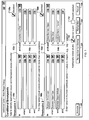
- FIG. 1 is a screen shot of an exemplary user interface 100 that can be used to specify one or more conditions that define and activate a conditional breakpoint.
- a developer during framework based application code development can place conditional breakpoints throughout the code. This example will be described further with reference to FIG. 2 .
- a user Prior to executing the framework based application program code, a user can choose to activate the conditional breakpoints in the application code. The user can then start the application program execution with external debugging activated. The user can then enter a specific hot-key combination (e.g., Alt-F2) to bring up the user interface 100, which displays a conditional breakpoints window in the framework based application program.
- a specific hot-key combination e.g., Alt-F2
- the user interface 100 can include selection areas to enter conditions for two conditional breakpoints, breakpoint 106a and breakpoint 106b.
- Breakpoints 106a, 106b can include event selection areas 102a, 102b respectively.
- the event selection areas 102a, 102b can include portion selection areas 114a, 114b respectively.
- the portion selection areas 114a, 114b can allow the user the ability to select the specific portion of the framework based application program that the conditional breakpoint resides in from a pre-defined group. For example, the conditional breakpoint may reside in a particular software package used within the code framework.
- the portion areas 102a, 102b can also include event selection areas 115a, 115b respectively.
- the event selection area 115a can allow the user the ability to select, from a pre-defined group, the specific event within the selected portion of the framework based application program, indicated by the portion selection area 114a, that can trigger the conditional breakpoint 106a.
- Event selection area 115b can operate in a similar manner.
- Breakpoints 106a, 106b can also include condition selection areas 104a, 104b respectively.
- the condition selection areas 104a, 104b can allow the user the ability to select the conditions under which a breakpoint will trigger for the selected event within the selected portion of the framework based application program.
- the condition selection areas 104a, 104b can each include three attribute selectors 116a-116c, 116d-116f respectively. Each attribute selector 116a-f has associated with it a value control 118a-118f respectively.
- Each attribute selector/value control pair can allow a user to select a specific attribute and an attribute value that can determine a condition under which a breakpoint will trigger for the selected event within the selected portion of the framework based application program.
- the attribute selector/value control pairs can be combined by a logical AND operator.
- the condition selection areas 104a, 104b can include more than or less than three attribute selector/value control pairs.
- the user interface 100 can include more than two conditional breakpoints.
- the user by checking enabled boxes 108a, 108b, can selectively enable breakpoints 106a, 106b respectively.
- the user can uncheck the enabled boxes 108a, 108b to disable breakpoints 106a, 106b, respectively, without the need to clear any of the condition entries for the breakpoints.
- the user interface 100 can include the ability for a user to select an additional two conditional breakpoints.
- a server event box 110 can allow a user to enable a server event conditional breakpoint by checking the server event box 110. Communication between a client and a server can cause the server event conditional breakpoint to trigger. For example, the user entering information into a user interface (e.g., a name entry into a dialog box) and then indicating acceptance of this information (e.g., user activates an OK button) can trigger a server event conditional breakpoint.
- An error/exception box 112 can allow a user to enable an error/exception conditional breakpoint by checking the error/exception box 112.
- a trapped error condition or an exception condition within the framework based application program can cause an error/exception conditional breakpoint to trigger.
- a developer during code development can place specific commands throughout the code that will pause or stop program execution when a defined exception or error condition occurs.
- Control buttons can be included in the user interface 100 to control the use of the conditional breakpoints.
- An activate control button 128 can control the activation of the conditional breakpoints entered by the user in the user interface 100.
- the framework based application program can accept the user entries for the conditional breakpoints 106a, 106b as well as the entries made in the enable boxes 108a, 108b, the server event box 110 and the error/exception box 112, and close the user interface 100.
- the application program can then continue execution.
- the application program can pause or stop if any of the application program code encounters any of the conditional breakpoints specified by the user.
- the application program Upon encountering a conditional breakpoint, the application program can enter a debugger application and the debugger application can display a debugger interface to the user.
- the debugger interface will be described in more detail with reference to FIG. 3 .
- a remember control button 124 can save the entries made by the user in the event selection areas 102a, 102b and the condition selection areas 104a, 104b for the conditional breakpoints 106a, 106b respectively. It can also save the selections made by the user in the enabled boxes 108a, 108b, the server event box 110 and the error/exception box 112. Subsequently, when the user enters a specific hot-key combination to bring up the user interface 100, the user can activate a recall control button 126 that can restore the previously saved conditional breakpoints and repopulate the user interface 100 with those selections.
- a remember for startup control button 120 can save the entries made by the user in the event selection areas 102a, 102b and the condition selection areas 104a, 104b for the conditional breakpoints 106a, 106b respectively. It can also store the selections made by the user in the enabled boxes 108a, 108b, the server event box 110 and the error/exception box 112.
- the saved conditional breakpoint entries can define conditional breakpoints that can be located in a startup section of the framework based application program before the application program can generate a user interface. This can allow the use of conditional breakpoints in application program code before a user interface can allow the ability for the user to enter the conditional breakpoint selections and conditions.
- the user selected all the breakpoint providers included in the framework based application program by selecting the "*" in the portion selection area 114a for conditional breakpoint 106a.
- the user selected "Exception occurred” in the event selection area 115a associated with the portion selection area 114a.
- the "Exception occurred” is the specific event within all the breakpoint providers in the application code that can trigger a conditional breakpoint.
- the user by checking enabled box 108a has enabled conditional breakpoint 106a. Therefore, in this example, the conditional breakpoint 106a triggers when an exception occurs in the application program.
- the user selected "Business Object Layer” in the portion selection area 114b for conditional breakpoint 106b.
- the user selected "Delete Business Object” in the event selection area 115b associated with the portion selection area 114b.
- the "Delete Business Object” is the specific event within the "Business Object Layer” provider in the application code that can trigger a conditional breakpoint.
- the user selected "Business Object Type” in the attribute selector 116d and entered “Sales Order” in the associated value control 118d.
- the "Sales Order” is the specific value within the "Business Object Type” attribute that can trigger a conditional breakpoint.
- the user selected "Business Object Attribute” in the attribute selector 116e and entered “CustomerName *Jones*" in the associated value control 118e.
- the attribute selectors 116d, 166e and their associated values controls 118d, 188e are combined using a logical AND operation. Therefore, both conditions should occur in order for a conditional breakpoint to occur.
- the user, by checking enabled box 108b has enabled conditional breakpoint 106b. Therefore, in this example, the application program triggers the conditional breakpoint 106b when a business object type "Sales Order" is deleted that has the value "Jones" in its attribute "Customer Name”.
- conditional breakpoint 106b For conditional breakpoint 106b, the number of breakpoints is reduced by having the conditional breakpoint 106b occur on a deletion of a sales order business object type and not the deletion of all business object types. Further breakpoint reductions occur by specifying that the sales order business object type have the value "Jones" in its attribute "Customer Name". Therefore, the breakpoint occurs when a specific event occurs in a specific business object type and the specific business object type has a specific attribute with a specific value.
- a user can investigate an application program error or exception, for example, reported by a customer.
- the user can choose to activate the conditional breakpoints in the application code.
- the user can then start the application program execution with external debugging activated.
- the user can then enter a specific hot-key combination (e.g., Alt-F2) to bring up the user interface 100.
- the user can set a conditional breakpoint to interrupt the application program whenever the application program detects an error or exception. Foe example, the user can do this by checking the error/exception box 112 in the user interface 100.
- the conditional breakpoint triggers and the application program can enter a debugger application and the debugger application can display a debugger interface to the user.
- the user can use the debugger to identify the erroneous code.
- a user can investigate why a particular erroneous event occurred in the application program. For example, the user can determine why a sales order for a particular customer (e.g.,Jones) no longer exists.
- the user can choose to activate the conditional breakpoints in the application code.
- the user can then start the application program execution with external debugging activated.
- the user can then enter a specific hot-key combination (e.g., Alt-F2) to bring up the user interface 100.
- the user can enter a conditional breakpoint to occur when the sales order is deleted (e.g., breakpoint 106b).
- the breakpoint triggers and the application program can enter a debugger application and the debugger application can display a debugger interface to the user.
- the debugger interface can display a call stack that can show which piece of the application program code triggered the deletion of the specific sales order.
- a user can investigate what occurs in the application program code when the user enters information into a user interface. For example, the user enters a value for a specific parameter in a dialog box and then activates an "OK" button to have the application program accept the entry. The user can choose to activate the conditional breakpoints in the application code. The user can then start the application program execution with external debugging activated. The user can then enter a specific hot-key combination (e.g., Alt-F2) to bring up the user interface 100. The user can set a conditional breakpoint to interrupt the application program whenever the application program detects a server event. For example, the user can do this by checking the server event box 110 in the user interface 100.
- a specific hot-key combination e.g., Alt-F2
- conditional breakpoint triggers and the application program can enter a debugger application and the debugger application can display a debugger interface to the user.
- the user can access the event handler to investigate what transpired between the client running the user interface and the server receiving the information from the client.
- FIG. 2 is a block diagram of exemplary computer code 200 that implements a conditional breakpoint.
- the exemplary computer code 200 shows a conditional breakpoint based on an ASSERT statement (line 202).
- the exemplary computer code 200 shows an exception condition (line 204) as the event that can trigger the conditional breakpoint.
- the exemplary computer code 200 can be located at any location within the application program code.
- the conditions input by a user in the user interface 100 for breakpoint 106a can enable the conditional breakpoint, implemented by the exemplary computer code 200, within the application program code.
- a plurality of conditional breakpoints triggered by an exception event can be implemented using the exemplary computer code 200 and can be located throughout the application program code. Therefore, each time the exception condition occurs, the conditional breakpoint can trigger, the application halts and the user can then access a debugger.
- a developer can place a plurality of conditional breakpoints at various locations throughout the application program code.
- the developer may place conditional breakpoints at error prone locations in the application program code.
- An example of such an error prone location can be a location in program code that is mathematically computationally intensive and prone to calculation errors.
- the developer may place the conditional breakpoints at central locations in the application program code that multiple program components access frequently. Examples of these code locations can be memory accesses and user interface interactions and updates.
- the exemplary computer code 200 shows the use of an ASSERT statement (line 202) to implement a conditional breakpoint triggered by an exception error (line 204).
- a developer can use an ASSERT statement and additional code statements to implement a conditional breakpoint defined by a break event and one or more break conditions.
- a plurality of these types of breakpoints can be located at various locations throughout the application program code. For example, using user interface 100 as shown in FIG. 1 , a user can select a specific portion of the application program that a conditional breakpoint can reside in from a pre-defined group using portion selection area 104b and the event that will trigger the breakpoint from event selection area 115b.
- Breakpoint 106b in FIG. 1 is an example of a user interface and the selected entries.
- the event that can trigger the conditional breakpoint and the conditions under which the event can trigger the conditional breakpoint can be included in computer code, similar to the exemplary computer code 200, that uses an ASSERT statement and additional code statements to implement the conditional breakpoint.
- a developer can use an ASSERT statement and additional code statements to implement a conditional breakpoint triggered by any communication between a client and a server.
- a plurality of these types of breakpoints can be located at various locations throughout the application program code. For example, using user interface 100 as shown in FIG. 1 , a user can enable the server event conditional breakpoints by checking the server event box 110.
- a developer can use an ASSERT statement and additional code statements to implement a conditional breakpoint triggered by an exception error.
- a plurality of these types of breakpoints can be located at various locations throughout the application program code. For example, using user interface 100 as shown in FIG. 1 , a user can enable the error/exception conditional breakpoints by checking the error/exception event box 112.
- FIG. 3 is a screen shot of an exemplary user interface 300 for a debugger application that can be invoked when a conditional breakpoint is reached and its conditions are satisfied.
- the debugger application pops up automatically when the application program code reaches a conditional breakpoint where the event and conditions for the conditional breakpoint are satisfied.
- a user may manually invoke the debugger application (e.g., by entering a hot key combination).
- the application program Prior to the display of the user interface 300, the application program can be interrupted and halted. In some implementations, the application program code can be interrupted and program execution may stop or end.
- the exemplary user interface for the debugger application 300 can include window 302, window 304 and window 306.
- Window 302 can show a code stack that includes the location in the framework application program code where the conditional breakpoint occurred and the conditional breakpoint code executed to cause the interruption of the application.
- the code can be the computer code 200 shown in FIG. 2 .
- Window 304 can show a program stack that can include information about a method 308 and events 310 associated with and included in method 308.
- the program stack can also include information about an application controller 312, which is the location of the code stack, shown in window 302, in the framework based application program code.
- Window 306 can show current values and attributes for variables used when the conditional breakpoint triggered and interrupted the application program execution.
- the framework based application program code is interrupted at stack level 70 when the framework based application program code throws an exception.
- Arrow 314 indicates the conditional breakpoint code that caused the interruption.
- Arrow 316 indicates the stack level where the interruption occurred.
- the framework based application code is interrupted at stack level 70, which is called from application controller CL_BSP_WD_CONTEXT_NODE_ASP and its method is GET_DQUERY_VALUEHELPS. The method can indicate the event that caused the conditional breakpoint to trigger.
- FIG. 4 is a flow chart of exemplary operations 400 that can define a conditional breakpoint in an application program.
- the operations 400 can be performed by a processor that executes instructions stored in a computer-readable medium.
- a user can use the user interface 100, as described with reference to FIG. 1 , to define one or more conditional breakpoints.
- the user can use the user interface 100 to select a location in the framework based application program code where the conditional breakpoint can occur, as well as the event that can trigger the conditional breakpoint.
- the user can also enter one or more conditions to be satisfied for the event that can trigger the conditional breakpoint.
- a process begins at step 402 with the receiving of an event selection.
- a user through user interface 100, can select a location in the framework based application program code to place the conditional breakpoint and the event that can trigger the conditional breakpoint.
- a predefined condition associated with the selected event can be received at step 404.
- a user through user interface 100 can enter one or more conditions under which the conditional breakpoint can trigger for the selected event within the selected portion of the framework based application program.
- the conditions can be combined by a logical AND operator.
- conditional breakpoint is then implemented at step 406. For example, a user can check an enabled box included in the user interface 100 that is associated with the conditional breakpoint to enable the implementation of the conditional breakpoint in the framework based application program. Therefore, the conditional breakpoint can trigger when the selected event occurs and the conditional breakpoint conditions are satisfied.
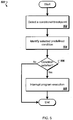
- FIG. 5 is a flow chart of exemplary operations 500 that can activate a conditional breakpoint in an application program.
- the operations 500 can be performed by a processor that executes instructions stored in a computer-readable medium.
- a user can start execution of a framework based application program with conditional breakpoints and external debugging activated.
- the framework based application program Once the framework based application program is executing, the user can enter a specific hot-key combination (e.g., Alt-F2) to bring up the user interface 100, as described with reference to FIG. 1 , which displays a conditional breakpoints window in the framework based application program.
- the user can select and enter events and conditions for a plurality of conditional breakpoints, selectively enable or disable the conditional breakpoints, and then activate the conditional breakpoints.
- Program execution can then resume from where it left off when the user activated the user interface 100.
- a process starts when the executing framework based application program detects a conditional breakpoint in step 502. For example, this can occur when the application program code executes an ASSERT statement used to implement a conditional breakpoint. Examples of the ASSERT statement and the application code associated with the ASSERT statement for implementation of a conditional breakpoint were shown with reference to FIGS. 2 and 3 .
- the process then identifies the selected predefined condition for the event that may trigger the conditional breakpoint in step 504. In some implementations, more than one predefined condition for the event may exist and the multiple conditions can be combined with a logical AND operator.
- the process determines if the predefined condition for the event is satisfied in step 506. If the condition is not satisfied, the process ends and program execution continues until another conditional breakpoint is detected. If the condition is satisfied, the process interrupts program execution in step 508.
- FIG 6 is a schematic diagram of a generic computer system 600.
- the system 600 can be used for the operations described in association with any of the computer-implement methods described previously, according to one implementation.
- the system 600 includes a processor 610, a memory 620, a storage device 630, and an input/output device 640. Each of the components 610, 620, 630, and 640 are interconnected using a system bus 650.
- the processor 610 is capable of processing instructions for execution within the system 600. In one implementation, the processor 610 is a single-threaded processor. In another implementation, the processor 610 is a multi-threaded processor.
- the processor 610 is capable of processing instructions stored in the memory 620 or on the storage device 630 to display graphical information for a user interface on the input/output device 640.
- the memory 620 stores information within the system 600.
- the memory 620 is a computer-readable medium.
- the memory 620 is a volatile memory unit.
- the memory 620 is a non-volatile memory unit.
- the storage device 630 is capable of providing mass storage for the system 600.
- the storage device 630 is a computer-readable medium.
- the storage device 630 may be a floppy disk device, a hard disk device, an optical disk device, or a tape device.
- the input/output device 640 provides input/output operations for the system 600.
- the input/output device 640 includes a keyboard and/or pointing device.
- the input/output device 640 includes a display unit for displaying graphical user interfaces.
- the features described can be implemented in digital electronic circuitry, or in computer hardware, firmware, software, or in combinations of them.
- the apparatus can be implemented in a computer program product tangibly embodied in an information carrier, e.g., in a machine-readable storage device, for execution by a programmable processor; and method steps can be performed by a programmable processor executing a program of instructions to perform functions of the described implementations by operating on input data and generating output.
- the described features can be implemented advantageously in one or more computer programs that are executable on a programmable system including at least one programmable processor coupled to receive data and instructions from, and to transmit data and instructions to, a data storage system, at least one input device, and at least one output device.
- a computer program is a set of instructions that can be used, directly or indirectly, in a computer to perform a certain activity or bring about a certain result.
- a computer program can be written in any form of programming language, including compiled or interpreted languages, and it can be deployed in any form, including as a stand-alone program or as a module, component, subroutine, or other unit suitable for use in a computing environment.
- Suitable processors for the execution of a program of instructions include, by way of example, both general and special purpose microprocessors, and the sole processor or one of multiple processors of any kind of computer.
- a processor will receive instructions and data from a read-only memory or a random access memory or both.
- the essential elements of a computer are a processor for executing instructions and one or more memories for storing instructions and data.
- a computer will also include, or be operatively coupled to communicate with, one or more mass storage devices for storing data files; such devices include magnetic disks, such as internal hard disks and removable disks; magneto-optical disks; and optical disks.
- Storage devices suitable for tangibly embodying computer program instructions and data include all forms of non-volatile memory, including by way of example semiconductor memory devices, such as EPROM, EEPROM, and flash memory devices; magnetic disks such as internal hard disks and removable disks; magneto-optical disks; and CD-ROM and DVD-ROM disks.
- semiconductor memory devices such as EPROM, EEPROM, and flash memory devices
- magnetic disks such as internal hard disks and removable disks
- magneto-optical disks and CD-ROM and DVD-ROM disks.
- the processor and the memory can be supplemented by, or incorporated in, ASICs (application-specific integrated circuits).
- ASICs application-specific integrated circuits
- the features can be implemented on a computer having a display device such as a CRT (cathode ray tube) or LCD (liquid crystal display) monitor for displaying information to the user and a keyboard and a pointing device such as a mouse or a trackball by which the user can provide input to the computer.
- a display device such as a CRT (cathode ray tube) or LCD (liquid crystal display) monitor for displaying information to the user and a keyboard and a pointing device such as a mouse or a trackball by which the user can provide input to the computer.
- the features can be implemented in a computer system that includes a back-end component, such as a data server, or that includes a middleware component, such as an application server or an Internet server, or that includes a front-end component, such as a client computer having a graphical user interface or an Internet browser, or any combination of them.
- the components of the system can be connected by any form or medium of digital data communication such as a communication network. Examples of communication networks include, e.g., a LAN, a WAN, and the computers and networks forming the Internet.
- the computer system can include clients and servers.
- a client and server are generally remote from each other and typically interact through a network, such as the described one.
- the relationship of client and server arises by virtue of computer programs running on the respective computers and having a client-server relationship to each other.
Landscapes
- Engineering & Computer Science (AREA)
- Theoretical Computer Science (AREA)
- Computer Hardware Design (AREA)
- Quality & Reliability (AREA)
- Physics & Mathematics (AREA)
- General Engineering & Computer Science (AREA)
- General Physics & Mathematics (AREA)
- Debugging And Monitoring (AREA)
Claims (9)
- Computerprogrammprodukt, welches greifbar in einem computerlesbaren Speichermedium enthalten ist und Befehle umfasst, welche bei Ausführung durch einen Prozessor auf einer Anzeigevorrichtung eine grafische Benutzerschnittstelle zum Ausführen eines Verfahrens (400) zum Definieren eines bedingten Haltepunkts (106a, 106b) in einem Anwendungsprogramm erzeugen, wobei ein Benutzer unter Führung der grafischen Benutzerschnittstelle (100) Eingaben erstellt, wobei das Verfahren (400) umfasst:Platzieren, durch einen Entwickler bei einer Herstellereinheit, einer Vielzahl von bedingten Haltepunkten (106a, 106b) in Code des Anwendungsprogramms, wobei jeder bedingte Haltepunkt ein Ereignis und mehrere Bedingungen umfasst;Empfangen einer Wahl eines Teils des Anwendungsprogramms von dem Benutzer;Bestücken einer Steuerung (115a, 115b) mit durch den Benutzer wählbaren Ereignissen, zwischen denen der Benutzer zu wählen hat, wobei die Steuerung (115a, 115b) ausgehend von dem durch den Benutzer identifizierten Teil bestückt wird;Empfangen (402) einer Wahl eines durch den Benutzer gewählten Ereignisses (204) innerhalb des Teils des Anwendungsprogramms, wobei das gewählte Ereignis (204) zum Aktivieren eines der bedingten Haltepunkte (106a, 106b) dient;Empfangen (404) mindestens einer Bedingung von mehreren vorgegebenen Bedingungen, welche mit dem Ereignis (204) verbunden sind und dem Benutzer zur Wahl zur Verfügung gestellt sind, wobei die von dem Benutzer gewählte Bedingung zum Bewirken der Aktivierung des bedingten Haltepunkts (106a, 106b) dient, wobei die Bedingung durch Wählen eines Attributs von mehreren in dem Anwendungsprogramm definierten Attributen und Eingeben eines Werts für das gewählte Attribut gewählt wird;Implementieren (406) des bedingten Haltepunkts (106a, 106b) in Verbindung mit dem Anwendungsprogramm, wobei der bedingte Haltepunkt (106a, 106b) dafür konfiguriert ist, die Ausführung des Anwendungsprogramms zu unterbrechen, wenn das Ereignis (204) unter der Voraussetzung, dass die Bedingung erfüllt ist, in dem Teil auftritt; undStarten einer Fehlersuchanwendung für das Anwendungsprogramm als Reaktion darauf, dass die Ausführung unterbrochen wurde.
- Computerprogrammprodukt nach Anspruch 1, wobei die grafische Benutzerschnittstelle (100) eine Deaktivierungssteuerung (108a, 109b) enthält, welche mit dem bedingten Haltepunkt (106a, 106b) verbunden ist, wobei bei Wählen der Deaktivierungssteuerung (108a, 108b) seitens des Benutzers der bedingte Haltepunkt (106a, 106b) deaktiviert wird und das Ereignis (204) und die Bedingung mit dem bedingten Haltepunkt (106a, 106b) verbunden bleiben.
- Computerprogrammprodukt nach Anspruch 1 oder 2, wobei der bedingte Haltepunkt (106a, 106b) in einem Startabschnitt des Anwendungsprogramms gelegen ist, welcher ausgeführt wird, bevor das Anwendungsprogramm eine Benutzerschnittstelle erzeugt.
- Computerprogrammprodukt nach einem der vorhergehenden Ansprüche, wobei der bedingte Haltepunkt (106a, 106b) dafür konfiguriert ist, in dem Anwendungsprogramm zu verbleiben, wenn das Programm an eine Kundeneinheit ausgeliefert wird, und wobei Benutzereingaben, welche das Ereignis (204) und die Bedingung identifizieren, an der Kundeneinheit von dem Benutzer empfangen werden.
- Computerprogrammprodukt nach einem der vorhergehenden Ansprüche, ferner umfassend:Empfangen einer Definition eines anderen Haltepunkts, welcher dafür konfiguriert ist, die Ausführung bei jedem Ereignis (204) zu unterbrechen, bei dem ein Client mit einem Server kommuniziert, und/oderEmpfangen einer Definition eines anderen Haltepunkts, welcher dafür konfiguriert ist, die Ausführung bei jedem Fehler oder jeder Ausnahme in der Ausführung des Anwendungsprogramms zu unterbrechen.
- Computersystem (600), welches eine Anzeigevorrichtung (640) umfasst, wobei das System zum Erzeugen einer grafischen Benutzerschnittstelle (100) zum Definieren eines bedingten Haltepunkts (106a, 106b) in einem Anwendungsprogramm auf der Anzeigevorrichtung (640) betreibbar ist,
wobei eine Vielzahl von bedingten Haltepunkten (106a, 106b) durch einen Entwickler an einer Herstellereinheit in Code des Anwendungsprogramms platziert wird, wobei jeder bedingte Haltepunkt ein Ereignis und mehrere Bedingungen umfasst; wobei die grafische Benutzerschnittstelle (100) umfasst:einen Teilwählbereich (114a, 114b) zum Identifizieren eines Teils des Anwendungsprogramms seitens des Benutzers;einen Ereigniswählbereich (115a, 115b) zum Wählen eines Ereignisses (204) innerhalb des Teils des Anwendungsprogramms seitens eines Benutzers, wobei das gewählte Ereignis zum Aktivieren eines der bedingten Haltepunkte (106a, 106b) dient, wobei der Ereigniswählbereich (115a, 115b) mit durch den Benutzer wählbaren Ereignissen bestück ist, zwischen denen der Benutzer ausgehend von dem durch den Benutzer identifizierten Teil wählt;einen Bedingungswählbereich (104a, 104b) zum Wählen mindestens einer Bedingung von mehreren vorgegebenen Bedingungen, welche mit dem Ereignis (204) verbunden sind, seitens des Benutzers, wobei die gewählte Bedingung dazu dient, die Aktivierung des bedingten Haltepunkts (106a, 106b) zu bewirken, wobei der Bedingungswählbereich umfasst:mindestens einen Attributwähler zum Auswählen mindestens ein Attribut von mehreren in dem Anwendungsprogramm definierten Attributen seitens des Benutzers; undmindestens eine Wertsteuerung, welche zum Eingeben eines Werts seitens des Benutzers mit dem Attributwähler verbunden ist; undwobei der bedingte Haltepunkt (106a, 106b) in Bezug auf das Anwendungsprogramm so implementiert ist, dass die Ausführung des Anwendungsprogramms unterbrochen wird, wenn das Ereignis (204) in dem Teil eintritt, vorausgesetzt die Bedingung ist erfüllt;wobei eine Fehlersuchanwendung für das Anwendungsprogramm so betätigbar ist, dass sie als Reaktion auf das Unterbrechen der Ausführung gestartet wird. - System (600) nach Anspruch 6, wobei die grafische Benutzerschnittstelle (100) ferner umfasst:eine Deaktivierungssteuerung (108a, 108b), welche mit dem bedingten Haltepunkt (106a, 106b) verbunden ist, wobei bei Wählen der Deaktivierungssteuerung (108a, 108b) seitens des Benutzers der bedingte Haltepunkt (106a, 106b) deaktiviert wird und das Ereignis (204) und die Bedingung mit dem bedingten Haltepunkt (106a, 106b) verbunden bleiben, und/oderwobei die grafische Benutzerschnittstelle (100) ferner umfasst:eine Haltepunktdefiniersteuerung (110) zum Definieren eines anderen Haltpunkts, der dafür konfiguriert ist, die Ausführung bei jedem Ereignis zu unterbrechen, bei dem ein Client mit einem Server kommuniziert, und/oder wobei die grafische Benutzerschnittstelle (100) ferner umfasst:eine Haltepunktdefiniersteuerung (112) zum Definieren eines anderen Haltpunkts, der dafür konfiguriert ist, die Ausführung bei jedem Fahler oder jeder Ausnahme in der Ausführung des Anwendungsprogramms zu unterbrechen.
- System (600) nach Anspruch 6 oder 7, wobei die grafische Benutzerschnittstelle (100) ferner umfasst:eine Start-Anhaltesteuerung zum Definieren, seitens des Benutzers, dass der bedingte Haltepunkt (106a, 106b) in einem Startabschnitt des Anwendungsprogramms gelegen ist, wobei,der bedingte Haltepunkt (106a, 106b) bei der Ausführung des Startabschnitts erfasst wird, bevor das Anwendungsprogramm eine Benutzerschnittstelle erzeugt.
- System (600) nach einem der Ansprüche 6 bis 8,
wobei die Bedingung erfüllt ist, wenn das Attribut den Wert hat, wenn der bedingte Haltepunkt (106a, 106b) erfasst wird, und/oder
wobei der Bedingungswählbereich mehrere Paare von Attributwählern und Wertsteuerungen umfasst, welche durch einen logischen UND-Operator kombiniert sind.
Applications Claiming Priority (1)
| Application Number | Priority Date | Filing Date | Title |
|---|---|---|---|
| US12/346,595 US8756570B2 (en) | 2008-12-30 | 2008-12-30 | Defining a conditional breakpoint |
Publications (2)
| Publication Number | Publication Date |
|---|---|
| EP2204739A1 EP2204739A1 (de) | 2010-07-07 |
| EP2204739B1 true EP2204739B1 (de) | 2017-05-10 |
Family
ID=41606584
Family Applications (1)
| Application Number | Title | Priority Date | Filing Date |
|---|---|---|---|
| EP09015963.3A Active EP2204739B1 (de) | 2008-12-30 | 2009-12-23 | Grafische Benutzerschnittstelle für Einstellung von bedingten Haltepunkten |
Country Status (2)
| Country | Link |
|---|---|
| US (1) | US8756570B2 (de) |
| EP (1) | EP2204739B1 (de) |
Families Citing this family (17)
| Publication number | Priority date | Publication date | Assignee | Title |
|---|---|---|---|---|
| US8578340B1 (en) | 2010-09-24 | 2013-11-05 | Ca, Inc. | Recording and replaying computer program execution with recorded execution event breakpoints |
| US8756588B2 (en) * | 2011-08-01 | 2014-06-17 | Salesforce.Com, Inc | Contextual exception management in multi-tenant systems |
| US20140136356A1 (en) * | 2012-11-13 | 2014-05-15 | Ryan Daniel Hatfield | Method for managing listing prices in an ecommerce environment |
| US10127138B2 (en) * | 2013-06-06 | 2018-11-13 | Microsoft Technology Licensing, Llc. | Debugging native code by transitioning from execution in native mode to execution in interpreted mode |
| US9507691B2 (en) * | 2014-01-10 | 2016-11-29 | International Business Machines Corporation | Conditional component breakpoint setting system and method |
| US9483373B2 (en) | 2014-02-14 | 2016-11-01 | Freescale Semiconductor, Inc. | Debug configuration tool with layered graphical user interface |
| US9886365B2 (en) * | 2016-01-07 | 2018-02-06 | Ca, Inc. | Transactional boundaries for software system debugging |
| US10154098B2 (en) | 2016-01-07 | 2018-12-11 | Ca, Inc. | Transactional boundaries for software system profiling |
| US10162731B2 (en) * | 2017-01-23 | 2018-12-25 | International Business Machines Corporation | Conditional breakpoint on call stack during debugging at runtime |
| US10169197B2 (en) * | 2017-01-24 | 2019-01-01 | International Business Machines Corporation | Temporary breakpoints during debug process |
| JP7172359B2 (ja) * | 2018-09-25 | 2022-11-16 | 富士フイルムビジネスイノベーション株式会社 | 情報処理システムおよびプログラム |
| US10783063B2 (en) * | 2018-10-23 | 2020-09-22 | Salesforce.Com, Inc. | Systems and methods for testing a customer environment |
| US12253938B2 (en) | 2018-12-14 | 2025-03-18 | NextWorld, LLC | Automated testing for metadata-driven custom applications |
| US11334472B2 (en) * | 2018-12-14 | 2022-05-17 | NextWorld, LLC | Automated testing for metadata-driven custom applications |
| US11467950B2 (en) | 2019-04-19 | 2022-10-11 | Salesforce, Inc. | Codeless logging in an integration platform |
| CN112529462A (zh) * | 2020-12-24 | 2021-03-19 | 平安普惠企业管理有限公司 | 业务验证方法、装置、服务器及存储介质 |
| US11983090B2 (en) * | 2022-02-17 | 2024-05-14 | International Business Machines Corporation | Setting breakpoints for source code segments enclosed by macros |
Family Cites Families (8)
| Publication number | Priority date | Publication date | Assignee | Title |
|---|---|---|---|---|
| WO1999001819A1 (en) * | 1997-07-01 | 1999-01-14 | Progress Software Corporation | Testing and debugging tool for network applications |
| US6412106B1 (en) * | 1999-06-16 | 2002-06-25 | Intervoice Limited Partnership | Graphical system and method for debugging computer programs |
| US6587995B1 (en) * | 2000-04-19 | 2003-07-01 | Koninklijke Philips Electronics N.V. | Enhanced programmable core model with integrated graphical debugging functionality |
| US7150002B1 (en) | 2002-03-29 | 2006-12-12 | Cypress Semiconductor Corp. | Graphical user interface with logic unifying functions |
| US20040031019A1 (en) | 2002-05-20 | 2004-02-12 | Richard Lamanna | Debugger for a graphical programming environment |
| US7383539B2 (en) * | 2003-09-18 | 2008-06-03 | International Business Machines Corporation | Managing breakpoints in a multi-threaded environment |
| US7464373B1 (en) * | 2003-12-10 | 2008-12-09 | The Mathworks, Inc. | System and method for using a graphical debugging tool in a modeling and execution environment |
| US7552425B2 (en) * | 2004-08-19 | 2009-06-23 | International Business Machines Corporation | Implementing enhanced compiled breakpoint analysis |
-
2008
- 2008-12-30 US US12/346,595 patent/US8756570B2/en active Active
-
2009
- 2009-12-23 EP EP09015963.3A patent/EP2204739B1/de active Active
Also Published As
| Publication number | Publication date |
|---|---|
| US8756570B2 (en) | 2014-06-17 |
| US20100169867A1 (en) | 2010-07-01 |
| EP2204739A1 (de) | 2010-07-07 |
Similar Documents
| Publication | Publication Date | Title |
|---|---|---|
| US8756570B2 (en) | Defining a conditional breakpoint | |
| US9823995B2 (en) | Structured query language debugger | |
| US8370816B2 (en) | Device, method and computer program product for evaluating a debugger script | |
| US8572577B2 (en) | Monitoring changes to data within a critical section of a threaded program | |
| US6981248B2 (en) | Conditional breakpoint encountered indication | |
| US8843899B2 (en) | Implementing a step-type operation during debugging of code using internal breakpoints | |
| US9009678B2 (en) | Software debugging with execution match determinations | |
| US20070074168A1 (en) | Automated step type determination | |
| WO2015112170A1 (en) | Continuous integration with reusable context aware jobs | |
| US20120266134A1 (en) | Managing Thread Execution In A Non-Stop Debugging Environment | |
| US8806447B2 (en) | Step-type operation processing during debugging by machine instruction stepping concurrent with setting breakpoints | |
| US7810071B2 (en) | Automated error analysis | |
| US10387294B2 (en) | Altering a test | |
| US8756583B2 (en) | Thread-specific event management in a non-stop debugging environment | |
| KR102693721B1 (ko) | 코드 점검 인터페이스 제공 방법, 그리고 이를 구현하기 위한 장치 | |
| US10108474B2 (en) | Trace capture of successfully completed transactions for trace debugging of failed transactions | |
| US20120266139A1 (en) | Thread-Specific Watch Event Administration In A Non-Stop Debugging Environment | |
| US20040054944A1 (en) | Debug thread termination control points | |
| US8701093B2 (en) | Event management in a non-stop debugging environment | |
| US7533339B2 (en) | System and method for providing user help | |
| US20110258613A1 (en) | Software debugger activation based on key performance indicators | |
| CN111309541B (zh) | 异常处理检测方法、装置、设备及计算机存储介质 | |
| US8954932B2 (en) | Crash notification between debuggers | |
| US8510719B2 (en) | Real-time user configurable debugging framework | |
| US11934294B2 (en) | Generating and debugging bytecode for a rule |
Legal Events
| Date | Code | Title | Description |
|---|---|---|---|
| PUAI | Public reference made under article 153(3) epc to a published international application that has entered the european phase |
Free format text: ORIGINAL CODE: 0009012 |
|
| AK | Designated contracting states |
Kind code of ref document: A1 Designated state(s): AT BE BG CH CY CZ DE DK EE ES FI FR GB GR HR HU IE IS IT LI LT LU LV MC MK MT NL NO PL PT RO SE SI SK SM TR |
|
| AX | Request for extension of the european patent |
Extension state: AL BA RS |
|
| 17P | Request for examination filed |
Effective date: 20100902 |
|
| RTI1 | Title (correction) |
Free format text: GRAPHICAL USER INTERFACE FOR SETTING OF CONDITIONAL BREAKPOINTS |
|
| 17Q | First examination report despatched |
Effective date: 20121109 |
|
| RAP1 | Party data changed (applicant data changed or rights of an application transferred) |
Owner name: SAP SE |
|
| GRAP | Despatch of communication of intention to grant a patent |
Free format text: ORIGINAL CODE: EPIDOSNIGR1 |
|
| INTG | Intention to grant announced |
Effective date: 20161205 |
|
| GRAS | Grant fee paid |
Free format text: ORIGINAL CODE: EPIDOSNIGR3 |
|
| GRAA | (expected) grant |
Free format text: ORIGINAL CODE: 0009210 |
|
| AK | Designated contracting states |
Kind code of ref document: B1 Designated state(s): AT BE BG CH CY CZ DE DK EE ES FI FR GB GR HR HU IE IS IT LI LT LU LV MC MK MT NL NO PL PT RO SE SI SK SM TR |
|
| REG | Reference to a national code |
Ref country code: GB Ref legal event code: FG4D |
|
| REG | Reference to a national code |
Ref country code: AT Ref legal event code: REF Ref document number: 893007 Country of ref document: AT Kind code of ref document: T Effective date: 20170515 Ref country code: CH Ref legal event code: EP |
|
| REG | Reference to a national code |
Ref country code: IE Ref legal event code: FG4D |
|
| REG | Reference to a national code |
Ref country code: DE Ref legal event code: R096 Ref document number: 602009045958 Country of ref document: DE |
|
| REG | Reference to a national code |
Ref country code: NL Ref legal event code: MP Effective date: 20170510 |
|
| REG | Reference to a national code |
Ref country code: LT Ref legal event code: MG4D |
|
| REG | Reference to a national code |
Ref country code: AT Ref legal event code: MK05 Ref document number: 893007 Country of ref document: AT Kind code of ref document: T Effective date: 20170510 |
|
| PG25 | Lapsed in a contracting state [announced via postgrant information from national office to epo] |
Ref country code: HR Free format text: LAPSE BECAUSE OF FAILURE TO SUBMIT A TRANSLATION OF THE DESCRIPTION OR TO PAY THE FEE WITHIN THE PRESCRIBED TIME-LIMIT Effective date: 20170510 Ref country code: NO Free format text: LAPSE BECAUSE OF FAILURE TO SUBMIT A TRANSLATION OF THE DESCRIPTION OR TO PAY THE FEE WITHIN THE PRESCRIBED TIME-LIMIT Effective date: 20170810 Ref country code: AT Free format text: LAPSE BECAUSE OF FAILURE TO SUBMIT A TRANSLATION OF THE DESCRIPTION OR TO PAY THE FEE WITHIN THE PRESCRIBED TIME-LIMIT Effective date: 20170510 Ref country code: ES Free format text: LAPSE BECAUSE OF FAILURE TO SUBMIT A TRANSLATION OF THE DESCRIPTION OR TO PAY THE FEE WITHIN THE PRESCRIBED TIME-LIMIT Effective date: 20170510 Ref country code: GR Free format text: LAPSE BECAUSE OF FAILURE TO SUBMIT A TRANSLATION OF THE DESCRIPTION OR TO PAY THE FEE WITHIN THE PRESCRIBED TIME-LIMIT Effective date: 20170811 Ref country code: FI Free format text: LAPSE BECAUSE OF FAILURE TO SUBMIT A TRANSLATION OF THE DESCRIPTION OR TO PAY THE FEE WITHIN THE PRESCRIBED TIME-LIMIT Effective date: 20170510 Ref country code: LT Free format text: LAPSE BECAUSE OF FAILURE TO SUBMIT A TRANSLATION OF THE DESCRIPTION OR TO PAY THE FEE WITHIN THE PRESCRIBED TIME-LIMIT Effective date: 20170510 |
|
| PG25 | Lapsed in a contracting state [announced via postgrant information from national office to epo] |
Ref country code: LV Free format text: LAPSE BECAUSE OF FAILURE TO SUBMIT A TRANSLATION OF THE DESCRIPTION OR TO PAY THE FEE WITHIN THE PRESCRIBED TIME-LIMIT Effective date: 20170510 Ref country code: BG Free format text: LAPSE BECAUSE OF FAILURE TO SUBMIT A TRANSLATION OF THE DESCRIPTION OR TO PAY THE FEE WITHIN THE PRESCRIBED TIME-LIMIT Effective date: 20170810 Ref country code: IS Free format text: LAPSE BECAUSE OF FAILURE TO SUBMIT A TRANSLATION OF THE DESCRIPTION OR TO PAY THE FEE WITHIN THE PRESCRIBED TIME-LIMIT Effective date: 20170910 Ref country code: PL Free format text: LAPSE BECAUSE OF FAILURE TO SUBMIT A TRANSLATION OF THE DESCRIPTION OR TO PAY THE FEE WITHIN THE PRESCRIBED TIME-LIMIT Effective date: 20170510 Ref country code: SE Free format text: LAPSE BECAUSE OF FAILURE TO SUBMIT A TRANSLATION OF THE DESCRIPTION OR TO PAY THE FEE WITHIN THE PRESCRIBED TIME-LIMIT Effective date: 20170510 Ref country code: NL Free format text: LAPSE BECAUSE OF FAILURE TO SUBMIT A TRANSLATION OF THE DESCRIPTION OR TO PAY THE FEE WITHIN THE PRESCRIBED TIME-LIMIT Effective date: 20170510 |
|
| REG | Reference to a national code |
Ref country code: FR Ref legal event code: PLFP Year of fee payment: 9 |
|
| PG25 | Lapsed in a contracting state [announced via postgrant information from national office to epo] |
Ref country code: RO Free format text: LAPSE BECAUSE OF FAILURE TO SUBMIT A TRANSLATION OF THE DESCRIPTION OR TO PAY THE FEE WITHIN THE PRESCRIBED TIME-LIMIT Effective date: 20170510 Ref country code: DK Free format text: LAPSE BECAUSE OF FAILURE TO SUBMIT A TRANSLATION OF THE DESCRIPTION OR TO PAY THE FEE WITHIN THE PRESCRIBED TIME-LIMIT Effective date: 20170510 Ref country code: CZ Free format text: LAPSE BECAUSE OF FAILURE TO SUBMIT A TRANSLATION OF THE DESCRIPTION OR TO PAY THE FEE WITHIN THE PRESCRIBED TIME-LIMIT Effective date: 20170510 Ref country code: EE Free format text: LAPSE BECAUSE OF FAILURE TO SUBMIT A TRANSLATION OF THE DESCRIPTION OR TO PAY THE FEE WITHIN THE PRESCRIBED TIME-LIMIT Effective date: 20170510 Ref country code: SK Free format text: LAPSE BECAUSE OF FAILURE TO SUBMIT A TRANSLATION OF THE DESCRIPTION OR TO PAY THE FEE WITHIN THE PRESCRIBED TIME-LIMIT Effective date: 20170510 |
|
| REG | Reference to a national code |
Ref country code: DE Ref legal event code: R097 Ref document number: 602009045958 Country of ref document: DE |
|
| PG25 | Lapsed in a contracting state [announced via postgrant information from national office to epo] |
Ref country code: IT Free format text: LAPSE BECAUSE OF FAILURE TO SUBMIT A TRANSLATION OF THE DESCRIPTION OR TO PAY THE FEE WITHIN THE PRESCRIBED TIME-LIMIT Effective date: 20170510 Ref country code: SM Free format text: LAPSE BECAUSE OF FAILURE TO SUBMIT A TRANSLATION OF THE DESCRIPTION OR TO PAY THE FEE WITHIN THE PRESCRIBED TIME-LIMIT Effective date: 20170510 |
|
| PLBE | No opposition filed within time limit |
Free format text: ORIGINAL CODE: 0009261 |
|
| STAA | Information on the status of an ep patent application or granted ep patent |
Free format text: STATUS: NO OPPOSITION FILED WITHIN TIME LIMIT |
|
| 26N | No opposition filed |
Effective date: 20180213 |
|
| PG25 | Lapsed in a contracting state [announced via postgrant information from national office to epo] |
Ref country code: SI Free format text: LAPSE BECAUSE OF FAILURE TO SUBMIT A TRANSLATION OF THE DESCRIPTION OR TO PAY THE FEE WITHIN THE PRESCRIBED TIME-LIMIT Effective date: 20170510 |
|
| REG | Reference to a national code |
Ref country code: CH Ref legal event code: PL |
|
| REG | Reference to a national code |
Ref country code: IE Ref legal event code: MM4A |
|
| PG25 | Lapsed in a contracting state [announced via postgrant information from national office to epo] |
Ref country code: LU Free format text: LAPSE BECAUSE OF NON-PAYMENT OF DUE FEES Effective date: 20171223 Ref country code: MT Free format text: LAPSE BECAUSE OF NON-PAYMENT OF DUE FEES Effective date: 20171223 |
|
| REG | Reference to a national code |
Ref country code: BE Ref legal event code: MM Effective date: 20171231 |
|
| PG25 | Lapsed in a contracting state [announced via postgrant information from national office to epo] |
Ref country code: IE Free format text: LAPSE BECAUSE OF NON-PAYMENT OF DUE FEES Effective date: 20171223 |
|
| PG25 | Lapsed in a contracting state [announced via postgrant information from national office to epo] |
Ref country code: CH Free format text: LAPSE BECAUSE OF NON-PAYMENT OF DUE FEES Effective date: 20171231 Ref country code: LI Free format text: LAPSE BECAUSE OF NON-PAYMENT OF DUE FEES Effective date: 20171231 Ref country code: BE Free format text: LAPSE BECAUSE OF NON-PAYMENT OF DUE FEES Effective date: 20171231 |
|
| PG25 | Lapsed in a contracting state [announced via postgrant information from national office to epo] |
Ref country code: MC Free format text: LAPSE BECAUSE OF FAILURE TO SUBMIT A TRANSLATION OF THE DESCRIPTION OR TO PAY THE FEE WITHIN THE PRESCRIBED TIME-LIMIT Effective date: 20170510 Ref country code: HU Free format text: LAPSE BECAUSE OF FAILURE TO SUBMIT A TRANSLATION OF THE DESCRIPTION OR TO PAY THE FEE WITHIN THE PRESCRIBED TIME-LIMIT; INVALID AB INITIO Effective date: 20091223 |
|
| PG25 | Lapsed in a contracting state [announced via postgrant information from national office to epo] |
Ref country code: CY Free format text: LAPSE BECAUSE OF NON-PAYMENT OF DUE FEES Effective date: 20170510 |
|
| PG25 | Lapsed in a contracting state [announced via postgrant information from national office to epo] |
Ref country code: MK Free format text: LAPSE BECAUSE OF FAILURE TO SUBMIT A TRANSLATION OF THE DESCRIPTION OR TO PAY THE FEE WITHIN THE PRESCRIBED TIME-LIMIT Effective date: 20170510 |
|
| PG25 | Lapsed in a contracting state [announced via postgrant information from national office to epo] |
Ref country code: TR Free format text: LAPSE BECAUSE OF FAILURE TO SUBMIT A TRANSLATION OF THE DESCRIPTION OR TO PAY THE FEE WITHIN THE PRESCRIBED TIME-LIMIT Effective date: 20170510 |
|
| PG25 | Lapsed in a contracting state [announced via postgrant information from national office to epo] |
Ref country code: PT Free format text: LAPSE BECAUSE OF FAILURE TO SUBMIT A TRANSLATION OF THE DESCRIPTION OR TO PAY THE FEE WITHIN THE PRESCRIBED TIME-LIMIT Effective date: 20170510 |
|
| PGFP | Annual fee paid to national office [announced via postgrant information from national office to epo] |
Ref country code: DE Payment date: 20251211 Year of fee payment: 17 |
|
| PGFP | Annual fee paid to national office [announced via postgrant information from national office to epo] |
Ref country code: GB Payment date: 20251219 Year of fee payment: 17 |
|
| PGFP | Annual fee paid to national office [announced via postgrant information from national office to epo] |
Ref country code: FR Payment date: 20251222 Year of fee payment: 17 |