EP2172835A1 - Display control device and display control method, and control program - Google Patents
Display control device and display control method, and control program Download PDFInfo
- Publication number
- EP2172835A1 EP2172835A1 EP08778284A EP08778284A EP2172835A1 EP 2172835 A1 EP2172835 A1 EP 2172835A1 EP 08778284 A EP08778284 A EP 08778284A EP 08778284 A EP08778284 A EP 08778284A EP 2172835 A1 EP2172835 A1 EP 2172835A1
- Authority
- EP
- European Patent Office
- Prior art keywords
- display
- overhead
- view direction
- information
- category
- Prior art date
- Legal status (The legal status is an assumption and is not a legal conclusion. Google has not performed a legal analysis and makes no representation as to the accuracy of the status listed.)
- Withdrawn
Links
Images




Classifications
-
- G—PHYSICS
- G01—MEASURING; TESTING
- G01C—MEASURING DISTANCES, LEVELS OR BEARINGS; SURVEYING; NAVIGATION; GYROSCOPIC INSTRUMENTS; PHOTOGRAMMETRY OR VIDEOGRAMMETRY
- G01C21/00—Navigation; Navigational instruments not provided for in groups G01C1/00 - G01C19/00
- G01C21/26—Navigation; Navigational instruments not provided for in groups G01C1/00 - G01C19/00 specially adapted for navigation in a road network
- G01C21/34—Route searching; Route guidance
- G01C21/36—Input/output arrangements for on-board computers
-
- G—PHYSICS
- G06—COMPUTING OR CALCULATING; COUNTING
- G06F—ELECTRIC DIGITAL DATA PROCESSING
- G06F3/00—Input arrangements for transferring data to be processed into a form capable of being handled by the computer; Output arrangements for transferring data from processing unit to output unit, e.g. interface arrangements
- G06F3/01—Input arrangements or combined input and output arrangements for interaction between user and computer
- G06F3/03—Arrangements for converting the position or the displacement of a member into a coded form
- G06F3/033—Pointing devices displaced or positioned by the user, e.g. mice, trackballs, pens or joysticks; Accessories therefor
- G06F3/0338—Pointing devices displaced or positioned by the user, e.g. mice, trackballs, pens or joysticks; Accessories therefor with detection of limited linear or angular displacement of an operating part of the device from a neutral position, e.g. isotonic or isometric joysticks
-
- G—PHYSICS
- G06—COMPUTING OR CALCULATING; COUNTING
- G06F—ELECTRIC DIGITAL DATA PROCESSING
- G06F3/00—Input arrangements for transferring data to be processed into a form capable of being handled by the computer; Output arrangements for transferring data from processing unit to output unit, e.g. interface arrangements
- G06F3/01—Input arrangements or combined input and output arrangements for interaction between user and computer
- G06F3/048—Interaction techniques based on graphical user interfaces [GUI]
- G06F3/0481—Interaction techniques based on graphical user interfaces [GUI] based on specific properties of the displayed interaction object or a metaphor-based environment, e.g. interaction with desktop elements like windows or icons, or assisted by a cursor's changing behaviour or appearance
-
- G—PHYSICS
- G06—COMPUTING OR CALCULATING; COUNTING
- G06F—ELECTRIC DIGITAL DATA PROCESSING
- G06F3/00—Input arrangements for transferring data to be processed into a form capable of being handled by the computer; Output arrangements for transferring data from processing unit to output unit, e.g. interface arrangements
- G06F3/01—Input arrangements or combined input and output arrangements for interaction between user and computer
- G06F3/048—Interaction techniques based on graphical user interfaces [GUI]
- G06F3/0481—Interaction techniques based on graphical user interfaces [GUI] based on specific properties of the displayed interaction object or a metaphor-based environment, e.g. interaction with desktop elements like windows or icons, or assisted by a cursor's changing behaviour or appearance
- G06F3/04815—Interaction with a metaphor-based environment or interaction object displayed as three-dimensional [3D], e.g. changing the user viewpoint with respect to the environment or object
-
- G—PHYSICS
- G06—COMPUTING OR CALCULATING; COUNTING
- G06T—IMAGE DATA PROCESSING OR GENERATION, IN GENERAL
- G06T19/00—Manipulating three-dimensional [3D] models or images for computer graphics
- G06T19/003—Navigation within 3D models or images
-
- G—PHYSICS
- G06—COMPUTING OR CALCULATING; COUNTING
- G06T—IMAGE DATA PROCESSING OR GENERATION, IN GENERAL
- G06T2219/00—Indexing scheme for manipulating 3D models or images for computer graphics
- G06T2219/028—Multiple view windows (top-side-front-sagittal-orthogonal)
Definitions
- the present invention relates to a display control device, a display control method and a control program, and particularly to a technique of enabling a user to instinctively understand various kinds of operations required to implement desired functions even when a display screen size of a display device such as in-vehicle mount equipment or the like.
- the menu screen of the hierarchical structure used in the in-vehicle equipment as described above does not perform any list display. Therefore, it has been difficult to instinctively understand where a display screen to implement a desired function exists, and thus the user cannot reach an operation screen or input screen even when the user understand what he/she wants to do. Accordingly, there occurs such a case that the user cannot attain his/her object. Specifically, when the operation screen or input screen corresponding to a user's desired function is located at the lower layer side (particularly at the lowermost layer side) of the hierarchical structure, and thus the user cannot display the corresponding screen if he/she is not familiar with the operation.
- an object of the present invention is to provide a display control device, a display control method and a control program that enable a user to visually and instinctively understand an operation to be executed in order to implement user's desired function, and can easily display the corresponding operation screen or input screen so that the user can perform an operation.
- a display control device for arranging flat type plural display objects each having a desired display face having each kind of information displayed thereon in a virtual three-dimensional space, and making an external display device display an image in which the display objects are viewed in an overhead-view style from a view point position input from an external on the basis of three-dimensional coordinate position data corresponding to the view point position, overhead-view direction data corresponding to an overhead-view direction from the view point position and zoom data (for example, display field angle data corresponding to a display field angle and display magnification data corresponding to a display magnification) is characterized in that the plural display objects belong to any category of plural predetermined categories and are arranged in a predetermined space area every category and classified into one main display object and sub display objects other than the main display object, the main display object is rotated so that a display face thereof is perpendicular to or intersects to the overhead-view direction, and moved in the virtual three-dimensional space so as to be located in the overhead-view direction or in
- the main display object is rotated so that the display face thereof is perpendicular to or intersects to the overhead-view direction, and moved in the virtual three-dimensional space so as to be located in the overhead-view direction or in the neighborhood of the overhead-view direction while following variation of the overhead-view direction, and displayed on the display screen of the display device, and the sub display objects are controlled to be rotated in the virtual three-dimensional space so that the display faces thereof are perpendicular to or intersect to the overhead view and displayed on the display screen of the display device.
- Each display object belongs to any category of the plural predetermined categories, and arranged in a predetermined space area every category. Therefore, the overall construction can be easily grasped, and a target display object, and thus an operation to be executed can be visually and instinctively understood by a user, so that the corresponding operation screen or input screen can be easily displayed.
- a predetermined axis may be virtually arranged in the virtual three-dimensional space, and the three-dimensional space maybe divided into the plural space areas in an extension direction of the axis.
- the display objects may be arranged circumferentially with respect to a circle vertical to the axis around the axis in a space area allocated to a category to which the display objects concerned belong .
- a ring-shaped category identification object along the circumference may be displayed in the neighborhood of the corresponding display object every category.
- the categories may contain an identification information category for displaying information to specify individual users, a time variation information category for displaying information varying with time, a search information category for displaying information necessary for search, and a setting information category for displaying various kinds of setting information.
- the display device is a display device used for an in-vehicle mount information processing device, and the display object belonging to the identification information category may display information necessary to specify a driver of a vehicle in which the in-vehicle mount information processing device is mounted.
- the display device is a display device used for an in-vehicle mount information processing device, and the display object belonging to the search information category may display information necessary to perform route guidance or searching a source for a reproduction target in a vehicle in which the in-vehicle mount navigation device is mounted. Furthermore, the display device is a display device used for an in-vehicle mount navigation device as an in-vehicle mount information processing device, and the display object belonging to the time variation information category may display information necessary to perform route guidance during running in a vehicle having the in-vehicle mount navigation device mounted therein. Furthermore, the main display obj ect may be a map screen for route guidance.
- the display control device may be connected to an input device that can input the three-dimensional coordinate position data, the display field angle data and the display magnification by a user's operation. Furthermore, a display control method for arranging flat type plural display obj ects each having a desired display face having each kind of information displayed thereon in a virtual three-dimensional space, and making an external display device display an image in which the display objects are viewed in an overhead-view style from a view point position input from an external on the basis of three-dimensional coordinate position data corresponding to the view point position, overhead-view direction data corresponding to an overhead-view direction from the view point position and zoom data (for example, display field angle data corresponding to a display field angle and display magnification data corresponding to a display magnification), the plural display obj ects belonging to any category of plural predetermined categories and being arranged in a predetermined space area every category and classified into one main display object and sub display objects other than the main display object, comprises: a step of rotating the main display
- a control program causing a computer to execute a control process on a display control device for arranging flat type plural display objects each having a desired display face having each kind of information displayed thereon in a virtual three-dimensional space, and making an external display device display an image in which the display objects are viewed in an overhead-view style from a view point position input from an external on the basis of three-dimensional coordinate position data corresponding to the view point position, overhead-view direction data corresponding to an overhead-view direction from the view point position and zoom data (for example, display field angle data corresponding to a display field angle and display magnification data corresponding to a display magnification), the plural display objects belonging to any category of plural predetermined categories and being arranged in a predetermined space area every category and classified into one main display object and sub display objects other than the main display object, the control process comprising: rotating the main display object so that a display face thereof is perpendicular to or intersects to the overhead-view direction and moving in the virtual three-dimensional space so as to be located in the overhead-
- a user can visually and instinctively understand an operation to be executed, the corresponding operation screen or input screen can be easily displayed, and the operation of corresponding equipment can be easily performed.
- Fig. 1 is a block diagram showing the construction of a car navigation device as an in-vehicle information processing device having a display control device according to an embodiment.
- the car navigation device 10 is mounted in a vehicle, and it is a device having a navigation function for executing a rouge guidance for this vehicle and a facilities searching function.
- the car navigation device 10 is roughly equipped with a GPS unit 11, a gyro unit 12, a vehicle speed detector 13, an FM receiver 14, a beacon receiver 15, a display unit 16, an instruction input unit 17, a user interface unit 18, an alarm unit 19, a controller 20, an information storage unit 21, an external recording device controller 22 and a communication controller 23.
- the GPS unit 11 receives a GPS electric wave from a GPS satellite through an GPS antenna, and obtains a position coordinate representing a current position and a travel direction from a GPS signal superposed on the GPS electric wave by calculation. Furthermore, the GPS unit 11 obtains date-and-hour information (year, month, day, hour, minute, etc.) of the present place of the vehicle from date-and-hour information contained in the GPS signal and the time difference of the present place of the vehicle by calculation, and outputs these information to the controller 20.
- the vehicle speed detector 13 calculates the speed of the vehicle on the basis of a vehicle speed pulse PS of the vehicle, and outputs it to the controller 20.
- the FM receiver 14 receives an FM multiple broadcasting wave through an FM antenna 14A, obtains VICS (Vehicle Information and Communication System) as road traffic information superposed on the FM multiple broadcasting wave, executes predetermined processing on the VICS information and then outputs the processed VICS information to the controller 20.
- VICS Vehicle Information and Communication System
- the beacon receiver 15 receives beacon information as necessary road traffic information through an electronic wave (or light such as infrared light or the like) from a beacon placed on a road or the like in the neighborhood of a setup place of the beacon, subjects predetermined processing on the beacon information and outputting the processed beacon information to the controller 20.
- the FM receiver 14 and the beacon receiver 15 obtains alarm information together with traffic jam information such as required time information to a predetermined destination, accident information, disabled vehicle information, construction regulation information, chain regulation information, required time information between interchanges, road branch information, lane control information, service area information and parking information as the VICS information and the beacon information.
- traffic jam information such as required time information to a predetermined destination, accident information, disabled vehicle information, construction regulation information, chain regulation information, required time information between interchanges, road branch information, lane control information, service area information and parking information as the VICS information and the beacon information.
- a liquid crystal display device having a touch panel is applied as the display unit 16, for example, and various kinds of information such as map information representing a searched guide route or facilities, etc. are displayed on the display unit 16 under the control of the controller 20.
- the instruction input unit 17 comprises various kinds of operators including a joystick input device described later which are provided to the car navigation device 10, a receiver for receiving a transmission signal from a remote controller (not shown), etc., and outputs various kinds of instructions from a user to the controller 20.
- the user interface unit 18 is constructed as an I/O control circuit, a driver or the like, and it is provided on the assumption of an interface function for connecting the display unit 16 and the instruction input unit 17 to the controller 20.
- the alarm unit 19 is configured to have a speaker and an amplifier, and emits various kinds of sounds under the control of the controller 20. Accordingly, the alarm unit 19 functions as an alarming unit for alarming various kinds of information to a user.
- the controller 20 controls the overall car navigation device 10, and it is constructed by CPU and peripheral circuits thereof.
- CPU reads out various kinds of data such as a control program, etc. stored in ROM 30, and executes control processing of the respective parts of the navigation device 10 in accordance with a user's instruction input through the instruction input u nit 17.
- DRAM 31 is a memory used for a work area of CPU
- SRAM 32 is a non-volatile memory and is backed up with a battery or the like to hold a memory content even when a main power source of the car navigation device such as an accessory power source of a vehicle or the like are turned off.
- VRAM 33 is a memory for storing display data of the display unit 16.
- the information storage unit 21 is a storage unit for storing map data, and specifically a hard disk device or a disk reading device which can read out the above data stored in a disk-shaped recording medium such as CD-ROM, DVD-ROM or the like may be applied as the information storing unit 21. Furthermore, under the control of the controller 20, the external recording device controller 22 records/reads out data into/from an external recording medium connected to the car navigation device 10. A semiconductor storage device such as a memory card or the like is applied as the external recording medium.
- the communication controller 23 accesses an information center or the internet through wireless communication equipment (for example, a cellular phone, a wide area wireless LAN communication device or the like)40, and receives various kinds of information through a wireless communication network.
- Fig. 2 is a front view showing the outlook of the joystick input device constituting the instruction input unit.
- Fig. 3 is a diagram (part 1) showing the operation of the joystick input device.
- Fig. 4 is a diagram (part 2) showing the operation of the joystick input device.
- the joystick input device 41 roughly has a disk-shaped base portion 42, a stick-shaped arm portion 43 supported on the base portion 42, and a direction/zoom instruction input portion 44 provided to the arm portion 43.
- the arm portion 43 is turnable within a range indicated by an arrow A as shown in Fig. 3 under the state that it is supported on the base portion 42.
- the arm portion 43 can be tilted in a direction indicated by an arrow B with a position B0 set as a reference position to control the vertical angle as shown in Fig. 4 under the state that it is supported on the base portion 42.
- the direction/zoom instruction input portion 44 is turned (or tilted) in eight directions as shown in Fig. 3 when the device is actually used, whereby an operation of selecting a list item or scrolling a map can be performed. Furthermore, as shown in Fig. 4 , the user can settle a selected list item or zoom in the display by pushing the direction/zoom instruction input unit 44 from the front side (from the upper left side in Fig. 4 ) to the back side (to the lower right side in Fig. 4 ). Furthermore, as shown in Fig. 4 , the user can release the selected list item or zoom out the display by pushing the direction/zoom instruction input unit 44 from the back side (from the lower right side in Fig. 4 ) to the front side (from the upper left side in Fig.
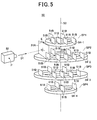
- Fig. 5 is a diagram showing the concept of the display control of this embodiment.
- a video camera is disposed at the view-point position for make the understanding easy.
- the plural display objects 51 are classified into plural predetermined categories of an identification information category, a time variation information category, a search information category and a set information category, and belong to any category. Accordingly, a user can easily reach necessary information or an input screen to implement his/her desired function by merely memorizing a category to which a user's desired matter belongs. Therefore, usability is more rapidly enhanced as compared with the menu screen of the hierarchical structure based on characters.
- the identification information category is used to display information associated with individual users to specify individual users. In this embodiment, information for identifying a driver of a vehicle in which the car navigation device 10 is mounted is stored.
- a father information object as information concerning a father as a driver
- a mother information obj ect as information concerning a mother
- a son information object as information concerning a son, etc.
- a short-distance wireless communication function for example, Bluetooth (registered trademark) communication function
- the time variation information category is a category for display information varying with time.
- rouge guide information of the car navigation is stored.
- the sub display objects 51B for displaying the time-variation information are stored a cross-point information object containing information of cross-points, a right-and-left turn information object containing information on right and left turn positions, a recommended surrounding point object containing information on recommended spots on the periphery of the route, etc.
- the search information category is a category for displaying information necessary for search.
- information for searching a destination or searching a reproduced music or video source is stored. More specifically, as the sub display objects 51B for searching a destination are stored a telephone number search object for inputting a telephone number and searching the corresponding point, an address search object for inputting an address and searching the corresponding address, a facility appellation search object for inputting the appellations of facilities and searching spots at which the facilities exist, a genre search object for searching a genre to which a music or video source belongs or a genre to which a store or facilities belong, a registered list search object for searching a registered list of spot lists which have been arbitrarily registered by a user, a peripheral search object for searching facilities located around the present position or an indicated position or facilities, etc., a television/magazine object for searching TV programs or magazine names or the contents of TV program or the contents of magazines, a return-home setting object for setting a return-home route from the present position (outdoor place) to the home, a
- sub display objects 51B are stored an FM/AM search obj ect for searching the broadcast contents, channels, etc. of FM/AM, a DVD/CD search object for searching DVD/CD in which desired music sources or video sources are recorded or displaying music sources or video sources contained in indicated DVD/CD, a TV search object for searching a TV program, a portable audio player search obj ect for searching music sources stored in a portable audio player, etc.
- Various kinds of setting information are stored in the setting information category. More specifically, a navigation setting object, an audio setting object, an audio recording setting object, a monitor setting object, a menu setting object, a data editing object, a user setting object, etc. are stored as the sub display objects 51B for setting various kinds of information.
- a predetermined axis 53 is virtually disposed in the virtual three-dimensional space 50, and the virtual three-dimensional space 53 is divided into four space areas SP1 to SP4 in the extension direction of the axis 53.
- the display objects 51 are arranged on rings 54-1 to 54-4 (on the circumferences of circles vertical to the axis 53) around the axis 53 in the space areas allocated to the categories to which the display obj ects 51 themselves belong.
- Fig. 6 is a diagram showing the movement of the view point and the change of the overhead-view direction.
- the position of the view-point position P and the overhead-view direction D1 can be changed.
- the user tilts the arm portion 43 of the joystick input device 41 in the direction of the arrow B with the position B0 as the reference position (the front and rear direction of the user when actually used), whereby the control 20 can display the view point position P on the display screen while the view point position P is changed along the circumference of a virtual circle CX.
- the user tilts the arm portion 43 of the joystick input device 41 in the direction of the arrow B1 with the position B0 as the reference position, whereby the controller 20 moves the video camera 52 in an upward direction DU along the circumference of the virtual circle CX and the front sides of the rings 54-1 to 54-4 are displayed on the display screen as if they are gradually rotated downwardly.
- the controller 20 moves the virtual video camera 52, that is, the view point position P to a position as indicated by a broken line at the upper end of the virtual circle in Fig. 6 , and the rings 54-1 to 54-4 are displayed on the display screen of the display unit 16 as if the user looks down at the rings from the upper side.
- the user tilts the arm portion 43 of the joystick input device 41 in the opposite direction to the direction of the arrow B1 with the position B0 as the reference position, whereby the controller 20 moves the video camera 52 to a downward direction DD along the circumference of the virtual circle CX and the front sides of the rings 54-1 to 54-4 are displayed on the display screen of the display unit 16 as if they are gradually rotated upwardly.
- the controller 20 moves the virtual video camera 52, that is, the view point position P to a position indicated by an broken line at the lower end of the virtual circle of Fig. 6 , and thus the rings 54-1 to 54-4 are displayed on the display screen as the user looks up at the rings from the lower side.
- the user turns the arm portion 43 of the joystick input device 41 with the range indicated by the arrow A, whereby the overhead-view direction D1 can be changed along the direction of the arrow DH.
- the controller 20 displays the display objects 51 so that the display objects 51 move to the right side or the left side on the display screen of the display unit 16.
- the user operates the direction/zoom instruction input unit 44 upwardly or downwardly, whereby the overhead-viewdirection D1 can be changed in the direction of an arrow DV, and the controller 20 can the direction of the sight line of the user while the positions of the rings 54-1 to 54-4 are fixed.
- the user fixes the arm portion 43 of the joystick input device 41 to a position indicated by a position Al within a range indicated by an arrow A and tilts the arm portion 43 of the joystick input device 41 to the front side (in the direction of the arrow B1 of Fig. 4 ) with the position B0 set as the reference, whereby the controller 20 can display the main display object 51A on the display screen of the display unit 16 as if only the main display object 51A is tilted to the back side (in the direction of the arrow E in Fig. 5 ).
- Fig. 7 is a diagram showing the operation when the user looks down at the rings in the axial direction.
- the viewpoint position P is located at the position of the video camera 52 represented by a solid line in Fig. 7 under an initial state (time t1) and the overhead-view direction D1 from the view point position corresponds to the upward direction in Fig. 7 .
- the main display object 51A and the sub display obj ects 51B as the display obj ects other than the main display object 51A, which constitute the display objects 51 are displayed on the display screen of the display unit 16 so that the display faces 51AS and 51BS of the respective display objects are oriented to be orthogonal to the overhead-view direction.
- Fig. 8 is a diagram showing the display screen of the initial state.
- this state is displayed on the display screen by the display unit 16
- the state as shown in Fig. 8 is displayed.
- a screen on which route detailed information as sub display objects (a cross-point 1, a cross-point 2 and a via place 1) is disposed on the ring 54-2 is displayed in the neighborhood of a navigation map screen as the main display object 51A.
- the controller 20 turns the main display object 51A till a position indicated by a broken line so that the display face 51 of the main display object 51A is orthogonal to the overhead-view direction D1.
- the turning start timing is set to a timing which is delayed from the turn start time t1 of the view point position P by only the time ⁇ t1 so that the user can easily grasp that the main display object 51A is turned.
- the turning speed is gradually increased, and the turning is finished at a timing which is delayed from the turning end time t2 of the view point position P by only the time ⁇ t2( ⁇ t1).
- Fig. 9 is a diagram showing the display state after the change of the view point position and zoom-in are performed.
- the controller 20 displays the display screen of the display unit 16 so that the detailed diagram of the cross-point 1 as the sub display object 51B is fully viewed as popup on the surface of the navigation map screen as the main display object 51A as shown in Fig. 8 .
- the user can visually and instinctively grasp where the operation target (operation screen or input screen) corresponding to the function which the user wants to implement is disposed, and thus can easily perform the operation of the corresponding equipment.
- the target device is the car navigation device.
- the present invention is not limited to the car navigation device, and may be applied to audio visual equipment, audio equipment and car navigation equipment.
- the present invention is not limited to in-vehicle mount equipment, but may be applied to display control of an information processing device having a small display screen.
- the sub display obj ects are disposed in a horizontal ring-shaped arrangement.
- the present invention is not limited to this arrangement, and the sub display objects may be disposed in a vertical ring-shaped arrangement or a non-ring-shaped arrangement (for example, square arrangement).
- the joystick input device 41 is used as the instruction input unit.
- an input device such as a key switch containing a keyboard, a mouse or the like may be likewise applied.
- the input device may be applied even when it is a wired type or wireless type.
Landscapes
- Engineering & Computer Science (AREA)
- Theoretical Computer Science (AREA)
- General Engineering & Computer Science (AREA)
- Physics & Mathematics (AREA)
- General Physics & Mathematics (AREA)
- Radar, Positioning & Navigation (AREA)
- Remote Sensing (AREA)
- Human Computer Interaction (AREA)
- Software Systems (AREA)
- Automation & Control Theory (AREA)
- Computer Graphics (AREA)
- Computer Hardware Design (AREA)
- Navigation (AREA)
- User Interface Of Digital Computer (AREA)
- Traffic Control Systems (AREA)
Abstract
Description
- The present invention relates to a display control device, a display control method and a control program, and particularly to a technique of enabling a user to instinctively understand various kinds of operations required to implement desired functions even when a display screen size of a display device such as in-vehicle mount equipment or the like.
- In connection with development of recent digital technologies, multifunctional in-vehicle equipment having various functions has multiplied even with respect to in-vehicle mount equipment such as car navigation devices, car audio devices, etc.
Therefore, when a large variety of functions are used, these functions are classified every category, it is a general method to make a user select his/her desired function by using a menu screen having a hierarchical structure such as a tree structure or the like (for example, seeJP-A-2005-96596 - However, the menu screen of the hierarchical structure used in the in-vehicle equipment as described above does not perform any list display. Therefore, it has been difficult to instinctively understand where a display screen to implement a desired function exists, and thus the user cannot reach an operation screen or input screen even when the user understand what he/she wants to do. Accordingly, there occurs such a case that the user cannot attain his/her object. Specifically, when the operation screen or input screen corresponding to a user's desired function is located at the lower layer side (particularly at the lowermost layer side) of the hierarchical structure, and thus the user cannot display the corresponding screen if he/she is not familiar with the operation.
Therefore, an object of the present invention is to provide a display control device, a display control method and a control program that enable a user to visually and instinctively understand an operation to be executed in order to implement user's desired function, and can easily display the corresponding operation screen or input screen so that the user can perform an operation. - In order to attain the above object, a display control device according to the present invention for arranging flat type plural display objects each having a desired display face having each kind of information displayed thereon in a virtual three-dimensional space, and making an external display device display an image in which the display objects are viewed in an overhead-view style from a view point position input from an external on the basis of three-dimensional coordinate position data corresponding to the view point position, overhead-view direction data corresponding to an overhead-view direction from the view point position and zoom data (for example, display field angle data corresponding to a display field angle and display magnification data corresponding to a display magnification) is characterized in that the plural display objects belong to any category of plural predetermined categories and are arranged in a predetermined space area every category and classified into one main display object and sub display objects other than the main display object, the main display object is rotated so that a display face thereof is perpendicular to or intersects to the overhead-view direction, and moved in the virtual three-dimensional space so as to be located in the overhead-view direction or in the neighborhood of the overhead-view direction while following variation of the overhead-view direction, and displayed on a display screen of the display device, and the sub display objects are controlled to be rotated in the virtual three-dimensional space so that display faces thereof are perpendicular to or intersect to the overhead view direction and displayed on the display screen of the display device.
- According to this construction, the main display object is rotated so that the display face thereof is perpendicular to or intersects to the overhead-view direction, and moved in the virtual three-dimensional space so as to be located in the overhead-view direction or in the neighborhood of the overhead-view direction while following variation of the overhead-view direction, and displayed on the display screen of the display device, and the sub display objects are controlled to be rotated in the virtual three-dimensional space so that the display faces thereof are perpendicular to or intersect to the overhead view and displayed on the display screen of the display device.
Each display object belongs to any category of the plural predetermined categories, and arranged in a predetermined space area every category. Therefore, the overall construction can be easily grasped, and a target display object, and thus an operation to be executed can be visually and instinctively understood by a user, so that the corresponding operation screen or input screen can be easily displayed. - In this case, a predetermined axis may be virtually arranged in the virtual three-dimensional space, and the three-dimensional space maybe divided into the plural space areas in an extension direction of the axis. Furthermore, the display objects may be arranged circumferentially with respect to a circle vertical to the axis around the axis in a space area allocated to a category to which the display objects concerned belong .
Furthermore, a ring-shaped category identification object along the circumference may be displayed in the neighborhood of the corresponding display object every category. - Furthermore, in a case where the main display object is displayed on the overall display screen on the basis of the three-dimensional coordinate position data and the zoom data, when a sub display object is located in front of the main display object, an image in which the image of the sub display object is superposed on the image of the main display object may be displayed as an overhead-viewed image.
The categories may contain an identification information category for displaying information to specify individual users, a time variation information category for displaying information varying with time, a search information category for displaying information necessary for search, and a setting information category for displaying various kinds of setting information.
The display device is a display device used for an in-vehicle mount information processing device, and the display object belonging to the identification information category may display information necessary to specify a driver of a vehicle in which the in-vehicle mount information processing device is mounted. - The display device is a display device used for an in-vehicle mount information processing device, and the display object belonging to the search information category may display information necessary to perform route guidance or searching a source for a reproduction target in a vehicle in which the in-vehicle mount navigation device is mounted.
Furthermore, the display device is a display device used for an in-vehicle mount navigation device as an in-vehicle mount information processing device, and the display object belonging to the time variation information category may display information necessary to perform route guidance during running in a vehicle having the in-vehicle mount navigation device mounted therein.
Furthermore, the main display obj ect may be a map screen for route guidance. - The display control device may be connected to an input device that can input the three-dimensional coordinate position data, the display field angle data and the display magnification by a user's operation.
Furthermore, a display control method for arranging flat type plural display obj ects each having a desired display face having each kind of information displayed thereon in a virtual three-dimensional space, and making an external display device display an image in which the display objects are viewed in an overhead-view style from a view point position input from an external on the basis of three-dimensional coordinate position data corresponding to the view point position, overhead-view direction data corresponding to an overhead-view direction from the view point position and zoom data (for example, display field angle data corresponding to a display field angle and display magnification data corresponding to a display magnification), the plural display obj ects belonging to any category of plural predetermined categories and being arranged in a predetermined space area every category and classified into one main display object and sub display objects other than the main display object, comprises: a step of rotating the main display object so that a display face thereof is perpendicular to or intersects to the overhead-view direction and moving in the virtual three-dimensional space so as to be located in the overhead-view direction or in the neighborhood of the overhead-view direction while following variation of the overhead-view direction; a step of rotating the sub display objects in the virtual three-dimensional space so that display faces of the sub display objects are perpendicular to or intersect to the overhead view direction; and a step of displaying the overhead-viewed image on the display screen of the display device. - There is provided a control program causing a computer to execute a control process on a display control device for arranging flat type plural display objects each having a desired display face having each kind of information displayed thereon in a virtual three-dimensional space, and making an external display device display an image in which the display objects are viewed in an overhead-view style from a view point position input from an external on the basis of three-dimensional coordinate position data corresponding to the view point position, overhead-view direction data corresponding to an overhead-view direction from the view point position and zoom data (for example, display field angle data corresponding to a display field angle and display magnification data corresponding to a display magnification), the plural display objects belonging to any category of plural predetermined categories and being arranged in a predetermined space area every category and classified into one main display object and sub display objects other than the main display object, the control process comprising: rotating the main display object so that a display face thereof is perpendicular to or intersects to the overhead-view direction and moving in the virtual three-dimensional space so as to be located in the overhead-view direction or in the neighborhood of the overhead-view direction while following variation of the overhead-view direction; rotating the sub display objects in the virtual three-dimensional space so that display faces of the sub display objects are perpendicular to or intersect to the overhead view direction; and displaying the overhead-viewed image on the display screen of the display device.
- According to the present invention, a user can visually and instinctively understand an operation to be executed, the corresponding operation screen or input screen can be easily displayed, and the operation of corresponding equipment can be easily performed.
-
- [
Fig. 1 ] is a block diagram showing the construction of a car navigation device as an in-vehicle mount type information processing device having a display control device according to an embodiment. - [
Fig. 2 ] is a front view of the outlook of a joystick input device constituting an instruction input unit. - [
Fig. 3 ] is a diagram an operation (part 1) of the joystick input device. - [
Fig. 4 ] is a diagram showing an operation (part 2) of the joystick input device. - [
Fig. 5 ] is a conceptual diagram showing display control of the embodiment; - [
Fig. 6 ] is a diagram showing movement of a view point and change of an overhead-view (bird's-eye view). - [
Fig. 7 ] is a diagram showing an operation when looking down at a ring from the upper side. - [
Fig. 8 ] is a diagram showing a display screen of an initial state. - [
Fig. 9 ] is a diagram showing a display state after the visual point position is changed and zoom-in is executed, and also is a functional block diagram showing the construction of an operation support system of in-vehicle mount equipment. -
- 10
- car navigation device
- 11
- GPS unit
- 12
- gyro unit
- 13
- Vehicle speed detector
- 14
- FM receiver
- 14A
- FM antenna
- 15
- beacon receiver
- 15a
- beacon antenna
- 16
- display unit
- 17
- instruction input unit
- 18
- user interface unit
- 19
- alarm unit
- 20
- controller
- 21
- information storage unit
- 22
- external recording device controller
- 23
- communication controller
- 30
- ROM
- 31
- DRAM
- 32
- SRAM
- 33
- VRAM
- 41
- joystick input device
- 42
- base unit
- 43
- arm unit
- 44
- zoom instruction input unit
- 50
- virtual three-dimensional space
- 51
- display face
- 51
- display object
- 51A
- main display object
- 51B
- sub display object
- 51AS
- display face
- 51BS
- display face
- 52
- video camera
- 53
- axis
- 53
- virtual three-dimensional space
- 54
- ring
- P
- view point position
- Next, a preferred embodiment of the present invention will be described with reference to the drawings.
Fig. 1 is a block diagram showing the construction of a car navigation device as an in-vehicle information processing device having a display control device according to an embodiment.
Thecar navigation device 10 is mounted in a vehicle, and it is a device having a navigation function for executing a rouge guidance for this vehicle and a facilities searching function.
Thecar navigation device 10 is roughly equipped with aGPS unit 11, agyro unit 12, avehicle speed detector 13, anFM receiver 14, abeacon receiver 15, adisplay unit 16, aninstruction input unit 17, auser interface unit 18, analarm unit 19, acontroller 20, aninformation storage unit 21, an externalrecording device controller 22 and acommunication controller 23. - The
GPS unit 11 receives a GPS electric wave from a GPS satellite through an GPS antenna, and obtains a position coordinate representing a current position and a travel direction from a GPS signal superposed on the GPS electric wave by calculation. Furthermore, theGPS unit 11 obtains date-and-hour information (year, month, day, hour, minute, etc.) of the present place of the vehicle from date-and-hour information contained in the GPS signal and the time difference of the present place of the vehicle by calculation, and outputs these information to thecontroller 20.
Thegyro unit 12 detects a relative direction (= travel direction) of the vehicle by the gyro sensor, and outputs it to thecontroller 20. Thevehicle speed detector 13 calculates the speed of the vehicle on the basis of a vehicle speed pulse PS of the vehicle, and outputs it to thecontroller 20. - The
FM receiver 14 receives an FM multiple broadcasting wave through anFM antenna 14A, obtains VICS (Vehicle Information and Communication System) as road traffic information superposed on the FM multiple broadcasting wave, executes predetermined processing on the VICS information and then outputs the processed VICS information to thecontroller 20. Through abeacon antenna 15A (or a light receiving unit for receiving an optical beacon), thebeacon receiver 15 receives beacon information as necessary road traffic information through an electronic wave (or light such as infrared light or the like) from a beacon placed on a road or the like in the neighborhood of a setup place of the beacon, subjects predetermined processing on the beacon information and outputting the processed beacon information to thecontroller 20. TheFM receiver 14 and thebeacon receiver 15 obtains alarm information together with traffic jam information such as required time information to a predetermined destination, accident information, disabled vehicle information, construction regulation information, chain regulation information, required time information between interchanges, road branch information, lane control information, service area information and parking information as the VICS information and the beacon information. - A liquid crystal display device having a touch panel is applied as the
display unit 16, for example, and various kinds of information such as map information representing a searched guide route or facilities, etc. are displayed on thedisplay unit 16 under the control of thecontroller 20.
Theinstruction input unit 17 comprises various kinds of operators including a joystick input device described later which are provided to thecar navigation device 10, a receiver for receiving a transmission signal from a remote controller (not shown), etc., and outputs various kinds of instructions from a user to thecontroller 20.
Theuser interface unit 18 is constructed as an I/O control circuit, a driver or the like, and it is provided on the assumption of an interface function for connecting thedisplay unit 16 and theinstruction input unit 17 to thecontroller 20.
Thealarm unit 19 is configured to have a speaker and an amplifier, and emits various kinds of sounds under the control of thecontroller 20. Accordingly, thealarm unit 19 functions as an alarming unit for alarming various kinds of information to a user. - The
controller 20 controls the overallcar navigation device 10, and it is constructed by CPU and peripheral circuits thereof. CPU reads out various kinds of data such as a control program, etc. stored inROM 30, and executes control processing of the respective parts of thenavigation device 10 in accordance with a user's instruction input through the instructioninput u nit 17.DRAM 31 is a memory used for a work area of CPU, andSRAM 32 is a non-volatile memory and is backed up with a battery or the like to hold a memory content even when a main power source of the car navigation device such as an accessory power source of a vehicle or the like are turned off.VRAM 33 is a memory for storing display data of thedisplay unit 16. - The
information storage unit 21 is a storage unit for storing map data, and specifically a hard disk device or a disk reading device which can read out the above data stored in a disk-shaped recording medium such as CD-ROM, DVD-ROM or the like may be applied as theinformation storing unit 21.
Furthermore, under the control of thecontroller 20, the externalrecording device controller 22 records/reads out data into/from an external recording medium connected to thecar navigation device 10. A semiconductor storage device such as a memory card or the like is applied as the external recording medium. - Under the control of the
controller 20, thecommunication controller 23 accesses an information center or the internet through wireless communication equipment (for example, a cellular phone, a wide area wireless LAN communication device or the like)40, and receives various kinds of information through a wireless communication network.
Fig. 2 is a front view showing the outlook of the joystick input device constituting the instruction input unit.
Fig. 3 is a diagram (part 1) showing the operation of the joystick input device.
Fig. 4 is a diagram (part 2) showing the operation of the joystick input device.
Thejoystick input device 41 roughly has a disk-shapedbase portion 42, a stick-shapedarm portion 43 supported on thebase portion 42, and a direction/zoominstruction input portion 44 provided to thearm portion 43.
Thearm portion 43 is turnable within a range indicated by an arrow A as shown inFig. 3 under the state that it is supported on thebase portion 42. Thearm portion 43 can be tilted in a direction indicated by an arrow B with a position B0 set as a reference position to control the vertical angle as shown inFig. 4 under the state that it is supported on thebase portion 42. - The direction/zoom
instruction input portion 44 is turned (or tilted) in eight directions as shown inFig. 3 when the device is actually used, whereby an operation of selecting a list item or scrolling a map can be performed. Furthermore, as shown inFig. 4 , the user can settle a selected list item or zoom in the display by pushing the direction/zoominstruction input unit 44 from the front side (from the upper left side inFig. 4 ) to the back side (to the lower right side inFig. 4 ). Furthermore, as shown inFig. 4 , the user can release the selected list item or zoom out the display by pushing the direction/zoominstruction input unit 44 from the back side (from the lower right side inFig. 4 ) to the front side (from the upper left side inFig. 4 ).
These operation states are taken into thecontroller 20 as digital data through theuser interface unit 18, and converted to three-dimensional coordinate position data, overhead-view direction data and zoom data described later.
In this case, field angle data representing the angle of field and display magnification data representing the magnification of the display are used as the zoom data of this embodiment. However, any other data may be used insofar as the data interlocks with the zoom magnification. -
Fig. 5 is a diagram showing the concept of the display control of this embodiment.
In this embodiment, plural planar display objects 51 having predetermined display faces on which various kinds of information are displayed (= amain display object 51A and sub display objects 51B) are arranged in a virtual three-dimensional space 50, and on the basis of three-dimensional coordinate position data corresponding to a view-point position P input through thejoystick input device 41, overhead-view direction data corresponding to an overhead-view direction D1 from the view-point P, display field angle data corresponding to a display field angle as zoom data and display magnification data corresponding to a displaymagnification, an image in which the display objects 51 are overhead-viewed from the view-point position displayed on the display screen of thedisplay unit 16 as a display device. InFig. 5 , a video camera is disposed at the view-point position for make the understanding easy. - In this embodiment, the plural display objects 51 (=the
main display object 51A and the sub display objects 51B) are classified into plural predetermined categories of an identification information category, a time variation information category, a search information category and a set information category, and belong to any category.
Accordingly, a user can easily reach necessary information or an input screen to implement his/her desired function by merely memorizing a category to which a user's desired matter belongs. Therefore, usability is more rapidly enhanced as compared with the menu screen of the hierarchical structure based on characters.
Here, the identification information category is used to display information associated with individual users to specify individual users. In this embodiment, information for identifying a driver of a vehicle in which thecar navigation device 10 is mounted is stored. Specifically, assuming that users belong to a family, a father information object as information concerning a father as a driver, a mother information obj ect as information concerning a mother, a son information object as information concerning a son, etc. are stored.
When these objects are selected, a user getting in a vehicle may be automatically identified to automatically select the corresponding object by using a short-distance wireless communication function (for example, Bluetooth (registered trademark) communication function) contained in a cellular phone terminal of a driver or a passenger. - The time variation information category is a category for display information varying with time. In this embodiment, rouge guide information of the car navigation is stored. More specifically, as the sub display objects 51B for displaying the time-variation information are stored a cross-point information object containing information of cross-points, a right-and-left turn information object containing information on right and left turn positions, a recommended surrounding point object containing information on recommended spots on the periphery of the route, etc.
- The search information category is a category for displaying information necessary for search. In this embodiment, information for searching a destination or searching a reproduced music or video source is stored. More specifically, as the sub display objects 51B for searching a destination are stored a telephone number search object for inputting a telephone number and searching the corresponding point, an address search object for inputting an address and searching the corresponding address, a facility appellation search object for inputting the appellations of facilities and searching spots at which the facilities exist, a genre search object for searching a genre to which a music or video source belongs or a genre to which a store or facilities belong, a registered list search object for searching a registered list of spot lists which have been arbitrarily registered by a user, a peripheral search object for searching facilities located around the present position or an indicated position or facilities, etc., a television/magazine object for searching TV programs or magazine names or the contents of TV program or the contents of magazines, a return-home setting object for setting a return-home route from the present position (outdoor place) to the home, a destination release object for releasing a destination under the route guidance, etc.
- As the sub display objects 51B are stored an FM/AM search obj ect for searching the broadcast contents, channels, etc. of FM/AM, a DVD/CD search object for searching DVD/CD in which desired music sources or video sources are recorded or displaying music sources or video sources contained in indicated DVD/CD, a TV search object for searching a TV program, a portable audio player search obj ect for searching music sources stored in a portable audio player, etc.
- Various kinds of setting information (initial setting information, etc. are stored in the setting information category. More specifically, a navigation setting object, an audio setting object, an audio recording setting object, a monitor setting object, a menu setting object, a data editing object, a user setting object, etc. are stored as the sub display objects 51B for setting various kinds of information.
In this case, apredetermined axis 53 is virtually disposed in the virtual three-dimensional space 50, and the virtual three-dimensional space 53 is divided into four space areas SP1 to SP4 in the extension direction of theaxis 53. The display objects 51 are arranged on rings 54-1 to 54-4 (on the circumferences of circles vertical to the axis 53) around theaxis 53 in the space areas allocated to the categories to which the display obj ects 51 themselves belong. -
Fig. 6 is a diagram showing the movement of the view point and the change of the overhead-view direction.
In connection with the operation of thejoystick input device 41 described above, the position of the view-point position P and the overhead-view direction D1 can be changed.
Specifically, the user tilts thearm portion 43 of thejoystick input device 41 in the direction of the arrow B with the position B0 as the reference position (the front and rear direction of the user when actually used), whereby thecontrol 20 can display the view point position P on the display screen while the view point position P is changed along the circumference of a virtual circle CX.
Specifically, the user tilts thearm portion 43 of thejoystick input device 41 in the direction of the arrow B1 with the position B0 as the reference position, whereby thecontroller 20 moves thevideo camera 52 in an upward direction DU along the circumference of the virtual circle CX and the front sides of the rings 54-1 to 54-4 are displayed on the display screen as if they are gradually rotated downwardly.
Finally, thecontroller 20 moves thevirtual video camera 52, that is, the view point position P to a position as indicated by a broken line at the upper end of the virtual circle inFig. 6 , and the rings 54-1 to 54-4 are displayed on the display screen of thedisplay unit 16 as if the user looks down at the rings from the upper side. - Furthermore, the user tilts the
arm portion 43 of thejoystick input device 41 in the opposite direction to the direction of the arrow B1 with the position B0 as the reference position, whereby thecontroller 20 moves thevideo camera 52 to a downward direction DD along the circumference of the virtual circle CX and the front sides of the rings 54-1 to 54-4 are displayed on the display screen of thedisplay unit 16 as if they are gradually rotated upwardly.
Finally, thecontroller 20 moves thevirtual video camera 52, that is, the view point position P to a position indicated by an broken line at the lower end of the virtual circle ofFig. 6 , and thus the rings 54-1 to 54-4 are displayed on the display screen as the user looks up at the rings from the lower side.
Furthermore, the user turns thearm portion 43 of thejoystick input device 41 with the range indicated by the arrow A, whereby the overhead-view direction D1 can be changed along the direction of the arrow DH. Accordingly, thecontroller 20 displays the display objects 51 so that the display objects 51 move to the right side or the left side on the display screen of thedisplay unit 16.
Furthermore, the user operates the direction/zoominstruction input unit 44 upwardly or downwardly, whereby the overhead-viewdirection D1 can be changed in the direction of an arrow DV, and thecontroller 20 can the direction of the sight line of the user while the positions of the rings 54-1 to 54-4 are fixed. - Furthermore, the user fixes the
arm portion 43 of thejoystick input device 41 to a position indicated by a position Al within a range indicated by an arrow A and tilts thearm portion 43 of thejoystick input device 41 to the front side (in the direction of the arrow B1 ofFig. 4 ) with the position B0 set as the reference, whereby thecontroller 20 can display themain display object 51A on the display screen of thedisplay unit 16 as if only themain display object 51A is tilted to the back side (in the direction of the arrow E inFig. 5 ). -
Fig. 7 is a diagram showing the operation when the user looks down at the rings in the axial direction.
In this case, it is assumed that the viewpoint position P is located at the position of thevideo camera 52 represented by a solid line inFig. 7 under an initial state (time t1) and the overhead-view direction D1 from the view point position corresponds to the upward direction inFig. 7 . In this case, themain display object 51A and the sub display obj ects 51B as the display obj ects other than themain display object 51A, which constitute the display objects 51, are displayed on the display screen of thedisplay unit 16 so that the display faces 51AS and 51BS of the respective display objects are oriented to be orthogonal to the overhead-view direction. -
Fig. 8 is a diagram showing the display screen of the initial state. When this state is displayed on the display screen by thedisplay unit 16, the state as shown inFig. 8 is displayed. A screen on which route detailed information as sub display objects (a cross-point 1, a cross-point 2 and a via place 1) is disposed on the ring 54-2 is displayed in the neighborhood of a navigation map screen as themain display object 51A.
When the user further operates thejoystick input device 41 from the above state to move the viewpoint position P to the position of thevide camera 52 indicated by broken line inFig. 7 and also set the overhead-view direction D1 to the upper right direction, thecontroller 20 turns themain display object 51A till a position indicated by a broken line so that the display face 51 of themain display object 51A is orthogonal to the overhead-view direction D1. - In this case, the turning start timing is set to a timing which is delayed from the turn start time t1 of the view point position P by only the time Δt1 so that the user can easily grasp that the
main display object 51A is turned. The turning speed is gradually increased, and the turning is finished at a timing which is delayed from the turning end time t2 of the view point position P by only the time Δt2(<Δt1).
Fig. 9 is a diagram showing the display state after the change of the view point position and zoom-in are performed.
When the view point position, thevideo camera 52 inFig. 7 is moved to a position indicated by a broken line, the overhead-view direction D1 is set to a direction indicated by a broken line and the user pushes the direction/zoominstruction input unit 44 from the front side to the back side as shown inFig. 4 to zoom in the display, thecontroller 20 displays the display screen of thedisplay unit 16 so that the detailed diagram of the cross-point 1 as thesub display object 51B is fully viewed as popup on the surface of the navigation map screen as themain display object 51A as shown inFig. 8 . - as described above, according to this embodiment, the user can visually and instinctively grasp where the operation target (operation screen or input screen) corresponding to the function which the user wants to implement is disposed, and thus can easily perform the operation of the corresponding equipment.
In the foregoing description, the target device is the car navigation device. However, the present invention is not limited to the car navigation device, and may be applied to audio visual equipment, audio equipment and car navigation equipment. Furthermore, the present invention is not limited to in-vehicle mount equipment, but may be applied to display control of an information processing device having a small display screen. - In the foregoing description, the sub display obj ects are disposed in a horizontal ring-shaped arrangement. However, the present invention is not limited to this arrangement, and the sub display objects may be disposed in a vertical ring-shaped arrangement or a non-ring-shaped arrangement (for example, square arrangement).
In the foregoing description, thejoystick input device 41 is used as the instruction input unit. However, an input device such as a key switch containing a keyboard, a mouse or the like may be likewise applied. Furthermore, the input device may be applied even when it is a wired type or wireless type. -
-
FIG. 1 - 11
- GPS UNIT
- 12
- GYRO UNIT
- 13
- VEHICLE SPEED DETECTOR
- 14
- FM RECEIVER
- 15
- BEACON RECEIVER
- 16
- DISPLAY UNIT
- 17
- INSTRUCTION INPUT UNIT
- 18
- USER INTERFACE UNIT
- 19
- ALARM UNIT
- 20
- CONTROLLER
- 21
- INFORMATION STORAGE UNIT
- 22
- EXTERNAL RECORDING DEVICE CONTROLLER
- 23
- COMMUNICATION CONTROLLER
- 40
- WIRELESS COMMUNICATION EQUIPMENT
-
FIG. 4
FRONT SIDE
BACK SIDE -
FIG. 7
TIME t1
TIME t2
TIME t1 + Δt1
TIME t2 + Δt2
FIGS. 8, 9
CROSS-POINT 1, CROSS-POINT 2,VIA PLACE 1UNUMA TACHIBANA 2
SAKURAGAOKA 4
UNUMASAKURAGAOKA 1
ENOSHIMA ELECTRIC RAILWAY
UNUMAISHIGAMI 2
UNUMAISHIGAMI 3
ISHIGAMI STATION
NUMAZAKURA
Claims (13)
- A display control device for arranging flat type plural display objects each having a desired display face having each kind of information displayed thereon in a virtual three-dimensional space, and making an external display device display an image in which the display objects are viewed in an overhead-view style from a view point position input from an external on the basis of three-dimensional coordinate position data corresponding to the view point position, overhead-view direction data corresponding to an overhead-view direction from the view point position and zoom data (for example, display field angle data corresponding to a display field angle and display magnification data corresponding to a display magnification) is characterized in that the plural display objects belong to any category of plural predetermined categories and are arranged in a predetermined space area every category and classified into one main display object and sub display objects other than the main display object, the main display object is rotated so that a display face thereof is perpendicular to or intersects to the overhead-view direction, and moved in the virtual three-dimensional space so as to be located in the overhead-view direction or in the neighborhood of the overhead-view direction while following variation of the overhead-view direction, and displayed on a display screen of the display device, and the sub display objects are controlled to be rotated in the virtual three-dimensional space so that display faces thereof are perpendicular to or intersect to the overhead view direction and displayed on the display screen of the display device.
- The display control device according to claim 1,
wherein a predetermined axis is virtually arranged in the virtual three-dimensional space, and the three-dimensional space is divided into the plural space areas in an extension direction of the axis. - The display control device according to claim 2,
wherein the display objects are arranged circumferentially with respect to a circle vertical to the axis around the axis in a space area allocated to a category to which the display objects concerned belong. - The display control device according to claim 3,
wherein a ring-shaped category identification object along the circumference is displayed in the neighborhood of the corresponding display object every category. - The display control device according to claim 1,
wherein in a case where the main display object is displayed on the overall display screen on the basis of the three-dimensional coordinate position data and the zoom data, when a sub display object is located in front of the main display object, an image in which the image of the sub display object is superposed on the image of the main display object is displayed as an overhead-viewed image. - The display control device according to claim 1,
wherein the categories contain an identification information category for displaying information to specify individual users, a time variation information category for displaying information varying with time, a search information category for displaying information necessary for search, and a setting information category for displaying various kinds of setting information. - The display control device according to claim 6,
wherein the display device is a display device used for an in-vehicle mount information processing device, and the display object belonging to the identification information category may display information necessary to specify a driver of a vehicle in which the in-vehicle mount information processing device is mounted. - The display control device according to claim 6,
wherein the display device is a display device used for an in-vehicle mount information processing device, and the display object belonging to the search information category may display information necessary to perform route guidance or searching a source for a reproduction target in a vehicle in which the in-vehicle mount navigation device is mounted. - The display control device according to claim 6,
wherein the display device is a display device used for an in-vehicle mount navigation device as an in-vehicle mount information processing device, and the display object belonging to the time variation information category is display information necessary to perform route guidance during running in a vehicle having the in-vehicle mount navigation device mounted therein. - The display control device according to claim 9,
wherein the main display object is a map screen for route guidance. - The display control device according to claim 1,
wherein the display control device is connected to an input device that can input the three-dimensional coordinate position data, the display field angle data and the display magnification by a user's operation. - A display control method for arranging flat type plural display objects each having a desired display face having each kind of information displayed thereon in a virtual three-dimensional space, and making an external display device display an image in which the display objects are viewed in an overhead-view style from a view point position input from an external on the basis of three-dimensional coordinate position data corresponding to the view point position, overhead-view direction data corresponding to an overhead-view direction from the view point position and zoom data (for example, display field angle data corresponding to a display field angle and display magnification data corresponding to a display magnification), the plural display obj ects belonging to any category of plural predetermined categories and being arranged in a predetermined space area every category and classified into one main display object and sub display objects other than the main display object, comprising:a step of rotating the main display object so that a display face thereof is perpendicular to or intersects to the overhead-view direction and moving in the virtual three-dimensional space so as to be located in the overhead-view direction or in the neighborhood of the overhead-view direction while following variation of the overhead-view direction;a step of rotating the sub display objects in the virtual three-dimensional space so that display faces of the sub display objects are perpendicular to or intersect to the overhead view direction; anda step of displaying the overhead-viewed image on the display screen of the display device.
- A control program causing a computer to execute a control process on a display control device for arranging flat type plural display obj ects each having a desired display face having each kind of information displayed thereon in a virtual three-dimensional space, and making an external display device display an image in which the display objects are viewed in an overhead-view style from a view point position input from an external on the basis of three-dimensional coordinate position data corresponding to the view point position, overhead-view direction data corresponding to an overhead-view direction from the view point position and zoom data (for example, display field angle data corresponding to a display field angle and display magnification data corresponding to a display magnification), the plural display obj ects belonging to any category of plural predetermined categories and being arranged in a predetermined space area every category and classified into one main display object and sub display objects other than the main display object, the control process comprising:rotating the main display obj ect so that a display face thereof is perpendicular to or intersects to the overhead-view direction and moving in the virtual three-dimensional space so as to be located in the overhead-view direction or in the neighborhood of the overhead-view direction while following variation of the overhead-view direction;rotating the sub display objects in the virtual three-dimensional space so that display faces of the sub display objects are perpendicular to or intersect to the overhead view direction; anddisplaying the overhead-viewed image on the display screen of the display device.
Applications Claiming Priority (2)
| Application Number | Priority Date | Filing Date | Title |
|---|---|---|---|
| JP2007190549A JP2009026177A (en) | 2007-07-23 | 2007-07-23 | Display control device, display control method and control program |
| PCT/JP2008/062992 WO2009014080A1 (en) | 2007-07-23 | 2008-07-18 | Display control device and display control method, and control program |
Publications (2)
| Publication Number | Publication Date |
|---|---|
| EP2172835A1 true EP2172835A1 (en) | 2010-04-07 |
| EP2172835A4 EP2172835A4 (en) | 2013-05-08 |
Family
ID=40281334
Family Applications (1)
| Application Number | Title | Priority Date | Filing Date |
|---|---|---|---|
| EP08778284.3A Withdrawn EP2172835A4 (en) | 2007-07-23 | 2008-07-18 | DISPLAY CONTROL DEVICE AND DISPLAY CONTROL METHOD, AND CONTROL PROGRAM |
Country Status (4)
| Country | Link |
|---|---|
| US (1) | US8423293B2 (en) |
| EP (1) | EP2172835A4 (en) |
| JP (1) | JP2009026177A (en) |
| WO (1) | WO2009014080A1 (en) |
Families Citing this family (8)
| Publication number | Priority date | Publication date | Assignee | Title |
|---|---|---|---|---|
| JP5378133B2 (en) * | 2009-09-28 | 2013-12-25 | 任天堂株式会社 | Bird's-eye view map resource generation program, bird's-eye view map display program, bird's-eye view map resource generation device, and bird's-eye view map display device |
| EP3996029B1 (en) * | 2011-04-12 | 2024-04-10 | Google LLC | Integrating maps and street views |
| CA2800061C (en) * | 2011-12-29 | 2019-05-14 | Alticast Corporation | Method and recorded medium for providing 3d information service |
| JP6086851B2 (en) * | 2013-09-18 | 2017-03-01 | 株式会社ソニー・インタラクティブエンタテインメント | Information processing apparatus and information processing method |
| USD755232S1 (en) * | 2014-06-20 | 2016-05-03 | Google Inc. | Portion of a display screen with icon |
| KR102551239B1 (en) | 2015-09-02 | 2023-07-05 | 인터디지털 씨이 페이튼트 홀딩스, 에스에이에스 | Method, apparatus and system for facilitating navigation in an extended scene |
| US10922895B2 (en) * | 2018-05-04 | 2021-02-16 | Microsoft Technology Licensing, Llc | Projection of content libraries in three-dimensional environment |
| CN108873908B (en) * | 2018-07-12 | 2020-01-24 | 重庆大学 | Robot city navigation system based on combination of visual SLAM and network map |
Family Cites Families (13)
| Publication number | Priority date | Publication date | Assignee | Title |
|---|---|---|---|---|
| JP3705826B2 (en) | 1993-03-17 | 2005-10-12 | 株式会社日立製作所 | Virtual three-dimensional window display control method |
| JPH10320167A (en) | 1997-05-15 | 1998-12-04 | Sharp Corp | Virtual space window display system |
| JPH1139132A (en) * | 1997-07-15 | 1999-02-12 | Sharp Corp | Interface system |
| WO1999008178A1 (en) * | 1997-08-12 | 1999-02-18 | Matsushita Electric Industrial Co., Ltd. | Window display |
| US6473751B1 (en) * | 1999-12-10 | 2002-10-29 | Koninklijke Philips Electronics N.V. | Method and apparatus for defining search queries and user profiles and viewing search results |
| US6411898B2 (en) * | 2000-04-24 | 2002-06-25 | Matsushita Electric Industrial Co., Ltd. | Navigation device |
| TWI238348B (en) * | 2002-05-13 | 2005-08-21 | Kyocera Corp | Portable information terminal, display control device, display control method, and recording media |
| JP3761165B2 (en) | 2002-05-13 | 2006-03-29 | 株式会社モバイルコンピューティングテクノロジーズ | Display control device, portable information terminal device, program, and display control method |
| JP4158105B2 (en) | 2003-09-25 | 2008-10-01 | ソニー株式会社 | In-vehicle device and method for controlling in-vehicle device |
| JP3904087B2 (en) * | 2004-07-23 | 2007-04-11 | ソニー株式会社 | Image control apparatus and method |
| JP4247684B2 (en) * | 2005-01-19 | 2009-04-02 | ソニー株式会社 | Map display device and map display method |
| JP2007140817A (en) * | 2005-11-17 | 2007-06-07 | Samii Kk | Image generation device, game machine, image generation method and program |
| DE202006003913U1 (en) * | 2006-03-09 | 2007-07-12 | Klicktel Ag | Navigation device with size-dependent address element sorting |
-
2007
- 2007-07-23 JP JP2007190549A patent/JP2009026177A/en active Pending
-
2008
- 2008-07-18 WO PCT/JP2008/062992 patent/WO2009014080A1/en not_active Ceased
- 2008-07-18 US US12/670,332 patent/US8423293B2/en not_active Expired - Fee Related
- 2008-07-18 EP EP08778284.3A patent/EP2172835A4/en not_active Withdrawn
Also Published As
| Publication number | Publication date |
|---|---|
| WO2009014080A1 (en) | 2009-01-29 |
| JP2009026177A (en) | 2009-02-05 |
| US8423293B2 (en) | 2013-04-16 |
| US20100223004A1 (en) | 2010-09-02 |
| EP2172835A4 (en) | 2013-05-08 |
Similar Documents
| Publication | Publication Date | Title |
|---|---|---|
| US8423293B2 (en) | Display control device, display control method and control program | |
| EP1703257B1 (en) | Point searching apparatus and method of searching | |
| JP4356594B2 (en) | Display device, display method, display program, and recording medium on which display program is recorded | |
| US8046714B2 (en) | Method, program and device for displaying menu | |
| US20080229249A1 (en) | User interface for multifunction device | |
| CN102224479B (en) | Input device, vehicle peripheral monitoring device, icon switch selection method and program | |
| US9009141B2 (en) | Display apparatus and displaying method of contents | |
| US20130325317A1 (en) | Smart loading of map tiles | |
| US6760652B2 (en) | In-vehicle accessory system utilizing region-based automatic function setting method | |
| JPH09153195A (en) | Information display device for vehicles | |
| JP2012098873A (en) | In-vehicle apparatus and control method of in-vehicle apparatus | |
| JP4723729B2 (en) | Map display control device and map display control program | |
| JP5161642B2 (en) | Information display device, control method therefor, and control program | |
| US20080040032A1 (en) | System for searching intersections and method thereof | |
| JP2005207976A (en) | Navigation device, information presenting method, and program for navigation | |
| JP4389161B2 (en) | Display device and display method | |
| JP2006293997A (en) | Method, program and apparatus for displaying menu | |
| JP4607358B2 (en) | Navigation device and method, and recording medium recording navigation software | |
| JP2005301702A (en) | Display device | |
| JP2006260267A (en) | Menu edition method, menu edition program, and menu-editing device | |
| JP2007271277A (en) | Navigation system, method and program | |
| JP2008123407A (en) | Input device and its menu display method | |
| KR101695490B1 (en) | Method for searching contents | |
| JP2008082868A (en) | Navigation apparatus, its control method, and its control program | |
| JPWO2016185540A1 (en) | Mobile navigation device |
Legal Events
| Date | Code | Title | Description |
|---|---|---|---|
| PUAI | Public reference made under article 153(3) epc to a published international application that has entered the european phase |
Free format text: ORIGINAL CODE: 0009012 |
|
| 17P | Request for examination filed |
Effective date: 20100122 |
|
| AK | Designated contracting states |
Kind code of ref document: A1 Designated state(s): AT BE BG CH CY CZ DE DK EE ES FI FR GB GR HR HU IE IS IT LI LT LU LV MC MT NL NO PL PT RO SE SI SK TR |
|
| AX | Request for extension of the european patent |
Extension state: AL BA MK RS |
|
| DAX | Request for extension of the european patent (deleted) | ||
| A4 | Supplementary search report drawn up and despatched |
Effective date: 20130409 |
|
| RIC1 | Information provided on ipc code assigned before grant |
Ipc: G01C 21/00 20060101ALI20130403BHEP Ipc: G06F 3/048 20130101AFI20130403BHEP |
|
| 17Q | First examination report despatched |
Effective date: 20160905 |
|
| STAA | Information on the status of an ep patent application or granted ep patent |
Free format text: STATUS: EXAMINATION IS IN PROGRESS |
|
| STAA | Information on the status of an ep patent application or granted ep patent |
Free format text: STATUS: THE APPLICATION IS DEEMED TO BE WITHDRAWN |
|
| 18D | Application deemed to be withdrawn |
Effective date: 20170315 |