EP1873625A2 - Image forming apparatus - Google Patents
Image forming apparatus Download PDFInfo
- Publication number
- EP1873625A2 EP1873625A2 EP07010513A EP07010513A EP1873625A2 EP 1873625 A2 EP1873625 A2 EP 1873625A2 EP 07010513 A EP07010513 A EP 07010513A EP 07010513 A EP07010513 A EP 07010513A EP 1873625 A2 EP1873625 A2 EP 1873625A2
- Authority
- EP
- European Patent Office
- Prior art keywords
- image
- printing
- external memory
- forming apparatus
- controller
- Prior art date
- Legal status (The legal status is an assumption and is not a legal conclusion. Google has not performed a legal analysis and makes no representation as to the accuracy of the status listed.)
- Withdrawn
Links
Images


Classifications
-
- H—ELECTRICITY
- H04—ELECTRIC COMMUNICATION TECHNIQUE
- H04N—PICTORIAL COMMUNICATION, e.g. TELEVISION
- H04N1/00—Scanning, transmission or reproduction of documents or the like, e.g. facsimile transmission; Details thereof
- H04N1/00127—Connection or combination of a still picture apparatus with another apparatus, e.g. for storage, processing or transmission of still picture signals or of information associated with a still picture
- H04N1/00132—Connection or combination of a still picture apparatus with another apparatus, e.g. for storage, processing or transmission of still picture signals or of information associated with a still picture in a digital photofinishing system, i.e. a system where digital photographic images undergo typical photofinishing processing, e.g. printing ordering
- H04N1/00169—Digital image input
- H04N1/00175—Digital image input from a still image storage medium
-
- G—PHYSICS
- G06—COMPUTING OR CALCULATING; COUNTING
- G06F—ELECTRIC DIGITAL DATA PROCESSING
- G06F3/00—Input arrangements for transferring data to be processed into a form capable of being handled by the computer; Output arrangements for transferring data from processing unit to output unit, e.g. interface arrangements
- G06F3/12—Digital output to print unit, e.g. line printer, chain printer
- G06F3/1201—Dedicated interfaces to print systems
- G06F3/1202—Dedicated interfaces to print systems specifically adapted to achieve a particular effect
- G06F3/1203—Improving or facilitating administration, e.g. print management
- G06F3/1204—Improving or facilitating administration, e.g. print management resulting in reduced user or operator actions, e.g. presetting, automatic actions, using hardware token storing data
-
- G—PHYSICS
- G06—COMPUTING OR CALCULATING; COUNTING
- G06F—ELECTRIC DIGITAL DATA PROCESSING
- G06F3/00—Input arrangements for transferring data to be processed into a form capable of being handled by the computer; Output arrangements for transferring data from processing unit to output unit, e.g. interface arrangements
- G06F3/12—Digital output to print unit, e.g. line printer, chain printer
- G06F3/1201—Dedicated interfaces to print systems
- G06F3/1223—Dedicated interfaces to print systems specifically adapted to use a particular technique
- G06F3/1237—Print job management
- G06F3/126—Job scheduling, e.g. queuing, determine appropriate device
- G06F3/1261—Job scheduling, e.g. queuing, determine appropriate device by using alternate printing
-
- G—PHYSICS
- G06—COMPUTING OR CALCULATING; COUNTING
- G06F—ELECTRIC DIGITAL DATA PROCESSING
- G06F3/00—Input arrangements for transferring data to be processed into a form capable of being handled by the computer; Output arrangements for transferring data from processing unit to output unit, e.g. interface arrangements
- G06F3/12—Digital output to print unit, e.g. line printer, chain printer
- G06F3/1201—Dedicated interfaces to print systems
- G06F3/1278—Dedicated interfaces to print systems specifically adapted to adopt a particular infrastructure
- G06F3/128—Direct printing, e.g. sending document file, using memory stick, printing from a camera
-
- H—ELECTRICITY
- H04—ELECTRIC COMMUNICATION TECHNIQUE
- H04N—PICTORIAL COMMUNICATION, e.g. TELEVISION
- H04N1/00—Scanning, transmission or reproduction of documents or the like, e.g. facsimile transmission; Details thereof
- H04N1/00127—Connection or combination of a still picture apparatus with another apparatus, e.g. for storage, processing or transmission of still picture signals or of information associated with a still picture
- H04N1/00132—Connection or combination of a still picture apparatus with another apparatus, e.g. for storage, processing or transmission of still picture signals or of information associated with a still picture in a digital photofinishing system, i.e. a system where digital photographic images undergo typical photofinishing processing, e.g. printing ordering
- H04N1/00185—Image output
- H04N1/00188—Printing, e.g. prints or reprints
-
- H—ELECTRICITY
- H04—ELECTRIC COMMUNICATION TECHNIQUE
- H04N—PICTORIAL COMMUNICATION, e.g. TELEVISION
- H04N1/00—Scanning, transmission or reproduction of documents or the like, e.g. facsimile transmission; Details thereof
- H04N1/0035—User-machine interface; Control console
- H04N1/00352—Input means
- H04N1/00395—Arrangements for reducing operator input
-
- H—ELECTRICITY
- H04—ELECTRIC COMMUNICATION TECHNIQUE
- H04N—PICTORIAL COMMUNICATION, e.g. TELEVISION
- H04N1/00—Scanning, transmission or reproduction of documents or the like, e.g. facsimile transmission; Details thereof
- H04N1/21—Intermediate information storage
-
- H—ELECTRICITY
- H04—ELECTRIC COMMUNICATION TECHNIQUE
- H04N—PICTORIAL COMMUNICATION, e.g. TELEVISION
- H04N1/00—Scanning, transmission or reproduction of documents or the like, e.g. facsimile transmission; Details thereof
- H04N1/21—Intermediate information storage
- H04N1/2104—Intermediate information storage for one or a few pictures
- H04N1/2158—Intermediate information storage for one or a few pictures using a detachable storage unit
Definitions
- the present invention relates to an image forming apparatus.
- Japanese patent No. 3,125,924 discloses a printer in which, when a memory card (external memory) in which an image file is stored is inserted in a card slot, a print start key flashes and a user depresses the print start key, all of the image data stored in the memory card are printed one by one.
- the printer requires a key operation to perform printing, and the operation becomes troublesome when plural image data that are stored in plural memory cards are to be printed.
- the present invention was developed in view of aforementioned problems.
- the present invention provides, as an illustrative non-limiting embodiment, an image forming apparatus including: a memory connecting portion, to which an external memory is detachably connected; a detecting portion that detects a connection state of the external memory; a printing portion that prints an image based on an image file to be printed which is stored in the external memory; and a controller that performs an automatic printing processing in which the controller controls the printing portion to automatically start printing the image in response to a detection by the detecting portion of connection of the external memory to the memory connecting portion.
- FIG. 1 is a block diagram of an electrical configuration of a printer according to an embodiment of the present invention and a USB memory.
- FIG. 2 is a plan view of an operating unit and a display unit.
- FIG. 3 is a conceptual diagramof a directory structure inside the USB memory.
- FIG. 4 is a flowchart of a USB printing processing.
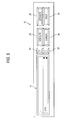
- FIG. 5 is a plan view of a display example of the operating unit and the display unit.
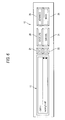
- FIG. 6 is a plan view of a display example of the operating unit and the display unit.
- FIG. 1 is a schematic block diagram of an electrical configuration of a printer 1 (example of an image forming apparatus) according to the present invention.
- the printer 1 includes a printing unit 11 (example of printing portion) that performs printing onto paper as a printing medium, an operating unit 12 (example of a selecting portion, a print selecting portion, a directory setting portion, a printing confirming portion, and an automatic printing setting portion) by which a user can operatively input operations, a display unit 13 (example of a display portion) that performs display, a USB interface 14 (example of a memory connecting portion and a detecting portion), a CPU 15 (example of a controller), a ROM 16, a RAM 17, and a nonvolatile memory 18.
- FIG. 2 shows the operating unit 12 and the display unit 13 disposed on a surface of the main case of the printer 1.
- the operating unit 12 includes an up key 21, a down key 22, an execute key 23, a cancel key 24, an advance key 25, and a back key 26.
- the display unit 13 includes a horizontally long liquid crystal display panel.
- a USB memory 20 (example of an external memory) is detachably connected to the USB interface 14, and data inside the USB memory 20 is read into the printer 1 via the USB interface 14.
- the USB interface 14 also detects the attachment/detachment state of the USB memory 20 and outputs the detection signal to the CPU 15.
- a program for performing a USB printing processing, to be described below, and various control programs for controlling the printer 1 are stored with various settings, initial values, etc., in the ROM 16.
- the RAM 17 is used as a work area into which the various control programs are read out.
- various settings, etc. are stored in the nonvolatile memory 18.
- the CPU 15 controls operations of the printing unit 11 and the display unit 13 in accordance with the control program read from the ROM 16 while storing processing results in the RAM 17 or the nonvolatile memory 18.
- FIG. 3 is a conceptual diagram of an example of a directory structure formed inside the USB memory 20.
- the USB memory 20 has such a tree-structure file system that plural directories are arranged hierarchically.
- Plural image data files are classified and stored respective directories by user's preference.
- three directories (sub-directories) 31A to 31C and plural image data files 32A, 32B, ... are stored in an uppermost directory (hereinafter referred to as "ROOT directory 30").
- ROOT directory 30 an uppermost directory
- three image data files 33A, 33B and 33C are stored in the sub-directory 31A.
- Various settings used in the USB printing processing described below are stored in the nonvolatile memory 18. Specifically, whether to perform or not automatic printing processing (automatic printing setting), whether to perform or not selective printing processing after the automatic printing processing ends (setting of selective printing when automatic printing processing is performed), whether to perform or not the selective printing processing when the automatic printing processing is not performed(setting of selective printing processing when automatic printing processing is not performed), and other setting flags, a reference value that is an upper limit for performing automatic printing processing, a specified directory for performing selection of files to be printed, etc. are stored.
- the CPU 15 is capable of performing a setting program based on input operations performed from the operating unit 12, and the respective settings described above can be changed by the user performing input operations from the operating unit 12 while referencing the display on the display unit 13 during performing of the setting program.
- FIG. 4 is a flowchart of the USB printing processing.
- the CPU 15 Upon starting the USB printing processing, the CPU 15 first determines whether or not the USB memory 20 is attached to the USB interface 14 (S11). Here, if the USB memory 20 is not attached (S11: No), the same process is repeated until the USB memory 20 is attached, that is, a standby state of waiting for the attachment of the USB memory 20 is entered. In the standby state, the automatic printing processing can be performed.
- the CPU 15 refers the nonvolatile memory 18 to check whether or not the automatic printing setting is ON (S12). If the automatic printing setting is OFF (S12: No), S20, to be described below, is entered without performing automatic printing processing. If the automatic printing setting is ON (S12: Yes), selection of files as objects to be printed is performed (S13).
- all image data files inside a directory that is set in advance as a specified directory are selected as the objects to be printed. For example, if the sub-directory 31A below the root directory 30 is specified as the specified directory, the image data files 33A, 33B and 33C, stored in the sub-directory 31A, are selected as the objects to be printed.
- the CPU 15 determines whether or not the image data files selected as the objects to be printed are present (S14). Here, if not even one image data file is present in the specified directory or the specified directory itself is not present in the USB memory 20 (S14 : No), the below-described S20 is entered without performing automatic printing processing.
- FIGS. 2, 5, and 6 show examples of display on the display unit 13.
- the screen of the display unit 13 is partitioned into two windows, i.e. an upper display portion and a lower display portion juxtaposed vertically.
- a path name position information
- current directory a directory that is currently the object of display (processing).
- names identification information of image data and directories stored in the current directory are displayed one by one.
- the selective printing processing ends.
- the setting of selective printing when automatic printing processing is performed has been OFF in S18 (S18: No) or the setting of selective printing when automatic printing processing is not performed had been OFF in S20 (S20: No)
- whether or not the USB memory 20 is detached from the USB interface 14 is determined (S21).
- the USB memory 20 is not detached (S21: No)
- the same processing is repeated until the USB memory 20 is detached. If the USB memory 20 is detached, S11 is returned to, that is, the standby state of waiting for the attachment of the USB memory 20 is entered.
- the user is, for example, free from being required to perform an operation of canceling the performing of the selective printing processing if the selective printing processing is unnecessary.
- the selective printing processing is performed (S19). Because when the selective printing processing is started, the uppermost directory is displayed first, the user can quickly find the image data that are desired to be printed.
- the configuration is also convenient because a directory that the user uses frequently can be set in advance as the specified directory for selection of the image data to be printed.
- the embodiment employed the USB memory as an example of the external memory.
- the external memory may be a Compact Flash (registered trademark) memory, a Smart Media (registered trademark), or a Memory Stick (trademark), etc.
- the aforementioned embodiment is configured such that a printer having the function of printing image data taken in from the external memory is described, the present invention can also be applied to a printer having, in addition to the above function, a printer function of printing image data transmitted from a PC, etc., a scanner function, a facsimile function, etc.
- the present invention provides illustrative, non-limiting embodiments as follows:
- An image forming apparatus includes: a memory connecting portion, to which an external memory is detachably connected; a detecting portion that detects a connection state of the external memory; a printing portion that prints an image based on an image file to be printed which is stored in the external memory; and a controller that performs an automatic printing processing in which the controller controls the printing portion to automatically start printing the image in response to a detectionby the detecting portion of connection of the external memory to the memory connecting portion.
- the controller may select the image file to be printed from among plural image files stored in the external memory.
- the external memory may store therein plural directories hierarchically, and the controller may select the image file to be printed, which is included in a specified directory among the plural directories.
- the image forming apparatus further includes: a display portion that displays information for identifying plural image files stored in the external memory; and a selecting portion, by which a user can operatively select an image file to be printed from among the plural image files with reference to the information displayed on the display portion.
- the controller may perform a selective printing processing in which the controller controls the display portion to display the information and controls the printing portion to print an image based on the image file selected by the selecting portion.
- the image forming apparatus further includes a print selecting portion, by which a user can operatively select whether or not the controller performs the selective printing processing after the automatic printing processing ends.
- the external memory may store thereinplural directories hierarchically.
- the display portion may display a content of each directory stored in the external memory according to an operation to the selecting portion.
- the controller may control the display portion to display a content of an uppermost directory among the hierarchically structured directories in the external memory after the automatic printing processing ends.
- the controller when it is selected that the controller does not perform the selective printing processing after the automatic printing processing ends, and when disconnection of the external memory from the memory connecting portion is detected by the detecting portion, the controller may enters a standby state in which the controller can perform the automatic printing processing.
- the image forming apparatus further includes: a display portion that displays information for identifying the plural image files stored in the external memory; and a selecting portion, by which a user can operatively select an image file from among the image files stored in the external memory with reference to the information displayed on the display portion.
- the controller may perform a selective printing processing in which the controller controls the display portion to display the information for identifying an image file included in an uppermost directory among the hierarchically structured directories and controls the printing portion to print an image based on the image file selected by the selecting portion.
- the image forming apparatus further includes a print selecting portion, by which a user can operatively select whether or not the controller performs the selective printing processing when the controller dose not perform the automatic printing processing.
- the image forming apparatus according to any one of (3) to (9) further includes a directory setting portion, by which a user can operatively set the specified directory.
- the controller may control the printing portion to start printing images based on image files when a number of the image files to be printed is less than a reference number and not to start printing images when the number of the image files to be printed is equal to or greater than the reference number.
- the image forming apparatus further includes a printing confirming portion, by which a user can operatively allow the printing portion to start printing images.
- a printing confirming portion by which a user can operatively allow the printing portion to start printing images.
- the image forming apparatus according to any oneof (1) to (12) further includes an automatic printing setting portion, by which a user can operatively select whether or not the controller performs the automatic printing processing in response to the detection by the detecting portion of connection of the external memory to the memory connecting portion.
- An image forming apparatus includes: a memory connecting portion, to which an external memory is detachably connected, the external memory storing therein plural directories hierarchically; a detecting portion that detects a connection state of the external memory; a printing portion that prints an image based on an image file to be printed, the image file being stored in a specified directory among the plural directories; and a controller that selects an image file as the image file to be printed in response to a detection by the detecting portion of the connection of the external memory to the memory connecting portion.
- the controller may perform the selective printing processing after the image is printed by the printing portion in the automatic printing processing performed by the controller.
- the display portion may display the information according to an operation to the selecting portion.
Landscapes
- Engineering & Computer Science (AREA)
- Theoretical Computer Science (AREA)
- Multimedia (AREA)
- Signal Processing (AREA)
- Human Computer Interaction (AREA)
- Physics & Mathematics (AREA)
- General Engineering & Computer Science (AREA)
- General Physics & Mathematics (AREA)
- Accessory Devices And Overall Control Thereof (AREA)
- Record Information Processing For Printing (AREA)
- Control Or Security For Electrophotography (AREA)
Abstract
Description
- This application claims priority from
Japanese Patent Application No. 2006-177691, filed on June 28, 2006 - The present invention relates to an image forming apparatus.
- A technique to print on a sheet an image based on an image file recorded by a digital camera is provided. For example,
Japanese patent No. 3,125,924 - However, the printer requires a key operation to perform printing, and the operation becomes troublesome when plural image data that are stored in plural memory cards are to be printed.
- Also, when plural image data are stored in a single memory card, it may be desired that not all of the image data but just a group of the image data be printed. For example, when a memory card is inserted, a user performs a key operation on a panel to select image data to be printed and just the selected image data are printed. However, the operation may be troublesome since the user is required to perform the operation of selecting the image data to be printed from among the plural image data.
- The present invention was developed in view of aforementioned problems.
- The present invention provides, as an illustrative non-limiting embodiment, an image forming apparatus including: a memory connecting portion, to which an external memory is detachably connected; a detecting portion that detects a connection state of the external memory; a printing portion that prints an image based on an image file to be printed which is stored in the external memory; and a controller that performs an automatic printing processing in which the controller controls the printing portion to automatically start printing the image in response to a detection by the detecting portion of connection of the external memory to the memory connecting portion.
- As one of advantages, when the external memory is attached to the apparatus, printing of the image data is started automatically even if a user does not perform any operations. The operation necessary to print the image data is eliminated. Other feature and advantages will be discussed in detail with reference to the accompanying drawings.
- FIG. 1 is a block diagram of an electrical configuration of a printer according to an embodiment of the present invention and a USB memory.
- FIG. 2 is a plan view of an operating unit and a display unit.
- FIG. 3 is a conceptual diagramof a directory structure inside the USB memory.
- FIG. 4 is a flowchart of a USB printing processing.
- FIG. 5 is a plan view of a display example of the operating unit and the display unit.
- FIG. 6 is a plan view of a display example of the operating unit and the display unit.
- An embodiment of the present invention shall now be described with reference to FIG. 1 to FIG. 6.
- (The entire printer configuration)
- FIG. 1 is a schematic block diagram of an electrical configuration of a printer 1 (example of an image forming apparatus) according to the present invention. The
printer 1 includes a printing unit 11 (example of printing portion) that performs printing onto paper as a printing medium, an operating unit 12 (example of a selecting portion, a print selecting portion, a directory setting portion, a printing confirming portion, and an automatic printing setting portion) by which a user can operatively input operations, a display unit 13 (example of a display portion) that performs display, a USB interface 14 (example of a memory connecting portion and a detecting portion), a CPU 15 (example of a controller), aROM 16, aRAM 17, and anonvolatile memory 18. - FIG. 2 shows the
operating unit 12 and thedisplay unit 13 disposed on a surface of the main case of theprinter 1. Theoperating unit 12 includes an upkey 21, a downkey 22, anexecute key 23, acancel key 24, anadvance key 25, and aback key 26. Thedisplay unit 13 includes a horizontally long liquid crystal display panel. - A USB memory 20 (example of an external memory) is detachably connected to the
USB interface 14, and data inside theUSB memory 20 is read into theprinter 1 via theUSB interface 14. TheUSB interface 14 also detects the attachment/detachment state of theUSB memory 20 and outputs the detection signal to theCPU 15. - A program for performing a USB printing processing, to be described below, and various control programs for controlling the
printer 1 are stored with various settings, initial values, etc., in theROM 16. TheRAM 17 is used as a work area into which the various control programs are read out. As shall be described below, various settings, etc., are stored in thenonvolatile memory 18. - The
CPU 15 controls operations of theprinting unit 11 and thedisplay unit 13 in accordance with the control program read from theROM 16 while storing processing results in theRAM 17 or thenonvolatile memory 18. - (Directory structure inside the USB memory 20)
- FIG. 3 is a conceptual diagram of an example of a directory structure formed inside the
USB memory 20. As shown in this figure, theUSB memory 20 has such a tree-structure file system that plural directories are arranged hierarchically. Plural image data files are classified and stored respective directories by user's preference. Specifically, three directories (sub-directories) 31A to 31C and pluralimage data files ROOT directory 30"). Furthermore, threeimage data files sub-directory 31A. - (Settings stored in the nonvolatile memory)
- Various settings used in the USB printing processing described below are stored in the
nonvolatile memory 18. Specifically, whether to perform or not automatic printing processing (automatic printing setting), whether to perform or not selective printing processing after the automatic printing processing ends (setting of selective printing when automatic printing processing is performed), whether to perform or not the selective printing processing when the automatic printing processing is not performed(setting of selective printing processing when automatic printing processing is not performed), and other setting flags, a reference value that is an upper limit for performing automatic printing processing, a specified directory for performing selection of files to be printed, etc. are stored. TheCPU 15 is capable of performing a setting program based on input operations performed from theoperating unit 12, and the respective settings described above can be changed by the user performing input operations from theoperating unit 12 while referencing the display on thedisplay unit 13 during performing of the setting program. - (USB printing processing)
- With the
printer 1, the USB printing processing described below is performed under control by theCPU 15. FIG. 4 is a flowchart of the USB printing processing. - Upon starting the USB printing processing, the
CPU 15 first determines whether or not theUSB memory 20 is attached to the USB interface 14 (S11). Here, if theUSB memory 20 is not attached (S11: No), the same process is repeated until theUSB memory 20 is attached, that is, a standby state of waiting for the attachment of theUSB memory 20 is entered. In the standby state, the automatic printing processing can be performed. - When the
USB interface 14 detects the attachment of the USB memory 20 (S11: Yes), theCPU 15 refers thenonvolatile memory 18 to check whether or not the automatic printing setting is ON (S12). If the automatic printing setting is OFF (S12: No), S20, to be described below, is entered without performing automatic printing processing. If the automatic printing setting is ON (S12: Yes), selection of files as objects to be printed is performed (S13). Here, all image data files inside a directory that is set in advance as a specified directory are selected as the objects to be printed. For example, if thesub-directory 31A below theroot directory 30 is specified as the specified directory, theimage data files sub-directory 31A, are selected as the objects to be printed. - The
CPU 15 then determines whether or not the image data files selected as the objects to be printed are present (S14). Here, if not even one image data file is present in the specified directory or the specified directory itself is not present in the USB memory 20 (S14 : No), the below-described S20 is entered without performing automatic printing processing. - If the selected image data files are present (S14: Yes), whether or not the number of the selected image data files is no less than the reference value is determined (S15) . If the number of the selected image data files is no less than the reference value (S15: Yes), a confirmation message that inquires the user to confirm whether printing is to be performed or not (enabling or not enabling of performing printing) is displayed on the display unit 13 (S16), and if the input indicating that printing is not to be performed (performing printing is not enabled) is made from the operating unit 12 (S16: No), the below-described S20 is entered without performing automatic printing processing. If the input indicating that printing is to be performed (performing printing is enabled) is made from the operating unit 12 (S16: Yes) and the number of image data files selected in S15 is less than the reference value, automatic printing processing is performed by the printing unit 11 (S17) . All of the image data files selected as the objects to be printed are read one by one from the
USB memory 20 into theprinting unit 11. The printing unit prints onto paper images based on the respective image data files one by one. - After the printing of all of the image data files selected as the objects to be printed (automatic printing processing) is completed, whether or not the setting of selective printing processing when automatic printing processing is performed is ON is determined (S18), and if this setting is ON (S18: Yes), the selective printing processing, describedbelow, isperformed (S19). Ifintheabove-described processing, automatic printing processing is not performed, that is, if the automatic printing setting is OFF in S12 (S12: No) or the image data files to be printed are not present in S14 (S14: No) or the user makes the input of not enabling the performingprinting in S16 (S16: No), whether or not the setting of selective printing when automatic printing processing is not performed is ON is determined (S20), and if this setting is ON (S20 : Yes), the selectiveprintingprocessing isperformed (S19).
- (Selective printing processing)
- FIGS. 2, 5, and 6 show examples of display on the
display unit 13. When the selective printing processing is performed, the screen of thedisplay unit 13 is partitioned into two windows, i.e. an upper display portion and a lower display portion juxtaposed vertically. In the upper display portion of thedisplayunit 13 is displayed a path name (position information) indicating a position in a hierarchical structure of a directory (hereinafter referred to as "current directory") that is currently the object of display (processing). In the lower display portion of thedisplay unit 13, names (identification information) of image data and directories stored in the current directory are displayed one by one. - When the selective printing processing starts, first, "/," which indicates the
root directory 30, is displayed in the upper display portion of thedisplay unit 13, and the name of a single image data file (such as "sample.pdf") that is stored immediately under theroot directory 30 is displayed in the lower display portion. Here, in accordance with operation of the up key 21 or the down key 22, the names of the image data files 32A, 32B, ... and thesub-directories root directory 30 are displayed successively one by one in a scrolled manner. - When the execute key 23 or the
advance key 25 is depressed while an image data file name is displayed in the lower display portion as shown in FIG. 2, the file, the name of which is displayed at that point, is selected and an image based on that image data file is printed by theprinting unit 11. Also, if when a sub-directory name (such as "DIR1") is displayed in the lower display portion as shown in FIG. 5, theadvance key 25 is depressed, the path name of that sub-directory (such as "/DIR/") is then displayed in the upper display portion and the name of an image data file (such as "subimg1.pdf") under that sub-directory or the name of sub-directory under that sub-directory is displayed in the lower display portion as shown in FIG. 6. When the execute key 23 or theadvance key 25 is depressed while an image data file name under the sub-directory is displayed in the lower display portion of the displayedunit 13, the file, the name of which is displayed at that point, is likewise selected and an image based on that image data file is printedby theprinting unit 11. In the selective printing processing, a user can thus select and print out an arbitrary image data file from among the image data files stored in the USB memory. - If the
USB memory 20 is detached from theprinter 1, etc., during the selective printing processing, the selective printing processing ends. After the selective printing processing ends, if the setting of selective printing when automatic printing processing is performed has been OFF in S18 (S18: No) or the setting of selective printing when automatic printing processing is not performed had been OFF in S20 (S20: No), whether or not theUSB memory 20 is detached from theUSB interface 14 is determined (S21). Here, if theUSB memory 20 is not detached (S21: No), the same processing is repeated until theUSB memory 20 is detached. If theUSB memory 20 is detached, S11 is returned to, that is, the standby state of waiting for the attachment of theUSB memory 20 is entered. - (Effects of the present embodiment)
- (1) According to the present embodiment, when the
USB memory 20 is attached to theprinter 1, the printing of the image data is started automatically (S17) even if the user does not perform any operations. The operation necessary to print the image data is eliminated. - (2) When the
USB memory 20 is attached to theprinter 1, the image data to be printed are selected automatically (S13) and the printing of the selected image data is started (S17) even if the user does not perform an operation of selecting the data to be printed. The operation necessary to print just a group of the image data is eliminated. - (3) Because from among the image data stored in the
USB memory 20, the image data, stored in the directory that is specified in advance, are selected as the objects to be printed (S13), the user can easily apportion image data that are to be printed and image data that are to be printed in directory units. - (4) Because after performing the automatic printing processing (S17), the selective printing processing is performed successively (S19), the configuration is favorable for cases where the user wishes to arbitrarily select and print image data in the
USB memory 20. - (5) By setting in advance whether to perform or not the selective printing processing after the automatic printing processing ends, the user is, for example, free from being required to perform an operation of canceling the performing of the selective printing processing if the selective printing processing is unnecessary.
- (6) Because when the selective printing processing is started (S19), the uppermost directory is displayed first, the user can quickly find the image data that are desired to be printed.
- (7) Because after the detection of detachment of the USB memory 20 (S21: Yes) following the end of the automatic printing processing (S17), the standby state is entered in which re-performing the automatic printing processing is enabled (S11), printing can be performed rapidly in cases where image data stored in plural external memories are to be printed.
- (8) If the image data to be printed by the automatic printing processing are not present (S14: No), the selective printing processing is performed (S19). Because when the selective printing processing is started, the uppermost directory is displayed first, the user can quickly find the image data that are desired to be printed.
- (9) By setting in advance whether to perform or not the selective printing processing in the case where the automatic printing processing is not to be performed, the user is, for example, free from being required to perform an operation of canceling performing the selective printing processing if the selective printing processing is unnecessary.
- (10) The configuration is also convenient because a directory that the user uses frequently can be set in advance as the specified directory for selection of the image data to be printed.
- (11) Because printing is not started if the number of the image data to be printed is equal to or greater than the reference number (S15: Yes), unintended printing of a large number of images can be prevented.
- (12) Whether to perform or not printing of the reference number of image data or more can be set according to the user's determination (S16).
- (13) Whether the automatic printing processing is to be performed or not when the
USB memory 20 is attached can be switched according to the user's circumstances. - (14) When the
USB memory 20 is attached, the image data are selected automatically (S13) even if the user does not perform any operations. The operation necessary to print just a portion of the image data is eliminated. - <Other Embodiments>
- The present invention is not limited to the embodiment described by the above description and drawings and, for example, the following embodiments also fall within the scope of the art of the present invention.
- (1) The embodiment employed the USB memory as an example of the external memory. However, the present invention is not limited thereto. For example, the external memory may be a Compact Flash (registered trademark) memory, a Smart Media (registered trademark), or a Memory Stick (trademark), etc.
- (2) The aforementioned embodiment is configured such that a printer having the function of printing image data taken in from the external memory is described, the present invention can also be applied to a printer having, in addition to the above function, a printer function of printing image data transmitted from a PC, etc., a scanner function, a facsimile function, etc.
- The present invention provides illustrative, non-limiting embodiments as follows:
- (1) An image forming apparatus includes: a memory connecting portion, to which an external memory is detachably connected; a detecting portion that detects a connection state of the external memory; a printing portion that prints an image based on an image file to be printed which is stored in the external memory; and a controller that performs an automatic printing processing in which the controller controls the printing portion to automatically start printing the image in response to a detectionby the detecting portion of connection of the external memory to the memory connecting portion.
- (2) In the image forming apparatus according to (1), the controller may select the image file to be printed from among plural image files stored in the external memory.
- (3) In the image forming apparatus according to (2), the external memory may store therein plural directories hierarchically, and the controller may select the image file to be printed, which is included in a specified directory among the plural directories.
- (4) The image forming apparatus according to any one of (1) to (3) further includes: a display portion that displays information for identifying plural image files stored in the external memory; and a selecting portion, by which a user can operatively select an image file to be printed from among the plural image files with reference to the information displayed on the display portion. After the automatic printing processing ends, the controller may perform a selective printing processing in which the controller controls the display portion to display the information and controls the printing portion to print an image based on the image file selected by the selecting portion.
- (5) The image forming apparatus according to (4) further includes a print selecting portion, by which a user can operatively select whether or not the controller performs the selective printing processing after the automatic printing processing ends.
- (6) In the image forming apparatus according to (4) or (5), the external memorymay store thereinplural directories hierarchically. The display portion may display a content of each directory stored in the external memory according to an operation to the selecting portion. The controller may control the display portion to display a content of an uppermost directory among the hierarchically structured directories in the external memory after the automatic printing processing ends.
- (7) In The image forming apparatus according to (5), when it is selected that the controller does not perform the selective printing processing after the automatic printing processing ends, and when disconnection of the external memory from the memory connecting portion is detected by the detecting portion, the controller may enters a standby state in which the controller can perform the automatic printing processing.
- (8) The image forming apparatus according to (3) further includes: a display portion that displays information for identifying the plural image files stored in the external memory; and a selecting portion, by which a user can operatively select an image file from among the image files stored in the external memory with reference to the information displayed on the display portion. When the specified directory includes no file, the controller may perform a selective printing processing in which the controller controls the display portion to display the information for identifying an image file included in an uppermost directory among the hierarchically structured directories and controls the printing portion to print an image based on the image file selected by the selecting portion.
- (9) The image forming apparatus according any one of (4) to (8), further includes a print selecting portion, by which a user can operatively select whether or not the controller performs the selective printing processing when the controller dose not perform the automatic printing processing.
- (10) The image forming apparatus according to any one of (3) to (9) further includes a directory setting portion, by which a user can operatively set the specified directory.
- (11) In the image forming apparatus according to any one of (1) to (10), the controller may control the printing portion to start printing images based on image files when a number of the image files to be printed is less than a reference number and not to start printing images when the number of the image files to be printed is equal to or greater than the reference number.
- (12) The image forming apparatus according to (11) further includes a printing confirming portion, by which a user can operatively allow the printing portion to start printing images. When the number of the image files to be printed is equal to or greater than the reference number, and when the printing portion is allowed by the printing confirming portion to start printing images, the controller may control the printing portion to start printing images based on the image files to be printed.
- (13) The image forming apparatus according to any oneof (1) to (12) further includes an automatic printing setting portion, by which a user can operatively select whether or not the controller performs the automatic printing processing in response to the detection by the detecting portion of connection of the external memory to the memory connecting portion.
- (14) An image forming apparatus includes: a memory connecting portion, to which an external memory is detachably connected, the external memory storing therein plural directories hierarchically; a detecting portion that detects a connection state of the external memory; a printing portion that prints an image based on an image file to be printed, the image file being stored in a specified directory among the plural directories; and a controller that selects an image file as the image file to be printed in response to a detection by the detecting portion of the connection of the external memory to the memory connecting portion.
- (15) In the image forming apparatus according to (4), the controller may perform the selective printing processing after the image is printed by the printing portion in the automatic printing processing performed by the controller.
- (16) In the image forming apparatus according (4), the display portion may display the information according to an operation to the selecting portion.
Claims (16)
- An image forming apparatus comprising:a memory connecting portion, to which an external memory is detachably connected;a detecting portion that detects a connection state of the external memory;a printing portion that prints an image based on an image file to be printed which is stored in the external memory; anda controller that performs an automatic printing processing in which the controller controls the printingportion to automatically start printing the image in response to a detection by the detecting portion of connection of the external memory to the memory connecting portion.
- The image forming apparatus according to claim 1,
wherein the controller selects the image file to be printed from among a plurality of image files stored in the external memory. - The image forming apparatus according to claim 2,
wherein the external memory stores therein a plurality of directories hierarchically, and
wherein the controller selects the image file to be printed, the image file to be printed being included in a specified directory among the plurality of directories. - The image forming apparatus according to claim 1, further comprising:a display portion that displays information for identifying a plurality of image files stored in the external memory; anda selecting portion, by which a user can operatively select an image file to be printed from among the plurality of image files with reference to the information displayed on the display portion,wherein after the automatic printing processing ends, the controller performs a selective printing processing in which the controller controls the display portion to display the information and controls the printing portion to print an image based on the image file selected by the selecting portion.
- The image forming apparatus according to claim 4, further comprising a print selecting portion, by which a user can operatively select whether or not the controller performs the selective printing processing after the automatic printing processing ends.
- The image forming apparatus according to claim 4,
wherein the external memory stores therein a plurality of directories hierarchically,
wherein the display portion displays a content of each directory stored in the external memory according to an operation to the selecting portion,
wherein the controller controls the display portion to display a content of an uppermost directory among the hierarchically structured directories in the external memory after the automatic printing processing ends. - The image forming apparatus according to claim 5,
wherein when it is selected that the controller does not perform the selective printing processing after the automatic printing processing ends, and when disconnection of the external memory from the memory connecting portion is detected by the detecting portion, the controller enters a standby state in which the controller can perform the automatic printing processing. - The image forming apparatus according to claim 3, further comprising:a display portion that displays information for identifying the plurality of image files stored in the external memory; anda selecting portion, by which a user can operatively select an image file from among the image files stored in the external memory with reference to the information displayed on the display portion;wherein when the specified directory includes no file, the controller performs a selective printing processing in which the controller controls the display portion to display the information for identifying an image file included in an uppermost directory among the hierarchically structured directories and controls the printing portion to print an image based on the image file selected by the selecting portion.
- The image forming apparatus according to claim 4, further comprising a print selecting portion, by which a user can operatively select whether or not the controller performs the selective printing processing when the controller dose not perform the automatic printing processing.
- The image forming apparatus according to claim 3, further comprising a directory setting portion, by which a user can operatively set the specified directory.
- The image forming apparatus according to claim 1,
wherein the controller controls the printing portion to start printing images based on image files when a number of the image files to be printed is less than a reference number and not to start printing images when the number of the image files to be printed is equal to or greater than the reference number. - The image forming apparatus according to claim 11, further comprising a printing confirming portion, by which a user can operatively allow the printing portion to start printing images,
wherein when the number of the image files to be printed is equal to or greater than the reference number, and when the printing portion is allowed by the printing confirming portion to start printing images, the controller controls the printing portion to start printing images based on the image files to be printed. - The image forming apparatus according to claim 1, further comprising an automatic printing setting portion, by which a user can operatively select whether or not the controller performs the automatic printing processing in response to the detection by the detecting portion of connection of the external memory to the memory connecting portion.
- An image forming apparatus comprising:a memory connecting portion, to which an external memory is detachably connected, the external memory storing therein a plurality of directories hierarchically;a detecting portion that detects a connection state of the external memory;a printing portion that prints an image based on an image file to be printed, the image file being stored in a specified directory among the plurality of directories; anda controller that selects an image file as the image file to be printed in response to a detection by the detecting portion of the connection of the external memory to the memory connecting portion.
- The image forming apparatus according to claim 4,
wherein the controller performs the selective printing processing after the image is printed by the printing portion in the automatic printing processing performed by the controller. - The image forming apparatus according to claim 4,
wherein the display portion displays the information according to an operation to the selecting portion.
Applications Claiming Priority (1)
| Application Number | Priority Date | Filing Date | Title |
|---|---|---|---|
| JP2006177691A JP2008006628A (en) | 2006-06-28 | 2006-06-28 | Image forming apparatus |
Publications (2)
| Publication Number | Publication Date |
|---|---|
| EP1873625A2 true EP1873625A2 (en) | 2008-01-02 |
| EP1873625A3 EP1873625A3 (en) | 2010-07-07 |
Family
ID=38535528
Family Applications (1)
| Application Number | Title | Priority Date | Filing Date |
|---|---|---|---|
| EP07010513A Withdrawn EP1873625A3 (en) | 2006-06-28 | 2007-05-25 | Image forming apparatus |
Country Status (4)
| Country | Link |
|---|---|
| US (1) | US8174715B2 (en) |
| EP (1) | EP1873625A3 (en) |
| JP (1) | JP2008006628A (en) |
| CN (1) | CN101097602B (en) |
Families Citing this family (9)
| Publication number | Priority date | Publication date | Assignee | Title |
|---|---|---|---|---|
| JP2007251781A (en) * | 2006-03-17 | 2007-09-27 | Brother Ind Ltd | Compound machine |
| JP2008105406A (en) * | 2006-09-28 | 2008-05-08 | Brother Ind Ltd | Image forming apparatus |
| JP4885814B2 (en) * | 2007-09-13 | 2012-02-29 | 株式会社リコー | Image processing apparatus, image forming apparatus, image processing method, image data processing program, and recording medium |
| JP5615021B2 (en) * | 2009-04-16 | 2014-10-29 | キヤノン株式会社 | Image processing apparatus, image processing method, and program |
| JP5526710B2 (en) * | 2009-10-30 | 2014-06-18 | ブラザー工業株式会社 | File selection program and printing system |
| US10078478B2 (en) * | 2015-09-29 | 2018-09-18 | Ricoh Company, Ltd. | Merging print data and metadata for a print job processed in a print workflow |
| JP2017097525A (en) * | 2015-11-20 | 2017-06-01 | アズビル株式会社 | Controller |
| JP7122922B2 (en) * | 2018-09-25 | 2022-08-22 | シャープ株式会社 | Image forming apparatus, image forming system, and image forming method |
| CN114253486A (en) * | 2020-09-24 | 2022-03-29 | 珠海奔图电子有限公司 | Image forming system, image forming apparatus, optical disc drive |
Citations (3)
| Publication number | Priority date | Publication date | Assignee | Title |
|---|---|---|---|---|
| US6268926B1 (en) * | 1997-05-15 | 2001-07-31 | Brother Kogyo Kabushiki Kaisha | Mail transmission/reception system |
| US20050007618A1 (en) * | 2003-07-07 | 2005-01-13 | Thomason Tamra L. | System for restricted execution of user requests for printing data |
| US20060061823A1 (en) * | 2004-09-20 | 2006-03-23 | David Riesel | Methods and apparatus for print job submission |
Family Cites Families (39)
| Publication number | Priority date | Publication date | Assignee | Title |
|---|---|---|---|---|
| JPS6396672A (en) | 1986-10-14 | 1988-04-27 | Ricoh Co Ltd | Control method for copying machine |
| JPS63318577A (en) | 1987-06-22 | 1988-12-27 | Konica Corp | Image processor |
| JP3554177B2 (en) | 1997-04-23 | 2004-08-18 | キヤノン株式会社 | Output control device, output control method, storage medium |
| KR100592135B1 (en) * | 1997-09-03 | 2006-08-30 | 마쯔시다덴기산교 가부시키가이샤 | Digital imaging system |
| JP3125924B2 (en) | 1998-03-16 | 2001-01-22 | セイコーエプソン株式会社 | Printer, printing method and recording medium |
| WO1999048289A1 (en) | 1998-03-16 | 1999-09-23 | Seiko Epson Corporation | Photograph image printing system, photograph image printing machine, computer-readable storage medium stored with photograph image printing program |
| JP3414674B2 (en) * | 1999-06-21 | 2003-06-09 | オリンパス光学工業株式会社 | Electronic camera system |
| JP2001096868A (en) * | 1999-10-01 | 2001-04-10 | Seiko Epson Corp | Composite printing machine, computer, printing system, and recording medium |
| US6947171B1 (en) * | 1999-10-01 | 2005-09-20 | Seiko Epson Corporation | Multifunction printer, computer, printing system and recording medium |
| JP3856997B2 (en) | 1999-10-12 | 2006-12-13 | 富士フイルムホールディングス株式会社 | Print control method and apparatus, and recording medium |
| US20020051065A1 (en) | 2000-04-26 | 2002-05-02 | Nikon Corporation | Recording medium for data file management, apparatus for data file management, handling apparatus for image data, and image capturing system |
| JP4568954B2 (en) * | 2000-04-26 | 2010-10-27 | 株式会社ニコン | Data file management recording medium, data file management apparatus, image data transmission method, and data transmission method |
| JP3896771B2 (en) * | 2000-07-13 | 2007-03-22 | カシオ計算機株式会社 | Information processing vending machine |
| JP2002036682A (en) * | 2000-07-24 | 2002-02-06 | Canon Inc | Image recording apparatus, image input apparatus, data processing apparatus, image recording method, and recording medium |
| US6831754B1 (en) * | 2000-08-25 | 2004-12-14 | Hewlett-Packard Development Company, L.P | System for sending and printing images |
| US7454796B2 (en) * | 2000-12-22 | 2008-11-18 | Canon Kabushiki Kaisha | Obtaining temporary exclusive control of a printing device |
| JP4464000B2 (en) | 2001-01-18 | 2010-05-19 | キヤノン株式会社 | Digital camera and data processing method |
| CN1241106C (en) * | 2001-10-09 | 2006-02-08 | 佳能株式会社 | Recording apparatus, controlling method and recording medium thereof |
| US6862592B1 (en) * | 2001-12-21 | 2005-03-01 | Adobe Systems Incorporated | Document processing in a cross-platform environment |
| US7095516B2 (en) * | 2002-01-31 | 2006-08-22 | Matsushita Electric Industrial Co., Ltd. | Printing apparatus |
| JP2003260847A (en) * | 2002-03-07 | 2003-09-16 | Seiko Epson Corp | Printing device and method of setting print target |
| EP1524124A4 (en) * | 2002-07-19 | 2006-05-10 | Seiko Epson Corp | PRINTING SYSTEM |
| JP2004155149A (en) * | 2002-11-08 | 2004-06-03 | Alps Electric Co Ltd | Printer and method of printing |
| JP4343714B2 (en) * | 2003-01-31 | 2009-10-14 | キヤノン株式会社 | Communication device and communication control method thereof |
| JP2004318737A (en) | 2003-04-18 | 2004-11-11 | Kyocera Mita Corp | Printer |
| JP2005111802A (en) | 2003-10-07 | 2005-04-28 | Seiko Epson Corp | Printing apparatus, printing method, and program |
| JP2005142799A (en) * | 2003-11-06 | 2005-06-02 | Konica Minolta Photo Imaging Inc | Digital camera, printer, print system, and program |
| JP2005174261A (en) * | 2003-12-15 | 2005-06-30 | Canon Inc | Printing apparatus, image selection method, and printing method |
| JP2005178320A (en) * | 2003-12-24 | 2005-07-07 | Canon Inc | Recording device |
| JP2005222233A (en) * | 2004-02-04 | 2005-08-18 | Seiko Epson Corp | Image supply apparatus, direct output system, and image output method |
| JP2005324465A (en) * | 2004-05-14 | 2005-11-24 | Canon Inc | Recording apparatus and control method thereof |
| JP2005349664A (en) | 2004-06-09 | 2005-12-22 | Sharp Corp | Image forming method and image forming apparatus |
| US7386246B2 (en) | 2004-08-10 | 2008-06-10 | Canon Kabushiki Kaisha | Job processing method, image forming system, image forming apparatus and storage medium |
| JP4652920B2 (en) * | 2004-08-10 | 2011-03-16 | キヤノン株式会社 | Job processing method and image forming apparatus |
| WO2006035599A1 (en) * | 2004-09-27 | 2006-04-06 | Konica Minolta Photo Imaging, Inc. | Image forming device |
| JP2006107142A (en) * | 2004-10-05 | 2006-04-20 | Canon Inc | Document processing apparatus and method |
| JP4600017B2 (en) * | 2004-12-02 | 2010-12-15 | セイコーエプソン株式会社 | User interface device, printing device, selection display method and program thereof |
| JP4429186B2 (en) * | 2005-02-10 | 2010-03-10 | 京セラミタ株式会社 | Image forming apparatus |
| JP4492555B2 (en) * | 2006-02-07 | 2010-06-30 | セイコーエプソン株式会社 | Printing device |
-
2006
- 2006-06-28 JP JP2006177691A patent/JP2008006628A/en active Pending
-
2007
- 2007-05-25 EP EP07010513A patent/EP1873625A3/en not_active Withdrawn
- 2007-06-14 US US11/762,972 patent/US8174715B2/en not_active Expired - Fee Related
- 2007-06-28 CN CN2007101279500A patent/CN101097602B/en not_active Expired - Fee Related
Patent Citations (3)
| Publication number | Priority date | Publication date | Assignee | Title |
|---|---|---|---|---|
| US6268926B1 (en) * | 1997-05-15 | 2001-07-31 | Brother Kogyo Kabushiki Kaisha | Mail transmission/reception system |
| US20050007618A1 (en) * | 2003-07-07 | 2005-01-13 | Thomason Tamra L. | System for restricted execution of user requests for printing data |
| US20060061823A1 (en) * | 2004-09-20 | 2006-03-23 | David Riesel | Methods and apparatus for print job submission |
Also Published As
| Publication number | Publication date |
|---|---|
| US8174715B2 (en) | 2012-05-08 |
| CN101097602A (en) | 2008-01-02 |
| US20080043281A1 (en) | 2008-02-21 |
| JP2008006628A (en) | 2008-01-17 |
| CN101097602B (en) | 2012-02-29 |
| EP1873625A3 (en) | 2010-07-07 |
Similar Documents
| Publication | Publication Date | Title |
|---|---|---|
| US8174715B2 (en) | Image forming apparatus that prints image file stored in external memory | |
| JP4457797B2 (en) | Image forming apparatus setting program, image forming apparatus setting apparatus, image reading apparatus setting program, and image reading apparatus setting apparatus | |
| EP2026194B1 (en) | Image forming apparatus | |
| US20070229899A1 (en) | Image forming apparatus for printing image data in removable storage | |
| US8117353B2 (en) | Image processing apparatus | |
| US8884936B2 (en) | Display control device, display control method, and non-transitory computer readable medium storing program | |
| JP4636931B2 (en) | Printing apparatus, control method therefor, and program | |
| US8503022B2 (en) | Restarting interrupted printing from external memory | |
| KR100654803B1 (en) | Image printing apparatus and printing method using same | |
| KR100648665B1 (en) | Image Forming Device and Image Forming Device Control Method | |
| US20070257922A1 (en) | Removable media device and image displaying system | |
| JP2007181029A (en) | Image processing apparatus and image processing apparatus control method | |
| US20070288667A1 (en) | Removable Media Device and Data Control Method | |
| JP2007261108A (en) | Image forming apparatus of particularly forming image to paper on basis of data of file stored in removable storage such as usb flash memory | |
| JP4544176B2 (en) | Image processing apparatus and image processing program | |
| KR20080010088A (en) | An image forming apparatus, a method of storing a print file thereof, and a printing system having the same | |
| JP5023958B2 (en) | Image processing apparatus, image processing method, and image processing program | |
| JP2008279780A (en) | Image forming apparatus | |
| CN113635682A (en) | Printing control device and control method for printing with paper insertion function | |
| JP4596278B2 (en) | Image processing apparatus and program thereof | |
| US7319534B2 (en) | Image forming apparatus capable of outputting a confirmation copy of at least one individually selected sheet of a plurality of sheets of a copy to be made, and method corresponding thereto | |
| JP4604967B2 (en) | Printing device | |
| US7831927B2 (en) | Image forming device and image forming method | |
| JP4831036B2 (en) | File moving apparatus and program | |
| JP2023006640A (en) | Printing support device, printing support method, and printing support program |
Legal Events
| Date | Code | Title | Description |
|---|---|---|---|
| PUAI | Public reference made under article 153(3) epc to a published international application that has entered the european phase |
Free format text: ORIGINAL CODE: 0009012 |
|
| AK | Designated contracting states |
Kind code of ref document: A2 Designated state(s): AT BE BG CH CY CZ DE DK EE ES FI FR GB GR HU IE IS IT LI LT LU LV MC MT NL PL PT RO SE SI SK TR |
|
| AX | Request for extension of the european patent |
Extension state: AL BA HR MK YU |
|
| PUAL | Search report despatched |
Free format text: ORIGINAL CODE: 0009013 |
|
| AK | Designated contracting states |
Kind code of ref document: A3 Designated state(s): AT BE BG CH CY CZ DE DK EE ES FI FR GB GR HU IE IS IT LI LT LU LV MC MT NL PL PT RO SE SI SK TR |
|
| AX | Request for extension of the european patent |
Extension state: AL BA HR MK RS |
|
| RIC1 | Information provided on ipc code assigned before grant |
Ipc: H04N 1/21 20060101ALI20100601BHEP Ipc: G06F 3/12 20060101AFI20071006BHEP |
|
| 17P | Request for examination filed |
Effective date: 20101227 |
|
| AKX | Designation fees paid |
Designated state(s): DE FR GB |
|
| 17Q | First examination report despatched |
Effective date: 20121106 |
|
| STAA | Information on the status of an ep patent application or granted ep patent |
Free format text: STATUS: THE APPLICATION HAS BEEN WITHDRAWN |
|
| 18W | Application withdrawn |
Effective date: 20161027 |