EP1821515A1 - Image scanning device with time authentication requesting function - Google Patents
Image scanning device with time authentication requesting function Download PDFInfo
- Publication number
- EP1821515A1 EP1821515A1 EP07100247A EP07100247A EP1821515A1 EP 1821515 A1 EP1821515 A1 EP 1821515A1 EP 07100247 A EP07100247 A EP 07100247A EP 07100247 A EP07100247 A EP 07100247A EP 1821515 A1 EP1821515 A1 EP 1821515A1
- Authority
- EP
- European Patent Office
- Prior art keywords
- document
- timestamp
- temporary
- scan
- cpu
- Prior art date
- Legal status (The legal status is an assumption and is not a legal conclusion. Google has not performed a legal analysis and makes no representation as to the accuracy of the status listed.)
- Withdrawn
Links
- 230000006870 function Effects 0.000 description 21
- 238000000034 method Methods 0.000 description 8
- 238000007639 printing Methods 0.000 description 4
- 238000005516 engineering process Methods 0.000 description 3
- 230000005540 biological transmission Effects 0.000 description 2
- 238000006243 chemical reaction Methods 0.000 description 2
- 238000004891 communication Methods 0.000 description 2
- 238000010586 diagram Methods 0.000 description 2
- 238000012545 processing Methods 0.000 description 2
- 230000002427 irreversible effect Effects 0.000 description 1
- 239000004973 liquid crystal related substance Substances 0.000 description 1
- 238000012986 modification Methods 0.000 description 1
- 230000004048 modification Effects 0.000 description 1
- 230000002093 peripheral effect Effects 0.000 description 1
- 230000003068 static effect Effects 0.000 description 1
- 238000012795 verification Methods 0.000 description 1
Images




Classifications
-
- H—ELECTRICITY
- H04—ELECTRIC COMMUNICATION TECHNIQUE
- H04N—PICTORIAL COMMUNICATION, e.g. TELEVISION
- H04N1/00—Scanning, transmission or reproduction of documents or the like, e.g. facsimile transmission; Details thereof
- H04N1/32—Circuits or arrangements for control or supervision between transmitter and receiver or between image input and image output device, e.g. between a still-image camera and its memory or between a still-image camera and a printer device
- H04N1/32101—Display, printing, storage or transmission of additional information, e.g. ID code, date and time or title
-
- H—ELECTRICITY
- H04—ELECTRIC COMMUNICATION TECHNIQUE
- H04N—PICTORIAL COMMUNICATION, e.g. TELEVISION
- H04N1/00—Scanning, transmission or reproduction of documents or the like, e.g. facsimile transmission; Details thereof
- H04N1/32—Circuits or arrangements for control or supervision between transmitter and receiver or between image input and image output device, e.g. between a still-image camera and its memory or between a still-image camera and a printer device
- H04N1/32037—Automation of particular transmitter jobs, e.g. multi-address calling, auto-dialing
- H04N1/32053—Delayed transmission, e.g. to make use of reduced connection rates
-
- H—ELECTRICITY
- H04—ELECTRIC COMMUNICATION TECHNIQUE
- H04N—PICTORIAL COMMUNICATION, e.g. TELEVISION
- H04N2201/00—Indexing scheme relating to scanning, transmission or reproduction of documents or the like, and to details thereof
- H04N2201/0077—Types of the still picture apparatus
- H04N2201/0094—Multifunctional device, i.e. a device capable of all of reading, reproducing, copying, facsimile transception, file transception
-
- H—ELECTRICITY
- H04—ELECTRIC COMMUNICATION TECHNIQUE
- H04N—PICTORIAL COMMUNICATION, e.g. TELEVISION
- H04N2201/00—Indexing scheme relating to scanning, transmission or reproduction of documents or the like, and to details thereof
- H04N2201/32—Circuits or arrangements for control or supervision between transmitter and receiver or between image input and image output device, e.g. between a still-image camera and its memory or between a still-image camera and a printer device
- H04N2201/3201—Display, printing, storage or transmission of additional information, e.g. ID code, date and time or title
- H04N2201/3212—Display, printing, storage or transmission of additional information, e.g. ID code, date and time or title of data relating to a job, e.g. communication, capture or filing of an image
- H04N2201/3214—Display, printing, storage or transmission of additional information, e.g. ID code, date and time or title of data relating to a job, e.g. communication, capture or filing of an image of a date
-
- H—ELECTRICITY
- H04—ELECTRIC COMMUNICATION TECHNIQUE
- H04N—PICTORIAL COMMUNICATION, e.g. TELEVISION
- H04N2201/00—Indexing scheme relating to scanning, transmission or reproduction of documents or the like, and to details thereof
- H04N2201/32—Circuits or arrangements for control or supervision between transmitter and receiver or between image input and image output device, e.g. between a still-image camera and its memory or between a still-image camera and a printer device
- H04N2201/3201—Display, printing, storage or transmission of additional information, e.g. ID code, date and time or title
- H04N2201/3212—Display, printing, storage or transmission of additional information, e.g. ID code, date and time or title of data relating to a job, e.g. communication, capture or filing of an image
- H04N2201/3215—Display, printing, storage or transmission of additional information, e.g. ID code, date and time or title of data relating to a job, e.g. communication, capture or filing of an image of a time or duration
-
- H—ELECTRICITY
- H04—ELECTRIC COMMUNICATION TECHNIQUE
- H04N—PICTORIAL COMMUNICATION, e.g. TELEVISION
- H04N2201/00—Indexing scheme relating to scanning, transmission or reproduction of documents or the like, and to details thereof
- H04N2201/32—Circuits or arrangements for control or supervision between transmitter and receiver or between image input and image output device, e.g. between a still-image camera and its memory or between a still-image camera and a printer device
- H04N2201/3201—Display, printing, storage or transmission of additional information, e.g. ID code, date and time or title
- H04N2201/3271—Printing or stamping
Definitions
- the present invention relates to an image scanning device with a time authentication requesting function.
- the device may form a part of a digital Multi Function Peripheral (MFP) or the like which assigns a timestamp to a document image scanned by a scanner and stores the document image assigned with the timestamp.
- MFP digital Multi Function Peripheral
- a digital MFP including a copier function, a facsimile function, a printer function, and a scanner function or the like assigns a timestamp to a document image scanned by a scanner, and stores the document image as an e-document. That is, since digital data can be easily altered compared with a paper document, timestamp technology has been used.
- the timestamp is technology for certifying the time when an electronic document was fixed. The timestamp certifies from when the document has existed, and that the document has not been altered by third parties and also the creator himself from the time when the document was created.
- a device When adopting such timestamp technology, first, a device transmits a hash value of an electronic document to a Time Stamping Authority (TSA).
- TSA encodes the hash value and information of correct time clocked by an electronic clock, and returns to the device as a timestamp.
- the device saves the received timestamp along with the electronic document.
- the device When verifying such an e-document, the device decodes the timestamp, and confirms time information of the timestamp. Then, the device compares the hash value of the electronic document, which has been separately calculated, with the hash value included in the timestamp. Accordingly, verification can be carried out as to whether or not the e-document had been altered.
- the hash value is a fixed length value generated using a one-way function (hash function) that is irreversible from a given original text.
- the hash value is also known as a message digest, etc. Since it is extremely difficult to obtain the original text from the hash value and to create different documents having the same hash value, it is possible to confirm whether or not the original text is identical by comparing the hash values.
- the conventional digital MFP can store the scanned document along with the timestamp as an e-document.
- costs are required for requesting the timestamp, a large amount of costs would be required to provide all documents in a form of e-documents.
- the document may be required to be converted into an e-document at a later date. Accordingly, the document cannot be destroyed after all, and a large volume of documents are required to be kept.
- preferred embodiments of the present invention provide an image scanning device with a time authentication requesting function which scans a document, not subject to be converted into an e-document, under the same format as an e-document and stores data without assigning a timestamp, to enable the stored data to be easily converted into an e-document later and to reduce costs required for the timestamp.
- an image scanning device with a time authentication requesting function includes an image scanning unit and a control unit.
- the image scanning unit scans a document and generates an image signal.
- the control unit assigns a timestamp to the image signal generated by the image scanning unit, and stores the image signal assigned with the timestamp in a storage unit.
- the control unit includes a temporary storing function for storing image data in the storage unit without assigning the timestamp to the image data.
- control unit includes a function for assigning a timestamp by selecting image data, which is stored in the storage unit and not assigned with a timestamp.
- a document that is not subject to be converted into an e-document is scanned under the same format as the e-document, and such a scanned document is stored without being assigned with a timestamp.
- the stored document is required to be provided as an e-document at a later date, it is not necessary to take out a paper document and to scan the paper document again.
- a number of paper documents to be stored can be reduced.
- e-documents to be assigned with a timestamp may be selected from e-documents stored without being assigned with a timestamp, and a timestamp may be assigned collectively to the selected e-documents. As a result, costs required for assigning the timestamp can be reduced.
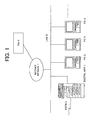
- Fig. 1 shows an example of a network configuration of a system including a digital MFP.
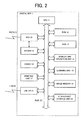
- Fig. 2 is a block diagram showing the hardware configuration of the digital MFP.
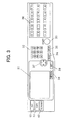
- Fig. 3 shows an example of a detailed structure of a display and operation unit.
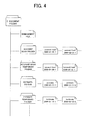
- Fig. 4 shows a file structure of an e-document storage unit.
- Fig. 5 shows an example of data stored in a management file.
- Fig. 6 shows an example of a scan execution screen.
- Fig. 7 shows an example of an e-document scan execution screen.
- Fig. 8 is a flowchart showing processes carried out when executing e-document scan.
- Fig. 9 shows an example of an e-document temporary scan execution screen.
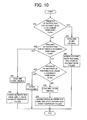
- Fig. 10 is a flowchart showing processes carried out when executing e-document temporary scan.
- Fig. 11 shows an example of a temporary e-document selection screen.
- Fig. 12 is a flowchart showing processes carried out when assigning a timestamp.
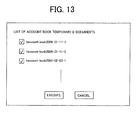
- Fig. 13 shows an example of a display screen displaying e-documents stored in an account book temporary folder.
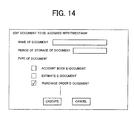
- Fig. 14 shows an example of an editing screen of a document to which a timestamp is to be assigned.
- FIG. 1 shows an example of a network configuration of a system including a digital MFP.
- Fig. 2 is a block diagram showing the hardware configuration of the digital MFP.
- reference numeral 1 denotes a digital MFP
- reference numerals 2, 3, 4, etc. respectively denote a Personal Computer (PC)
- reference numeral 5 denotes a Public Switched Telephone Network (PSTN)
- PSTN Public Switched Telephone Network
- 6 denotes a Local Area Network (LAN)
- 7 denotes an Internet network
- 8 denotes a TSA.
- the digital MFP 1 includes functions of a copy mode, a printer mode, and a facsimile mode, and also includes a mail transmitting function.
- the digital MFP 1 is connected to the PSTN 5 and the LAN 6.
- a plurality of PCs 2, 3, 4, etc. as terminal devices are connected to the LAN 6.
- the LAN 6 is also connected to the Internet network 7.
- the digital MFP 1 can transmit and receive mail via the Internet network 7.
- the TSA 8 is a time stamping authority.
- the TSA 8 receives a hash value of scanned data from the digital MFP 1 via the Internet network 7, the TSA 8 encodes the received hash value along with information of accurate time clocked by an electronic clock. Then, the TSA 8 returns the encoded hash value as a timestamp.
- the digital MFP 1 includes a Central Processing Unit (CPU) 11, a Read Only Memory (ROM) 12, a Random Access Memory (RAM) 13, a display and operation unit 14, a scanning unit 15, an image memory 16, a printing unit 17, a Coder-Decoder (CODEC) 18, a Modulator-Demodulator (MODEM) 19, a Network Control Unit (NCU) 20, a LAN interface (I/F) 21, and an e-document storage unit 22.
- CPU Central Processing Unit
- ROM Read Only Memory
- RAM Random Access Memory
- M display and operation unit 14
- scanning unit 15 an image memory 16
- printing unit 17 a Coder-Decoder (CODEC) 18, a Modulator-Demodulator (MODEM) 19
- NCU Network Control Unit
- I/F LAN interface
- e-document storage unit 22 Each of the units 11 to 22 is connected via a bus 23.
- the CPU 11 controls each of the hardware components of the digital MFP 1 via the bus 23.
- the CPU 11 executes various programs stored in the ROM 12.
- the ROM 12 previously stores various programs and operation messages or the like necessary for an operation of the digital MFP 1.
- the RAM 13 is formed of a Static RAM (SRAM) or the like.
- SRAM Static RAM
- the display and operation unit 14 includes a display unit, which displays an operation status of the digital MFP 1 and displays an operation screen for various functions, and a plurality of keys for operating the digital MFP 1. As shown in Fig. 3, the display and operation unit 14 includes a Liquid Crystal Display (LCD) display unit 31 as the display unit and a plurality of operation keys. Touch-screen switches are provided in the LCD display unit 31. By pressing an item displayed on the LCD display unit 31, it becomes possible to select a corresponding item or to execute a function.
- LCD Liquid Crystal Display
- the display and operation unit 14 includes a ten-key numeric pad 32, a start key 33, a reset key 34, a stop key 35, a plurality of one-touch dial keys 36, a cross key 37, a return key 38, a set key 39, a FAX switching key 40, a copy switching key 41, and a scanner switching key 42 or the like. Further, the LCD display unit 31 may substitute a portion or all of these operation keys.
- the scanning unit 15 includes an original placing table for an Auto Document Feeder (ADF) and/or a Flat Bed Scanner (FBS) or the like.
- the scanning unit 15 scans an original by a scanner using a Charge-Coupled Device (CCD) or the like, and outputs dot image data.
- the image memory 16 includes a Dynamic RAM (DRAM) or the like.
- the image memory 16 stores transmission image data, received image data, or image data scanned by the scanning unit 15.
- the printing unit 17 includes an electrophotographic printer device. The printing unit 17 prints out received data, copied original data, or print data transmitted from the remote PCs 2, 3, 4, etc.
- the CODEC 18 encodes and decodes according to a prescribed protocol. For transmitting image data scanned from an original, the CODEC 18 encodes the image data by the Modified Huffman (MH), the Modified Read (MR) or the Modified MR (MMR) scheme. The CODEC 18 decodes image data received from a remote terminal. The CODEC 18 also encodes and decodes according to the Tagged Image File Format (TIFF) or the like, which is an image format generally used as a file attachable to electronic mail.
- TIFF Tagged Image File Format
- the MODEM 19 is connected to the bus 23, and includes functions as a faxmodem capable of carrying out facsimile communication.
- the MODEM 19 is also connected to the NCU 20, which is also connected to the bus 23.
- the NCU 20 is hardware for closing and releasing an analog communication line.
- the NCU 20 connects the MODEM 19 to the PSTN 5 according to necessity.
- the LAN I/F 21 is connected to the LAN 6.
- the LAN I/F 21 receives a signal from the Internet network 7, and transmits a signal and/or data to the LAN 6.
- the LAN I/F 21 executes an interface processing such as a signal conversion and a protocol conversion.
- the e-document storage unit 22 is a storage unit which stores e-documents per document type.
- the e-document storage unit 22 includes a management file of e-documents, and a folder and a temporary folder for each of following documents: account book, estimate, memorandum, and/or purchase order, etc.
- Each document folder stores a scanned document assigned with a file name and a timestamp.
- the file name of the document folder includes a character string capable of identifying a document name, a date, and a consecutive number.
- Each temporary document folder stores a scanned document assigned with a file name including a character string capable of identifying a document name, a date, and a consecutive number.
- the management file stores a file name, a period of validity of the timestamp, and a period of storage of the data.
- the management file stores only the file name.
- the scanning unit 15 scans image data of an original, and the CODEC 18 compresses the scanned image data. Then, the image data is stored in the image memory 16. The compressed image data is retrieved from the image memory 16, and the MODEM 19 modulates the retrieved image data. Then, the image data is transmitted from the NCU 20 to a destination via the PSTN 5.
- the MODEM 19 demodulates the received image data, and the image data is stored in the image memory 16. Then, the CODEC 18 decodes the image data, and the printing unit 17 prints out the image data.
- the digital MFP 1 can scan a document and store the scanned document as an e-document or a temporary e-document as described above.
- a description will be made of processes when carrying out e-document scan.
- the LCD display unit 31 of the display and operation unit 14 displays an e-document scan execution screen illustrated in Fig. 7.
- This screen displays a selection screen for selecting a type of document to be executed with e-document scan, e.g. an account book e-document scan, an estimate e-document scan, and a purchase order e-document scan.
- the digital MFP 1 executes the e-document scan.
- Fig. 8 is a flowchart showing processes carried out by the CPU 11 when executing the e-document scan.
- the CPU 11 After selecting the e-document scan for one of the document types, when the "EXECUTE" button is pressed, the CPU 11 starts an e-document scan program shown in the flowchart of Fig. 8.
- the CPU 11 determines whether or not the user has instructed an account book e-document scan (step 101).
- image data of an original is scanned by the scanning unit 15, compressed by the CODEC 18, and stored in the image memory 16 (step 102).
- the CPU 11 calculates a hash value of the data stored in the image memory 16, and transmits the calculated hash value to the TSA 8 via the LAN I/F 21, the LAN 6 and the Internet network 7 (step 103).
- the CPU 11 determines whether or not a timestamp has been received from the TSA 8 (step 104).
- the CPU 11 creates an account book file name by "account book”, "date” and "consecutive number”. Then, the scanned data and the timestamp are stored in the account book folder of the e-document storage unit 22 under the created file name.
- the file name, the period of validity of the timestamp, and the period of storage of the e-document are stored in the management file (step 105). Further, a term of storage of the e-document can be designated for each document type, for example, ten years for account books, or five years for purchase orders. Therefore, the period of storage can be automatically decided according to a creation date of the e-document and the term of storage for the type of such e-document.
- the CPU 11 determines whether or not the user has instructed the estimate e-document scan (step 106).
- image data of the original is scanned and stored (step 107).
- the CPU 11 calculates a hash value of the scanned data, and transmits the hash value to the TSA 8 (step 108).
- the CPU 11 determines whether or not a timestamp has been received from the TSA 8 (step 109).
- the CPU 11 creates a file name by "estimate", "date” and "consecutive number”.
- the CPU 11 stores the scanned data and the timestamp under the created file name in the estimate folder of the e-document storage unit 22, and stores the file name, the period of validity of the timestamp, the period of storage of e-document in the management file (step 110).
- the CPU 11 determines whether or not the user has instructed the purchase order e-document scan (step 111).
- the CPU 11 determines that the user has instructed the purchase order e-document scan
- the image data of the original is scanned and stored (step 112).
- the CPU 11 calculates the hash value of the scanned data, and transmits the hash value to the TSA 8 (step 113).
- the CPU 11 determines whether or not a timestamp has been received from the TSA 8 (step 114).
- the CPU 11 creates a file name by "purchase order", "date” and "consecutive number”.
- the CPU 11 stores the scanned data and the timestamp under the created file name in the purchase order folder of the e-document storage unit 22.
- the CPU 11 also stores the file name, the period of validity of the timestamp, and the period of storage of the e-document in the management file (step 115).
- the CPU 11 determines at step 111 that the user has not instructed the purchase order e-document scan, the CPU 11 executes an e-document scan of other document type (step 116).
- the LCD display unit 31 of the display and operation unit 14 displays an e-document temporary scan execution screen shown in Fig. 9.
- This screen displays a selection screen for selecting a document type to be executed with the e-document temporary scan such as an account book e-document temporary scan, an estimate e-document temporary scan, and a purchase order e-document temporary scan.
- Fig. 10 is a flowchart showing processes carried out by the CPU 11 when executing the e-document temporary scan.
- the CPU 11 After the e-document temporary scan of either one of the document types is selected, when the "EXECUTE" button is pressed, the CPU 11 starts the e-document temporary scan program shown in the flowchart of Fig. 10.
- the CPU 11 determines whether or not the user has instructed the account book e-document temporary scan (step 201).
- the image data of the original is scanned by the scanning unit 15, compressed by the CODEC 18, and stored in the image memory 16 (step 202).
- the CPU 11 creates an account book file name by "taccount book”, "date” and “consecutive number”.
- the CPU 11 stores the scanned data under the created file name in the account book temporary folder of the e-document storage unit 22, and stores the file name in the management file (step 203).
- the CPU 11 determines whether or not the user has instructed an estimate e-document temporary scan (step 204).
- the CPU 11 determines that the user has instructed the estimate e-document temporary scan, in the same manner as described above, the image data of the original is scanned and stored (step 205). Then, the CPU 11 creates a file name including "testimate", "date", and "consecutive number". The scanned data is stored under the created file name in the estimate temporary folder of the e-document storage unit 22, and the file name is stored in the management file (step 206).
- the CPU 11 determines whether or not the user has instructed the purchase order e-document temporary scan (step 207).
- the CPU 11 determines that the user has instructed the purchase order e-document temporary scan, in the same manner as described above, the image data of the original is scanned and stored (step 208). Then, the CPU 11 creates a file name including "tpurchase order", "date", and "consecutive number". The scanned data is stored under the created file name in the purchase order temporary folder, and the file name is stored in the management file (step 209).
- the CPU 11 determines at step 207 that the user has not instructed the purchase order e-document temporary scan, the CPU 11 executes e-document temporary scan of other document type (step 210).
- the CPU 11 After either one of the temporary e-documents is pressed and selected, when the "EXECUTE" button is pressed, the CPU 11 starts a timestamp assigning program illustrated in the flowchart of Fig. 12.
- the LCD display unit 31 of the display and operation unit 14 displays the temporary e-document of the document type selected by the user (step 301).
- the LCD display unit 31 of the display and operation unit 14 displays account book temporary e-documents stored in the account book temporary folder of the e-document storage unit 22.
- a timestamp is assigned to the selected temporary e-document.
- the CPU 11 determines whether or not the "EXECUTE” button has been pressed in the screen illustrated in Fig. 13 (step 302). When the CPU 11 determines that the "EXECUTE” button has not been pressed, the CPU 11 determines whether or not a "CANCEL” button has been pressed (step 303). When the CPU 11 determines that the "CANCEL” button has not been pressed, the CPU 11 returns to step 302 and determines again whether or not the "EXECUTE” button has been pressed. When the CPU 11 determines that the "CANCEL” button has been pressed, the CPU 11 ends the program, and displays the temporary e-document selection screen illustrated in Fig. 11 on the LCD display unit 31 of the display and operation unit 14 again.
- the LCD display unit 31 of the display and operation unit 14 displays an editing screen for editing a document to be assigned with the timestamp shown in Fig. 14 (step 304).
- the editing screen displays an entry section for entering a name of a document to be assigned with a timestamp, an entry section for entering a period of storage of the document, and a selection section for selecting a document type. Therefore, any document name and any period of storage of the document may be entered. In addition, a document type may be changed.
- the CPU 11 determines whether or not the "EXECUTE” button has been pressed in the editing screen illustrated in Fig. 14 (step 305). When the CPU 11 determines that the "EXECUTE” button has not been pressed, the CPU 11 determines whether or not the "CANCEL” button has been pressed (step 306). When the CPU 11 determines that the "CANCEL” button has not been pressed, the CPU 11 returns to step 305, and determines again whether or not the "EXECUTE” button has been pressed. When the CPU 11 determines that the "CANCEL” button has been pressed, the CPU 11 ends the program, and in the same manner as described above, the LCD display unit 31 of the display and operation unit 14 displays again the temporary e-document selection screen shown in Fig. 11.
- the CPU 11 determines at step 305 that the "EXECUTE" button has been pressed, the CPU 11 calculates a hash value of the entire data of the temporary e-document selected in the temporary e-document selection screen of Fig. 13, and transmits the hash value to the TSA 8 (step 307).
- the CPU 11 determines whether or not the timestamp has been received from the TSA 8 (step 308).
- the entire data of the selected temporary e-document and the timestamp are stored under the file name entered from the editing screen of Fig. 14 in the e-document folder of the document type selected in the editing screen.
- the file name, the period of validity of the timestamp, and the period of the e-document are stored in the management file (step 309).
- a document not subject to be converted into an e-document is scanned under the same format as the e-document, and the data is stored without being assigned with a timestamp. Accordingly, when the data is required to be provided as an e-document at a later date, it is not necessary to take out a paper document and scan the document again. As a result, a number of paper documents to be stored can be reduced.
- e-documents to be assigned with a timestamp can be selected from e-documents stored without being assigned with a timestamp, and a timestamp can be assigned collectively to the selected e-documents. As a result, costs required for assigning the timestamp can be reduced.
- the editing screen for editing a document to be assigned with a timestamp is displayed to enable a document name, a period of storage of the document, and a document type to be designated.
- a file name can be created from "selected document type", for example, "purchase order", "date”, and "consecutive number”. Then, the document may be stored under the created file name in the e-document folder, and the period of storage may be entered automatically.
- a document type when executing the e-document temporary scan, a document type is selected and the temporary scan is executed.
- all documents may be stored in the same temporary folder as temporary e-documents.
- a document name may be created automatically from date and consecutive number.
- a file name is created from a character string capable of identifying a document name, date, and consecutive number when executing the e-document scan.
- a file name may be created from a character string capable of identifying a document name, and a consecutive number.
- the period of storage may be determined from the term of storage with a date when the document has been created as a reference date, and the period of storage may be entered manually.
Landscapes
- Engineering & Computer Science (AREA)
- Multimedia (AREA)
- Signal Processing (AREA)
- Automation & Control Theory (AREA)
- Facsimiles In General (AREA)
- Information Retrieval, Db Structures And Fs Structures Therefor (AREA)
Abstract
Description
- The present invention relates to an image scanning device with a time authentication requesting function. The device may form a part of a digital Multi Function Peripheral (MFP) or the like which assigns a timestamp to a document image scanned by a scanner and stores the document image assigned with the timestamp.
- Recently, a digital MFP including a copier function, a facsimile function, a printer function, and a scanner function or the like assigns a timestamp to a document image scanned by a scanner, and stores the document image as an e-document. That is, since digital data can be easily altered compared with a paper document, timestamp technology has been used. The timestamp is technology for certifying the time when an electronic document was fixed. The timestamp certifies from when the document has existed, and that the document has not been altered by third parties and also the creator himself from the time when the document was created.
- When adopting such timestamp technology, first, a device transmits a hash value of an electronic document to a Time Stamping Authority (TSA). The TSA encodes the hash value and information of correct time clocked by an electronic clock, and returns to the device as a timestamp. The device saves the received timestamp along with the electronic document.
- When verifying such an e-document, the device decodes the timestamp, and confirms time information of the timestamp. Then, the device compares the hash value of the electronic document, which has been separately calculated, with the hash value included in the timestamp. Accordingly, verification can be carried out as to whether or not the e-document had been altered. Further, the hash value is a fixed length value generated using a one-way function (hash function) that is irreversible from a given original text. The hash value is also known as a message digest, etc. Since it is extremely difficult to obtain the original text from the hash value and to create different documents having the same hash value, it is possible to confirm whether or not the original text is identical by comparing the hash values.
- As described above, the conventional digital MFP can store the scanned document along with the timestamp as an e-document. However, since costs are required for requesting the timestamp, a large amount of costs would be required to provide all documents in a form of e-documents. Meanwhile, when one wishes to destroy a paper document, although such a document may not be required to be converted into an e-document at that time, the document may be required to be converted into an e-document at a later date. Accordingly, the document cannot be destroyed after all, and a large volume of documents are required to be kept.
- In order to overcome the problems described above, preferred embodiments of the present invention provide an image scanning device with a time authentication requesting function which scans a document, not subject to be converted into an e-document, under the same format as an e-document and stores data without assigning a timestamp, to enable the stored data to be easily converted into an e-document later and to reduce costs required for the timestamp.
- According to the present invention, an image scanning device with a time authentication requesting function includes an image scanning unit and a control unit. The image scanning unit scans a document and generates an image signal. The control unit assigns a timestamp to the image signal generated by the image scanning unit, and stores the image signal assigned with the timestamp in a storage unit. The control unit includes a temporary storing function for storing image data in the storage unit without assigning the timestamp to the image data.
- According to a preferred feature of the invention, the control unit includes a function for assigning a timestamp by selecting image data, which is stored in the storage unit and not assigned with a timestamp.
- According to the above-described image scanning device with the time authentication requesting function, a document that is not subject to be converted into an e-document is scanned under the same format as the e-document, and such a scanned document is stored without being assigned with a timestamp. When the stored document is required to be provided as an e-document at a later date, it is not necessary to take out a paper document and to scan the paper document again. As a result, a number of paper documents to be stored can be reduced. Moreover, e-documents to be assigned with a timestamp may be selected from e-documents stored without being assigned with a timestamp, and a timestamp may be assigned collectively to the selected e-documents. As a result, costs required for assigning the timestamp can be reduced.
- Other features, elements, processes, steps, characteristics and advantages of the present invention will become more apparent from the following detailed description of preferred embodiments of the present invention with reference to the attached drawings.
- Fig. 1 shows an example of a network configuration of a system including a digital MFP.
- Fig. 2 is a block diagram showing the hardware configuration of the digital MFP.
- Fig. 3 shows an example of a detailed structure of a display and operation unit.
- Fig. 4 shows a file structure of an e-document storage unit.
- Fig. 5 shows an example of data stored in a management file.
- Fig. 6 shows an example of a scan execution screen.
- Fig. 7 shows an example of an e-document scan execution screen.
- Fig. 8 is a flowchart showing processes carried out when executing e-document scan.
- Fig. 9 shows an example of an e-document temporary scan execution screen.
- Fig. 10 is a flowchart showing processes carried out when executing e-document temporary scan.
- Fig. 11 shows an example of a temporary e-document selection screen.
- Fig. 12 is a flowchart showing processes carried out when assigning a timestamp.
- Fig. 13 shows an example of a display screen displaying e-documents stored in an account book temporary folder.
- Fig. 14 shows an example of an editing screen of a document to which a timestamp is to be assigned.
- A description will be made of an example of a digital MFP as an image scanning device with a time authentication requesting function according to a preferred embodiment of the present invention. Fig. 1 shows an example of a network configuration of a system including a digital MFP. Fig. 2 is a block diagram showing the hardware configuration of the digital MFP.
- In Fig. 1,
reference numeral 1 denotes a digital MFP,reference numerals reference numeral 5 denotes a Public Switched Telephone Network (PSTN), 6 denotes a Local Area Network (LAN), 7 denotes an Internet network, and 8 denotes a TSA. Thedigital MFP 1 includes functions of a copy mode, a printer mode, and a facsimile mode, and also includes a mail transmitting function. Thedigital MFP 1 is connected to thePSTN 5 and theLAN 6. A plurality ofPCs LAN 6. The LAN 6 is also connected to theInternet network 7. Thedigital MFP 1 can transmit and receive mail via theInternet network 7. The TSA 8 is a time stamping authority. When theTSA 8 receives a hash value of scanned data from thedigital MFP 1 via theInternet network 7, theTSA 8 encodes the received hash value along with information of accurate time clocked by an electronic clock. Then, theTSA 8 returns the encoded hash value as a timestamp. - As shown in Fig. 2, the
digital MFP 1 includes a Central Processing Unit (CPU) 11, a Read Only Memory (ROM) 12, a Random Access Memory (RAM) 13, a display andoperation unit 14, ascanning unit 15, animage memory 16, aprinting unit 17, a Coder-Decoder (CODEC) 18, a Modulator-Demodulator (MODEM) 19, a Network Control Unit (NCU) 20, a LAN interface (I/F) 21, and ane-document storage unit 22. Each of theunits 11 to 22 is connected via a bus 23. - The
CPU 11 controls each of the hardware components of thedigital MFP 1 via the bus 23. TheCPU 11 executes various programs stored in theROM 12. TheROM 12 previously stores various programs and operation messages or the like necessary for an operation of thedigital MFP 1. TheRAM 13 is formed of a Static RAM (SRAM) or the like. TheRAM 13 stores temporary data that is generated when a program is executed. - The display and
operation unit 14 includes a display unit, which displays an operation status of thedigital MFP 1 and displays an operation screen for various functions, and a plurality of keys for operating thedigital MFP 1. As shown in Fig. 3, the display andoperation unit 14 includes a Liquid Crystal Display (LCD)display unit 31 as the display unit and a plurality of operation keys. Touch-screen switches are provided in theLCD display unit 31. By pressing an item displayed on theLCD display unit 31, it becomes possible to select a corresponding item or to execute a function. As the operation keys, the display andoperation unit 14 includes a ten-keynumeric pad 32, astart key 33, areset key 34, astop key 35, a plurality of one-touch dial keys 36, a cross key 37, areturn key 38, aset key 39, aFAX switching key 40, acopy switching key 41, and ascanner switching key 42 or the like. Further, theLCD display unit 31 may substitute a portion or all of these operation keys. - The
scanning unit 15 includes an original placing table for an Auto Document Feeder (ADF) and/or a Flat Bed Scanner (FBS) or the like. Thescanning unit 15 scans an original by a scanner using a Charge-Coupled Device (CCD) or the like, and outputs dot image data. Theimage memory 16 includes a Dynamic RAM (DRAM) or the like. Theimage memory 16 stores transmission image data, received image data, or image data scanned by thescanning unit 15. Theprinting unit 17 includes an electrophotographic printer device. Theprinting unit 17 prints out received data, copied original data, or print data transmitted from theremote PCs - The
CODEC 18 encodes and decodes according to a prescribed protocol. For transmitting image data scanned from an original, theCODEC 18 encodes the image data by the Modified Huffman (MH), the Modified Read (MR) or the Modified MR (MMR) scheme. TheCODEC 18 decodes image data received from a remote terminal. TheCODEC 18 also encodes and decodes according to the Tagged Image File Format (TIFF) or the like, which is an image format generally used as a file attachable to electronic mail. - The
MODEM 19 is connected to the bus 23, and includes functions as a faxmodem capable of carrying out facsimile communication. TheMODEM 19 is also connected to theNCU 20, which is also connected to the bus 23. TheNCU 20 is hardware for closing and releasing an analog communication line. TheNCU 20 connects theMODEM 19 to thePSTN 5 according to necessity. The LAN I/F 21 is connected to theLAN 6. The LAN I/F 21 receives a signal from theInternet network 7, and transmits a signal and/or data to theLAN 6. The LAN I/F 21 executes an interface processing such as a signal conversion and a protocol conversion. - The
e-document storage unit 22 is a storage unit which stores e-documents per document type. As shown in Fig. 4, thee-document storage unit 22 includes a management file of e-documents, and a folder and a temporary folder for each of following documents: account book, estimate, memorandum, and/or purchase order, etc. Each document folder stores a scanned document assigned with a file name and a timestamp. Further, the file name of the document folder includes a character string capable of identifying a document name, a date, and a consecutive number. Each temporary document folder stores a scanned document assigned with a file name including a character string capable of identifying a document name, a date, and a consecutive number. As shown in Fig. 5, for the e-documents, the management file stores a file name, a period of validity of the timestamp, and a period of storage of the data. For the temporary e-documents, the management file stores only the file name. - When carrying out facsimile transmission, the
scanning unit 15 scans image data of an original, and theCODEC 18 compresses the scanned image data. Then, the image data is stored in theimage memory 16. The compressed image data is retrieved from theimage memory 16, and theMODEM 19 modulates the retrieved image data. Then, the image data is transmitted from theNCU 20 to a destination via thePSTN 5. When receiving facsimile, theMODEM 19 demodulates the received image data, and the image data is stored in theimage memory 16. Then, theCODEC 18 decodes the image data, and theprinting unit 17 prints out the image data. - The
digital MFP 1 can scan a document and store the scanned document as an e-document or a temporary e-document as described above. In the following, a description will be made of processes when carrying out e-document scan. When the user presses thescanner switching key 42 of the display andoperation unit 14, theLCD display unit 31 of the display andoperation unit 14 displays a scan execution screen illustrated in Fig. 6. This screen displays a selection screen for selecting either "e-document scan", "e-document temporary scan", "normal scan", or "assign timestamp". After either one of the functions is pressed, when an "EXECUTE" button is pressed, thedigital MFP 1 executes the selected function. - When the user selects an e-document scan in the scan execution screen illustrated in Fig. 6 and presses the "EXECUTE" button, the
LCD display unit 31 of the display andoperation unit 14 displays an e-document scan execution screen illustrated in Fig. 7. This screen displays a selection screen for selecting a type of document to be executed with e-document scan, e.g. an account book e-document scan, an estimate e-document scan, and a purchase order e-document scan. After pressing and selecting either one of the e-document scans and pressing the "EXECUTE" button, thedigital MFP 1 executes the e-document scan. - Fig. 8 is a flowchart showing processes carried out by the
CPU 11 when executing the e-document scan. After selecting the e-document scan for one of the document types, when the "EXECUTE" button is pressed, theCPU 11 starts an e-document scan program shown in the flowchart of Fig. 8. TheCPU 11 determines whether or not the user has instructed an account book e-document scan (step 101). When theCPU 11 determines that the user has instructed the account book e-document scan, image data of an original is scanned by thescanning unit 15, compressed by theCODEC 18, and stored in the image memory 16 (step 102). - Next, the
CPU 11 calculates a hash value of the data stored in theimage memory 16, and transmits the calculated hash value to theTSA 8 via the LAN I/F 21, theLAN 6 and the Internet network 7 (step 103). After transmitting hash value data to theTSA 8, theCPU 11 determines whether or not a timestamp has been received from the TSA 8 (step 104). When receiving the timestamp from theTSA 8, theCPU 11 creates an account book file name by "account book", "date" and "consecutive number". Then, the scanned data and the timestamp are stored in the account book folder of thee-document storage unit 22 under the created file name. In addition, the file name, the period of validity of the timestamp, and the period of storage of the e-document are stored in the management file (step 105). Further, a term of storage of the e-document can be designated for each document type, for example, ten years for account books, or five years for purchase orders. Therefore, the period of storage can be automatically decided according to a creation date of the e-document and the term of storage for the type of such e-document. - Meanwhile, when the
CPU 11 determines atstep 101 that the user has not instructed the account book e-document scan, theCPU 11 determines whether or not the user has instructed the estimate e-document scan (step 106). When theCPU 11 determines that the user has instructed the estimate e-document scan, image data of the original is scanned and stored (step 107). Then, theCPU 11 calculates a hash value of the scanned data, and transmits the hash value to the TSA 8 (step 108). Next, theCPU 11 determines whether or not a timestamp has been received from the TSA 8 (step 109). When receiving a timestamp from theTSA 8, theCPU 11 creates a file name by "estimate", "date" and "consecutive number". TheCPU 11 stores the scanned data and the timestamp under the created file name in the estimate folder of thee-document storage unit 22, and stores the file name, the period of validity of the timestamp, the period of storage of e-document in the management file (step 110). - When the
CPU 11 determines atstep 106 that the user has not instructed the estimate e-document scan, theCPU 11 determines whether or not the user has instructed the purchase order e-document scan (step 111). When theCPU 11 determines that the user has instructed the purchase order e-document scan, the image data of the original is scanned and stored (step 112). Then, theCPU 11 calculates the hash value of the scanned data, and transmits the hash value to the TSA 8 (step 113). - Next, the
CPU 11 determines whether or not a timestamp has been received from the TSA 8 (step 114). When receiving the timestamp from theTSA 8, theCPU 11 creates a file name by "purchase order", "date" and "consecutive number". TheCPU 11 stores the scanned data and the timestamp under the created file name in the purchase order folder of thee-document storage unit 22. TheCPU 11 also stores the file name, the period of validity of the timestamp, and the period of storage of the e-document in the management file (step 115). When theCPU 11 determines atstep 111 that the user has not instructed the purchase order e-document scan, theCPU 11 executes an e-document scan of other document type (step 116). - When the user selects the e-document temporary scan in the scan execution screen shown in Fig. 6 and presses the "EXECUTE" button, the
LCD display unit 31 of the display andoperation unit 14 displays an e-document temporary scan execution screen shown in Fig. 9. This screen displays a selection screen for selecting a document type to be executed with the e-document temporary scan such as an account book e-document temporary scan, an estimate e-document temporary scan, and a purchase order e-document temporary scan. After pressing and selecting either one of the e-document temporary scans, when the "EXECUTE" button is pressed, thedigital MFP 1 executes the e-document temporary scan. - Fig. 10 is a flowchart showing processes carried out by the
CPU 11 when executing the e-document temporary scan. After the e-document temporary scan of either one of the document types is selected, when the "EXECUTE" button is pressed, theCPU 11 starts the e-document temporary scan program shown in the flowchart of Fig. 10. TheCPU 11 determines whether or not the user has instructed the account book e-document temporary scan (step 201). When theCPU 11 determines that the user has instructed the account book e-document temporary scan, the image data of the original is scanned by thescanning unit 15, compressed by theCODEC 18, and stored in the image memory 16 (step 202). Then, theCPU 11 creates an account book file name by "taccount book", "date" and "consecutive number". TheCPU 11 stores the scanned data under the created file name in the account book temporary folder of thee-document storage unit 22, and stores the file name in the management file (step 203). - Meanwhile, when the
CPU 11 determines atstep 201 that the user has not instructed the account book e-document temporary scan, theCPU 11 determines whether or not the user has instructed an estimate e-document temporary scan (step 204). When theCPU 11 determines that the user has instructed the estimate e-document temporary scan, in the same manner as described above, the image data of the original is scanned and stored (step 205). Then, theCPU 11 creates a file name including "testimate", "date", and "consecutive number". The scanned data is stored under the created file name in the estimate temporary folder of thee-document storage unit 22, and the file name is stored in the management file (step 206). - When the
CPU 11 determines atstep 204 that the user has not instructed the estimate e-document temporary scan, theCPU 11 determines whether or not the user has instructed the purchase order e-document temporary scan (step 207). When theCPU 11 determines that the user has instructed the purchase order e-document temporary scan, in the same manner as described above, the image data of the original is scanned and stored (step 208). Then, theCPU 11 creates a file name including "tpurchase order", "date", and "consecutive number". The scanned data is stored under the created file name in the purchase order temporary folder, and the file name is stored in the management file (step 209). When theCPU 11 determines atstep 207 that the user has not instructed the purchase order e-document temporary scan, theCPU 11 executes e-document temporary scan of other document type (step 210). - Next, a description will be made of processes for selecting a necessary document from temporary e-documents, and assigning a timestamp. When the user selects "assign timestamp" in the scan execution screen illustrated in Fig. 6 and presses the "EXECUTE" button, the
LCD display unit 31 of the display andoperation unit 14 displays a temporary e-document selection screen illustrated in Fig. 11. This screen displays a selection screen for selecting a type of a temporary e-document to which a timestamp will be assigned, e.g., an account book temporary e-document, an estimate temporary e-document, and a purchase order temporary e-document. After either one of the temporary e-documents is pressed and selected, when the "EXECUTE" button is pressed, theCPU 11 starts a timestamp assigning program illustrated in the flowchart of Fig. 12. TheLCD display unit 31 of the display andoperation unit 14 displays the temporary e-document of the document type selected by the user (step 301). - For example, after the user selects the account book temporary e-document in the temporary e-document selection screen shown in Fig. 11, when the user presses the "EXECUTE" button, as shown in Fig. 13, the
LCD display unit 31 of the display andoperation unit 14 displays account book temporary e-documents stored in the account book temporary folder of thee-document storage unit 22. After the user selects a temporary e-document to which a timestamp is to be assigned, when the user presses the "EXECUTE" button, a timestamp is assigned to the selected temporary e-document. - After displaying the temporary e-document of the selected document type, the
CPU 11 determines whether or not the "EXECUTE" button has been pressed in the screen illustrated in Fig. 13 (step 302). When theCPU 11 determines that the "EXECUTE" button has not been pressed, theCPU 11 determines whether or not a "CANCEL" button has been pressed (step 303). When theCPU 11 determines that the "CANCEL" button has not been pressed, theCPU 11 returns to step 302 and determines again whether or not the "EXECUTE" button has been pressed. When theCPU 11 determines that the "CANCEL" button has been pressed, theCPU 11 ends the program, and displays the temporary e-document selection screen illustrated in Fig. 11 on theLCD display unit 31 of the display andoperation unit 14 again. - When the
CPU 11 determines atstep 302 that the "EXECUTE" button has been pressed, theLCD display unit 31 of the display andoperation unit 14 displays an editing screen for editing a document to be assigned with the timestamp shown in Fig. 14 (step 304). As shown in the drawing, the editing screen displays an entry section for entering a name of a document to be assigned with a timestamp, an entry section for entering a period of storage of the document, and a selection section for selecting a document type. Therefore, any document name and any period of storage of the document may be entered. In addition, a document type may be changed. - After displaying the editing screen, the
CPU 11 determines whether or not the "EXECUTE" button has been pressed in the editing screen illustrated in Fig. 14 (step 305). When theCPU 11 determines that the "EXECUTE" button has not been pressed, theCPU 11 determines whether or not the "CANCEL" button has been pressed (step 306). When theCPU 11 determines that the "CANCEL" button has not been pressed, theCPU 11 returns to step 305, and determines again whether or not the "EXECUTE" button has been pressed. When theCPU 11 determines that the "CANCEL" button has been pressed, theCPU 11 ends the program, and in the same manner as described above, theLCD display unit 31 of the display andoperation unit 14 displays again the temporary e-document selection screen shown in Fig. 11. - Meanwhile, when the
CPU 11 determines atstep 305 that the "EXECUTE" button has been pressed, theCPU 11 calculates a hash value of the entire data of the temporary e-document selected in the temporary e-document selection screen of Fig. 13, and transmits the hash value to the TSA 8 (step 307). Next, theCPU 11 determines whether or not the timestamp has been received from the TSA 8 (step 308). When receiving the timestamp from theTSA 8, the entire data of the selected temporary e-document and the timestamp are stored under the file name entered from the editing screen of Fig. 14 in the e-document folder of the document type selected in the editing screen. The file name, the period of validity of the timestamp, and the period of the e-document are stored in the management file (step 309). - As described above, a document not subject to be converted into an e-document is scanned under the same format as the e-document, and the data is stored without being assigned with a timestamp. Accordingly, when the data is required to be provided as an e-document at a later date, it is not necessary to take out a paper document and scan the document again. As a result, a number of paper documents to be stored can be reduced. In addition, e-documents to be assigned with a timestamp can be selected from e-documents stored without being assigned with a timestamp, and a timestamp can be assigned collectively to the selected e-documents. As a result, costs required for assigning the timestamp can be reduced.
- Further, in the above-described preferred embodiment, the editing screen for editing a document to be assigned with a timestamp is displayed to enable a document name, a period of storage of the document, and a document type to be designated. As another example, without displaying the editing screen, in the same manner as the e-document scan, a file name can be created from "selected document type", for example, "purchase order", "date", and "consecutive number". Then, the document may be stored under the created file name in the e-document folder, and the period of storage may be entered automatically.
- In the above-described preferred embodiment, when executing the e-document temporary scan, a document type is selected and the temporary scan is executed. As another example, without distinguishing document types, all documents may be stored in the same temporary folder as temporary e-documents. In this case, a document name may be created automatically from date and consecutive number. In the above-described preferred embodiment, a file name is created from a character string capable of identifying a document name, date, and consecutive number when executing the e-document scan. As another example, a file name may be created from a character string capable of identifying a document name, and a consecutive number. Instead of determining the period of storage by the date when the document has been scanned as a reference date, the period of storage may be determined from the term of storage with a date when the document has been created as a reference date, and the period of storage may be entered manually.
- While the present invention has been described with respect to preferred embodiments thereof, it will be apparent to those skilled in the art that the disclosed invention may be modified in numerous ways and may assume many embodiments other than those specifically set out and described above. Accordingly, the appended claims are intended to cover all modifications of the present invention that fall within the scope of the present invention.
Claims (2)
- An image scanning device with a time authentication requesting function comprising:an image scanning means for scanning a document and generating an image signal; anda control means for assigning a timestamp to the image signal generated by the image scanning means and storing the image signal assigned with the timestamp in a storing means;wherein the control means includes a temporary storing function for storing image data in the storing means without assigning the timestamp.
- An image scanning device according to claim 1, in which the control means includes a function for selecting image data, which is stored in the storing means and not assigned with the timestamp, and assigning the timestamp to the selected image data.
Applications Claiming Priority (1)
| Application Number | Priority Date | Filing Date | Title |
|---|---|---|---|
| JP2006038809A JP4315161B2 (en) | 2006-02-16 | 2006-02-16 | Image reader with time authentication request function |
Publications (1)
| Publication Number | Publication Date |
|---|---|
| EP1821515A1 true EP1821515A1 (en) | 2007-08-22 |
Family
ID=37807923
Family Applications (1)
| Application Number | Title | Priority Date | Filing Date |
|---|---|---|---|
| EP07100247A Withdrawn EP1821515A1 (en) | 2006-02-16 | 2007-01-08 | Image scanning device with time authentication requesting function |
Country Status (4)
| Country | Link |
|---|---|
| US (1) | US7791768B2 (en) |
| EP (1) | EP1821515A1 (en) |
| JP (1) | JP4315161B2 (en) |
| CN (1) | CN101022492A (en) |
Families Citing this family (3)
| Publication number | Priority date | Publication date | Assignee | Title |
|---|---|---|---|---|
| JP2007214720A (en) * | 2006-02-08 | 2007-08-23 | Murata Mach Ltd | Image reader having time authentication request function |
| JP2007243574A (en) * | 2006-03-08 | 2007-09-20 | Konica Minolta Business Technologies Inc | Time stamp acquisition device, time stamp acquisition method, and time stamp acquisition program |
| US9380050B2 (en) | 2014-06-20 | 2016-06-28 | Xerox Corporation | Scan image authentication |
Citations (11)
| Publication number | Priority date | Publication date | Assignee | Title |
|---|---|---|---|---|
| EP0516898A1 (en) * | 1990-04-16 | 1992-12-09 | Pitney Bowes Inc. | Electronic notary |
| GB2297856A (en) * | 1995-02-08 | 1996-08-14 | Cryptomathic As | Electronic negotiable documents |
| EP0940945A2 (en) * | 1998-03-06 | 1999-09-08 | AT&T Corp. | A method and apparatus for certification and safe storage of electronic documents |
| WO2001003363A1 (en) * | 1999-07-02 | 2001-01-11 | Time Certain, Llc | System and methods for proving dates in digital data files |
| US6185576B1 (en) * | 1996-09-23 | 2001-02-06 | Mcintosh Lowrie | Defining a uniform subject classification system incorporating document management/records retention functions |
| US20030028495A1 (en) * | 2001-08-06 | 2003-02-06 | Pallante Joseph T. | Trusted third party services system and method |
| EP1283485A1 (en) * | 2001-08-08 | 2003-02-12 | Océ-Technologies B.V. | Entry of physical documents in a digital back-end system |
| EP1330107A1 (en) * | 2000-09-22 | 2003-07-23 | Ricoh Company, Ltd. | Document acquiring device, document filing system, and electronic document notarizing system |
| US20040093493A1 (en) * | 1995-01-17 | 2004-05-13 | Bisbee Stephen F. | System and method for electronic transmission, storage and retrieval of authenticated documents |
| US20050050577A1 (en) * | 1999-03-30 | 2005-03-03 | Paul Westbrook | System for remotely controlling client recording and storage behavior |
| EP1524839A2 (en) * | 2003-10-17 | 2005-04-20 | Canon Kabushiki Kaisha | Data processing device and data storage device |
Family Cites Families (12)
| Publication number | Priority date | Publication date | Assignee | Title |
|---|---|---|---|---|
| US6532039B2 (en) * | 1997-09-17 | 2003-03-11 | Flashpoint Technology, Inc. | Method and system for digital image stamping |
| JP4631132B2 (en) | 2000-06-05 | 2011-02-16 | 三菱電機株式会社 | Digital signature validity period extension system, digital signature validity period extension device, and digital signature validity period extension method |
| US6941790B2 (en) | 2002-07-26 | 2005-09-13 | Humdinger, Inc. | Ram guidance system |
| JP2004080611A (en) | 2002-08-21 | 2004-03-11 | Seiko Instruments Inc | Electronic data long-term storage system |
| JP4078284B2 (en) | 2003-10-17 | 2008-04-23 | キヤノン株式会社 | Image processing apparatus and image processing method |
| JP4492100B2 (en) | 2003-11-14 | 2010-06-30 | ソニー株式会社 | Image signal processing apparatus and processing method |
| JP2005223758A (en) * | 2004-02-06 | 2005-08-18 | Canon Inc | Image processing apparatus, control method therefor, computer program, and recording medium |
| JP2005267083A (en) | 2004-03-17 | 2005-09-29 | Fuji Xerox Co Ltd | Documents management method and device |
| US7532256B2 (en) * | 2005-01-25 | 2009-05-12 | Teresis Media Management | Methods and apparatus for detecting scenes in a video medium |
| US8228372B2 (en) * | 2006-01-06 | 2012-07-24 | Agile Sports Technologies, Inc. | Digital video editing system |
| US20080165250A1 (en) * | 2007-01-08 | 2008-07-10 | Jeff Kirk Ekdahl | Vehicle security surveillance system |
| US7877706B2 (en) * | 2007-01-12 | 2011-01-25 | International Business Machines Corporation | Controlling a document based on user behavioral signals detected from a 3D captured image stream |
-
2006
- 2006-02-16 JP JP2006038809A patent/JP4315161B2/en not_active Expired - Fee Related
-
2007
- 2007-01-08 EP EP07100247A patent/EP1821515A1/en not_active Withdrawn
- 2007-02-07 US US11/703,151 patent/US7791768B2/en not_active Expired - Fee Related
- 2007-02-13 CN CNA2007100057480A patent/CN101022492A/en active Pending
Patent Citations (11)
| Publication number | Priority date | Publication date | Assignee | Title |
|---|---|---|---|---|
| EP0516898A1 (en) * | 1990-04-16 | 1992-12-09 | Pitney Bowes Inc. | Electronic notary |
| US20040093493A1 (en) * | 1995-01-17 | 2004-05-13 | Bisbee Stephen F. | System and method for electronic transmission, storage and retrieval of authenticated documents |
| GB2297856A (en) * | 1995-02-08 | 1996-08-14 | Cryptomathic As | Electronic negotiable documents |
| US6185576B1 (en) * | 1996-09-23 | 2001-02-06 | Mcintosh Lowrie | Defining a uniform subject classification system incorporating document management/records retention functions |
| EP0940945A2 (en) * | 1998-03-06 | 1999-09-08 | AT&T Corp. | A method and apparatus for certification and safe storage of electronic documents |
| US20050050577A1 (en) * | 1999-03-30 | 2005-03-03 | Paul Westbrook | System for remotely controlling client recording and storage behavior |
| WO2001003363A1 (en) * | 1999-07-02 | 2001-01-11 | Time Certain, Llc | System and methods for proving dates in digital data files |
| EP1330107A1 (en) * | 2000-09-22 | 2003-07-23 | Ricoh Company, Ltd. | Document acquiring device, document filing system, and electronic document notarizing system |
| US20030028495A1 (en) * | 2001-08-06 | 2003-02-06 | Pallante Joseph T. | Trusted third party services system and method |
| EP1283485A1 (en) * | 2001-08-08 | 2003-02-12 | Océ-Technologies B.V. | Entry of physical documents in a digital back-end system |
| EP1524839A2 (en) * | 2003-10-17 | 2005-04-20 | Canon Kabushiki Kaisha | Data processing device and data storage device |
Non-Patent Citations (1)
| Title |
|---|
| ADAMS(ENTRUST TECHNOLOGIES) P CAIN (BBN) D PINKAS (BULL) R ZUCCHERATO(ENTRUST TECHNOLOGIES) C: "Internet X.509 Public Key Infrastructure Time Stamp Protocol (TSP)", IETF STANDARD-WORKING-DRAFT, INTERNET ENGINEERING TASK FORCE, IETF, CH, vol. pkix, no. 4, October 1999 (1999-10-01), XP015025330, ISSN: 0000-0004 * |
Also Published As
| Publication number | Publication date |
|---|---|
| JP2007221405A (en) | 2007-08-30 |
| JP4315161B2 (en) | 2009-08-19 |
| US20070188829A1 (en) | 2007-08-16 |
| CN101022492A (en) | 2007-08-22 |
| US7791768B2 (en) | 2010-09-07 |
Similar Documents
| Publication | Publication Date | Title |
|---|---|---|
| EP1841128B1 (en) | Communication terminal device with timestamp function | |
| EP1841127A1 (en) | Server device with certificate revocation list acquiring function | |
| EP1841126A2 (en) | Communication device with revocation list acquiring function | |
| US7948656B2 (en) | Image processing apparatus | |
| US7791768B2 (en) | Image scanning device with time authentication requesting function | |
| JP2009182909A (en) | Image information forming apparatus | |
| US20070188822A1 (en) | Image scanning device with time authentication requesting function | |
| EP1821516A1 (en) | Communication device with time authentication requesting function | |
| JP3988752B2 (en) | Network MFP | |
| JP2007214715A (en) | Image reader having time authentication request function | |
| JP2011176832A (en) | Image reading apparatus | |
| HK1107624B (en) | Image scanning device with time authentication requesting function | |
| HK1108255A (en) | Image scanning device with time authentication requesting function | |
| JP2007043257A (en) | Communication terminal device | |
| JP2007214716A (en) | Communication device having time authentication request function | |
| JP2007214720A (en) | Image reader having time authentication request function | |
| JP2007219778A (en) | Document processor | |
| HK1108242A (en) | Communication device with time authentication requesting function | |
| JP4702378B2 (en) | Image processing device | |
| HK1109284A (en) | Communication terminal device with timestamp function | |
| JP2007074109A (en) | Communication terminal device | |
| JP2008005179A (en) | Manuscript reader and recorder | |
| JP2004201182A (en) | Communication device | |
| JP2007043253A (en) | Communication terminal device | |
| JP2005323126A (en) | Communication terminal equipment |
Legal Events
| Date | Code | Title | Description |
|---|---|---|---|
| PUAI | Public reference made under article 153(3) epc to a published international application that has entered the european phase |
Free format text: ORIGINAL CODE: 0009012 |
|
| AK | Designated contracting states |
Kind code of ref document: A1 Designated state(s): AT BE BG CH CY CZ DE DK EE ES FI FR GB GR HU IE IS IT LI LT LU LV MC NL PL PT RO SE SI SK TR |
|
| AX | Request for extension of the european patent |
Extension state: AL BA HR MK YU |
|
| 17P | Request for examination filed |
Effective date: 20070912 |
|
| 17Q | First examination report despatched |
Effective date: 20071214 |
|
| AKX | Designation fees paid |
Designated state(s): DE GB |
|
| STAA | Information on the status of an ep patent application or granted ep patent |
Free format text: STATUS: THE APPLICATION HAS BEEN WITHDRAWN |
|
| 18W | Application withdrawn |
Effective date: 20151124 |