EP1560125A2 - Automatic document layout - Google Patents
Automatic document layout Download PDFInfo
- Publication number
- EP1560125A2 EP1560125A2 EP05250448A EP05250448A EP1560125A2 EP 1560125 A2 EP1560125 A2 EP 1560125A2 EP 05250448 A EP05250448 A EP 05250448A EP 05250448 A EP05250448 A EP 05250448A EP 1560125 A2 EP1560125 A2 EP 1560125A2
- Authority
- EP
- European Patent Office
- Prior art keywords
- container
- priority order
- region
- size
- information
- Prior art date
- Legal status (The legal status is an assumption and is not a legal conclusion. Google has not performed a legal analysis and makes no representation as to the accuracy of the status listed.)
- Withdrawn
Links
Images








Classifications
-
- G—PHYSICS
- G06—COMPUTING OR CALCULATING; COUNTING
- G06F—ELECTRIC DIGITAL DATA PROCESSING
- G06F40/00—Handling natural language data
- G06F40/10—Text processing
- G06F40/103—Formatting, i.e. changing of presentation of documents
Definitions
- the present invention relates to a document processing apparatus which has an automatic layout function of laying out the fields of records registered in, e.g., a database at predetermined positions to complete a document.
- the one-to-one marketing is a kind of database marketing.
- Personal attribute information such as the age, sex, hobby, taste, and purchase log of each customer is stored as a database.
- the contents of the information are analyzed, and a proposal that meets customer's needs is presented.
- a typical method is variable print.
- DTP DeskTop Publishing
- variable print systems have been developed, which customize and output a document for each customer. Such a system is required to optimally lay out and display contents in information quantity that changes for each customer.
- containers also called field regions in a document form
- a database and the containers are associated with each other to achieve layout display.
- each container serving as a partial display region in which a text or image is to be pasted has a fixed size. For this reason, when data in the database is inserted in the container, and the data size is larger than the container size, text overlap or image clipping occurs. If the data size is smaller than the container size, a space is formed in the container. In either case, optimum layout display corresponding to the information amount of a text or image to be displayed cannot be implemented.
- An automatic layout system can flexibly set the container size of a text or image. Some automatic layout systems can set a variable container size and increase the container size in accordance with the amount of data to be inserted. In another technique, if text data larger than a fixed container size is inserted, the font size of the text is reduced to display the entire text in the container.
- the layout design apparatus described in the patent document 1 manages the priority orders of layout materials.
- a layout is determined by laying out materials in accordance with the priority order.
- the apparatus only determines the layout order of unit materials. Since the material with lowest priority is always laid out in a narrow region, the layout desired by the user cannot be obtained.
- the priority order is determined by the type of material. For this reason, when the layout is calculated automatically on the basis of the size of data in the database, the user cannot specifically set how to change the size of each container. For example, assume that two variable containers A and B are present, and data from a database are inserted in them.
- the mechanism described in patent reference 1 determines the layout on the basis of the priority order set by the type of material. If the priority order is set in order of image, graphic, and text data, the size and position of the container A which receives, e.g., image data are determined first. Then, the size and position of the container B which receives text data are determined.
- the automatic layout system of patent reference 1 determines the predetermined priority order on the basis of the type of content. Even when a content which should have a greater appeal than remaining contents independently of the content type is inserted in a container, the size of the container is determined in consideration of the types of remaining contents. That is, each container cannot preferentially be laid out independently.
- the present invention has been made in consideration of the above-described prior art, and has as an aspect to provide a document processing apparatus which can increase the degree of freedom of data layout by giving a priority order to each region where data is laid out on a template.
- Another aspect of the present invention provides a document processing apparatus which can increase the degree of freedom of data layout by dynamically laying out each region where data is laid out on a template depending on whether a priority order is set for each region or not.
- the present invention provides a document processing apparatus capable of changing a layout of a document dynamically in accordance with data to be laid out in the document, comprising:
- the degree of freedom of data layout can be increased by giving a priority order to each region where data is laid out on a template.
- This embodiment is directed to computer software which causes a computer to implement a so-called variable printing function.
- This function creates a document by laying out records in a database in accordance with containers (partial regions in which data is to be inserted: also referred to as field regions) defined on a document template (also simply referred to as a template).
- This embodiment is particularly directed to computer software which causes a computer to implement an automatic layout system having an automatic layout function (or a document processing apparatus having this function) capable of changing the size of a container in accordance with the size of its content.
- a computer in which this software is loaded as an executable program functions as a document processing apparatus.
- the container size of data is changed on the basis of the data size in laying out the data in accordance with the template.
- data is preferentially inserted in a container having a high priority order, and the container size is changed in accordance with the data size.
- the size of a container having a low priority order is changed without any influence on the container with the high priority order such that a predetermined distance defined by a link between the containers is maintained.
- Fig. 1A shows a system 100 which prints a variable data document.
- a method to be described in this specification is practiced by causing a general-purpose computer module 101 (to be described in detail with reference to Fig. 1B) to execute a predetermined program.
- the process to be described with reference to Fig. 1A is executed in the entire or part of software like a layout editing application program 121 which is executed in the computer module 101 and becomes executable on the system 100.
- the step of layout editing or printing is executed in accordance with an instruction of software executed by the computer 101 serving as a document processing apparatus of the present invention.
- the software is stored in a computer-readable medium including; e.g., a storage device to be described below.
- the software is loaded from the computer-readable medium to the computer and executed by the computer 101.
- a computer-readable medium which has the software or a computer program recorded on a medium is a computer program product.
- the computer program product When the computer program product is used in a computer, the computer functions as an apparatus capable of executing layout editing or variable data print of a document.
- the computer module 101 is connected to an input device such as a keyboard 132 or a pointing device like a mouse 133 and an output device including a display device 144 and a local printer 145 depending on the situation.
- An input/output interface 138 connects the computer module 101 to another computer apparatus in the system 100 through a network connection 107.
- Typical examples of the network connection 107 are a local area network (LAN) and wide area network (WAN).
- the computer module 101 generally includes at least one processor unit 135, a memory unit 136 including, e.g., a semiconductor random access memory (RAM) or read-only memory (ROM), an input/output (I/O) interface including a video interface 137, and an I/O interface 143 for the keyboard 132 and mouse 133.
- processor unit 135 e.g., a central processing unit (CPU) or a central processing unit (CPU) circuitry
- a memory unit 136 including, e.g., a semiconductor random access memory (RAM) or read-only memory (ROM), an input/output (I/O) interface including a video interface 137, and an I/O interface 143 for the keyboard 132 and mouse 133.
- RAM semiconductor random access memory
- ROM read-only memory
- I/O interface including a video interface 137
- I/O interface 143 for the keyboard 132 and mouse 133.
- a storage device 139 generally includes a hard disk drive 140 and flexible disk drive 141. Although not illustrated in Fig. 1B, a magnetic tape drive can also be used.
- a CD-ROM drive 142 is provided as a nonvolatile data source.
- the computer module 101 uses the constituent elements (135 to 143) included in the computer module 101, which communicate through an interconnection bus 134, by an operation system such as GNU/LINUX or Microsoft Windows (registered trademark) or by a method by the conventional operation mode of a computer system.
- Examples of a computer having the arrangement shown in Fig. 1B are an IBM-compatible PC or Sparcstation available from SUN, or a computer system including them.
- the layout application program 121 shown in Fig. 1A is normally resident in the hard disk drive 140 shown in Fig. 1B and loaded, executed, and controlled by the processor 135.
- the application program 121 is encoded on a CD-ROM or flexible disk, loaded through the corresponding flexible disk drive 141 or CD-ROM drive 142, and provided to the user.
- the application program 121 may be loaded by the user from the network connection 107.
- the software can also be loaded in the computer module 101 from another computer-readable medium having an appropriate size, including a magnetic tape, ROM, integrated circuit, magnetooptical disk, wireless communication or infrared communication between the computer module 101 and another device, a computer-readable card such as a PCMCIA card, email communication, and the Internet or an intranet having recorded information on a WEB site.
- another computer-readable medium having an appropriate size, including a magnetic tape, ROM, integrated circuit, magnetooptical disk, wireless communication or infrared communication between the computer module 101 and another device, a computer-readable card such as a PCMCIA card, email communication, and the Internet or an intranet having recorded information on a WEB site.
- the layout editing application 121 instructs to execute variable data printing (VDP) and includes two software components.
- the first component is a layout engine 105. This is a software component to calculate the positions of rectangles and lines which form containers on the basis of constraints and sizes given by rectangular containers.
- the layout engine 105 operates as an application to determine the size and position of each partial region (container) and outputs drawing information to a printer driver (not shown), the printer driver executes image drawing processing of a variable data document and generates print data.
- a user interface 103 as the second component provides a mechanism which causes a user to create a document template and associates the data source with a container in the document template.
- the user interface 103 and layout engine 105 communicate with each other through a communication channel 123.
- the data source for document generation is a general database 119 on a database server 117 formed by another computer which is generally making the database application run.
- the host computer 101 communicates with the database server 117 through the network connection 107.
- the layout editing application 121 generates a document template to be stored in the host computer 101 or a file server 115 formed by another computer.
- the layout editing application 121 also generates a document containing a document template merged with data.
- a print server 109 is a computer to provide a network function to a printer which is not connected directly to the network.
- the print server 109 and printer 113 are connected through a general communication channel 111.
- Fig. 2 shows an arrangement which separates a layout engine 255 from the arrangement shown in Fig. 1A and causes an engine server 227 to execute the layout engine.
- the engine server 227 is a general computer.
- a document template stored in the file server 115 can be merged with data stored in the database 119 to cause the layout engine 255 to generate a document for printing or another purpose. This operation is requested through the user interface 103 or requested to print only a specific record.
- the user interface 103 includes a user interface formed by an application window 301 displayed on the video display 144 at the time of operation.
- the application window 301 is characterized by a menu bar 302 and tool bar 303 which can be set in a non-display state or moved to various positions on the screen, a work area 306 whose position can be moved by the position and operation of the mouse 133, an optional palette 311, and a cursor/pointer device 313.
- the menu bar 302 as a known technique has a number of menu items 304 extended under the layer of menu options.
- the tool bar 303 has a number of tool buttons and widgets 305 which can be set in a non-display state or display state by a special mode of the application.
- An optional ruler 308 is used to indicate the position of a pointer, page, line, margin guide, layout frame (container), or object in the work area.
- the palette 311 is used to access an additional function such as a variable data library.
- the palette 311 has a window control 312 to move, resize, or close it.
- the palette 311 can optionally be displayed on the foreground of the work area or hidden behind an object.
- the palette 311 can be displayed only within the application window 301 or can partially or wholly be displayed outside the application window 301.
- the tool bar 303 has at least following user-selectable "buttons”.
- buttons are mounted as tool chips of icons which change in accordance with the operation situation, as is well known.
- a basic layout can be determined.
- the basic layout is a layout as a base of variable data print.
- containers in the basic layout are fixed containers, all record print results have the same layout.
- containers in the basic layout are variable containers (to be described later)
- the size or position of each container varies within the constraint range (to be described later) in accordance with the amount or size of data loaded for each record.
- the document template created by the layout editing application 121 is strictly used to determine the basic layout.
- the final layout of a printed product is adjusted in accordance with loaded data.
- the work area 306 is used to display and edit the design of the document template. It allows the user to design the outline of a printed document as preprocessing and understand how the merged document changes on the basis of the amount or size of variable data.
- an external data source e.g., a record of a database
- a variable text or image is displayed in each container so that a preview of the current document can be obtained.
- Objects serving as visual keys to express the document structure and variable data containers are always displayed when the cursor is moved onto a container, or a container is selected.
- the work area 306 is characterized by a scroll bar 307, the optional ruler 308, and a document template 309.
- the document template 309 can indicate the presence of a plurality of pages.
- the page size of a given document template is designated by the user by a known technique. For example, "Page Setup” is selected from “File” of the menu to display a dialogue to set the page size. The page size designated there by the user is reflected. The actual number of pages of each document can change depending on the variable data. When variable data cannot be fitted in one page, and the basic layout has no constraint to fit the containers in a page having a predetermined paper size, an additional page is automatically created.
- the layout is determined dynamically for each record.
- a border in each page is a page margin 310 representing the maximum width of an object printable on the page.
- the page margin 310 can be defined by the user.
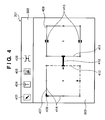
- Fig. 4 shows examples of objects which can be displayed on the document template 309 of one page.
- the objects include a plurality of containers 407 and 408, an arbitrarily applicable anchor icon 409, unfixed sides 410, a link 412, and sliders 413.
- the anchor icon 409 can be set at a corner or side of the rectangle of a container or the center of a container. When the anchor icon 409 is set, the position of the set point is fixed. That is, in the example shown in Fig. 4, the anchor icon 409 is set at the upper left corner of the container 407.
- variable data is inserted in the container 407, and the image size or text size of the variable data is large, the container can be enlarged to the right and lower sides.
- the container When the anchor icon 409 is set on a side, the side is fixed.
- the container can be enlarged in the directions of the three remaining sides.
- the anchor icon 409 When the anchor icon 409 is set at the center of a container, the central position of the container is fixed.
- the container can be enlarged in four directions without changing the central position of the rectangle of the container.
- the link 412 (to be described later in detail) indicates that the containers 407 and 408 are associated with each other.
- the link 412 indicates that the container 408 can be moved to the right while maintaining the length (the range can be designated) set for the link.
- the sliders 413 indicate that the container can be moved in parallel to the sides on which the sliders are set.
- a container is a space (called a partial region) where a fixed or variable text or image is inserted from a variable data file to the document template for each record and drawn.
- a container is laid out together with other containers and objects. Movement, size adjustment, and re-creation of the container are done by using the pointer 313 by operating the mouse 133, as shown in the user interface window shown in Fig. 3 or 4.
- a container has an aggregate of settings, visual expression, and interaction and editing operation.
- the definition of a container will be described below.
- a container has constraints to control the manner a content to be displayed or printed in each document is fitted in the container. These constraints are used as a principal means for causing the user to control a number of documents by one document template.
- An example of the constraint is "the maximum height of the content of this container is 4 inches”.
- Another example of the constraint is "the left edge of the content of the container must be displayed at the same horizontal position in each document”.
- a content place holder which designates the layout of a fixed content such that, e.g., an image has a defined position on a page is well-known in the digital print technique.
- a container has a position and size which can be edited and displayed by a known technique.
- the user can designate the sizes and positions of the contents of a document by designating the positions, sizes, and constraints of containers. Since a plurality of document are generated from one document template, the user interface needs to be used to designate and display a number of possible settings and constraints of containers.
- the sides of one container define the virtual border of a content associated with the container displayed in the document. More specifically, the left side of a container corresponds to the left edge of layout of the content associated with the container in all documents to which the same template is applied. Similarly, the height of a container can be understood as a constraint of the height of a content associated with the container in a document generated by applying the same template. In this specification, this discrimination will be clarified in a description of the side or size of a container by referring to the user interface 103.
- a term opposite to "fixed” is "variable” which indicates that a side, axis, corner, intermediate position, or a document constraint can change between documents (between records).
- the layout is expected to dynamically change depending on the size or amount of variable data.
- the user may want that the size or position of a specific container is fixed, or the four corners of a container at a corner of the page are fixed.
- the layout editing application 121 can appropriately set, for each container (partial region), whether to fix or change a side, axis, corner, or intermediate position.
- the user can create a desired basic layout in determining the basic layout of a document template 180.
- the procedures for creating a document to be variable-printed can be divided into two phases, i.e., template creation processing (layout mode) for creating a template and a document creation processing (processing for displaying a preview of a document will particularly be called a preview mode) for creating a document by inserting contents in the created template.
- template creation processing display mode
- document creation processing processing for displaying a preview of a document will particularly be called a preview mode
- the layout mode will be described.
- Containers are classified into two types: text container and image container.
- a text container has a text and an embedded image.
- An image container has only an image.
- a new text container or image container is created on the document template 309 by clicking o the text container tool 404 or image container tool 405 by the mouse 133 and dragging a rectangle onto the template 309.
- a container can easily be created by activating the appropriate tool 404 or 405 and clicking the mouse on the document template 309.
- a container having a default size is inserted.
- a dialogue box or prompt is displayed to input the size of the new container.
- a container can also automatically be created and laid out by a schema defined or calculated in advance.
- the container property dialogue is displayed so that constraints for the container can be set.
- the container property dialogue UI corresponding to a partial region setting means
- various kinds of constraints described above can be set.
- the size (width and height) and position of the container can be set.
- the basic pattern (basic size and reference position) of the container is set.
- the maximum container size (width and height) and the minimum container size (width and height) can be set.
- the states of the sides of a container created in the document template are preferably graphically displayed on the user interface, as shown in Fig. 4.
- the states of the sides are indicated by common expression, the number of types of objects corresponding to states can further be reduced.
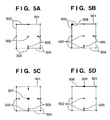
- Figs. 5A to 5D are views showing display examples of a container.
- the layout editing application 121 expresses a side by a solid line 503 or dotted line 504.
- a container has anchors (line, shape, and icon indicated by objects 506, 507, and 509 drawn near the sides), handles (control points drawn on or near the sides or shapes for movement and correction) 502, sliders (short parallel lines drawn on both sides of a side, 403 in Fig. 4), enlarge/reduce (arrow) icons 505, and colors as characteristic features.
- Anchors are displayed at fixed points defined by the rules 6, 7, and 8.
- Sliders are displayed on fixed sides.
- Handles are displayed on remaining sides.
- variable side i.e., a movable side
- dynamic correction processing is performed in which a content is merged with a document template, and a document is displayed on the user interface.
- buttons and sides are drawn or not depending on which tool or container is selected, highlighted, or activated.
- the sides of a container and icons are displayed to design the document template and not drawn on a printed product to which the created document template is applied.
- neither the width nor height of the container 501 is fixed.
- the fixed sides 503 are expressed by solid lines.
- the variable sides 504 are expressed by dotted lines.
- a dotted line indicates that the side can be changed in accordance with the size of a content of the container.
- the enlarge/reduce icons 505 are indicators representing that the adjacent sides 504 can be changed as another container associated by a link changes its size or moves.
- both the width and height of the container 501 are variable.
- the anchor icon 506 indicates that the two crossing sides 503 are fixed.
- the container 501 can extend equally from the point indicated by the anchor icon 507.
- the container 501 can change both the width and height. In enlargement/reduction, the layout is adjusted such that the anchor icon 507 is always located at the central point of the container 501.
- both the width and height of the container 501 are variable except that an upper side 508 is fixed.
- the anchor icon 509 displayed at the center of the upper side 508 indicates that the left and right sides of the container can move about the central axis (vertical axis) which passes through the icon 509 and is drawn vertically.
- Fig. 19 shows an example of data of a document template (to be referred to as template data).
- template data 1901 is stored in the memory unit 136 or hard disk 140.
- the template data contains the following elements.
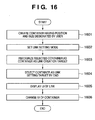
- Fig. 16 is a flowchart showing a link setting method by the layout editing application 121.
- Figs. 6A to 6C show examples of a UI. A method of setting a link between containers will be described below with reference to Figs. 6A to 6C and 16.
- the layout editing application 121 creates containers (at least two containers) to set a link in accordance with an operation instruction from the user (step 1601).
- the link tool button 406 shown in Fig. 4 is selected (step 1602).
- Figs. 6A to 6C show examples of the user interface when two containers are created, the link tool is selected, and the operation of setting a link is executed. Figs. 6A to 6C will be described sequentially.
- Sides 0601 and 0602 shown in Fig. 6A are fixed sides which are the same as the sides 407 and 409 in Fig. 4 described above.
- Anchors 0603 and 0604 are the same as the anchor 409.
- the user selects one container as a link setting target by clicking on it (step 1603).
- the mouse pointer is moved to the other container, and the mouse is clicked on it (step 1604).
- a line 0606 shown in Fig. 6B indicates a line which connects the first click point in Fig. 6A and the position of the mouse pointer after movement.
- the line 0606 is a UI which presents the link setting position to the user.
- the containers are set in the state shown in Fig. 6C.
- a link 0607 is displayed at the set position (step 1605).
- the objects which indicate the containers are also changed automatically (step 1606).
- Sides 0608 and 0610 indicated by dotted lines are variable sides.
- the sides of the containers are changed as shown in Fig. 6C because they need to be changed to variable sides in accordance with link setting. If all sides are fixed even after link setting, a contradiction occurs. The above-described processing is executed automatically to prevent this contradiction.
- Enlarge/reduce icons (arrows) 0609 are the same as the icons 505 in Figs. 5A to 5D.
- the enlarge/reduce icons 0609 are objects which visually present, to the user, directions in which the containers can change due to link setting.
- the right side 0608 of the left container and the left side 0610 of the right container change to variable sides. This is merely an example.
- the right container may have the slider 413 in Fig. 4.
- step 1601 container information 1903 is defined by creating containers.
- step 1606 the layout editing application 121 stores, as link information, that a link is set between the two containers selected in steps 1603 and 1604.
- step 1606 the layout editing application 121 changes the attributes of the opposing sides of the two containers having the link as needed. For example, if at least one of the opposing sides is variable, the attributes of the sides need not be changed. However, if both sides are fixed, link setting is meaningless. Hence, at least one of the sides is changed to a variable side. In the example shown in Fig. 16, both sides are changed to variable sides. When the attributes of the sides are changed, the attribute information of each side having the changed attribute contained in the container information 1903 is rewritten.
- variable side when one of the opposing sides of containers associated by a link is variable, and the other is fixed, the variable side can move in accordance with the content size.
- the container itself on the side of the fixed side translates in accordance with the movement amount of the variable side (if no anchor is present).
- the distance (distance in the direction along the link) between the containers, which is defined by the link, is maintained.
- both sides are variable, the sizes of both containers can change in accordance with content sizes. Even in this case, the distance between the containers is maintained.
- Fig. 7 shows a priority order setting method by the operator.
- the procedures shown in Fig. 7 are executed by the computer shown in Figs. 1A to 2 in accordance with the operation by the operator.
- the procedures are started from a state in which a template defined in advance is displayed.
- a template is created by defining, for each template, the attribute information of the template including a template name, containers defined in it, and container attribute, and the information shown in Fig. 19 such as link information and permanent information.
- the layout editing application 121 selects a container for which a priority order is to be set in the preview widow in accordance with the operation of the user (0701).
- the mouse cursor is moved to the position of the container as a set target, and the right or left button of the mouse is clicked on it.
- the user interface module 103 of the layout editing application 121 displays a menu for priority order setting (0702).
- a pop-up menu displayed by clicking on the left button of the mouse can be used.
- a priority order setting dialogue may be prepared in the container properties. The priority order is set in accordance with the operation of the user (0703). The menu and setting will be described later in detail.
- the UI of the container is changed in accordance with the set priority order and displayed again in the preview display window of the template (0704).
- the container priority order information 19031 contained in the template is checked. If a priority flag is set, an enlarge/reduce icon corresponding to the set priority flag is erased, and the container is displayed again.
- the UI to be changed will be described later in detail.
- Fig. 8 shows the UI of a pop-up menu used to set a priority order for a container.
- a menu 0801 is a pop-up menu which is displayed on the window when the mouse pointer is moved onto a container, and the right button is clicked on it.
- a hierarchical menu 0802 is displayed. Referring to Fig. 8, a check box "width is not affected by content size” or “height is not affected by content size” can be selected.
- the priority order is not designated as a numerical value. Instead, it can be regarded as a priority flag which indicates whether to change the container size dynamically due to the influence of the size of the content to be inserted in the container associated with the priority order.
- the priority flag "width (or height) is not affected by content size" is set for one container.
- the container having the set priority flag is affected by a change in size of the other container but does not change its size by the content of the container itself. Hence, when the priority order is set, the priority order becomes lower than that of the other associated container.
- a container is selected in step 0701, the identifier of the selected container is stored in a memory area indicating a container of interest.
- the menu window shown in Fig. 8 is displayed.
- a check mark is displayed in a check box of the menu 0802 in accordance with the value of the priority flag for the height and widthwise directions, which is read out from the priority order information 19031 of the container information 1903 shown in Fig. 19. More specifically, when the priority flag is set, a check mark is displayed in a check box. (In this sense, the priority flag of this embodiment is a "non"-priority flag in fact.
- step 0703 the layout editing application 121 reflects the new set value of the priority order input (checked) by the operator on the priority order information 19031 of the container information 1903. More specifically, the priority flag corresponding to the check box with the check mark is set, and the priority flag corresponding to the check box having no check mark is reset.
- step 0704 the display of the user interface in Fig. 8 is updated in accordance with the reflected priority order information. More specifically, the side whose size should preferentially be changed is explicitly displayed in accordance with the value of the priority flag on the preview display of the template. This will be described below in detail with reference to Figs. 9A to 9D.
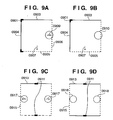
- Figs. 9A to 9D show display examples of the UI to explicitly visualize for the user the above-described priority order.
- Fig. 9A shows the state of a container which has no priority order set either in the height direction or in the widthwise direction.
- Fig. 9B shows the state of a container which has a priority order set in the widthwise direction. Referring to Figs. 9A and 9B, the upper left corner of the container is fixed by an anchor 0901. For this reason, sides 0903 and 0904 are fixed. Sides 0905 and 0906 are variable.
- the container shown in Fig. 9A has no priority order set either in the height direction or in the widthwise direction and changes its size in accordance with the content size.
- variable symbol 0907 (down arrow) in the height direction and an enlarge/reduce icon (right arrow) 0909 serving as a variable symbol in the widthwise direction are displayed.
- arrows 0609 in Fig. 6C which indicate the directions in which the container can change.
- the pop-up menu 0802 shown in Fig. 8 is displayed.
- the priority flag representing "width is not affected by content size” is set in step 0703 in Fig. 7 and stored in the priority order information 19031 in Fig. 19.
- the container state shown in Fig. 9B is displayed.
- No enlarge/reduce icon (arrow) 0909 is displayed in Fig. 9B (0910).
- the setting is changed such that the container size is not affected in the widthwise direction by the size of the content to be inserted in the container.
- the arrow 0909 indicating the moving direction of the variable side to visually present the setting to the user is erased. That is, the side expressed by the dotted line indicates that its size can change due to a change in size of the container associated by the link.
- the container size does not change due to the content size is indicated by erasing the enlarge/reduce icon.
- Fig. 9C shows an example of change of the UI in another case.
- Anchors 0911 are set on the upper and lower sides to indicate they are fixed in the vertical direction.
- a center lock state is set in which the central axis in the widthwise direction of the container is fixed.
- a side 0913 is a fixed side.
- a side 0915 s a variable side.
- Enlarge/reduce icons 0917 indicate the change directions of the variable sides. More specifically, the left and right sides change their positions on the basis of the content size. They also change the positions in accordance with the sizes of the linked containers.
- the pop-up menu shown in Fig. 8 is displayed, and the priority order is set.
- the layout editing application 121 sets the priority flag representing "width is not affected by content size” in step 0703 in Fig. 7 and stores the priority flag in the priority order information 19031 in Fig. 19.
- the container state shown in Fig. 9D is displayed. No enlarge/reduce icons 0917 are displayed in Fig. 9D.
- the reason why the icons are erased is the same as in Fig. 9B.
- the difference between Fig. 9B and Fig. 9C is that since the left and right sides of the container are variable, the arrows representing that the container size can be changed are displayed on both sides in Fig. 9C.
- the priority order is set, the arrows on the both sides are erased. This is because the setting is done such that the container size is not affected in the widthwise direction by the size of the content to be inserted.
- a symbol is displayed in the template preview mode to indicate that the container size can be changed in the widthwise or height direction in accordance with the content size.
- Fig. 10 shows the flow of the layout preview mode by using a template. This processing is also executed by the computer shown in Figs. 1A to 2. First, a template of interest and its preview mode are selected in accordance with the operation of the operator (1001). Preview processing starts.
- the automatic layout system of this embodiment has two modes, i.e., a layout mode in which containers are created, and a layout is created by associating the containers with each other, and a preview mode in which records are inserted in the created layout, and the layout result after actual record insertion is previewed.
- Fig. 7 shows part of processing in the layout mode.
- the field of a corresponding record is inserted in each container in the template of interest.
- the size of each container is calculated in accordance with the priority order set for it. This is layout calculation.
- layout calculation for display is done. Even in actual printing, layout calculation is done by inserting records. The calculation method at this time is the same as in the preview mode.
- the layout editing application 121 selects a record to be previewed and inserts it in the template (1002).
- the record can appropriately be selected.
- the correspondence between a container and a field in the record is designated in the template data when it is created.
- the field to be inserted in each container is determined in accordance with the template data.
- the layout editing application 121 checks whether the containers contained in the template include a container having a priority order set (1003). To do this, the priority order information is scanned in all pieces of container information contained in the template data, and it is determined whether there is a container having a priority order. If it is determined by this check that a container having a set priority order is present, the layout is calculated under a condition "priority order is present" (1004). The layout calculation method under the condition "priority order is present" will be described later in detail with reference to Fig. 12. If it is determined in step 1003 that no container having a set priority order is present, the layout is calculated under a condition "priority order is absent" (1005). Step 1005 will be described later with reference to Fig. 11. The layout calculated in step 1004 or 1005 is displayed (1006). More specifically, corresponding contents are laid out in accordance with the finally determined containers, and a preview of the image is displayed.
- step 1007 It is determined whether to preview another record (1007). If NO in step 1007, the preview mode is ended (1009). If YES in step 1007, another record is selected, layout calculation is executed again, and preview is done (1008). Not in the preview mode but in the print mode, layout calculation is done sequentially for all records to be printed. Hence, the processing in steps 1007 and 1009 is not present. When printing is ended for all records, the processing is ended.
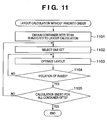
- Fig. 11 is a flowchart showing the layout calculation method in step 1005 in Fig. 11 when no priority order is set.
- Figs. 13A to 13C are views showing display examples of the UI at that time.
- container sets to be subjected to layout calculation are obtained (1101).
- Layout calculation is executed for each set of containers associated with a link. Referring to, e.g., Fig. 15, four containers are laid out on a page and associated with each other.
- containers A and B are associated by a link
- containers C and D are also associated by a link.
- the containers A and B form set 1
- containers C and D form set 2.
- reference numeral 1501 denotes an anchor; 1502, a fixed side; 1503, a controller; 1504, an arrow which indicates the change direction of a variable side; 1505, a variable side; 1506, a link; and 1507, a slider.
- a set is selected from the container sets obtained in step 1101 to calculate the layout (1102).
- layout calculation is executed. First, the sizes of the two containers (A and B) as variable elements included in the selected container set are calculated assuming that the containers are not affected by the image size or text size of data to be inserted. More specifically, the layout editing application 121 determines whether the container A is an image data container or text container. This determination can be done on the basis of the attribute set for the container, as described above. Next, the layout editing application 121 loads the data to be inserted in the container A. When the container A is an image data container, the size (the number of horizontal pixels, the number of vertical pixels, and the resolution) of the image data is defined as the size of the container A without any constraint.
- the amount of data to be inserted in the container A can be calculated on the basis of the number of characters of text data and the character attribute such as a font type, font size, character pitch, and line pitch designated by the container attribute of the container A.
- a constraint is applied because the aspect ratio of the container A cannot be determined without considering a constraint.
- the layout editing application 121 determines whether characters corresponding to the calculated data size (text size) can be inserted in the container A having the width (horizontal direction) set as the basic pattern of the container A.
- the layout editing application 121 calculates the width of the container A, which allows insertion of characters in the calculated amount, thereby calculating the size of the container A.
- the layout editing application 121 optimizes the layout such that the difference between the size of each container to be laid out and the actual content size becomes as small as possible (1103). More specifically, the layout is optimized such that the difference between the size of the content to be inserted and the size of layout becomes as equal as possible between the containers associated with each other to dynamically change their sizes.
- the layout editing application 121 obtains the size of the container set selected in step 1102, i.e., the total size of the container A, container B, and link 1506 (fixed link). Then, the layout editing application 121 calculates the difference between the total size and the size of the container set in the basic layout (in the example shown in Fig. 15, the size of the container set corresponds to the distance between the anchor icons of the containers A and B). If the width of the container A or B is increased as the result of calculation in the preceding step, a different value is generated. The layout editing application 121 equally distributes the difference value to the elements of the container set, thereby adjusting the layout.
- the layout editing application 121 optimizes the layout. If a violation of rules has occurred, calculation is done again to prevent any violation of rules (1104).
- the rules described here are constraints set by the user in creating the layout. Examples of the constraints are the size and position of a container and the length of a variable link. To determine whether a violation of rules has occurred, the position and size of each container after layout calculation are checked by referring to the container information 1903 and link information 1904 of the template data. More specifically, the positions of the fixed sides, corner points, axes, and central points, and the size of fixed sides are compared to determine whether a side to be fixed has moved, or movement more than the constraint has been done.
- optimization is necessary only when a content cannot be fitted in a container initially defined on the template. If a corresponding content can be fitted in an associated container without changing its size, the optimization procedures need not be executed. In this case, layout processing is performed to fill each container with a corresponding content, and the container size is not changed.
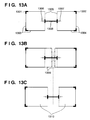
- Figs. 13A to 13C show examples of the UI in the preview mode in which layout is done without setting any priority order.
- Fig. 13A shows a state in which records are inserted, and the layout is determined.
- Reference numerals 1301 and 1302 denote anchors; 1303 and 1304, fixed sides; 1305, a variable side; 1306, an arrow which indicates the change direction of a variable side; and 1308, a link.
- the records are changed, and contents having different sizes are inserted.
- Fig. 13B shows the new container sizes after layout calculation, which are superposed on the state shown in Fig. 13A.
- Alternate long and two short dashed lines 1309 indicate the sizes of contents to be inserted in the respective containers. Layout calculation is executed.
- Fig. 13A shows a state in which records are inserted, and the layout is determined.
- Reference numerals 1301 and 1302 denote anchors; 1303 and 1304, fixed sides; 1305, a variable side; 1306, an arrow which indicates the change
- FIG. 13C shows the result of layout calculation.
- the sizes of containers after layout calculation are calculated such that they have the same difference to the size of the content to be actually inserted, and no violation of the above-described rules occurs.
- content sizes (1309) to be inserted shown in Fig. 13B and the content sizes (1310) after calculation have the same difference.
- the position of each movable side corresponding to the content size is obtained. This can be obtained from the relationship between the container size and the fixed side of the container to receive it. That is, the position to which each movable side should be moved is determined such that the container can have a size to receive the whole content. If there are two movable sides, they are moved by, e.g., the same distance.
- This processing is executed for each container in the container set of interest.
- the position to which each variable side should be moved again is determined such that the distance between the containers equals the distance defined by the link.
- the movable side is moved again without moving the intermediate point between the movable sides of the two containers. In this way, layout calculation is executed.
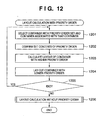
- Fig. 12 is a flowchart showing the layout calculation method in step 1004 in Fig. 10 when the priority order is set.
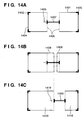
- Figs. 14A to 14C are views showing display examples of the UI in the preview mode at that time. A description will be done with reference to Figs. 12 and 14A to 14C. Referring to Fig. 14A, reference numerals 1401 and 1404, fixed sides; 1402 and 1403, anchors; 1405, a variable side; 1406, an arrow which indicates a change direction of the variable side; 1407, a link.
- the layout editing application 121 selects, from a template of interest, a container having a priority order and another container associated with that container by a link (1201). To select containers, an identifier representing a container which satisfies the condition is stored in a lookup memory area. The two containers shown in Fig. 14A correspond to the selected containers.
- the right container is a container having a set priority order.
- the left container is a container which is associated with the right container and has no set priority order.
- the layout editing application 121 confirms the contents of the set priority order (1202).
- the layout editing application 121 determines by referring to the template data whether one of the above-described flags "container width is not affected by content size” and “container height is not affected by content size” or both of them are set.
- the priority of a container having a priority order is lower than that of a container associated with that container.
- “container width is not affected by content size” is set for the right container.
- the priority of layout calculation is lower than the left container. Hence, the size of the right container is affected only by a change in size of the left container.
- the layout editing application 121 preferentially calculates the layout of the container having with higher priority order (1203). More specifically, the position of a variable side of the container which is changed by the size of the content to be inserted in the container having the higher priority order is calculated. If a plurality of variable sides are present, their positions are calculated such that they are moved in by the same amount. After that, the layout editing application 121 calculates the layout of the container having the lower priority order (1204). More specifically, the position of a variable side of the container having the lower priority order is calculated such that the distance from the container having the higher priority order is maintained at the distance defined by the link.
- the layout of the left container is calculated first. Since the content 1408 is inserted in the left container, the right side of the container, which is a variable side, moves to the right. Since there is no influence of the right container, the left container can be enlarged as much as possible without any violation of rules. Hence, for the left container, the content to be inserted can be laid out in an ideal side as much as possible. In the example shown in Figs. 14A to 14C, the left container can be enlarged to the same size as that of the content to be inserted.
- step 1201 It is determined whether processing for the container having a priority order is ended, i.e., whether an unprocessed container having a priority order included in the template of interest remains. If an unprocessed container remains, the processing from step 1201 is repeated (1205).
- the layout editing application 121 executes layout calculation for the right container having a lower priority order.
- the size of the left container and the length of the link are already determined. For this reason, the size of the right container to be laid out without any violation of rules is also determined. More specifically, the left side of the right container is moved to a position separated from the right side of the left container by the distance of the link 1407. Finally, calculation is executed for a container having no priority order included in the template of interest in accordance with the same procedures as in ⁇ Layout Calculation Method (Without Priority Order)> described above (1205).
- the contents of a container and, more particularly, the contents of a container having a lower priority order cannot completely be displayed in the display (print) mode.
- reduction (or enlargement) or clipping of the content can be designated. This designation can be done for each container in accordance with the procedures as shown in Fig. 7, like priority order setting.
- enlargement, reduction, or clipping is executed for the content in accordance with the designation.
- optimization is necessary only when a content cannot be fitted in a container initially defined on the template. If a corresponding content can be fitted in a container with a higher priority order without changing its size, the optimization procedures need not be executed. In this case, layout processing is performed to fill each container with a corresponding content, and the container size is not changed.
- the priority order information of this embodiment has the first value (priority flag ON) and the second value (priority flag OFF) indicating a higher priority order than the first value.
- the layout means changes the size of a region (container) in accordance with the size of data to be laid out.
- the layout means changes the size of the region in accordance with the size of another region.
- the template further contains link information representing the distance between at least the two regions.
- the layout means lays out data in each container in accordance with the order represented by the priority order while maintaining the distance between the regions (containers) indicated by the link information.
- This embodiment further comprises a generation means for generating a template containing region information (container information) to lay out data and priority order information representing a priority order associated with the region.
- a generation means for generating a template containing region information (container information) to lay out data and priority order information representing a priority order associated with the region.
- the embodiment further comprises a display means for displaying a preview of a document in which the data is laid out by the layout means.
- the display means distinguishably displays the priority order associated with the region (container) by the presence/absence of an arrow (enlarge/reduce icon).
- a priority order in automatic layout can be set for each container. For this reason, the degree of freedom of layout can be increased, and the size of a container which should have a greater appeal than remaining containers can be increased with priority over the remaining containers.
- the set priority order can visually be displayed on the user interface the user can readily predict the layout result after automatic layout.
- a priority order is set in accordance with the order of container selection in link setting.
- Fig. 17 shows the flow of procedures for automatically setting a priority order by creating a link.
- Fig. 17 shows an operation in a template mode.
- Figs. 18A to 18C show examples of the UI in executing the processing.
- a layout editing application 121 creates containers in accordance with the operation of the operator (1701).
- the position and size of each created container, the attribute of each side, and corresponding content information are stored in container information 1903 of template data.
- container information 1903 of template data since a priority order is set by using a link, at least two containers to be associated by a link must be created.
- a link creation mode is set (1702).
- a link is created for the containers as priority order setting targets in accordance with the operation of the operator.
- the layout editing application 121 sets a higher priority order for the container selected first from the containers as the link setting targets (1703).
- a link is created from the selected container to the container to be associated by dragging the mouse, a lower priority order is set for the container selected as the link destination by the mouse (1704).
- the priority orders are stored in priority order information 19031 (1705). More specifically, the priority order information can be a numeral value corresponding to the selected order.
- the priority flag of the container having the lower priority order i.e., the container selected by the mouse drag operation as the link destination is set.
- the priority flag in the link destination is set. That is, when the link is set in the horizontal direction, the priority flag "container width is not affected by content size” is set.
- the priority flag "container height is not affected by content size” is set.
- Fig. 18A shows a state in which containers are created.
- Reference numerals 1801 and 1802 denote fixed sides; 1803 and 1804, anchors; and 1805, a pointer.
- the priority order of the left container is set higher.
- the operator selects the left container first and sets a link to the right container, as shown in Fig. 18B.
- the UI display may be changed to an arrow, as indicated by an arrow 1806.
- the link is set, the container setting is changed to that shown in Fig. 18C.
- a link UI 1807 is displayed.
- the fixed sides are changed to variable sides 1808.
- the change direction is indicated by an enlarge/reduce icon (arrow) 1809 for the container on the left side.
- no enlarge/reduce icon is displayed at a position 1810.
- the priority order "container width is not affected by content size" described in the first embodiment is set for the right container simultaneously as the link is set. Referring to Figs. 18A to 18C, since the link is set in the horizontal direction, the priority order for the width is set. When the link is set in the vertical direction, the priority order is set for the height as a matter of course.
- the system may use both the priority order giving methods of the first and second embodiments.
- the priority order is given in accordance with link setting, as in the second embodiment, and the priority order can be changed as the attribute of a container, as in the first embodiment. Accordingly, the priority order set simultaneously with link setting can be canceled.
- the priority order is given to each selected region in accordance with the order of region selection (the order of the link source and link destination) in the operation (operation shown in Figs. 17 and 18A to 18C) of associating the regions (containers) to lay out data.
- the priority order of each container can be set in accordance with the order of container selection in link setting. For this reason, the priority order setting operation is simplified.
- Fig. 20 is a functional block diagram showing principal constituent elements of a document processing apparatus according to the present invention.
- the document processing apparatus comprises a storage means 2001 and a layout means 2002.
- the storage means 2001 stores a template 2001a which contains a plurality of combinations of region information 2001d representing a region to lay out data and priority order information 2001b representing a priority order associated with that region.
- the layout means 2002 lays out data corresponding to the region in an order represented by the priority order 2001b in accordance with the template 2001a and changes the size or position of the region in accordance with the data without invading a region associated with a higher priority order than the region.
- the template 2001a stored in the storage means 2001 further contains the priority order information 2001b independently for each region information 2001d.
- the priority order information 2001b has a first value and a second value indicating a higher priority order than the first value.
- the layout means 2002 changes the size of the region in accordance with the size of data to be laid out.
- the layout means 2002 changes the size of the region in accordance with the size of another region.
- the template 2001a further contains link information 2001c which indicates at least the distance between the two regions.
- the layout means lays out data in the region in accordance with the order represented by the priority order 2001b while maintaining the distance between the regions indicated by the link information 2001c.
- the apparatus further comprises a generation means 2003 for generating the template 2001a containing the region information 2001d to lay out data and the priority order information 2001b representing a priority order associated with the region.
- the apparatus further comprises a display means 2004 for displaying a preview of a document 2001e in which the data is laid out by the layout means 2002.
- the display means 2004 distinguishably displays the priority order associated with the region.
- the generation means 2003 gives a priority order to each selected region in accordance with the order of region selection in the operation of associating the regions to lay out data.
- the template 2001a stored in the storage means 2001 contains the region information 2001d having the priority order information 2001b set and the region information 2001d having no priority order information 2001b set.
- the layout means 2002 lays out corresponding data in the region in the order represented by the priority order information 2001b.
- the layout means 2002 determines the layout by laying out data in the region dynamically in accordance with the data size.
- the priority order is implemented by the order of adjustment in adjusting the container size independently for each container.
- the present invention can be applied to an apparatus comprising a single device or to system constituted by a plurality of devices.
- the invention can be implemented by supplying a software program, which implements the functions of the foregoing embodiments, directly or indirectly to a system or apparatus, reading the supplied program code with a computer of the system or apparatus, and then executing the program code.
- a software program which implements the functions of the foregoing embodiments
- reading the supplied program code with a computer of the system or apparatus, and then executing the program code.
- the mode of implementation need not rely upon a program.
- the program code itself installed in the computer also implements the present invention.
- the claims of the present invention also cover a computer program for the purpose of implementing the functions of the present invention.
- the program may be executed in any form, e.g., as object code, a program executed by an interpreter, or scrip data supplied to an operating system.
- Example of storage media that can be used for supplying the program are a floppy disk, a hard disk, an optical disk, a magneto-optical disk, a CD-ROM, a CD-R, a CD-RW, a magnetic tape, a non-volatile type memory card, a ROM, and a DVD (DVD-ROM and a DVD-R).
- a client computer can be connected to a website on the Internet using a browser of the client computer, and the computer program of the present invention or an automatically-installable compressed file of the program can be downloaded to a recording medium such as a hard disk.
- the program of the present invention can be supplied by dividing the program code constituting the program into a plurality of files and downloading the files from different websites.
- a WWW World Wide Web
- a storage medium such as a CD-ROM
- distribute the storage medium to users, allow users who meet certain requirements to download decryption key information from a website via the Internet, and allow these users to decrypt the encrypted program by using the key information, whereby the program is installed in the user computer.
- an operating system or the like running on the computer may perform all or a part of the actual processing so that the functions of the foregoing embodiments can be implemented by this processing.
- a CPU or the like mounted on the function expansion board or function expansion unit performs all or a part of the actual processing so that the functions of the foregoing embodiments can be implemented by this processing.
Landscapes
- Engineering & Computer Science (AREA)
- Theoretical Computer Science (AREA)
- Health & Medical Sciences (AREA)
- Artificial Intelligence (AREA)
- Audiology, Speech & Language Pathology (AREA)
- Computational Linguistics (AREA)
- General Health & Medical Sciences (AREA)
- Physics & Mathematics (AREA)
- General Engineering & Computer Science (AREA)
- General Physics & Mathematics (AREA)
- Document Processing Apparatus (AREA)
- Processing Or Creating Images (AREA)
Abstract
Description
Claims (17)
- A document processing apparatus capable of changing a layout of a document dynamically in accordance with data to be laid out in the document, comprising:wherein the template stored in said storage means (2001) contains the priority order information independently for each region information.storage means (2001) for storing a template which contains a plurality of combinations of region information representing a region to lay out data and priority order information representing a priority order associated with the region; andlayout means (2002) for laying out the data corresponding to the region in an order represented by the priority order in accordance with the template and changes a size or position of the region in accordance with the data without invading a region associated with a higher priority order than the region,
- The apparatus according to claim 1, wherein the priority order information has a first value and a second value indicating a higher priority order than the first value, when the value of the priority order is the second value, said layout means (2002) changes the size of the region in accordance with the size of the data to be laid out, and when the value of the priority order is the first value, said layout means changes the size of the region in accordance with a size of another region.
- The apparatus according to claim 1 or 2, wherein the template further contains link information which indicates a distance between at least the two regions, and said layout means (2002) lays out the data in the region in accordance with the order represented by the priority order while maintaining the distance between the regions indicated by the link information.
- The apparatus according to any one of claims 1 to 3, further comprising a generation means (2003) for generating the template containing the region information to lay out the data and the priority order information representing a priority order associated with the region.
- The apparatus according to any one of claims 1 to 4, further comprising a display means (2004) for displaying a preview of the document in which the data is laid out by said layout means (2002), said display means (2004) distinguishably displaying the priority order associated with the region.
- The apparatus according to claim 4 or 5, wherein said generation means (2003) gives a priority order to each selected region in accordance with an order of region selection in an operation of associating the regions to lay out the data.
- The apparatus according to any one of claims 1 to 6, wherein the template stored in said storage means (2001) contains region information having the set priority order information and region information having no set priority order information, and
when the priority order information is set in the region information, said layout means (2002) lays out corresponding data in the region in the order represented by the priority order information, and when no priority order information is set in the region information, said layout means (2002) determines the layout by laying out the data in the region dynamically in accordance with a data size. - A document processing method capable of changing a layout of a document dynamically in accordance with data to be laid out in the document by using a template which is stored in a storage unit and contains a plurality of combinations of region information representing a region to lay out data and priority order information representing a priority order associated with the region, comprising:wherein the template stored in the storage unit contains the priority order information independently for each region information.a step of laying out the data corresponding to the region in an order represented by the priority order in accordance with the template (S1203); anda layout step (S1204) of changing a size or position of the region in accordance with the data without invading a region associated with a higher priority order than the region,
- The method according to claim 8, wherein the priority order information has a first value and a second value indicating a higher priority order than the first value, and in the layout step, when the value of the priority order is the second value, the size of the region is changed in accordance with the size of the data to be laid out, and when the value of the priority order is the first value, the size of the region is changed in accordance with a size of another region.
- The method according to claim 8 or 9, wherein the template further contains link information which indicates a distance between at least the two regions, and in the layout step, the data is laid out in the region in accordance with the order represented by the priority order while maintaining the distance between the regions indicated by the link information.
- The method according to any one of claims 8 to 10, further comprising a generation step (S1701; S1705) of generating the template containing the region information to lay out the data and the priority order information representing a priority order associated with the region.
- The method according to any one of claims 8 to 11, further comprising a display step (S1006) of causing a display unit to display a preview of the document in which the data is laid out in the layout step, the priority order associated with the region being distinguishably displayed in the display step.
- The method according to claim 11 or 12, wherein in the generation step, a priority order is given to each selected region in accordance with an order of region selection in an operation of associating the regions to lay out the data.
- The method according to any one of claims 8 to 13, wherein the template stored in the storage unit contains region information having the set priority order information and region information having no set priority order information, and
in the layout step, when the priority order information is set in the region information, corresponding data is laid out in the region in the order represented by the priority order information, and when no priority order information is set in the region information, the layout is determined by laying out the data in the region dynamically in accordance with a data size. - A program which is recorded in a medium readable by a computer for making the computer operate as a document processing apparatus according to any one of claims 8 to 14.
- A computer readable storage medium which stores a program according to claim 15.
- Apparatus according to claim 1 wherein a template can have at least two containers and a link (1407) which associates the containers with each other and which limits the distance between the containers to a predetermined value, wherein the layout means is operable to display an arrow icon (1406) for a container having a higher priority order to indicate the priority order of the container and when a record is to be laid out by using the template, and the data to be inserted in each container cannot completely be fitted in the container, the layout means is operable to move the variable side of the container having the higher priority order to increase the container size in accordance with the content size and to enlarge or reduce the other container associated by the link (1407) within the range of the limit of the distance to the container having the higher priority order by the link (1407) so that the already determined size of the container with the higher priority order is not changed.
Applications Claiming Priority (2)
| Application Number | Priority Date | Filing Date | Title |
|---|---|---|---|
| JP2004024584 | 2004-01-30 | ||
| JP2004024584A JP4110105B2 (en) | 2004-01-30 | 2004-01-30 | Document processing apparatus, document processing method, and document processing program |
Publications (2)
| Publication Number | Publication Date |
|---|---|
| EP1560125A2 true EP1560125A2 (en) | 2005-08-03 |
| EP1560125A3 EP1560125A3 (en) | 2006-09-20 |
Family
ID=34650867
Family Applications (1)
| Application Number | Title | Priority Date | Filing Date |
|---|---|---|---|
| EP05250448A Withdrawn EP1560125A3 (en) | 2004-01-30 | 2005-01-28 | Automatic document layout |
Country Status (4)
| Country | Link |
|---|---|
| US (1) | US7757167B2 (en) |
| EP (1) | EP1560125A3 (en) |
| JP (1) | JP4110105B2 (en) |
| CN (1) | CN100359511C (en) |
Families Citing this family (38)
| Publication number | Priority date | Publication date | Assignee | Title |
|---|---|---|---|---|
| JP4095592B2 (en) * | 2004-08-06 | 2008-06-04 | キヤノン株式会社 | Information processing apparatus, information processing method, and program |
| JP4047308B2 (en) * | 2004-08-06 | 2008-02-13 | キヤノン株式会社 | Layout processing method, information processing apparatus, and computer program |
| GB2421106A (en) * | 2004-12-07 | 2006-06-14 | Hewlett Packard Development Co | A method and apparatus for preparing variable-data documents for publishing |
| JP4298642B2 (en) * | 2004-12-14 | 2009-07-22 | キヤノン株式会社 | Layout processing method, layout processing apparatus, and layout processing program |
| DE102005009105A1 (en) * | 2005-02-28 | 2006-09-07 | Siemens Ag | Method and management of a display device |
| US7616192B2 (en) * | 2005-07-28 | 2009-11-10 | Avago Technologies Ecbu Ip (Singapore) Pte. Ltd. | Touch device and method for providing tactile feedback |
| US7533354B2 (en) * | 2005-08-25 | 2009-05-12 | International Business Machines Corporation | Technique for selecting and prioritizing choices |
| JP2007148588A (en) * | 2005-11-24 | 2007-06-14 | Canon System Solutions Inc | Document editing device, method and program |
| JP4789699B2 (en) * | 2006-05-24 | 2011-10-12 | キヤノン株式会社 | Information processing method and apparatus |
| JP2007334510A (en) * | 2006-06-13 | 2007-12-27 | Canon Inc | Automatic layout system and method |
| JP4912139B2 (en) * | 2006-12-22 | 2012-04-11 | キヤノン株式会社 | Information processing device |
| JP4956202B2 (en) * | 2007-01-16 | 2012-06-20 | キヤノン株式会社 | Information processing apparatus, information processing method, and program |
| JP2008194880A (en) * | 2007-02-09 | 2008-08-28 | Canon Finetech Inc | Recording method and recording apparatus |
| JP2008310525A (en) * | 2007-06-13 | 2008-12-25 | Canon Inc | Information processing apparatus, information processing method, and information processing program |
| JP4342578B2 (en) * | 2007-07-24 | 2009-10-14 | 株式会社エヌ・ティ・ティ・ドコモ | Information processing apparatus and program |
| JP5043769B2 (en) * | 2008-07-11 | 2012-10-10 | キヤノン株式会社 | Document layout editing apparatus, document layout editing method, and computer program |
| JP5032419B2 (en) * | 2008-08-27 | 2012-09-26 | 株式会社東芝 | Server, screen transmission method and computer program |
| JP5183384B2 (en) * | 2008-09-18 | 2013-04-17 | キヤノン株式会社 | Layout processing method, layout processing apparatus, and layout control program |
| US20110182366A1 (en) * | 2008-10-07 | 2011-07-28 | Telefonaktiebolaget Lm Ericsson (Publ) | Multi-View Media Data |
| JP5195519B2 (en) * | 2009-02-27 | 2013-05-08 | 株式会社リコー | Document management apparatus, document processing system, and document management method |
| US20110227949A1 (en) * | 2010-03-19 | 2011-09-22 | I/O Interconnect, Ltd. | Read apparatus and operation method for e-book |
| US9135358B2 (en) | 2010-10-20 | 2015-09-15 | Microsoft Technology Licensing, Llc | Result types for conditional data display |
| US20120159314A1 (en) * | 2010-12-16 | 2012-06-21 | Microsoft Corporation | Adaptive content layout |
| US8743386B2 (en) | 2011-04-05 | 2014-06-03 | Canon Kabushiki Kaisha | Executing a print job in accordance with input image data |
| JP6019736B2 (en) * | 2012-05-15 | 2016-11-02 | 富士ゼロックス株式会社 | Display device and program |
| US20140013214A1 (en) * | 2012-07-03 | 2014-01-09 | Andrew Hunter | Method and System of Populating a Space |
| US20140033228A1 (en) * | 2012-07-25 | 2014-01-30 | Google Inc. | Configuring content display dimensions |
| KR101279805B1 (en) * | 2012-12-20 | 2013-06-28 | 주식회사 한글과컴퓨터 | Auto object placement based electronic document editing apparatus and method |
| US9754392B2 (en) | 2013-03-04 | 2017-09-05 | Microsoft Technology Licensing, Llc | Generating data-mapped visualization of data |
| US9137237B2 (en) | 2013-09-03 | 2015-09-15 | Microsoft Technology Licensing, Llc | Automatically generating certification documents |
| US20160048605A1 (en) * | 2014-08-14 | 2016-02-18 | International Business Machines Corporation | Integrating image renditions and page layout |
| US20160139721A1 (en) * | 2014-11-14 | 2016-05-19 | Hallmark Cards, Incorporated | Recordable photo frame with user-definable touch zones |
| US11027571B2 (en) | 2014-11-14 | 2021-06-08 | Hallmark Cards, Incorporated | Recordable greeting card with user-definable touch zones |
| US9959257B2 (en) * | 2016-01-08 | 2018-05-01 | Adobe Systems Incorporated | Populating visual designs with web content |
| EP3513330A4 (en) * | 2016-09-14 | 2020-05-20 | PTI Marketing Technologies Inc. | SYSTEMS AND METHODS FOR AUTOMATICALLY REFORMING PUBLICATIONS |
| CN109375972B (en) * | 2018-09-17 | 2022-03-08 | 广州视源电子科技股份有限公司 | Method, apparatus, computer device and storage medium for multi-element layout |
| CN109144656B (en) * | 2018-09-17 | 2022-03-08 | 广州视源电子科技股份有限公司 | Method, apparatus, computer device and storage medium for multi-element layout |
| CN113506357B (en) * | 2021-05-25 | 2024-07-12 | 北京北大方正电子有限公司 | Floating map processing method, device, equipment and storage medium |
Family Cites Families (20)
| Publication number | Priority date | Publication date | Assignee | Title |
|---|---|---|---|---|
| JPS62284461A (en) | 1986-06-03 | 1987-12-10 | Toshiba Corp | Document formation supporting system |
| US5214755A (en) | 1989-04-25 | 1993-05-25 | Microsoft Corporation | Document processing method and system |
| US5060170A (en) | 1989-08-09 | 1991-10-22 | International Business Machines Corp. | Space allocation and positioning method for screen display regions in a variable windowing system |
| US5437008A (en) * | 1992-06-23 | 1995-07-25 | Adobe Systems Incorporated | Method of establishing constraints and links in a distribution frame between graphical elements and resolving the constaints |
| JPH06203130A (en) | 1992-09-25 | 1994-07-22 | Nec Corp | Graphic editing system |
| JPH07129658A (en) | 1993-11-02 | 1995-05-19 | Toppan Printing Co Ltd | Layout design equipment |
| US5721848A (en) * | 1994-02-04 | 1998-02-24 | Oracle Corporation | Method and apparatus for building efficient and flexible geometry management widget classes |
| US5845303A (en) | 1994-12-06 | 1998-12-01 | Netpodium, Inc. | Document processing using frame-based templates with hierarchical tagging |
| JPH08255255A (en) | 1995-03-16 | 1996-10-01 | Sony Corp | Document information layout device and document information display device |
| JPH0969096A (en) * | 1995-08-31 | 1997-03-11 | Nec Corp | Article arranging device |
| US5956737A (en) * | 1996-09-09 | 1999-09-21 | Design Intelligence, Inc. | Design engine for fitting content to a medium |
| US5953007A (en) * | 1997-09-15 | 1999-09-14 | International Business Machines Corporation | System, method, and program for using animations to show page layout combinations in a user interface for submitting print jobs |
| JP3071189B1 (en) | 1999-03-02 | 2000-07-31 | 株式会社ナイキ | Open door support structure |
| US6826727B1 (en) | 1999-11-24 | 2004-11-30 | Bitstream Inc. | Apparatus, methods, programming for automatically laying out documents |
| WO2001061456A2 (en) * | 2000-02-14 | 2001-08-23 | Geophoenix, Inc. | Methods and apparatus for viewing information in virtual space |
| US7028255B1 (en) * | 2000-08-14 | 2006-04-11 | Adobe Systems Incorporated | Self-sizing object placement |
| WO2002046878A2 (en) * | 2000-12-06 | 2002-06-13 | American Express Travel Related Services Company, Inc. | Layout generator system and method |
| JP3835193B2 (en) * | 2001-03-30 | 2006-10-18 | セイコーエプソン株式会社 | Digital content creation system and digital content creation program |
| US7010746B2 (en) * | 2002-07-23 | 2006-03-07 | Xerox Corporation | System and method for constraint-based document generation |
| JP2004129067A (en) | 2002-10-04 | 2004-04-22 | Canon Inc | Image forming method |
-
2004
- 2004-01-30 JP JP2004024584A patent/JP4110105B2/en not_active Expired - Fee Related
-
2005
- 2005-01-28 CN CNB2005100051019A patent/CN100359511C/en not_active Expired - Fee Related
- 2005-01-28 EP EP05250448A patent/EP1560125A3/en not_active Withdrawn
- 2005-01-28 US US11/045,776 patent/US7757167B2/en not_active Expired - Fee Related
Also Published As
| Publication number | Publication date |
|---|---|
| US7757167B2 (en) | 2010-07-13 |
| CN100359511C (en) | 2008-01-02 |
| JP4110105B2 (en) | 2008-07-02 |
| EP1560125A3 (en) | 2006-09-20 |
| JP2005216179A (en) | 2005-08-11 |
| US20050179947A1 (en) | 2005-08-18 |
| CN1648894A (en) | 2005-08-03 |
Similar Documents
| Publication | Publication Date | Title |
|---|---|---|
| US7757167B2 (en) | Document layout processing using templates | |
| US7712026B2 (en) | Document processing apparatus, method and program for layout of data contents assigned to regions on a template | |
| EP1566742B1 (en) | Dynamic document layout | |
| US7555710B2 (en) | Method, apparatus and program for determining layout of a page using links between partial areas in the page | |
| US8250470B2 (en) | Information processing apparatus, control method therefor, and program | |
| US7373593B2 (en) | Apparatus and method for automatically setting constraints within a document layout | |
| US7930632B2 (en) | Information processing apparatus, control method therefor, and computer-readable medium displaying a layout result on the basis of adjustment record information stored with respect to a predetermined record | |
| US7735004B2 (en) | Layout control method, layout control apparatus, and layout control program | |
| KR100821449B1 (en) | Layout adjustment method and device | |
| US7831909B2 (en) | Information processing apparatus, control method therefor, and program with display based on change amount of field areas | |
| US7805672B2 (en) | Layout processing method, layout processing apparatus, and layout processing program that changes the priority of an area for automatic layout | |
| US20050168782A1 (en) | Layout adjustment method and apparatus and layout adjustment program | |
| US7707494B2 (en) | Information processing apparatus, control method therefor, and program | |
| US7861160B2 (en) | Laying out images in fields, linking the fields, and calculating distance before and after image rotation | |
| US20080155387A1 (en) | Information processing apparatus, control method thereof, and program | |
| US8332743B2 (en) | Layout decision method, apparatus, and program | |
| US7847971B2 (en) | Layout processing method, information processing apparatus, and computer program | |
| US7853872B2 (en) | Laying out field regions in a page for insertion of data | |
| CN100389384C (en) | Layout processing method, information processing apparatus | |
| JP2007249431A (en) | Information processing apparatus, control method therefor, and program |
Legal Events
| Date | Code | Title | Description |
|---|---|---|---|
| PUAI | Public reference made under article 153(3) epc to a published international application that has entered the european phase |
Free format text: ORIGINAL CODE: 0009012 |
|
| AK | Designated contracting states |
Kind code of ref document: A2 Designated state(s): AT BE BG CH CY CZ DE DK EE ES FI FR GB GR HU IE IS IT LI LT LU MC NL PL PT RO SE SI SK TR |
|
| AX | Request for extension of the european patent |
Extension state: AL BA HR LV MK YU |
|
| PUAL | Search report despatched |
Free format text: ORIGINAL CODE: 0009013 |
|
| AK | Designated contracting states |
Kind code of ref document: A3 Designated state(s): AT BE BG CH CY CZ DE DK EE ES FI FR GB GR HU IE IS IT LI LT LU MC NL PL PT RO SE SI SK TR |
|
| AX | Request for extension of the european patent |
Extension state: AL BA HR LV MK YU |
|
| RIC1 | Information provided on ipc code assigned before grant |
Ipc: G06F 17/21 20060101ALI20060817BHEP Ipc: G06F 17/24 20060101AFI20060817BHEP |
|
| 17P | Request for examination filed |
Effective date: 20070320 |
|
| 17Q | First examination report despatched |
Effective date: 20070423 |
|
| AKX | Designation fees paid |
Designated state(s): DE ES FR GB IT NL |
|
| STAA | Information on the status of an ep patent application or granted ep patent |
Free format text: STATUS: THE APPLICATION HAS BEEN WITHDRAWN |
|
| 18W | Application withdrawn |
Effective date: 20140707 |