EP1536319A1 - Client terminal for creating environment information thereof for receiving service from web server, method for controlling the same and program for making a computer perform the controlling method - Google Patents
Client terminal for creating environment information thereof for receiving service from web server, method for controlling the same and program for making a computer perform the controlling method Download PDFInfo
- Publication number
- EP1536319A1 EP1536319A1 EP04257250A EP04257250A EP1536319A1 EP 1536319 A1 EP1536319 A1 EP 1536319A1 EP 04257250 A EP04257250 A EP 04257250A EP 04257250 A EP04257250 A EP 04257250A EP 1536319 A1 EP1536319 A1 EP 1536319A1
- Authority
- EP
- European Patent Office
- Prior art keywords
- information
- environment information
- web server
- environment
- processing apparatus
- Prior art date
- Legal status (The legal status is an assumption and is not a legal conclusion. Google has not performed a legal analysis and makes no representation as to the accuracy of the status listed.)
- Withdrawn
Links
Images




Classifications
-
- G—PHYSICS
- G06—COMPUTING OR CALCULATING; COUNTING
- G06F—ELECTRIC DIGITAL DATA PROCESSING
- G06F3/00—Input arrangements for transferring data to be processed into a form capable of being handled by the computer; Output arrangements for transferring data from processing unit to output unit, e.g. interface arrangements
- G06F3/12—Digital output to print unit, e.g. line printer, chain printer
- G06F3/1201—Dedicated interfaces to print systems
- G06F3/1278—Dedicated interfaces to print systems specifically adapted to adopt a particular infrastructure
- G06F3/1285—Remote printer device, e.g. being remote from client or server
- G06F3/1289—Remote printer device, e.g. being remote from client or server in server-client-printer device configuration, e.g. the server does not see the printer
-
- G—PHYSICS
- G06—COMPUTING OR CALCULATING; COUNTING
- G06F—ELECTRIC DIGITAL DATA PROCESSING
- G06F16/00—Information retrieval; Database structures therefor; File system structures therefor
- G06F16/90—Details of database functions independent of the retrieved data types
- G06F16/95—Retrieval from the web
- G06F16/958—Organisation or management of web site content, e.g. publishing, maintaining pages or automatic linking
- G06F16/972—Access to data in other repository systems, e.g. legacy data or dynamic Web page generation
-
- G—PHYSICS
- G06—COMPUTING OR CALCULATING; COUNTING
- G06F—ELECTRIC DIGITAL DATA PROCESSING
- G06F3/00—Input arrangements for transferring data to be processed into a form capable of being handled by the computer; Output arrangements for transferring data from processing unit to output unit, e.g. interface arrangements
- G06F3/12—Digital output to print unit, e.g. line printer, chain printer
- G06F3/1201—Dedicated interfaces to print systems
- G06F3/1202—Dedicated interfaces to print systems specifically adapted to achieve a particular effect
- G06F3/1203—Improving or facilitating administration, e.g. print management
-
- G—PHYSICS
- G06—COMPUTING OR CALCULATING; COUNTING
- G06F—ELECTRIC DIGITAL DATA PROCESSING
- G06F3/00—Input arrangements for transferring data to be processed into a form capable of being handled by the computer; Output arrangements for transferring data from processing unit to output unit, e.g. interface arrangements
- G06F3/12—Digital output to print unit, e.g. line printer, chain printer
- G06F3/1201—Dedicated interfaces to print systems
- G06F3/1223—Dedicated interfaces to print systems specifically adapted to use a particular technique
- G06F3/1224—Client or server resources management
- G06F3/1225—Software update, e.g. print driver, modules, plug-ins, fonts
-
- G—PHYSICS
- G06—COMPUTING OR CALCULATING; COUNTING
- G06F—ELECTRIC DIGITAL DATA PROCESSING
- G06F3/00—Input arrangements for transferring data to be processed into a form capable of being handled by the computer; Output arrangements for transferring data from processing unit to output unit, e.g. interface arrangements
- G06F3/12—Digital output to print unit, e.g. line printer, chain printer
- G06F3/1201—Dedicated interfaces to print systems
- G06F3/1223—Dedicated interfaces to print systems specifically adapted to use a particular technique
- G06F3/1224—Client or server resources management
- G06F3/1226—Discovery of devices having required properties
Definitions
- the present invention relates to an information processing apparatus that can be connected to a server machine that presents Web page data to a client terminal via a network, where the Web page data can be displayed by a browser on the client terminal.
- the present invention further relates to an information processing method, and a recording medium and a program used therefor.
- the Web server generates page data written in script languages such as Hyper Text Markup Language (HTML), Java® Script, VBScript, and so forth, and transmits the page data to a client terminal via a network such as the Internet.
- the client terminal displays the page data through a browser software program installed therein, and a user transmits information about the result of operations performed on the browser software program to the Web server.
- the Web server processes the information transmitted from the client terminal, generates new page data corresponding to the information, and transmits the new page data to the client terminal.
- the client terminal displays the new page data by using the browser software program. While the above-described procedures are performed, various types of services are presented to the user of the client terminal. The above-described services are referred to as Web services.
- the environment information includes information about printers, application software programs, and so forth, that can be used by the client terminal.
- a designer on the Web-server side creates a plug-in software program (an OCX module, for example) that can be installed on the client terminal by following predetermined procedures.
- the plug-in software program extends functions of the browser software program, so as to read the environment information of the client terminal. Further, where the plug-in software program requests the browser software program to post the environment information according to a request issued from the Web server, the client terminal transmits the environment information to the Web server by using the browser software program. Subsequently, the Web server can present services suitable for the client terminal of the user, based on the environment information obtained from the client terminal in the above-described manner.
- each of the printers is designed for using a predetermined type of output media that may be ordinary paper, glossy paper, cardboard paper, and so forth. Further, a predetermined size is designated for each of the types of output media. As the number of printers connected to the client terminal increases, the seriousness of the above-described problem also increases.
- the present invention provides an information processing apparatus that can transmit environment information of a client terminal (the information processing apparatus) to a Web server with a reduced processing load, an information processing method, and a recording medium and a program used therefor.
- an information processing apparatus that can use contents provided by a Web server through a browser software program in the information processing apparatus.
- the information processing apparatus includes: a creating unit for creating/updating environment information; a storing unit for storing the created/updated environment information in a storage device; and a transmission unit for transmitting the created environment information to the Web server via a network.
- the creating unit updates the environment information in response to an environment-information request transmitted from the Web server with reference to the environment information stored in the storage device.
- the contents presented by the Web server is determined according to the environment information.
- a method for controlling an information processing apparatus that can use contents presented by a Web server through a browser software program in the information processing apparatus.
- the controlling method includes steps of: creating/updating environment information; storing the created/updated environment information in a storage device; and transmitting the created/updated environment information to the Web server via a network.
- environment information After environment information has been created and stored in the storage device, the environment information is updated in response to the environment-information request transmitted from the Web server with reference to the environment information stored in the storage device.
- the contents presented by the Web server is determined according to the environment information.
- a program for making a computer system perform a method for controlling an information processing apparatus that can use contents presented by a Web server through a browser software program in the information processing apparatus according to the method described above is provided.
- Fig. 1 shows the schematic configuration of an information processing system including a client PC (an information processing apparatus) and a Web server according to an embodiment of the present invention.
- Fig. 2 shows an example hardware configuration of the client PC shown in Fig. 1.
- Fig. 3 shows an example information configuration of a RAM (random access memory) under the control of a PLUG-IN MODULE.
- Fig. 4 is a flowchart illustrating operations performed for processing environment information of the client PC.
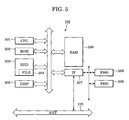
- Fig. 5 shows an example hardware configuration for briefly describing the flowchart of Fig. 4.
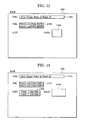
- Figs. 6-11 illustrate the configuration and details of data of the RAM that are changed according to the flow shown in Fig. 4, where new TABLE is generated.
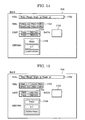
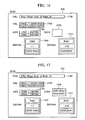
- Figs. 12-17 illustrate the configuration and details of data of the RAM that are changed according to the flow shown in Fig. 4, where existing environment information is used.
- the information processing system includes a client personal computer (PC) functioning as an information processing apparatus and a Web server.
- PC personal computer
- the information processing system includes a Web server 101, a client PC 102, and a network (NET) 105 connected therebetween.
- a browser software program 103 requests predetermined page data from the Web server 101 via the NET 105 and displays the page data transmitted from the Web server 101.
- the NET 105 may be, for example, the Internet involving various types of equipment and apparatuses on its routes. However, the configuration of the NET 105 will not be described, since it is not essential for achieving the present invention.
- the Browser Software program 103 includes a plug-in module 104 installed therein where the plug-in module is a program that reads the condition (environment information) of a printer connected to the client PC 102, or a printer that can be used via a local area network (LAN) or the like. While the exemplary embodiments herein are described with reference to printers, the present invention is not limited to printers.
- the plug-in module(s) can read the condition (environment information) of any peripheral device, for example, a scanner, a multi-function peripheral (MFP) device and the like.
- the Browser Software program 103 starts the PLUG-IN MODULE 104 according to an instruction in the page data transmitted from the Web server 101.
- the started PLUG-IN MODULE 104 reads the printer condition, as the environment information. Then, the PLUG-IN MODULE 104 stores the read environment information in a predetermined area and instructs the Browser Software program 103 to post the environment information to a predetermined URL (a URL indicating the Web server 101) stored in a predetermined area. Subsequently, the Browser Software program 103 posts the environment information specified by the PLUG-IN MODULE 104 to the URL (the Web server 101). The Web server 101 informs the client PC 102 of the information about a URL for providing new page data corresponding to the posted environment information. The client PC 102 accesses the URL and displays the new page data through the Browser Software program 103. In this embodiment, the posting denotes transmission of specified data from the Browser Software program 103 to the Web server 101 according to an instruction transmitted from the PLUG-IN MODULE 104, for example.
- the Web server 101 presents print service to the client PC 102.
- the Web server 101 can present the print service to five types of printers A, B, C, D, and E, and where the posted environment information indicates that the printers A, D, and E are connected to the client PC 102
- the Web server transmits information about a predetermined URL to the client PC 102.
- the client PC 102 accesses the predetermined URL and displays page data including a pull-down menu for selecting a predetermined printer from among the printers A, D, and E.
- the types of printers to which the Web server 101 can present the print service can be changed, as required.
- the Web server 101 transmits the information of a predetermined URL for displaying page data including a pull-down menu for selecting a predetermined printer from between the printers A and D to the client PC 102.
- the Web server 101 stores information about the size and type of a form (output media), e.g., paper, that can be used for each of the printers and the page data includes a pull-down menu showing the above-described form information.
- the page data (the contents presented by the Web server) is determined according to the service of the Web server 101 and the environment information of the client 102.
- Fig. 2 shows an example hardware configuration of the client PC 102 shown in Fig. 1.
- a central processing unit (CPU) 201 and a read-only memory (ROM) 202 are provided.
- the CPU 201 reads a program or the like from the ROM 202.
- the ROM 202 stores a program for initializing the CPU 201, reading an operating system (OS) from a hard-disk drive (HDD) 203 (that will be described later) into a random access memory (RAM) 206 (that will be described later), and making preparations so that the CPU 201 can run the OS, for example.
- OS operating system
- HDD hard-disk drive
- RAM random access memory
- the RAM 206 denotes a writable and readable memory and a recording area to which the CPU 201 can have direct access. The use of the RAM 206 will be described later.
- the HDD 203 is a secondary storage device such as a magnetic hard disk storing the Browser Software program 103, the PLUG-IN MODULE 104, programs including various types of DRVs (drivers) (that will be described later), and data.
- a FILE 204 denotes file-path information designating a predetermined file on the HDD 203. This file-path information includes the details of TABLE (printer environment) that will be described later. Where the FILE 204 does not exist, it indicates that information about the TABLE is not recorded.
- a DISP 205 denotes a display device. For example, a window on which the Browser Software program 103 displays page data is displayed on the DISP 205.
- An IF 207 denotes an interface unit to which input devices including a keyboard, a mouse, and so forth, at least one printer (PRN), such as printers 208 to 210, and a NET 105 are connected.
- the IF 207 communicates with the Web server 101 shown in Fig. 1 via the NET 105.
- each of the three printers 208 to 210 is locally connected to the IF 207.
- the present invention is not limited to the above-described configuration. On the contrary, a plurality of printers can be connected to the IF 207 via a network such as a LAN.
- Fig. 3 shows the information configuration of the RAM 206 under the control of the above-described PLUG-IN MODULE 104.
- a storing area 302 stores a predetermined URL, that is, information about a transition destination (the address of a Web page) after the PLUG-IN MODULE 104 finishes its processing.
- the URL shown in the URL storing area 302 is set by the Browser Software program 103 according to the page data transmitted from the Web server 101.
- a storing area 303 is a memory area for maintaining information about the printer environment (TABLE) on the RAM 206.
- TABLE printer-model-name information
- VER driver-version information
- INFO printer information
- the data configuration of the INFO will not be described, since it is not essential for achieving the present invention.
- MODEL denotes the model of a printer named by a driver developer and referred to as "model name" in the property information of the printer. In normal times, the MODEL cannot be manipulated by a user.
- VER denotes information about the version of a printer driver that will be described later.
- a storing area 304 denotes a memory area for storing LIST, that is, information about the list of printers that can be used by the PLUG-IN MODULE 104.
- LIST denotes information including information that is the same as the MODEL of the TABLE and the driver name required for the MODEL.
- the LIST is generated when the PLUG-IN MODULE 104 performs its processing and one of the functions of the OS. The configuration of the LIST will not be described.
- a storing area 305 denotes a memory area for storing an item of data (DATA) posted to the above-described URL, as a result of the processing of the PLUG-IN MODULE 104.
- DATA item of data
- PRNs 208 to 210 items of information about the printers are coupled to one another and stored as the DATA.
- the memory size of the storing area 305 is large enough for storing the DATA.
- a storing area 306 is a memory area for storing a printer driver (DRV) required for making each of the PRN 208 to 210 perform print processing.
- DUV printer driver
- the above-described Printer Drivers are read into a storing area 306 on the RAM 206 used by the PLUG-IN MODULE 104 shown in Fig. 3, so as to utilize the VER, INFO, and so forth that are entered into the Printer Drivers.
- Fig. 4 is a flowchart showing the environment-information processing performed in the client PC 102.
- the PLUG-IN MODULE 104 reads the TABLE from the FILE 204 on the HDD 203, at step S0.
- the memory area 303 on the RAM 206 shown in Fig. 3 remains blank.
- the OS creates the LIST, that is, the list of printers that can be used by the client PC 102, and stores the LIST in the memory area 304, at step S1.
- the PLUG-IN MODULE 104 selects one of the printers (PRNs) from the LIST and reads a printer driver (DRV) corresponding to the selected printer, at step S2.
- the PLUG-IN MODULE 104 checks whether or not the MODEL, that is, information about the selected printer (PRN), exists in the TABLE, at step S3. Where the MODEL exists in the TABLE (YES at step S3), the processing advances to step S5. Otherwise (No at step S3), the processing advances to step S4.
- step S3 when it is determined that an entry of the selected printer does not exist in the TABLE, at step S3, the processing advances to step S4.
- the PLUG-IN MODULE 104 adds the printer entry to the TABLE, and the processing advances to step S7. Specifically, the PLUG-IN MODULE 104 adds the MODEL, VER, and INFO to the TABLE with reference to information about the Printer Driver that was read, at step S2.
- the PLUG-IN MODULE 104 makes a version-information comparison, at step S5.
- the processing advances to step S6, so that the PLUG-IN MODULE 104 updates the TABLE. That is to say, the VER and INFO of an entry corresponding to the selected printer in the TABLE of the storing area 303 are updated to VER and INFO read from the DVR.
- step S7 the PLUG-IN MODULE 104 checks whether or not the processing of steps S3 to S6 was finished for each of the printers on the LIST. When the processing is not finished for all of the printers, the processing goes back to step S2. When the processing is finished for each of the printers on the LIST, the processing advances to step S8.
- the PLUG-IN MODULE 104 creates DATA, based on the information in the TABLE, as data to be posted to a predetermined URL via the Browser Software program 103.
- the entire INFO in the TABLE is stored in sequence, so that the DATA is formed.
- the configuration of the DATA can be arbitrarily determined.
- the PLUG-IN MODULE 104 issues and transmits a request to the Browser Software program 103 for posting the accumulated data or the DATA to the URL, at step S9.
- the PLUG-IN MODULE 104 writes the details of the TABLE into the FILE 204 and frees memories including the storing area 303 of the TABLE, the storing area 304 of the LIST, and so forth, at step S10, and the processing is terminated.
- the Browser Software program 103 posts the information stored in the DATA to the URL and enters a standby state until new page data arrives. Upon receiving the new page data transmitted from the Web server 101, the Browser Software program 103 displays the new page data on a predetermined window.
- Fig. 5 shows an example hardware configuration of the client PC 102.
- This hardware configuration is different from that of Fig. 2 in that two printers P990 508 and P850 509 are connected to the IF 207. That is to say, the number of printers connected to the IF 207 is decreased from three to two for the sake of simplicity.
- Figs. 6 to 11 illustrate the change in the configuration and details of the data stored in the RAM 206 according to the flow shown in Fig. 4, in the case where new TABLE is created.
- Reference numerals 1102, 1103, 1104, 1105, and 1106 shown in Figs. 6 to 11 correspond to reference numerals 302, 303, 304, 305, and 306, respectively, and designate storing areas in the RAM 206.
- Fig. 6 illustrates the configuration and details of data of the RAM 206 under the control of PLUG-IN MODULE 104 immediately after the PLUG-IN MODULE 104 is started (before step S0).
- a destination URL to which the DATA is posted according to the request transmitted to the Browser Software program 103, at step S9, is already stored in the storing area 1102. Further, the TABLE, the LIST, and the DATA are initialized to blanks.
- a printer driver DRV990 for the printer P990 508 and a printer driver DRV850 for the printer P850 509 are not loaded on the RAM 206 under the control of the PLUG-IN MODULE 104 before step S0 is performed.
- This data configuration is achieved irrespective of whether or not the printer drivers are installed on the OS.
- the RAM 206 has a storing area 1102 for storing the URL and a storing area 1105 for storing the DATA.
- step S0 the details of the FILE 204 are read from the HDD 203 and set to the TABLE.
- the assumption is made that the FILE 204 does not exist.
- the TABLE remains blank and the state of the RAM 206 remains the same as that shown in Fig. 6, after the processing of step S0 is finished.
- step S1 the OS creates the LIST and the PLUG-IN MODULE 104 reads the LIST into the RAM 206. Subsequently, a storing area 1104 for storing the LIST is added on the RAM 206, as shown in Fig. 7.
- the printer names P990 and P850 and the driver names DRV990 and DRV850 are stored in the LIST, as information about the two printers P990 508 and P850 509 that are connected to the client PC 102.
- the PLUG-IN MODULE 104 selects a predetermined printer from the LIST shown in Fig. 7. For example, when the printer name P990 is selected, the PLUG-IN MODULE 104 reads the driver name DRV 990 corresponding to the printer name P990 shown in the LIST into the storing area 1106 in the RAM 206. Subsequently, the data configuration of the RAM 206 becomes as shown in Fig. 8.
- the driver name DRV 990 used for the printer P990 is read into the RAM 206. Therefore, version information VER "1.62" and printer information INFO "P990-INFO" can be read, as information stored in the DRV 990.
- the PLUG-IN MODULE 104 starts the processing at step S3.
- the PLUG-IN MODULE 104 checks whether or not an entry relating to the printer P990 508 exists in the TABLE, at step S3. Since the area for storing the TABLE remains blank, or the storing area does not exist, as shown in Figs. 7 and 8, it is determined to be "NO" at step S3, and the processing advances to step S4.
- the PLUG-IN MODULE 104 creates the entry relating to the printer P990 508 with reference to the information of the DRV 990, at step S4. More specifically, the PLUG-IN MODULE 104 reads the VER and INFO of the DRV 990 into the TABLE, so that the VER and INFO are set thereto. Subsequently, as shown in Fig. 9, the storing area 1103 is provided and the printer environment information relating to the printer P990 is stored therein, as the TABLE.
- step S7 it is checked whether or not the above-described processing was finished for each of the printers on the LIST, at step S7. Since the processing was not performed for the printer P850 509, the processing goes back to step S2.
- the processing for the printer P850 509 is performed in the same manner as that for the above-described printer P990 508. That is to say, the PLUG-IN MODULE 104 reads the driver name DRV 850 for the printer P850 into the RAM 206, at step S2. Since it is determined that an entry relating to the printer P850 does not exist in the TABLE, at step S3, the processing advances to step S4, so that the entry relating to the printer P850 509 is added to the TABLE. Subsequently, a storing area 1107 is provided and the DRV 850 is stored therein, as shown in Fig. 10. That is to say, the printer environment information relating to the P850 is further added to the TABLE. Since the processing at step S7 was finished for each of the printers on the list, as shown in Fig. 10, the processing advances to step S8.
- the PLUG-IN MODULE 104 stores "P990-INFO” and "P850-INFO” in the TABLE in the storing area 1105, as the DATA, at step S8. Subsequently, the details of DATA are stored, as shown in Fig. 11.
- the PLUG-IN MODULE 104 transmits an instruction to the Browser Software program 103 for posting the DATA to a predetermined URL, at step S9.
- the PLUG-IN MODULE 104 writes the details of the TABLE into the FILE 204, at step S10, and the processing is terminated.
- the Browser Software program 103 posts the DATA to the URL and waits for the arrival of page data transmitted from the URL.
- the Browser Software program 103 displays a screen corresponding to the page data transmitted to the window thereof.
- Figs. 12 to 17 illustrate processing procedures performed for creating environment information at a reduced processing load by using the environment information created through the processing procedures shown in Figs. 6 to 11.
- Figs. 12 to 17 illustrate the configuration and details of data that change according to the flowchart shown in Fig. 4, in the case where the existing environment information is used.
- Storing areas 1702 to 1707 shown in Figs. 12 to 17 correspond to the storing areas 1102 to 1107, respectively, shown in Figs. 6 to 11.
- the storing areas 1702 to 1707 are provided in the RAM 206, corresponding to processing procedures performed by the PLUG-IN MODULE 104.
- the restarted PLUG-IN MODULE 104 reads the details of a file indicated by the FILE 204 on the HDD 203, at step S0. Since the processing shown in Figs. 6 to 11 is finished, the information about the printer P990 508 and the printer P850 509 is stored in the FILE 204. Fig. 12 shows the data configuration of the RAM 206 in the state where the step S0 is finished. It is to be noted that the URL information transmitted from the Browser Software program 103 to the PLUG-IN MODULE 104 is the same as that shown in Fig. 6. The URL information is stored in the storing area 1702 and the TABLE is stored in the storing area 1703, as shown in Fig. 12. Although not shown in this drawing, the DATA is stored in the storing area 1705.
- the OS creates the LIST and the PLUG-IN MODULE 104 reads the created LIST into the RAM 206, at step S1. Subsequently, the storing area 1704 is provided, as shown in Fig. 13, so that the LIST is stored therein.
- the PLUG-IN MODULE 104 selects one of the printers shown on the LIST, at step S2, and a printer driver corresponding to the selected printer is loaded to the RAM 206. Since the selected printer names are P990 and P850, the DRV 990 is read into the RAM 206. Subsequently, the storing area 1706 is provided, as shown in Fig. 14, so that the DRV 990 is stored therein.
- the state of Fig. 14 is different from that of Fig. 8 in that the value of VER, that is, version information shown in the DRV 990, is "1.7" in place of "1.62". Further, the value of INFO of the printer information is indicated as "INFO-P990" in place of "P990-INFO"
- the PLUG-IN MODULE 104 makes a comparison between the value of MODEL in the TABLE and the printer name, at step S3. Since the MODEL value is equivalent to the printer name in this case, the processing advances to step S5.
- the PLUG-IN MODULE 104 determines whether or not the value of VER of the entry relating to the P990 on the TABLE is equivalent to that of the VER of the DRV 990 read into the RAM 206. Since the VER values are different from each other, the processing advances to step S6.
- the PLUG-IN MODULE 104 updates the VER and INFO of the entry relating to the 990 on the TABLE to "1.7" and "INFO-P990", respectively. That is to say, information on the upper row of the TABLE of the storing area 1703 shown in Fig. 14 is updated, as shown in Fig. 15. Then, in the state shown in Fig. 15, the PLUG-IN MODULE 104 determines whether or not the above-described processing was finished for each of the printers, at step S7. Since the processing has not yet been performed for the printer P850 509, the processing goes back to step S2.
- the PLUG-IN MODULE 104 reads the DRV 850 for the printer P850 509 into the storing area 1707 of the RAM 206, at step S2. Then, the PLUG-IN MODULE 104 makes a comparison between the MODEL value on the TABLE and the printer name, at step S3. When both the MODEL value and the printer name indicate P850, the processing advances to step S5. Then, the PLUG-IN MODULE 104 makes a comparison between the VER value of the entry of the P850 in the TABLE and the VER value of the DRV 850 read into the RAM 206. When it is determined that the above-described two values are equivalent to each other, the processing advances to step S7. At this step, the PLUG-IN MODULE 104 determines whether or not the processing was performed for each of the printers. When it is determined that the processing was finished for each of the printers, the processing advances to step S8.
- the PLUG-IN MODULE 104 writes "INFO-P990, P850-INFO", as the DATA posted from the TABLE. Subsequently, the details of data are stored, as shown in Fig. 17.
- the PLUG-IN MODULE 104 transmits an instruction to the Browser Software program 103, the instruction being transmitted for posting the DATA to a predetermined URL, at step S9. Then, the PLUG-IN MODULE 104 writes the details of the TABLE into the FILE 204, at step S10, and the processing is terminated. After the processing of the PLUG-IN MODULE 104 is finished, the Browser Software program 103 posts the DATA to the URL and waits for the arrival of page data transmitted from the URL.
- the client PC 102 of this embodiment can store the created environment information (the details of the TABLE) in the FILE 204. Therefore, when new TABLE (new environment information) is required, it becomes possible to refer to the existing environment information stored in the FILE 204 and use it, as it is, when there is no change in the printer name and the version name. Subsequently, the load of processing, such as extraction of the environment information stored in the printer driver can be eliminated.
- the environment information may include information only about printers to which the Web server 101 presents services.
- the Web server 101 informs the client PC 102 of the MODEL information of printers to which the Web server 101 presents services. Then, the client PC 102 selects a printer corresponding to the MODEL information transmitted from the Web server 101, at step S2.
- a program for performing the functions of the client PC 102 is read into a memory and the CPU 201 executes the read program, so as to achieve the above-described functions.
- the present invention is not limited to the above-described configuration. That is to say, part of or the entire process can be executed by purpose-built hardware.
- the above-described memory may be, for example, a magneto-optical disk, a non-volatile memory such as a flash memory, a read-only recording medium such as a CD-ROM, a volatile memory other than a RAM, and a computer readable/writable recording medium that is formed as a combination of the above-described mediums.
- the program for performing the functions of performing various processing procedures in the client PC 102 is stored in a computer-readable recording medium so that a predetermined computer system reads the program and performs the above-described functions and the various processing procedures are performed.
- a predetermined computer system reads the program and performs the above-described functions and the various processing procedures are performed.
- computer system denotes a system including hardware such as an OS and peripheral devices.
- the "computer-readable recording medium” may be, for example, a flexible disk, a magneto-optical disk, a ROM, a transportable medium such as a CD-ROM, or a storage device such as a hard disk mounted in the computer system. Still further, the "computer-readable recording medium” includes a recording medium that can retain a program for a predetermined time period.
- the recording medium can be a volatile memory (RAM) in the computer system functioning as a server, or a client, where the program is transmitted via a network such as the Internet and a communications line such as a telephone line.
- RAM volatile memory
- the above-described program may be transferred from the computer system storing the above-described program in a storage device or the like to another computer system via a transfer medium, or a transfer wave in the transfer medium.
- transfer medium denotes a medium having the functions of transferring information.
- the transfer medium may be, for example, a network (communications network) such as the Internet, or a communications line such as a telephone line.
- the above-described program may be configured, only for achieving part of the above-described functions.
- the above-described program may be a difference file (a difference program) that can achieve the above-described functions in conjunction with a program stored in the computer system.
- a program product such as a computer-readable recording medium storing the above-described program can be used for the embodiment of the present invention.
- the above-described program, recording medium, transfer medium, and program product fall within the scope of the present invention.
Landscapes
- Engineering & Computer Science (AREA)
- Theoretical Computer Science (AREA)
- Physics & Mathematics (AREA)
- General Engineering & Computer Science (AREA)
- General Physics & Mathematics (AREA)
- Human Computer Interaction (AREA)
- Databases & Information Systems (AREA)
- Data Mining & Analysis (AREA)
- Information Transfer Between Computers (AREA)
Applications Claiming Priority (2)
| Application Number | Priority Date | Filing Date | Title |
|---|---|---|---|
| JP2003397755A JP2005157880A (ja) | 2003-11-27 | 2003-11-27 | 情報処理装置、情報処理方法、その記録媒体及びプログラム |
| JP2003397755 | 2003-11-27 |
Publications (1)
| Publication Number | Publication Date |
|---|---|
| EP1536319A1 true EP1536319A1 (en) | 2005-06-01 |
Family
ID=34463847
Family Applications (1)
| Application Number | Title | Priority Date | Filing Date |
|---|---|---|---|
| EP04257250A Withdrawn EP1536319A1 (en) | 2003-11-27 | 2004-11-23 | Client terminal for creating environment information thereof for receiving service from web server, method for controlling the same and program for making a computer perform the controlling method |
Country Status (3)
| Country | Link |
|---|---|
| US (1) | US20050120120A1 (enExample) |
| EP (1) | EP1536319A1 (enExample) |
| JP (1) | JP2005157880A (enExample) |
Cited By (1)
| Publication number | Priority date | Publication date | Assignee | Title |
|---|---|---|---|---|
| EP2306300A3 (en) * | 2009-09-29 | 2012-10-03 | Brother Kogyo Kabushiki Kaisha | Terminal device to be connected with internet |
Families Citing this family (6)
| Publication number | Priority date | Publication date | Assignee | Title |
|---|---|---|---|---|
| US20060080286A1 (en) * | 2004-08-31 | 2006-04-13 | Flashpoint Technology, Inc. | System and method for storing and accessing images based on position data associated therewith |
| US8615778B1 (en) | 2006-09-28 | 2013-12-24 | Qurio Holdings, Inc. | Personalized broadcast system |
| US7895275B1 (en) * | 2006-09-28 | 2011-02-22 | Qurio Holdings, Inc. | System and method providing quality based peer review and distribution of digital content |
| KR20090094229A (ko) * | 2006-09-29 | 2009-09-04 | 노마딕스, 인코포레이티드 | 콘텐츠를 삽입하기 위한 시스템 및 방법 |
| US9959584B1 (en) * | 2013-11-08 | 2018-05-01 | Document Imaging Systems Corp. | Automated system and method for electronic health record indexing |
| US11159603B2 (en) * | 2015-04-15 | 2021-10-26 | Hyland Switzerland Sàrl | Cross-platform module for loading across a plurality of device types |
Citations (6)
| Publication number | Priority date | Publication date | Assignee | Title |
|---|---|---|---|---|
| EP0903889A2 (en) * | 1997-09-17 | 1999-03-24 | Hewlett-Packard Company | Internet enabled computer system management |
| WO2000056055A2 (en) * | 1999-03-15 | 2000-09-21 | Rtimage Ltd. | Collaborative document annotation system |
| WO2001052052A1 (en) * | 2000-01-11 | 2001-07-19 | Ecora.Com | Automatic documentation of configurable systems |
| EP1198091A2 (en) * | 2000-09-27 | 2002-04-17 | Seiko Epson Corporation | User support |
| US20020052757A1 (en) * | 2000-10-27 | 2002-05-02 | Lewis Thomas S. | Network data sharing system |
| EP1262873A1 (en) * | 2001-05-31 | 2002-12-04 | Gateway, Inc. | Method and apparatus for providing customer support |
Family Cites Families (4)
| Publication number | Priority date | Publication date | Assignee | Title |
|---|---|---|---|---|
| JP2002215721A (ja) * | 2001-01-16 | 2002-08-02 | Canon Inc | 情報処理装置及びその方法及びコンピュ―タ読み取り可能なプログラムが格納された記憶媒体及び印刷制御プログラム |
| US20020107939A1 (en) * | 2001-02-07 | 2002-08-08 | Ford Daniel E. | System and method for accessing software components in a distributed network environment |
| JP2003173246A (ja) * | 2001-12-05 | 2003-06-20 | Ricoh Co Ltd | デバイス情報収集方法、プログラム、サーバ装置及び記憶媒体 |
| US7359076B2 (en) * | 2003-04-01 | 2008-04-15 | Seiko Epson Corporation | Document sharing service for network printing |
-
2003
- 2003-11-27 JP JP2003397755A patent/JP2005157880A/ja not_active Withdrawn
-
2004
- 2004-11-23 EP EP04257250A patent/EP1536319A1/en not_active Withdrawn
- 2004-11-23 US US10/995,618 patent/US20050120120A1/en not_active Abandoned
Patent Citations (6)
| Publication number | Priority date | Publication date | Assignee | Title |
|---|---|---|---|---|
| EP0903889A2 (en) * | 1997-09-17 | 1999-03-24 | Hewlett-Packard Company | Internet enabled computer system management |
| WO2000056055A2 (en) * | 1999-03-15 | 2000-09-21 | Rtimage Ltd. | Collaborative document annotation system |
| WO2001052052A1 (en) * | 2000-01-11 | 2001-07-19 | Ecora.Com | Automatic documentation of configurable systems |
| EP1198091A2 (en) * | 2000-09-27 | 2002-04-17 | Seiko Epson Corporation | User support |
| US20020052757A1 (en) * | 2000-10-27 | 2002-05-02 | Lewis Thomas S. | Network data sharing system |
| EP1262873A1 (en) * | 2001-05-31 | 2002-12-04 | Gateway, Inc. | Method and apparatus for providing customer support |
Cited By (2)
| Publication number | Priority date | Publication date | Assignee | Title |
|---|---|---|---|---|
| EP2306300A3 (en) * | 2009-09-29 | 2012-10-03 | Brother Kogyo Kabushiki Kaisha | Terminal device to be connected with internet |
| US8619292B2 (en) | 2009-09-29 | 2013-12-31 | Brother Kogyo Kabushiki Kaisha | Terminal device for printing data from the internet |
Also Published As
| Publication number | Publication date |
|---|---|
| US20050120120A1 (en) | 2005-06-02 |
| JP2005157880A (ja) | 2005-06-16 |
Similar Documents
| Publication | Publication Date | Title |
|---|---|---|
| US6920617B2 (en) | System and methods for distributing digital content | |
| US9082064B2 (en) | Thumbnail creation method and image forming apparatus | |
| US20090201551A1 (en) | Printing apparatus, document management apparatus, method for controlling the same, and storage medium storing program | |
| JP2011138533A (ja) | 携帯用計算デバイスへの無線通信媒体を介するコンテンツ送達のためのシステムおよび方法 | |
| US9411791B2 (en) | Device control method and system using XML document | |
| US20110060989A1 (en) | Help file generating method and apparatus | |
| US20120147409A1 (en) | Method of controlling user inforamtion and information processing apparatus | |
| US10200548B2 (en) | Image processing apparatus, image processing method, and recording medium | |
| US20060044593A1 (en) | Printing method, print system, print control apparatus, and program | |
| US20110164283A1 (en) | Image processing apparatus, image processing system, and image processing method | |
| JP2010061562A (ja) | 機器動作履歴記録システム | |
| CN107656709B (zh) | 图像形成设备及其控制方法和存储介质 | |
| US20120079365A1 (en) | Image forming control program, method of image forming control and image processing apparatus | |
| US20070268507A1 (en) | Method and system for printing content according to print capabilities of image forming apparatuses using a device | |
| US8773702B2 (en) | Client apparatus, print server, image forming apparatus, and print method of network print system including capability of storage of date and time of generation of print data and identification information associated therewith, and capability of deletion from storage of print data older than a predetermined time | |
| JP4850739B2 (ja) | 情報処理装置及びその制御方法、コンピュータプログラム、画像形成システム | |
| US20140074962A1 (en) | Browser device, browser program, browser system, image forming apparatus, and non-transitory storage medium | |
| US20180183955A1 (en) | Server, image processing unit and non-transitory recording medium | |
| CN101729713A (zh) | 显示控制装置、图像形成装置以及显示器控制方法 | |
| US20050120120A1 (en) | Client terminal for creating environment information thereof for receiving service from Web server, method for controlling same, and program for making computer perform controlling method | |
| US8943403B2 (en) | Print control apparatus and printticket control method | |
| JP2000148425A (ja) | 印刷システム、ウェブサーバ、情報処理装置及びその方法及びコンピュータ読み取り可能なプログラムが格納された記憶媒体 | |
| JP2004070871A (ja) | ネットワークプリンタ及びデータ共有印刷システム | |
| US20070033444A1 (en) | Method and apparatus of providing devices with history information on image forming jobs | |
| JP2009099153A (ja) | 季節にあったグリーティング・カードを作成するシステムおよび方法 |
Legal Events
| Date | Code | Title | Description |
|---|---|---|---|
| PUAI | Public reference made under article 153(3) epc to a published international application that has entered the european phase |
Free format text: ORIGINAL CODE: 0009012 |
|
| AK | Designated contracting states |
Kind code of ref document: A1 Designated state(s): AT BE BG CH CY CZ DE DK EE ES FI FR GB GR HU IE IS IT LI LU MC NL PL PT RO SE SI SK TR |
|
| AX | Request for extension of the european patent |
Extension state: AL HR LT LV MK YU |
|
| 17P | Request for examination filed |
Effective date: 20051115 |
|
| AKX | Designation fees paid |
Designated state(s): AT BE BG CH CY CZ DE DK EE ES FI FR GB GR HU IE IS IT LI LU MC NL PL PT RO SE SI SK TR |
|
| 17Q | First examination report despatched |
Effective date: 20051208 |
|
| STAA | Information on the status of an ep patent application or granted ep patent |
Free format text: STATUS: THE APPLICATION HAS BEEN WITHDRAWN |
|
| 18W | Application withdrawn |
Effective date: 20120524 |