EP1530134A2 - Techniken zur Vorschau von Inhaltpaketdateien durch ein Portal - Google Patents
Techniken zur Vorschau von Inhaltpaketdateien durch ein Portal Download PDFInfo
- Publication number
- EP1530134A2 EP1530134A2 EP04026617A EP04026617A EP1530134A2 EP 1530134 A2 EP1530134 A2 EP 1530134A2 EP 04026617 A EP04026617 A EP 04026617A EP 04026617 A EP04026617 A EP 04026617A EP 1530134 A2 EP1530134 A2 EP 1530134A2
- Authority
- EP
- European Patent Office
- Prior art keywords
- content
- content files
- files
- level
- file
- Prior art date
- Legal status (The legal status is an assumption and is not a legal conclusion. Google has not performed a legal analysis and makes no representation as to the accuracy of the status listed.)
- Ceased
Links
Images

Classifications
-
- G—PHYSICS
- G06—COMPUTING OR CALCULATING; COUNTING
- G06F—ELECTRIC DIGITAL DATA PROCESSING
- G06F16/00—Information retrieval; Database structures therefor; File system structures therefor
- G06F16/10—File systems; File servers
Definitions
- the present invention relates to techniques for previewing content package files through a portal, and more particularly, to techniques for previewing content package files through a portal interface before importing the content package files into the portal.
- a content package file is a relational data structure file that contains references to other content files.
- the other content files reside in the same directory as the content package file or in subdirectories of the package content file directory.
- a content package file may be written in an Extensible Markup Language (XML), for example.
- Client-server systems can import content package files to a portal server computer.
- a content package file When a content package file is imported, all of the content files referenced in the content package file are also imported to the portal server computer.
- the user can view the content package file using a portal.
- all of the other content files referred to in the content package file are also imported and stored on the portal server computer.
- One or more of the referenced content files may be duplicative of a content file currently stored on the portal server computer.
- these referenced content files When the referenced content files are imported and "update" mode is used, these referenced content files automatically overwrite any content files previously stored on the portal server computer that have the same names. If the user has, in the interim, updated or otherwise edited content files stored on the portal server computer, those updates and edits are lost if a content file with the same name is imported. This creates a problem, because users have no reliable way of knowing which other content files are referenced in the package content file, until after the package content file and the files it references are imported, and previously updated files with the same name have been erased.
- path names may contain errors.
- the path name may be misspelled. In this case, the misspelled path name does not refer to a valid path.
- a path name in the content package file may not refer to path where a content file is actually stored. This type of error can occur if a content file is moved from one location to another.
- the present invention provides techniques for previewing a content package file through a portal interface before the file is imported to the portal server computer.
- the present invention analyzes the content package file and extracts basic information from the content package file.
- the content package file contains references to a first level of other content files.
- the first level content files within the content package file can contain references to second level content files.
- the second level content files can contain references to third level content files, and so on.
- the content from the content package file and the other contents files can be packaged into one large file.
- Basic information is extracted from this large file that summarizes the content files and their relationships to each other and the content package file.
- the basic information is then displayed in a preview screen to the user through a portal interface before the content files are imported.
- a user can be notified if any of the references to content files contain errors. This feature allows a user to correct an erroneous reference before the content files are imported onto the portal server computer.
- Figure 1 illustrates a process for allowing a user to preview a content package file and the content files referred to within the content package file according to an embodiment of the present invention
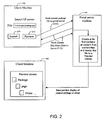
- Figure 2 illustrates a client-server system diagram that implement an embodiment of the present invention
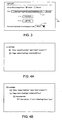
- Figure 3 illustrates an example of a display screen that allows a user to select a content package file to preview according to the present invention
- Figures 4A-4B illustrate examples of how a content package file and its sub-files can be previewed on a displayed screen in an expandable hierarchical format according to the present invention.
- FIG. 1 is a flow chart that illustrates a process according to an embodiment of the present invention.
- Figure 2 illustrates an example of a client-server system diagram that can implement an embodiment of the present invention.
- the system diagram of Figure 2 includes a client machine 150 and a portal server machine 151.
- the process described in Figure 1 can be implemented by the client-server system shown in Figure 2.
- Figure 3 illustrates an example of a display screen 210 that can be provided to a user to allow the user to select a content package file at step 110.
- a user can type the path to a content package file directly in region 211 or browse through directories of files to locate the path to a content package file.
- Screen 210 allows a user to choose whether to import a file from a client or a server machine.
- the user can import a content package file from a server machine or from a client machine.
- a user can select preview option 212 in screen 210 to preview the content package file specified in region 211 according to the principles of the present invention.
- a user can select import option 213 to import the content package file specified in region 211.
- the content package file specified in region 211 is sent to server 151 at step 111 as shown in Figures 1 and 2.
- Server 151 extracts the references to the content files referred to within the content package file.
- Server 151 then fetches the content files at step 112.
- Content files referred to in the content package file are called first level content files.
- Content files referred to in a first level content file are called second level content files.
- Content files referred to in a second level content file are called third level content file, etc.
- Portal server 151 iterates through each of the content files, extracts from them the references to other content files (i.e., the second level, third level, etc. content files), and then fetches these other content files from client 150 at step 112. This iterative process stops when all of the references to content files have been extracted and fetched.
- the references to other content files i.e., the second level, third level, etc. content files
- the portal server 151 establishes communications with client 150 to transfer the content files to portal server 151 at step 112. These communications are depicted in Figure 2. In an alternative embodiment of the present invention, the content files are transferred to portal server 151 from another server machine.
- step 113 the contents of the content files fetched at step 112 are extracted. All of the content from the content file is extracted including all of its data and code. Also at step 113, all of the references to the content files are replaced with the extracted content. A large combined file (e.g., a large XML file) is created at step 113. In this combined file, all of the references are eliminated from the content package file and the content files.
- a large combined file e.g., a large XML file
- a preview screen of the content package file is created using the combined file generated at step 113.
- the portal server renders basic information about the content files from the combined file to create the preview screen.
- Portal server 151 then sends this preview display to client machine 150.
- the basic information rendered about the content files is less than all of the content in the content files.
- the basic information about the content files can include meta-data such as names of the files, file types, version numbers, etc.
- the basic information can also include brief summaries of the content files.
- the preview can be an HTML file format, or any other suitable file format used for displaying information.
- portal server 151 renders an XML combined file to create a preview HTML display.
- server 151 sends the preview screen to client 150 to be displayed on the client machine.
- the preview screen of the content package file is displayed.
- the preview can display the basic information about the content files and the content package file.
- the preview screen displays an expandable hierarchy of the content package file and the referenced content files.
- Steps 112-114 are typically performed on portal server 151.
- Portal server 151 establishes a communication with a client machine to fetch each of the content files. This technique requires the portal server to establish multiple communications with the client to obtain the content files.
- a portal server makes with the client, a user can compress the content package file and its referenced content files into a compressed file format, such as, for example, a Zip file.
- the portal server gets the compressed file.
- the server can then expand the file contents and generate the preview of the content package file.
- the portal server can create the preview screen in less time.
- Figures 4A-4B are examples of preview screens that preview a content package file according to the present invention.
- the preview screens shown in Figures 4A-4B display a preview of a content package file in an expandable hierarchy.
- a user can click on the + (plus) or - (minus) icon next to the package to preview first level content files that are referred to in the content package file.
- a plus icon indicates that a content file contains references to other content files.
- a user can click on the plus icon to expand the next level of the hierarchy in order to view the referenced content files.
- a minus icon is displayed next to a file in the preview screen, either there are no lower level content files referenced in that content file or the lower level content files are already displayed. It should be clear from this description that other icons may be used to indicate this information.
- the preview screen displays a file name, a file type, and a version number for the content file named "myiView.”
- the preview For the content file name "myPage,” the preview displays a file name and a Boolean value (contentUrl) indicating whether the myPage file refers to other content files.
- First level content file labels for myiView and myPage are displayed beneath the package content file name in an hierarchical format that is expandable. The user can click on the minus icon next to "package” to hide the first level content files as well as the other levels of content files.
- the user can click on the plus icon next to content file name myPage in Figure 4A to preview the second level content files that are referenced in the myPage file as shown in Figure 4B.
- the myiView content file does not contain references to any other content files, and as a result, the myiView node cannot be expanded.
- the second level content files that are referenced in myPage are previewed beneath the listing of dependencies.
- the content file iViewPage is referenced in the myPage file, so iViewPage is displayed in the dependencies list beneath the myPage file label in the hierarchical format.
- the iViewPage file contains references to other third level content files, then a plus icon is displayed next to the file label. By clicking on this plus icon, the iViewPage node can be expanded to preview the third level content files.
- the iView Page file does not contain any references to other content files, so a minus icon is displayed next to its label.
- the present invention displays basic information next to each content file label in the preview screen.
- file names, file types, and version numbers are displayed as part of the preview of the content files.
- the preview can display a brief summary of the contents of one or more of the content files, or possibly some or all of the contents of the file.
- any data or code from the content files can be displayed in the preview screen through a portal.
- the purpose of the preview screen is to let the user know which content files are embedded in a file hierarchy beneath the main content package file. Additional basic information about the file such as a file type, name and a brief summary of its content can be displayed to help the user better understand the nature of each of the embedded content files.
- the user can decide whether to import the content package file. If the user decides to import the content package file, the user clicks on import option 213. The package content file and all of the lower level embedded content files are then imported to the portal server computer at step 116.
- the present invention also allows a user to determine whether the content files imported to the portal server computer overwrite existing content files with the same name.
- Drop down list 214 in the display screen of Figure 3 gives the user the option to select whether the imported content files overwrite existing content files.
- the user has chosen 'none' from the list, which prevents the imported content files from overwriting any of the existing content files stored on the portal server computer. This feature allows a user to prevent an imported content file from overwriting an existing file that has been updated or otherwise changed with respect to the imported file.
- the present invention displays each of the lower level content files in the preview screen before the content files are imported, the user can see in the preview screen whether any of the content files may overwrite his existing files. If such overwrite files exist, then the user selects the 'none' option from list 214 to prevent his existing files from being lost.
- Drop down list 214 has an option that causes imported files to overwrite any existing files with the same name on the portal server computer.
- one (or more) of the references to the content files may contain an error.
- error There are two types of errors. One type of error occurs when the wrong path name is entered as the reference. Another type of error occurs when the correct path name is initially entered as the reference, but the content file is subsequently moved to another location.
- the system detects the error when it tries to fetch the content file at step 112.
- the preview screen displays an error message to the user indicating that the reference to the file contains an error. The user can then fix the erroneous reference and then attempt to preview the content files again.
- This feature is advantageous, because it allows the user to fix any errors in the content file references before the content package file is imported to the portal server computer. This provides the user with enhanced control over the content of the files that are imported onto to the portal server computer. Without this feature, content files linked to erroneous references are not imported to the portal server computer.
Landscapes
- Engineering & Computer Science (AREA)
- Theoretical Computer Science (AREA)
- Data Mining & Analysis (AREA)
- Databases & Information Systems (AREA)
- Physics & Mathematics (AREA)
- General Engineering & Computer Science (AREA)
- General Physics & Mathematics (AREA)
- Information Retrieval, Db Structures And Fs Structures Therefor (AREA)
- Information Transfer Between Computers (AREA)
Applications Claiming Priority (4)
| Application Number | Priority Date | Filing Date | Title |
|---|---|---|---|
| US51900703P | 2003-11-10 | 2003-11-10 | |
| US519007P | 2003-11-10 | ||
| US734550 | 2003-12-11 | ||
| US10/734,550 US8312102B2 (en) | 2003-11-10 | 2003-12-11 | Techniques for previewing content package files through a portal |
Publications (2)
| Publication Number | Publication Date |
|---|---|
| EP1530134A2 true EP1530134A2 (de) | 2005-05-11 |
| EP1530134A3 EP1530134A3 (de) | 2006-10-18 |
Family
ID=34437358
Family Applications (1)
| Application Number | Title | Priority Date | Filing Date |
|---|---|---|---|
| EP04026617A Ceased EP1530134A3 (de) | 2003-11-10 | 2004-11-09 | Techniken zur Vorschau von Inhaltpaketdateien durch ein Portal |
Country Status (2)
| Country | Link |
|---|---|
| US (1) | US8312102B2 (de) |
| EP (1) | EP1530134A3 (de) |
Families Citing this family (15)
| Publication number | Priority date | Publication date | Assignee | Title |
|---|---|---|---|---|
| KR100800860B1 (ko) | 2005-09-09 | 2008-02-04 | 삼성전자주식회사 | 디지털 방송 시스템에서 전자 서비스 가이드를 이용한미리보기 서비스 방법 및 장치 |
| US8104048B2 (en) | 2006-08-04 | 2012-01-24 | Apple Inc. | Browsing or searching user interfaces and other aspects |
| US20080033919A1 (en) * | 2006-08-04 | 2008-02-07 | Yan Arrouye | Methods and systems for managing data |
| US20080092044A1 (en) * | 2006-10-12 | 2008-04-17 | International Business Machines Corporation | Cascading clouds |
| US8185839B2 (en) * | 2007-06-09 | 2012-05-22 | Apple Inc. | Browsing or searching user interfaces and other aspects |
| US8201096B2 (en) * | 2007-06-09 | 2012-06-12 | Apple Inc. | Browsing or searching user interfaces and other aspects |
| US9058337B2 (en) * | 2007-10-22 | 2015-06-16 | Apple Inc. | Previewing user interfaces and other aspects |
| US8607166B2 (en) * | 2008-06-06 | 2013-12-10 | Apple Inc. | Browsing or searching user interfaces and other aspects |
| US8516038B2 (en) * | 2008-06-06 | 2013-08-20 | Apple Inc. | Browsing or searching user interfaces and other aspects |
| US8762887B2 (en) | 2008-06-06 | 2014-06-24 | Apple Inc. | Browsing or searching user interfaces and other aspects |
| US8817053B2 (en) | 2010-09-30 | 2014-08-26 | Apple Inc. | Methods and systems for opening a file |
| US10057726B2 (en) | 2012-10-02 | 2018-08-21 | Razer (Asia-Pacific) Pte. Ltd. | Managing user data on an electronic device |
| US9106721B2 (en) | 2012-10-02 | 2015-08-11 | Nextbit Systems | Application state synchronization across multiple devices |
| CN103729214A (zh) * | 2013-12-19 | 2014-04-16 | 北京像素软件科技股份有限公司 | 一种用户界面预览的方法 |
| US10105593B2 (en) | 2014-04-08 | 2018-10-23 | Razer (Asia-Pacific) Pte. Ltd. | File prefetching for gaming applications accessed by electronic devices |
Family Cites Families (7)
| Publication number | Priority date | Publication date | Assignee | Title |
|---|---|---|---|---|
| JP3615905B2 (ja) * | 1997-05-12 | 2005-02-02 | 株式会社東京放送 | デジタル映像分配装置 |
| US6160554A (en) * | 1998-03-19 | 2000-12-12 | Hewlett Packard Company | Computer file content preview window |
| US6772338B1 (en) * | 1999-10-26 | 2004-08-03 | Ricoh Co., Ltd. | Device for transfering data between an unconscious capture device and another device |
| US6771384B1 (en) * | 2000-01-10 | 2004-08-03 | Kinko's Washington, Inc. | Imposition of graphic image files |
| US6879988B2 (en) * | 2000-03-09 | 2005-04-12 | Pkware | System and method for manipulating and managing computer archive files |
| JP2003083162A (ja) * | 2001-09-10 | 2003-03-19 | Honda Motor Co Ltd | 自動二輪車用エンジン |
| US7624132B2 (en) * | 2002-01-22 | 2009-11-24 | Sun Microsystems, Inc. | Method and apparatus for processing a streamed zip file |
-
2003
- 2003-12-11 US US10/734,550 patent/US8312102B2/en active Active
-
2004
- 2004-11-09 EP EP04026617A patent/EP1530134A3/de not_active Ceased
Non-Patent Citations (3)
| Title |
|---|
| "Exporting and Importing Web Packages", MICROSOFT TM OFFICE FRONTPAGE TM 2003 INSIDE OUT,, 23 August 2003 (2003-08-23), pages 1 - 4, XP007911035 * |
| RAHMAN S: "Digital Library Network for Engineering and Technology", FINAL REPORT,, no. NSF Grant DUE-0085849, 1 May 2003 (2003-05-01), pages 1 - 162, XP007911069 * |
| VARA PRASHANTH PUSHPAGIRI: "A Java-based Smart Object Model for use in Digital Learning Environments", THESIS SUBMITTED TO THE FACULTY OF THE VIRGINIA POLYTECHNIC INSTITUTE AND STATE UNIVERSITY,, 13 June 2003 (2003-06-13), pages 1 - 99, XP007911034, Retrieved from the Internet <URL:http://scholar.lib.vt.edu/theses/available/etd-07182003-010006/unrest ricted/vara_prashanth_thesis_document_july_26.pdf> * |
Also Published As
| Publication number | Publication date |
|---|---|
| US8312102B2 (en) | 2012-11-13 |
| EP1530134A3 (de) | 2006-10-18 |
| US20050102373A1 (en) | 2005-05-12 |
Similar Documents
| Publication | Publication Date | Title |
|---|---|---|
| US8312102B2 (en) | Techniques for previewing content package files through a portal | |
| RU2464639C2 (ru) | Управление ссылками на web-страницы, использующие структурированные данные | |
| US6931598B2 (en) | Dynamic web list display | |
| US7240296B1 (en) | Unified navigation shell user interface | |
| US6272484B1 (en) | Electronic document manager | |
| US6061700A (en) | Apparatus and method for formatting a web page | |
| EP0917071B1 (de) | Erfassen eines Hypertexts ohne Seitenwechsel in einem Dokument mit Seitenwechsel | |
| US7406664B1 (en) | System for integrating HTML Web site views into application file dialogs | |
| US20020069204A1 (en) | System and method for in-context editing | |
| US20090235158A1 (en) | Web Page Authoring Tool for Structured Documents | |
| KR100922640B1 (ko) | 파일을 복사하고 업데이트하기 위한 컴퓨터로 구현된 방법 | |
| US20030074416A1 (en) | Method of establishing a navigation mark for a web page | |
| US20090307626A1 (en) | Browsing or searching user interfaces and other aspects | |
| US6789080B1 (en) | Retrieving documents transitively linked to an initial document | |
| US20090112876A1 (en) | Method and system for providing dynamic branding in a computer program or suite | |
| CA2608802C (en) | Method and system for providing dynamic branding in a computer program or suite | |
| WO2004072864A1 (en) | Dynamically configurable file display system | |
| HK1170576A (en) | Copying and updating files | |
| HK1169910A (en) | Copying and updating files | |
| HK1110664B (en) | Capturing unpaginated hypertext in a paginated document |
Legal Events
| Date | Code | Title | Description |
|---|---|---|---|
| PUAI | Public reference made under article 153(3) epc to a published international application that has entered the european phase |
Free format text: ORIGINAL CODE: 0009012 |
|
| AK | Designated contracting states |
Kind code of ref document: A2 Designated state(s): AT BE BG CH CY CZ DE DK EE ES FI FR GB GR HU IE IS IT LI LU MC NL PL PT RO SE SI SK TR |
|
| AX | Request for extension of the european patent |
Extension state: AL HR LT LV MK YU |
|
| RAP1 | Party data changed (applicant data changed or rights of an application transferred) |
Owner name: SAP AG |
|
| PUAL | Search report despatched |
Free format text: ORIGINAL CODE: 0009013 |
|
| AK | Designated contracting states |
Kind code of ref document: A3 Designated state(s): AT BE BG CH CY CZ DE DK EE ES FI FR GB GR HU IE IS IT LI LU MC NL PL PT RO SE SI SK TR |
|
| AX | Request for extension of the european patent |
Extension state: AL HR LT LV MK YU |
|
| 17P | Request for examination filed |
Effective date: 20061214 |
|
| AKX | Designation fees paid |
Designated state(s): DE FR GB |
|
| 17Q | First examination report despatched |
Effective date: 20070723 |
|
| STAA | Information on the status of an ep patent application or granted ep patent |
Free format text: STATUS: THE APPLICATION HAS BEEN REFUSED |
|
| 18R | Application refused |
Effective date: 20101005 |