EP1447748A2 - Method of installing software and storage medium - Google Patents
Method of installing software and storage medium Download PDFInfo
- Publication number
- EP1447748A2 EP1447748A2 EP04250451A EP04250451A EP1447748A2 EP 1447748 A2 EP1447748 A2 EP 1447748A2 EP 04250451 A EP04250451 A EP 04250451A EP 04250451 A EP04250451 A EP 04250451A EP 1447748 A2 EP1447748 A2 EP 1447748A2
- Authority
- EP
- European Patent Office
- Prior art keywords
- software
- installation
- link setup
- installing
- monitoring
- Prior art date
- Legal status (The legal status is an assumption and is not a legal conclusion. Google has not performed a legal analysis and makes no representation as to the accuracy of the status listed.)
- Withdrawn
Links
Images



Classifications
-
- G—PHYSICS
- G06—COMPUTING OR CALCULATING; COUNTING
- G06F—ELECTRIC DIGITAL DATA PROCESSING
- G06F8/00—Arrangements for software engineering
- G06F8/60—Software deployment
Definitions
- the present invention relates to a method of installing mutually associated softwares, and a storage medium for storing the installed softwares.
- link setup is automatically performed only to the second software which has already been installed.
- One concern of the present invention is to provide a software installing method which can automatically perform appropriate link setup even when a second software is installed after a first software was installed, and a storage medium which stores the installed software.
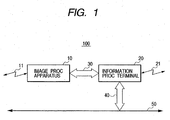
- Fig. 1 is a block diagram showing the basic structure of an image processing system 100 according to an embodiment of the present invention.
- the image processing system 100 mainly consists of an image processing apparatus 10 and an information processing terminal 20.
- the image processing apparatus 10 has various functions such as a printer function, a scanner function, a facsimile function, a copying function, a memory card function and the like, and the image processing apparatus 10 and the information processing terminal 20 mutually transmit/receive various control instructions and data through an external I/F (interface) 30.
- I/F interface
- the information processing terminal 20 is connected to a network 50 through a network I/F 40.
- another information processing terminal may be connected to the network 50 through a network I/F.
- the image processing apparatus 10 and the information processing terminal 20 may transmit/receive various data, image information and the like to/from another communication apparatus respectively through communication lines 11 and 21.
- Fig. 2 is a block diagram showing the basic structure of the information processing terminal 20.
- a CPU 201 controls entire operations of the information processing terminal 20 through system buses in accordance with programs stored in a ROM 202, a main memory 203 or a hard disk 220, or programs read from an FDD (flexible disk drive) 221 or a CD-ROM drive 222.
- FDD flexible disk drive
- the ROM 202 stores control programs to be used for the CPU 201, and the main memory 203 temporarily stores the programs and the image data so that the processes of the information processing terminal 20 can be performed at high speed.
- a hard disk control unit 204 controls the hard disk 220 in which an operating system, various application programs, image data and the like are stored. Moreover, various application softwares and driver softwares according to the embodiment are installed in the hard disk 220. Ordinarily, these application softwares and these driver softwares are supplied from another computer-readable memory medium and then installed in the hard disk 220 through the FDD 221, the CD-ROM drive 222 and the like. Besides, the application software and the driver software can also be downloaded through a network control unit 207 and a modem 208 and then installed in the hard disk 220.
- a keyboard/mouse control unit 205 controls a keyboard/mouse 230 which acts as an input means for inputting an instruction from an operator (or a user), and a display control unit 206 controls a display 240 which performs various displays to the operator.
- a network control unit 207 performs control to connect the information processing terminal 20 to a not-shown network through the network I/F 40.
- a known method is adopted to connect the information processing terminal 20 to the network, a detailed explanation of such connection is omitted.
- the modem 208 performs connection to a provider, and also performs communication of data, image information and the like to a communication partner's apparatus.
- An external I/F control unit 209 consists of a serial I/O (input/output) I/F LSI, a parallel I/O I/F LSI and the like, and transmits/receives various control instructions and data to/from the image processing apparatus 10 through the external I/F 30.
- An FDD control unit 210 controls the FDD 221, and a CD-ROM drive control unit 211 controls the CD-ROM drive 222.
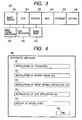
- Fig. 3 is a diagram for explaining a toolbox 300 which is one example of a first software installed in the information processing terminal 20.
- the toolbox 300 which consists of scan start buttons 301 to 305 and a setup button 306 is an application software which is activated by an operator's handling. Besides, the toolbox 300 may be automatically activated when the information processing terminal 20 is activated.
- a scan operation is performed in a reading mode (concerning color, gray scale, binary, resolution, size, or the like) set in regard to each button. After the scan operation was performed, setup is performed for each button, and the process starts.
- second softwares such as a later-described image editing application 420 and a later-described OCR application 430 are set respectively to the image editing button 301 and the OCR button 302
- second softwares such as a later-described image editing application 420 and a later-described OCR application 430 are set respectively to the image editing button 301 and the OCR button 302
- an original is read in the reading mode corresponding to the clicked button
- the read data is given to the set second software, and the second software is then activated.
- the printer driver may display a setup dialog box by which the detailed setup is performed for the printing.
- a printer driver included in a later-described driver group 410 may be automatically set as the printer driver.
- the original is read in the set reading mode, and the read image is then given to a set electronic mail application in a set file format, whereby the electronic mail application is activated to form an attached file.
- the storage button 305 When the storage button 305 is clicked, the original is read in the set reading mode, and the read data is then stored in a hard disk or the like in the information processing terminal 20, as a file name set in the set file format.
- setup button 306 When the setup button 306 is clicked, a setup dialog box for setting the reading modes corresponding to the respective buttons, the target applications and the target drivers is displayed, whereby the operator can confirm, change and save (store) the various settings.
- Fig. 4 is a diagram for explaining an integrated installer 400 which installs the drivers and the applications in the information processing terminal 20.
- the integrated installer 400 is a program which is supplied from a medium such as a CD-ROM or the like and activated by an operator's handling. For example, it is desirable to cause the information processing terminal 20 to automatically activate the integrated installer 400 when the CD-ROM is loaded in the CD-ROM drive 222.
- buttons 401 to 406 are provided on the integrated installer 400. Thus, when the respective buttons are clicked, the following operations are performed.
- a toolbox 300 being the first software is installed.
- the driver installation button 402 is clicked, the driver group 410 including the printer driver, the scanner driver and the like necessary to perform the printing, the scanning and the like in the image processing apparatus 10 is installed from the information processing terminal 20.
- the image editing application installation button 403 when the image editing application installation button 403 is clicked, the image editing application 420 being the second software is installed.
- the OCR application installation button 404 when the OCR application installation button 404 is clicked, the OCR application 430 being the second software is installed.
- Fig. 5 is a flow chart showing the process of the integrated installer 400 in the information processing terminal 20.
- step S501 When the integrated installer 400 is activated, it is first judged whether or not the toolbox installation button 401 is clicked (step S501). When it is judged that the toolbox installation button 401 is clicked, the installer for installing the toolbox 300 is activated (step S502). Then, the operation is monitored until the installation ends (step S503). When the end of the installation is monitored, it may be monitored whether or not a window having a designated caption name is present. Also, it may be monitored whether or not a process handle of the activated installer is present.
- step S504 When it is monitored and judged in the step S503 that the installation ends, the flow advances to a step S504 to perform link setup.
- the link setup is performed only to the application and the print driver already installed into the information processing terminal 20.
- step S505 After the link setup ended in the step S504, or when it is judged in the step S501 that the toolbox installation button 401 is not clicked, the flow advances to a step S505.
- step S505 it is judged whether or not the driver installation button 402 is clicked.
- the installer for installing the driver group 410 is activated (step S506), and the operation is monitored until the installation ends (step S507).
- the end of the installation it may be monitored whether or not a window having a designated caption name is present. Also, it may be monitored whether or not a process handle of the activated installer is present.
- step S508 When it is monitored and judged in the step S507 that the installation ends, the flow advances to a step S508 to perform link setup.
- step S508 only when the toolbox 300 has been installed, it is set to link the printer driver in the driver group 410 to the copying button 303 on the toolbox 300.
- step S509 it is judged whether or not the image editing application installation button 403 is clicked.
- the installer for installing the image editing application 420 is activated (step S510), and the operation is monitored until the installation ends (step S511).
- the end of the installation it may be monitored whether or not a window having a designated caption name is present. Also, it may be monitored whether or not a process handle of the activated installer is present.
- step S512 When it is monitored and judged in the step S511 that the installation ends, the flow advances to a step S512 to perform link setup.
- step S512 only when the toolbox 300 has been installed, it is set to link the image editing application 420 to the image editing button 301 on the toolbox 300.
- Fig. 6 is the flow chart showing the successive process of the integrated installer 400 in the information processing terminal 20.
- step S601 it is judged whether or not the OCR application installation button 404 is clicked.
- the installer for installing the OCR application 430 is activated (step S602), and the operation is monitored until the installation ends (step S603).
- the end of the installation it may be monitored whether or not a window having a designated caption name is present. Also, it may be monitored whether or not a process handle of the activated installer is present.
- step S604 When it is monitored and judged in the step S603 that the installation ends, the flow advances to a step S604 to perform link setup.
- step S604 only when the toolbox 300 has been installed, it is set to link the OCR application 430 to the OCR button 302 on the toolbox 300.
- step S605 After the link setup ended in the step S604, or when it is judged in the step S601 that the OCR application installation button 404 is not clicked, the flow advances to a step S605.
- step S605 it is judged whether or not the user's guide button 405 is clicked.
- the dialog box for selecting which user's guide should be displayed for the drivers and the applications is activated (step S606), and the flow advances to a step S607.
- the flow advances to the step S607.
- step S607 it is judged whether or not the end button 406 is clicked.
- the flow returns to the step S501 shown in Fig. 5.
- the dialog box of the integrated installer 400 is closed, and the process ends.
- the button for installing the driver group 410, the button for installing the image editing application 420 and the button for installing the OCR application 430 are independently provided, and the installation and the link setup for each of the driver and the applications are performed when the corresponding button is clicked. Instead, it is possible to previously select which of the driver group 410, the image editing application 420 and the OCR application 430, and then click a batch installation button.
- driver/applications it is possible to select the plural items (i.e., driver/applications) from among the driver group 410, the image editing application 420 and the OCR application 430.
- the batch installation button is clicked, the selected items are sequentially installed, and then the link setup is automatically performed for all the installed items.
- the present invention includes the case where a storage medium storing program codes of software to realize the functions of the above embodiment is supplied to a system or an apparatus and then a computer (or CPU or MPU) in the system or the apparatus reads and executes the program codes stored in the storage medium.
- the program codes themselves read from the storage medium realize the functions of the present invention, whereby the storage medium storing these program codes constitutes the present invention.
- the storage medium for supplying the program codes for example, a Floppy DiskTM, an optical disk, a magnetooptical disk, a CD-ROM, a CD-R, a magnetic tape, a nonvolatile memory card, a ROM or the like can be used.
- the present invention includes not only a case where the functions of the above embodiment are realized by executing the program codes read by the computer, but also a case where an OS (operating system) or the like functioning on the computer executes a part or all of the actual process according to instructions of the program codes, whereby the functions of the above embodiment are achieved by that process.
- an OS operating system
- the present invention includes not only a case where the functions of the above embodiment are realized by executing the program codes read by the computer, but also a case where an OS (operating system) or the like functioning on the computer executes a part or all of the actual process according to instructions of the program codes, whereby the functions of the above embodiment are achieved by that process.
- the link setup for the second software is automatically performed when the installation of the second software ends, whereby it is possible not to urge the operator to manually perform the link setup which is generally difficult for the operator, and it is also possible to provide the software installation method which is highly convenient for the operator.
Landscapes
- Engineering & Computer Science (AREA)
- Software Systems (AREA)
- General Engineering & Computer Science (AREA)
- Theoretical Computer Science (AREA)
- Physics & Mathematics (AREA)
- General Physics & Mathematics (AREA)
- Stored Programmes (AREA)
Abstract
Description
Claims (12)
- A software installation method which installs first software and second software capable of operating while linking to said first software, comprising:a first installation step of installing said first software;a second installation step of installing said second software;a first link setup step of performing link setup of said second software already installed, when the installation of said first software in said first installation step ends; anda second link setup step of performing link setup of said second software installed in said second installation step, when the installation of said second software ends.
- A software installation method according to Claim 1, wherein said second link setup step operates only when said first software has already been installed.
- A software installation method which installs first software and second software capable of operating while linking to said first software, comprising:a first installation step of installing said first software;a first monitoring step of monitoring that the installation of said first software in said first installation step ended;a second installation step of installing said second software;a second monitoring step of monitoring that the installation of said second software in said second installation step ended;a first link setup step of performing link setup of said second software already installed, when it is judged in said first monitoring step that the installation of said first software ended; anda second link setup step of performing link setup of said second software installed in said second installation step, when it is judged in said second monitoring step that the installation of said second software ended.
- A software installation method according to Claim 3, wherein said second link setup step operates only when said first software has already been installed.
- A storage medium which computer-readably stores a program for installing first software and second software capable of operating while linking to said first software, said program executing:a first installation step of installing said first software;a second installation step of installing said second software;a first link setup step of performing link setup of said second software already installed, when the installation of said first software in said first installation step ends; anda second link setup step of performing link setup of said second software installed in said second installation step, when the installation of said second software ends.
- A storage medium according to Claim 5, wherein said second link setup step operates only when said first software has already been installed.
- A storage medium which computer-readably stores a program for installing first software and second software capable of operating while linking to said first software, said program executing:a first installation step of installing said first software;a first monitoring step of monitoring that the installation of said first software in said first installation step ended;a second installation step of installing said second software;a second monitoring step of monitoring that the installation of said second software in said second installation step ended;a first link setup step of performing link setup of said second software already installed, when it is judged in said first monitoring step that the installation of said first software ended; anda second link setup step of performing link setup of said second software installed in said second installation step, when it is judged in said second monitoring step that the installation of said second software ended.
- A storage medium according to Claim 7, wherein said second link setup step operates only when said first software has already been installed.
- An information processing terminal comprising a central processor, memory means storing first application software, means for installing second software capable of linking with said first application software, and link set up means for linking second software installed by said installing means with said first software.
- A terminal according to claim 9 wherein said first software is application software for processing data for transmission to and from an information processing apparatus.
- A terminal according to claim 9 or claim 10, wherein the application software includes a toolbox storing application software for processing image data.
- A terminal according to anyone of claim 9 or 10 in combination with information processing apparatus which includes a printer and a scanner.
Applications Claiming Priority (2)
| Application Number | Priority Date | Filing Date | Title |
|---|---|---|---|
| JP2003024195 | 2003-01-31 | ||
| JP2003024195A JP2004234481A (en) | 2003-01-31 | 2003-01-31 | Software installation method and storage medium |
Publications (2)
| Publication Number | Publication Date |
|---|---|
| EP1447748A2 true EP1447748A2 (en) | 2004-08-18 |
| EP1447748A3 EP1447748A3 (en) | 2005-08-24 |
Family
ID=32677560
Family Applications (1)
| Application Number | Title | Priority Date | Filing Date |
|---|---|---|---|
| EP04250451A Withdrawn EP1447748A3 (en) | 2003-01-31 | 2004-01-28 | Method of installing software and storage medium |
Country Status (4)
| Country | Link |
|---|---|
| US (1) | US7320128B2 (en) |
| EP (1) | EP1447748A3 (en) |
| JP (1) | JP2004234481A (en) |
| CN (1) | CN1519715A (en) |
Families Citing this family (8)
| Publication number | Priority date | Publication date | Assignee | Title |
|---|---|---|---|---|
| CN101390050B (en) | 2005-12-22 | 2018-04-24 | 艾伦·J·薛比洛 | Apparatus and method for selectively allocating software resources by subtractive installation |
| US20070150887A1 (en) * | 2005-12-22 | 2007-06-28 | Shapiro Alan J | Apparatus and method for selectively dispensing soft assets |
| KR20080002084A (en) * | 2006-06-30 | 2008-01-04 | 삼성전자주식회사 | System for Optical Character Reading and Method of Reading Optical Characters |
| JP2008077487A (en) * | 2006-09-22 | 2008-04-03 | Oki Data Corp | Driver installation control method, driver installation program, drive control method, driver program, program storage medium, and terminal device |
| US9020811B2 (en) * | 2006-10-13 | 2015-04-28 | Syscom, Inc. | Method and system for converting text files searchable text and for processing the searchable text |
| JP2009146122A (en) | 2007-12-13 | 2009-07-02 | Nec Infrontia Corp | Installation method, installer and installation program |
| JP5508498B2 (en) * | 2012-10-10 | 2014-05-28 | Necインフロンティア株式会社 | Installation method, installer device, and installation program |
| US10230855B1 (en) * | 2016-09-12 | 2019-03-12 | Parallels International Gmbh | Asynchronous usage of redirected scanners with a single driver |
Family Cites Families (12)
| Publication number | Priority date | Publication date | Assignee | Title |
|---|---|---|---|---|
| US5548745A (en) | 1993-01-19 | 1996-08-20 | Canon Kabushiki Kaisha | Method and apparatus for designating context in a windowing environment |
| US5481714A (en) * | 1993-10-18 | 1996-01-02 | International Business Machines Corporation | Method and system for installing an operating system on a data processing system with abort capability and voice input feature |
| US5794052A (en) * | 1995-02-27 | 1998-08-11 | Ast Research, Inc. | Method of software installation and setup |
| US5666501A (en) * | 1995-03-30 | 1997-09-09 | International Business Machines Corporation | Method and apparatus for installing software |
| KR100286008B1 (en) * | 1995-12-30 | 2001-04-16 | 윤종용 | Software program automatic update method |
| US6684397B1 (en) * | 1997-09-08 | 2004-01-27 | Novell, Inc. | Auto-install apparatus and method |
| US6006035A (en) * | 1997-12-31 | 1999-12-21 | Network Associates | Method and system for custom computer software installation |
| US6378127B1 (en) | 1998-09-21 | 2002-04-23 | Microsoft Corporation | Software installation and validation using custom actions |
| TW434478B (en) * | 1998-10-27 | 2001-05-16 | Inventec Corp | Method for testing the integrity of software pre-installed in a computer hard disk |
| US6066182A (en) * | 1998-11-05 | 2000-05-23 | Platinum Technology Ip, Inc. | Method and apparatus for operating system personalization during installation |
| US6591418B2 (en) * | 1999-03-26 | 2003-07-08 | Dell U.S.A., L.P. | Factory software management system |
| JP3595752B2 (en) | 1999-12-15 | 2004-12-02 | キヤノン株式会社 | Image reading system, control method of the image reading system, information processing terminal, and control method of the information processing terminal |
-
2003
- 2003-01-31 JP JP2003024195A patent/JP2004234481A/en active Pending
-
2004
- 2004-01-26 US US10/763,221 patent/US7320128B2/en not_active Expired - Fee Related
- 2004-01-28 EP EP04250451A patent/EP1447748A3/en not_active Withdrawn
- 2004-01-30 CN CNA2004100037619A patent/CN1519715A/en active Pending
Also Published As
| Publication number | Publication date |
|---|---|
| JP2004234481A (en) | 2004-08-19 |
| EP1447748A3 (en) | 2005-08-24 |
| CN1519715A (en) | 2004-08-11 |
| US7320128B2 (en) | 2008-01-15 |
| US20040154015A1 (en) | 2004-08-05 |
Similar Documents
| Publication | Publication Date | Title |
|---|---|---|
| US7916953B2 (en) | Removable medium device, medium for controlling removable medium device, and medium for controlling network device | |
| JP4847220B2 (en) | Data processing apparatus, control method therefor, program, and storage medium | |
| US7876459B2 (en) | Printing apparatus, print processing system and print processing method for processing print files having different file formats | |
| US20110261396A1 (en) | Control device for managing drivers | |
| US20070022233A1 (en) | Document processing device with USB drive | |
| EP1447748A2 (en) | Method of installing software and storage medium | |
| US6590675B1 (en) | Method and system for image printing capable of properly performing a form overlay | |
| US20060119872A1 (en) | Printing processing system | |
| US20050270551A1 (en) | External storage device, image acquisition device, and method and system to control a driver | |
| US9128407B2 (en) | Image forming device and computer-readable storage medium | |
| US20060242593A1 (en) | Printer emoticon detector & converter | |
| US20080204784A1 (en) | Multifunction image processing apparatus and method of controlling the multifunction image processing apparatus | |
| US8045205B2 (en) | Image forming device, and method and computer readable medium therefor | |
| US7952741B2 (en) | Information-processing system causing a plurality of processing execution apparatuses to execute a plurality of kinds of processing for one kind of data | |
| US20060200644A1 (en) | Storage medium for storing processing mode specifying information conversion program and processing mode specifying information conversion method | |
| US8416478B2 (en) | Image reading and transmitting apparatus and method that generates image checking data for a read image, and computer-readable medium storing a computer program therefor | |
| US20070070410A1 (en) | Device, program, method and system for data transmission | |
| JP4890223B2 (en) | Electronic device, report creation method and report creation program | |
| US20070153321A1 (en) | High speed printing method and apparatus | |
| JP4549810B2 (en) | Scan subsystem capable of generating document processing data | |
| JP2001312433A (en) | Information processing apparatus and method, and storage medium | |
| KR100318727B1 (en) | How to Edit the Function of the All-in-One | |
| KR100370202B1 (en) | Printer and method of processing print data thereof | |
| US20030117669A1 (en) | Method and apparatus for fast image fetching and processing | |
| US12177396B2 (en) | Image reading device determining transmission destination |
Legal Events
| Date | Code | Title | Description |
|---|---|---|---|
| PUAI | Public reference made under article 153(3) epc to a published international application that has entered the european phase |
Free format text: ORIGINAL CODE: 0009012 |
|
| AK | Designated contracting states |
Kind code of ref document: A2 Designated state(s): AT BE BG CH CY CZ DE DK EE ES FI FR GB GR HU IE IT LI LU MC NL PT RO SE SI SK TR |
|
| AX | Request for extension of the european patent |
Extension state: AL LT LV MK |
|
| PUAL | Search report despatched |
Free format text: ORIGINAL CODE: 0009013 |
|
| AK | Designated contracting states |
Kind code of ref document: A3 Designated state(s): AT BE BG CH CY CZ DE DK EE ES FI FR GB GR HU IE IT LI LU MC NL PT RO SE SI SK TR |
|
| AX | Request for extension of the european patent |
Extension state: AL LT LV MK |
|
| RIC1 | Information provided on ipc code assigned before grant |
Ipc: 7G 06F 9/44 B Ipc: 7G 06F 9/445 A |
|
| 17P | Request for examination filed |
Effective date: 20060224 |
|
| AKX | Designation fees paid |
Designated state(s): DE ES FR GB IT |
|
| STAA | Information on the status of an ep patent application or granted ep patent |
Free format text: STATUS: THE APPLICATION HAS BEEN WITHDRAWN |
|
| 18W | Application withdrawn |
Effective date: 20130404 |