EP1426912A2 - Medical wound treatment simulator - Google Patents
Medical wound treatment simulator Download PDFInfo
- Publication number
- EP1426912A2 EP1426912A2 EP04075264A EP04075264A EP1426912A2 EP 1426912 A2 EP1426912 A2 EP 1426912A2 EP 04075264 A EP04075264 A EP 04075264A EP 04075264 A EP04075264 A EP 04075264A EP 1426912 A2 EP1426912 A2 EP 1426912A2
- Authority
- EP
- European Patent Office
- Prior art keywords
- wound
- medical
- treatment
- soldier
- view
- Prior art date
- Legal status (The legal status is an assumption and is not a legal conclusion. Google has not performed a legal analysis and makes no representation as to the accuracy of the status listed.)
- Withdrawn
Links
Images
Classifications
-
- G—PHYSICS
- G09—EDUCATION; CRYPTOGRAPHY; DISPLAY; ADVERTISING; SEALS
- G09B—EDUCATIONAL OR DEMONSTRATION APPLIANCES; APPLIANCES FOR TEACHING, OR COMMUNICATING WITH, THE BLIND, DEAF OR MUTE; MODELS; PLANETARIA; GLOBES; MAPS; DIAGRAMS
- G09B23/00—Models for scientific, medical, or mathematical purposes, e.g. full-sized devices for demonstration purposes
- G09B23/28—Models for scientific, medical, or mathematical purposes, e.g. full-sized devices for demonstration purposes for medicine
Definitions
- the present invention relates to a medical treatment simulator according to the preamble of claim 1.
- One object of the invention is to provide means for training medical personnel in a battlefield.
- the medical treatment simulator enables the Medic to carry out wound evaluation and treatment selection based on a computer. All these functions are to be done in the field.
- the MTS Equipment comprises one component, a Handheld Palmtop Computer.
- the Palmtop Computer communicates with the soldier equipment (PDD) via a communication port on top of the computer.
- PDD soldier equipment
- IrDA IrDA or Bluetooth interface
- the MTS equipment shall integrate the behaviour and influence of Medic handling during an exercise. Focus is placed on the logistic consequences for the exercising units more than skills training of the medic personnel. The MTS equipment is used to guide and register measures taken by the medic personnel. All steps are registered for later evaluation in After Action Review (AAR).
- AAR After Action Review
- the initial wound evaluation is done in the soldier equipment PDD at the time of hit/injury. All hit results are located to a part of the body:
- the hit results/WoundAreas are stored in the PDD together with time information.
- the MTS equipment When the Medical personnel reach the wounded soldier the MTS equipment is used to feed status information from the soldier PDD into the MTS computer. For each of the seven WoundAreas, a number of injuries are stored in the database together with a probability of occurrence. By random selection using these probabilities, one of the injuries is selected, for example the WoundArea Right Arm becomes the injury Right Hand cut off by wrist.
- the injury is stored in the soldier PDD (not available for the soldier).
- the soldier PDD not available for the soldier.
- the database also contains all selectable examinations to be performed. These are presented to the Medical Operator on the MTS screen.
- the Medical Operator selects a treatment from a list presented on a screen containing the selectable examinations.
- the Medical Operator takes the MTS equipment to the soldier and updates the status of the soldier and a Lifetime Counter.
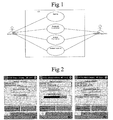
- Figure 1 shows two actors, namely a Medical Operator and a Wounded player PDD.
- the Medical Operator interacts with a Medical Treatment System (MTS) via a Touch Pad by selecting commands and reading messages.
- MTS Medical Treatment System
- the Wounded Player PDD is the actor who is under medical examination and treatment.
- Equipment Identification is for example performed according to the following:
- the AmmunitionType belongs to the most recent wound in each WoundArea and that a WoundArea is deemed to be treated if the applicable bit in TreatedArea is set.
- EPC Electronic Patient Card
- the EPC consists of examinations and treatments performed since the last time the wounded player was hit. This information can be viewed after identification. A local image is kept and updated at examination in the MTS until a treatment is performed. After the treatment has been performed a new identification is required to be able to view the patient card. The reason for this is that the status may have been changed in the PDD.
- Medical examination can only be performed if the Wounded Player is identified. If Equipment Identification has not been performed, the Medical Examination View will not appear and an error message will be displayed saying that identification has to be done prior to examination.
- the Medical Examination is performed according to the following:
- the examinations will be transferred to the PDD.
- the MTS will perform identification in order to make sure that the correct player is treated. If he directs the MTS towards wrong player an error message will be displayed.
- the examination result is fetched from the medical Handling Database.
- the examination result is fetched from a Human Body Model.
- the main difference from using the Medical Handling Database is that the human Body model takes the time since the injury occurred into account when calculating the Examination Result.
- Medical treatment can only be performed if the Wounded Player is identified. If the Equipment Identification has not been performed, the Medical Treatment View will not appear and an error message will be displayed saying that identification has to be done prior to treatment.
- the Medical Treatment is performed according to the following:
- the new Life Time Counter Frequency will be calculated for example based on the injury, treatments performed since the last hit and time since last hit.
- the Man Machine Interface consists of the following views
- the Medical Operator When entering this view the Medical Operator shall direct the MTS IR towards the Wounded Player PDD and press the identification button.
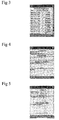
- the Wounded Player ID is presented on the screen and possibly the injury selected by the MTS. See fig 2.
- the view shown in 3 will appear when the EPC button is pressed in the identification view. Details for treatments and examinations will appear when the entries are selected.
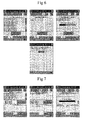
- Fig 4 shows an examination-subview of the Electronic Patient Card of fig 3 and Fig 5 shows a treatment-subview of the Electronic Patient Card of fig 3.
- the different examination alternatives of the examination view will be presented to the Medical Operator.
- an examination result is calculated based on the chosen examination, wherein the examination result in one embodiment is dependent on the time passed since the injury. After the examination duration has elapsed, the examination result is presented to the Medical Operator. Only those examinations which the Medical Operator is authorized to perform are displayed.
- buttons for filtering out examinations related to ABCDE protocol are introduced.
- the examinations will be related either to one of five locations (head, chest, stomach, arm and leg) or to the whole body.
- the relation between treatments and ABCDE protocol/body locations is set-up in the Medical Handling Database.
- the examination scroll list will be empty. Hence no examination will be possible to perform.
- buttons for filtering out treatments related to ABCDE protocol are introduced.
- the T button corresponds to transportation. Only those treatments related to the selected button will be presented.
- the relation between treatments and ABCDE protocol is set-up in the Medical Handling Database.
- the treatment scroll list will be empty. Hence no treatment will be possible to perform."
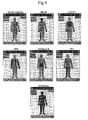
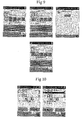
- the body location selection view of fig 8 is used to select whether examinations/treatments related to a certain body location shall be presented in the list of selectable items or if all shall be presented.
- the following data may be to set
- selectable examinations and selectable treatments shall be immediately adapted to the new operator level.
- the available supplies shall be selected in a similar way as the selection of treatments.
- the available amount is decreased each time a selection is made. When it becomes zero it shall be marked as empty and not being selectable any more.
- the Supply View shall contain a refill button.
- the access to this shall be protected by the same password as the Set up view.
- the event records are stored in a file which can keep up to 2000 entries. In case the event record becomes full they will be thrown away according to a FIFO principle.
Landscapes
- Engineering & Computer Science (AREA)
- Physics & Mathematics (AREA)
- General Physics & Mathematics (AREA)
- Mathematical Analysis (AREA)
- Mathematical Physics (AREA)
- Medicinal Chemistry (AREA)
- General Health & Medical Sciences (AREA)
- Algebra (AREA)
- Computational Mathematics (AREA)
- Chemical & Material Sciences (AREA)
- Health & Medical Sciences (AREA)
- Mathematical Optimization (AREA)
- Medical Informatics (AREA)
- Pure & Applied Mathematics (AREA)
- Business, Economics & Management (AREA)
- Educational Administration (AREA)
- Educational Technology (AREA)
- Theoretical Computer Science (AREA)
- Medical Treatment And Welfare Office Work (AREA)
- Magnetic Resonance Imaging Apparatus (AREA)
Abstract
Description
- Head
- Shoulder
- Stomach
- Left Arm
- Right Arm
- Left leg
- Right Leg
- Fig 1
- shows a Medical handling Use Case Diagram
- Fig 2
- shows an example of an Identification View of a Medical Treatment Simulator
- Fig 3
- shows an example of an Electronic Patient Card View of the Medical Treatment Simulator.
- Fig 4
- shows an examination-subview of the Electronic Patient Card of fig 3.
- Fig 5
- shows a treatment-subview of the Electronic Patient Card of fig 3.
- Fig 6
- shows an example of an examination view of the Medical Treatment Simulator.
- Fig 7
- shows an example of a treatment view of the Medical Treatment Simulator
- Fig 8
- shows an example of a body location selection view of the Medical Treatment Simulator
- Fig 9
- shows an example of a set-up view of the Medical Treatment Simulator
- Fig 10
- shows an example of a supply view of the Medical Treatment Simulator
- AAR
- After Action Review
- AWES
- Attack Weapon Effect Simulator
- COTS
- Commercial Off The Shelf
- DBDD
- Database Design Description
- DFWES
- Direct Fire Weapons Effect Simulator
- EPC
- Electronic Patient Card
- EXCON
- Exercise Control
- HBM
- Human Body Model
- IDD
- Interface Design Description
- Injury
- Injury is an identifier used in the MTS based on Ammunition Category and Wound Area.
- Medical Operator
- The medic personnel using the MTS equipment for treatment of Players
- MTS
- Medical Treatment Simulator
- N/A
- Not applicable
- NDI
- Non Development Item
- PDA
- Personal Digital Assistant
- PDD
- Personal Detection Device
- Player
- All entities in the system that has a Player ID assigned.
- Player ID
- Unique identifier for a DFWES or AWES player participating in an exercise.
- WoundArea
- Wound Area indicates which area that has been hit in the PDD.
| Status data obtained from the PDD | |
| Data element | Usage |
| Player ID | Presented in the identification view the screen, |
| DamageStatus | Used to evaluate whether the Player is wounded or not. • Player is TREATABLE if: o (b1 = 1) or (b2 = 1) or (b3 = 1) and o untreated(2) WoundArea(s)exist and o b0=0 • Player is NOT SUBJECT TO TREATMENT otherwise |
| Time | The Time shall be used to synchronise the MTS. |
| PDD Medical Status | The PDD Medical Status shall be used to identify the Injury |
| PDD Medical Treatment | The PDD Medical Status shall be used to identify if any of the Injuries has been treated. |
- Identification View (Default)
- Examination View
- Treatment View
- Setup View
- Supply View
- The button to perform selected treatments are pressed
- An identification is performed
- New examinations are selected in the Examination view
- Something is selected in the Supply View
- Any action is taken in the Set-Up View
- Medical Operator Player Id
- Operator Level (1-5 where
level 1 is the level with lowest authority)
- Medical Handling Database
- Medical Supply Database
- Medical Treatment Simulator
Example
WoundAreaID in Status file has value = 3, i.e. wounded in Head and Chest. If this combination does not exist in database the wound will be handled as a Head injury.
"Wound Area missing in Database ".
Claims (6)
- Medical treatment simulator comprisingmeans for retrieving data from a soldier equipment regarding a simulated wound status of the soldier, said data including information regarding a wound area of the soldier body,a database arranged to store a set of wound types related to each possible wound area andprocessing means for selecting a wound type from the wound area information retrieved from the soldier equipment and from the set of wound types related to said wound area.
- Medical treatment simulator according to claim 1, wherein a probability of occurrence is related to each wound type data of the database and wherein the processing means are arranged to randomly select wound type based on said probabilities.
- Medical treatment simulator according to claim 1, wherein said means for retrieving soldier equipment data includes an IR link.
- Medical treatment simulator according to claim 1, wherein said database further comprises one or more examinations related to each wound type.
- Medical treatment simulator according to claim 4, wherein the database comprises a number of selectable treatments.
- Medical treatment simulator according to claim 5, comprising means for sending information to the soldier equipment regarding updated wound status based on a result of a selected treatment.
Priority Applications (1)
| Application Number | Priority Date | Filing Date | Title |
|---|---|---|---|
| EP04075264A EP1426912A3 (en) | 2004-01-29 | 2004-01-29 | Medical wound treatment simulator |
Applications Claiming Priority (1)
| Application Number | Priority Date | Filing Date | Title |
|---|---|---|---|
| EP04075264A EP1426912A3 (en) | 2004-01-29 | 2004-01-29 | Medical wound treatment simulator |
Publications (2)
| Publication Number | Publication Date |
|---|---|
| EP1426912A2 true EP1426912A2 (en) | 2004-06-09 |
| EP1426912A3 EP1426912A3 (en) | 2004-09-01 |
Family
ID=32309552
Family Applications (1)
| Application Number | Title | Priority Date | Filing Date |
|---|---|---|---|
| EP04075264A Withdrawn EP1426912A3 (en) | 2004-01-29 | 2004-01-29 | Medical wound treatment simulator |
Country Status (1)
| Country | Link |
|---|---|
| EP (1) | EP1426912A3 (en) |
Cited By (1)
| Publication number | Priority date | Publication date | Assignee | Title |
|---|---|---|---|---|
| WO2014113186A1 (en) * | 2013-01-18 | 2014-07-24 | Fresenius Medical Care Holdings, Inc. | Dialysis treatment simulation systems and methods |
Families Citing this family (2)
| Publication number | Priority date | Publication date | Assignee | Title |
|---|---|---|---|---|
| US8992777B2 (en) | 2011-11-18 | 2015-03-31 | Fresenius Medical Care Holdings, Inc. | Systems and methods for providing notifications in dialysis systems |
| US9165112B2 (en) | 2012-02-03 | 2015-10-20 | Fresenius Medical Care Holdings, Inc. | Systems and methods for displaying objects at a medical treatment apparatus display screen |
Family Cites Families (3)
| Publication number | Priority date | Publication date | Assignee | Title |
|---|---|---|---|---|
| US5385474A (en) * | 1992-12-09 | 1995-01-31 | Brindle; Charles | Medical simulator |
| US6112075A (en) * | 1994-11-07 | 2000-08-29 | Weiser; Douglas Diedrich | Method of communicating emergency warnings through an existing cellular communication network, and system for communicating such warnings |
| US6383135B1 (en) * | 2000-02-16 | 2002-05-07 | Oleg K. Chikovani | System and method for providing self-screening of patient symptoms |
-
2004
- 2004-01-29 EP EP04075264A patent/EP1426912A3/en not_active Withdrawn
Cited By (1)
| Publication number | Priority date | Publication date | Assignee | Title |
|---|---|---|---|---|
| WO2014113186A1 (en) * | 2013-01-18 | 2014-07-24 | Fresenius Medical Care Holdings, Inc. | Dialysis treatment simulation systems and methods |
Also Published As
| Publication number | Publication date |
|---|---|
| EP1426912A3 (en) | 2004-09-01 |
Similar Documents
| Publication | Publication Date | Title |
|---|---|---|
| CN102289576B (en) | Medicine access control system | |
| US7756726B2 (en) | Secured medical sign-in | |
| US8280550B2 (en) | Cabinet with remote integration | |
| US6671579B2 (en) | Override having built in audit trail for medication dispensing and administering systems | |
| DE60210802T2 (en) | RECIPE IMPLEMENTATION SYSTEM AND METHOD | |
| CN102999708A (en) | Ward medicine storing/taking system | |
| US8311852B2 (en) | Medical information management apparatus | |
| Smith et al. | Improving patient satisfaction through computer-based questionnaires | |
| EP2704044A2 (en) | Apparatus and method for providing medical support | |
| US20120296674A1 (en) | Medical record card and integration of health care | |
| JP2023054090A (en) | Picking support system | |
| US5890492A (en) | System for controlling the spread of HIV/AIDS and other infectious diseases | |
| JP2004537130A (en) | Online patient evaluation method, apparatus and readable medium | |
| Lu et al. | Fastball quality after ulnar collateral ligament reconstruction in Major League Baseball pitchers | |
| CN119181474A (en) | Hemp essence medicine management system, hemp essence medicine data processing method and hemp essence medicine cabinet | |
| Gill et al. | Hook of the hamate fracture | |
| JP2007025956A (en) | Nursing information management system and method, nursing information management server, nursing information management terminal and program | |
| JP4205722B2 (en) | Disaster victim information provision method and disaster victim information provision system | |
| JP7195062B2 (en) | Medical server, medical system, terminal and method for providing information on medical equipment | |
| JP2005011051A (en) | Point service provision method | |
| JP7138488B2 (en) | MEDICAL SERVER, MEDICAL SYSTEM, TERMINAL AND METHOD FOR PERMITTING REGISTRATION IN MEDICAL SYSTEM FOR USERS RECEIVING HOME TREATMENT USING MEDICAL DEVICES | |
| JPH07239882A (en) | Machine with bar code reader for accepting revisitor for consultation | |
| JP2018165867A (en) | Medication management system, medication management program | |
| JP2593002B2 (en) | Return visitor device | |
| JP2593003B2 (en) | Return system controller |
Legal Events
| Date | Code | Title | Description |
|---|---|---|---|
| PUAI | Public reference made under article 153(3) epc to a published international application that has entered the european phase |
Free format text: ORIGINAL CODE: 0009012 |
|
| AK | Designated contracting states |
Kind code of ref document: A2 Designated state(s): AT BE BG CH CY CZ DE DK EE ES FI FR GB GR HU IE IT LI LU MC NL PT RO SE SI SK TR |
|
| AX | Request for extension of the european patent |
Extension state: AL LT LV MK |
|
| PUAL | Search report despatched |
Free format text: ORIGINAL CODE: 0009013 |
|
| AK | Designated contracting states |
Kind code of ref document: A3 Designated state(s): AT BE BG CH CY CZ DE DK EE ES FI FR GB GR HU IE IT LI LU MC NL PT RO SE SI SK TR |
|
| AX | Request for extension of the european patent |
Extension state: AL LT LV MK |
|
| AKX | Designation fees paid | ||
| REG | Reference to a national code |
Ref country code: DE Ref legal event code: 8566 |
|
| STAA | Information on the status of an ep patent application or granted ep patent |
Free format text: STATUS: THE APPLICATION IS DEEMED TO BE WITHDRAWN |
|
| 18D | Application deemed to be withdrawn |
Effective date: 20050302 |