EP1376338A2 - Providing contextually sensitive tools and help content in computer-generated documents - Google Patents
Providing contextually sensitive tools and help content in computer-generated documents Download PDFInfo
- Publication number
- EP1376338A2 EP1376338A2 EP03011851A EP03011851A EP1376338A2 EP 1376338 A2 EP1376338 A2 EP 1376338A2 EP 03011851 A EP03011851 A EP 03011851A EP 03011851 A EP03011851 A EP 03011851A EP 1376338 A2 EP1376338 A2 EP 1376338A2
- Authority
- EP
- European Patent Office
- Prior art keywords
- document
- providing
- solution
- xml
- software components
- Prior art date
- Legal status (The legal status is an assumption and is not a legal conclusion. Google has not performed a legal analysis and makes no representation as to the accuracy of the status listed.)
- Withdrawn
Links
Images



Classifications
-
- G—PHYSICS
- G06—COMPUTING OR CALCULATING; COUNTING
- G06F—ELECTRIC DIGITAL DATA PROCESSING
- G06F9/00—Arrangements for program control, e.g. control units
- G06F9/06—Arrangements for program control, e.g. control units using stored programs, i.e. using an internal store of processing equipment to receive or retain programs
- G06F9/44—Arrangements for executing specific programs
- G06F9/455—Emulation; Interpretation; Software simulation, e.g. virtualisation or emulation of application or operating system execution engines
- G06F9/45504—Abstract machines for program code execution, e.g. Java virtual machine [JVM], interpreters or emulators
- G06F9/45508—Runtime interpretation or emulation, e g. emulator loops, bytecode interpretation
- G06F9/45512—Command shells
-
- Y—GENERAL TAGGING OF NEW TECHNOLOGICAL DEVELOPMENTS; GENERAL TAGGING OF CROSS-SECTIONAL TECHNOLOGIES SPANNING OVER SEVERAL SECTIONS OF THE IPC; TECHNICAL SUBJECTS COVERED BY FORMER USPC CROSS-REFERENCE ART COLLECTIONS [XRACs] AND DIGESTS
- Y10—TECHNICAL SUBJECTS COVERED BY FORMER USPC
- Y10S—TECHNICAL SUBJECTS COVERED BY FORMER USPC CROSS-REFERENCE ART COLLECTIONS [XRACs] AND DIGESTS
- Y10S707/00—Data processing: database and file management or data structures
- Y10S707/99941—Database schema or data structure
- Y10S707/99943—Generating database or data structure, e.g. via user interface
Definitions
- This invention relates to the provision of contextually sensitive tools and help content in computer-generated documents.
- Computer software applications allow users to create a variety of documents to assist them in work, education, and leisure.
- popular word processing applications allow users to create letters, articles, books, memoranda, and the like.
- Spreadsheet programs allow users to store, manipulate, print, and display a variety of alpha-numeric data.
- Such applications have a number of well-known strengths, including rich editing, formatting and calculation.
- a user may decide to prepare a resumé using a word processing application loaded on her home computer.
- a word processing application loaded on her home computer.
- she likely will fill in such sections such as "personal information,” “education,” “experience,” and “extra-curricular activities.”
- she may require assistance, including information on the preferred ordering of the sections, information on the preferred number of past jobs to place in the "experience” section, and the like.
- the user likely must read a book on resumés, or go online to an internet-based resumé help site for the information.
- the user may enter an internet-based resumé site to complete a resumé using a web-based resumé template.
- the user may be allowed to enter specific information in given data fields, and the user may be provided with internet web site links for navigating to sites where she may obtain assistance with various sections of the document.
- the user may be allowed to submit the resumé to some web-based job service, or the user may be able to print the template.
- the functionality of the user's word processing application such as rich editing and formatting of the resumé, is likely not available to the user given the limitations of the web-based application in contrast to the user's computer-based word processor.
- the present invention provides a method and system for creating, implementing and using computer-generated documents that provide contextually sensitive tools, controls and help content to the user(s) of those documents.
- a schema is attached to a document defining permissible data content, data type and data structure for the document.
- the document is structured to associate the document with the schema, and a solution is associated with the document structure.
- a plurality of software components is assembled for providing the solution to the document, and the document is enabled to call the plurality of software components for providing the solution to the document based on an editing position in the document.
- a software application for opening the document may be booted to initiate opening the document.
- a determination is made as to whether the document refers to the solution.
- a determination is made as to whether the plurality of software components for providing the solution is present in a library of software components. If so, the plurality of software components is called for providing the solution to the document.
- focusing document editing in a particular portion of the document causes the generation of a list of Extensible Markup Language (XML) elements enclosing a position of the editing focus.
- XML Extensible Markup Language
- a determination is made as to whether any available solutions are associated with the list of XML elements. If any available solutions are associated with the list of XML elements, each associated solution is called and is obtained for use by the document.
- the solutions comprise help content and document tools associated with the context of the editing position in the document.
- a graphical user interface is launched for displaying each solution obtained for use by the document.
- the present invention is directed toward creation, implementation and use of computer-generated "smart" documents to which functionality is attached for providing contextually sensitive tools, help content and controls to users of those documents.
- portions of documents are structured so that when a user enters those portions, such as by placing a computer cursor in those portions, the document points to a solution that may provide the user contextually sensitive tools and/or help content. For example, if a user is preparing a resumé to assist her in obtaining a job, the user may place her computer cursor in the "education" section the resumé. According to the present invention, the placement of computer cursor in the "education" section may provide the user with contextually sensitive information.
- the document may point to an overall solution, e.g., a resumé document solution, or individual portions of the document may point to contextual subsets of the solution, e.g., and "experience" section solution of a resume document solution.
- a document tools pane may open on the user's computer screen adjacent to the document being edited and may provide a narrative on suggested approaches for the completion of the "education" section. If the user moves the cursor to another portion of the document, for example to the "objectives" section of the resumé, the user may obtain information associated with that context, such as examples of proper employment objectives statements.
- contextually sensitive tools and help content provided to a user in accordance with an embodiment of the present invention may be provided for a variety of software application programs, including word processors, spreadsheets, web browsers, text editors, and the like.
- the types and content of helpful information and tools provided to a user according to an embodiment of the present invention may include a variety of tools and actions and help information as desired by the creator of the software applications in use by the user.
- a computer screen display is illustrated showing an exemplary software application 100 with which a document and associated document tools pane providing document tools and help content is illustrated.
- the document 110 depicted in Fig. 1 shows an employee annual performance review template with which an employ may complete her annual performance review or with which she may complete a performance review of one of her employees.
- the application 100 depicted in Fig. 1 is a word processing application used for displaying and editing the document 110, but as should be understood by those skilled in the art, the application 100 could include other software applications, including spreadsheet applications, text editing applications, and the like.
- the document 110 illustrated in Fig. 1 depicts an annual performance review document, but the document 110 could include a variety of other documents and templates edited by the user, including resumé templates, will templates, desktop publishing documents, letters, financial spreadsheets, and the like.
- the word processing application 100 provides typical functionality associated with a word processor, accessible via drop down menus such as, File, Edit, View, Insert, Format, etc.
- the document 110 is displayed in the work area of the application 100, and a document tools pane 135 is illustrated to the right of the document 110.
- the display illustrated in Fig. 1 is by way of example only, and the components illustrated in Fig. 1 may be organized in a variety of different ways pleasing to the user. That is, the document tools pane may be located on the bottom of the screen display, to the left of the document 110, or according to other orientations allowed by the application 100.
- the "Submit Review” action may allow the user to submit the completed document 110 to her supervisor or to her employee after completion of the document.
- the "Open Last Review” action may allow the user to open the last performance review so that she may determine whether she completed her objectives as set forth in the last review. If the document in use by the user is some other type of document, for example a a resumé document, helpful information in the document tools pane might include information on preparing the "education" section, the "experience” section, and/or the "personal information” section.
- a will document 110 might be associated with helpful information regarding legal rules for preparation of wills, rules regarding estate beneficiaries, and the like.
- a variety of document controls may be provided, including radio buttons, text boxes, check boxes, ActiveX controls, XML tree controls, and the like.
- a text box may be provided to allow a user to select from a list of prewritten text items.
- the user may be allowed to enter text in a list box provided in the pane 135 that will then be inserted into the document or used by the application with respect to some other functionality of the application.
- a radio button or check box may be provided to allow the user to select from different choices of document actions or help content. For example, if the document is a will, check boxes may be provided with which the user may select "married,” “single,” etc., to obtain help information based on the user's personal will and estate profile.
- FIG. 2 a general system architecture for creating and utilizing a "smart" document 110 in accordance with the present invention is illustrated.
- a software application 100 as described above, is opened on the user's computer 20 to create or edit a document 110 according to the present invention.
- a schema library 105 is provided for containing all of the executable files required for providing the contextually sensitive functionality to the document 110.
- the schema library may include a variety of components, including individual modular software routines that have been compiled and dynamically linked and that are ready to use by the application 100 for providing contextually sensitive functionality to the document 110.
- Such components may include a number of dynamically-linked libraries (dll), which include executable files or routines stored separately from the software application 110.
- the dlls are loaded by the software application 100 only when they are needed to provide functionality to the document 110.
- the schema library 105 may include a number of Extensible Markup Language (XML) files for providing contextually sensitive functionality in association with XML structure that has been applied to the document 110.
- XML Extensible Markup Language
- a solution property 115 is included in the document 110 for pointing the document to a particular solution contained in the schema library 105.
- the solution location property 118 provides the document 110 and the application 100 with information as to the location of the solution property in the schema library or to a remote location provided via a distributed computing environment, such as is provided from a web-based server via the Internet.
- a solution property 115 points the document to the "objectives” section help solution illustrated in the document tools pane 135.
- the solution location 118 provides the document 110 and the application 100 with the location of the components, dlls, or XML files necessary for implementing that solution.
- exemplary components may include components for drawing the document tools pane 135, components for displaying the information associated with the particular context, in this case the "objectives” section, and components for executing document actions such as "Submit Review" action 145.
- Fig. 3 and the following discussion are intended to provide a brief, general description of a suitable computing environment in which the invention may be implemented. While the invention will be described in the general context of an application program that runs on an operating system in conjunction with a personal computer, those skilled in the art will recognize that the invention also may be implemented in combination with other program modules. Generally, program modules include routines, programs, components, data structures, etc. that perform particular tasks or implement particular abstract data types. Moreover, those skilled in the art will appreciate that the invention may be practiced with other computer system configurations, including hand-held devices, multiprocessor systems, microprocessor-based or programmable consumer electronics, cell phones, minicomputers, mainframe computers, and the like. The invention may also be practiced in distributed computing environments where tasks are performed by remote processing devices that are linked through a communications network. In a distributed computing environment, program modules may be located in both local and remote memory storage devices.
- an exemplary system for implementing the invention includes a conventional personal computer 20, including a processing unit 21, a system memory 22, and a system bus 23 that couples the system memory to the processing unit 21.
- the system memory 22 includes read-only memory (ROM) 24 and random access memory (RAM) 25.
- ROM 24 read-only memory
- RAM random access memory
- the personal computer 20 further includes a hard disk drive 27, a magnetic disk drive 28, e.g., to read from or write to a removable disk 29, and an optical disk drive 30, e.g., for reading a CD-ROM disk 31 or to read from or write to other optical media.
- the hard disk drive 27, magnetic disk drive 28, and optical disk drive 30 are connected to the system bus 23 by a hard disk drive interface 32, a magnetic disk drive interface 33, and an optical drive interface 34, respectively.
- the drives and their associated computer-readable media provide non-volatile storage for the personal computer 20.
- computer-readable media refers to a hard disk, a removable magnetic disk and a CD-ROM disk, it should be appreciated by those skilled in the art that other types of media which are readable by a computer, such as magnetic cassettes, flash memory cards, digital video disks, Bernoulli cartridges, and the like, may also be used in the exemplary operating environment.
- a number of program modules may be stored in the drives and RAM 25, including an operating system 35, one or more application programs 100, a word processor program module 37 (or other type of program module), program data, such as the manifest 38, and other program modules (not shown).
- a user may enter commands and information into the personal computer 20 through a keyboard 40 and pointing device, such as a mouse 42.
- Other input devices may include a microphone, joystick, game pad, satellite dish, scanner, or the like.
- These and other input devices are often connected to the processing unit 21 through a serial port interface 46 that is coupled to the system bus, but may be connected by other interfaces, such as a game port or a universal serial bus (USB).
- a monitor 47 or other type of display device is also connected to the system bus 23 via an interface, such as a video adapter 48.
- personal computers typically include other peripheral output devices (not shown), such as speakers or printers.
- the personal computer 20 may operate in a networked environment using logical connections to one or more remote computers, such as a remote computer 49.
- the remote computer 49 may be a server, a router, a peer device or other common network node, and typically includes many or all of the elements described relative to the personal computer 20, although only a memory storage device 50 has been illustrated in Fig. 3.
- the logical connections depicted in Fig. 3 include a local area network (LAN)51 and a wide area network (WAN)52.
- LAN local area network
- WAN wide area network
- the personal computer 20 When used in a LAN networking environment, the personal computer 20 is connected to the LAN 51 through a network interface 53. When used in a WAN networking environment, the personal computer 20 typically includes a modem 54 or other means for establishing communications over the WAN 52, such as the Internet.
- the modem 54 which may be internal or external, is connected to the system bus 23 via the serial port interface 46.
- program modules depicted relative to the personal computer 20, or portions thereof may be stored in the remote memory storage device. It will be appreciated that the network connections shown are exemplary and other means of establishing a communications link between the computers may be used.
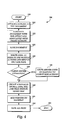
- Fig. 4 is a flow chart illustrating a method of creating a "smart" document 110 according to an embodiment of the present invention.
- the method 300 begins at start step 305 and proceeds to step 310 where an XML schema is attached to the document.
- a schema sets up the grammar and rules associated with Extensible Markup Language (XML) tags applied to the document 110 to provide XML structure to the document 110.
- XML Extensible Markup Language
- the schema attached to the document 110 illustrated in Fig. 1 may set out all of the grammatical, data type and data content rules allowed for tags associated with the document 110.
- the "personal information" section 120 which includes the name, e-mail name, title, and employee identification for the employee, may have schema that requires that data entered into the "name” block must be in the form of "first name,” followed by "middle name,” followed by "last name.”
- the document 110 is annotated with XML structure that will be associated with tools and help functionality for providing contextually sensitive functionality to the document as described above.
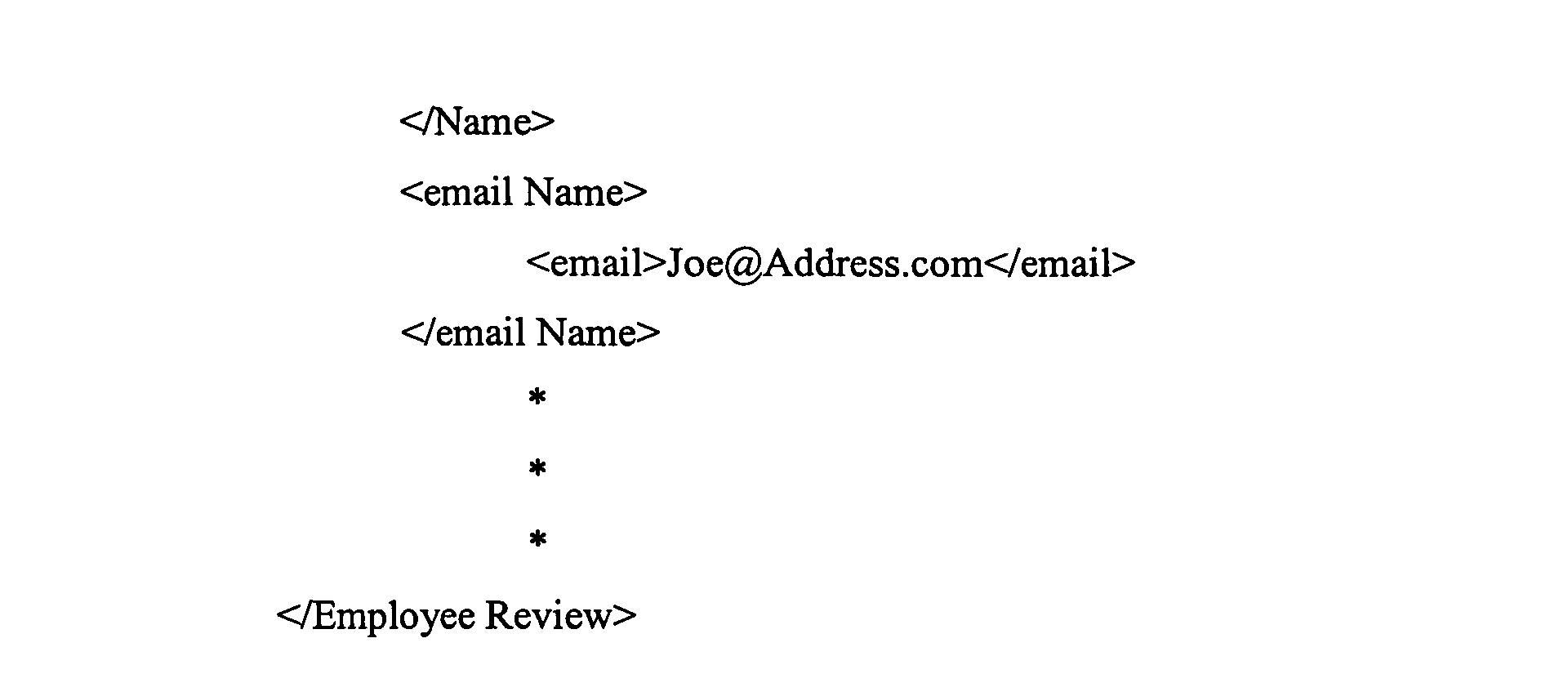
- a simplified XML structure annotation for the employee review document 110 illustrated in Fig. 1 is as follows.
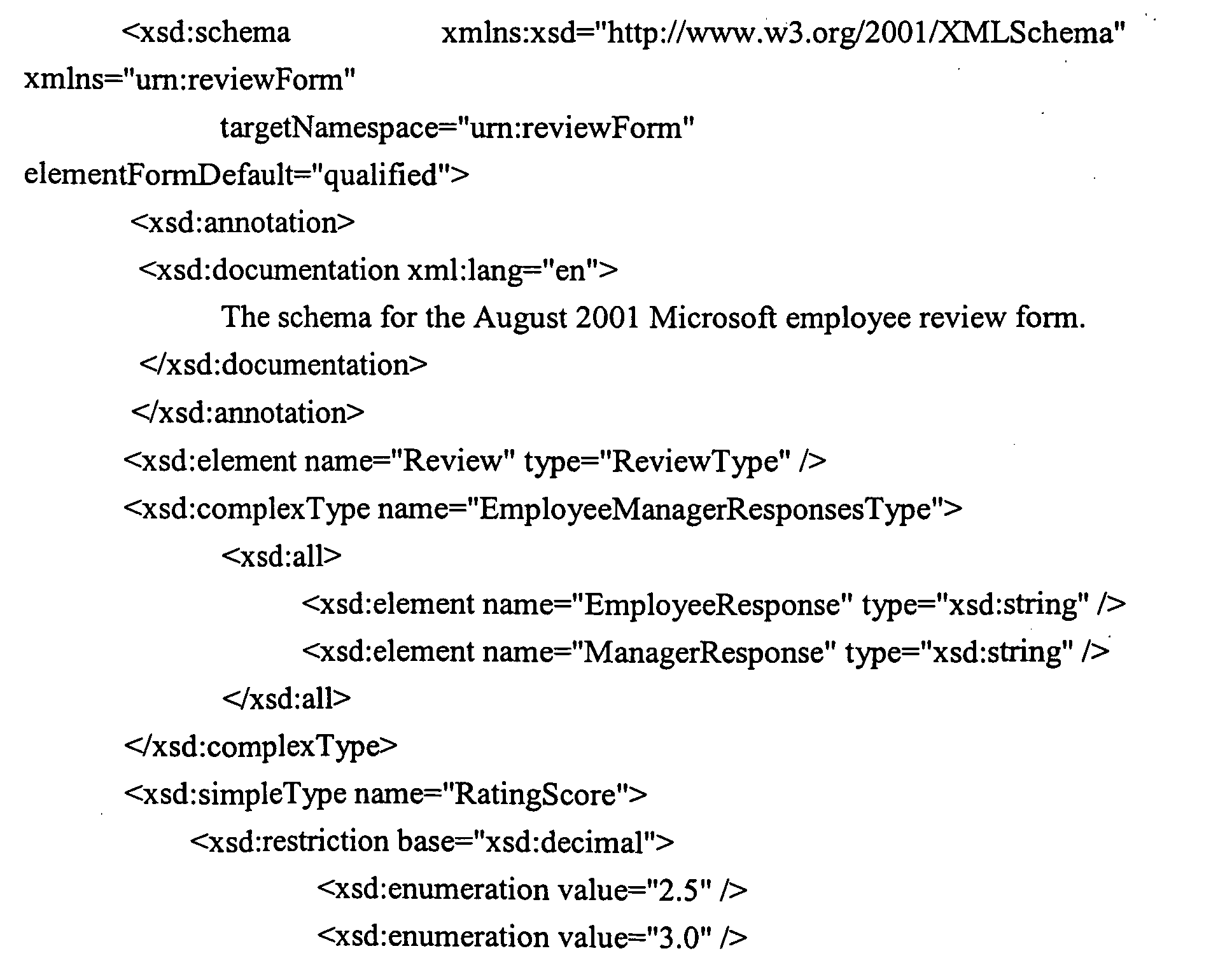
- the schema attached to the document 110 prescribes the data type and data structure rules entered within the XML document structure.
- the XML structure illustrated above is simplified in nature, and is provided for purposes of illustration only.
- a sample XML schema associated with the example XML structure above is as follows.
- the document 110 is saved along with the associated document schema and XML structure.
- step 325 software programming code is written that is necessary to display and handle tools, controls and actions in the document tools pane 135 according to the position of the user's cursor within the document 110.
- the code written at step 325 includes all required XML files, including Extensible Style Sheet Language (XSL) files, including XSL transformations and XSL formatting objects.
- XSL transformations include files containing specific rules by which one XML document is transformed into another XML document.
- all XML files, including XML documents and XML transformation documents are written for processing the document 110 as an XML-structured document.
- an XML schema may be written to define a list of document actions, controls and help content that are associated with a solution or contextual subset of a solution that are correspondingly associated with XML structure (elements) in the document.
- the XML schema may be written using any editing tool or XML schema editing tool to create an instance of the schema.
- the XML schema may be written to include directly in the XML schema all of the properties of the schema and a list of the document actions, controls and help content to be displayed.
- An exemplary XML schema is set out above.
- code written for the document 110 at step 325 includes all of the components, such as dynamic-link libraries (dll), needed by the application 100 and the document 110 for providing the contextually sensitive functionality to the document 110, as described with reference to Fig. 1.
- dll dynamic-link libraries
- a d11 in the form of an application programming interface (API) may be written to call on a particular solution contained in the schema library 105 when the computer cursor is located by the user within a particular context of the document 110.
- an application program interface is included for finding the solution property 115 associated with the "name” portion of the document 110 and for calling that solution to provide document tools, actions and help content associated with the "name" portion of the document.
- exemplary components that are written at step 325 include components for drawing the document tools pane 135 and for displaying textual information associated with the XML elements in the document 110 within which the computer cursor is presently located.
- Other components may include modular software routines for displaying an action, such as a "submit review" button, for allowing the user to submit the review to a third party, such as the user's employee or the user's supervisor.
- Still other components may be included for drawing and for providing functionality to controls, such as radio buttons, text boxes and check boxes, as described above with reference to Fig. 1.
- Any component object model add-ins that may be needed to provide functionality according to the present invention are also written at step 325.
- the actual text of help content that is drawn into the pane 135 is assembled for deployment when a corresponding help topic is called.
- Controls such as radio buttons, text boxes and check boxes, may be provided in the pane 135 without an associated schema being attached to the document. By declaring that a control is associated with a particular XML element, that control may be provided at the top of the pane 135 above other actions, controls and help topics prescribed by the schema. Similarly, a control may be provided immediately above all other items, including those described above, in the pane 135 by declaring that the control is associated with the entire schema for the document rather than to individual XML elements prescribed by the schema.
- the schema library 105 may be in the form of a database containing pointers to the aforementioned stored components that may be stored in the memory of the computer 20 in various locations, including the computer's registry.
- an application programming interface for implementing the functionality of the present invention to provide a "smart" document solution to the document 110.
- the API includes properties and methods or instructions that are called upon when a particular action is initiated, for example, opening the document 110 that in turn points to a solution, as described above.
- sample computer programming code for implementing the "smart" document API. The sample code listed below is not limiting of variations that may be made in computer programming code that may be written for implementing the API according to the present invention.
- the SmartDocInitialize method includes routines and instructions executed when the API is called upon to provide "smart" document functionality to the docket 110.
- the SmartDocXMLTypeCount property includes the number of XML element types associated with the solution.
- the SmartDocXMLTypeName property includes unique identifiers for the XML element types associated with the "smart" document solution.
- the SmartDocXMLTypeCaption property includes captions associated with XML elements that may be included in a menu or pane such as the help pane 135.
- the ControlCount property includes the number of controls associated with the "smart" document solution for a particular XML element type.
- the ControllD property includes unique identifiers for the controls.
- the ControlTypeFromID property includes the types of controls available for use with an associated solution, for example, radio buttons, textboxes, and check boxes.
- the ControlNameFromID property returns a name associated with each control for use internally by a given application program 100.
- the PopulateRadioGroup method includes routines and instructions that are executed for populating radio control buttons within a menu or pane such as the help pane 135.
- the OnRadioGroupSelectChange method includes routines and instructions that are executed when a radio group (radio button) is selected or deselected.
- the PopulateImage method includes routines and instructions that are executed for populating an image associated with a solution, such as an image populated within the help pane 135.
- the ImageClick method includes routines and instructions that are executed when an image is selected by a user.
- the PopulateDocumentFragment method includes routines and instructions that are executed for populating the user interface with text or data.
- the PopulateActiveXProps method includes routines and instructions that are executed for obtaining ActiveX functionality associated with a document solution.
- the PopulateCheckbox method includes routines and instructions for providing a checkbox control in a user interface such as the help pane 135.
- the OnCheckboxChange method includes routines and instructions that are executed when a checkbox control is selected or deselected by a user.
- the PopulateListOrComboContent method includes routines and instructions that are executed to populate a list box control in a user interface such as the pane 135.
- the OnListOrComboSelectChange method includes routines and instructions that are executed upon the selection of an item in a list box control.
- the PopulateTextboxContent method includes routines and instructions for populating a textbox in a user interface such as the pane 135.
- the OnTextboxContentChange method includes routines and instructions that are executed for handling an event associated with the change of content in a textbox control within a user interface such as the pane 135.
- the PopulateHelpContent method includes routines and instructions for populating a help content field within the pane 135 with required text or data.
- the InvokeControl method includes routines and instructions that are executed when a control such as a radio button, textbox, or checkbox is selected or deselected.
- a solution location identifier such as a solution URL
- a manifest of all of the programming components described above is created for identifying the list of components, dlls, schema files, and XML files that will be used to provide various solutions and functionality to the document 110.
- a pointer is added to the document 110 for pointing the document to the manifest of components for obtaining functionality provided by individual and various components.
- all files, code, and changes to the document 110 are saved, and the document creation method ends at step 390. Accordingly, the document 110 is now in a condition to be opened and utilized by a user.
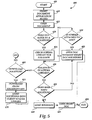
- Fig. 5 refers to the steps involved in opening and utilizing the document 110.
- the employee performance review document 110 is described with reference to the steps involved in opening a "smart" document created and implemented in accordance with an embodiment of the present invention.
- the method 400 begins at start step 405, and proceeds to step 410 where the application 100 is booted by the user. As is understood by those skilled in the art, the application 100 may be booted by selecting the application or by selecting a document 110 created with the application 100.
- the user selects the document 110 for opening in a manner consistent with the application 100.
- a determination is made as to whether the document 110 refers to a solution. That is, at step 420, a determination is made as to whether the document 110 is annotated with pointers to a solution or to multiple solutions for providing contextually sensitive tools and help information to the document, as described above. As a part of the check to determine whether the document 110 points to a solution or to multiple solutions, a determination is also made as to whether a schema has been attached to the document as described above.
- the method proceeds to step 425 and the application 100 calls the schema library 105 to determine whether the solution referred to by the document 110 is stored in the schema library 105.
- the determination includes a determination as to what components in the schema library are necessary; that is, what components are associated with the solution I.D.
- the document 110 may have a schema attached to define the rules governing the XML structure of the document 110, but that was created without reference to a particular solution.
- multiple solutions may be attached to the document 110.
- a first solution might include helpful information and actions to provide contextually sensitive information regarding completion of the document 110 by a particular user.
- a second solution may be attached to the document 110 for providing information to a supervisor of the user so that the contextually sensitive information provided to the supervisor will give the supervisor information as to how to evaluate each section of the employee's review document.
- a prompt may be provided to the user, such as the dialog box 500, illustrated in Fig. 6, to notify the user that multiple solutions are available for this document.
- the user may then select one solution from the list of solutions for providing the desired functionality to the user after the document opens.
- a dialog box similar to the dialog box 500 may be presented to the user to query the user as to whether she desires the help content and tools functionality.
- the user may have completed the document 110 on numerous occasions and may not now desire additional help functionality or action functionality. If desired, the user may elect to always receive the solution upon opening the document 110. Similarly, the user may elect to have the document 110 via the application 100 check for updates to the solution each time the document 110 is opened.
- step 455 the method proceeds to step 455, and the document is opened without "smart" document solutions according to the normal procedures required and implemented by the application 100. If the user does desire the functionality of the solution referred to by the document 110, the method proceeds to step 440, and the solution is loaded for use by the application 100 and document 110. As should be understood by those skilled in the art, loading the solution includes calls from the document 110 via the application 100 to all necessary files, dlls, component add-ins, and XML files associated with the solution and stored in the schema library 105.
- each called file Upon being called by the document 110, each called file is registered with the application 100 via the computer's operating system, and a path is established between each called file and the application 100 and document 110 for provision of the functionality associated with each file. For example, if a particular d11 that is used for drawing the document tools pane 135 must be assigned a registry key for proper communication with the application 100 and document 110, this registration process is performed during the load solution step 440.
- the "smart" document 110 is opened and is displayed on the user's computer screen, as illustrated in Fig. 1.
- step 450 a determination is made as to whether a schema has been attached to the document. If the document has an attached schema, but no reference to a particular solution, the method proceeds to step 430 and a "check" is made of the schema library as to whether a solution does exist that may be associated with the schema that is attached to the document 110. That is, even where no solution is referred to in the document 110, the schema library may have solutions that have been obtained by the user of the computer 20 subsequent to the creation of the document 110 that may be utilized by the document 110 even though the document 110 was not originally created to refer to the solution.
- step 435 If a solution does exist in the schema library for the document 110, the method proceeds to step 435, and the steps thereafter, as described above. If a schema is not attached to the document 110, the method proceeds to step 455, and the document is opened without "smart" document solutions.
- step 460 a determination is made as to whether the user would like to download a solution.
- the user may be "prompted" by the application 100 and informed that the document 110 will work more efficiently, or will be more useful, if the user downloads certain help and action functionality to the user's document 110.
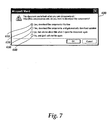
- the user may be provided with a "prompt" in the form of a dialog box, such as the dialog box 600 illustrated in Fig. 7.
- a number of queries may be made to the user to ask the user whether the user would like components comprising the desired solution to be downloaded according to a number of methods. If the user declines to download solution functionality and components, the method proceeds back to step 455, and the document is opened without "smart" document solutions as described above.
- step 465 components necessary for providing the desired solution(s) to the document 110 are downloaded to the user's computer 20 from some remote source, such as a remote web-based server.
- some remote source such as a remote web-based server.
- the application 100 uses the solution location pointer 118 from the document 110 to locate and obtain the necessary solution components.
- the downloaded solutions are loaded into the client-side schema library 105, and the solution is loaded as described above so that the document 110 will include the functionality of the solution.
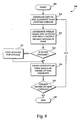
- Fig. 8 is a flow chart illustrating a method for determining what to display in the document tools pane 135 after a document 110 is opened with a "smart" document solution.
- the document 110 has been opened with a "smart" document solution which has been loaded and is running.
- the user has placed the computer cursor in a particular location with the document 110, such as the "objectives" section 125.
- the method 700 begins at start step 705, and proceeds to step 710, where a list of XML elements that surround the cursor is generated.
- the position of the cursor within the XML hierarchy is located, and the X-path expression to get to the position where the cursor is located is determined.
- the cursor may be located within the "e-mail" tag and inside the larger XML tree within the "employee review" tag.
- the application 100 enters a look-up table stored on the client computer 20 that contains information about which XML elements have which particular tools, help content, controls, etc., associated with those XML elements. For example, if the cursor is located in the "e-mail name" element within the "personal information" section 120, the application 100 will enter the look-up table to determine which particular tools or help content are associated with the e-mail name element.
- Each document action, help item, and control associated with each element is populated with a unique identification (ID) associated with each XML element to which it is applied so that the application 100 may readily locate the actions, help items, or tools associated with the XML element.
- ID unique identification
- the "objectives" section of the review document 110 may be associated with a "Submit Review” button when the section is completed. On the other hand, if the section is not completed, the "Submit Review” button may not appear in the pane 135 because the document should not be submitted without the completed "objections" section.
- the "Submit Review” button in this case may be identified as dynamic at step 720, and the method then proceeds to step 725.
- the document 110 via the application 100 calls the component representing the "Submit Review” button and provides that component with the context of the cursor position, for example, whether the "objectives" element has been completed or not.
- step 730 after a determination has been made that the actions, help content, or controls are static or dynamic, the contents of the document tools pane 135 are drawn on the user's computer screen adjacent to the document 110, as illustrated in Fig. 1.
- step 735 a determination is made as to whether the cursor is moved to a new context. For example, after the user completes an entry in the "objectives" section 125, the user may move the cursor to the "personal information" section 120 to complete that section. If the cursor does not move, the method proceeds to step 790 and ends. That is, as long as the cursor stays in the current context, no additional changes are made to the content of the document tools pane 135.
- step 710 a new list of XML elements containing the cursor is generated, and the method proceeds on as described above to provide new content in the document tools pane 135 associated with the new position and context of the cursor.
- the name 140 is a name for the document XML element associated with the actions and tools shown in the document tools pane 135.
- the name may refer to the schema that is attached to the document, for example, employee performance review form, or the name 140 may refer to the XML element in which the cursor is currently located.
- the name 140 may be re-drawn as "objectives section.”
- the document actions 145 are displayed based on the cursor context and based on whether the actions are static or dynamic.
- the "Submit Review” action may be a dynamic action that is not displayed in the document actions pane 135 if all required sections of the document 110 have not been completed.
- the "Last Years Objectives” help topic 155 is shown in a collapsed display. Selecting the "+” expands the help topic to display additional sub-topics contained therein.
- the "Objective Writing Tips” help topic is shown in an expanded view, showing the full content 160 available under that help topic. If an XML element within the document 110 has no “smart" document actions or tools associated with it, that XML element is not shown or identified in the document tools pane 135.
- Help topics and tools may be nested, meaning that sub-help topics and sub-actions may be included in help topics and document tools. If the cursor is in multiple elements because of nesting, then the number of sections in the document tools pane 135 can be greater than two. In this case, the nested elements are shown in order of nesting where the outermost element is at the top of the document tools pane 135 and innermost element is at the bottom of the document tools pane 135. If the elements, actions, tools, and help content do not fit on one page, a scroll bar may be provided, as illustrated in Fig. 1, that will extend over the entire document tools pane 135.
- Action and help content are listed in the order in which the dlls, or components that provide them to the document 110 return their names in response to a call from the application 100.
- XML elements that are not associated with actions, controls or help topics are not shown to the user. If desired, however, all XML elements may be shown in the pane 135 to make the user aware of the complete XML structure of the document 110.
- the user of the document 110 may now enter the document and complete the document with the help of the "smart" document functionality provided in the document tools pane 135.
- the user may be provided with helpful information and tools associated with that portion of the document.
Landscapes
- Engineering & Computer Science (AREA)
- Software Systems (AREA)
- Theoretical Computer Science (AREA)
- Physics & Mathematics (AREA)
- General Engineering & Computer Science (AREA)
- General Physics & Mathematics (AREA)
- Document Processing Apparatus (AREA)
- User Interface Of Digital Computer (AREA)
- Information Retrieval, Db Structures And Fs Structures Therefor (AREA)
Abstract
Description



ByVal bstrSolutionPath As String)
Long, ByVal ApplicationName As String, ByVal LocaleID As Long) As Boolean
ByVal ApplicationName As String, ByVal LocaleID As Long, ByVal bstrText
As String, ByVal bstrXML As String, ByVal Target As Object, List() As String, count As Long, InitialSelected As Long)
Private Sub ISmartDocument_OnRadioGroupSelectChange(ByVal
ControlID As Long, ByVal Target As Object, ByVal Selected As Long, ByVal Value As
String)
ApplicationName As String, ByVal LocaleID As Long, ByVal bstrText As String, ByVal bstrXML As String, ByVal Target As Object, ImageSrc As String)
ByVal YCoordinate As Long)
Long, ByVal ApplicationName As String, ByVal LocaleID As Long, ByVal bstrText As String, ByVal bstrXML As String, ByVal Target As Object, DocumentFragment As String)
As String, ByVal bstrXML As String, ByVal Target As Object, Checked As Boolean)
ByVal Target As Object, ByVal Checked As Boolean)
bstrText As String, ByVal bstrXML As String, ByVal Target As Object,
List() As String, count As Long, InitialSelected As Long, IsEditable As Boolean, ControlOnSameLine As Boolean)
String)
Long, ByVal Target As Object, ByVal Value As String)
ByVal ApplicationName As String, ByVal LocaleID As Long, ByVal bstrText
As String, ByVal bstrXML As String, ByVal Target As Object, Content As String)
ApplicationName As String, ByVal Target As Object, ByVal Text As String, ByVal Xml As String, ByVal LocaleID As Long)
Claims (60)
- A method of providing contextually sensitive functionality to a computer-generated document, comprising the steps of:attaching a schema to the document defining permissible data content, data type and data structure for the document;structuring the document to associate the document with the schema;associating a solution with the document structure;assembling a plurality of software components for providing the solution to the document; andenabling the document to call the plurality of software components for providing the solution to the document based on an editing position in the document.
- The method of Claim 1, whereby the schema includes a definition of permissible data content, data type and data structure for the whole document.
- The method of Claim 1, whereby the schema includes a definition of permissible data content, data type and data structure for particular portions of the document.
- The method of Claim 1, whereby the step of attaching a schema to the document, includes attaching an Extensible Markup Language (XML) schema to the document.
- The method of Claim 3 whereby the step of structuring the document includes structuring the particular portions of the document to associate the particular portions of the document with permissible data content, permissible data type, and permissible data structure for the particular portions of the document as defined by the schema.
- The method of Claim 5, whereby the step of structuring the particular portions of the document includes annotating the particular portions of the document with XML structure.
- The method of Claim 6, whereby the step of annotating the document with XML structure further comprises defining XML elements associated with the particular portions of the document.
- The method of Claim 7, whereby the step of defining XML elements further comprises defining XML elements associated with a plurality of text strings in the document.
- The method of Claim 7, whereby the step of defining XML elements further comprises defining XML elements associated with a plurality of data elements within the document.
- The method of Claim 6, whereby the step of associating a solution with the document structure, further comprises associating help content and document tools with the XML structure.
- The method of Claim 10, whereby the help content and document tools are associated with XML elements comprising the XML structure.
- The method of Claim 6, whereby the step of associating a solution with the document structure, further comprises associating controls with the XML structure.
- The method of Claim 12, whereby the step of associating controls with the XML structure includes associating radio buttons, check boxes or text boxes with the XML structure.
- The method of Claim 1, further comprising the steps of:listing the plurality of software components in a manifest of software components; andstoring a pointer to the manifest in a library of software components.
- The method of Claim 14, whereby the library of software components is a schema library.
- The method of Claim 7, whereby the step of enabling the document to call the plurality of software components further comprises the step of attaching a solution property to the document to associate the plurality of software components for providing the solution with the document.
- The method of Claim 16, further comprising the step of associating the solution property with the XML structure.
- The method of Claim 17, whereby the step of attaching a solution property to the document further comprises attaching a plurality of solution properties to the document to associate of plurality of contextual subsets of the solution with the particular portions of the document.
- The method of Claim 18, further comprising associating each of the plurality of contextual subsets of the solution with a plurality of corresponding XML elements.
- The method of Claim 19, whereby each of the plurality of contextual subsets of the solution include help content or document tools associated with each of a plurality of XML elements.
- The method of Claim 7, further comprising the step of enabling the document to receive the solution by receiving a call to the solution from the document based on initiation of editing the document within an XML element associated with the solution.
- The method of Claim 1, further comprising the steps of:booting a software application for opening the document;initiating opening the document;determining whether the document refers to the solution;determining whether the plurality of software components for providing the solution is present in a library of software components; andcalling the plurality of software components for providing the solution to the document.
- The method of Claim 22, in response to calling the plurality of software components, providing the solution to the document.
- The method of Claim 22, further comprising determining whether the document refers to more than one solution.
- The method of Claim 22, further comprising determining whether the document contains a solution property pointing to the solution.
- The method of Claim 25, further comprising determining whether the document contains a pointer to the solution.
- The method of Claim 26, further comprising determining whether the document contains a pointer to a contextual subset of the solution.
- The method of Claim 22, further comprising the step of completing opening the document with functionality provided by the plurality of software components available for use by the document.
- The method of Claim 22, further comprising the steps of:focusing document editing in a particular portion of the document;generating a list of XML elements enclosing a position of the editing focus;determining if any available solutions are associated with the list of XML elements; andafter determining if any available solutions are associated with the list of XML elements, calling each associated solution and obtaining each associated solution for use by the document.
- The method of Claim 29, whereby the step of focusing document editing in a particular portion of the document includes placing a computer cursor within the particular portion of the document.
- The method of Claim 25, whereby the step of determining if any available solutions are associated with the list of XML elements, further comprises the step of parsing a look-up table of solutions to determine if any available solutions are associated with any XML element in the list of XML elements.
- The method of Claim 31, further comprising the step of determining whether any of the available solutions are dynamic by calling on each of a plurality of software components comprising the any available solutions.
- The method of Claim 31, further comprising the step of determining types of functionality associated with the available solutions that are to be displayed to a user of the document by calling on each of a plurality of software components comprising the available solutions.
- The method of Claim 33, in response to the step of determining types of functionality associated with the available solutions that are to be displayed to a user, designating a help content for display to the user.
- The method of Claim 34, in response to the step of determining types of functionality associated with the available solutions that are to be displayed to a user, designating a document tool for display to the user.
- The method of Claim 33, in response to the step of determining types of functionality associated with the available solutions that are to be displayed to a user, designating a control for display to the user.
- The method of Claim 36, whereby controls designated for display include radio buttons, check boxes and text boxes.
- The method of Claim 29, further comprising the step of:creating an XML schema for defining a list of document actions, controls or help content associated with the available solutions associated with the list of XML elements.
- The method of Claim 33, further comprising the step of launching a graphical user interface for displaying each solution obtained for use by the document.
- The method of Claim 39, whereby the step of displaying each solution obtained for use by the document includes drawing the help content and document tools in a help pane displayable to a user of the document.
- The method of Claim 39, whereby the step of displaying each solution obtained for use by the document includes drawing the radio buttons, check boxes or text boxes in a help pane displayable to a user of the document.
- The method of Claim 13, further comprising a method for implementing an Application Programming Interface is for providing the solution to the document, comprising the steps of:providing a SmartDocXMLTypeCount property including a number of XML element types associated with the solution;providing a SmartDocXMLTypeName property including unique identifiers for the XML element types associated with the solution;providing a SmartDocXMLTypeCaption property including captions associated with XML elements that may be displayed to a user;providing a ControlCount property including a number of controls associated with the solution;providing a ControlID property including unique identifiers for the controls;providing a ControlTypeFromID property including the types of controls available for use with the solution;providing a ControlNameFromID property for returning a name associated with each control for use internally by an application program providing the document;providing a PopulateRadioGroup method including routines and instructions that are executed for populating radio controls that may be displayed to a user;providing an OnRadioGroupSelectChange method including routines and instructions that are executed when a radio control is selected;providing a PopulateImage method including routines and instructions that are executed for populating an image associated with the solution;providing an ImageClick method including routines and instructions that are executed when an image is selected;providing a PopulateDocumentFragment method including routines and instructions that are executed for displaying data;providing a PopulateActiveXProps method including routines and instructions that are executed for obtaining ActiveX functionality associated with the solution;providing a PopulateCheckbox method including routines and instructions for providing a checkbox control;providing an OnCheckboxChange method including routines and instructions that are executed when a checkbox control is selected;providing a PopulateListOrComboContent method including routines and instructions that are executed to populate a list box control;providing OnListOrComboSelectChange method including routines and instructions that are executed upon the selection of an item in a list box control;providing a PopulateTextboxContent method including routines and instructions for populating a textbox;providing an OnTextboxContentChange method including routines and instructions that are executed for handling an event associated with a change of content in the textbox control;providing a PopulateHelpContent method including routines and instructions for populating a help content field with data; andproviding an InvokeControl method including routines and instructions that are executed when a control is selected.
- A method of providing contextually sensitive functionality to a computer-generated document, comprising the steps of:attaching an Extensible Markup Language (XML) schema to the document defining permissible data content, data types and data structures for the document;annotating particular portions of the document with XML structure associated with the permissible data content, the permissible data types, and permissible data structures for the particular portions of the document as defined by the schema;associating help content and document tools with XML elements comprising the XML structure;assembling a plurality of software components for providing the help content and document tools to the document; andenabling the document to call the plurality of software components for providing the help content and document tools to the document based on an editing position in the document.
- The method of Claim 43, further comprising the steps of:listing the plurality of software components in a manifest of software components; andstoring the manifest in a library of software components.
- The method of Claim 43, whereby the step of enabling the document to call the plurality of software components further comprises the step of attaching a solution property to the document to associate the plurality of software components for providing the help content and document tools to the document.
- The method of Claim 43, further comprising the step of enabling the document to receive the help content and document tools by calling to the plurality of software components upon initiation of editing the document within an XML element associated with a particular help content or a particular document action.
- The method of Claim 46, further comprising the steps of:booting a software application for opening the document;determining whether the document refers to help content or document tools;determining whether the plurality of software components for providing help content or document tools is present in a library of software components; andcalling the plurality of software components for providing the help content or document tools to the document.
- The method of Claim 47, in response to calling the plurality of software components, providing the help content or document tools to the document.
- The method of Claim 47, further comprising the steps of:opening the document;placing a computer cursor in a particular portion of the document;generating a list of XML elements enclosing a position of the cursor;determining if any available help content or document tools are associated with the list of XML elements; andafter determining if any available help content or document tools are associated with the list of XML elements, calling each associated help content or document action; andobtaining each associated help content or document action for use by the document.
- The method of Claim 49, whereby the step of determining if any available help content or document tools are associated with the list of XML elements, further comprises the step of parsing a look-up table of solutions to determine if any available help content or document tools are associated with any XML element in the list of XML elements.
- The method of Claim 50, further comprising the steps of:launching a graphical user interface for displaying each help content or document action obtained for use by the document; anddisplaying each help content or document action in the graphical user interface.
- A computer readable medium having stored thereon computer-executable instructions which when executed by a computer, perform the steps of:attaching an Extensible Markup Language (XML) schema to the document defining permissible data content, data types and data structures for the document;annotating particular portions of the document with XML structure associated with the permissible data content, the permissible data types, and permissible data structures for the particular portions of the document as defined by the schema;associating help content and document tools with XML elements comprising the XML structure;assembling a plurality of software components for providing the help content and document tools to the document; andenabling the document to call the plurality of software components for providing the help content and document tools to the document based on an editing position in the document.
- The computer readable medium of Claim 52 having stored thereon computer-executable instructions which when executed by a computer, further perform the steps of:listing the plurality of software components in a manifest of software components; andstoring the manifest in a library of software components.
- The computer readable medium of Claim 53 having stored thereon computer-executable instructions which when executed by a computer, further perform the step of:whereby the step of enabling the document to call the plurality of software components further comprises the step of attaching a solution property to the document to associate the plurality of software components for providing the help content and document tools to the document.
- The computer readable medium of Claim 54 having stored thereon computer-executable instructions which when executed by a computer, further perform the step of:enabling the document to receive the help content and document tools by calling to the plurality of software components upon initiation of editing the document within an XML element associated with a particular help content or a particular document action.
- The computer readable medium of Claim 55 having stored thereon computer-executable instructions which when executed by a computer, further perform the steps of:booting a software application for opening the document;determining whether the document refers to help content or document tools;determining whether the plurality of software components for providing help content or document tools is present in a library of software components; andcalling the plurality of software components for providing the help content or document tools to the document.
- The computer readable medium of Claim 56 having stored thereon computer-executable instructions which when executed by a computer, further perform the step of:providing the help content or document tools to the document in response to calling the plurality of software components.
- The computer readable medium of Claim 57 having stored thereon computer-executable instructions which when executed by a computer, further perform the steps of:opening the document;placing a computer cursor in a particular portion of the document;generating a list of XML elements enclosing a position of the cursor;determining if any available help content or document tools are associated with the list of XML elements; andafter determining if any available help content or document tools are associated with the list of XML elements, calling each associated help content or document action; andobtaining each associated help content or document action for use by the document.
- The computer readable medium of Claim 58 having stored thereon computer-executable instructions which when executed by a computer, further perform the step of:whereby the step of determining if any available help content or document tools are associated with the list of XML elements, further comprises the step of parsing a look-up table of solutions to determine if any available help content or document tools are associated with any XML element in the list of XML elements.
- The computer readable medium of Claim 59 having stored thereon computer-executable instructions which when executed by a computer, further perform the steps of:launching a graphical user interface for displaying each help content or document action obtained for use by the document; anddisplaying each help content or document action in the graphical user interface.
Applications Claiming Priority (2)
| Application Number | Priority Date | Filing Date | Title |
|---|---|---|---|
| US10/164,960 US7356537B2 (en) | 2002-06-06 | 2002-06-06 | Providing contextually sensitive tools and help content in computer-generated documents |
| US164960 | 2002-06-06 |
Publications (2)
| Publication Number | Publication Date |
|---|---|
| EP1376338A2 true EP1376338A2 (en) | 2004-01-02 |
| EP1376338A3 EP1376338A3 (en) | 2005-10-26 |
Family
ID=27612867
Family Applications (1)
| Application Number | Title | Priority Date | Filing Date |
|---|---|---|---|
| EP03011851A Withdrawn EP1376338A3 (en) | 2002-06-06 | 2003-05-26 | Providing contextually sensitive tools and help content in computer-generated documents |
Country Status (15)
| Country | Link |
|---|---|
| US (2) | US7356537B2 (en) |
| EP (1) | EP1376338A3 (en) |
| JP (1) | JP4567952B2 (en) |
| KR (1) | KR100991036B1 (en) |
| CN (1) | CN1495609B (en) |
| AU (2) | AU2003204379B2 (en) |
| BR (1) | BR0302114A (en) |
| CA (1) | CA2431104C (en) |
| MX (1) | MXPA03005009A (en) |
| MY (1) | MY140805A (en) |
| NO (1) | NO329336B1 (en) |
| PL (1) | PL360520A1 (en) |
| RU (1) | RU2332728C2 (en) |
| TW (1) | TWI287722B (en) |
| ZA (1) | ZA200304057B (en) |
Cited By (2)
| Publication number | Priority date | Publication date | Assignee | Title |
|---|---|---|---|---|
| US20090164493A1 (en) * | 2007-12-24 | 2009-06-25 | Johnsgard Todd J | Apparatus and methods for editing content on a wireless device |
| CN102130843B (en) * | 2010-01-20 | 2013-10-23 | 北京开普互联科技有限公司 | Intelligent-document-platform-based multi-channel information acquisition and exchange method |
Families Citing this family (97)
| Publication number | Priority date | Publication date | Assignee | Title |
|---|---|---|---|---|
| US7363585B1 (en) | 1999-12-15 | 2008-04-22 | Microsoft Corporation | Methods and arrangements for providing non-model reminder information in a graphical user interface |
| US7770102B1 (en) * | 2000-06-06 | 2010-08-03 | Microsoft Corporation | Method and system for semantically labeling strings and providing actions based on semantically labeled strings |
| US7890865B2 (en) * | 2002-05-09 | 2011-02-15 | Microsoft Corporation | Methods and apparatuses for providing message information in graphical user interfaces based on user inputs |
| US7356537B2 (en) | 2002-06-06 | 2008-04-08 | Microsoft Corporation | Providing contextually sensitive tools and help content in computer-generated documents |
| US7209915B1 (en) * | 2002-06-28 | 2007-04-24 | Microsoft Corporation | Method, system and apparatus for routing a query to one or more providers |
| US7797353B1 (en) * | 2002-09-13 | 2010-09-14 | Cadence Design Systems, Inc. | Method and system for enhancing software documentation and help systems |
| US20040122843A1 (en) * | 2002-12-19 | 2004-06-24 | Terris John F. | XML browser markup and collaboration |
| US7610288B2 (en) * | 2003-01-07 | 2009-10-27 | At&T Intellectual Property I, L.P. | Performance management system and method |
| AU2003901428A0 (en) * | 2003-03-24 | 2003-04-10 | Objective Systems Pty Ltd | A system and method for formatting and distributing reading material |
| US7558841B2 (en) | 2003-05-14 | 2009-07-07 | Microsoft Corporation | Method, system, and computer-readable medium for communicating results to a data query in a computer network |
| US9715678B2 (en) | 2003-06-26 | 2017-07-25 | Microsoft Technology Licensing, Llc | Side-by-side shared calendars |
| US7707255B2 (en) | 2003-07-01 | 2010-04-27 | Microsoft Corporation | Automatic grouping of electronic mail |
| US7606925B2 (en) * | 2003-09-02 | 2009-10-20 | Microsoft Corporation | Video delivery workflow |
| US7437709B2 (en) | 2004-02-19 | 2008-10-14 | International Business Machines Corporation | Providing assistance for editing markup document based on inferred grammar |
| US20050234939A1 (en) * | 2004-04-15 | 2005-10-20 | Udo Arend | System and method for progressively disclosing information to a computer user |
| US20050273441A1 (en) * | 2004-05-21 | 2005-12-08 | Microsoft Corporation | xParts-schematized data wrapper |
| US20050268219A1 (en) * | 2004-05-28 | 2005-12-01 | Microsoft Corporation | Method and system for embedding context information in a document |
| US9015621B2 (en) | 2004-08-16 | 2015-04-21 | Microsoft Technology Licensing, Llc | Command user interface for displaying multiple sections of software functionality controls |
| US8146016B2 (en) | 2004-08-16 | 2012-03-27 | Microsoft Corporation | User interface for displaying a gallery of formatting options applicable to a selected object |
| US7703036B2 (en) | 2004-08-16 | 2010-04-20 | Microsoft Corporation | User interface for displaying selectable software functionality controls that are relevant to a selected object |
| US7895531B2 (en) | 2004-08-16 | 2011-02-22 | Microsoft Corporation | Floating command object |
| US8255828B2 (en) | 2004-08-16 | 2012-08-28 | Microsoft Corporation | Command user interface for displaying selectable software functionality controls |
| US8631386B2 (en) * | 2004-08-25 | 2014-01-14 | Mohit Doshi | System and method for automating the development of web services |
| US8615731B2 (en) * | 2004-08-25 | 2013-12-24 | Mohit Doshi | System and method for automating the development of web services that incorporate business rules |
| US7451397B2 (en) * | 2004-12-15 | 2008-11-11 | Microsoft Corporation | System and method for automatically completing spreadsheet formulas |
| US7587665B2 (en) * | 2005-03-15 | 2009-09-08 | Microsoft Corporation | Method and computer-readable medium for providing spreadsheet-driven key performance indicators |
| US7818668B2 (en) * | 2005-04-19 | 2010-10-19 | Microsoft Corporation | Determining fields for presentable files |
| GB0512186D0 (en) * | 2005-06-15 | 2005-07-20 | Ibm | Data processing method and system |
| JP2007047989A (en) * | 2005-08-09 | 2007-02-22 | Mitsubishi Electric Corp | Guidance information providing device |
| JP4680001B2 (en) * | 2005-08-11 | 2011-05-11 | 三菱電機株式会社 | Guidance information presentation system, document / drawing creation terminal and knowledge server |
| US8239882B2 (en) | 2005-08-30 | 2012-08-07 | Microsoft Corporation | Markup based extensibility for user interfaces |
| US20070050710A1 (en) * | 2005-08-31 | 2007-03-01 | Redekop Christopher K | Graphical user interface for a web application |
| US8234293B2 (en) * | 2005-09-08 | 2012-07-31 | Microsoft Corporation | Autocompleting with queries to a database |
| US9542667B2 (en) | 2005-09-09 | 2017-01-10 | Microsoft Technology Licensing, Llc | Navigating messages within a thread |
| US8627222B2 (en) | 2005-09-12 | 2014-01-07 | Microsoft Corporation | Expanded search and find user interface |
| JP2009508240A (en) * | 2005-09-12 | 2009-02-26 | サンド ボックス テクノロジーズ インク. | System and method for controlling the distribution of electronic information |
| US7992085B2 (en) | 2005-09-26 | 2011-08-02 | Microsoft Corporation | Lightweight reference user interface |
| US7788590B2 (en) | 2005-09-26 | 2010-08-31 | Microsoft Corporation | Lightweight reference user interface |
| US8032790B2 (en) * | 2005-10-27 | 2011-10-04 | International Business Machines Corporation | Testing of a system logging facility using randomized input and iteratively changed log parameters |
| US7917904B2 (en) | 2006-01-06 | 2011-03-29 | Microsoft Corporation | Automated analysis tasks of complex computer system |
| US7487174B2 (en) * | 2006-01-17 | 2009-02-03 | International Business Machines Corporation | Method for storing text annotations with associated type information in a structured data store |
| JP2007193500A (en) * | 2006-01-18 | 2007-08-02 | Mitsubishi Electric Corp | Document or drawing creation support device |
| US9003285B2 (en) * | 2006-01-19 | 2015-04-07 | International Business Machines Corporation | Displaying readme text inside an application |
| US8601437B2 (en) * | 2006-02-15 | 2013-12-03 | Microsoft Corporation | Reusable component data persistence using a markup language |
| US8219923B2 (en) * | 2006-03-10 | 2012-07-10 | National Instruments Corporation | Automatic generation of documentation for specified systems |
| US7650316B2 (en) * | 2006-03-10 | 2010-01-19 | National Instruments Corporation | Automatic generation of help information for specified systems |
| US8099664B2 (en) * | 2006-03-17 | 2012-01-17 | Microsoft Corporation | Dynamic help user interface control with secured customization |
| US9727989B2 (en) | 2006-06-01 | 2017-08-08 | Microsoft Technology Licensing, Llc | Modifying and formatting a chart using pictorially provided chart elements |
| US20080147588A1 (en) * | 2006-12-14 | 2008-06-19 | Dean Leffingwell | Method for discovering data artifacts in an on-line data object |
| US20080147642A1 (en) * | 2006-12-14 | 2008-06-19 | Dean Leffingwell | System for discovering data artifacts in an on-line data object |
| US7882090B2 (en) * | 2007-03-14 | 2011-02-01 | Microsoft Corporation | Customizing help content |
| US8201103B2 (en) | 2007-06-29 | 2012-06-12 | Microsoft Corporation | Accessing an out-space user interface for a document editor program |
| US8762880B2 (en) | 2007-06-29 | 2014-06-24 | Microsoft Corporation | Exposing non-authoring features through document status information in an out-space user interface |
| US8484578B2 (en) | 2007-06-29 | 2013-07-09 | Microsoft Corporation | Communication between a document editor in-space user interface and a document editor out-space user interface |
| US20090030902A1 (en) * | 2007-07-24 | 2009-01-29 | Microsoft Corporation | Schematized data intelligent assistance for development environments |
| US8196042B2 (en) | 2008-01-21 | 2012-06-05 | Microsoft Corporation | Self-revelation aids for interfaces |
| RU2370811C1 (en) | 2008-03-21 | 2009-10-20 | Самсунг Электроникс Ко., Лтд. | System and method for reference generation |
| US9588781B2 (en) | 2008-03-31 | 2017-03-07 | Microsoft Technology Licensing, Llc | Associating command surfaces with multiple active components |
| US9665850B2 (en) | 2008-06-20 | 2017-05-30 | Microsoft Technology Licensing, Llc | Synchronized conversation-centric message list and message reading pane |
| US8402096B2 (en) | 2008-06-24 | 2013-03-19 | Microsoft Corporation | Automatic conversation techniques |
| EP2159693B1 (en) * | 2008-08-21 | 2017-05-31 | Business Objects, S.A. | Context driven help function |
| US8373703B2 (en) * | 2008-09-24 | 2013-02-12 | Penny Beckwith | System and method for incorporating a personalized writing style into a word program |
| US20100185651A1 (en) * | 2009-01-16 | 2010-07-22 | Google Inc. | Retrieving and displaying information from an unstructured electronic document collection |
| US8615707B2 (en) * | 2009-01-16 | 2013-12-24 | Google Inc. | Adding new attributes to a structured presentation |
| US8977645B2 (en) | 2009-01-16 | 2015-03-10 | Google Inc. | Accessing a search interface in a structured presentation |
| US8452791B2 (en) | 2009-01-16 | 2013-05-28 | Google Inc. | Adding new instances to a structured presentation |
| US8412749B2 (en) | 2009-01-16 | 2013-04-02 | Google Inc. | Populating a structured presentation with new values |
| US8799353B2 (en) | 2009-03-30 | 2014-08-05 | Josef Larsson | Scope-based extensibility for control surfaces |
| US9046983B2 (en) | 2009-05-12 | 2015-06-02 | Microsoft Technology Licensing, Llc | Hierarchically-organized control galleries |
| US9047168B2 (en) * | 2009-05-14 | 2015-06-02 | National Instruments Corporation | Automatically generating documentation for a diagram including a plurality of states and transitions |
| US20110106819A1 (en) * | 2009-10-29 | 2011-05-05 | Google Inc. | Identifying a group of related instances |
| US20100306223A1 (en) * | 2009-06-01 | 2010-12-02 | Google Inc. | Rankings in Search Results with User Corrections |
| US8312385B2 (en) * | 2009-09-30 | 2012-11-13 | Palo Alto Research Center Incorporated | System and method for providing context-sensitive sidebar window display on an electronic desktop |
| US8332754B2 (en) | 2009-11-04 | 2012-12-11 | International Business Machines Corporation | Rendering sections of content in a document |
| WO2011082489A1 (en) * | 2010-01-06 | 2011-07-14 | Vitrium Systems Inc. | Method and system of providing a viewing experience with respect to a document having read-only content |
| US8479151B2 (en) | 2010-05-12 | 2013-07-02 | National Instruments Corporation | Converting a statechart from a first statechart format to a second statechart format |
| US8302014B2 (en) * | 2010-06-11 | 2012-10-30 | Microsoft Corporation | Merging modifications to user interface components while preserving user customizations |
| US8549479B2 (en) * | 2010-11-09 | 2013-10-01 | Verisign, Inc. | Test automation tool for domain registration systems |
| US8719285B2 (en) * | 2011-12-22 | 2014-05-06 | Yahoo! Inc. | System and method for automatic presentation of content-related data with content presentation |
| US8887245B1 (en) * | 2011-12-28 | 2014-11-11 | Google Inc. | Browser-based prevention of unsecure online transmission of sensitive information |
| US9064237B2 (en) | 2012-01-23 | 2015-06-23 | Microsoft Technology Licensing, Llc | Collaborative communication in a web application |
| CN102662921B (en) * | 2012-03-29 | 2016-02-03 | 华为技术有限公司 | A kind of document processing method, device and editing machine |
| US9239817B2 (en) * | 2012-04-19 | 2016-01-19 | Microsoft Technology Licensing, Llc | Managing web extension through manifest file |
| KR20140039509A (en) * | 2012-09-24 | 2014-04-02 | 에스케이플래닛 주식회사 | System and method for providing contextual user-interface based on mark-up language |
| US10394932B2 (en) * | 2012-11-30 | 2019-08-27 | Adobe Inc. | Methods and systems for combining a digital publication shell with custom feature code to create a digital publication |
| US20160055457A1 (en) * | 2014-08-25 | 2016-02-25 | Laura Anne Mather | Human Resource System Providing Reduced Bias |
| WO2016179683A1 (en) * | 2015-05-11 | 2016-11-17 | BALASUBRAMANIAM, Rueban | Methods and systems relating to context-specific writing frameworks |
| US9778929B2 (en) | 2015-05-29 | 2017-10-03 | Microsoft Technology Licensing, Llc | Automated efficient translation context delivery |
| US9696967B2 (en) * | 2015-11-09 | 2017-07-04 | Microsoft Technology Licensing, Llc | Generation of an application from data |
| CN106484413B (en) * | 2016-09-30 | 2019-09-20 | 深圳市华傲数据技术有限公司 | Document editor and document edit method |
| US10534847B2 (en) * | 2017-03-27 | 2020-01-14 | Microsoft Technology Licensing, Llc | Automatically generating documents |
| WO2019078814A1 (en) | 2017-10-16 | 2019-04-25 | Hewlett-Packard Development Company, L.P. | Help content based application page analysis |
| US20190138637A1 (en) * | 2017-11-07 | 2019-05-09 | Microsoft Technology Licensing, Llc | Automated document assistant using quality examples |
| US20190138645A1 (en) * | 2017-11-07 | 2019-05-09 | Microsoft Technology Licensing, Llc | Automated document assistant with top skills |
| US10628184B2 (en) | 2017-12-08 | 2020-04-21 | International Business Machines Corporation | KPI aware complex enterprise applications with cognitive abilities to maximize productivity |
| CN111209731B (en) * | 2019-12-27 | 2023-08-01 | 广东德诚科教有限公司 | Assessment quantization value acquisition method, device, equipment and readable storage medium |
| US11314503B2 (en) | 2020-06-08 | 2022-04-26 | Bank Of America Corporation | Software development documentation using machine learning |
Family Cites Families (398)
| Publication number | Priority date | Publication date | Assignee | Title |
|---|---|---|---|---|
| US626728A (en) * | 1899-06-13 | Pencil or pen holder | ||
| US599756A (en) * | 1898-03-01 | Wave-motor | ||
| US4674065A (en) | 1982-04-30 | 1987-06-16 | International Business Machines Corporation | System for detecting and correcting contextual errors in a text processing system |
| EP0287713B1 (en) | 1987-04-23 | 1994-06-22 | Océ-Nederland B.V. | A text processing system and methods for checking in a text processing system the correct and consistent use of units or chemical formulae |
| US4868750A (en) | 1987-10-07 | 1989-09-19 | Houghton Mifflin Company | Collocational grammar system |
| CA1318404C (en) | 1988-10-11 | 1993-05-25 | Michael J. Hawley | Method and apparatus for indexing files in a computer system |
| US5408655A (en) * | 1989-02-27 | 1995-04-18 | Apple Computer, Inc. | User interface system and method for traversing a database |
| NL8900587A (en) | 1989-03-10 | 1990-10-01 | Bso Buro Voor Systeemontwikkel | METHOD FOR DETERMINING THE SEMANTIC RELATION OF LEXICAL COMPONENTS IN A TEXT |
| US5287448A (en) | 1989-05-04 | 1994-02-15 | Apple Computer, Inc. | Method and apparatus for providing help information to users of computers |
| US5020019A (en) | 1989-05-29 | 1991-05-28 | Ricoh Company, Ltd. | Document retrieval system |
| US5148366A (en) | 1989-10-16 | 1992-09-15 | Medical Documenting Systems, Inc. | Computer-assisted documentation system for enhancing or replacing the process of dictating and transcribing |
| GB9009930D0 (en) * | 1990-05-02 | 1990-06-27 | Int Computers Ltd | Electronic spreadsheet |
| JP3005031B2 (en) | 1990-10-17 | 2000-01-31 | キヤノン株式会社 | Communication device |
| DE69126272T2 (en) | 1990-10-19 | 1997-10-30 | Moore Business Forms Inc | Automation system of forms |
| JP2943447B2 (en) * | 1991-01-30 | 1999-08-30 | 三菱電機株式会社 | Text information extraction device, text similarity matching device, text search system, text information extraction method, text similarity matching method, and question analysis device |
| US5940614A (en) | 1991-04-18 | 1999-08-17 | International Business Machines Corporation | Hypertext control method and apparatus for displaying help information in an interactive data processing system |
| US5202828A (en) | 1991-05-15 | 1993-04-13 | Apple Computer, Inc. | User interface system having programmable user interface elements |
| EP0601107A4 (en) | 1991-08-30 | 1995-03-15 | Trw Financial Systems Inc | METHOD AND APPARATUS FOR CONVERTING DOCUMENT BETWEEN PAPER MEDIUM AND ELECTRONIC MEDIA. |
| JP3811902B2 (en) | 1991-09-11 | 2006-08-23 | 司文 安藤 | Natural language processing on computers |
| JP2980780B2 (en) | 1991-09-24 | 1999-11-22 | ゼネラル・エレクトリック・カンパニイ | Method for measuring usage time of consumed energy and usage time meter recorder |
| US5283856A (en) | 1991-10-04 | 1994-02-01 | Beyond, Inc. | Event-driven rule-based messaging system |
| US5546521A (en) | 1991-10-15 | 1996-08-13 | International Business Machines Corporation | Dynamic presentation of contextual help and status information |
| US5541836A (en) | 1991-12-30 | 1996-07-30 | At&T Corp. | Word disambiguation apparatus and methods |
| US5446891A (en) | 1992-02-26 | 1995-08-29 | International Business Machines Corporation | System for adjusting hypertext links with weighed user goals and activities |
| US5337233A (en) | 1992-04-13 | 1994-08-09 | Sun Microsystems, Inc. | Method and apparatus for mapping multiple-byte characters to unique strings of ASCII characters for use in text retrieval |
| US5535323A (en) | 1992-06-29 | 1996-07-09 | Digital Equipment Corporation | Method of and system for displaying context sensitive and application independent help information |
| US5799068A (en) | 1992-06-29 | 1998-08-25 | Elonex I.P. Holdings Ltd. | Smart phone integration with computer systems |
| US5432940A (en) | 1992-11-02 | 1995-07-11 | Borland International, Inc. | System and methods for improved computer-based training |
| WO1994014115A2 (en) * | 1992-12-01 | 1994-06-23 | Microsoft Corporation | A method and system for in-place interaction with embedded objects |
| US5596700A (en) * | 1993-02-17 | 1997-01-21 | International Business Machines Corporation | System for annotating software windows |
| US5386564A (en) * | 1993-02-24 | 1995-01-31 | Hewlett-Packard Company | Conversion of data and objects across classes in an object management system |
| DE4406668C2 (en) | 1993-04-27 | 1996-09-12 | Hewlett Packard Co | Method and device for operating a touch-sensitive display device |
| US5522089A (en) | 1993-05-07 | 1996-05-28 | Cordata, Inc. | Personal digital assistant module adapted for initiating telephone communications through DTMF dialing |
| US6282489B1 (en) | 1993-05-28 | 2001-08-28 | Mapquest.Com, Inc. | Methods and apparatus for displaying a travel route and generating a list of places of interest located near the travel route |
| IL110811A0 (en) | 1993-09-07 | 1994-11-11 | Jetform Corp | Electronic forms generation system and method |
| US6272074B1 (en) | 1993-09-23 | 2001-08-07 | Oracle Corporation | Method and apparatus for generating recurring events in a calendar/schedule system |
| US5764794A (en) | 1993-10-27 | 1998-06-09 | Perlin; Kenneth | Method and apparatus for electronically storing alphanumeric characters |
| US5623679A (en) | 1993-11-19 | 1997-04-22 | Waverley Holdings, Inc. | System and method for creating and manipulating notes each containing multiple sub-notes, and linking the sub-notes to portions of data objects |
| US5657259A (en) | 1994-01-21 | 1997-08-12 | Object Technology Licensing Corp. | Number formatting framework |
| DE69528885T2 (en) | 1994-01-27 | 2003-04-10 | Minnesota Mining & Mfg | SOFTWARE NOTES |
| US5392386A (en) | 1994-02-03 | 1995-02-21 | Inter Hi-Tec Ag | Method and apparatus for adding functionality to computer programs executing under graphical user interfaces |
| US5822720A (en) | 1994-02-16 | 1998-10-13 | Sentius Corporation | System amd method for linking streams of multimedia data for reference material for display |
| US6625581B1 (en) | 1994-04-22 | 2003-09-23 | Ipf, Inc. | Method of and system for enabling the access of consumer product related information and the purchase of consumer products at points of consumer presence on the world wide web (www) at which consumer product information request (cpir) enabling servlet tags are embedded within html-encoded documents |
| US6108674A (en) | 1994-06-28 | 2000-08-22 | Casio Computer Co., Ltd. | Image output devices which automatically selects and outputs a stored selected image in correspondence with input data |
| US5581684A (en) | 1994-08-01 | 1996-12-03 | Ddtec Sa | Application-external help system for a windowing user interface |
| US5761689A (en) * | 1994-09-01 | 1998-06-02 | Microsoft Corporation | Autocorrecting text typed into a word processing document |
| EP0702294A3 (en) | 1994-09-13 | 1997-05-02 | Sun Microsystems Inc | Method and apparatus for diagnosing lexical errors |
| US5717923A (en) * | 1994-11-03 | 1998-02-10 | Intel Corporation | Method and apparatus for dynamically customizing electronic information to individual end users |
| DE4440598C1 (en) | 1994-11-14 | 1996-05-23 | Siemens Ag | World Wide Web hypertext information highway navigator controlled by spoken word |
| US5617565A (en) * | 1994-11-29 | 1997-04-01 | Hitachi America, Ltd. | Broadcast interactive multimedia system |
| EP1028374B1 (en) * | 1994-12-13 | 2007-08-22 | Microsoft Corporation | Data transfer with expanded clipboard formats |
| US5625783A (en) * | 1994-12-13 | 1997-04-29 | Microsoft Corporation | Automated system and method for dynamic menu construction in a graphical user interface |
| GB9426165D0 (en) | 1994-12-23 | 1995-02-22 | Anthony Andre C | Method of retrieving and displaying data |
| US5685000A (en) | 1995-01-04 | 1997-11-04 | U S West Technologies, Inc. | Method for providing a linguistically competent dialogue with a computerized service representative |
| US5805911A (en) | 1995-02-01 | 1998-09-08 | Microsoft Corporation | Word prediction system |
| JP2817646B2 (en) * | 1995-02-01 | 1998-10-30 | 日本電気株式会社 | Document editing device |
| US5893073A (en) * | 1995-02-27 | 1999-04-06 | Sun Microsystems, Inc. | Method and apparatus for representing recurring events |
| US5680619A (en) | 1995-04-03 | 1997-10-21 | Mfactory, Inc. | Hierarchical encapsulation of instantiated objects in a multimedia authoring system |
| US5781189A (en) * | 1995-05-05 | 1998-07-14 | Apple Computer, Inc. | Embedding internet browser/buttons within components of a network component system |
| US5708825A (en) * | 1995-05-26 | 1998-01-13 | Iconovex Corporation | Automatic summary page creation and hyperlink generation |
| US5819086A (en) * | 1995-06-07 | 1998-10-06 | Wall Data Incorporated | Computer system for creating semantic object models from existing relational database schemas |
| US5778402A (en) * | 1995-06-07 | 1998-07-07 | Microsoft Corporation | Method and system for auto-formatting a document using an event-based rule engine to format a document as the user types |
| US5794257A (en) | 1995-07-14 | 1998-08-11 | Siemens Corporate Research, Inc. | Automatic hyperlinking on multimedia by compiling link specifications |
| US5640560A (en) * | 1995-08-02 | 1997-06-17 | Microsoft Corporation | CD-ROM content repurposing |
| US5752022A (en) * | 1995-08-07 | 1998-05-12 | International Business Machines Corp. | Method for creating a hypertext language for a distributed computer network |
| KR0149296B1 (en) * | 1995-08-29 | 1998-12-15 | 김광호 | Wide viewing angle driving circuit and its driving method |
| US5826025A (en) | 1995-09-08 | 1998-10-20 | Sun Microsystems, Inc. | System for annotation overlay proxy configured to retrieve associated overlays associated with a document request from annotation directory created from list of overlay groups |
| US5872973A (en) * | 1995-10-26 | 1999-02-16 | Viewsoft, Inc. | Method for managing dynamic relations between objects in dynamic object-oriented languages |
| US6473069B1 (en) | 1995-11-13 | 2002-10-29 | Cirque Corporation | Apparatus and method for tactile feedback from input device |
| US5855007A (en) | 1995-11-15 | 1998-12-29 | Jovicic; Neboisa | Electronic coupon communication system |
| US5845077A (en) | 1995-11-27 | 1998-12-01 | Microsoft Corporation | Method and system for identifying and obtaining computer software from a remote computer |
| US5822539A (en) | 1995-12-08 | 1998-10-13 | Sun Microsystems, Inc. | System for adding requested document cross references to a document by annotation proxy configured to merge and a directory generator and annotation server |
| US5893132A (en) | 1995-12-14 | 1999-04-06 | Motorola, Inc. | Method and system for encoding a book for reading using an electronic book |
| US5859636A (en) * | 1995-12-27 | 1999-01-12 | Intel Corporation | Recognition of and operation on text data |
| WO1997025798A1 (en) | 1996-01-11 | 1997-07-17 | Mrj, Inc. | System for controlling access and distribution of digital property |
| US5875443A (en) * | 1996-01-30 | 1999-02-23 | Sun Microsystems, Inc. | Internet-based spelling checker dictionary system with automatic updating |
| US5946647A (en) | 1996-02-01 | 1999-08-31 | Apple Computer, Inc. | System and method for performing an action on a structure in computer-generated data |
| US6128771A (en) | 1996-02-09 | 2000-10-03 | Sun Microsystems, Inc. | System and method for automatically modifying database access methods to insert database object handling instructions |
| US5802299A (en) | 1996-02-13 | 1998-09-01 | Microtouch Systems, Inc. | Interactive system for authoring hypertext document collections |
| EP0813146A1 (en) | 1996-04-01 | 1997-12-17 | Sun Microsystems, Inc. | Results-oriented help displays for computer software programs |
| US6493006B1 (en) | 1996-05-10 | 2002-12-10 | Apple Computer, Inc. | Graphical user interface having contextual menus |
| US6018748A (en) | 1996-05-28 | 2000-01-25 | Sun Microsystems, Inc. | Dynamic linkable labels in a network browser page |
| US5913214A (en) * | 1996-05-30 | 1999-06-15 | Massachusetts Inst Technology | Data extraction from world wide web pages |
| US5715415A (en) | 1996-06-05 | 1998-02-03 | Microsoft Corporation | Computer application with help pane integrated into workspace |
| US5818447A (en) | 1996-06-06 | 1998-10-06 | Microsoft Corporation | System and method for in-place editing of an electronic mail message using a separate program |
| US6151643A (en) | 1996-06-07 | 2000-11-21 | Networks Associates, Inc. | Automatic updating of diverse software products on multiple client computer systems by downloading scanning application to client computer and generating software list on client computer |
| US5920859A (en) * | 1997-02-05 | 1999-07-06 | Idd Enterprises, L.P. | Hypertext document retrieval system and method |
| US6085201A (en) * | 1996-06-28 | 2000-07-04 | Intel Corporation | Context-sensitive template engine |
| US5802530A (en) | 1996-07-01 | 1998-09-01 | Sun Microsystems, Inc. | Web document based graphical user interface |
| US5987480A (en) | 1996-07-25 | 1999-11-16 | Donohue; Michael | Method and system for delivering documents customized for a particular user over the internet using imbedded dynamic content |
| US6308171B1 (en) | 1996-07-30 | 2001-10-23 | Carlos De La Huerga | Method and system for automated data storage and retrieval |
| US5895461A (en) * | 1996-07-30 | 1999-04-20 | Telaric, Inc. | Method and system for automated data storage and retrieval with uniform addressing scheme |
| US6516321B1 (en) * | 1996-07-30 | 2003-02-04 | Carlos De La Huerga | Method for database address specification |
| US6434567B1 (en) | 1996-07-30 | 2002-08-13 | Carlos De La Huerga | Method for specifying enterprise-wide database address formats |
| US6272505B1 (en) | 1998-07-07 | 2001-08-07 | Carlos De La Huerga | Document modification based hyperlink limiting method and apparatus |
| US6061516A (en) * | 1996-08-13 | 2000-05-09 | Hitachi, Ltd. | Online application processing system |
| SE515663C2 (en) | 1996-08-23 | 2001-09-17 | Ericsson Telefon Ab L M | Touch screen and use of touch screen |
| WO1998012616A2 (en) * | 1996-09-23 | 1998-03-26 | Lowrie Mcintosh | Defining a uniform subject classification system incorporating document management/records retention functions |
| US6006252A (en) * | 1996-10-08 | 1999-12-21 | Wolfe; Mark A. | System and method for communicating information relating to a network resource |
| US6182029B1 (en) * | 1996-10-28 | 2001-01-30 | The Trustees Of Columbia University In The City Of New York | System and method for language extraction and encoding utilizing the parsing of text data in accordance with domain parameters |
| US5948061A (en) | 1996-10-29 | 1999-09-07 | Double Click, Inc. | Method of delivery, targeting, and measuring advertising over networks |
| KR19980035431A (en) * | 1996-11-13 | 1998-08-05 | 김광호 | How to Convert Multilingual Input Settings |
| US6292768B1 (en) | 1996-12-10 | 2001-09-18 | Kun Chun Chan | Method for converting non-phonetic characters into surrogate words for inputting into a computer |
| US6018761A (en) * | 1996-12-11 | 2000-01-25 | The Robert G. Uomini And Louise B. Bidwell Trust | System for adding to electronic mail messages information obtained from sources external to the electronic mail transport process |
| US6347398B1 (en) * | 1996-12-12 | 2002-02-12 | Microsoft Corporation | Automatic software downloading from a computer network |
| US6802061B1 (en) | 1996-12-12 | 2004-10-05 | Microsoft Corporation | Automatic software downloading from a computer network |
| JP3402100B2 (en) | 1996-12-27 | 2003-04-28 | カシオ計算機株式会社 | Voice control host device |
| AU6240398A (en) | 1997-01-14 | 1998-08-03 | Benjamin Slotznick | System for calculating occasion dates and converting between different calendar systems, and intelligent agent for using same |
| US6006279A (en) | 1997-01-21 | 1999-12-21 | Canon Information Systems, Inc. | Plug-in module host framework |
| US5933139A (en) | 1997-01-31 | 1999-08-03 | Microsoft Corporation | Method and apparatus for creating help functions |
| US6029171A (en) | 1997-02-10 | 2000-02-22 | Actioneer, Inc. | Method and apparatus for group action processing between users of a collaboration system |
| US5995756A (en) | 1997-02-14 | 1999-11-30 | Inprise Corporation | System for internet-based delivery of computer applications |
| US5884266A (en) | 1997-04-02 | 1999-03-16 | Motorola, Inc. | Audio interface for document based information resource navigation and method therefor |
| US6138170A (en) * | 1997-04-07 | 2000-10-24 | Novell, Inc. | Method and system for integrating external functions into an application environment |
| US6078886A (en) | 1997-04-14 | 2000-06-20 | At&T Corporation | System and method for providing remote automatic speech recognition services via a packet network |
| US6073090A (en) | 1997-04-15 | 2000-06-06 | Silicon Graphics, Inc. | System and method for independently configuring international location and language |
| US5944787A (en) | 1997-04-21 | 1999-08-31 | Sift, Inc. | Method for automatically finding postal addresses from e-mail addresses |
| US6167523A (en) | 1997-05-05 | 2000-12-26 | Intel Corporation | Method and apparatus for forms data validation and processing control |
| US6405111B2 (en) | 1997-05-16 | 2002-06-11 | Snap-On Technologies, Inc. | System and method for distributed computer automotive service equipment |
| US5877757A (en) | 1997-05-23 | 1999-03-02 | International Business Machines Corporation | Method and system for providing user help information in network applications |
| EP0881567B1 (en) * | 1997-05-28 | 2003-10-08 | Agilent Technologies, Inc. (a Delaware corporation) | Online documentation and help system for computer-based systems |
| JP3323105B2 (en) * | 1997-06-03 | 2002-09-09 | 株式会社ジャストシステム | Action execution management device and computer-readable recording medium storing a program for causing a computer to function as the device |
| KR100434526B1 (en) * | 1997-06-12 | 2004-09-04 | 삼성전자주식회사 | Sentence extracting method from document by using context information and local document form |
| US6185550B1 (en) * | 1997-06-13 | 2001-02-06 | Sun Microsystems, Inc. | Method and apparatus for classifying documents within a class hierarchy creating term vector, term file and relevance ranking |
| US6137911A (en) | 1997-06-16 | 2000-10-24 | The Dialog Corporation Plc | Test classification system and method |
| US5892919A (en) * | 1997-06-23 | 1999-04-06 | Sun Microsystems, Inc. | Spell checking universal resource locator (URL) by comparing the URL against a cache containing entries relating incorrect URLs submitted by users to corresponding correct URLs |
| US5933140A (en) | 1997-06-30 | 1999-08-03 | Sun Microsystems, Inc. | Child window containing context-based help and a miniaturized web page |
| US6088711A (en) * | 1997-07-01 | 2000-07-11 | Microsoft Corporation | Method and system for defining and applying a style to a paragraph |
| TW338136B (en) | 1997-07-01 | 1998-08-11 | Inst Information Industry | Dynamic relation infrastructure of an object database |
| US5974413A (en) | 1997-07-03 | 1999-10-26 | Activeword Systems, Inc. | Semantic user interface |
| US6199046B1 (en) * | 1997-07-29 | 2001-03-06 | Adsura Pty Ltd. | Method system and article of manufacture for performing real time currency conversion |
| GB2329042B (en) | 1997-09-03 | 2002-08-21 | Ibm | Presentation of help information via a computer system user interface in response to user interaction |
| JPH1185706A (en) * | 1997-09-08 | 1999-03-30 | Sharp Corp | Application data generation method and apparatus, and recording medium recording application data generation program |
| US6658623B1 (en) | 1997-09-15 | 2003-12-02 | Fuji Xerox Co., Ltd. | Displaying in a first document a selectable link to a second document based on a passive query |
| US6708189B1 (en) * | 1997-09-30 | 2004-03-16 | Desknet, Inc. | Computer file transfer system |
| US6023684A (en) | 1997-10-01 | 2000-02-08 | Security First Technologies, Inc. | Three tier financial transaction system with cache memory |
| US5896321A (en) * | 1997-11-14 | 1999-04-20 | Microsoft Corporation | Text completion system for a miniature computer |
| US6623527B1 (en) | 1997-11-19 | 2003-09-23 | International Business Machines Corporation | Method for providing a document with a button for a network service |
| US6219698B1 (en) | 1997-12-19 | 2001-04-17 | Compaq Computer Corporation | Configuring client software using remote notification |
| US6028605A (en) * | 1998-02-03 | 2000-02-22 | Documentum, Inc. | Multi-dimensional analysis of objects by manipulating discovered semantic properties |
| US6092074A (en) * | 1998-02-10 | 2000-07-18 | Connect Innovations, Inc. | Dynamic insertion and updating of hypertext links for internet servers |
| JP3246432B2 (en) | 1998-02-10 | 2002-01-15 | 株式会社日立製作所 | Address reader and mail sorting machine |
| US6067087A (en) * | 1998-03-03 | 2000-05-23 | Microsoft Corporation | Method for building menus during idle times |
| JP3666005B2 (en) * | 1998-03-03 | 2005-06-29 | マツダ株式会社 | Patent information search system, patent information search device, information search relay device, and patent information search method |
| US7028312B1 (en) | 1998-03-23 | 2006-04-11 | Webmethods | XML remote procedure call (XML-RPC) |
| US6052531A (en) | 1998-03-25 | 2000-04-18 | Symantec Corporation | Multi-tiered incremental software updating |
| US6154738A (en) | 1998-03-27 | 2000-11-28 | Call; Charles Gainor | Methods and apparatus for disseminating product information via the internet using universal product codes |
| US6031525A (en) | 1998-04-01 | 2000-02-29 | New York University | Method and apparatus for writing |
| US6006265A (en) | 1998-04-02 | 1999-12-21 | Hotv, Inc. | Hyperlinks resolution at and by a special network server in order to enable diverse sophisticated hyperlinking upon a digital network |
| US6173316B1 (en) | 1998-04-08 | 2001-01-09 | Geoworks Corporation | Wireless communication device with markup language based man-machine interface |
| JP4036528B2 (en) | 1998-04-27 | 2008-01-23 | 富士通株式会社 | Semantic recognition system |
| US6167469A (en) | 1998-05-18 | 2000-12-26 | Agilent Technologies, Inc. | Digital camera having display device for displaying graphical representation of user input and method for transporting the selected digital images thereof |
| US6122647A (en) | 1998-05-19 | 2000-09-19 | Perspecta, Inc. | Dynamic generation of contextual links in hypertext documents |
| US6112209A (en) | 1998-06-17 | 2000-08-29 | Gusack; Mark David | Associative database model for electronic-based informational assemblies |
| US6121968A (en) | 1998-06-17 | 2000-09-19 | Microsoft Corporation | Adaptive menus |
| US6381742B2 (en) * | 1998-06-19 | 2002-04-30 | Microsoft Corporation | Software package management |
| US6629079B1 (en) | 1998-06-25 | 2003-09-30 | Amazon.Com, Inc. | Method and system for electronic commerce using multiple roles |
| US6510504B2 (en) | 1998-06-29 | 2003-01-21 | Oracle Corporation | Methods and apparatus for memory allocation for object instances in an object-oriented software environment |
| US6356357B1 (en) * | 1998-06-30 | 2002-03-12 | Flashpoint Technology, Inc. | Method and system for a multi-tasking printer capable of printing and processing image data |
| US6199081B1 (en) | 1998-06-30 | 2001-03-06 | Microsoft Corporation | Automatic tagging of documents and exclusion by content |
| US6167568A (en) | 1998-06-30 | 2000-12-26 | Sun Microsystems, Inc. | Method and apparatus for implementing electronic software distribution |
| US6694055B2 (en) * | 1998-07-15 | 2004-02-17 | Microsoft Corporation | Proper name identification in chinese |
| US6353926B1 (en) | 1998-07-15 | 2002-03-05 | Microsoft Corporation | Software update notification |
| US6741994B1 (en) | 1998-07-27 | 2004-05-25 | Hewlett-Packard Development Company, L.P. | Method and automatic organization of data |
| JP3360617B2 (en) | 1998-08-18 | 2002-12-24 | 日本電気株式会社 | Numerical information extracting device, numerical information searching device, storage medium storing numerical information extracting program, and storage medium storing numerical information searching program |
| US6553385B2 (en) * | 1998-09-01 | 2003-04-22 | International Business Machines Corporation | Architecture of a framework for information extraction from natural language documents |
| NO984066L (en) | 1998-09-03 | 2000-03-06 | Arendi As | Computer function button |
| US7272604B1 (en) | 1999-09-03 | 2007-09-18 | Atle Hedloy | Method, system and computer readable medium for addressing handling from an operating system |
| US6141005A (en) | 1998-09-10 | 2000-10-31 | International Business Machines Corporation | Combined display of locale-sensitive calendars in a distributed computer enterprise environment |
| CA2246920A1 (en) | 1998-09-10 | 2000-03-10 | Ibm Canada Limited - Ibm Canada Limitee | An activemark mechanism for a live parsing editor |
| US7051275B2 (en) | 1998-09-15 | 2006-05-23 | Microsoft Corporation | Annotations for multiple versions of media content |
| WO2000025239A1 (en) | 1998-10-28 | 2000-05-04 | Yahoo! Inc. | A method of controlling an internet browser interface and a controllable browser interface |
| US6442591B1 (en) | 1998-11-02 | 2002-08-27 | International Business Machines Corporation | Method and system for automatic electronic mail address maintenance |
| US6262728B1 (en) | 1998-11-03 | 2001-07-17 | Agilent Technologies, Inc. | System and method for annotating a graphical user interface display in a computer-based system |
| US7039859B1 (en) | 1998-11-12 | 2006-05-02 | International Business Machines Corporation | Generating visual editors from schema descriptions |
| US6964010B1 (en) | 1998-12-14 | 2005-11-08 | International Business Machines Corporation | Formatted-item list control |
| US6339755B1 (en) | 1998-12-15 | 2002-01-15 | International Business Machines Corporation | Method, system and data structure for splitting language and locale properties in a data processing system |
| US6396515B1 (en) | 1998-12-15 | 2002-05-28 | International Business Machines Corporation | Method, system and computer program product for dynamic language switching in user interface menus, help text, and dialogs |
| US6338059B1 (en) * | 1998-12-17 | 2002-01-08 | International Business Machines Corporation | Hyperlinked search interface for distributed database |
| US6339436B1 (en) | 1998-12-18 | 2002-01-15 | International Business Machines Corporation | User defined dynamic help |
| US6697837B1 (en) * | 1999-11-19 | 2004-02-24 | Installation Software Technologies, Inc. | End user profiling method |
| JP2001333353A (en) * | 2000-03-16 | 2001-11-30 | Matsushita Electric Ind Co Ltd | Data processing method and recording medium, and program for causing computer to execute the data processing method |
| US6424979B1 (en) | 1998-12-30 | 2002-07-23 | American Management Systems, Inc. | System for presenting and managing enterprise architectures |
| US6349295B1 (en) | 1998-12-31 | 2002-02-19 | Walker Digital, Llc | Method and apparatus for performing supplemental searches over a network |
| US6556984B1 (en) * | 1999-01-19 | 2003-04-29 | International Business Machines Corporation | Hierarchical string matching using multi-path dynamic programming |
| US6401067B2 (en) | 1999-01-28 | 2002-06-04 | International Business Machines Corporation | System and method for providing user-directed constraints for handwriting recognition |
| JP2000222394A (en) | 1999-02-03 | 2000-08-11 | Nec Corp | Document management apparatus, document management method thereof, and recording medium recording control program therefor |
| JP2000231566A (en) | 1999-02-09 | 2000-08-22 | Nec Eng Ltd | Label function part in WWW browser |
| US6480860B1 (en) | 1999-02-11 | 2002-11-12 | International Business Machines Corporation | Tagged markup language interface with document type definition to access data in object oriented database |
| JP2000242392A (en) | 1999-02-12 | 2000-09-08 | Dbm Korea:Kk | Computer system and method for dynamic information display |
| US6311177B1 (en) | 1999-02-16 | 2001-10-30 | International Business Machines Corporation | Accessing databases when viewing text on the web |
| US7590575B2 (en) | 1999-03-08 | 2009-09-15 | Microsoft Corporation | Method and apparatus for converting, formatting, and displaying currency values |
| US6507857B1 (en) | 1999-03-12 | 2003-01-14 | Sun Microsystems, Inc. | Extending the capabilities of an XSL style sheet to include components for content transformation |
| US6477510B1 (en) | 1999-03-15 | 2002-11-05 | Andrew Johnson, Inc. | Euro booking currency conversion method |
| JP2000276274A (en) * | 1999-03-26 | 2000-10-06 | Casio Comput Co Ltd | Compound document processing device and storage medium |
| US7216351B1 (en) | 1999-04-07 | 2007-05-08 | International Business Machines Corporation | Systems and methods for synchronizing multi-modal interactions |
| US6311152B1 (en) | 1999-04-08 | 2001-10-30 | Kent Ridge Digital Labs | System for chinese tokenization and named entity recognition |
| US6415304B1 (en) | 1999-04-20 | 2002-07-02 | Microsoft Corporation | Waiting prior to engaging in action for enhancement of automated service |
| US6339426B1 (en) * | 1999-04-29 | 2002-01-15 | Microsoft Corporation | Methods, apparatus and data structures for overscaling or oversampling character feature information in a system for rendering text on horizontally striped displays |
| US6320496B1 (en) | 1999-04-29 | 2001-11-20 | Fuji Xerox Co., Ltd | Systems and methods providing tactile guidance using sensory supplementation |
| US6880129B1 (en) * | 1999-04-29 | 2005-04-12 | Silverstream Software, Llc | Method and apparatus for using name spaces in a graphical user interface |
| WO2000067117A2 (en) | 1999-04-30 | 2000-11-09 | Peoplesoft, Inc. | Multilingual components for application development providing locale sensitive and culturally appropriate presentation of data |
| AU4286199A (en) | 1999-05-31 | 2000-12-18 | Eurosymbol Limited | Computer system |
| US6442545B1 (en) | 1999-06-01 | 2002-08-27 | Clearforest Ltd. | Term-level text with mining with taxonomies |
| US6289513B1 (en) * | 1999-06-01 | 2001-09-11 | Isaac Bentwich | Interactive application generation and text processing |
| US7472349B1 (en) | 1999-06-01 | 2008-12-30 | Oracle International Corporation | Dynamic services infrastructure for allowing programmatic access to internet and other resources |
| US6901402B1 (en) | 1999-06-18 | 2005-05-31 | Microsoft Corporation | System for improving the performance of information retrieval-type tasks by identifying the relations of constituents |
| JP2001014303A (en) | 1999-06-29 | 2001-01-19 | Nec Corp | Document management device |
| US6456304B1 (en) | 1999-06-30 | 2002-09-24 | Microsoft Corporation | Procedural toolbar user interface |
| US6732361B1 (en) * | 1999-07-28 | 2004-05-04 | Xerox Corporation | Generating combinations of offers and using action identifiers from the offers to obtain performance of combinations of actions |
| US6880126B1 (en) | 1999-08-03 | 2005-04-12 | International Business Machines Corporation | Controlling presentation of a GUI, using view controllers created by an application mediator, by identifying a destination to access a target to retrieve data |
| US6806890B2 (en) * | 1999-08-17 | 2004-10-19 | International Business Machines Corporation | Generating a graphical user interface from a command syntax for managing multiple computer systems as one computer system |
| US6859908B1 (en) | 1999-08-31 | 2005-02-22 | Intel Corporation | Automated text entry for processor-based system |
| US6697824B1 (en) * | 1999-08-31 | 2004-02-24 | Accenture Llp | Relationship management in an E-commerce application framework |
| EP1093058A1 (en) | 1999-09-28 | 2001-04-18 | Cloanto Corporation | Method and apparatus for processing text and character data |
| US6981212B1 (en) | 1999-09-30 | 2005-12-27 | International Business Machines Corporation | Extensible markup language (XML) server pages having custom document object model (DOM) tags |
| US6718516B1 (en) * | 1999-09-30 | 2004-04-06 | International Business Machines Corporation | Method for verifying context between multiple related XML tags in document object model (DOM) |
| US6519603B1 (en) * | 1999-10-28 | 2003-02-11 | International Business Machine Corporation | Method and system for organizing an annotation structure and for querying data and annotations |
| GB2355833B (en) | 1999-10-29 | 2003-10-29 | Canon Kk | Natural language input method and apparatus |
| JP2001125994A (en) | 1999-10-29 | 2001-05-11 | Toshiba Medical System Co Ltd | Medical report system |
| JP2001134716A (en) * | 1999-11-09 | 2001-05-18 | Toshiba Corp | Location information recognition method, recognition application, recording medium, and location information recognition device |
| US6392668B1 (en) | 1999-11-12 | 2002-05-21 | Kendara, Inc. | Client-side system and method for network link differentiation |
| US6950982B1 (en) | 1999-11-19 | 2005-09-27 | Xerox Corporation | Active annotation mechanism for document management systems |
| AU1488101A (en) * | 1999-11-19 | 2001-05-30 | Science Management Corporation | Forms creation method and e-commerce method |
| US6963867B2 (en) | 1999-12-08 | 2005-11-08 | A9.Com, Inc. | Search query processing to provide category-ranked presentation of search results |
| US6564264B1 (en) * | 1999-12-08 | 2003-05-13 | At&T Corp. | System, apparatus and method for automatic address updating of outgoing and incoming user messages in a communications network |
| US6615131B1 (en) | 1999-12-21 | 2003-09-02 | Televigation, Inc. | Method and system for an efficient operating environment in a real-time navigation system |
| US6715144B2 (en) | 1999-12-30 | 2004-03-30 | International Business Machines Corporation | Request based automation of software installation, customization and activation |
| US6591260B1 (en) | 2000-01-28 | 2003-07-08 | Commerce One Operations, Inc. | Method of retrieving schemas for interpreting documents in an electronic commerce system |
| US6868525B1 (en) | 2000-02-01 | 2005-03-15 | Alberti Anemometer Llc | Computer graphic display visualization system and method |
| GB0004097D0 (en) | 2000-02-22 | 2000-04-12 | Ibm | Management of speech technology modules in an interactive voice response system |
| US7478140B2 (en) * | 2000-03-09 | 2009-01-13 | Pitney Bowes Software Inc. | System and method for sending electronic mail and parcel delivery notification using recipient's identification information |
| US6311194B1 (en) | 2000-03-15 | 2001-10-30 | Taalee, Inc. | System and method for creating a semantic web and its applications in browsing, searching, profiling, personalization and advertising |
| US6556972B1 (en) * | 2000-03-16 | 2003-04-29 | International Business Machines Corporation | Method and apparatus for time-synchronized translation and synthesis of natural-language speech |
| US6604099B1 (en) | 2000-03-20 | 2003-08-05 | International Business Machines Corporation | Majority schema in semi-structured data |
| US6904560B1 (en) | 2000-03-23 | 2005-06-07 | Adobe Systems Incorporated | Identifying key images in a document in correspondence to document text |
| US7032011B2 (en) | 2000-03-29 | 2006-04-18 | Symantec Corporation | Server based extraction, transfer, storage and processing of remote settings, files and data |
| US6631519B1 (en) | 2000-03-30 | 2003-10-07 | Microsoft Corporation | Automated schema and interface generation |
| AU781901B2 (en) * | 2000-03-31 | 2005-06-23 | International Business Machines Corporation | Aggregation of content as a personalized document |
| NO311639B1 (en) * | 2000-04-05 | 2001-12-27 | Gto Subsea As | Method and apparatus for moving rocks and loose masses under water |
| US6742054B1 (en) | 2000-04-07 | 2004-05-25 | Vitria Technology, Inc. | Method of executing a data transformation specification |
| US20020004803A1 (en) * | 2000-04-07 | 2002-01-10 | Oleg Serebrennikov | Method and apparatus for the dynamic modification of relational information in electronic documents such as HTML pages and the like |
| US6618733B1 (en) | 2000-04-11 | 2003-09-09 | Revelink Inc. | View navigation for creation, update and querying of data objects and textual annotations of relations between data objects |
| US6883137B1 (en) * | 2000-04-17 | 2005-04-19 | International Business Machines Corporation | System and method for schema-driven compression of extensible mark-up language (XML) documents |
| US6578022B1 (en) * | 2000-04-18 | 2003-06-10 | Icplanet Corporation | Interactive intelligent searching with executable suggestions |
| US6976090B2 (en) | 2000-04-20 | 2005-12-13 | Actona Technologies Ltd. | Differentiated content and application delivery via internet |
| US7035788B1 (en) | 2000-04-25 | 2006-04-25 | Microsoft Corporation | Language model sharing |
| US6571253B1 (en) | 2000-04-28 | 2003-05-27 | International Business Machines Corporation | Hierarchical view of data binding between display elements that are organized in a hierarchical structure to a data store that is also organized in a hierarchical structure |
| AU2001255795A1 (en) | 2000-05-02 | 2001-11-12 | Sun Microsystems, Inc. | Cluster configuration repository |
| US6874125B1 (en) | 2000-05-03 | 2005-03-29 | Microsoft Corporation | Method for providing feedback on windows, messages and dialog boxes |
| AU2001261232A1 (en) | 2000-05-08 | 2001-11-20 | Walker Digital, Llc | Method and system for providing a link in an electronic file being presented to a user |
| US6643650B1 (en) | 2000-05-09 | 2003-11-04 | Sun Microsystems, Inc. | Mechanism and apparatus for using messages to look up documents stored in spaces in a distributed computing environment |
| US20010041328A1 (en) | 2000-05-11 | 2001-11-15 | Fisher Samuel Heyward | Foreign language immersion simulation process and apparatus |
| US6961750B1 (en) | 2000-05-18 | 2005-11-01 | Microsoft Corp. | Server-side control objects for processing client-side user interface elements |
| US6459364B2 (en) | 2000-05-23 | 2002-10-01 | Hewlett-Packard Company | Internet browser facility and method for the visually impaired |
| US20010049596A1 (en) | 2000-05-30 | 2001-12-06 | Adam Lavine | Text to animation process |
| US20010049702A1 (en) | 2000-06-05 | 2001-12-06 | Sun Microsystems, Inc. | Service side filtering XML messages in a distributed network |
| AU2001275298A1 (en) * | 2000-06-06 | 2001-12-17 | Ingeo Systems, Inc. | Creating and verifying electronic documents |
| US7712024B2 (en) | 2000-06-06 | 2010-05-04 | Microsoft Corporation | Application program interfaces for semantically labeling strings and providing actions based on semantically labeled strings |
| US7770102B1 (en) | 2000-06-06 | 2010-08-03 | Microsoft Corporation | Method and system for semantically labeling strings and providing actions based on semantically labeled strings |
| US6519557B1 (en) * | 2000-06-06 | 2003-02-11 | International Business Machines Corporation | Software and method for recognizing similarity of documents written in different languages based on a quantitative measure of similarity |
| US7451389B2 (en) | 2000-06-06 | 2008-11-11 | Microsoft Corporation | Method and system for semantically labeling data and providing actions based on semantically labeled data |
| US7788602B2 (en) | 2000-06-06 | 2010-08-31 | Microsoft Corporation | Method and system for providing restricted actions for recognized semantic categories |
| US7421645B2 (en) * | 2000-06-06 | 2008-09-02 | Microsoft Corporation | Method and system for providing electronic commerce actions based on semantically labeled strings |
| US7716163B2 (en) * | 2000-06-06 | 2010-05-11 | Microsoft Corporation | Method and system for defining semantic categories and actions |
| JP2001350745A (en) * | 2000-06-08 | 2001-12-21 | Fuji Xerox Co Ltd | Document processing device |
| WO2001097142A2 (en) * | 2000-06-15 | 2001-12-20 | Bellsouth Intellectual Property Corporation | Electronic mail (email) internet appliance methods and systems |
| US6874143B1 (en) | 2000-06-21 | 2005-03-29 | Microsoft Corporation | Architectures for and methods of providing network-based software extensions |
| KR100457428B1 (en) * | 2000-06-22 | 2004-11-16 | 주식회사 아이온커뮤니케이션즈 | Web sitre constructing and administration method |
| WO2002001401A1 (en) * | 2000-06-26 | 2002-01-03 | Onerealm Inc. | Method and apparatus for normalizing and converting structured content |
| EP1187010A3 (en) | 2000-07-12 | 2004-06-30 | IvyTeam AG | Method and system for implementing process-based web applications |
| US6857103B1 (en) | 2000-07-14 | 2005-02-15 | International Business Machines Corporation | Flexible help support in an object oriented application |
| US6766326B1 (en) | 2000-07-24 | 2004-07-20 | Resty M Cena | Universal storage for dynamic databases |
| US6601075B1 (en) * | 2000-07-27 | 2003-07-29 | International Business Machines Corporation | System and method of ranking and retrieving documents based on authority scores of schemas and documents |
| JP2002041353A (en) | 2000-07-28 | 2002-02-08 | Toppan Printing Co Ltd | Automatic update system |
| US6413100B1 (en) * | 2000-08-08 | 2002-07-02 | Netucation, Llc | System and methods for searching for and delivering solutions to specific problems and problem types |
| AU2001284987A1 (en) | 2000-08-16 | 2002-02-25 | Filestream, Inc. | End-to-end secure file transfer method and system |
| US6826726B2 (en) * | 2000-08-18 | 2004-11-30 | Vaultus Mobile Technologies, Inc. | Remote document updating system using XML and DOM |
| US8126942B2 (en) * | 2000-08-25 | 2012-02-28 | Fujitsu Limited | Data processing system and data processing method |
| US6654734B1 (en) | 2000-08-30 | 2003-11-25 | International Business Machines Corporation | System and method for query processing and optimization for XML repositories |
| WO2002019097A1 (en) | 2000-09-01 | 2002-03-07 | International Interactive Commerce, Ltd. | System and method for collaboration using web browsers |
| US6871204B2 (en) | 2000-09-07 | 2005-03-22 | Oracle International Corporation | Apparatus and method for mapping relational data and metadata to XML |
| US6717593B1 (en) * | 2000-09-12 | 2004-04-06 | Avaya Technology Corp. | Mark-up language implementation of graphical or non-graphical user interfaces |
| US6990654B2 (en) * | 2000-09-14 | 2006-01-24 | Bea Systems, Inc. | XML-based graphical user interface application development toolkit |
| US6636880B1 (en) | 2000-09-18 | 2003-10-21 | International Business Machines Corporation | Automatic conversion of units in a computer program |
| US6829631B1 (en) | 2000-09-21 | 2004-12-07 | International Business Machines Corporation | Method and system for screening electronic messages |
| EP1327191B1 (en) | 2000-09-22 | 2013-10-23 | Lumension Security, Inc. | Non-invasive automatic offsite patch fingerprinting and updating system and method |
| US7190976B2 (en) * | 2000-10-02 | 2007-03-13 | Microsoft Corporation | Customizing the display of a mobile computing device |
| US6944857B1 (en) | 2000-10-12 | 2005-09-13 | International Business Machines Corporation | Method, system, computer program product, and article of manufacture for updating a computer program according to a stored configuration |
| US6441753B1 (en) | 2000-10-25 | 2002-08-27 | Motorola, Inc. | Multi-function key assembly for an electronic device |
| US6728679B1 (en) * | 2000-10-30 | 2004-04-27 | Koninklijke Philips Electronics N.V. | Self-updating user interface/entertainment device that simulates personal interaction |
| US6795808B1 (en) | 2000-10-30 | 2004-09-21 | Koninklijke Philips Electronics N.V. | User interface/entertainment device that simulates personal interaction and charges external database with relevant data |
| US7100115B1 (en) | 2000-10-31 | 2006-08-29 | Sun Microsystems, Inc. | Method and apparatus for providing computer-based help |
| US6622140B1 (en) | 2000-11-15 | 2003-09-16 | Justsystem Corporation | Method and apparatus for analyzing affect and emotion in text |
| JP2002222181A (en) | 2000-11-21 | 2002-08-09 | Bisket Kk | Information processing system and method, and recording medium recording information processing software |
| US7320019B2 (en) * | 2000-11-30 | 2008-01-15 | At&T Delaware Intellectual Property, Inc. | Method and apparatus for automatically checking e-mail addresses in outgoing e-mail communications |
| US20040003132A1 (en) | 2000-12-06 | 2004-01-01 | Biosentients, Inc. | Data pool architecture, system, and method for intelligent object data in heterogeneous data environments |
| US6595342B1 (en) | 2000-12-07 | 2003-07-22 | Sony Corporation | Method and apparatus for a biometrically-secured self-service kiosk system for guaranteed product delivery and return |
| US6996778B2 (en) | 2000-12-11 | 2006-02-07 | Microsoft Corporation | User interface for managing multiple network resources |
| US20020078222A1 (en) | 2000-12-14 | 2002-06-20 | Compas Jeffrey C. | Updating information in network devices |
| US6829331B2 (en) | 2001-01-02 | 2004-12-07 | Soundbite Communications, Inc. | Address book for a voice message delivery method and system |
| US6957385B2 (en) | 2001-01-05 | 2005-10-18 | Microsoft Corporation | Worldwide number format for a spreadsheet program module |
| US20020091803A1 (en) * | 2001-01-08 | 2002-07-11 | Kokoro Imamura | Multi-user management process enabling user privacy for use in a network entertainment center |
| KR20020062387A (en) * | 2001-01-20 | 2002-07-26 | 엘지이노텍 주식회사 | Eletronic field manual using xml |
| US20020111928A1 (en) | 2001-01-30 | 2002-08-15 | Haddad Wadieh George | System for processing document production orders over computer network |
| US6959416B2 (en) * | 2001-01-30 | 2005-10-25 | International Business Machines Corporation | Method, system, program, and data structures for managing structured documents in a database |
| JP2002232585A (en) | 2001-01-30 | 2002-08-16 | Canon Inc | Communication device, telephone directory data management method, program, and storage medium |
| US6845499B2 (en) | 2001-01-31 | 2005-01-18 | I2 Technologies Us, Inc. | System and method for developing software applications using an extended XML-based framework |
| US7013289B2 (en) | 2001-02-21 | 2006-03-14 | Michel Horn | Global electronic commerce system |
| US7346840B1 (en) * | 2001-02-26 | 2008-03-18 | Cisco Technology, Inc. | Application server configured for dynamically generating web forms based on extensible markup language documents and retrieved subscriber data |
| US7080318B2 (en) | 2001-02-28 | 2006-07-18 | Koninklijke Philips Electronics N.V. | Schema, syntactic analysis method and method of generating a bit stream based on a schema |
| US6694307B2 (en) * | 2001-03-07 | 2004-02-17 | Netvention | System for collecting specific information from several sources of unstructured digitized data |
| US7237190B2 (en) | 2001-03-07 | 2007-06-26 | International Business Machines Corporation | System and method for generating multiple customizable interfaces for XML documents |
| US20020129107A1 (en) | 2001-03-12 | 2002-09-12 | Loughran Stephen A. | Method and apparatus for automatic content handling |
| US20030101190A1 (en) | 2001-03-14 | 2003-05-29 | Microsoft Corporation | Schema-based notification service |
| US20030050911A1 (en) | 2001-03-14 | 2003-03-13 | Mark Lucovsky | Schema-based services for identity-based access to profile data |
| US7302634B2 (en) | 2001-03-14 | 2007-11-27 | Microsoft Corporation | Schema-based services for identity-based data access |
| US20020133523A1 (en) | 2001-03-16 | 2002-09-19 | Anthony Ambler | Multilingual graphic user interface system and method |
| US7305354B2 (en) | 2001-03-20 | 2007-12-04 | Lightsurf,Technologies, Inc. | Media asset management system |
| US6948133B2 (en) | 2001-03-23 | 2005-09-20 | Siemens Medical Solutions Health Services Corporation | System for dynamically configuring a user interface display |
| US6950831B2 (en) | 2001-03-23 | 2005-09-27 | Siemens Medical Solutions Health Services Corporation | Processing system for use with a user interface display |
| US20030101204A1 (en) | 2001-03-24 | 2003-05-29 | Watson Todd E. | Method for converting units of measurement |
| US7032174B2 (en) | 2001-03-27 | 2006-04-18 | Microsoft Corporation | Automatically adding proper names to a database |
| US6382350B1 (en) | 2001-04-02 | 2002-05-07 | Collins & Aikman Products Corp. | Molded acoustic and decorative mats and methods for forming the same |
| US20030046316A1 (en) | 2001-04-18 | 2003-03-06 | Jaroslav Gergic | Systems and methods for providing conversational computing via javaserver pages and javabeans |
| US7778816B2 (en) | 2001-04-24 | 2010-08-17 | Microsoft Corporation | Method and system for applying input mode bias |
| US20020178182A1 (en) | 2001-05-04 | 2002-11-28 | Kuansan Wang | Markup language extensions for web enabled recognition |
| US7409638B2 (en) | 2001-05-10 | 2008-08-05 | International Business Machines Corporation | Web interface for providing system-status on-demand |
| US7302440B2 (en) | 2001-07-27 | 2007-11-27 | Metatomix, Inc. | Methods and apparatus for statistical data analysis and reduction for an enterprise application |
| US6925457B2 (en) | 2001-07-27 | 2005-08-02 | Metatomix, Inc. | Methods and apparatus for querying a relational data store using schema-less queries |
| US20030009489A1 (en) | 2001-05-29 | 2003-01-09 | Griffin Steven K. | Method for mining data and automatically associating source locations |
| US7177870B2 (en) | 2001-05-30 | 2007-02-13 | Accenture Global Services Gmbh | Method of data block aggregation |
| US6745208B2 (en) * | 2001-05-31 | 2004-06-01 | International Business Machines Corporation | Method and apparatus for synchronizing an XML document with its object model |
| US20030055927A1 (en) | 2001-06-06 | 2003-03-20 | Claudius Fischer | Framework for a device and a computer system needing synchronization |
| US20020188941A1 (en) | 2001-06-12 | 2002-12-12 | International Business Machines Corporation | Efficient installation of software packages |
| US20030014745A1 (en) * | 2001-06-22 | 2003-01-16 | Mah John M. | Document update method |
| JP2005514673A (en) | 2001-06-22 | 2005-05-19 | オモイグイ,ノサ | Knowledge acquisition, management, communication and presentation system and method |
| US6898604B1 (en) | 2001-06-29 | 2005-05-24 | Microsoft Corporation | XML serialization and deserialization |
| US6714486B2 (en) | 2001-06-29 | 2004-03-30 | Kevin Biggs | System and method for customized time display |
| US6948151B2 (en) | 2001-06-29 | 2005-09-20 | International Business Machines Corporation | System and method for dynamic packaging of component objects |
| US7120897B2 (en) | 2001-07-10 | 2006-10-10 | Microsoft Corporation | User control objects for providing server-side code generation from a user-defined dynamic web page content file |
| US6732090B2 (en) * | 2001-08-13 | 2004-05-04 | Xerox Corporation | Meta-document management system with user definable personalities |
| US7010779B2 (en) | 2001-08-16 | 2006-03-07 | Knowledge Dynamics, Inc. | Parser, code generator, and data calculation and transformation engine for spreadsheet calculations |
| US7024351B2 (en) * | 2001-08-21 | 2006-04-04 | Microsoft Corporation | Method and apparatus for robust efficient parsing |
| US7840934B2 (en) * | 2001-08-29 | 2010-11-23 | Hewlett-Packard Development Company, L.P. | Method and system for integrating workflow management systems with business-to-business interaction standards |
| US7454459B1 (en) | 2001-09-04 | 2008-11-18 | Jarna, Inc. | Method and apparatus for implementing a real-time event management platform |
| US7024658B1 (en) | 2001-09-28 | 2006-04-04 | Adobe Systems Incorporated | Extensible help facility for a computer software application |
| AU2002334721B2 (en) * | 2001-09-28 | 2008-10-23 | Oracle International Corporation | An index structure to access hierarchical data in a relational database system |
| JP2002163250A (en) | 2001-10-01 | 2002-06-07 | Fuji Xerox Co Ltd | Document processing device |
| US6934915B2 (en) | 2001-10-09 | 2005-08-23 | Hewlett-Packard Development Company, L.P. | System and method for personalizing an electrical device interface |
| US7711775B2 (en) * | 2001-10-24 | 2010-05-04 | Groove Networks, Inc. | Method and apparatus for managing software component downloads and updates |
| US7103773B2 (en) | 2001-10-26 | 2006-09-05 | Hewlett-Packard Development Company, L.P. | Message exchange in an information technology network |
| GB2383662B (en) | 2001-11-26 | 2005-05-11 | Evolution Consulting Group Plc | Creating XML documents |
| US6993760B2 (en) | 2001-12-05 | 2006-01-31 | Microsoft Corporation | Installing software on a mobile computing device using the rollback and security features of a configuration manager |
| WO2003056449A2 (en) | 2001-12-21 | 2003-07-10 | Xmlcities, Inc. | Extensible stylesheet designs using meta-tag and/or associated meta-tag information |
| TW515963B (en) | 2001-12-25 | 2003-01-01 | Metal Ind Redearch & Amp Dev C | Database management and retrieval method |
| US7357298B2 (en) | 2001-12-28 | 2008-04-15 | Kimberly-Clark Worldwide, Inc. | Integrating event-based production information with financial and purchasing systems in product manufacturing |
| US7051076B2 (en) * | 2002-01-16 | 2006-05-23 | Toshiba Tec Kabushiki Kaisha | Automatically creating mailing address directory in an image communication apparatus |
| US6925470B1 (en) | 2002-01-25 | 2005-08-02 | Amphire Solutions, Inc. | Method and apparatus for database mapping of XML objects into a relational database |
| US8032828B2 (en) | 2002-03-04 | 2011-10-04 | Hewlett-Packard Development Company, L.P. | Method and system of document transformation between a source extensible markup language (XML) schema and a target XML schema |
| US7689899B2 (en) | 2002-03-06 | 2010-03-30 | Ge Corporate Financial Services, Inc. | Methods and systems for generating documents |
| US20030229593A1 (en) | 2002-03-14 | 2003-12-11 | Michael Raley | Rights expression profile system and method |
| US7805371B2 (en) | 2002-03-14 | 2010-09-28 | Contentguard Holdings, Inc. | Rights expression profile system and method |
| CN1653463B (en) | 2002-03-14 | 2013-03-06 | 康坦夹德控股股份有限公司 | Method and apparatus for processing usage rights expressions |
| US20030182391A1 (en) | 2002-03-19 | 2003-09-25 | Mike Leber | Internet based personal information manager |
| US20040039990A1 (en) * | 2002-03-30 | 2004-02-26 | Xorbix Technologies, Inc. | Automated form and data analysis tool |
| US7185336B2 (en) | 2002-04-03 | 2007-02-27 | Hewlett-Packard Development Company, L.P. | System and method for selecting and installing a device driver |
| US20030195937A1 (en) | 2002-04-16 | 2003-10-16 | Kontact Software Inc. | Intelligent message screening |
| EP1504369B1 (en) | 2002-04-24 | 2013-07-17 | Intel Corporation | System and method for processing of xml documents represented as an event stream |
| US7325194B2 (en) | 2002-05-07 | 2008-01-29 | Microsoft Corporation | Method, system, and apparatus for converting numbers between measurement systems based upon semantically labeled strings |
| US20050108195A1 (en) | 2002-05-07 | 2005-05-19 | Microsoft Corporation | Method, system, and apparatus for processing information based on the discovery of semantically labeled strings |
| US7707496B1 (en) | 2002-05-09 | 2010-04-27 | Microsoft Corporation | Method, system, and apparatus for converting dates between calendars and languages based upon semantically labeled strings |
| US6687485B2 (en) * | 2002-05-21 | 2004-02-03 | Thinksmark Performance Systems Llc | System and method for providing help/training content for a web-based application |
| US7742048B1 (en) | 2002-05-23 | 2010-06-22 | Microsoft Corporation | Method, system, and apparatus for converting numbers based upon semantically labeled strings |
| US7707024B2 (en) | 2002-05-23 | 2010-04-27 | Microsoft Corporation | Method, system, and apparatus for converting currency values based upon semantically labeled strings |
| US7827546B1 (en) | 2002-06-05 | 2010-11-02 | Microsoft Corporation | Mechanism for downloading software components from a remote source for use by a local software application |
| US7281245B2 (en) * | 2002-06-05 | 2007-10-09 | Microsoft Corporation | Mechanism for downloading software components from a remote source for use by a local software application |
| US7356537B2 (en) | 2002-06-06 | 2008-04-08 | Microsoft Corporation | Providing contextually sensitive tools and help content in computer-generated documents |
| US7003522B1 (en) | 2002-06-24 | 2006-02-21 | Microsoft Corporation | System and method for incorporating smart tags in online content |
| US7716676B2 (en) | 2002-06-25 | 2010-05-11 | Microsoft Corporation | System and method for issuing a message to a program |
| US7392479B2 (en) | 2002-06-27 | 2008-06-24 | Microsoft Corporation | System and method for providing namespace related information |
| US20040001099A1 (en) | 2002-06-27 | 2004-01-01 | Microsoft Corporation | Method and system for associating actions with semantic labels in electronic documents |
| US7346598B2 (en) | 2002-06-28 | 2008-03-18 | Microsoft Corporation | Schemaless dataflow within an XML storage solution |
| US20040006564A1 (en) | 2002-06-28 | 2004-01-08 | Lucovsky Mark H. | Schema-based service for identity-based data access to category data |
| US7206788B2 (en) | 2002-07-30 | 2007-04-17 | Microsoft Corporation | Schema-based services for identity-based access to device data |
| US7639257B2 (en) | 2002-07-31 | 2009-12-29 | Adobe Systems Incorporated | Glyphlets |
| US20040044959A1 (en) | 2002-08-30 | 2004-03-04 | Jayavel Shanmugasundaram | System, method, and computer program product for querying XML documents using a relational database system |
| TW586020B (en) * | 2002-09-03 | 2004-05-01 | Young Optics Inc | Optical system for projection display apparatus |
| US6993714B2 (en) | 2002-10-03 | 2006-01-31 | Microsoft Corporation | Grouping and nesting hierarchical namespaces |
| US7370270B2 (en) | 2002-10-23 | 2008-05-06 | Aol Llc A Delaware Limited Liability Company | XML schema evolution |
| US7796292B2 (en) | 2003-01-03 | 2010-09-14 | Integrated Software Design, Inc. | Interactive system and method for graphical document generation |
| US20040143581A1 (en) | 2003-01-15 | 2004-07-22 | Bohannon Philip L. | Cost-based storage of extensible markup language (XML) data |
| US7783614B2 (en) | 2003-02-13 | 2010-08-24 | Microsoft Corporation | Linking elements of a document to corresponding fields, queries and/or procedures in a database |
| US20040172584A1 (en) | 2003-02-28 | 2004-09-02 | Microsoft Corporation | Method and system for enhancing paste functionality of a computer software application |
| US7480064B2 (en) | 2003-03-31 | 2009-01-20 | Ricoh Company | Method and system for providing updated help and solution information at a printing device |
| US7739588B2 (en) | 2003-06-27 | 2010-06-15 | Microsoft Corporation | Leveraging markup language data for semantically labeling text strings and data and for providing actions based on semantically labeled text strings and data |
| EP1690210A2 (en) | 2003-07-07 | 2006-08-16 | Metatomix, Inc. | Surveillance, monitoring and real-time events platform |
| TWI234389B (en) | 2003-10-30 | 2005-06-11 | Sunplus Technology Co Ltd | Image buffer memory system to reduce the discontinuous change of gray scale and method thereof |
-
2002
- 2002-06-06 US US10/164,960 patent/US7356537B2/en not_active Expired - Fee Related
-
2003
- 2003-05-22 MY MYPI20031902A patent/MY140805A/en unknown
- 2003-05-26 AU AU2003204379A patent/AU2003204379B2/en not_active Ceased
- 2003-05-26 EP EP03011851A patent/EP1376338A3/en not_active Withdrawn
- 2003-05-26 ZA ZA200304057A patent/ZA200304057B/en unknown
- 2003-06-02 TW TW092114952A patent/TWI287722B/en not_active IP Right Cessation
- 2003-06-04 BR BR0302114-9A patent/BR0302114A/en not_active IP Right Cessation
- 2003-06-04 CA CA2431104A patent/CA2431104C/en not_active Expired - Fee Related
- 2003-06-05 RU RU2003116932/09A patent/RU2332728C2/en not_active IP Right Cessation
- 2003-06-05 NO NO20032550A patent/NO329336B1/en not_active IP Right Cessation
- 2003-06-05 KR KR1020030036252A patent/KR100991036B1/en not_active Expired - Fee Related
- 2003-06-05 PL PL03360520A patent/PL360520A1/en unknown
- 2003-06-05 MX MXPA03005009A patent/MXPA03005009A/en active IP Right Grant
- 2003-06-06 CN CN031430031A patent/CN1495609B/en not_active Expired - Fee Related
- 2003-06-06 JP JP2003162911A patent/JP4567952B2/en not_active Expired - Fee Related
-
2007
- 2007-10-26 US US11/924,856 patent/US8706708B2/en not_active Expired - Fee Related
-
2009
- 2009-06-25 AU AU2009202563A patent/AU2009202563B2/en not_active Ceased
Cited By (5)
| Publication number | Priority date | Publication date | Assignee | Title |
|---|---|---|---|---|
| US20090164493A1 (en) * | 2007-12-24 | 2009-06-25 | Johnsgard Todd J | Apparatus and methods for editing content on a wireless device |
| EP2077506A2 (en) | 2007-12-24 | 2009-07-08 | Qualcomm Incorporated | Apparatus and methods for editing content on a wireless device |
| EP2077506A3 (en) * | 2007-12-24 | 2009-08-19 | Qualcomm Incorporated | Apparatus and methods for editing content on a wireless device |
| WO2009082725A3 (en) * | 2007-12-24 | 2009-09-03 | Qualcomm Incorporated | Apparatus and methods for editing content on a wireless device |
| CN102130843B (en) * | 2010-01-20 | 2013-10-23 | 北京开普互联科技有限公司 | Intelligent-document-platform-based multi-channel information acquisition and exchange method |
Also Published As
| Publication number | Publication date |
|---|---|
| AU2003204379B2 (en) | 2009-03-26 |
| AU2009202563A1 (en) | 2009-07-16 |
| HK1063229A1 (en) | 2004-12-17 |
| AU2003204379A1 (en) | 2004-01-08 |
| CN1495609A (en) | 2004-05-12 |
| AU2009202563B2 (en) | 2010-10-21 |
| JP2004046828A (en) | 2004-02-12 |
| PL360520A1 (en) | 2003-12-15 |
| EP1376338A3 (en) | 2005-10-26 |
| US20080046812A1 (en) | 2008-02-21 |
| ZA200304057B (en) | 2004-03-02 |
| NO329336B1 (en) | 2010-09-27 |
| US7356537B2 (en) | 2008-04-08 |
| TW200405180A (en) | 2004-04-01 |
| RU2332728C2 (en) | 2008-08-27 |
| MY140805A (en) | 2010-01-15 |
| KR20030095295A (en) | 2003-12-18 |
| CA2431104A1 (en) | 2003-12-06 |
| TWI287722B (en) | 2007-10-01 |
| US20030229608A1 (en) | 2003-12-11 |
| BR0302114A (en) | 2004-09-08 |
| KR100991036B1 (en) | 2010-10-29 |
| CN1495609B (en) | 2013-07-10 |
| JP4567952B2 (en) | 2010-10-27 |
| NO20032550D0 (en) | 2003-06-05 |
| NO20032550L (en) | 2003-12-08 |
| US8706708B2 (en) | 2014-04-22 |
| CA2431104C (en) | 2012-09-18 |
| MXPA03005009A (en) | 2004-10-15 |
Similar Documents
| Publication | Publication Date | Title |
|---|---|---|
| CA2431104C (en) | Providing contextually sensitive tools and help content in computer-generated documents | |
| EP1922604B1 (en) | Command user interface for displaying selectable functionality controls in a database application | |
| US7778816B2 (en) | Method and system for applying input mode bias | |
| US5535323A (en) | Method of and system for displaying context sensitive and application independent help information | |
| US7406664B1 (en) | System for integrating HTML Web site views into application file dialogs | |
| US7788590B2 (en) | Lightweight reference user interface | |
| RU2328034C2 (en) | Method and system of operations comparison with to semantic marks in electronic documents | |
| US20050193330A1 (en) | Methods and systems for eBook storage and presentation | |
| US8078960B2 (en) | Rendering an HTML electronic form by applying XSLT to XML using a solution | |
| US7827546B1 (en) | Mechanism for downloading software components from a remote source for use by a local software application | |
| US7254784B2 (en) | User-driven menu generation system with multiple submenus | |
| US7712024B2 (en) | Application program interfaces for semantically labeling strings and providing actions based on semantically labeled strings | |
| US20070219956A1 (en) | Excel spreadsheet parsing to share cells, formulas, tables, etc. | |
| US20070220415A1 (en) | Excel spreadsheet parsing to share cells, formulas, tables or entire spreadsheets across an enterprise with other users | |
| EP1672525A2 (en) | Management and use of data in a computer-generated document | |
| WO1998030968A2 (en) | Electronic document authoring system | |
| JP2004265402A (en) | Method and system for extending pasting function of computer software application | |
| HK1063229B (en) | Method for providing contextually sensitive tools and help content in computer-generated documents | |
| Barker | Beginning InfoPath 2003 | |
| Williams et al. | Professional InfoPath 2003 | |
| HK1092245A (en) | Management and use of data in a computer-generated document |
Legal Events
| Date | Code | Title | Description |
|---|---|---|---|
| PUAI | Public reference made under article 153(3) epc to a published international application that has entered the european phase |
Free format text: ORIGINAL CODE: 0009012 |
|
| AK | Designated contracting states |
Kind code of ref document: A2 Designated state(s): AT BE BG CH CY CZ DE DK EE ES FI FR GB GR HU IE IT LI LU MC NL PT RO SE SI SK TR |
|
| AX | Request for extension of the european patent |
Extension state: AL LT LV MK |
|
| PUAL | Search report despatched |
Free format text: ORIGINAL CODE: 0009013 |
|
| RIC1 | Information provided on ipc code assigned before grant |
Ipc: 7G 06F 17/24 B Ipc: 7G 06F 9/44 A |
|
| AK | Designated contracting states |
Kind code of ref document: A3 Designated state(s): AT BE BG CH CY CZ DE DK EE ES FI FR GB GR HU IE IT LI LU MC NL PT RO SE SI SK TR |
|
| AX | Request for extension of the european patent |
Extension state: AL LT LV MK |
|
| 17P | Request for examination filed |
Effective date: 20060306 |
|
| AKX | Designation fees paid |
Designated state(s): AT BE BG CH CY CZ DE DK EE ES FI FR GB GR HU IE IT LI LU MC NL PT RO SE SI SK TR |
|
| 17Q | First examination report despatched |
Effective date: 20060405 |
|
| STAA | Information on the status of an ep patent application or granted ep patent |
Free format text: STATUS: THE APPLICATION HAS BEEN WITHDRAWN |
|
| 18W | Application withdrawn |
Effective date: 20121016 |