EP1024440A2 - Verfahren zum Wiederauffinden von Daten - Google Patents
Verfahren zum Wiederauffinden von Daten Download PDFInfo
- Publication number
- EP1024440A2 EP1024440A2 EP00300528A EP00300528A EP1024440A2 EP 1024440 A2 EP1024440 A2 EP 1024440A2 EP 00300528 A EP00300528 A EP 00300528A EP 00300528 A EP00300528 A EP 00300528A EP 1024440 A2 EP1024440 A2 EP 1024440A2
- Authority
- EP
- European Patent Office
- Prior art keywords
- search
- screen
- screens
- application
- text
- Prior art date
- Legal status (The legal status is an assumption and is not a legal conclusion. Google has not performed a legal analysis and makes no representation as to the accuracy of the status listed.)
- Withdrawn
Links
Images



Classifications
-
- G—PHYSICS
- G06—COMPUTING OR CALCULATING; COUNTING
- G06F—ELECTRIC DIGITAL DATA PROCESSING
- G06F16/00—Information retrieval; Database structures therefor; File system structures therefor
- G06F16/20—Information retrieval; Database structures therefor; File system structures therefor of structured data, e.g. relational data
- G06F16/24—Querying
- G06F16/242—Query formulation
- G06F16/243—Natural language query formulation
-
- Y—GENERAL TAGGING OF NEW TECHNOLOGICAL DEVELOPMENTS; GENERAL TAGGING OF CROSS-SECTIONAL TECHNOLOGIES SPANNING OVER SEVERAL SECTIONS OF THE IPC; TECHNICAL SUBJECTS COVERED BY FORMER USPC CROSS-REFERENCE ART COLLECTIONS [XRACs] AND DIGESTS
- Y10—TECHNICAL SUBJECTS COVERED BY FORMER USPC
- Y10S—TECHNICAL SUBJECTS COVERED BY FORMER USPC CROSS-REFERENCE ART COLLECTIONS [XRACs] AND DIGESTS
- Y10S707/00—Data processing: database and file management or data structures
- Y10S707/99931—Database or file accessing
- Y10S707/99933—Query processing, i.e. searching
- Y10S707/99934—Query formulation, input preparation, or translation
Definitions
- This invention relates to a method for data retrieval in a computing device, for example to an intuitive method for retrieving personal management information stored in a handheld personal computer (H/PC) or the like.
- the invention also relates to a method for linking screens associated with the retrieval of data.
- PDA's personal digital assistants
- H/PC handheld personal computers
- PIM personal information management
- Examples of such personal information include information of business contacts, appointments and tasks. These information are usually maintained in separate databases in a H/PC.
- An example of a H/PC is one running the WindowsCE operating system (OS) available from Microsoft, Redmond, Washington, USA. Each of the databases in the H/PC running WindowsCE is written to and read from through applications such as Contacts, Tasks and Calendar.
- OS WindowsCE operating system
- the second method is a global search application which is able to search for any information that resides on the H/PC.
- One such application software is a bFIND application available from bSquare Development, Washington, U.S.A.
- This bFind application is separate from the Contacts, Tasks or Calendar applications. Unlike the "Find" tool, this bFind application is able to search more than just personal management information.
- the bFind application is able to search file contents, search for file names and other information matching a search text.
- the method for specifying search conditions is similar to that of the "Find" tool.
- a user is expected to enter several pieces of information to formulate the search conditions. For example, the user is required to enter a search text for searching, databases to carry out the search in and if files are involved, where and what type of files to search.
- a user has to decide what information to retrieve. Having decided the information, the user has to decide a search text which is contained in the information. As example, the user has information stored in the H/PC of a person by the name of John Smith. In deciding the search text for searching, the user is burdened by having to decide whether "John Smith" or "Smith John” should be the search text. The user may even contemplate having a single-word search text consisting of either the name "John" or "Smith". Next, the user has to specify the database or location to search for the information. The user has to decide where the original information is stored.
- the user has to decide if the information is stored in the Contacts, Tasks, Calendar databases or in a particular file. If the information is stored in a file, the user may want to further specify a particular type of file to search. The user may additionally want to restrict the search to one in a particular period of time. For example, the information containing the name "John Smith" may well be stored in an Appointment record. Such a record may be more accurately and quickly retrieved if a search is limited to a particular period.
- the speed with which search conditions can be specified is limited by the fact that a similar application is named differently on organizers of different make. For example, a contact application in one organizer is known as a phone application in another organizer. Similarly, a calendar application in one organizer is known as an appointment application on another. The task of having to decide which database to search for a user who owns two such organizers limits the efficiency of searching. The task is also inconvenient and annoying.
- Another disadvantage of the two search methods is that once a new search is carried out, records of previous searches are lost. To search for a search text previously searched for, a user will have to repeat the search.
- the present invention seeks to provide improved retrieval of data.
- the preferred embodiment can provide application software or a software function within an application software which a user can independently launch or invoke to allow the user to quickly define a set of search conditions as formed in the user's mind. Once the information is entered, the user simply activates the search and leaves the proper formulation of the search conditions to the application or software function.
- the application or software function can also maintain previously retrieved data so that search for these data need not be repeated.
- One embodiment provides a method for retrieving data with a more intuitive manner of specifying search conditions.
- the method is implemented as an application on a computing device.
- the method is suitable for retrieving information which is stored as records in the computing device. Records are retrieved if they meet the specified search conditions.
- a search condition comprises a search text and other search conditions.
- the application accepts a search command which contains the search text and other search conditions. The application then breaks the search command into words. The application translates any word which matches any predetermined keywords into an appropriate search condition. Words which do not match any predetermined keywords form the search text. Records which bear the search text and meet the search conditions are then retrieved.
- Another embodiment provides a method for managing screens associated with a plurality of search operations.
- Each search operation comprises a set of at least two screens which are bidirectionally linked to each other. These screens are for a user to interface with the computing device during a search operation.
- Each new set of screens for a new search operation is also bidirectionally linked to a set of screens for a preceding search operation. This bidirectional linking of screens allows a user to move from one screen to another within and outside of a search operation.
- FIG. 1 is a block diagram of major components of a typical pen-based H/PC 100.
- the H/PC 100 comprises a display and input assembly 102, a QWERTY keyboard 104, a memory 106, a pen or stylus 108 and a processor 110.
- An operating system (OS) which manages the operations within the H/PC 100 resides in the memory 106.
- the display and input assembly 102 is both an input and an output device. When acting as an output device, the assembly receives data from the processor 110 and displays that data on a suitable display screen.
- the display screen is preferably a liquid crystal display (LCD).
- the input device of the display assembly 102 is preferably a thin, clear membrane which covers the LCD display and which is sensitive to the position of the stylus 108 on its surface. With such a structure, the membrane of the display assembly 102 serves as an input tablet.
- the search application is implemented as a series of program instructions that resides in a program storage device, such as the memory 106 of the H/PC 100.
- the instructions are collectively known as an application program or simply a program.
- One of the methods is to have a search application icon appear on the display assembly 102 to provide a means for launching the search application.
- a user activates the search application icon with the stylus 108. This action causes a control circuit of the display assembly 102 to send a launch search application signal to the processor 110.
- the processor 110 on detecting the signal causes the OS to run the search application program.
- Other methods of launching the application will be described later.
- Figure 2 is a block diagram showing some software that resides in the memory 106 of Figure 1.
- the memory 106 besides containing the search application program 200 also contains other programs 202, 204, 206, which provide other applications 208, 210, 212 which are separate from the search application 213.
- Examples of such existing applications on a H/PC 100 are a contacts application 208, a tasks application 210 and a calendar application 212.
- the user activates the contacts application 208 to store and search for personal information such as names, addresses and telephone numbers of friends and business contacts.
- the tasks application 210 is used to maintain a list of outstanding to-dos.
- the tasks application 210 holds information such as task description, due date and others.
- the user activates the calendar application 212 to maintain a list of appointments, each of which logs information such as appointment description, date, time and venue.
- the applications 208, 210 and 212 maintain their respective information in data stores such as files (not shown) or databases 214, 216 and 218 that reside in a readable and writable portion 220 of the memory 106.
- Each related group of data for example, a name, an address and a telephone number, is stored in a database as a record.
- the individual pieces of information in the record that is, the name, address and telephone number are known as fields.
- a database contains many instances of each record type. It is important to distinguish between a type and an instance of both a record and a field.
- an instance of a contacts record type in the contacts database 218 consists of an instance of each of the following field types: name, address, telephone number and email address.
- the name "John Smith” is an instance of the name field type. It is a common practice to drop the qualifiers “types” and “instance " (for both records and fields), and to rely on context to indicate which of the two is meant. The description that follows adopts this common practice.
- DBMS database management system
- OS 222 uses services provided by an OS 222 to read and write to the databases 214, 216, 218.
- the DBMS 224 offers facilities such as facilities for creating databases, inserting data to and retrieving data from the databases 214, 216 and 218 and other facilities as is known to those skilled in the art.
- Figure 3 is a state transition diagram showing various states 302, 304, 306, 308 of a search operation. The allowable transitions between the states are also shown.
- a state machine implemented in the application manages the state changes.
- the states are named INPUT 302, CONFIRMATION 304, RESULT 306 and EDIT RECORD 308 according to screen types which are displayed in each of the states.
- the operation sequence transitions from one state to another when the state machine receives an impetus. This impetus is the result of a user activating one of several buttons on the different screens.
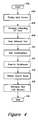
- Figure 4 is a flowchart showing a sequence of steps embodying the method of data retrieval.
- the search application 213 When the search application 213 is launched, for example using the icon method described above, the sequence starts in a START step 402 and proceeds to a DISPLAY INPUT SCREEN step 404. In this step 404, the application 213 displays an Input GUI screen 500 as shown in Figure 5.
- This Input GUI screen 500 allows a user to enter notes 502, 504 and graphics 506. The user enters notes 502, 504 using the keyboard 104 and graphics 506 using the stylus 108.
- the sequence next proceeds to an ALLOW SELECTING OF TEXT step 404.
- the application allows the user to select part of the notes 502, 504 as a selected text or search command 508 for processing.
- the user can specify the selected text 508 by highlighting any portions of the notes 502, 504 with the stylus 108.
- Figure 5 shows notes 504 as the only portion of the notes 502, 504 selected as the selected text 508.
- the application waits for a command from the user.
- the user can select a command by clicking on the appropriate buttons 510, 512, 514, 516.
- These commands are for the generation of a new Input GUI screen, the invoking of a search operation on the selected text 508, and the traversing of screens. Each of these commands will be described later.
- the DISPLAY INPUT SCREEN and ALLOWING SELECTING OF TEXT steps 404, 406 may be considered as belonging to the INPUT state 302 of the state transition diagram in Figure 3.
- the operation follows the path of an arrow 310 in Figure 3 to enter a CONFIRMATION state 304.
- the sequence in Figure 4 also proceeds to a SCAN SELECTED TEXT step 408, where the application separates characters of the selected text or search command 508 into groups that logically belong together. For the preferred embodiment, the application recognizes the space character as a delimiter between the groups. These groups of characters will be simply called words in this description. Before proceeding to describe how these words in the selected text 508 are translated into a set of search conditions, a table which is used for translating a selected text is first described.
- Table 1 is a translation table used for translating words in the selected text 508. Each row in the table is a separate record. Each record has three fields. The first field is a keyword field. Each keyword uniquely identifies a record in Table 1. The words in a selected text, such as the selected text 508, are checked against the keywords in Table 1 to see if there is a match. If any keyword appears in the selected text, the information contained in the particular record in the table identified by the keyword will be used to develop one or more search conditions. The second field of each record contains rules which govern how the search conditions are formed. The third field identifies which of the many different databases should be searched. This information forms yet another search condition.
- the method of translating selected text 508 into search conditions using the translation table is best illustrated with an example. Take the case of a selected text consisting of a sentence "Meet Clark today phone” as shown in Figure 5.
- the application scans the selected text 508 character by character until a delimiting space character is encountered. When the first space character is reached, the application recognizes "Meet” as a word. On the second space character, the application picks up the second word "Clark” Using such a method, the sentence “Meet Clark today phone” will be broken into four separate words, “Meet", “Clark”, "today” and “phone”. The application finds the word “Meet” in the translation table and recognizes it as a keyword.
- the application attempts to use information in the matched record containing the keyword "meet" to develop one or more search conditions. However the second field of the record is empty. There are no rules in this particular record to govern how any search condition should be developed.
- the application proceeds to check the third field containing information of databases to search. Based on the information in this third field, the application selects the Calendar and Tasks databases accordingly for searching.
- the application next checks for a match for the word "Clark” in the keyword column of the translation table. Since "Clark" is not found in the translation table, the application classifies it as not a defined keyword but as part of a search text. Words in the search text will be searched for in the selected databases after the entire selected text 508 is scanned.
- the application next processes the next word "today” by checking for a keyword "today” in the translation table.
- the application finds another record with a keyword "today”.
- the application fills the From and To dates search conditions with a system date maintained in the H/PC. If the system date is kept up to date, the application will be able to pick up the correct date to enter into the appropriate fields of the search conditions.
- the application in processing the last word "phone” in the selected text 508, searches the translation table for a record containing the keyword "phone". Once again, the application finds that such a record exist and uses the information to further develop the search conditions. This record simply indicates that the Contacts database be searched. Based on this information, the application simply marks the Contacts database for searching.
- the sequence proceeds to a GET CONFIRMATION step 410.
- the application presents the results of the translation of the selected text 508 in a Confirmation GUI screen 600.
- An example of such a confirmation GUI screen 600 is shown in Figure 6.
- This Confirmation GUI screen 600 shows the search conditions after the selected text 508 has undergone translation in the SCAN SELECTED TEXT step 408.
- the Confirmation GUI screen shows a search text 602 consisting of a single word "Clark" and From and To date fields 604, 606 containing a date, 12 November 98, assuming that 12 November 98 is the date the search is invoked. It also shows the Calendar, Contacts and Tasks databases marked for searching.
- the application waits for confirmation from the user to commence searching.
- the user may either accept the search conditions as developed by the application or the user may modify the different fields in the search conditions.
- a Continue Find button 612 When the user is satisfied with the search conditions, he or she may click on a Continue Find button 612 to allow the sequence to proceed to a next step.
- the user may alternatively select a Previous button 614 to discontinue the search operation. In the latter case, the application redisplays the previous Input GUI screen 500 as shown in Figure 5 to allow the user to enter or select new text for searching.
- the operation follows the path of an arrow 312 in Figure 3 to a RESULT state 306.
- the sequence also proceeds to a SEARCH DATABASES step 412.
- the application searches each of the marked databases in the Confirmation GUI screen 600 for records meeting the other search conditions.
- a database such as the Contacts database
- a record is deemed to meet the other search conditions if it contains the search text.
- Such a record does not contain any time information and the date conditions are therefore of no relevance when retrieving records in that database.
- a record is deemed to have met the other search conditions if it contains the search text and has a date which falls between the From and To dates of the search conditions.
- search text consists of more than one word
- the application can either search for records in the databases containing the entire search text or the application can simply search for records containing one or more words in the search text separately.
- the latter method of searching takes longer to complete as it consists effectively of a larger number of searches.
- the search text may additionally include BOOLEAN operators, such as but not limited to, AND and OR operators to further qualify the search text.
- a DISPLAY RESULT step 414 the application displays results of the search operation.
- the application uses a primary and a secondary sort order to display the results of the search operation.
- a primary sort order may indicate that records of a similar type be displayed in an ascending order with the record type having the least number of matched records being displayed first.
- the secondary search order determines how records of each record type are displayed. For example, in the displaying of contacts type of records, the records are sorted in an ascending order according to the Name field in the contacts records. Examples of sorting orders for other record types are given in Table 2 below.
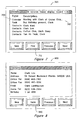
- Figure 7 is an example of a Result GUI screen 700 showing records containing the search text "Clark".
- the application in addition to displaying truncated text 702 of matched records, also displays the type 704 of each record as shown in Figure 7. If there are more records than can be accommodated in one Result GUI screen 700, the activation of the Find button 712 will reveal a next screen of records meeting the search conditions.
- a user may specify a new search by selecting a portion of text displayed on the Result GUI screen 700 and activating the Find button 712.
- the application will treat the search as if a search is activated from an Input GUI screen.
- the user can view or modify a record by selecting the record, for example by tapping the stylus twice on the display 102 where the record is displayed.
- the action of selecting a particular record in the Result GUI screen 700 causes the search operation to follow the path of an arrow 314 in Figure 3 to enter an Edit Record state 308.
- the sequence also proceeds to a Retrieve And Edit Record step 416.
- the application displays an Edit Record GUI screen 800.
- Figure 8 is an example of an Edit Record GUI screen 800 showing fields of a "Clark Lee" contacts record. The screen 800 allows a user to access all the fields of the particular record.
- search application 213 One way to allow access to the record is for the search application 213 to be given read and write permissions to the databases so that a user can access the databases using the search application directly. Another way is for the search application to invoke the appropriate application and for the user to use the appropriate application to subsequently access the databases.
- Previous and Next buttons are described first.
- the application links the two screens bidirectionally. This linking of the two screens allows the user to switch from one screen to another by activating the Previous, Next or Find buttons depending on the screen type.
- the user needs to activate the Previous button. And to move in the reverse direction, the user needs to activate the Find button.
- the Next button is activated in each case to move in the specified direction.
- Figure 3 shows the specific buttons which need to be activated to move from one screen type to another for the different states.
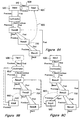
- FIG. 9A is a state transition diagram showing state transitions during this particular sequence. The invocation of a new Input GUI screen from one of the several RESULT states is also shown. A dotted-line arrow 900 shows that the new Input GUI screen 500' is invoked from a Result GUI screen 700.
- One method of linking the new Input GUI screen 500 is for the application to back up to the first Input GUI screen 500 by following the Previous link from each screen to a preceding screen until the Input GUI screen 500 is reached.
- the application after creating a second Input GUI screen 500' bidirectionally links the screen 500' to the first Input GUI screen 500 through a Next link 908 and a Previous link 910.
- the Next link 908 originates from the first Input GUI screen 500 to terminate at the second Input GUI screen 500' and vice versa for the Previous link 910.
- screens are linked bidirectionally in this manner, a user can move between the two screens by activating the appropriate Next and Previous buttons in the Input GUI screens 500, 500'.
- Figures 9B and 9C are other implementations of linking a new Input GUI screen 500'. These implementations are not as elegant as that shown in Figure 9A. The implementations in Figure 9B and 9C may become unwieldy after several invocations of new Input GUI screens at different states of searches.
- the application can support as many new Input GUI screens as the amount of memory 106 on the H/PC can support.
- Each screen can be exited by appropriate activation of a exit or quit button on each screen (not shown) to free up memory used for supporting the screen.
- the quitting of screen may cause downstream screens to be also quitted, as it may no longer make sense to maintain those screens since the link to them from a higher level screen has been broken. This quitting of screens will further free up memory.
- the oldest screen will be discarded.
- the oldest Input GUI screen 500 and its associated downstream screens will be purged to free memory for a new Input GUI screen invocation.
- Other variations of such a method are applicable to the implementations in Figure 9B and 9C.
- an Update button (not shown) is also available. Activation of this button allows a user to update the translation table of Table 1.
- the application displays the Translation table and allows the user to update the table by modifying, deleting and adding new records.
- the keyboard 104 is described as a means to enter data for searching. It will be expressly understood by those skilled in the art that a handwriting recognition or voice recognition means is equally applicable for entering data. Also, instead of having a contiguous block of selected text, the selected text may consist of separate blocks of text.
- the search application need not be separate and independent of the other applications but integrally implemented with the applications.
- the implementation may be in the form of a software function within the applications. This will allow a user to search other types of information when using any one of the applications. For example, when using a calendar application, a user may invoke a search function within the calendar application to search contact information. It is also possible to have such a search function in a word processing application like Microsoft Word, available from Microsoft Corporation (Redmond, Washington, USA).
- the DBMS 224 may be replaced by a simple set of file manipulation routines and databases 214, 216 and 218 may be implemented as other data stores such as simple files which the file manipulation routines can operate on.
- the keywords and translation rules in the translation table given in the above disclosure are meant only for illustration purposes.
- the disclosed keywords and rules in Table 2 are chosen for only a simple illustration to aid the understanding of the SCAN SELECTED TEXT step 408 and may not suffice for a full-fledged commercial application. For a commercial application, a more complete translation table may be required.
- the translation table also need not be user-customizable as described. It may be a default translation table available from a manufacturer. Similarly, the GET CONFIRMATION step may be removed. The default translation table and removal of the GET CONFIRMATION step will however result in a less flexible implementation of the invention.
- the search text is extracted from a selected text which serves as input to a search operation.
- the search text may however be developed in a similar manner as described for the other conditions using keywords.
Landscapes
- Engineering & Computer Science (AREA)
- Physics & Mathematics (AREA)
- Mathematical Physics (AREA)
- Theoretical Computer Science (AREA)
- Artificial Intelligence (AREA)
- Computational Linguistics (AREA)
- Data Mining & Analysis (AREA)
- Databases & Information Systems (AREA)
- General Engineering & Computer Science (AREA)
- General Physics & Mathematics (AREA)
- Information Retrieval, Db Structures And Fs Structures Therefor (AREA)
- User Interface Of Digital Computer (AREA)
Applications Claiming Priority (2)
| Application Number | Priority Date | Filing Date | Title |
|---|---|---|---|
| SG9900269 | 1999-01-29 | ||
| SG9900269 | 1999-01-29 |
Publications (2)
| Publication Number | Publication Date |
|---|---|
| EP1024440A2 true EP1024440A2 (de) | 2000-08-02 |
| EP1024440A3 EP1024440A3 (de) | 2002-02-06 |
Family
ID=20430273
Family Applications (1)
| Application Number | Title | Priority Date | Filing Date |
|---|---|---|---|
| EP00300528A Withdrawn EP1024440A3 (de) | 1999-01-29 | 2000-01-25 | Verfahren zum Wiederauffinden von Daten |
Country Status (2)
| Country | Link |
|---|---|
| US (1) | US6434552B1 (de) |
| EP (1) | EP1024440A3 (de) |
Cited By (3)
| Publication number | Priority date | Publication date | Assignee | Title |
|---|---|---|---|---|
| EP2284734A1 (de) * | 2004-06-25 | 2011-02-16 | Apple Inc. | Verfahren und Systeme zum suchen und zur Anzeige von Daten |
| US8095506B2 (en) | 2004-06-25 | 2012-01-10 | Apple Inc. | Methods and systems for managing data |
| US8135727B2 (en) | 2004-06-25 | 2012-03-13 | Apple Inc. | Methods and systems for managing data |
Families Citing this family (20)
| Publication number | Priority date | Publication date | Assignee | Title |
|---|---|---|---|---|
| US6819339B1 (en) * | 2000-02-24 | 2004-11-16 | Eric Morgan Dowling | Web browser with multilevel functions |
| US6938083B1 (en) * | 2000-07-21 | 2005-08-30 | Unisys Corporation | Method of providing duplicate original file copies of a searched topic from multiple file types derived from the web |
| US7739298B1 (en) * | 2001-01-26 | 2010-06-15 | Apple Inc. | Using a calculation expression to define and control access rights for records in a database |
| US6850934B2 (en) * | 2001-03-26 | 2005-02-01 | International Business Machines Corporation | Adaptive search engine query |
| US20030014395A1 (en) * | 2001-07-12 | 2003-01-16 | International Business Machines Corporation | Communication triggered just in time information |
| US7171626B2 (en) * | 2001-10-29 | 2007-01-30 | Microsoft Corporation | System and method for presenting the contents of a content collection based on content type |
| US6980949B2 (en) * | 2003-03-14 | 2005-12-27 | Sonum Technologies, Inc. | Natural language processor |
| US7080103B2 (en) * | 2003-05-08 | 2006-07-18 | International Business Machines Corporation | Personal information management system and method with audit functionality |
| US20050262054A1 (en) * | 2004-05-18 | 2005-11-24 | Nokia Corporation | Item type specific structured search |
| JP2006023944A (ja) * | 2004-07-07 | 2006-01-26 | Canon Inc | 画像処理システム及び画像処理方法 |
| JP4208780B2 (ja) * | 2004-07-07 | 2009-01-14 | キヤノン株式会社 | 画像処理システム及び画像処理装置の制御方法並びにプログラム |
| JP2006023945A (ja) * | 2004-07-07 | 2006-01-26 | Canon Inc | 画像処理システム及び画像処理方法 |
| JP2006025129A (ja) * | 2004-07-07 | 2006-01-26 | Canon Inc | 画像処理システム及び画像処理方法 |
| JP4939739B2 (ja) * | 2004-10-05 | 2012-05-30 | パナソニック株式会社 | 携帯情報端末及び表示制御プログラム |
| US8312489B2 (en) * | 2005-02-23 | 2012-11-13 | Sony Corporation | CM searching method and apparatus, and CM-appendant information supplying method and apparatus |
| US20070067155A1 (en) * | 2005-09-20 | 2007-03-22 | Sonum Technologies, Inc. | Surface structure generation |
| US20070233732A1 (en) * | 2006-04-04 | 2007-10-04 | Mozes Incorporated | Content request, storage and/or configuration systems and methods |
| US20140033122A1 (en) * | 2008-11-15 | 2014-01-30 | Adobe Systems Incorporated | Smart module management selection |
| US20110029350A1 (en) * | 2009-07-29 | 2011-02-03 | Edith Ronen | Method and system for calendaring events |
| GB2503223A (en) | 2012-06-19 | 2013-12-25 | Ibm | Redrafting text strings using a vocabulary |
Family Cites Families (8)
| Publication number | Priority date | Publication date | Assignee | Title |
|---|---|---|---|---|
| JPH03129472A (ja) * | 1989-07-31 | 1991-06-03 | Ricoh Co Ltd | 文書検索装置における処理方法 |
| US5331555A (en) | 1990-05-11 | 1994-07-19 | Sharp Kabushiki Kaisha | Electronic apparatus |
| JP3376604B2 (ja) | 1992-07-20 | 2003-02-10 | カシオ計算機株式会社 | 情報管理装置 |
| US5873076A (en) * | 1995-09-15 | 1999-02-16 | Infonautics Corporation | Architecture for processing search queries, retrieving documents identified thereby, and method for using same |
| US5867822A (en) * | 1996-06-26 | 1999-02-02 | Sun Microsystems, Inc. | Method and apparatus for management of electronic calendars throughout an enterprise and management of events in a distributed system |
| US6016478A (en) * | 1996-08-13 | 2000-01-18 | Starfish Software, Inc. | Scheduling system with methods for peer-to-peer scheduling of remote users |
| US6029171A (en) | 1997-02-10 | 2000-02-22 | Actioneer, Inc. | Method and apparatus for group action processing between users of a collaboration system |
| US6167397A (en) * | 1997-09-23 | 2000-12-26 | At&T Corporation | Method of clustering electronic documents in response to a search query |
-
1999
- 1999-05-13 US US09/311,172 patent/US6434552B1/en not_active Expired - Lifetime
-
2000
- 2000-01-25 EP EP00300528A patent/EP1024440A3/de not_active Withdrawn
Cited By (20)
| Publication number | Priority date | Publication date | Assignee | Title |
|---|---|---|---|---|
| EP2284734A1 (de) * | 2004-06-25 | 2011-02-16 | Apple Inc. | Verfahren und Systeme zum suchen und zur Anzeige von Daten |
| US8095506B2 (en) | 2004-06-25 | 2012-01-10 | Apple Inc. | Methods and systems for managing data |
| US8135727B2 (en) | 2004-06-25 | 2012-03-13 | Apple Inc. | Methods and systems for managing data |
| US8150826B2 (en) | 2004-06-25 | 2012-04-03 | Apple Inc. | Methods and systems for managing data |
| US8156104B2 (en) | 2004-06-25 | 2012-04-10 | Apple Inc. | Methods and systems for managing data |
| US8166065B2 (en) | 2004-06-25 | 2012-04-24 | Apple Inc. | Searching metadata from files |
| US8229913B2 (en) | 2004-06-25 | 2012-07-24 | Apple Inc. | Methods and systems for managing data |
| US8229889B2 (en) | 2004-06-25 | 2012-07-24 | Apple Inc. | Methods and systems for managing data |
| US8234245B2 (en) | 2004-06-25 | 2012-07-31 | Apple Inc. | Methods and systems for managing data |
| US8352513B2 (en) | 2004-06-25 | 2013-01-08 | Apple Inc. | Methods and systems for managing data |
| US8429208B2 (en) | 2004-06-25 | 2013-04-23 | Apple Inc. | Methods and systems for managing data |
| US8473511B2 (en) | 2004-06-25 | 2013-06-25 | Apple Inc. | Methods and systems for managing data |
| US8738670B2 (en) | 2004-06-25 | 2014-05-27 | Apple Inc. | Methods and systems for managing data |
| US8856074B2 (en) | 2004-06-25 | 2014-10-07 | Apple Inc. | Methods and systems for managing data |
| US8868498B2 (en) | 2004-06-25 | 2014-10-21 | Apple Inc. | Methods and systems for managing data |
| US9020989B2 (en) | 2004-06-25 | 2015-04-28 | Apple Inc. | Methods and systems for managing data |
| US9063942B2 (en) | 2004-06-25 | 2015-06-23 | Apple Inc. | Methods and systems for managing data |
| US9213708B2 (en) | 2004-06-25 | 2015-12-15 | Apple Inc. | Methods and systems for managing data |
| US9460096B2 (en) | 2004-06-25 | 2016-10-04 | Apple Inc. | Methods and systems for managing data |
| US10678799B2 (en) | 2004-06-25 | 2020-06-09 | Apple Inc. | Methods and systems for managing data |
Also Published As
| Publication number | Publication date |
|---|---|
| EP1024440A3 (de) | 2002-02-06 |
| US6434552B1 (en) | 2002-08-13 |
Similar Documents
| Publication | Publication Date | Title |
|---|---|---|
| US6434552B1 (en) | Method for data retrieval | |
| US6741994B1 (en) | Method and automatic organization of data | |
| US6557004B1 (en) | Method and apparatus for fast searching of hand-held contacts lists | |
| US5515497A (en) | Method and apparatus for selecting and displaying items in a notebook graphical user interface | |
| CN1938673B (zh) | 动态生成可选择搜索扩展的系统和方法 | |
| US6901559B1 (en) | Method and apparatus for providing recent categories on a hand-held device | |
| US7392249B1 (en) | Methods, systems, and computer-readable mediums for providing persisting and continuously updating search folders | |
| CA2266457C (en) | System and method for search and retrieval of digital information | |
| US7447989B2 (en) | Method and system for setting document-linked timed reminders | |
| US8239375B2 (en) | Method of searching for personal information management (PIM) information and handheld electronic device employing the same | |
| US7890492B2 (en) | Organizing pointers to objects in an array to improve the speed of object retrieval | |
| US7409644B2 (en) | File system shell | |
| US7925975B2 (en) | Searching for commands to execute in applications | |
| US20100070922A1 (en) | Start menu operation for computer user interface | |
| US20070156643A1 (en) | Application of metadata to documents and document objects via a software application user interface | |
| US20050192973A1 (en) | Visual database management system and method | |
| US20070196033A1 (en) | Searching and indexing of photos based on ink annotations | |
| US7519576B2 (en) | Integrated user interface mechanism for recursive searching and selecting of items | |
| US20070168378A1 (en) | Application of metadata to documents and document objects via an operating system user interface | |
| CA2517615C (en) | Method of searching for personal informaton management (pim) information and handheld electronic device employing the same | |
| US6046739A (en) | System and method for organizing objects managed within a desktop | |
| US6535885B1 (en) | Multikeyed table implementable on a personal digital assistant | |
| EP0996072A1 (de) | Verfahren zum gemeinsamen Verbrauch von Daten unter einer Vielzahl von Anwendungen in einem Tragbaren Gerät | |
| JP3335863B2 (ja) | 文字入力簡易化装置及び方法 | |
| EP1043674A2 (de) | Verfahren zum Wiederauffinden, Aktualisieren und Speichern von Daten |
Legal Events
| Date | Code | Title | Description |
|---|---|---|---|
| PUAI | Public reference made under article 153(3) epc to a published international application that has entered the european phase |
Free format text: ORIGINAL CODE: 0009012 |
|
| AK | Designated contracting states |
Kind code of ref document: A2 Designated state(s): DE FR GB Kind code of ref document: A2 Designated state(s): AT BE CH CY DE DK ES FI FR GB GR IE IT LI LU MC NL PT SE |
|
| AX | Request for extension of the european patent |
Free format text: AL;LT;LV;MK;RO;SI |
|
| RAP1 | Party data changed (applicant data changed or rights of an application transferred) |
Owner name: HEWLETT-PACKARD COMPANY, A DELAWARE CORPORATION |
|
| PUAL | Search report despatched |
Free format text: ORIGINAL CODE: 0009013 |
|
| AK | Designated contracting states |
Kind code of ref document: A3 Designated state(s): AT BE CH CY DE DK ES FI FR GB GR IE IT LI LU MC NL PT SE |
|
| AX | Request for extension of the european patent |
Free format text: AL;LT;LV;MK;RO;SI |
|
| 17P | Request for examination filed |
Effective date: 20020415 |
|
| AKX | Designation fees paid |
Free format text: DE FR GB |
|
| STAA | Information on the status of an ep patent application or granted ep patent |
Free format text: STATUS: THE APPLICATION IS DEEMED TO BE WITHDRAWN |
|
| 18D | Application deemed to be withdrawn |
Effective date: 20061011 |