EP0923218A2 - Telekommunikationsendgerät - Google Patents
Telekommunikationsendgerät Download PDFInfo
- Publication number
- EP0923218A2 EP0923218A2 EP98123387A EP98123387A EP0923218A2 EP 0923218 A2 EP0923218 A2 EP 0923218A2 EP 98123387 A EP98123387 A EP 98123387A EP 98123387 A EP98123387 A EP 98123387A EP 0923218 A2 EP0923218 A2 EP 0923218A2
- Authority
- EP
- European Patent Office
- Prior art keywords
- entered
- input
- text
- operating mode
- text characters
- Prior art date
- Legal status (The legal status is an assumption and is not a legal conclusion. Google has not performed a legal analysis and makes no representation as to the accuracy of the status listed.)
- Withdrawn
Links
Images


Classifications
-
- H—ELECTRICITY
- H04—ELECTRIC COMMUNICATION TECHNIQUE
- H04W—WIRELESS COMMUNICATION NETWORKS
- H04W88/00—Devices specially adapted for wireless communication networks, e.g. terminals, base stations or access point devices
- H04W88/02—Terminal devices
-
- H—ELECTRICITY
- H04—ELECTRIC COMMUNICATION TECHNIQUE
- H04M—TELEPHONIC COMMUNICATION
- H04M1/00—Substation equipment, e.g. for use by subscribers
- H04M1/72—Mobile telephones; Cordless telephones, i.e. devices for establishing wireless links to base stations without route selection
- H04M1/724—User interfaces specially adapted for cordless or mobile telephones
- H04M1/72403—User interfaces specially adapted for cordless or mobile telephones with means for local support of applications that increase the functionality
- H04M1/7243—User interfaces specially adapted for cordless or mobile telephones with means for local support of applications that increase the functionality with interactive means for internal management of messages
- H04M1/72436—User interfaces specially adapted for cordless or mobile telephones with means for local support of applications that increase the functionality with interactive means for internal management of messages for text messaging, e.g. short messaging services [SMS] or e-mails
-
- H—ELECTRICITY
- H04—ELECTRIC COMMUNICATION TECHNIQUE
- H04M—TELEPHONIC COMMUNICATION
- H04M2250/00—Details of telephonic subscriber devices
- H04M2250/70—Details of telephonic subscriber devices methods for entering alphabetical characters, e.g. multi-tap or dictionary disambiguation
Definitions
- the invention relates to a telecommunications terminal the genus of the main claim.
- Such Control information is particularly advantageous if due to the dimensions of the display unit not the all text entered for the short message at the same time can be represented. This is especially true when using cell phones trained telecommunications terminals the case at which should be as small as possible.
- Control information includes a first number and that the first Number of the number of those already in the input mode corresponds to the entered text characters. That way the user exactly and quickly over the length of the previous entered text for the short message. The Representation of a number for the previous text length required even a small space requirement on the display unit.
- Another advantage is that the number of inputable text characters in the input operating mode a first predetermined value is limited that the Control information includes a second number and that the second number the first given value minus the Number of entries already entered in the input operating mode Corresponds to text characters. This way the user has the Possibility of prematurely closing the text for his short message break up. This can prevent the entered Text based on reaching the first specified value for the permissible number of text characters that can be entered is continued and possibly in the middle of a word is canceled. Based on the control information of the The remaining number of text characters that can be entered can be the Prevent such an abrupt text abort.
- Control information includes a graphic symbol that the graphic symbol is designed as a level indicator and that the level indicator depends on the number of Text characters already entered in the input mode and one the number of those in the input operation mode inputable text characters delimiting the first predetermined Value the number of remaining inputable Text characters in relation to and together with the number of Text characters already entered, preferably in Bar shape, dynamic.
- the Users even faster an overview of the previous one and get the remaining text length since it doesn't first one or two shown on the display unit Numbers for the previous and / or the remaining one Must interpret text length.
- Another advantage is that when falling short a predetermined difference between the number of Text characters that can be entered in the input operating mode limiting first predetermined value and the number of in text characters already entered in the input operating mode the delivery of an optical and / or an acoustic Warning signal is given.
- the user can entering a text for a short message in good time on the approaching end of the text length Capacity limit be made aware. It needs the user is not constantly counting the number remaining Enterable text characters by observing the corresponding Check control information. He can therefore read the text enter without worry until the warning signal is given and must if the specified difference is specified appropriately after the warning signal for a clean termination of the Concentrate text entry at the end of the text Text aborted in the middle of a word.
- Another advantage is that the representation of the Control information on the display unit in the Input operating mode only takes place when a second predetermined value from the number of in the Input operating mode text characters already entered is exceeded. This prevents the User unnecessary when entering the short message Information on the display device is distracted.
- the second specified value should be chosen as possible be that the presentation of the control information only then occurs when the user also has a need to the previous and / or remaining text length to be informed, for example about his text in good time before a maximum number is permitted of text characters to end.
- FIG. 1 shows an operating front of a Mobile phones
- Figure 2 is a block diagram of a Mobile phones
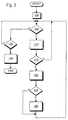
- Figure 3 is a flow chart for the control the display of control information on a Display unit of the mobile phone.
- FIG. 1 is a control panel 95 one as a mobile phone trained telecommunications terminal 1 shown.
- 50 denotes a transmitting / receiving antenna, 10 one designed as a display unit, 55 a Loudspeaker, 60 an LED, 65 an alphanumeric Keyboard and 80 a microphone for voice input when over the mobile phone 1 can be set up a voice connection should.
- In an input operating mode can use the alphanumeric keyboard 65 letters and Digits are entered in the order of their Input on display 10 as text character 40 for illustration to be brought.
- the position of the display 10 will who is currently entering text characters using the alphanumeric keyboard 65 takes place until this entry represented by a space 85.
- the space is 85 thereby behind the last entered text character 40 am Display 10 shown.
- the display 10 also shows the Display of a first number 25, a second number 30 and a graphic symbol 35 is provided.
- the first number 25, the second number 30 and the graphic symbol 35 are according to Figure 1 shown together on the display 10. However, it can also be provided only the first number 25, only the second Number 30 or just the graphic symbol 35 on the display 10 to represent. Furthermore, only the first can be provided Number 25 and the second number 30 together on the display To represent 10 or just the first number 25 and that graphic symbol 35 or just the second number 30 and that graphic symbol 35.
- the input operating mode can for example by pressing one of the buttons alphanumeric keyboard 65 can be activated.
- the Input operating mode can be used, for example, as a menu item a selection menu by selecting one of these menu items assigned number on the alphanumeric keyboard 65 to be activated.
- it can also be, for example Activation of the input operating mode by pressing the Control button 45 or the send button 75 take place.
- the alphanumeric keyboard 65 in input mode Text entered completely or only partially on the display 10 are shown.
- the input operation mode can be by Pressing the send button 75 are ended, whereupon the User to enter a phone number by appropriate Representation on the display 10 is requested.
- the text entered in the input mode in the form a short message for example, according to the short message service (SMS) via the transmitting / receiving antenna 50 to the selected participants via a mobile network trained telecommunications or data network sent.
- SMS short message service
- the first number 25, the second number 30 and the graphic symbol 35 are shown on the display 10 in the input operating mode.
- the first number 25 indicates the number of text characters 40 already entered in the input operating mode.
- the entry of a text for a short message in the input operating mode is generally limited to a first predetermined value for the number of text characters 40 that can be entered, for example 160 text characters 40.
- the second number 30 then corresponds to the first predetermined value minus the number of characters already in the Input operating mode on the alphanumeric keyboard 65 entered text characters 40.
- the second number 30 indicates how many text characters 40 the user can still enter until he reaches the maximum allowable text length.
- the first number 25 shows the value 100 "and the second number 30 the value 60 ".
- the graphic symbol 35 is designed as a fill level indicator.
- the fill level indicator 35 displays the number of text characters 40 that have already been entered in the input operating mode and the number of text characters that can be input in the input operating mode 40 dynamically represents the first predetermined value that limits the number of text characters 40 that can still be input in relation to and together with the number of text characters 40 that have already been input. According to the exemplary embodiment in FIG.
- the fill level indicator 35 can preferably be designed in the form of a bar
- the number of the maximum text characters 40 that can be entered in the input operating mode can be represented by the length of a rectangle.
- the rectangle then fills dynamically from left to right as text characters 40 are entered on the alphanumeric keyboard 65.
- This filling process can be shown on the display 10 in that when entering text characters 40, the rectangle is colored from the left beginning in a color different from the basic color of the rectangle.
- the filling process divides the rectangle into a filled and an unfilled rectangle.
- the length of the unfilled rectangle represents the number of text characters 40 that can still be entered, and the length of the filled rectangle represents the number of text characters 40 that have already been entered.
- the filling of the rectangle takes place dynamically, that is, when the text characters 40 are entered.
- FIG. 2 shows a block diagram of the mobile telephone 1 shown.
- the mobile phone 1 comprises a controller 90 to which the display 10, the speaker 55 and the LED 60 are connected.
- controller 90 also an input unit 5 connected.
- the Input unit 5 comprises the alphanumeric keyboard 65, the control button 45, the handset button 70 and the Send button 75.
- the first number 25, the second number 30 and the graphic Symbol 35 can be referred to as control information.
- the control information 25, 30, 35 is in the Input operating mode can be shown on the display 10.
- the Control information 25, 30, 35 depends on the number of Input operating mode from text characters 40 already entered.
- the display of the control information 25, 30, 35 am Display 10 is in the by pressing the control button 45 Input operating mode can be activated.
- the representation of the Control information 25, 30, 35 on the display 10 in the Input operating mode only takes place when a second predetermined value from the number of in the Input operating mode text characters already entered 40 is exceeded.
- an optical warning signal can be used by lighting up, for example by flashing the LED 60 take place.
- An acoustic warning signal can be received from Speakers 55 are played.
- FIG 3 is a flow chart for the operation of the Controller 90 for the representation of the Control information 25, 30, 35 shown on the display 10.
- the Activation of the input operating mode by the controller 90 detected and an index variable i by zeroing initialized. It then becomes a program point 105 branches.
- controller 90 checks whether a text character 40 on the alphanumeric keyboard 65 was entered. If this is the case, it becomes one Program point 110 branches, otherwise it becomes one Program item 135 branches. Initiated at program point 110 the controller 90 displays the input Text character 40 on the display 10 on the last by the Space 85 marked position and increment the Index variable i. It then becomes a program item 115 branches.
- the controller 90 checks whether the index variable i has the second predetermined value exceeded or the control button 45 was pressed. Is if this is the case, the program branches to a program point 120, otherwise the program branches back to program point 105.
- Program point 120 causes controller 90 to display 10 to display the current control information 25, 30, 35 on the display 10.
- the first number 25 corresponds to that current value of the index variable i.
- the second number 30 corresponds to the first specified value minus the current value of the index variable i.
- the length of the filled Rectangle of the graphic symbol 35 represents the current value of the index variable i and the length of the unfilled rectangle of the graphic symbol 35 represents the first given value minus the current value of the index variable i. Then becomes a program point 125 branches.
- the controller 90 checks whether there is a difference between the Number of inputs that can be entered in the input operating mode Text characters 40 limiting the first predetermined value and the Number of those already entered in the input operating mode Text character 40 falls below a predetermined difference. If this is the case, then program point 130 branches, otherwise program point 105 branched back.
- the Control 90 the delivery of an optical and / or one acoustic warning signal by means of the light emitting diode 60 or the Loudspeaker 55. Then program point 105 branched back.
- the control checks at program point 135 90 whether the send button 75 has been pressed. Is that the case, the program branches to a program point 140, otherwise is branched back to program point 105.
- controller 90 causes controller 90 to terminate Input operating mode.
- the controller 90 then switches the mobile phone 1 in a transmission mode and causes the display unit 10 to display a Prompt for the entry of a phone number Participant of the mobile network 20, on which the im Input operating mode entered short message in the form of Text character 40 should be sent.
- the controller 90 After entering a corresponding number on the alphanumeric keypad 65 the controller 90 causes the transmission unit 15 to Transmission of the short message to the selected subscriber.
- the program section is then exited.
- the telecommunications terminal 1 can also be used as Cordless phone, as a mobile device, as a handheld radio, as Company radio or the like may be formed.
- the telecommunications terminal 1 can also be used as corded telecommunications terminal 1 is formed be.
- the telecommunications or data network 20 can also a combined radio and landline network or a pure one Landline network, i.e. a corded one Be a telecommunications network.
Landscapes
- Engineering & Computer Science (AREA)
- Computer Networks & Wireless Communication (AREA)
- Signal Processing (AREA)
- Business, Economics & Management (AREA)
- General Business, Economics & Management (AREA)
- Human Computer Interaction (AREA)
- Mobile Radio Communication Systems (AREA)
- Input From Keyboards Or The Like (AREA)
- Telephone Function (AREA)
Abstract
Description

Claims (7)
- Telekommunikationsendgerät (1) mit einer Eingabeeinheit (5), einer Anzeigeeinheit (10) und einer Sendeeinheit (15), wobei an der Eingabeeinheit (5) ein Text eingebbar und an der Anzeigeeinheit (10) darstellbar ist und ein eingegebener Text von der Sendeeinheit (15) an einen Teilnehmer eines Telekommunikations- oder Datennetzes (20) übertragbar ist, dadurch gekennzeichnet, daß in einem Eingabebetriebsmodus, in dem der Text an der Eingabeeinheit (5) eingegeben wird, eine Kontrollinformation (25, 30, 35) an der Anzeigeeinheit (10) darstellbar ist und daR die Kontrollinformation (25, 30, 35) von der Anzahl der bereits eingegebenen Textzeichen (40) abhängt.
- Telekommunikationsendgerät (1) nach Anspruch 1, dadurch gekennzeichnet, daß die Darstellung der Kontrollinformation (25, 30, 35) an der Anzeigeeinheit (10) durch Betätigung einer Taste (45) im Eingabebetriebsmodus aktivierbar ist.
- Telekommunikationsendgerät (1) nach Anspruch 1 oder 2, dadurch gekennzeichnet, daß die Kontrollinformation (25, 30, 35) eine erste Zahl (25) umfaßt und daß die erste Zahl (25) der Anzahl der bereits in dem Eingabebetriebsmodus eingegebenen Textzeichen (40) entspricht.
- Telekommunikationsendgerät (1) nach Anspruch 1, 2 oder 3, dadurch gekennzeichnet, daß die Anzahl der eingebbaren Textzeichen (40) in dem Eingabebetriebsmodus auf einen ersten vorgegebenen Wert begrenzt ist, daß die Kontrollinformation (25, 30, 35) eine zweite Zahl (30) umfaßt und daß die zweite Zahl (30) dem ersten vorgegebenen Wert abzüglich der Anzahl der bereits in dem Eingabebetriebsmodus eingegebenen Textzeichen (40) entspricht.
- Telekommunikationsendgerät (1) nach einem der vorherigen Ansprüche, dadurch gekennzeichnet, daß die Kontrollinformation (25, 30, 35) ein grafisches Symbol (35) umfaßt, daß das grafische Symbol (35) als Füllstandsanzeige ausgebildet ist und daß die Füllstandsanzeige (35) in Abhängigkeit der Anzahl der bereits in dem Eingabebetriebsmodus eingegebenen Textzeichen (40) und eines die Anzahl der in dem Eingabebetriebsmodus eingebbaren Textzeichen (40) begrenzenden ersten vorgegebenen Wertes die Anzahl der noch verbleibenden eingebbaren Textzeichen (40) in Relation zu und zusammen mit der Anzahl der bereits eingegebenen Textzeichen (40), vorzugsweise in Balkenform, dynamisch darstellt.
- Telekommunikationsendgerät (1) nach einem der vorherigen Ansprüche, dadurch gekennzeichnet, daß bei Unterschreiten einer vorgegebenen Differenz zwischen einem die Anzahl der in dem Eingabebetriebsmodus eingebbaren Textzeichen (40) begrenzenden ersten vorgegebenen Wert und der Anzahl der in dem Eingabebetriebsmodus bereits eingegebenen Textzeichen (40) die Abgabe eines optischen und/oder eines akustischen Warnsignals erfolgt.
- Telekommunikationsendgerät (1) nach einem der vorherigen Ansprüche, dadurch gekennzeichnet, daß die Darstellung der Kontrollinformation (25, 30, 35) an der Anzeigeeinheit (10) in dem Eingabebetriebsmodus erst dann erfolgt, wenn ein zweiter vorgegebener Wert von der Anzahl der in dem Eingabebetriebsmodus bereits eingegebenen Textzeichen (40) überschritten wird.
Applications Claiming Priority (2)
| Application Number | Priority Date | Filing Date | Title |
|---|---|---|---|
| DE19754728 | 1997-12-10 | ||
| DE19754728A DE19754728A1 (de) | 1997-12-10 | 1997-12-10 | Telekommunikationsendgerät |
Publications (2)
| Publication Number | Publication Date |
|---|---|
| EP0923218A2 true EP0923218A2 (de) | 1999-06-16 |
| EP0923218A3 EP0923218A3 (de) | 2003-07-02 |
Family
ID=7851325
Family Applications (1)
| Application Number | Title | Priority Date | Filing Date |
|---|---|---|---|
| EP98123387A Withdrawn EP0923218A3 (de) | 1997-12-10 | 1998-12-09 | Telekommunikationsendgerät |
Country Status (2)
| Country | Link |
|---|---|
| EP (1) | EP0923218A3 (de) |
| DE (1) | DE19754728A1 (de) |
Cited By (4)
| Publication number | Priority date | Publication date | Assignee | Title |
|---|---|---|---|---|
| EP1111946A1 (de) * | 1999-12-21 | 2001-06-27 | Sony International (Europe) GmbH | Tragbares Kommunicationsgerät mit Bildverarbeitungsbetrieb zur verarbeitung von Nachrichten mit vorbestimmter maximaler Länge |
| WO2005083993A1 (en) * | 2004-01-27 | 2005-09-09 | Nokia Corporation | System and method for concatenating short audio messages |
| WO2007129138A1 (en) | 2006-05-08 | 2007-11-15 | Sony Ericsson Mobile Communications Ab | Method and system for graphically delimiting text message content for a mobile radio terminal |
| EP2312814A3 (de) * | 2009-10-16 | 2014-01-01 | Lg Electronics Inc. | Verfahren zum Anhängen von Daten und mobiles Endgerät damit |
Family Cites Families (1)
| Publication number | Priority date | Publication date | Assignee | Title |
|---|---|---|---|---|
| CA1317678C (en) * | 1989-03-20 | 1993-05-11 | William Jaaskelainen | Dynamic progress marking icon |
-
1997
- 1997-12-10 DE DE19754728A patent/DE19754728A1/de not_active Ceased
-
1998
- 1998-12-09 EP EP98123387A patent/EP0923218A3/de not_active Withdrawn
Cited By (5)
| Publication number | Priority date | Publication date | Assignee | Title |
|---|---|---|---|---|
| EP1111946A1 (de) * | 1999-12-21 | 2001-06-27 | Sony International (Europe) GmbH | Tragbares Kommunicationsgerät mit Bildverarbeitungsbetrieb zur verarbeitung von Nachrichten mit vorbestimmter maximaler Länge |
| WO2005083993A1 (en) * | 2004-01-27 | 2005-09-09 | Nokia Corporation | System and method for concatenating short audio messages |
| WO2007129138A1 (en) | 2006-05-08 | 2007-11-15 | Sony Ericsson Mobile Communications Ab | Method and system for graphically delimiting text message content for a mobile radio terminal |
| US8516398B2 (en) | 2006-05-08 | 2013-08-20 | Sony Corporation | Method and system for graphically delimiting text message content for a mobile radio terminal |
| EP2312814A3 (de) * | 2009-10-16 | 2014-01-01 | Lg Electronics Inc. | Verfahren zum Anhängen von Daten und mobiles Endgerät damit |
Also Published As
| Publication number | Publication date |
|---|---|
| DE19754728A1 (de) | 1999-06-24 |
| EP0923218A3 (de) | 2003-07-02 |
Similar Documents
| Publication | Publication Date | Title |
|---|---|---|
| DE60126330T2 (de) | Mobile anwendung zur emotionalen benachrichtigung | |
| DE60123741T2 (de) | Mobile Kommunikationseinrichtung | |
| DE60114759T3 (de) | Verfahren und Vorrichtung zur Konvertierung von Addressbucheinträgen in einem drahtlosen Kommunikationsgerät | |
| DE19754728A1 (de) | Telekommunikationsendgerät | |
| EP0817458A2 (de) | Vorrichtung zur Ermöglichung einer kostenoptimierten Telekommunikation | |
| EP0962084B1 (de) | Funkgerät | |
| EP0860971A2 (de) | Funkgerät | |
| EP0975182B1 (de) | Telekommunikationsgerät mit Schnittstelle zu einem Fernsehgerät als Monitor für Telekommunikations-Anwendungen | |
| DE19949716C2 (de) | Mobiles Telekommunikationsendgerät | |
| WO2003041373A1 (de) | Verfahren zur vereinheitlichung der bediensteuerung bei mobilfunkendgeräten | |
| EP1230782A2 (de) | Telekommunikations-endgerät, multifunktions-bedienteil und verfahren zum herstellen einer fernsprechverbindung | |
| DE102008062985A1 (de) | Verfahren und Vorrichtung zur Steuerung eines mobilen Endgerätes für Kurznachrichten | |
| DE19830564C1 (de) | Telekommunikationsendgerät | |
| DE19942296A1 (de) | Telekommunikationsendgerät | |
| DE29905481U1 (de) | Notrufeinrichtung für ein Mobilteil eines Telekommunikationssystems | |
| EP1021904A1 (de) | Funkgerät menüsystem | |
| DE4323871B4 (de) | Verfahren und Vorrichtung zur Weitermeldung bei einem Anrufbeantworter eingegangener Nachrichten | |
| DE102004056513A1 (de) | Verfahren und System zur Übermittlung von Nutzdaten an ein in einem Kommunikationsnetzwerk eingebundenes datendienstfähiges Endgerät | |
| DE102006059281B4 (de) | Kommunikationseinheit zum Empfang von Informationen | |
| DE102012016111A1 (de) | Verfahren zum Betreiben eines Telekommunikationssystems in einem Fahrzeug und Telekommunikationssystem hierfür | |
| EP1631046A1 (de) | Darstellung von Menüfeldern verschiedener Anwendungsprogramme auf einer Anzeige eines mobilen Endgerätes | |
| EP1297698A1 (de) | Telekommunikationsendgerät mit einer kamera | |
| DE20009413U1 (de) | Vorrichtung zum Versenden und Empfangen von Nachrichten | |
| DE10206216A1 (de) | Verfahren zum Versenden von Textnachrichten mittels eines Paketvermittlungsverfahrens und Anordnung zur Durchführung dieses Verfahrens | |
| DE19744225C2 (de) | Funktelefon |
Legal Events
| Date | Code | Title | Description |
|---|---|---|---|
| PUAI | Public reference made under article 153(3) epc to a published international application that has entered the european phase |
Free format text: ORIGINAL CODE: 0009012 |
|
| AK | Designated contracting states |
Kind code of ref document: A2 Designated state(s): AT BE CH CY DE DK ES FI FR GB GR IE IT LI LU MC NL PT SE |
|
| AX | Request for extension of the european patent |
Free format text: AL;LT;LV;MK;RO;SI |
|
| RAP1 | Party data changed (applicant data changed or rights of an application transferred) |
Owner name: SIEMENS AKTIENGESELLSCHAFT |
|
| PUAL | Search report despatched |
Free format text: ORIGINAL CODE: 0009013 |
|
| RIC1 | Information provided on ipc code assigned before grant |
Ipc: 7G 06F 3/023 B Ipc: 7H 04M 1/725 A |
|
| AK | Designated contracting states |
Designated state(s): AT BE CH CY DE DK ES FI FR GB GR IE IT LI LU MC NL PT SE |
|
| AX | Request for extension of the european patent |
Extension state: AL LT LV MK RO SI |
|
| AKX | Designation fees paid | ||
| REG | Reference to a national code |
Ref country code: DE Ref legal event code: 8566 |
|
| STAA | Information on the status of an ep patent application or granted ep patent |
Free format text: STATUS: THE APPLICATION IS DEEMED TO BE WITHDRAWN |
|
| 18D | Application deemed to be withdrawn |
Effective date: 20040103 |