EP0902577A2 - Funkgerät - Google Patents
Funkgerät Download PDFInfo
- Publication number
- EP0902577A2 EP0902577A2 EP98117078A EP98117078A EP0902577A2 EP 0902577 A2 EP0902577 A2 EP 0902577A2 EP 98117078 A EP98117078 A EP 98117078A EP 98117078 A EP98117078 A EP 98117078A EP 0902577 A2 EP0902577 A2 EP 0902577A2
- Authority
- EP
- European Patent Office
- Prior art keywords
- radio
- display device
- control element
- display
- symbol
- Prior art date
- Legal status (The legal status is an assumption and is not a legal conclusion. Google has not performed a legal analysis and makes no representation as to the accuracy of the status listed.)
- Granted
Links
- 230000006870 function Effects 0.000 claims abstract description 49
- 230000004913 activation Effects 0.000 abstract description 6
- 238000012790 confirmation Methods 0.000 description 9
- 239000010432 diamond Substances 0.000 description 5
- 230000008901 benefit Effects 0.000 description 4
- 238000013479 data entry Methods 0.000 description 4
- 230000001681 protective effect Effects 0.000 description 3
- 229910003460 diamond Inorganic materials 0.000 description 2
- 230000000712 assembly Effects 0.000 description 1
- 238000000429 assembly Methods 0.000 description 1
- 230000015572 biosynthetic process Effects 0.000 description 1
- 230000004397 blinking Effects 0.000 description 1
- 230000001427 coherent effect Effects 0.000 description 1
- 210000001072 colon Anatomy 0.000 description 1
- 238000012937 correction Methods 0.000 description 1
- 230000009849 deactivation Effects 0.000 description 1
- 230000001419 dependent effect Effects 0.000 description 1
- 238000013461 design Methods 0.000 description 1
- 238000011161 development Methods 0.000 description 1
- 230000018109 developmental process Effects 0.000 description 1
- 210000003811 finger Anatomy 0.000 description 1
- 238000012905 input function Methods 0.000 description 1
- 239000004973 liquid crystal related substance Substances 0.000 description 1
- 239000003550 marker Substances 0.000 description 1
- 210000003813 thumb Anatomy 0.000 description 1
Images


Classifications
-
- H—ELECTRICITY
- H04—ELECTRIC COMMUNICATION TECHNIQUE
- H04M—TELEPHONIC COMMUNICATION
- H04M1/00—Substation equipment, e.g. for use by subscribers
- H04M1/26—Devices for calling a subscriber
- H04M1/27—Devices whereby a plurality of signals may be stored simultaneously
- H04M1/274—Devices whereby a plurality of signals may be stored simultaneously with provision for storing more than one subscriber number at a time, e.g. using toothed disc
- H04M1/2745—Devices whereby a plurality of signals may be stored simultaneously with provision for storing more than one subscriber number at a time, e.g. using toothed disc using static electronic memories, e.g. chips
- H04M1/27467—Methods of retrieving data
- H04M1/2748—Methods of retrieving data by matching character strings
-
- H—ELECTRICITY
- H04—ELECTRIC COMMUNICATION TECHNIQUE
- H04M—TELEPHONIC COMMUNICATION
- H04M1/00—Substation equipment, e.g. for use by subscribers
- H04M1/72—Mobile telephones; Cordless telephones, i.e. devices for establishing wireless links to base stations without route selection
- H04M1/724—User interfaces specially adapted for cordless or mobile telephones
- H04M1/72469—User interfaces specially adapted for cordless or mobile telephones for operating the device by selecting functions from two or more displayed items, e.g. menus or icons
-
- H—ELECTRICITY
- H04—ELECTRIC COMMUNICATION TECHNIQUE
- H04M—TELEPHONIC COMMUNICATION
- H04M1/00—Substation equipment, e.g. for use by subscribers
- H04M1/72—Mobile telephones; Cordless telephones, i.e. devices for establishing wireless links to base stations without route selection
- H04M1/724—User interfaces specially adapted for cordless or mobile telephones
-
- H—ELECTRICITY
- H04—ELECTRIC COMMUNICATION TECHNIQUE
- H04M—TELEPHONIC COMMUNICATION
- H04M2250/00—Details of telephonic subscriber devices
- H04M2250/22—Details of telephonic subscriber devices including a touch pad, a touch sensor or a touch detector
Definitions
- the invention relates to a radio in the genus of Main claim.
- the radio device according to the invention with the features of The main claim has the advantage that each Function of the radio with a total of only two Controls can be selected and activated. On in this way, operating devices and operating elements saved and user guidance made easier.
- the display device in at least a first area for displaying Operating functions and at least a second area Representation of data display functions is divided. On this way the clarity for the user increased and the user guidance simplified.
- the formation of the first is particularly advantageous Control element as a trackball.
- a two-dimensional directional dependency for the Realize actuation of the first control element so that shown two-dimensionally on the display device Functions can be selected by the first control element can.
- Such a two-dimensional representation of the Functions on the display device increases the Clarity and ease of use for the user and allows better use of space when displaying the Functions on the display device.
- a Trackballs as the first control element also results for good haptic feedback to the user Operation of the trackball, so that a particularly fast and targeted selection of a function on the display device is possible.
- the first control element is a touch-sensitive surface that a touch on one on the display device depicts the function of the radio, so that the Function is selected.
- the touch-sensitive surface a function of the radio Select even faster.
- Another advantage is that Use a touch sensitive area first Control element the height of the radio can be reduced can, especially when the second control and the optionally existing third control element on the side Radio are arranged.
- the area when entering data a predefined size for displaying the entered data does not exceed.
- the user thus the largest possible number of symbols to choose from functions of the radio are clearly available are provided, the data entry only for Display options provided for control purposes entered data only a small area of the Display device needs to take.
- the first and the second control element are arranged adjacent.
- the radio device can be in one Palm and for example with the thumb operated by the same hand.
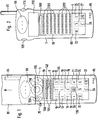
- FIG. 1 shows a radio device according to the invention with a display device in a basic setting
- Figure 2 shows a radio device according to the invention with a touch-sensitive surface executed first Control element and with a display device in one Setting to display received data
- Figure 3 on Radio device according to the invention with a display device for Entry of an alphanumeric message to be sent
- figure 4 a radio device according to the invention with a Display device for a menu call
- Figure 5 a Radio device according to the invention with a display device in an alternative basic setting
- FIG. 6 Radio device according to the invention with a display device in another alternative basic setting.
- the invention relates to the input / output interface or the user interface of a portable radio, for example a cell phone or one Cordless phones.
- the assemblies for the The user interface of these devices is made up of a microphone and loudspeakers or listeners in particular from a keyboard and a display device for symbols and numerical or alphanumeric characters.
- 1 denotes a mobile phone Radio.
- the mobile phone 1 faces a surface its housing speaker openings 90 at an upper End of the surface and microphone openings 85 at one bottom of the surface.
- a two-dimensional display device 5 is arranged between Speaker openings 90 and the microphone openings 85 .
- an antenna 95 intended for sending and receiving data.
- a trackball first control element 110 approximately in the center with respect to the two Long sides of the mobile phone 1 on the surface of the Mobile phones 1 arranged.
- the first control element 110 is trained depending on the direction and enables two-dimensional movement of an input marker on the Display device 5.
- first control element 110 To the right of the first control element 110 is a second control element 115 on the surface of the Mobile phones 1 arranged. Left of the first control 110 is a third control element 120 on the surface of the Mobile phones 1 arranged, the actuation of which Mobile phone 1 can be switched on and off.
- the display device 5 is in a second area 70, in called the following display area, above about one in Figure 1 shown in dashed lines to display Data or data display functions and a first area 65, hereinafter referred to as functional area, below this dashed line to indicate operating functions divided up. This division is context-dependent, i. H. she depends on the operating mode of the Mobile phones 1 off.
- About the display device 5 can data received or entered, as well as symbols for numeric and / or alphanumeric characters and for Commands, such as control functions or Data input functions are displayed two-dimensionally.
- the selection of one shown on the display device 5 The function or data symbol is done with the Input mark made by the first control element 110 can be moved two-dimensionally via the display device 5 can.
- the on the entire display device 5 with the first control element 110 movable input marking can for example by an underscore 125, an open one Triangle 130 or a colored marking 135 of the selected symbol field.
- the second control element 115 is actuated, that can be designed as a button, for example.
- the second control element 115 is in the immediate vicinity of the first control element 110 arranged so that a comfortable one-hand operation can be realized.
- Figure 1 shows the display device 5 in one Basic setting.
- An activation or switching on the Mobile phones 1 are done by removing one Protective cover 80 in the direction of the arrow upward according to FIG. 1, whereby a contact 75, for example by spring force in Arrow direction to the left is actuated according to Figure 1.
- a Activation of the mobile phone 1 can also be done by Data is received from a radio system.
- Another Possibility to activate the mobile phone 1 is in the actuation of the third control element 120, the can be designed as a button, for example.
- a Deactivating or switching off the mobile phone 1 is then carried out analogously by inserting the mobile phone 1 in the protective cover 80, the contact 75 opposite to that shown in FIG Figure 1 arrow direction shown is pressed.
- a Deactivation can also be done by pressing the third Control element 120 take place.
- the protective cover 80 can in addition to the mechanical protection of the mobile phone 1 serve to activate the mobile phone 1.
- the basic setting of the display device 5 according to FIG. 1 comprises a symbol line 100 in the display area 70 Representation of the reception field strength, the Accumulator charge state, the time and / or the like.
- the display area 70 further comprises two lines of text 105 to display twelve characters each.
- the Functional area 65 comprises symbol fields 10, 11, ..., 18, 20 for numerical entry of numbers 1, 2 ..., 9, 0, a symbol field 19 as a star key, a symbol field 21 as Diamond key, a switching symbol 23 for switching over numerical entry, a switch symbol 24 for switching to alphanumeric entry, a circuit symbol 22 for the call of an operating menu, a circuit symbol 26 for deleting one previously entered and to delete a Radio connection and a switching symbol 27 to confirm a previously entered and to record a Radio link.
- the Input mark over the entire display device 5 By actuating the trackball 110, the Input mark over the entire display device 5, the means both in the display area 70 and in the Functional area 65 are moved.
- the Entry mark in display area 70 as underscore 125 under one character each of the text lines 105 and Functional area 65 as a colored marking 135 of a Switch symbol or symbol field shown. It was in Embodiment according to Figure 1 by moving the Trackballs 110 first the seventh character of the top of the selected two lines of text 105 and by pressing the second control element 115 confirmed. The correspondingly activated characters is then additionally, for example, by marked a blinking frame 140. Then the Entry mark by operating the trackball 110 in the Functional area 65 shifted so that in the display area 70th no underscore 125 is visible.
- the flashing frame 140 encloses it Otherwise the flashing frame 140 remains up to one entry blank.
- An entry is made at the end of a line 105, the first character of the following line 105 by the flashing frame 140 marked or, if no further text line 105 for Checking the entries is provided, then the entered characters scrolled, i.e. one line after shifted left so that the input in the last Line of text can be continued.
- the Display device 5 When a message is received from the radio network, the Display device 5 to another operating mode Display of the received message switched.
- the display area 70 becomes six lines of twelve characters expanded and the functional area 65 by eliminating the numeric symbol fields 10, ..., 18, 20, of the star symbol field 19 and the diamond symbol field 21 according to FIG. 2 downsized. Are in the display area 70 in this way Ninety-six characters can be displayed.
- Figure 5 sets Radio device according to the invention with the display device 5 in an alternative basic setting, apart from the described redesign of the display device 5 with the switching symbol 28 for alternating switching between numeric and alphanumeric entry and with the another switching symbol 60 for the page-by-page display Display device 5 is constructed exactly as in Exemplary embodiment according to FIG. 1 from the basic setting according to FIG. 1 upon receipt of a Message the remaining functional area 65 according to the Basic setting of Figure 5 can be switched. According to FIG. 5 is by corresponding movement of the trackball 110 the further switching symbol 60 for page-by-page representation been selected.
- Figure 3 shows an inventive radio with the Distribution of the display device 5 according to the Basic setting according to Figure 1.
- Figure 3 by switching to alphanumeric input using Selection and confirmation of the switching symbol 24 the numerical Symbol fields 10, ..., 18, 20, the star symbol field 19 and the diamond symbol field 21 by means of alphanumeric symbol fields 30, 31, ..., 55 and symbol fields 56, 57, 58, 59 for Special characters replaced.
- the alphanumeric symbol fields 30, ..., 55 represent the capital letters A, B, C, ..., Z of the alphabet
- the symbol field 56 enables the selection a space or a hyphen
- the symbol field 57 entering a comma or a question mark
- the Symbol field 58 the entry of a point or one Exclamation mark
- the symbol field 59 enter a Colon or semicolon.
- a switchover between the alternative input options of the Symbol fields 56, ..., 59 for special characters can be for example, by repeatedly pressing the second one Realize control element 115. So it can take turns one or the other special characters can be entered.
- Analogous can also be used for switching between capital letters and Lower case letters for the symbol fields 30, ..., 55 for alphanumeric entry.
- a switchover between uppercase and lowercase letters and between two each a symbol field 56, 57, 58, 59 assigned special characters can also be done using a dedicated switch symbol 29 can be realized according to FIG. 6.
- a dedicated switch symbol 29 can be realized according to FIG. 6.
- Figure 6 thus represents another alternative basic setting Switch to alphanumeric input for the Display device 5.
- the symbol fields 30, ..., 55 for alphanumeric Data input and the symbol fields 56, ..., 59 for input of special characters are linked to data entry functions and allow you to enter an alphanumeric Message.
- By switching to alphanumeric Input marked operating mode according to Figure 3 can twenty-four characters each of a message in the Display area 70 entered, displayed and by selection using the trackball 110 and confirmation using the second control element 115 in the respective text line 105 can be edited, the display area 70 with the two Text lines 105 and the symbol line 100 compared to Basic setting according to Figure 1 is still unchanged.
- Input corrections are, for example, by selecting and Confirmation of the switch symbol 26 to delete the last made entry possible.
- the first control element 110 is as touch-sensitive surface formed that a touch to a function shown on the display device 5 of the mobile phone 1 maps, so that this function is selected. Both in the display area 70 displayed characters or data about the touch sensitive Surface 110 and shown in the functional area 65 Symbol fields and circuit symbols by using the described input marks can be selected. Instead of the trackball, the first control element 110 So the touch-sensitive surface is used in the same way become. To facilitate the operator guidance at the Select the desired character or the desired one Function, the touch-sensitive surface 110 is sufficient train large, so that the fastest possible targeted selection without incorrect operation is possible.
- the input is made on the touch-sensitive surface for example by changing the resistance or the Incidence of light when touching certain surface elements especially with a finger of the user or with a Pen.
- FIG. 4 shows a menu operating mode which, after selection and confirmation of the switching symbol 22, is set for calling up the menu and whose division of the display device 5 corresponds to the division according to FIG. 2.
- the text lines 105 are now used to display menu levels, wherein a text line 105 can optionally be provided for switching over to further menu levels which are initially not visible.
- the desired menu level or text line 105 is selected by means of the triangle 130 which is open to the left as input marking at the beginning of the line, as a result of which further submenus or menu items can be selected and, after confirmation by the second control element 115, can be displayed.
- Submenus or menu items are also called up by selecting and confirming the desired item.
- Message "or Phonebook” is an automatic context-sensitive switch to further submenu items or to the alphanumeric input operating mode according to FIG. 3 or FIG. 6, which can also be used for entries in a telephone book memory of the mobile telephone 1 in an analogous manner to entering a message.
- the ones assigned to the switching symbols Control functions in the functional area 65 of the display device 5 can also be adapted as desired to the respectively set operating mode and make the control functions required for the respective operating mode available.
- the selection of a subscriber of the mobile radio network takes place, for example, in the basic setting according to FIG. 1, the dialed number being reproduced for checking purposes by means of the two lines of text.
- the call number and / or the name of the calling subscriber can also be displayed on the two text lines 105, for example.
- Figure 3 are only two each Text lines 105 are provided for checking the input. Become further switching symbols for control functions or keypads for Data entry functions required, so only one line can Control of input can be provided.
- the display device 5 For flexible design of the display device 5 with symbol fields and circuit symbols, it is advantageously designed as a graphics-capable liquid crystal display.
- the assignment of the symbol fields and switching symbols to data entry functions and control functions depends on the selected operating mode. Apart from the color gradation of the display device 5 at the location of the symbol fields and switching symbols, these are also depicted with symbols as a function of the operating mode, which enables the user to be assigned to the functions of the mobile telephone 1 associated with the symbol fields and switching symbols.
- the second control element 115 and both left and right of the first Control element 110 are advantageous to double the second control element 115 and both left and right of the first Control element 110 to be arranged.
- the on / off of the Mobile phone 1 can in this case by simultaneous Activation of the same two controls 115 causes are so that the third control element 120 is not required becomes.
- the invention is also not based on those described Operating modes of the mobile phone 1 limited, but on any operating modes applicable in which data and / or Functions that can be displayed on the display device 5 are selectable by means of the first control element 110 and can be confirmed or confirmed by means of the second control element 115 can be activated.
- the invention is also not only on radio devices that as Mobile phones are trained, but with everyone Radio equipment applicable in which a display device 5 is used, for example also with cordless phones, Company radios and handheld radios.
- the listed implementation options of the first Control element 110 as a trackball or as Touch-sensitive surface is also only an example.
- the invention extends to all others equivalent acting known to the expert Realization options for a directional first control element 110, for example also on one Joystick.
Landscapes
- Engineering & Computer Science (AREA)
- Human Computer Interaction (AREA)
- Signal Processing (AREA)
- Computer Networks & Wireless Communication (AREA)
- Mobile Radio Communication Systems (AREA)
- Position Input By Displaying (AREA)
- Transceivers (AREA)
- Telephone Set Structure (AREA)
- User Interface Of Digital Computer (AREA)
Abstract
Description

Claims (9)
- Funkgerät (1), insbesondere Mobilfunkgerät oder Schnurlostelefon, mit einer Anzeigevorrichtung (5), an der Funktionen des Funkgerätes (1) darstellbar sind, dadurch gekennzeichnet, daß ein richtungsabhängiges erstes Bedienelement (110) vorgesehen ist, durch dessen Betätigung eine an der Anzeigevorrichtung (5) dargestellte Funktion auswählbar ist und daß ein zweites Bedienelement (115) vorgesehen ist, durch dessen Betätigung eine an der Anzeigevorrichtung (5) ausgewählte Funktion aktivierbar ist.
- Funkgerät nach Anspruch 1, dadurch gekennzeichnet, daß die Anzeigevorrichtung in mindestens einen ersten Bereich (65) zur Anzeige von Bedienfunktionen und mindestens einen zweiten Bereich (70) zur Darstellung von Datenanzeigefunktionen aufgeteilt ist.
- Funkgerät (1) nach Anspruch 1 oder 2, dadurch gekennzeichnet, daß ein Aufruf von Funktionen des Funkgerätes (1) kontextsensitiv in Abhängigkeit von einem Betriebsmodus des Funkgerätes (1) und der an der Anzeigevorrichtung (5) dargestellten Informationen erfolgt.
- Funkgerät nach Anspruch 1, 2 oder 3, dadurch gekennzeichnet, daß das erste Bedienelement (110) ein Trackball ist.
- Funkgerät nach Anspruch 1, 2 oder 3, dadurch gekennzeichnet, daß das erste Bedienelement (110) eine berührungssensitive Fläche ist, die eine Berührung auf eine an der Anzeigevorrichtung (5) dargestellte Funktion des Funkgerätes (1) abbildet, so daß die Funktion ausgewählt wird.
- Funkgerät nach einem der vorherigen Ansprüche, dadurch gekennzeichnet, daß ein drittes Bedienelement (120) vorgesehen ist, durch dessen Betätigung das Funkgerät (1) ein- und ausschaltbar ist.
- Funkgerät (1) nach einem der Ansprüche 2 bis 6, dadurch gekennzeichnet, daß bei Datenempfang von einer Funkstation oder Aufruf von Menüfunktionen der Bereich (70) zur Anzeige empfangener Daten oder verfügbarer Menüpunkte eine vorgegebene Größe nicht unterschreitet.
- Funkgerät (1) nach einem der Ansprüche 2 bis 7, dadurch gekennzeichnet, daß bei Dateneingabe der Bereich (70) zur Anzeige der eingegebenen Daten eine vorgegebene Größe nicht überschreitet.
- Funkgerät (1) nach einem der vorherigen Ansprüche, dadurch gekennzeichnet, daß das erste und das zweite Bedienelement (110, 115) benachbart vorzugsweise in unmittelbarer Nähe angeordnet sind.
Applications Claiming Priority (2)
| Application Number | Priority Date | Filing Date | Title |
|---|---|---|---|
| DE19739676A DE19739676C1 (de) | 1997-09-10 | 1997-09-10 | Funkgerät |
| DE19739676 | 1997-09-10 |
Publications (3)
| Publication Number | Publication Date |
|---|---|
| EP0902577A2 true EP0902577A2 (de) | 1999-03-17 |
| EP0902577A3 EP0902577A3 (de) | 2003-07-09 |
| EP0902577B1 EP0902577B1 (de) | 2009-04-29 |
Family
ID=7841834
Family Applications (1)
| Application Number | Title | Priority Date | Filing Date |
|---|---|---|---|
| EP98117078A Expired - Lifetime EP0902577B1 (de) | 1997-09-10 | 1998-09-09 | Funkgerät |
Country Status (2)
| Country | Link |
|---|---|
| EP (1) | EP0902577B1 (de) |
| DE (2) | DE19739676C1 (de) |
Cited By (1)
| Publication number | Priority date | Publication date | Assignee | Title |
|---|---|---|---|---|
| EP1259050A1 (de) * | 2001-05-18 | 2002-11-20 | Telital R & D Denmark A/S | Multitasking Benutzerschnittstelle |
Families Citing this family (2)
| Publication number | Priority date | Publication date | Assignee | Title |
|---|---|---|---|---|
| IL176673A0 (en) * | 2006-07-03 | 2007-07-04 | Fermon Israel | A variably displayable mobile device keyboard |
| DE112011105343B4 (de) * | 2011-06-17 | 2015-06-18 | Iris Papenmeier | Kommunikationsgerät |
Citations (4)
| Publication number | Priority date | Publication date | Assignee | Title |
|---|---|---|---|---|
| EP0463856A2 (de) | 1990-06-26 | 1992-01-02 | Nokia Mobile Phones Ltd. | Vorrichtung zum Durchlaufen des Menüs eines Fernsprechgeräts |
| EP0651544A2 (de) | 1993-11-01 | 1995-05-03 | International Business Machines Corporation | Persönliches Kommunikationsgerät mit einer berührungsempfindlichen Steueranzeige |
| WO1997029582A1 (en) | 1996-02-12 | 1997-08-14 | Sprint Telecommunications Venture | Mobile telephone having user interface including navigation and selection controls |
| DE19705636A1 (de) | 1997-02-14 | 1998-08-20 | Bosch Gmbh Robert | Funkgerät |
Family Cites Families (2)
| Publication number | Priority date | Publication date | Assignee | Title |
|---|---|---|---|---|
| DE4406390A1 (de) * | 1994-02-26 | 1995-08-31 | Sel Alcatel Ag | Mobilfunkendgerät |
| TW295733B (de) * | 1994-09-15 | 1997-01-11 | Motorola Inc |
-
1997
- 1997-09-10 DE DE19739676A patent/DE19739676C1/de not_active Revoked
-
1998
- 1998-09-09 EP EP98117078A patent/EP0902577B1/de not_active Expired - Lifetime
- 1998-09-09 DE DE59814361T patent/DE59814361D1/de not_active Expired - Lifetime
Patent Citations (4)
| Publication number | Priority date | Publication date | Assignee | Title |
|---|---|---|---|---|
| EP0463856A2 (de) | 1990-06-26 | 1992-01-02 | Nokia Mobile Phones Ltd. | Vorrichtung zum Durchlaufen des Menüs eines Fernsprechgeräts |
| EP0651544A2 (de) | 1993-11-01 | 1995-05-03 | International Business Machines Corporation | Persönliches Kommunikationsgerät mit einer berührungsempfindlichen Steueranzeige |
| WO1997029582A1 (en) | 1996-02-12 | 1997-08-14 | Sprint Telecommunications Venture | Mobile telephone having user interface including navigation and selection controls |
| DE19705636A1 (de) | 1997-02-14 | 1998-08-20 | Bosch Gmbh Robert | Funkgerät |
Cited By (1)
| Publication number | Priority date | Publication date | Assignee | Title |
|---|---|---|---|---|
| EP1259050A1 (de) * | 2001-05-18 | 2002-11-20 | Telital R & D Denmark A/S | Multitasking Benutzerschnittstelle |
Also Published As
| Publication number | Publication date |
|---|---|
| DE19739676C1 (de) | 1999-01-14 |
| DE59814361D1 (de) | 2009-06-10 |
| EP0902577A3 (de) | 2003-07-09 |
| EP0902577B1 (de) | 2009-04-29 |
Similar Documents
| Publication | Publication Date | Title |
|---|---|---|
| DE19705636C2 (de) | Funkgerät | |
| DE69523696T2 (de) | Universalbenutzerschnittstelle für ein zellulares mobiltelefon | |
| DE19743283C1 (de) | Multifunktionale Bedieneinheit für Kommunikationsendgeräte | |
| DE19964158B4 (de) | Funktelefon | |
| DE69929655T2 (de) | Kontextempfindliche Anzeige mit eingeblendeten Fenster für ein tragbares Telefongerät | |
| DE69331299T2 (de) | Tragbares Funktelefon | |
| DE69838052T2 (de) | Tragbares Kommunikationsgerät | |
| DE69519905T2 (de) | Anordnung und Verfahren zum Markieren von Text auf einem Anzeigebildschirm in einem persönlichen Kommunikationsgerät | |
| DE69635132T2 (de) | Endgerät | |
| EP0731590A2 (de) | Mobiltelefon | |
| DE19738425A1 (de) | Auf intuitive Bewegungen gestützte graphische Benutzerschnittstelle | |
| WO2004028116A2 (de) | Einrichtung zur eingabe von zeichen mittels eines eingabeelementes und mobiltelefon | |
| EP0685953B1 (de) | Funksprechgerät | |
| EP1993027A1 (de) | Elektronische Anzeigeeinrichtung und Verfahren zum Betrieb einer Anzeigeeinrichtung | |
| EP1061714B1 (de) | Verfahren zum Auswählen von Bezeichnungen aus einer vorgegebenen Liste | |
| WO2000036496A1 (de) | Verfahren und anordnung zur selektion eines datensatzes aus einer menge mehrerer datensätze | |
| DE19739676C1 (de) | Funkgerät | |
| DE19706595C1 (de) | Funkgerät mit einer Anzeigevorrichtung und mindestens einem Bedienelement | |
| DE10195665B4 (de) | Mobiltelefon mit verbesserter Schnittstelle zwischen Mensch und Maschine | |
| DE19758932B4 (de) | Funkgerät | |
| DE10233608A1 (de) | Eingabevorrichtung für ein Endgerät | |
| DE10205642A1 (de) | Verfahren und Einrichtung zur Eingabe von Textzeilen oder Textblöcken | |
| EP0860971A2 (de) | Funkgerät | |
| DE10320876B4 (de) | Mobiltelefon mit Richtungsnavigationstasten, die verwendet werden, um Knöpfe zu ersetzen, und Verfahren zum Verwenden dieser Tasten | |
| DE10143229A1 (de) | Verfahren und Benutzerschnittstelle zur Eingabe von Eingabeelementen in ein elektronisches Gerät |
Legal Events
| Date | Code | Title | Description |
|---|---|---|---|
| PUAI | Public reference made under article 153(3) epc to a published international application that has entered the european phase |
Free format text: ORIGINAL CODE: 0009012 |
|
| AK | Designated contracting states |
Kind code of ref document: A2 Designated state(s): AT BE CH CY DE DK ES FI FR GB GR IE IT LI LU MC NL PT SE |
|
| AX | Request for extension of the european patent |
Free format text: AL;LT;LV;MK;RO;SI |
|
| PUAL | Search report despatched |
Free format text: ORIGINAL CODE: 0009013 |
|
| AK | Designated contracting states |
Designated state(s): AT BE CH CY DE DK ES FI FR GB GR IE IT LI LU MC NL PT SE |
|
| AX | Request for extension of the european patent |
Extension state: AL LT LV MK RO SI |
|
| RIC1 | Information provided on ipc code assigned before grant |
Ipc: 7H 04M 1/02 B Ipc: 7H 04M 1/72 B Ipc: 7H 04M 1/00 A |
|
| 17P | Request for examination filed |
Effective date: 20040109 |
|
| AKX | Designation fees paid |
Designated state(s): DE FR GB IT |
|
| 17Q | First examination report despatched |
Effective date: 20040305 |
|
| 17Q | First examination report despatched |
Effective date: 20040305 |
|
| RAP1 | Party data changed (applicant data changed or rights of an application transferred) |
Owner name: IPCOM GMBH & CO. KG |
|
| GRAP | Despatch of communication of intention to grant a patent |
Free format text: ORIGINAL CODE: EPIDOSNIGR1 |
|
| GRAS | Grant fee paid |
Free format text: ORIGINAL CODE: EPIDOSNIGR3 |
|
| GRAA | (expected) grant |
Free format text: ORIGINAL CODE: 0009210 |
|
| AK | Designated contracting states |
Kind code of ref document: B1 Designated state(s): DE FR GB IT |
|
| REG | Reference to a national code |
Ref country code: GB Ref legal event code: FG4D Free format text: NOT ENGLISH |
|
| REF | Corresponds to: |
Ref document number: 59814361 Country of ref document: DE Date of ref document: 20090610 Kind code of ref document: P |
|
| PLBE | No opposition filed within time limit |
Free format text: ORIGINAL CODE: 0009261 |
|
| STAA | Information on the status of an ep patent application or granted ep patent |
Free format text: STATUS: NO OPPOSITION FILED WITHIN TIME LIMIT |
|
| 26N | No opposition filed |
Effective date: 20100201 |
|
| REG | Reference to a national code |
Ref country code: FR Ref legal event code: PLFP Year of fee payment: 19 |
|
| REG | Reference to a national code |
Ref country code: FR Ref legal event code: PLFP Year of fee payment: 20 |
|
| PGFP | Annual fee paid to national office [announced via postgrant information from national office to epo] |
Ref country code: IT Payment date: 20170926 Year of fee payment: 20 Ref country code: GB Payment date: 20170925 Year of fee payment: 20 Ref country code: FR Payment date: 20170925 Year of fee payment: 20 |
|
| PGFP | Annual fee paid to national office [announced via postgrant information from national office to epo] |
Ref country code: DE Payment date: 20171130 Year of fee payment: 20 |
|
| REG | Reference to a national code |
Ref country code: DE Ref legal event code: R071 Ref document number: 59814361 Country of ref document: DE |
|
| REG | Reference to a national code |
Ref country code: GB Ref legal event code: PE20 Expiry date: 20180908 |
|
| PG25 | Lapsed in a contracting state [announced via postgrant information from national office to epo] |
Ref country code: GB Free format text: LAPSE BECAUSE OF EXPIRATION OF PROTECTION Effective date: 20180908 |