EP0754324B1 - Font manager with selective access of installed fonts - Google Patents
Font manager with selective access of installed fonts Download PDFInfo
- Publication number
- EP0754324B1 EP0754324B1 EP95916128A EP95916128A EP0754324B1 EP 0754324 B1 EP0754324 B1 EP 0754324B1 EP 95916128 A EP95916128 A EP 95916128A EP 95916128 A EP95916128 A EP 95916128A EP 0754324 B1 EP0754324 B1 EP 0754324B1
- Authority
- EP
- European Patent Office
- Prior art keywords
- font
- fonts
- user
- operating system
- subset
- Prior art date
- Legal status (The legal status is an assumption and is not a legal conclusion. Google has not performed a legal analysis and makes no representation as to the accuracy of the status listed.)
- Expired - Lifetime
Links
Images


Classifications
-
- G—PHYSICS
- G06—COMPUTING OR CALCULATING; COUNTING
- G06F—ELECTRIC DIGITAL DATA PROCESSING
- G06F40/00—Handling natural language data
- G06F40/10—Text processing
- G06F40/103—Formatting, i.e. changing of presentation of documents
- G06F40/109—Font handling; Temporal or kinetic typography
Definitions
- the present invention generally relates to a method for managing fonts installed on a computer, and more specifically, to a method for determining the fonts that are presented to a user when a selection is made of a font for use in an application running on the computer.
- font manager that can provide the user with a short and manageable list of fonts, but not require that fonts excluded from this short list be deinstalled and therefore unavailable when needed by an application. Any application requiring a font that is installed, even though not among the short list presented to the user, should still be provided for use in documents in which that font is specified. For those fonts that are not installed, a replacement font that most closely resembles the required font should be provided. Characteristics of fonts should be defined objectively, so that the user is not forced to rely simply on similar sounding names when selecting a font for a particular use. Furthermore, assistance should be provided to the user in selecting the "right" font for a particular job from among those that are available for use. The present invention addresses these issues.
- a method of managing a plurality of fonts in which only a subset of the fonts is displayed in a menu is known from the prior art document "Now Utilities 4.0 manual", Now software Inc. Portland, Oregon, USA in which fonts are displayed in a WYSIWYG format. However, no provision is made for regenerating fonts that are not initially installed.
- a method for managing a plurality of fonts in an operating system running on a computer comprising the steps of:
- the method may further include the step of defining a plurality of different subsets of fonts, each subset including fonts selected by the user for use in documents by corresponding different types of applications running on the computer.
- Applications running on the computer use any font required from among the plurality of fonts installed on the system in documents, including fonts not included in the subset.
- the step of enabling the user to select one of the fonts further comprises the step of graphically presenting a plurality of font parameters to the user. The user selects specific ones of the font parameters to determine the fonts to be included in the subset.
- the method may include the step of creating an application specific subset of the plurality of fonts installed on the system, independent of any selection made by the user.
- the application specific subset is presented to the user when the user elects to select a font to be used in a document by the corresponding application. Changes in the application specific subset of fonts can be made by the user.
- Another step of the method is that of enabling the user to select fonts for inclusion in the subset from among a plurality of special fonts that are not installed on the system prior to use. Instead, such fonts are simply listed among the plurality of fonts installed on the system.
- the special font selected is generated on-the-fly, using data that define characteristics of the special font.
- Yet another step is that of displaying samples of the plurality of fonts installed on the system to enable the user to select fonts for inclusion in the subset from among the plurality of fonts installed on the system. The selection is then based on a visual appearance of the font.
- the fonts of the subset are presented to the user for use in documents by applications preferably running under a graphics operating system on the computer.
- the method can include the step of providing a font advisor that recommends specific fonts be included in the subset for use in corresponding specific types of documents.
- the step of enabling the user to select the font then includes the further step of enabling the user to select from among a plurality of styles that affect the specific fonts recommended by the font advisor.
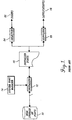
- FIGURE 1 is a block diagram functionally illustrating a font management paradigm used in the prior art for managing the selection and use of fonts on computers, e.g., personal computers.
- the fonts i.e., files identifying the fonts by name and files of raw font data describing and defining the outlines or shapes of the characters comprising the fonts
- An installer application 12 and a system font manager 14 are provided in the operating system running on the computer for installing selected fonts stored on the hard disk 10.
- a graphics user interface operating system such as Microsoft Corporation's WINDOWSTM graphics user interface operating system
- a user utilizes a system font manager 14 to install a selected font stored on the hard disk 10 as raw font data.
- system font manager 14 When system font manager 14 causes installer application 12 to install a particular font, the font is added to a list of fonts in a file 16 of installed fonts. In the WINDOWSTM graphics user interface operating system, this file is the win.ini file.
- the installed fonts in file 16 are the fonts that are available to an application running on a computer.
- a supplier 20 provides an interface between applications 18 and the installed fonts in file 16. Supplier 20 is part of the software comprising the graphics user interface system.
- supplier 20 searches the installed fonts listed in file 16 for the requested font, and if available, provides the application with the requested font. If the requested font is not among the list of installed fonts in file 16, supplier 20 provides a substitute or replacement font that is typically selected by the graphics interface operating system based upon similarities between the names of the requested font and the installed fonts.
- a user 22 of one of applications 18, e.g., a word processing program is given access to the installed fonts in file 16 through a selector 24.
- a selector 24 For example, when drafting a document with a word processing application, the user can select one of the fonts listed when a font menu is activated in the word processing application. The user then selects one of the installed fonts in file 16 that is displayed when the font menu is activated, and in turn, the word processing program requests that selector 24 provide the selected font via supplier 20.
- the font In order for the user and application to be able to use a font that is stored on the hard disk 10 but not contained in the list of installed fonts in file 16, the font must first be installed using system font manager 14 and installer 12. On the other hand, if the list of installed fonts 16 becomes so long that it is difficult for a user 22 to select a font, e.g., from a menu listing hundred of installed fonts, system font manager 14 and installer 12 would typically be used to deinstall some of the fonts. As noted above in the Background of the Invention, once a font is deinstalled, it is no longer available to applications or to the user, unless reinstalled.
- FIGURE 2 illustrates how the present invention solves this problem.
- the present invention includes a font manager 26 that generates font menu lists 28, a selector 30, and a supplier 32.
- a font manager 26 that generates font menu lists 28, a selector 30, and a supplier 32.
- raw font data files are stored on a hard drive 34, and a system font manager 36 in conjunction with an installer 38 is used to install fonts into a file 40 (e.g., in the win.ini file of the WINDOWSTM graphics user interface operating system) that lists the installed fonts.
- font manager 26 produces font menu lists that are subsets of the totality of installed fonts listed in file 40.
- selector 30 When user 22 of any of applications 42 activates a font menu to select a font, selector 30 only enables the font menu to show the user the fonts contained in one of font menu lists 28. Thus, by creating appropriately composed and sized font menu lists 28 using the font manager 26, a user is presented with a more manageable list of fonts, which are specifically appropriate for the application in which the font is to be selected.
- system font manager 36 and installer 38 are used to install all of the fonts on the hard drive 34 into the list of installed fonts in file 40. Applications 42 then have access to all of the installed fonts 40 via supplier 32. Even if a very large number of fonts are present in the list of installed fonts 40, the font manager 26 can be used to create smaller, more manageable font menu lists that are represented to the user for selective use in any specific one of applications 42.
- the font menu lists 28 include a general font menu list that includes fonts more generally used without regard to the application, and application specific font groups. Font manager 26 is able to selectively produce a default general font menu list and default application specific font groups.
- the default application specific font group for an application can include only the fonts installed when the application was originally installed in the graphics user operating system.
- fonts included in an application specific font group can be determined using a look-up table (not shown) that lists a plurality of applications 42 and corresponding recommended fonts appropriate for each of these applications, to produce the application specific groups for each application installed on the hard disk, including in each such group the recommended fonts that are also installed on the hard disk and listed in file 40.
- a user can then use font manager 26 to modify any of font menu lists 28, by adding or deleting fonts of the user's choice to and from the default font groups.
- the fonts included in the application specific groups can be determined based on specific characteristics of the installed fonts that are appropriate for the various applications installed in the graphics user operating system. For example, certain fonts include mathematical symbols that are used in writing equations and would (if included in the installed fonts) be included in the application specific font group produced by font manager 26 for MATHCADTM, an application used for solving mathematical problems.
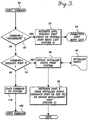
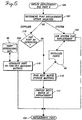
- FIGURE 3 is a flow chart that illustrates the operation of selector 30 and supplier 32. Font commands generated by applications 42 are intercepted by the font management system. In the preferred embodiment, installation of the software comprising the present invention in the WINDOWSTM graphics user interface operating system changes the system.ini file so that this intercept occurs any time that one of the applications or the user attempts to select one of the fonts. The process illustrated in the flow chart of FIGURE 3 begins when a font command 50 is intercepted.
- font menu lists 28 are retrieved and displayed to the user, as indicated generally by blocks 52 and 54, which represent the steps performed by selector 30.
- an application is requesting a particular font, that font (or a replacement font if the requested font is not installed in file 40) is retrieved by supplier 32, as illustrated generally by blocks 56 and 58.
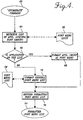
- the logic first determines whether the font command is requesting that a list of fonts be enumerated for display to the user, as indicated by a query 60. If yes, an application specific font group (corresponding to the application then running) or the general font menu list is retrieved from the font menu lists 28 (block 52). The details of how this step is accomplished are illustrated in FIGURE 4.
- the list of application specific font groups in the font menu lists 28 are retrieved, as indicated by a block 64.
- a determination is made as to whether an application specific font group exists for the application that generated the "enumerate" command.
- the application specific font group is formatted for display as a font menu listing, as indicated by a block 68. Then, the formatted menu list is returned to the application that generated the "enumerate" command, as indicated at a block 70, so that the output displayed to the user is formatted font menu list 54.
- the general font menu list contained in the list of font menu lists 28 is formatted as a menu, as indicated at a block 72. This general font menu list is then returned as the formatted font menu list displayed to the user, at block 70.
- program control flows from query 60 to a query 74 (FIGURE 3).
- a determination is made as to whether the font command 50 is requesting to use a particular font X. If yes, a list of the installed fonts 40 is obtained from the operating system. Specifically, as indicated in block 58, the requested font X is retrieved from the installed fonts listed in file 40, or if font X is not present in the installed fonts listed in file 40, either a suitable font ("special font”) is generated on-the-fly or a replacement font is obtained from the list of installed fonts. Details of these alternatives that are embodied in block 58 are discussed below.
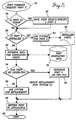
- a font command in a block 76 requesting font X is processed by first determining whether font X is identified by a key word that must be specially processed.
- the word "OTHER" is a key word that can be included in a font menu list 28 as one of the possible choices of fonts presented or displayed to the user. This option, if chosen, allows the user to select a font that is not specifically listed by name in one of the font menu lists 28. Instead, the user is presented with a screen display that offers various parameters determining the appearance of the font so that the user can specify the font by selecting from among the parameters.
- FIGURE 9 An example of the screen presented to the user for this purpose is illustrated in FIGURE 9.
- the user may select "OTHER" if he does not know the name of a font that is desired, but the appearance of the font desired is known. In this way, even though the user is presented with one of font menu lists 28 that generally would be relatively small, by selecting the "OTHER" entry, the user gains access to additional fonts, e.g., all of the installed fonts 40 or one of the special fonts that is generated on-the-fly.
- additional fonts e.g., all of the installed fonts 40 or one of the special fonts that is generated on-the-fly.
- a determination is made as to whether font X is the "OTHER" selection. If yes, the user is presented with an expanded font menu screen like that of FIGURE 9, which is discussed in detail below, and the user is enabled to select or specify an actual font, as indicated by a block 80.
- the user will be presented a list of all of the installed fonts in file 40.
- the font selected or specified can optionally be added to the particular font menu list 28 from which the user selected "OTHER.”
- the selected font is simply retrieved or generated on-the-fly without adding the font to the font menu list.
- the selected font X is obtained as illustrated by the remaining steps in the flow chart of FIGURE 5. If, at the decision block 78, a determination is made that the "OTHER" selection was not selected, these steps are performed to obtain font X.
- a decision block 82 a determination is made as to whether font X is installed in the list of fonts in file 40. If font X is installed, the font is retrieved from the installed fonts. In particular, a request is made to the operating system for font X, as indicated at a block 84. Then, as indicated at a block 86, the requested font is returned to application 42 that generated the request font command, and the output of the process illustrated in FIGURE 5 is a font, as indicated by a block 88.
- font generating data 90 comprising PANOSETM numbers and other nonconventional specification data are provided for generating all of the characters of these special fonts on-the-fly.
- the PANOSETM number for a font is a multi-digit number, each digit of which specifies a particular characteristic of the font.
- the remainder of font generating data 90 are parameters that fine tune the use of the PANOSETM numbers to more accurately determine each character of the special fonts included in the list of fonts in file 40.
- the advantage of storing the font generating data instead of fully installing the special fonts as conventional fonts, is that the font generating data for these special fonts require only a few kilobytes of data rather than the tens or hundreds of kilobytes of data that are required for defining the characters of conventional fonts, so that less system hard drive storage is used for each special font.
- the font generating data are retrieved.
- a decision block 94 a determination is made as to whether font X can be generated from the font generating data 90. If yes, the font is generated on-the-fly based upon the font generating data 90, as indicated at a block 96. The generated font is then returned to the application requesting the font, as indicated at block 86.
- a replacement font is determined, as indicated at a block 98.
- the particular steps for obtaining the replacement font are illustrated in the flow chart of FIGURE 6.
- a determination is first made as to which font replacement procedure has been selected by the user, as indicated at a block 102.
- either supplier 32 is designated to find the replacement font, or the graphics user interface operating system is required to obtain the replacement font - depending upon the prior election of the user. If the graphics user interface operating system has been selected to find the replacement font, the conventional steps are followed by it, as indicated at a block 104, resulting in the output of a replacement font, which is indicated in a block 108.
- the graphics user interface operating system finds a replacement font from the list of installed fonts in file 40 based upon a font name association mapping procedure.
- such schemes often do not produce a very good match with the requested font, and the appearance of the replacement font can be significantly different from that desired.
- the width of the replacement font is frequently different than the requested font so that the overall alignment of the lines of a document in which the font is used is altered, resulting in altered pagination in documents in which the replacement font is used.
- This change in the font characteristics and its effect on pagination can have a significant impact on the appearance of such documents and on the placement, for example, of charts or other diagrams within those documents.
- supplier 32 first determines if a replacement font can be generated, as noted in a decision block 110. If not, the supplier finds the best match among the installed fonts in accordance with a block 112, by comparing the PANOSETM number of the requested font with the PANOSETM numbers of the installed fonts, both conventional and special, to determine a replacement font. The replacement font will have the least differences between specific digits of the PANOSETM number for the requested font of any of the installed fonts listed in file 40. By using this PANOSETM mapping technique, the closest matching font in the installed fonts is selected as the replacement font for the requested font, as indicated at a block 114. The logic then proceeds to block 108, yielding the replacement font.
- a replacement font is generated at decision block 110.
- font generating data 90 comprising the PANOSETM number of the requested font are used to generate a replacement font that matches the matrix, i.e., overall height and width, of the requested font, and many of its other characteristics.
- the output of the process illustrated by FIGURE 6 is the replacement font, as shown in block 108.
- font command 50 is passed to the graphics user interface operating system in a block 118, to implement functions not related to this invention.
- the font command 50 is neither an "enumerate” command or a "request font” command.
- the font command is implemented in a block 120.
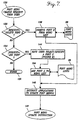
- font manager 26 to generate font menu lists 28 is described with reference to the flow chart in FIGURE 7.
- the font manager 26 enables the user to add or delete fonts included in the application specific font groups and the general font menu list. By changing font menu lists 28, the user is able to customize the list of fonts that are presented to the user by selector 30.
- the process illustrated in FIGURE 7 begins with a font menu change request 130 that is made by the user. A determination is made at decision blocks 132 and 134, respectively, as to whether the user wants to delete a font or add a font to a particular font menu list. If the user does not want to delete or add a font, the user has entered an improper request. In this case, the output of the process is an error indication in a block 136.
- the user responds to a dialog in font manager 26 to select the font menu list that is to be changed, and the steps for selecting a particular font menu list are not specifically shown in FIGURE 7.
- an instruction is sent to all applications using this font menu list to update their font menus, as indicated at a block 140.
- the output of this process is a font menu update instruction in a block 142.
- a determination is made that the user has requested to add a font the user is asked to select or specify a font X to be added, as generally indicated at a block 144.
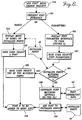
- FIGURE 8 illustrates the process for two different font selection interfaces.
- One font selection interface presents the names of all installed fonts listed in file 40 and enables a user to select one of the installed fonts for addition to the menu list.
- the other font selection interface presents the user with a screen showing a plurality of font parameters from which the user chooses to specify a font. An exemplary copy of this screen is illustrated in FIGURE 9.
- a menu of all of the installed fonts listed in file 40 is displayed, as indicated at a block 154.
- This font selection interface also provide the user with an option to graphically display a specimen of the listed fonts, thereby enabling the user to make a choice based on appearance of the font as well as or in addition to selecting based upon the name of the fonts.
- the list of font names displayed in the menu can include special fonts that are generated on-the-fly, as previously explained. The user is asked to select a font from those listed at a block 156, and the selected font is the output of the process illustrated in FIGURE 8, as indicated in a block 158.
- FIGURE 9 illustrates one possible format for the font parameter selection interface.
- the displayed screen shown in FIGURE 9 includes a screen 162 that allows a user to specify or choose among various font parameters.
- Parameters 164 illustrated in FIGURE 9 include weight, contrast, stroke width, proportion, serif style, and x-height.
- a FIND command 166 is provided to cause the font manager to find a particular font or a plurality of fonts matching the selected parameters from among the installed fonts in file 40.
- a graphical illustration window 168 is provided to display the name of each such font 170, along with a sample 172 showing the various characters comprising one of the fonts found.
- An enlarged view of an upper case and a lower case character of the font are illustrated in a window 174 of screen 162. Further graphical selection options are provided to assist the user in selecting and setting font parameters.
- window 176 upon "clicking," e.g., with a mouse, upon one of the font parameter entry panels, window 176 opens, illustrating how the appearance of a font changes when the proportional character spacing parameters are changed, and window 178 opens to graphically illustrate the various serif styles that can be selected with the mouse by clicking on one of the illustrated examples.
- the user must select particular font parameters, as indicated at block 182 of FIGURE 8. Then, at decision block 184, a determination is made as to whether any of the installed fonts listed in file 40 match the particular parameter settings chosen by the user. If yes, the user is presented with a list of these matching fonts and asked to select one of the fonts, as indicated at a block 186. The list of matching fonts can also be presented as part of the font selection interface screen shown in FIGURE 9.
- a font matching the settings is generated on-the-fly, as indicated at a block 188, using the font generating data 90 (derived from the corresponding PANOSETM number for the chosen font parameters).
- the generated font is then added to the list of installed fonts listed in file 40, as indicated at a block 190.
- the output of the process in block 158 is the font to be added to the particular menu list selected by the user.
- the font selected is added to the menu list at a block 194 in FIGURE 7. After adding the font to the menu list, applications that use this font menu list are instructed to update their font menus, as indicated at block 140.
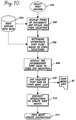
- Font manager 26 offers another feature that assists the user in selecting a font for a particular type of document.
- the user can initiate a font advisor, as indicated in a block 200 in FIGURE 10.
- the font advisor function displays a list of several different types of documents to the user, including: newsletter, spreadsheet, presentation, report, resume, schedule, sign, menu, magazine, letter/memo, book, fax, etc.
- buttons that enable to the user to select either a formal or an informal style and two list boxes that enable the user to select a desired impression.
- the impressions include: modem official, old-fashioned, traditional serious, soft, unusual, cute, dull, elegant, fancy, friendly, fun, hard, etc.
- the various types of documents and the stylistic impressions that are listed are drawn from a font advisor database 204.
- the font manager determines a plurality of font pairs that are appropriate for the selected type of document and the styles selected by the user, using information drawn from the font advisor database, as indicated in a block 206.
- the recommended font pairs are displayed to the user in accordance with a block 208, so that the user can select the font pair to be used. Samples of the fonts are included in the display to assist the user in making the selection.
- the font pairs each include a display font and a body font suitable for use in the selected type of document.
- the font pair selected by the user is added to font menu list 28, as shown in a block 210.
- the font manager then instructs the applications running on the computer to update their respective font menus, as noted in a block 212.
- a block 214 provides that the result of implementing this instruction is that the font menus are updated.
- the preferred embodiment of the present invention has been disclosed for use in connection with the WINDOWSTM graphics user interface operating system. However, it is also contemplated the invention will be usable in connection with managing fonts installed in other operating systems, such as Apple Corporation's SYSTEM 7TM operating system, and even in operating systems that are not truly of the graphics user interface type.
Landscapes
- Engineering & Computer Science (AREA)
- Theoretical Computer Science (AREA)
- General Physics & Mathematics (AREA)
- Artificial Intelligence (AREA)
- Computational Linguistics (AREA)
- General Health & Medical Sciences (AREA)
- Physics & Mathematics (AREA)
- General Engineering & Computer Science (AREA)
- Health & Medical Sciences (AREA)
- Audiology, Speech & Language Pathology (AREA)
- Controls And Circuits For Display Device (AREA)
- Document Processing Apparatus (AREA)
- User Interface Of Digital Computer (AREA)
- Fittings On The Vehicle Exterior For Carrying Loads, And Devices For Holding Or Mounting Articles (AREA)
- Digital Computer Display Output (AREA)
- Television Systems (AREA)
Applications Claiming Priority (3)
| Application Number | Priority Date | Filing Date | Title |
|---|---|---|---|
| US221806 | 1988-07-20 | ||
| US08/221,806 US5586242A (en) | 1994-04-01 | 1994-04-01 | Font manager with selective access of installed fonts |
| PCT/US1995/003846 WO1995027253A1 (en) | 1994-04-01 | 1995-03-29 | Font manager with selective access of installed fonts |
Publications (3)
| Publication Number | Publication Date |
|---|---|
| EP0754324A1 EP0754324A1 (en) | 1997-01-22 |
| EP0754324A4 EP0754324A4 (en) | 1997-06-04 |
| EP0754324B1 true EP0754324B1 (en) | 2000-03-01 |
Family
ID=22829468
Family Applications (1)
| Application Number | Title | Priority Date | Filing Date |
|---|---|---|---|
| EP95916128A Expired - Lifetime EP0754324B1 (en) | 1994-04-01 | 1995-03-29 | Font manager with selective access of installed fonts |
Country Status (8)
| Country | Link |
|---|---|
| US (1) | US5586242A (enExample) |
| EP (1) | EP0754324B1 (enExample) |
| JP (1) | JPH09512929A (enExample) |
| KR (1) | KR100341360B1 (enExample) |
| CN (1) | CN1149501C (enExample) |
| AT (1) | ATE190155T1 (enExample) |
| DE (1) | DE69515296T2 (enExample) |
| WO (1) | WO1995027253A1 (enExample) |
Families Citing this family (65)
| Publication number | Priority date | Publication date | Assignee | Title |
|---|---|---|---|---|
| US5893132A (en) | 1995-12-14 | 1999-04-06 | Motorola, Inc. | Method and system for encoding a book for reading using an electronic book |
| US5761682A (en) | 1995-12-14 | 1998-06-02 | Motorola, Inc. | Electronic book and method of capturing and storing a quote therein |
| US5815407A (en) | 1995-12-14 | 1998-09-29 | Motorola Inc. | Method and device for inhibiting the operation of an electronic device during take-off and landing of an aircraft |
| US5990907A (en) * | 1995-12-15 | 1999-11-23 | Colletti; John C. | Automatic font management within an operating system environment |
| US5874959A (en) * | 1997-06-23 | 1999-02-23 | Rowe; A. Allen | Transparent overlay viewer interface |
| DE19743690A1 (de) * | 1997-10-02 | 1999-04-08 | Heidelberger Druckmasch Ag | Verfahren zur Auswahl von Schriften für die Herstellung von Druckprodukten |
| US6687879B1 (en) * | 1998-07-09 | 2004-02-03 | Fuji Photo Film Co., Ltd. | Font retrieval apparatus and method using a font link table |
| US6731309B1 (en) * | 1998-08-28 | 2004-05-04 | Corel Corporation | Real time preview |
| US7472348B2 (en) * | 1998-11-05 | 2008-12-30 | Canon Kabushiki Kaisha | Image processing apparatus, image processing method and storage medium using character size and width for magnification |
| US6512531B1 (en) * | 1999-04-09 | 2003-01-28 | Adobe Systems Incorporated | Font navigation tool |
| AUPQ589300A0 (en) * | 2000-02-28 | 2000-03-23 | Canon Kabushiki Kaisha | Automatically selecting fonts |
| US7155672B1 (en) | 2000-05-23 | 2006-12-26 | Spyglass, Inc. | Method and system for dynamic font subsetting |
| US7539939B1 (en) * | 2000-07-25 | 2009-05-26 | Creativepro.Com, Inc. | Preview window to preview text in several different fonts simultaneously |
| US6678688B1 (en) | 2000-10-26 | 2004-01-13 | Telefonaktiebolaget Lm Ericsson (Publ) | Method and apparatus for composite font generation |
| US7348983B1 (en) * | 2001-06-22 | 2008-03-25 | Intel Corporation | Method and apparatus for text image stretching |
| KR100735227B1 (ko) * | 2002-12-06 | 2007-07-03 | 삼성전자주식회사 | 문자의 폰트를 변경할 수 있는 휴대용 통신 단말기 및이를 이용한 문자의 폰트 변경 방법 |
| US20040177056A1 (en) * | 2003-03-06 | 2004-09-09 | Davis William Nelson | Font rental system and method |
| US7262869B2 (en) * | 2003-03-10 | 2007-08-28 | Hewlett-Packard Development Company, L.P. | Controlling font usage based on printer identification information |
| US7548325B2 (en) * | 2003-09-30 | 2009-06-16 | Toshiba Corporation | Method and system to manage multiple format fonts in an image generating device |
| US8689101B2 (en) * | 2004-02-27 | 2014-04-01 | Blackberry Limited | Font data processing system and method |
| US7478325B2 (en) * | 2005-04-22 | 2009-01-13 | Microsoft Corporation | Methods for providing an accurate visual rendition of a text element formatted with an unavailable font |
| CN100450106C (zh) * | 2005-08-09 | 2009-01-07 | 腾讯科技(深圳)有限公司 | 一种在即时消息中实现字体多样化的方法 |
| WO2007050816A2 (en) * | 2005-10-25 | 2007-05-03 | Extensis Corporation | Systems, methods, use interfaces, and computer-readable media for activating and managing fonts |
| FR2892885B1 (fr) * | 2005-11-02 | 2008-01-25 | Streamezzo Sa | Procede de gestion de polices de caractere a l'interieur de scenes multimedia, programme d'ordinateur et terminal correspondants. |
| US20070216712A1 (en) * | 2006-03-20 | 2007-09-20 | John Louch | Image transformation based on underlying data |
| US20070229515A1 (en) * | 2006-03-29 | 2007-10-04 | Kyocera Mita Corporation | Image forming apparatus and image forming control program |
| US8201088B2 (en) * | 2006-07-25 | 2012-06-12 | Monotype Imaging Inc. | Method and apparatus for associating with an electronic document a font subset containing select character forms which are different depending on location |
| US20080024806A1 (en) * | 2006-07-28 | 2008-01-31 | Extensis Inc. | In-process font activation |
| US7707497B1 (en) * | 2006-09-12 | 2010-04-27 | Adobe Systems Incorporated | Prefix savvy displays in font enumeration user interfaces |
| KR100871148B1 (ko) * | 2007-03-13 | 2008-12-05 | (주)에이트리 | 폰트데이터 표시방법 및 그 장치 |
| US8271470B2 (en) * | 2007-06-09 | 2012-09-18 | Apple Inc. | Auto-activation of fonts |
| US20080303822A1 (en) * | 2007-06-09 | 2008-12-11 | Nathan Daniel Taylor | Font metadata |
| US8225198B2 (en) * | 2008-03-31 | 2012-07-17 | Vistaprint Technologies Limited | Flexible web page template building system and method |
| US8331681B1 (en) * | 2008-10-24 | 2012-12-11 | Adobe Systems Incorporated | Generating typefaces through image analysis |
| US9319444B2 (en) | 2009-06-22 | 2016-04-19 | Monotype Imaging Inc. | Font data streaming |
| US8769050B2 (en) * | 2009-10-16 | 2014-07-01 | Celartern, Inc. | Serving font files in varying formats based on user agent type |
| US8769405B2 (en) * | 2009-10-16 | 2014-07-01 | Celartem, Inc. | Reduced glyph font files |
| US8555162B2 (en) * | 2009-10-16 | 2013-10-08 | Celartem, Inc. | Activation of fonts using font sets |
| EP2367118A1 (en) * | 2010-03-15 | 2011-09-21 | GMC Software AG | Method and devices for generating two-dimensional visual objects |
| US8615709B2 (en) | 2010-04-29 | 2013-12-24 | Monotype Imaging Inc. | Initiating font subsets |
| CN102385570A (zh) | 2010-08-31 | 2012-03-21 | 国际商业机器公司 | 字体匹配方法和系统 |
| US20130215126A1 (en) * | 2012-02-17 | 2013-08-22 | Monotype Imaging Inc. | Managing Font Distribution |
| US9838444B2 (en) | 2012-05-31 | 2017-12-05 | Google Llc | Systems and methods for dynamically providing fonts based on language settings |
| US9152219B2 (en) * | 2012-06-18 | 2015-10-06 | Microsoft Technology Licensing, Llc | Creation and context-aware presentation of customized emoticon item sets |
| CN103577387A (zh) * | 2012-07-24 | 2014-02-12 | 腾讯科技(深圳)有限公司 | 更换字体的方法和装置 |
| US20140035927A1 (en) * | 2012-08-03 | 2014-02-06 | Celartem, Inc. | Methods, Computer Readable Media, and Apparatuses for Enabling Non-System Fonts |
| US9817615B2 (en) | 2012-12-03 | 2017-11-14 | Monotype Imaging Inc. | Network based font management for imaging devices |
| US9569865B2 (en) | 2012-12-21 | 2017-02-14 | Monotype Imaging Inc. | Supporting color fonts |
| US9626337B2 (en) | 2013-01-09 | 2017-04-18 | Monotype Imaging Inc. | Advanced text editor |
| US9317777B2 (en) | 2013-10-04 | 2016-04-19 | Monotype Imaging Inc. | Analyzing font similarity for presentation |
| US9465776B2 (en) | 2013-11-26 | 2016-10-11 | Adobe Systems Incorporated | Filtering fonts based on a selection of glyphs |
| US9691169B2 (en) | 2014-05-29 | 2017-06-27 | Monotype Imaging Inc. | Compact font hinting |
| CN104360799B (zh) * | 2014-10-17 | 2018-04-10 | 深圳第七大道科技有限公司 | 一种字体匹配的方法及装置 |
| US10115215B2 (en) * | 2015-04-17 | 2018-10-30 | Monotype Imaging Inc. | Pairing fonts for presentation |
| US11537262B1 (en) | 2015-07-21 | 2022-12-27 | Monotype Imaging Inc. | Using attributes for font recommendations |
| US11334750B2 (en) | 2017-09-07 | 2022-05-17 | Monotype Imaging Inc. | Using attributes for predicting imagery performance |
| US10909429B2 (en) | 2017-09-27 | 2021-02-02 | Monotype Imaging Inc. | Using attributes for identifying imagery for selection |
| US11657602B2 (en) | 2017-10-30 | 2023-05-23 | Monotype Imaging Inc. | Font identification from imagery |
| US10657312B2 (en) | 2017-11-17 | 2020-05-19 | Adobe Inc. | Deploying new font technologies to legacy operating systems |
| CN116861868A (zh) * | 2018-03-28 | 2023-10-10 | 福建榕基软件工程有限公司 | 一种基于自动排版的简历生成方法与终端 |
| US20220335224A1 (en) * | 2021-04-15 | 2022-10-20 | International Business Machines Corporation | Writing-style transfer based on real-time dynamic context |
| US12169681B2 (en) | 2021-05-04 | 2024-12-17 | Adobe Inc. | Context-aware font recommendation from text |
| CN113869003A (zh) * | 2021-09-28 | 2021-12-31 | 泰山信息科技有限公司 | 一种字体动态切换方法、装置、设备及存储介质 |
| US11775734B2 (en) * | 2021-11-24 | 2023-10-03 | Adobe Inc. | Multimodal input contextual font recommendations |
| US12536366B2 (en) | 2023-01-11 | 2026-01-27 | Celartem, Inc. | Font auto-activation |
Family Cites Families (2)
| Publication number | Priority date | Publication date | Assignee | Title |
|---|---|---|---|---|
| US5142613A (en) * | 1987-07-23 | 1992-08-25 | Minolta Camera Kabushiki Kaisha | Font managing apparatus for a character generator |
| US5185818A (en) * | 1991-06-05 | 1993-02-09 | Adobe Systems Incorporated | Method of substituting fonts and displaying characters |
-
1994
- 1994-04-01 US US08/221,806 patent/US5586242A/en not_active Expired - Lifetime
-
1995
- 1995-03-29 AT AT95916128T patent/ATE190155T1/de not_active IP Right Cessation
- 1995-03-29 JP JP7524863A patent/JPH09512929A/ja not_active Ceased
- 1995-03-29 EP EP95916128A patent/EP0754324B1/en not_active Expired - Lifetime
- 1995-03-29 WO PCT/US1995/003846 patent/WO1995027253A1/en not_active Ceased
- 1995-03-29 DE DE69515296T patent/DE69515296T2/de not_active Expired - Fee Related
- 1995-03-29 KR KR1019960705418A patent/KR100341360B1/ko not_active Expired - Fee Related
- 1995-03-29 CN CNB951931792A patent/CN1149501C/zh not_active Expired - Fee Related
Also Published As
| Publication number | Publication date |
|---|---|
| DE69515296T2 (de) | 2000-08-10 |
| WO1995027253A1 (en) | 1995-10-12 |
| DE69515296D1 (de) | 2000-04-06 |
| US5586242A (en) | 1996-12-17 |
| ATE190155T1 (de) | 2000-03-15 |
| CN1149345A (zh) | 1997-05-07 |
| EP0754324A4 (en) | 1997-06-04 |
| JPH09512929A (ja) | 1997-12-22 |
| CN1149501C (zh) | 2004-05-12 |
| KR970702528A (ko) | 1997-05-13 |
| KR100341360B1 (ko) | 2002-11-29 |
| EP0754324A1 (en) | 1997-01-22 |
Similar Documents
| Publication | Publication Date | Title |
|---|---|---|
| US5586242A (en) | Font manager with selective access of installed fonts | |
| EP0650129B1 (en) | Method, system, and computer-readable medium for automatic formatting of user selected text | |
| US7461351B2 (en) | Interactive formatting interface | |
| US6279016B1 (en) | Standardized filtering control techniques | |
| US8091044B2 (en) | Filtering the display of files in graphical interfaces | |
| CN101278252B (zh) | 数据库应用程序用户界面提供功能的方法及其界面部署的方法 | |
| US6282551B1 (en) | System and methods for improved spreadsheet interface with user-familiar objects | |
| US8255828B2 (en) | Command user interface for displaying selectable software functionality controls | |
| RU2398264C2 (ru) | Способ, система и машиночитаемый носитель для применения глобальной схемы форматирования к диаграмме в электронном документе | |
| US5276793A (en) | System and method for editing a structured document to preserve the intended appearance of document elements | |
| US6725422B1 (en) | Method and system in an electronic spreadsheet for introducing new elements in a cell named range according to different modes | |
| EP1429261A1 (en) | Method and apparatus for displaying data in a web page | |
| US20100017742A1 (en) | Form input skip-field software tool | |
| US5208910A (en) | Menu driven and method system for informing which past selections have caused disabled actions | |
| WO1994029786A1 (en) | System and methods for automatically displaying graphical help images on a computer | |
| GB2380300A (en) | Standard user interface control for generic filtering of an arbitrary data provider | |
| EP1079319B1 (en) | Method and system for extending a named range in a spreadsheet | |
| Morgado | Quick Document Formatting with Styles | |
| Greiner et al. | Submit Data User Manual | |
| JPH05108629A (ja) | 文書処理装置 | |
| JPH04309121A (ja) | ウィンドウ管理装置 |
Legal Events
| Date | Code | Title | Description |
|---|---|---|---|
| PUAI | Public reference made under article 153(3) epc to a published international application that has entered the european phase |
Free format text: ORIGINAL CODE: 0009012 |
|
| 17P | Request for examination filed |
Effective date: 19961017 |
|
| AK | Designated contracting states |
Kind code of ref document: A1 Designated state(s): AT BE CH DE DK ES FR GB GR IE IT LI LU MC NL PT SE |
|
| A4 | Supplementary search report drawn up and despatched |
Effective date: 19970415 |
|
| AK | Designated contracting states |
Kind code of ref document: A4 Designated state(s): AT BE CH DE DK ES FR GB GR IE IT LI LU MC NL PT SE |
|
| 17Q | First examination report despatched |
Effective date: 19981209 |
|
| GRAG | Despatch of communication of intention to grant |
Free format text: ORIGINAL CODE: EPIDOS AGRA |
|
| GRAG | Despatch of communication of intention to grant |
Free format text: ORIGINAL CODE: EPIDOS AGRA |
|
| GRAH | Despatch of communication of intention to grant a patent |
Free format text: ORIGINAL CODE: EPIDOS IGRA |
|
| GRAH | Despatch of communication of intention to grant a patent |
Free format text: ORIGINAL CODE: EPIDOS IGRA |
|
| GRAA | (expected) grant |
Free format text: ORIGINAL CODE: 0009210 |
|
| AK | Designated contracting states |
Kind code of ref document: B1 Designated state(s): AT BE CH DE DK ES FR GB GR IE IT LI LU MC NL PT SE |
|
| PG25 | Lapsed in a contracting state [announced via postgrant information from national office to epo] |
Ref country code: SE Free format text: THE PATENT HAS BEEN ANNULLED BY A DECISION OF A NATIONAL AUTHORITY Effective date: 20000301 Ref country code: NL Free format text: LAPSE BECAUSE OF FAILURE TO SUBMIT A TRANSLATION OF THE DESCRIPTION OR TO PAY THE FEE WITHIN THE PRESCRIBED TIME-LIMIT Effective date: 20000301 Ref country code: LI Free format text: LAPSE BECAUSE OF NON-PAYMENT OF DUE FEES Effective date: 20000301 Ref country code: IT Free format text: LAPSE BECAUSE OF FAILURE TO SUBMIT A TRANSLATION OF THE DESCRIPTION OR TO PAY THE FEE WITHIN THE PRESCRIBED TIME-LIMIT;WARNING: LAPSES OF ITALIAN PATENTS WITH EFFECTIVE DATE BEFORE 2007 MAY HAVE OCCURRED AT ANY TIME BEFORE 2007. THE CORRECT EFFECTIVE DATE MAY BE DIFFERENT FROM THE ONE RECORDED. Effective date: 20000301 Ref country code: GR Free format text: LAPSE BECAUSE OF NON-PAYMENT OF DUE FEES Effective date: 20000301 Ref country code: ES Free format text: THE PATENT HAS BEEN ANNULLED BY A DECISION OF A NATIONAL AUTHORITY Effective date: 20000301 Ref country code: CH Free format text: LAPSE BECAUSE OF NON-PAYMENT OF DUE FEES Effective date: 20000301 Ref country code: BE Free format text: LAPSE BECAUSE OF FAILURE TO SUBMIT A TRANSLATION OF THE DESCRIPTION OR TO PAY THE FEE WITHIN THE PRESCRIBED TIME-LIMIT Effective date: 20000301 Ref country code: AT Free format text: LAPSE BECAUSE OF FAILURE TO SUBMIT A TRANSLATION OF THE DESCRIPTION OR TO PAY THE FEE WITHIN THE PRESCRIBED TIME-LIMIT Effective date: 20000301 |
|
| REF | Corresponds to: |
Ref document number: 190155 Country of ref document: AT Date of ref document: 20000315 Kind code of ref document: T |
|
| REG | Reference to a national code |
Ref country code: CH Ref legal event code: EP |
|
| PG25 | Lapsed in a contracting state [announced via postgrant information from national office to epo] |
Ref country code: LU Free format text: LAPSE BECAUSE OF NON-PAYMENT OF DUE FEES Effective date: 20000329 Ref country code: IE Free format text: LAPSE BECAUSE OF NON-PAYMENT OF DUE FEES Effective date: 20000329 |
|
| REF | Corresponds to: |
Ref document number: 69515296 Country of ref document: DE Date of ref document: 20000406 |
|
| REG | Reference to a national code |
Ref country code: IE Ref legal event code: FG4D |
|
| PG25 | Lapsed in a contracting state [announced via postgrant information from national office to epo] |
Ref country code: PT Free format text: LAPSE BECAUSE OF FAILURE TO SUBMIT A TRANSLATION OF THE DESCRIPTION OR TO PAY THE FEE WITHIN THE PRESCRIBED TIME-LIMIT Effective date: 20000601 Ref country code: DK Free format text: LAPSE BECAUSE OF FAILURE TO SUBMIT A TRANSLATION OF THE DESCRIPTION OR TO PAY THE FEE WITHIN THE PRESCRIBED TIME-LIMIT Effective date: 20000601 |
|
| ET | Fr: translation filed | ||
| NLV1 | Nl: lapsed or annulled due to failure to fulfill the requirements of art. 29p and 29m of the patents act | ||
| REG | Reference to a national code |
Ref country code: CH Ref legal event code: PL |
|
| PG25 | Lapsed in a contracting state [announced via postgrant information from national office to epo] |
Ref country code: MC Free format text: LAPSE BECAUSE OF NON-PAYMENT OF DUE FEES Effective date: 20000930 |
|
| PLBE | No opposition filed within time limit |
Free format text: ORIGINAL CODE: 0009261 |
|
| STAA | Information on the status of an ep patent application or granted ep patent |
Free format text: STATUS: NO OPPOSITION FILED WITHIN TIME LIMIT |
|
| REG | Reference to a national code |
Ref country code: IE Ref legal event code: MM4A |
|
| 26N | No opposition filed | ||
| REG | Reference to a national code |
Ref country code: GB Ref legal event code: IF02 |
|
| PGFP | Annual fee paid to national office [announced via postgrant information from national office to epo] |
Ref country code: GB Payment date: 20070327 Year of fee payment: 13 |
|
| PGFP | Annual fee paid to national office [announced via postgrant information from national office to epo] |
Ref country code: DE Payment date: 20070430 Year of fee payment: 13 |
|
| PGFP | Annual fee paid to national office [announced via postgrant information from national office to epo] |
Ref country code: FR Payment date: 20070319 Year of fee payment: 13 |
|
| GBPC | Gb: european patent ceased through non-payment of renewal fee |
Effective date: 20080329 |
|
| REG | Reference to a national code |
Ref country code: FR Ref legal event code: ST Effective date: 20081125 |
|
| PG25 | Lapsed in a contracting state [announced via postgrant information from national office to epo] |
Ref country code: DE Free format text: LAPSE BECAUSE OF NON-PAYMENT OF DUE FEES Effective date: 20081001 |
|
| PG25 | Lapsed in a contracting state [announced via postgrant information from national office to epo] |
Ref country code: FR Free format text: LAPSE BECAUSE OF NON-PAYMENT OF DUE FEES Effective date: 20080331 |
|
| PG25 | Lapsed in a contracting state [announced via postgrant information from national office to epo] |
Ref country code: GB Free format text: LAPSE BECAUSE OF NON-PAYMENT OF DUE FEES Effective date: 20080329 |