EP0591702A1 - Benutzerschnittstellenverfahren und System - Google Patents
Benutzerschnittstellenverfahren und System Download PDFInfo
- Publication number
- EP0591702A1 EP0591702A1 EP93114566A EP93114566A EP0591702A1 EP 0591702 A1 EP0591702 A1 EP 0591702A1 EP 93114566 A EP93114566 A EP 93114566A EP 93114566 A EP93114566 A EP 93114566A EP 0591702 A1 EP0591702 A1 EP 0591702A1
- Authority
- EP
- European Patent Office
- Prior art keywords
- user interface
- data
- window
- objects
- windows
- Prior art date
- Legal status (The legal status is an assumption and is not a legal conclusion. Google has not performed a legal analysis and makes no representation as to the accuracy of the status listed.)
- Withdrawn
Links
Images


Classifications
-
- G—PHYSICS
- G06—COMPUTING OR CALCULATING; COUNTING
- G06F—ELECTRIC DIGITAL DATA PROCESSING
- G06F3/00—Input arrangements for transferring data to be processed into a form capable of being handled by the computer; Output arrangements for transferring data from processing unit to output unit, e.g. interface arrangements
- G06F3/01—Input arrangements or combined input and output arrangements for interaction between user and computer
- G06F3/048—Interaction techniques based on graphical user interfaces [GUI]
- G06F3/0481—Interaction techniques based on graphical user interfaces [GUI] based on specific properties of the displayed interaction object or a metaphor-based environment, e.g. interaction with desktop elements like windows or icons, or assisted by a cursor's changing behaviour or appearance
-
- G—PHYSICS
- G06—COMPUTING OR CALCULATING; COUNTING
- G06F—ELECTRIC DIGITAL DATA PROCESSING
- G06F8/00—Arrangements for software engineering
- G06F8/30—Creation or generation of source code
- G06F8/38—Creation or generation of source code for implementing user interfaces
Definitions
- This invention relates to a user interface method and system in an interactive workstation data processing system, and more particularly in a window-oriented environment.
- Workstation applications have the requirement to provide their users with an easy-to-use mechanism for defining and tailoring application elements.
- the evolution of the interfaces by which the user dialogs with the operating systems, caused the operations required to become more and more user friendly.
- the requirement is to provide the user with an environment where he can invoke functions of the system without being skilled in the way the system operates.
- a method for creating and storing for later reuse a user interface said user interface being composed by one or more windows, each window being associated to one or more objects, the objects being the source of data arranged in data fields, the method comprising the steps of:
- an interactive workstation data processing system having a user interface, the user interface being composed by one or more windows, each window being associated to one or more objects, the objects being the source of data arranged in data fields, the system comprising:
- Such a method and system avoid the user constraint of exploring the consecutive linked operations of the application to reach the information he needs, and provides an easy-to-use application scenario comprised of several related objects and the associated information.
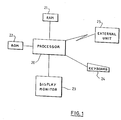
- Fig. 1 is a schematic diagram of an interactive workstation data processing system embodying the invention.
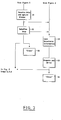
- Figg. 2 and 3 are schematic diagrams of the process of creating, storing and recalling the objacts and the associated information.
- Fig. 4 is an example of the representation of the hierarchy between the objects.
- Figure 1 describes the data processing system on which the preferred embodiment of the present invention operates.
- the system includes a processor (20), a random access memory (RAM) (21), a read only memory (ROM) (22), a display monitor (23), a keyboard (24) and a connection with external unit (25) such as external storage, a host computer or other data processing systems.
- the process for creating the user interface is shown.
- the step 1 requests the first level of the hierarchy of the objects after completion of the initialization fase, representing those objects in a tree in RAM memory (11).
- the ObjView is a window in which the objects information received from external unit (25) or from RAM (11) or from a virtual memory when available in the data processing system.
- the step 2 in figure 2 shows the creation of the ObjView.
- An ObjView can be also described as a container or a visual component whose specific purpose is to hold objects.
- the objects displayed in the ObjView belong to different classes and types.
- objects are network control units and related programs, Network Control Programs (NCP), transmission lines and Physical Units (PU).
- a container can display objects in various formats and views; the switching between one type and another is done through the use of a pop-up menu driven by mouse operations.
- the hierarchy of the objects is represented by the relation between the container objects and the container itself.
- all the NCPs controlled by the external unit (25) are included in the NCP container object; all the transmission lines connected to an NCP are shown as children of the NCP itself, as well as all the PUs attached under one line are shown as children of that line (see figure 4, where TST001, TST002, TST003 and TST004 are network control units, LINEA02 is a line, CUVIDE02 is a Phisical Unit and VIDE01 is a video terminal).
- the presence of the object is checked in the tree in memory and, if it is not found, the external unit (25) is requested for the missing objects information.
- This way of operating allows the downloading of objects only when the user refers to them, with better performance and better transmission media utilization, e.g. in managing very large networks as in the described embodiment. Further the memory utilization of the workstation is related only to the effective utilization of the objects.
- Step 3 enables the user to select or modify the visual characteristics of the ObjView, such as colours, titles, fonts and sizes.
- Step 4 shows the creation of a DataView.
- a DataView in the described embodiment, displays both historical and on-line network performance data, obtained from the external unit.
- DataView may display the network performance data in two modes: graphical and textual. In graphical mode the user has the ability of displaying the network performance data through multiple graphics on the screen with the option of different scaling, different positions on the screen, different types of charts (pie, column, area, 3D Bar, Line).
- Each graphical data-view may display performance data representing two combinations of pair object(resource) / data-field(counter).
- a DataView may refer to one object and one or more data defined for that object (Oneres-mode), or to one data-field and one or more object for which that field is defined (Onecounter-mode).
- a DataView with Onecounter mode may be later changed to Oneres mode or viceversa. On a graph times are always on the X axis.
- textual mode the performance data are displayed in a textual format.
- the two modes Oneres and Onecounter have the same meaning as in graphical mode.
- the resources in Onecounter mode or the counters in Oneres mode are shown as headers of the text view columns. Intervals and their relative values are always the rows.
- Step 6 defines the resource/counter pair used to drive the data retrieval required by the DataView.
- the user can insert a resource in the resource list by manually add it to the list or by chosing it within a proposed set of possible resources. Once a resource is in the resource list, all the counters applicable to that resource are shown in the counter list. The user must select at least one counter. If more than one counter are selected the Oneres-mode is assigned to the DataView and no more resource selections are allowed. If only one counter has been selected the Onecounter-mode is assigned to the DataView and the user can select other resources of the same type (with the same counter defined) of the first resource selected.
- the step 7 will associate a graphical or textual representation of the selected counters for the selected resource (Oneres-mode) or the representation of the selected single counter for the selected resources (Onecounter-mode) accordingly to the formerly determined mode.
- Steps 8 and 9 estabilish and build the commands needed to retrieve the required data which may be historycal(8) or on-line(9).
- Step 10 reported in figure 3 receives data and arrange them in the DataView according to the graphical (or textual) representation. In the case of on-line data the DtaView may be continuously updated at fixed time intervals or at any time new data are available, so that the user has always updated information available. Step 10 continues until the user decides to stop it (step 11). At this point the user can decide to finish the work session (step 14) or to repeat the process from one of the three steps 2, 4 or 6 reported in figure 2
- Step 12 enables the user to retrieve and store structure information required to rebuild for a later use all the DataViews and ObjViews currently used.
- the information saved includes ObjViews and DataViews layout, resource/counter pairs and resource definition.
- Step 13 arranges the structure information in script form and phisically writes it into a file.
- Step 15 enables the user to load the previously saved script file to rebuild the ObjViews and DataViews accordingly to the saved information without requesting the data retrieval.
- the process continues as described before from the step 7.
- Step 16 performs the same as the step 15 including the request for the data retrieval. The process continues as described before from the step 10.
- the present invention has been described for a network performance monitoring system, but it could equally well be practiced in all those applications which operates with an object manipulation approach.
Landscapes
- Engineering & Computer Science (AREA)
- General Engineering & Computer Science (AREA)
- Theoretical Computer Science (AREA)
- Human Computer Interaction (AREA)
- Software Systems (AREA)
- Physics & Mathematics (AREA)
- General Physics & Mathematics (AREA)
- User Interface Of Digital Computer (AREA)
- Digital Computer Display Output (AREA)
Applications Claiming Priority (2)
| Application Number | Priority Date | Filing Date | Title |
|---|---|---|---|
| ITMI922213 | 1992-09-25 | ||
| ITMI922213A IT1255832B (it) | 1992-09-25 | 1992-09-25 | Metodo e sistema per interfaccia utente |
Publications (1)
| Publication Number | Publication Date |
|---|---|
| EP0591702A1 true EP0591702A1 (de) | 1994-04-13 |
Family
ID=11364007
Family Applications (1)
| Application Number | Title | Priority Date | Filing Date |
|---|---|---|---|
| EP93114566A Withdrawn EP0591702A1 (de) | 1992-09-25 | 1993-09-10 | Benutzerschnittstellenverfahren und System |
Country Status (2)
| Country | Link |
|---|---|
| EP (1) | EP0591702A1 (de) |
| IT (1) | IT1255832B (de) |
Citations (2)
| Publication number | Priority date | Publication date | Assignee | Title |
|---|---|---|---|---|
| EP0121015A1 (de) * | 1983-03-31 | 1984-10-10 | International Business Machines Corporation | Abbildungsraumverwaltung und Wiedergabe in einem bestimmten Teil des Bildschirms eines virtuellen Mehrfunktionsterminals |
| WO1991009365A2 (en) * | 1989-12-18 | 1991-06-27 | Andersen Consulting | Computer-assisted software engineering for cooperative processing |
-
1992
- 1992-09-25 IT ITMI922213A patent/IT1255832B/it active IP Right Grant
-
1993
- 1993-09-10 EP EP93114566A patent/EP0591702A1/de not_active Withdrawn
Patent Citations (2)
| Publication number | Priority date | Publication date | Assignee | Title |
|---|---|---|---|---|
| EP0121015A1 (de) * | 1983-03-31 | 1984-10-10 | International Business Machines Corporation | Abbildungsraumverwaltung und Wiedergabe in einem bestimmten Teil des Bildschirms eines virtuellen Mehrfunktionsterminals |
| WO1991009365A2 (en) * | 1989-12-18 | 1991-06-27 | Andersen Consulting | Computer-assisted software engineering for cooperative processing |
Non-Patent Citations (1)
| Title |
|---|
| DERWENT ACCESSION NO. 91-366 802(50), Questel Telesystems (WPIL), DERWENT PUBLICATION LTD., London *Abstract*; & Research Disclosure 331025 * |
Also Published As
| Publication number | Publication date |
|---|---|
| ITMI922213A0 (it) | 1992-09-25 |
| IT1255832B (it) | 1995-11-17 |
| ITMI922213A1 (it) | 1994-03-25 |
Similar Documents
| Publication | Publication Date | Title |
|---|---|---|
| US5689665A (en) | Apparatus and method for displaying windows | |
| CA2060983C (en) | Hypertext marker and method for dynamically displaying help information in an interactive data processing system | |
| US5317306A (en) | System and method for dynamic control of horizontal scrolling | |
| US6823344B1 (en) | File manager system providing faster and more efficient interactive user access to files in computer displays | |
| US6262732B1 (en) | Method and apparatus for managing and navigating within stacks of document pages | |
| US5774887A (en) | Customer service electronic form generating system | |
| JP2642021B2 (ja) | ディスプレイ・システム | |
| EP1005681B1 (de) | Browser für hierarchische strukturen | |
| EP0747804B1 (de) | Auswahlerleichterung auf einer graphischen Schnittstelle | |
| US5041967A (en) | Methods and apparatus for dynamic menu generation in a menu driven computer system | |
| CA2736493C (en) | Displaying menu for accessing hierarchial content data including caching multiple menu states | |
| EP0547784B1 (de) | Bildfensterverwaltung von verbundenen Anwendungen | |
| US6559864B1 (en) | Method and system for displaying and providing access to data on a monitor | |
| EP0967541B1 (de) | Verfahren und Anordnung zur graphischen Auswahl von Daten | |
| US6928623B1 (en) | Method and system for selecting a target window for automatic fill-in | |
| US5854629A (en) | Enhanced scrolling technique for context menus in graphical user interfaces | |
| CA2039027C (en) | Method and apparatus for assisting in the presentation and removal of windows | |
| CA2307296A1 (en) | Data processor controlled display system audio identifiers for overlapping windows in an interactive graphical user interface | |
| US20020067378A1 (en) | Computer controlled user interactive display interfaces with three-dimensional control buttons | |
| US7239316B1 (en) | Method and apparatus for graphically manipulating data tables | |
| US20060020902A1 (en) | Interactive graphical user interfaces for computer display systems with simplified implementation for exposing completely hidden windows | |
| EP0583030A2 (de) | Verfahren und System zum augenscheinlichen direkten Edieren der vergänglichen graphischen Elemente in einem Datenverarbeitungssystem | |
| JP2521036B2 (ja) | デ―タ表示方法、システム及び実行方法 | |
| EP0405496B1 (de) | Verfahren zur Behandlung von Bildern, die grösser als ein Fenster sind | |
| EP0621527A1 (de) | Hierarchisch organisierte Makrobefehle für eine graphische Benutzerschnittstelle |
Legal Events
| Date | Code | Title | Description |
|---|---|---|---|
| PUAI | Public reference made under article 153(3) epc to a published international application that has entered the european phase |
Free format text: ORIGINAL CODE: 0009012 |
|
| AK | Designated contracting states |
Kind code of ref document: A1 Designated state(s): DE FR GB |
|
| 17P | Request for examination filed |
Effective date: 19940718 |
|
| 17Q | First examination report despatched |
Effective date: 19960229 |
|
| 18D | Application deemed to be withdrawn |
Effective date: 19960911 |