WO2025009093A1 - ファイル管理装置、ファイル管理方法、および、ファイル管理プログラム - Google Patents
ファイル管理装置、ファイル管理方法、および、ファイル管理プログラム Download PDFInfo
- Publication number
- WO2025009093A1 WO2025009093A1 PCT/JP2023/024924 JP2023024924W WO2025009093A1 WO 2025009093 A1 WO2025009093 A1 WO 2025009093A1 JP 2023024924 W JP2023024924 W JP 2023024924W WO 2025009093 A1 WO2025009093 A1 WO 2025009093A1
- Authority
- WO
- WIPO (PCT)
- Prior art keywords
- file
- unit
- image
- execution environment
- storage unit
- Prior art date
- Legal status (The legal status is an assumption and is not a legal conclusion. Google has not performed a legal analysis and makes no representation as to the accuracy of the status listed.)
- Ceased
Links
Images



Classifications
-
- G—PHYSICS
- G06—COMPUTING OR CALCULATING; COUNTING
- G06F—ELECTRIC DIGITAL DATA PROCESSING
- G06F16/00—Information retrieval; Database structures therefor; File system structures therefor
- G06F16/10—File systems; File servers
- G06F16/11—File system administration, e.g. details of archiving or snapshots
-
- G—PHYSICS
- G06—COMPUTING OR CALCULATING; COUNTING
- G06F—ELECTRIC DIGITAL DATA PROCESSING
- G06F9/00—Arrangements for program control, e.g. control units
- G06F9/06—Arrangements for program control, e.g. control units using stored programs, i.e. using an internal store of processing equipment to receive or retain programs
- G06F9/44—Arrangements for executing specific programs
Definitions
- the present invention relates to a file management device, a file management method, and a file management program.
- a runnable application is generated by building the code written by the programmer.
- the application is then run and a testing process is carried out to verify whether the output is correct, identifying areas of the code that need to be corrected. Applications that pass testing are released into production.
- Patent Document 1 describes GitHub Actions provided by GitHub (registered trademark) as a CI/CD pipeline.
- Patent Literature 2 describes the use of containers as an execution environment for executing GitHub Actions to execute jobs.
- GitHub Docs "Understanding GitHub Actions", [online], [Retrieved June 23, 2023], Internet ⁇ URL: https://docs.github.com/ja/actions/learn-github-actions/understanding-github-actions> GitHub Docs, "Running jobs in a container”, [online], [Retrieved June 23, 2023], Internet ⁇ URL: https://docs.github.com/ja/actions/using-jobs/running-jobs-in-a-container>
- the main objective of the present invention is to efficiently free up storage space for execution environment files while increasing the reusability of the execution environment files.
- the file management device of the present invention has the following features.
- the present invention includes an environment construction unit that constructs an execution environment from an execution environment file read from a file storage unit; A processing unit that executes an executable file on the execution environment; an extraction unit that extracts the execution environment file that satisfies a predetermined condition in the file storage unit; and a deletion unit that deletes the execution environment file in the file storage unit that has been extracted by the extraction unit.
- FIG. 1 is a configuration diagram of an automation system according to an embodiment of the present invention.
- FIG. 2 is a hardware configuration diagram of each device constituting the automation system according to the present embodiment.
- FIG. 2 is a configuration diagram showing details of a server according to the embodiment.
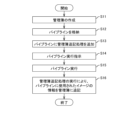
- 4 is a flowchart showing a pipeline execution process according to the present embodiment. 4 is a table showing an example of a management book stored in a management book storage unit according to the present embodiment.
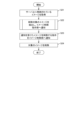
- 10 is a flowchart showing an image deletion process according to the present embodiment.
- 7 is a flowchart showing details of the process of extracting images to be deleted in FIG. 6 according to the present embodiment.
- FIG. 1 is a configuration diagram of an automation system 100.
- the automation system 100 is configured by connecting a client 10 and a server (file management device) 20 via a network.
- the client 10 includes a pipeline description unit 11, a pipeline storage unit 12, and an execution instruction unit 13.
- the pipeline description unit 11 is a processing unit for describing pipeline processing such as a CI/CD pipeline in response to an input from a user, and is, for example, a tool such as a workflow.
- the pipeline storage unit 12 is a memory unit that stores the executable file of the pipeline processing described by the pipeline description unit 11, and is, for example, a network storage such as github, gitlab, etc.
- the execution instruction unit 13 is a processing unit that reads the executable file of the pipeline processing stored in the pipeline storage unit 12 and instructs the server 20 to execute it, and is, for example, a tool such as github actions.
- the server 20 includes a file storage unit 21 , an environment construction unit 22 , a virtual tenant environment (execution environment) 23 , and a pipeline processing unit (processing unit) 24 .
- the file storage unit 21 is a non-volatile memory such as a hard disk drive (HDD) or a solid state drive (SSD), and stores the following files.
- the image to be used is an execution environment file such as a VM or a container used in the pipeline processing unit 24, and is read by the environment construction unit 22 to construct the virtual tenant environment 23.
- the generated image is an execution environment file generated as a result of execution of the build process by the pipeline processing unit 24.
- the test result 64 (see FIG. 3 described later) is a file generated as a result of execution of the pipeline processing unit 24, and is, for example, an output file of the test result of pytest.
- the environment construction unit 22 is also called a runner because it is a tool that prepares to run the pipeline processing.
- the environment construction unit 22 reads the image to be used from the file storage unit 21 and deploys it on a volatile memory (RAM: Random Access Memory), thereby constructing a virtual tenant environment 23. If the corresponding image to be used does not exist in the file storage unit 21, the environment construction unit 22 downloads the corresponding image to be used from an image registry (not shown) to the file storage unit 21.
- an image registry is Docker Hub or Harbor.
- the pipeline processing unit 24 executes an executable file for pipeline processing instructed by the execution instruction unit 13 on the virtual tenant environment 23 constructed by the environment construction unit 22. That is, the pipeline processing unit 24 is executed after the image to be used is used.
- a generated image which is a result of execution of the build process on the code, test results 64 (FIG. 3) indicating the operation history of the application, and the like are stored in the file storage unit 21.
- FIG. 2 is a diagram showing the hardware configuration of each device constituting the automation system 100.
- Each device (client 10, server 20) of the automation system 100 is configured as a computer 900 having a CPU 901, a RAM 902, a ROM 903, a HDD 904, a communication I/F 905, an input/output I/F 906, and a media I/F 907.
- the communication I/F 905 is connected to an external communication device 915.
- the input/output I/F 906 is connected to an input/output device 916.
- the media I/F 907 reads and writes data from a recording medium 917.
- the CPU 901 controls each unit by executing a program (file management program) loaded into the RAM 902.
- This program also called an application, or an app for short
- FIG. 3 is a block diagram showing the details of the server 20.
- the file storage unit 21 stores an image deletion unit (deletion unit) 61, an image storage unit 62, a management book storage unit 63, and a test result 64 (described in FIG. 1).
- the image storage unit 62 stores the use image and the generated image described in Fig. 1.
- the image deletion unit 61 deletes a specified image from the image storage unit 62, thereby freeing up storage space for the execution environment file.
- the management book storage section 63 stores a management book in which explanatory information of the usage images stored in the image storage section 62 is described (see FIG. 5 for details).
- the pipeline processing unit 24 has a pipeline execution unit 31, a pipeline processing addition unit 32, a usage image grasping unit 41, an image comparison unit 42, an image list acquisition unit 43, an image extraction unit (extraction unit) 44, an image deletion instruction unit 45, a management book entry instruction unit 51, a management book entry unit 52, a management book acquisition unit 53, and a management book creation unit 54.
- the server 20 efficiently frees up storage space for execution environment files while increasing the reusability of the execution environment files, mainly by using the following components.
- An environment construction unit 22 that constructs a virtual tenant environment 23 from a usage image read from the file storage unit 21.
- a pipeline processing unit 24 that executes executable files (hereinafter, “pipeline files”) such as workflows that describe the processing contents of the pipelines to be executed on the virtual tenant environment 23.
- An image extraction unit 44 that extracts use images that satisfy predetermined conditions in the file storage unit 21.
- An image deleting section 61 that deletes the images to be used in the file storage section 21 that have been extracted by the image extracting section 44 .
- FIG. 4 is a flowchart showing the pipeline execution process.
- the management book creation unit 54 creates a management book for managing images to be used in the image storage unit 62 (see FIG. 5 for details), and stores the management book in the management book storage unit 63 (S11).
- the pipeline description unit 11 stores the described pipeline file in the pipeline storage unit 12 (S12).
- the pipeline process adding unit 32 adds a management book appending process to the pipeline file stored in S12 (S13).
- the management book appending process is a process of appending, to the management book, descriptive information of the usage image used for the pipeline process executed from the pipeline file.
- the execution instruction unit 13 instructs the pipeline processing unit 24 to execute the pipeline file of S13 (S14).
- the pipeline processing unit 24 loads the usage image required for executing the pipeline file from the image storage unit 62 to the environment construction unit 22, and then executes the pipeline file specified in S14 on the environment construction unit 22 (S15).
- the usage image understanding unit 41 understands the usage image used by the environment construction unit 22 in conjunction with the execution process of S15. It should be noted that a generated image that was generated in the past may be stored in the image storage unit 62. In this case, the pipeline processing unit 24 may use the stored generated image as the image to be used this time.
- the management book entry instruction unit 51 instructs the management book entry unit 52 to add the explanatory information specified in S13 to the management book by executing the management book addition process added to the pipeline file in S13.
- the management book entry unit 52 follows the instruction and adds explanatory information of the usage image to the management book in the management book storage unit 63 (S16).
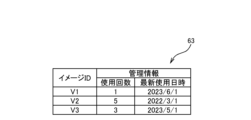
- FIG. 5 is a table showing an example of the management book stored in the management book storage unit 63.
- image IDs are stored as explanatory information for images used in the image storage unit 62, and management information indicating the usage status of the images used (number of times used and the most recent date and time of use) is associated with each other.
- the record in the first row indicates that the image with the image ID "V1" in the image storage unit 62 was used for the first time on the date and time "2023/6/1".
- the record in the second row indicates that the image with the image ID "V2" in the image storage unit 62 was used on the date and time "2022/3/1" as the fifth usage result.
- the management book entry unit 52 When a used image is deleted from the image storage unit 62, the management book entry unit 52 also deletes the corresponding record from the management book. For example, let us consider a case where a pipeline file uses an image with image ID "V1" at 8:00 AM, 9:00 AM, and 10:00 AM on the same day, and then at 9:30 AM, the image with image ID "V1" is deleted from the image storage unit 62.
- the used image with image ID "V1” is read into image storage unit 62 from an external device.
- [9:00 AM] For the existing record of image ID "V1”, update the number of uses to 2 and the latest usage date and time to 9:00 AM.
- [9:30 AM] The used image with image ID "V1" is deleted from the image storage unit 62, and the record with image ID "V1” is also deleted from the management book.
- the used image with image ID "V1” is read from the external device into image storage unit 62 again.
- FIG. 6 is a flowchart showing the image deletion process. This flowchart is started, for example, when the remaining capacity in the image storage unit 62 falls below a predetermined value (for example, 10% or less).
- the image list acquisition unit 43 acquires images (used images, created images) stored in the image storage unit 62 (S21).
- the image extraction unit 44 extracts images to be deleted from the images acquired in S21, and notifies the image deletion instruction unit 45 of the extracted images (S22, see FIG. 7 for details).
- the image deletion instruction unit 45 notifies the image deletion unit 61 of an instruction to delete the notified image (S23).
- the image deletion unit 61 deletes the image notified in S23 from the image storage unit 62 (S24).
- the management book description unit 52 deletes the explanatory information of the image deleted in S24 from the management book in the management book storage unit 63.
- FIG. 7 is a flow chart showing the details of the process (S22) of extracting images to be deleted in FIG.
- the user sets in advance in the image extraction unit 44 which method is to be adopted.
- [Method 1] All images (used images, generated images) are subject to deletion.
- [Method 2] The generated image is the target for deletion.
- [Method 3] Images that have been used infrequently are targeted for deletion.
- Methodhod 4] Images with the oldest last used date and time are subject to deletion.
- the image extraction unit 44 targets all images acquired in S21 (used images and generated images) to be deleted (S211). If the answer is No in S201, the management book acquisition unit 53 acquires explanatory information on the usage image from the management book storage unit 63 (S202).
- the image extraction unit 44 selects the generated image as the deletion target (S212). Therefore, the image comparison unit 42 compares all images (used image, generated image) acquired in S21 with the used image acquired in S202. Then, the image comparison unit 42 identifies, among the images stored in the image storage unit 62, images that are not registered in the management book storage unit 63 as the generated image to be deleted. For this purpose, the pipeline processing unit 24 executes the build process in the pipeline file to store a newly generated generated image in the file storage unit 21. Then, the image extraction unit 44 extracts the generated image generated by the pipeline processing unit 24 as a usage image that satisfies a predetermined condition.
- the image extraction unit 44 targets images to be deleted that have been used less than a predetermined number of times (e.g., 3 times) (S213). Therefore, the management book acquisition unit 53 acquires the number of times of use for each image to be used from the management information in the management book shown in FIG. Thus, the pipeline processing unit 24 records the number of times each used image is used as a usage history of the used image used when executing the pipeline file. Then, the image extraction unit 44 extracts the used images whose number of times of use is less than a predetermined number as used images that satisfy a predetermined condition.
- a predetermined number of times e.g., 3 times
- the image extraction unit 44 targets images to be deleted whose most recent use date and time is older than a predetermined date and time (e.g., three months ago) (S214). Therefore, the management book acquisition unit 53 acquires the most recent use date and time for each image to be used from the management information in the management book shown in FIG. Thus, the pipeline processing unit 24 records the most recent use date and time for each used image as a usage history of the used image used when executing the pipeline file. Then, the image extraction unit 44 extracts the used image whose most recent use date and time is older than a predetermined date and time as a used image that satisfies a predetermined condition.
- a predetermined date and time e.g., three months ago
- Fig. 3 describes the configuration of server 20 capable of executing any of methods 1 to 4 (not only a single method but also a combination of multiple methods is possible).
- the components can be simplified by configuring server 20 to be capable of executing only individual methods.
- the management book is not necessary in the first place. Therefore, the pipeline processing addition unit 32, the management book entry unit 52, the management book acquisition unit 53, the management book creation unit 54, the management book storage unit 63, the usage image grasping unit 41, the image comparison unit 42, and the management book entry instruction unit 51 can be omitted from the server 20.
- the image ID of the image used is necessary in the management book append process (S13, S16) and the management book read process (S202), but there is no need to read or write data on management information (number of uses, most recent date and time of use).
- an image file stored in the image storage unit 62 has been exemplified as an execution environment file for constructing the virtual tenant environment 23.
- other data structures such as a disk volume (area) may also be used as the execution environment file.
- the process of S13 may be executed from the pipeline process addition unit 32 existing inside the pipeline file to be added.
- the server 20 of the present invention includes an environment construction unit 22 that constructs a virtual tenant environment 23 from a usage image read from a file storage unit 21; A pipeline processing unit 24 that executes a pipeline file on the virtual tenant environment 23; an image extraction unit 44 for extracting a use image that satisfies a predetermined condition in the file storage unit 21;
- the image extracting section 44 is characterized by having an image deleting section 61 for deleting the used image in the file storage section 21 extracted by the image extracting section 44.
- the server 20 can increase the reusability of the execution environment file and shorten the execution time by using the usage image read from the file storage unit 21. Also, the server 20 can efficiently free up the storage area for the execution environment file by deleting the usage image extracted by the image extraction unit 44.
- the pipeline processing unit 24 executes the build process in the pipeline file to generate a new generated image, which is stored in the file storage unit 21,
- the image extraction unit 44 extracts the generated image generated by the pipeline processing unit 24 as a usable image that satisfies a predetermined condition.
- the pipeline processing unit 24 records the number of times each image is used as a usage history of the image used when executing the pipeline file,
- the image extraction unit 44 extracts use images whose number of uses is less than a predetermined number as use images that satisfy a predetermined condition.
- the pipeline processing unit 24 records the latest use date and time for each image used as a usage history of the image used when executing the pipeline file
- the image extraction unit 44 is characterized in that it extracts, as a use image that satisfies a predetermined condition, a use image whose latest use date and time is older than a predetermined date and time.
- Pipeline description unit 12 Pipeline storage unit 13 Execution instruction unit 20 Server (file management device) 21 File storage unit 22 Environment construction unit 23 Virtual tenant environment (execution environment) 24 Pipeline processing unit (processing unit) 31 Pipeline execution unit 32 Pipeline processing addition unit 41 Usage image grasping unit 42 Image comparison unit 43 Image list acquisition unit 44 Image extraction unit (extraction unit) 45 Image deletion instruction unit 51 Management book entry instruction unit 52 Management book entry unit 53 Management book acquisition unit 54 Management book creation unit 61 Image deletion unit (deletion unit) 62 Image storage section 63 Management book storage section 64 Test result 100 Automation system
Landscapes
- Engineering & Computer Science (AREA)
- Theoretical Computer Science (AREA)
- Software Systems (AREA)
- Physics & Mathematics (AREA)
- General Engineering & Computer Science (AREA)
- General Physics & Mathematics (AREA)
- Data Mining & Analysis (AREA)
- Databases & Information Systems (AREA)
- Information Retrieval, Db Structures And Fs Structures Therefor (AREA)
Abstract
サーバ(20)は、ファイル格納部(21)から読み込んだ使用イメージから仮想テナント環境(23)を構築する環境構築部(22)と、仮想テナント環境(23)上でパイプラインファイルを実行するパイプライン処理部(24)と、ファイル格納部(21)内の所定の条件を満たす使用イメージを抽出するイメージ抽出部(44)と、イメージ抽出部(44)が抽出したファイル格納部(21)内の使用イメージを削除するイメージ削除部(61)とを有する。
Description
本発明は、ファイル管理装置、ファイル管理方法、および、ファイル管理プログラムに関する。
ソフトウェアの開発工程では、プログラマが作成したコードをビルド処理することで、実行可能なアプリケーションが生成される。そして、アプリケーションを実行して、その出力結果が正しいか否かを検証するテスト処理によって、コードの修正箇所が判明する。テストに合格したアプリケーションは、プロダクションとしてリリースされる。
このようなソフトウェアの開発工程は、CI(Continuous Integration)/CD(Continuous Delivery)パイプラインで効率的に自動化される。CI/CD パイプラインにより、ソフトウェア開発の柔軟な対応、迅速な提供を可能とする。
特許文献1には、CI/CDパイプラインとしてGitHub(登録商標)が提供するGitHub Actionsについて、記載されている。
特許文献2には、GitHub Actionsを実行するための実行環境として、コンテナを使用してジョブを実行することが記載されている。
特許文献1には、CI/CDパイプラインとしてGitHub(登録商標)が提供するGitHub Actionsについて、記載されている。
特許文献2には、GitHub Actionsを実行するための実行環境として、コンテナを使用してジョブを実行することが記載されている。
GitHub Docs、「GitHub Actions を理解する」、[online]、[2023年6月23日検索]、インターネット〈URL:https://docs.github.com/ja/actions/learn-github-actions/understanding-github-actions〉
GitHub Docs、「コンテナ内でのジョブの実行」、[online]、[2023年6月23日検索]、インターネット〈URL:https://docs.github.com/ja/actions/using-jobs/running-jobs-in-a-container〉
開発中のアプリケーションに含まれる不具合の影響で計算機にダメージを与えないように、特許文献2のコンテナや仮想計算機(VM:Virtual Machine)などの、試行錯誤するための隔離された実行環境が用いられることが多い。
このテスト用の実行環境ファイルは、計算機上に大量のファイルを読み込んでから構築されるので、準備に時間がかかる。そこで、過去に構築された実行環境ファイルを削除せずに保管して、次回のテストにも流用することで、CI/CDパイプラインの実行準備を短縮することを検討する。
このテスト用の実行環境ファイルは、計算機上に大量のファイルを読み込んでから構築されるので、準備に時間がかかる。そこで、過去に構築された実行環境ファイルを削除せずに保管して、次回のテストにも流用することで、CI/CDパイプラインの実行準備を短縮することを検討する。
一方、実行環境ファイルが読み込まれる計算機内の記憶領域は有限なので、残り容量に応じて保管された実行環境ファイルを削除する必要がある。ここで、再利用される可能性が高い実行環境ファイルまで削除してしまうと、CI/CDパイプラインの実行準備を短縮できなくなってしまう。
そこで、本発明は、実行環境ファイルの再利用性を高めつつ、実行環境ファイルの記憶領域を効率的に空けることを主な課題とする。
前記課題を解決するために、本発明のファイル管理装置は、以下の特徴を有する。
本発明は、ファイル格納部から読み込んだ実行環境ファイルから実行環境を構築する環境構築部と、
前記実行環境上で実行ファイルを実行する処理部と、
前記ファイル格納部内の所定の条件を満たす前記実行環境ファイルを抽出する抽出部と、
前記抽出部が抽出した前記ファイル格納部内の前記実行環境ファイルを削除する削除部とを有することを特徴とする。
本発明は、ファイル格納部から読み込んだ実行環境ファイルから実行環境を構築する環境構築部と、
前記実行環境上で実行ファイルを実行する処理部と、
前記ファイル格納部内の所定の条件を満たす前記実行環境ファイルを抽出する抽出部と、
前記抽出部が抽出した前記ファイル格納部内の前記実行環境ファイルを削除する削除部とを有することを特徴とする。
本発明によれば、実行環境ファイルの再利用性を高めつつ、実行環境ファイルの記憶領域を効率的に空けることができる。
以下、本発明の一実施形態について、図面を参照して詳細に説明する。
図1は、自動化システム100の構成図である。
自動化システム100は、クライアント10とサーバ(ファイル管理装置)20とがネットワークで接続されて構成される。
クライアント10は、パイプライン記載部11と、パイプライン格納部12と、実行指示部13とを有する。パイプライン記載部11は、ユーザからの入力に応じて、CI/CDパイプラインなどのパイプライン処理を記載するための処理部であり、例えば、workflowなどのツールである。
パイプライン格納部12は、パイプライン記載部11により記載されたパイプライン処理の実行ファイルを格納する記憶部であり、例えば、github, gitlabなどのネットワークストレージである。実行指示部13は、パイプライン格納部12に格納されたパイプライン処理の実行ファイルを読み取り、サーバ20に実行を指示する処理部であり、例えば、github actionsなどのツールである。
自動化システム100は、クライアント10とサーバ(ファイル管理装置)20とがネットワークで接続されて構成される。
クライアント10は、パイプライン記載部11と、パイプライン格納部12と、実行指示部13とを有する。パイプライン記載部11は、ユーザからの入力に応じて、CI/CDパイプラインなどのパイプライン処理を記載するための処理部であり、例えば、workflowなどのツールである。
パイプライン格納部12は、パイプライン記載部11により記載されたパイプライン処理の実行ファイルを格納する記憶部であり、例えば、github, gitlabなどのネットワークストレージである。実行指示部13は、パイプライン格納部12に格納されたパイプライン処理の実行ファイルを読み取り、サーバ20に実行を指示する処理部であり、例えば、github actionsなどのツールである。
サーバ20は、ファイル格納部21と、環境構築部22と、仮想テナント環境(実行環境)23と、パイプライン処理部(処理部)24とを有する。
ファイル格納部21は、HDD(Hard Disk Drive)やSSD(Solid State Drive)などの不揮発性メモリとして、以下の各ファイルを格納する。
・使用イメージは、パイプライン処理部24に使用されるVMやコンテナなどの実行環境ファイルであり、環境構築部22が仮想テナント環境23を構築するために読み込まれる。
・生成イメージは、パイプライン処理部24によるビルド処理の実行結果として生成される実行環境ファイルである。
・試験結果64(後記する図3参照)は、パイプライン処理部24の実行結果として生成されるファイルであり、例えば、pytestの試験結果の出力ファイルである。
ファイル格納部21は、HDD(Hard Disk Drive)やSSD(Solid State Drive)などの不揮発性メモリとして、以下の各ファイルを格納する。
・使用イメージは、パイプライン処理部24に使用されるVMやコンテナなどの実行環境ファイルであり、環境構築部22が仮想テナント環境23を構築するために読み込まれる。
・生成イメージは、パイプライン処理部24によるビルド処理の実行結果として生成される実行環境ファイルである。
・試験結果64(後記する図3参照)は、パイプライン処理部24の実行結果として生成されるファイルであり、例えば、pytestの試験結果の出力ファイルである。
環境構築部22は、パイプライン処理を動作させる準備を行うツールなので、runnerとも呼ばれる。環境構築部22は、ファイル格納部21から使用イメージを読み込み、揮発性メモリ(RAM:Random Access Memory)上に展開することで、仮想テナント環境23を構築する。
なお、該当する使用イメージがファイル格納部21に存在しない場合には、環境構築部22は、図示しないイメージレジストリからファイル格納部21に該当する使用イメージをダウンロードしておく。イメージレジストリとは、例えばdockerの場合、docker HubやHarborである。
なお、該当する使用イメージがファイル格納部21に存在しない場合には、環境構築部22は、図示しないイメージレジストリからファイル格納部21に該当する使用イメージをダウンロードしておく。イメージレジストリとは、例えばdockerの場合、docker HubやHarborである。
以下、環境構築部22が使用イメージをもとに仮想テナント環境23を構築する処理を、「使用イメージを使用する」と表記する。
パイプライン処理部24は、環境構築部22が構築した仮想テナント環境23上で、実行指示部13から指示されたパイプライン処理の実行ファイルを実行する。つまり、使用イメージが使用された後に、パイプライン処理部24が実行される。
パイプライン処理部24の実行結果として、コードに対するビルド処理の実行結果である生成イメージや、アプリケーションの動作履歴などを示す試験結果64(図3)などが、ファイル格納部21に格納される。
パイプライン処理部24は、環境構築部22が構築した仮想テナント環境23上で、実行指示部13から指示されたパイプライン処理の実行ファイルを実行する。つまり、使用イメージが使用された後に、パイプライン処理部24が実行される。
パイプライン処理部24の実行結果として、コードに対するビルド処理の実行結果である生成イメージや、アプリケーションの動作履歴などを示す試験結果64(図3)などが、ファイル格納部21に格納される。
図2は、自動化システム100を構成する各装置のハードウェア構成図である。
自動化システム100の各装置(クライアント10、サーバ20)は、CPU901と、RAM902と、ROM903と、HDD904と、通信I/F905と、入出力I/F906と、メディアI/F907とを有するコンピュータ900として構成される。
通信I/F905は、外部の通信装置915と接続される。入出力I/F906は、入出力装置916と接続される。メディアI/F907は、記録媒体917からデータを読み書きする。さらに、CPU901は、RAM902に読み込んだプログラム(ファイル管理プログラム)を実行することにより、各部を制御する。そして、このプログラム(アプリケーション、その略のアプリとも呼ばれる)は、通信回線を介して配布したり、CD-ROM等の記録媒体917に記録して配布したりすることも可能である。
自動化システム100の各装置(クライアント10、サーバ20)は、CPU901と、RAM902と、ROM903と、HDD904と、通信I/F905と、入出力I/F906と、メディアI/F907とを有するコンピュータ900として構成される。
通信I/F905は、外部の通信装置915と接続される。入出力I/F906は、入出力装置916と接続される。メディアI/F907は、記録媒体917からデータを読み書きする。さらに、CPU901は、RAM902に読み込んだプログラム(ファイル管理プログラム)を実行することにより、各部を制御する。そして、このプログラム(アプリケーション、その略のアプリとも呼ばれる)は、通信回線を介して配布したり、CD-ROM等の記録媒体917に記録して配布したりすることも可能である。
図3は、サーバ20の詳細を示す構成図である。
図3では、とくに、サーバ20のファイル格納部21と、パイプライン処理部24との詳細を説明する。
ファイル格納部21には、イメージ削除部(削除部)61と、イメージ格納部62と、管理簿格納部63と、試験結果64(図1で説明)とが格納される。
イメージ格納部62には、図1で説明した使用イメージと、生成イメージとが格納される。イメージ削除部61は、指示されたイメージをイメージ格納部62から削除することで、実行環境ファイルの記憶領域を空ける。
管理簿格納部63には、イメージ格納部62に格納されている使用イメージの説明情報を記載した管理簿が格納される(詳細は図5)。
図3では、とくに、サーバ20のファイル格納部21と、パイプライン処理部24との詳細を説明する。
ファイル格納部21には、イメージ削除部(削除部)61と、イメージ格納部62と、管理簿格納部63と、試験結果64(図1で説明)とが格納される。
イメージ格納部62には、図1で説明した使用イメージと、生成イメージとが格納される。イメージ削除部61は、指示されたイメージをイメージ格納部62から削除することで、実行環境ファイルの記憶領域を空ける。
管理簿格納部63には、イメージ格納部62に格納されている使用イメージの説明情報を記載した管理簿が格納される(詳細は図5)。
パイプライン処理部24は、パイプライン実行部31と、パイプライン処理追加部32と、使用イメージ把握部41と、イメージ比較部42と、イメージ一覧取得部43と、イメージ抽出部(抽出部)44と、イメージ削除指示部45と、管理簿記載指示部51と、管理簿記載部52と、管理簿取得部53と、管理簿作成部54とを有する。
サーバ20は、主に以下の構成要素により、実行環境ファイルの再利用性を高めつつ、実行環境ファイルの記憶領域を効率的に空ける。
・ファイル格納部21から読み込んだ使用イメージから仮想テナント環境23を構築する環境構築部22。
・仮想テナント環境23上で実行されるパイプラインの処理内容が記載されたworkflowなどの実行ファイル(以下、「パイプラインファイル」)を実行するパイプライン処理部24。
・ファイル格納部21内の所定の条件を満たす使用イメージを抽出するイメージ抽出部44。
・イメージ抽出部44が抽出したファイル格納部21内の使用イメージを削除するイメージ削除部61。
以下、図4以降を参照して、図3のサーバ20の各構成要素を明らかにする。
・ファイル格納部21から読み込んだ使用イメージから仮想テナント環境23を構築する環境構築部22。
・仮想テナント環境23上で実行されるパイプラインの処理内容が記載されたworkflowなどの実行ファイル(以下、「パイプラインファイル」)を実行するパイプライン処理部24。
・ファイル格納部21内の所定の条件を満たす使用イメージを抽出するイメージ抽出部44。
・イメージ抽出部44が抽出したファイル格納部21内の使用イメージを削除するイメージ削除部61。
以下、図4以降を参照して、図3のサーバ20の各構成要素を明らかにする。
図4は、パイプライン実行処理を示すフローチャートである。
管理簿作成部54は、イメージ格納部62内の使用イメージを管理するための管理簿を作成し(詳細は図5)、その管理簿を管理簿格納部63に格納する(S11)。パイプライン記載部11は、記載されたパイプラインファイルを、パイプライン格納部12に格納する(S12)。
ここで、パイプライン処理追加部32は、S12で格納されたパイプラインファイルに対して、管理簿追記処理を追加する(S13)。管理簿追記処理とは、パイプラインファイルから実行されるパイプライン処理に使用される使用イメージの説明情報を、管理簿に追記する処理である。
管理簿作成部54は、イメージ格納部62内の使用イメージを管理するための管理簿を作成し(詳細は図5)、その管理簿を管理簿格納部63に格納する(S11)。パイプライン記載部11は、記載されたパイプラインファイルを、パイプライン格納部12に格納する(S12)。
ここで、パイプライン処理追加部32は、S12で格納されたパイプラインファイルに対して、管理簿追記処理を追加する(S13)。管理簿追記処理とは、パイプラインファイルから実行されるパイプライン処理に使用される使用イメージの説明情報を、管理簿に追記する処理である。
実行指示部13は、S13のパイプラインファイルの実行をパイプライン処理部24に指示する(S14)。
パイプライン処理部24は、パイプラインファイルの実行に要する使用イメージをイメージ格納部62から環境構築部22に展開した後、S14で指示されたパイプラインファイルを環境構築部22上で実行する(S15)。使用イメージ把握部41は、S15の実行処理に伴い環境構築部22で使用された使用イメージを把握する。
なお、イメージ格納部62には、過去に生成された生成イメージが保管されている場合もある。この場合には、パイプライン処理部24は、保管されている生成イメージを、今回の使用イメージとして使用してもよい。
パイプライン処理部24は、パイプラインファイルの実行に要する使用イメージをイメージ格納部62から環境構築部22に展開した後、S14で指示されたパイプラインファイルを環境構築部22上で実行する(S15)。使用イメージ把握部41は、S15の実行処理に伴い環境構築部22で使用された使用イメージを把握する。
なお、イメージ格納部62には、過去に生成された生成イメージが保管されている場合もある。この場合には、パイプライン処理部24は、保管されている生成イメージを、今回の使用イメージとして使用してもよい。
管理簿記載指示部51は、パイプラインファイル内にS13で追加された管理簿追記処理の実行により、S13で指定された説明情報を管理簿に追記するように管理簿記載部52に指示する。管理簿記載部52は、指示に従い、使用イメージの説明情報を、管理簿格納部63内の管理簿に追記する(S16)。
図5は、管理簿格納部63に格納される管理簿の一例を示すテーブルである。
管理簿には、イメージ格納部62内の使用イメージの説明情報として、イメージIDと、使用イメージの使用状況を示す管理情報(使用回数と、最新使用日時)とが対応付けて格納されている。
第1行のレコードは、イメージ格納部62内のイメージID「V1」の使用イメージが、1回目の使用結果として、日時「2023/6/1」に使用された旨を示す。
第2行のレコードは、イメージ格納部62内のイメージID「V2」の使用イメージが、5回目の使用結果として、日時「2022/3/1」に使用された旨を示す。
管理簿には、イメージ格納部62内の使用イメージの説明情報として、イメージIDと、使用イメージの使用状況を示す管理情報(使用回数と、最新使用日時)とが対応付けて格納されている。
第1行のレコードは、イメージ格納部62内のイメージID「V1」の使用イメージが、1回目の使用結果として、日時「2023/6/1」に使用された旨を示す。
第2行のレコードは、イメージ格納部62内のイメージID「V2」の使用イメージが、5回目の使用結果として、日時「2022/3/1」に使用された旨を示す。
なお、管理簿記載部52は、イメージ格納部62内の使用イメージが削除された場合には、対応する管理簿内のレコードも削除する。
例えば、あるパイプラインファイルが同日の午前8時、午前9時、および、午前10時にそれぞれイメージID「V1」の使用イメージを使用し、午前9時30分にイメージID「V1」の使用イメージがイメージ格納部62から削除された場合を説明する。各時刻でのイメージID「V1」の管理簿のレコードは、以下のように時間経過により変化する。
[午前7時]=イメージID「V1」のレコードは、管理簿に存在しない。この時点では、イメージ格納部62内にイメージID「V1」の使用イメージは存在しない。
[午前8時]=イメージID「V1」、使用回数=1、最新使用日時=午前8時を記載したレコードを新規作成する。外部装置からイメージ格納部62内にイメージID「V1」の使用イメージが読み込まれる。
[午前9時]=既存のイメージID「V1」のレコードについて、使用回数=2、最新使用日時=午前9時に更新する。
[午前9時30分]=イメージID「V1」の使用イメージがイメージ格納部62から削除され、イメージID「V1」のレコードも管理簿から削除される。
[午前10時]=イメージID「V1」、使用回数=1、最新使用日時=午前10時を記載したレコードを新規作成する。再び、外部装置からイメージ格納部62内にイメージID「V1」の使用イメージが読み込まれる。
例えば、あるパイプラインファイルが同日の午前8時、午前9時、および、午前10時にそれぞれイメージID「V1」の使用イメージを使用し、午前9時30分にイメージID「V1」の使用イメージがイメージ格納部62から削除された場合を説明する。各時刻でのイメージID「V1」の管理簿のレコードは、以下のように時間経過により変化する。
[午前7時]=イメージID「V1」のレコードは、管理簿に存在しない。この時点では、イメージ格納部62内にイメージID「V1」の使用イメージは存在しない。
[午前8時]=イメージID「V1」、使用回数=1、最新使用日時=午前8時を記載したレコードを新規作成する。外部装置からイメージ格納部62内にイメージID「V1」の使用イメージが読み込まれる。
[午前9時]=既存のイメージID「V1」のレコードについて、使用回数=2、最新使用日時=午前9時に更新する。
[午前9時30分]=イメージID「V1」の使用イメージがイメージ格納部62から削除され、イメージID「V1」のレコードも管理簿から削除される。
[午前10時]=イメージID「V1」、使用回数=1、最新使用日時=午前10時を記載したレコードを新規作成する。再び、外部装置からイメージ格納部62内にイメージID「V1」の使用イメージが読み込まれる。
図6は、イメージ削除処理を示すフローチャートである。
このフローチャートは、例えば、イメージ格納部62内の残り容量が所定値以下(例えば10%以下)になった場合に起動される。
イメージ一覧取得部43は、イメージ格納部62に格納されているイメージ(使用イメージ、生成イメージ)を取得する(S21)。イメージ抽出部44は、S21で取得したイメージから削除対象のイメージを抽出し、抽出したイメージをイメージ削除指示部45へ通知する(S22、詳細は図7)。
イメージ削除指示部45は、通知を受けたイメージを削除する指示をイメージ削除部61へ通知する(S23)。イメージ削除部61は、S23で通知されたイメージをイメージ格納部62から削除する(S24)。また、管理簿記載部52は、S24で削除されたイメージの説明情報を、管理簿格納部63内の管理簿から削除する。
このフローチャートは、例えば、イメージ格納部62内の残り容量が所定値以下(例えば10%以下)になった場合に起動される。
イメージ一覧取得部43は、イメージ格納部62に格納されているイメージ(使用イメージ、生成イメージ)を取得する(S21)。イメージ抽出部44は、S21で取得したイメージから削除対象のイメージを抽出し、抽出したイメージをイメージ削除指示部45へ通知する(S22、詳細は図7)。
イメージ削除指示部45は、通知を受けたイメージを削除する指示をイメージ削除部61へ通知する(S23)。イメージ削除部61は、S23で通知されたイメージをイメージ格納部62から削除する(S24)。また、管理簿記載部52は、S24で削除されたイメージの説明情報を、管理簿格納部63内の管理簿から削除する。
図7は、図6の削除対象のイメージを抽出する処理(S22)の詳細を示すフローチャートである。
このフローチャートでは、以下の4つの手法のいずれかを実行する例を説明する。どの手法を採用するかについては、事前にユーザがイメージ抽出部44に設定しておく。
[手法1]=全イメージ(使用イメージ、生成イメージ)を削除対象とする。
[手法2]=生成イメージを削除対象とする。
[手法3]=使用回数が少ない使用イメージを削除対象とする。
[手法4]=最新使用日時が古い使用イメージを削除対象とする。
このフローチャートでは、以下の4つの手法のいずれかを実行する例を説明する。どの手法を採用するかについては、事前にユーザがイメージ抽出部44に設定しておく。
[手法1]=全イメージ(使用イメージ、生成イメージ)を削除対象とする。
[手法2]=生成イメージを削除対象とする。
[手法3]=使用回数が少ない使用イメージを削除対象とする。
[手法4]=最新使用日時が古い使用イメージを削除対象とする。
まず、手法1を採用する場合(S201でYes)、イメージ抽出部44は、S21で取得した全イメージ(使用イメージ、生成イメージ)を削除対象とする(S211)。
S201でNoなら、管理簿取得部53は、管理簿格納部63から使用イメージの説明情報を取得する(S202)。
S201でNoなら、管理簿取得部53は、管理簿格納部63から使用イメージの説明情報を取得する(S202)。
手法2を採用する場合(S203でYes)、イメージ抽出部44は、生成イメージを削除対象とする(S212)。そのため、イメージ比較部42は、S21で取得した全イメージ(使用イメージ、生成イメージ)と、S202で取得した使用イメージとを比較する。そして、イメージ比較部42は、イメージ格納部62に格納されているイメージのうちの管理簿格納部63に登録されていないイメージを、削除対象とする生成イメージとして特定する。
そのために、パイプライン処理部24が、パイプラインファイル内のビルド処理を実行することで新たに生成した生成イメージを、ファイル格納部21に格納する。そして、イメージ抽出部44が、パイプライン処理部24が生成した生成イメージを、所定の条件を満たす使用イメージとして抽出する。
そのために、パイプライン処理部24が、パイプラインファイル内のビルド処理を実行することで新たに生成した生成イメージを、ファイル格納部21に格納する。そして、イメージ抽出部44が、パイプライン処理部24が生成した生成イメージを、所定の条件を満たす使用イメージとして抽出する。
S203でNoかつ、手法3を採用する場合(S204でYes)、イメージ抽出部44は、使用回数が所定回数(例えば3回)よりも少ない使用イメージを削除対象とする(S213)。そのため、管理簿取得部53は、図5に示した管理簿の管理情報から、使用イメージごとの使用回数を取得する。
これにより、パイプライン処理部24が、パイプラインファイルを実行するときに使用された使用イメージの使用履歴として、使用イメージごとの使用回数を記録する。そして、イメージ抽出部44が、使用イメージの使用回数が所定回数よりも少ない使用イメージを、所定の条件を満たす使用イメージとして抽出する。
これにより、パイプライン処理部24が、パイプラインファイルを実行するときに使用された使用イメージの使用履歴として、使用イメージごとの使用回数を記録する。そして、イメージ抽出部44が、使用イメージの使用回数が所定回数よりも少ない使用イメージを、所定の条件を満たす使用イメージとして抽出する。
S204でNoかつ、手法4を採用する場合(S205でYes)、イメージ抽出部44は、最新使用日時が所定日時(例えば現在より3か月前)よりも古い使用イメージを削除対象とする(S214)。そのため、管理簿取得部53は、図5に示した管理簿の管理情報から、使用イメージごとの最新使用日時を取得する。
これにより、パイプライン処理部24が、パイプラインファイルを実行するときに使用された使用イメージの使用履歴として、使用イメージごとの最新使用日時を記録する。そして、イメージ抽出部44が、使用イメージの最新使用日時が所定日時よりも古い使用イメージを、所定の条件を満たす使用イメージとして抽出する。
これにより、パイプライン処理部24が、パイプラインファイルを実行するときに使用された使用イメージの使用履歴として、使用イメージごとの最新使用日時を記録する。そして、イメージ抽出部44が、使用イメージの最新使用日時が所定日時よりも古い使用イメージを、所定の条件を満たす使用イメージとして抽出する。
以上、図7で説明したように、イメージ抽出部44が削除対象とするイメージを決定するために参照されるデータは、手法1~手法4によって異なる。図3では、手法1~手法4のどの手法も実行可能な(単独の手法だけでなく、複数の手法の併用も可能な)サーバ20の構成を説明した。一方、以下に示すように、個別の手法だけを実行可能なサーバ20の構成とすることで、構成要素を簡略化できる。
[手法1]について、そもそも管理簿が不要になる。よって、パイプライン処理追加部32と、管理簿記載部52と、管理簿取得部53と、管理簿作成部54と、管理簿格納部63と、使用イメージ把握部41と、イメージ比較部42と、管理簿記載指示部51とを、サーバ20から省略できる。
[手法1]について、そもそも管理簿が不要になる。よって、パイプライン処理追加部32と、管理簿記載部52と、管理簿取得部53と、管理簿作成部54と、管理簿格納部63と、使用イメージ把握部41と、イメージ比較部42と、管理簿記載指示部51とを、サーバ20から省略できる。
[手法2]について、管理簿追記処理(S13,S16)および管理簿の読み込み処理(S202)において、使用イメージのイメージIDは必要だが、管理情報(使用回数、最新使用日時)のデータ読み書きは不要になる。
[手法3]について、管理簿追記処理(S13,S16)および管理簿の読み込み処理(S202)において、使用イメージのイメージIDおよび使用回数は必要だが、最新使用日時のデータ読み書きは不要になる。また、生成イメージが削除対象にはならないので、イメージ比較部42はサーバ20から省略できる。
さらに、S21でイメージ一覧取得部43がイメージ格納部62に格納されているイメージを取得する処理は、S202で管理簿取得部53が管理簿から使用イメージの説明情報を取得する処理で代用可能なので、その場合にはイメージ一覧取得部43もサーバ20から省略できる。
さらに、S21でイメージ一覧取得部43がイメージ格納部62に格納されているイメージを取得する処理は、S202で管理簿取得部53が管理簿から使用イメージの説明情報を取得する処理で代用可能なので、その場合にはイメージ一覧取得部43もサーバ20から省略できる。
[手法4]について、管理簿追記処理(S13,S16)および管理簿の読み込み処理(S202)において、使用イメージのイメージIDおよび最新使用日時は必要だが、使用回数のデータ読み書きは不要になる。また、生成イメージが削除対象にはならないので、イメージ比較部42はサーバ20から省略できる。
さらに、S21でイメージ一覧取得部43がイメージ格納部62に格納されているイメージを取得する処理は、S202で管理簿取得部53が管理簿から使用イメージの説明情報を取得する処理で代用可能なので、その場合にはイメージ一覧取得部43もサーバ20から省略できる。
さらに、S21でイメージ一覧取得部43がイメージ格納部62に格納されているイメージを取得する処理は、S202で管理簿取得部53が管理簿から使用イメージの説明情報を取得する処理で代用可能なので、その場合にはイメージ一覧取得部43もサーバ20から省略できる。
以上説明した自動化システム100では、仮想テナント環境23を構築するための実行環境ファイルとして、イメージ格納部62に格納されるイメージのファイルを例示した。一方、実行環境ファイルとしてディスクのボリューム(領域)など、他のデータ構造を用いてもよい。
また、パイプライン処理追加部32がパイプラインファイルに管理簿追記処理を追加する処理(S13)について、追加対象のパイプラインファイルの内部に存在するパイプライン処理追加部32から、S13の処理を実行してもよい。
また、パイプライン処理追加部32がパイプラインファイルに管理簿追記処理を追加する処理(S13)について、追加対象のパイプラインファイルの内部に存在するパイプライン処理追加部32から、S13の処理を実行してもよい。
[効果]
本発明のサーバ20は、ファイル格納部21から読み込んだ使用イメージから仮想テナント環境23を構築する環境構築部22と、
仮想テナント環境23上でパイプラインファイルを実行するパイプライン処理部24と、
ファイル格納部21内の所定の条件を満たす使用イメージを抽出するイメージ抽出部44と、
イメージ抽出部44が抽出したファイル格納部21内の使用イメージを削除するイメージ削除部61とを有することを特徴とする。
本発明のサーバ20は、ファイル格納部21から読み込んだ使用イメージから仮想テナント環境23を構築する環境構築部22と、
仮想テナント環境23上でパイプラインファイルを実行するパイプライン処理部24と、
ファイル格納部21内の所定の条件を満たす使用イメージを抽出するイメージ抽出部44と、
イメージ抽出部44が抽出したファイル格納部21内の使用イメージを削除するイメージ削除部61とを有することを特徴とする。
これにより、サーバ20は、ファイル格納部21から読み込んだ使用イメージを使用することで、実行環境ファイルの再利用性を高めて実行時間を短縮できる。また、サーバ20は、イメージ抽出部44が抽出した使用イメージを削除することで、実行環境ファイルの記憶領域を効率的に空けることができる。
本発明は、パイプライン処理部24が、パイプラインファイル内のビルド処理を実行することで新たに生成した生成イメージを、ファイル格納部21に格納し、
イメージ抽出部44が、パイプライン処理部24が生成した生成イメージを、所定の条件を満たす使用イメージとして抽出することを特徴とする。
イメージ抽出部44が、パイプライン処理部24が生成した生成イメージを、所定の条件を満たす使用イメージとして抽出することを特徴とする。
これにより、サーバ20は、ビルド処理で自ら生成した生成イメージを、削除してもよいイメージとして把握できる。
本発明は、パイプライン処理部24が、パイプラインファイルを実行するときに使用された使用イメージの使用履歴として、使用イメージごとの使用回数を記録し、
イメージ抽出部44が、使用イメージの使用回数が所定回数よりも少ない使用イメージを、所定の条件を満たす使用イメージとして抽出することを特徴とする。
イメージ抽出部44が、使用イメージの使用回数が所定回数よりも少ない使用イメージを、所定の条件を満たす使用イメージとして抽出することを特徴とする。
これにより、サーバ20は、使用される機会が少ない使用イメージを、削除してもよいイメージとして把握できる。
本発明は、パイプライン処理部24が、パイプラインファイルを実行するときに使用された使用イメージの使用履歴として、使用イメージごとの最新使用日時を記録し、
イメージ抽出部44が、使用イメージの最新使用日時が所定日時よりも古い使用イメージを、所定の条件を満たす使用イメージとして抽出することを特徴とする。
イメージ抽出部44が、使用イメージの最新使用日時が所定日時よりも古い使用イメージを、所定の条件を満たす使用イメージとして抽出することを特徴とする。
これにより、サーバ20は、最近使用されていない使用イメージを、削除してもよいイメージとして把握できる。
10 クライアント
11 パイプライン記載部
12 パイプライン格納部
13 実行指示部
20 サーバ(ファイル管理装置)
21 ファイル格納部
22 環境構築部
23 仮想テナント環境(実行環境)
24 パイプライン処理部(処理部)
31 パイプライン実行部
32 パイプライン処理追加部
41 使用イメージ把握部
42 イメージ比較部
43 イメージ一覧取得部
44 イメージ抽出部(抽出部)
45 イメージ削除指示部
51 管理簿記載指示部
52 管理簿記載部
53 管理簿取得部
54 管理簿作成部
61 イメージ削除部(削除部)
62 イメージ格納部
63 管理簿格納部
64 試験結果
100 自動化システム
11 パイプライン記載部
12 パイプライン格納部
13 実行指示部
20 サーバ(ファイル管理装置)
21 ファイル格納部
22 環境構築部
23 仮想テナント環境(実行環境)
24 パイプライン処理部(処理部)
31 パイプライン実行部
32 パイプライン処理追加部
41 使用イメージ把握部
42 イメージ比較部
43 イメージ一覧取得部
44 イメージ抽出部(抽出部)
45 イメージ削除指示部
51 管理簿記載指示部
52 管理簿記載部
53 管理簿取得部
54 管理簿作成部
61 イメージ削除部(削除部)
62 イメージ格納部
63 管理簿格納部
64 試験結果
100 自動化システム
Claims (6)
- ファイル格納部から読み込んだ実行環境ファイルから実行環境を構築する環境構築部と、
前記実行環境上で実行ファイルを実行する処理部と、
前記ファイル格納部内の所定の条件を満たす前記実行環境ファイルを抽出する抽出部と、
前記抽出部が抽出した前記ファイル格納部内の前記実行環境ファイルを削除する削除部とを有することを特徴とする
ファイル管理装置。 - 前記処理部は、前記実行ファイル内のビルド処理を実行することで新たに生成した前記実行環境ファイルを、前記ファイル格納部に格納し、
前記抽出部は、前記処理部が生成した前記実行環境ファイルを、前記所定の条件を満たす前記実行環境ファイルとして抽出することを特徴とする
請求項1に記載のファイル管理装置。 - 前記処理部は、前記実行ファイルを実行するときに使用された前記実行環境ファイルの使用履歴として、前記実行環境ファイルごとの使用回数を記録し、
前記抽出部は、前記実行環境ファイルの使用回数が所定回数よりも少ない前記実行環境ファイルを、前記所定の条件を満たす前記実行環境ファイルとして抽出することを特徴とする
請求項1に記載のファイル管理装置。 - 前記処理部は、前記実行ファイルを実行するときに使用された前記実行環境ファイルの使用履歴として、前記実行環境ファイルごとの最新使用日時を記録し、
前記抽出部は、前記実行環境ファイルの最新使用日時が所定日時よりも古い前記実行環境ファイルを、前記所定の条件を満たす前記実行環境ファイルとして抽出することを特徴とする
請求項1に記載のファイル管理装置。 - ファイル管理装置は、環境構築部と、処理部と、抽出部と、削除部とを有しており、
前記環境構築部は、ファイル格納部から読み込んだ実行環境ファイルから実行環境を構築し、
前記処理部は、前記実行環境上で実行ファイルを実行し、
前記抽出部は、前記ファイル格納部内の所定の条件を満たす前記実行環境ファイルを抽出し、
前記削除部は、前記抽出部が抽出した前記ファイル格納部内の前記実行環境ファイルを削除することを特徴とする
ファイル管理方法。 - コンピュータを、請求項1ないし請求項4のいずれか1項に記載のファイル管理装置として機能させるためのファイル管理プログラム。
Priority Applications (2)
| Application Number | Priority Date | Filing Date | Title |
|---|---|---|---|
| PCT/JP2023/024924 WO2025009093A1 (ja) | 2023-07-05 | 2023-07-05 | ファイル管理装置、ファイル管理方法、および、ファイル管理プログラム |
| JP2025530880A JPWO2025009093A1 (ja) | 2023-07-05 | 2023-07-05 |
Applications Claiming Priority (1)
| Application Number | Priority Date | Filing Date | Title |
|---|---|---|---|
| PCT/JP2023/024924 WO2025009093A1 (ja) | 2023-07-05 | 2023-07-05 | ファイル管理装置、ファイル管理方法、および、ファイル管理プログラム |
Publications (1)
| Publication Number | Publication Date |
|---|---|
| WO2025009093A1 true WO2025009093A1 (ja) | 2025-01-09 |
Family
ID=94171304
Family Applications (1)
| Application Number | Title | Priority Date | Filing Date |
|---|---|---|---|
| PCT/JP2023/024924 Ceased WO2025009093A1 (ja) | 2023-07-05 | 2023-07-05 | ファイル管理装置、ファイル管理方法、および、ファイル管理プログラム |
Country Status (2)
| Country | Link |
|---|---|
| JP (1) | JPWO2025009093A1 (ja) |
| WO (1) | WO2025009093A1 (ja) |
Citations (1)
| Publication number | Priority date | Publication date | Assignee | Title |
|---|---|---|---|---|
| JP2013148938A (ja) * | 2012-01-17 | 2013-08-01 | Hitachi Ltd | 情報処理装置及び情報処理システム |
-
2023
- 2023-07-05 JP JP2025530880A patent/JPWO2025009093A1/ja active Pending
- 2023-07-05 WO PCT/JP2023/024924 patent/WO2025009093A1/ja not_active Ceased
Patent Citations (1)
| Publication number | Priority date | Publication date | Assignee | Title |
|---|---|---|---|---|
| JP2013148938A (ja) * | 2012-01-17 | 2013-08-01 | Hitachi Ltd | 情報処理装置及び情報処理システム |
Non-Patent Citations (1)
| Title |
|---|
| KAWASAKI CITY: "Start time-saving development with GitHub Actions. Easy and comfortable CI/CD. Experience a highly functional automation tool based on GitHub.", SOFTWARE DESIGN, GIJUTSU HYORONSHA, TOKYO,, JP, vol. 442, no. 376, 18 February 2022 (2022-02-18), JP , pages 70 - 75, XP009560010, ISSN: 0916-6297 * |
Also Published As
| Publication number | Publication date |
|---|---|
| JPWO2025009093A1 (ja) | 2025-01-09 |
Similar Documents
| Publication | Publication Date | Title |
|---|---|---|
| JP5731000B2 (ja) | 差分バックアップからのデータベースの個別復元を実行する方法及びシステム | |
| CN102142024B (zh) | 在分布式数据库中使用递增捕捉来进行逻辑数据备份和回退 | |
| JP4592814B2 (ja) | 情報処理装置 | |
| JP5756394B2 (ja) | 順次バックアップ・デバイス内に格納されたバックアップ・オブジェクトからファイルの復元セットを復元するためのコンピュータ・プログラム、システム、および方法 | |
| US10592354B2 (en) | Configurable recovery states | |
| US9135266B1 (en) | System and method for enabling electronic discovery searches on backup data in a computer system | |
| US20220261288A1 (en) | Managing custom workflows for domain objects defined within microservices | |
| JP2004302505A (ja) | データ移行支援システム、プログラム、装置および取外し可能な記憶装置またはデータ移行が完了した記憶媒体の識別方法 | |
| JP5719083B2 (ja) | データベース装置、プログラムおよびデータ処理方法 | |
| US9015526B2 (en) | Restoring method and computer system | |
| US20100312865A1 (en) | Asynchronous update of virtualized applications | |
| CN117971132A (zh) | 分布式对象存储系统中的分片方法和分片系统 | |
| US20140156943A1 (en) | Information processing apparatus, information processing method, and program | |
| WO2025009093A1 (ja) | ファイル管理装置、ファイル管理方法、および、ファイル管理プログラム | |
| US20120221890A1 (en) | Mechanism for managing kernel application binary interface/application programming interface-based discrepancies relating to kernel packages | |
| US11176089B2 (en) | Systems and methods for implementing dynamic file systems | |
| JP2013148938A (ja) | 情報処理装置及び情報処理システム | |
| JP5279981B2 (ja) | 更新制御プログラム、更新制御方法および更新制御装置 | |
| CN103678478A (zh) | 信息处理装置、信息处理方法和程序 | |
| US10564894B2 (en) | Free space pass-through | |
| JP2008033527A (ja) | ストレージ装置、ディスク装置及びデータ復元方法 | |
| US12422997B2 (en) | Re-allocation of disks based on disk health prior to restore | |
| US8074100B2 (en) | Method and apparatus for restore management | |
| CN115421983A (zh) | 基于大型机的数据备份方法和装置 | |
| JP5240086B2 (ja) | データ管理プログラム |
Legal Events
| Date | Code | Title | Description |
|---|---|---|---|
| 121 | Ep: the epo has been informed by wipo that ep was designated in this application |
Ref document number: 23944345 Country of ref document: EP Kind code of ref document: A1 |
|
| ENP | Entry into the national phase |
Ref document number: 2025530880 Country of ref document: JP Kind code of ref document: A |
|
| WWE | Wipo information: entry into national phase |
Ref document number: 2025530880 Country of ref document: JP |
|
| NENP | Non-entry into the national phase |
Ref country code: DE |